
Ask AI
— answers from the official manualAnswers from the official manual.
Common questions
Common Questions
10 totalHow do I manually control the output of the Vabches D3m545bs05?
Press the MANUAL key to switch from automatic to manual control. The controller will then show the current output level on the second display. Use the ▲▲▲ or ▼▼▼ keys to change this manually controlled value.
How do I acknowledge an alarm that is displayed in the background loop?
First, bring the background loop forward using FAST+DISPLAY. Then press ACK once for Alarm 1 or twice for Alarm 2 to clear and acknowledge it.
What steps are necessary to mount the Vabches D3m545bs05 controller in a panel?
Loosen and remove two front screws, slide out the chassis from the bezel, attach the bezel gasket around the back of the bezel, insert the controller into the panel cutout, secure it with four mounting collar screws.
How do I configure the process variable (PV) for a thermocouple input on my Vabches D3m545bs05?
In PV INPUT configuration, select the T/C (thermocouple type), choose DEG. F/C/K as needed, and set LINEARIZE to NONE unless using special linearization settings for your particular thermocouple type.
What should I do if the controller needs to be factory reset?
Press and hold the Power button for 10 seconds until the LED flashes red. This clears all settings, returning the device to its factory defaults.
How can I change the digital input assignments from default to acknowledge alarms?
Change CONTACT 1 or CONTACT 2 (for Loop 1) and/or CONTACT 5 (for Loop 2) in CONFIG setup menus. Assign them to L1. ALARM ACK OR L2. ALARM ACK.
Full Manual
149 pages
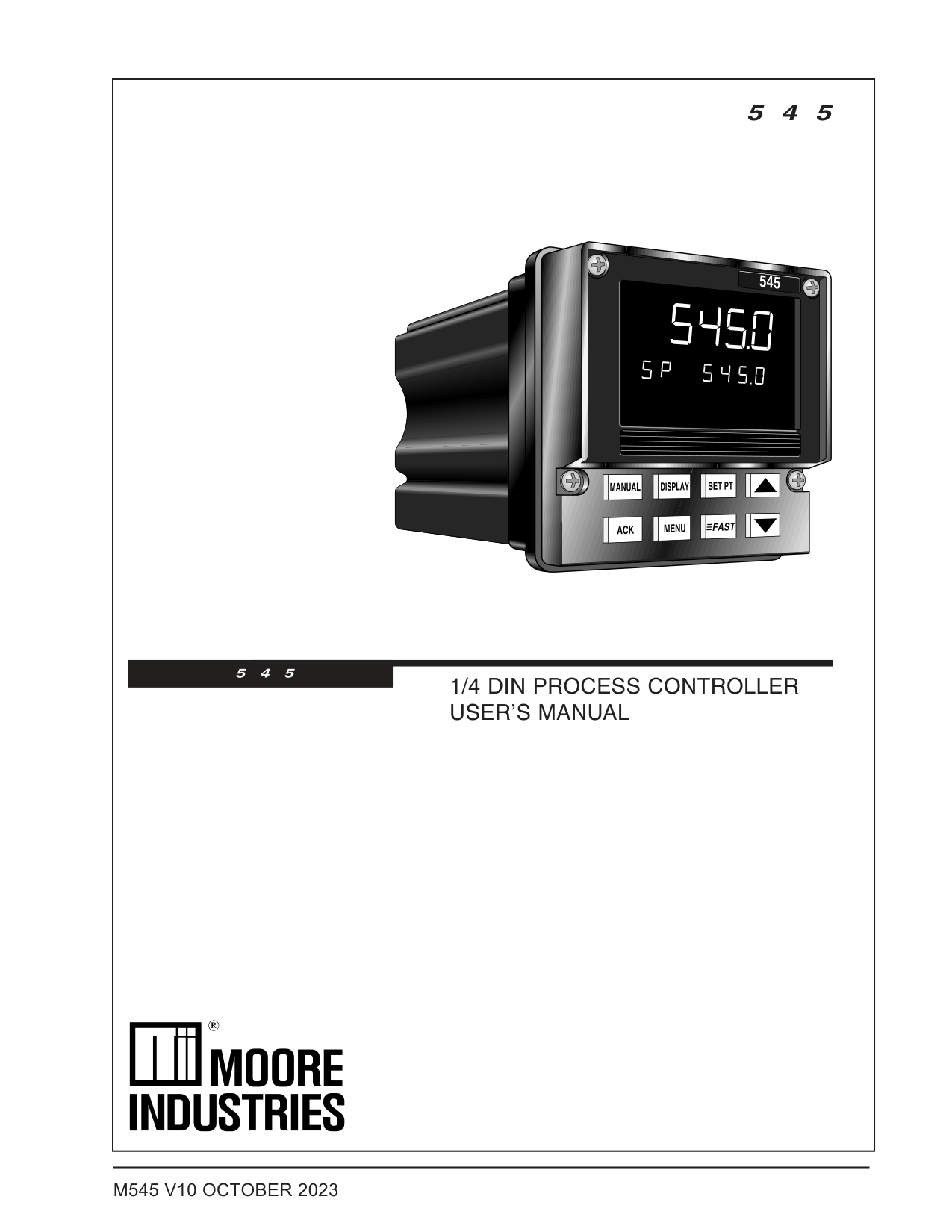
|5 4 5
1/4 DIN PROCESS CONTROLLER USER’S MANUAL
5 4 5
| |---|
################## M545 V10 OCTOBER 2023
###### Table of Contents
############################################################ PAGE
AC Power Input ....................................................................... 12 Process Variable Input ............................................................. 13 Digital Input(s) ......................................................................... 16 Remote Setpoint Option ........................................................... 16 Output Modules ....................................................................... 17 Serial Communications ............................................................ 19
CONFIG.................................................................................. 30 PV INPUT ............................................................................... 35 CUST. LINR. ........................................................................... 37 CONTROL .............................................................................. 38 ALARMS ................................................................................. 41 REM. SETPT........................................................................... 45 RETRANS............................................................................... 46 SELF TUNE ............................................................................ 48 SPECIAL ................................................................................ 49
About This Manual: Throughout this User’s Manual information appears along the margins, in the form of NOTEs, CAUTIONs and WARNINGs, usually in boldface. Please heed these safety and good practice notices for the protection of you and your equipment.
545 User's Manual Table of Contents i
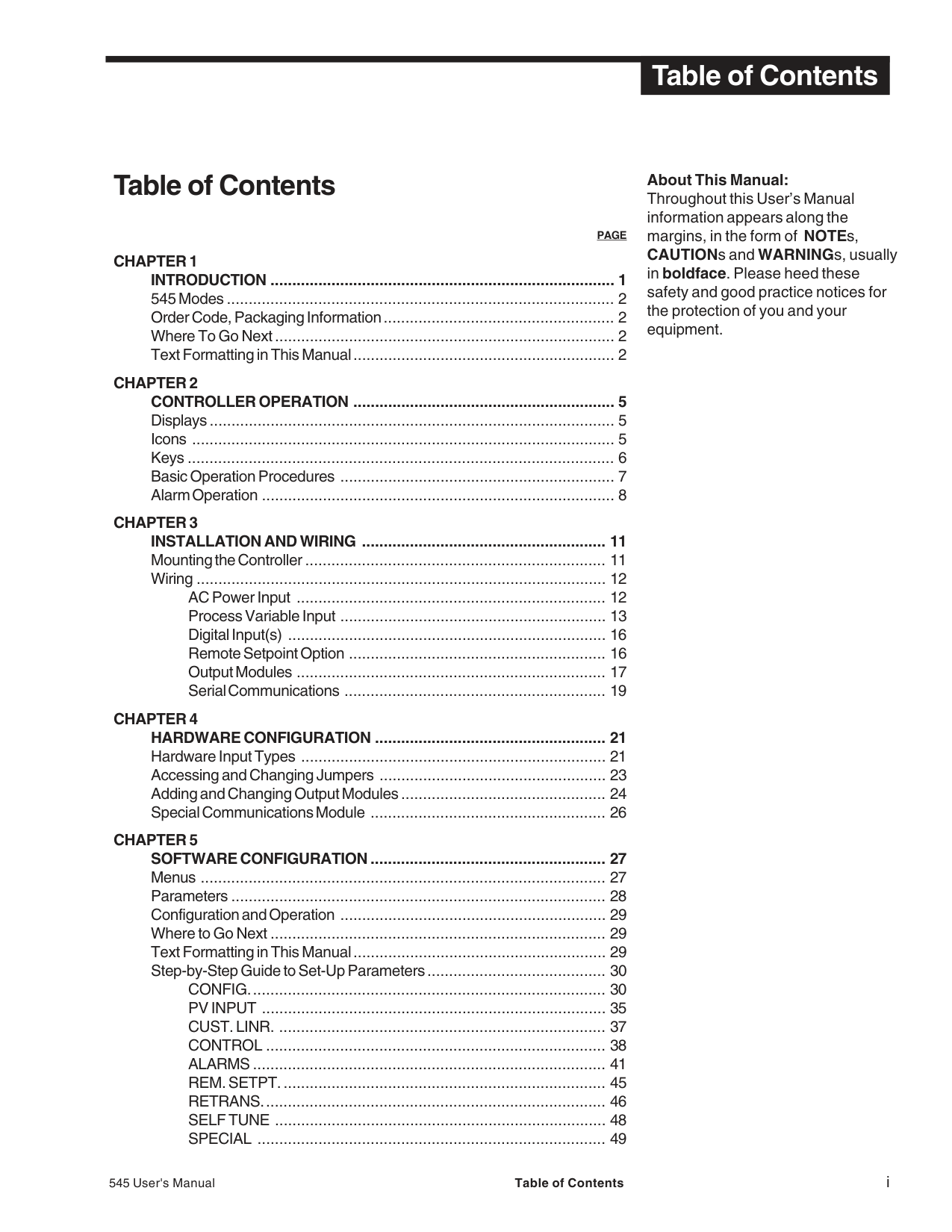
PAGE Step-by-Step Guide to Set-Up Parameters (continued)
SECURITY.............................................................................. 51 SER. COMM. .......................................................................... 52
Parameter Value Charts ................................................................... 54
PAGE
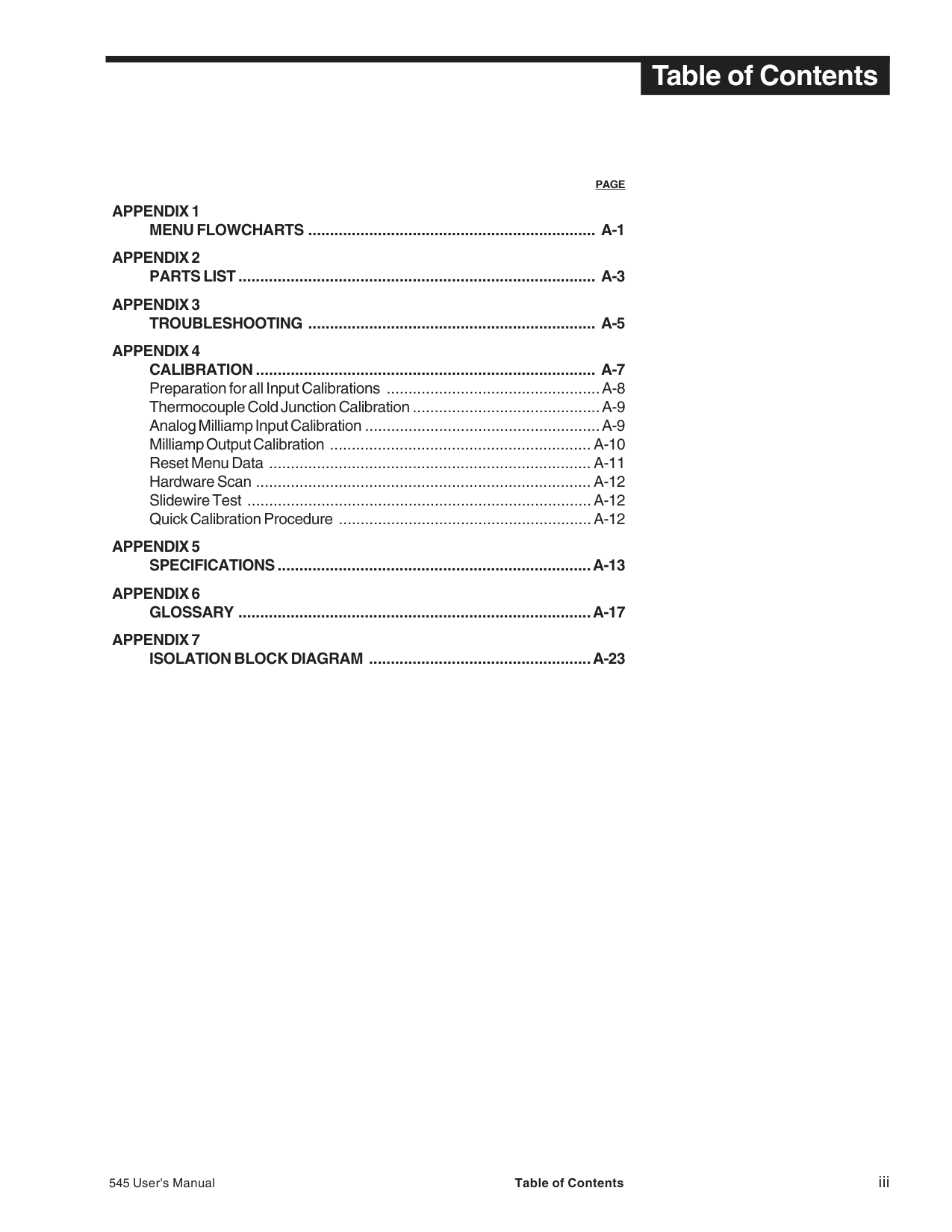
545 User's Manual Table of Contents iii
###### List of Figures
################################## FIGURE DESCRIPTION PAGE
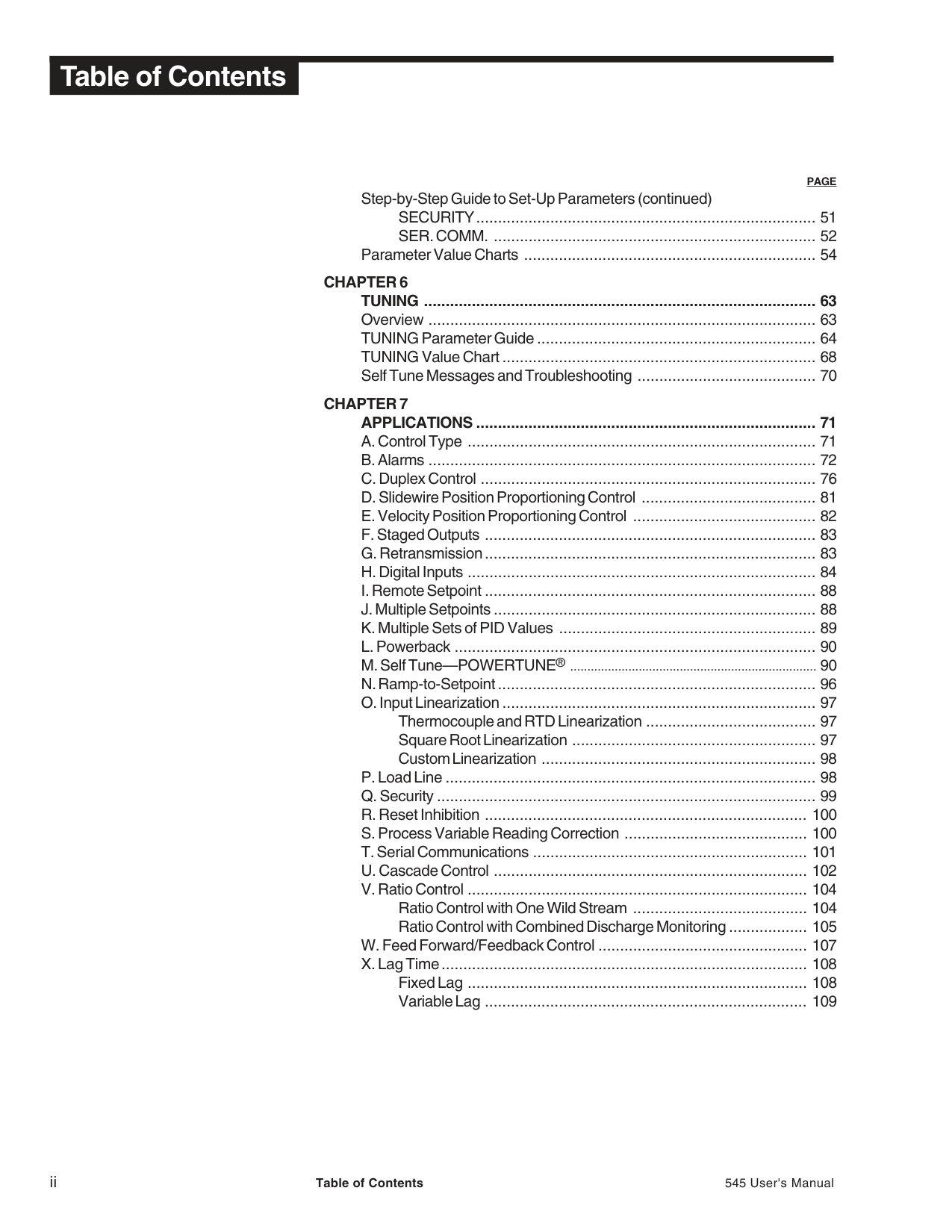
################################## FIGURE DESCRIPTION PAGE
7.21 ...............The Functions of Cascade Control ................................... 103 7.22 ...............Ratio Control in Mixing Application “Wild Stream” -
7.25 ...............Feed Forward Control in Mixing Application -
545 User's Manual Table of Contents v
###### CHAPTER 1INTRODUCTION
From its surge-resistant power supply to its rugged construction, the 545 process controller is designed to ensure the integrity of your process with maximum reliability — hour after hour, day after day. The isolated inputs and outputs guard against the dangers of electrical interference, the front face meets NEMA 4X standards for watertight operation and exposure to corrosive environments, and the solid metal housing and sturdy rubber keys enhance durability and ESD protection. The 545 has been engineered to be the industry’s most user–friendly process controller. With three digital display areas — two offering up to 9 characters of true alphanumerics — the 545 effectively eliminates the cryptic messages that could confuse even the most experienced operator. The bright, crisp display is vacuum fluorescent, and offers much better readability than any other display technology. Additional operator–friendly features include: custom programmable alarm messages, illuminated keys, and an easy to use menu system. The 545 is the most accurate instrument in its class. With a sampling rate of eight times per second, it is ideal for demanding pressure and flow applications. The 545 also offers two universal process inputs and modular, field interchangeable outputs that allow more flexibility than ever before. With two independent full feature control loops, the 545 can take the place of two PID controllers; additionally, preprogrammed functions can be called for cascade, ratio and feed forward applications.
The 545 uses foreground and background loops that facilitate straight forward operator interface in any of the dual loop modes. It also offers sophisticated control algorithms, including heuristic adaptive tuning, split range and duplex outputs (control), and open or closed loop electric actuator control (velocity control).
Thank you for selecting the dual loop Process Controller. The 545 is user-configurable for any of the following functions:
Specifications and information subject to change without notice.
########### 545 MODES
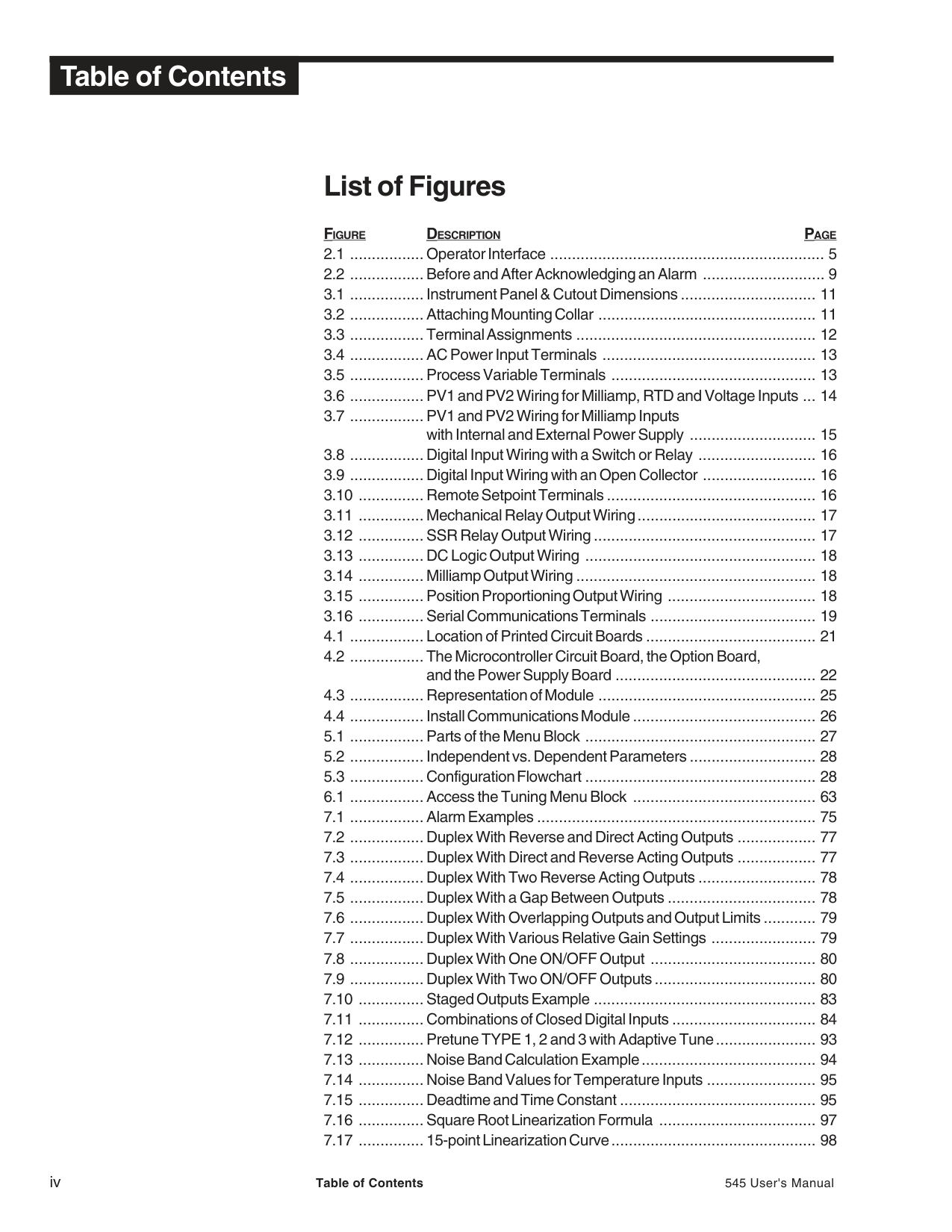
There are three operating modes for the 545 controller: OPERATION, the default mode of the controller. When the 545 is operating, you can change setpoints, select manual control and change output level, acknowledge alarms and monitor conditions.
SET UP, also referred to as configuration. Here you set up the basic functions of the instrument such as input and output assignments, alarm types and special functions
TUNING, where you configure function parameters for Proportional, Integral and Derivation (PID) control. Use this mode periodically to optimize the control performance of the instrument.
########### ORDER CODE, PACKAGING INFORMATION
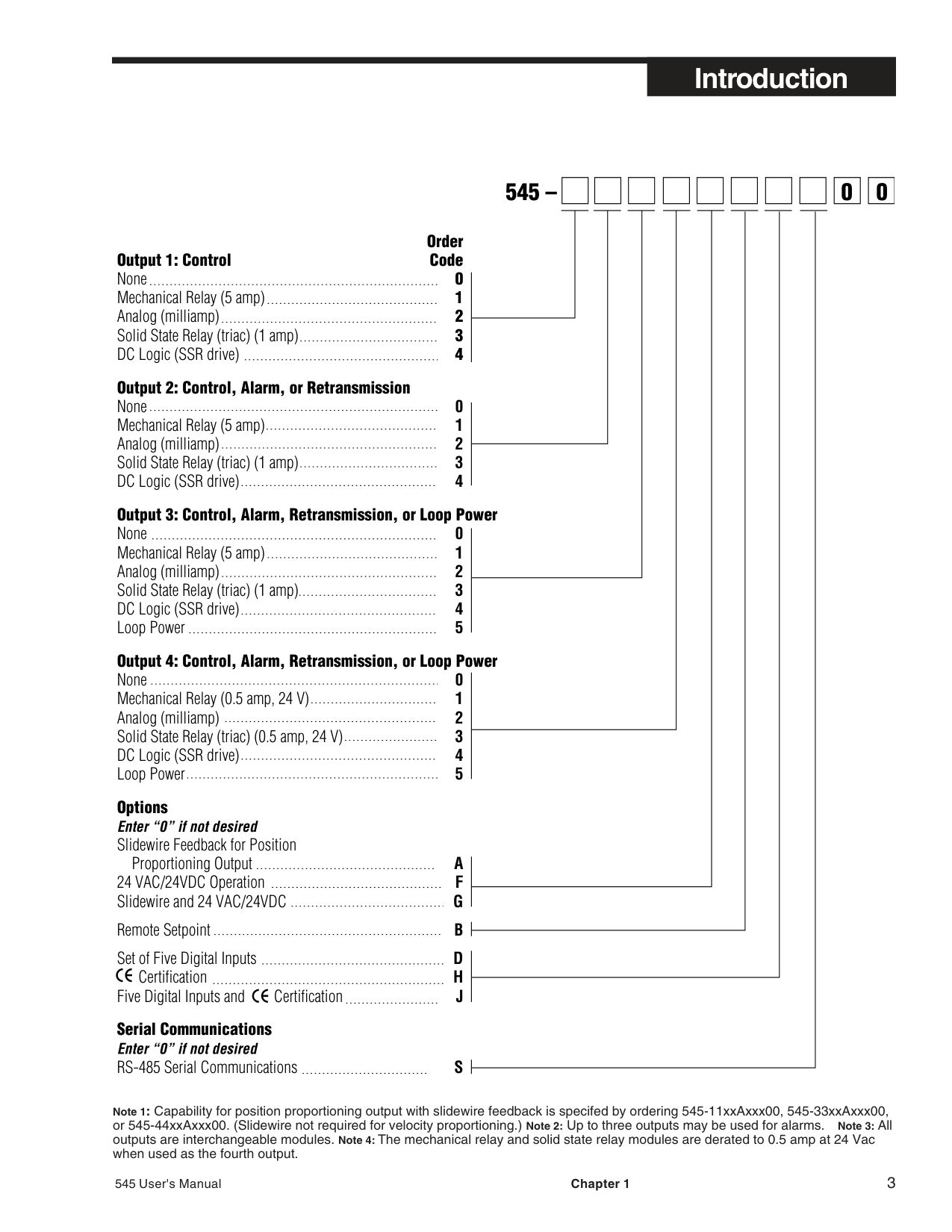
Comparing the product number to the ordering code on page 3 to determine the outputs and options installed on the 545. The product number is printed on the label on the top of the controller case. Included with the 545 are:
WHERE TO GO NEXT
########### TEXT FORMATTING IN THIS MANUAL
Feature Format KEYS SET PT DISPLAY
or
SET PT DISPLAY
ICONS OUT, ALM MENUS CONFIG., TUNING, PARAMETERS CYCLE TM:1, MIN.OUT2 PARAMETER VALUES OFF, SETPOINT, LAST OUT. DISPLAY MESSAGES TOO HOT, OUT%
######## 545 –
| | | |---|---| | | |
############################ Order
Options Enter “0” if not desired Slidewire Feedback for Position
Proportioning Output A 24 VAC/24VDC Operation F Slidewire and 24 VAC/24VDC G
Remote Setpoint B Set of Five Digital Inputs D
Certification H Five Digital Inputs and Certification J Serial Communications Enter “0” if not desired RS-485 Serial Communications S
|0| |---|
|0| |---|
Note 1: Capability for position proportioning output with slidewire feedback is specifed by ordering 545-11xxAxxx00, 545-33xxAxxx00, or 545-44xxAxxx00. (Slidewire not required for velocity proportioning.) Note 2: Up to three outputs may be used for alarms. Note 3: All outputs are interchangeable modules. Note 4: The mechanical relay and solid state relay modules are derated to 0.5 amp at 24 Vac when used as the fourth output.
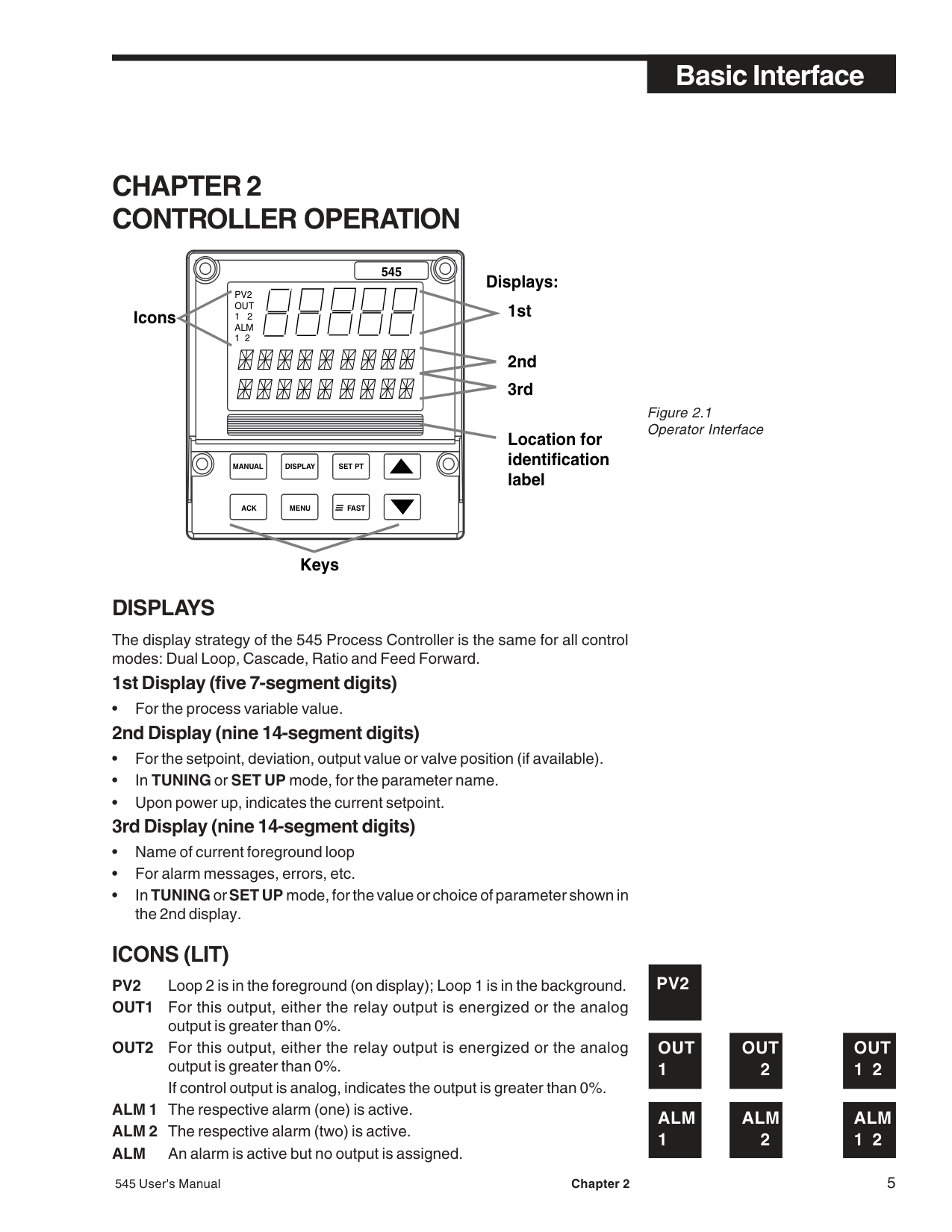
###### CHAPTER 2CONTROLLER OPERATION
545
Displays:
PV2 OUT 1 2 ALM 1 2
Icons 1st
2nd 3rd
Location for identification label
MANUAL DISPLAY SET PT
ACK MENU FAST
Keys
Figure 2.1 Operator Interface
DISPLAYS
The display strategy of the 545 Process Controller is the same for all control modes: Dual Loop, Cascade, Ratio and Feed Forward.
1st Display (five 7-segment digits)

############### 3rd Display (nine 14-segment digits)
########### ICONS (LIT)
PV2 Loop 2 is in the foreground (on display); Loop 1 is in the background.
PV2
OUT OUT OUT 1212
ALM ALM ALM 1212
FAST
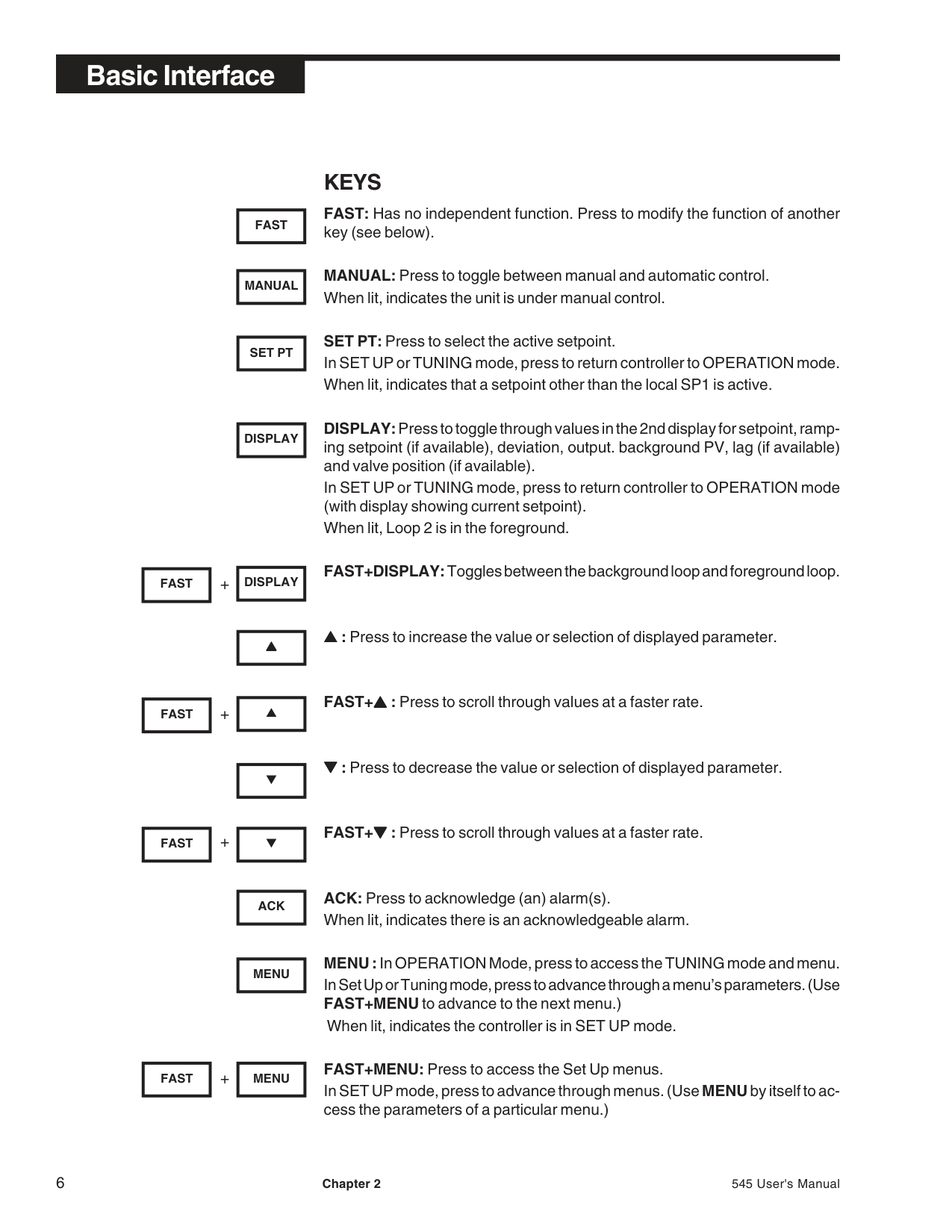
########### KEYS
FAST: Has no independent function. Press to modify the function of another key (see below).
MANUAL
MANUAL: Press to toggle between manual and automatic control. When lit, indicates the unit is under manual control.
SET PT
SET PT: Press to select the active setpoint. In SET UP or TUNING mode, press to return controller to OPERATION mode. When lit, indicates that a setpoint other than the local SP1 is active.
DISPLAY
DISPLAY:Press to toggle through values in the 2nd display for setpoint, ramping setpoint (if available), deviation, output. background PV, lag (if available) and valve position (if available).
In SET UP or TUNING mode, press to return controller to OPERATION mode (with display showing current setpoint). When lit, Loop 2 is in the foreground.
################################## DISPLAYFAST+
FAST+DISPLAY:Toggles between the background loop and foreground loop.
▲▲▲
▲▲▲ : Press to increase the value or selection of displayed parameter.
FAST
+
▲
FAST+▲▲▲ : Press to scroll through values at a faster rate.
▼
▼▼▼ : Press to decrease the value or selection of displayed parameter.
FAST
+
▼
FAST+▼▼▼ : Press to scroll through values at a faster rate.
ACK
ACK: Press to acknowledge (an) alarm(s). When lit, indicates there is an acknowledgeable alarm.
MENU
MENU :In OPERATION Mode, press to access the TUNING mode and menu. In Set Up or Tuning mode, press to advance through a menu’s parameters. (Use FAST+MENU to advance to the next menu.)
When lit, indicates the controller is in SET UP mode.
+
MENUFAST
FAST+MENU: Press to access the Set Up menus. In SET UP mode, press to advance through menus. (UseMENUby itself to access the parameters of a particular menu.)
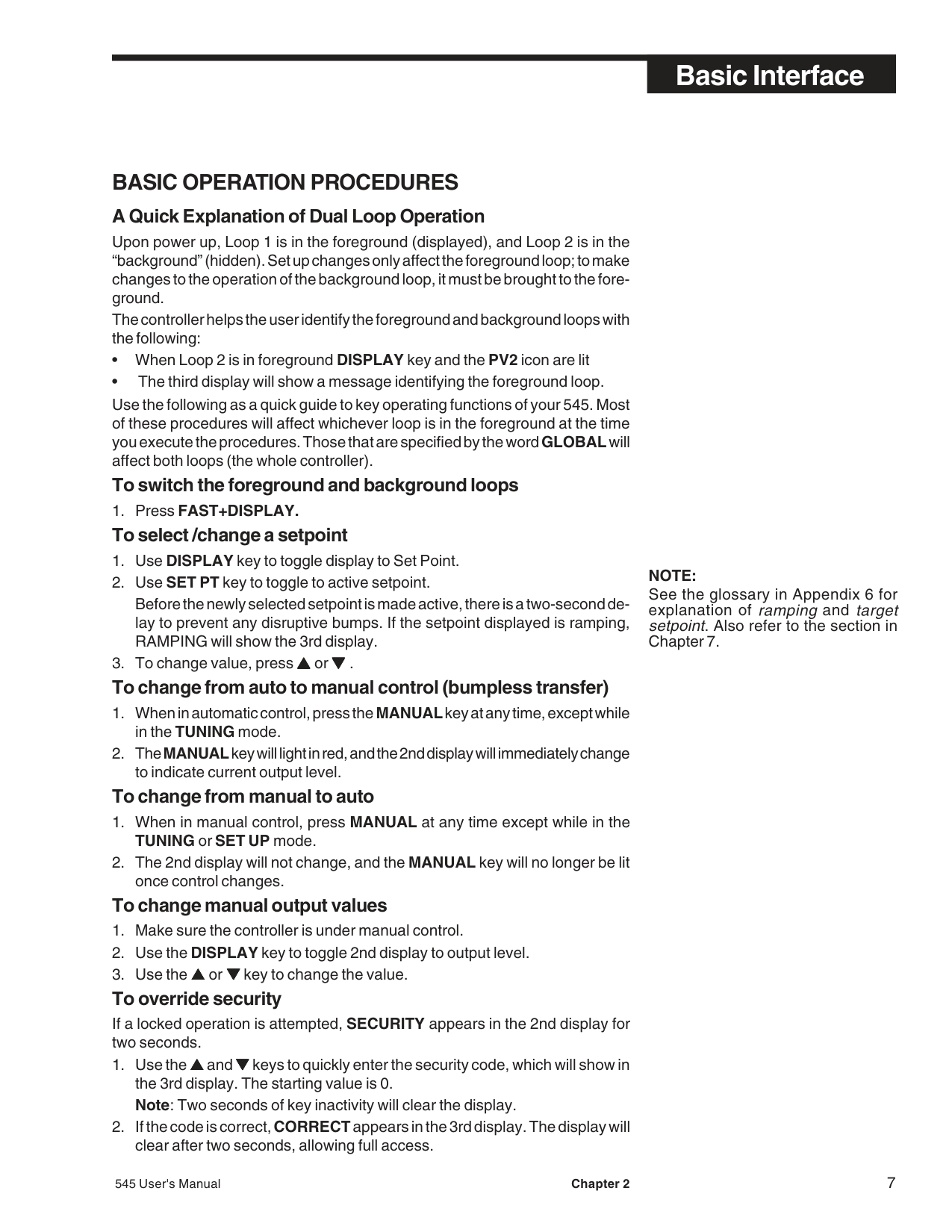
########### BASIC OPERATION PROCEDURES A Quick Explanation of Dual Loop Operation
Upon power up, Loop 1 is in the foreground (displayed), and Loop 2 is in the “background” (hidden). Set up changes only affect the foreground loop; to make changes to the operation of the background loop, it must be brought to the foreground.
The controller helps the user identify the foreground and background loops with the following:
Use the following as a quick guide to key operating functions of your 545. Most of these procedures will affect whichever loop is in the foreground at the time you execute the procedures. Those that are specified by the wordGLOBALwill affect both loops (the whole controller).
############### To switch the foreground and background loops
############### 1. Press FAST+DISPLAY. To select /change a setpoint
Before the newly selected setpoint is made active, there is a two-second delay to prevent any disruptive bumps. If the setpoint displayed is ramping, RAMPING will show the 3rd display.
############### To change from manual to auto
############### To change manual output values
If a locked operation is attempted, SECURITY appears in the 2nd display for two seconds.
################################## NOTE:
See the glossary in Appendix 6 for explanation of rampingand target setpoint. Also refer to the section in
Chapter 7.
################################## NOTE:
All alarms are software alarms unless tied to an output relay in the SET UP mode. See Chapter 5 and Chapter 7 for more details on alarms.
############### To display control output value
############### To display the active PID set
########### ALARM OPERATION
Alarms may be used in systems to provide warnings of unsafe conditions. All 545 operators must know how the alarms are configured, the consequences of acknowledging an alarm, and how to react to alarm conditions.
############### Alarm Indication
Depending on how the system is configured, the 545 indicates an alarm condition(s) for the foreground loop by:
To acknowledge an alarm(s): An acknowledgeable alarm has both a lit icon and a lit ACK key. A non-acknowledgeable alarm has only a lit icon. Figure 2.2 demonstrates acknowledging an alarm.

######################### BEFORE AFTER
545
############################################################## 545
OUT 1 ALM 1
OUT 1
MANUAL DISPLAY SET PT
MANUAL DISPLAY SET PT
ACK MENU FAST
ACK MENU FAST
Latching Alarms If an alarm is set up to be latching (for details, see Chapter 5) then, in general, it must be acknowledged in order to clear the alarm and release the relay (if applicable). A non-latching alarm will clear itself as soon as the process leaves the alarm condition. Limit Sequence
An alarm can be configured to be both latching and non-acknowledgeable. In this case, the alarm is acknowledgeable only after the process has left the alarm condition. This is similar to the function of a limit controller.
More on Alarms For more details on how to set up alarms and for examples of various ways alarms can be set up, refer to the section on Alarms in Chapter 7.
############################################## NOTE:
Powering down the 545 acknowledges/ clears all latched alarms. When powering up, all alarms will be reinitialized.
Figure 2.2 Before and After Acknowledging an Alarm
###### CHAPTER 3 INSTALLATION AND WIRING
########### MOUNTING THE CONTROLLER
The 545 front face is NEMA 4X rated (waterproof). To obtain a waterproof seal between the controller and the panel, follow these directions:
Figure 3.1 Instrument Panel & Cutout Dimensions
3.770 (95.76)
7.180 (182.37) OVERALL LENGTH
PANEL
3.622 (92.00) MIN. 3.653 (92.80) MAX.
1.180 (29.97)
545
PV2 OUT 1 2 ALM 1 2
3.585 (91.06)
MANUAL DISPLAY SET PT
ACK MENU FAST
6.000 (152.40)
BEZEL GASKET
CUTOUTFRONT
SIDE
3.622 (92.00) MIN. 3.653 (92.80) MAX.
Mounting Clip
Front Panel
Collar Screws (1 of 4)Mounting Collar
############################## Figure 3.2 Attaching Mounting Collar
CAUTION ! The enclosure into which the 545 Controller is mounted must be grounded.
WARNING! Avoid electrical shock. Do not connect AC power wiring at the source distribution panel until all wiring connections are complete.
########### WIRING
Our 545 controllers are thoroughly tested, calibrated and “burned in” at the factory, so the controller is ready to install. Before beginning, read this chapter thoroughly and take great care in planning a system. A properly designed system can help prevent problems such as electrical noise disturbances and dangerous extreme conditions.
Diagrams on the next three pages serve as guides for wiring different types of process inputs. The shaded areas on the diagrams show which rear terminals are used for that type of wiring.
AC Power Input
Figure 3.3 Terminal Assignments Actual 545 device only has top and bottom numbers of each column of terminals marked.
################################## WARNING!
Electric Shock Hazard! Terminals 1 and 2 carry live power. DO NOT touch these terminals when power is on.
################################## WARNING!
Terminal 9 must be grounded to avoid potential shock hazard, and reduced noise immunity to your system.
###################################### TOP (as viewed from back of controller)
|1
2
3
4
5
6
7 816
15
14
13
12
11
10
91
| | | |---|---| | | | | | | | | | | | | | | | | | | | | |
18
19
20
21
22
23 31
30
29
28
27
26
25EARTHGND
S/W CCW
S/W 2
S/W 3
RSP–
RSP+
OUT 4–
OUT 4+
DIN GND
DIN 1
DIN 2
DIN 3
DIN 4
DIN 5
COLD JUNC–
COLD JUNC+
| |---|
(NOT USED)
LINE
COMM–
NEUTRAL
COMM+
OUT 2–
OUT 3–
PV2–
PV2+
RTD 3RD
PV1–
PV1+
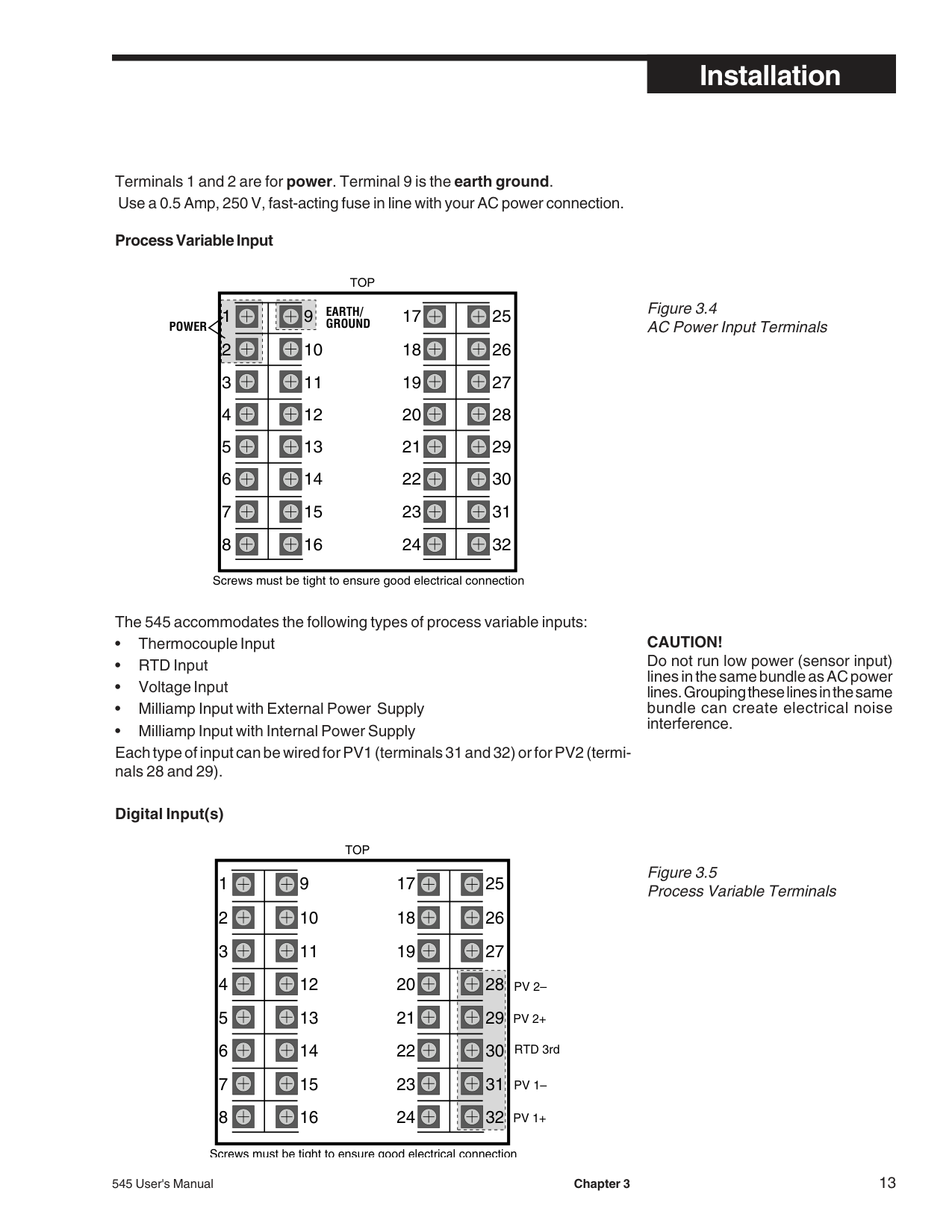
Terminals 1 and 2 are for power. Terminal 9 is the earth ground. Use a 0.5 Amp, 250 V, fast-acting fuse in line with your AC power connection.
################################## Process Variable Input
TOP
|1
2
3
4
5
6
7 816
15
14
13
12
11
10
91
| | | |---|---| | | | | | | | | | | | | | | | | | | | | |
18
19
20
21
22
23 31
30
29
28
27
26
25EARTH/GROUND
| |---|
POWER
Screws must be tight to ensure good electrical connection
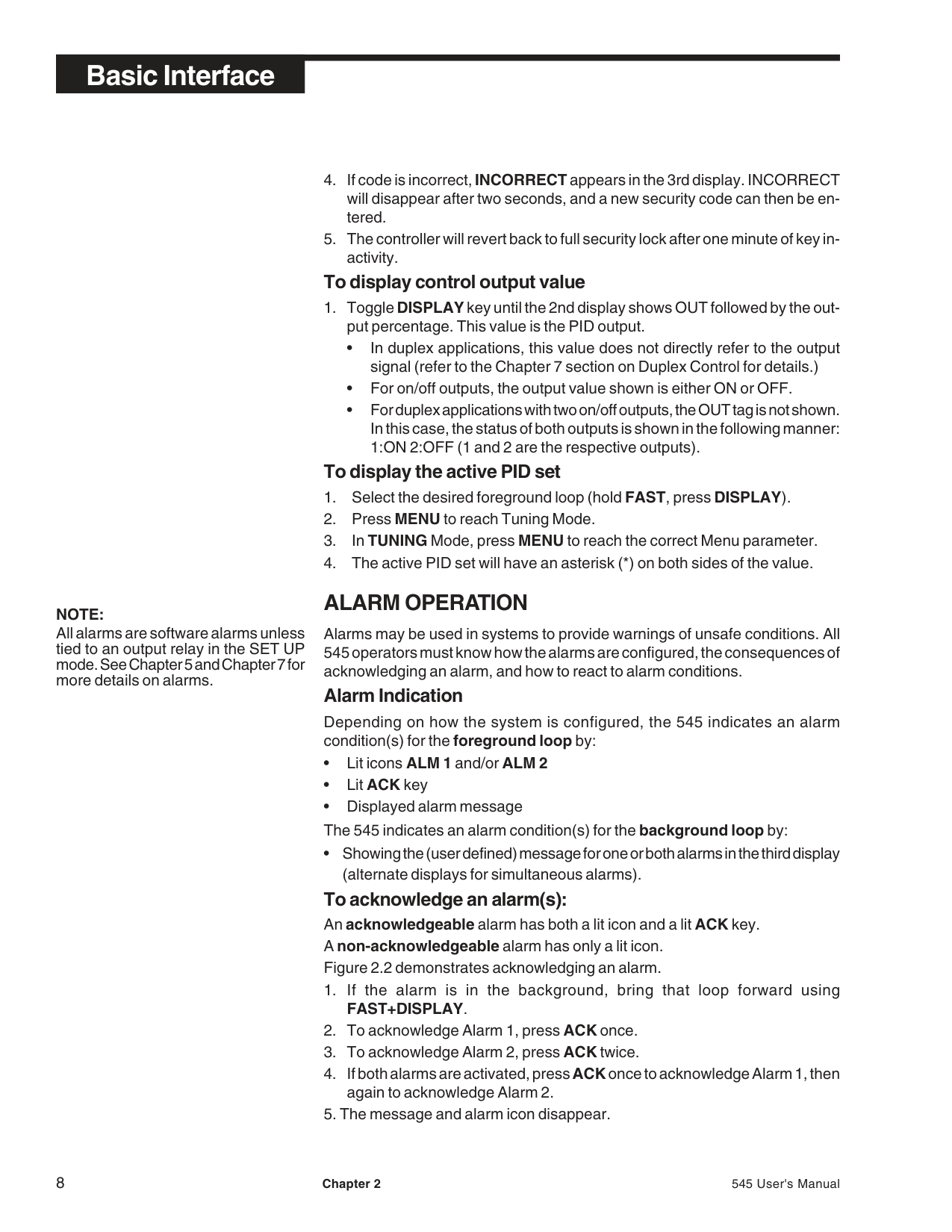
The 545 accommodates the following types of process variable inputs:
Digital Input(s)
TOP
|1
2
3
4
5
6
7 816
15
14
13
12
11
10
91
| | | |---|---| | | | | | | | | | | | | | | | | | | | | |
18
19
20
21
22
23 31
30
29
28
27
26
25
| |---|
PV 2–
Screws must be tight to ensure good electrical connection
CAUTION!
Do not run low power (sensor input) lines in the same bundle as AC power lines. Grouping these lines in the same bundle can create electrical noise interference.
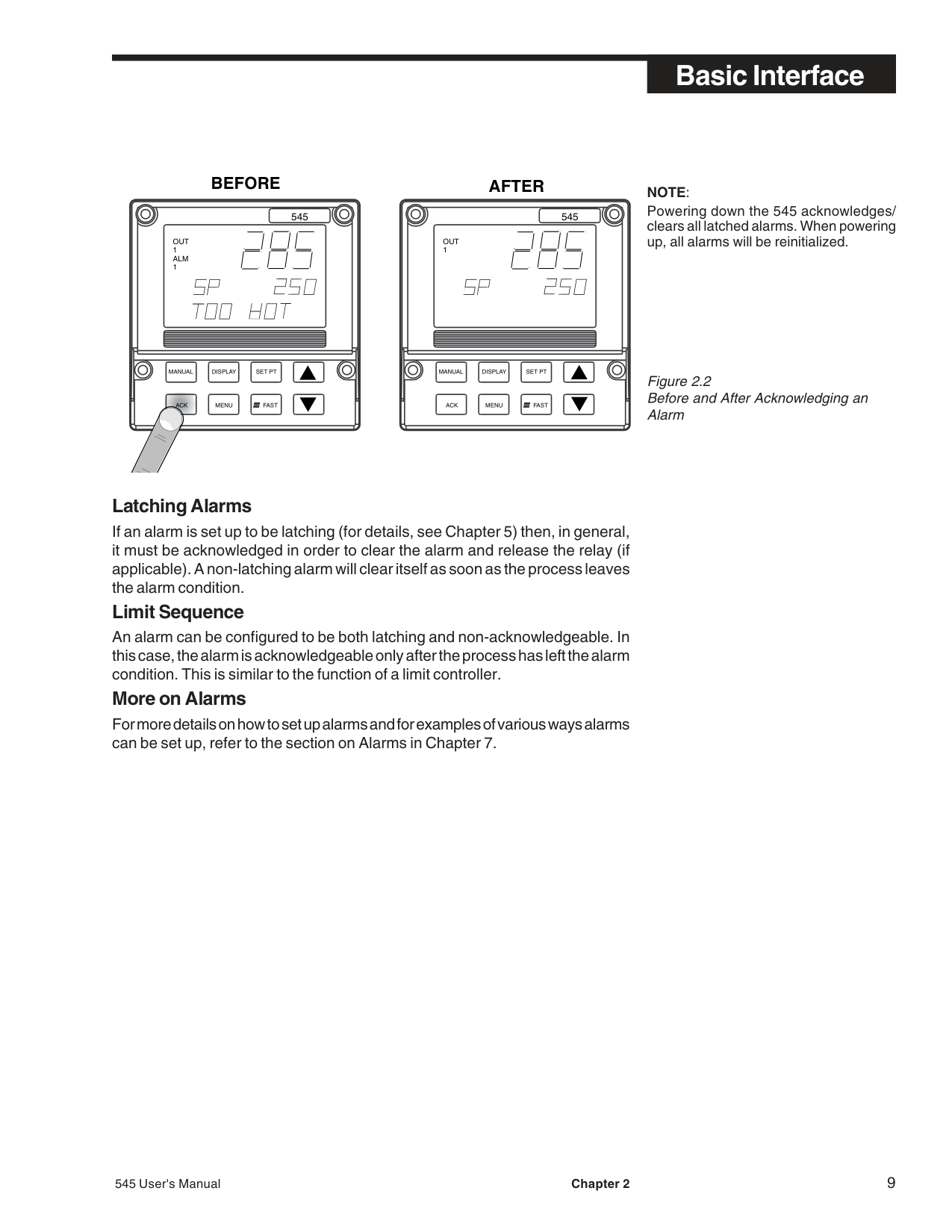
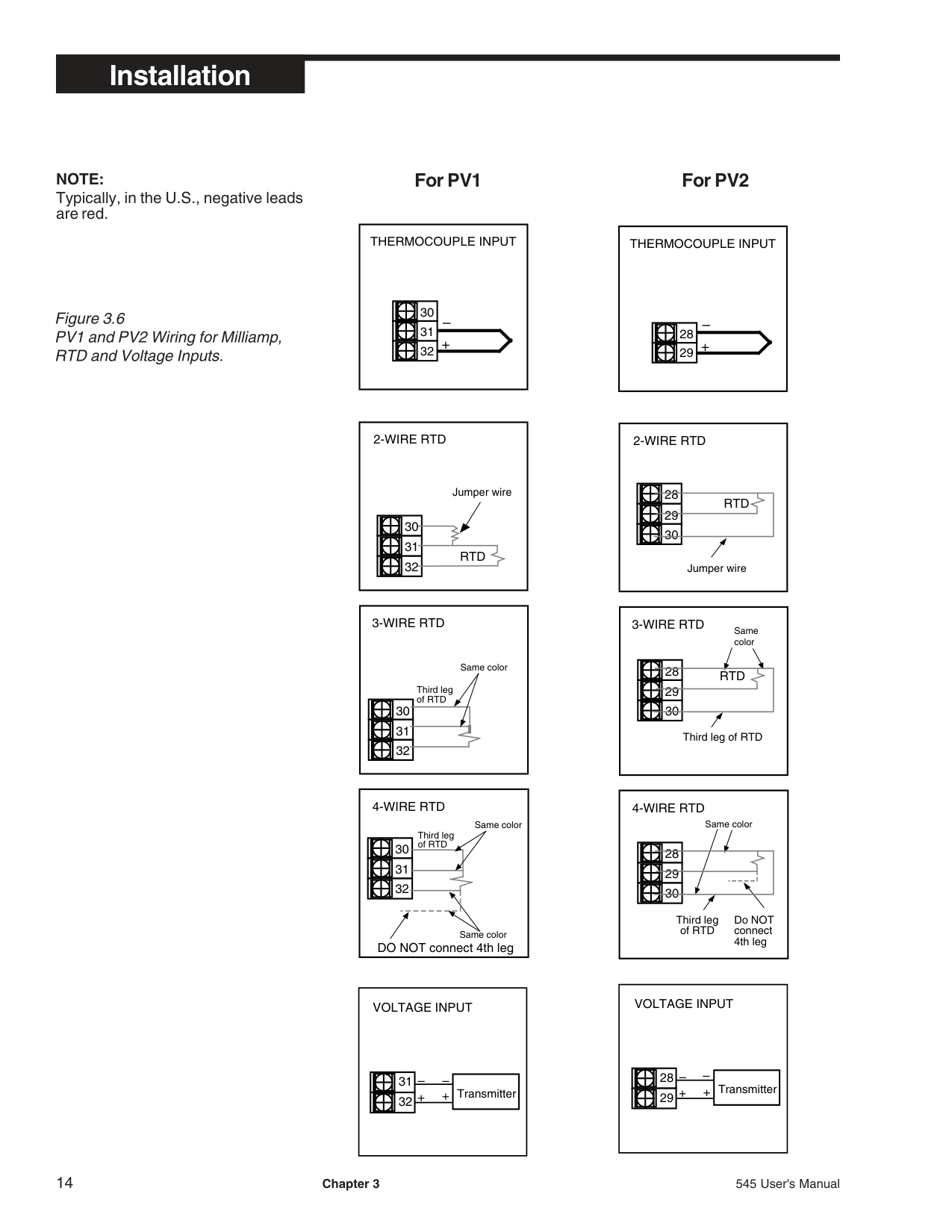
NOTE: Typically, in the U.S., negative leads are red.
############################## Figure 3.6PV1 and PV2 Wiring for Milliamp,RTD and Voltage Inputs.
############### For PV1 For PV2
|– +
THERMOCOUPLE INPUT
30
31
32
| |---|
|2-WIRE RTD
RTD
Jumper wire
30
31
32
| |---|
|30
31
32
3-WIRE RTD
Same color
Third leg of RTD| |---|
|30
31
32
4-WIRE RTD
Same color
DO NOT connect 4th leg
Third leg of RTD
Same color| |---|
|VOLTAGE INPUT
|– –|Transmitter| |---|---| |++|Transmitter| | |Transmitter|
31
32
| |---|
|– +
THERMOCOUPLE INPUT
28
29
| |---|
|2-WIRE RTD
RTD
Jumper wire
28
29
30
| |---|
|Same color
28
29
30
3-WIRE RTD
RTD
Third leg of RTD
| |---|
|4-WIRE RTD
Same color
28
29
30
Third leg of RTD
Do NOT connect 4th leg| |---|
|VOLTAGE INPUT
|– –|Transmitter| |---|---|

|++|Transmitter| | |Transmitter|
28
29
| |---|
############### For PV1 For PV1
|– Transmitter +
– External + Power Supply
MILLIAMP INPUT 2-wire transmitter with separate power supply
28
29
| |---|
|MILLIAMP INPUT
– +
15
16 +
2-wire transmitter
–
31
32
+
–
2-wire transmitter with loop power supply| |---|
|15
16
31
32
MILLIAMP INPUT
+
–
–
+
Input power for transmitter
4-20 mA output from transmitter+
–
–
+
4-wire transmitter with loop power supply| |---|
|Transmitter
External Power Supply
MILLIAMP INPUT 2-wire transmitter with separate power supply
31
32 +
+–
–| |---|
|MILLIAMP INPUT
– +
15
16 +
2-wire transmitter
–
28
29
+
–
2-wire transmitter with loop power supply| |---|
|15
16
28
29
MILLIAMP INPUT
+
–
–
+
Input power for transmitter
4-20 mA output from transmitter+
–
–
+
4-wire transmitter with loop power supply| |---|
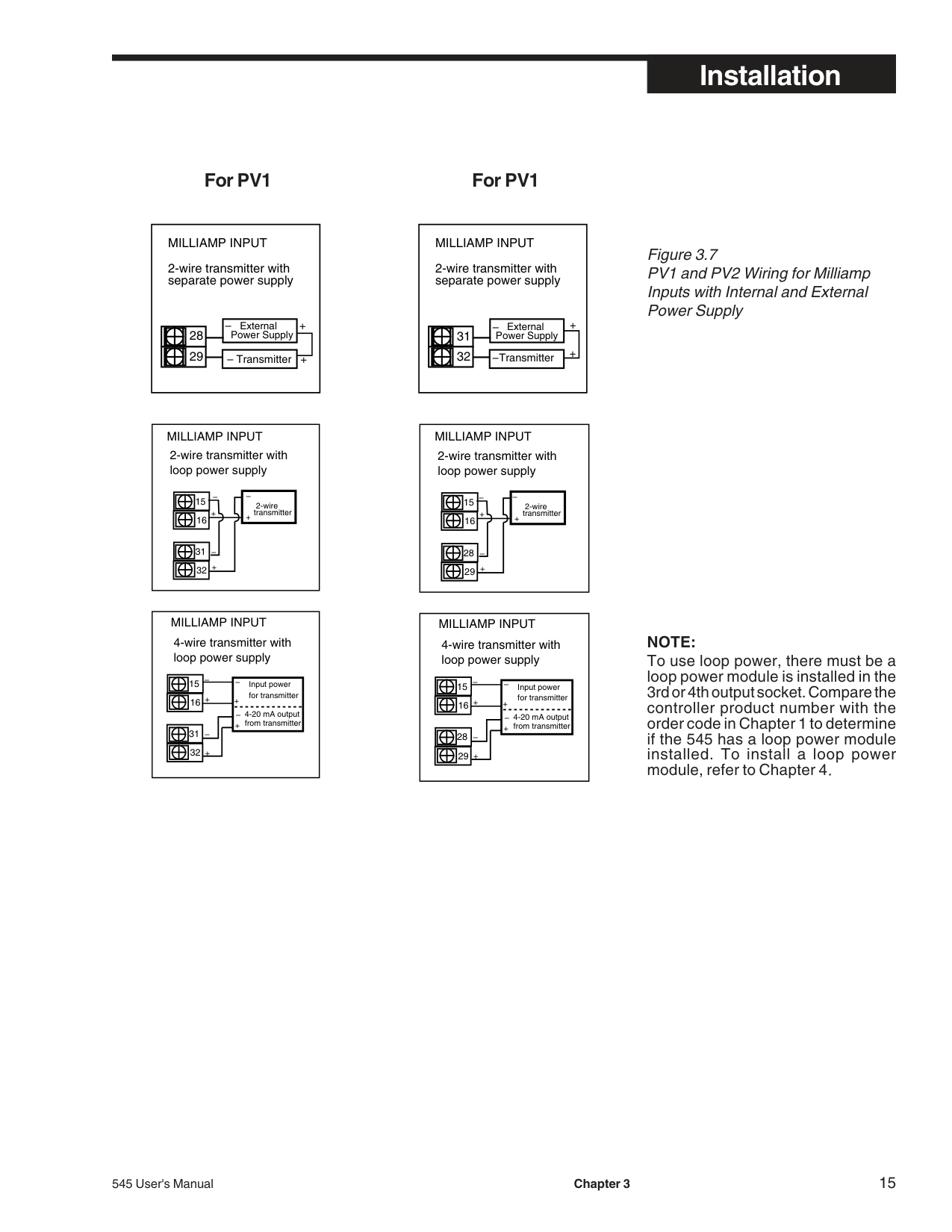
Figure 3.7 PV1 and PV2 Wiring for Milliamp Inputs with Internal and External Power Supply
################################## NOTE:
To use loop power, there must be a loop power module is installed in the 3rd or 4th output socket. Compare the controller product number with the order code in Chapter 1 to determine if the 545 has a loop power module installed. To install a loop power module, refer to Chapter 4.
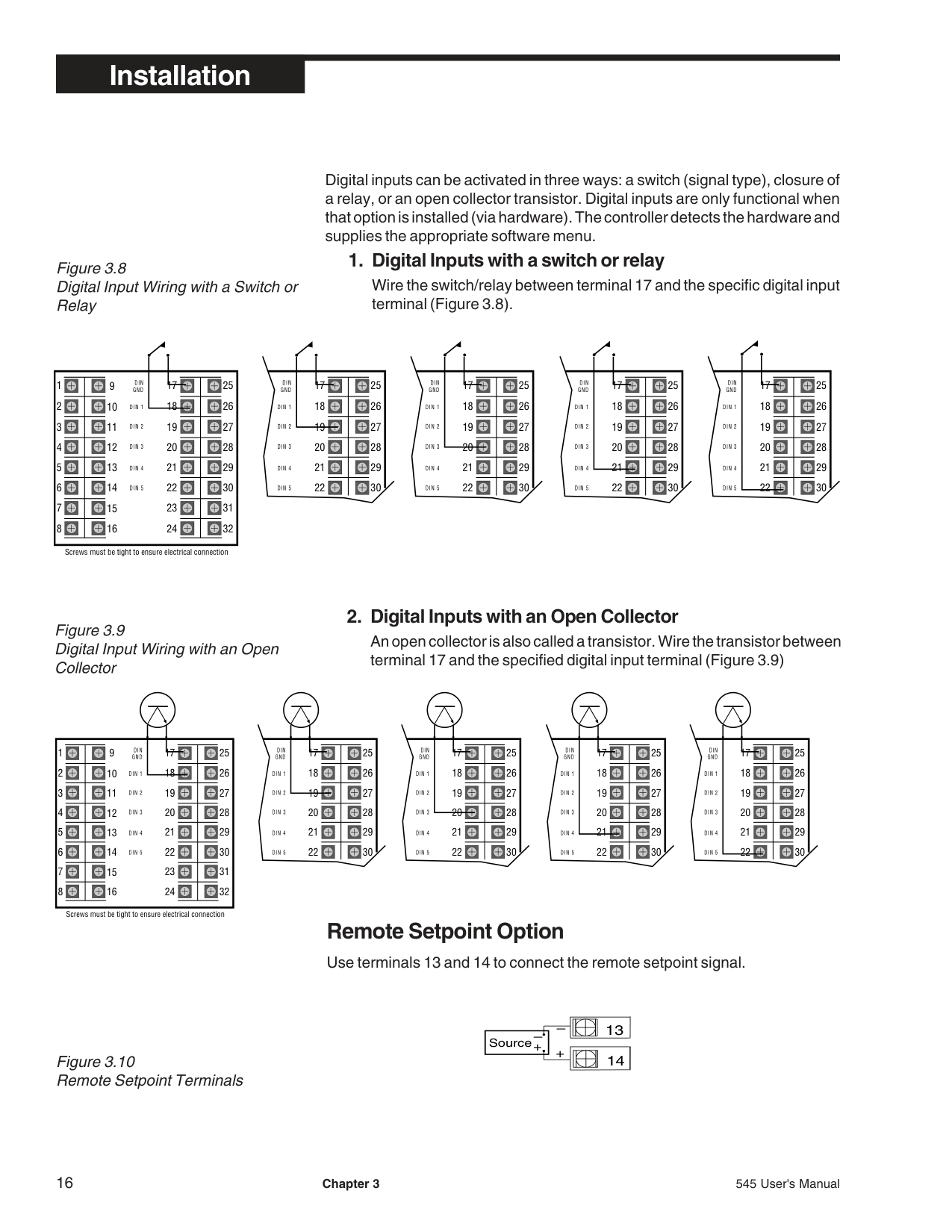
Remote Setpoint Option
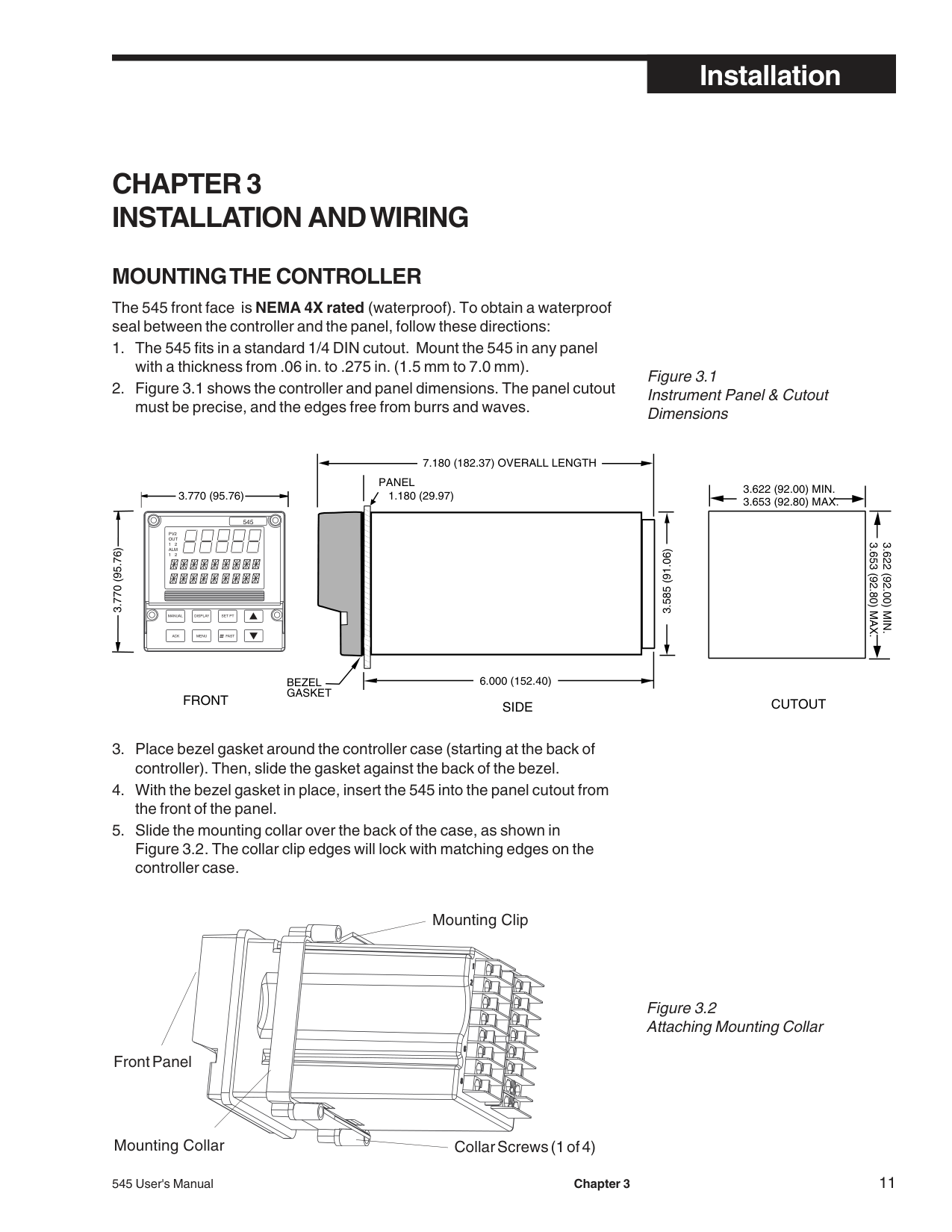
Use terminals 13 and 14 to connect the remote setpoint signal.
15
14
13
12
11
10
9 17
| | | |---|---| | | | | | | | | | | | | | | | | | | | | |
31
30
29
28
27
26
25DINGND
| | | |---|---| | | | | | | | | | | | | | | | | | | | | |
Screws must be tight to ensure electrical connection
| | | |---|---| | | | | | | | | | | | | | | |
29
28
27
26
25DINGND
| | | |---|---| | | | | | | | | | | | | | | |
29
28
27
26
25DINGND
| | | |---|---| | | | | | | | | | | | | | | |
29
28
27
26
25DINGND
| | | |---|---| | | | | | | | | | | | | | | |
29
28
27
26
25DINGND
15
14
13
12
11
10
9 17
| | | |---|---| | | |
| | | | | | | | | | | | | | | | | |
31
30
29
28
27
26
25DINGND
| | | |---|---| | | | | | | | | | | | | | | | | | | | | |
Screws must be tight to ensure electrical connection
| | | |---|---| | | | | | | | | | | | | | | |
29
28
27
26
25DINGND
| | | |---|---| | | | | | | | | | | | | | | |
29
28
27
26
25DINGND
| | | |---|---| | | | | | | | | | | | | | | |
29
28
27
26
25DINGND
| | | |---|---| | | | | | | | | | | | | | | |
29
28
27
26
25DINGND
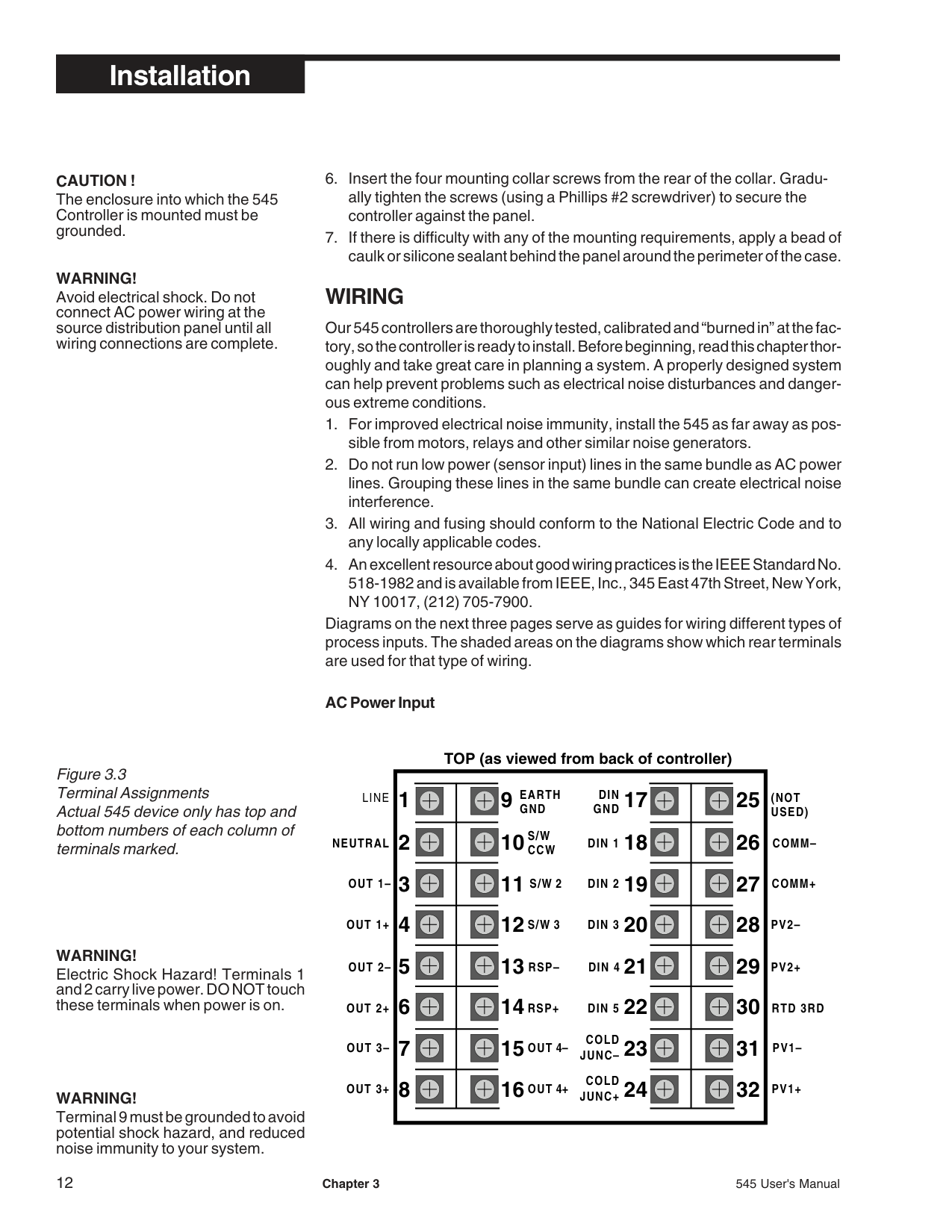
Digital inputs can be activated in three ways: a switch (signal type), closure of a relay, or an open collector transistor. Digital inputs are only functional when that option is installed (via hardware). The controller detects the hardware and supplies the appropriate software menu.
############## 1. Digital Inputs with a switch or relay
Wire the switch/relay between terminal 17 and the specific digital input terminal (Figure 3.8).
############## 2. Digital Inputs with an Open Collector
An open collector is also called a transistor. Wire the transistor between terminal 17 and the specified digital input terminal (Figure 3.9)
–

13
–
+Source
+
14
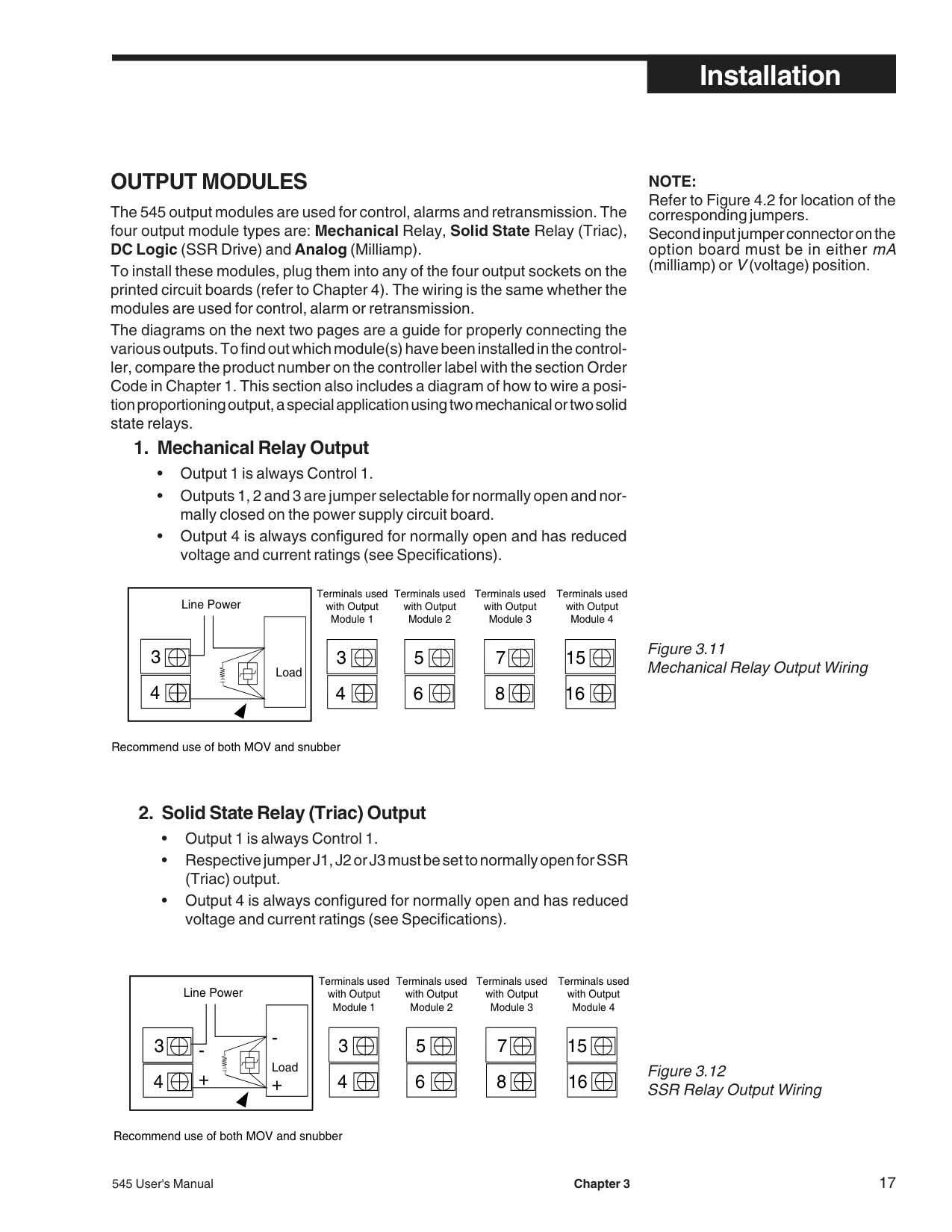
########### OUTPUT MODULES
The 545 output modules are used for control, alarms and retransmission. The four output module types are: Mechanical Relay, Solid State Relay (Triac), DC Logic (SSR Drive) and Analog (Milliamp).
To install these modules, plug them into any of the four output sockets on the printed circuit boards (refer to Chapter 4). The wiring is the same whether the modules are used for control, alarm or retransmission.
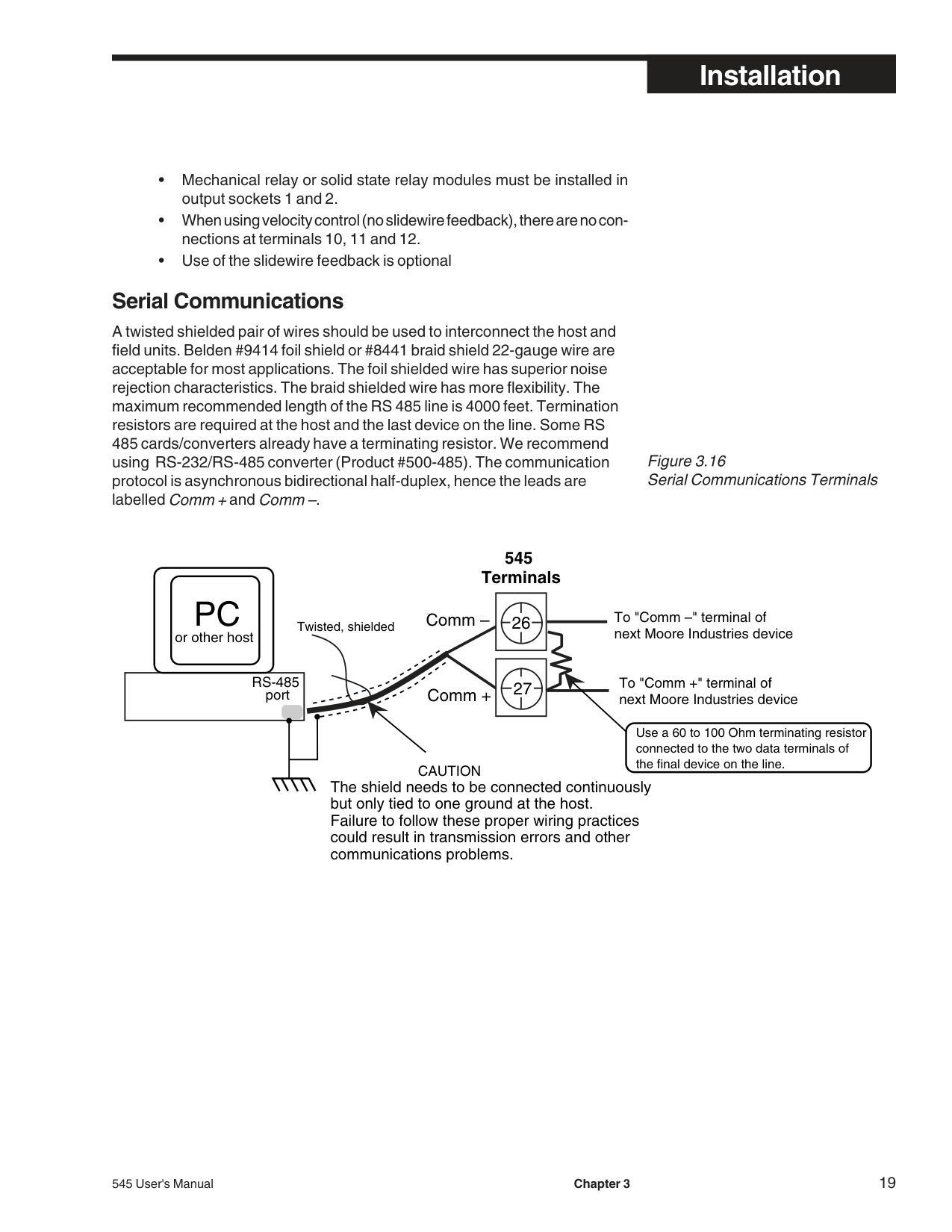
The diagrams on the next two pages are a guide for properly connecting the various outputs. To find out which module(s) have been installed in the controller, compare the product number on the controller label with the section Order Code in Chapter 1. This section also includes a diagram of how to wire a position proportioning output, a special application using two mechanical or two solid state relays.
############### 1. Mechanical Relay Output
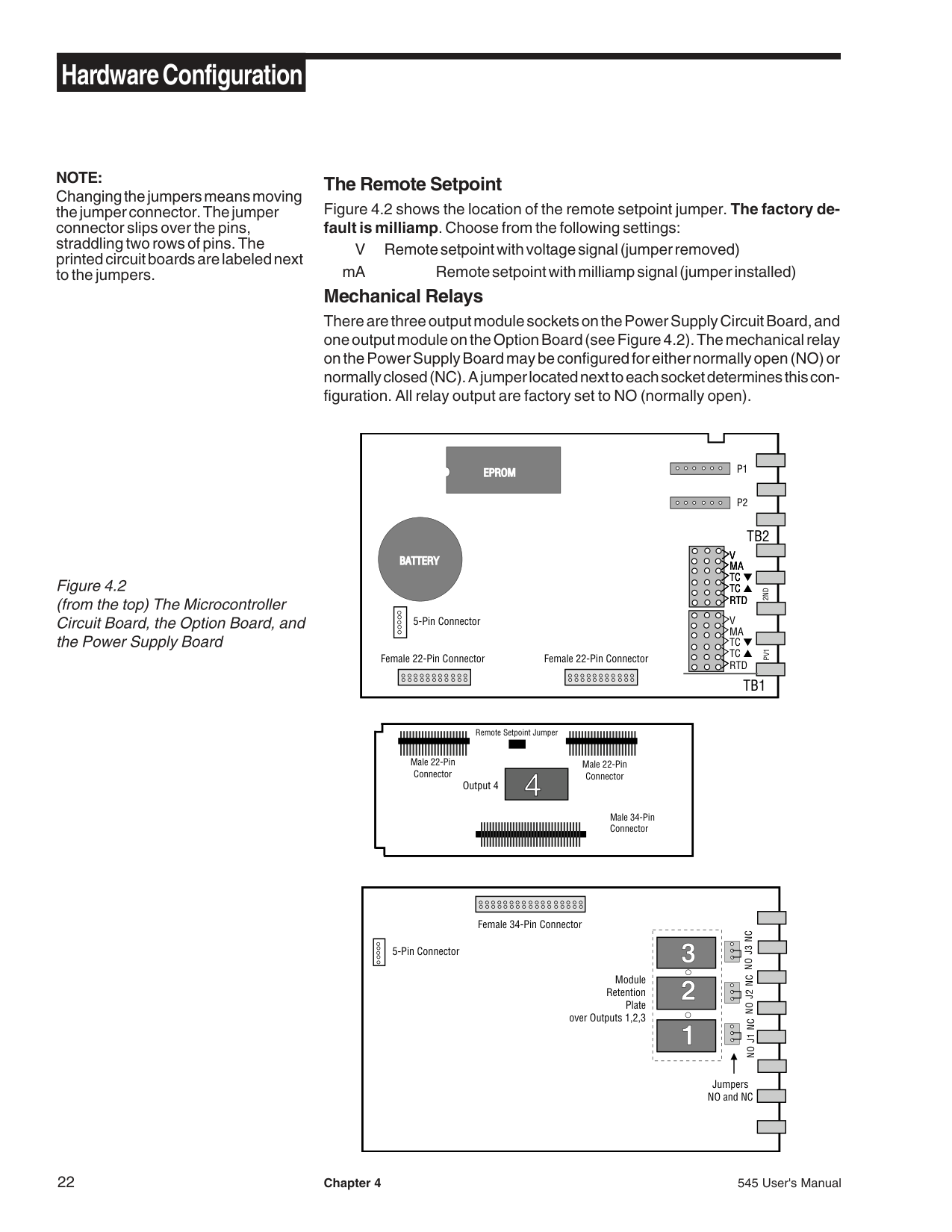
NOTE: Refer to Figure 4.2 for location of the corresponding jumpers. Second input jumper connector on the option board must be in either mA (milliamp) or V(voltage) position.
Terminals used with Output Module 1
Terminals used with Output Module 2
Terminals used with Output Module 3
|3
4
Line Power
Load
| |---|
|3| |---|
|5| |---|
|7| |---|
|4| |---|
|6| |---|
|8| |---|
Recommend use of both MOV and snubber
Terminals used with Output Module 4
|15| |---|
|16| |---|
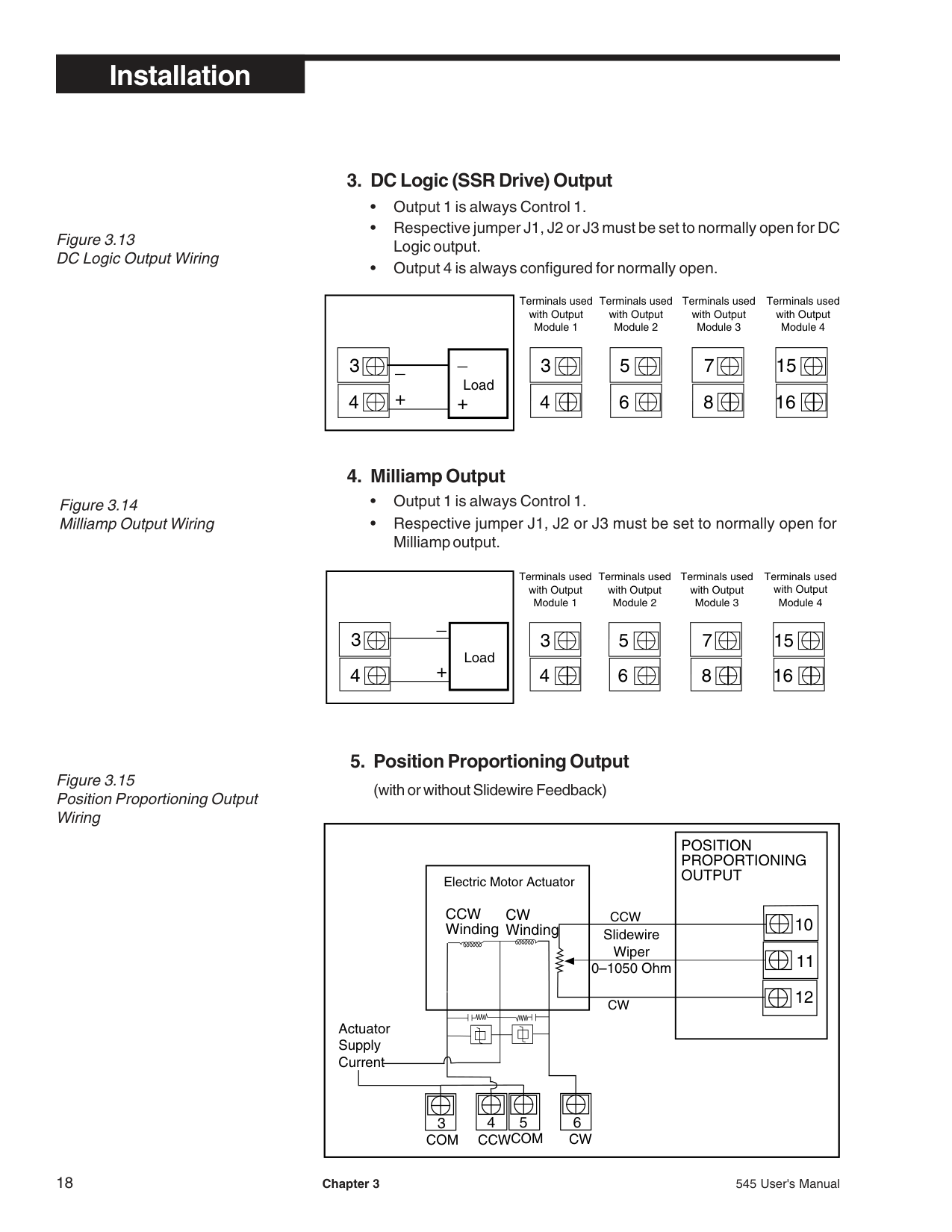
############### 2. Solid State Relay (Triac) Output
Terminals used with Output Module 1
Terminals used with Output Module 2
Terminals used with Output Module 3
|3
4
Line Power
Load
-
+
-
+| |---|
|3| |---|
|5| |---|
|7| |---|
|4| |---|
|6| |---|
|8| |---|
Recommend use of both MOV and snubber
Terminals used with Output Module 4
|15| |---|
|16| |---|
############################## Figure 3.13DC Logic Output Wiring
############################## Figure 3.14Milliamp Output Wiring
############### 3. DC Logic (SSR Drive) Output
Terminals used with Output Module 4
Terminals used with Output Module 3
Terminals used with Output Module 1
Terminals used with Output Module 2
||3|_| |---|---| |3| |
|4|+| |---|---| |4| |
_ +
Load| |---|
|3| |---|
|5| |---|
|7| |---|
|15| |---|
|4| |---|
|6| |---|
|8| |---|
|16| |---|
Terminals used with Output Module 4
Terminals used with Output Module 3
Terminals used with Output Module 1
Terminals used with Output Module 2
||3| | |---|---| |3| |
|4|+| |---|---| |4| |
_
Load| |---|
|3| |---|
|5| |---|
|7| |---|
|15| |---|
|4| |---|
|6| |---|
|8|
|---|
|16| |---|
############################## Figure 3.15Position Proportioning OutputWiring
|POSITION PROPORTIONING OUTPUT
11
12
|3| |---|
10Slidewire
Wiper 0–1050 Ohm
CW
CCW
Electric Motor Actuator
CW Winding
6
|5| |---|
|4| |---|
COM CWCCWCOM
Actuator Supply Current
CCW Winding| |---|
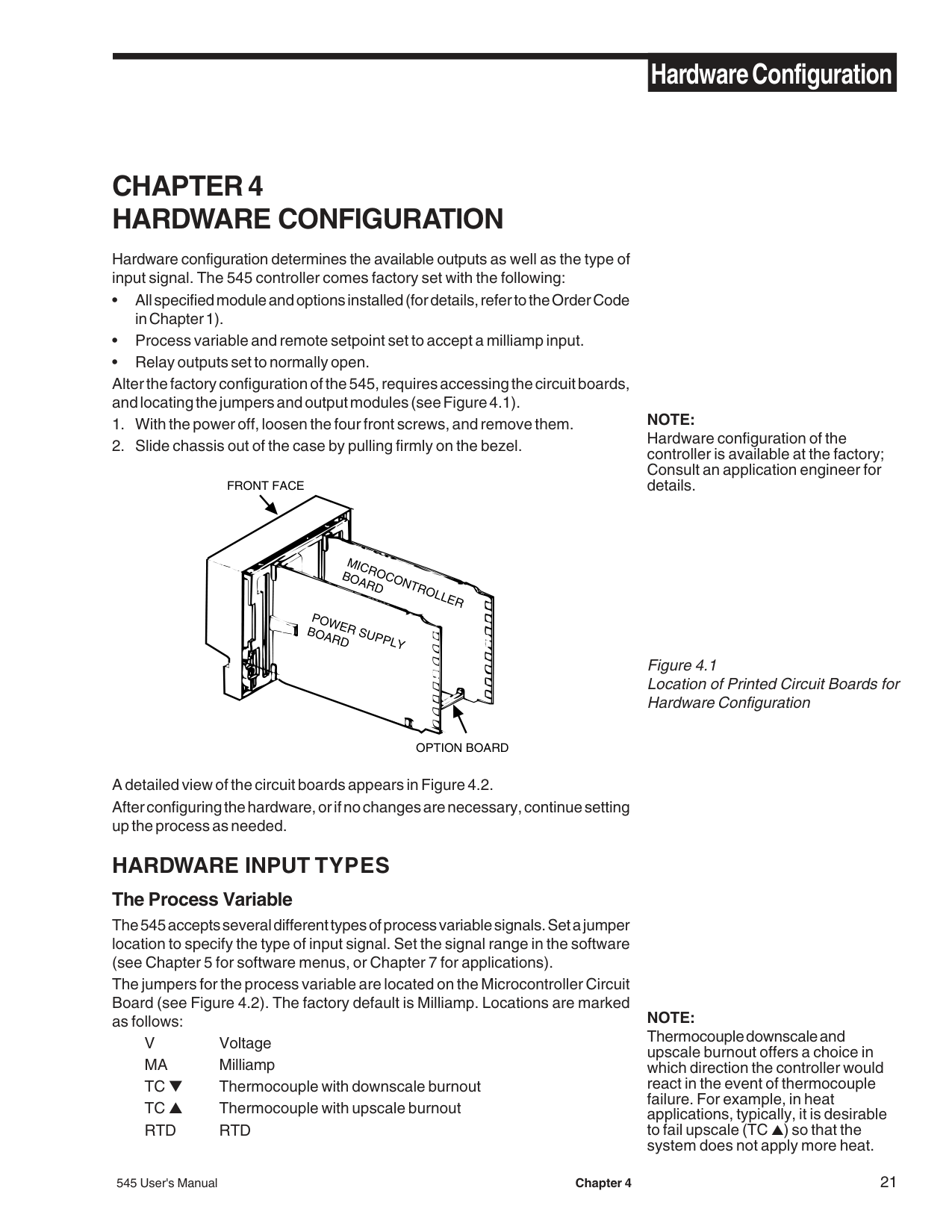
########### Serial Communications
A twisted shielded pair of wires should be used to interconnect the host and field units. Belden #9414 foil shield or #8441 braid shield 22-gauge wire are acceptable for most applications. The foil shielded wire has superior noise rejection characteristics. The braid shielded wire has more flexibility. The maximum recommended length of the RS 485 line is 4000 feet. Termination resistors are required at the host and the last device on the line. Some RS 485 cards/converters already have a terminating resistor. We recommend using RS-232/RS-485 converter (Product #500-485). The communication protocol is asynchronous bidirectional half-duplex, hence the leads are labelledComm +andComm –.
Figure 3.16 Serial Communications Terminals
####################### 545 Terminals
PC
To "Comm –" terminal of next Moore Industries device
######################## Comm –
Twisted, shielded
or other host
RS-485 port
To "Comm +" terminal of
next Moore Industries deviceComm +
Use a 60 to 100 Ohm terminating resistor connected to the two data terminals of the final device on the line.
CAUTION The shield needs to be connected continuously but only tied to one ground at the host. Failure to follow these proper wiring practices could result in transmission errors and other communications problems.
###### CHAPTER 4 HARDWARE CONFIGURATION
Hardware configuration determines the available outputs as well as the type of input signal. The 545 controller comes factory set with the following:
FRONT FACE
MICROCONTROLLERBOARD
POWER SUPPLYBOARD
OPTION BOARD
NOTE: Hardware configuration of the controller is available at the factory; Consult an application engineer for details.
Figure 4.1 Location of Printed Circuit Boards for Hardware Configuration
A detailed view of the circuit boards appears in Figure 4.2. After configuring the hardware, or if no changes are necessary, continue setting up the process as needed.
########### HARDWARE INPUT TYPES The Process Variable
The 545 accepts several different types of process variable signals. Set a jumper location to specify the type of input signal. Set the signal range in the software (see Chapter 5 for software menus, or Chapter 7 for applications).
The jumpers for the process variable are located on the Microcontroller Circuit Board (see Figure 4.2). The factory default is Milliamp. Locations are marked as follows:
V Voltage MA Milliamp TC ▼ Thermocouple with downscale burnout TC ▲ Thermocouple with upscale burnout RTD RTD
NOTE: Thermocouple downscale and upscale burnout offers a choice in which direction the controller would react in the event of thermocouple failure. For example, in heat applications, typically, it is desirable to fail upscale (TC ▲) so that the system does not apply more heat.
NOTE: Changing the jumpers means moving the jumper connector. The jumper connector slips over the pins, straddling two rows of pins. The printed circuit boards are labeled next to the jumpers.
The Remote Setpoint Figure 4.2 shows the location of the remote setpoint jumper. The factory default is milliamp. Choose from the following settings:
V Remote setpoint with voltage signal (jumper removed)
mA Remote setpoint with milliamp signal (jumper installed) Mechanical Relays
There are three output module sockets on the Power Supply Circuit Board, and one output module on the Option Board (see Figure 4.2). The mechanical relay on the Power Supply Board may be configured for either normally open (NO) or normally closed (NC). A jumper located next to each socket determines this configuration. All relay output are factory set to NO (normally open).
############################## Figure 4.2(from the top) The MicrocontrollerCircuit Board, the Option Board, andthe Power Supply Board
EPROMEPROM
PV12ND
V MA
V MA
BATTERYBATTERY
TC
TC
TC ▼
TC RTD
TC
TC ▲ RTD
V MA
5-Pin Connector
TC ▼
TC ▲ RTD
Female 22-Pin ConnectorFemale 22-Pin Connector
|Male 22-Pin Connector
Male 22-Pin Connector
Male 34-Pin Connector
4Output 4
Remote Setpoint Jumper| |---|
|Female 34-Pin Connector
|1
2
3
| |---|
NO J1 NCNO J2 NCNO J3 NC
Module Retention
Plate over Outputs 1,2,3
Jumpers NO and NC
| | |---|
5-Pin Connector| |---|
Caution!! Static discharge can cause damage to equipment. Always use a wrist grounding strap when handling electronics to prevent static discharge.
########### ACCESSING AND CHANGING JUMPERS
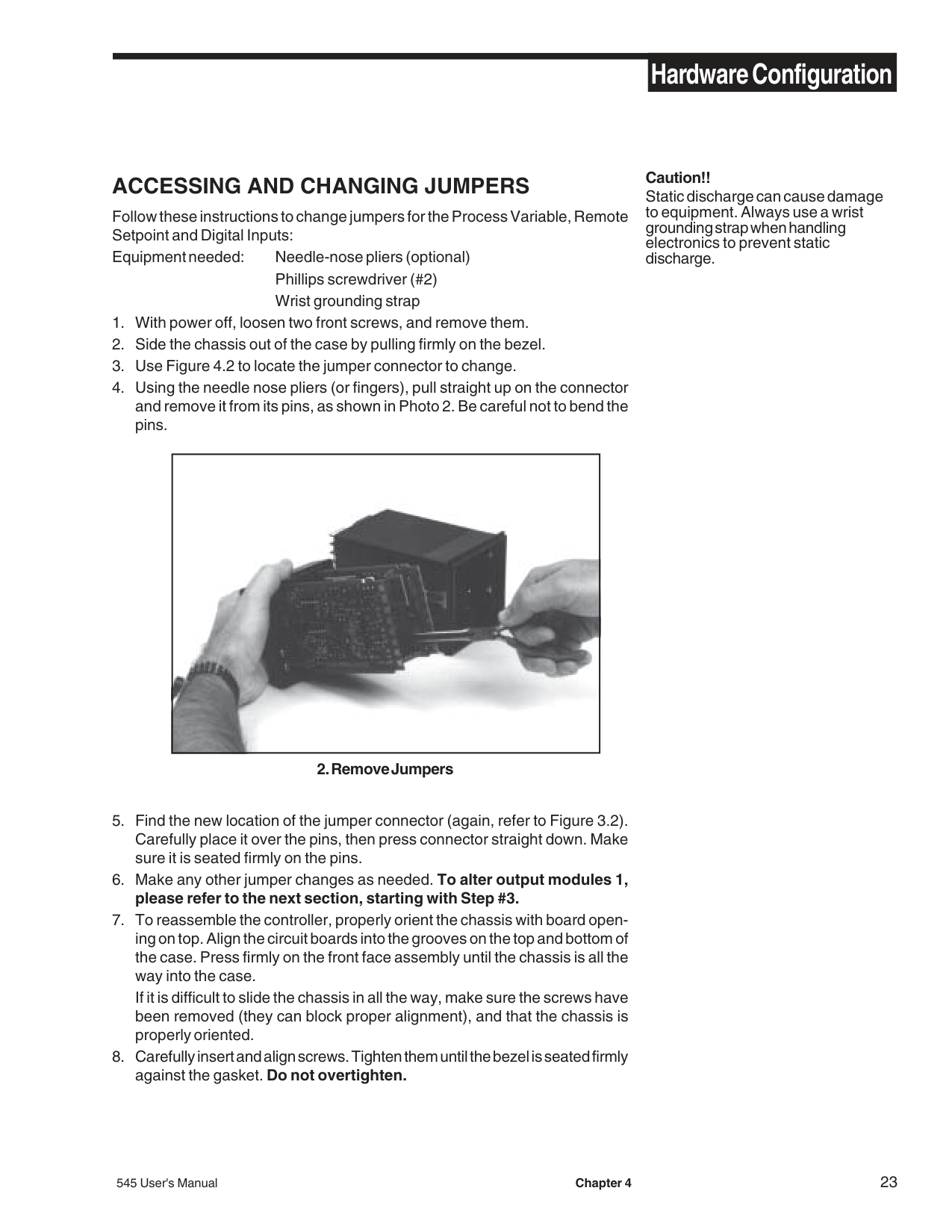
Follow these instructions to change jumpers for the Process Variable, Remote Setpoint and Digital Inputs: Equipment needed: Needle-nose pliers (optional)
Phillips screwdriver (#2) Wrist grounding strap
|| |---|
################################## 2. Remove Jumpers
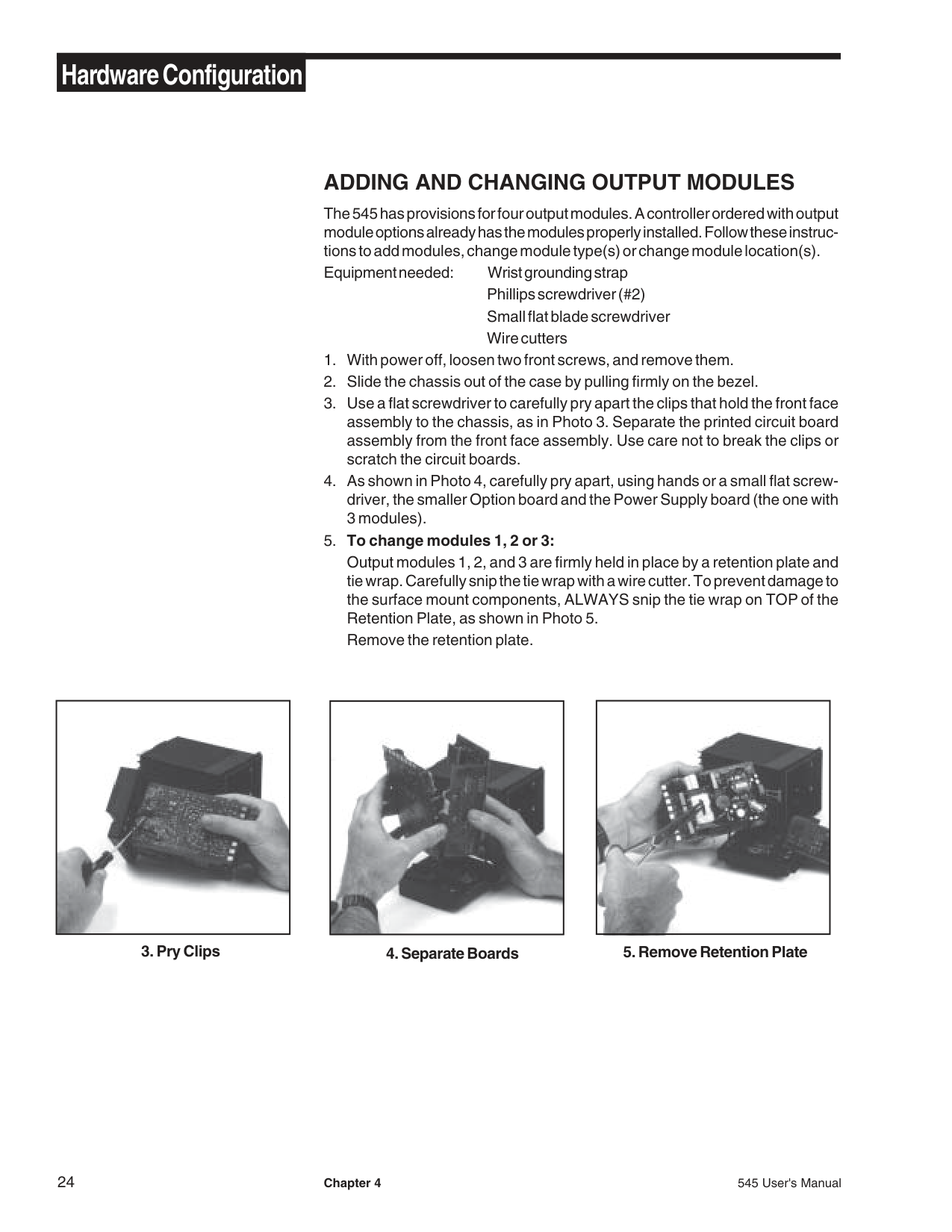
########### ADDING AND CHANGING OUTPUT MODULES
The 545 has provisions for four output modules. A controller ordered with output module options already has the modules properly installed. Follow these instructions to add modules, change module type(s) or change module location(s).
Equipment needed: Wrist grounding strap Phillips screwdriver (#2) Small flat blade screwdriver Wire cutters
|| |---|
|| |---|
|| |---|
|| |---|
|| |---|
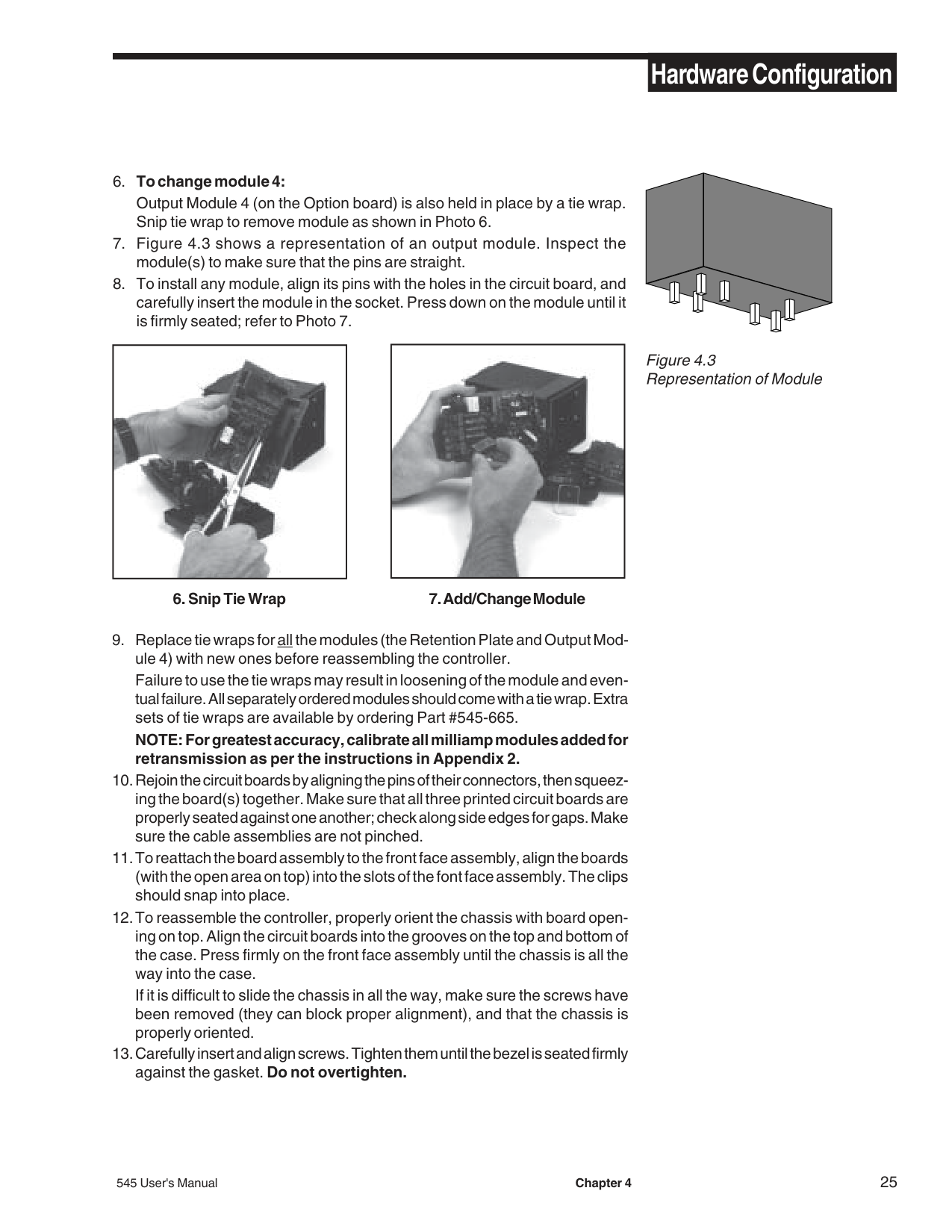
############################## Figure 4.3 Representation of Module
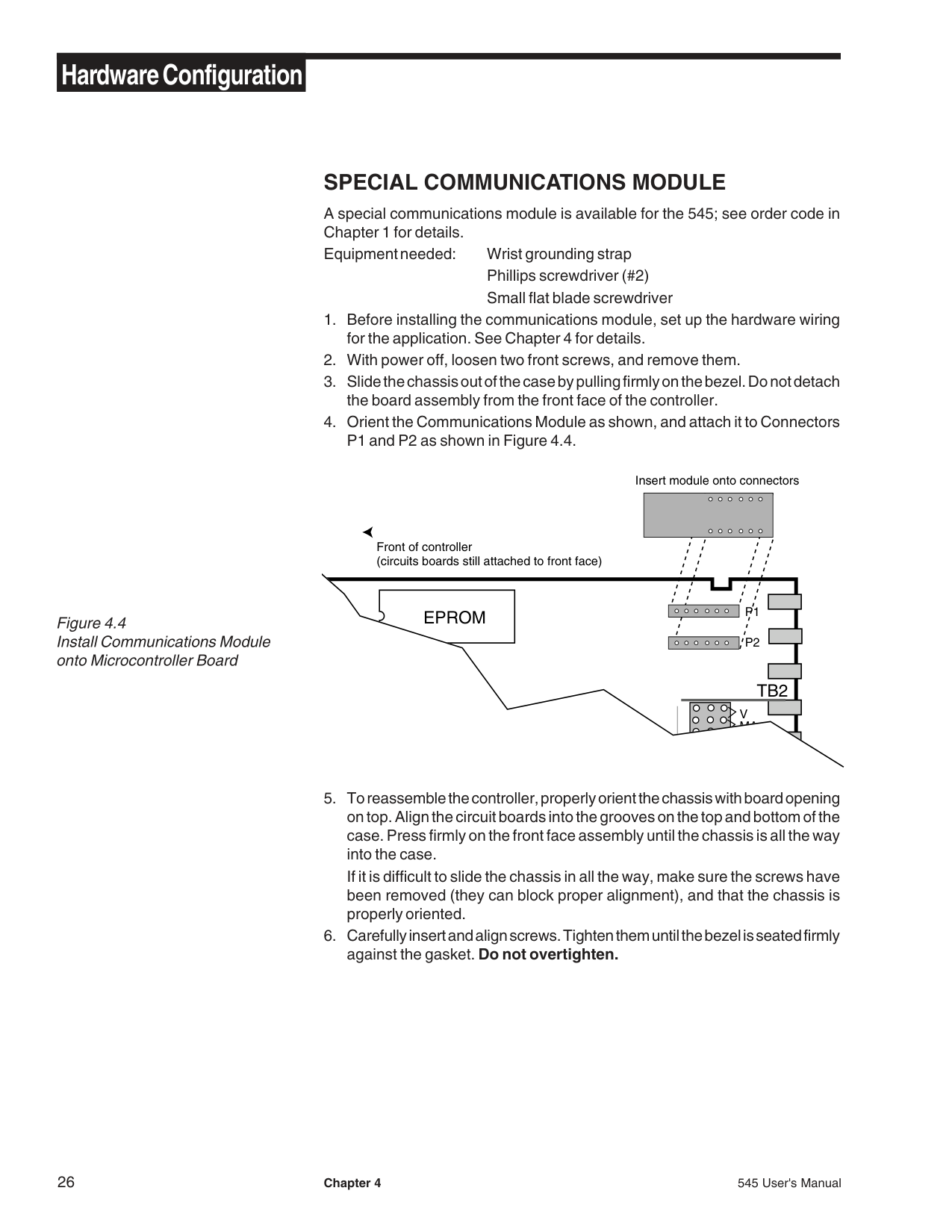
########### SPECIAL COMMUNICATIONS MODULE
A special communications module is available for the 545; see order code in Chapter 1 for details. Equipment needed: Wrist grounding strap
Phillips screwdriver (#2) Small flat blade screwdriver
Insert module onto connectors
Front of controller (circuits boards still attached to front face)
|TB2
EPROM
P2
P1
V MA
5. To reassemble the controller, properly orient the chassis with board opening on top. Align the circuit boards into the grooves on the top and bottom of the case. Press firmly on the front face assembly until the chassis is all the way into the case.
If it is difficult to slide the chassis in all the way, make sure the screws have| |---|
been removed (they can block proper alignment), and that the chassis is properly oriented.
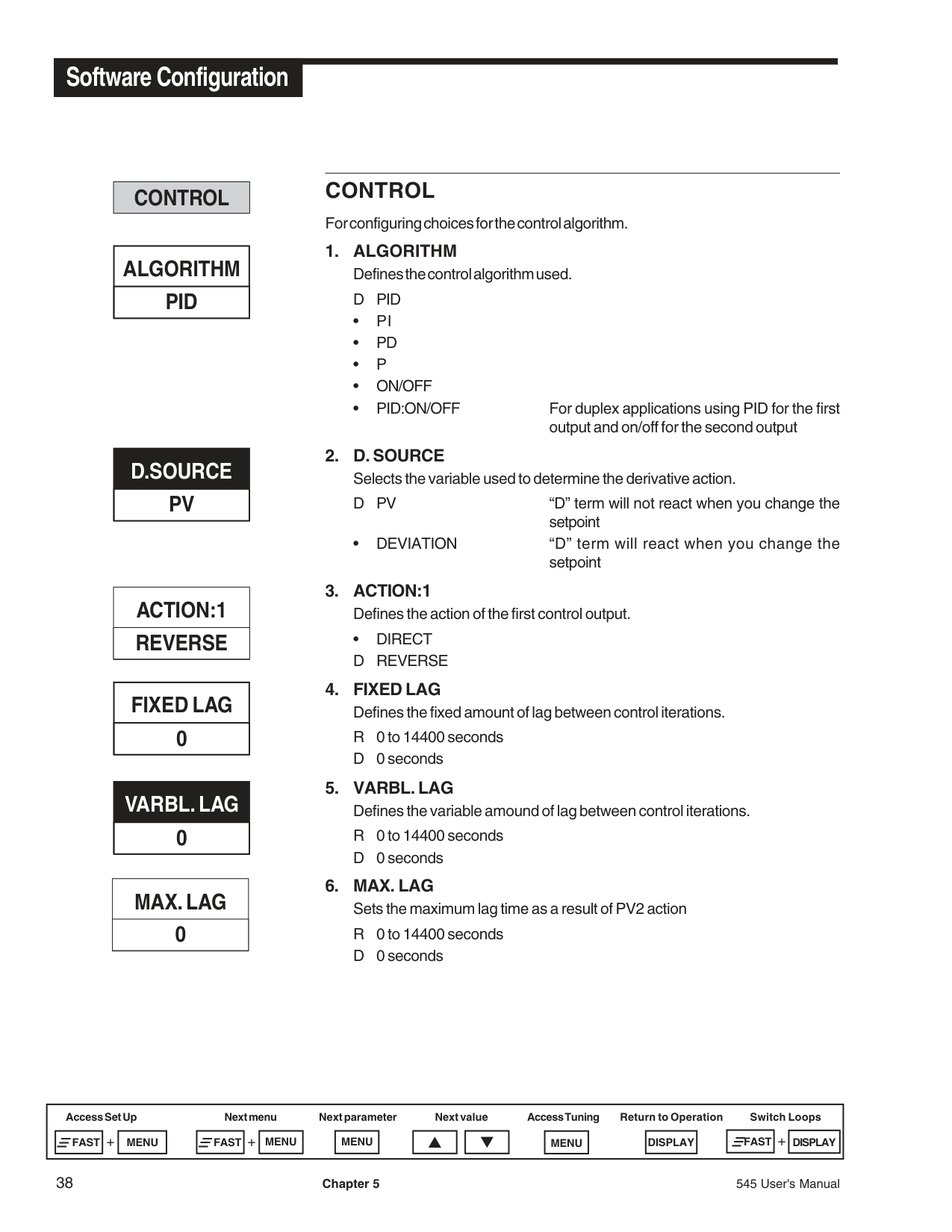
###### CHAPTER 5 SOFTWARE CONFIGURATION
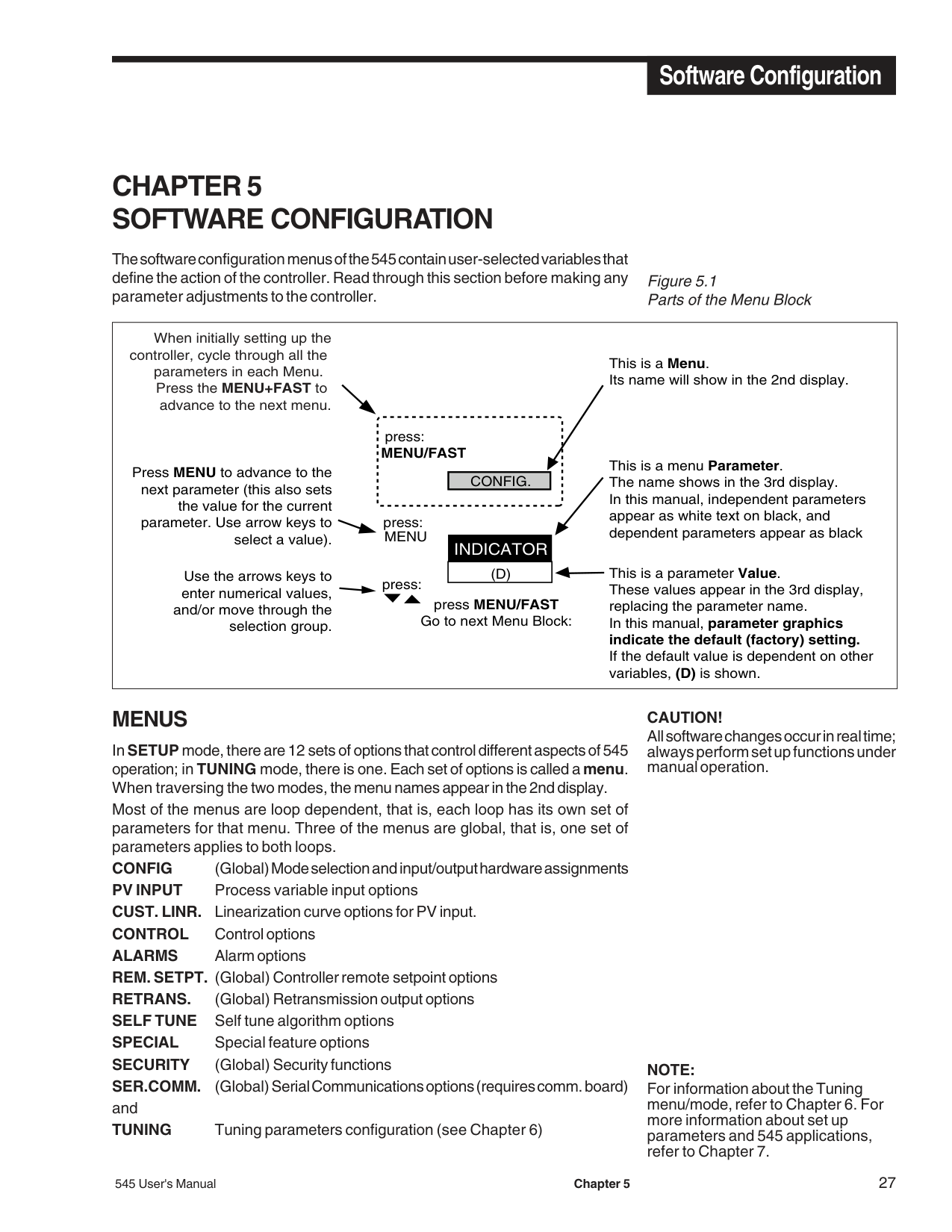
The software configuration menus of the 545 contain user-selected variables that define the action of the controller. Read through this section before making any parameter adjustments to the controller.
############################# Figure 5.1 Parts of the Menu Block
|CONFIG.
MENU
press:
press:
(D)
INDICATOR
MENU/FAST
press:
press MENU/FAST Go to next Menu Block:
Press MENU to advance to the next parameter (this also sets
the value for the current parameter. Use arrow keys to
select a value).
This is a Menu. Its name will show in the 2nd display.
This is a menu Parameter. The name shows in the 3rd display. In this manual, independent parameters appear as white text on black, and dependent parameters appear as black
Use the arrows keys to enter numerical values,
and/or move through the selection group.
This is a parameter Value. These values appear in the 3rd display, replacing the parameter name. In this manual, parameter graphics indicate the default (factory) setting. If the default value is dependent on other variables, (D) is shown.
When initially setting up the
controller, cycle through all the parameters in each Menu. Press the MENU+FAST to
advance to the next menu.| |---|
########## MENUS
InSETUPmode, there are 12 sets of options that control different aspects of 545 operation; in TUNING mode, there is one. Each set of options is called a menu. When traversing the two modes, the menu names appear in the 2nd display.
Most of the menus are loop dependent, that is, each loop has its own set of parameters for that menu. Three of the menus are global, that is, one set of parameters applies to both loops.
CONFIG (Global) Mode selectionandinput/output hardware assignments PV INPUT Process variable input options CUST. LINR. Linearization curve options for PV input. CONTROL Control options ALARMS Alarm options REM. SETPT. (Global) Controller remote setpoint options RETRANS. (Global) Retransmission output options SELF TUNE Self tune algorithm options SPECIAL Special feature options SECURITY (Global) Security functions SER.COMM. (Global) Serial Communications options (requires comm. board) and TUNING Tuning parameters configuration (see Chapter 6)
################################# CAUTION!
All software changes occur in real time; always perform set up functions under manual operation.
NOTE: For information about the Tuning menu/mode, refer to Chapter 6. For more information about set up parameters and 545 applications, refer to Chapter 7.
TUNE PT. AUTOMATIC
CONTACT 1 MANUAL
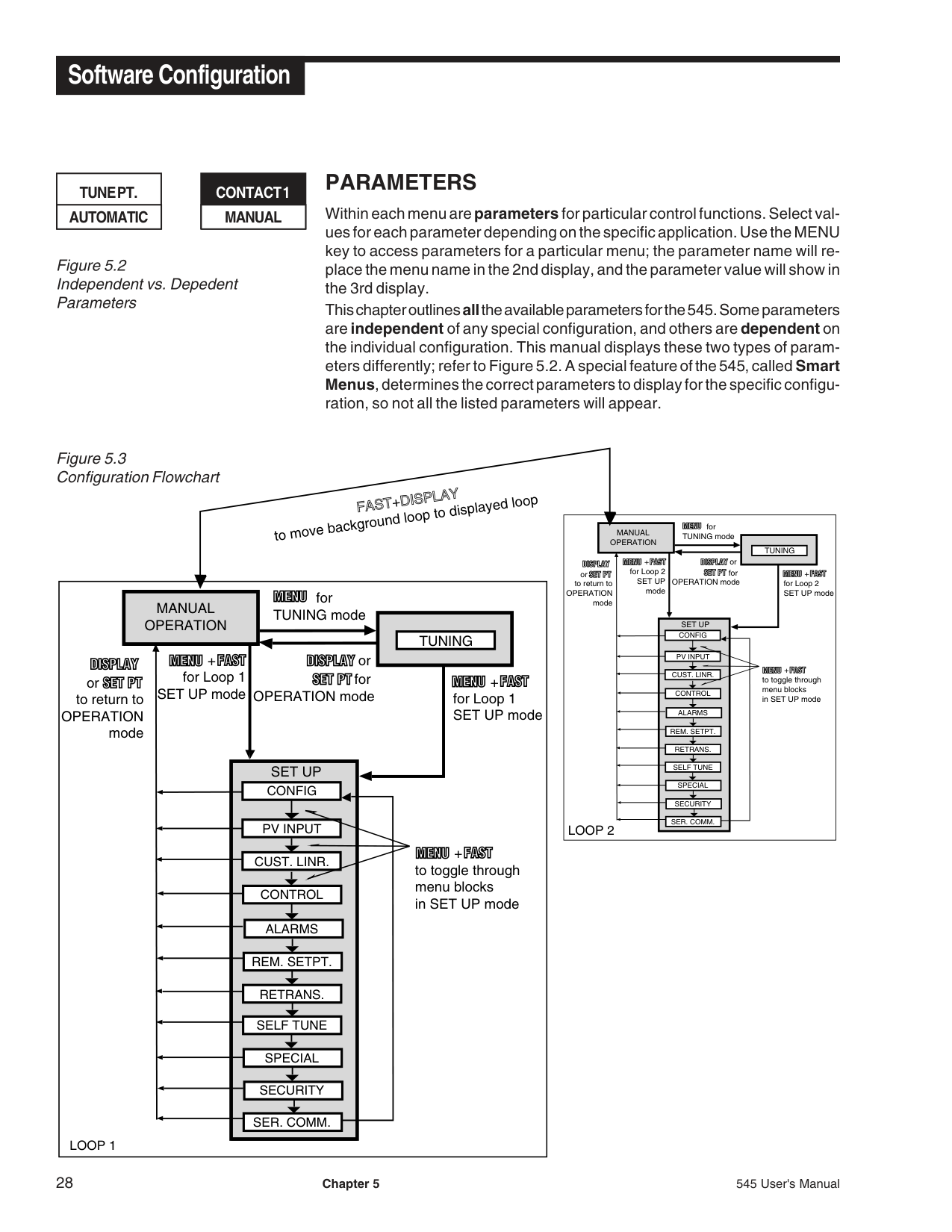
########### PARAMETERS
Within each menu areparameters for particular control functions. Select values for each parameter depending on the specific application. Use the MENU key to access parameters for a particular menu; the parameter name will replace the menu name in the 2nd display, and the parameter value will show in the 3rd display.
This chapter outlinesallthe available parameters for the 545. Some parameters are independent of any special configuration, and others are dependent on the individual configuration. This manual displays these two types of parameters differently; refer to Figure 5.2. A special feature of the 545, called Smart Menus, determines the correct parameters to display for the specific configuration, so not all the listed parameters will appear.
############################## Figure 5.3Configuration Flowchart
FAST+DISPLAYto move background loop to displayed loop
for TUNING mode
MANUAL OPERATION
TUNING
+
or or
for Loop 1 SET UP modeto return to
for OPERATION mode for Loop 1 SET UP mode
+
OPERATION mode
SET UP
CONFIG
| | | |---|---| | | |
PV INPUT
+
CUST. LINR.
to toggle through menu blocks in SET UP mode
CONTROL
ALARMS
REM. SETPT.
RETRANS. SELF TUNE SPECIAL SECURITY SER. COMM.
LOOP 1
for TUNING mode
MANUAL OPERATION
TUNING
or or
+
for Loop 2 SET UP mode
for OPERATION mode for Loop 2 SET UP mode
+
to return to OPERATION
mode
SET UP
CONFIG
| | | |---|---| | | |
PV INPUT
+
CUST. LINR.
to toggle through menu blocks in SET UP mode
CONTROL
ALARMS
REM. SETPT.
RETRANS. SELF TUNE SPECIAL SECURITY SER. COMM.
LOOP 2
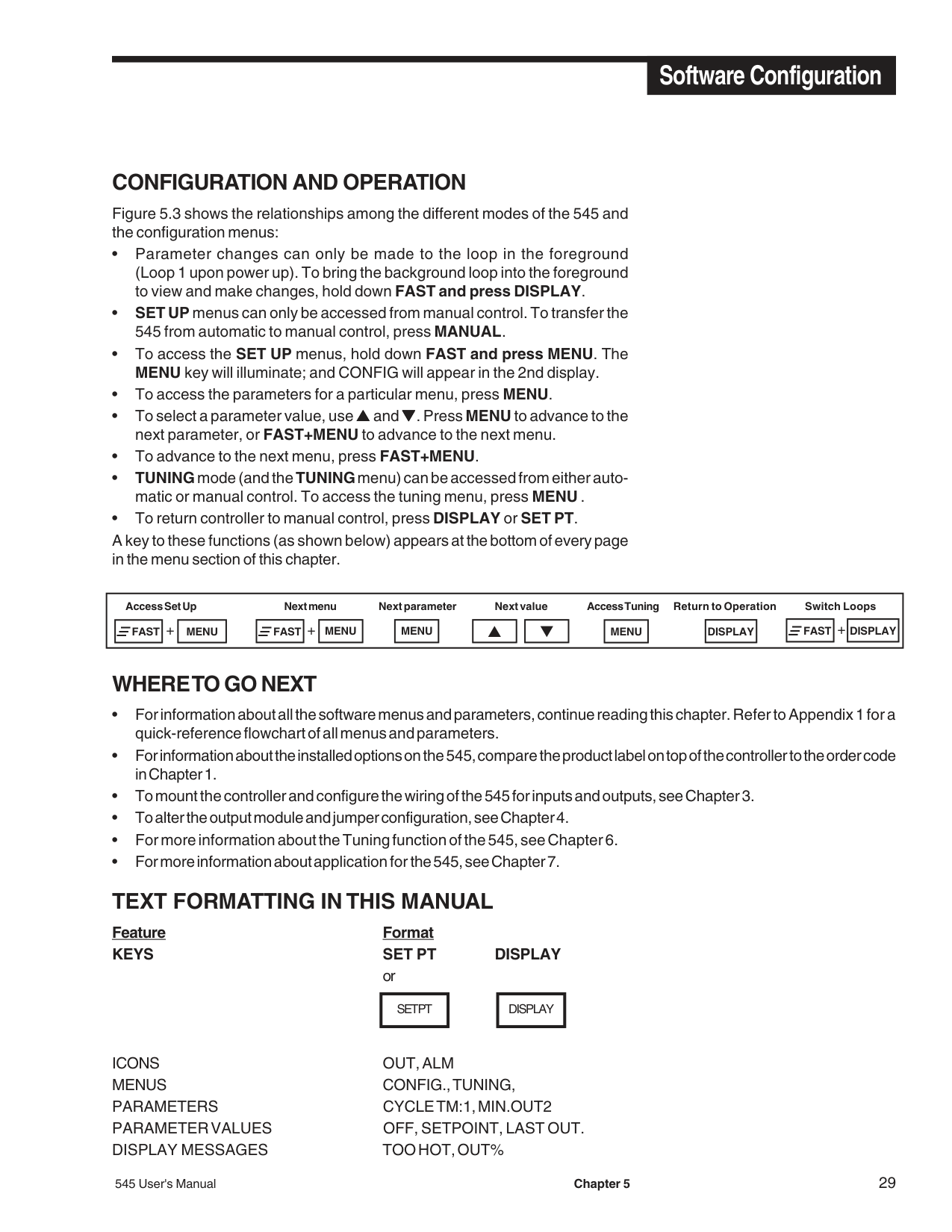
########### CONFIGURATION AND OPERATION
Figure 5.3 shows the relationships among the different modes of the 545 and the configuration menus:
|Access Set Up Next menu Next parameter Next value Access Tuning Return to Operation Switch Loops
+
|FAST| |---|
|MENU| |---|
+
|MENU| |---|
|MENU| |---|
|▲| |---|
|▼| |---|
|MENU| |---|
|DISPLAY| |---|
|FAST
|
|---|
+
|FAST| |---|
|DISPLAY| |---| | |---|
########### WHERE TO GO NEXT
########### TEXT FORMATTING IN THIS MANUAL
Feature Format KEYS SET PT DISPLAY
or
SET PT DISPLAY
ICONS OUT, ALM MENUS CONFIG., TUNING, PARAMETERS CYCLETM:1, MIN.OUT2 PARAMETER VALUES OFF, SETPOINT, LAST OUT. DISPLAY MESSAGES TOO HOT, OUT%
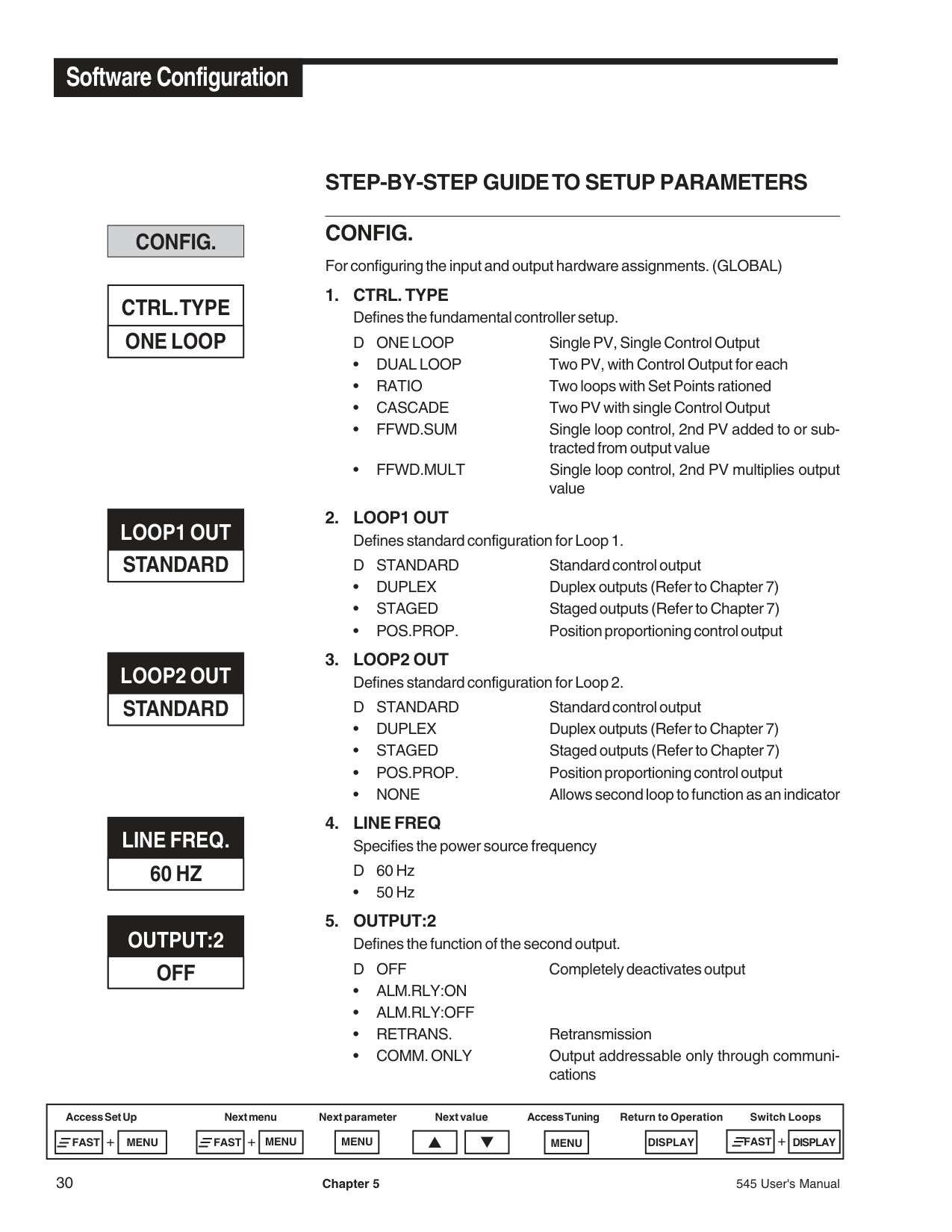
########### CONFIG.
########### CTRL. TYPE ONE LOOP
########### LOOP1 OUTSTANDARD
########### LOOP2 OUTSTANDARD
########### LINE FREQ. 60 HZ
OUTPUT:2 OFF
########### STEP-BY-STEP GUIDE TO SETUP PARAMETERS CONFIG. For configuring the input and output hardware assignments. (GLOBAL)
• 50 Hz
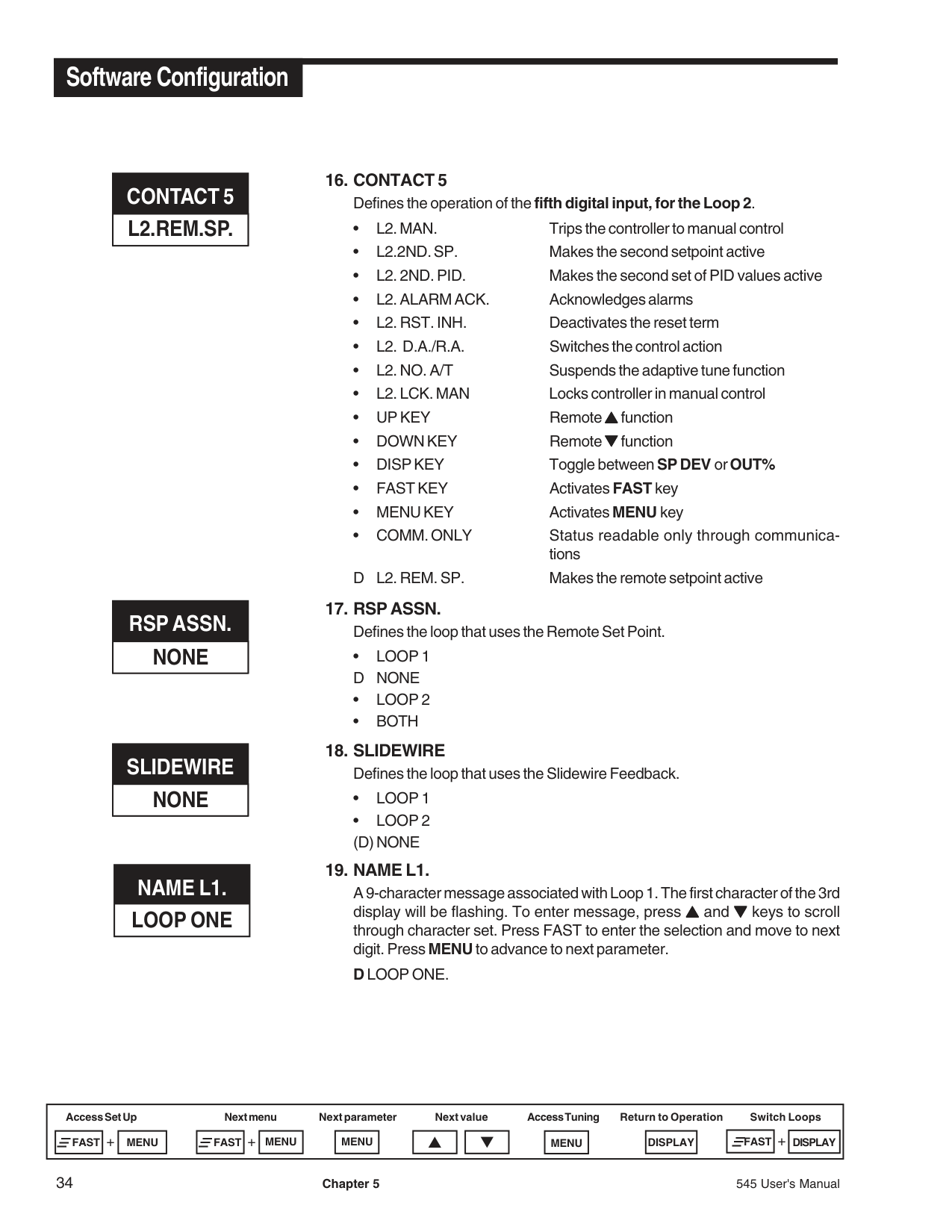
D L1. REM. SP. Makes the remote setpoint active
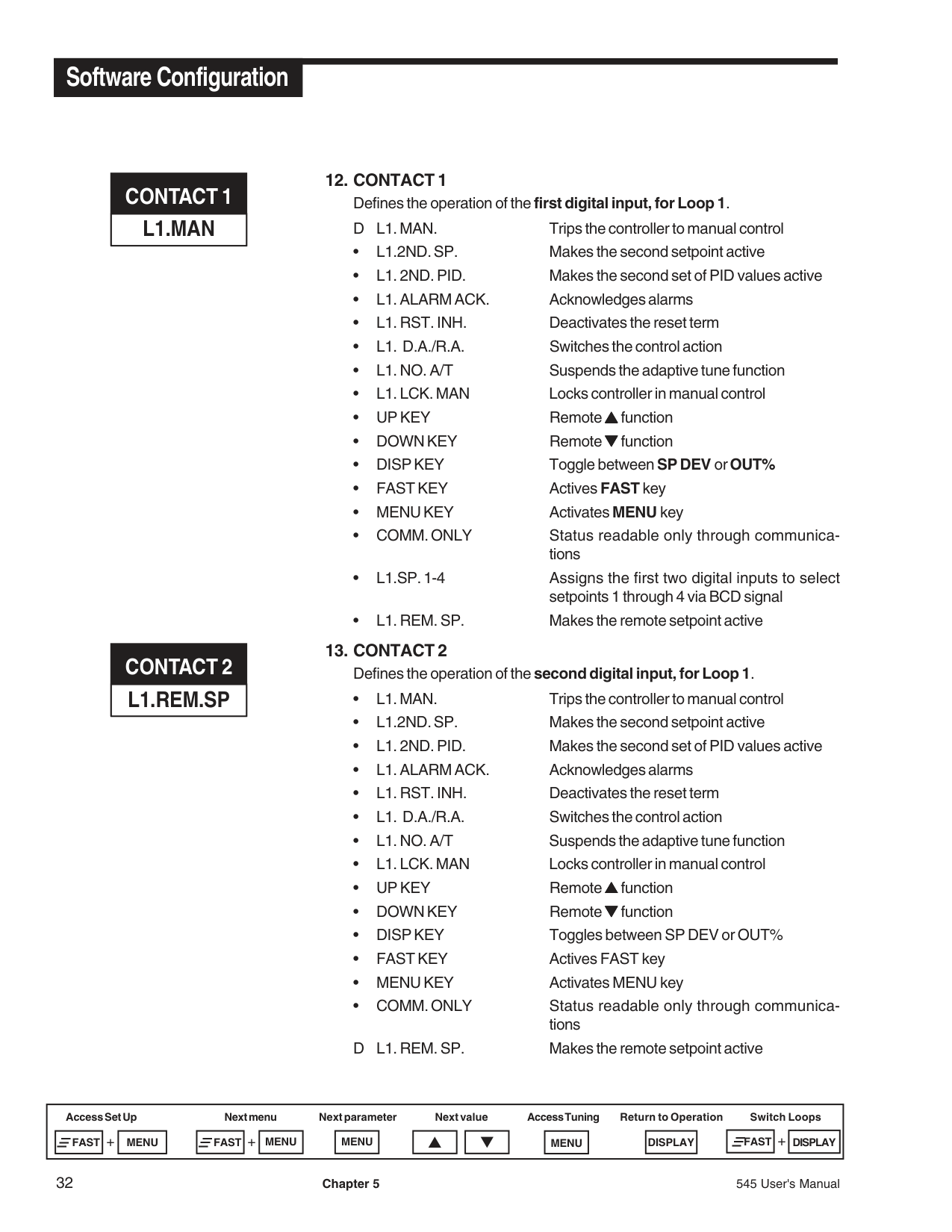
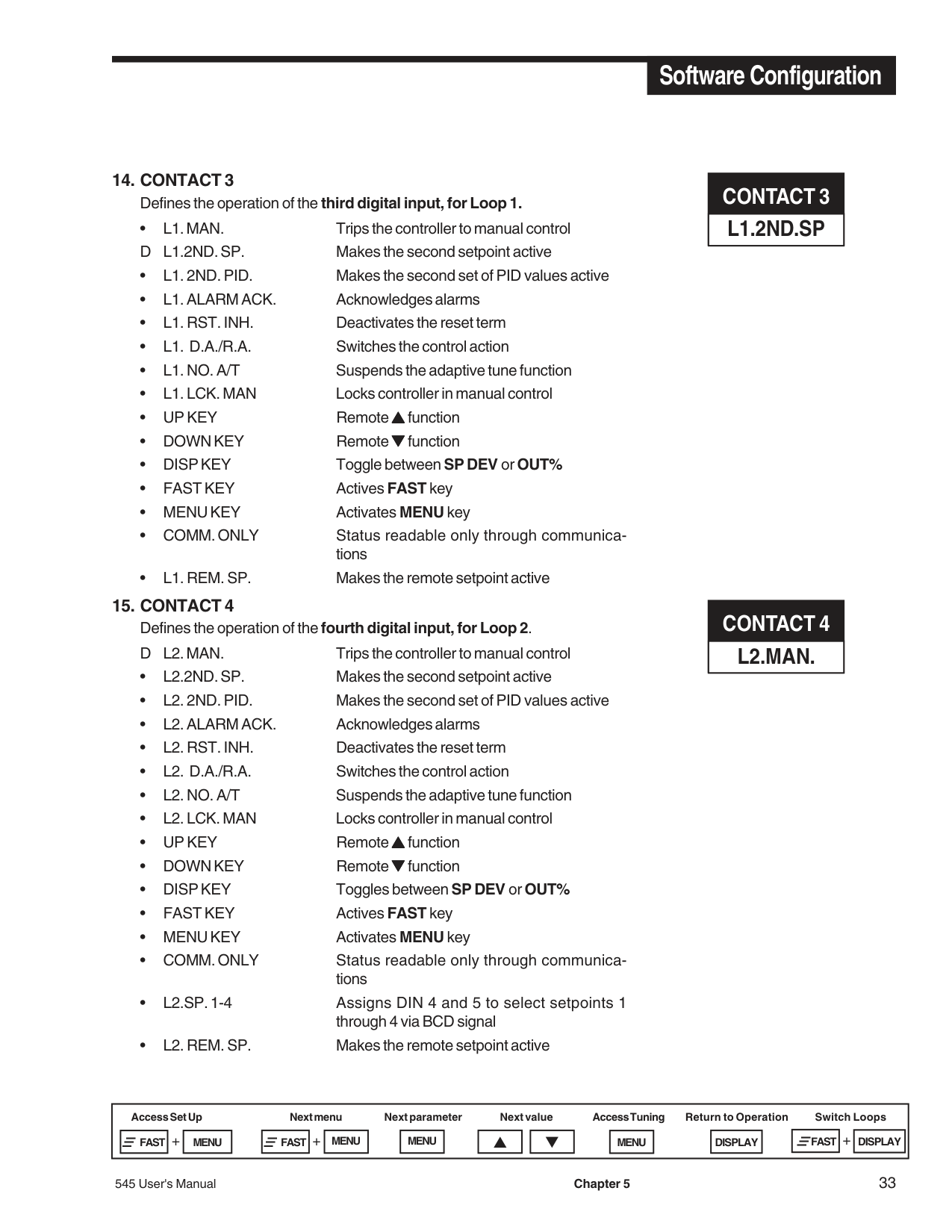
#################### 14. CONTACT 3Defines the operation of the third digital input, for Loop 1.
##################### 15. CONTACT 4Defines the operation of the fourth digital input, for Loop 2.D L2. MAN. Trips the controller to manual control
########### CONTACT 3 L1.2ND.SP
########### CONTACT 4 L2.MAN.
########### CONTACT 5 L2.REM.SP.
########### RSP ASSN. NONE
########### SLIDEWIRE NONE
########### NAME L1. LOOP ONE
#################### 16. CONTACT 5Defines the operation of the fifth digital input, for the Loop 2.
D L2. REM. SP. Makes the remote setpoint active
##################### 17. RSP ASSN.Defines the loop that uses the Remote Set Point.
##################### 18. SLIDEWIREDefines the loop that uses the Slidewire Feedback.
#################### 19. NAME L1.
A 9-character message associated with Loop 1. The first character of the 3rd display will be flashing. To enter message, press ▲▲▲ and ▼▼▼ keys to scroll through character set. Press FAST to enter the selection and move to next digit. Press MENU to advance to next parameter.
DLOOP ONE.
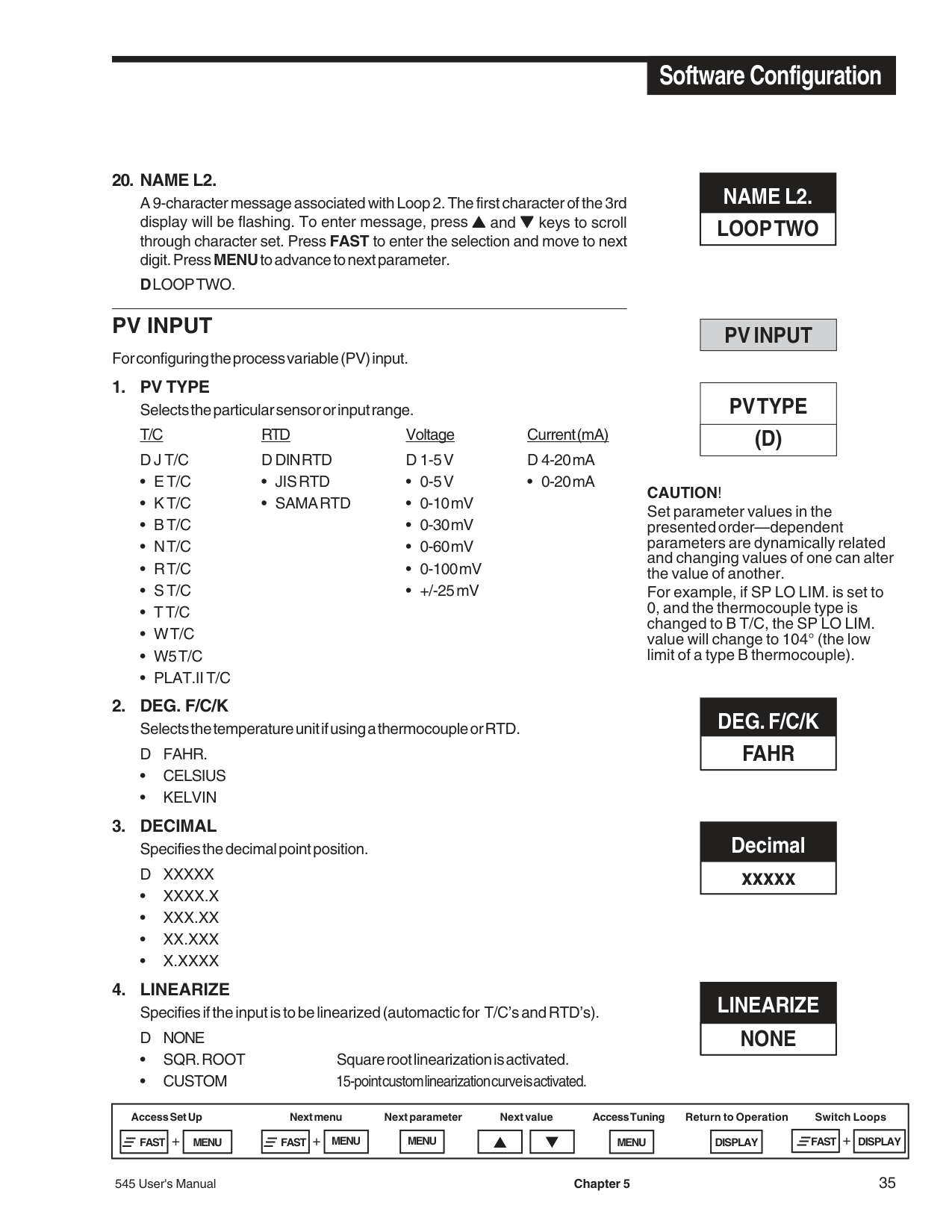
#################### 20. NAME L2.
A 9-character message associated with Loop 2. The first character of the 3rd display will be flashing. To enter message, press ▲▲▲ and ▼▼▼ keys to scroll through character set. Press FAST to enter the selection and move to next digit. PressMENUto advance to next parameter.
DLOOP TWO.
########### NAME L2. LOOP TWO
########### PV INPUT
For configuring the process variable (PV) input.
########### PV INPUT
########### PV TYPE (D)
CAUTION! Set parameter values in the presented order—dependent parameters are dynamically related and changing values of one can alter the value of another. For example, if SP LO LIM. is set to 0, and the thermocouple type is changed to B T/C, the SP LO LIM. value will change to 104° (the low limit of a type B thermocouple).
########### DEG. F/C/K FAHR
########### Decimal xxxxx
########### LINEARIZE NONE
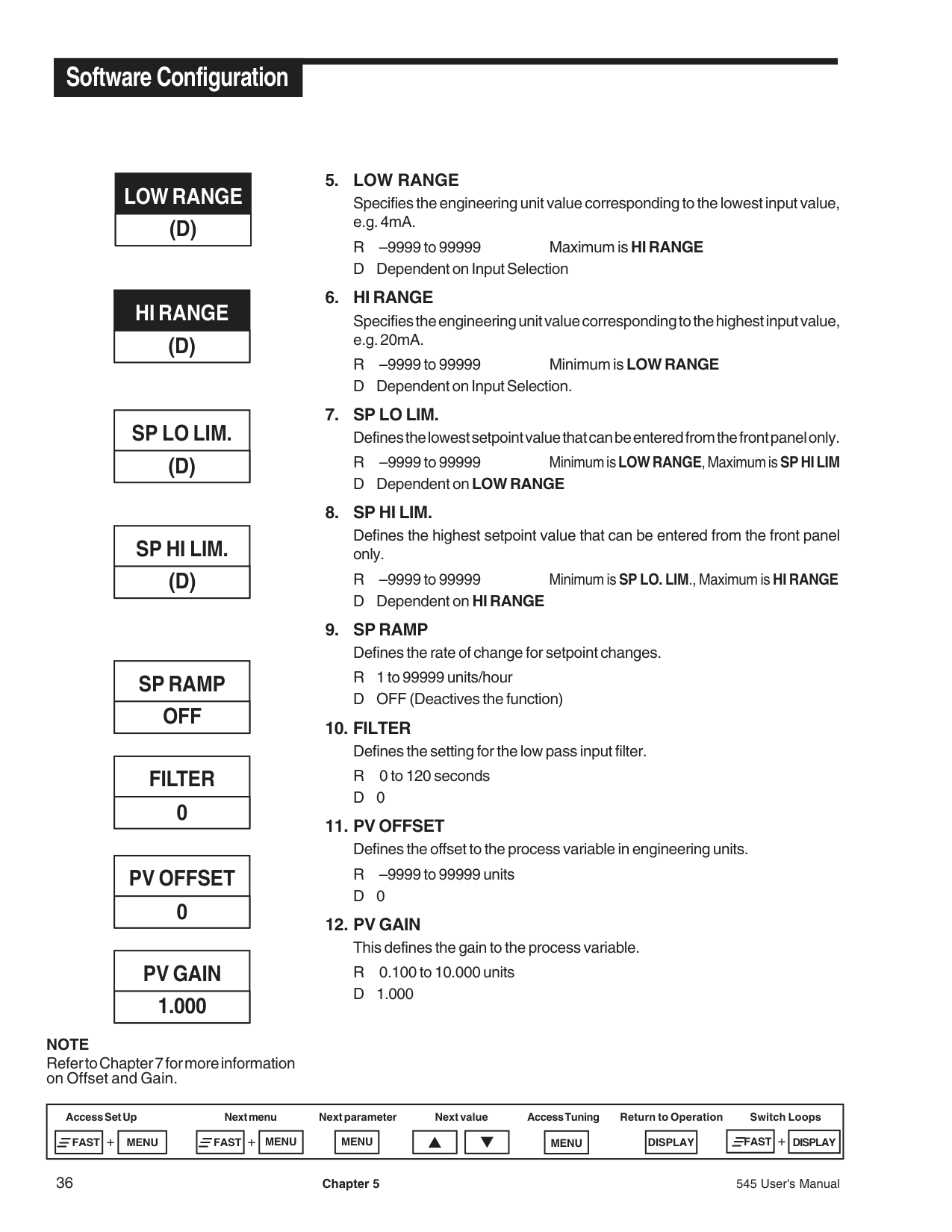
########### LOW RANGE (D)
########### HI RANGE (D)
########### SP LO LIM. (D)
########### SP HI LIM. (D)
########### SP RAMP OFF
########### FILTER 0
########### PV OFFSET
########### 0
PV GAIN
########### 1.000
NOTE Refer to Chapter 7 for more information on Offset and Gain.
Specifies the engineering unit value corresponding to the lowest input value, e.g. 4mA.
R –9999 to 99999 Maximum is HI RANGE D Dependent on Input Selection
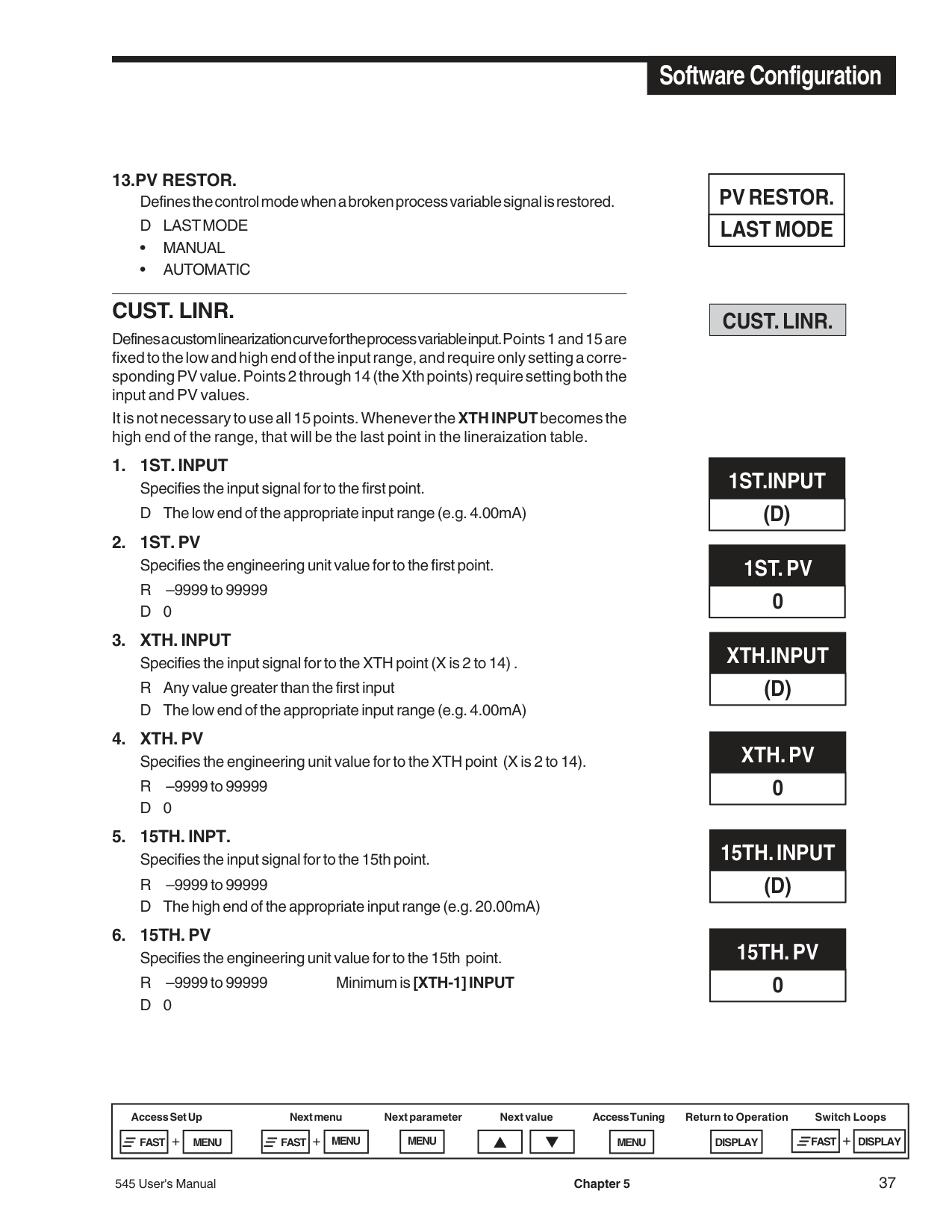
13.PV RESTOR. Defines the control mode when a broken process variable signal is restored. D LAST MODE
########### CUST. LINR.
Defines a custom linearization curve for the process variable input. Points 1 and 15 are fixed to the low and high end of the input range, and require only setting a corresponding PV value. Points 2 through 14 (the Xth points) require setting both the input and PV values.
It is not necessary to use all 15 points. Whenever theXTH INPUTbecomes the high end of the range, that will be the last point in the lineraization table.
########### PV RESTOR. LAST MODE
########### CUST. LINR.
########### 1ST.INPUT (D)
########### 1ST. PV 0
########### XTH.INPUT (D)
########### XTH. PV 0
########### 15TH. INPUT (D)
########### 15TH. PV 0
########### CONTROL
########### ALGORITHM PID
########### D.SOURCE PV
########### ACTION:1 REVERSE
########### FIXED LAG 0
########### VARBL. LAG 0
########### MAX. LAG 0
########### CONTROL
For configuring choices for the control algorithm.
D PV “D” term will not react when you change the setpoint
• DEVIATION “D” term will react when you change the setpoint
• DIRECT D REVERSE
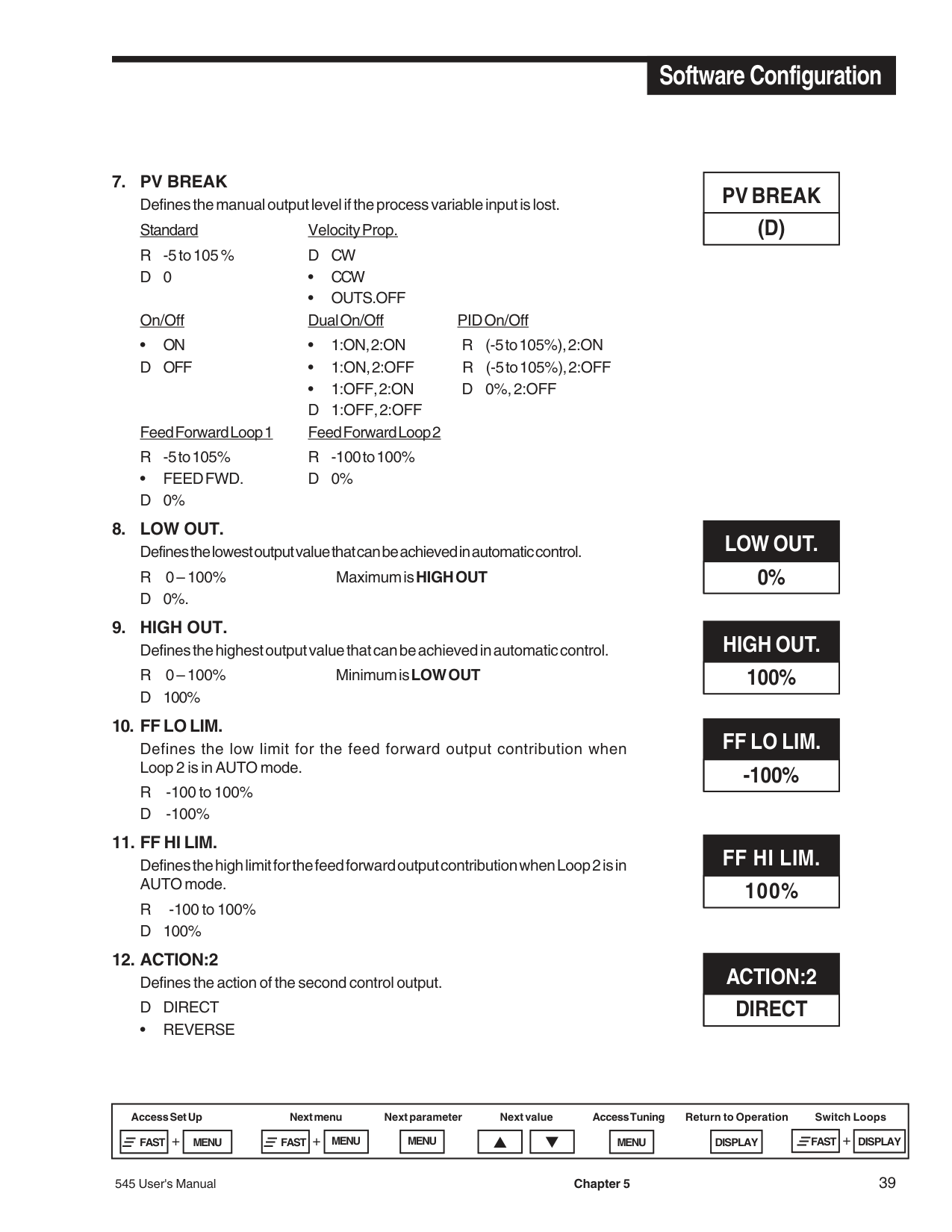
• OUTS.OFF On/Off Dual On/Off PID On/Off
• ON • 1:ON, 2:ON R (-5 to 105%), 2:ON D OFF • 1:ON, 2:OFF R (-5 to 105%), 2:OFF
• 1:OFF, 2:ON D 0%, 2:OFF D 1:OFF, 2:OFF
Feed Forward Loop 1 Feed Forward Loop 2 R -5 to 105% R -100 to 100%
• FEED FWD. D 0% D0%
Defines the low limit for the feed forward output contribution when Loop 2 is in AUTO mode.
R -100 to 100% D -100%
• REVERSE
########### PV BREAK (D)
########### LOW OUT. 0%
########### HIGH OUT. 100%
########### FF LO LIM. -100%
########### FF HI LIM. 100%
########### ACTION:2 DIRECT
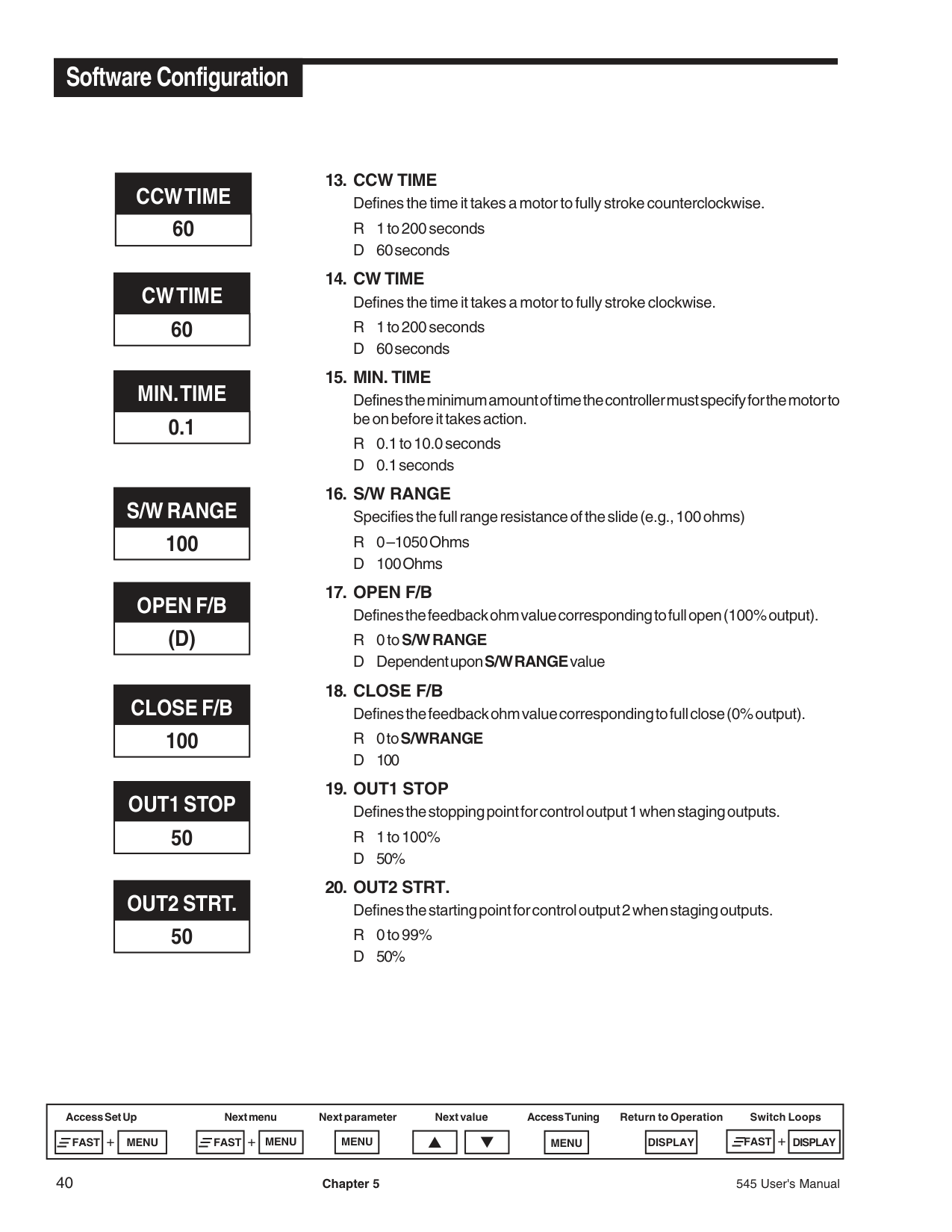
########### CCW TIME 60
########### CW TIME 60
########### MIN. TIME 0.1
########### S/W RANGE 100
########### OPEN F/B (D)
########### CLOSE F/B 100
########### OUT1 STOP 50
########### OUT2 STRT. 50
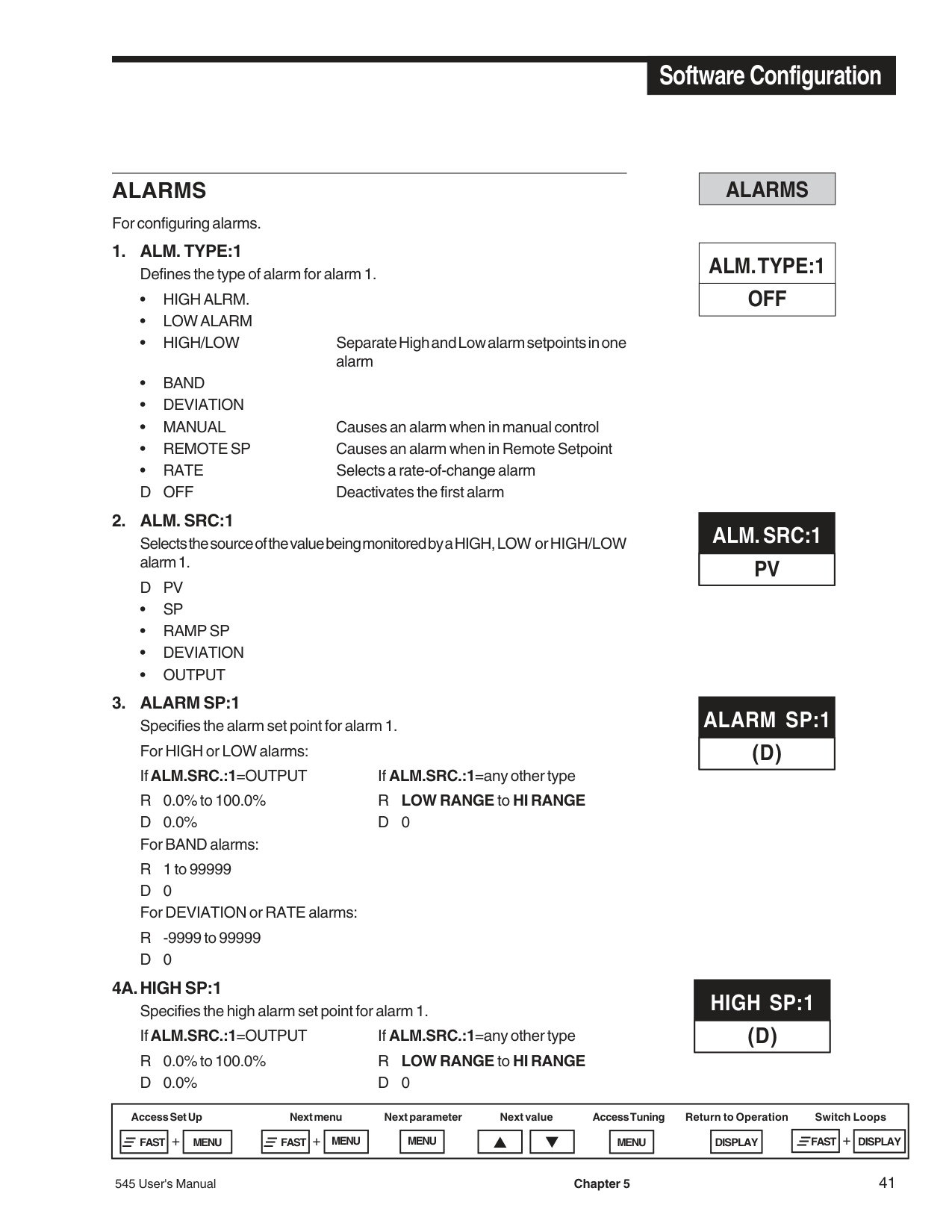
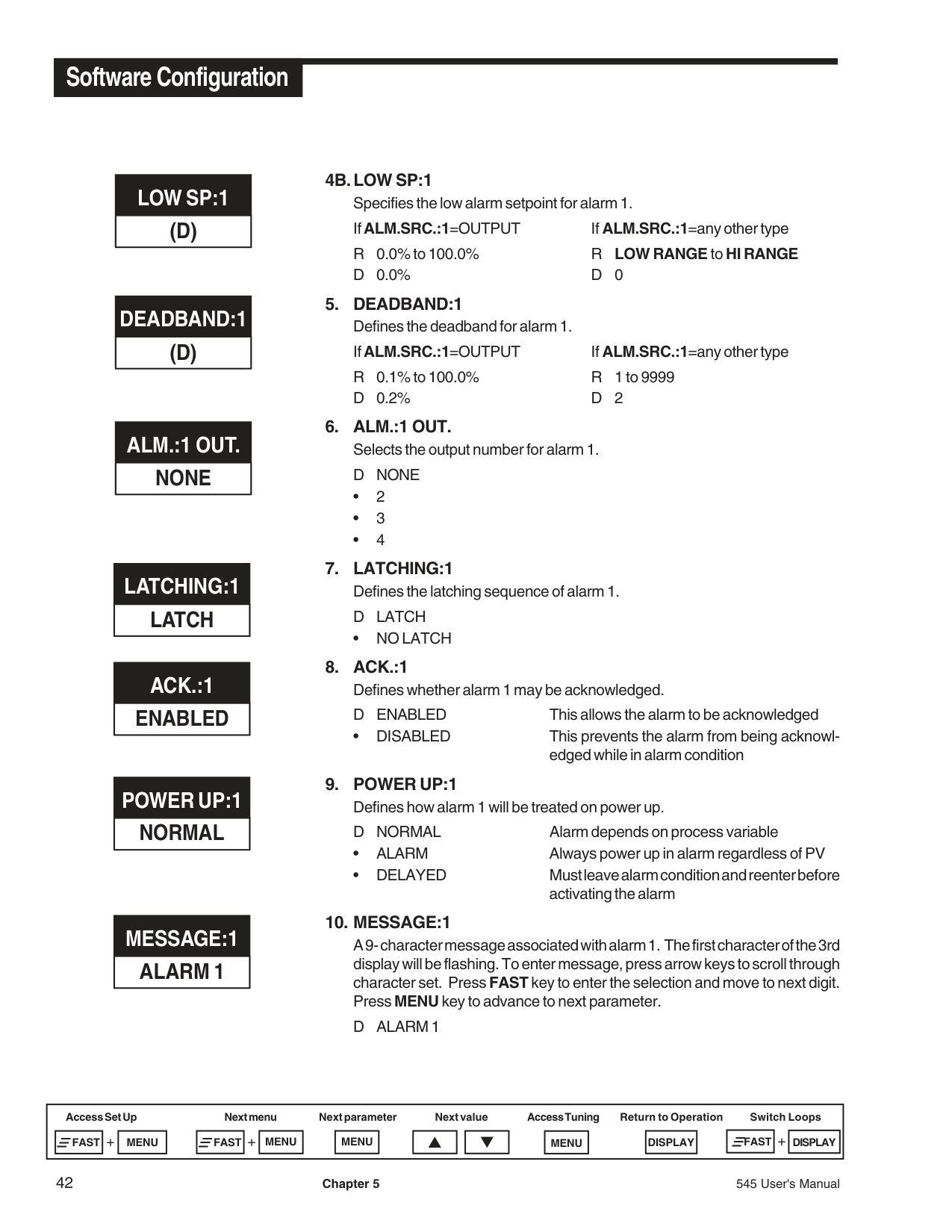
########### ALARMS
For configuring alarms.
Selects the source of the value being monitored by a HIGH, LOW or HIGH/LOW alarm 1.
DPV
########### ALARMS
########### ALM. TYPE:1 OFF
########### ALM. SRC:1 PV
########### ALARM SP:1 (D)
########### HIGH SP:1 (D)
########### LOW SP:1 (D)
########### DEADBAND:1(D)
########### ALM.:1 OUT. NONE
########### LATCHING:1 LATCH
########### ACK.:1 ENABLED
########### POWER UP:1 NORMAL
########### MESSAGE:1 ALARM 1
• NO LATCH
• DISABLED This prevents the alarm from being acknowledged while in alarm condition
A 9- character message associated with alarm 1. The first character of the 3rd display will be flashing. To enter message, press arrow keys to scroll through character set. Press FAST key to enter the selection and move to next digit. Press MENU key to advance to next parameter.
D ALARM 1
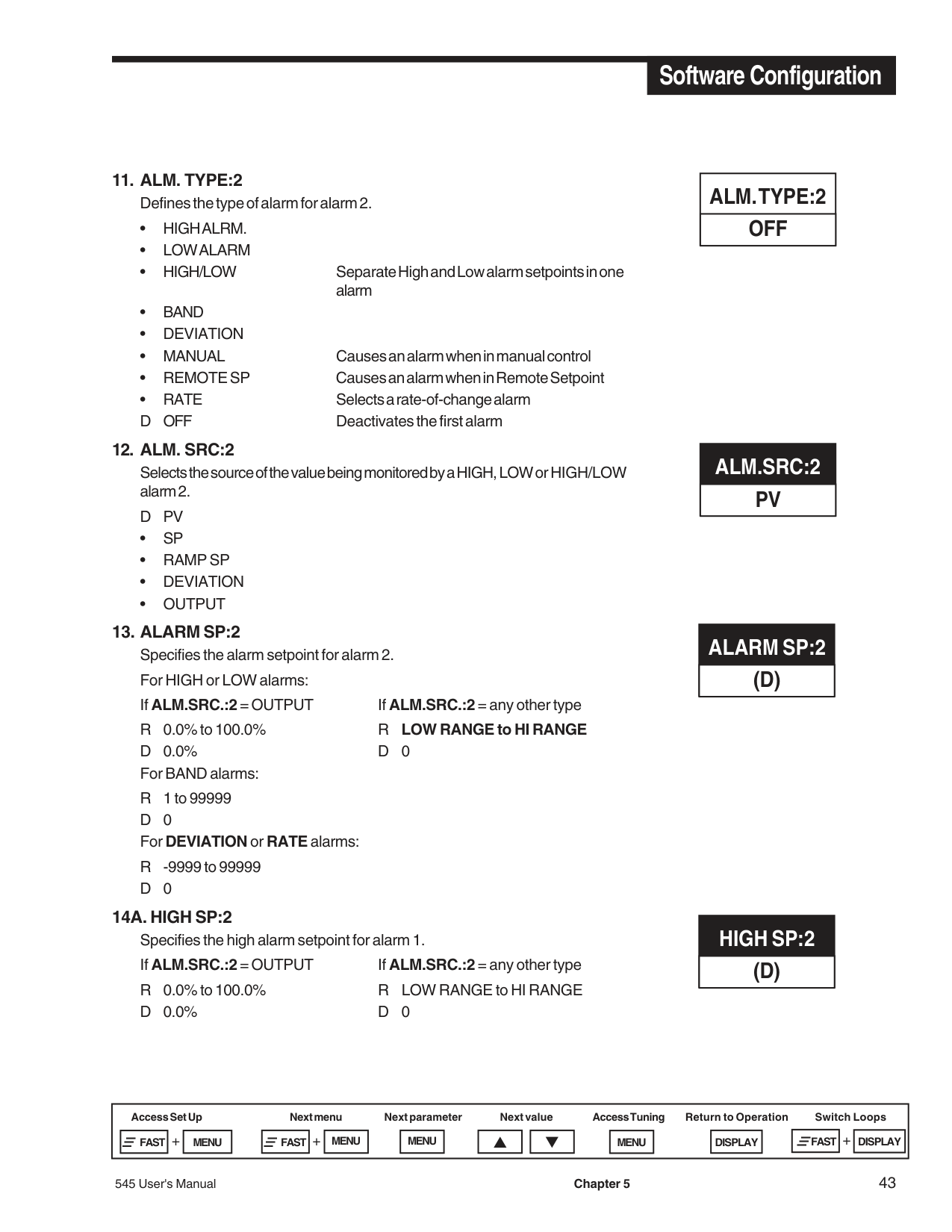
|ALM. TYPE:2 OFF| |---|
########### ALM.SRC:2 PV
########### ALARM SP:2 (D)
########### HIGH SP:2 (D)
########### LOW SP:2 (D)
########### DEADBAND:22
########### ALM.:2 OUT. NONE
########### LATCHING:2 LATCH
########### ACK.:2 ENABLED
########### POWER UP:2 NORMAL
########### MESSAGE:2 ALARM 2
•2 •3 •4
• NO LATCH
• DISABLED Prevents alarm acknowledgment while alarm condition exists.
#################### 20. MESSAGE:2
A 9-character message associated with alarm 2. The first character of the 3rd display will be flashing. To enter message, press arrow keys to scroll through character set. Press FAST key to enter the selection and move to next digit. Press MENU key to advance to next parameter.
D ALARM 2
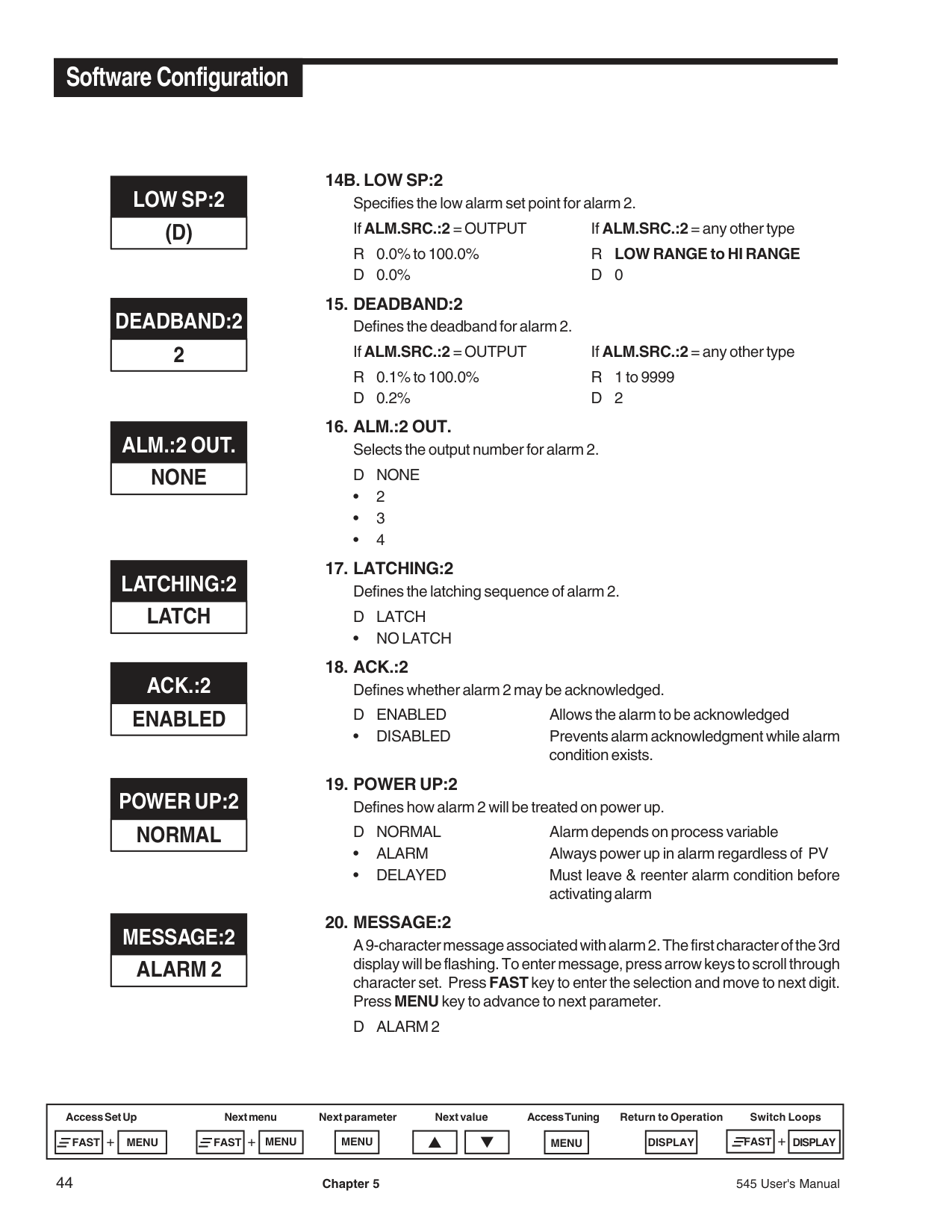
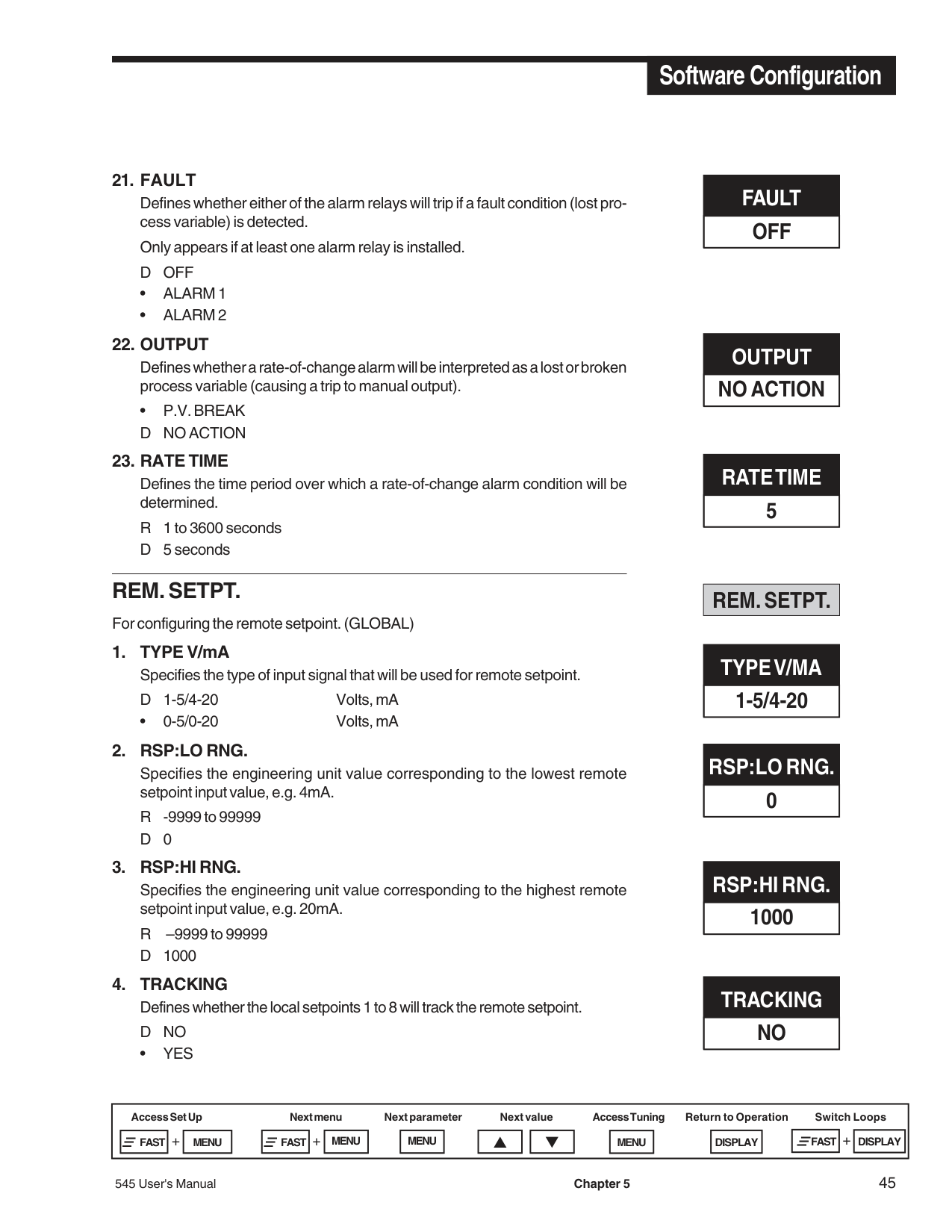
Defines whether either of the alarm relays will trip if a fault condition (lost process variable) is detected.
Only appears if at least one alarm relay is installed. D OFF
• P.V. BREAK D NO ACTION
########### REM. SETPT.
For configuring the remote setpoint. (GLOBAL)
• 0-5/0-20 Volts, mA
• YES
########### FAULT OFF
########### OUTPUT NO ACTION
########### RATE TIME 5
########### REM. SETPT.
########### TYPE V/MA 1-5/4-20
########### RSP:LO RNG. 0
########### RSP:HI RNG. 1000
########### TRACKING NO
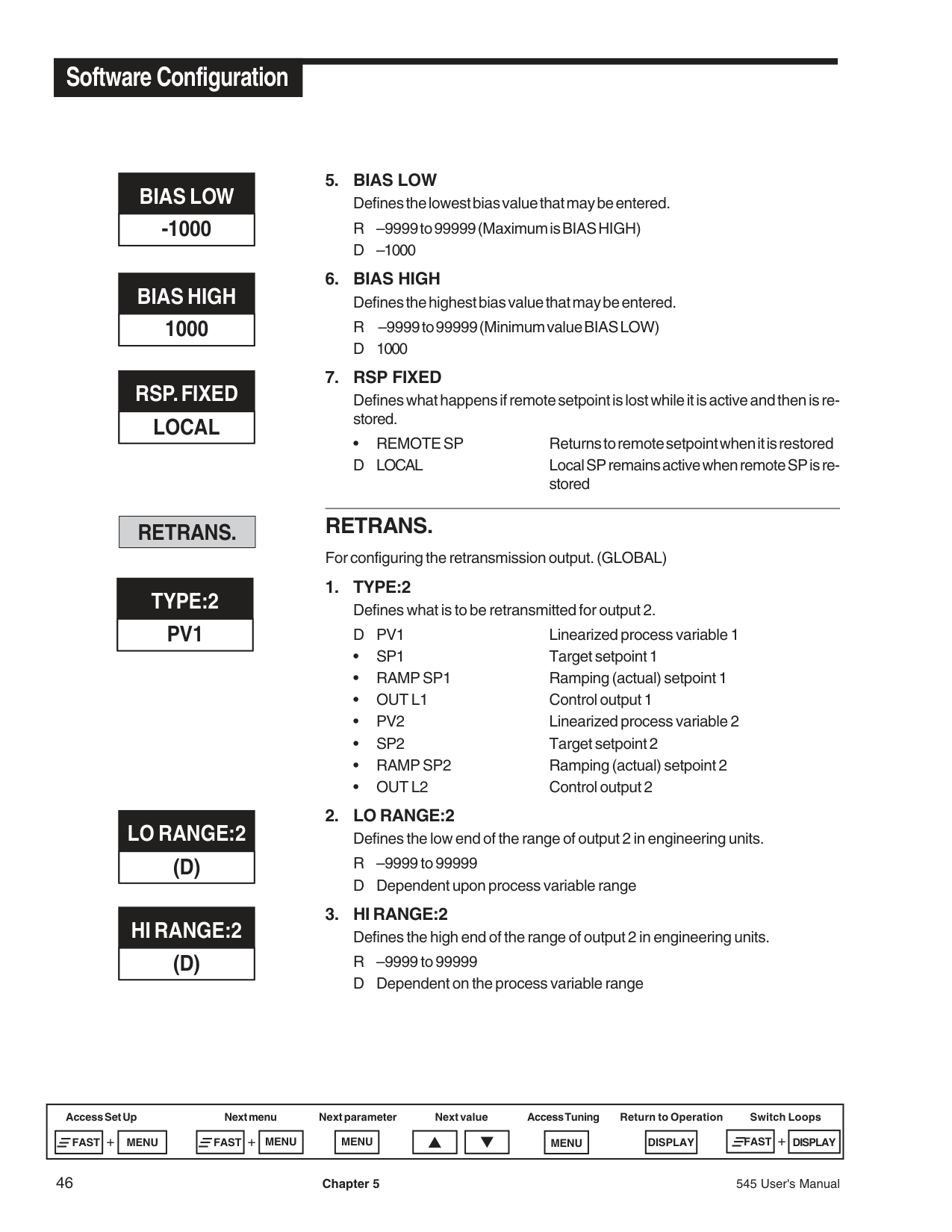
########### BIAS LOW -1000
########### BIAS HIGH 1000
########### RSP. FIXED LOCAL
########### RETRANS.
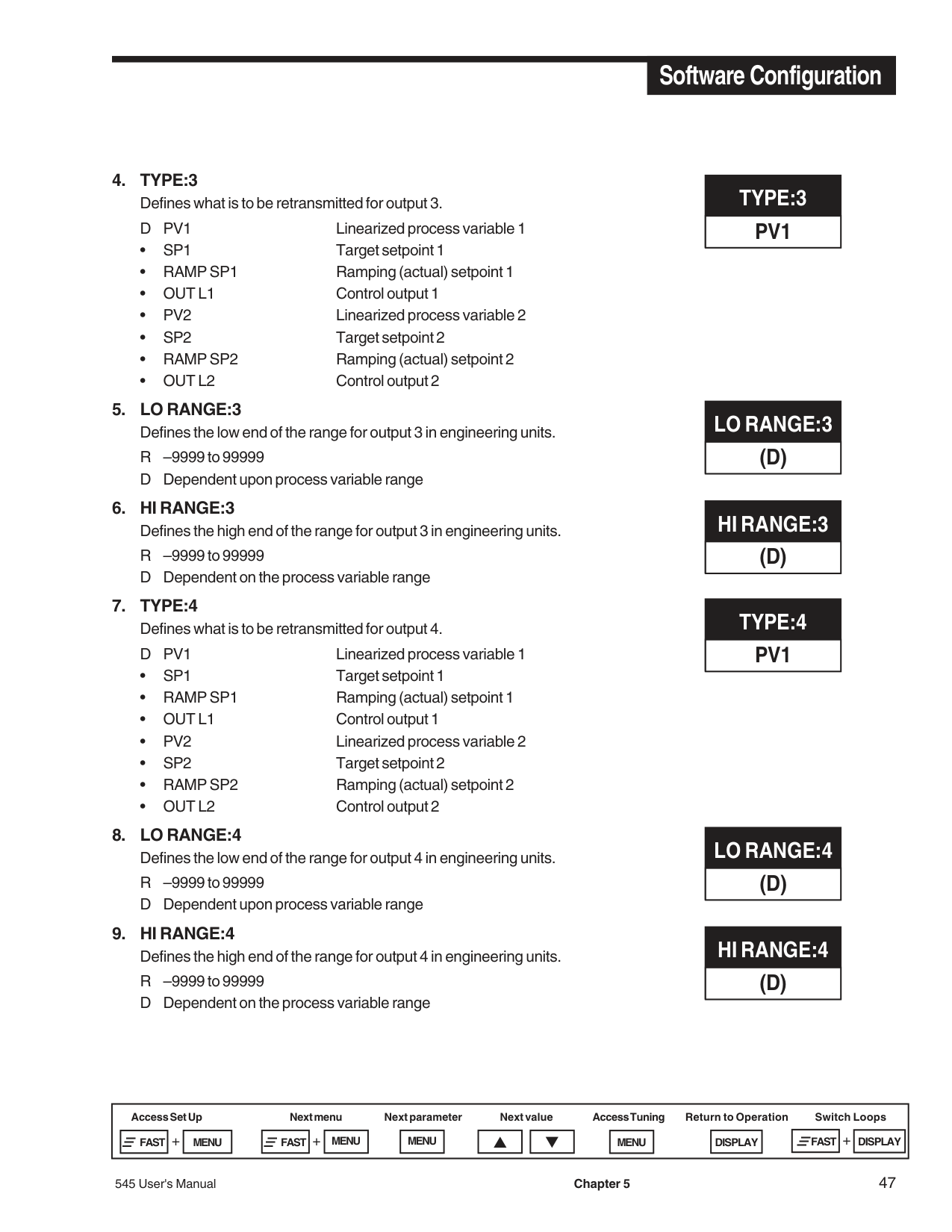
########### TYPE:2 PV1
########### LO RANGE:2 (D)
########### HI RANGE:2 (D)
• REMOTE SP Returns to remote setpoint when it is restored D LOCAL Local SP remains active when remote SP is re-
stored
########### RETRANS.
For configuring the retransmission output. (GLOBAL)
########### TYPE:3 PV1
########### LO RANGE:3(D)
TYPE:4 PV1
LO RANGE:4 (D)
########### SELF TUNE
########### SELF TUNE
For configuring the self tune algorithm.
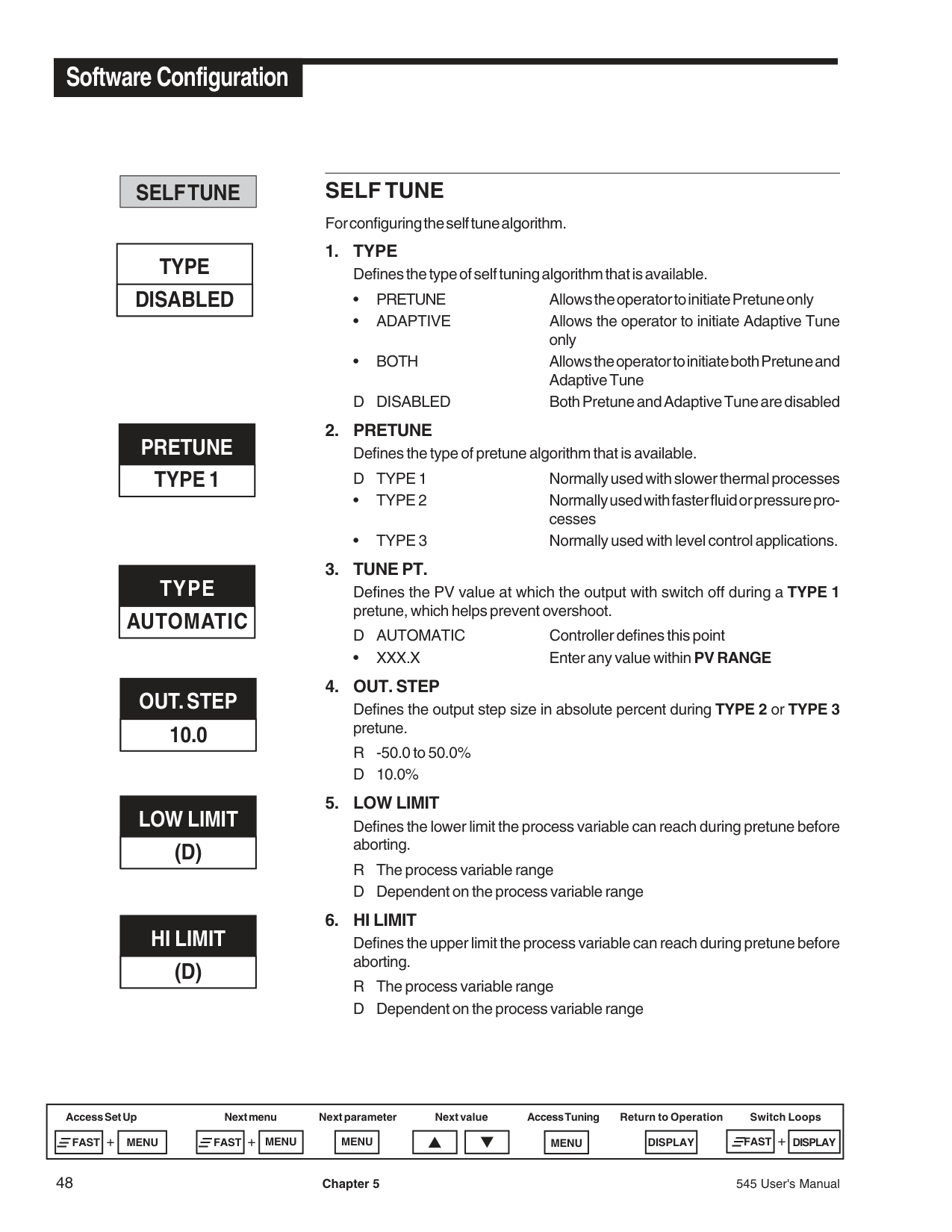
D DISABLED Both Pretune and Adaptive Tune are disabled
Defines the PV value at which the output with switch off during a TYPE 1 pretune, which helps prevent overshoot.
D AUTOMATIC Controller defines this point
• XXX.X Enter any value within PV RANGE
Defines the output step size in absolute percent during TYPE 2 or TYPE 3 pretune.
R -50.0 to 50.0% D 10.0%
Defines the lower limit the process variable can reach during pretune before aborting.
R The process variable range D Dependent on the process variable range
########### TYPE DISABLED
########### PRETUNE TYPE 1
########### TYPE AUTOMATIC
########### OUT. STEP 10.0
########### LOW LIMIT (D)
########### HI LIMIT (D)
Defines the upper limit the process variable can reach during pretune before aborting.
R The process variable range
• MANUAL D AUTOMATIC
########### SPECIAL
For configuring special features.
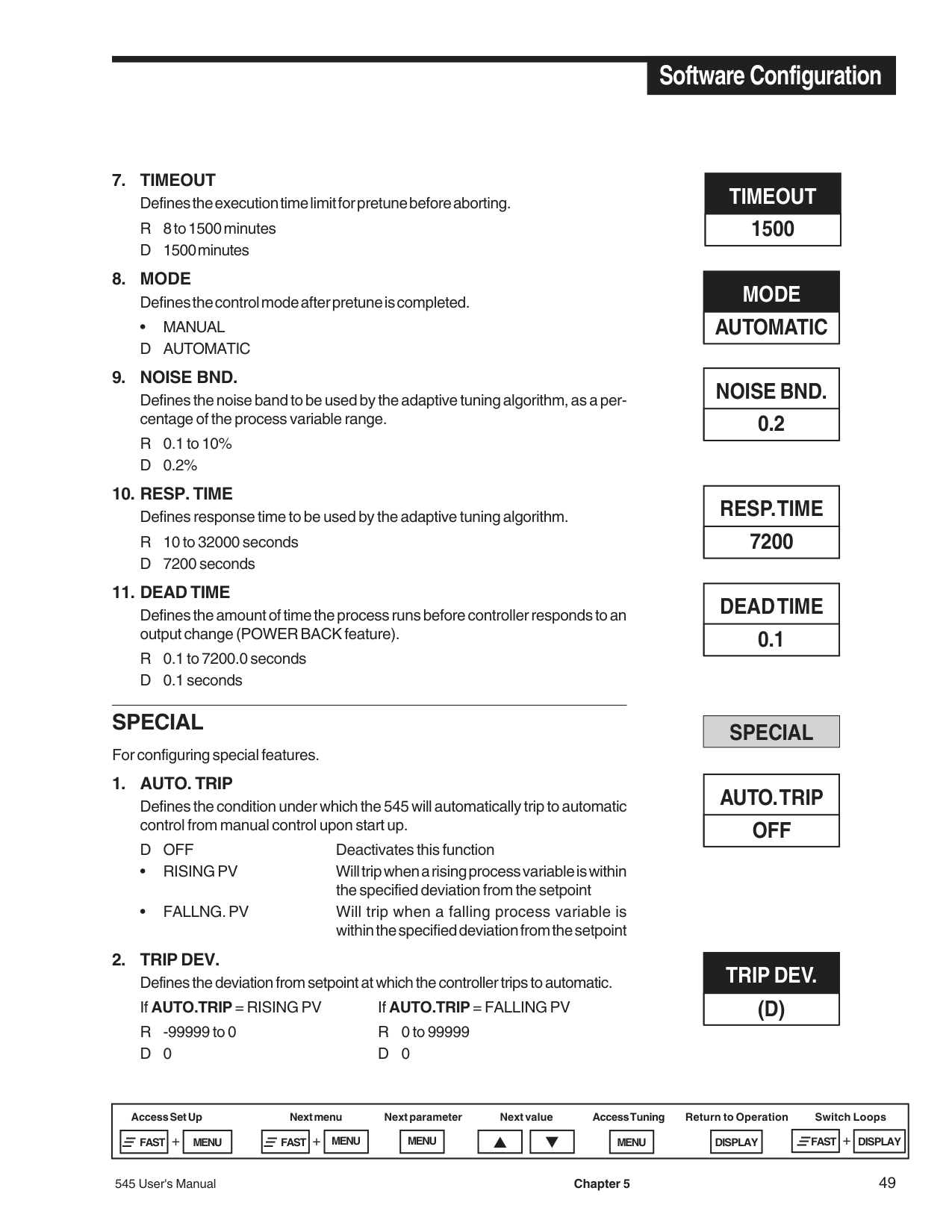
########### TIMEOUT 1500
########### MODE AUTOMATIC
########### NOISE BND. 0.2
########### RESP. TIME 7200
########### DEAD TIME 0.1
########### SPECIAL
########### AUTO. TRIP OFF
########### TRIP DEV. (D)
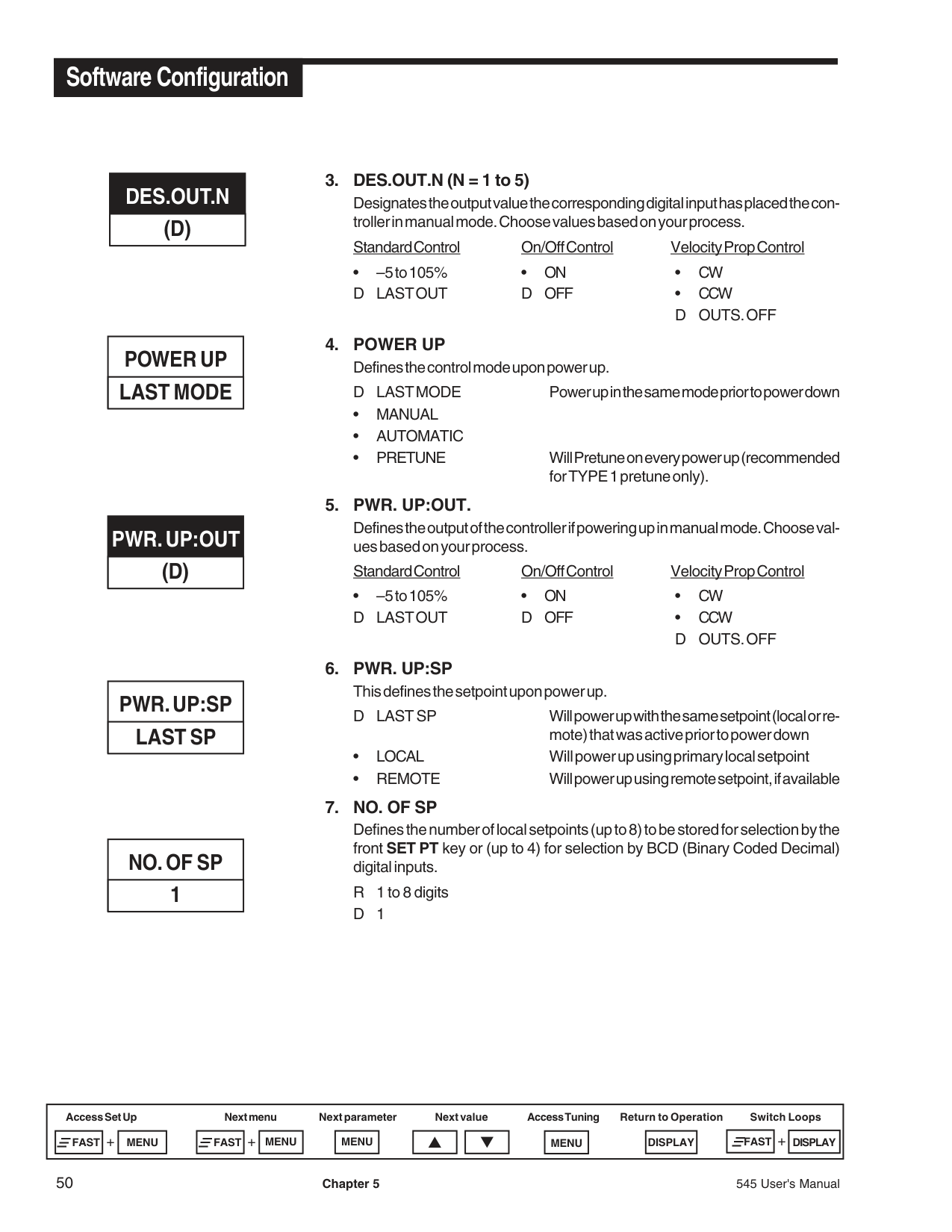
########### DES.OUT.N (D)
########### POWER UP LAST MODE
########### PWR. UP:OUT (D)
########### PWR. UP:SP LAST SP
########### NO. OF SP 1
Designates the output value the corresponding digital input has placed the controller in manual mode. Choose values based on your process.
Standard Control On/Off Control Velocity Prop Control
• –5 to 105% • ON • CW D LAST OUT D OFF • CCW
D OUTS. OFF
Defines the output of the controller if powering up in manual mode. Choose values based on your process.
Standard Control On/Off Control Velocity Prop Control
• –5 to 105% • ON • CW D LAST OUT D OFF • CCW
D OUTS. OFF
D LAST SP Will power up with the same setpoint (local or remote) that was active prior to power down
########### SECURITY
For configuring the security function. (GLOBAL)
• LOCKED
• LOCKED
• LOCKED
• LOCKED
• LOCKED
• LOCKED
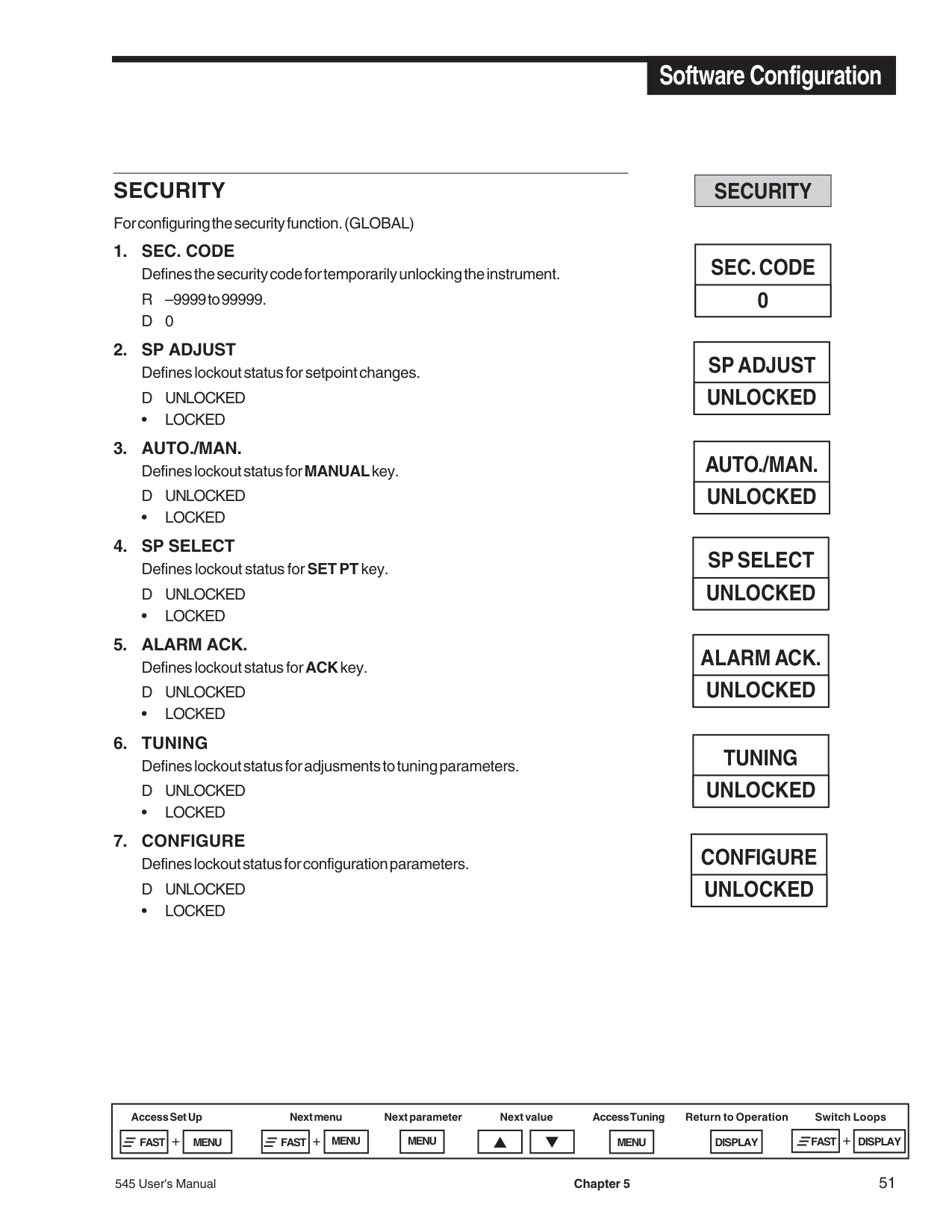
########### SECURITY
########### SEC. CODE 0
########### SP ADJUST UNLOCKED
########### AUTO./MAN. UNLOCKED
########### SP SELECT UNLOCKED
########### ALARM ACK. UNLOCKED
########### TUNING UNLOCKED
########### CONFIGURE UNLOCKED
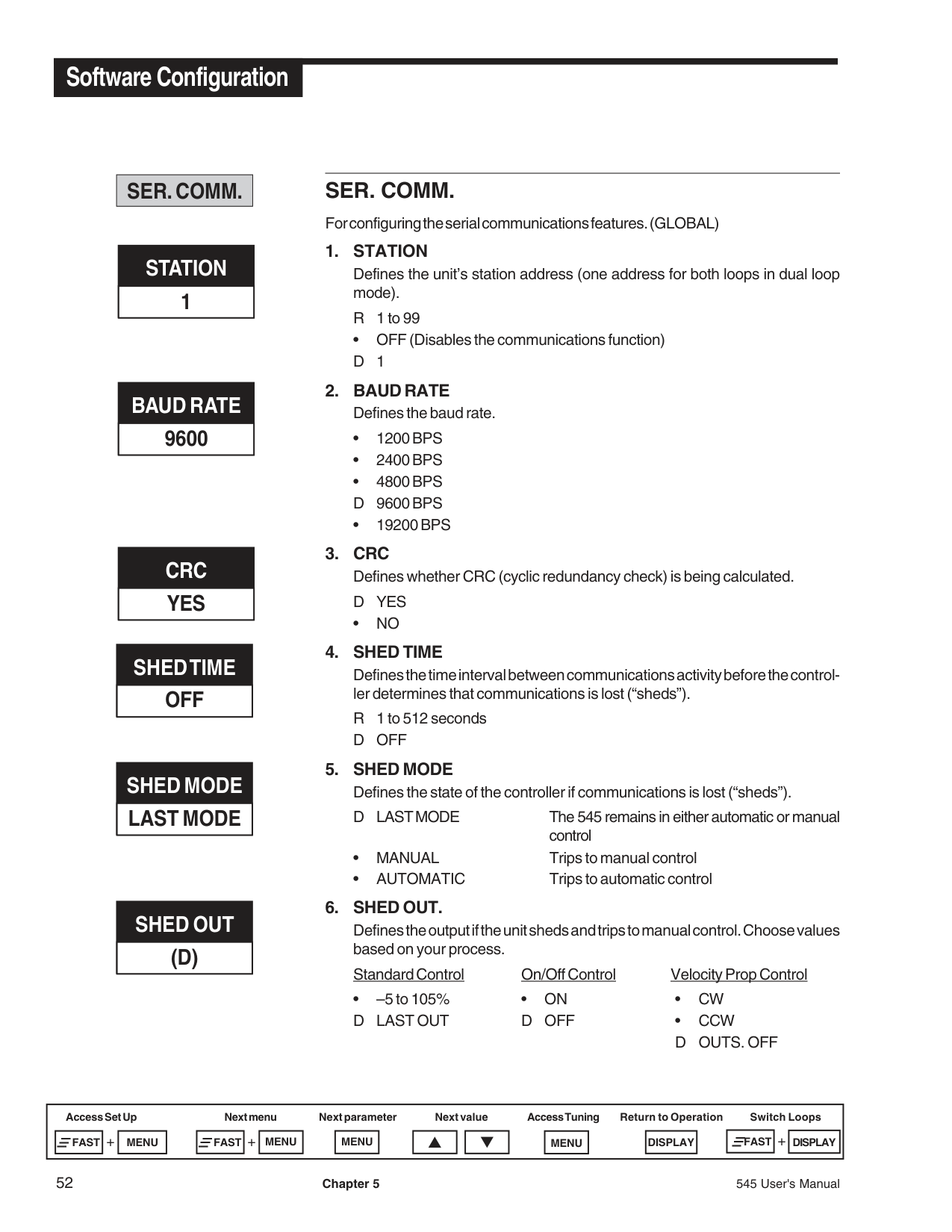
########### SER. COMM.
########### STATION 1
########### BAUD RATE 9600
########### CRC YES
########### SHED TIME OFF
########### SHED MODE LAST MODE
########### SHED OUT (D)
########### SER. COMM.
For configuring the serial communications features. (GLOBAL)
• OFF (Disables the communications function) D1
•NO
D LAST MODE The 545 remains in either automatic or manual control
Defines the output if the unit sheds and trips to manual control. Choose values based on your process.
Standard Control On/Off Control Velocity Prop Control
• –5 to 105% • ON • CW D LAST OUT D OFF • CCW
D OUTS. OFF
prior to communications being lost.
• DESIG. SP Goes to a designated setpoint value if communications is lost.
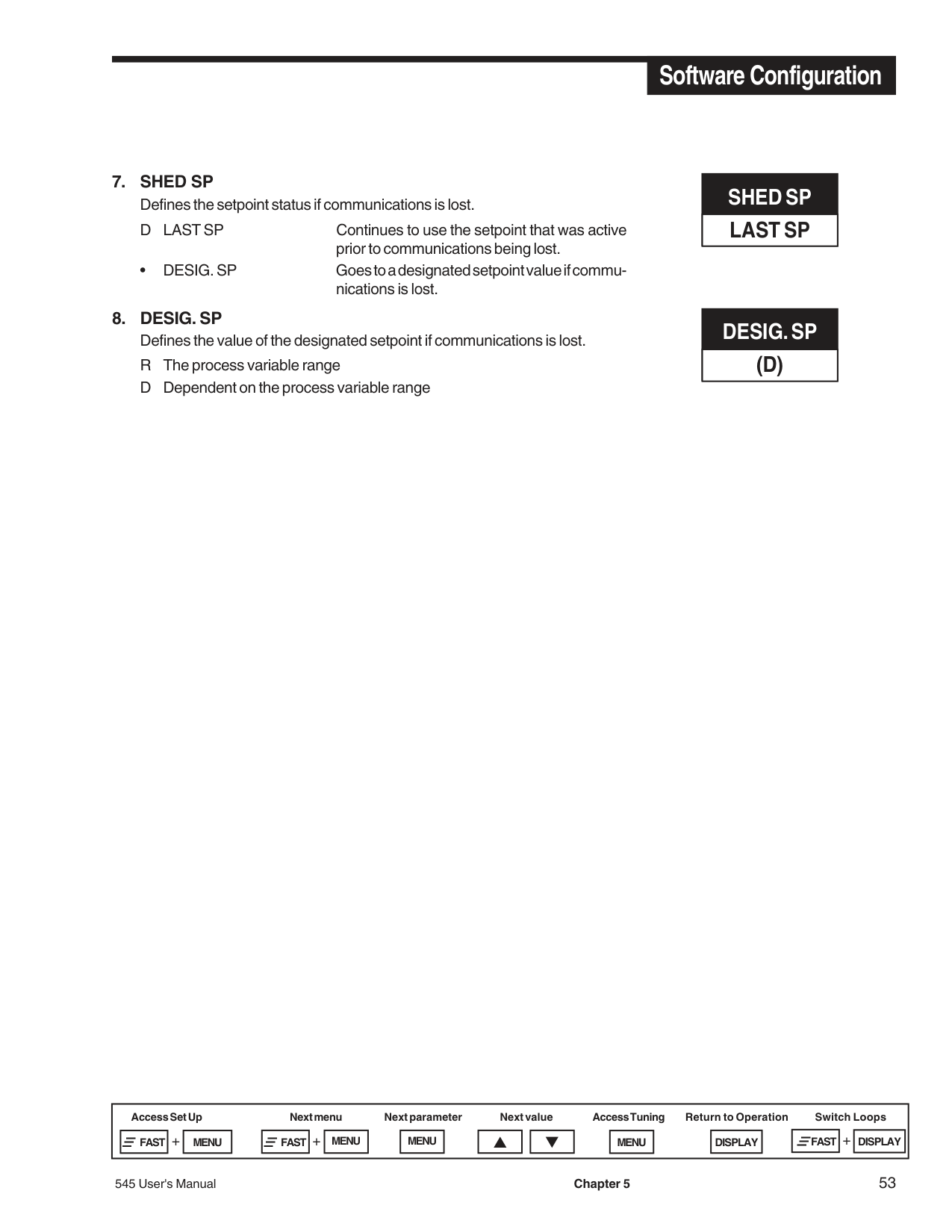
########### SHED SP LAST SP
########### DESIG. SP (D)
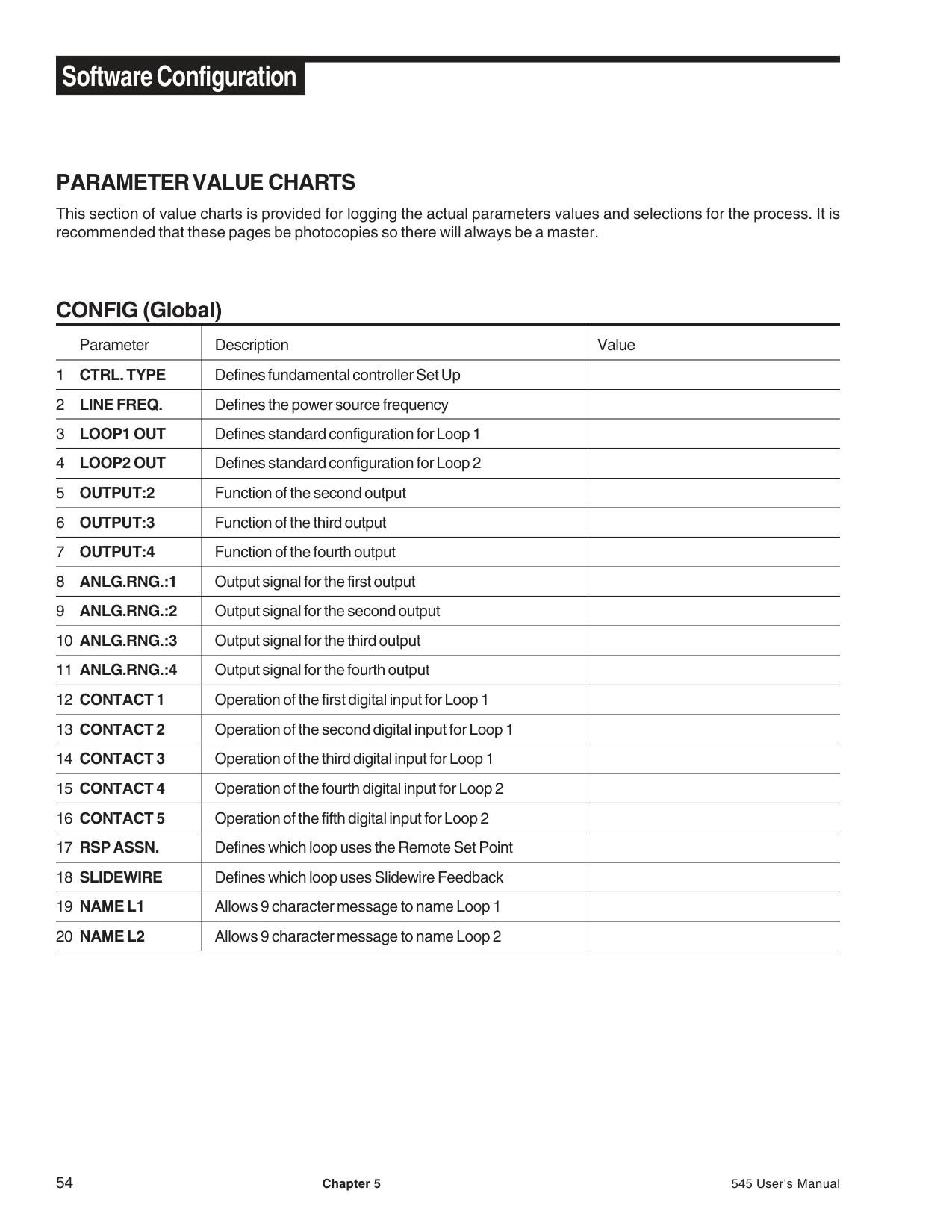
########### PARAMETER VALUE CHARTS
This section of value charts is provided for logging the actual parameters values and selections for the process. It is recommended that these pages be photocopies so there will always be a master.
########### CONFIG (Global)
|Parameter
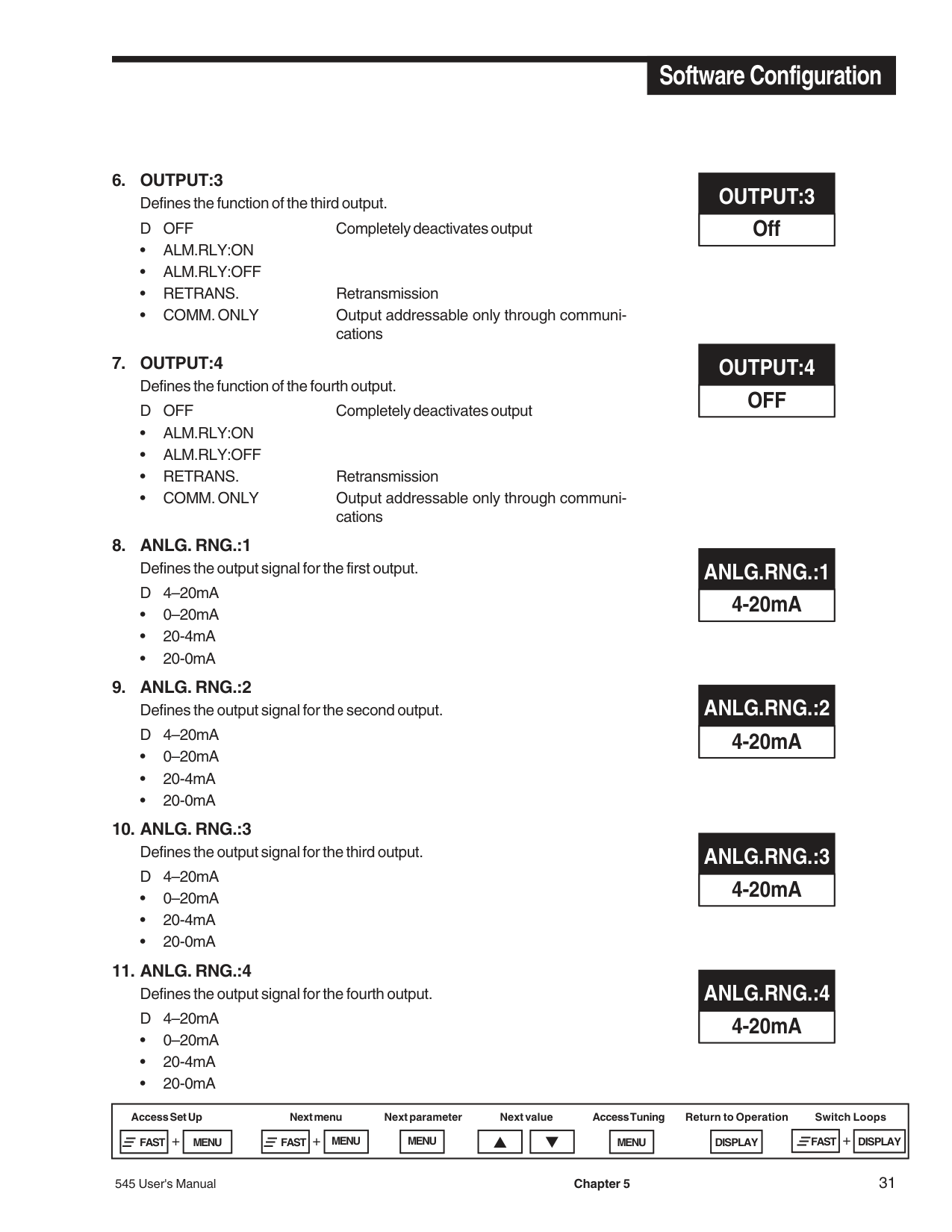
|Description|Value| |---|---|---| |1 CTRL. TYPE|Defines fundamental controller Set Up| | |2 LINE FREQ.|Defines the power source frequency| | |3 LOOP1 OUT|Defines standard configuration for Loop 1| | |4 LOOP2 OUT|Defines standard configuration for Loop 2| | |5 OUTPUT:2|Function of the second output| | |6 OUTPUT:3|Function of the third output| | |7 OUTPUT:4|Function of the fourth output| | |8 ANLG.RNG.:1|Output signal for the first output| | |9 ANLG.RNG.:2|Output signal for the second output| | |10 ANLG.RNG.:3|Output signal for the third output| | |11 ANLG.RNG.:4|Output signal for the fourth output| | |12 CONTACT 1|Operation of the first digital input for Loop 1| | |13 CONTACT 2|Operation of the second digital input for Loop 1| | |14 CONTACT 3|Operation of the third digital input for Loop 1| | |15 CONTACT 4|Operation of the fourth digital input for Loop 2| | |16 CONTACT 5|Operation of the fifth digital input for Loop 2| | |17 RSP ASSN.|Defines which loop uses the Remote Set Point| | |18 SLIDEWIRE|Defines which loop uses Slidewire Feedback| | |19 NAME L1|Allows 9 character message to name Loop 1| | |20 NAME L2|Allows 9 character message to name Loop 2| |
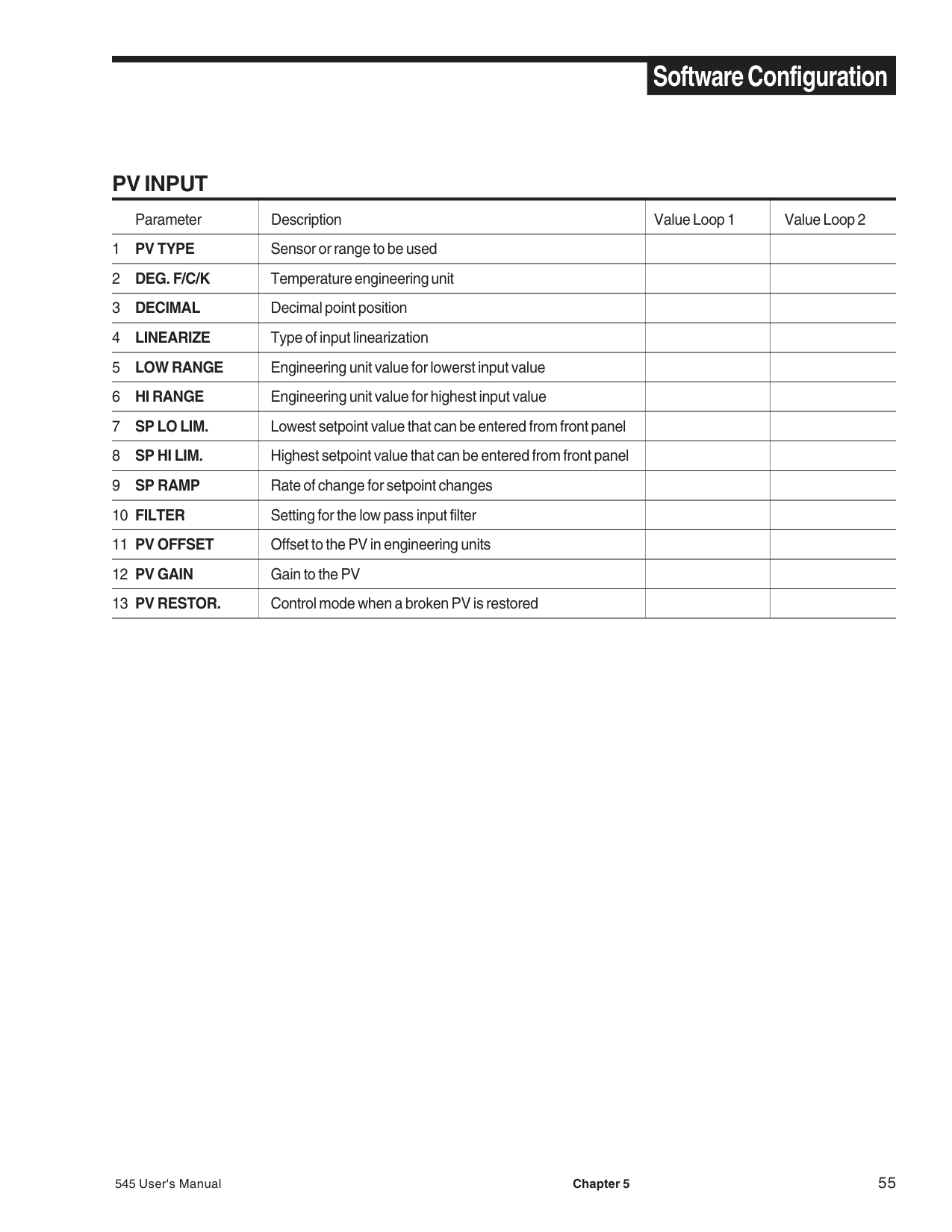
########### PV INPUT
|Parameter|Description|Value Loop 1|Value Loop 2| |---|---|---|---| |1 PV TYPE|Sensor or range to be used| | | |2 DEG. F/C/K|Temperature engineering unit| | | |3 DECIMAL|Decimal point position| | | |4 LINEARIZE|Type of input linearization| | | |5 LOW RANGE|Engineering unit value for lowerst input value| | | |6 HI RANGE|Engineering unit value for highest input value| | | |7 SP LO LIM.|Lowest setpoint value that can be entered from front panel| | | |8 SP HI LIM.|Highest setpoint value that can be entered from front panel| | | |9 SP RAMP|Rate of change for setpoint changes| | |
|10 FILTER|Setting for the low pass input filter| | | |11 PV OFFSET|Offset to the PV in engineering units| | | |12 PV GAIN|Gain to the PV| | | |13 PV RESTOR.|Control mode when a broken PV is restored| | |
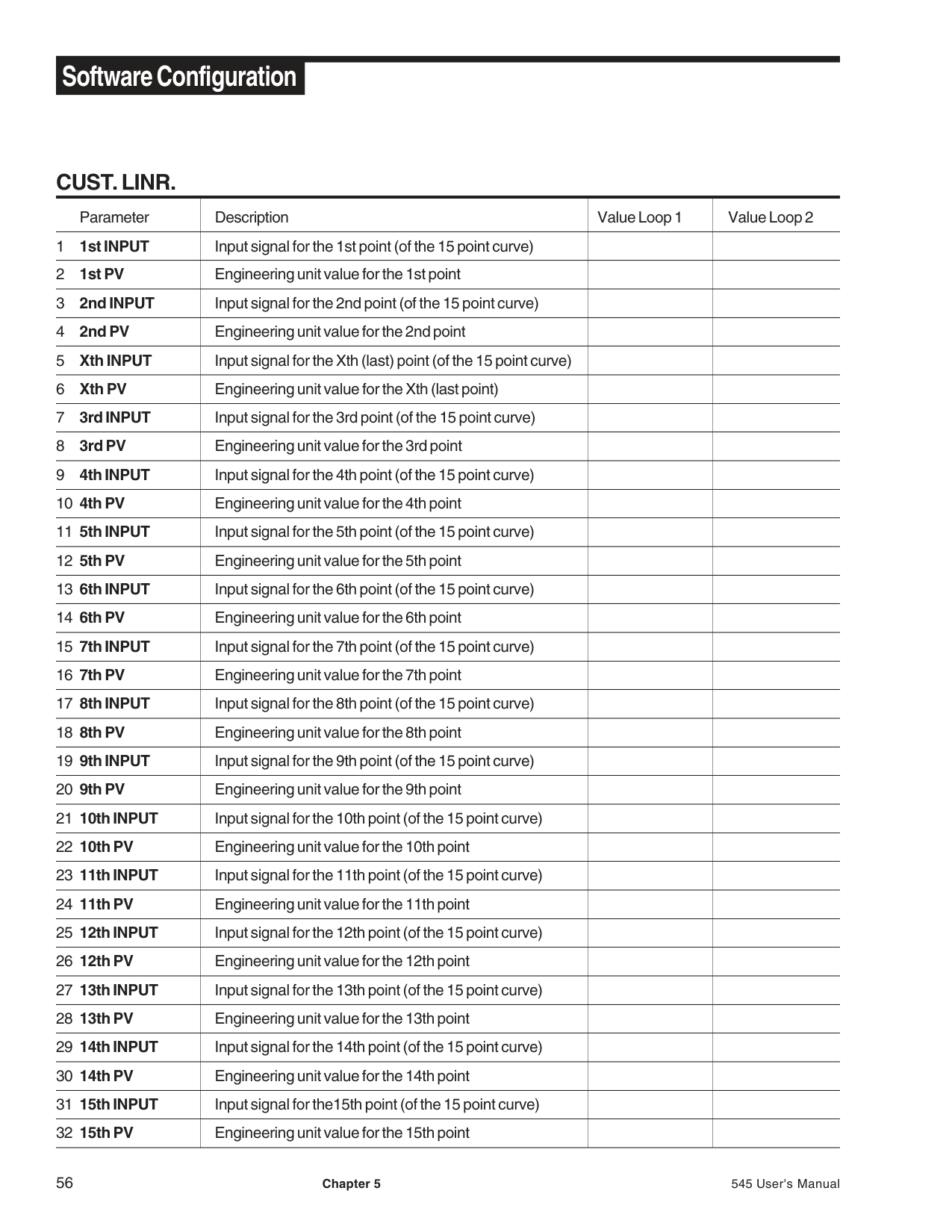
########### CUST. LINR.
|Parameter|Description|Value Loop 1|Value Loop 2| |---|---|---|---| |1 1st INPUT|Input signal for the 1st point (of the 15 point curve)| | | |2 1st PV|Engineering unit value for the 1st point| | | |3 2nd INPUT|Input signal for the 2nd point (of the 15 point curve)| | | |4 2nd PV|Engineering unit value for the 2nd point| | | |5 Xth INPUT|Input signal for the Xth (last) point (of the 15 point curve)| | | |6 Xth PV|Engineering unit value for the Xth (last point)| | | |7 3rd INPUT|Input signal for the 3rd point (of the 15 point curve)| | | |8 3rd PV|Engineering unit value for the 3rd point| | | |9 4th INPUT|Input signal for the 4th point (of the 15 point curve)| | | |10 4th PV|Engineering unit value for the 4th point| | | |11 5th INPUT|Input signal for the 5th point (of the 15 point curve)| | | |12 5th PV|Engineering unit value for the 5th point| | | |13 6th INPUT|Input signal for the 6th point (of the 15 point curve)| | | |14 6th PV|Engineering unit value for the 6th point| | | |15 7th INPUT|Input signal for the 7th point (of the 15 point curve)| | | |16 7th PV|Engineering unit value for the 7th point| | | |17 8th INPUT|Input signal for the 8th point (of the 15 point curve)| | | |18 8th PV|Engineering unit value for the 8th point| | | |19 9th INPUT|Input signal for the 9th point (of the 15 point curve)| | | |20 9th PV|Engineering unit value for the 9th point| | | |21 10th INPUT|Input signal for the 10th point (of the 15 point curve)| | | |22 10th PV|Engineering unit value for the 10th point| | | |23 11th INPUT|Input signal for the 11th point (of the 15 point curve)| | | |24 11th PV|Engineering unit value for the 11th point| | | |25 12th INPUT|Input signal for the 12th point (of the 15 point curve)| | | |26 12th PV|Engineering unit value for the 12th point| | | |27 13th INPUT|Input signal for the 13th point (of the 15 point curve)| | | |28 13th PV|Engineering unit value for the 13th point| | | |29 14th INPUT|Input signal for the 14th point (of the 15 point curve)| | | |30 14th PV|Engineering unit value for the 14th point| | | |31 15th INPUT|Input signal for the15th point (of the 15 point curve)| | | |32 15th PV|Engineering unit value for the 15th point| | |
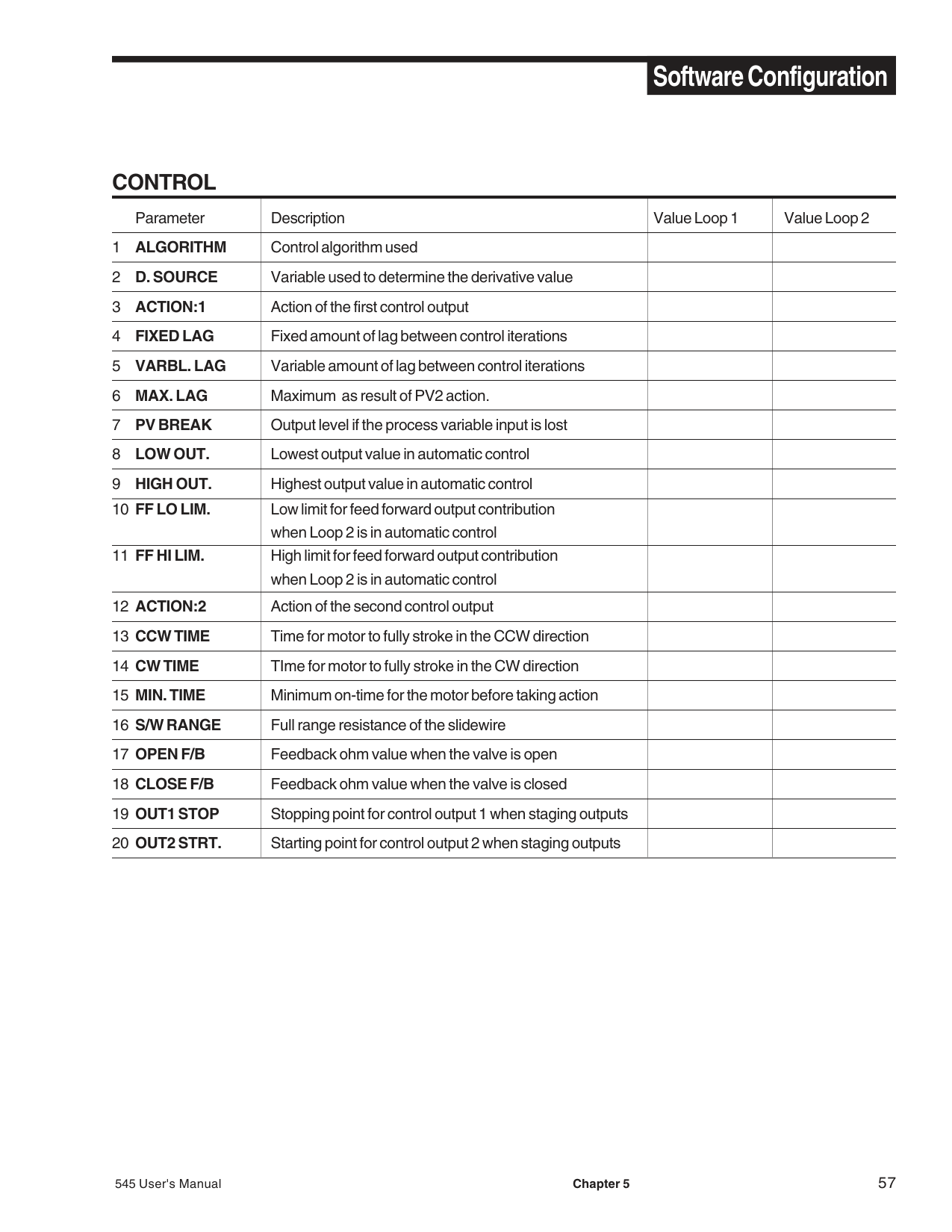
########### CONTROL
|Parameter|Description|Value Loop 1|Value Loop 2| |---|---|---|---|
|1 ALGORITHM|Control algorithm used| | | |2 D. SOURCE|Variable used to determine the derivative value| | | |3 ACTION:1|Action of the first control output| | | |4 FIXED LAG|Fixed amount of lag between control iterations| | | |5 VARBL. LAG|Variable amount of lag between control iterations| | | |6 MAX. LAG|Maximum as result of PV2 action.| | | |7 PV BREAK|Output level if the process variable input is lost| | | |8 LOW OUT.|Lowest output value in automatic control| | | |9 HIGH OUT.|Highest output value in automatic control| | | |10 FF LO LIM.
|Low limit for feed forward output contribution when Loop 2 is in automatic control| | | |11 FF HI LIM.|High limit for feed forward output contribution when Loop 2 is in automatic control| | | |12 ACTION:2|Action of the second control output| | | |13 CCW TIME|Time for motor to fully stroke in the CCW direction| | | |14 CW TIME|TIme for motor to fully stroke in the CW direction| | | |15 MIN. TIME|Minimum on-time for the motor before taking action| | | |16 S/W RANGE|Full range resistance of the slidewire| | | |17 OPEN F/B|Feedback ohm value when the valve is open| | | |18 CLOSE F/B|Feedback ohm value when the valve is closed| | | |19 OUT1 STOP|Stopping point for control output 1 when staging outputs| | | |20 OUT2 STRT.|Starting point for control output 2 when staging outputs| | |
########### ALARMS
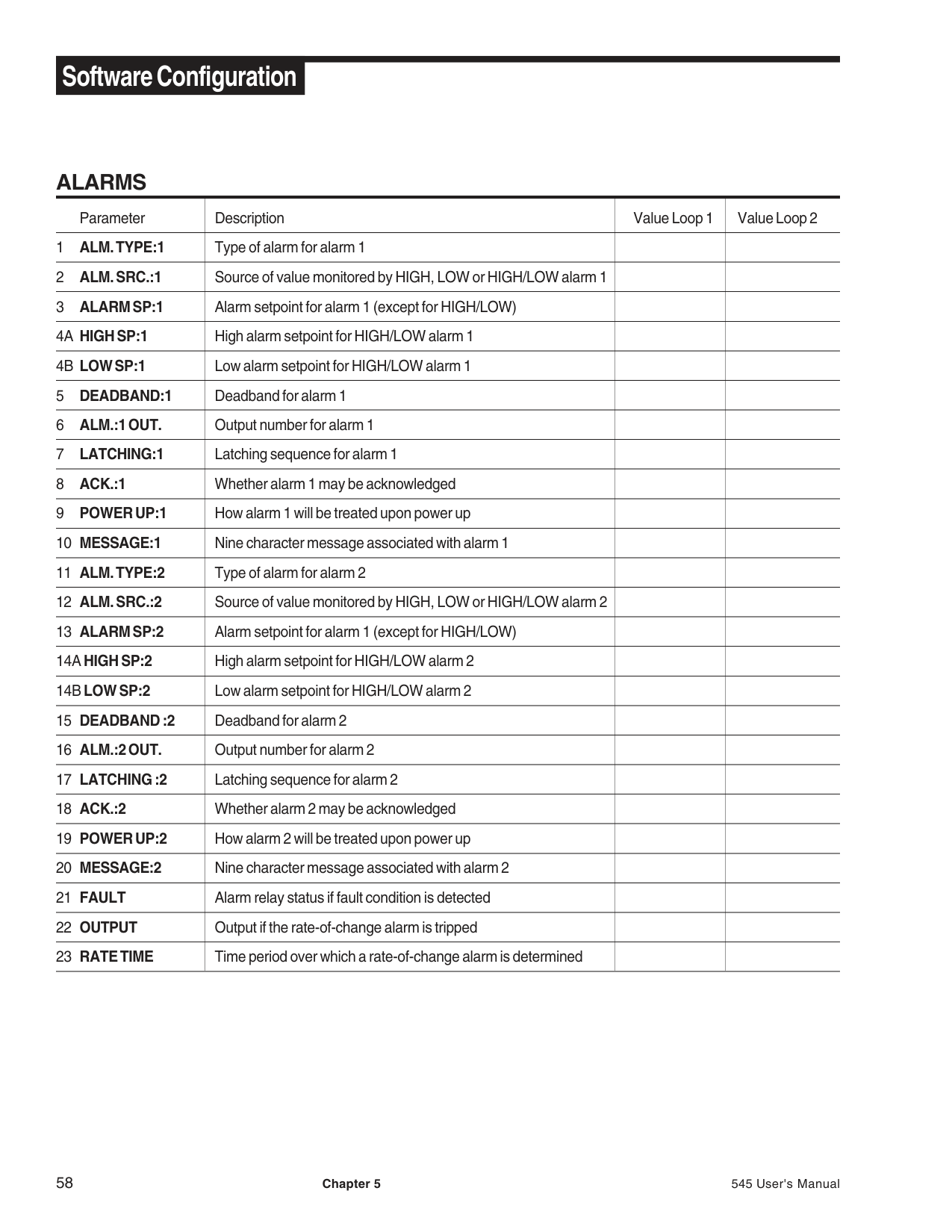
|Parameter|Description|Value Loop 1|Value Loop 2| |---|---|---|---| |1 ALM. TYPE:1|Type of alarm for alarm 1| | | |2 ALM. SRC.:1|Source of value monitored by HIGH, LOW or HIGH/LOW alarm 1| | | |3 ALARM SP:1|Alarm setpoint for alarm 1 (except for HIGH/LOW)| | | |4A HIGH SP:1|High alarm setpoint for HIGH/LOW alarm 1| | | |4B LOW SP:1|Low alarm setpoint for HIGH/LOW alarm 1| | | |5 DEADBAND:1|Deadband for alarm 1| | | |6 ALM.:1 OUT.|Output number for alarm 1| | | |7 LATCHING:1|Latching sequence for alarm 1| | | |8 ACK.:1|Whether alarm 1 may be acknowledged| | | |9 POWER UP:1|How alarm 1 will be treated upon power up| | | |10 MESSAGE:1|Nine character message associated with alarm 1| | | |11 ALM. TYPE:2|Type of alarm for alarm 2| | | |12 ALM. SRC.:2|Source of value monitored by HIGH, LOW or HIGH/LOW alarm 2| | | |13 ALARM SP:2|Alarm setpoint for alarm 1 (except for HIGH/LOW)| | | |14AHIGH SP:2|High alarm setpoint for HIGH/LOW alarm 2| | | |14BLOW SP:2|Low alarm setpoint for HIGH/LOW alarm 2| | | |15 DEADBAND :2|Deadband for alarm 2| | | |16 ALM.:2 OUT.|Output number for alarm 2| | | |17 LATCHING :2|Latching sequence for alarm 2| | | |18 ACK.:2|Whether alarm 2 may be acknowledged| | | |19 POWER UP:2|How alarm 2 will be treated upon power up| | | |20 MESSAGE:2|Nine character message associated with alarm 2| | |
|21 FAULT|Alarm relay status if fault condition is detected| | | |22 OUTPUT|Output if the rate-of-change alarm is tripped| | | |23 RATE TIME|Time period over which a rate-of-change alarm is determined| | |
########### REM. SETPT. (Global)
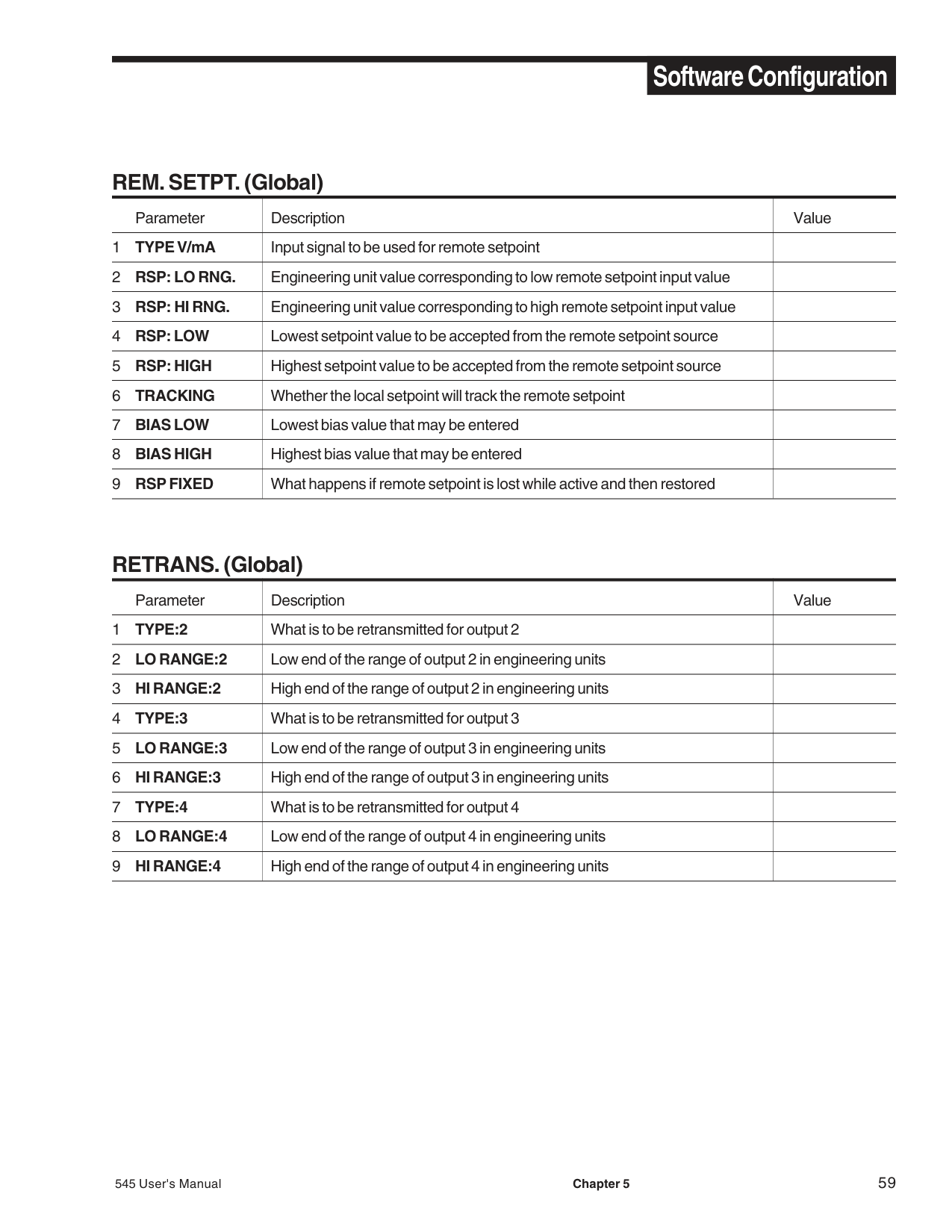
|Parameter|Description|Value| |---|---|---| |1 TYPE V/mA|Input signal to be used for remote setpoint| | |2 RSP: LO RNG.|Engineering unit value corresponding to low remote setpoint input value| | |3 RSP: HI RNG.|Engineering unit value corresponding to high remote setpoint input value| | |4 RSP: LOW|Lowest setpoint value to be accepted from the remote setpoint source| | |5 RSP: HIGH|Highest setpoint value to be accepted from the remote setpoint source| | |6 TRACKING|Whether the local setpoint will track the remote setpoint| | |7 BIAS LOW|Lowest bias value that may be entered| | |8 BIAS HIGH|Highest bias value that may be entered| | |9 RSP FIXED|What happens if remote setpoint is lost while active and then restored| |
########### RETRANS. (Global)
|Parameter|Description|Value| |---|---|---| |1 TYPE:2|What is to be retransmitted for output 2| | |2 LO RANGE:2|Low end of the range of output 2 in engineering units| | |3 HI RANGE:2|High end of the range of output 2 in engineering units| | |4 TYPE:3|What is to be retransmitted for output 3| | |5 LO RANGE:3|Low end of the range of output 3 in engineering units| | |6 HI RANGE:3|High end of the range of output 3 in engineering units| | |7 TYPE:4|What is to be retransmitted for output 4| | |8 LO RANGE:4|Low end of the range of output 4 in engineering units| | |9 HI RANGE:4|High end of the range of output 4 in engineering units| |
########### SELF TUNE
|Parameter|Description|Value Loop 1|Value Loop 2| |---|---|---|---| |1 TYPE|Type of self tuning algorithm that is available| | | |2 PRETUNE|Output step size in absolute percent| | | |3 TUNE PT.|TYPE 1: Defines the PV value at which the output switches off| | | |4 OUT. STEP|TYPE 2 & 3: Defines output step size in absolute percent| | | |5 LOW LIMIT|Lower limit PV can reach during Pretune before aborting| | | |6 HI LIMIT|Upper limit PV can reach during Pretune before aborting| | | |7 TIMEOUT|Execution time limit for Pretune before aborting| | | |8 MODE|Control mode after Pretune is completed or aborted| | | |9 NOISE BND.|Noise band to be used by adaptive tuning algorithm| | |
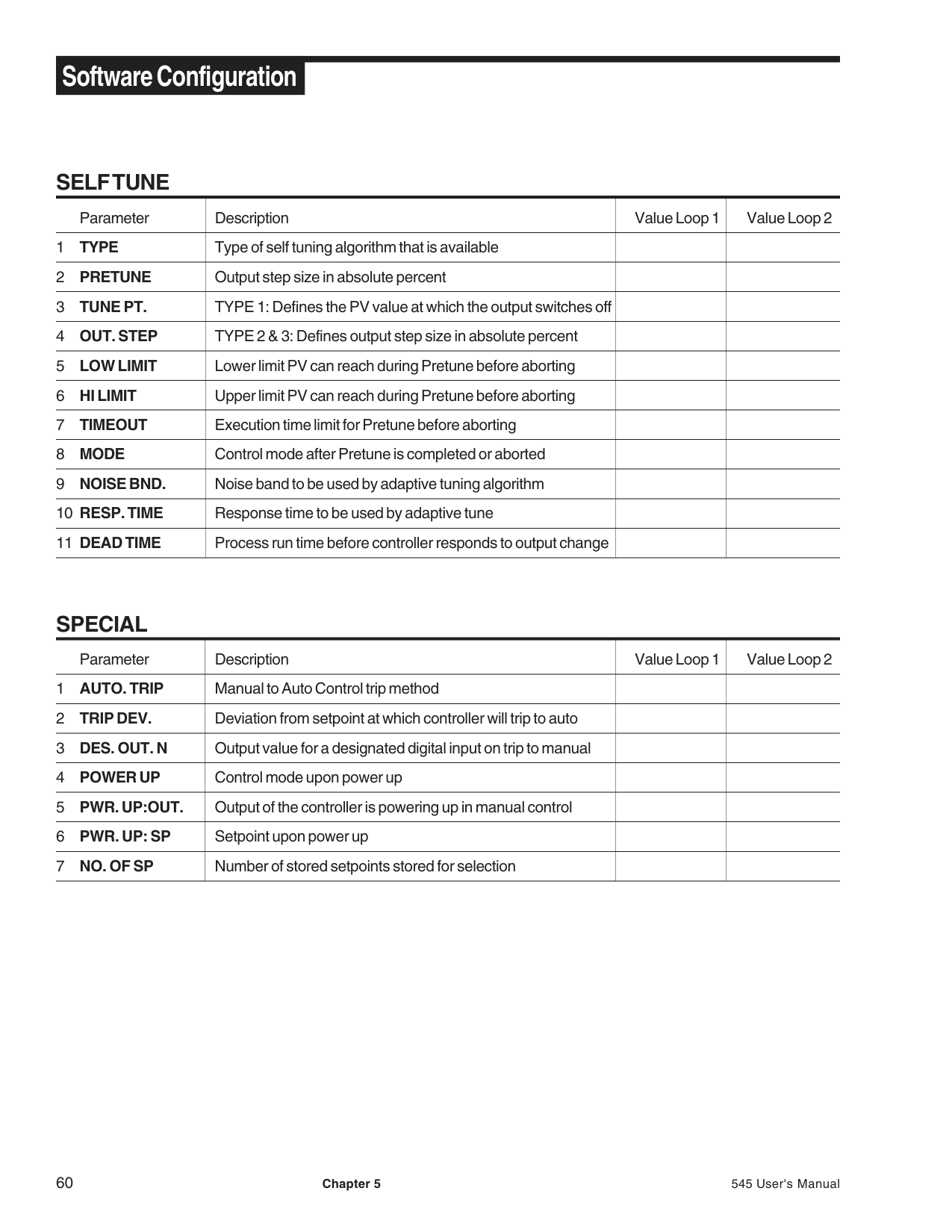
|10 RESP. TIME|Response time to be used by adaptive tune| | | |11 DEAD TIME|Process run time before controller responds to output change| | |
########### SPECIAL
|Parameter|Description|Value Loop 1|Value Loop 2| |---|---|---|---| |1 AUTO. TRIP|Manual to Auto Control trip method| | | |2 TRIP DEV.|Deviation from setpoint at which controller will trip to auto| | | |3 DES. OUT. N|Output value for a designated digital input on trip to manual| | | |4 POWER UP|Control mode upon power up| | | |5 PWR. UP:OUT.|Output of the controller is powering up in manual control| | | |6 PWR. UP: SP|Setpoint upon power up| | | |7 NO. OF SP|Number of stored setpoints stored for selection| | |
########### SECURITY (Global)
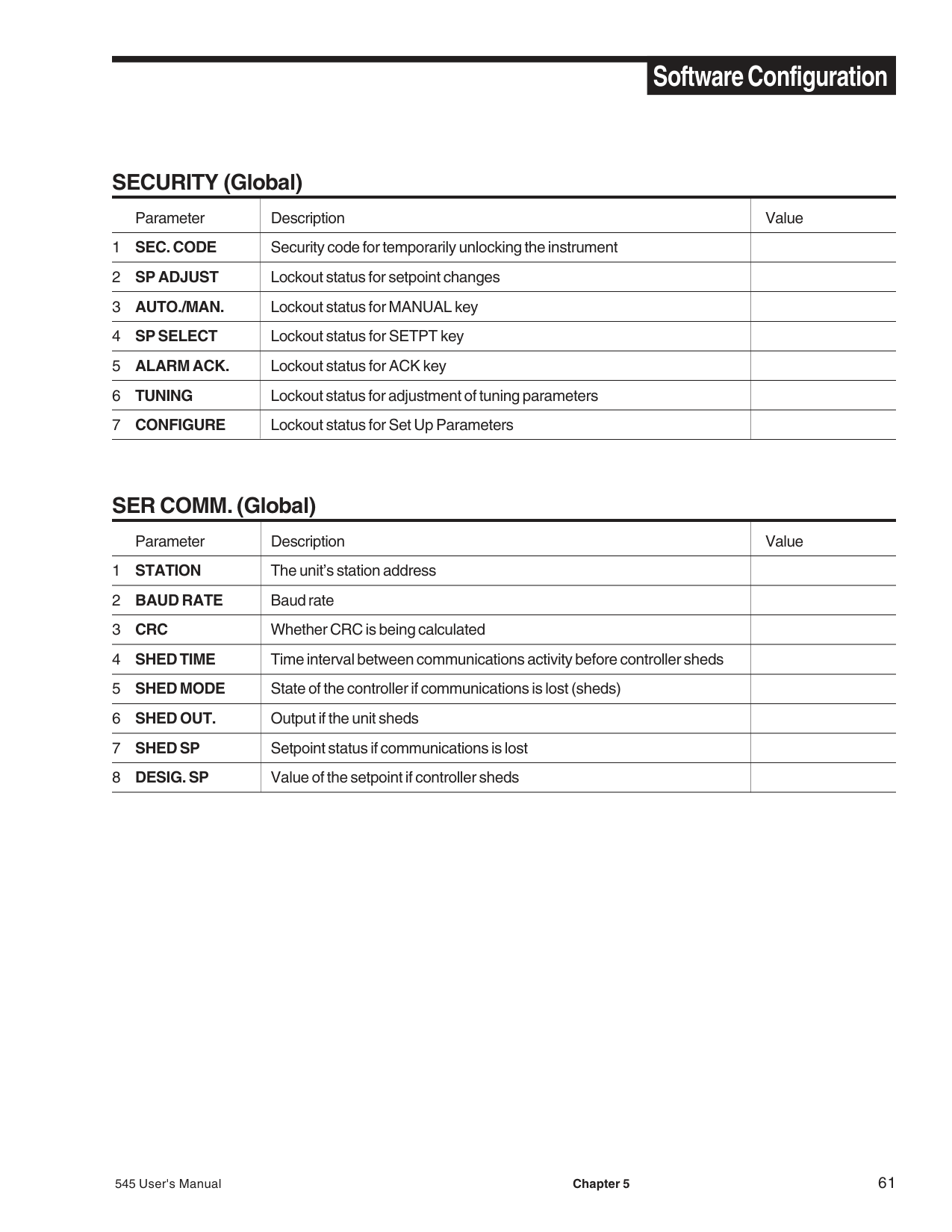
|Parameter|Description|Value| |---|---|---| |1 SEC. CODE|Security code for temporarily unlocking the instrument| | |2 SP ADJUST|Lockout status for setpoint changes| | |3 AUTO./MAN.|Lockout status for MANUAL key| | |4 SP SELECT|Lockout status for SETPT key| | |5 ALARM ACK.|Lockout status for ACK key| | |6 TUNING|Lockout status for adjustment of tuning parameters| | |7 CONFIGURE|Lockout status for Set Up Parameters| |
########### SER COMM. (Global)
|Parameter|Description|Value| |---|---|---| |1 STATION|The unit’s station address| | |2 BAUD RATE|Baud rate| | |3 CRC|Whether CRC is being calculated| | |4 SHED TIME|Time interval between communications activity before controller sheds| | |5 SHED MODE|State of the controller if communications is lost (sheds)| | |6 SHED OUT.|Output if the unit sheds| | |7 SHED SP|Setpoint status if communications is lost| | |8 DESIG. SP|Value of the setpoint if controller sheds| |
###### CHAPTER 6 TUNING
########### OVERVIEW
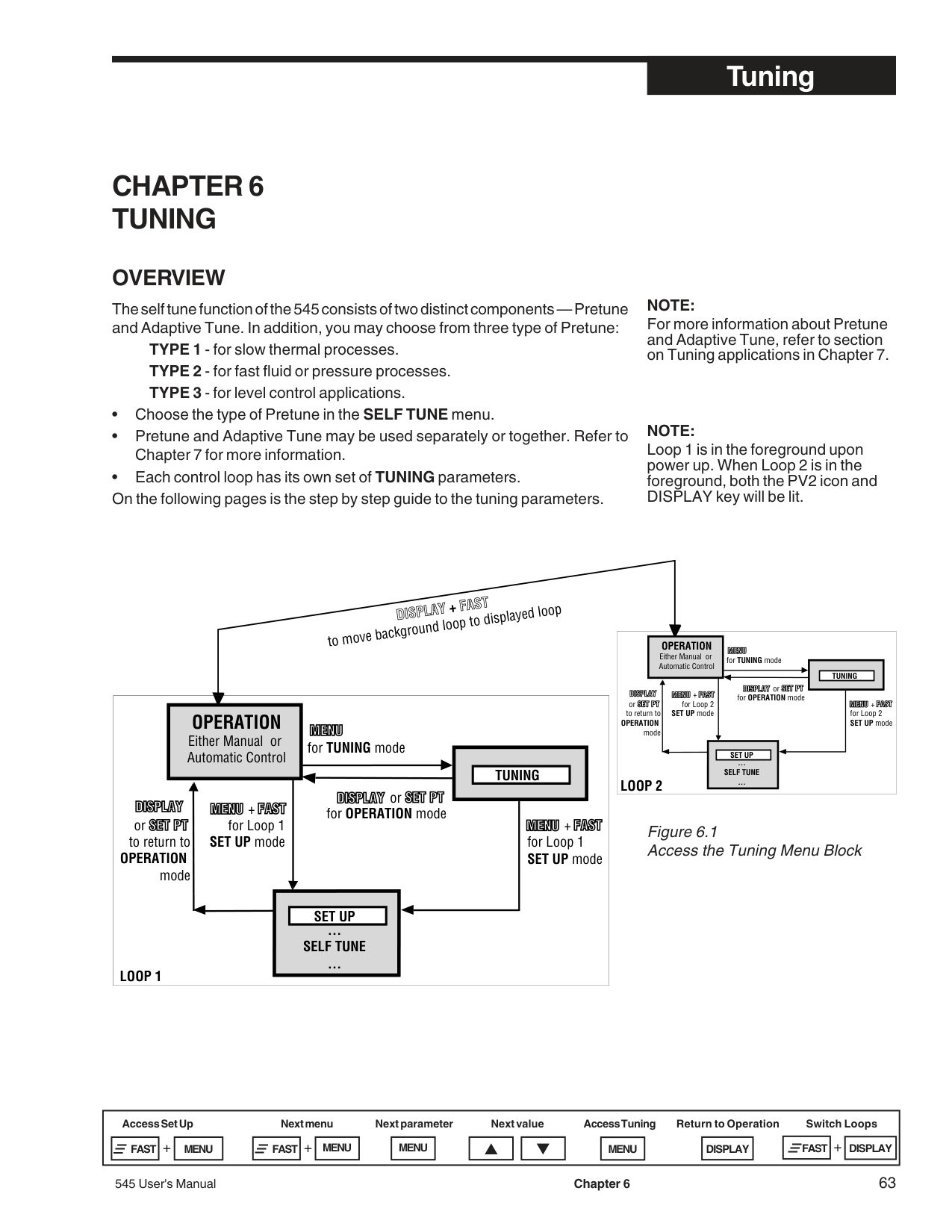
The self tune function of the 545 consists of two distinct components — Pretune and Adaptive Tune. In addition, you may choose from three type of Pretune:
NOTE: For more information about Pretune and Adaptive Tune, refer to section on Tuning applications in Chapter 7.
NOTE: Loop 1 is in the foreground upon power up. When Loop 2 is in the foreground, both the PV2 icon and DISPLAY key will be lit.
DISPLAY+FASTto move background loop to displayed loop
OPERATION Either Manual or Automatic Control
for TUNING mode
TUNING
or or
+
for OPERATION mode
for Loop 1 SET UP modeto return to
+
for Loop 1 SET UP mode
################################################ OPERATION
mode
SET UP
… SELF TUNE
… LOOP 1
OPERATION Either Manual or Automatic Control

for TUNING mode
TUNING
or or
+
for OPERATION mode
for Loop 2
+
SET UP modeto return to OPERATION
for Loop 2 SET UP mode
mode
SET UP
… SELF TUNE …
LOOP 2
############################## Figure 6.1 Access the Tuning Menu Block
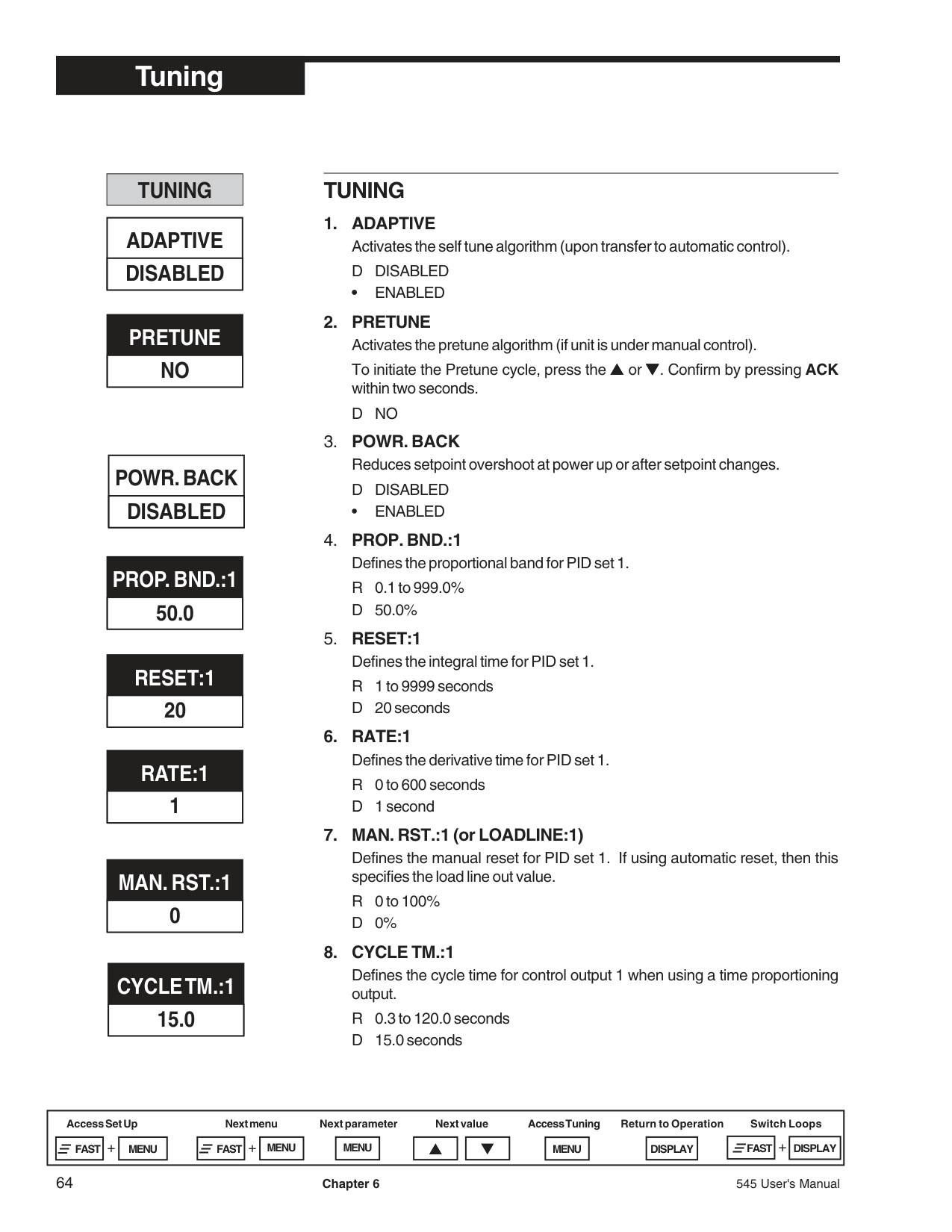
########### TUNING
|ADAPTIVE DISABLED| |---|
########### PRETUNE NO
|POWR. BACK DISABLED| |---|
########### PROP. BND.:1 50.0
########### RESET:1 20
RATE:1
########### 1
########### MAN. RST.:1
########### 0
########### CYCLE TM.:115.0
########### TUNING
• ENABLED
To initiate the Pretune cycle, press the ▲▲▲ or ▼▼▼. Confirm by pressing ACK within two seconds.
DNO
• ENABLED
Defines the manual reset for PID set 1. If using automatic reset, then this specifies the load line out value.
R 0 to 100% D0%
Defines the cycle time for control output 1 when using a time proportioning output.
R 0.3 to 120.0 seconds D 15.0 seconds
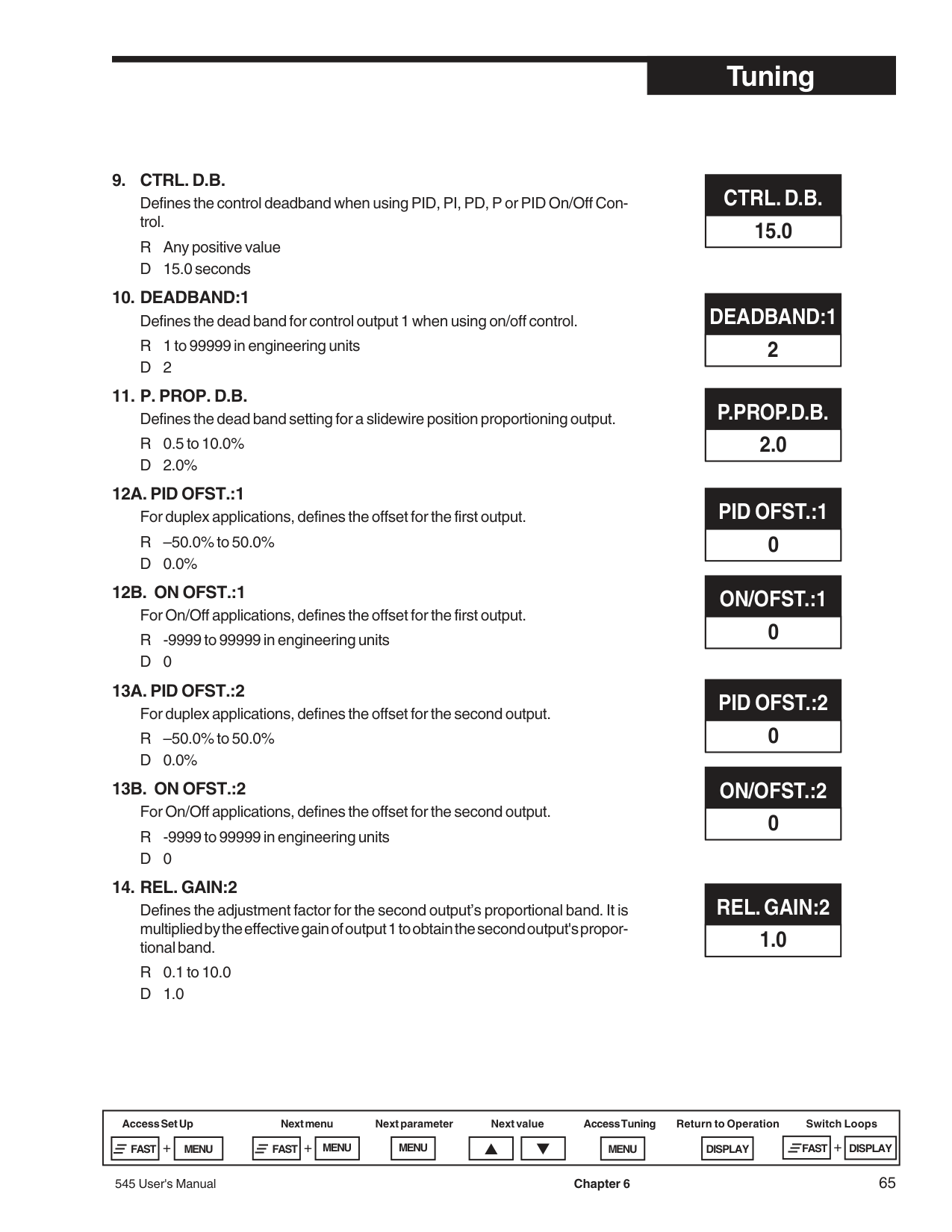
Defines the control deadband when using PID, PI, PD, P or PID On/Off Control.
R Any positive value D 15.0 seconds
13A. PID OFST.:2 For duplex applications, defines the offset for the second output. R –50.0% to 50.0% D 0.0%
########### CTRL. D.B. 15.0
########### DEADBAND:1 2
########### P.PROP.D.B. 2.0
########### PID OFST.:1 0
########### ON/OFST.:10
PID OFST.:2 0
########### ON/OFST.:20
########### REL. GAIN:2 1.0
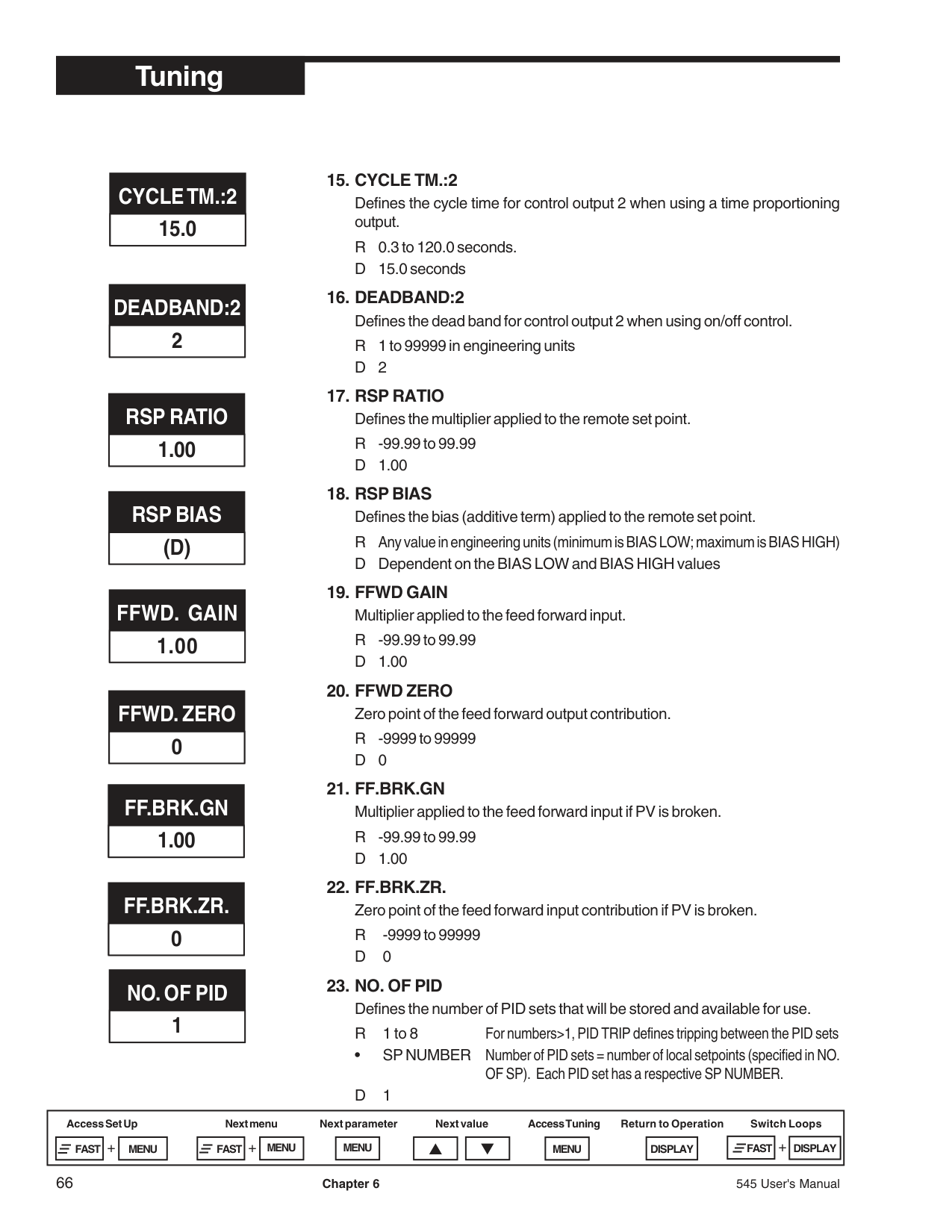
Defines the cycle time for control output 2 when using a time proportioning output.
R 0.3 to 120.0 seconds. D 15.0 seconds
########### CYCLE TM.:215.0
DEADBAND:2
########### 2
########### RSP RATIO 1.00
########### RSP BIAS (D)
FFWD. GAIN
########### 1.00
########### FFWD. ZERO
########### 0
########### FF.BRK.GN 1.00
########### FF.BRK.ZR. 0
########### NO. OF PID
########### 1
• SP NUMBER Number of PID sets = number of local setpoints (specified in NO.
OF SP). Each PID set has a respective SP NUMBER. D1
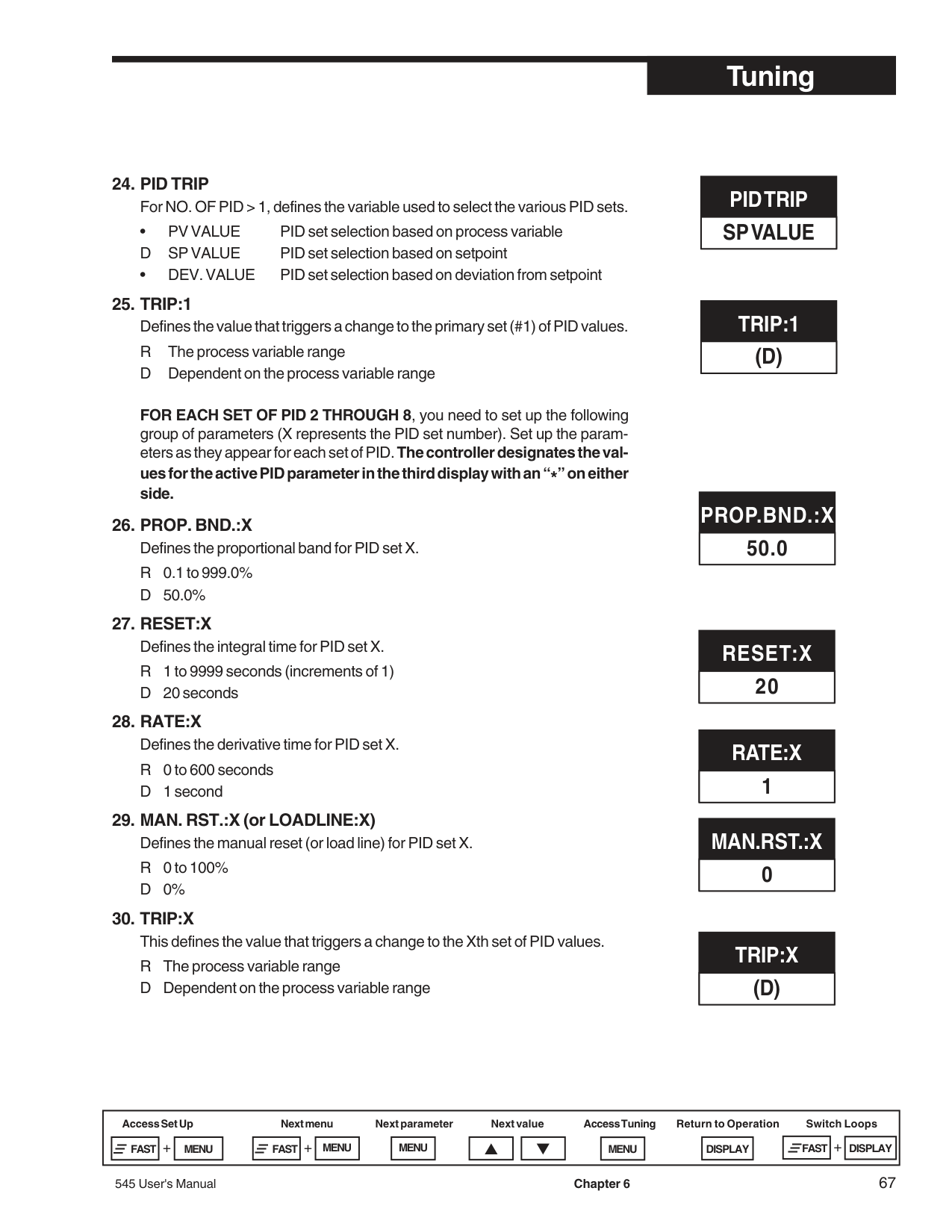
FOR EACH SET OF PID 2 THROUGH 8, you need to set up the following group of parameters (X represents the PID set number). Set up the parameters as they appear for each set of PID.The controller designates the val-
ues for the active PID parameter in the third display with an “*” on either side.
########### PID TRIP SP VALUE
########### TRIP:1 (D)
########### PROP.BND.:X 50.0
########### RESET:X 20
########### RATE:X 1
########### MAN.RST.:X 0
########### TRIP:X (D)
########### TUNING
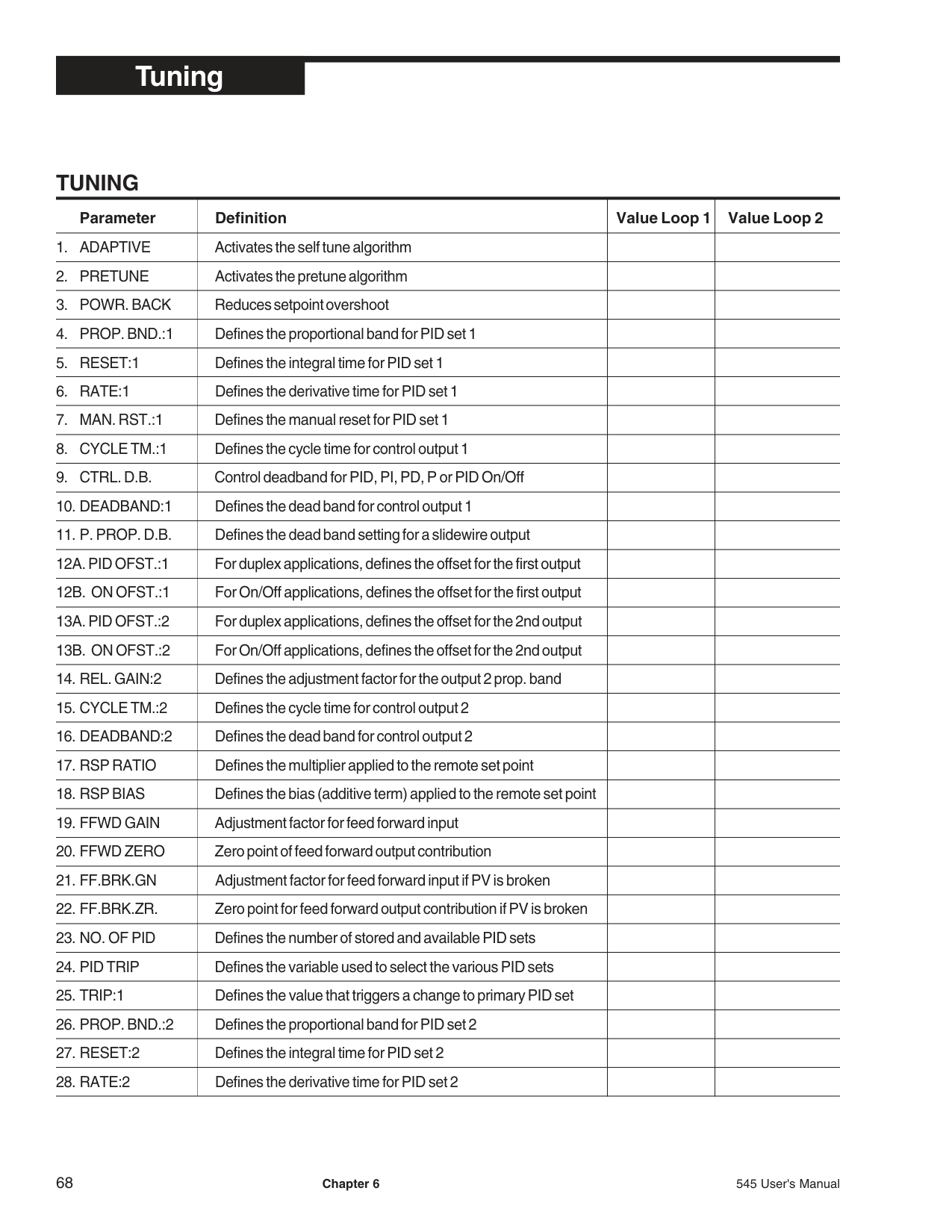
|Parameter|Definition|Value Loop 1|Value Loop 2| |---|---|---|---| |1. ADAPTIVE|Activates the self tune algorithm| | | |. PRETUNE|Activates the pretune algorithm| | | |. POWR. BACK|Reduces setpoint overshoot| | | |. PROP. BND.:1|Defines the proportional band for PID set 1| | | |5. RESET:1|Defines the integral time for PID set 1| | | |6. RATE:1|Defines the derivative time for PID set 1| | | |. MAN. RST.:1|Defines the manual reset for PID set 1| | | |. CYCLE TM.:1|Defines the cycle time for control output 1| | | |. CTRL. D.B.|Control deadband for PID, PI, PD, P or PID On/Off| | | |0. DEADBAND:1|Defines the dead band for control output 1| | | |1. P. PROP. D.B.|Defines the dead band setting for a slidewire output| | | |2A. PID OFST.:1|For duplex applications, defines the offset for the first output| | | |2B. ON OFST.:1|For On/Off applications, defines the offset for the first output| | | |3A. PID OFST.:2|For duplex applications, defines the offset for the 2nd output| | | |3B. ON OFST.:2|For On/Off applications, defines the offset for the 2nd output| | | |4. REL. GAIN:2|Defines the adjustment factor for the output 2 prop. band| | | |5. CYCLE TM.:2|Defines the cycle time for control output 2| | | |6. DEADBAND:2|Defines the dead band for control output 2| | | |7. RSP RATIO|Defines the multiplier applied to the remote set point| | | |8. RSP BIAS|Defines the bias (additive term) applied to the remote set point| | | |9. FFWD GAIN|Adjustment factor for feed forward input| | | |0. FFWD ZERO|Zero point of feed forward output contribution| | | |1. FF.BRK.GN|Adjustment factor for feed forward input if PV is broken| | | |2. FF.BRK.ZR.|Zero point for feed forward output contribution if PV is broken| | | |3. NO. OF PID|Defines the number of stored and available PID sets| | | |24. PID TRIP|Defines the variable used to select the various PID sets| | | |25. TRIP:1|Defines the value that triggers a change to primary PID set| | | |6. PROP. BND.:2|Defines the proportional band for PID set 2| | | |27. RESET:2|Defines the integral time for PID set 2| | | |28. RATE:2|Defines the derivative time for PID set 2| | |
|9. MAN. RST.:2|Defines the manual reset (or load line) for PID set 2| | | |---|---|---|---| |30. TRIP:2|Defines the value that triggers a change to the 2nd PID set| | |
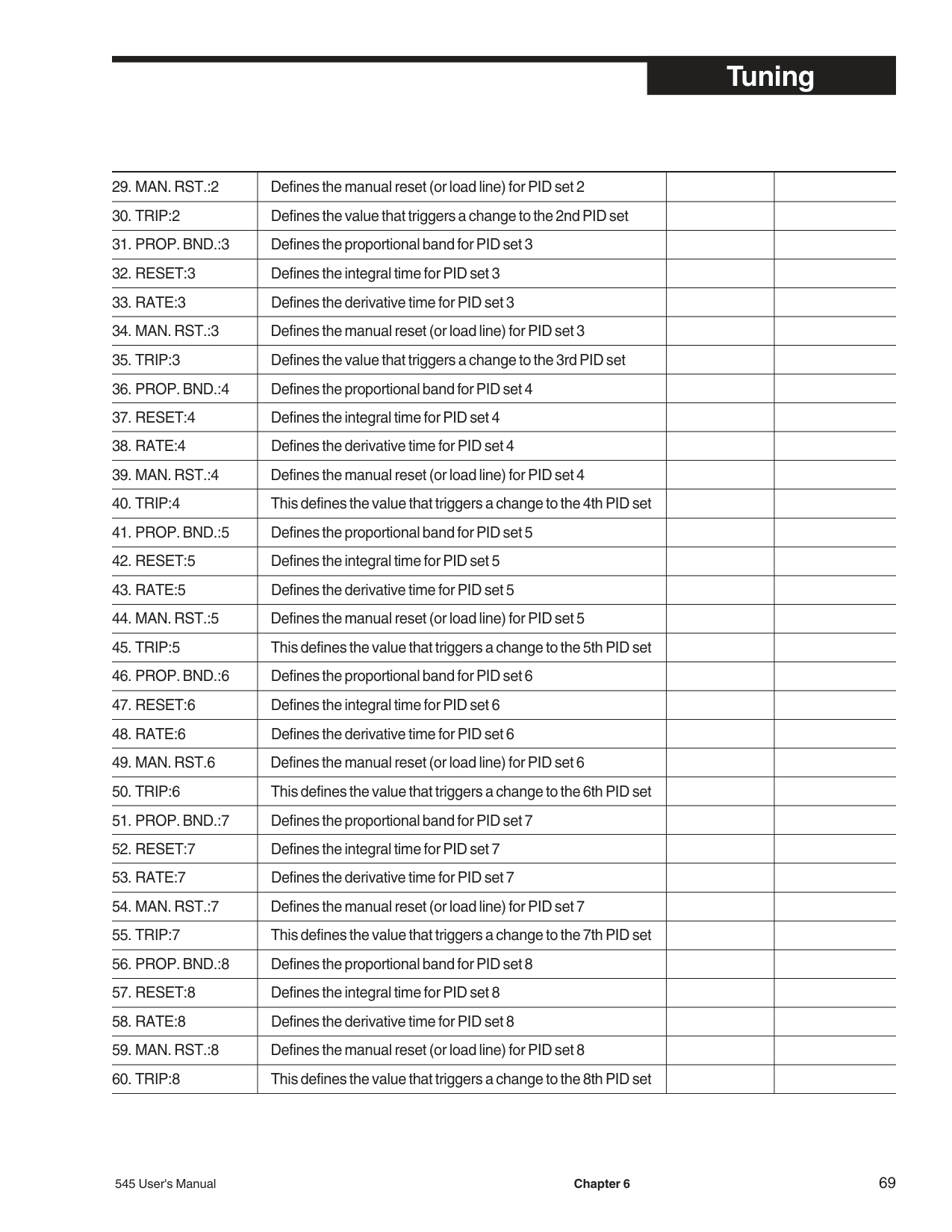
|1. PROP. BND.:3|Defines the proportional band for PID set 3| | | |32. RESET:3|Defines the integral time for PID set 3| | | |33. RATE:3|Defines the derivative time for PID set 3| | | |4. MAN. RST.:3|Defines the manual reset (or load line) for PID set 3| | | |35. TRIP:3|Defines the value that triggers a change to the 3rd PID set| | | |6. PROP. BND.:4|Defines the proportional band for PID set 4| | | |37. RESET:4|Defines the integral time for PID set 4| | | |38. RATE:4|Defines the derivative time for PID set 4| | | |9. MAN. RST.:4|Defines the manual reset (or load line) for PID set 4| | | |40. TRIP:4|This defines the value that triggers a change to the 4th PID set| | | |1. PROP. BND.:5|Defines the proportional band for PID set 5| | | |42. RESET:5|Defines the integral time for PID set 5| | | |43. RATE:5|Defines the derivative time for PID set 5| | | |4. MAN. RST.:5|Defines the manual reset (or load line) for PID set 5| | | |45. TRIP:5|This defines the value that triggers a change to the 5th PID set| | | |6. PROP. BND.:6|Defines the proportional band for PID set 6| | | |47. RESET:6|Defines the integral time for PID set 6| | | |48. RATE:6|Defines the derivative time for PID set 6| | | |9. MAN. RST.6|Defines the manual reset (or load line) for PID set 6| | | |50. TRIP:6|This defines the value that triggers a change to the 6th PID set| | | |1. PROP. BND.:7|Defines the proportional band for PID set 7| | | |52. RESET:7|Defines the integral time for PID set 7| | | |53. RATE:7|Defines the derivative time for PID set 7| | | |4. MAN. RST.:7|Defines the manual reset (or load line) for PID set 7| | | |55. TRIP:7|This defines the value that triggers a change to the 7th PID set| | | |6. PROP. BND.:8|Defines the proportional band for PID set 8| | | |57. RESET:8|Defines the integral time for PID set 8| | | |58. RATE:8|Defines the derivative time for PID set 8| | | |9. MAN. RST.:8|Defines the manual reset (or load line) for PID set 8| | | |60. TRIP:8|This defines the value that triggers a change to the 8th PID set| | |
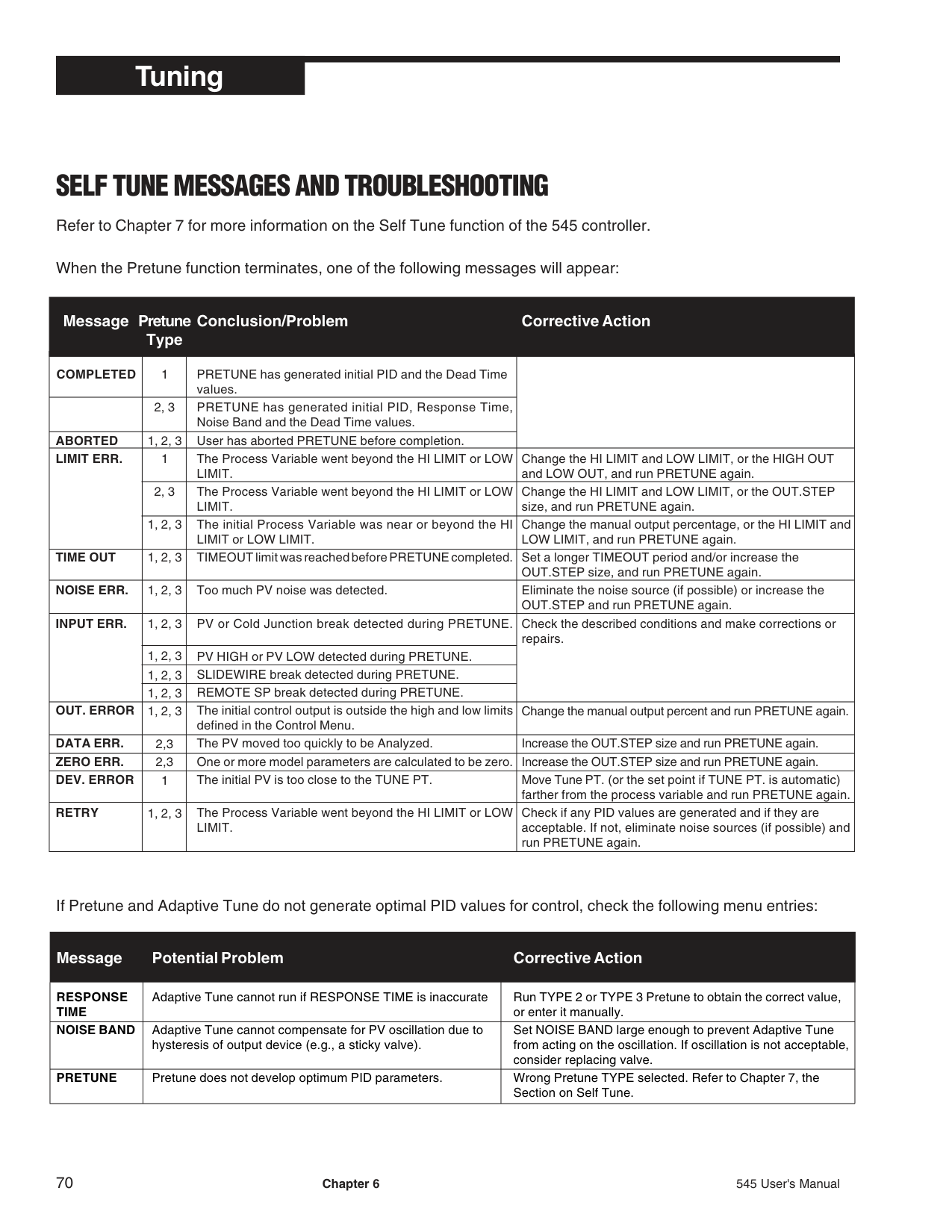
##### SELF TUNE MESSAGES AND TROUBLESHOOTING
Refer to Chapter 7 for more information on the Self Tune function of the 545 controller.
When the Pretune function terminates, one of the following messages will appear:
################################## Message
################################## Pretune Type
################################## Conclusion/Problem
################################## Corrective Action
COMPLETED
ABORTED LIMIT ERR.
1, 2, 3
TIME OUT
NOISE ERR.
1, 2, 3
1, 2, 3
1, 2, 3
INPUT ERR.
1, 2, 3
OUT. ERROR
1, 2, 3 1, 2, 3 1, 2, 3 1, 2, 3
DATA ERR. ZERO ERR. DEV. ERROR
2,3 2,3 1
RETRY
1, 2, 3
PRETUNE has generated initial PID and the Dead Time values. PRETUNE has generated initial PID, Response Time, Noise Band and the Dead Time values. User has aborted PRETUNE before completion. The Process Variable went beyond the HI LIMIT or LOW LIMIT. The Process Variable went beyond the HI LIMIT or LOW LIMIT. The initial Process Variable was near or beyond the HI LIMIT or LOW LIMIT. TIMEOUT limit was reached before PRETUNE completed.
Too much PV noise was detected.
PV or Cold Junction break detected during PRETUNE.
PV HIGH or PV LOW detected during PRETUNE. SLIDEWIRE break detected during PRETUNE. REMOTE SP break detected during PRETUNE. The initial control output is outside the high and low limits defined in the Control Menu. The PV moved too quickly to be Analyzed. One or more model parameters are calculated to be zero. The initial PV is too close to the TUNE PT.
The Process Variable went beyond the HI LIMIT or LOW LIMIT.
Change the HI LIMIT and LOW LIMIT, or the HIGH OUT and LOW OUT, and run PRETUNE again. Change the HI LIMIT and LOW LIMIT, or the OUT.STEP size, and run PRETUNE again. Change the manual output percentage, or the HI LIMIT and LOW LIMIT, and run PRETUNE again. Set a longer TIMEOUT period and/or increase the OUT.STEP size, and run PRETUNE again. Eliminate the noise source (if possible) or increase the OUT.STEP and run PRETUNE again. Check the described conditions and make corrections or repairs.
Change the manual output percent and run PRETUNE again.
Increase the OUT.STEP size and run PRETUNE again. Increase the OUT.STEP size and run PRETUNE again. Move Tune PT. (or the set point if TUNE PT. is automatic) farther from the process variable and run PRETUNE again. Check if any PID values are generated and if they are acceptable. If not, eliminate noise sources (if possible) and run PRETUNE again.
If Pretune and Adaptive Tune do not generate optimal PID values for control, check the following menu entries:
Message
Potential Problem Corrective Action
|RESPONSE TIME|Adaptive Tune cannot run if RESPONSE TIME is inaccurate|Run TYPE 2 or TYPE 3 Pretune to obtain the correct value, or enter it manually.| |---|---|---| |NOISE BAND|Adaptive Tune cannot compensate for PV oscillation due to hysteresis of output device (e.g., a sticky valve).|Set NOISE BAND large enough to prevent Adaptive Tune from acting on the oscillation. If oscillation is not acceptable, consider replacing valve.| |PRETUNE|Pretune does not develop optimum PID parameters.|Wrong Pretune TYPE selected. Refer to Chapter 7, the Section on Self Tune.|
###### CHAPTER 7 APPLICATIONS
The 545 controller provides a variety of user-programmable control features and capabilities. The following topics are included in this chapter:
NOTE: Controller capabilities depend upon the specified hardware option.
########### A. CONTROL TYPE
Each of the control loops in the 545 can be independently configured.
########### Software Configuration
on slow, stable processes where moderate deviation (cycling) around setpoint is tolerable. Only available with SSR, SSR Drive, and relay outputs.
NOTE: The ability to base alarms on parameters other than PV greatly expands the alarm capacity.
########### B. ALARMS
Each loop of the 545 controller has two extremely flexible and powerful software alarms (4 alarms total). The number of available outputs limits how alarms are linked to relays. A Global Alarm feature allows all alarms to be assigned to the same relay.
################################## The 545 indicates an alarm condition(s) for the foreground loop by:
########### Software Configuration
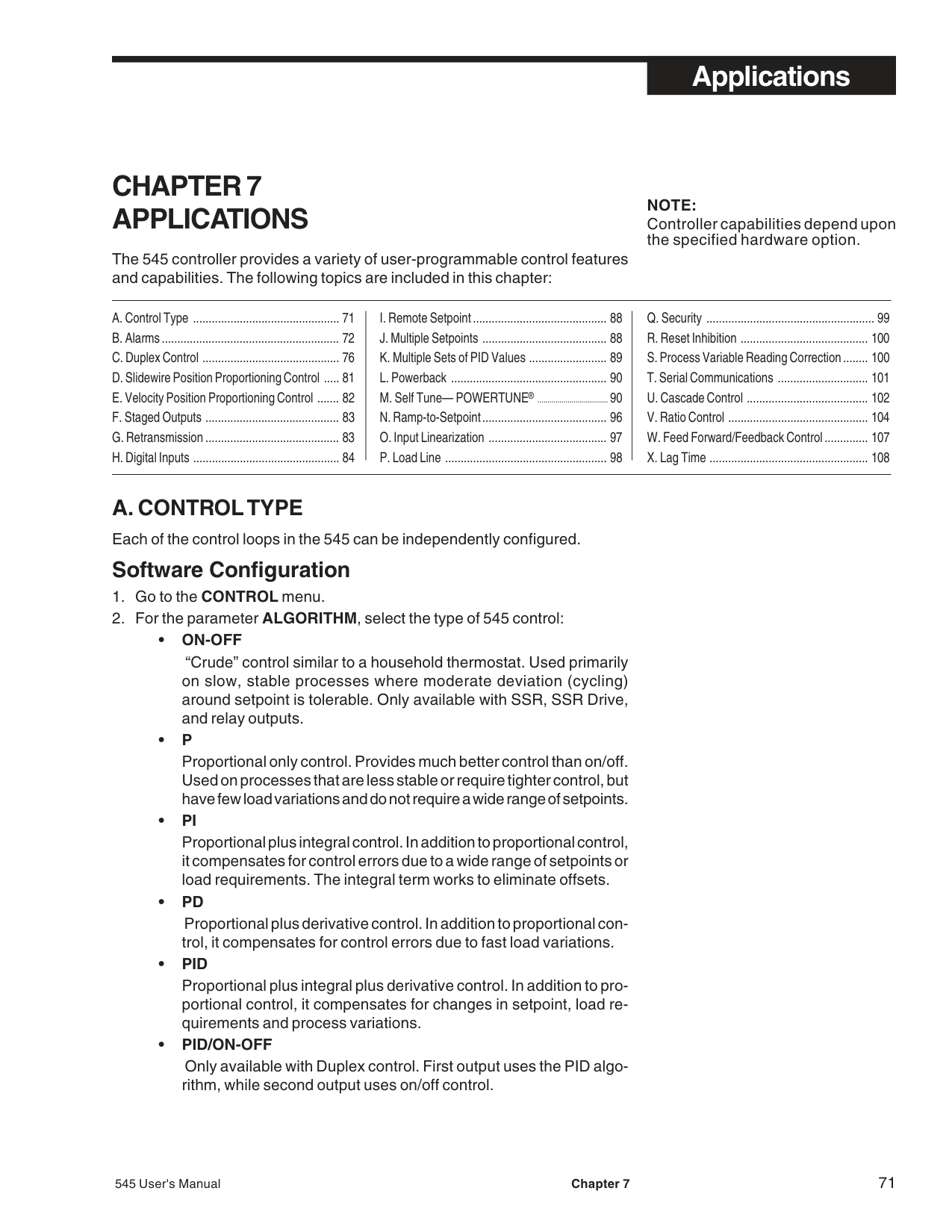
################################## ALM.TYPE:1and ALM. TYPE:2
Specifies the type of alarm to implement. Selection includes:
setpoint changes, the alarm point changes.
For example, if the control setpoint is 500 and the alarm setpoint is +50, then an alarm occurs when the process variable exceeds 550. In order for an alarm to occur when the process variable drops below 450, select an alarm setpoint of –50.
ALM.SRC.:1 and ALM.SRC.:2 For HIGH , LOW or HIGH/LOW alarms, specifies the variable (source) upon which a selected alarm is based. Selection includes:
################################## ALARM SP:1 and ALARM SP:2
Defines the point at which an alarm occurs. For a RATE (rate of change) alarm, it specifies the amount of change (per RATE TIME period) that must occur before the alarm activates. A negative value specifies a negative rate-of-change. Does not apply to HIGH/LOW alarms.
HIGH SP:1 and HIGH SP:2 For a HIGH/LOW alarm, defines the high setpoint at which an alarm occurs.
LOW SP:1 and LOW SP:2 For a HIGH/LOW alarm, defines the low setpoint at which an alarm occurs.
################################## DEADBAND:1 and DEADBAND:2
Specifies the range through which the process variable must travel before leaving an alarm condition (see alarm examples at the end of this section). Prevents frequent alarm oscillation or “chattering” if the process variable has stabilized around the alarm point.
################################## ALM.1 OUT and ALM.2 OUT
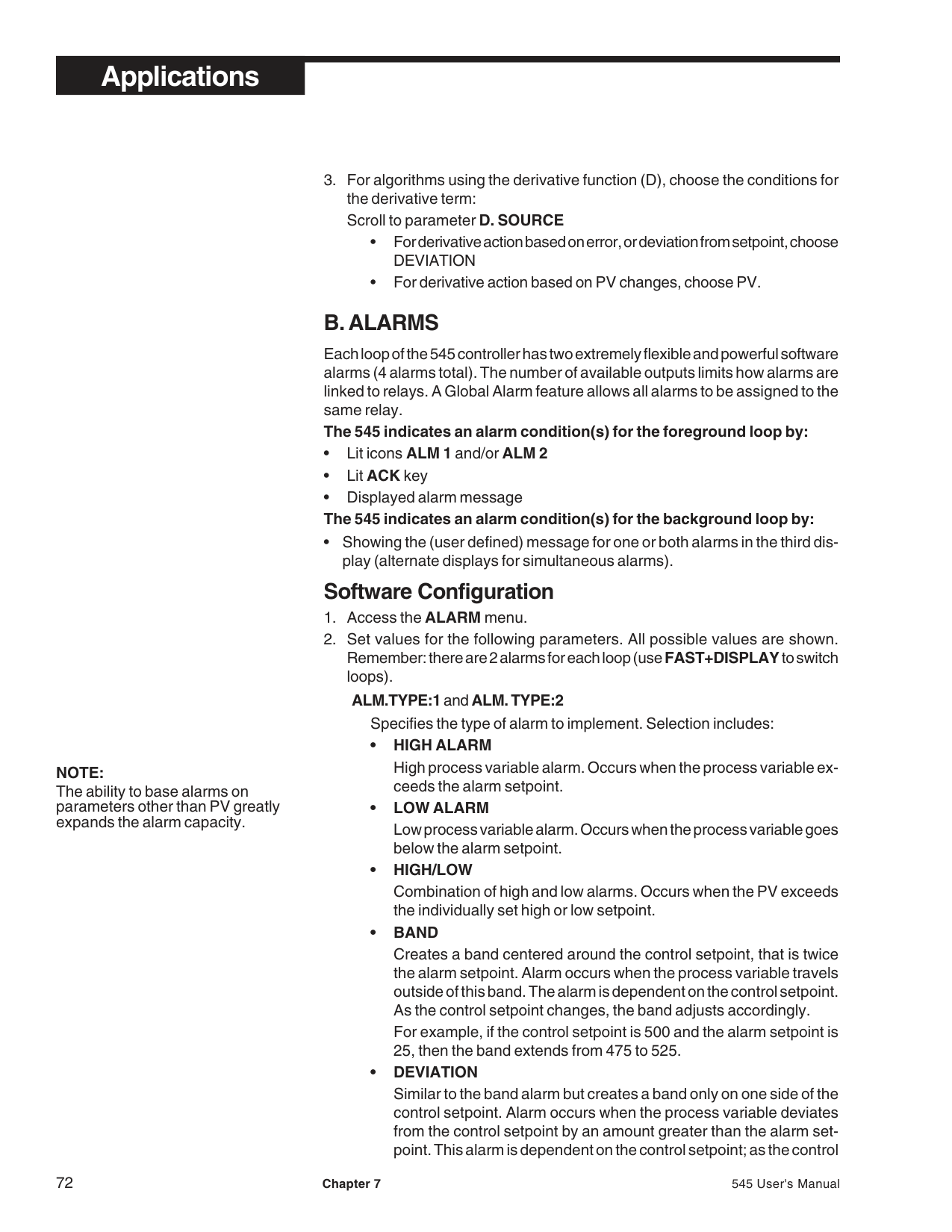
For any enabled alarm, selects the output number to which the selected alarm will be assigned. It is possible to assign both alarms to the same output relay, thus creating a “global” alarm .
|Alarm Parameters Reference
For Alarm 1 Parameter Description
ALM. TYPE:1 Type
ALM. SRC.:1 Source
ALARM SP:1 Setpoint
HIGH SP:1 High setpoint
LOW SP:1 Low setpoint
DEADBAND:1 Deadband
ALM.:1 OUT. Output number
LATCHING:1 Latching sequence
ACK.:1 Acknowledging
POWER UP:1 Status on power up
MESSAGE:1 Message
For Alarm 2 Parameter Description ALM. TYPE:2 Type ALM. SRC.:2 Source ALARM SP:2 Setpoint HIGH SP:2 High setpoint LOW SP:2 Low setpoint DEADBAND:2 Deadband ALM.:2 OUT. Output number LATCHING:2 Latching sequence ACK.:2 Acknowledging POWER UP:2 Status on power up
MESSAGE:2 Message
For either alarm (depending on choices) Parameter Description FAULT Fault assignment OUTPUT Output action for rate RATE TIME Time base for rate
NOTE: Each of the two loops has two alarms.| |---|
################################## LATCHING:1 and LATCHING:2
A latching (YES) alarm will remain active after leaving the alarm condition unless it is acknowledged. A non-latching (NO) alarm will return to the non-alarm state when leaving the alarm condition without being acknowledged.
################################## ACK.:1 and ACK.:2
For any enabled alarm, enables or disables operator use of theACKkey to acknowledge an alarm at any time, even if the control process is still in the alarm condition.
A latching alarm can always be acknowledged when it is out of the alarm condition. When either alarm is available to be acknowledged, theACK key will be illuminated. If both alarms are acknowledgeable, pressingACK will first acknowledge alarm #1. PressingACKa second time will acknowledge alarm #2.
################################## POWER UP:1 and POWER UP:2
For any enabled alarm, selects the alarm condition upon power up. Choices are:
################################## MESSAGE:1 and MESSAGE:2
Allows user to specify a nine-character message to be displayed when the respective alarm is active. If both alarms are active or any other diagnostic message is present, the messages will alternate.
################################## FAULT
Activates an alarm if the process variable signal is lost. Assign this function to either Alarm 1 or Alarm 2 (not both). This action is in addition the selected alarm type (additive alarm function).
################################## OUTPUT
For a RATE alarm, selects the output action. Use to obtain early indication of a possible break in the process variable signal. Select PV BREAK to have rate-of-change alarm take the same action as a detection of a break in the process variable signal (where it trips to manual control at a predetermined output).
################################## RATE TIME
For RATE alarms, defines the time period over which a discrete change in process variable must occur for the rate alarm to be activated. The amount of change is defined by the alarm setpoint. The rate-of-change is defined as the amount of change divided by the time period.
Example
In example A, the process variable would only have to experience a ten unit change over a short period of time, while in Example B, it would require a 100 unit change over a ten second period. Example A is much more sensitive than Example B. In general, for a given rateof-change, the shorter the time period, the more sensitive the rate alarm.
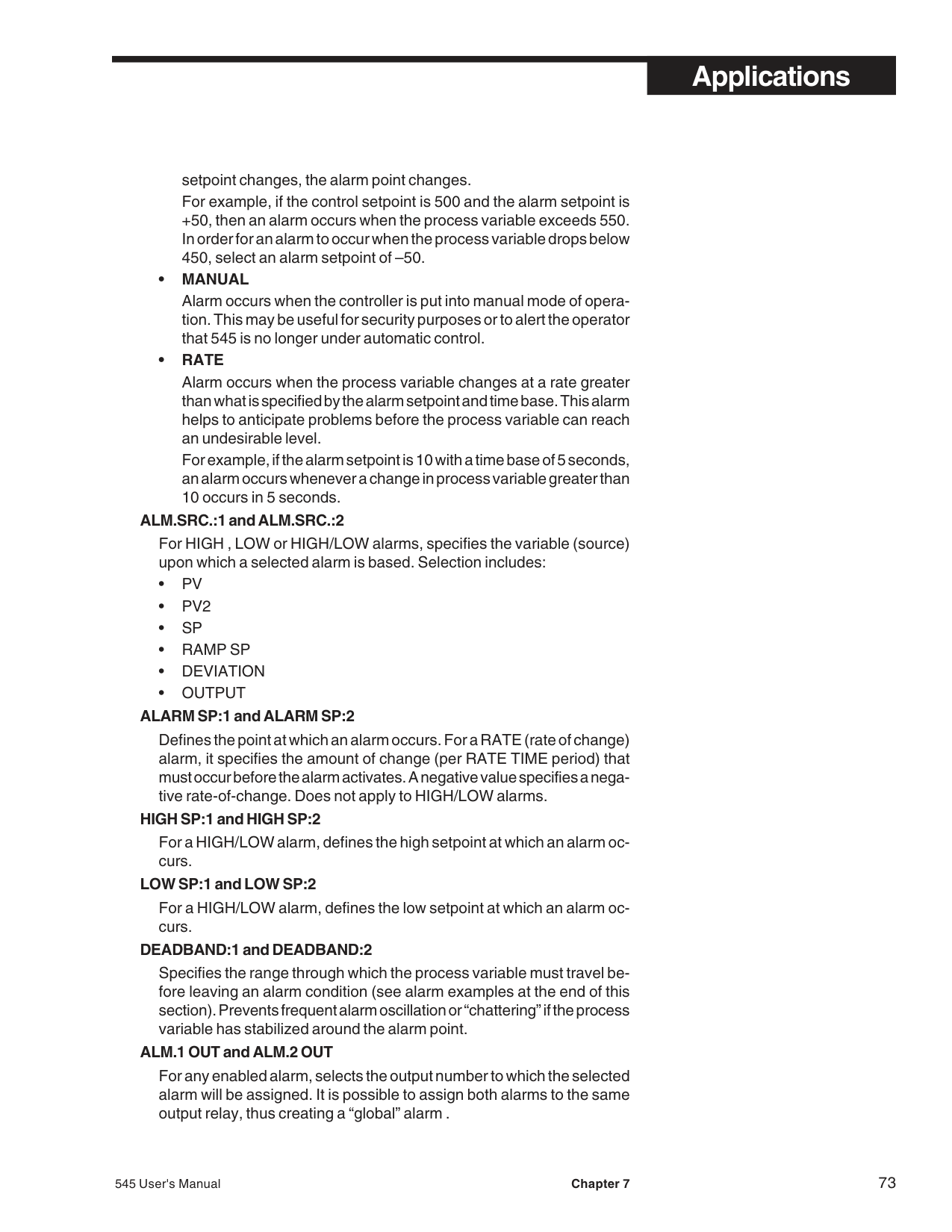
Figure 7.1 Alarm Examples
BAND ALARM HIGH PROCESS VARIABLE ALARM
|TIME
ICON ON
IN ALARM CONDITION
CANNOT ACKNOWLEDGE
RELAY DE-ENERGIZED
RELAY ENERGIZED
ICON ON
RELAY DE-ENERGIZED
ICON OFF
PV
ICON OFF
RELAY ENERGIZED
NO ALARMNO ALARM CANNOT ACKNOWLEDGE
C.SP
+ A.SP
C.SP
DB
C.SP
- A.SP
DB
IN ALARM CONDITION
PARAMETER SETTINGS: OUTPUT N = ALM.RLY:OFF (N = 2 to 4) ALM. TYPE:1 = BAND ALM.:1 OUT. = N (N= 2 to 4) LATCHING = NO LATCH ACK.:1 = DISABLED| |---|
|| | |IN ALARM
CONDITION PV| | |---|---|---|---| | | | | | | | | |TIME|
ICON OFF
NO ALARMMAY ACKNOWLEDGE
RELAY ENERGIZED
RELAY DE-ENERGIZED
ICON ON
RELAY DE-ENERGIZED
ICON OFF NO ALARM
DB
A.SP
PARAMETER SETTINGS: OUTPUT N = ALM.RLY:ON (N = 2 to 4) ALM. TYPE:1 = HIGH ALRM. ALM.:1 OUT. = N (N = 2 to 4) LATCHING = NO LATCH ACK.:1 = ENABLED| |---|
DEVIATION ALARM POWER UP ALARM
|PARAMETER SETTINGS: OUTPUT N = ALM.RLY:ON (N = 2 to 4) ALM. TYPE:1 = DEVIATION ALM.:1 OUT. = N (N = 2 to 4) LATCHING = LATCH ACK.:1 = ENABLED ALARM SP:1 = (<0)
TIME
IN ALARM CONDITION
MAY ACKNOWLEDGE
RELAY ENERGIZED
RELAY DE-ENERGIZED
ICON ON
MUST ACKNOWLEDGE TO SHUT OFF ICON AND DE-ENERGIZE RELAY
ICON OFF NO ALARM
PV
C.SP
+ A.SP
DB
C.SP| |---|
|TIME
ALARM CONDITION
RELAY ENERGIZED
RELAY ENERGIZED
ICON ON
PV A.SP
UNIT POWER UP
RELAY ENERGIZED
ICON ON
DB
MAY ACKNOWLEDGE
ICON ON
MAY ACKNOWLEDGE
CANNOT ACKNOWLEDGE
PARAMETER SETTINGS: OUTPUT N = ALM.RLY:ON (N = 2 to 4) ALM. TYPE:1 = HIGH ALM. ALM.:1 OUT. = N (N = 2 to 4) LATCHING:1 = LATCH ACK.:1 = DISABLED POWER UP:1 = ALARM| |---|
NOTE:The duplex output states vary depending upon:
Please refer to the output state examples in this section to confirm that the configuration is appropriate for the process.
NOTE: Set manual reset/load line parameters to 50% when using Duplex control (MAN. RST.:X parameter is in the TUNING menu.)
########### C. DUPLEX CONTROL
The Duplex control algorithm enables two discrete control outputs for the control loop. Duplex control is commonly used for applications that require both heating and cooling or when 2 control elements are needed to achieve the desired result.
########### Hardware Configuration
• The controller must have two output modules assigned to the loop (any combination of output modules).
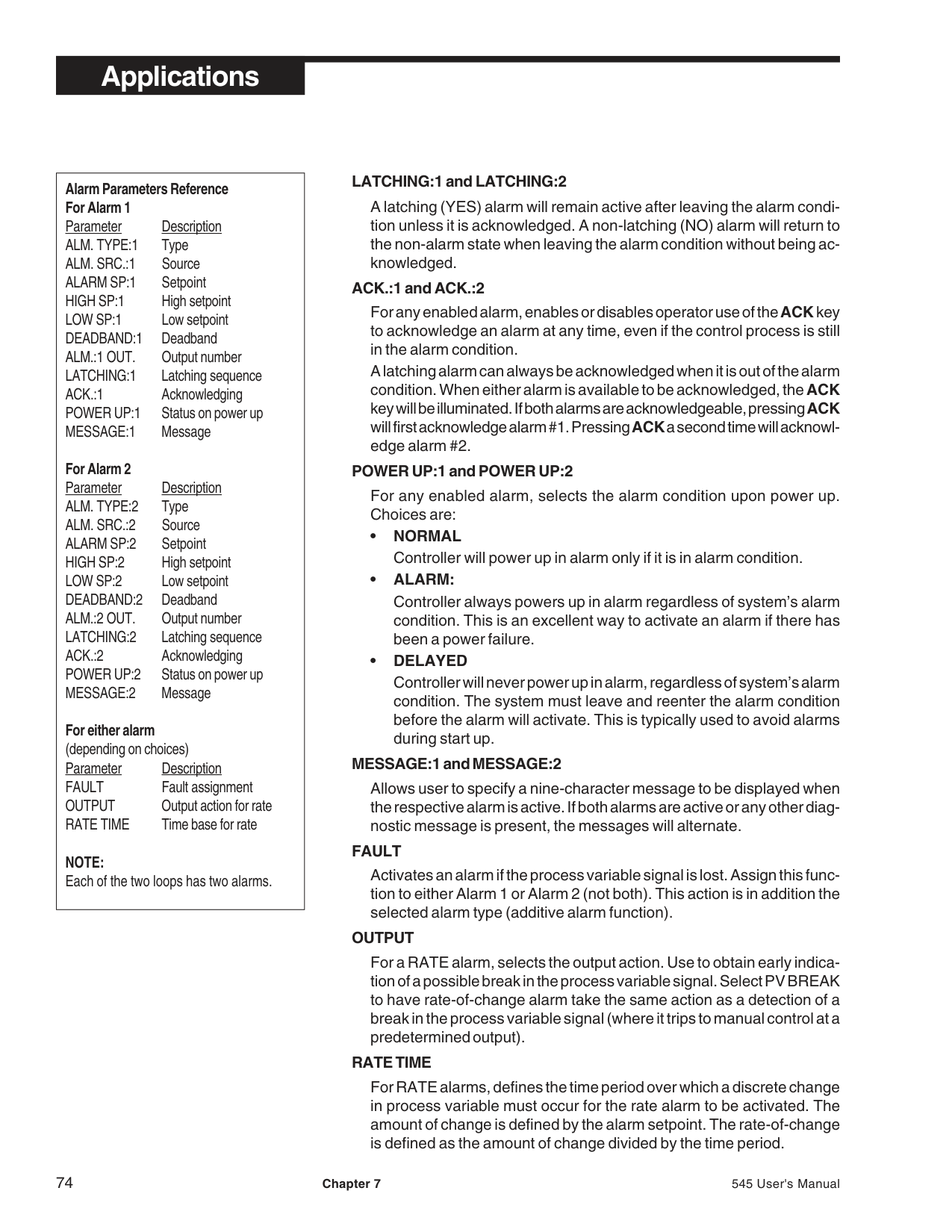
########### Software Configuration
########### Duplex Output State Examples
The following Duplex examples represent a variety of ways this function can be set up. PID control examples show the PID output percentage on the horizontal axis, and On/Off control examples show the process variable on the horizontal axis. The vertical axes are the output of each physical output. Most of these examples use the first output as heating and the second output as cooling.
When using PID control, the 545 controller actually displays the PID output. To relate this output to the actual physical output, locate the PID output on the horizontal axis. Draw a vertical line at that point. At the intersection of this vertical
line and the respective output line, draw a horizontal line. The physical output is the value where this horizontal line intersects the respective axis. The illustrations assume a manual reset/load line term of 50%. Therefore, at zero error (process variable equals setpoint) the PID output is 50%. Duplex with reverse and direct acting outputs
A reverse acting output 1 and a direct acting output 2 with: no offset, no restrictive outputs limits, and a neutral relative gain with PID control.
PARAMETER SETTINGS
|PID OUTPUT
100% 100%
50%100% 0%
Out 1 Out 2
Out 1 Out 2
0%0%
| |---|
Figure 7.2 Duplex with Reverse and Direct Acting Outputs
############### Duplex with direct and reverse acting outputs
A reverse acting output 1 and a direct acting output 2 with: no offset, no restrictive output limits, and a neutral relative gain with PID control.
PARAMETER SETTINGS
|PID OUTPUT
100% 100%
50%100% 0%
Out 1 (Heat)
Out 2 (Cool)
0%0%
Out 2
Out 1Out 2
Out 1|
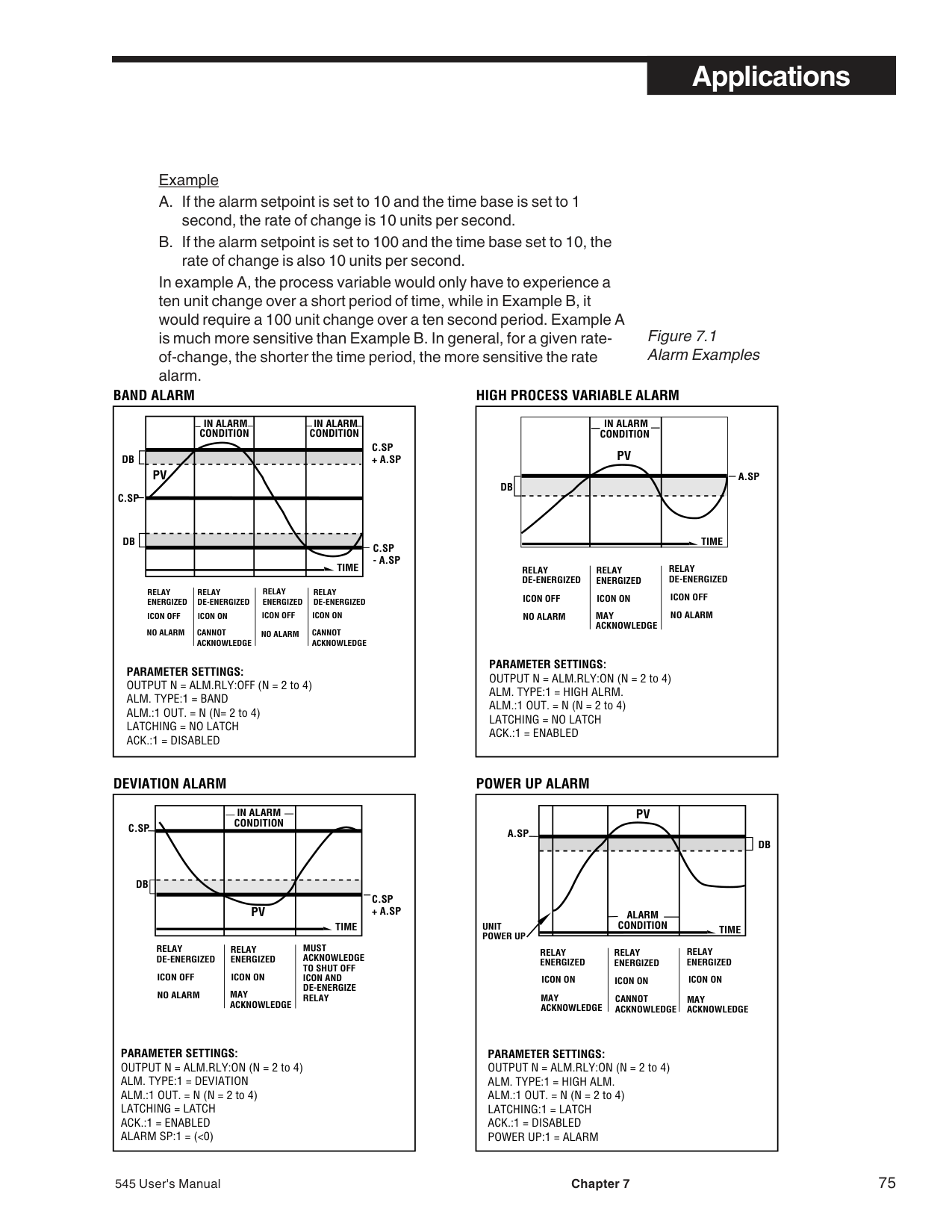
|---|
############################## Figure 7.3 Duplex with Direct and Reverse Acting Outputs
Figure 7.4 Duplex with Two Reverse Acting Outputs
############### Duplex with 2 reverse acting outputs
Two reverse acting outputs with: no offset, no restrictive output limits, and a neutral relative gain with PID control.
PARAMETER SETTINGS ACTION:1 = REVERSE ACTION:2 = REVERSE PID OFST.:1 = 0 PID OFST.:2 = 0 LOW OUT = 0 HIGH OUT = 100 REL. GAIN = 1.0
|PID OUTPUT
100% 100%
50%100% 0%
Out 1 (Heat)
Out 2 (Cool)
Out 2
0%0%
Out 1| |---|
Figure 7.5 Duplex with a Gap Between Outputs
############### Duplex with a gap between outputs
A reverse acting output 1 and a direct acting output 2 react with: a positive offset for output 1 and a negative offset for output 2 (assume no restrictive output limits and a neutral relative gain with PID control).
On the graph, a positive offset refers to an offset to the left of 50%; a negative offset is to the right of 50%.
########################################## PARAMETER SETTINGS
|PID OUTPUT
100% 100%
50%100% 0%
Out 1 (Heat)
Out 2 (Cool)
Out 1 Out 2
0%0%
Offset 2Offset 1| |---|
############### Duplex with a overlapping outputs and output limits
A reverse acting output 1 and a direct acting output 2 with: a negative offset for output 1, a positive offset for output 2, and restrictive high and low output limits with PID control.
This combination of offsets results in an overlap where both outputs are active simultaneously when the PID output is around 50%.
The output limits are applied directly to the PID output. This in turn limits the actual output values. In this example, the high output maximum limits the maximum value for output 1, while the low output minimum limits the maximum value for output 2. The value the actual outputs are limited to depends on offset settings, control action and relative gain setting with PID control.
######################################## PARAMETER SETTINGS
|PID OUTPUT
100% 100%
50%100% 0%
Out 1 (Heat)
Out 2 (Cool)
Out 1 Out 2
0%0% 10%
| | | |---|---| | | |
85%| |---|
############### Duplex with various relative gain settings
A reverse acting output 1 and a direct acting output 2 with: various relative gain settings (assume no offset or restrictive outputs) with PID control.
PARAMETER SETTINGS ACTION:1 = REVERSE ACTION:2 = DIRECT
||❶
Out 2
❸
❷| | |---|---| |❶
Out 2
❸
❷| |
PID OUTPUT
100% 100%
50%100% 0%
Out 1 (Heat)
Out 2 (Cool)
Out 1
0%0%
50%
25%| |---|
############################## Figure 7.8Duplex with One ON/OFF Output
Notice that the relative gain setting does not affect output 1. In this example, a relative gain setting of 2.0 (curve 1) results in output 2 reaching its maximum value at a PID output of 25%. A relative gain setting of 1.0 results in output 2 reaching its maximum value at a PID output of 0%. A relative gain setting of 0.5 results in output 2 reaching a maximum of 50% at a PID output of 0%.
############### Duplex with one ON/OFF output
A reverse acting output 1 and a direct acting, on/off output 2 with a positive offset. Relative gain does not apply when using duplex with an on/off output. The deadband setting for output 2 works the same as the deadband in single on/off control (the deadband effect for output 2 is not illustrated here).
PARAMETER SETTINGS ACTION:1 = REVERSE ACTION:2 = DIRECT PID OFST.:1 = 0 ON OFST.:2 = + VALUE LOW OUT = 0 HIGH OUT = 100
|PID OUTPUT
100% ON
50%100% 0%
Out 1 (Heat)
Out 2 (Cool)
Out 1
OFF0%
Out 2
Out 2 Offset from Setpoint in Engineering Units|
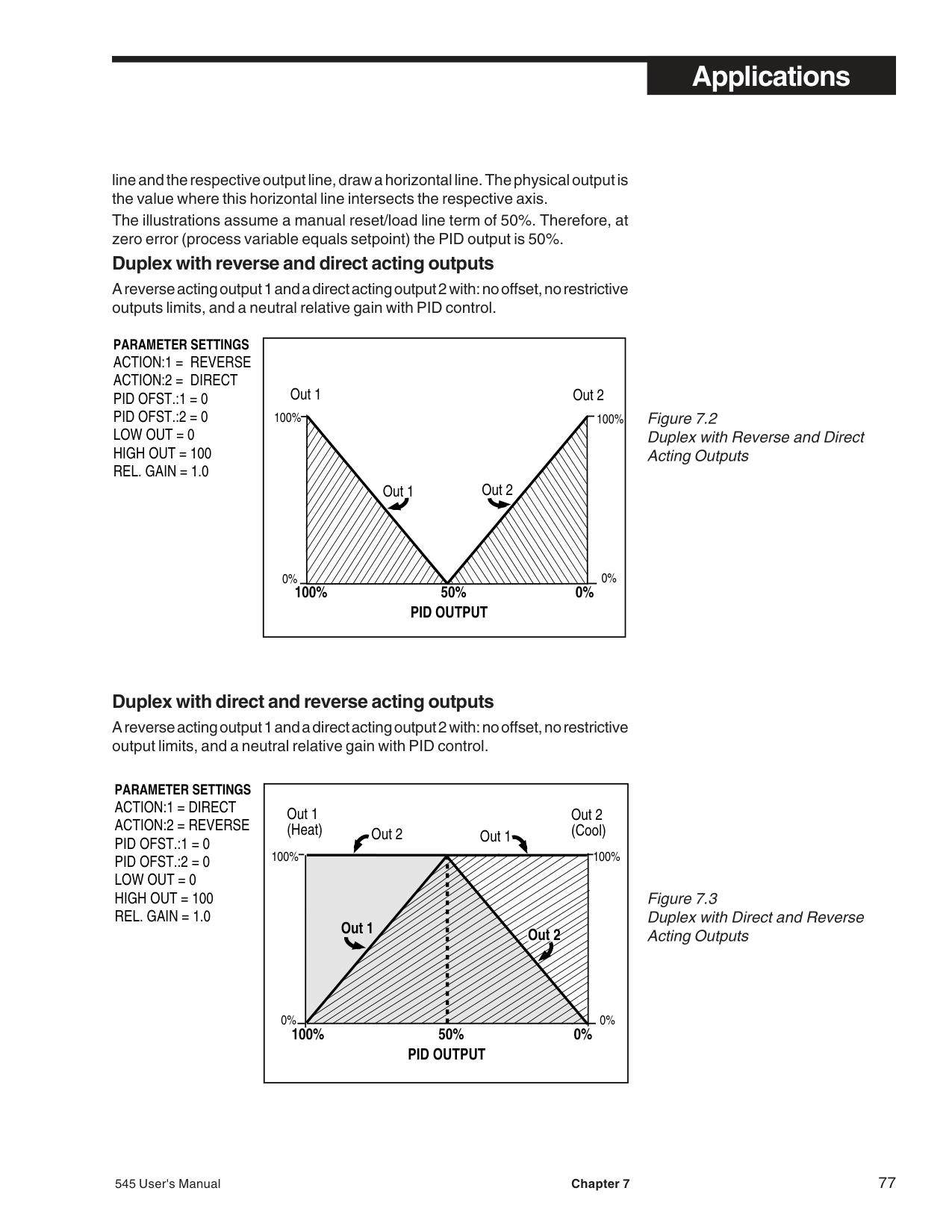
|---|
############################## Figure 7.9Duplex with Two ON/OFF Outputs
Duplex with two ON/OFF outputs A reverse acting on/off output 1 and a direct acting on/off output 2 with a negative offset for output 1 and a positive offset for output 2. Note that here the horizontal axis is expressed in terms of process variable rather than PID output.
############################################ PARAMETER SETTINGS
|PROCESS VARIABLE
ON ON
SP High Range
Out 1 (Heat)
Out 2 (Cool)
Out 1
OFFOFF
Out 2
Offset 2Low Range
Offset 1| |---|
########### D. SLIDEWIRE POSITION PROPORTIONING CONTROL
Slidewire position proportioning utilizes a slidewire feedback signal to determine the actual position of the actuator being controlled. This option is only available for one of the two control loops.
########### Hardware Configuration
########### Software Configuration
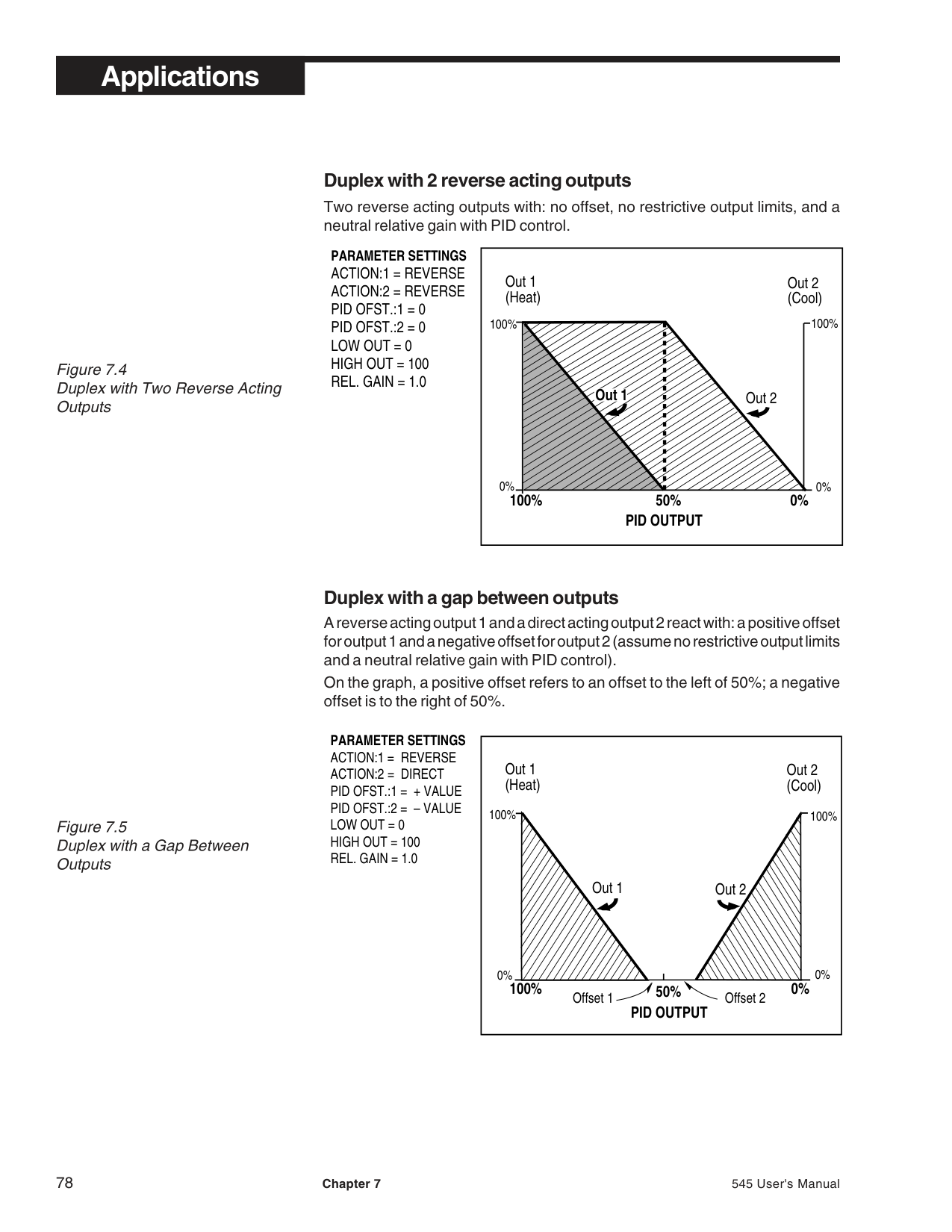
CAUTION! The relay in socket 1 drives the motor counterclockwise and the relay in output socket 2 drives the motor clockwise. This is important for:
The configuration choices influence the way the position proportioning algorithm works.
NOTE: OPEN F/B and CLOSE F/B values are always reference to the CCW end of the Slidewire.
NOTE: P.PROP.D.B. can only be configured if the Slidewire Feedback is wired to the controller.
NOTE: Adaptive tuning is not available with velocity position proportioning control.
########### E. VELOCITY POSITION PROPORTIONING CONTROL
Velocity position proportioning does not utilize direct feedback. It estimates the position of the actuator, based on time and the speed of the actuator.
In automatic control mode, the controller will display “CW” to refer to energizing of the clockwise relay, and “CCW” to refer to energizing of the counterclockwise relay. A blank display means that both relays are de-energized.
In manual control mode, the display is blank unless an output change is being made. Use the▲▲▲ and▼▼▼ keys to change the output; the relay is only energized while the keys are being pressed. The display indicates the percentage change in valve position in real time. The rate of change is dependent on the values entered for CCW TIME and CW TIME.
The controller will transfer to manual control due to a lost process variable (PV. BREAK), a digital input closure (DES.OUTPT.), a power-up sequence (PWR.UP:OUT.), or lost communications (SHED OUT). In these cases, the output can be set to: remain at its last value with both relays de-energized (OUTS OFF); rotate fully counterclockwise (CCW); or rotate fully clockwise (CW). CCW and CW will energize the respective relay for a period two times that of theCCW TIME or CW TIME.
########### Hardware Configuration
• The controller must have mechanical relay, solid state relay or DC logic
modules installed in the first two output sockets. Refer to the section on Chapter 1 for more information.
########### Software Configuration
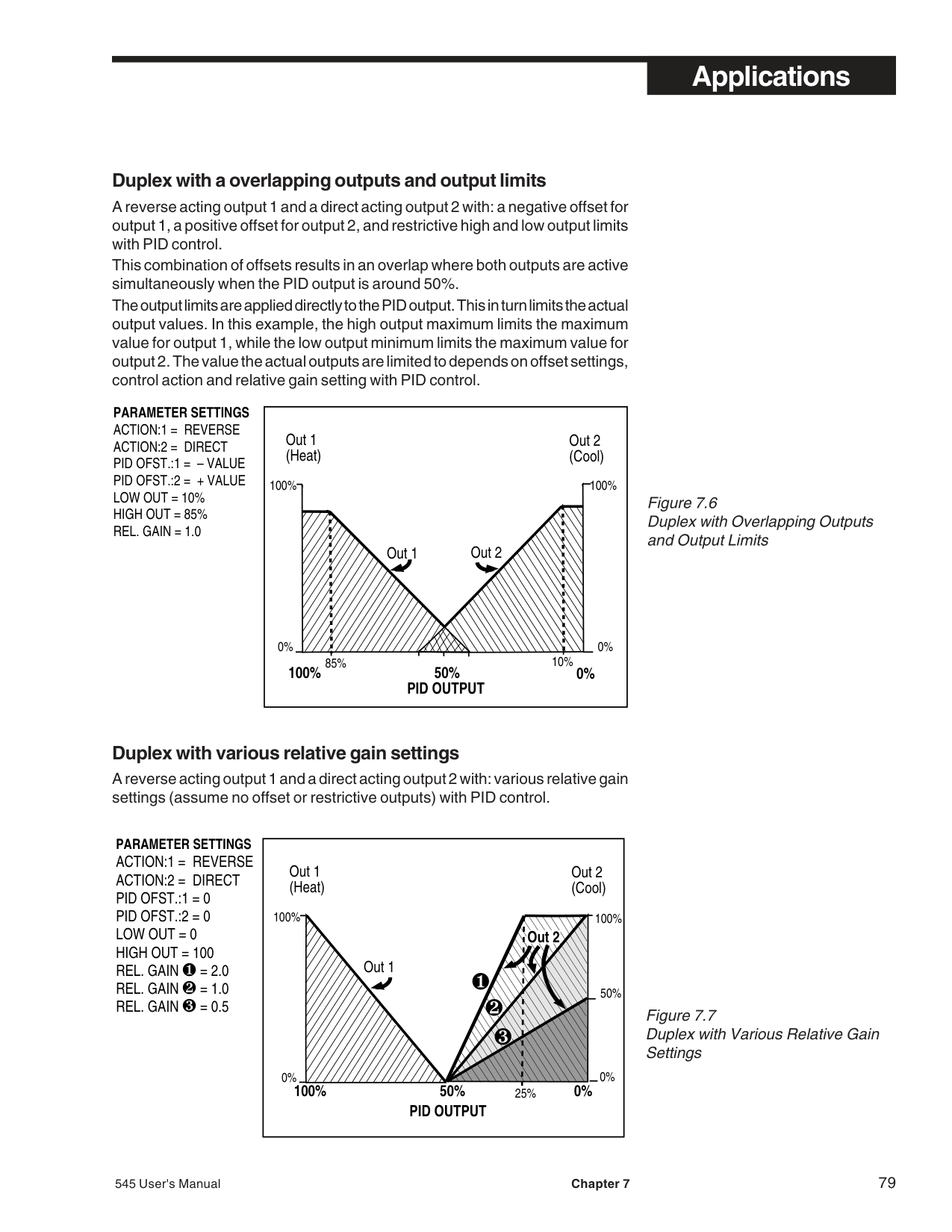
########### F. STAGED OUTPUTS
With staged outputs, one analog output can vary its signal (e.g., 4-20 mA) over a portion of the PID output range. The second analog output then varies its signal over another portion of the PID output range. This is an excellent method to stage two control valves or two pumps using standard control signal ranges.
| | | | |---|---|---| |Output 1|Output 2|Output 2| | | | |
20 mA
4 mA
PID Output
100%50%33%0%
Figure 7.10 Staged Outputs Example
Hardware Configuration
• The controller must have analog output modules installed in the first two output sockets.
Software Configuration
########### G. RETRANSMISSION
The retransmission feature may be used to transmit a milliamp signal corresponding to any of the following values: PV, SP1, Ramp SP1, Out L1, PV2, SP2, Ramp SP2, OUTL2. A common application is to use it to record one of these variables with a recorder.
########### Hardware Configuration
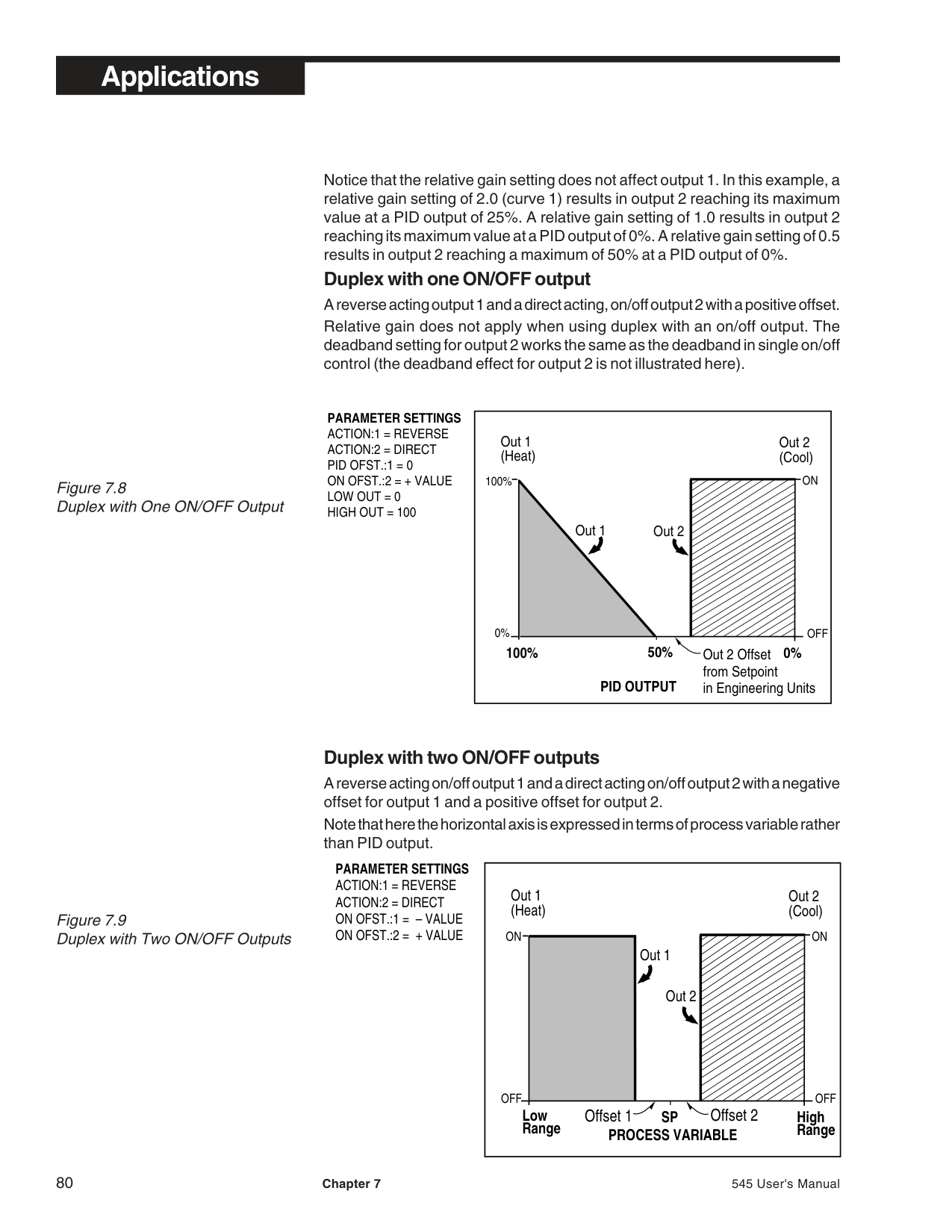
• There must be an analog module installed in output socket 2, 3 or 4.
Software Configuration Up to two outputs can be configured for retransmission. The menu will scroll through the configuration parameters for specified value “X” (2, 3 or 4).
NOTE: For an analog output module for retransmission that was not factoryinstalled, calibrate the output for maximum accuracy. Refer to Appendix 4 for details on calibration.
NOTE: To take advantage of multiple setpoints, make sure that the SP NUMBER parameter in the SPECIAL menu is set to a value greater than 1.
Figure 7.11 Combinations of Closed Digital Inputs for Each Setpoint (based on BCD logic)
X=closed contact 0=open contact
########### H. DIGITAL INPUTS
Digital inputs can be activated in three ways: A switch (signal type)—the recommended type, a relay, or and open collector transistor
Digital inputs are only functional when that option is installed (via hardware). The controller detects the hardware type, and supplies the appropriate software menus (see the section on parameters in Chapter 5). There are 14 contact types for the five digital inputs.
########### Hardware Configuration
• This optional feature is only available if ordered originally from the factory, Product #545xxxxxxDx00. The five digital inputs share a common ground.
########### Software Configuration
|Setpoints DIN 1 DIN 2 DIN 4 DIN 5
Loop 1 SP1 OO
Loop 1 SP2 XO
Loop 1 SP3 OX
Loop 1 SP4 XX
Loop 2 SP1 OO
Loop 2 SP2 XO
Loop 2 SP3 OX
Loop 2 SP4 XX
| |---|
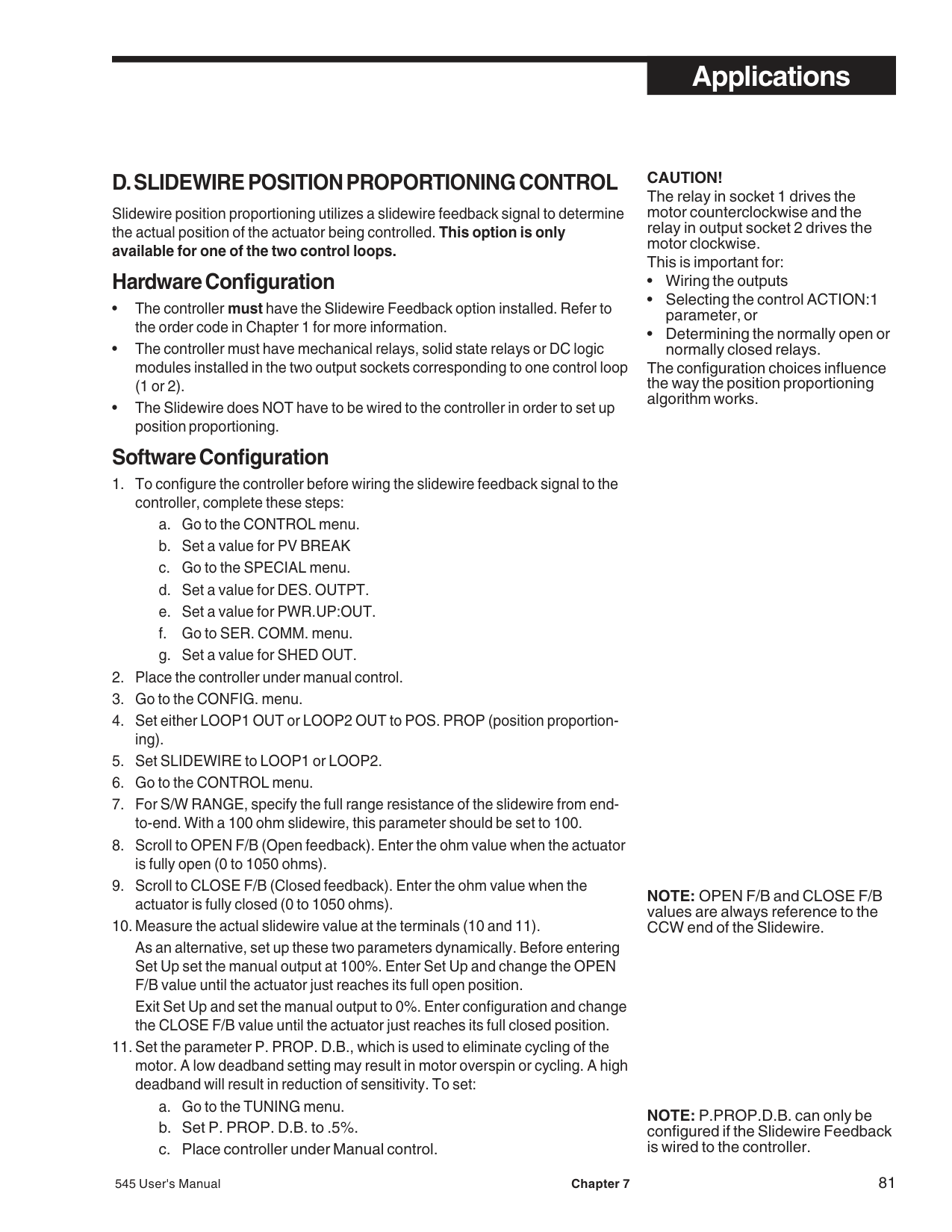
▼▼▼, DISPLAY and MENU keys.
NOTE: The second display does not change when tripping to manual from a closed digital input.
NOTE: Only alarms configured to be acknowledged are affected by this digital input.
▼▼▼, DISPLAY and MENU keys.
########### Basic Operating Procedures
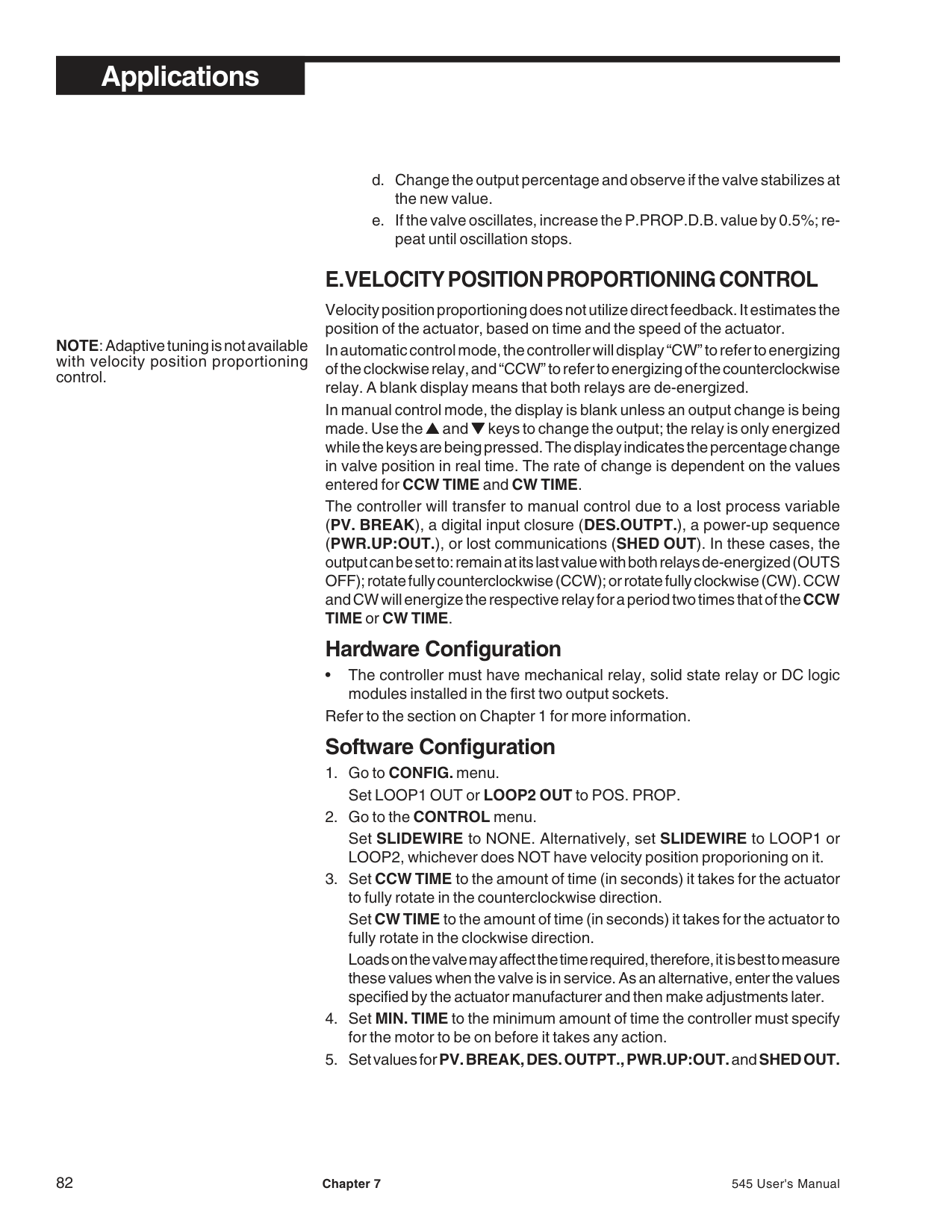
For example, if one digital input closes and selects 2nd setpoint, and then another digital input closes and selects a remote setpoint, the remote setpoint takes precedence.
For example, if one digital input closes and selects the 2nd setpoint, and then a different setpoint is selected through the keyboard, the keyboard selection takes precedence.
NOTE: There is a one-second delay before a closed digital input takes action.
########### I. REMOTE SETPOINT
The Remote Setpoint can be assigned to Loop 1, Loop 2, or both. Remote setpoint limits are the same as setpoint limits.
Hardware Configuration
Software Configuration
Basic Operating Procedures
After configuring the hardware and software, select the remote input by:
########### J. MULTIPLE SETPOINTS
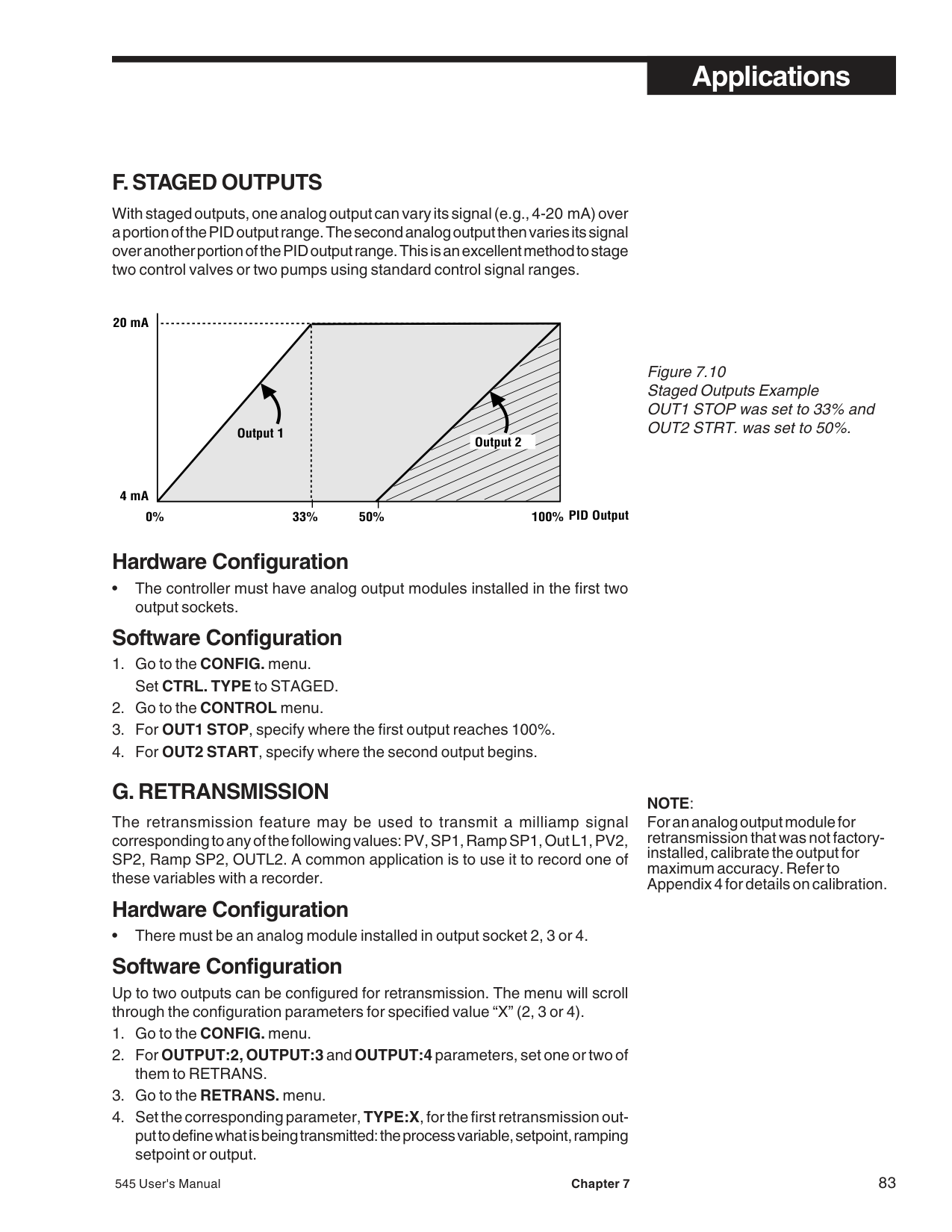
The 545 can store up to eight local setpoints and use a remote setpoint. One application of this feature is configuring the controller to restrict operators to discrete setpoint choices. The 545 can also store multiple sets of PID parameters (see next section).
########### Software Configuration
Set NO. OF PID to SP NUMBER. For details on multiple sets of PID, refer to the next section in this chapter.
########### Basic Operating Procedures
To select a set point, toggle theSET PTkey to scroll through the setpoints. The displayed setpoint becomes active after two second of key inactivity.
The digital inputs can also be used to select the active setpoints. A single digital input may be used for selecting the seconds setpoint, SP2. A set of two digital inputs per loop may be used, to select up to 4 setpoints per loop (see the section in this Chapter in Digital Inputs).
The SET PT key is lit when a setpoint other than the primary local setpoint is active.
########### K. MULTIPLE SETS OF PID VALUES
The 545 has the ability to store up to eight sets of PID values. This can be a valuable feature for operating the controller under conditions which require different tuning parameters for optimal control. There are various methods of selecting which set should be active. These methods are explained in this section.
########### Software Configuration
########### Basic Operating Procedures
A PID set can be selected in one of four ways.
= the low end of the process variable range, but this is not required.)
########### Using with Adaptive and Pretune
The 545 can be programmed to automatically set the PID values using the Pretune and Adaptive Tuning functions. For both functions, the tuned set of PID is that which is active upon initiation of the tuning function.
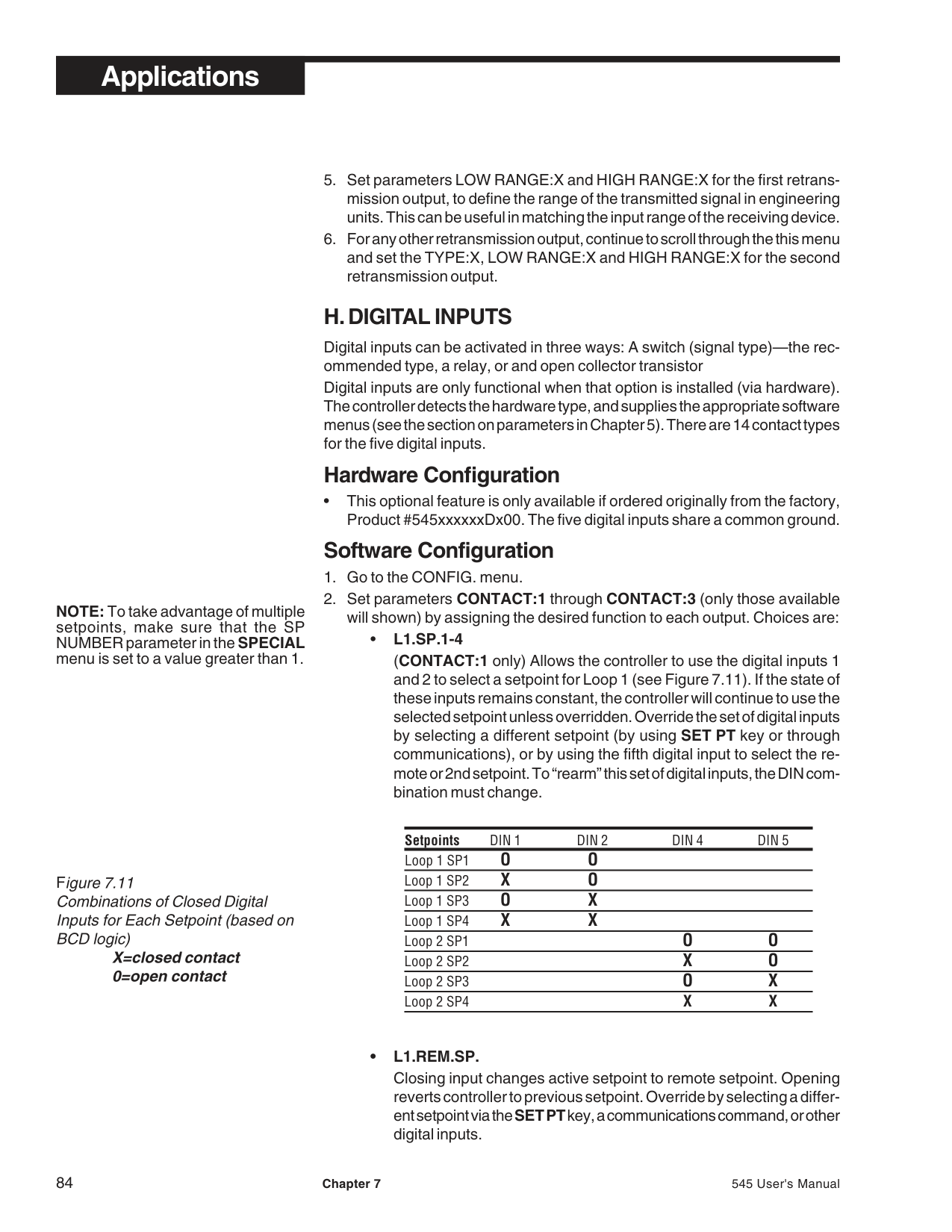
The controller cannot trip to other PID sets (based on trip point or the digital input
contact) until Adaptive Tuning is disabled. However, if the PID set is tied to the corresponding local setpoint, the active PID set values will change with the local setpoint.
Each PID set has 5 parameters that control its function—proportional band, reset, rate, manual reset (or loadline), and trip point. For each set (2 thru 8), these values have to be manually set.
########### L. POWERBACK
POWERBACK is Moore Industries’ proprietary algorithm which, when invoked by the user, reduces or eliminates setpoint overshoot at power up or after setpoint changes. Powerback monitors the process variable to make predictive adjustments to control parameters, which in turn helps to eliminate overshoot of the Setpoint.
########### Software Configuration
R 10 to 3200 seconds D 7200 seconds
########### M. SELF TUNE—POWERTUNE®
The Self Tune function of the 545 consists of two distinct components, Pretune and Adaptive Tune. These components may be used independently or in conjunction with one another. For best results, we recommend using them together.
########### Pretune
This algorithm has three versions. Choose the type that most closely matches the process to optimize the calculation of the PID parameters. The three Pretune types are:
Pretune is an on-demand function. Upon initiation, there is a five second period during which the controller monitors the activity of the process variable. Then the control output is manipulated and the response of the process variable is monitored. From this information, the initial Proportional Band, Reset and Rate (P, I and D values) and Dead Time are calculated. When using TYPE 2 or TYPE 3 Pretune, the Noise Band (NOISE BND.) and Response Time (RESP. TIME) and DEAD TIME will also be calculated.
In order to run this algorithm, the process must fulfill these requirements:
If these conditions are not fulfilled, set the Adaptive Tune to run by itself.
########### Adaptive Tune
Adaptive Tune continuously monitors the process and natural disturbances and makes adjustments in the tuning parameters to compensate for these changes. In order to make accurate calculations, Adaptive Tune needs noise band and response time values. Pretune TYPE 2 and TYPE 3 automatically calculate these values. These values may also be entered or changed manually in the SELF TUNEmenu. For Pretune TYPE 1, Noise Band, Response Time and Dead Time parameters must be entered manually.
Figure 7.12 illustrates the relationship between Pretune and Adaptive Tune
########### Software Configurations Pretune by Itself
CAUTION! Disable Adaptive Tuning before altering process conditions (e.g., for shutdown, tank draining, etc.). Otherwise, the 545 will attempt to adapt the Tuning parameters to the temporary process conditions. Adaptive Tune can be disabled via digital input (if applicable—see Digital Inputs in this chapter), or via menus:
############### Pretune TYPE 1 & Adaptive Tune
The controller will automatically transfer to automatic control upon completion of Pretune if set to do so, or upon manual transfer. Figure 7.12 illustrates the operation of Pretune TYPE 1 with Adaptive Tune.
############### Pretune TYPE 2 or 3 & Adaptive Tune
The controller will automatically transfer to automatic control upon completion of Pretune if set to do so, or upon manual transfer. Figure 7.12 illustrates the operation of Pretunes TYPE 2 and TYPE 3 with Adaptive Tune.
############################## Figure 7.12 Pretune TYPE 1, 2 and 3 with Adaptive Tune
100%
High Out Limit
################################################# TYPE 1 Pretune/Adaptive Control
70%
50%
30%
Note: Noise Band and Resp. Time must be entered before
CONTROL OUTPUT
Low Out Limit
enabling Adaptive TUne)
0%
900
700
500
SP
300
PV
0
################################################################### PRETUNE ADAPTIVE
➔
➔
BA
TIME
100%
################################################# TYPE 2 Pretune/Adaptive Control
70%
50%
Out Step
30%
CONTROL OUTPUT
0%
900
700
500
SP
300
PV
################################################################ 0
################################################################### NOISE BUMP
ADAPTIVE
➔
➔
➔
➔
BA C
TIME
Pretune
100%
################################################# TYPE 3 Pretune/Adaptive Control
70%
50%
Out Step
30%
CONTROL OUTPUT
0%
900
700
500
SP
300
PV
0
################################################################### NOISE BUMP
ADAPTIVE
➔
➔
➔
➔
BA C
TIMEPretune
NOTE:Adaptive tuning isnot available for velocity position proportional control.
############### Adaptive Tune by Itself
CAUTION! If the process conditions are temporarily changed, (e.g., during process shutdown, draining of a tank, etc.)disable adaptive tuning. Otherwise, the controller will attempt to adapt its tuning parameters to the temporary process conditions. Disable adaptive tuning by:
############################## Figure 7.13 Noise Band Calculation Example
############### Poor Pretune Results
If Pretune results are poor, or process conditions do not allow Pretune to run, the POWERBACK and Adaptive Tune parameters can be manually configured. Proper setting of the noise band and response time parameters will yield excellent adaptive control without running the Pretune function.
|(SECONDS)
–328
400
401
402
403
404
405
752
0 40 80 120 160 200 240
406
407
408
409PROCESS VARIABLE
Type T Thermocouple
Range –328°F TO 752° F
NOISE BAND =
(407 – 402) [ 752 – (–352) ]
X 100 = .5%
TIME
| |---|
A noise band that is too small will result in tuning parameter values based on noise rather than the effects of load (and setpoint) changes. If the noise band is set too small, then Adaptive Tune will attempt to retune the controller too often. This may result in the controller tuning cycling between desirable system tuning and overly sluggish tuning. While the result may be better than that achieved with a non-adaptive controller, this frequent retuning is not desirable.
If the noise band is set too large, the process variable will remain within the noise band, and the controller will not retune itself. With too large a noise band, important disturbances will be ignored, and the controller will be indifferent to sluggish and oscillatory behavior.
| | |INPUT TYPE|INPUT TYPE|INPUT TYPE|INPUT TYPE|INPUT TYPE|INPUT TYPE|INPUT TYPE|INPUT TYPE|INPUT TYPE|INPUT TYPE|INPUT TYPE| |---|---|---|---|---|---|---|---|---|---|---|---|---| | | |B|E|J|K|N|R|/S|WP|/WSLATINE|RTD|0.1°RT| |Peak to Peak Noise °F|0|0.1|0.1|0.1|0.1|0.1|0.1|0.1|0.1|0.1|0.1|0.1| |Peak to Peak Noise °F|1|0.1|0.1|0.1|0.1|0.1|0.1|0.1|0.1|0.1|0.1|0.1| |Peak to Peak Noise °F|2|0.1|0.1|0.1|0.1|0.1|0.1|0.2|0.1|0.1|0.1|0.2| |Peak to Peak Noise °F|3|0.1|0.2|0.2|0.1|0.1|0.1|0.3|0.1|0.2|0.2|0.3| |Peak to Peak Noise °F|4|0.1|0.2|0.2|0.1|0.1|0.1|0.4|0.1|0.2|0.2|0.5| |Peak to Peak Noise °F|5|0.2|0.2|0.2|0.2|0.2|0.2|0.5|0.1|0.2|0.3|0.6| |Peak to Peak Noise °F|6|0.2|0.3|0.3|0.2|0.2|0.2|0.6|0.1|0.3|0.3|0.7| |Peak to Peak Noise °F|7|0.2|0.3|0.3|0.2|0.3|0.2|0.6|0.2|0.3|0.4|0.8| |Peak to Peak Noise °F|8|0.2|0.4|0.4|0.3|0.3|0.3|0.7|0.2|0.4|0.4|0.9| |Peak to Peak Noise °F|9|0.3|0.4|0.4|0.3|0.3|0.3|0.8|0.2|0.4|0.5|1.0| |Peak to Peak Noise °F|10|0.3|0.4|0.4|0.3|0.4|0.3|0.9|0.2|0.4|0.5|1.1|
Noise band settings are generally between 0.1% and 1.0%, with most common settings of 0.2% or 0.3%. Figure 7.14 shows the conversion of peakto-peak noise to an appropriate noise band for each T/C type & RTD.
Self Tuning with Multiple Sets of PID For both Pretune and Adaptive Tune, the tuned set of PID is that which is active upon initiation of the tuning function.
The controller cannot trip to other PID sets (based on trip point or the digital input contact) until Adaptive Tuning is disabled. However, if the PID set is tied to the corresponding local setpoint, the active PID set values will change with the local setpoint.
Each PID set has 5 parameters that control its function—proportional band, reset, rate, manual reset (or loadline), and trip point. For each set (2 thru 8), these values have to be manually set.
############################## Figure 7.14Noise Band Values forTemperature Inputs
|DT τ
RT
63% of Final PV
PV
Time ➜
Final PV
Control Output
DT = Dead Time τ = Time Constant RT = Response Time| |---|
######################################### Figure 7.15Deadtime and Time Constant
############### Self Tune with Time Proportioning Outputs
When using either the Pretune or the Adaptive Tune with a time proportioning output, use as short of a cycle time as possible within the constraint of maintaining a reasonable life on relays, contacts or heating elements.
############### Self Tune with Control Valves
In many systems utilizing a control valve, the point at which the control valve begins to stroke does not coincide with 0% output, and the point at which it completes its stroke doesn’t coincide with 100%. The parameters LOW OUT andHIGH OUTin theCONTROLmenu specify the limits on the output. Set these limits to correspond with the starting and stopping point of the valve’s stroke. This prevents a form of “windup” and thus provides the adaptive control algorithm with the most accurate information.
For example, in manual, the control output was slowly increased and it was noted that the control valve started to stroke at 18% and at 91% it completed its stroke. In this case LOW OUT should be set at 18% and HIGH OUT at 91%.
Note that when output limits are used, the full output range from -5 to 105% is available in manual control.
############### Self Tune with Cascade Control
########### N. RAMP-TO-SETPOINT
The 545 contains a ramp-to-setpoint function that may be used at the user’s discretion. This function is especially useful in processes where the rate-ofchange of the setpoint must be limited.
When the ramping function is activated, the controller internally establishes a series of setpoints between the original setpoint and the new target setpoint. These interim setpoints are referred to as the actual setpoint . Either setpoint may be viewed by the user. When the setpoint is ramping, RAMPING will be shown in the 3rd display when the actual (ramping) setpoint is displayed.
When the target setpoint is being shown, RAMPING will not appear. Pressing the DISPLAY key will scroll the 2nd display as follows:
########### Software Configuration
########### O. INPUT LINEARIZATION Thermocouple and RTD Linearization
For a thermocouple or RTD input, the incoming signal is automatically linearized. The 545 has lookup tables that it uses to provide an accurate reading of the temperature being sensed.
########### Square Root Linearization
Many flow transmitters generate a nonlinear signal corresponding to the flow being measured. To linearize this signal for use by the 545, the square root of the signal must be calculated. The 545 has the capability to perform this square root linearization.
For the first 1% of the input span, the input is treated in a linear fashion. Then it is a calculated value, using the formula in Figure 7.16.
########### PV = Low Range + [(Hi Range – Low Range) (V input- Vlow/ (Vhigh – V low)]
Hi Range is the high end of the process variable. Low Range is the low end of the process variable. V input is the actual voltage or current value of the input. V high is the high end of the input signal range (e.g. 5 volts or 20 mA). V low is the low end of the input signal range (e.g. 1 volt or 4 mA).
Example: PV range is 0 – 1000. Input signal range is 1–5 volts. Input signal is 3 volts.
Therefore PV = 0 + [ (1000 – 0) (3-1) / (5–1) ] = 1000 .5 =707
Figure 7.16 Square Root Linearization Formula
############### Hardware Configuration
• A voltage or milliamp input must be installed on the controller. Software Configuration
Figure 7.17 15-point Linearization Curve
########### Custom Linearization
Custom linearization allows virtually any nonlinear signal to be linearized using a 15-point straight line approximation curve (see Figure 7.17). Typical applications are linearizing signals from nonlinear transducers, or controlling volume based on level readings for irregularly-shaped vessels. To define the function, enter data point pairs—the engineering units corresponding to a particular voltage or current input.
|5th
1st
10th
15th
1st 5th 10th 15th
PV VALUEin engineering units
INPUT VALUE in milliamps or voltage| |---|
############### Software Configuration
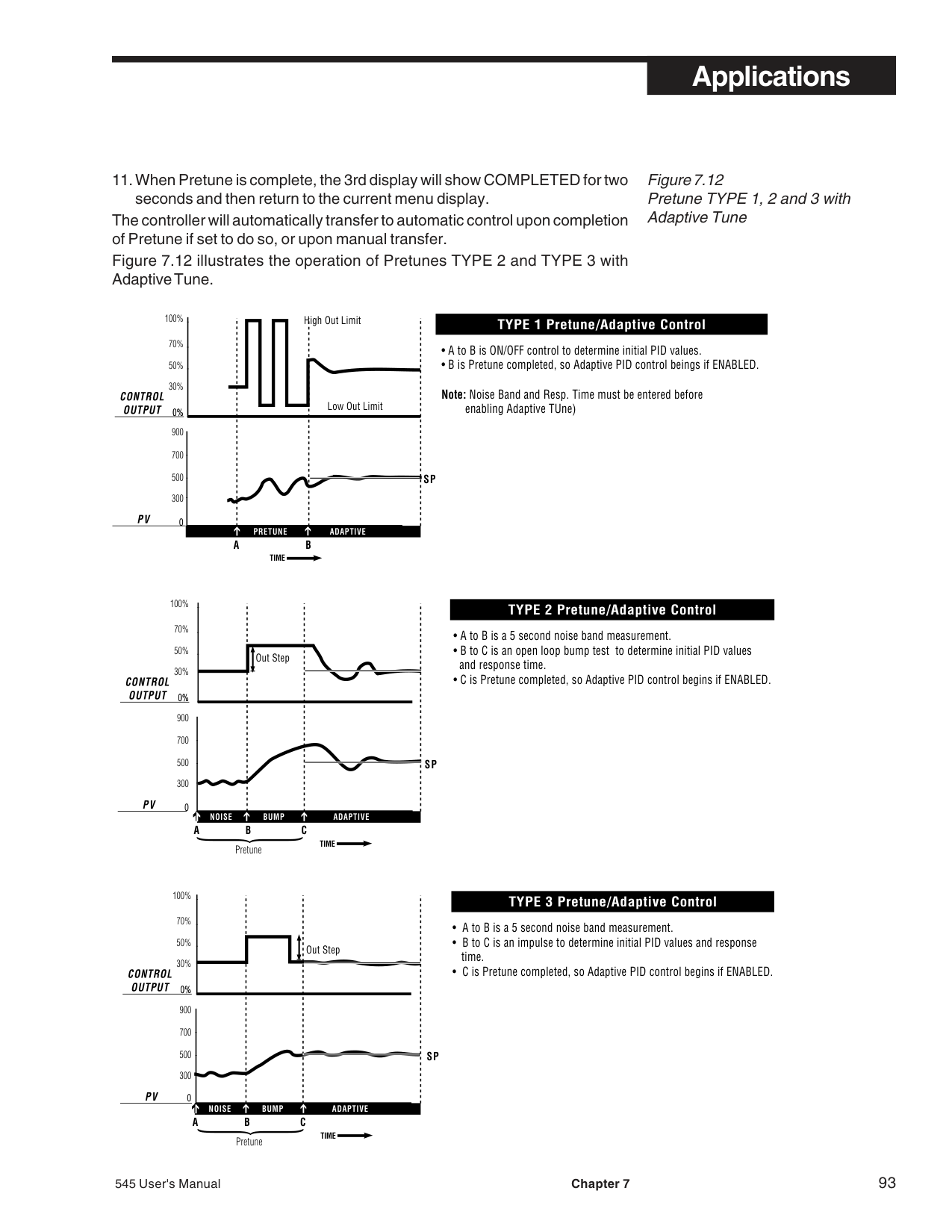
It is not necessary to use all 15 points. Whenever the XTH INPUT becomes the high end of the input range, that will be the last point in the table.
Once the various points are defined, the values between the points are interpolated using a straight line relationship between the points. The only limitation is that the resulting linearization curve must be either ever-increasing or ever-decreasing.
########### P. LOAD LINE
Load line is a manual reset superimposed on the automatic reset action. Adjusting the MAN. RST. tuning constant shifts the controller proportional band with respect to the setpoint.
When used with a proportional only or proportional/derivative control algorithm, the MAN. RST. parameter (located in the TUNING menu) is in effect “manual reset”.
However, when the automatic reset term is present, the reset action gradually shifts the proportional band to eliminate offset between the setpoint and the process. In this case, load line provides an initial shift at which the reset action begins. Load line is adjusted by observing the percent output required to control the process and then adjusting the load line to that value. This minimizes the effect of momentary power outages and transients. Load line may also be
adjusted to give the best response when bringing the load to the desired level from a “cold” start.
| | |L O A D L|IN E 2 0 %
L O A D L IN E 5 0 %
LOAD LINE 80%| |---|---|---|---|
100%
ut
tp
u
r O
50%
lle
tro
n
o
C
0 20% 40% 60% 80% 100%
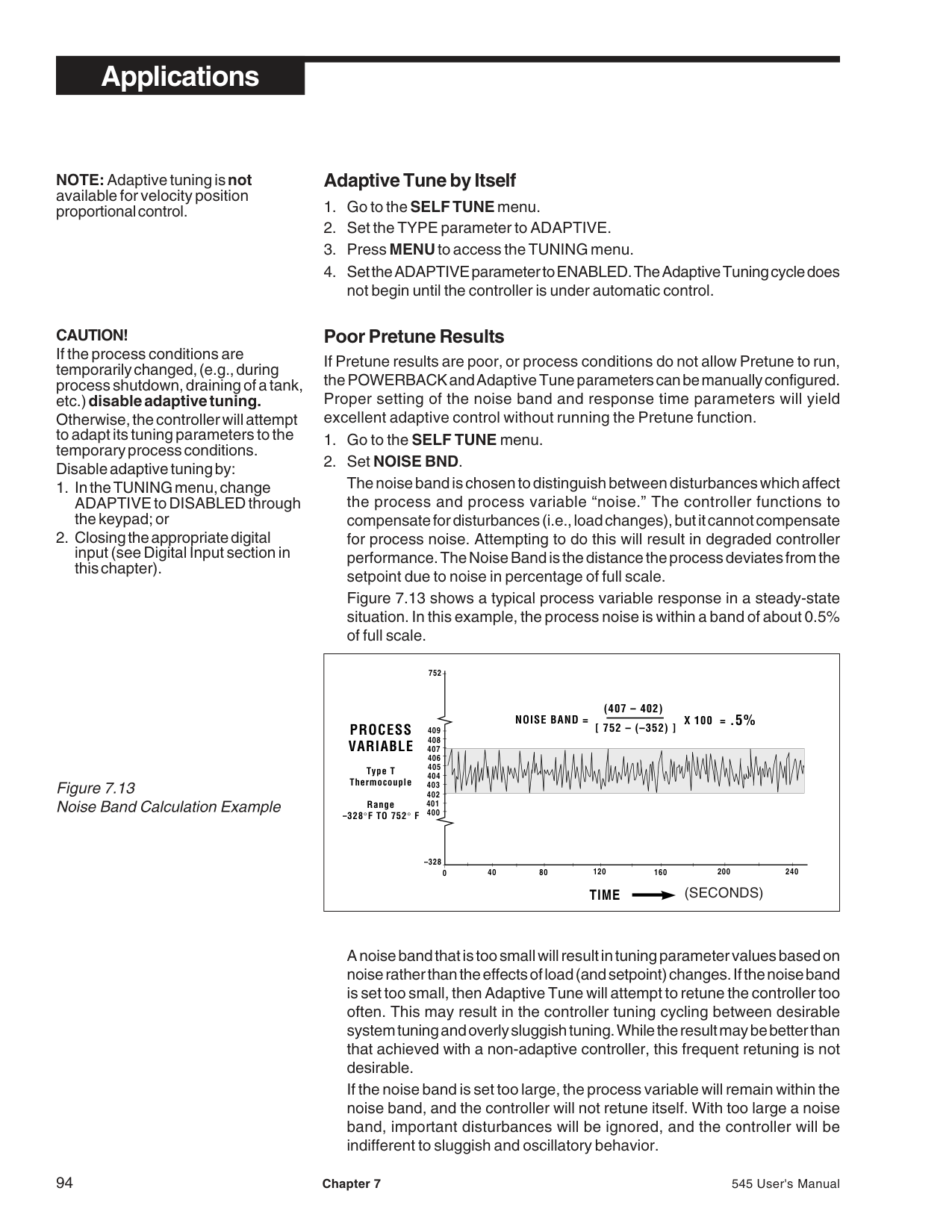
Process Variable Location (% of Controller Span)
############################## Figure 7.18 Load Line Example
########### Q. SECURITY
The 545 security system is easily customized to fit a system’s needs.
########### Software Configuration
NOTE: SEC CODE does not appear unless all functions are unlocked.
NOTE: Lock outCONFIGURE for full security. If left unlocked, the operator will have access to the security code.
NOTE: The security function is compromised if the security code is left at zero (0).
NOTE: Security does not prevent the operation from the digital inputs or serial communications.
########### Basic Operating Procedures
The security feature can be overridden. When a locked function is attempted, the operator will have the opportunity to enter the security code.If the correct security code is entered, the operator has full access. The security feature is reactivated after one minute of keypad inactivity. If the security code is forgotten, the security feature can still be overridden.
• The security override code is 62647 .
Store this number in a secure place and blacken out the code in this manual to limit access.
########### R. RESET INHIBITION
Reset Inhibition is useful in some systems either at the start-up of a process or when a sustained offset of process variable from setpoint exists. In conditions like these, the continuous error signal may cause the process temperature to greatly overshoot setpoint. Any of the digital inputs may be set up so that the contact closure disables the reset action (sets it to zero).
Software Configuration
NOTE: PV GAIN is only available if using a linear voltage or current input.
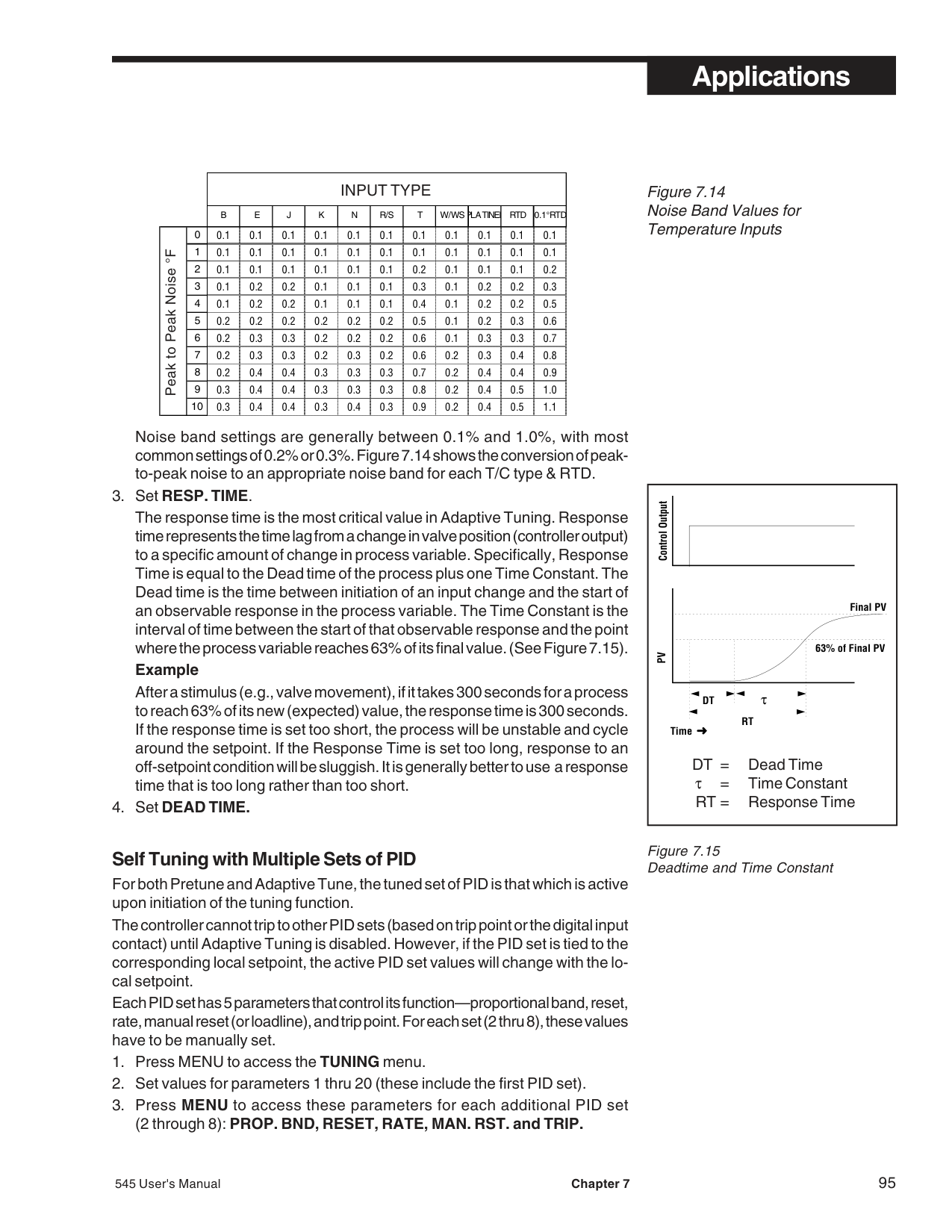
########### S. PROCESS VARIABLE READING CORRECTION
Conditions extraneous to the controller—an aging thermocouple, out of calibration transmitter, lead wire resistance, etc.—can cause the display to indicate a value other than the actual process value. The PV OFFSET and PV GAINparameters can be used to compensate for these extraneous conditions. NOTE: This feature is provided as a convenience only. Correcting the cause of the erroneous reading is recommended.
With a combination of both offset and gain factors, just about any inaccuracy in the sensor or transmitter can be compensated.
########### T. SERIAL COMMUNICATIONS
The serial communications option enables the 545 to communicate with a supervisory device, such as a personal computer or programmable logic controller.
The communications standard utilized is RS-485 which provides a multi-drop system that communicates at a high rate over long distances. Typical limitations are 32 instruments per pair of wires over a distance up to 4000 feet.
The 545 uses a proprietary protocol which provides an extremely fast and accurate response to any command. Cyclic redundancy checking (CRC) virtually ensures the integrity of any data read by the 545. Through communications, there is access to every Set up, Tuning and Operating parameter. For details on 545 protocol, contact a Moore Industries’ application engineer.
########### Hardware Configuration
• This optional features is only available if ordered originally from the factory. The circuitry for communications is contained on a modular circuit board that plugs into the Microcontroller Circuit Board, Refer to the order code in Chapter 1 for details.
########### Software Configuration
########### U. CASCADE CONTROL
In Cascade control, the output of one control loop (outside loop) becomes the remote setpoint of a second control loop (inside). The 545 performs this cascade control in a single instrument. The Cascade strategy enables better control of processes with significant lag times by breaking the process into two faster responding loops.
Cascade Control is typically used for the following:
When the 545 is configured for Cascade, Loop 1 is automatically the primary or outer feedback Loop and Loop 2 is the secondary or inner feedback loop. Loop 1 will not have a physical output, but rather the PID algorithm output is internally fed to Loop 2 as its Setpoint. Loop 2’s output comes out of Output 1. Should Loop 2 require two outputs, (e.g. duplex, staged) the second output would come out of Output 2.
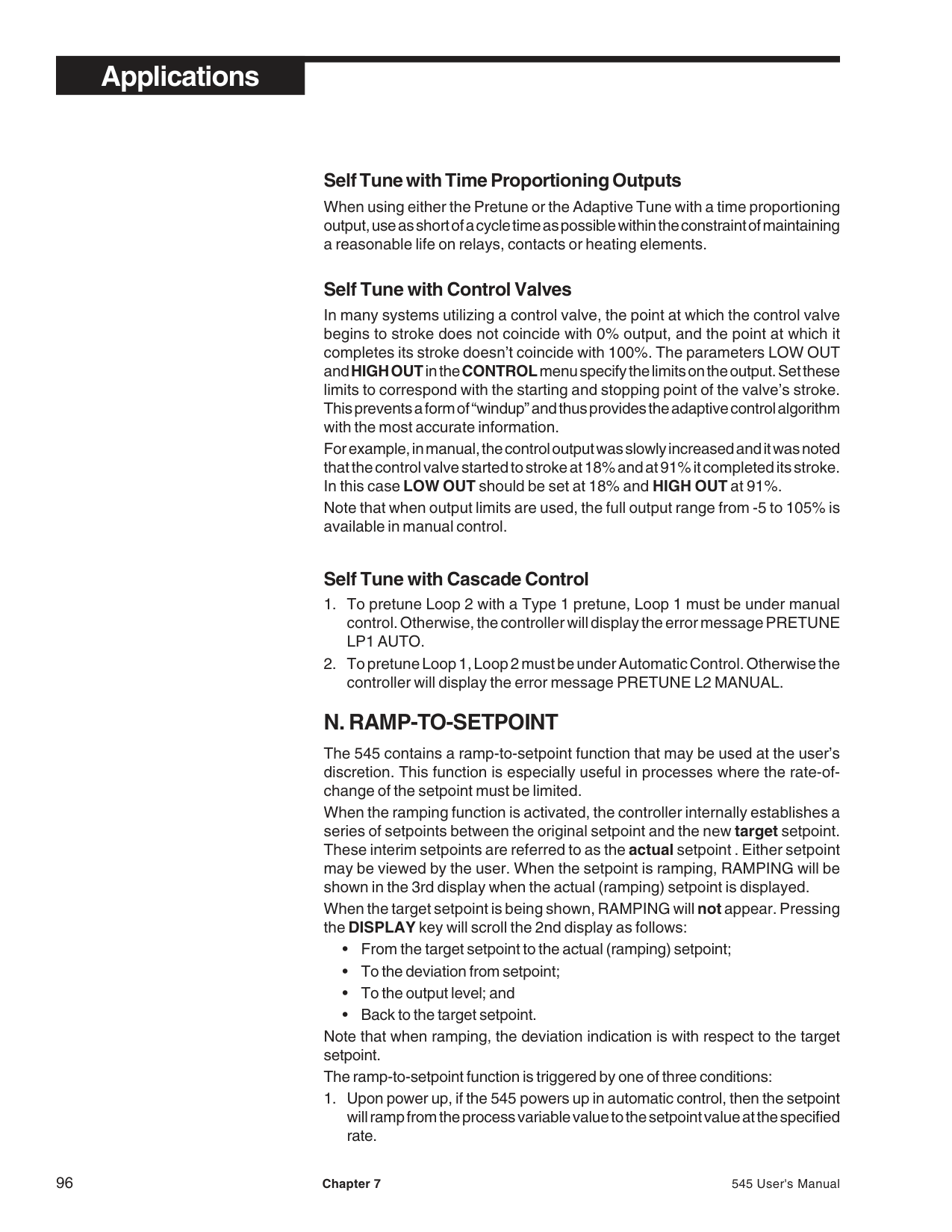
steam
raw materials
################################################### MIXER
HEAT EXCHANGER
| | | |---|---| | | |
pressure sensor
temperature sensor
OUT
IN
OUTSIDE LOOP
OUT RSP
IN
INSIDE LOOP
Figure 7.19 Cascade Control of Product Temperature-Functional View
########### Hardware Configuration
• Wire as in Figure 7.20
########### Software Configuration
If type is V/mA, set LO RANGE and HI RANGE parameters to match the transmitter range.
steam
raw materials
###################################################### MIXER
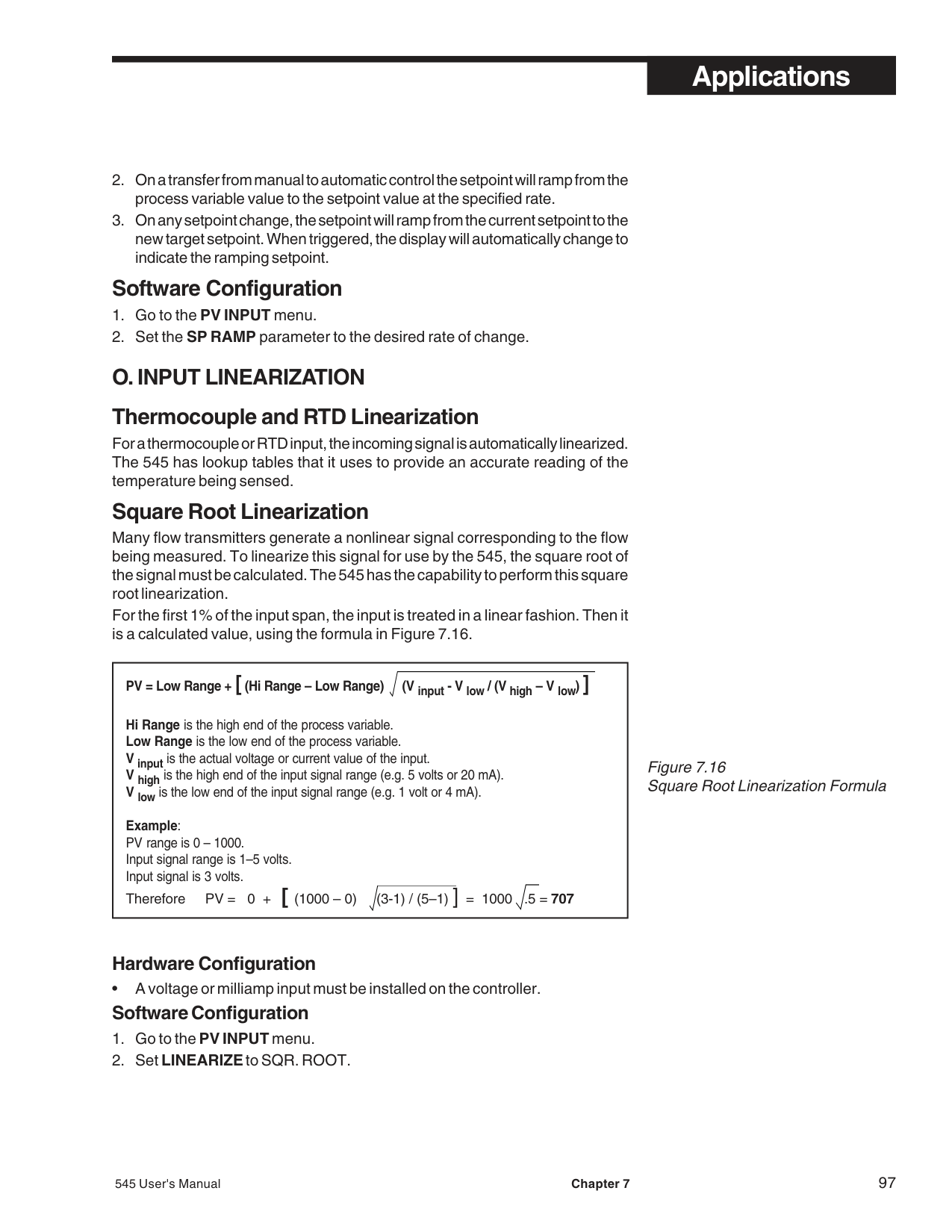
HEAT EXCHANGER
| | | |---|---| | | |
pressure sensor
temperature sensor
|1
2
3
4
5
6
7 816
15
14
13
12
11
10
917
18
19
20
21
22
23
| | | |---|---| | | | | | | | | | | | | | | | | | | | | |
31
30
29
28
27
26
25EARTHGND
S/W CCW
S/W 2
S/W 3
RSP–
RSP+
OUT 4–
OUT 4+
DIN GND
DIN 1
DIN 2
DIN 3
DIN 4
DIN 5
COLD JUNC–
COLD JUNC+
545 002| |---|
LINE
(NOT USED)
COMM–
NEUTRAL
COMM+
OUT 2–
OUT 3–
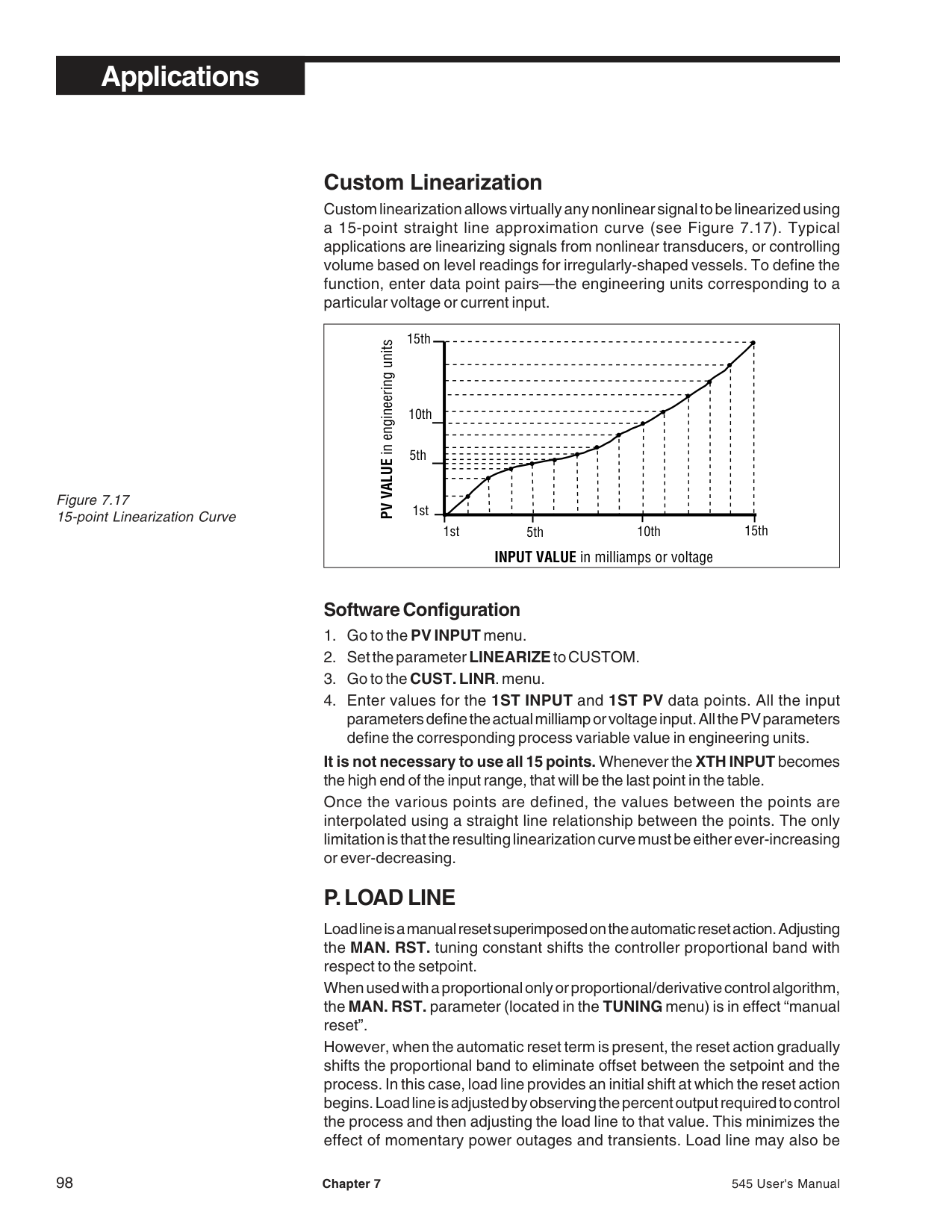
PV2–
PV2+
RTD 3RD
PV1–
PV1+
OUTSIDE LOOP
INSIDE LOOP
############################## Figure 7.20 Cascade Control of Produce Temperature-Wiring View
|Loop 1 Output (Outside Loop)
0
0%
100%
200 800 1000
Loop 2 SP (Inside Loop)
PV2 RANGE = 0-1000 SP LOW LIM = 200 SP HI LIM = 800
Loop 1 Output (Outside Loop)
0
0%
30%
70%
100%
200 800 1000
Loop 2 SP (Inside Loop)
(LOOP 1) LOW OUT = 30 (LOOP 1) HIGH OUT = 70
| |---|
############################## Figure 7.21 The Functions of Cascade Control
of Loop 2 setpoint over which you want control. Example
Your Loop 2 range is 0 to 1000; you want its setpoint span to be 100 to 500. Remember that the setpoint span of Loop 2 is driven by the PID output of Loop 1 (the outside loop). Therefore you set SP LO LIM at 200 and SP HI LIM at 800. With these parameters, whenever Loop 1 output is 0%, the Loop 2 SP is 200.
################################## TUNING TIP
Similarly, whenever Loop 1 output is 100%, then Loop 2 SP is at 800. All the intermediate values follow a linear curve, as shown in Figure 7.21.
########### Tuning Cascade Control
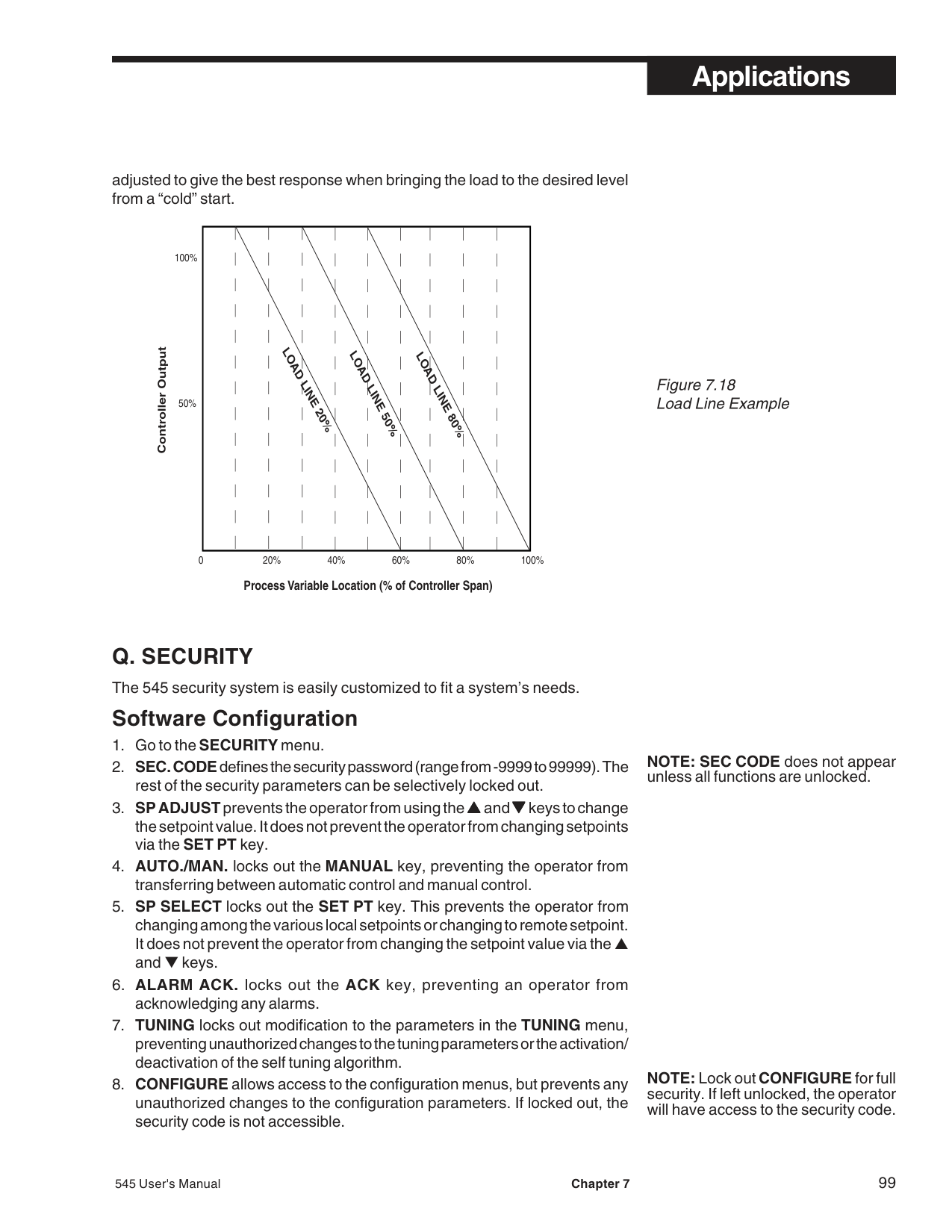
########### V. RATIO CONTROL
Ratio Control is employed in blending applications that require materials to be mixed to a desired ratio. In some applications not only is the ratio being controlled but also the combined flow or total discharge rate of the mixed materials.
########### Ratio control with one wild stream
Figure 7.22 shows a simple example of a two stream blending application in which one of the streams is wild (uncontrolled). Ratio control for the type of application where one loop is “wild,” can be accomplished with a 545 configured for one loop.
############################## Figure 7.22 Ratio Control in Mixing Application “Wild Stream”-Wiring View
| | | |---|---| | | | | | | | | | | | | | | | | | | | | |
| | | |---|---| | | | | | | | | | | | | | | | | | | | | |
EARTH GND
DIN GND
25LINE
91
(NOT USED)
S/W CCW
10
26
COMM–
NEUTRAL
11
27
COMM+
OUT 2–
OUT 3–
12
28
PV2–
13
29
PV2+
RSP–
14
30
RTD 3RD
RSP+
COLD JUNC–
15
PV1–
OUT 4–
COLD JUNC+
PV1+
OUT 4+
545 002
Flow Sensor
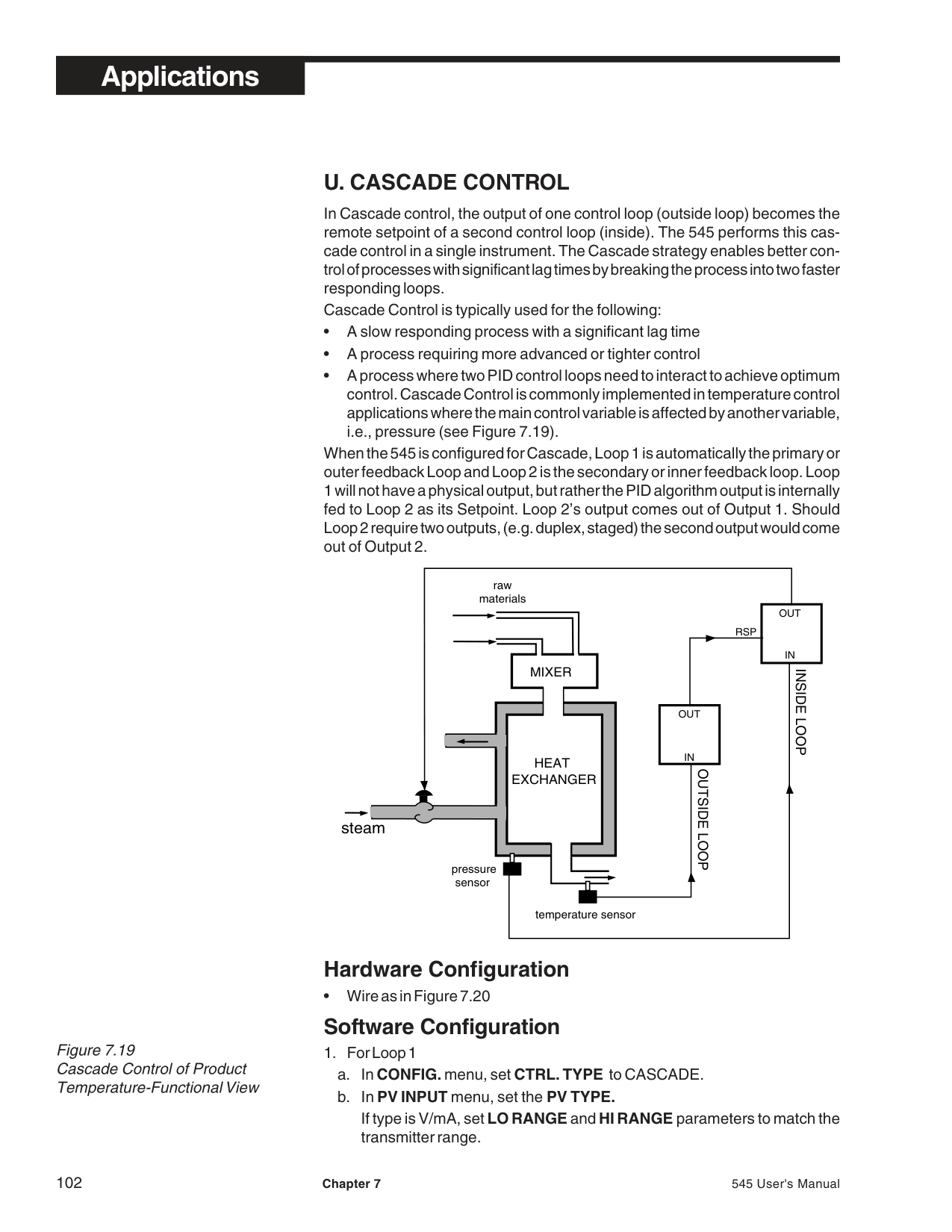
MIXER
Controlled Stream
Wild Stream Flow Sensor
############### Hardware Configuration
############### Software Configuration
################################## Example
In this example, the remote setpoint signal is the flow rate of Material B. The desired amount of B is twice that of A. Therefore, the ratio is 2.0. If the flow of Material B is measured at 50 gallons/minute, the effective remote setpoint value would be 2 times 50, or 100. The 535 would try to maintain the flow of Material A at 100. As the flow of Material B changes, the setpoint would change accordingly, always in a 2:1 ratio.
########### Ratio control with combined discharge monitoring
This process requires not only the same ratio of blending as in example 1, but also requires the control of the combined discharge rate. In this example, material A will always by in the proper ratio to material B even as the flow of B is controlled to a specific rate. By controlling the flow rate of B, the total discharge from the mixer (in Figure 7.23) can also be regulated.
Material B (PV1) has the only user defined setpoint in the system. The total flow setpoint of the system is calculated by the following formula:
Total Flow = PV1 + ((PV2 x Loop2 SP Ratio) + SP Bias)
NOTE: In dual stream Ratio Control, enter the ratio and bias values in the TUNING menu of Loop 2 under SP RATIO and SP BIAS
Secondary Loop
RSP INPUT
Primary Loop OUT
IN
PV1 RETRANS
OUT IN
|FLOW SENSOR
MATERIAL A| | |---|---|
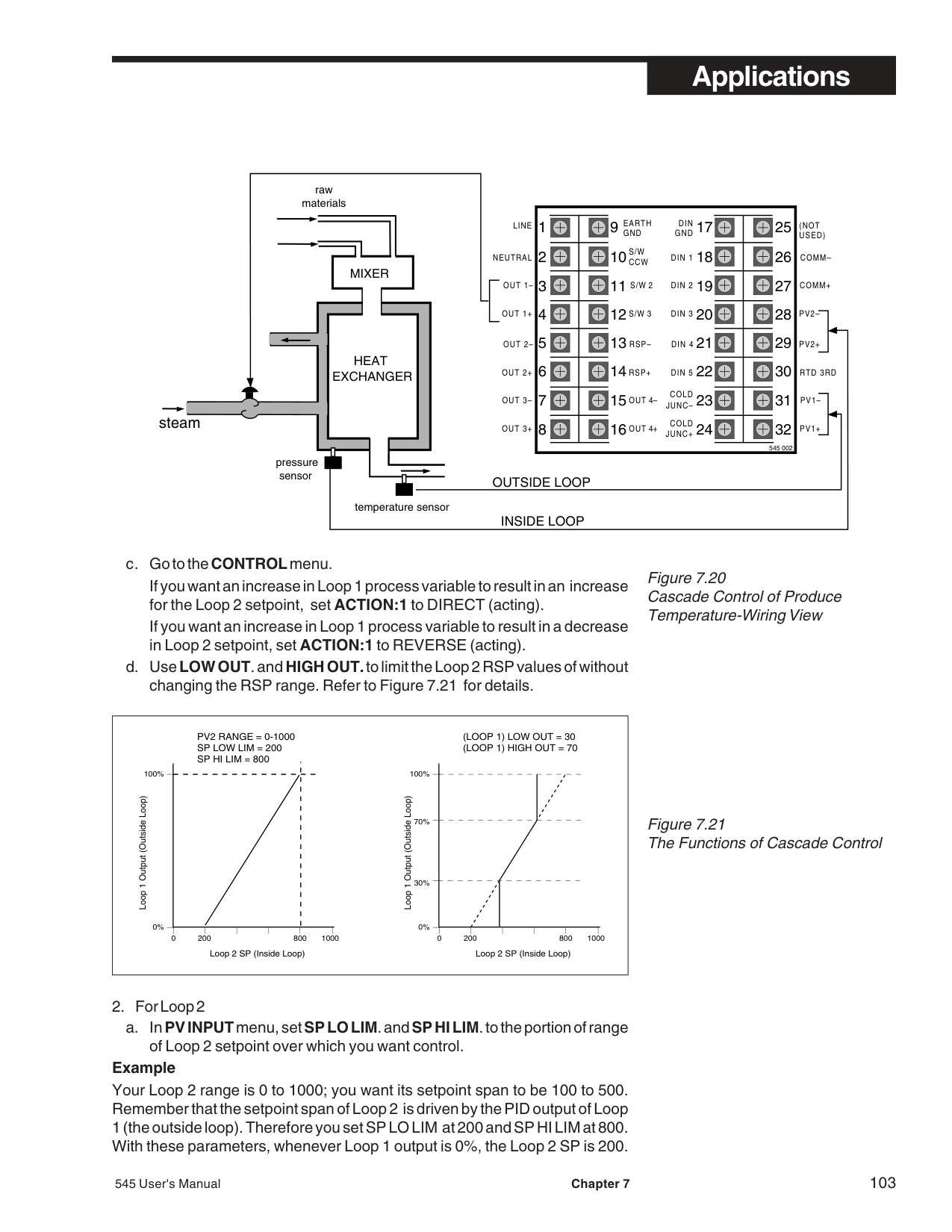
| | |
MIXER
MATERIAL B
FLOW SENSOR
Figure 7.23 Ratio Control in Mixing Application “Controlled Stream”-Functional View
############### Hardware Configuration
• Follow wiring as in Figure 7.24
Figure 7.24 Ratio Control in Mixing Application “Controlled Stream”-Wiring View
TUNING TIP: Put Loop 1 under manual control when tuning Loop 2, in order to hold Loop 2 SP at a constant.
|1
2
3
4
5
6
7 816
15
14
13
12
11
10
91
| | | |---|---| | | | | | | | | | | | | | | | | | | | | |
18
19
20
21
22
23 31
30
29
28
27
26
25EARTHGND
S/W CCW
S/W 2
S/W 3
RSP–
RSP+
OUT 4–
OUT 4+
DIN GND
DIN 1
DIN 2
DIN 3
DIN 4
DIN 5
COLD JUNC–
COLD JUNC+| |---|
LINE
(NOT USED)
COMM–
NEUTRAL
COMM+
OUT 2–
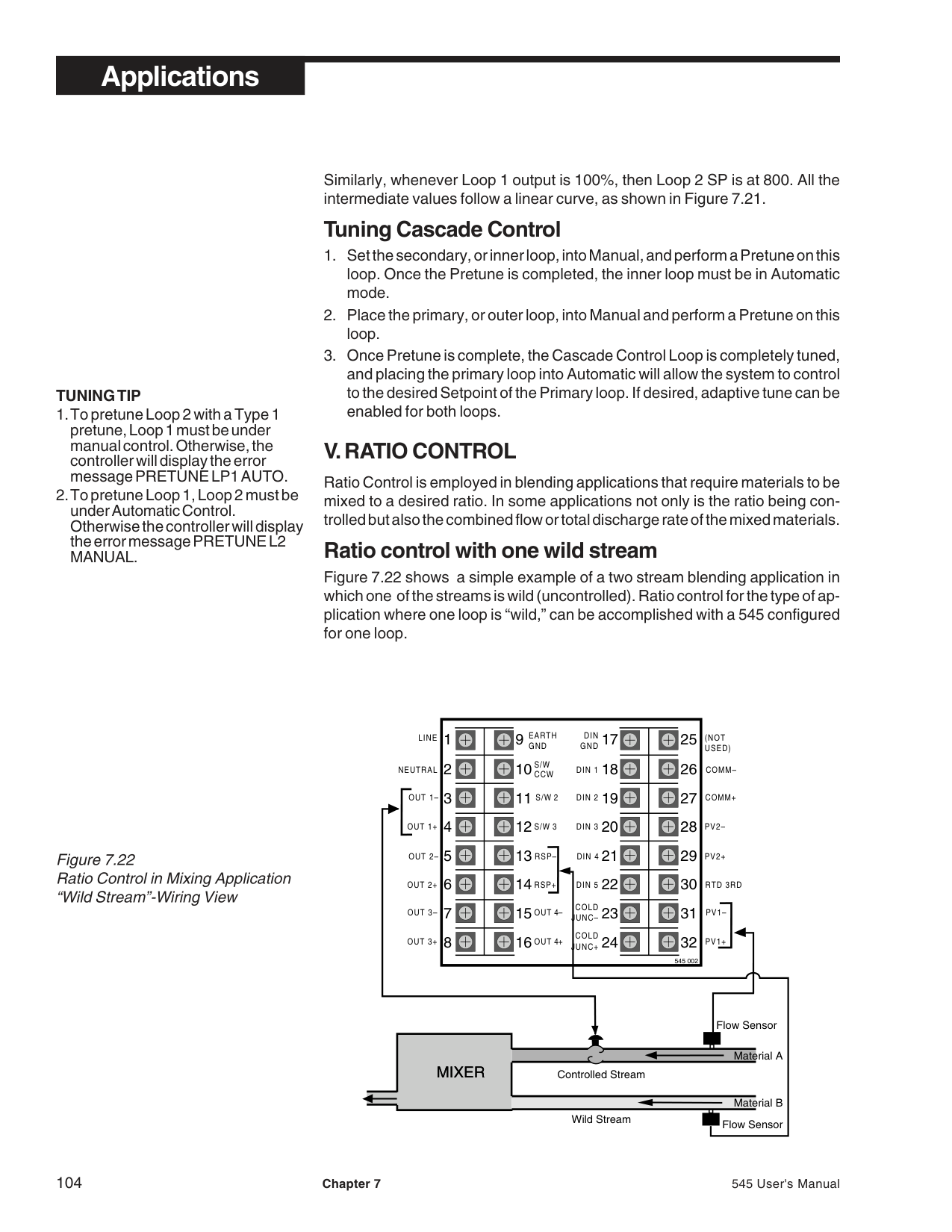
OUT 3–
PV2–
| | | |---|---| | | | | | |
PV2+
RTD 3RD
PV1–
| | | |---|---| | | | |MATERIAL A
MATERIAL B
|MATERIAL A
MATERIAL B
|
PV1+
FLOW SENSOR
MIXER
FLOW SENSOR
############### Software Configuration
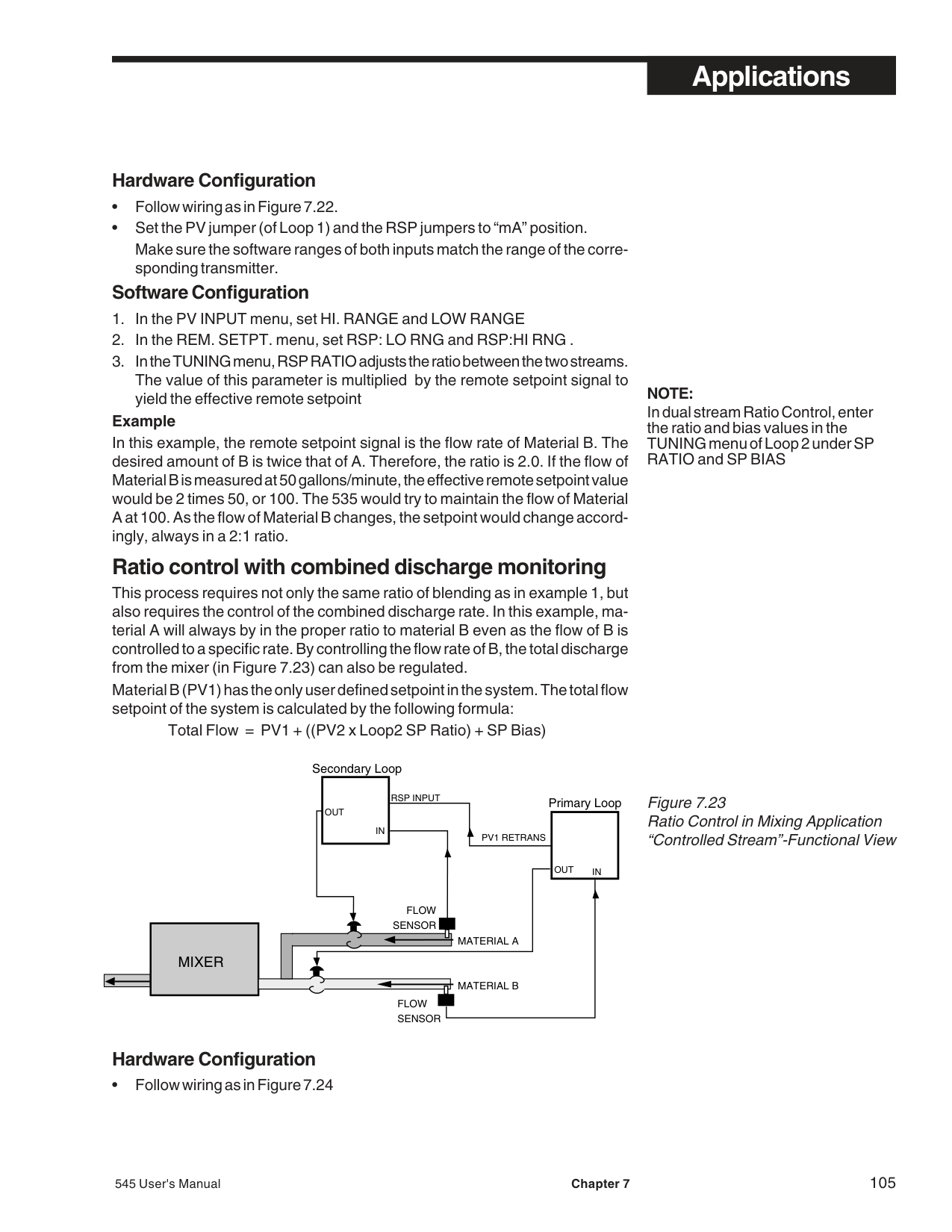
########### W. FEED FORWARD/FEEDBACK CONTROL
In feedback control, controller output is based on the difference between process variable and setpoint. By contrast, feed forward control generates an output signal based upon the process variable. Feed forward control functions compensate for system lag times by providing a predictive or anticipative output signal based on a process measurement. Typically a feed forward signal is used to enhance the performance of a feedback loop.
################################## Example
Below is an alkaline effluent stream with a constantly changing flow rate, into which an acid is being mixed (Refer to Figures 7.25 and 7.26). The acid valve is positioned as a result of the flow rate of the stream and the pH of the mix. This type of control is called Feed Forward/Feed Back. The pH sensor is a closed (feedback) loop that actually measures the result of the valve’s action. The flow rate is an open (feed forward) loop, adding, subtracting or multiplying its output to the pH loop.
|PV1
PV2 Feed Forward PV
PID
SUM or +/–
OUTPUT OUTPUT TO VALVE
SP
ZERO GAIN
| |---|
Figure 7.25 Feed Forward Control in Mixing Application-Wiring View
Figure 7.26 Feed Forward Control in Mixing ApplicationFunctional View
||545 Feed Forward Controller|545 Feed Forward Controller| | |---|---|---| | | | |
Acid Tank
Mixing Tank (PV1) pH Sensor
Raw Material
Feed Forward
Input (PV2) Flow Sensor| |---|
########### Software Configuration
############################## Figure 7.27 Fixed and Variable Lag ExampleCompound Loop Chlorine Control
########### X. LAG TIME
These functions are for slow processes with long or changing lag times.
Figure 7.27 shows a compound loop flow pacing (feed forward/feed back) water chlorination control system. The fixed lag time is the time under steady flow it takes the chlorine to travel from the injector to the residual sampling point. Under fluctuating flow rates, the travel time between the injector and the sampling point will vary. When variable lag time is invoked, changes in the flow past the flow meter automatically increase or decrease the lag time between the injector and sampling point.
545 Controller
Valve Control Signal
Flow Signal
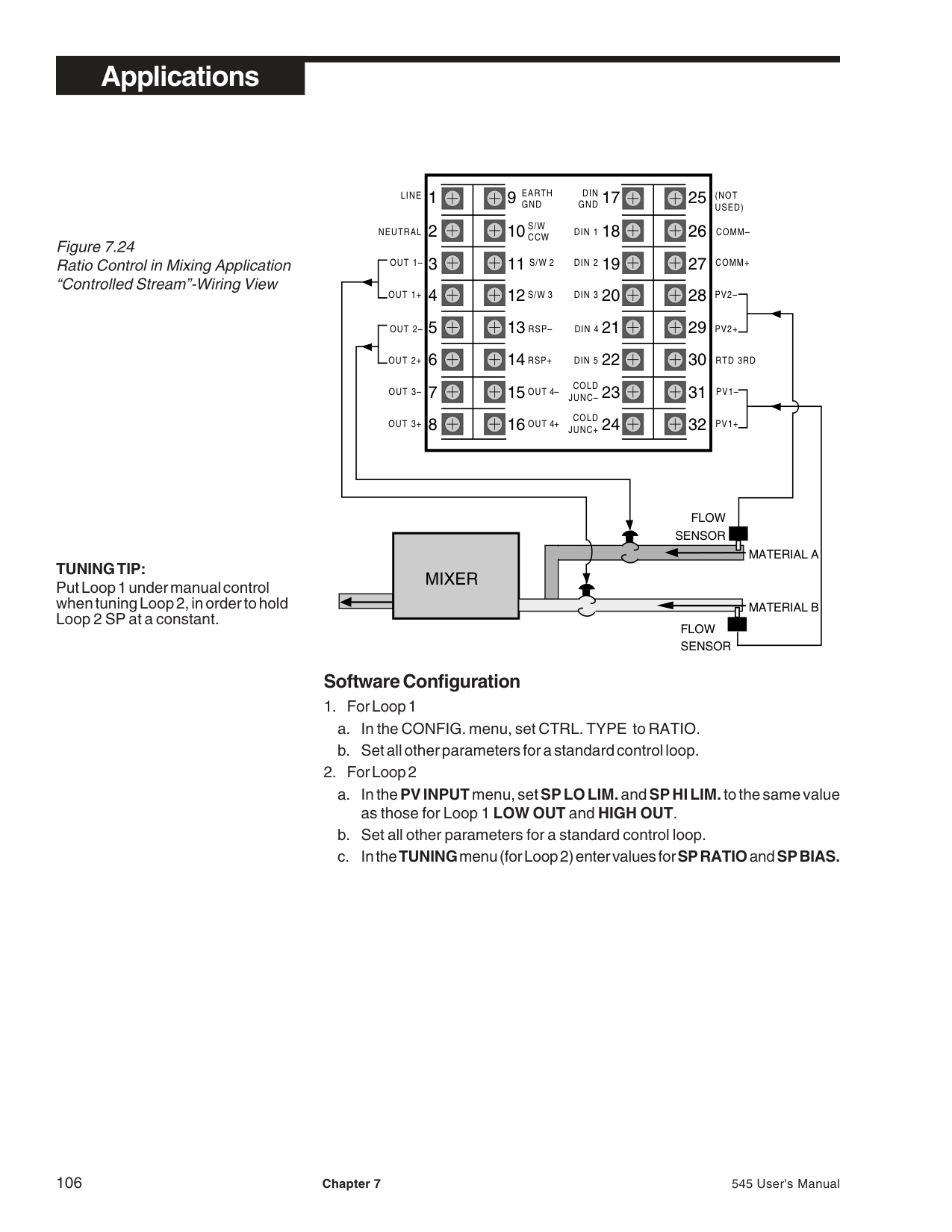
Residual Signal
Control Valve
Chlorine Residual Analyzer
Chlorine Tank
Flow Sample
Flow Meter
Chlorine Injector
Water Flow Water Flow
Residual Sampling Point
########### Fixed Lag
Fixed Lag (FIXED. LAG) is a constant delay that prevents change in the control output before the results of the previous control value change can be measured. The fixed lag function may be used with the following control types: ONE LOOP, DUAL LOOP, FFWD. SUM and FFWD. MULT.
############### Software Configuration
########### Variable Lag
Variable lag (VARBL. LAG) can be used in feed forward/feed back control strategies where the feedforward contribution (PV2 input) can vary and thus increase or decrease the amount of actual process lag time. Variable Lag may be used with FFWD. SUM and FFWD. MULT control types.
############### Software Configuration
When in the normal operating mode, the lag time will decrease as the PV2 value increases, and will increases as the PV2 value decreases.
###### Menu Flowcharts
SET UP
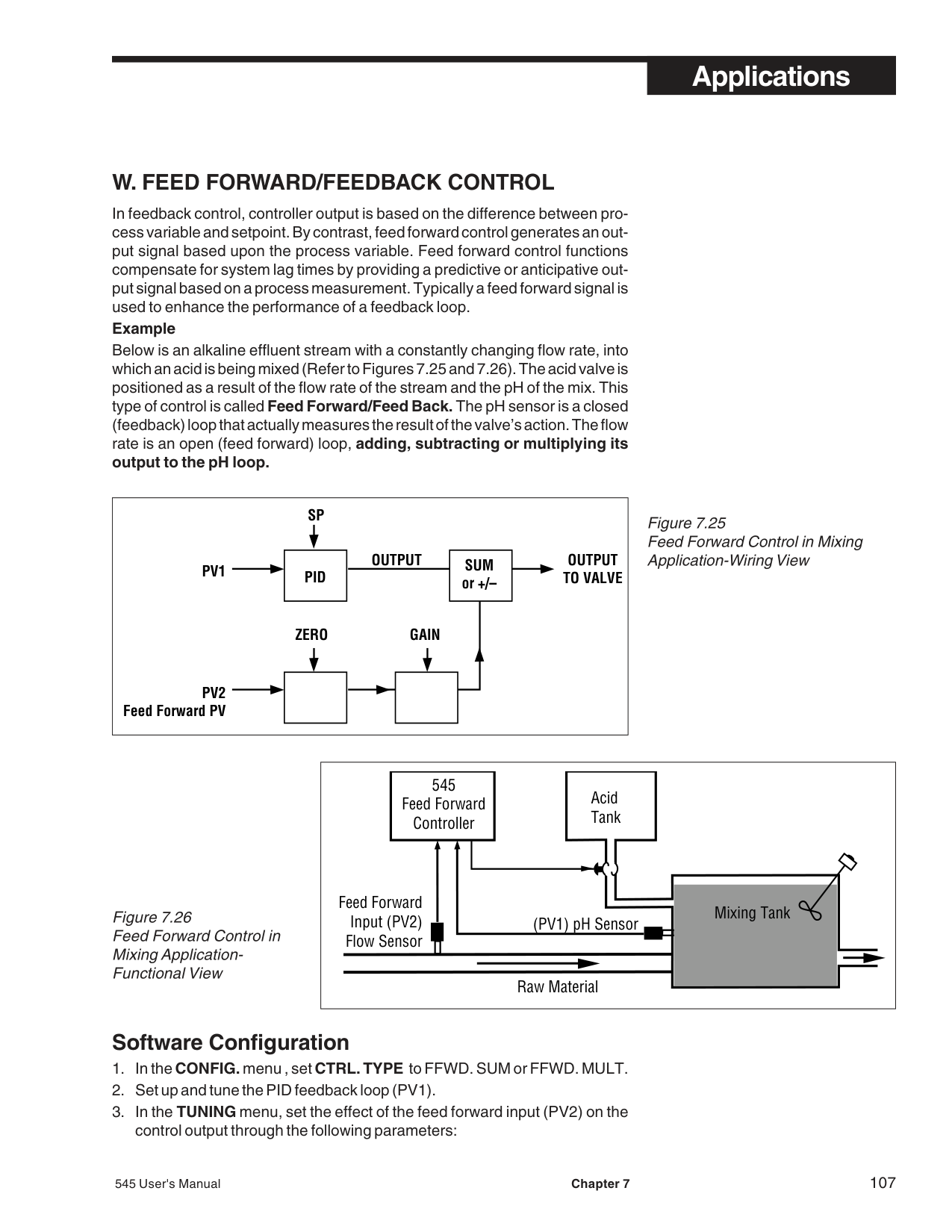
###### APPENDIX 1 MENU FLOWCHARTS
➤
CONFIG.
G
CTRL. TYPE LOOP1 OUT LOOP2 OUT OUTPUT: 2 OUTPUT: 3 OUTPUT: 4
ANLG. RNG.:1 ANLG. RNG.:2 ANLG. RNG.:3 ANLG. RNG.:4 CONTACT 1 CONTACT 2
CONTACT 4 CONTACT 5 RSP ASSN. SLIDEWIRE NAME L1.
CONTACT 3
NAME L2
➤➤➤ ➤➤➤➤➤➤➤
PV INPUT
PV TYPE DEG. F/C/K DECIMAL LINEARIZE LOW RANGE HI RANGE
SP LO LIM. SP HI LIM. SP RAMP FILTER PV OFFSET PV GAIN
PV RESTOR.
CUST. LINR.
1ST. INPUT 1ST. PV 2ND. INPUT 2ND. PV 15TH. INPUT* 15TH. PV*
CONTROL
ALGORITHM D. SOURCE
ACTION: 1 FIXED LAG VARBL. LAG
MAX LAG
HIGH OUT.
PV BREAK LOW OUT.
FF LO LIM. FF HI LIM. ACTION:2
S/W RANGE OPEN F/B CLOSE F/BCCW TIMEMIN. TIMECW TIME
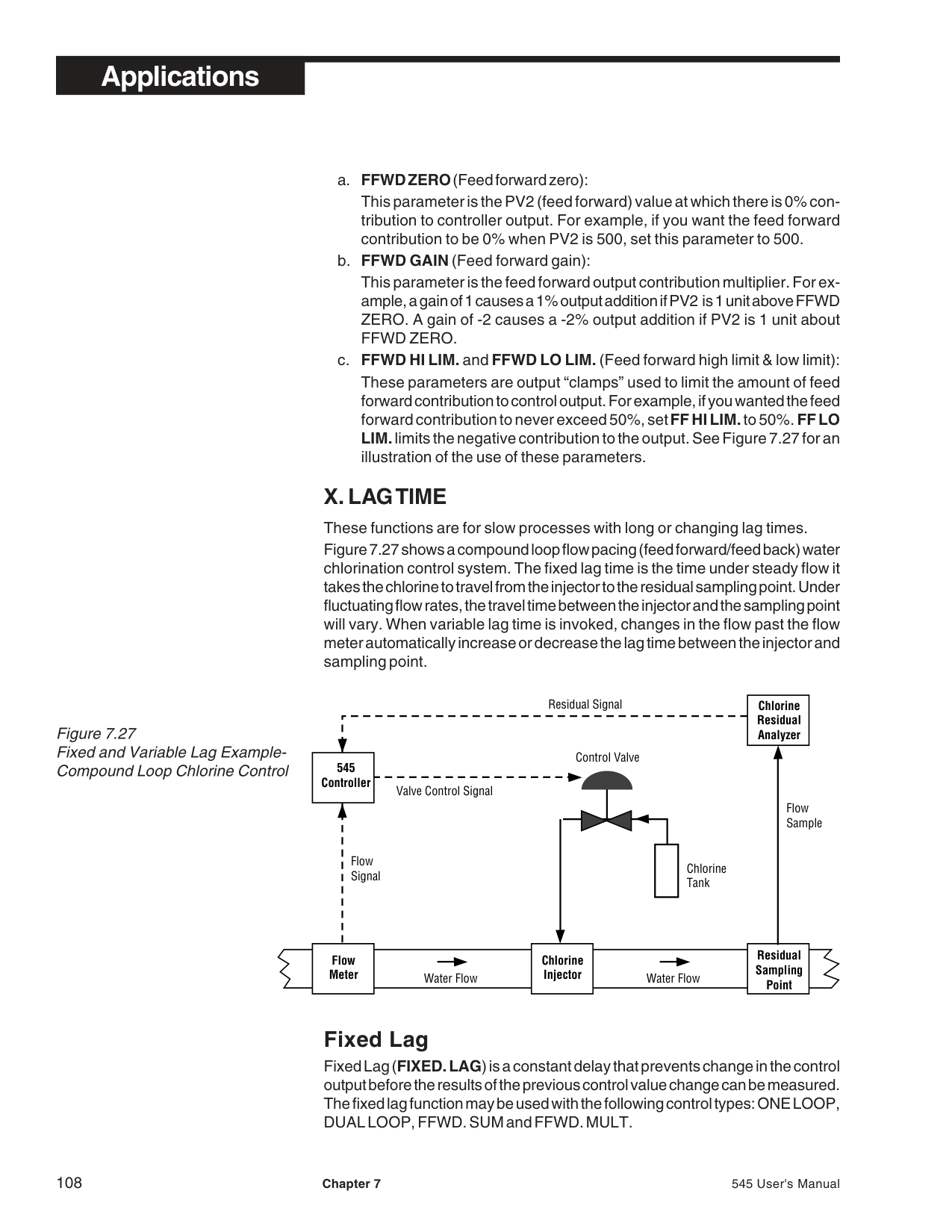
OUT1 STOP OUT2 STRT.
ALARMS
ALM. TYPE:1 ALM SRC:1 ALARM SP:1 HIGH SP:1 LOW SP:1
DEADBAND:1
ACK.:1 POWER UP:1 MESSAGE:1 ALM TYPE:2
ALM.:1 OUT. LATCHING:1
DEADBAND:2ALARM SP:2 ALM.:2 OUT.
HIGH SP:2 LOW SP:2
ALM SRC:2
LATCHING:2
MESSAGE:2POWER UP:2ACK.:2
FAULT OUTPUT
RATE TIME
REM. SETPT.
RSP:LO RNG. RSP:HI RNG. TRACKING BIAS HIGH
TYPE V/MA BIAS LOW
RSP FIXED
RETRANS.
TYPE:2 LO RANGE:2 HI RANGE:2 TYPE:3 LO RANGE:3 HI RANGE:3
TYPE:4 LO RANGE:4 HI RANGE:4
SELF TUNE
TYPE OUT. STEP LOW LIMITPRETUNETUNE PT. HI LIMIT
TIMEOUT MODE DEAD TIMERESP. TIMENOISE BND.
SPECIAL
AUTO. TRIP TRIP DEV. DES. OUTPT. POWER UP PWR. UP:OUT. PWR. UP:SP
NO. OF SP
G
SECURITY
SEC. CODE SP ADJUST AUTO./MAN. SP SELECT ALARM ACK. TUNING
CONFIGURE
G
BAUD RATE CRC SHED TIME SHED MODE SHED OUT.
SER. COMM.
STATION
DESIG. SPSHED SP
G DENOTES GLOBAL MENUS
545 User's Manual Appendix 1 A-1
###### Menu Flowcharts
TUNING ADAPTIVE
RATE:1RESET:1PROP BND,:1PRETUNE POWR. BACK
P. PROP.D.B. PID OFST.:2
CYCLE TM.:1MAN. RST.:1 DEADBAND:1 PID OFST.:1
FFWD GAINRSP BIASRSP RATIOCYCLE TM.:2 DEADBAND:2
REL. GAIN:2
FFWD ZERO FF.BRK.GN
TRIP:1PID TRIPNO. OF PIDFF.BRK.ZR
Up to 8 times, depending on NO. OF PID

A-2 Appendix 1 545 User's Manual
###### Parts List
##### APPENDIX 2 PARTS LIST
CIRCUIT BOARDS
OPERATOR INTERFACE ASSEMBLY shown with bezel insert in place
CIRCUIT BOARD SUPPORT (BEZEL INSERT)
BEZEL GASKET
CONTROLLER BODY shown with mounting collar in place
MOUNTING COLLAR
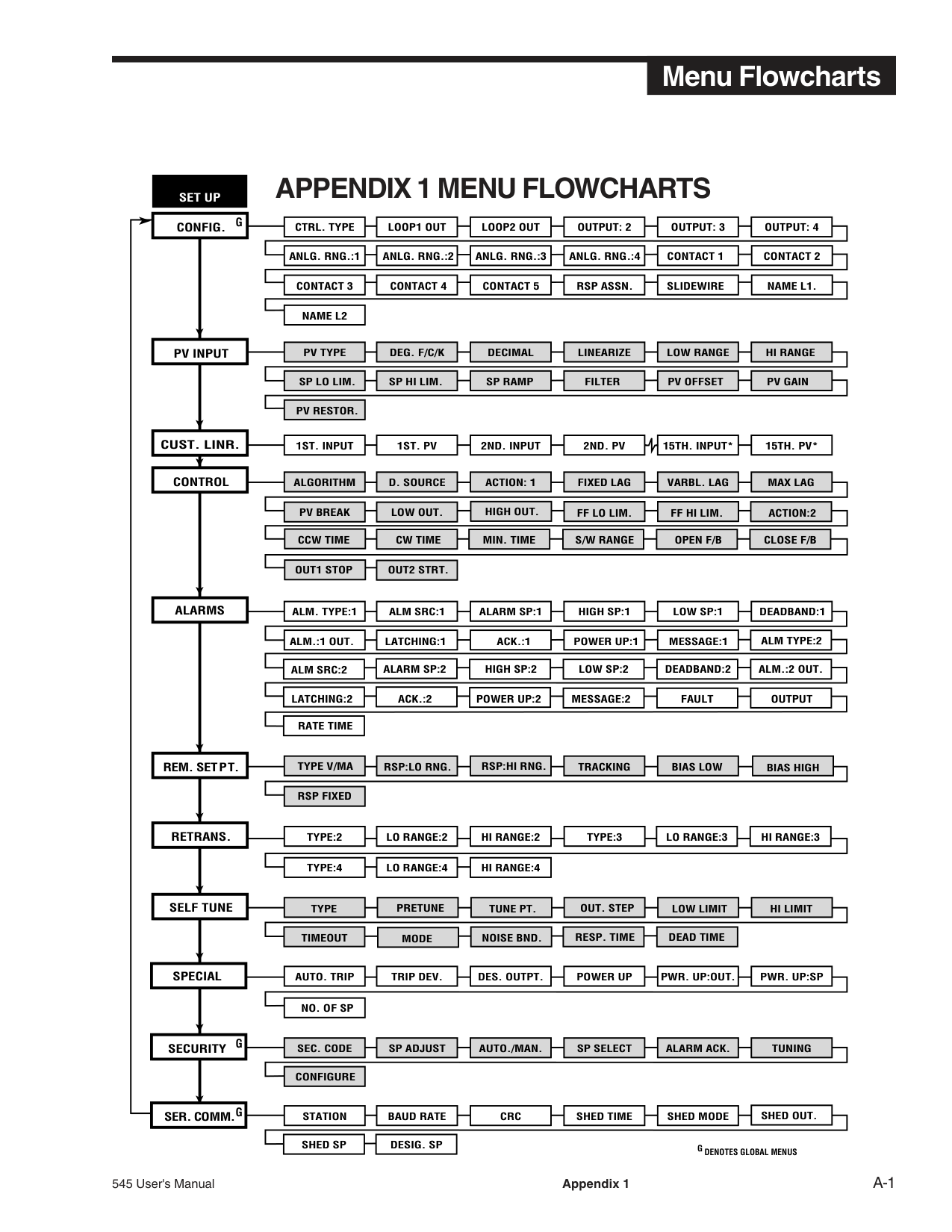
ITEM PART # Output Modules
Mechanical Relay Module 535 600 Analog (Milliamp Module) 535 601 Solid State Relay Module 535 602 DC Logic (SSR Drive) Module 535 603 Loop Power Module 535 604 RS-485 Communications Module 535 705
Repair/Replacement Parts
Operator Interface Assembly 545 634 Power Supply Circuit Board 535 730 Microcontroller Circuit Board 535 731 Option Circuit Board w/no Options 535 720 Option Circuit Board w/Set of 5 Digital Contacts 535 721 Option Circuit Board w/Slidewire Feedback 535 722 Option Circuit Board w/set of 5 Digital Contacts & Slidewire Feedback 535 723 EPROM w/no Remote Setpoint Option 545 740 EPROM w/Remote Setpoint Option 545 741 Lithium Battery 093 128 Jumper Kit: Set of All Jumper Connectors 545 660 Gasket Kit: 1 Panel Gasket & 1 Bezel Gasket 535 662 Mounting Kit: Mounting Collar & 4 screws 535 761 Bezel Retention Screw Kit 535 663 Module Retention Kit for Outputs 1-3 ( Includes Retention Plate) 535 664 Module Retention Kit for Output 4: Set of 5 Tie Wraps 535 665 Circuit Board Support (Bezel Insert) 535 075 Engineering unit labels (1 sheet) 535 106
545 User's Manual Appendix 2 A-3
###### Parts List
A-4 Appendix 2 545 User's Manual
Troubleshooting
##### APPENDIX 3 TROUBLESHOOTING
SYMPTOM PROBLEM SOLUTION Display will not light up
Defective power source Improper wiring Blown in-line fuse Unit not inserted in case properly; or, screws have not been tightened.
Check power source and wiring Correct wiring Check wiring, replace fuse Remove unit from case (and remove bezel screws), then reinsert unit and properly tighten screws. Move jumper to proper location Select proper range Check and correct sensor wiring Check and correct wiring Install module Replace transmitter Select proper range in software
Improper/Lost PV reading
Input jumper selection improperly set Input range improperly selected in software Reverse polarity If controller powered, improperly wired Loop power module not installed Defective transmitter Transmitter signal out of range Defective thermocouple Input jumper selection improperly set Wrong TC type selected in software
• Voltage/current
Improper/Lost PV reading
Replace thermocouple Select Proper input Select proper thermocouple type in software Wire properly Replace RTD Move jumper connector to proper location Wire properly Check and correct wiring or module location Set jumper connector to proper location
• Thermocouple
Improper wiring Defective RTD Input jumper selection improperly set
Improper/Lost PV reading
• RTD
Improper wiring Output wiring and module location do not match
No control output
If SSR, SSR Drive of Milliamp output, jumpers J1, J2 and J3 are not set properly Software configuration does not match hardware PID values not set properly Input sensor signal is not connected or valid Resetting action due to electrical noise on powerline PID values not set properly
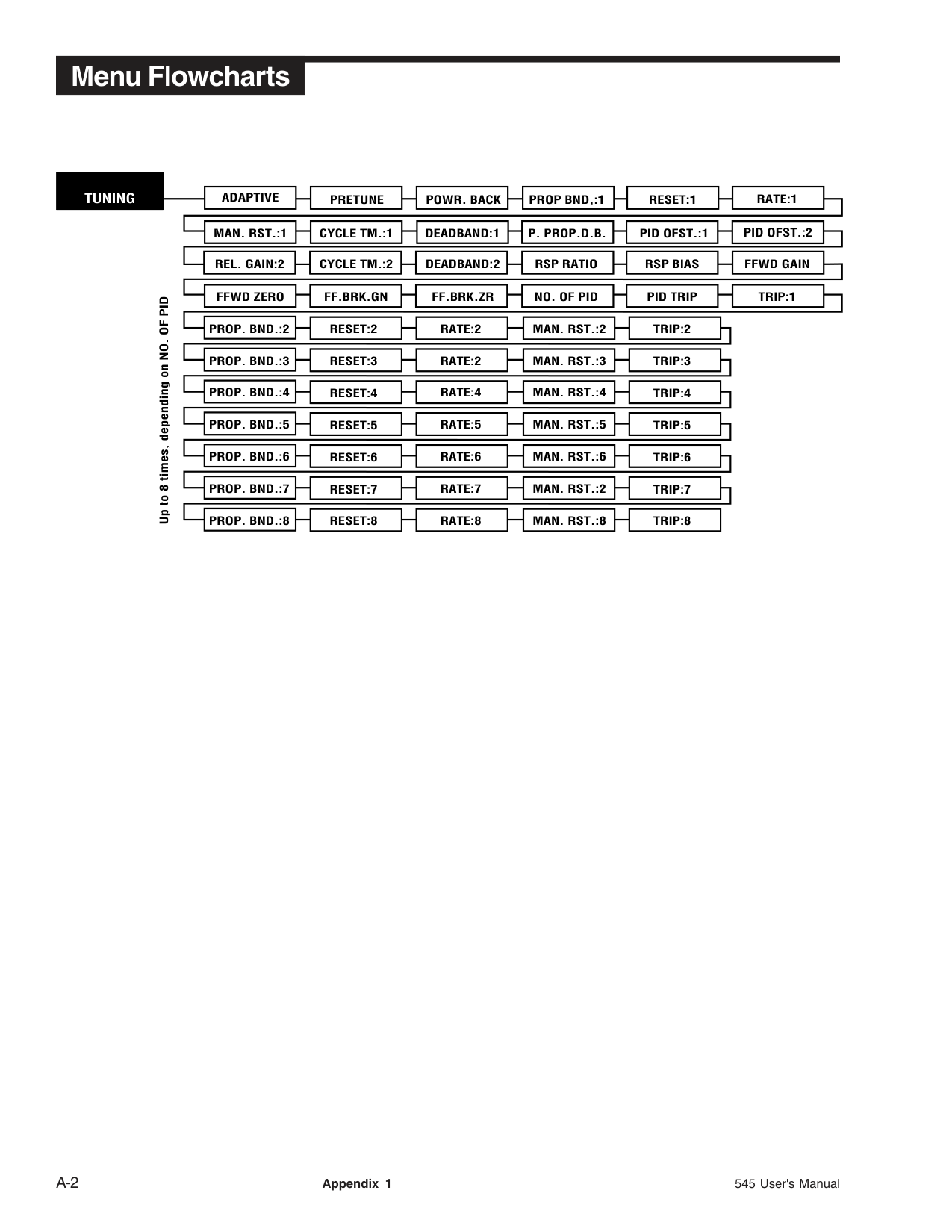
Reconfigure software to match hardware Set PID values properly See LOST PV message Filter power line.
Can’t switch to auto control Erratic display
Retune controller
545 User's Manual Appendix 3 A-5
###### Troubleshooting
################################################## Message When does it occur? What to do:
|DEFAULTS|Whenever the memory is cleared and all parameters revert to factory default settings. This may be done by purposely clearing the memory or when the unit is powered up for the first time or if the software version is changed.|Entering the Set Up mode and changing a parameter will clear the message. If due to something other than the user purposely clearing the memory, call factory for assistance.| |---|---|---| |LOST CAL. or ERROR: BAD CAL. DATA|Indicates that the calibration data has been lost. Occurs if all the memory has been erased.|Problem should never happen. Must correct the situation and recalibrate. Call factory for assistance.| |PV1 UNDER or PV1 OVER or PV2 UNDER or PV2 OVER or|When the process variable value travels slightly outside the boundaries of the instrument span. Does not apply to thermocouple or RTD inputs.|May not need to do anything. May want to check the transmitter accuracy and check to see if range of transmitter matches the range of the controller.| |LOST PV1 or LOST PV2|When the controller senses a lost process variable signal or the input signal travels well beyond the instrument span.|Check wiring and sensor/transmitter.| |LOST RSP|When the remote setpoint is in use and the controller senses that the signal has been lost or has traveled well outside the range.|Check wiring and remote setpoint source.| |COMM SHED|When the communications is lost for longer than the communications shed time.|Check communications wiring, etc. To clear message, must make an auto/manual change.| |ERROR: ROM CHECKSUM|On power up, a problem with the EPROM is detected. Controller locks up until fixed.|This is a fatal error and requires an EPROM change. Call factory for assistance.| |OUT1 CONF or
OUT2 CONF or
OUT3 CONF or
OUT4 CONF
|Upon power up, controller senses that the modules needed for control as determined by software configuration are not present.|Must power down and install correct module combination or reconfigure the controller to match the current module combination.| |LOST F/B|The slidewire feedback is sensed as lost.|Check the slidewire wiring.| |LOST CJC|The cold junction is sensed as lost.|Call factory for assistance.| |ERROR: BAD EEPROM|During power up, an EEPROM failure is detected. Controller locks up until fixed.|This is a fatal error and requires an EPROM change. Call factory for assistance.| |NEEDS CAL.|When the controller is powered up with default calibration data (input and output accuracy specifications may not be met).|Enter calibration menu and recalibrate the controller. Call factory for assistance.| |ERROR: BAD MODEL NUM.|During power up, a discrepancy was found between the EEPROM's and controller's model numbers. Controller locks up until fixed.|This is a fatal error and requires an EPROM or EEPROM change. Call factory for assistance.|
A-6 Appendix 3 545 User's Manual
###### APPENDIX 4 CALIBRATION
Access the parts of the calibration menu as shown inFigure A4.2.
|1
2
13
12
11
10
9 17
18
19
20
21
22
23
24 32
31
30
29
28
27
26
25
OUT 4–
OUT 4+
3
4
5
6
7 816
15
14
–
+
| |---|
OUT 2-
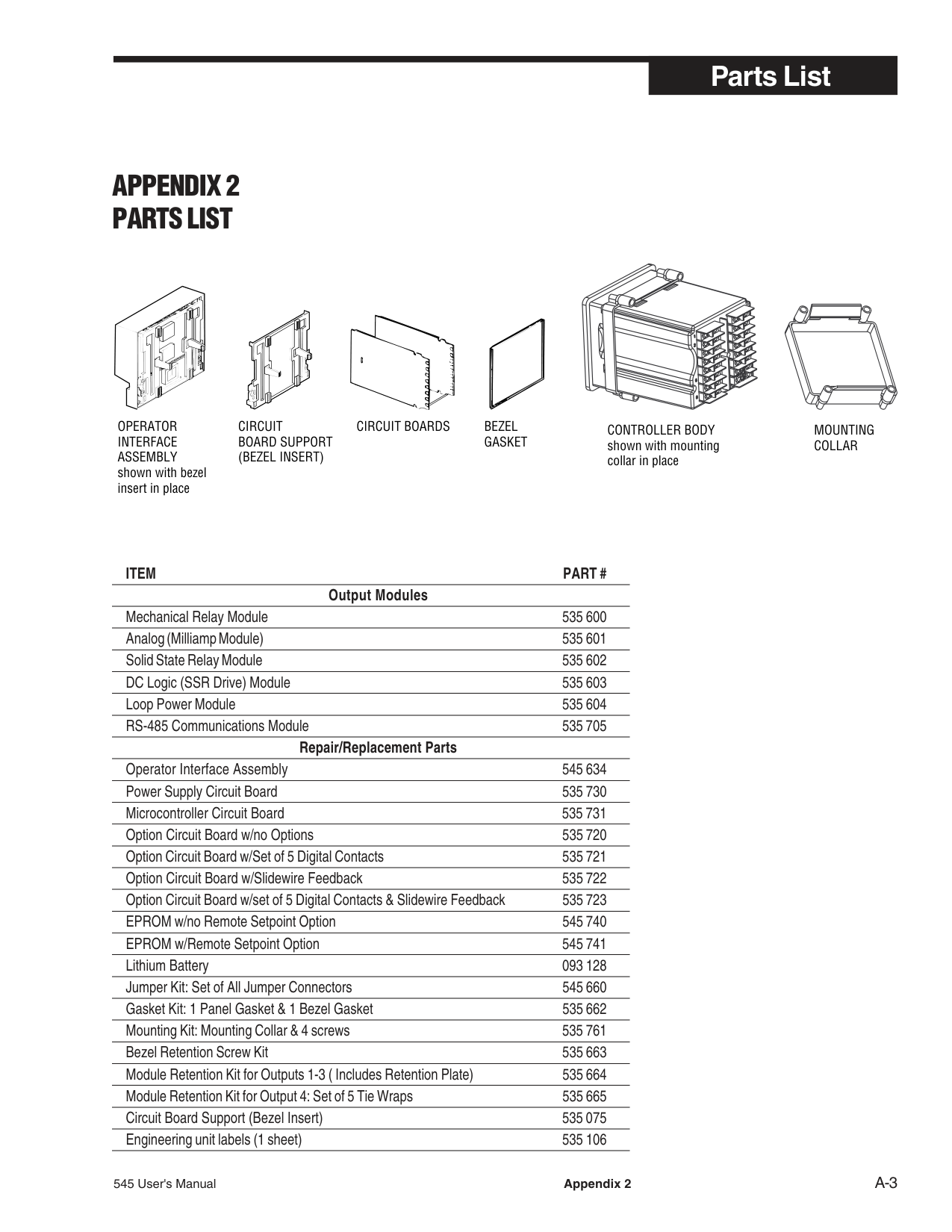
OUT 3-
PV2–
PV2+
PV1–
PV1+
############################## Figure A4.1 545 Rear Terminals for Calibration
|CAL. VREF| |---|
Figure A4.2 Flowchart Calibration Menus
|CALIBRATE| |---|
|CAL. 120mV, etc.| |---|
PRESS MENU
PRESS ACK
ANALOG IN
5.0000
PRESS ACK
|PRESS MENU||SET BOTH| |---|
Power Down Move Jumpers| |---|---| |CALIBRATE||SET BOTH|

|---|
Power Down Move Jumpers|
mA CALIB.
COMPLETED
|PV1=20mA| |---|
|PV2=20mA| |---|
Attach 20mA to PV1 Press ACK
Attach 20mA to PV2 Press ACK
If mA calibration values are OK.
PRESS ACK Power Up PRESS ACK
ANA. mA IN JUMPER=mA PRESS ACK
mA CALIB. FAILED
PRESS MENU
|CALIBRATE| |---|
|PV= –150 C| |---|
If mA calibration values are out of range.
PRESS ACK
PRESS ACK
COLD JUNC.
PRESS ACK
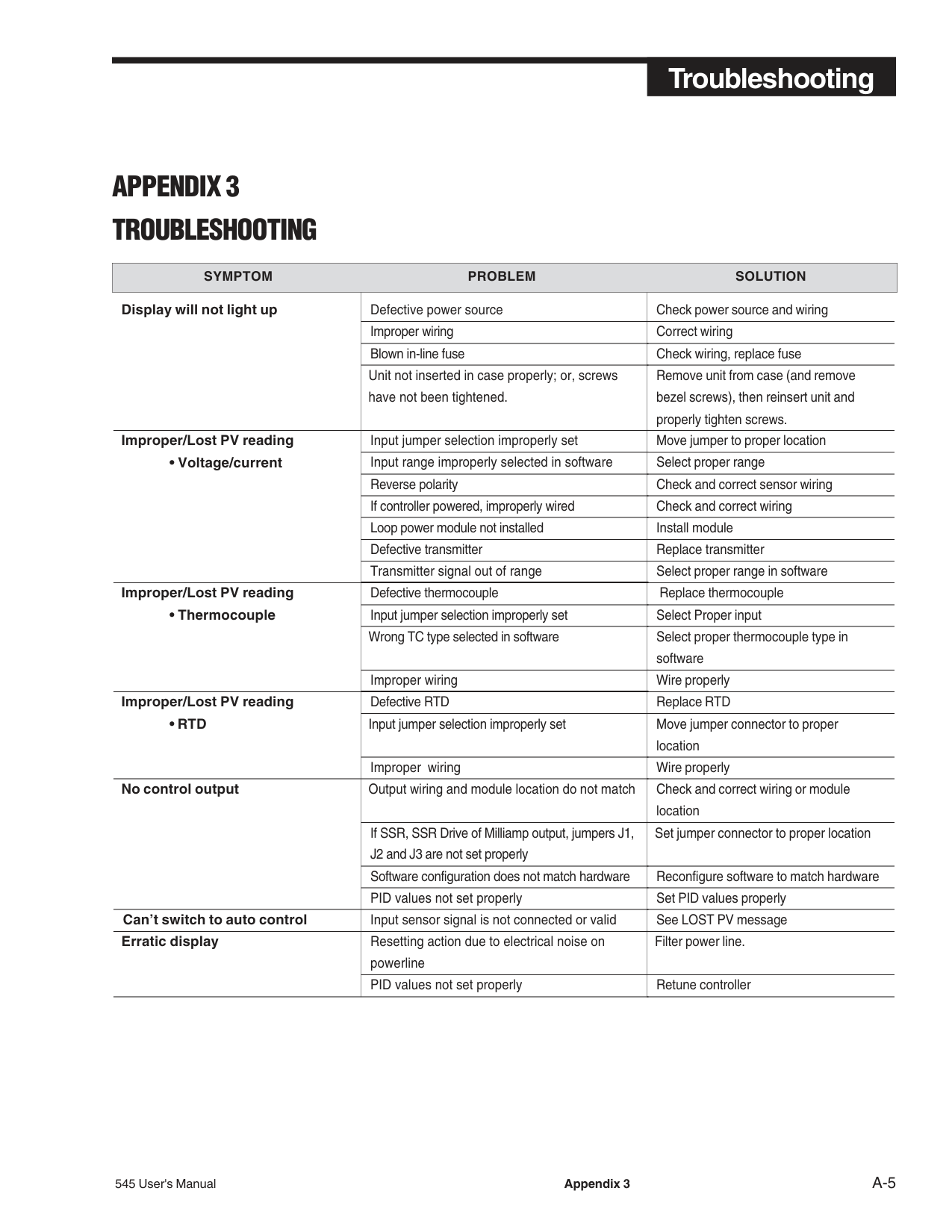
PRESS MENU
|CALIBRATE| |---|
|OUTPUT "X"| |---|
|OUTPUT X, etc| |---|
PRESS MENU
PRESS ACK
4 mA
ANLG. OUT
PRESS ACK
PRESS MENU
RESET
RESET
|After two seconds| | |---|---| |PRESS MENU before two| |
SKIPPED
PUSH MENU
PRESS ACK
MENU DATA
TO RESET
PRESS MENU
RESET
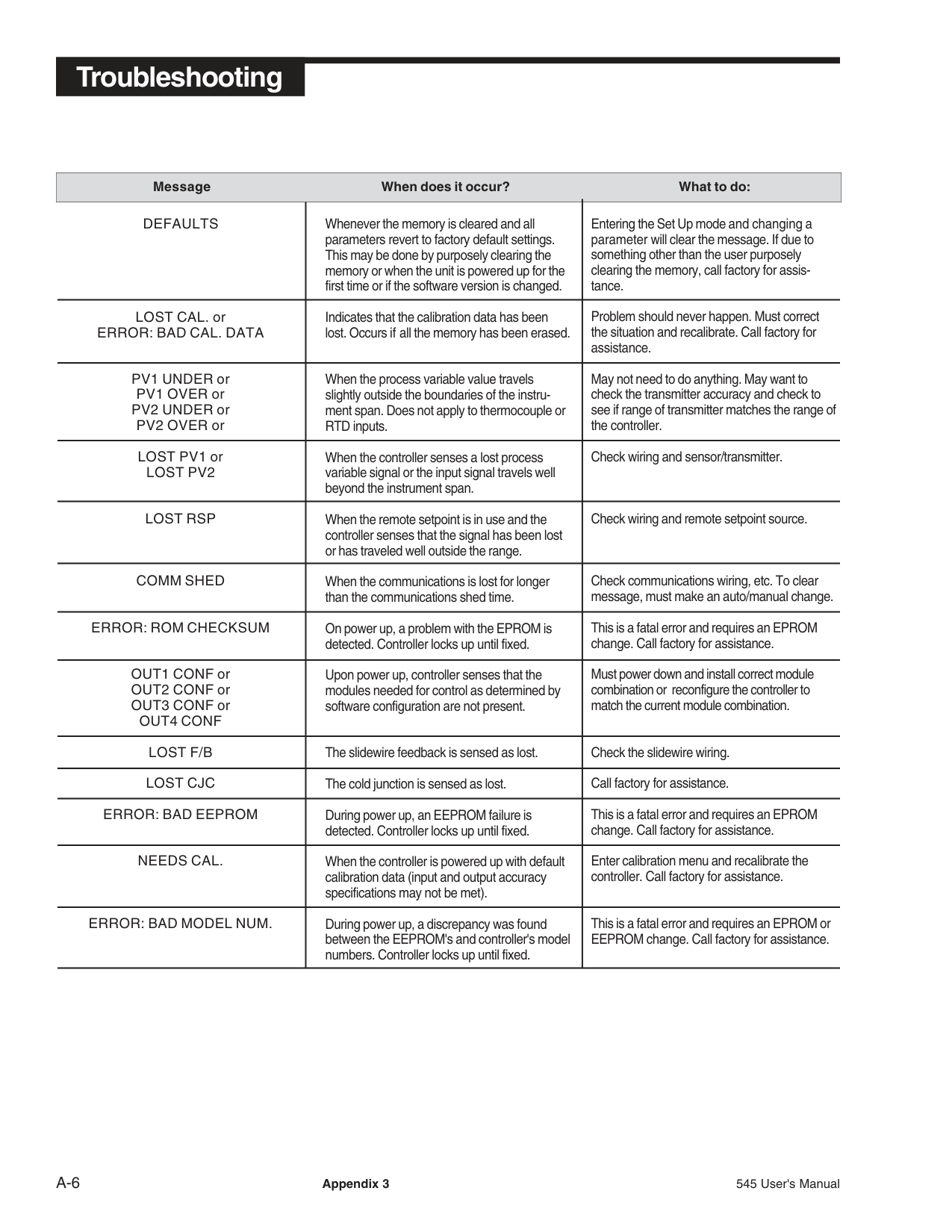
seconds
HARDWARE
COMPLETED
PRESS ACK
SCAN
DISPLAY ONLY
PRESS MENU
SLIDEWIRE
SLIDEWIRE
PRESS ACK
TEST
____%
PRESS MENU
PRESS ACK
EPROM
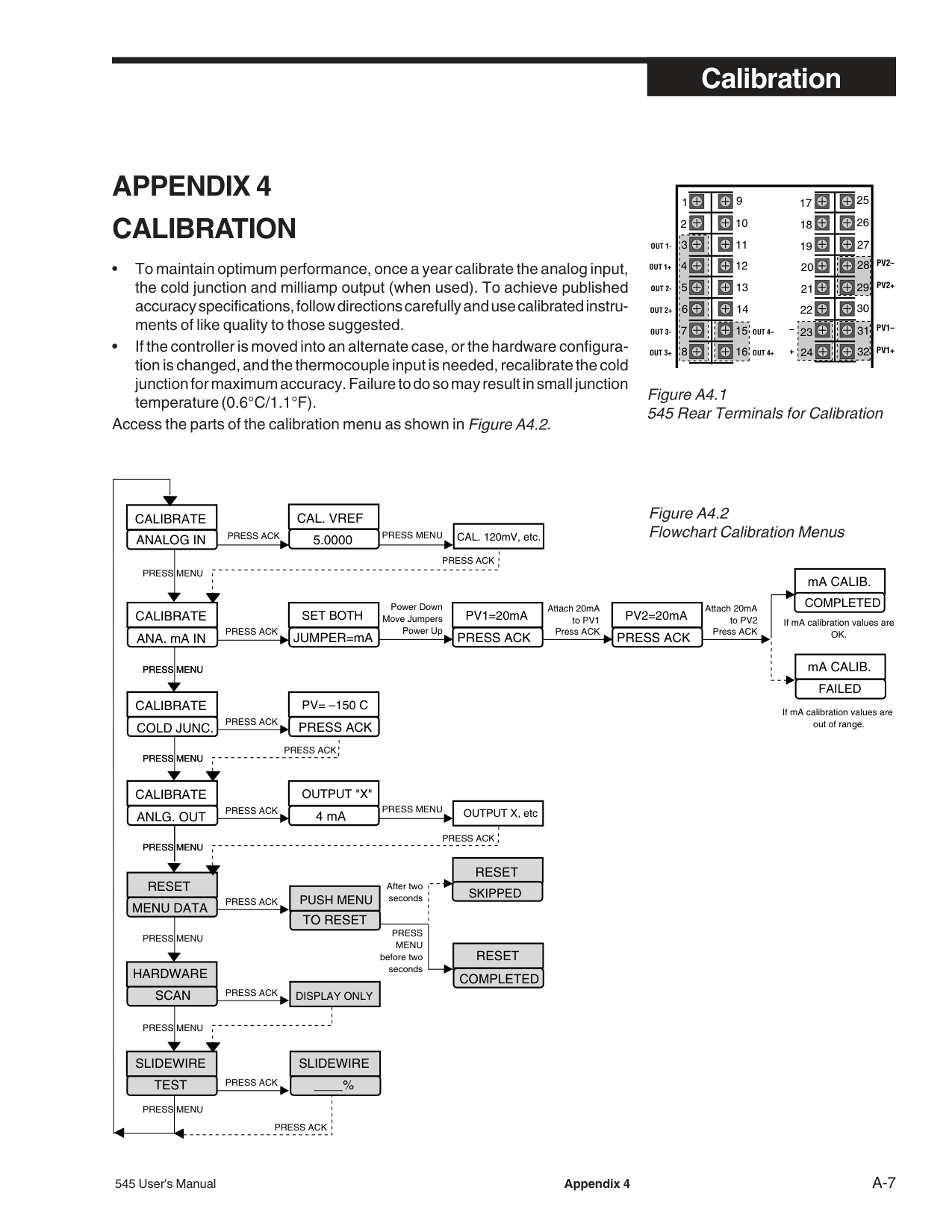
32
PV1–
Hook-up wires to multimeter
PV1+
P1
P2
Jumper locations for Analog,Thermocouple and Milliamp calibration
TB2 CALIBRATION JUMPERSSELECT V AND TC
V
MA
TC
| | | |---|---|
TC
2ND
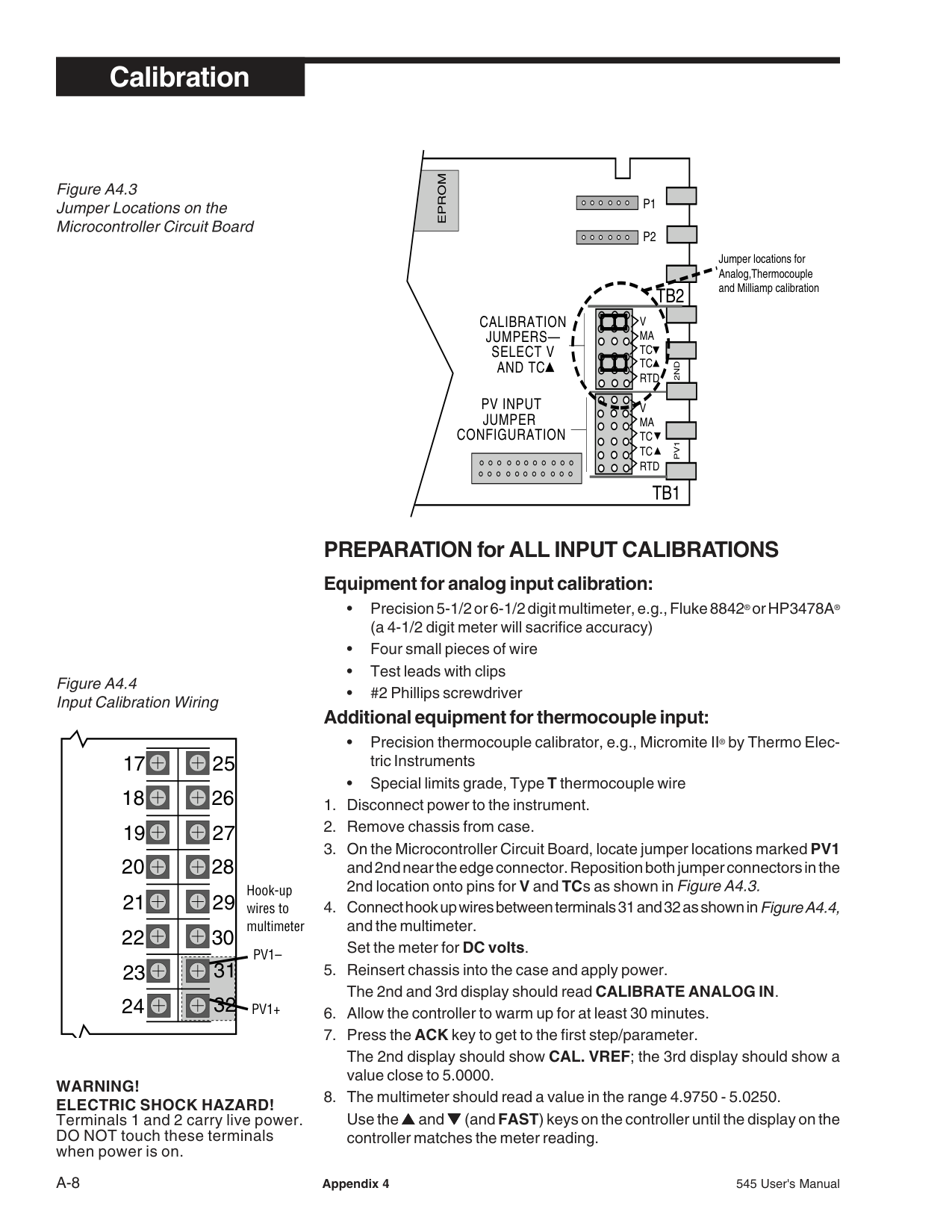
RTD
PV INPUT JUMPER CONFIGURATION
V MA TC RTD TC
PV1
TB1
########### PREPARATION for ALL INPUT CALIBRATIONS Equipment for analog input calibration:
############### Additional equipment for thermocouple input:
WARNING! ELECTRIC SHOCK HAZARD! Terminals 1 and 2 carry live power. DO NOT touch these terminals when power is on.
########### THERMOCOUPLE COLD JUNCTION CALIBRATION
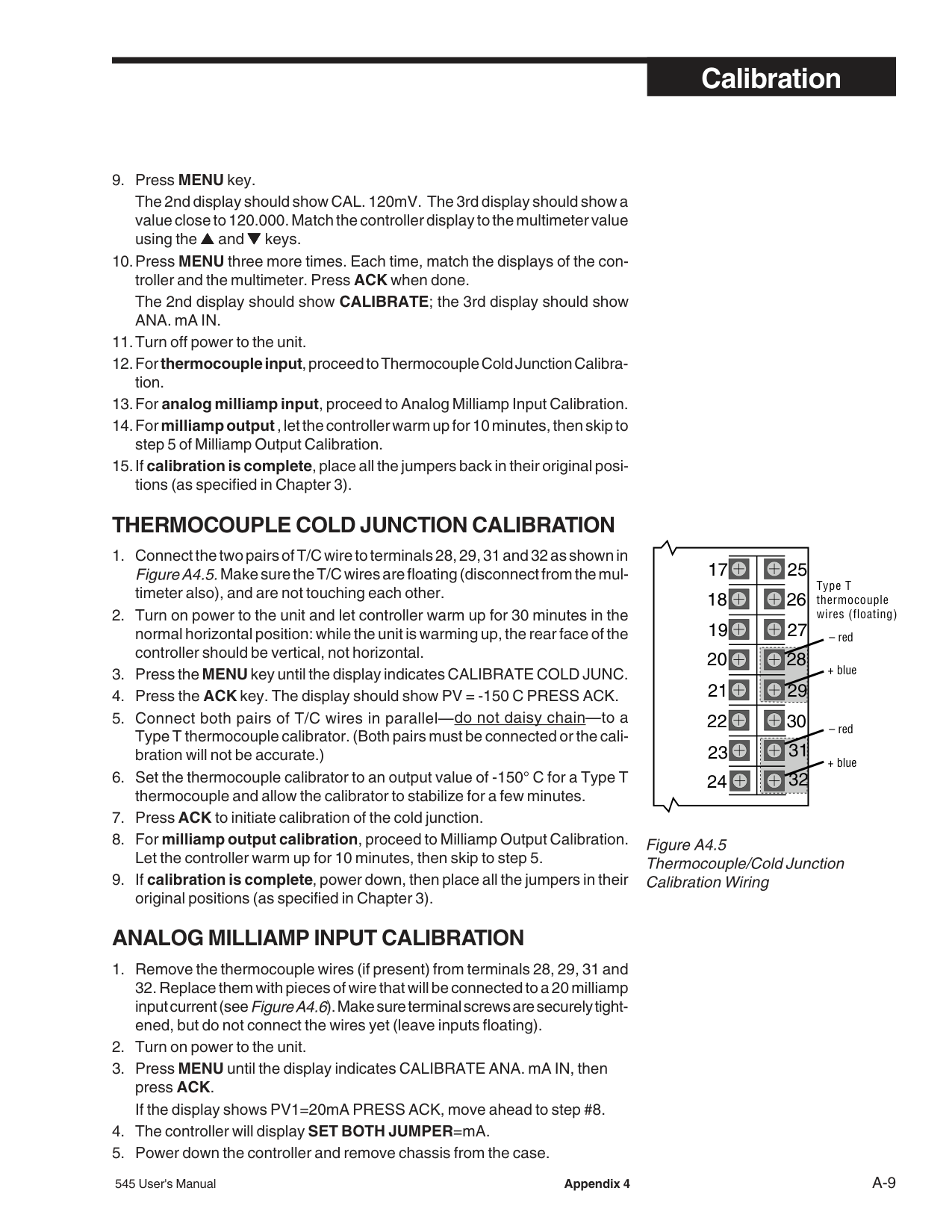
Type T thermocouple wires (floating)
19 20
+ blue
+ blue
21 22
32
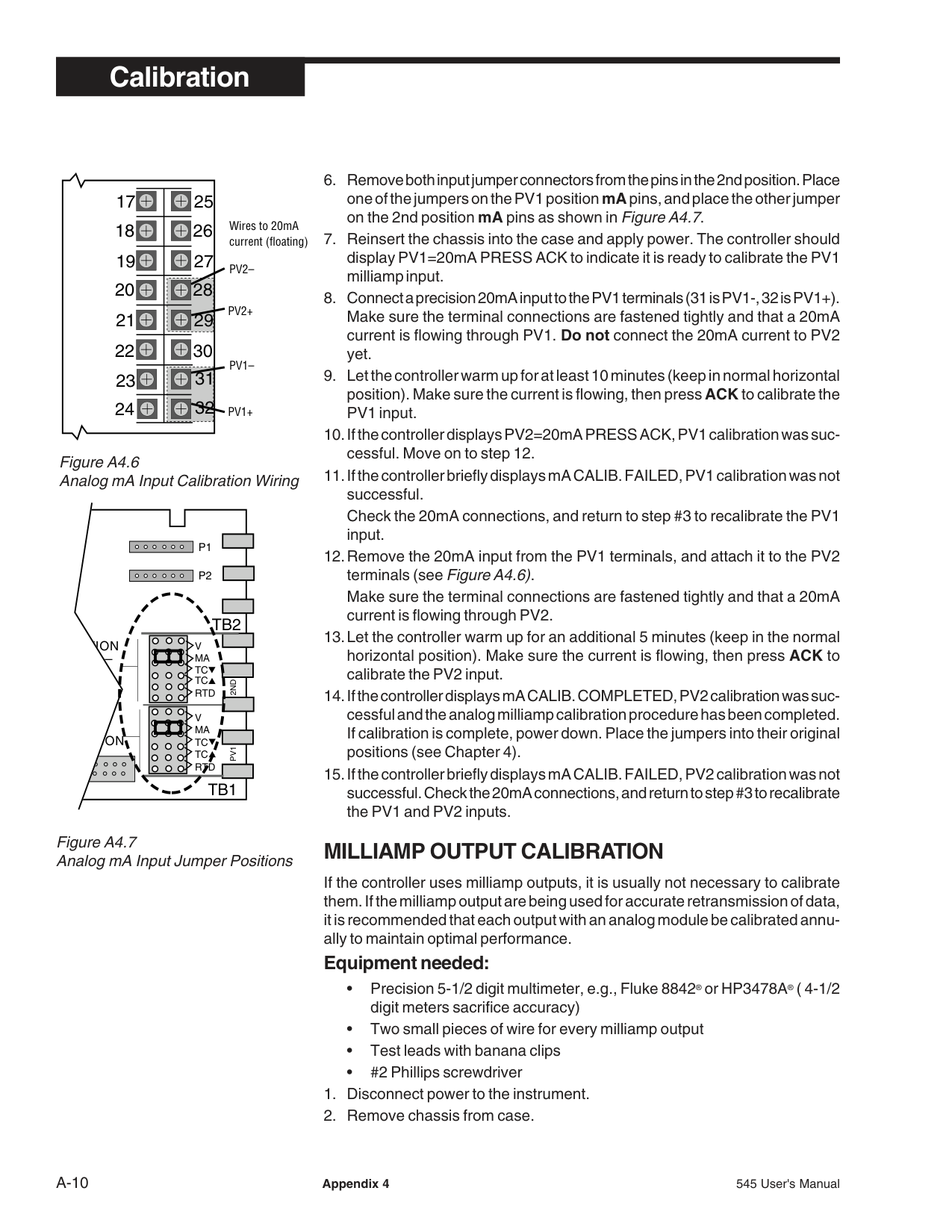
############################## Figure A4.5 Thermocouple/Cold Junction Calibration Wiring
########### ANALOG MILLIAMP INPUT CALIBRATION
Wires to 20mA current (floating)
PV2+
21 22
32
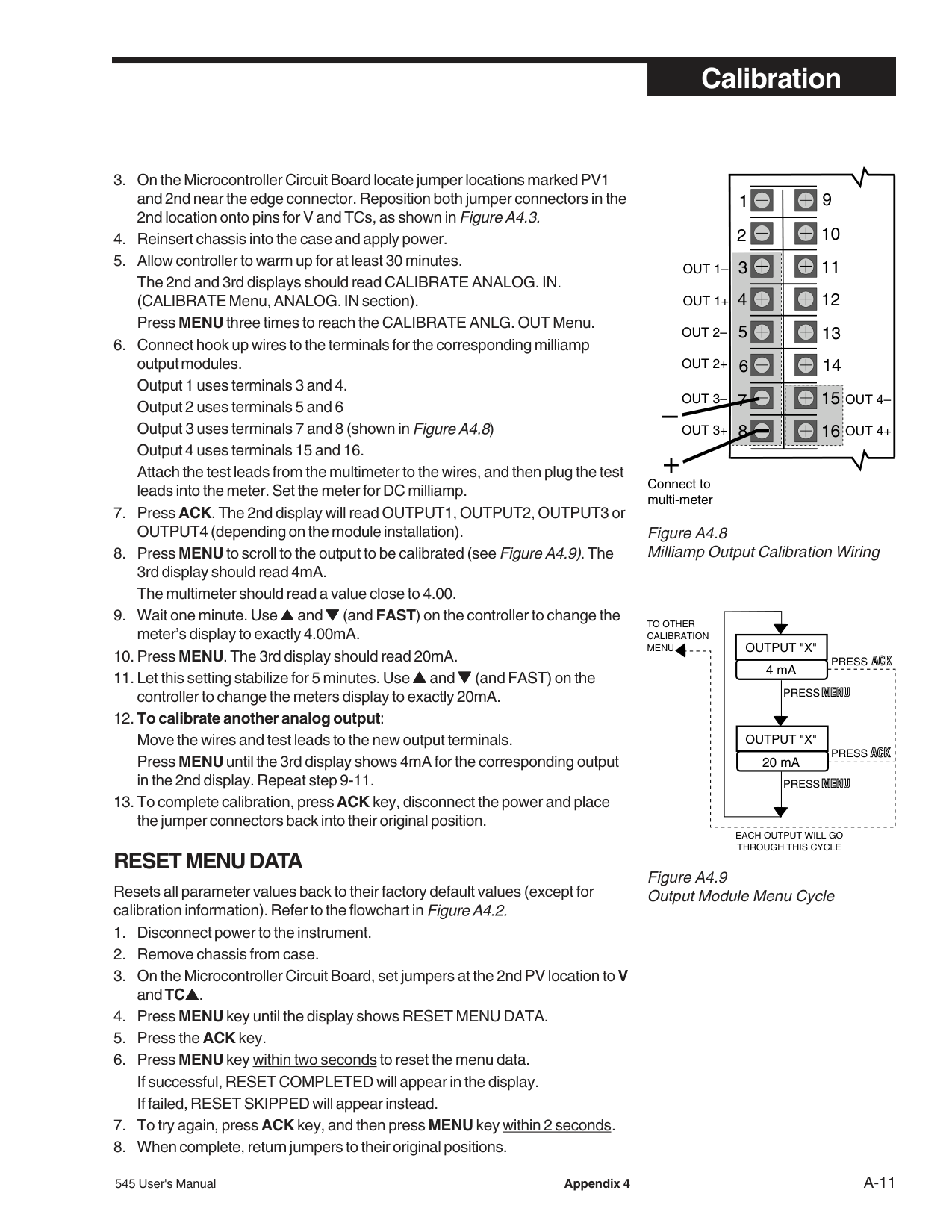
PV1–
Figure A4.6 Analog mA Input Calibration Wiring
P1
P2
TB2 BRATION PERSLECT V
V
MA
TC
TC
2ND
RTD
V MA TC RTD TC
GURATION
PV1
TB1
Figure A4.7 Analog mA Input Jumper Positions
Make sure the terminal connections are fastened tightly and that a 20mA current is flowing through PV2.
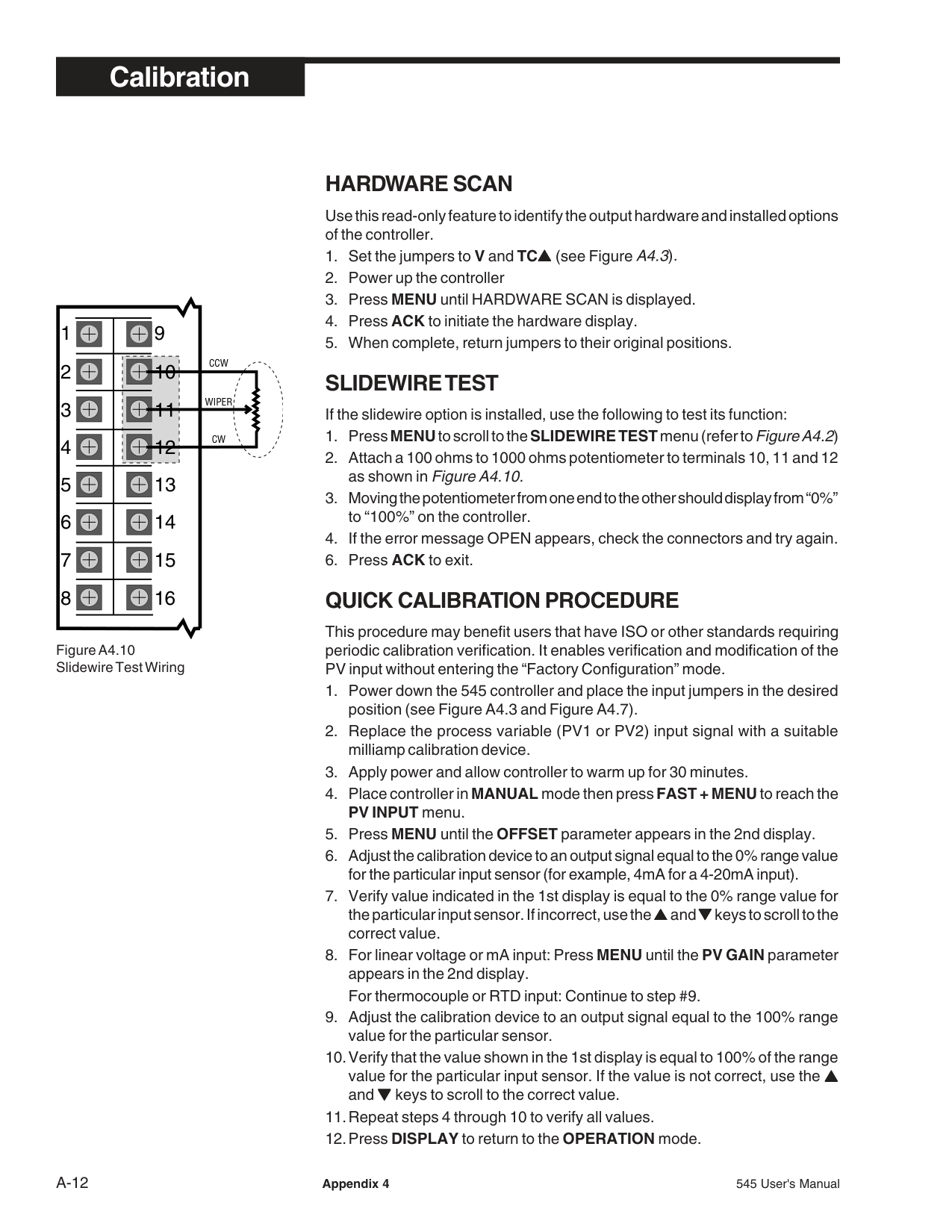
########### MILLIAMP OUTPUT CALIBRATION
If the controller uses milliamp outputs, it is usually not necessary to calibrate them. If the milliamp output are being used for accurate retransmission of data, it is recommended that each output with an analog module be calibrated annually to maintain optimal performance.
############### Equipment needed:
########### RESET MENU DATA
Resets all parameter values back to their factory default values (except for calibration information). Refer to the flowchart inFigure A4.2.
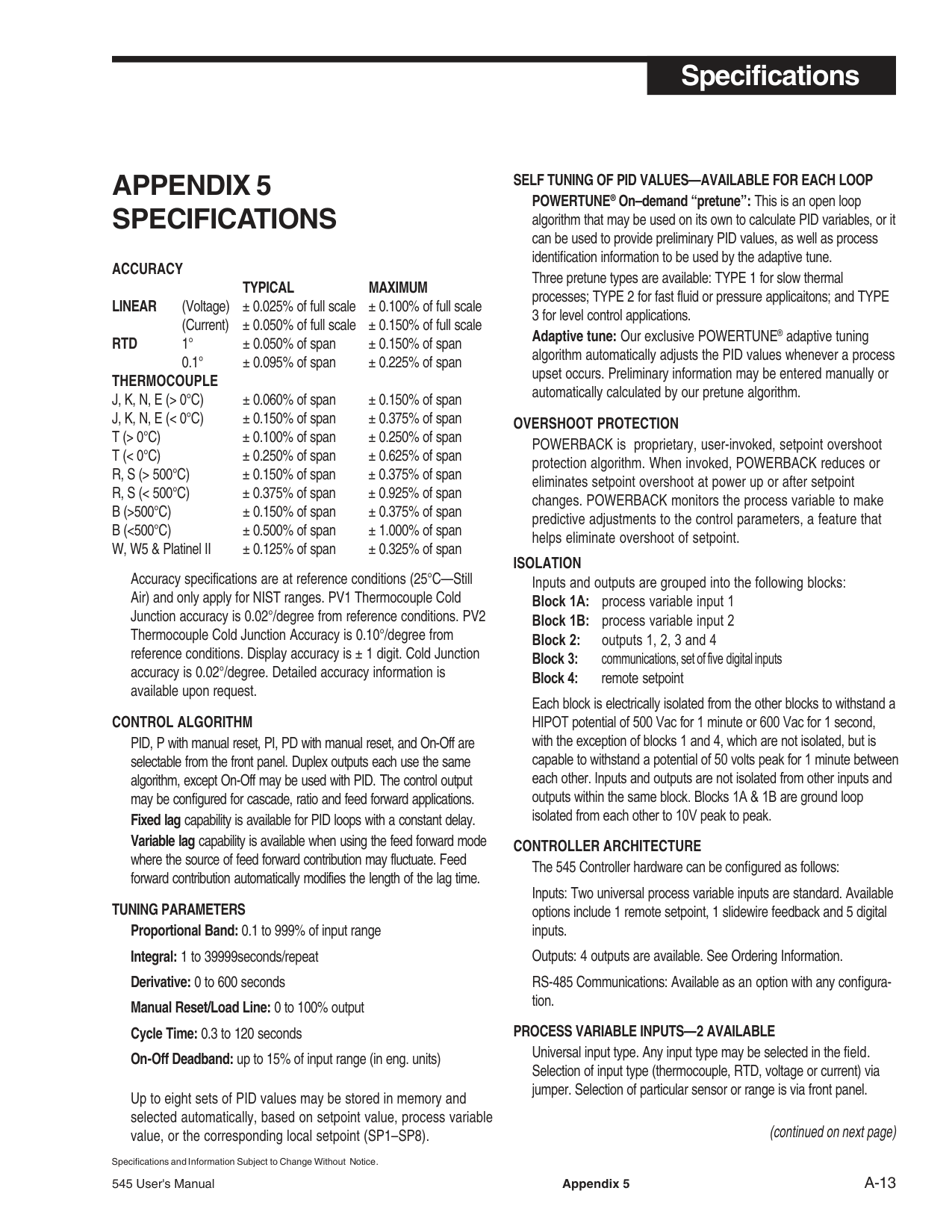
13
12
11
10
9
OUT 2–
OUT 3–
14
15
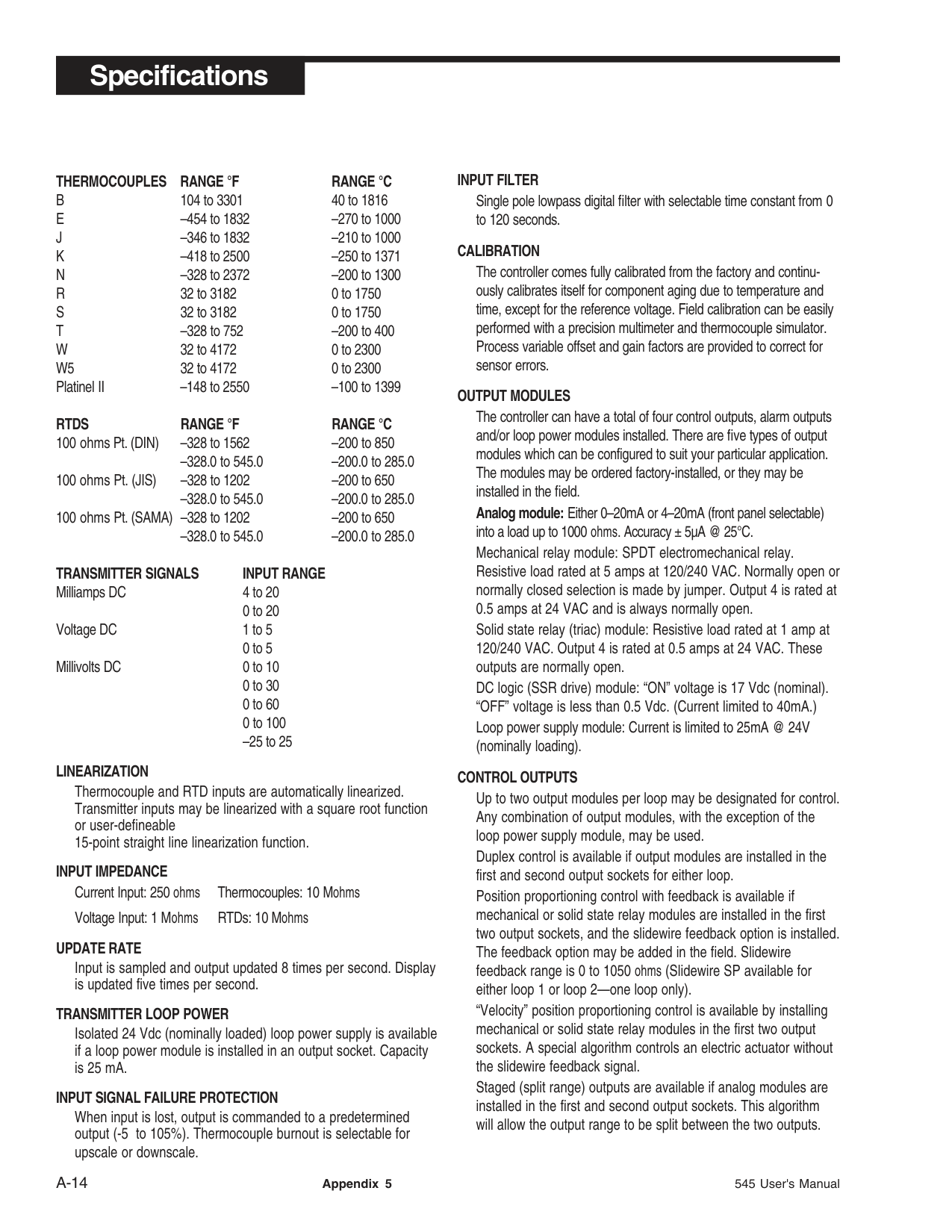
OUT 4– OUT 4+
#### – +
Connect to multi-meter
4 mA
|OUTPUT "X"| |---|
20 mA
|OUTPUT "X"| |---|
TO OTHER CALIBRATION MENU
EACH OUTPUT WILL GO THROUGH THIS CYCLE
PRESS
PRESS
PRESS
PRESS
| | | |---|---| | | | | | | | | | | | | | | | | | | | | |
9
CCW
10
WIPER
11
CW
12
13
14
15
Figure A4.10 Slidewire Test Wiring
########### HARDWARE SCAN
Use this read-only feature to identify the output hardware and installed options of the controller.
SLIDEWIRE TEST
If the slidewire option is installed, use the following to test its function:
########### QUICK CALIBRATION PROCEDURE
This procedure may benefit users that have ISO or other standards requiring periodic calibration verification. It enables verification and modification of the PV input without entering the “Factory Configuration” mode.
###### APPENDIX 5 SPECIFICATIONS
################################## ACCURACY
TYPICAL MAXIMUM LINEAR (Voltage) ± 0.025% of full scale ± 0.100% of full scale
(Current) ± 0.050% of full scale ± 0.150% of full scale RTD 1° ± 0.050% of span ± 0.150% of span
0.1° ± 0.095% of span ± 0.225% of span THERMOCOUPLE
J, K, N, E (> 0°C) ± 0.060% of span ± 0.150% of span J, K, N, E (< 0°C) ± 0.150% of span ± 0.375% of span T (> 0°C) ± 0.100% of span ± 0.250% of span T (< 0°C) ± 0.250% of span ± 0.625% of span R, S (> 500°C) ± 0.150% of span ± 0.375% of span R, S (< 500°C) ± 0.375% of span ± 0.925% of span B (>500°C) ± 0.150% of span ± 0.375% of span B (<500°C) ± 0.500% of span ± 1.000% of span W, W5 & Platinel II ± 0.125% of span ± 0.325% of span
Accuracy specifications are at reference conditions (25°C—Still Air) and only apply for NIST ranges. PV1 Thermocouple Cold Junction accuracy is 0.02°/degree from reference conditions. PV2 Thermocouple Cold Junction Accuracy is 0.10°/degree from reference conditions. Display accuracy is ± 1 digit. Cold Junction accuracy is 0.02°/degree. Detailed accuracy information is available upon request.
CONTROL ALGORITHM PID, P with manual reset, PI, PD with manual reset, and On-Off are selectable from the front panel. Duplex outputs each use the same algorithm, except On-Off may be used with PID. The control output may be configured for cascade, ratio and feed forward applications. Fixed lag capability is available for PID loops with a constant delay. Variable lag capability is available when using the feed forward mode where the source of feed forward contribution may fluctuate. Feed forward contribution automatically modifies the length of the lag time.
TUNING PARAMETERS Proportional Band: 0.1 to 999% of input range Integral: 1 to 39999seconds/repeat Derivative: 0 to 600 seconds Manual Reset/Load Line: 0 to 100% output Cycle Time: 0.3 to 120 seconds On-Off Deadband: up to 15% of input range (in eng. units)
Up to eight sets of PID values may be stored in memory and selected automatically, based on setpoint value, process variable value, or the corresponding local setpoint (SP1–SP8).
SELF TUNING OF PID VALUES—AVAILABLE FOR EACH LOOP POWERTUNE® On–demand “pretune”: This is an open loop algorithm that may be used on its own to calculate PID variables, or it can be used to provide preliminary PID values, as well as process identification information to be used by the adaptive tune. Three pretune types are available: TYPE 1 for slow thermal processes; TYPE 2 for fast fluid or pressure applicaitons; and TYPE 3 for level control applications. Adaptive tune: Our exclusive POWERTUNE® adaptive tuning algorithm automatically adjusts the PID values whenever a process upset occurs. Preliminary information may be entered manually or automatically calculated by our pretune algorithm.
OVERSHOOT PROTECTION POWERBACK is proprietary, user-invoked, setpoint overshoot protection algorithm. When invoked, POWERBACK reduces or eliminates setpoint overshoot at power up or after setpoint changes. POWERBACK monitors the process variable to make predictive adjustments to the control parameters, a feature that helps eliminate overshoot of setpoint.
################################## ISOLATION
Inputs and outputs are grouped into the following blocks:
Each block is electrically isolated from the other blocks to withstand a HIPOT potential of 500 Vac for 1 minute or 600 Vac for 1 second, with the exception of blocks 1 and 4, which are not isolated, but is capable to withstand a potential of 50 volts peak for 1 minute between each other. Inputs and outputs are not isolated from other inputs and outputs within the same block. Blocks 1A & 1B are ground loop isolated from each other to 10V peak to peak.
CONTROLLER ARCHITECTURE The 545 Controller hardware can be configured as follows: Inputs: Two universal process variable inputs are standard. Available options include 1 remote setpoint, 1 slidewire feedback and 5 digital inputs. Outputs: 4 outputs are available. See Ordering Information. RS-485 Communications: Available as an option with any configuration.
PROCESS VARIABLE INPUTS—2 AVAILABLE Universal input type. Any input type may be selected in the field. Selection of input type (thermocouple, RTD, voltage or current) via jumper. Selection of particular sensor or range is via front panel.
########################### (continued on next page)
Specifications and Information Subject to Change Without Notice.
THERMOCOUPLES RANGE °F RANGE °C B 104 to 3301 40 to 1816 E –454 to 1832 –270 to 1000 J –346 to 1832 –210 to 1000 K –418 to 2500 –250 to 1371 N –328 to 2372 –200 to 1300 R 32 to 3182 0 to 1750 S 32 to 3182 0 to 1750 T –328 to 752 –200 to 400 W 32 to 4172 0 to 2300 W5 32 to 4172 0 to 2300 Platinel II –148 to 2550 –100 to 1399
RTDS RANGE °F RANGE °C 100 ohms Pt. (DIN) –328 to 1562 –200 to 850
TRANSMITTER SIGNALS INPUT RANGE Milliamps DC 4 to 20
0 to 20 Voltage DC 1 to 5
0 to 5
Millivolts DC 0 to 10 0 to 30 0 to 60 0 to 100
–25 to 25
LINEARIZATION Thermocouple and RTD inputs are automatically linearized. Transmitter inputs may be linearized with a square root function or user-defineable 15-point straight line linearization function.
INPUT IMPEDANCE Current Input: 250 ohms Thermocouples: 10 Mohms Voltage Input: 1 Mohms RTDs: 10 Mohms
UPDATE RATE Input is sampled and output updated 8 times per second. Display is updated five times per second.
TRANSMITTER LOOP POWER Isolated 24 Vdc (nominally loaded) loop power supply is available if a loop power module is installed in an output socket. Capacity is 25 mA.
################################## INPUT SIGNAL FAILURE PROTECTION
When input is lost, output is commanded to a predetermined output (-5 to 105%). Thermocouple burnout is selectable for upscale or downscale.
INPUT FILTER Single pole lowpass digital filter with selectable time constant from 0 to 120 seconds.
CALIBRATION The controller comes fully calibrated from the factory and continuously calibrates itself for component aging due to temperature and time, except for the reference voltage. Field calibration can be easily performed with a precision multimeter and thermocouple simulator. Process variable offset and gain factors are provided to correct for sensor errors.
OUTPUT MODULES The controller can have a total of four control outputs, alarm outputs and/or loop power modules installed. There are five types of output modules which can be configured to suit your particular application. The modules may be ordered factory-installed, or they may be installed in the field. Analog module: Either 0–20mA or 4–20mA (front panel selectable) into a load up to 1000 ohms. Accuracy ± 5µA @ 25°C. Mechanical relay module: SPDT electromechanical relay. Resistive load rated at 5 amps at 120/240 VAC. Normally open or normally closed selection is made by jumper. Output 4 is rated at 0.5 amps at 24 VAC and is always normally open. Solid state relay (triac) module: Resistive load rated at 1 amp at 120/240 VAC. Output 4 is rated at 0.5 amps at 24 VAC. These outputs are normally open. DC logic (SSR drive) module: “ON” voltage is 17 Vdc (nominal). “OFF” voltage is less than 0.5 Vdc. (Current limited to 40mA.) Loop power supply module: Current is limited to 25mA @ 24V (nominally loading).
CONTROL OUTPUTS Up to two output modules per loop may be designated for control. Any combination of output modules, with the exception of the loop power supply module, may be used. Duplex control is available if output modules are installed in the first and second output sockets for either loop. Position proportioning control with feedback is available if mechanical or solid state relay modules are installed in the first two output sockets, and the slidewire feedback option is installed. The feedback option may be added in the field. Slidewire feedback range is 0 to 1050 ohms (Slidewire SP available for either loop 1 or loop 2—one loop only). “Velocity” position proportioning control is available by installing mechanical or solid state relay modules in the first two output sockets. A special algorithm controls an electric actuator without the slidewire feedback signal. Staged (split range) outputs are available if analog modules are installed in the first and second output sockets. This algorithm will allow the output range to be split between the two outputs.
RETRANSMISSION OUTPUT Based on available outputs (any socket not used for control), up to two different variables can be simultaneously programmed for retransmission. Each precise, 16-bit resolution output may be scaled for any range. Variable selection includes: PV1, SP1, RAMP SP1, LOOP1OUT, PV2, SP2, RAMP SP2 and LOOP2OUT.
ALARMS The 545 controller has two software alarms per loop for a total of four alarms. High and low alarms may be sourced to the PV, SP, RAMP SP, DEVIATION and OUTPUT. If an alarm is tripped, the alarm message will show, the ACK key will illuminate (if acknowledgeable) and the ALM icon will light. If the alarm is tied to the first available non-control output, the “1” below the ALM icon will light. Similarly, if the alarm is tied to the second noncontrol output, the “2” below the ALM will light. The availability of outputs determines how many alarms can be tied to relays. Global Alarm feature allows one or more of the internal software alarms to be tied to the same single, physical output. The acknowledge key is active for alarms associated with either loop. The order in which alarms are acknowledged is: loop1 alarm1, loop1 alarm 2, loop2 alarm 1, loop2 alarm2.
DIGITAL INPUTS A set of five external digital inputs activated by dry contacts (or open collector transistors) are available. Each can be configured to perform one of the following functions:
In addition, if the set of five digital inputs is installed, two can be designated to select one of four local setpoints per loop (and associated PID set, if desired) via a binary coded decimal (BCD) input.
SETPOINT SELECTION A remote setpoint input is available for one of the two loops. Signal is 0–20/4–20 mADC or 0–5/1–5 VDC (jumper selectable). Signal may be rationed and biased. Eight local setpoints per loop may be stored in memory. Setpoint selection is made via SET PT key or digital contact(s).
FAULT OUTPUT One of the alarm outputs may be designated to also energize if the input signal is lost.
SERIAL COMMUNICATIONS Isolated serial communications is available using an RS-485 interface. Baud rates of up to 19,200 are selectable. The protocol supports CRC data checking. If communications is lost, a timeout feature will command the controller to a particular control mode and specific setpoint or output if desired. Outputs 2–4 and digital inputs can act as “host-controlled” I/O independent of the controller’s function. May be installed in the field.
DIGITAL DISPLAYS Upper display: five-digit, seven-segment. Used exclusively for displaying the process variable value. Height is 15 mm (0.6 in.). 2nd display: nine-character, 14-segment alphanumeric. Used for displaying setpoint, deviation, output value, slidewire position (actual valve position) and configuration information. Height is 6 mm (0.25 in.). 3rd display: nine-character, 14-segment alphanumeric. Used for indicating which loop is displayed and for displaying alarm messages and configuration information. Height is 6 mm (0.25 in.). All displays are vacuum fluorescent. Color is bluegreen.
STATUS INDICATORS There are two types of indicators: icons and illuminated keys. ALM 1 and ALM 2 icons: alarm 1 and alarm 2 status. OUT 1 and OUT 2 icons: control output 1 and control output 2 status. PV2 icon illuminated: 2nd loop is on display. DISPLAY key illuminated: 2nd loop is on display. MAN key illuminated: controller is in manual control mode. ACK key illuminated: alarm may be acknowledged. SET PT key illuminated: setpoint other than primary local setpoint is active. MENU key illuminated: controller is in configuration mode.
################################## DIMENSIONS
Meets 1/4 DIN designation as specified in DIN standard number 43
Panel-mounted. See diagram for details. WIRING CONNECTIONS
31 screw terminals in the rear of the instrument.
########################## (continued on next page)
################################## POWER CONSUMPTION
15 VA at 120 VAC, 60 Hz (typical). WEIGHT
Approximately 1 kg (2.2 lbs.).
AMBIENT TEMPERATURE Operative Limits: 0 to 50°C (32 to 122°F). Storage Limits: –40 to 70°C (–40 to 158°F).
RELATIVE HUMIDITY
10 to 90%, non-condensing. VOLTAGE AND FREQUENCY
Universal power supply: 90 to 250 VAC, 48 to 62 Hz.
NOISE IMMUNITY Common mode rejection (process input): >120 dB. Normal mode rejection (process input): >80 dB. AC line is double filtered and transient protected. Snubbers are provided for each relay output.
CONSTRUCTION Case: extruded, non–perforated black anodized aluminum with ABS plastic sleeve. Bezel: black plastic ABS. Chassis assembly: plug-in type. Keys: silicone rubber with diffusion printed graphics. NEMA rating: front panel conforms to NEMA 4X when instrument is properly installed.
################################## AGENCY APPROVALS

(Heavy Industrial) (Available as an option)
MEMORY RETENTION Lithium battery maintains all programming for approximately ten years.
SECURITY There are two levels of access: restricted and full. A configurable code is used to enter the full access level. Functions not available in the restricted level are configurable.
APPENDIX 6 GLOSSARY adaptive control: Control in which automatic means are used to change the type or influence (or both) of control parameters in such a way as to improve the performance of the control system. adaptive tune: A component of the 545 self tune function which continuously monitors the process and natural disturbances and makes adjustments in the tuning parameters to compensate or improve the performance of the control system. alarm: A condition, generated by a controller, indicating that the process has exceeded or fallen below the set or limit point.
alarm, band: A type of alarm set up where a band is created around the control setpoint.
alarm, deviation: An alarm similar to a band alarm except it only creates a band on one side of the alarm setpoint.
alarm, fault: An indication that becomes active upon loss of process variable. Fault alarm operates in addition to other alarm assignments.
alarm, global : The single physical output to which one or more internal software alarms are tied.
alarm, high process variable: A type of alarm that is set up to occur when the process variable goes above the alarm setpoint.
alarm, low process variable: A type of alarm that is set up to occur when the process variable goes below the alarm setpoint.
alarm, manual: A type of alarm set up to occur when the controller is put into manual mode of operation.
alarm, power up: A type of alarm that determines alarm condition on power up of the controller.
alarm, rate-of-change: A type of alarm set up to occur when there is an excessive change in the process variable (PV) value.
automatic controller: A device or combination of devices which measures the value of a variable, quantity, or condition and operates to correct or limit its deviation from the setpoint.
baud rate: Any of the standard transmission rates for sending or receiving binary coded data.
bias: A reference level. A numeric value in a digital system or a voltage or current in an analog system.
binary coded decimal (BCD): A notation in which the individual decimal digits are represented by a group of binary bits, e.g., in the 8-4-2-1 coded decimal notation each decimal digit is represented by four binary bits.
bezel: The flat portion surrounding the face of the controller, which holds the keys and display.
bump: A sudden increase in the output power initiated by the controller in order to determine the system response during a self tune procedure.
calibration: The act of adjustment or verification of the controller unit by comparison of the unit’s reading and standards of known accuracy and stability.
cascade control: Control in which the output of one (controller or) loop is the setpoint for another (controller or) loop. closed loop: Control system that has a sensing device for process variable feedback. cold junction: Point of connection between thermocouple metals and the electronic instrument. cold junction compensation: Electronic means used to compensate for the effect of temperature at the cold junction.
configuration: Also called Set Up. The selection of hardware devices and software routines that function together.
contact: In hardware, a set of conductors that can be brought into contact by electromechanical action and thereby produce switching. In software, a symbolic set of points whose open or closed condition depends on the logic status assigned to them by internal or external conditions.
control action: The slope of the output of the instrument in reference to the input, e.g., direct output increases on rise of input. Typical cooling response or reverse output decreases on rise of input (typical heating response).
control action, derivative (rate) (D): The part of the control algorithm that reacts to rate of change of the process variable.
############################################## control action, integral (reset) (I): The
part of the control algorithm that reacts to offset between setpoint and process variable.
control action, proportional (P): Control action in which there is a continuous linear relation between the output and the input.
control action, proportional plus derivative (PD): A control algorithm that provides proportional control with the addition of derivative action to compensate for rapid changes in process variable.
control action, proportional plus integral (PI): A control algorithm that provides proportional control with the addition of integral action to compensate for offsets between setpoint and process variable.
control action, proportional plus integral plus derivative (PID): A control algorithm that provides proportional control with both integral and derivative action.
control, adaptive: (see adaptive control)
control algorithm: A mathematical representation of the control action to be performed.
control, cascade: (see cascade control)
control output: The end product which
is at some desired value that is the result of having been processed or manipulated.
############################################## control mode, automatic: A user
selected method of operation where the controller determines the control output.
control mode, manual: A user selected method of operation where the operator determines the control output.
control parameters: User defined values that specify how the process is to be controlled.
controlled variable: A process variable which is to be controlled at some desired value by means of manipulating another process variable.
CRC (cyclic redundancy check): An error checking technique in which a checking number is generated by taking the remainder after dividing all the bits in a block (in serial form) by a predetermined binary number.
CSA: Acronym for Canadian Standards Association.
cycle time: The time necessary to complete a full ON-through-OFF period in a time proportioning control system.
cycling (oscillation): A periodic change in the factor under control usually resulting in signal excursions above and below the control point. DIN: Deutsche Industrial Norms, a German agency that sets standard for engineering units and dimensions. damping: The decrease in amplitude of an oscillation due to the dissipation of energy. damped, 1/4 amplitude: The loss of one-quarter of the amount of amplitude with every oscillation.
dead band: A temperature band between heating and cooling functions; the range through which an input can be varied without initiating observable change in output.
dead time: The interval of time be-
tween initiation of an input change or stimulus and the start of the resulting observable response.
default settings: Parameters selections that have been made at the factory.
derivative: Anticipatory action that senses the rate of change of temperature, and compensates to minimize overshoot and undershoot. Also “rate.” derivative action: (See control action, derivative)
deviation: The difference between the value of the controlled variable and the value at which it is being controlled.
digital input: Used in this manual to indicate the status of a dry contact; also called “gate”.
disturbance: An undesired change that takes place in a process that tends to affect adversely the value of a controlled variable.
duplex control: Control method where the temperature of the end product is maintained by controlling two final elements using two of the 545 outputs.
duty cycle: Percentage of “load ON time” relative to total cycle time.
earth ground: A terminal used on the 545 to ensure, by means of a special connection, the grounding (earthing) of part of the controller.
engineering unit: Terms of data measurement such as degrees Celsius, pounds, grams, etc.
error: The difference between the actual and the true value, often expressed as a percentage of either span or full scale.

feedback: Process signal used in control as a measure of response to control action; the part of a closed-loop system which automatically brings back information about the condition under control.
feed forward control: Control in which the output of the control loop is adjusted based on the process variable and a second variable that is rationed and biased.
final control element: Component of a control system, such as a valve or contractor, which directly regulates that flow of energy or material to the process.
FM: Factory Mutual Research Corporation; an organization which sets safety standards.
gain: The ratio of the change in output to the change in input which caused it.
hunting: Oscillation or fluctuation of process temperature between setpoint and process variable.
hysteresis: In ON/OFF control, the process variable change necessary to change the output from full ON to full OFF.
icons: Indicators on the face of the controller.
input: Process variable information being supplied to the instrument.
integral: Control action that automatically eliminates offset, or “droop”, between setpoint and actual process temperature. Also “reset.”
internal voltage reference: A precision voltage source within the 545 controller, used to establish internal calibration.
isolation: Electrical separation of sensor from high voltage circuitry. Allows for application of grounded or ungrounded sensing element.
JIS: Japanese Industrial Standards. Also Japanese Industrial Standards Committee (JISC). Establishes standards on equipment and components.
jumper: A wire that connects or bypasses a portion of a circuit on the printed circuit board.
jumper connectors: The connecting device that straddles a jumper to connect or bypass a portion of a circuit on a printed circuit board.
lag, fixed: a consistant, constant delay in detection of a control variable change.
lag, variable : A fluctuating delay in the detection of a control value change (usually the feed forward contribution source).
linearity: The nearness with which the plot of a signal or other variable plotted against a prescribed linear scale approximates a straight line.
linearization: A function the 545 uses to automatically linearize a non-linear signal, either from thermocouple or RTD temperature sensors, through the use of look up tables. The relationship that exists between two variables when the ratio of the value of one variable to the corresponding value of the other is constant over an entire range of possibilities.
linearization, custom: User-definable linearization.
linearization, square root: A function the 545 uses to linearize a non-linear signal corresponding to the flow being measured by flow transmitters.
load line out: A start up output value which is to bring initial output closer to actual steady state output.
load: The demand for input to a process.
loop: A signal path. Ioop power: An internal 24-volt current limited power supply used to power 2 or 4 wire transmitter on the input of the controller. low pass input filter: A method to block fast acting signals (typically noise), while allowing slow acting signals (actual process variable) to pass. manipulated variable: A quantity or condition which is varied so as to change the value of the controlled variable. (see also control output) measuring element: An element which converts any system activity or condition into a form or language that the controller can understand. mechanical relay: (see relay) menu: Groups of parameters arranged in the software. microcontroller: A large scale integrated circuit that has all the functions of a computer, including memory and input/output systems. NEMA 4X: A National Electrical Manufacturers Association standard for specifying a product’s resistance to water and corrosion. normally open: A switched output (i.e, relay, etc.) whose unpowered state has no connection. normally closed: A switched output (i.e., relay) whose unpowered state provides connection. noise: An unwanted component of a signal or variable. noise band: A measurement of the amount of random process “noise” affecting the measurement of the process variable.
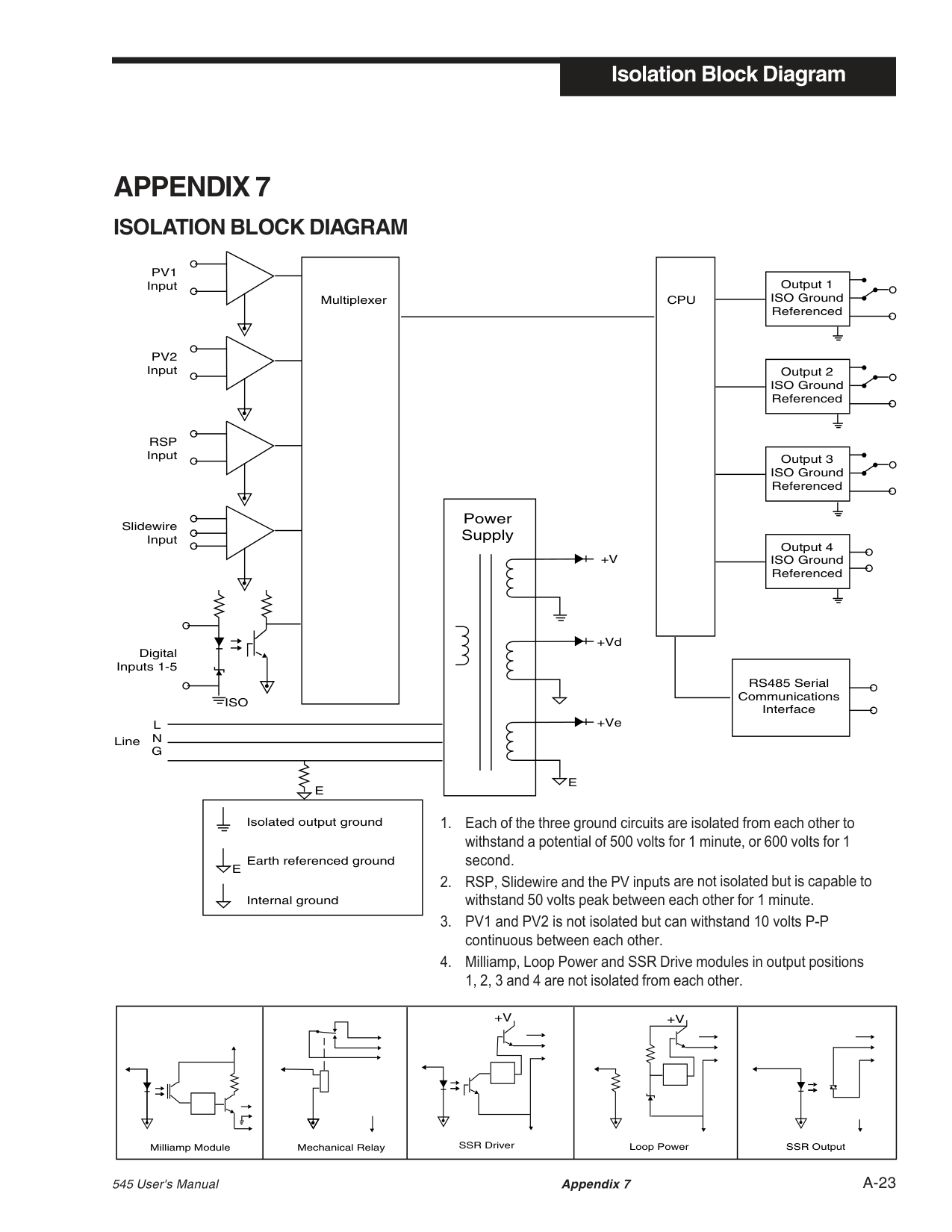
offset: The difference between the setpoint and the actual process variable; or adjustment to actual input temperature and to the temperature values the controller uses for display and control.
ON/OFF control: Control of a process variable about a setpoint by turning the output full ON below setpoint and full OFF above setpoint.
open loop: Control system with no sensory feedback.
optimization: The act of controlling a process at its maximum possible level of performance, usually as expressed in economic terms.
output: Action in response to difference between setpoint and process variable.
output modules: Plug in devices that provide power handling to enable process control. These modules are either binary (on/off) such as a relay, or analog (continuously variable) for current loop control.
overshoot: Condition where temperature exceeds setpoint due to initial power up or process changes.
P control: Proportioning control. PD control: Proportioning control with rate action. PI control: Proportioning control with auto-reset. PID control: Proportioning control with auto-reset and rate. parameter(s): A user-defined variable that specifies how a particular function in the 545 will operate. position proportioning: A type of control output that utilizes two relays to control an electric motorized actuator. POWERBACK®: Propriertary algorithm which monitors the PV to make predicitve adjustments to control parameters in order to reduce or eliminate setpoint overshoot at power up or after setpoint changes.
POWERTUNE®: Moore Industries' exclusive self tuning function. Consists of an on-demand pretune which calculates PID values or provides preliminary PID values and process information for the second tuning function. Second tuning function is an adaptive tuning algorithm that automatically adjusts PID values whenever a process upset or setpoint change occurs.
pretune algorithm: A method by which the 545 controller initiates an output value change, monitors the manner of the corresponding process variable change, and then determines the appropriate PID control parameters.
primary loop: The outer loop in a cascade system.
process:The equipment for which
supply and demand must be balanced, the system under control excluding the equipment that does the control.
process variable: In the treatment of material, any characteristic or measurable attribute whose value changes with changes in prevailing conditions. Common variables are level, pressure and temperature.
proportional band: The change input required to produce a full range change in the output due to proportional control action. The area around the setpoint where proportional control occurs.
RTD: Resistance Temperature Detector. Resistive sensing device displaying resistance versus temperature characteristics. Displays positive temperature coefficient.
ramping: (see setpoint, ramping) rate: Anticipatory action that senses the rate of change of temperature and compensates to minimize overshoot. Also “derivative.” rate action: The derivative function of a controller.
rate time: The time interval over which the system temperature is sampled for the derivative function.
ratio: The value obtained by dividing one number by another used to determine proportions.
ratio control: Control in which the
setpoint of one loop is a ratio of the process variable of another loop or sensor output.
regulate: The act of maintaining a controlled variable at or near its setpoint in the face of load disturbances.
relay (mechanical): An electromechanical device that completes or interrupts a circuit by physically moving electrical contacts into contact with each other.
############################################## relay (solid state): A solid state

switching device which completes or interrupts a circuit electrically with no moving parts.
reset: Control action that automatically
eliminates offset, or “droop”, between setpoint and actual process temperature. Also “integral”
reset term: (see reset) relative gain: An open-loop gain determined with all other manipulated variables constant, divided by the same gain determined with all other controlled variables constant. retransmission: a feature on the 545 which allows the transmission of a milliamp signal corresponding to the process variable, target setpoint or actual setpoint to another devices, typically a chart recorder. SSR drive: A D.C. on/off signal output for controlling a solid state relay. sample interval: The time interval between measurements or observations of a variable. secondary loop: The inner loop of a cascade system. self tune: A method of automatically calculating and inserting optimum PID parameters by testing system response and timing.
serial communications: The sending or receiving of binary coded data to a supervisory device such as a personal computer or programmable logic controller.
set up: Also called configuration, selection of hardware devices and software routines that function together.
setpoint: An input variable which sets the desired value of a controlled variable.
setpoint, actual: The desired value of a controlled variable that the controller is currently acting upon.
setpoint, deviation from: The number of units difference between the current process variable and the setpoint.
setpoint, ramping: A setpoint which is determined by the ramp function of the controller where over time, the controller variable reaches a desired value.
setpoint, target: The end point of the ramp function.
sheds: In serial communications, when the signal is lost.
slidewire position proportioning: An output algorithm that utilizes a slidewire feedback signal to determine the actual position of the actuator being controlled.
solid state relay: (see relay, solid state)
stability: The desirable condition in which input and output are in balance and will remain so unless subject to an external stimulus.
staged outputs: The set up of two analog outputs, where one analog output varies its signal over a portion of the PID output range, and the second analog output then varies its signal over the remainder of the PID output range. static discharge: Undesirable current resulting from the discharge of electrostatic energy.
station address: The unique identifier assigned to a device for communications.
thermocouple: Temperature sensing device that is constructed of two dissimilar metals wherein a measurable, predictable voltage is generated corresponding to temperature.
############################################## thermocouple break protection: Fail-
safe operation that assures desired output upon an open thermocouple condition.
thermocouple upscale burnout (▲): Jumper position that determines whether, when a thermocouple fails, its output is replaced by a millivoltage which will match the thermocouple’s maximum value. The jumper connector should be placed in the TC ▲ position.
thermocouple downscale burnout (▼▼▼): Jumper position that determines whether, when a thermocouple fails, its output is replaced be a millivoltage which will match the thermocouple’s minimum value. The jumper connector should be placed in the TC ▼▼▼ position.
three mode control: (See control action PID)
time proportioning control: A control algorithm that expresses output power (0–100%) as a function of percent ON versus percent OFF within a preset cycle time.
time proportioning output: A controller output assigned by software to facilitate time proportional control (typically a relay, SSR, or SSR Drive output).
tracking: A function that defines whether the local setpoint will track the remote setpoint. When the controller is transferred to a local setpoint, that local setpoint value will match the remote process value when the transfer occurs.
transducer:A device which converts information of one physical form to another physical type in its output (e.g., a thermocouple converts a temperature difference into millivolts).
transmitter (2-wire): A device used to transmit data via a two wire current loop. A two-wire transmitter is loop powered.
transmitter (4-wire): A device used to transmit data via a current loop or a DC voltage. A 4-wire transmitter uses 2 wires for data and 2 wires for power.
triac: Solid state switching device used to switch alternating current signals on and off. Triac circuits are sometimes referred to as solid state relays (SSR).
trip point: Value which determines when that set of PID values becomes active.
velocity position proportioning: This is a control technique where valve position is determined by calculating the amount of time it takes to open/ close a valve by moving the valve for a portion of that time.
windup: Saturation of the integral mode of a controller developing during times when control cannot be achieved, which causes the controlled variable to overshoot its setpoint when the obstacle to control is removed.
wild stream: In mixing applications that require materials to be mixed to a desired ratio, this is the one part of the material that is uncontrolled.
Isolation Block Diagram
###### APPENDIX 7
########### ISOLATION BLOCK DIAGRAM
| |Multiplexer| |---|---| | |Multiplexer| | |Multiplexer| | |Multiplexer| | |Multiplexer|
|CPU| |---|
PV1 Input
PV2 Input
RSP Input
############################################# Power Supply
Slidewire Input
|Output 4 ISO Ground Referenced| | |---|---| |Output 4 ISO Ground Referenced| | |Output 4 ISO Ground Referenced| |
+V
+Vd
Digital Inputs 1-5
|RS485 Serial Communications Interface| | |---|---| |RS485 Serial Communications Interface| | |RS485 Serial Communications Interface| |
ISO
+Ve
L N G
Line
E
E
|E
Isolated output ground
Earth referenced ground
Internal ground| |---|
|Milliamp Module|Mechanical Relay
|+V
SSR Driver|+V
Loop Power|SSR Output| |---|---|---|---|---|
545 User's Manual Appendix 7 A-23
########### Isolation Block Diagram
A-24 Appendix 7 545 User's Manual
############ RETURN PROCEDURES
#################### To return equipment to Moore Industries for repair, follow these four steps:
Warranty Repair – If you are unsure if your unit is still under warranty, we can use the unit’s serial number to verify the warranty status for you over the phone. Be sure to include the RMA number on all documentation.
Non-Warranty Repair – If your unit is out of warranty, be prepared to give us a Purchase Order number when you call. In most cases, we will be able to quote you the repair costs at that time. The repair price you are quoted will be a “Not To Exceed” price, which means that the actual repair costs may be less than the quote. Be sure to include the RMA number on all documentation.
The returned equipment will be inspected and tested at the factory. A Moore Industries representative will contact the person designated on your documentation if more information is needed. The repaired equipment, or its replacement, will be returned to you in accordance with the shipping instructions furnished in your documentation.
WARRANTY DISCLAIMER
THE COMPANY MAKES NO EXPRESS, IMPLIED OR STATUTORY WARRANTIES (INCLUDING ANY WARRANTY OF MERCHANTABILITY OR OF FITNESS FOR A PARTICULAR PURPOSE) WITH RESPECT TO ANY GOODS OR SERVICES SOLD BY THE COMPANY. THE COMPANY DISCLAIMS ALL WARRANTIES ARISING FROM ANY COURSE OF DEALING OR TRADE USAGE, AND ANY BUYER OF GOODS OR SERVICES FROM THE COMPANY ACKNOWLEDGES THAT THERE ARE NO WARRANTIES IMPLIED BY CUSTOM OR USAGE IN THE TRADE OF THE BUYER AND OF THE COMPANY, AND THAT ANY PRIOR DEALINGS OF THE BUYER WITH THE COMPANY DO NOT IMPLY THAT THE COMPANY WARRANTS THE GOODS OR SERVICES IN ANY WAY.
ANY BUYER OF GOODS OR SERVICES FROM THE COMPANY AGREES WITH THE COMPANY THAT THE SOLE AND EXCLUSIVE REMEDIES FOR BREACH OF ANY WARRANTY CONCERNING THE GOODS OR SERVICES SHALL BE FOR THE COMPANY, AT ITS OPTION, TO REPAIR OR REPLACE THE GOODS OR SERVICES OR REFUND THE PURCHASE PRICE. THE COMPANY SHALL IN NO EVENT BE LIABLE FOR ANY CONSEQUENTIAL OR INCIDENTAL DAMAGES EVEN IF THE COMPANY FAILS IN ANY ATTEMPT TO REMEDY DEFECTS IN THE GOODS OR SERVICES , BUT IN SUCH CASE THE BUYER SHALL BE ENTITLED TO NO MORE THAN A REFUND OF ALL MONIES PAID TO THE COMPANY BY THE BUYER FOR PURCHASE OF THE GOODS OR SERVICES.
ANY CAUSE OF ACTION FOR BREACH OF ANY WARRANTY BY THE COMPANY SHALL BE BARRED UNLESS THE COMPANY RECEIVES FROM THE BUYER A WRITTEN NOTICE OF THE ALLEGED DEFECT OR BREACH WITHIN TEN DAYS FROM THE EARLIEST DATE ON WHICH THE BUYER COULD REASONABLY HAVE DISCOVERED THE ALLEGED DEFECT OR BREACH, AND NO ACTION FOR THE BREACH OF ANY WARRANTY SHALL BE COMMENCED BY THE BUYER ANY LATER THAN TWELVE MONTHS FROM THE EARLIEST DATE ON WHICH THE BUYER COULD REASONABLY HAVE DISCOVERED THE ALLEGED DEFECT OR BREACH.
##################################################### RETURN POLICY
For a period of thirty-six (36) months from the date of shipment, and under normal conditions of use and service, Moore Industries ("The Company") will at its option replace, repair or refund the purchase price for any of its manufactured products found, upon return to the Company (transportation charges prepaid and otherwise in accordance with the return procedures established by The Company), to be defective in material or workmanship. This policy extends to the original Buyer only and not to Buyer's customers or the users of Buyer's products, unless Buyer is an engineering contractor in which case the policy shall extend to Buyer's immediate customer only. This policy shall not apply if the product has been subject to alteration, misuse, accident, neglect or improper application, installation, or operation. THE COMPANY SHALL IN NO EVENT BE LIABLE FOR ANY INCIDENTAL OR CONSEQUENTIAL DAMAGES.
Specifications and Information subject to change without notice.
|Installation
500 SERIES
Process Controllers
Hardware Installation and Modification Manual for Electronic Products Series 531, 532, 535, 545, 555 Model 2
5 0 0
Form M500 V7|
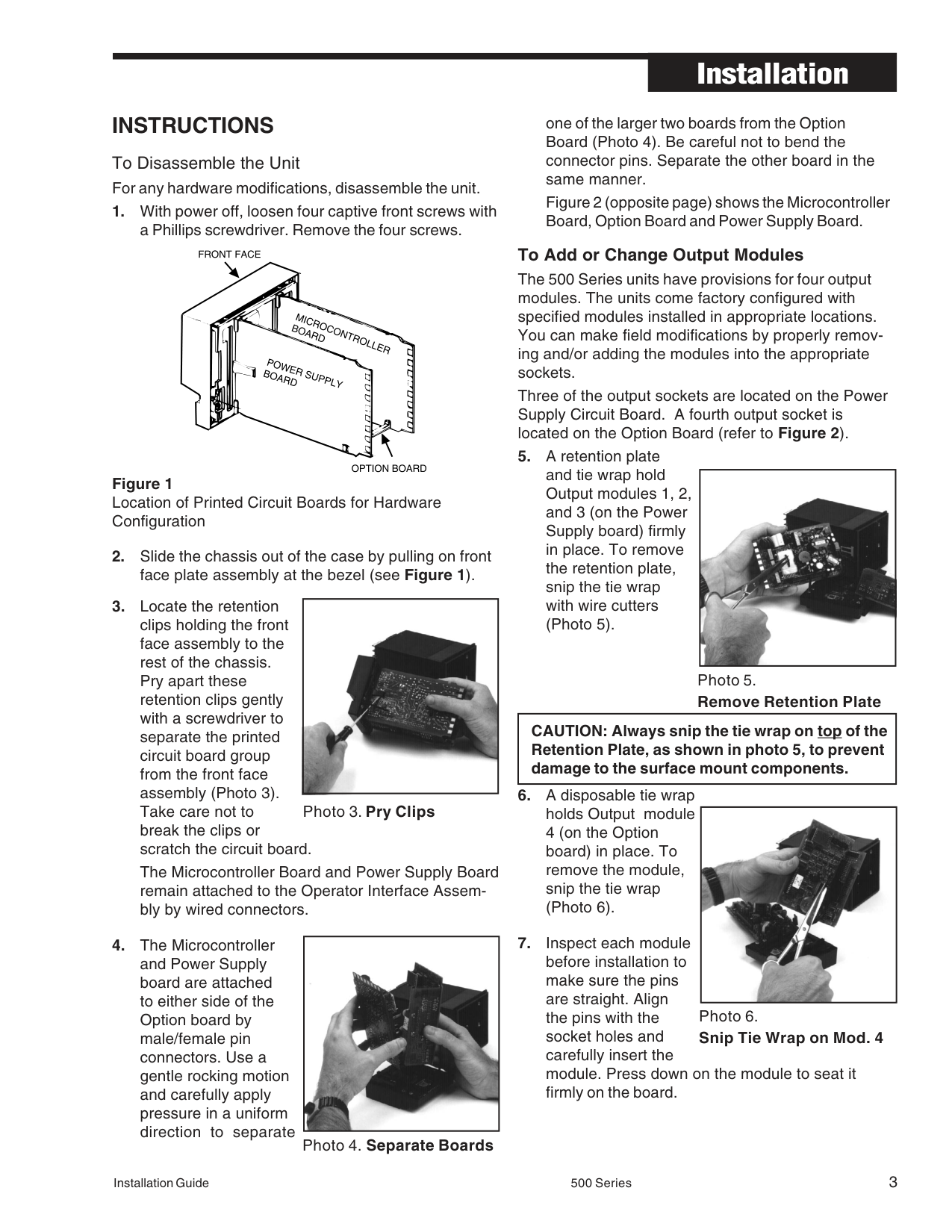
|---|
#################################### Installation Guide 500 Series 1 M500 V7, APRIL 2016
########### INTRODUCTION
############################################### This technical brochure provides hardware installation and modification instructions for our controllers: Series 531, 532, 535, 545, and 555. Use these instructions with the following kits:
################################################## Display Assembly Kits
Output and Communications Module Kits 532-600 ............... 531, 532 Analog Module Kit
Power Supply Kit 535-730*.............. 90 to 250VAC Power Supply Kit 535-732 ............... 24VAC/VDC Power Supply Kit
Mounting Kit 535-761*.............. Mounting Kit
Miscellaneous Kits 532-100 ............... 531, 532 Bypass Board Kit 535-188*.............. Rear Terminal Upgrade Kit 535-660 ............... 531, 532, 535, 545, 555 Jumper Kit 535-662*.............. Gasket Kit
(1 Panel Gasket, 1 Bezel Gasket) 535-763*.............. Bezel Retention Screw Kit
EPROM Kits 531-740................ 531 EPROM Kit 532-740 ............... 532 EPROM Kit 535-741................535 EPROM Kit (RSP)
Microcontroller (MCU) Board Kits 535-731 ............... MCU Board Kit 545-733 ............... MCU Board Kit with CE Option
################################################## Option Board Kits
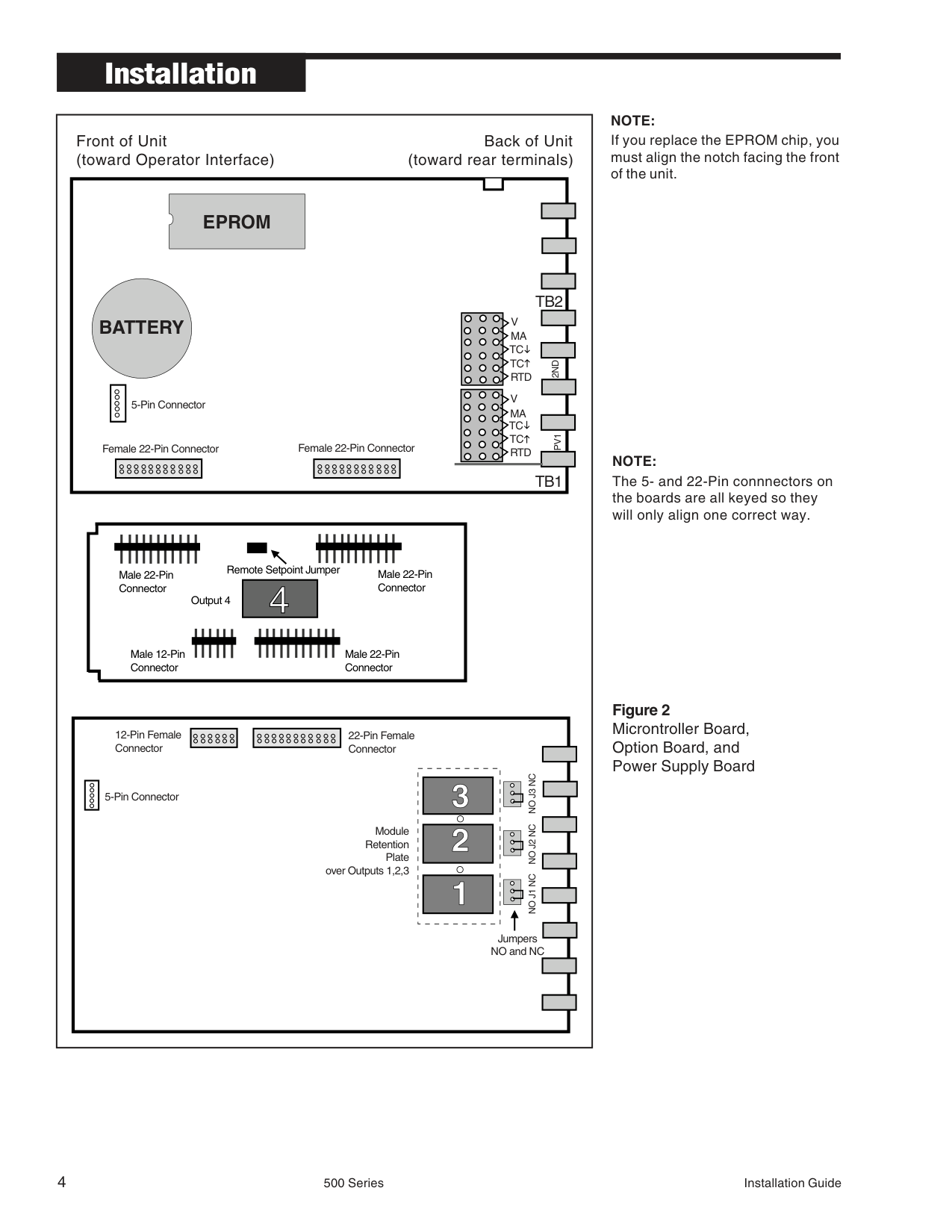
################################################## * Universal Kit (can be used with all 500 Series Controllers)
########### HOW TO USE THIS MANUAL:
########### EQUIPMENT
To make any hardware changes to the units, you will need the following equipment:
INSTRUCTIONS To Disassemble the Unit For any hardware modifications, disassemble the unit.
The Microcontroller Board and Power Supply Board remain attached to the Operator Interface Assembly by wired connectors.
Figure 1 Location of Printed Circuit Boards for Hardware Configuration
|| |---|
|| |---|
one of the larger two boards from the Option Board (Photo 4). Be careful not to bend the connector pins. Separate the other board in the same manner. Figure 2 (opposite page) shows the Microcontroller Board, Option Board and Power Supply Board.
To Add or Change Output Modules The 500 Series units have provisions for four output modules. The units come factory configured with specified modules installed in appropriate locations. You can make field modifications by properly removing and/or adding the modules into the appropriate sockets. Three of the output sockets are located on the Power Supply Circuit Board. A fourth output socket is located on the Option Board (refer to Figure 2).
|| |---|
|CAUTION: Always snip the tie wrap on top of the Retention Plate, as shown in photo 5, to prevent damage to the surface mount components.
| |---|
|| |---|
|Front of Unit Back of Unit (toward Operator Interface) (toward rear terminals)
|Male 22-Pin Connector
Male 22-Pin Connector
Male 12-Pin Connector
Male 22-Pin Connector
Output 4
Remote Setpoint Jumper
| |---|
5-Pin Connector
Female 22-Pin Connector Female 22-Pin Connector
|5-Pin Connector
Module Retention
Plate over Outputs 1,2,3
12-Pin Female Connector
22-Pin Female Connector
Jumpers NO and NC
NO J1 NCNO J2 NCNO J3 NC| |---|
V MA
V MA TC TC RTD
TB1
PV12ND
TB2
TC TC RTD
EPROM
BATTERY| |---|
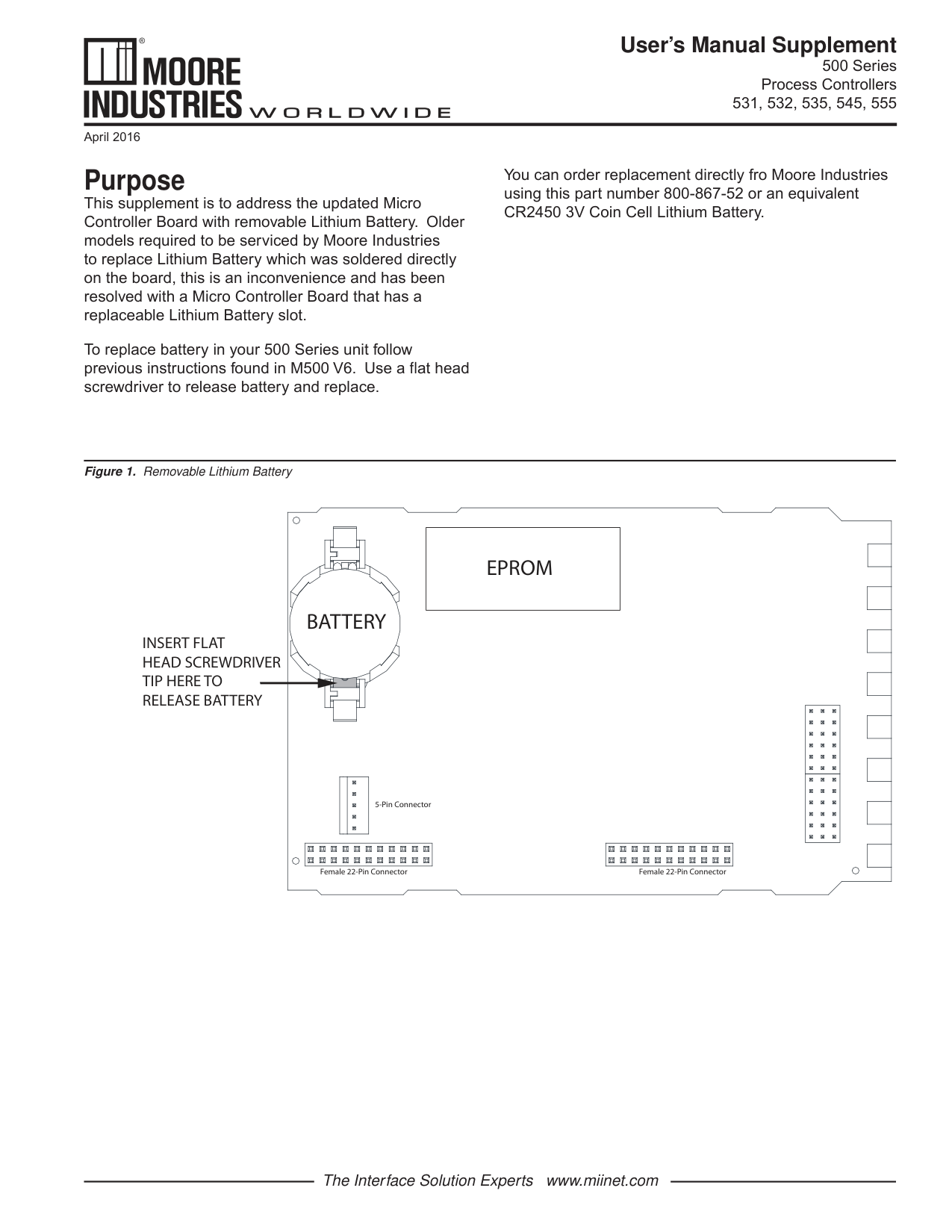
############################################## NOTE:
If you replace the EPROM chip, you must align the notch facing the front of the unit.
NOTE: The 5- and 22-Pin connnectors on the boards are all keyed so they will only align one correct way.
Figure 2 Microntroller Board, Option Board, and Power Supply Board
Failure to use these devices may result in a loosening of the module and eventual failure. If you ordered a module separately, it should have come with a tie wrap. An extra set of tie wraps is available by ordering Part #535-665. Note: For greatest accuracy, milliamp modules added for retransmission must be calibrated per instructions in Operator's Manual.
To Change the Option Board
Note: When adding Option board for 5 digital inputs, associated screw terminal in the rear terminal block must be installed. (See information on page 1 for ordering a Screw Kit.)
#################### To Change the Power Supply or Microcontroller (CPU) Board
For the Power Supply Board, disconnect the 5-pin female connector that wires it to the Display Assembly. Reattach the connector to the new board. You can only orient the connector one way.
To Change the Display Assembly
|CAUTION Static discharge will cause damage to equipment. Always ground yourself with a wrist grounding strap when handling electronics to prevent static discharge.| |---|
CAUTION Do not scratch the boards or bend the pins of the connectors.
#################### To Change the EPROM
To Reassemble the Unit
########### User’s Manual Supplement
500 Series Process Controllers
531, 532, 535, 545, 555
April 2016
Purpose This supplement is to address the updated Micro Controller Board with removable Lithium Battery. Older models required to be serviced by Moore Industries to replace Lithium Battery which was soldered directly on the board, this is an inconvenience and has been resolved with a Micro Controller Board that has a replaceable Lithium Battery slot.
To replace battery in your 500 Series unit follow previous instructions found in M500 V6. Use a flat head screwdriver to release battery and replace.
You can order replacement directly fro Moore Industries using this part number 800-867-52 or an equivalent CR2450 3V Coin Cell Lithium Battery.
Figure 1. Removable Lithium Battery
############################### INSERT FLAT HEAD SCREWDRIVER TIP HERE TO RELEASE BATTERY
BATTERY
|EPROM| |---|
| | | |---|---|
5-Pin Connector
Female 22-Pin ConnectorFemale 22-Pin Connector
| | |---| | |
The Interface Solution Experts www.miinet.com
############ RETURN PROCEDURES
#################### To return equipment to Moore Industries for repair, follow these four steps:
Warranty Repair – If you are unsure if your unit is still under warranty, we can use the unit’s serial number to verify the warranty status for you over the phone. Be sure to include the RMA number on all documentation.
Non-Warranty Repair – If your unit is out of warranty, be prepared to give us a Purchase Order number when you call. In most cases, we will be able to quote you the repair costs at that time. The repair price you are quoted will be a “Not To Exceed” price, which means that the actual repair costs may be less than the quote. Be sure to include the RMA number on all documentation.
WARRANTY DISCLAIMER
THE COMPANY MAKES NO EXPRESS, IMPLIED OR STATUTORY WARRANTIES (INCLUDING ANY WARRANTY OF MERCHANTABILITY OR OF FITNESS FOR A PARTICULAR PURPOSE) WITH RESPECT TO ANY GOODS OR SERVICES SOLD BY THE COMPANY. THE COMPANY DISCLAIMS ALL WARRANTIES ARISING FROM ANY COURSE OF DEALING OR TRADE USAGE, AND ANY BUYER OF GOODS OR SERVICES FROM THE COMPANY ACKNOWLEDGES THAT THERE ARE NO WARRANTIES IMPLIED BY CUSTOM OR USAGE IN THE TRADE OF THE BUYER AND OF THE COMPANY, AND THAT ANY PRIOR DEALINGS OF THE BUYER WITH THE COMPANY DO NOT IMPLY THAT THE COMPANY WARRANTS THE GOODS OR SERVICES IN ANY WAY.
ANY BUYER OF GOODS OR SERVICES FROM THE COMPANY AGREES WITH THE COMPANY THAT THE SOLE AND EXCLUSIVE REMEDIES FOR BREACH OF ANY WARRANTY CONCERNING THE GOODS OR SERVICES SHALL BE FOR THE COMPANY, AT ITS OPTION, TO REPAIR OR REPLACE THE GOODS OR SERVICES OR REFUND THE PURCHASE PRICE. THE COMPANY SHALL IN NO EVENT BE LIABLE FOR ANY CONSEQUENTIAL OR INCIDENTAL DAMAGES EVEN IF THE COMPANY FAILS IN ANY ATTEMPT TO REMEDY DEFECTS IN THE GOODS OR SERVICES , BUT IN SUCH CASE THE BUYER SHALL BE ENTITLED TO NO MORE THAN A REFUND OF ALL MONIES PAID TO THE COMPANY BY THE BUYER FOR PURCHASE OF THE GOODS OR SERVICES.
ANY CAUSE OF ACTION FOR BREACH OF ANY WARRANTY BY THE COMPANY SHALL BE BARRED UNLESS THE COMPANY RECEIVES FROM THE BUYER A WRITTEN NOTICE OF THE ALLEGED DEFECT OR BREACH WITHIN TEN DAYS FROM THE EARLIEST DATE ON WHICH THE BUYER COULD REASONABLY HAVE DISCOVERED THE ALLEGED DEFECT OR BREACH, AND NO ACTION FOR THE BREACH OF ANY WARRANTY SHALL BE COMMENCED BY THE BUYER ANY LATER THAN TWELVE MONTHS FROM THE EARLIEST DATE ON WHICH THE BUYER COULD REASONABLY HAVE DISCOVERED THE ALLEGED DEFECT OR BREACH.
##################################################### RETURN POLICY
For a period of thirty-six (36) months from the date of shipment, and under normal conditions of use and service, Moore Industries ("The Company") will at its option replace, repair or refund the purchase price for any of its manufactured products found, upon return to the Company (transportation charges prepaid and otherwise in accordance with the return procedures established by The Company), to be defective in material or workmanship. This policy extends to the original Buyer only and not to Buyer's customers or the users of Buyer's products, unless Buyer is an engineering contractor in which case the policy shall extend to Buyer's immediate customer only. This policy shall not apply if the product has been subject to alteration, misuse, accident, neglect or improper application, installation, or operation. THE COMPANY SHALL IN NO EVENT BE LIABLE FOR ANY INCIDENTAL OR CONSEQUENTIAL DAMAGES.
Specifications and Information subject to change without notice.