
Ask AI
— answers from the official manualAnswers from the official manual.
Common questions
Common Questions
10 totalHow do I change the weight setting on the Weider Pro 9635?
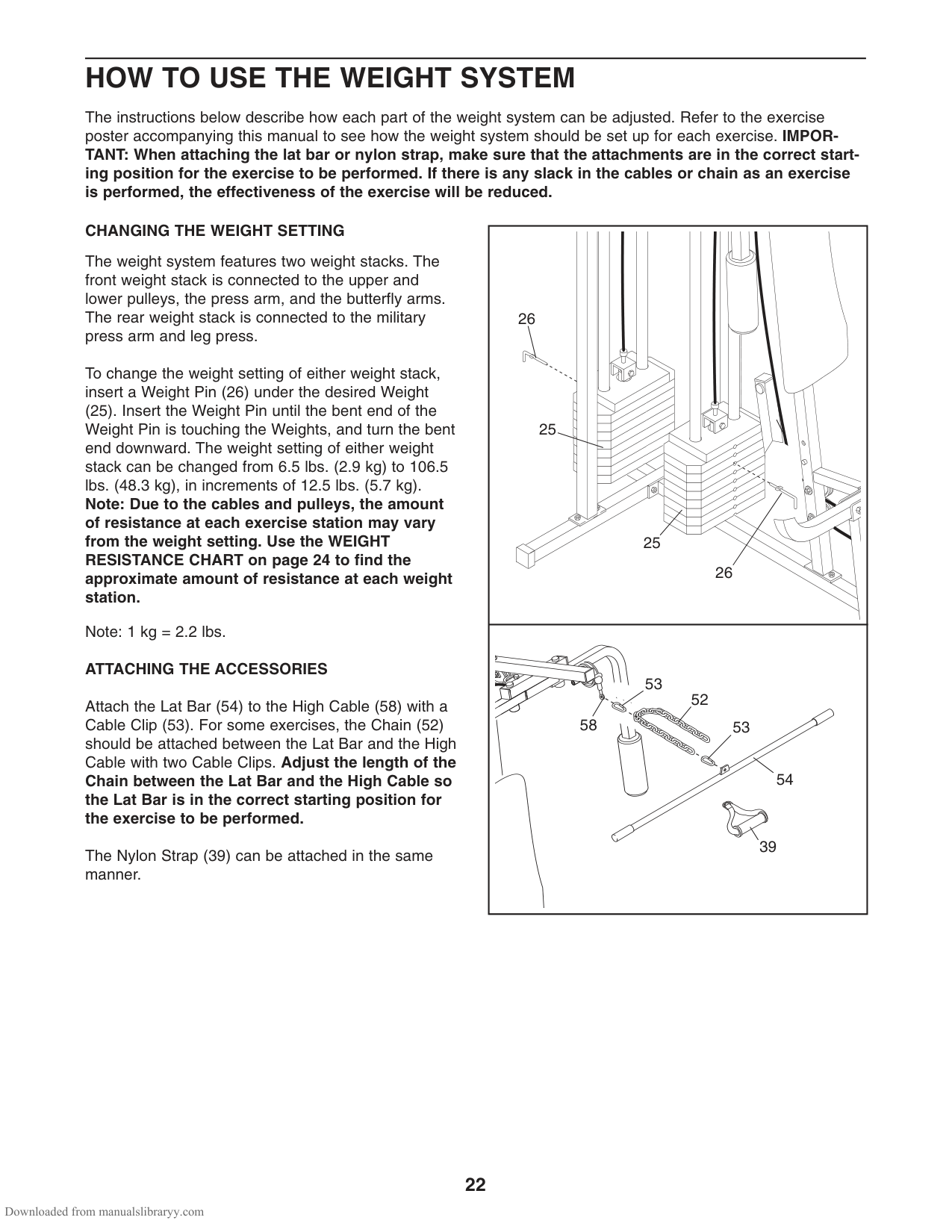
Insert a Weight Pin (26) under the desired Weight (25). Turn the bent end downward until it is touching and then press down to secure. This can be adjusted from 6.5 lbs. to 106.5 lbs., in increments of 12.5 lbs. Use the WEIGHT RESISTANCE CHART on page 24 for approximate resistance values.
How do I attach a Lat Bar or Nylon Strap to the Weider Pro 9635?
Attach the Lat Bar (54) with a Cable Clip (53) to the High Cable (58). For some exercises, connect a Chain (52) between the Lat Bar and cable using Cable Clips. Adjust the chain length so that the Lat Bar is in the correct starting position for the exercise. For the Nylon Strap, attach it similarly.
How do I tighten cables on the Weider Pro 9635 if they feel slack?
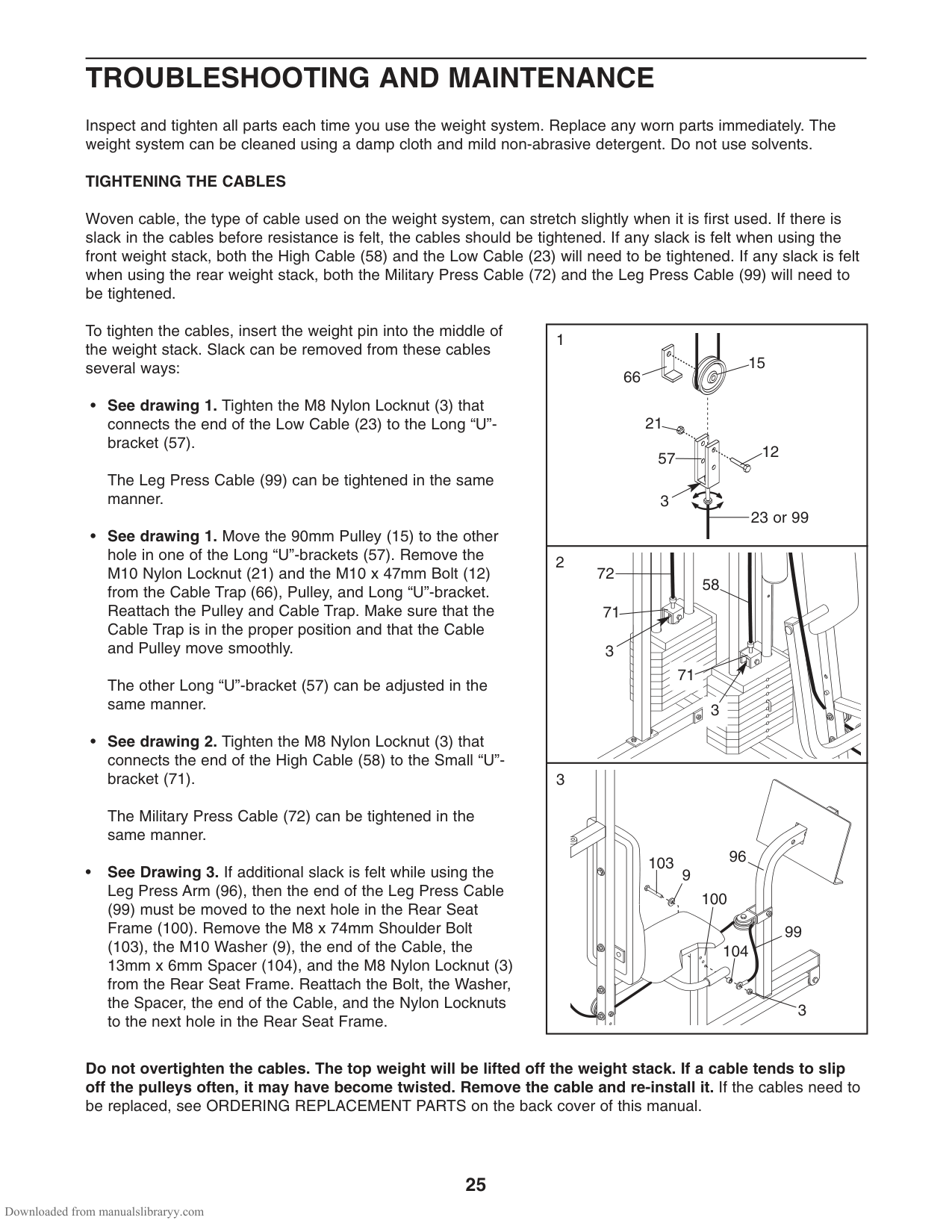
To remove slack from a cable, adjust one of the following: Tighten M8 Nylon Locknuts connecting Low Cable (23) or Leg Press Cable (99) to brackets; loosen and reattach Pulleys in Long “U”-brackets (57); move ends of High Cable (58), Military Press Cable (72) from Small “U”-bracket (71). See TROUBLESHOOTING AND MAINTENANCE on page 25 for drawings.
What should I do to attach or remove the seat from the Weider Pro 9635?
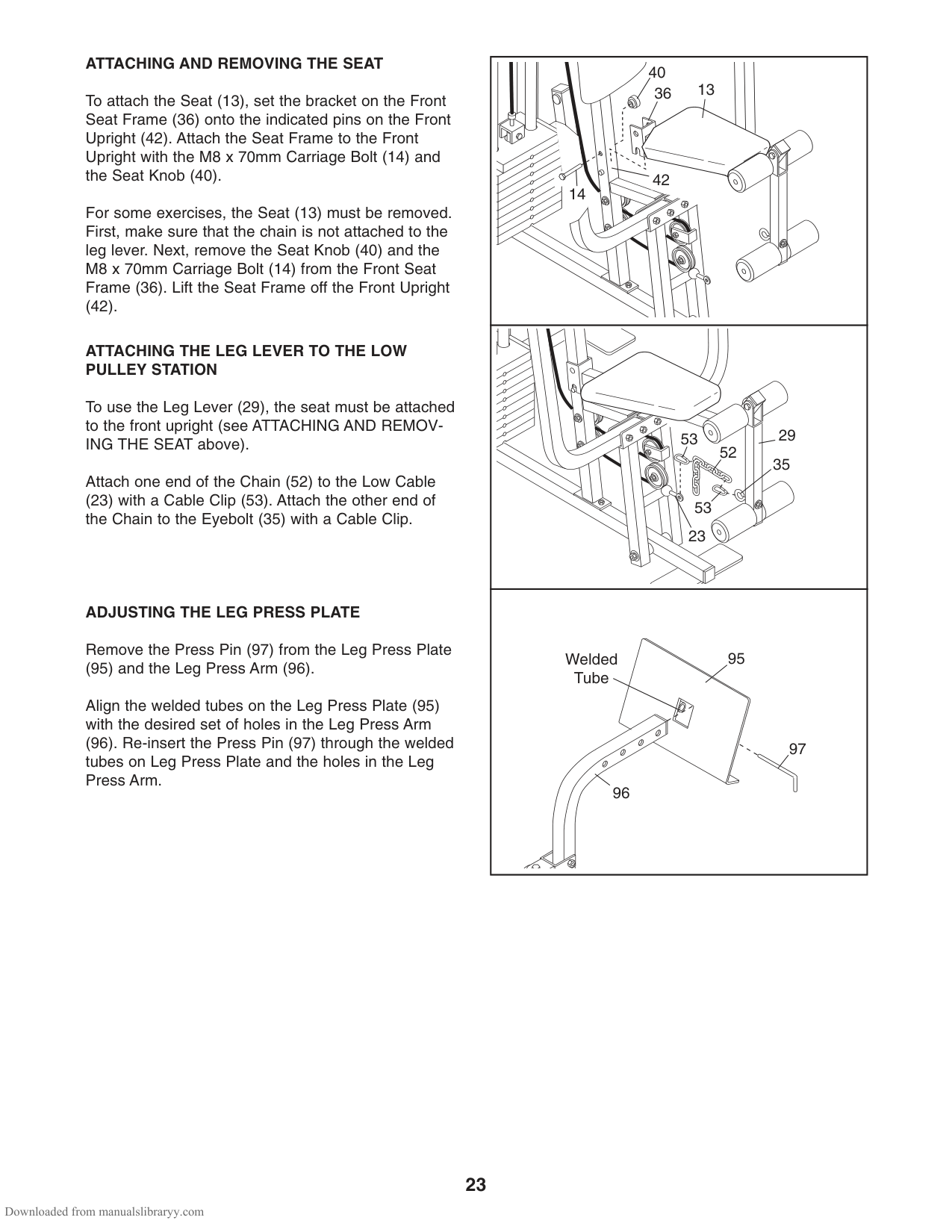
Attach by setting Front Seat Frame pins onto Front Upright (42), secure with M8 x 70mm Carriage Bolt (14) and Seat Knob (40). To remove, unclip Chain (if present), loosen Seat Knob (40) and lift frame off Front Upright (42). See SEAT ASSEMBLY steps 36-41 on pages 17-18.
Where do I find the key numbers when ordering replacement parts for Weider Pro 9635?
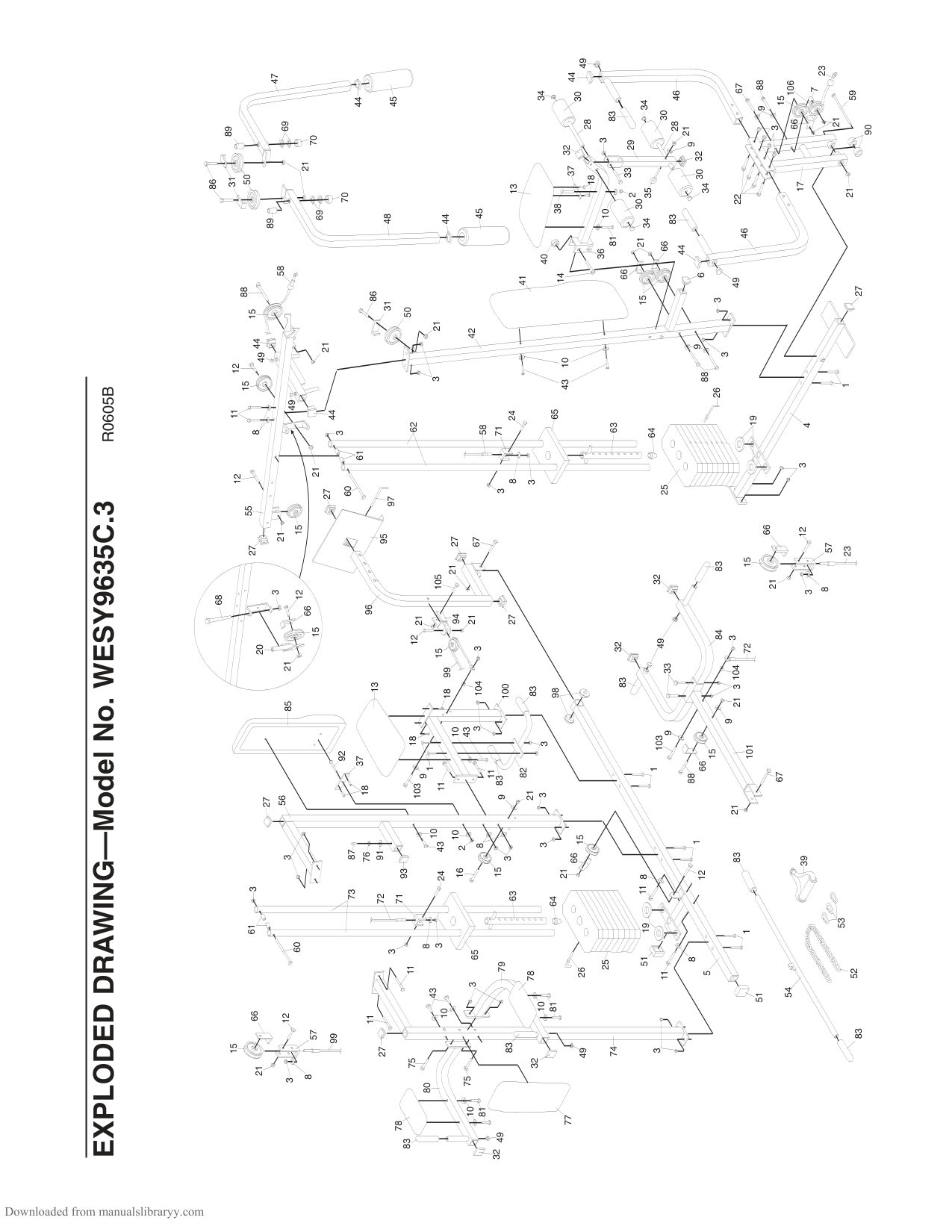
Refer to the model number (WESY9635C.3) and serial number in the manual packet, which lists specific part details including Key Numbers in the EXPLODED DRAWING attached near center of this user guide.
What precaution should I take regarding assembly clearance?
Before starting assembly, ensure there is enough space around to walk and maneuver parts during setup as illustrated in ASSEMBLY guidelines on page 4. Assemble only at the location where it will be used permanently.
Full Manual
34 pages
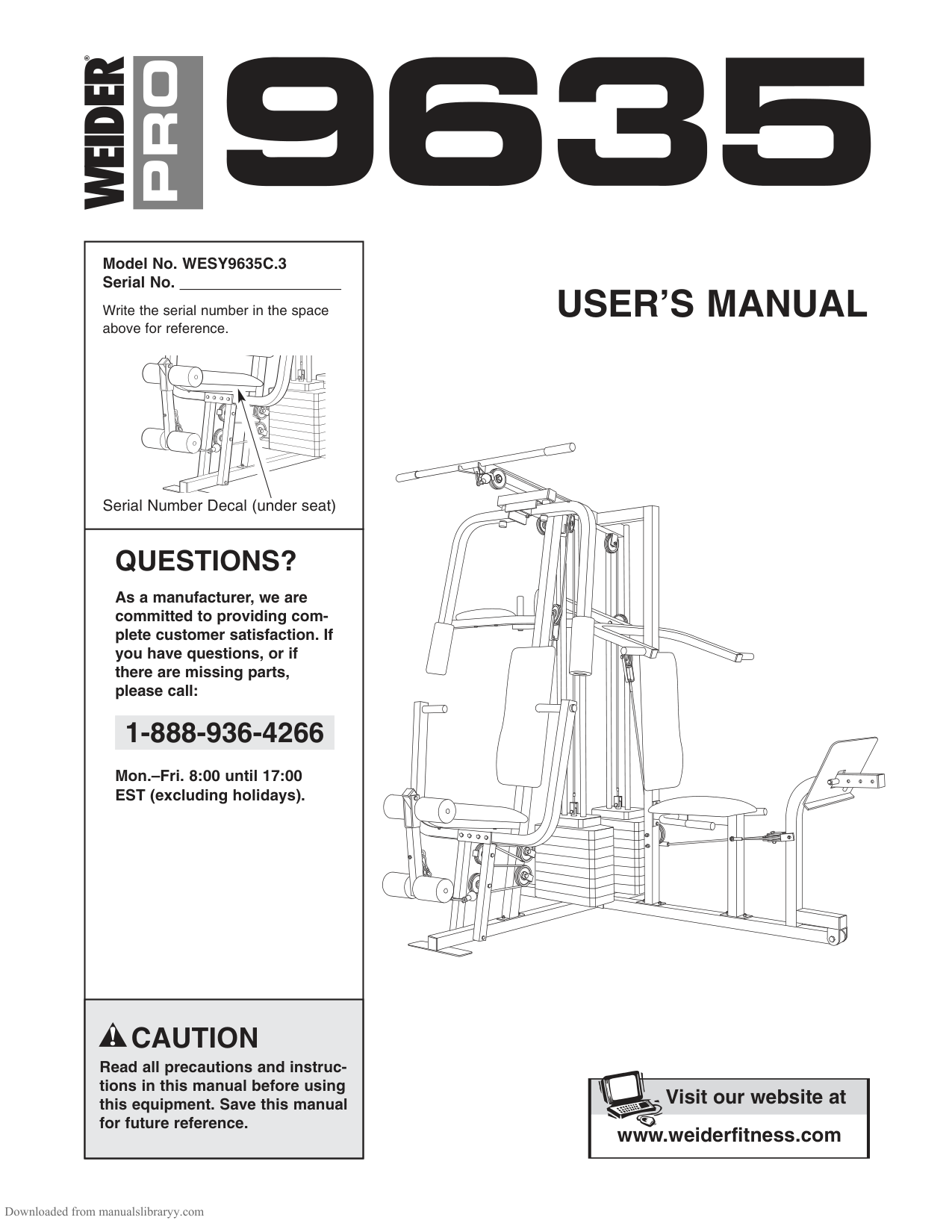
######## Model No. WESY9635C.3 Serial No.
USER’S MANUAL
Write the serial number in the space above for reference.
Serial Number Decal (under seat)
QUESTIONS?
As a manufacturer, we are committed to providing complete customer satisfaction. If you have questions, or if there are missing parts, please call:
1-888-936-4266
Mon.–Fri. 8:00 until 17:00 EST (excluding holidays).
##### Visit our website at
www.proform.com
##### Visit our website at
www.healthrider.com
CAUTION
Read all precautions and instructions in this manual before using this equipment. Save this manual for future reference.
| | |---|
|www.weiderfitness.com
Visit our website at| |---|
| | |---|
TABLE OF CONTENTS
WARNING DECAL PLACEMENT . . . . . . . . . . . . . . . . . . . . . . . . . . . . . . . . . . . . . . . . . . . . . . . . . . . . . . . . . . . . . .2 IMPORTANT PRECAUTIONS . . . . . . . . . . . . . . . . . . . . . . . . . . . . . . . . . . . . . . . . . . . . . . . . . . . . . . . . . . . . . . . .3 BEFORE YOU BEGIN . . . . . . . . . . . . . . . . . . . . . . . . . . . . . . . . . . . . . . . . . . . . . . . . . . . . . . . . . . . . . . . . . . . . . .4 ASSEMBLY . . . . . . . . . . . . . . . . . . . . . . . . . . . . . . . . . . . . . . . . . . . . . . . . . . . . . . . . . . . . . . . . . . . . . . . . . . . . . . .5 HOW TO USE THE WEIGHT SYSTEM . . . . . . . . . . . . . . . . . . . . . . . . . . . . . . . . . . . . . . . . . . . . . . . . . . . . . . . .22 WEIGHT RESISTANCE CHART . . . . . . . . . . . . . . . . . . . . . . . . . . . . . . . . . . . . . . . . . . . . . . . . . . . . . . . . . . . . . .24 TROUBLESHOOTING AND MAINTENANCE . . . . . . . . . . . . . . . . . . . . . . . . . . . . . . . . . . . . . . . . . . . . . . . . . . .25 CABLE DIAGRAMS . . . . . . . . . . . . . . . . . . . . . . . . . . . . . . . . . . . . . . . . . . . . . . . . . . . . . . . . . . . . . . . . . . . . . . .26 ORDERING REPLACEMENT PARTS . . . . . . . . . . . . . . . . . . . . . . . . . . . . . . . . . . . . . . . . . . . . . . . . . .Back Cover LIMITED WARRANTY . . . . . . . . . . . . . . . . . . . . . . . . . . . . . . . . . . . . . . . . . . . . . . . . . . . . . . . . . . . . . .Back Cover
Note: A PART IDENTIFICATION CHART and a PART LIST/EXPLODED DRAWING are attached to the center of this manual. Remove the PART IDENTIFICATION CHART and the PART LIST/EXPLODED DRAWING before beginning assembly.
WARNING DECAL PLACEMENT
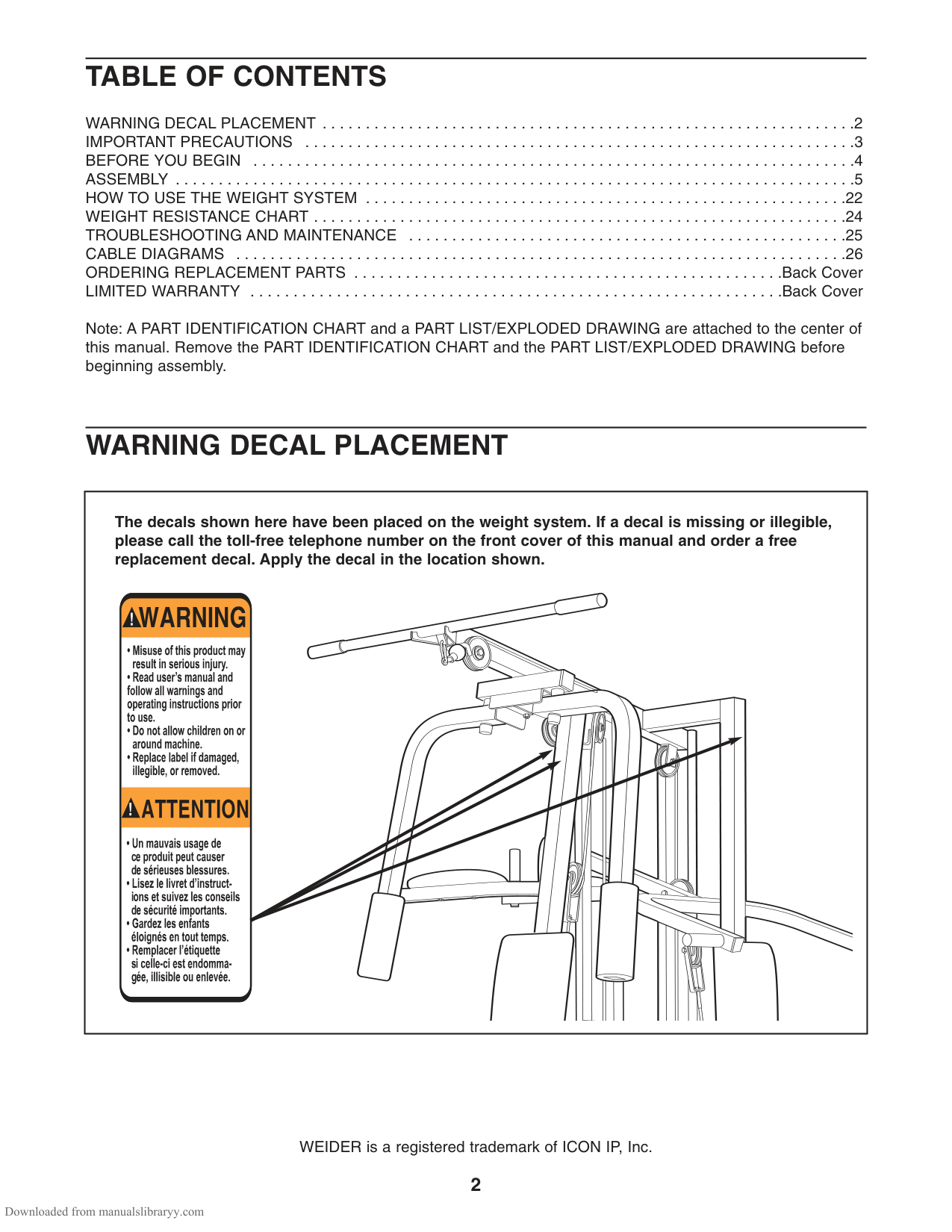
The decals shown here have been placed on the weight system. If a decal is missing or illegible, please call the toll-free telephone number on the front cover of this manual and order a free replacement decal. Apply the decal in the location shown.
WEIDER is a registered trademark of ICON IP, Inc.
IMPORTANT PRECAUTIONS
WARNING: Toreduce the risk of serious injury, read the following important precautions
before using the weight system.
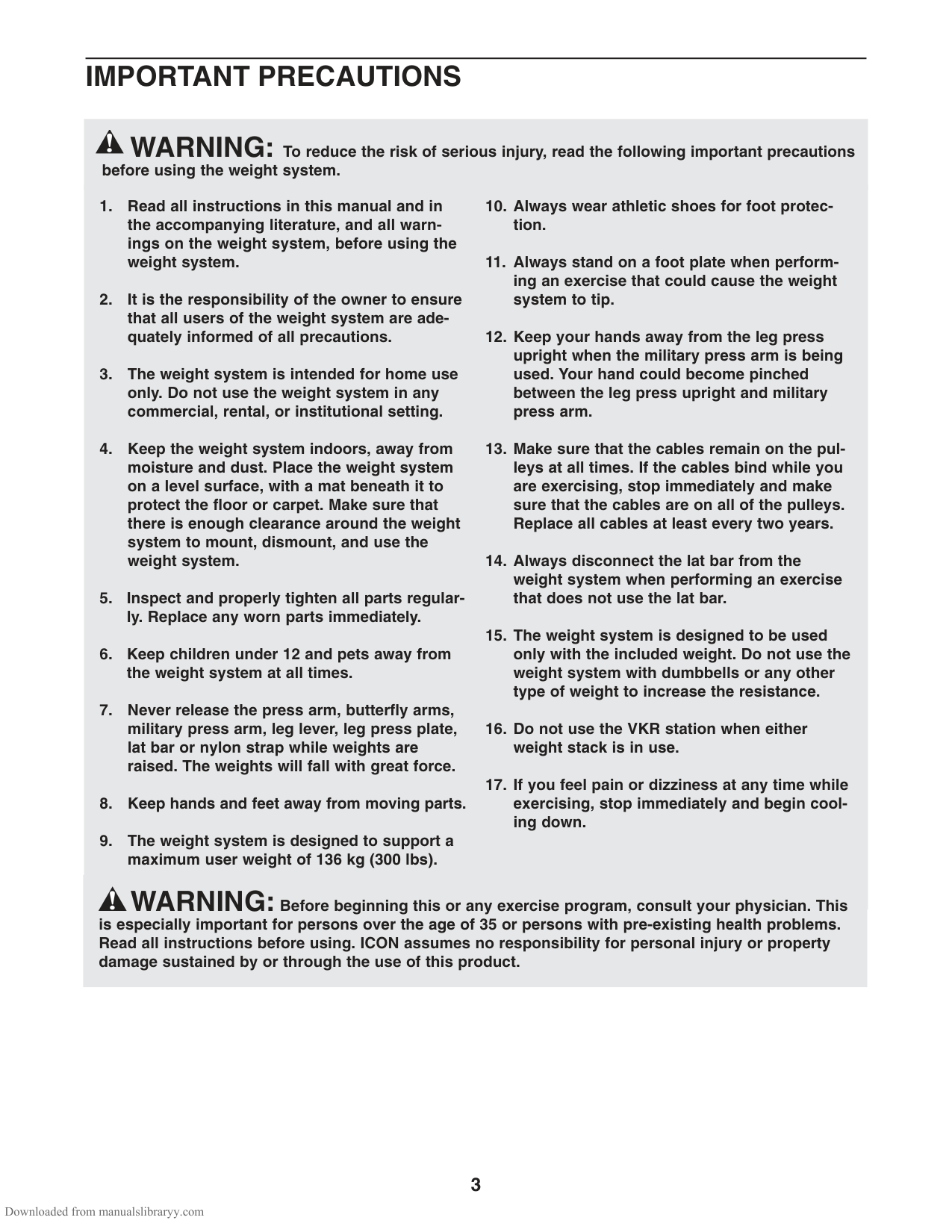
WARNING:Before beginning this or any exercise program, consult your physician. This is especially important for persons over the age of 35 or persons with pre-existing health problems. Read all instructions before using. ICON assumes no responsibility for personal injury or property damage sustained by or through the use of this product.
BEFORE YOU BEGIN
######### Thank you for selecting the versatile WEIDER
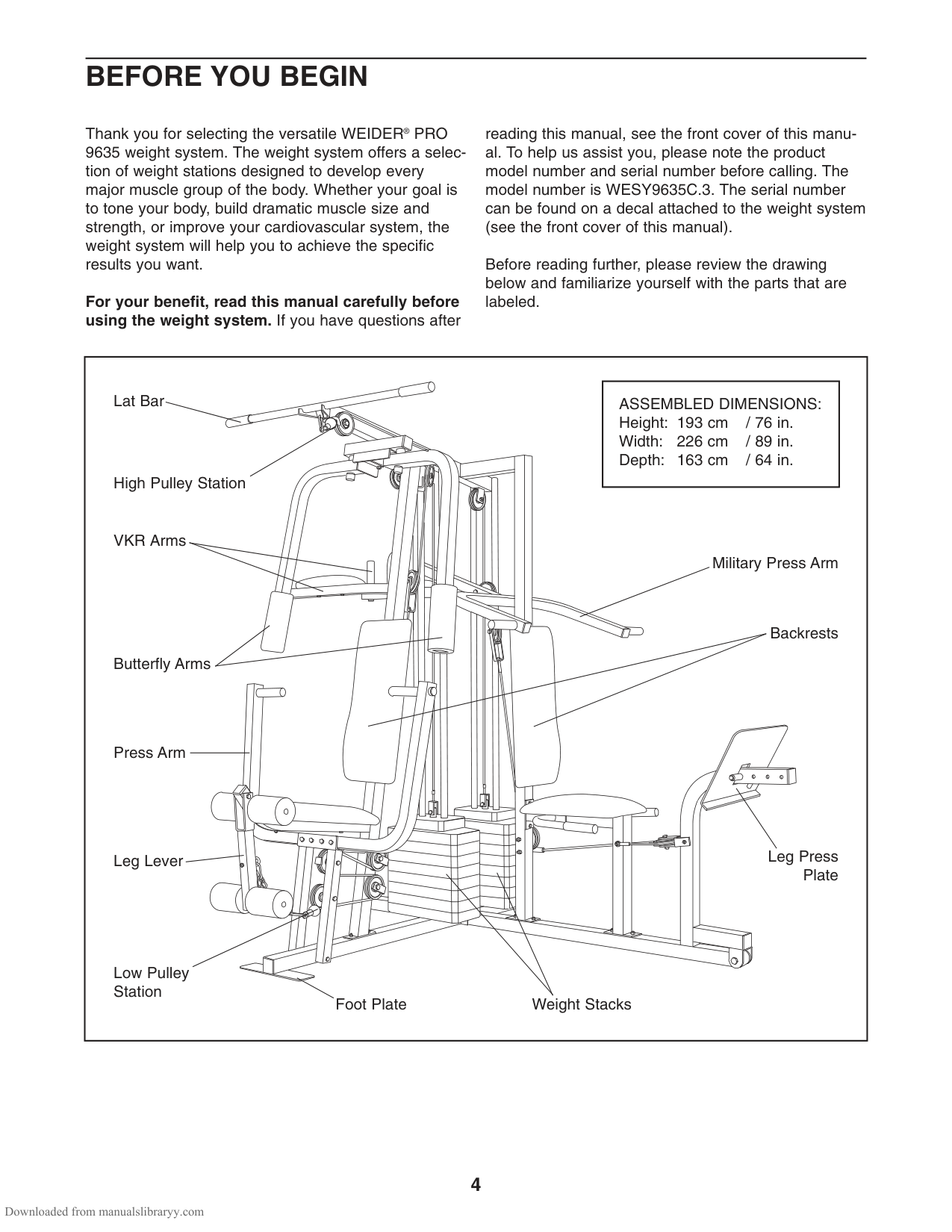
PRO 9635 weight system. The weight system offers a selection of weight stations designed to develop every major muscle group of the body. Whether your goal is to tone your body, build dramatic muscle size and strength, or improve your cardiovascular system, the weight system will help you to achieve the specific results you want.
®
For your benefit, read this manual carefully before using the weight system. If you have questions after
reading this manual, see the front cover of this manual. To help us assist you, please note the product model number and serial number before calling. The model number is WESY9635C.3. The serial number can be found on a decal attached to the weight system (see the front cover of this manual).
Before reading further, please review the drawing below and familiarize yourself with the parts that are labeled.
|Foot Plate
Low Pulley Station
High Pulley Station
Lat Bar
Leg Lever
Butterfly Arms
Military Press Arm
Press Arm
Weight Stacks
Backrests
VKR Arms
Leg Press Plate
|ASSEMBLED DIMENSIONS: Height: 193 cm / 76 in. Width: 226 cm / 89 in. Depth: 163 cm / 64 in.| |---| | |---|
ASSEMBLY
|Before beginning assembly, carefully read the following information and instructions:
• Because of its weight and size, the weight system should be assembled in the location where it will be used. Make sure that there is enough clearance to walk around the weight system as you assemble it.
• Place all parts in a cleared area and remove the packing materials. Do not dispose of the packing materials until assembly is completed.
• Tighten all parts as you assemble them, unless instructed to do otherwise.
• As you assemble the weight system, make sure all parts are oriented as shown in the drawings.
• Assembly requires two people.
• For help identifying small parts, use the PART IDENTIFICATION CHART. The included grease, and the following tools (not included) may be required for assembly:
• Two adjustable wrenches
• One rubber mallet
• One standard screwdriver
• One Phillips screwdriver
• Clear tape or masking tape, and soapy water.
Assembly will be more convenient if you have a socket set, a set of open-end or closed-end wrenches, or a set of ratchet wrenches.
Make Things Easier for Yourself
Everything in this manual is designed to ensure that the weight system can be assembled successfully by almost anyone. However, the weight system has many parts and the assembly process will take time. By setting aside plenty of time, assembly will go smoothly.| |---|
FRAME ASSEMBLY
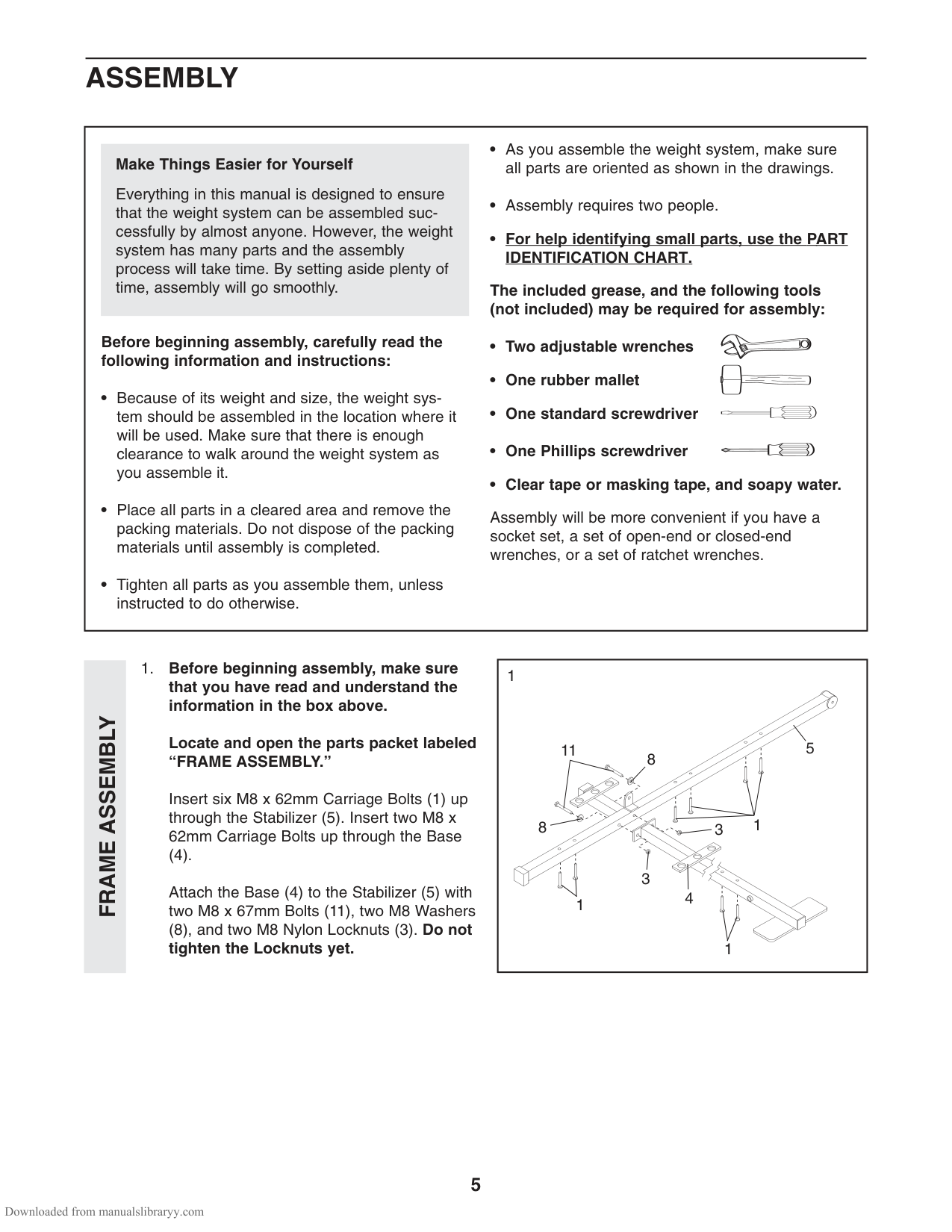
Locate and open the parts packet labeled “FRAME ASSEMBLY.”
Insert six M8 x 62mm Carriage Bolts (1) up through the Stabilizer (5). Insert two M8 x 62mm Carriage Bolts up through the Base
(4). Attach the Base (4) to the Stabilizer (5) with two M8 x 67mm Bolts (11), two M8 Washers
(8), and two M8 Nylon Locknuts (3). Do not tighten the Locknuts yet.
|1
8
8
11
1
4
3
3
1
5
1| |---|
FRAME ASSEMBLY
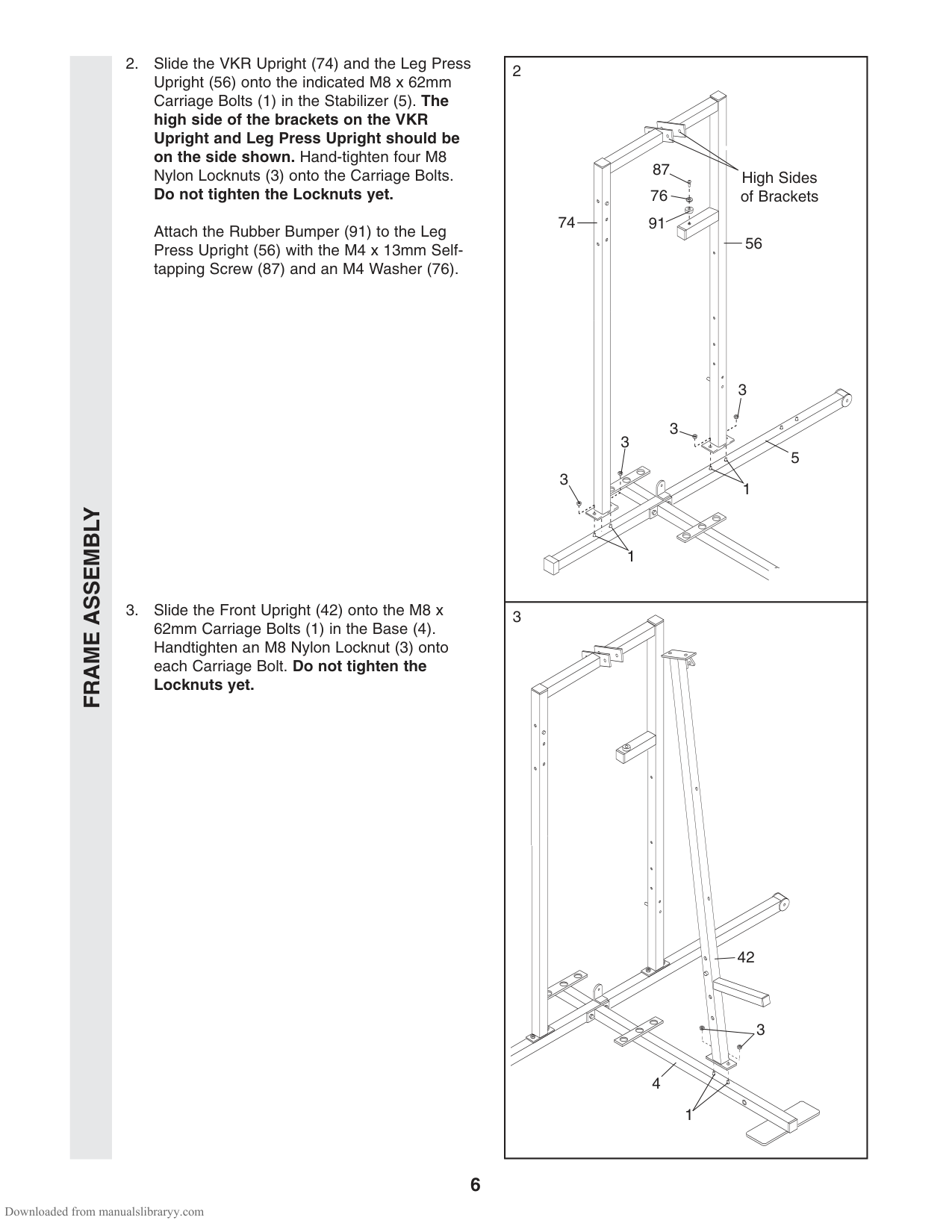
Attach the Rubber Bumper (91) to the Leg Press Upright (56) with the M4 x 13mm Selftapping Screw (87) and an M4 Washer (76).
|2
1
1
56
74
3 3
3
3
5
High Sides of Brackets
87
91
76
| |---| |3
42
4
1
3|
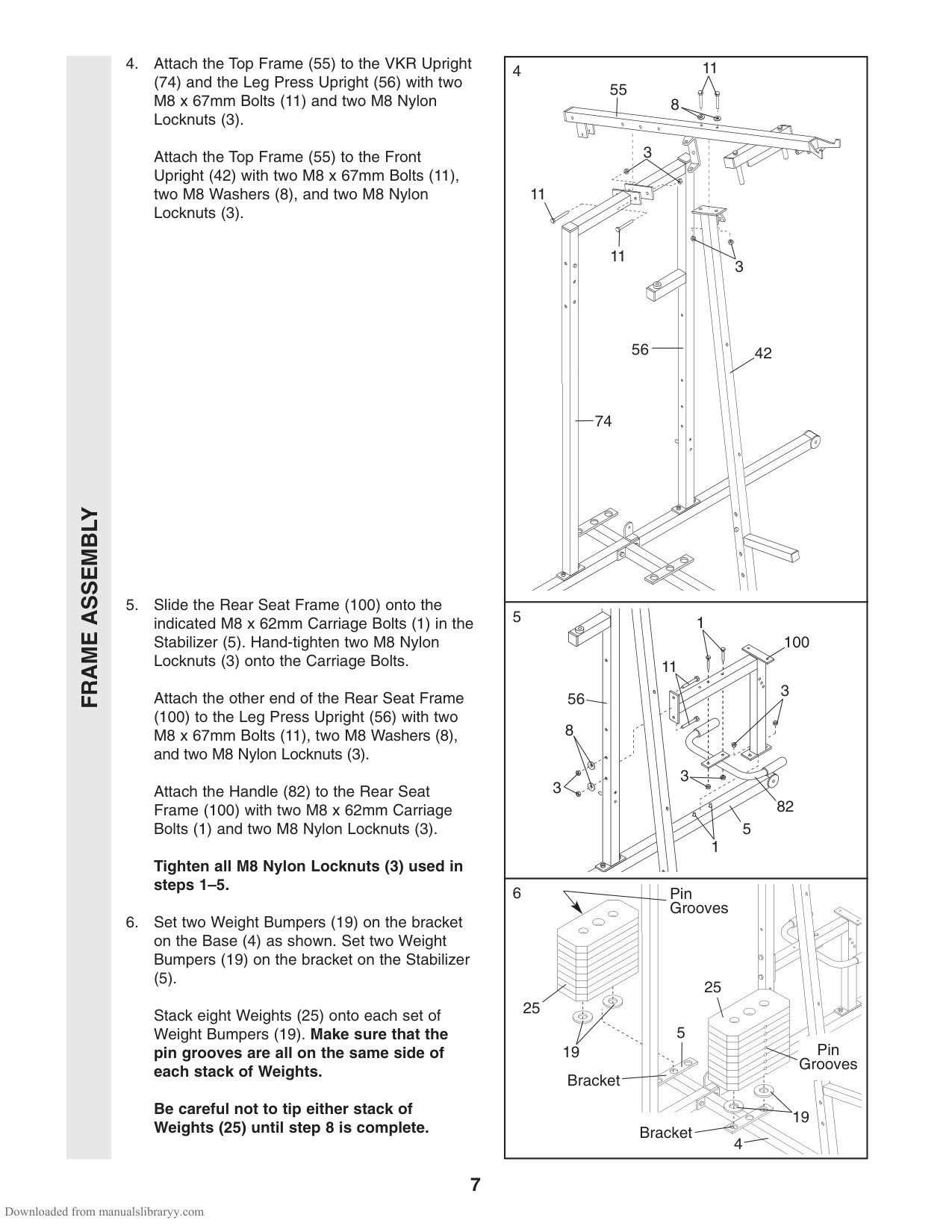
(74) and the Leg Press Upright (56) with two M8 x 67mm Bolts (11) and two M8 Nylon Locknuts (3).
Attach the Top Frame (55) to the Front Upright (42) with two M8 x 67mm Bolts (11), two M8 Washers (8), and two M8 Nylon Locknuts (3).
Attach the other end of the Rear Seat Frame
(100) to the Leg Press Upright (56) with two M8 x 67mm Bolts (11), two M8 Washers (8), and two M8 Nylon Locknuts (3).
Attach the Handle (82) to the Rear Seat Frame (100) with two M8 x 62mm Carriage Bolts (1) and two M8 Nylon Locknuts (3).
Tighten all M8 Nylon Locknuts (3) used in steps 1–5.
3
3
8
11
11
11
56 42
74
FRAME ASSEMBLY
100
11
3
56 8
3 3
82
5
1
6 Pin Grooves
| | |---| | | | | | | | | | | | | | |
(5). Stack eight Weights (25) onto each set of Weight Bumpers (19). Make sure that the pin grooves are all on the same side of each stack of Weights.
25
25
5
| | |---| | | | | | | | | | | | | | |
Pin Grooves
19
Bracket
Be careful not to tip either stack of Weights (25) until step 8 is complete.
19
Bracket
4
FRAME ASSEMBLY
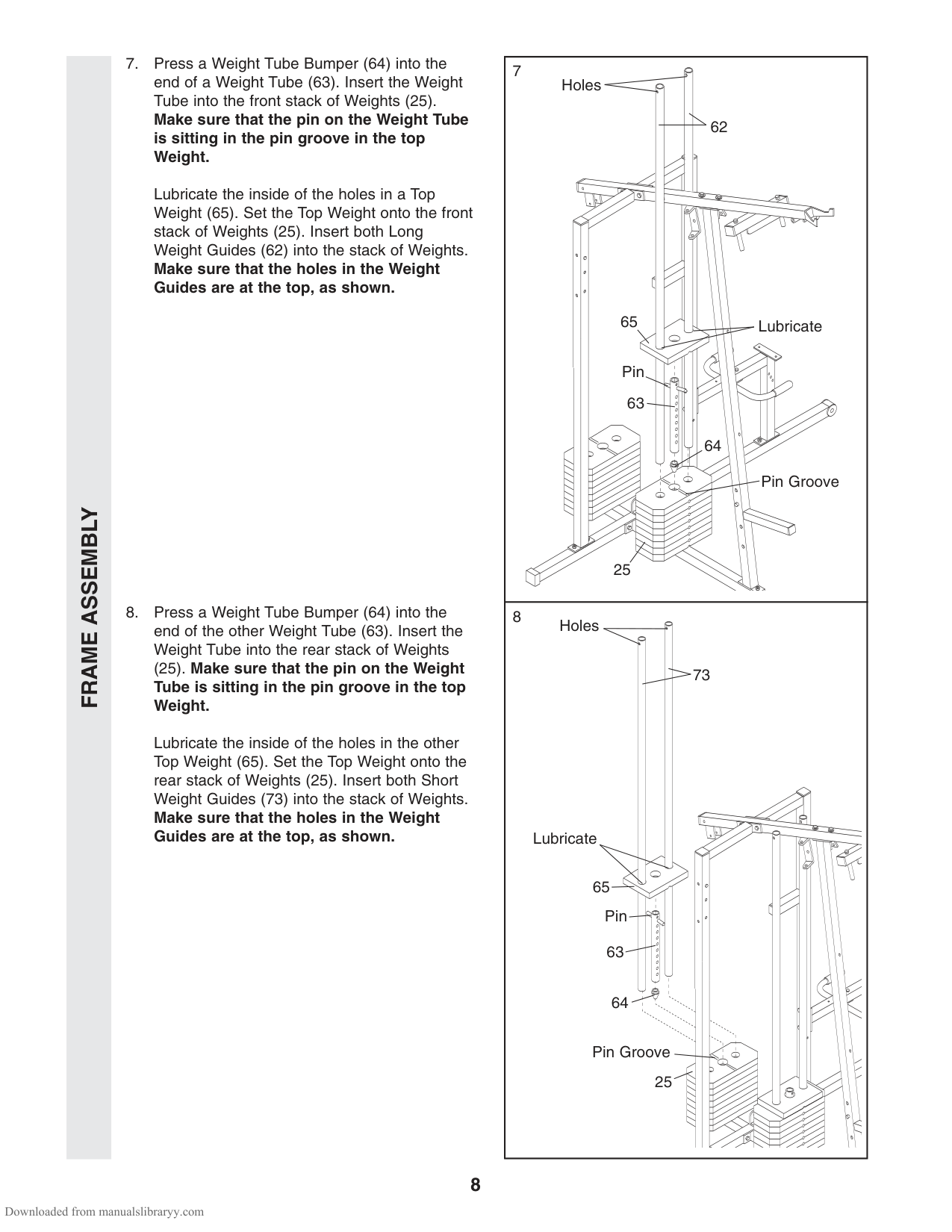
Lubricate the inside of the holes in a Top Weight (65). Set the Top Weight onto the front stack of Weights (25). Insert both Long Weight Guides (62) into the stack of Weights. Make sure that the holes in the Weight Guides are at the top, as shown.
######## (25). Make sure that the pin on the Weight Tube is sitting in the pin groove in the top Weight.
Lubricate the inside of the holes in the other Top Weight (65). Set the Top Weight onto the rear stack of Weights (25). Insert both Short Weight Guides (73) into the stack of Weights. Make sure that the holes in the Weight Guides are at the top, as shown.
Lubricate
62
65
Pin 63
64
Pin Groove
Holes
Lubricate
73
65 Pin
Pin Groove
25
25
| | |---| | | | | | | | | | | | | | |
FRAME ASSEMBLYARMASSEMBLY
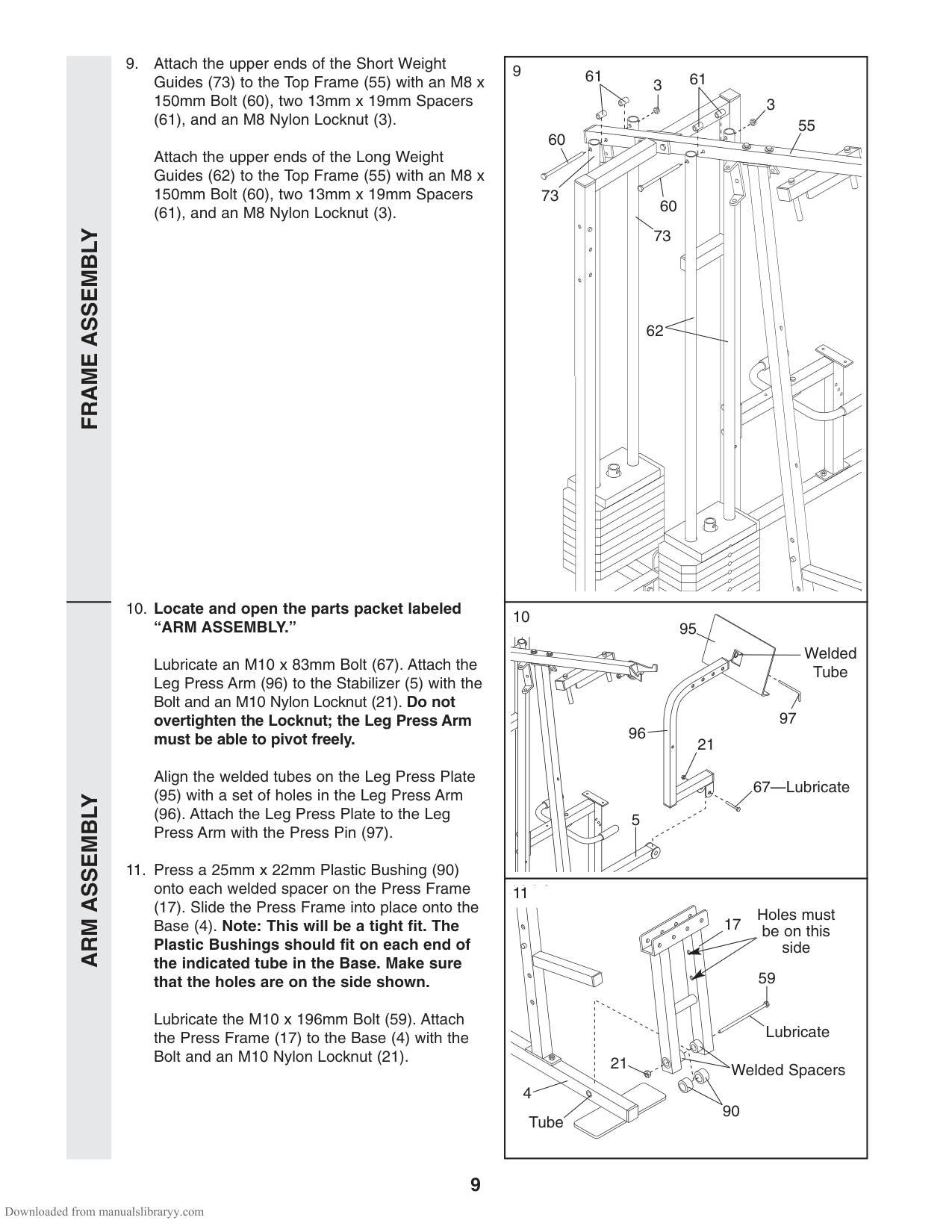
(61), and an M8 Nylon Locknut (3). Attach the upper ends of the Long Weight Guides (62) to the Top Frame (55) with an M8 x 150mm Bolt (60), two 13mm x 19mm Spacers
(61), and an M8 Nylon Locknut (3).
Lubricate an M10 x 83mm Bolt (67). Attach the Leg Press Arm (96) to the Stabilizer (5) with the Bolt and an M10 Nylon Locknut (21). Do not overtighten the Locknut; the Leg Press Arm must be able to pivot freely.
Align the welded tubes on the Leg Press Plate
61 613
3 60
55
73
60
73
62
95
Welded Tube
97
96
21
67—Lubricate
5
11
(17). Slide the Press Frame into place onto the Base (4). Note: This will be a tight fit. The Plastic Bushings should fit on each end of the indicated tube in the Base. Make sure that the holes are on the side shown.
Holes must be on this side 59
17
Lubricate the M10 x 196mm Bolt (59). Attach the Press Frame (17) to the Base (4) with the Bolt and an M10 Nylon Locknut (21).
Lubricate
Welded Spacers21 4
90
Tube
ARMASSEMBLY
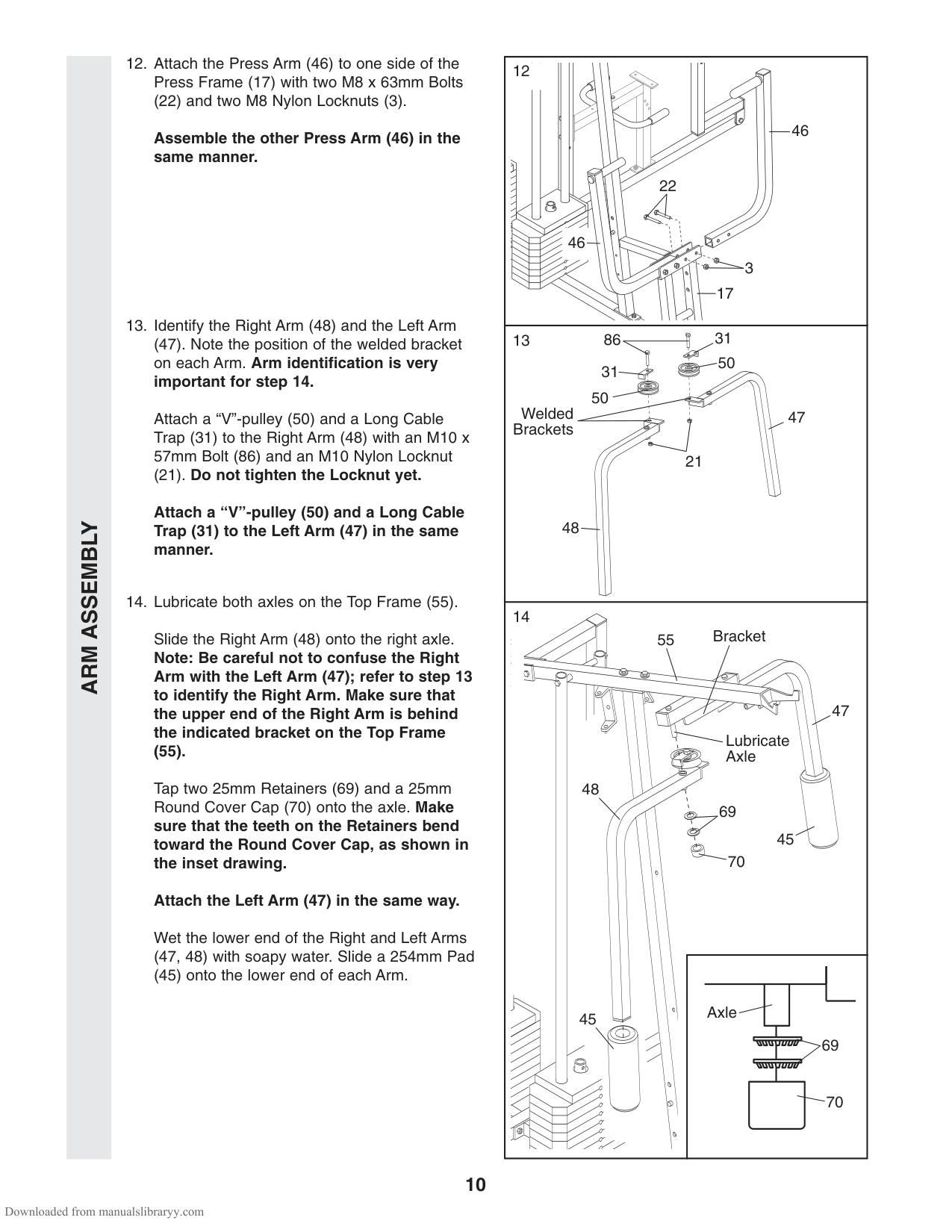
(22) and two M8 Nylon Locknuts (3).
Assemble the other Press Arm (46) in the same manner.
(47). Note the position of the welded bracket on each Arm. Arm identification is very important for step 14.
Attach a “V”-pulley (50) and a Long Cable Trap (31) to the Right Arm (48) with an M10 x 57mm Bolt (86) and an M10 Nylon Locknut
(21). Do not tighten the Locknut yet.
Attach a “V”-pulley (50) and a Long Cable Trap (31) to the Left Arm (47) in the same manner.
46
22
46
| | |---| | | | | | | | | | | | | | |
3
17
31
50
50
Welded Brackets
47
21
48
14
55 Bracket
Slide the Right Arm (48) onto the right axle. Note: Be careful not to confuse the Right Arm with the Left Arm (47); refer to step 13 to identify the Right Arm. Make sure that the upper end of the Right Arm is behind the indicated bracket on the Top Frame
47
Lubricate Axle
(55).
Tap two 25mm Retainers (69) and a 25mm Round Cover Cap (70) onto the axle. Make sure that the teeth on the Retainers bend toward the Round Cover Cap, as shown in the inset drawing.
48
45
Attach the Left Arm (47) in the same way.
Wet the lower end of the Right and Left Arms (47, 48) with soapy water. Slide a 254mm Pad
(45) onto the lower end of each Arm.
Axle
45
ARMASSEMBLYCABLE ASSEMBLY
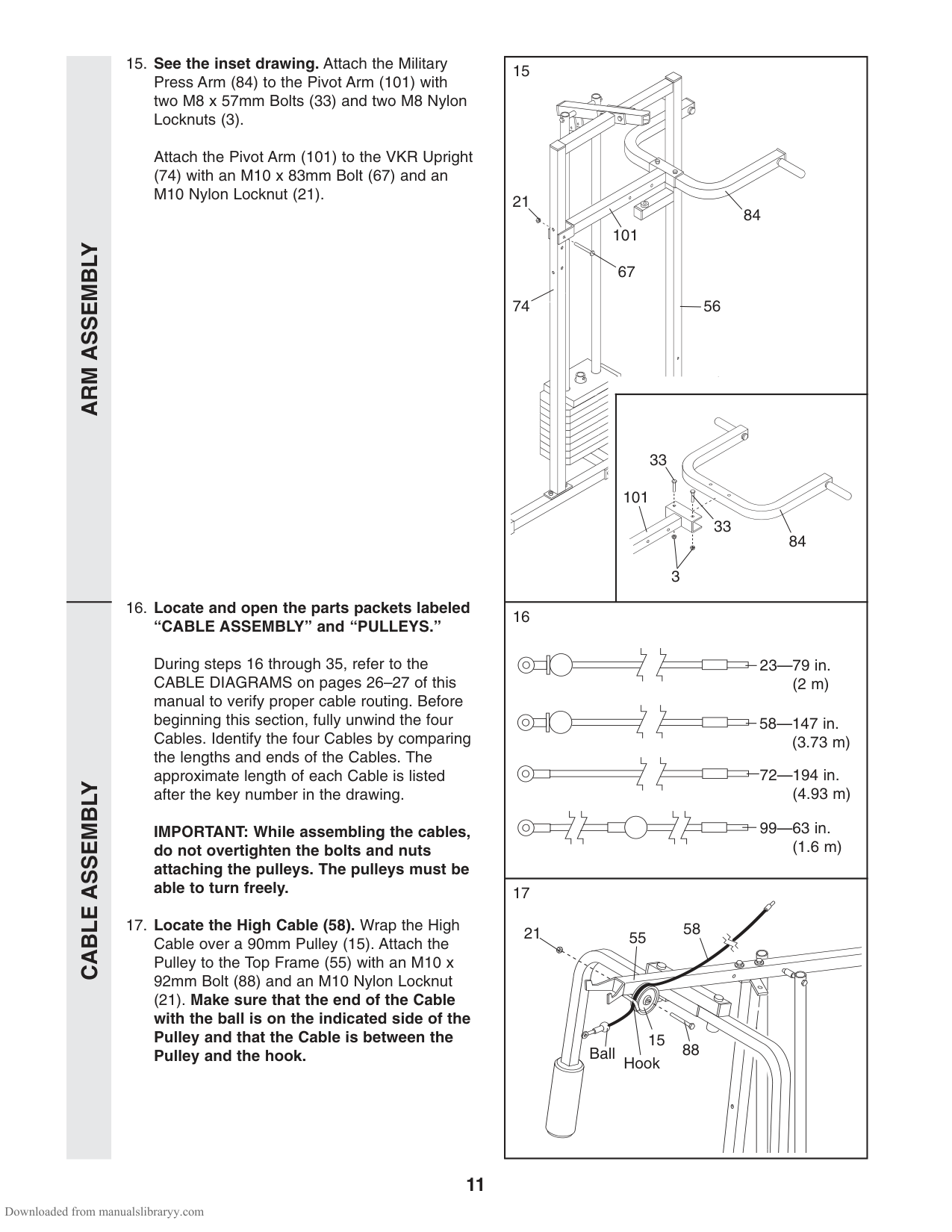
Attach the Pivot Arm (101) to the VKR Upright
(74) with an M10 x 83mm Bolt (67) and an M10 Nylon Locknut (21).
During steps 16 through 35, refer to the CABLE DIAGRAMS on pages 26–27 of this manual to verify proper cable routing. Before beginning this section, fully unwind the four Cables. Identify the four Cables by comparing the lengths and ends of the Cables. The approximate length of each Cable is listed after the key number in the drawing.
IMPORTANT: While assembling the cables, do not overtighten the bolts and nuts attaching the pulleys. The pulleys must be able to turn freely.
(21). Make sure that the end of the Cable with the ball is on the indicated side of the Pulley and that the Cable is between the Pulley and the hook.
84
84
101
101
21
67 5674
33
33
3
| | |---| | | | | | | | |
| | | | | |
| | | |---|---| | | | | | |
23—79 in. (2 m)
| | | |---|---| | | | | | |
58—147 in.
72—194 in.
| | | | | |---|---|---|---| | | | | |
99—63 in. (1.6 m)
17
5521 58
15
88
Ball
Hook
CABLE ASSEMBLY
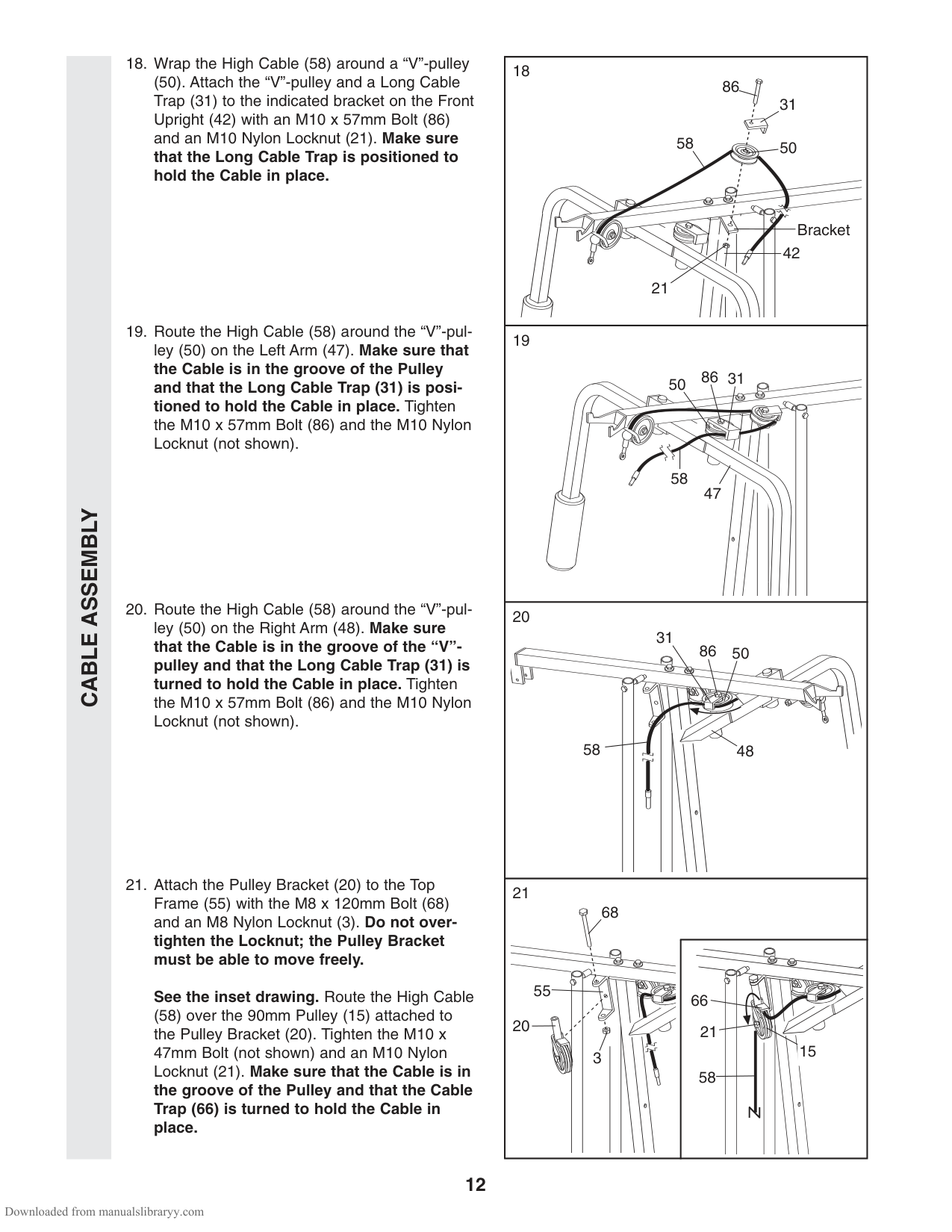
(50). Attach the “V”-pulley and a Long Cable Trap (31) to the indicated bracket on the Front Upright (42) with an M10 x 57mm Bolt (86) and an M10 Nylon Locknut (21). Make sure that the Long Cable Trap is positioned to hold the Cable in place.
######## See the inset drawing. Route the High Cable
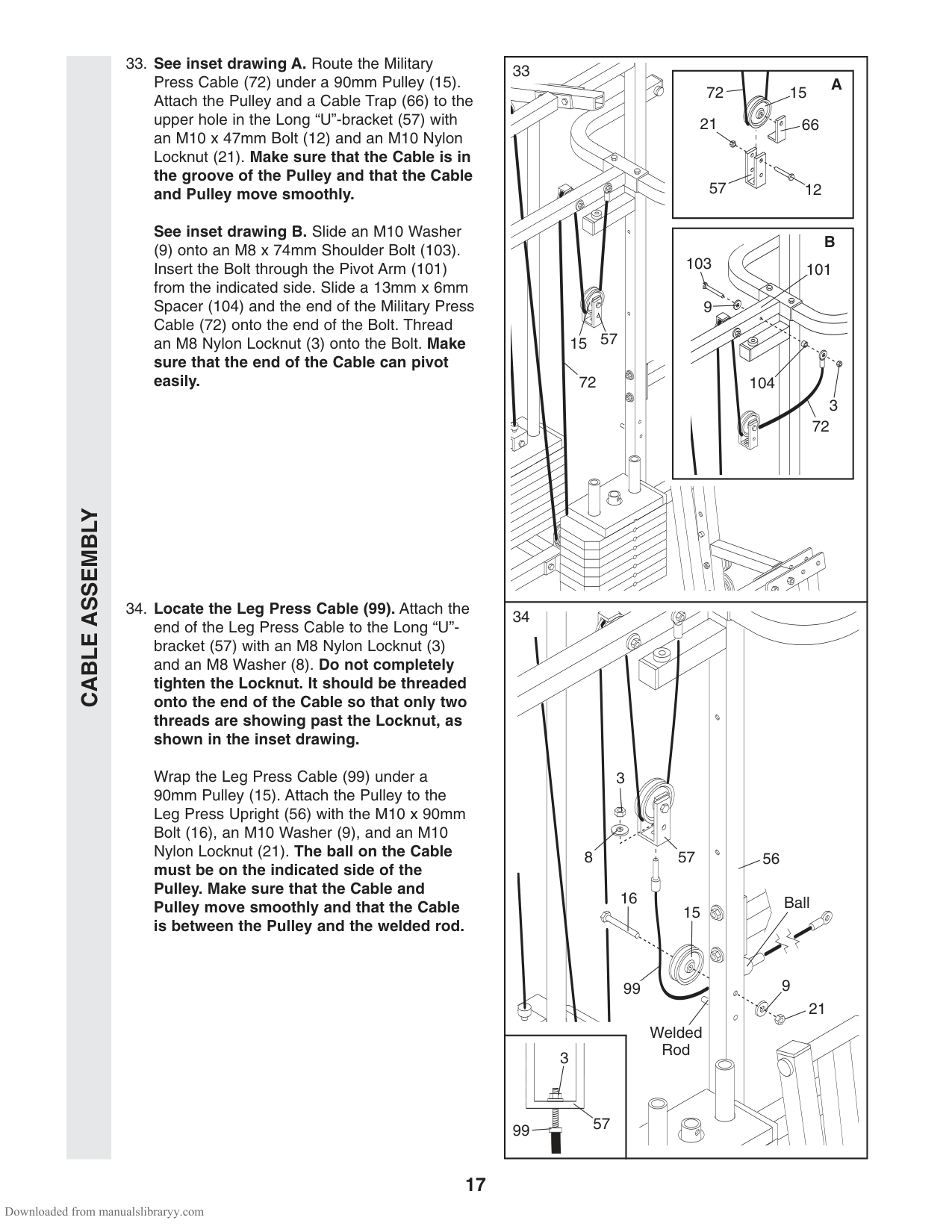
(58) over the 90mm Pulley (15) attached to the Pulley Bracket (20). Tighten the M10 x 47mm Bolt (not shown) and an M10 Nylon Locknut (21). Make sure that the Cable is in the groove of the Pulley and that the Cable Trap (66) is turned to hold the Cable in place.
86
31
31
50
50
21
58
58
Bracket
42
47
31
86
50
58
48
21
| | |---| | | | | | | | | | |
68
55
66 21
20
15
3
58
CABLE ASSEMBLY
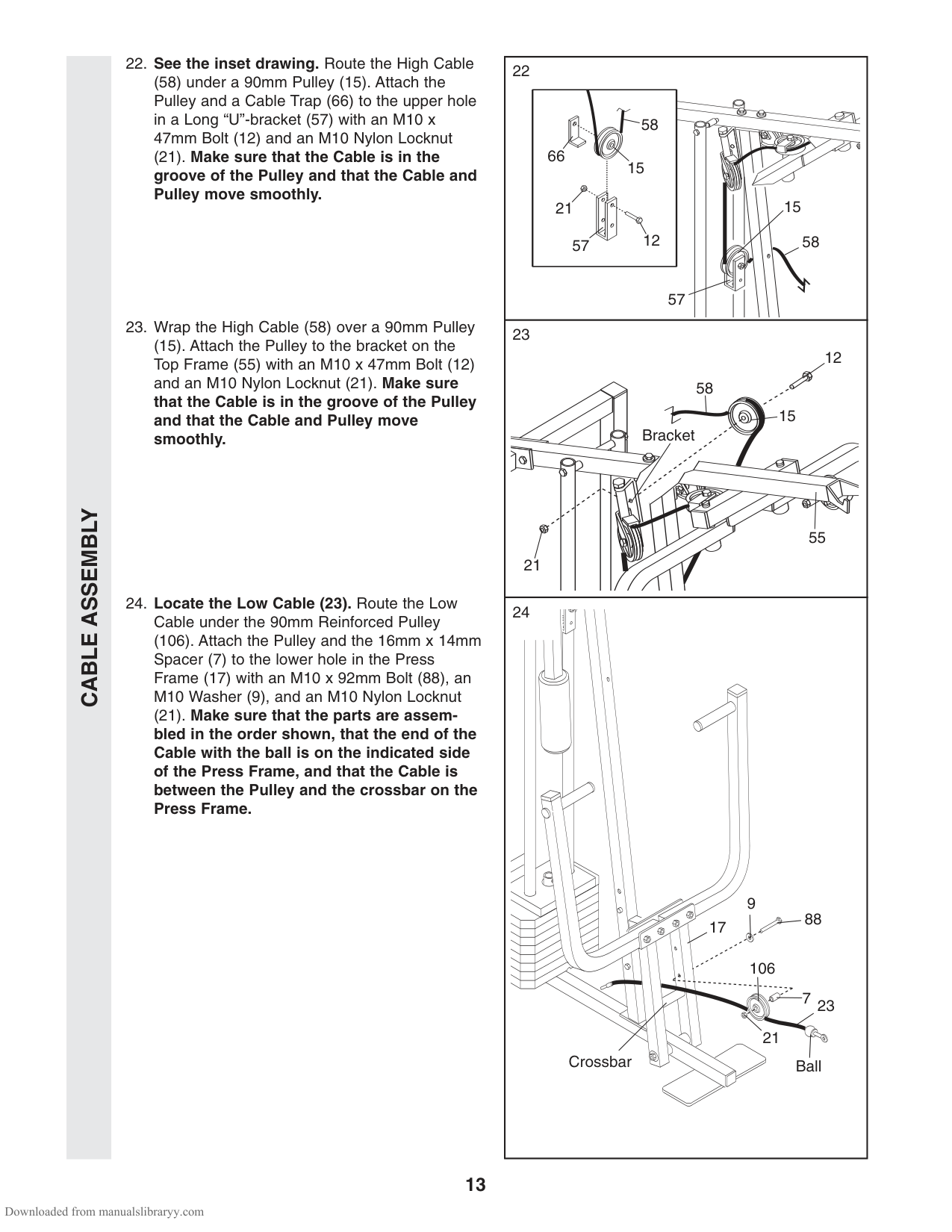
(58) under a 90mm Pulley (15). Attach the Pulley and a Cable Trap (66) to the upper hole in a Long “U”-bracket (57) with an M10 x 47mm Bolt (12) and an M10 Nylon Locknut
(21). Make sure that the Cable is in the groove of the Pulley and that the Cable and Pulley move smoothly.
(15). Attach the Pulley to the bracket on the Top Frame (55) with an M10 x 47mm Bolt (12) and an M10 Nylon Locknut (21). Make sure that the Cable is in the groove of the Pulley and that the Cable and Pulley move smoothly.
(106). Attach the Pulley and the 16mm x 14mm Spacer (7) to the lower hole in the Press Frame (17) with an M10 x 92mm Bolt (88), an M10 Washer (9), and an M10 Nylon Locknut
(21). Make sure that the parts are assembled in the order shown, that the end of the Cable with the ball is on the indicated side of the Press Frame, and that the Cable is between the Pulley and the crossbar on the Press Frame.
58
|15
66
21
1257
58| |---|
15
Bracket
55 21
12
15
58
57
| | |---| | | | | | | | | | |
9
88
17
| | |---| | | | | | | | | | | | |
| |
106
7
23
| | |---| | | | | | | | | | | | | | |
21
BallCrossbar
CABLE ASSEMBLY
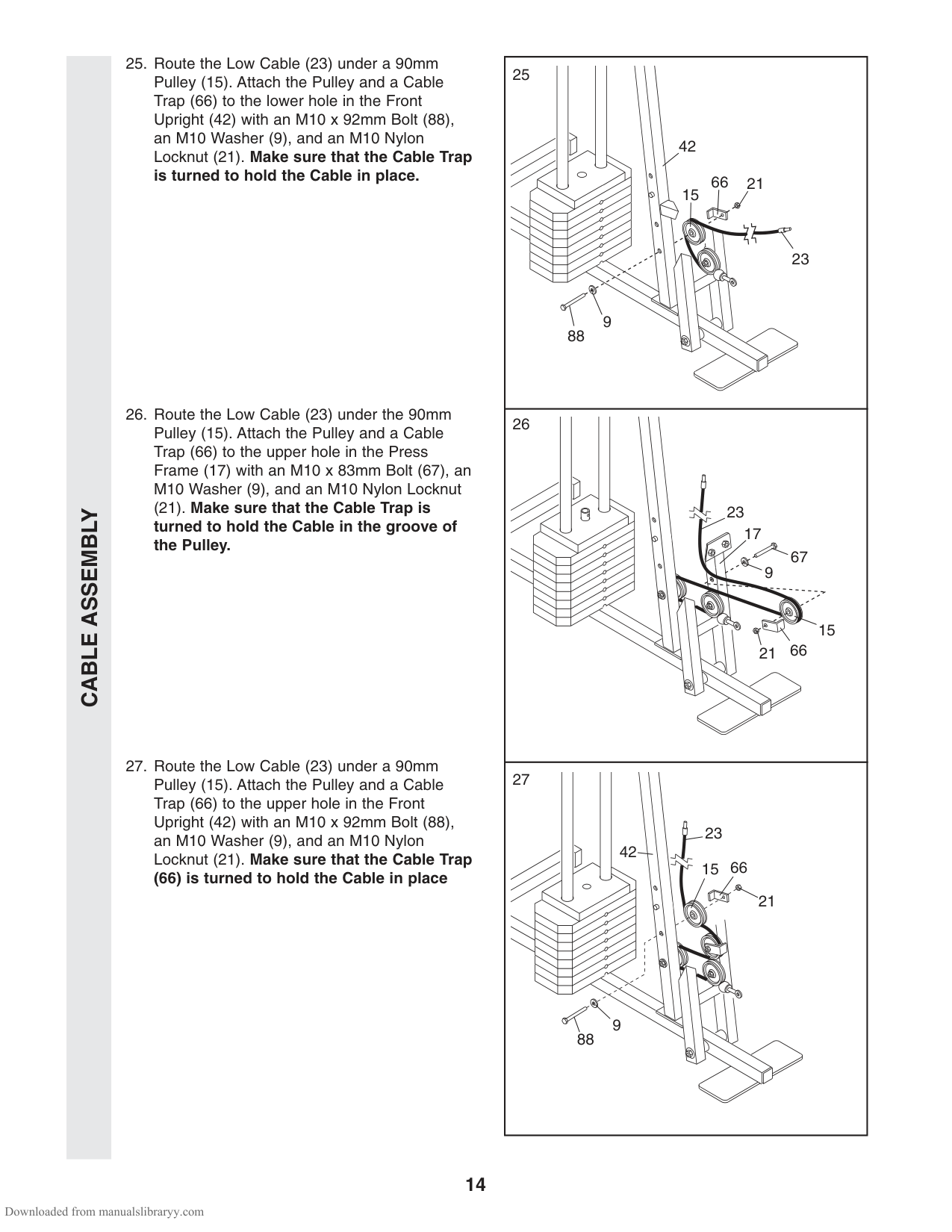
(21). Make sure that the Cable Trap is turned to hold the Cable in the groove of the Pulley.
(66) is turned to hold the Cable in place
42
66
21 15
23
9
88
23
17
15
9
21
27
23 15 66
42
21
| | |---| | | | | | | | | | | | | | |
9
88
CABLE ASSEMBLY
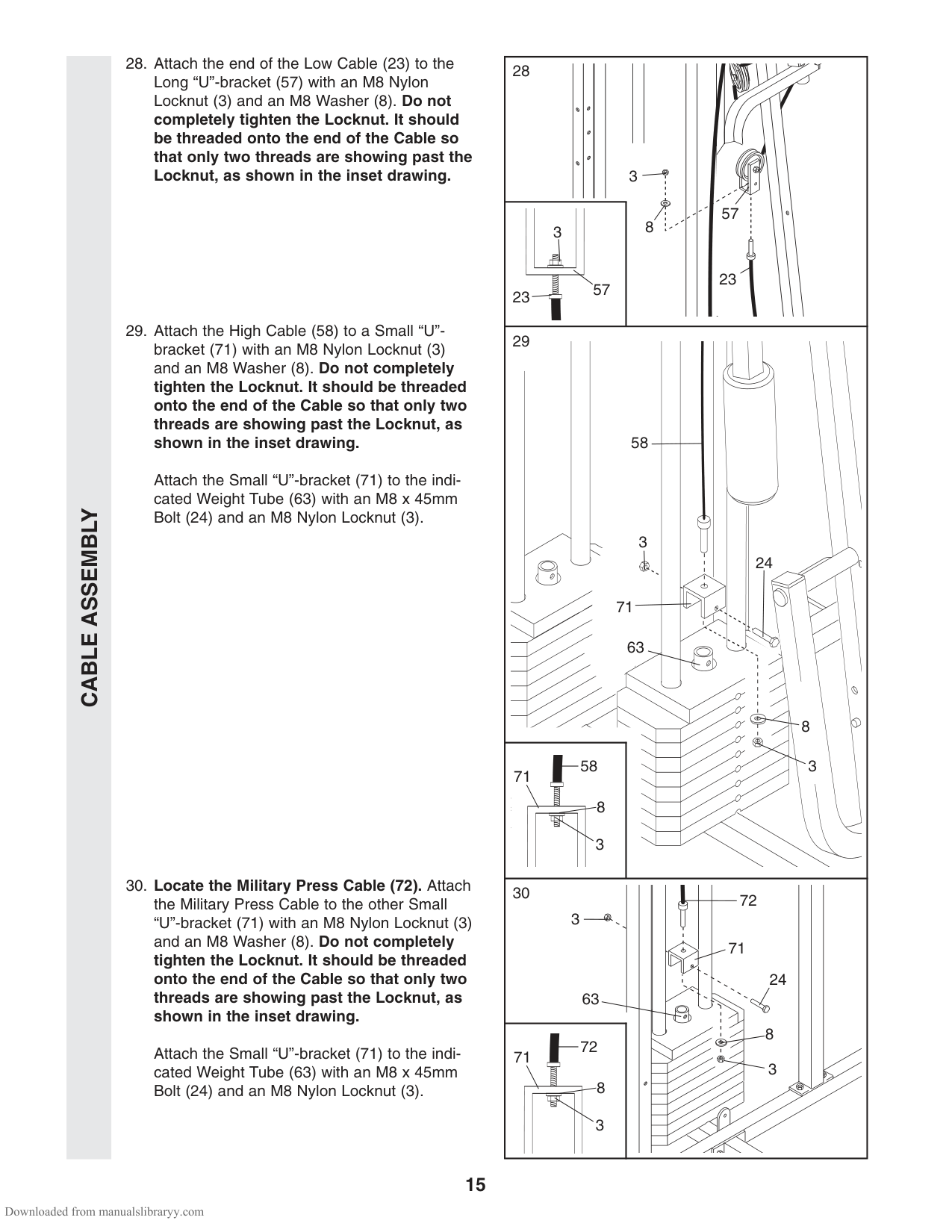
Attach the Small “U”-bracket (71) to the indicated Weight Tube (63) with an M8 x 45mm Bolt (24) and an M8 Nylon Locknut (3).
Attach the Small “U”-bracket (71) to the indicated Weight Tube (63) with an M8 x 45mm Bolt (24) and an M8 Nylon Locknut (3).
8
58
24
63
71
8
3
3
57
3
23
5723
| | |---| | | | | | | | | | | | | | |
3
58
71
8 3
30
72
3
71
24 63
8 3
72
71
8 3
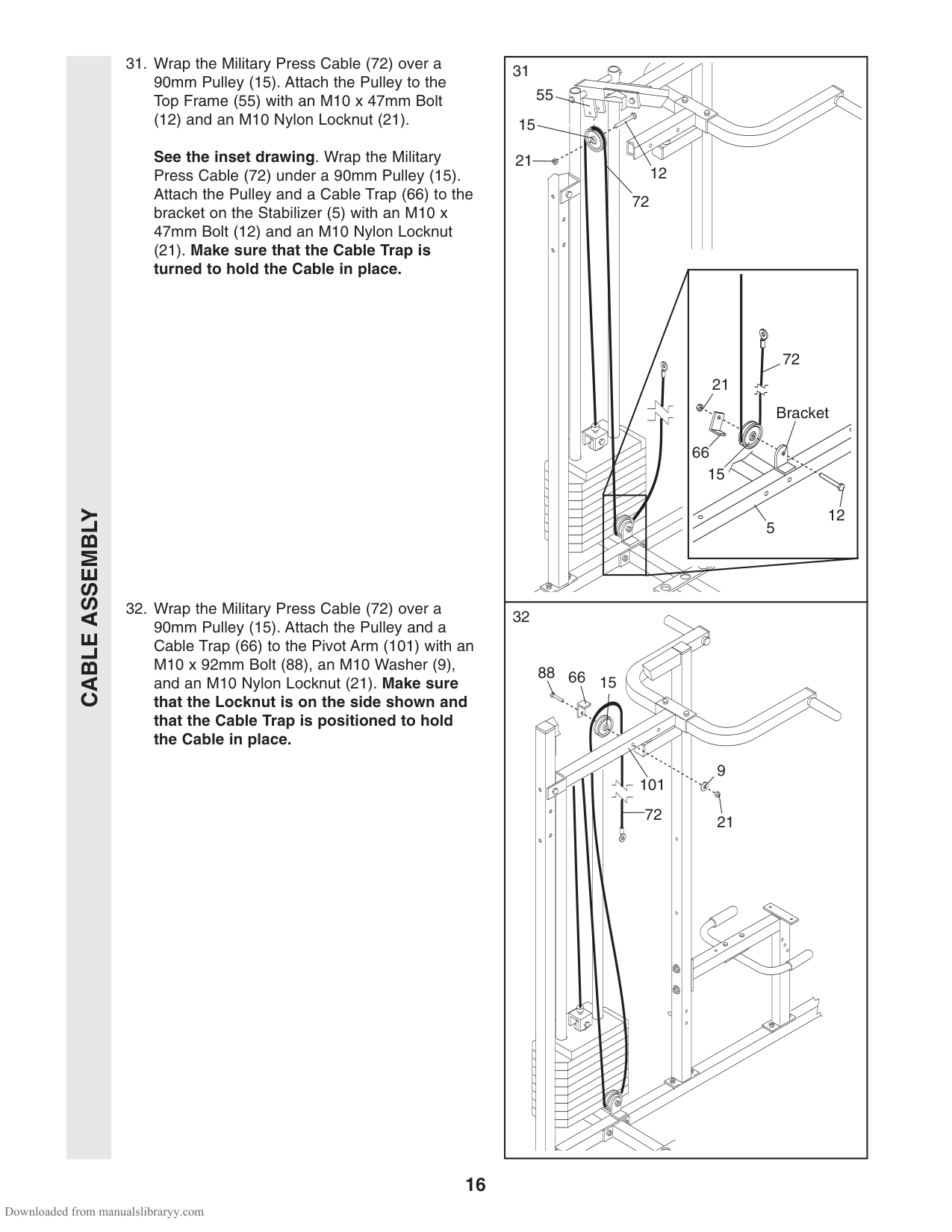
55
(12) and an M10 Nylon Locknut (21). See the inset drawing. Wrap the Military Press Cable (72) under a 90mm Pulley (15). Attach the Pulley and a Cable Trap (66) to the bracket on the Stabilizer (5) with an M10 x 47mm Bolt (12) and an M10 Nylon Locknut
15
21
12 72
######## (21). Make sure that the Cable Trap is turned to hold the Cable in place.
72
21
Bracket
66
15
12
CABLE ASSEMBLY
5
88
66
15
9
101
72 21
CABLE ASSEMBLY
See inset drawing B. Slide an M10 Washer (9) onto an M8 x 74mm Shoulder Bolt (103). Insert the Bolt through the Pivot Arm (101) from the indicated side. Slide a 13mm x 6mm Spacer (104) and the end of the Military Press Cable (72) onto the end of the Bolt. Thread an M8 Nylon Locknut (3) onto the Bolt. Make sure that the end of the Cable can pivot easily.
Wrap the Leg Press Cable (99) under a 90mm Pulley (15). Attach the Pulley to the Leg Press Upright (56) with the M10 x 90mm Bolt (16), an M10 Washer (9), and an M10 Nylon Locknut (21). The ball on the Cable must be on the indicated side of the Pulley. Make sure that the Cable and Pulley move smoothly and that the Cable is between the Pulley and the welded rod.
15
72
21
66
57
12
103
101 9
57
15
72
104
3
72
3
57
8
56
16
Ball
15
9
99
21
Welded Rod
3
57
99
CABLE ASSEMBLYSEATASSEMBLY
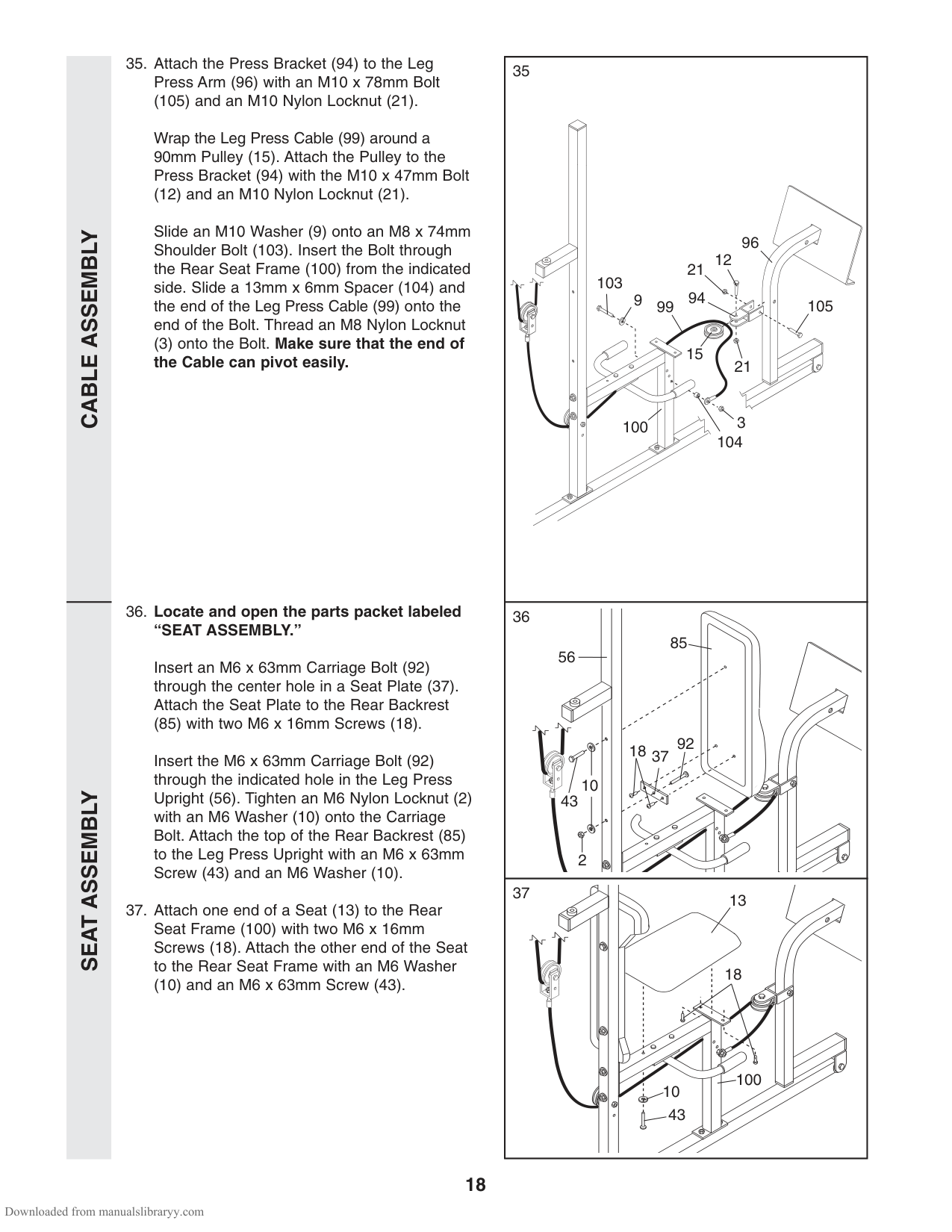
(105) and an M10 Nylon Locknut (21). Wrap the Leg Press Cable (99) around a 90mm Pulley (15). Attach the Pulley to the Press Bracket (94) with the M10 x 47mm Bolt
(12) and an M10 Nylon Locknut (21). Slide an M10 Washer (9) onto an M8 x 74mm Shoulder Bolt (103). Insert the Bolt through the Rear Seat Frame (100) from the indicated side. Slide a 13mm x 6mm Spacer (104) and the end of the Leg Press Cable (99) onto the end of the Bolt. Thread an M8 Nylon Locknut (3) onto the Bolt. Make sure that the end of the Cable can pivot easily.
Insert an M6 x 63mm Carriage Bolt (92) through the center hole in a Seat Plate (37). Attach the Seat Plate to the Rear Backrest
(85) with two M6 x 16mm Screws (18). Insert the M6 x 63mm Carriage Bolt (92) through the indicated hole in the Leg Press Upright (56). Tighten an M6 Nylon Locknut (2) with an M6 Washer (10) onto the Carriage Bolt. Attach the top of the Rear Backrest (85) to the Leg Press Upright with an M6 x 63mm Screw (43) and an M6 Washer (10).
(10) and an M6 x 63mm Screw (43).
96
12
21 99
103
94
9
105
15
21
3
100
104
85 56
9218
37
10
43
2
37
13
18
100 43
10
SEATASSEMBLY
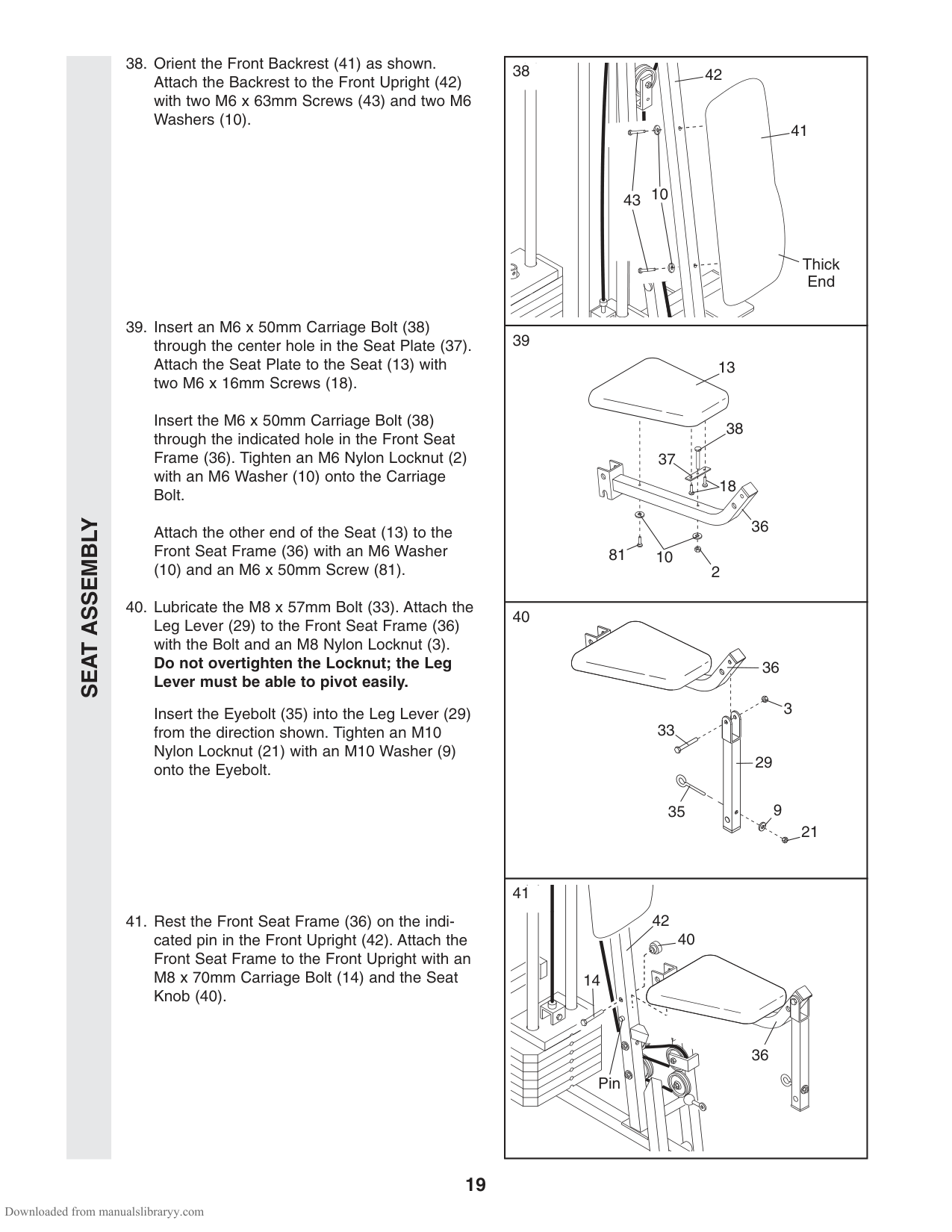
Insert the M6 x 50mm Carriage Bolt (38) through the indicated hole in the Front Seat Frame (36). Tighten an M6 Nylon Locknut (2) with an M6 Washer (10) onto the Carriage Bolt.
Attach the other end of the Seat (13) to the Front Seat Frame (36) with an M6 Washer
(10) and an M6 x 50mm Screw (81).
Insert the Eyebolt (35) into the Leg Lever (29) from the direction shown. Tighten an M10 Nylon Locknut (21) with an M10 Washer (9) onto the Eyebolt.
41
Thick End
42
10
43
13
38
37
18
36 1081
2
36
3
33
29
9
35
21
41
42
40
14
36
| | |---| | | | | | | | | | |
Pin
SEATASSEMBLYVKR ASSEMBLY
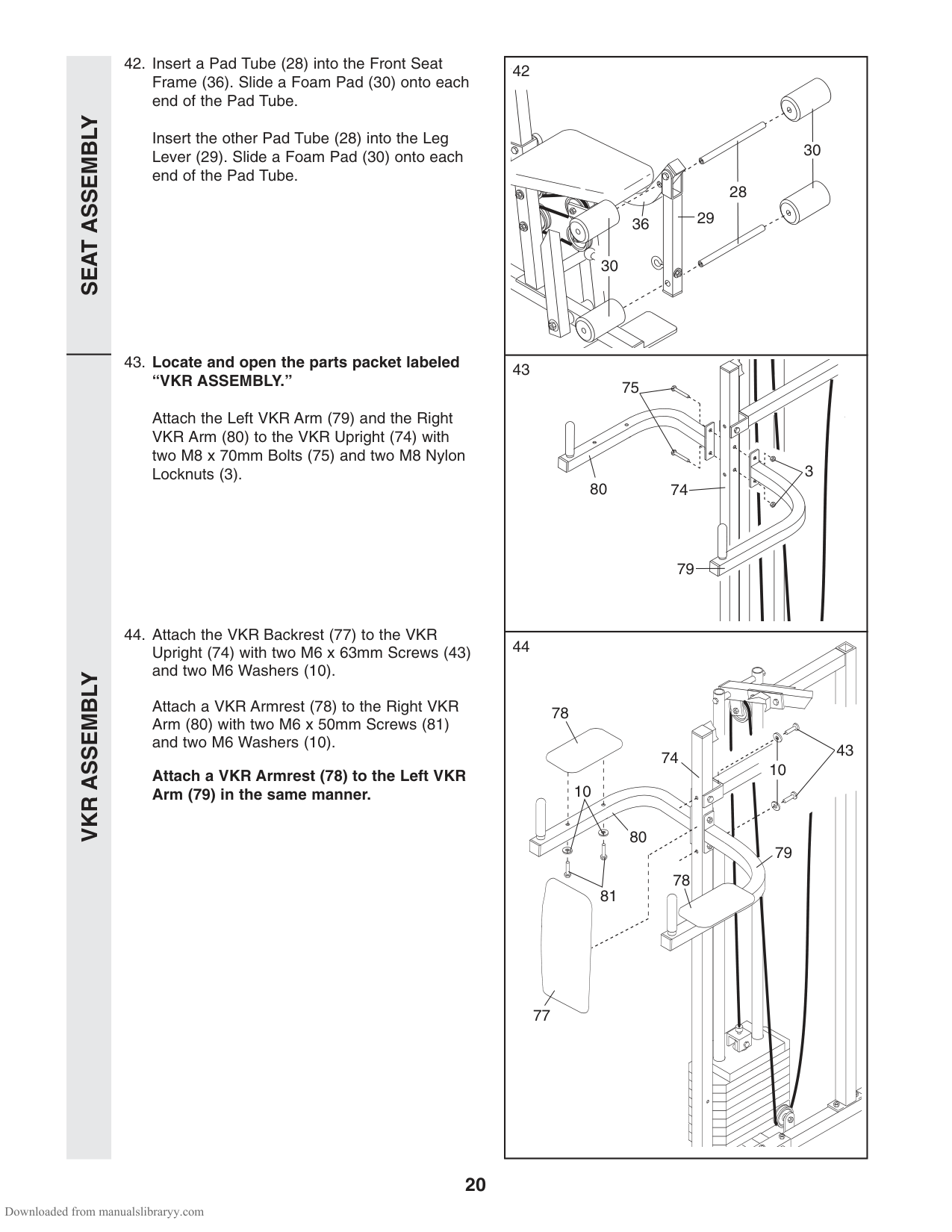
Insert the other Pad Tube (28) into the Leg Lever (29). Slide a Foam Pad (30) onto each end of the Pad Tube.
Attach the Left VKR Arm (79) and the Right VKR Arm (80) to the VKR Upright (74) with two M8 x 70mm Bolts (75) and two M8 Nylon Locknuts (3).
| | |---| | | | | | | | | | | | | | |
Attach a VKR Armrest (78) to the Right VKR Arm (80) with two M6 x 50mm Screws (81) and two M6 Washers (10).
Attach a VKR Armrest (78) to the Left VKR Arm (79) in the same manner.
79
75
74
3
30
28 36 29
30
78
43 10
74
10
80
79
78
77
Before using the weight system, pull each cable a few times to be sure that the cables move smoothly over the pulleys. If one of the cables does not move smoothly, find and correct the problem. IMPORTANT: If the cables are not properly installed, they may be damaged when heavy weight is used. See the CABLE DIAGRAMS on page 26 and 27 of this manual for proper cable routing. If there is any slack in the cables, you will need to remove it by tightening the cables. See TROUBLESHOOTING AND MAINTENANCE on page 25.
HOW TO USE THE WEIGHT SYSTEM
The instructions below describe how each part of the weight system can be adjusted. Refer to the exercise poster accompanying this manual to see how the weight system should be set up for each exercise. IMPORTANT: When attaching the lat bar or nylon strap, make sure that the attachments are in the correct starting position for the exercise to be performed. If there is any slack in the cables or chain as an exercise is performed, the effectiveness of the exercise will be reduced.
######## CHANGING THE WEIGHT SETTING
The weight system features two weight stacks. The front weight stack is connected to the upper and lower pulleys, the press arm, and the butterfly arms. The rear weight stack is connected to the military press arm and leg press.
To change the weight setting of either weight stack, insert a Weight Pin (26) under the desired Weight
(25). Insert the Weight Pin until the bent end of the Weight Pin is touching the Weights, and turn the bent end downward. The weight setting of either weight stack can be changed from 6.5 lbs. (2.9 kg) to 106.5 lbs. (48.3 kg), in increments of 12.5 lbs. (5.7 kg). Note: Due to the cables and pulleys, the amount of resistance at each exercise station may vary from the weight setting. Use the WEIGHT RESISTANCE CHART on page 24 to find the approximate amount of resistance at each weight station.
Note: 1 kg = 2.2 lbs. ATTACHING THE ACCESSORIES
Attach the Lat Bar (54) to the High Cable (58) with a Cable Clip (53). For some exercises, the Chain (52) should be attached between the Lat Bar and the High Cable with two Cable Clips. Adjust the length of the Chain between the Lat Bar and the High Cable so the Lat Bar is in the correct starting position for the exercise to be performed.
The Nylon Strap (39) can be attached in the same manner.
26
25
25
26
53
52
58
53
54
39
| | |---| | | | | | | | | | |
######## ATTACHING AND REMOVING THE SEAT
To attach the Seat (13), set the bracket on the Front Seat Frame (36) onto the indicated pins on the Front Upright (42). Attach the Seat Frame to the Front Upright with the M8 x 70mm Carriage Bolt (14) and the Seat Knob (40).
For some exercises, the Seat (13) must be removed. First, make sure that the chain is not attached to the leg lever. Next, remove the Seat Knob (40) and the M8 x 70mm Carriage Bolt (14) from the Front Seat Frame (36). Lift the Seat Frame off the Front Upright
(42).
######## ATTACHING THE LEG LEVER TO THE LOW PULLEY STATION
To use the Leg Lever (29), the seat must be attached to the front upright (see ATTACHING AND REMOVING THE SEAT above).
Attach one end of the Chain (52) to the Low Cable (23) with a Cable Clip (53). Attach the other end of the Chain to the Eyebolt (35) with a Cable Clip.
ADJUSTING THE LEG PRESS PLATE Remove the Press Pin (97) from the Leg Press Plate

Align the welded tubes on the Leg Press Plate (95) with the desired set of holes in the Leg Press Arm
40
36 13
42
14
29
53
52
35
53
23
95
Welded Tube
97
96
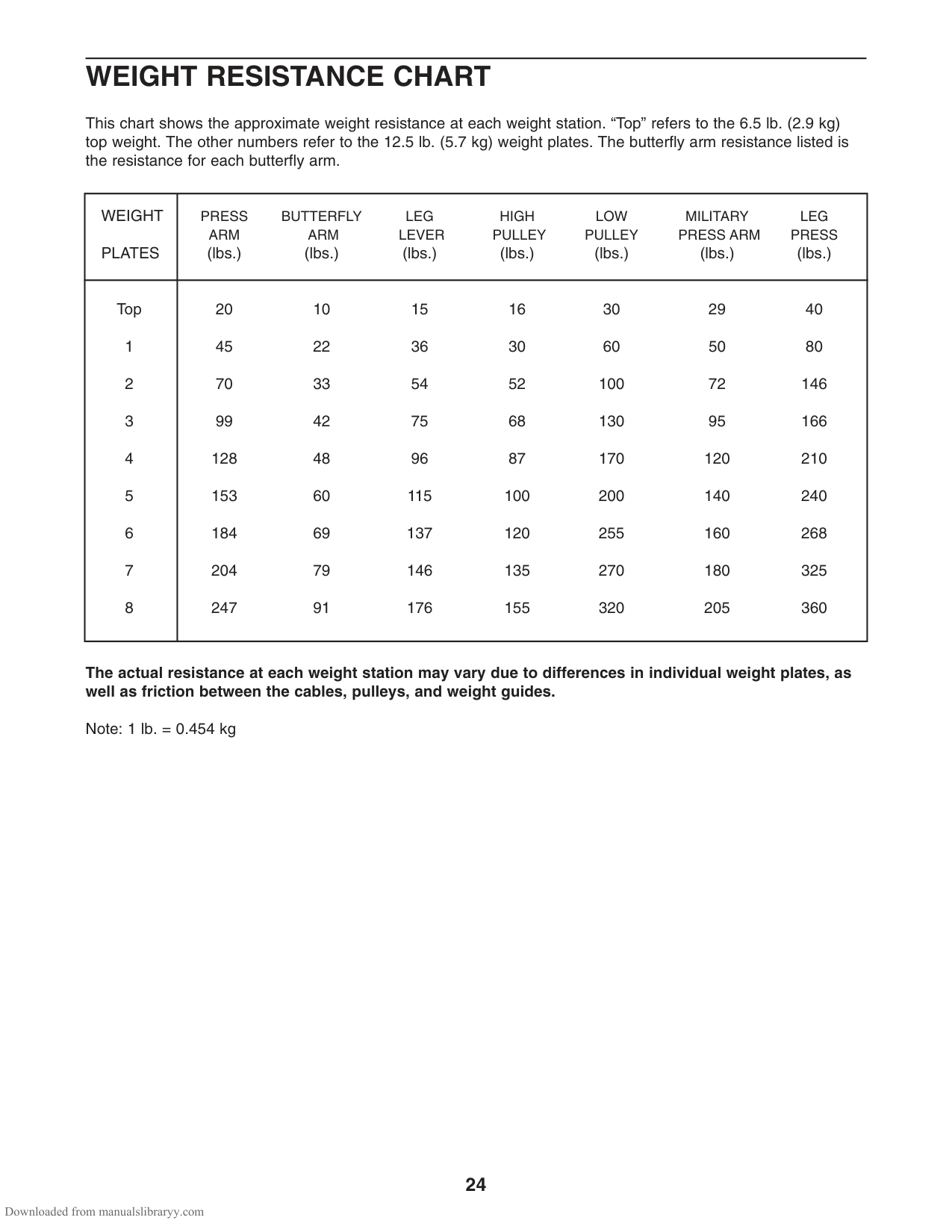
WEIGHT RESISTANCE CHART
This chart shows the approximate weight resistance at each weight station. “Top” refers to the 6.5 lb. (2.9 kg) top weight. The other numbers refer to the 12.5 lb. (5.7 kg) weight plates. The butterfly arm resistance listed is the resistance for each butterfly arm.
|WEIGHT PLATES|PRESS BUTTERFLY LEG HIGH LOW MILITARY LEG ARM ARM LEVER PULLEY PULLEY PRESS ARM PRESS (lbs.) (lbs.) (lbs.) (lbs.) (lbs.) (lbs.) (lbs.)| |---|---| |Top
1
2
3
4
5
6
7
8
|20 10 15 16 30 29 40 45 22 36 30 60 50 80 70 33 54 52 100 72 146 99 42 75 68 130 95 166
128 48 96 87 170 120 210 153 60 115 100 200 140 240 184 69 137 120 255 160 268 204 79 146 135 270 180 325 247 91 176 155 320 205 360|
######## The actual resistance at each weight station may vary due to differences in individual weight plates, as well as friction between the cables, pulleys, and weight guides.
Note: 1 lb. = 0.454 kg
TROUBLESHOOTING AND MAINTENANCE
Inspect and tighten all parts each time you use the weight system. Replace any worn parts immediately. The weight system can be cleaned using a damp cloth and mild non-abrasive detergent. Do not use solvents.
######## TIGHTENING THE CABLES
Woven cable, the type of cable used on the weight system, can stretch slightly when it is first used. If there is slack in the cables before resistance is felt, the cables should be tightened. If any slack is felt when using the front weight stack, both the High Cable (58) and the Low Cable (23) will need to be tightened. If any slack is felt when using the rear weight stack, both the Military Press Cable (72) and the Leg Press Cable (99) will need to be tightened.
To tighten the cables, insert the weight pin into the middle of the weight stack. Slack can be removed from these cables several ways:
1
The Leg Press Cable (99) can be tightened in the same manner.
The other Long “U”-bracket (57) can be adjusted in the same manner.
The Military Press Cable (72) can be tightened in the same manner.
12
57
66
15
3
3
3
23 or 99
21
58
71
| | |---| | | | | | | | | | | | | | |
96
103
9
100
(99) must be moved to the next hole in the Rear Seat Frame (100). Remove the M8 x 74mm Shoulder Bolt (103), the M10 Washer (9), the end of the Cable, the 13mm x 6mm Spacer (104), and the M8 Nylon Locknut (3) from the Rear Seat Frame. Reattach the Bolt, the Washer, the Spacer, the end of the Cable, and the Nylon Locknuts to the next hole in the Rear Seat Frame.
99
104
3
Do not overtighten the cables. The top weight will be lifted off the weight stack. If a cable tends to slip off the pulleys often, it may have become twisted. Remove the cable and re-install it. If the cables need to be replaced, see ORDERING REPLACEMENT PARTS on the back cover of this manual.
CABLE DIAGRAMS
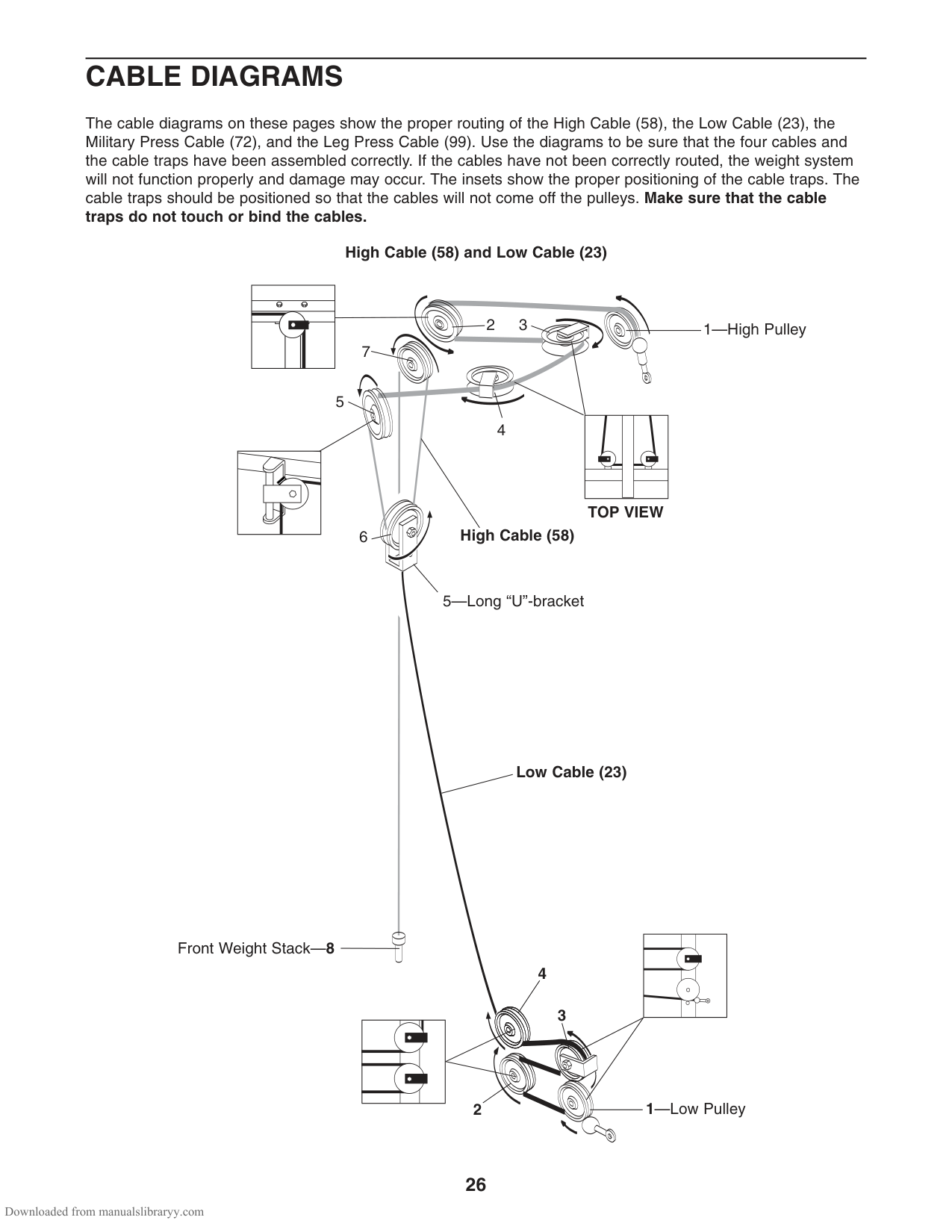
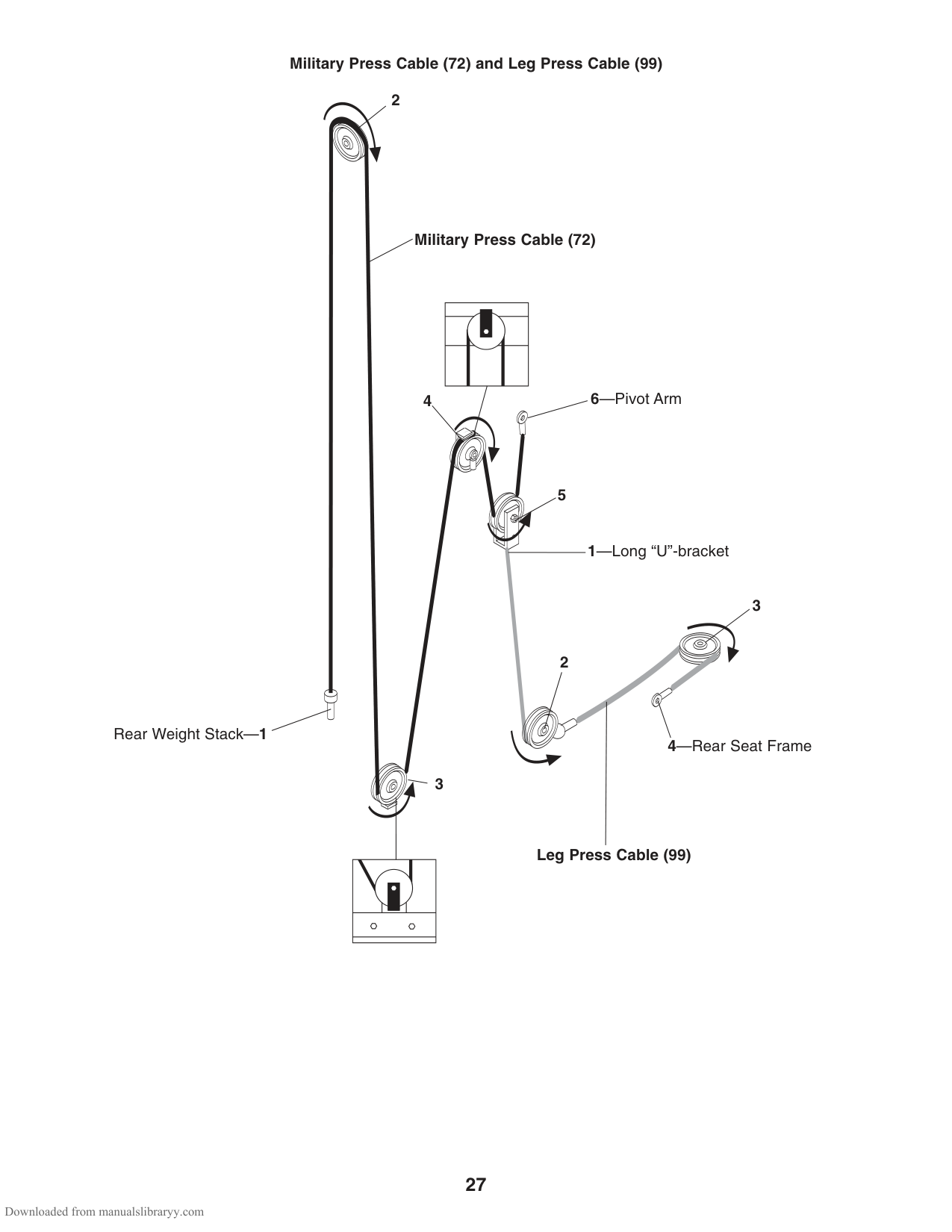
The cable diagrams on these pages show the proper routing of the High Cable (58), the Low Cable (23), the Military Press Cable (72), and the Leg Press Cable (99). Use the diagrams to be sure that the four cables and the cable traps have been assembled correctly. If the cables have not been correctly routed, the weight system will not function properly and damage may occur. The insets show the proper positioning of the cable traps. The cable traps should be positioned so that the cables will not come off the pulleys. Make sure that the cable traps do not touch or bind the cables.
######## High Cable (58) and Low Cable (23)
1—High Pulley23
7
5
4
TOP VIEW
######## High Cable (58)
6
5—Long “U”-bracket
######## Low Cable (23)
Front Weight Stack—8
4
3
1—Low Pulley2
######## Military Press Cable (72) and Leg Press Cable (99)
2
Rear Weight Stack—1
Military Press Cable (72)
6—Pivot Arm
5
1—Long “U”-bracket
3
2
4—Rear Seat Frame
Leg Press Cable (99)
ORDERING REPLACEMENT PARTS
To order replacement parts, see the front cover of this manual. To help us assist you, please be prepared to give the following information:
||LIMITED WARRANTY| |---|
|ICON OF CANADA, INC., (ICON), warrants this product to be free from defects in workmanship and material, under normal use and service conditions, for a period of one (1) year from the date of purchase. This warranty extends only to the original purchaser. ICON’s obligation under this warranty is limited to replacing or repairing, at ICON’s option, the product through one of its authorized service centers. All repairs for which warranty claims are made must be preauthorized by ICON. This warranty does not extend to any product or damage to a product caused by or attributable to freight damage, abuse, misuse, improper or abnormal usage or repairs not provided by an ICON authorized service center, to products used for commercial or rental purposes, or to products used as store display models. No other warranty beyond that specifically set forth above is authorized by ICON.
ICON is not responsible or liable for indirect, special or consequential damages arising out of or in connection with the use or performance of the product or damages with respect to any economic loss, loss of property, loss of revenues or profits, loss of enjoyment or use, costs of removal, installation or other consequential damages of whatsoever nature. Some provinces do not allow the exclusion or limitation of incidental or consequential damages. Accordingly, the above limitation may not apply to you. The warranty extended hereunder is in lieu of any and all other warranties and any implied warranties of merchantability or fitness for a particular purpose is limited in its scope and duration to the terms set forth herein. Some provinces do not allow limitations on how long an implied warranty lasts. Accordingly, the above limitation may not apply to you.
This warranty gives you specific legal rights. You may also have other rights which vary from province to province or so specified by the retailer of your equipment.
ICON OF CANADA, INC., 900 de l’Industrie, St. Jerôme, QC J7Y 4B8| |---| | |---|
Part No. 231613 R0605B Printed in China © 2005 ICON IP, Inc.
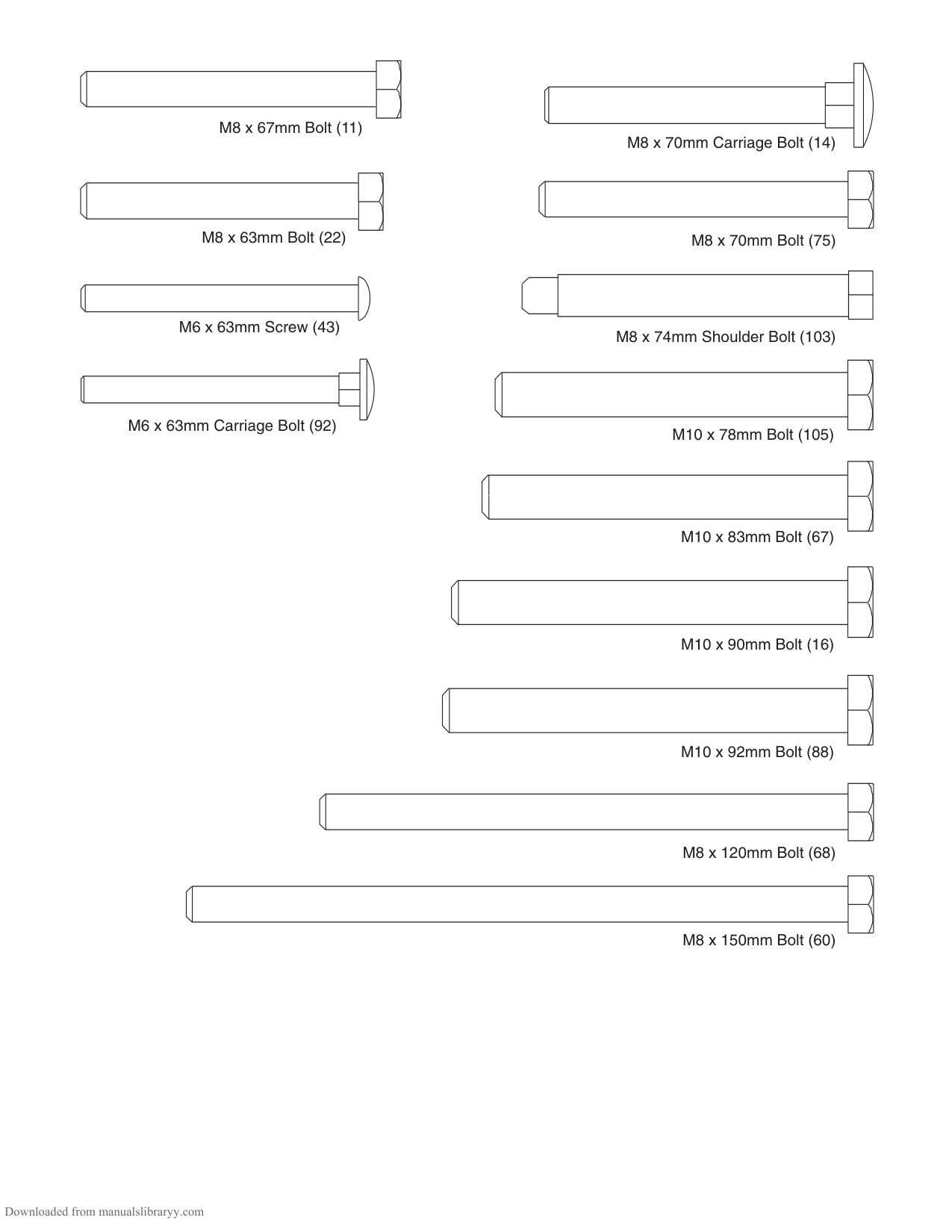
M8 x 67mm Bolt (11)
M8 x 63mm Bolt (22)
M6 x 63mm Screw (43)
| | | | |---|---|---| | | | | | | | | | | | |
M6 x 63mm Carriage Bolt (92)
M8 x 70mm Carriage Bolt (14)
M8 x 70mm Bolt (75)
M8 x 74mm Shoulder Bolt (103)
M10 x 78mm Bolt (105)
M10 x 83mm Bolt (67)
M10 x 90mm Bolt (16)
M10 x 92mm Bolt (88)
M8 x 120mm Bolt (68)
M8 x 150mm Bolt (60)
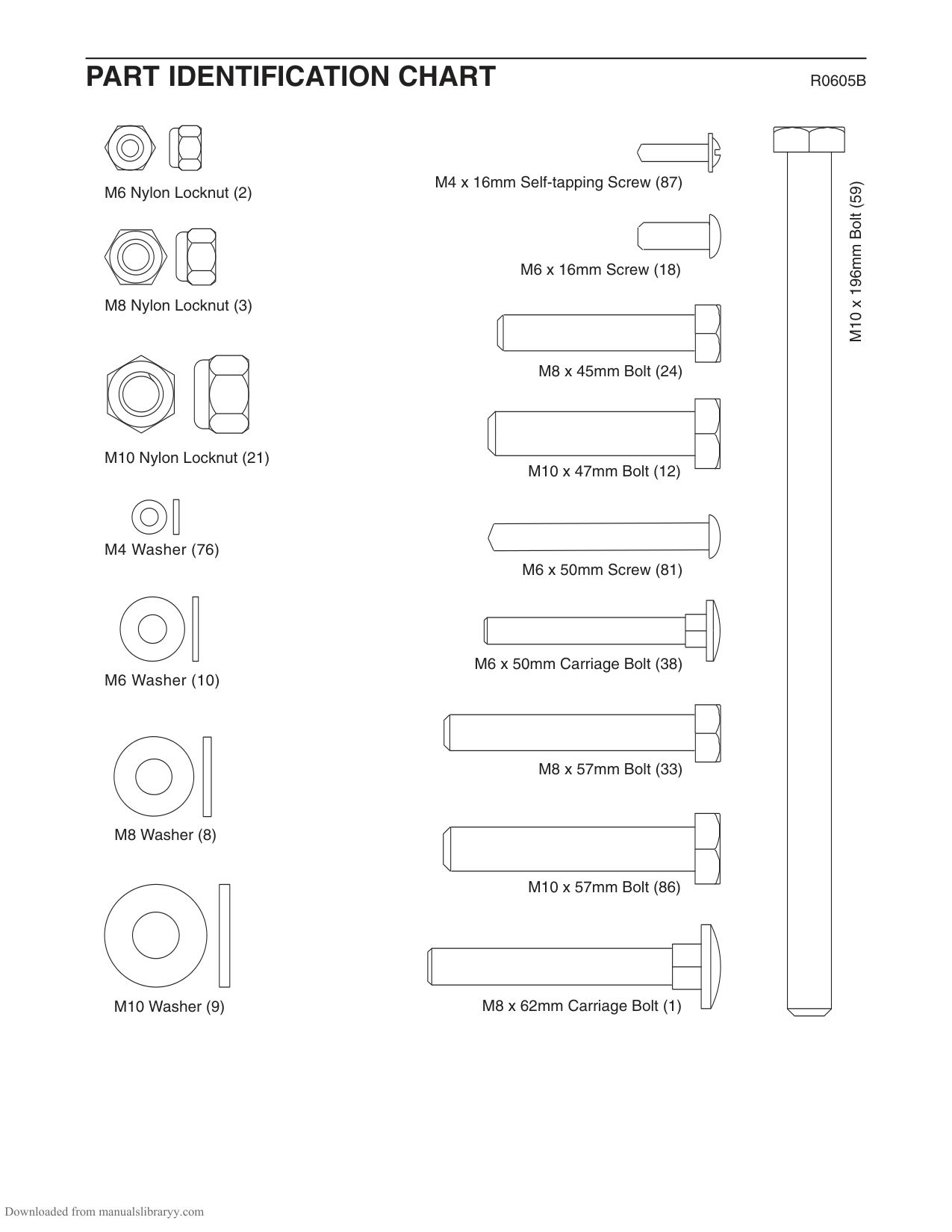
PART IDENTIFICATION CHART R0605B
M6 Nylon Locknut (2)
M8 Nylon Locknut (3)
M10 Nylon Locknut (21)
M4 Washer (76)
M6 Washer (10)
M8 Washer (8)
M10 Washer (9)
| | | |---|---| | | | | | |
M4 x 16mm Self-tapping Screw (87)
M6 x 16mm Screw (18)
M8 x 45mm Bolt (24)
M10 x 47mm Bolt (12)
M6 x 50mm Screw (81)
M6 x 50mm Carriage Bolt (38)
M8 x 57mm Bolt (33)
M10 x 57mm Bolt (86)
| | | |---|---| | | | | | | | | |
M8 x 62mm Carriage Bolt (1)
M10 x 196mm Bolt (59)
#### SAVE THIS PART LIST/EXPLODED DRAWING FOR FUTURE REFERENCE
|81| |---|
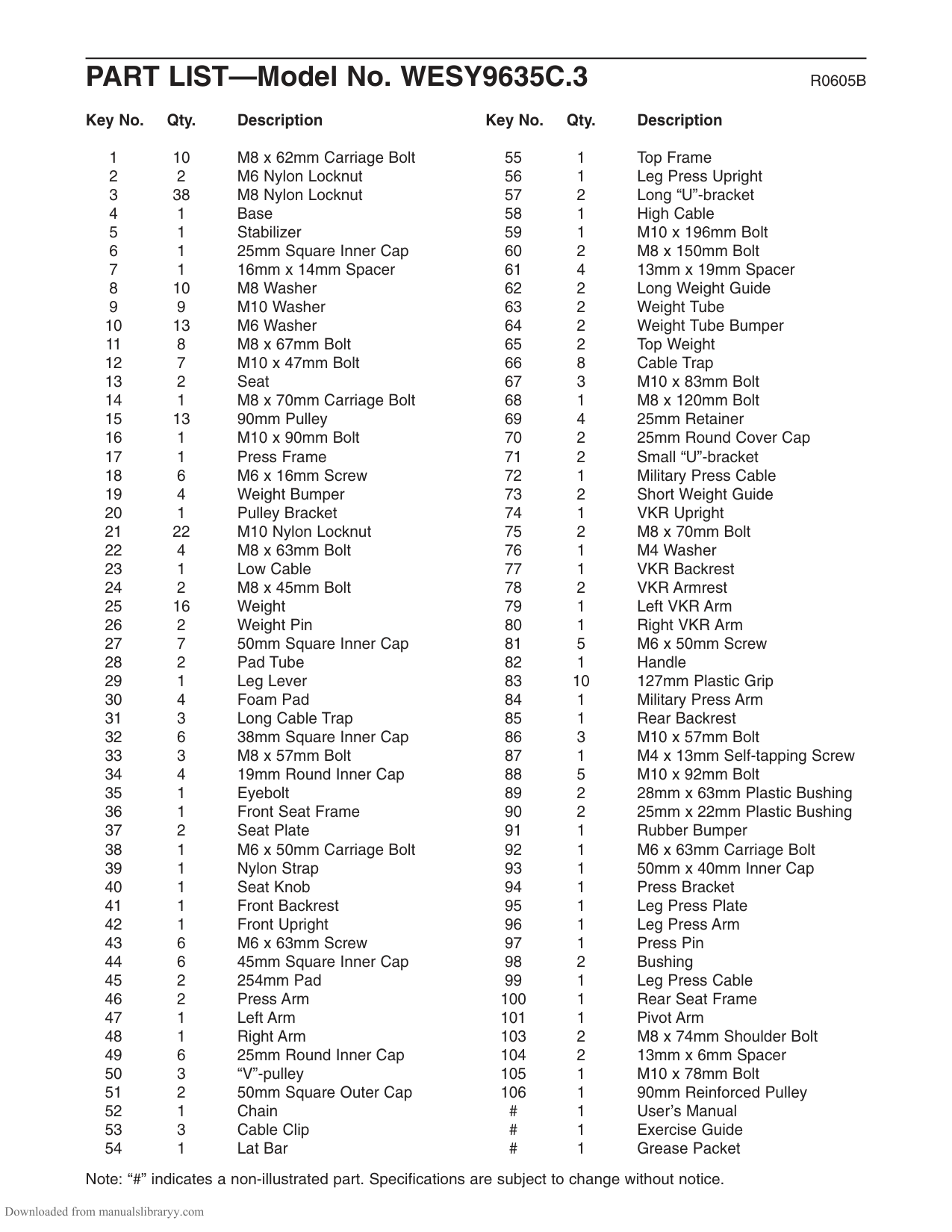
PART LIST—Model No. WESY9635C.3 R0605B
####### Key No. Qty. Description
####### Key No. Qty. Description
Note: “#” indicates a non-illustrated part. Specifications are subject to change without notice.
EXPLODED DRAWING—ModelNo. WESY9635C.3R0605B
3 49
23
44
47
88
106
67
7 3
59
46
34
30
15
45
44
3434
3 9
30
83
21
66
28
28
90
21
89
69
35
9
32
3230
21
37
33 10
50 31
18
86
17
34
13
21
70
2
22
38
45
48
44
44 83
89
46
81
21
66
36
40
58
66
6
14
41
49
27 1
44 88
86
15
3 3
50 31
15
213
42
21
9
49
1043
12
88
8 15
26
49
65
55 1211
44 21
24 3
19
62
63
4
58
71
64
3
61
| | | | | | | | | |---|---|---|---|---|---|---|---|
8
3
25
60
15
21
27
8483
32
3
12
68
66
15
93104
49
32
72
83
39
53
52
54
83
21
15
12
3
57
23
66
8
27
27
3
3
21
12
21
98
99
21
94 105
67
97 95
27
100
96 73
65
8
3104
15
21
33
83
13 18
3
83
18
21
85
10
43
9
103
1 18
3 82
101
15 66
37 92
1
11
67
88
9
83
11
103
3 21
3
9 8
56
3 27
21
10
10
15
1
43
2
87
91
76
66
15
16 3
21
93
12
24
11 19118
3
63
3 72
71
64
61
| | | | | | | | | |---|---|---|---|---|---|---|---|
1
60
8
51
25
79
11
26
5
78
3
10 43
51
10
81
66
123
11
57
99
83
15
74
27
49
3
75
32
8
7510
80
81
77
83 78
4932