
Ask AI
— answers from the official manualAnswers from the official manual.
Common questions
Common Questions
8 totalWhat are the steps for a factory reset of my thermostat?
Press and hold keys , and TIME simultaneously to reset the thermostat, which also resets all settings to default. This will clear user-set programs and return it to factory initial values.
How do I change the batteries in my White Rodgers thermostats?
Replace low battery warning by installing new AAA alkaline batteries at the top of the base. Insert them with positive ends facing right, and press cover to secure.
What should I do if the thermostat is showing no heat or cooling?
Check for a blown fuse or tripped circuit breaker, ensure furnace power switch is ON, verify pilot light is lit (for systems requiring it), and confirm system wires are securely attached. If issues persist, contact your heating/cooling service person.
How do I perform a diagnostic check to verify thermostat functionality?
Set SYSTEM Switch to HEAT or COOL as applicable and adjust setpoint temperature above (heat) or below (cool) room temperature. Within seconds, a soft click sound usually indicates operation is normal.
What should I do if fan runs constantly?
Check wire connections to ensure no shorts and reset thermostat by pressing , TIME simultaneously. If the issue remains unresolved after resetting, the manufacturer or a service person might need to test the system or replace the thermostat.
How can I fix a blank display or non-responsive keypad?
Replace batteries if needed, and check system for proper operation. If the problem is due to voltage spike/static discharge, perform reset by pressing , and TIME simultaneously.
Full Manual
7 pages
Installation Instructions for
Heating & Air Conditioning
##### 1F78
5/2 Day Programmable Thermostat
######## CONTENTS
Preparations.................................................. 1 Thermostat Details ........................................ 1 Removing Old Thermostat ............................ 1 Mounting and Wiring ..................................... 2 Check Thermostat Operation ........................ 3 Programming your Thermostat ..................... 4 Specifications ................................................ 6 Troubleshooting ............................................ 6
YOUR THERMOSTAT REPLACES 1
PREPARATIONS
|Typical System Compatibility Chart|1F78| |---|---| |Standard Heat Only Two Wire Gas or Oil Fired Systems (24 volt)|Yes| |Electronic Ignition Heat Only Two Wire Systems (24 volt)|Yes| |Electronic Ignition Heat Only Gas or Oil Fired Systems (24 volt)|Yes| |Standard Heat/Cool Systems (24 volt)|Yes| |Heat/Cool Systems Electric Heat (24 volt)|Yes| |Heat Only Electric Heat Systems (24 volt)|Yes| |Cool Only Systems (24 volt)|Yes| |Heat Pump Systems (No Aux or Emergency Heat)|Yes| |Hot Water Zone Heat Only (Two Wire) Systems|Yes| |Hot Water Zone Heat Only (Three Wire) Systems|No| |Line Voltage Heating or Baseboard 110/240 Volt Systems|No| |Millivolt Systems Floor or Wall Furnaces|Yes| |12 VDC Mobile Home Application|Yes| |Multistage Systems|No| |Systems Exceding 30VAC, 1.5 Amp|No|
Assemble tools required as shown below.
FLAT BLADE SCREWDRIVER
HAND OR POWER DRILL WITH 3/16 INCH DRILL BIT, IF NEEDED
WIRE CUTTER/STRIPPER
Failure to follow and read all instructions carefully before installing or operating this control could cause personal injury and/or property damage
2 3
THERMOSTAT DETAILS REMOVING OLD THERMOSTAT
###### CAUTION!
Mounting hole
To prevent electrical shock and/or equipment damage, disconnect electrical power to the system at the main fuse or circuit breaker until installation is complete.
W903 Clip to Disable EMR Feature
Before removing wires from old thermostat’s switching subbase, label each wire with the terminal designation it was removed from.
W RH BRC
G O
Y
Mounting hole
W903
| | | |---|---| | | | | | |
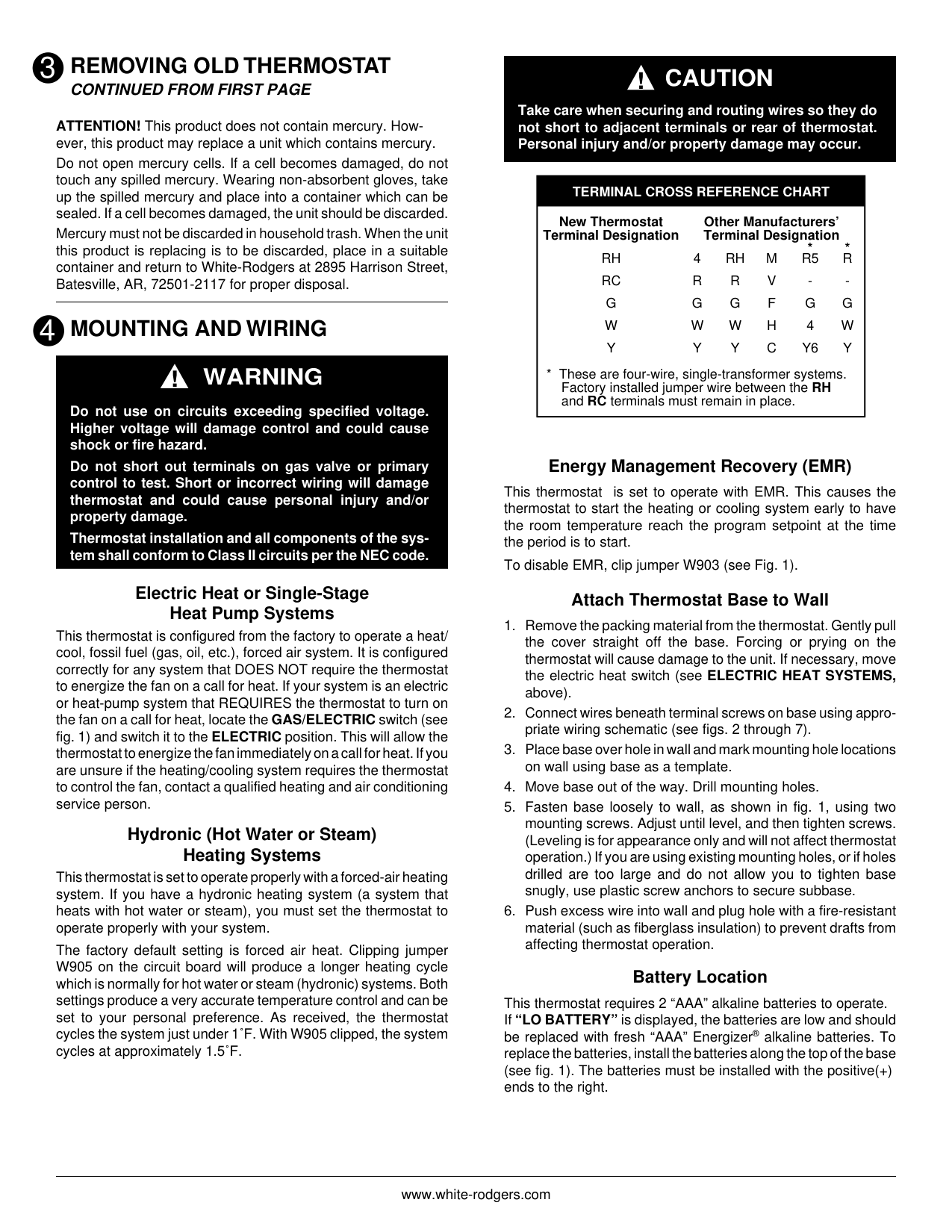
W905 Clip for Hydronic
| | |---|
System
GASELEC
W904 Clip for Celsius Display
Electric/Gas Switch
Figure 1. Thermostat base


White-Rodgers is a division of Emerson Electric Co. www.white-rodgers.com
############# PART NO. 37-6614A
0435
######## REMOVING OLD THERMOSTAT
CONTINUED FROM FIRST PAGE
ATTENTION! This product does not contain mercury. However, this product may replace a unit which contains mercury. Do not open mercury cells. If a cell becomes damaged, do not touch any spilled mercury. Wearing non-absorbent gloves, take up the spilled mercury and place into a container which can be sealed. If a cell becomes damaged, the unit should be discarded. Mercury must not be discarded in household trash. When the unit this product is replacing is to be discarded, place in a suitable container and return to White-Rodgers at 2895 Harrison Street, Batesville, AR, 72501-2117 for proper disposal.
#### 4
MOUNTING AND WIRING
####### WARNING!
Do not use on circuits exceeding specified voltage. Higher voltage will damage control and could cause shock or fire hazard.
Do not short out terminals on gas valve or primary control to test. Short or incorrect wiring will damage thermostat and could cause personal injury and/or property damage.
Thermostat installation and all components of the system shall conform to Class II circuits per the NEC code.
########## Electric Heat or Single-Stage Heat Pump Systems
This thermostat is configured from the factory to operate a heat/ cool, fossil fuel (gas, oil, etc.), forced air system. It is configured correctly for any system that DOES NOT require the thermostat to energize the fan on a call for heat. If your system is an electric or heat-pump system that REQUIRES the thermostat to turn on the fan on a call for heat, locate the GAS/ELECTRIC switch (see fig. 1) and switch it to the ELECTRIC position. This will allow the thermostat to energize the fan immediately on a call for heat. If you are unsure if the heating/cooling system requires the thermostat to control the fan, contact a qualified heating and air conditioning service person.
########## Hydronic (Hot Water or Steam) Heating Systems
This thermostat is set to operate properly with a forced-air heating system. If you have a hydronic heating system (a system that heats with hot water or steam), you must set the thermostat to operate properly with your system.
The factory default setting is forced air heat. Clipping jumper W905 on the circuit board will produce a longer heating cycle which is normally for hot water or steam (hydronic) systems. Both settings produce a very accurate temperature control and can be set to your personal preference. As received, the thermostat cycles the system just under 1˚F. With W905 clipped, the system cycles at approximately 1.5˚F.
###### CAUTION!
Take care when securing and routing wires so they do not short to adjacent terminals or rear of thermostat. Personal injury and/or property damage may occur.
|TERMINAL CROSS REFERENCE CHART New Thermostat Terminal Designation
Other Manufacturers’ Terminal Designation
RH RC G W Y
4 R G W Y
RH R G W Y
M V F H C
R5 G 4 Y6
R G W Y
**
* These are four-wire, single-transformer systems. Factory installed jumper wire between the RH and RC terminals must remain in place.| |---|
########## Energy Management Recovery (EMR)
This thermostat is set to operate with EMR. This causes the thermostat to start the heating or cooling system early to have the room temperature reach the program setpoint at the time the period is to start.
To disable EMR, clip jumper W903 (see Fig. 1).
########## Attach Thermostat Base to Wall
########## Battery Location
This thermostat requires 2 “AAA” alkaline batteries to operate. If “LO BATTERY” is displayed, the batteries are low and should be replaced with fresh “AAA” Energizer® alkaline batteries. To replace the batteries, install the batteries along the top of the base (see fig. 1). The batteries must be installed with the positive(+) ends to the right.
MOUNTING AND WIRING
CONTINUED FROM SECOND PAGE
################### THERMOSTAT SYSTEM
G W
##################### RH
Hot
24 VAC 120 VAC
Neutral
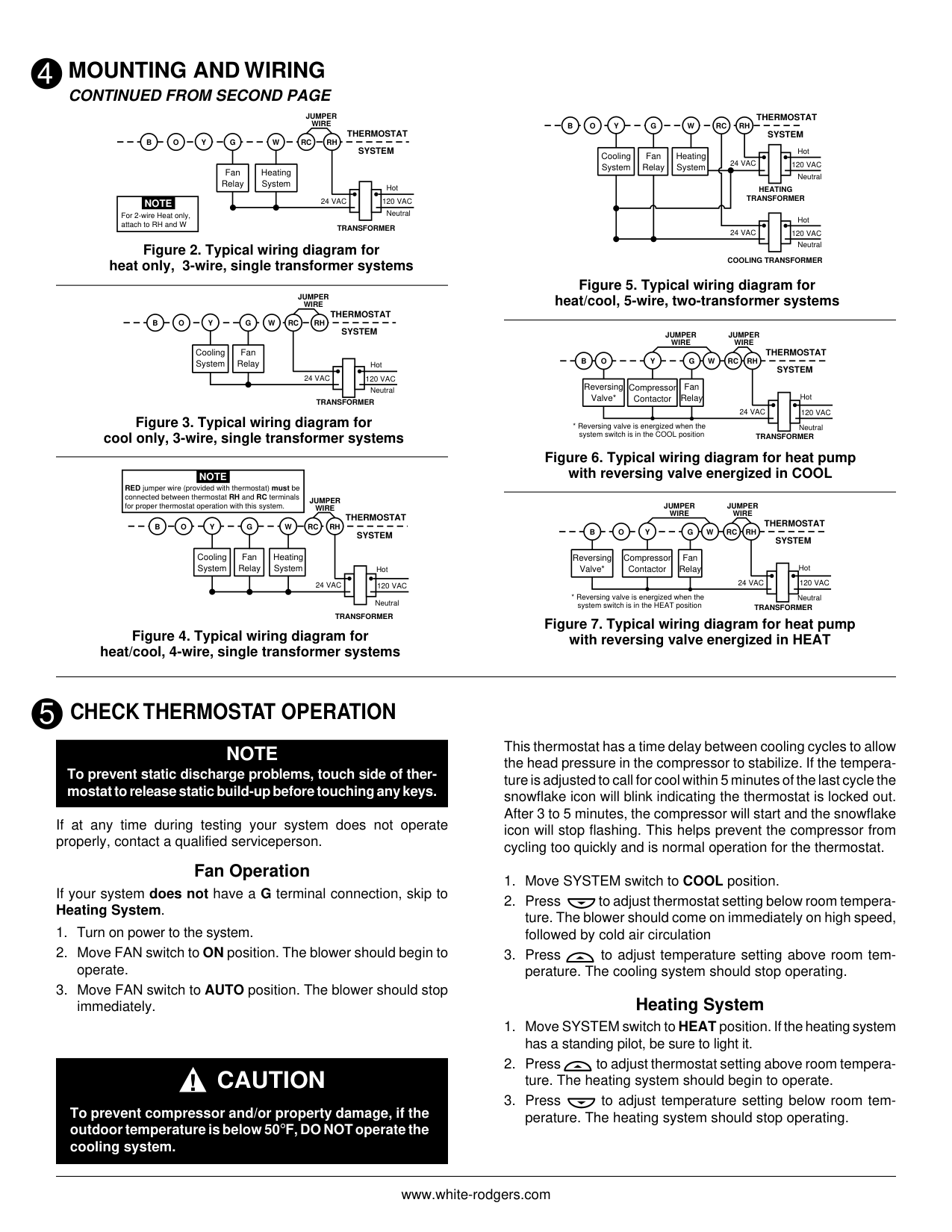
heat only, 3-wire, single transformer systems
TRANSFORMER
Heating System
Fan Relay
Y RC
JUMPER WIRE
OB
|For 2-wire Heat only, attach to RH and W
NOTE| |---|
RHY
24 VAC 120 VAC
Hot
Neutral TRANSFORMER
THERMOSTAT SYSTEM
G W
cool only, 3-wire, single transformer systems
Cooling System
Fan Relay
RCOB
JUMPER WIRE
RHY
24 VAC 120 VAC
Hot
Neutral
THERMOSTAT SYSTEM
G W
|RED jumper wire (provided with thermostat) must be connected between thermostat RH and RC terminals for proper thermostat operation with this system.
NOTE| |---|
JUMPER WIRE
OB
RC
Cooling System
Fan Relay
Heating System
TRANSFORMER
heat/cool, 4-wire, single transformer systems
#################### THERMOSTAT SYSTEM
RHY
OB
G W
###################### RC
Hot
Cooling System
Fan Relay
Heating System
24 VAC 120 VAC
Neutral
HEATING TRANSFORMER
Hot
24 VAC 120 VAC
Neutral COOLING TRANSFORMER
Figure 5. Typical wiring diagram for heat/cool, 5-wire, two-transformer systems
JUMPER WIRE
JUMPER WIRE
################## THERMOSTAT SYSTEM
RHY
RCOB
G W
Reversing Valve*
Fan Relay
Compressor Contactor
Hot
24 VAC 120 VAC
Neutral
TRANSFORMER
############ Figure 6. Typical wiring diagram for heat pumpwith reversing valve energized in COOL
####################### JUMPER WIRE
JUMPER WIRE
THERMOSTAT SYSTEM
RHY
RCOB
G W
Reversing Valve*
Fan Relay
Compressor Contactor
Hot
24 VAC 120 VAC
Neutral
TRANSFORMER
############### Figure 7. Typical wiring diagram for heat pumpwith reversing valve energized in HEAT
CHECK THERMOSTAT OPERATION
This thermostat has a time delay between cooling cycles to allow the head pressure in the compressor to stabilize. If the temperature is adjusted to call for cool within 5 minutes of the last cycle the snowflake icon will blink indicating the thermostat is locked out. After 3 to 5 minutes, the compressor will start and the snowflake icon will stop flashing. This helps prevent the compressor from cycling too quickly and is normal operation for the thermostat.
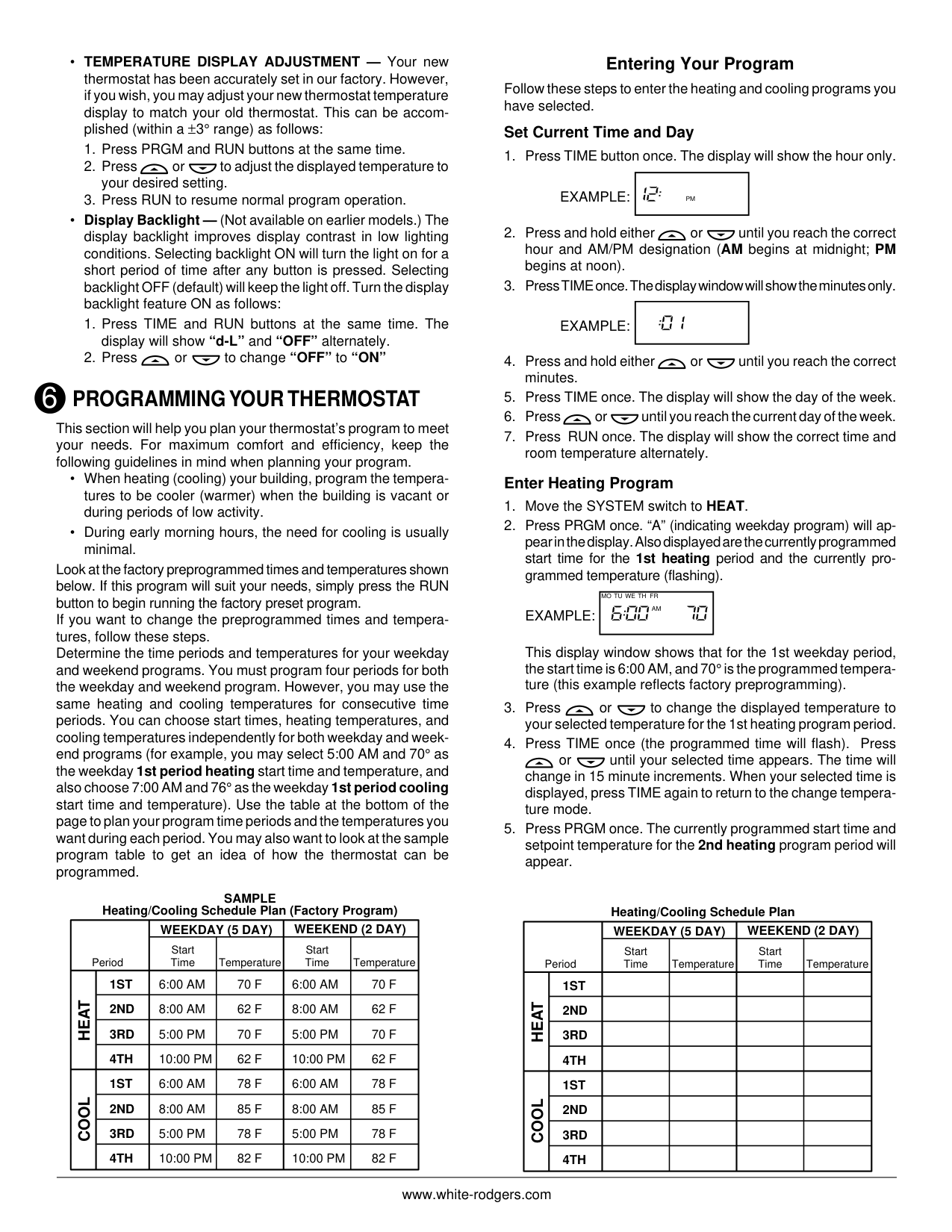
######### NOTE To prevent static discharge problems, touch side of thermostat to release static build-up before touching any keys.
If at any time during testing your system does not operate properly, contact a qualified serviceperson.
Fan Operation If your system does not have a G terminal connection, skip to Heating System.
########## Heating System
CAUTION!
perature. The heating system should stop operating.To prevent compressor and/or property damage, if the outdoor temperature is below 50°F, DO NOT operate the cooling system.
######## CHECK THERMOSTAT OPERATION
########### CONTINUED FROM THIRD PAGE
Before you begin programming your thermostat, you should be familiar with its features and with the display and the location and operation of the thermostat buttons. Your thermostat consists of two parts: the thermostat cover and the base. To remove the cover, gently pull it straight out from the base. To replace the cover, line up the cover with the base and press gently until the cover snaps onto the base.
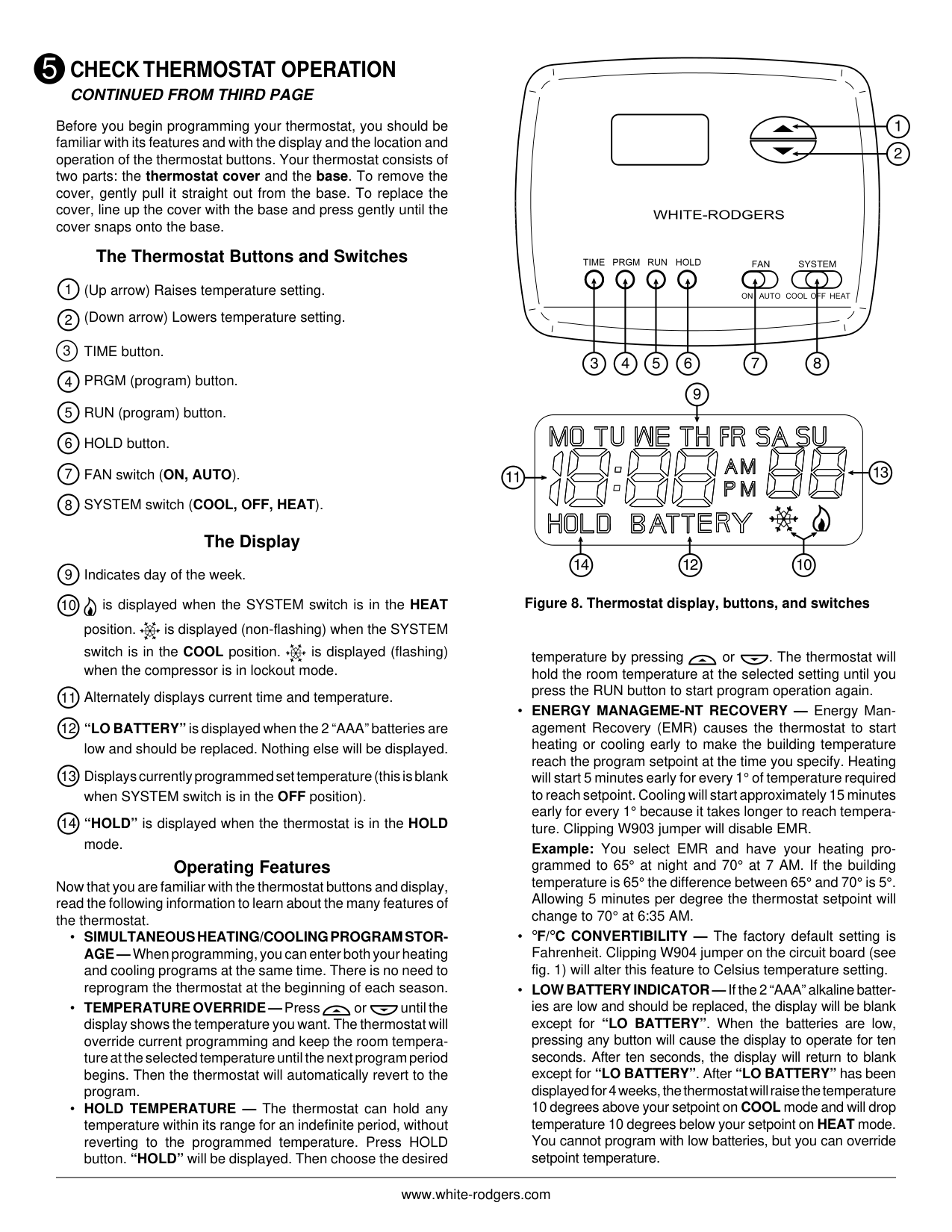
########## The Thermostat Buttons and Switches
Operating Features Now that you are familiar with the thermostat buttons and display, read the following information to learn about the many features of the thermostat.
FAN SYSTEM
OFFON AUTO COOL HEAT
############# Figure 8. Thermostat display, buttons, and switches
temperature by pressing or . The thermostat will hold the room temperature at the selected setting until you press the RUN button to start program operation again.
PROGRAMMING YOUR THERMOSTAT6
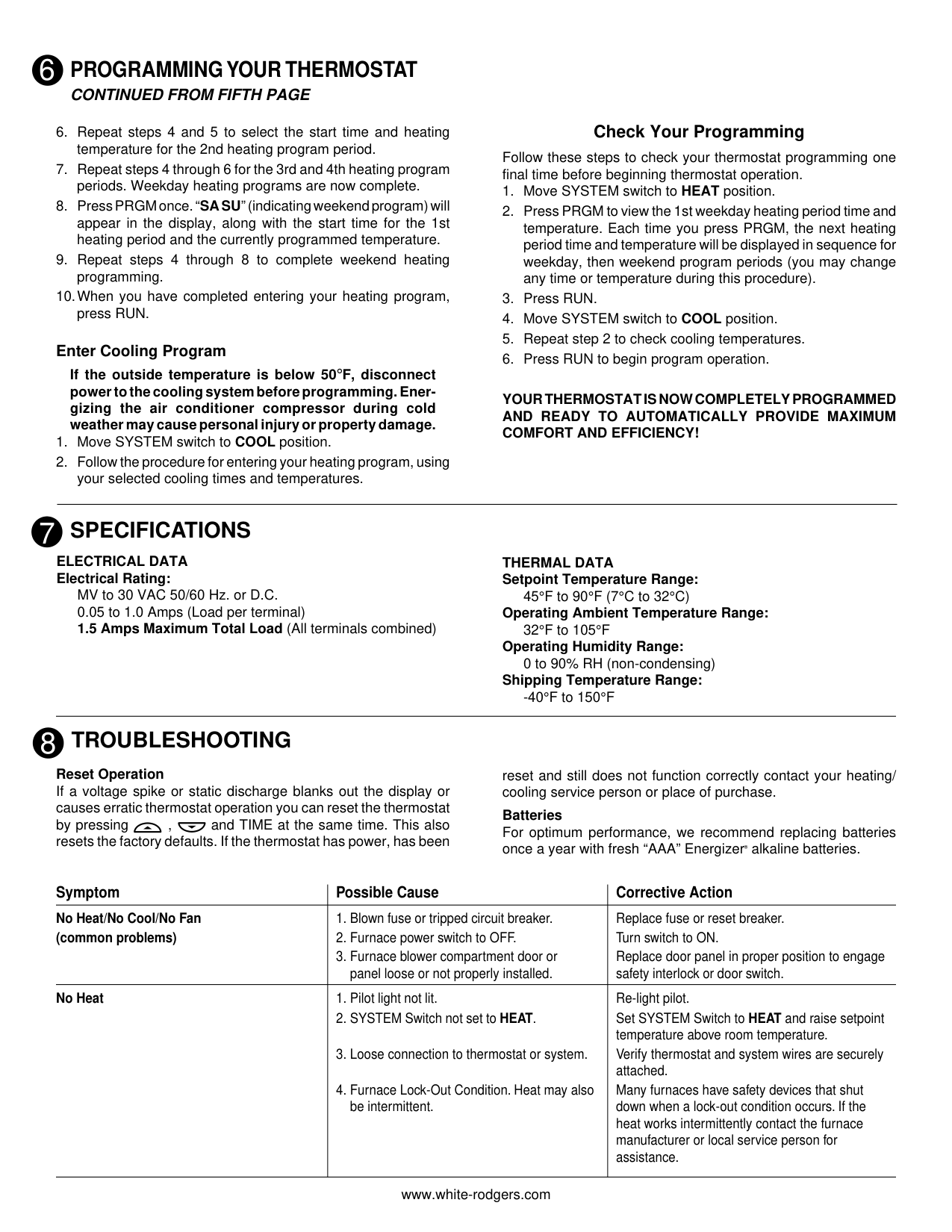
This section will help you plan your thermostat’s program to meet your needs. For maximum comfort and efficiency, keep the following guidelines in mind when planning your program.
Look at the factory preprogrammed times and temperatures shown below. If this program will suit your needs, simply press the RUN button to begin running the factory preset program. If you want to change the preprogrammed times and temperatures, follow these steps. Determine the time periods and temperatures for your weekday and weekend programs. You must program four periods for both the weekday and weekend program. However, you may use the same heating and cooling temperatures for consecutive time periods. You can choose start times, heating temperatures, and cooling temperatures independently for both weekday and weekend programs (for example, you may select 5:00 AM and 70° as the weekday 1st period heating start time and temperature, and also choose 7:00 AM and 76° as the weekday 1st period cooling start time and temperature). Use the table at the bottom of the page to plan your program time periods and the temperatures you want during each period. You may also want to look at the sample program table to get an idea of how the thermostat can be programmed.
########## Entering Your Program
Follow these steps to enter the heating and cooling programs you have selected.
########### Set Current Time and Day
EXAMPLE:
|PM| |---|
EXAMPLE:
| | |---|
########### Enter Heating Program
EXAMPLE:
|AM
MO TU WE TH FR| |---|
This display window shows that for the 1st weekday period, the start time is 6:00 AM, and 70° is the programmed temperature (this example reflects factory preprogramming).
or until your selected time appears. The time will change in 15 minute increments. When your selected time is displayed, press TIME again to return to the change temperature mode.
SAMPLE Heating/Cooling Schedule Plan (Factory Program)
Heating/Cooling Schedule Plan
|Period|Period|WEEKDAY (5 DAY)|WEEKDAY (5 DAY)|WEEKEND (2 DAY)|WEEKEND (2 DAY)| |---|---|---|---|---|---| |Period|Period|Start Time|Temperature|Start Time|Temperature| | |1ST|6:00 AM|70 F|6:00 AM|70 F| | |2ND|8:00 AM|62 F|8:00 AM|62 F| | |3RD|5:00 PM|70 F|5:00 PM|70 F| | |4TH|10:00 PM|62 F|10:00 PM|62 F| |COOL HEAT|1ST|6:00 AM|78 F|6:00 AM|78 F| | |2ND|8:00 AM|85 F|8:00 AM|85 F| | |3RD|5:00 PM|78 F|5:00 PM|78 F| | |4TH|10:00 PM|82 F|10:00 PM|82 F|
|Period|Period|WEEKDAY (5 DAY)|WEEKDAY (5 DAY)|WEEKEND (2 DAY)|WEEKEND (2 DAY)| |---|---|---|---|---|---| |Period|Period|Start Time|Temperature|Start Time|Temperature| | |1ST| | | | | | |2ND| | | | | | |3RD| | | | | | |4TH| | | | | | |1ST| | | | |
|COOL HEAT|2ND| | | | | | |3RD| | | | | | |4TH| | | | |
#### 6
######## PROGRAMMING YOUR THERMOSTAT
CONTINUED FROM FIFTH PAGE
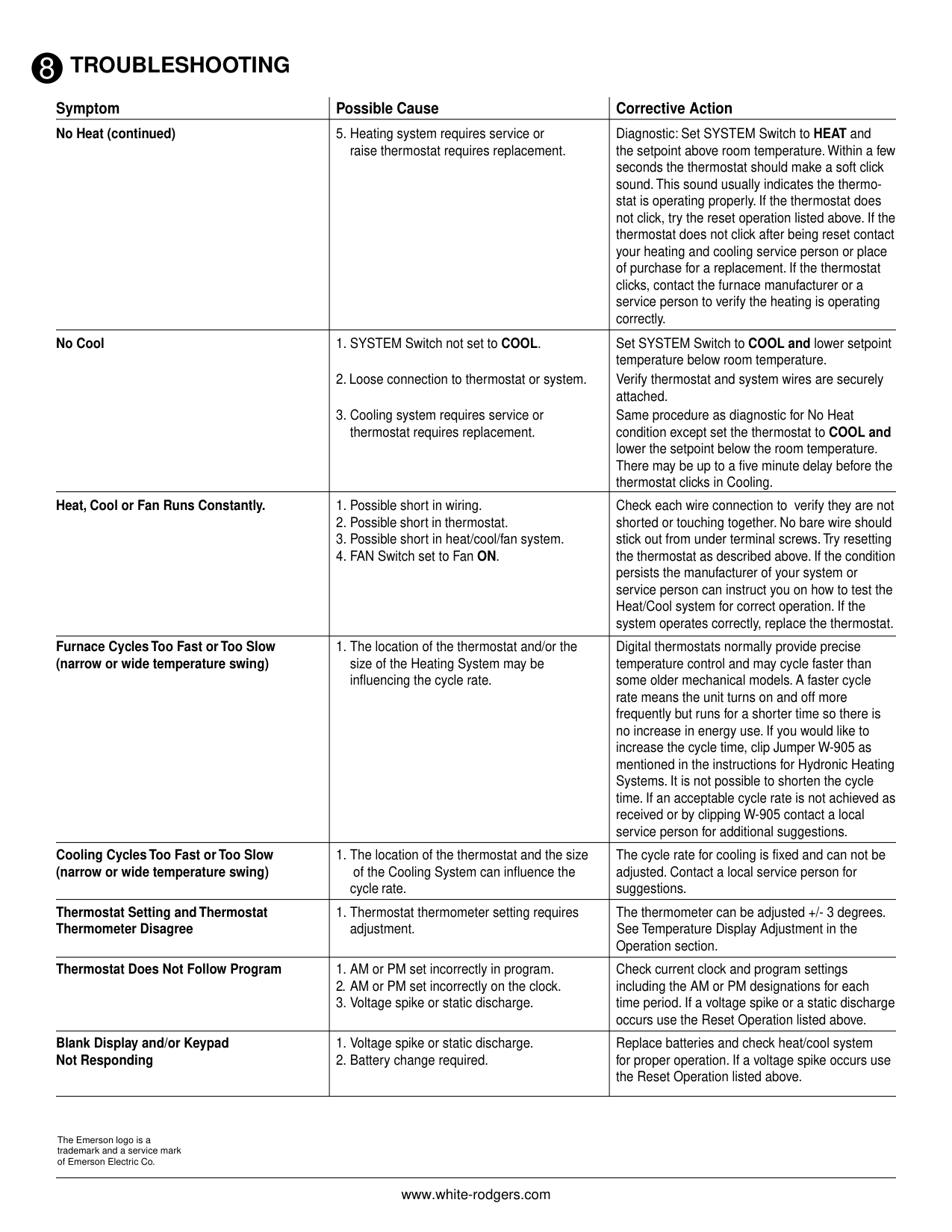
########### Enter Cooling Program
If the outside temperature is below 50°F, disconnect power to the cooling system before programming. Energizing the air conditioner compressor during cold weather may cause personal injury or property damage.
########## Check Your Programming
Follow these steps to check your thermostat programming one final time before beginning thermostat operation.
YOUR THERMOSTAT IS NOW COMPLETELY PROGRAMMED AND READY TO AUTOMATICALLY PROVIDE MAXIMUM COMFORT AND EFFICIENCY!
SPECIFICATIONS7
ELECTRICAL DATA Electrical Rating:
THERMAL DATA Setpoint Temperature Range:
45°F to 90°F (7°C to 32°C)
MV to 30 VAC 50/60 Hz. or D.C.
############# Operating Ambient Temperature Range:
32°F to 105°F
Operating Humidity Range:
0 to 90% RH (non-condensing) Shipping Temperature Range:
-40°F to 150°F
TROUBLESHOOTING8
############# Reset Operation
If a voltage spike or static discharge blanks out the display or causes erratic thermostat operation you can reset the thermostat by pressing , and TIME at the same time. This also resets the factory defaults. If the thermostat has power, has been
reset and still does not function correctly contact your heating/ cooling service person or place of purchase.
Batteries For optimum performance, we recommend replacing batteries once a year with fresh “AAA” Energizer
alkaline batteries.
®
|ymptom|Possible Cause|Corrective Action| |---|---|---| |No Heat/No Cool/No Fan (common problems)|1. Blown fuse or tripped circuit breaker.
2. Furnace power switch to OFF.
3. Furnace blower compartment door or panel loose or not properly installed.
|Replace fuse or reset breaker. Turn switch to ON. Replace door panel in proper position to engage safety interlock or door switch.| |No Heat|1. Pilot light not lit.
2. SYSTEM Switch not set to HEAT.
3. Loose connection to thermostat or system.
4. Furnace Lock-Out Condition. Heat may also be intermittent.
|Re-light pilot. Set SYSTEM Switch to HEAT and raise setpoint temperature above room temperature. Verify thermostat and system wires are securely attached.
Many furnaces have safety devices that shut down when a lock-out condition occurs. If the heat works intermittently contact the furnace manufacturer or local service person for assistance.|
8
TROUBLESHOOTING
|ymptom|Possible Cause|Corrective Action| |---|---|---| |No Heat (continued)|5. Heating system requires service or raise thermostat requires replacement.|Diagnostic: Set SYSTEM Switch to HEAT and the setpoint above room temperature. Within a few seconds the thermostat should make a soft click sound. This sound usually indicates the thermostat is operating properly. If the thermostat does not click, try the reset operation listed above. If the thermostat does not click after being reset contact your heating and cooling service person or place of purchase for a replacement. If the thermostat clicks, contact the furnace manufacturer or a service person to verify the heating is operating correctly.| |No Cool|1. SYSTEM Switch not set to COOL.
2. Loose connection to thermostat or system.
3. Cooling system requires service or thermostat requires replacement.
|Set SYSTEM Switch to COOL and lower setpoint temperature below room temperature. Verify thermostat and system wires are securely attached. Same procedure as diagnostic for No Heat condition except set the thermostat to COOL and lower the setpoint below the room temperature. There may be up to a five minute delay before the thermostat clicks in Cooling.| |Heat, Cool or Fan Runs Constantly.|1. Possible short in wiring.
2. Possible short in thermostat.
3. Possible short in heat/cool/fan system.
4. FAN Switch set to Fan ON.
|Check each wire connection to verify they are not shorted or touching together. No bare wire should stick out from under terminal screws. Try resetting the thermostat as described above. If the condition persists the manufacturer of your system or service person can instruct you on how to test the Heat/Cool system for correct operation. If the system operates correctly, replace the thermostat.| |Furnace Cycles Too Fast or Too Slow (narrow or wide temperature swing)|1. The location of the thermostat and/or the size of the Heating System may be influencing the cycle rate.|Digital thermostats normally provide precise temperature control and may cycle faster than some older mechanical models. A faster cycle rate means the unit turns on and off more frequently but runs for a shorter time so there is no increase in energy use. If you would like to increase the cycle time, clip Jumper W-905 as mentioned in the instructions for Hydronic Heating Systems. It is not possible to shorten the cycle time. If an acceptable cycle rate is not achieved as received or by clipping W-905 contact a local service person for additional suggestions.| |Cooling Cycles Too Fast or Too Slow (narrow or wide temperature swing)|1. The location of the thermostat and the size of the Cooling System can influence the cycle rate.|The cycle rate for cooling is fixed and can not be adjusted. Contact a local service person for suggestions.| |Thermostat Setting and Thermostat Thermometer Disagree|1. Thermostat thermometer setting requires adjustment.|The thermometer can be adjusted +/- 3 degrees. See Temperature Display Adjustment in the Operation section.| |Thermostat Does Not Follow Program|1. AM or PM set incorrectly in program.
2. AM or PM set incorrectly on the clock.
3. Voltage spike or static discharge.
|Check current clock and program settings including the AM or PM designations for each time period. If a voltage spike or a static discharge occurs use the Reset Operation listed above.| |Blank Display and/or Keypad Not Responding|1. Voltage spike or static discharge.
2. Battery change required.
|Replace batteries and check heat/cool system for proper operation. If a voltage spike occurs use the Reset Operation listed above.|
The Emerson logo is a trademark and a service mark of Emerson Electric Co.