
Ask AI
— answers from the official manualAnswers from the official manual.
Common questions
Common Questions
16 totalWhat should I do if my system displays 'NO AC'?
Ensure that the power cord is properly plugged into both the wall outlet and the security panel. If the problem persists, refer to page 41 for troubleshooting steps.
How can I bypass a zone on my system?
Enter your user code followed by '*'. For zones that require it, also enter the specific zone number after '*'. This allows temporary disarm of individual zones while leaving others armed.
What does 'NOT READY' mean on my system?
'NOT READY' indicates that your system is not fully operational, usually due to a device or zone malfunction. Check the system’s trouble list for specific issues.
How do I change my user code on the Safewatch Pro 3000?
Enter your master code followed by [8] and press [1], then enter your new user code twice to confirm.
How do I test my security sensors?
Press and hold the 'TEST' button until the display changes to 'TEST CODE'. Follow the on-screen instructions to perform a full system check.
How often should I replace batteries in wireless sensors?
Batteries within wireless units may need replacement annually. Check your manual for specific advice from ADT regarding recommended battery types and replacement schedules.
Show 10 more questions
How can I perform a factory reset on the ADT Safewatch Pro 3000 system?
What is the procedure to arm the ADT Safewatch Pro 3000 system in different modes?
How do I bypass a specific zone on the ADT Safewatch Pro 3000 system?
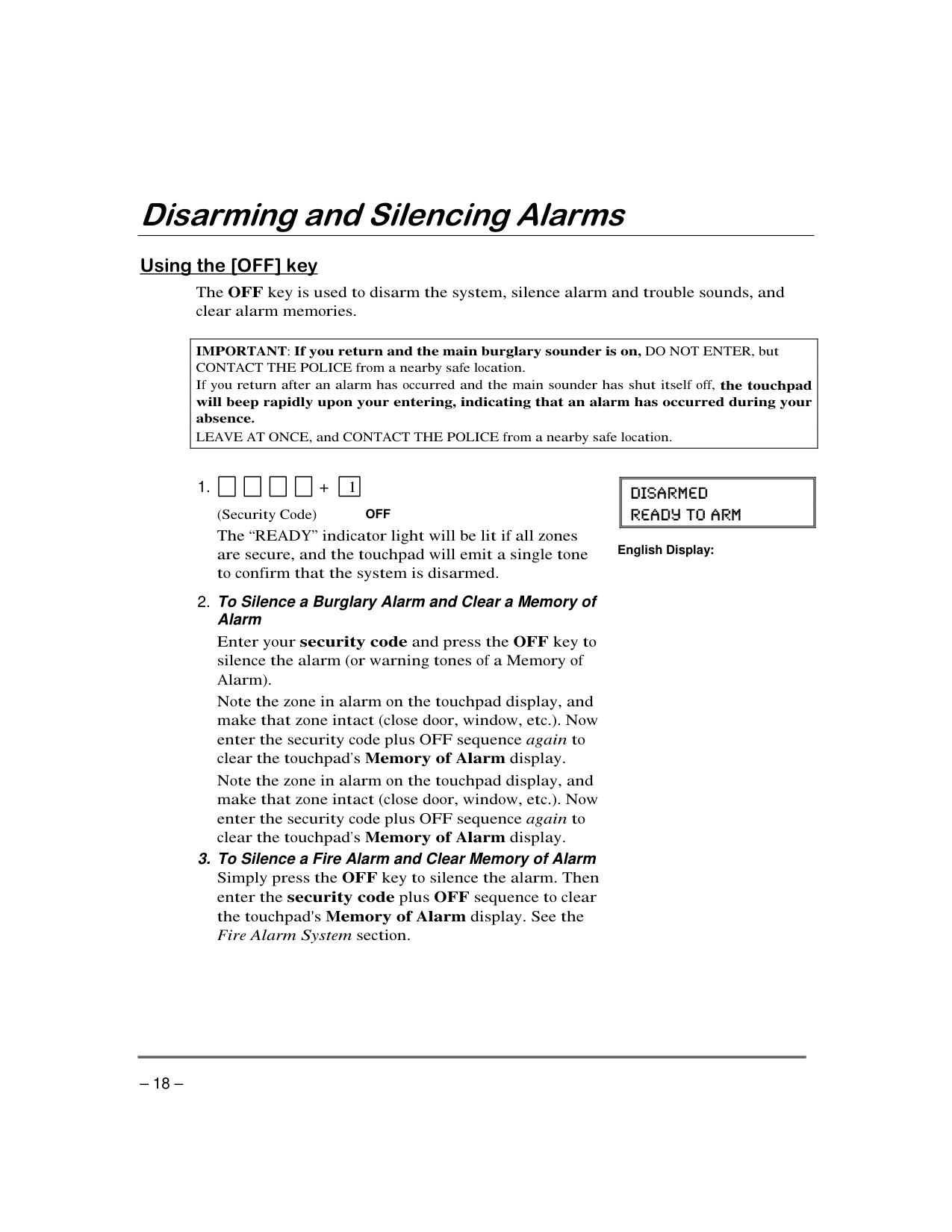
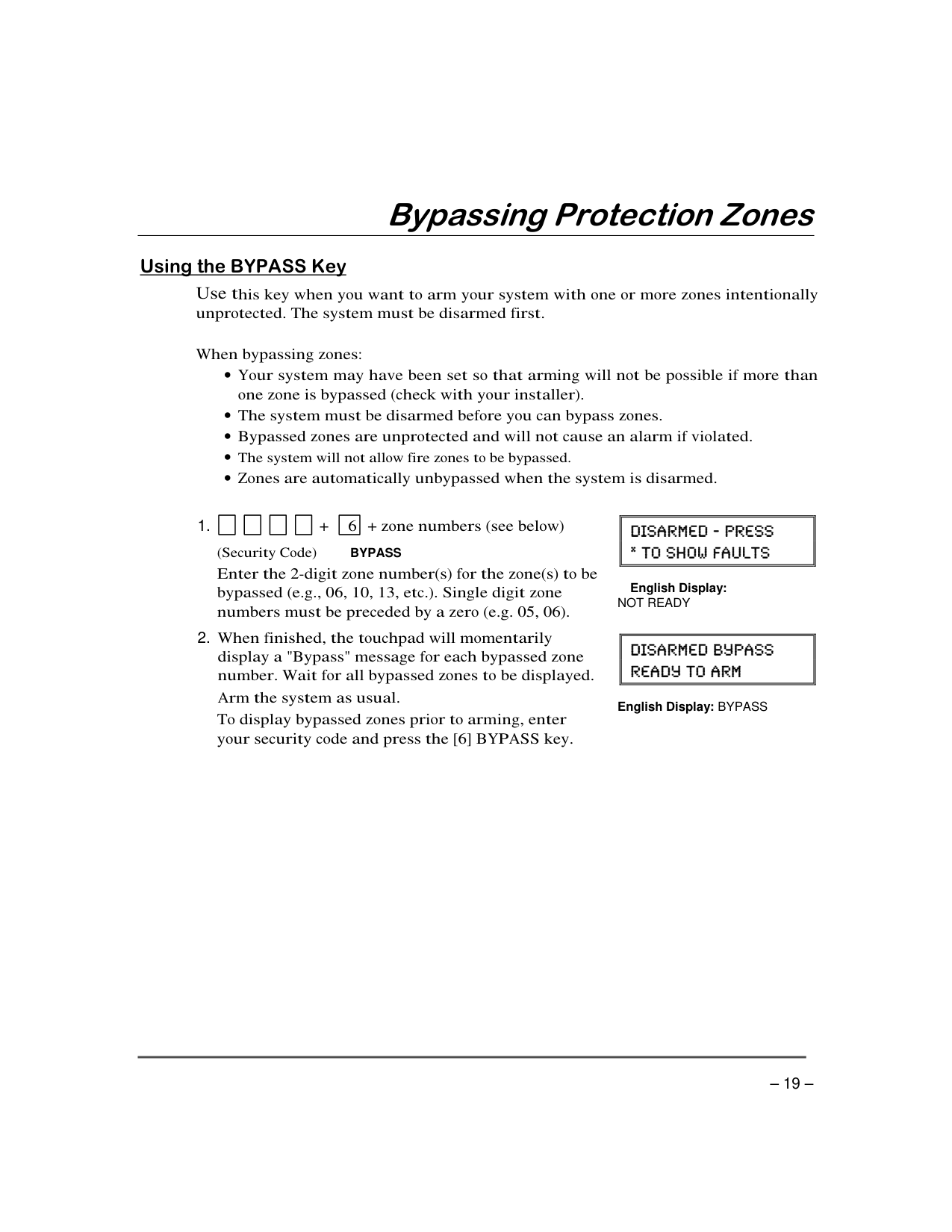
How do I set up chime mode on my ADT Safewatch Pro 3000 system?
What should I do if there's an open zone or trouble condition displayed on my ADT Safewatch Pro 3000 system?
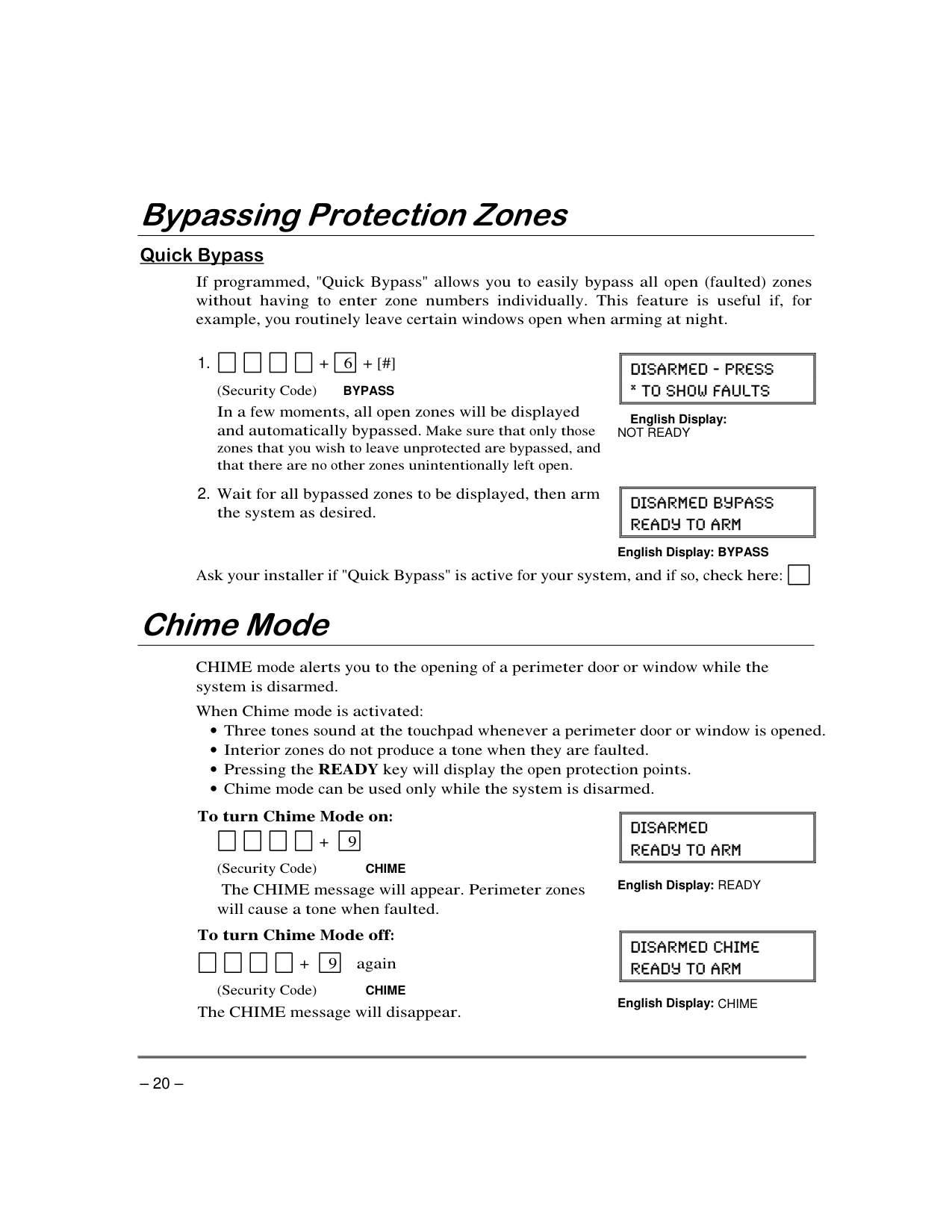
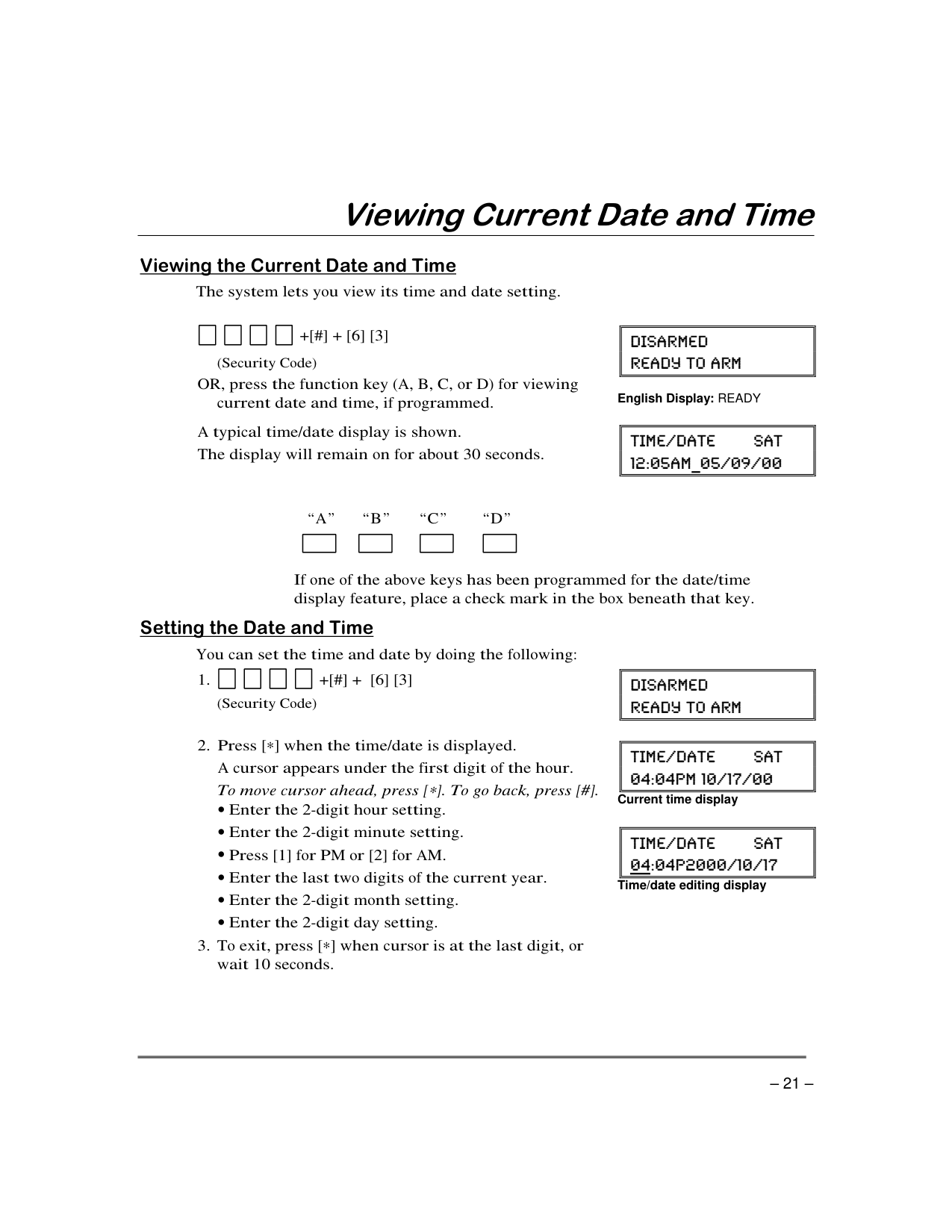
How do I change the time and date on my ADT Safewatch Pro 3000 system?
What should I do when the system displays 'No AC'?
How do I arm my ADT Safewatch Pro 3000 using the Keyswitch?
How do I test my ADT Safewatch Pro 3000 system regularly?
Can I set up a scheduler to send pager reports if no one disarms the system by a certain time?
Full Manual
56 pages


######## K5309 3/01 Model SASW3000B
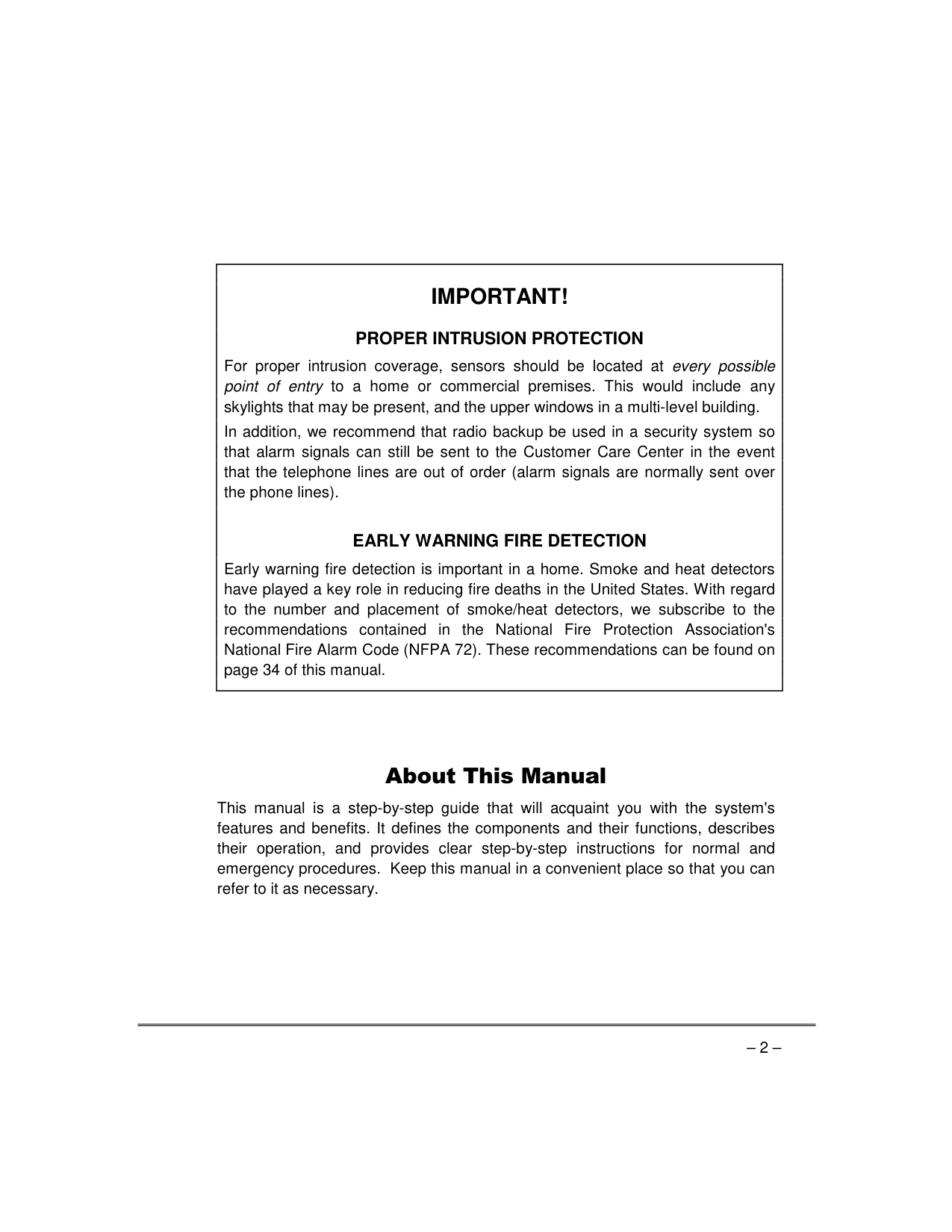
|IMPORTANT! PROPER INTRUSION PROTECTION
For proper intrusion coverage, sensors should be located at every possible point of entry to a home or commercial premises. This would include any skylights that may be present, and the upper windows in a multi-level building.
In addition, we recommend that radio backup be used in a security system so that alarm signals can still be sent to the Customer Care Center in the event that the telephone lines are out of order (alarm signals are normally sent over the phone lines).
EARLY WARNING FIRE DETECTION
Early warning fire detection is important in a home. Smoke and heat detectors have played a key role in reducing fire deaths in the United States. With regard to the number and placement of smoke/heat detectors, we subscribe to the recommendations contained in the National Fire Protection Association's National Fire Alarm Code (NFPA 72). These recommendations can be found on page 34 of this manual.
| |---|
This manual is a step-by-step guide that will acquaint you with the system's features and benefits. It defines the components and their functions, describes their operation, and provides clear step-by-step instructions for normal and emergency procedures. Keep this manual in a convenient place so that you can refer to it as necessary.
######## “ ”
####### '
'
’
–
“ ”
“ ”
“ ' ”
“ ” “ ” “ ” “ ”
| | |---|
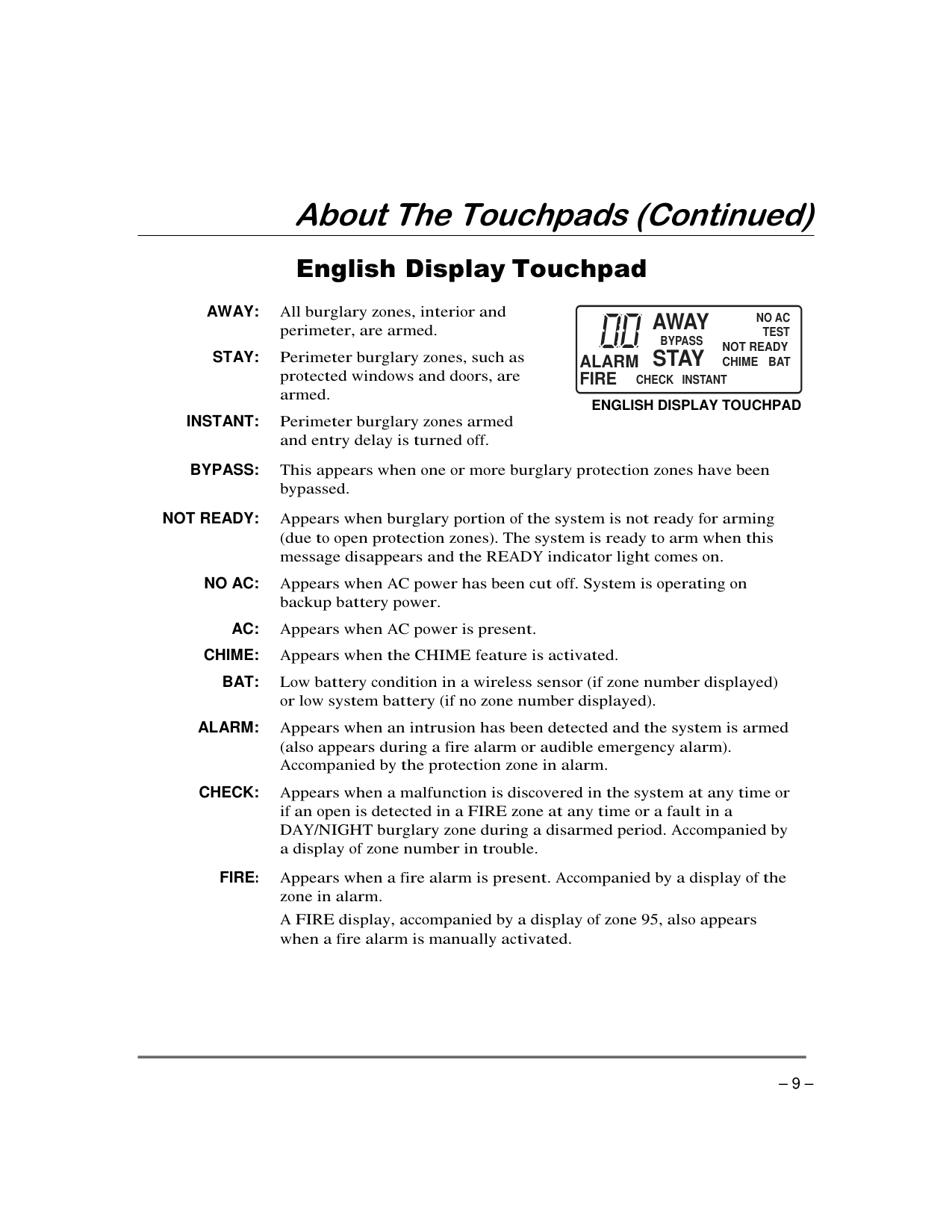
AWAY:
STAY:
INSTANT:
BYPASS:
NOT READY:
NO AC:
AC: CHIME: BAT:
ALARM:
CHECK:
AWAY
NO AC
TEST NOT READY CHIME BAT
BYPASS
STAY
ALARM FIRE
CHECK INSTANT
ENGLISH DISPLAY TOUCHPAD
FIRE
|8 CODE| |---|
|9 CHIME| |---|
|1 OFF| |---|
'
|2 AWAY| |---|
|3 STAY| |---|
|READY| |---|
| | |---|
– †
|4| |---|
|5 TEST| |---|
|6 BYPASS| |---|
|7INSTANT| |---|
†
|1 OFF| |---|
|3 STAY| |---|
|2 AWAY| |---|
|7INSTANT| |---|
4 3
4 3
################# ARMED READY
ARMED READY
############# 1 OFF AWAY STAY23 4 TEST
########### 1 OFF AWAY STAY23 4 TEST
C
D
C
D
5
6BYPASS 7INSTANT
5
5
6BYPASS 7INSTANT
5
98
98
CODE CHIME
CODE CHIME
#0
#0
READY
READY
11
11
Custom English Display Touchpad (Touchpads shown without swing-down front door)
English Display Touchpad
•
•
“ ” “ ”
–
| | |---|
| | |---|
| | |---|
| | |---|
| | |---|
| | |---|
“ ”
|Your system may have been programmed for this feature to minimize false alarms sent to the Customer Care Center. Ask your installer if "Exit Alarm" is active in your system. If so, check this box.
| | |---|
| |---|
.
|Custom Display:
|| | |---| | |---|
English Display: Zone no. and “NOT READY”| |---|
| |…|…| |---|---|---| | | | | | | | | | | | | | | | |
########## [#]
“ ” “ ” “ ” “ ”
321 654 987
#0
*READY
INSTANT
OFF
CODE
AWAY
TEST
CHECK
STAY
BYPASS
ADT3000-007-V0
|| | |---| | |---|
English Display: READY
|| | |---| | |---|
English Display: AWAY
“ ”
| | | | | |---|---|---|---|
||| |---| | |---|
################ GREEN RED
| | |---|
| | |---|
| | |---|
| | |---|
| | |---|
| | |---|
OFF
“ ”
|| | |---| | |---|
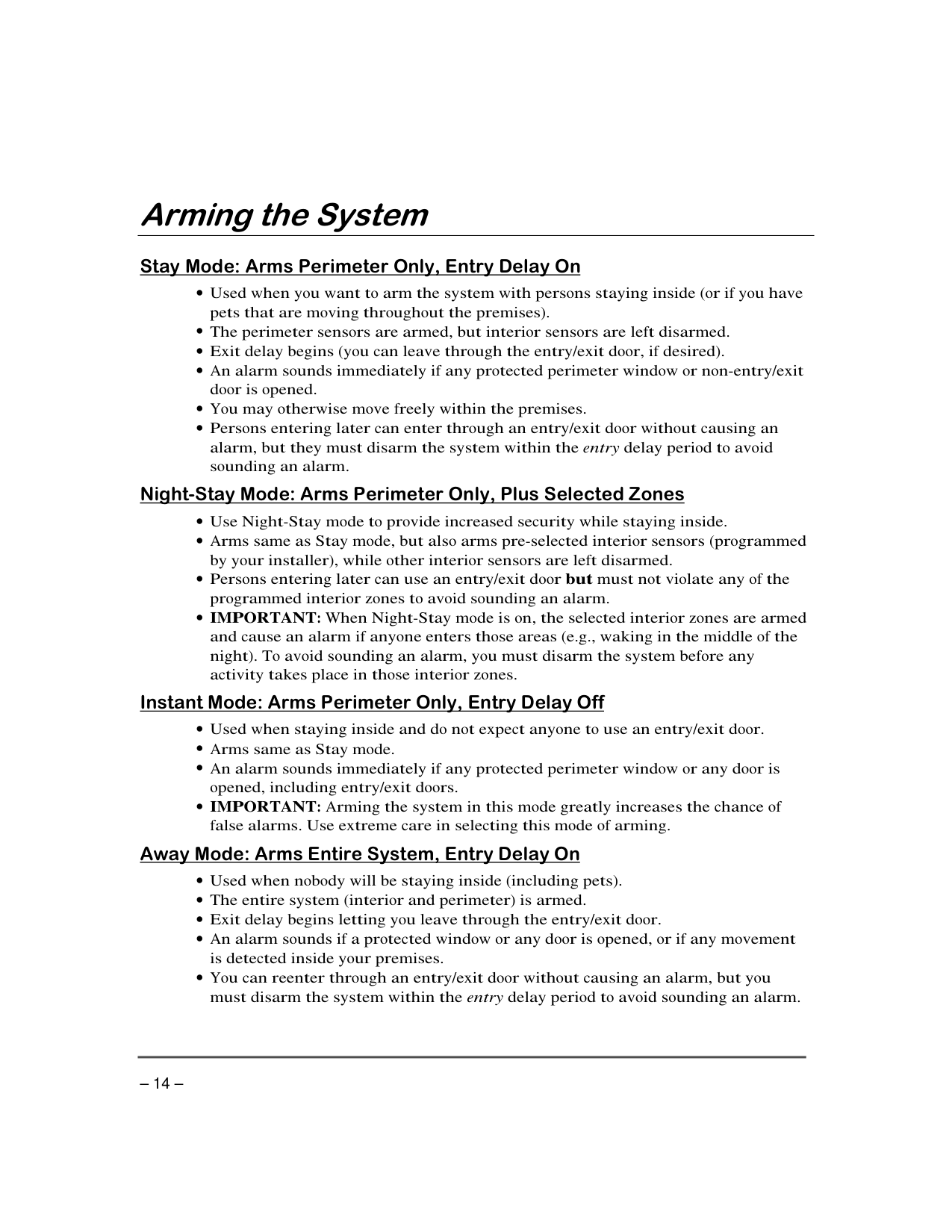
English Display:
’
’
'
| | |---|
| | |---|
| | |---|
| | |---|
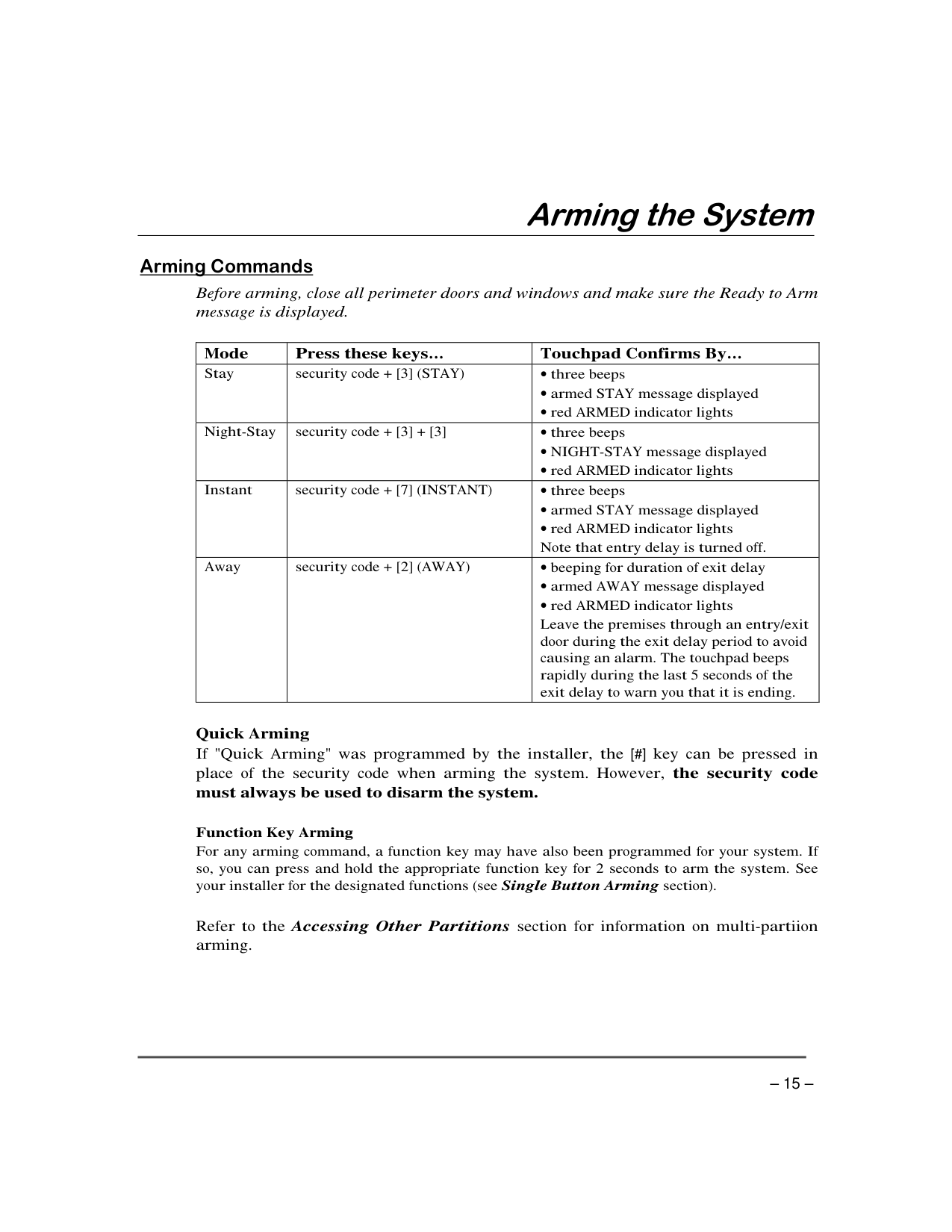
| | |---|
|| | |---| | |---|
English Display: NOT READY
|| | |---| | |---|
English Display: BYPASS
| | |---|
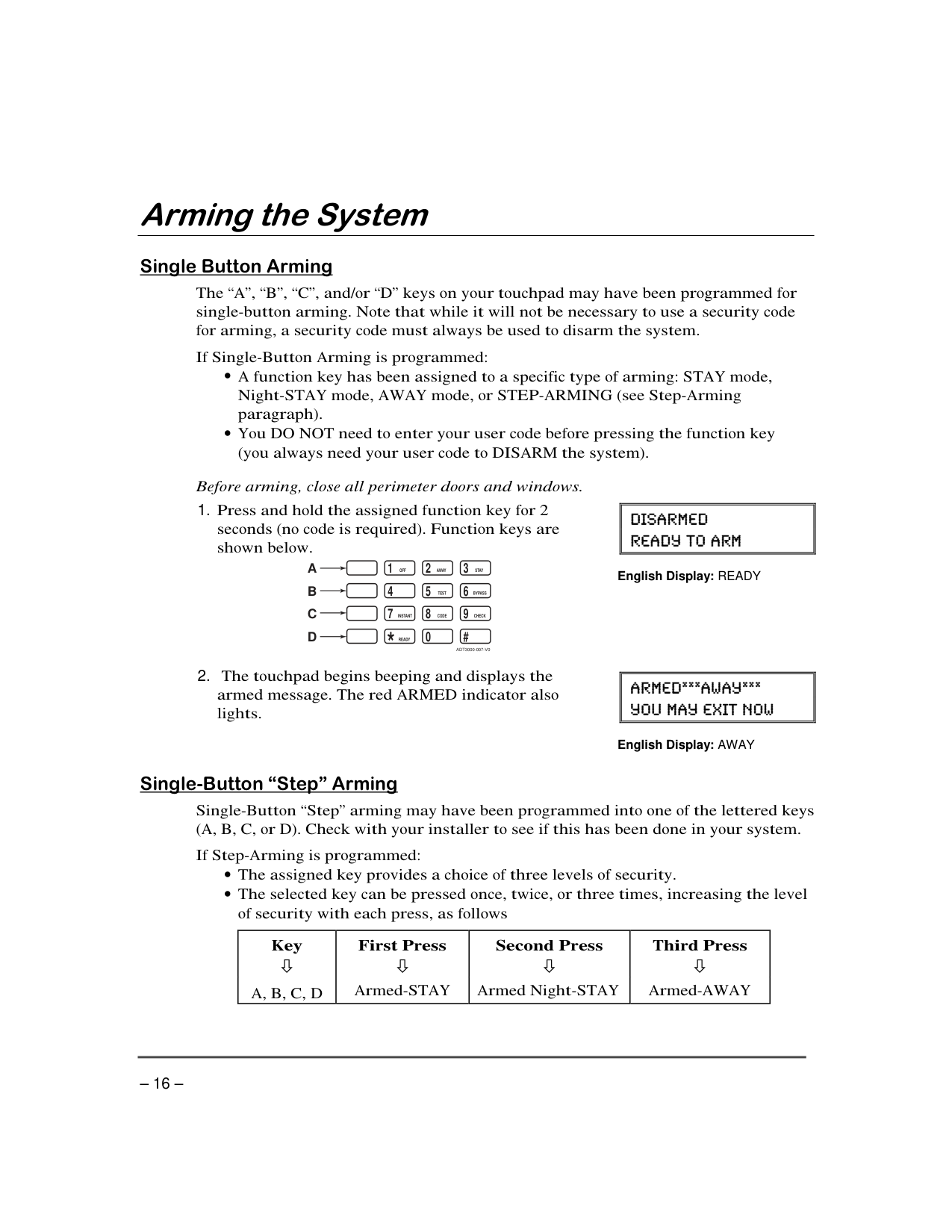
| | |---|
| | |---|
| | |---|
BYPASS
English Display: NOT READY
|| | |---| | |---|
English Display: BYPASS
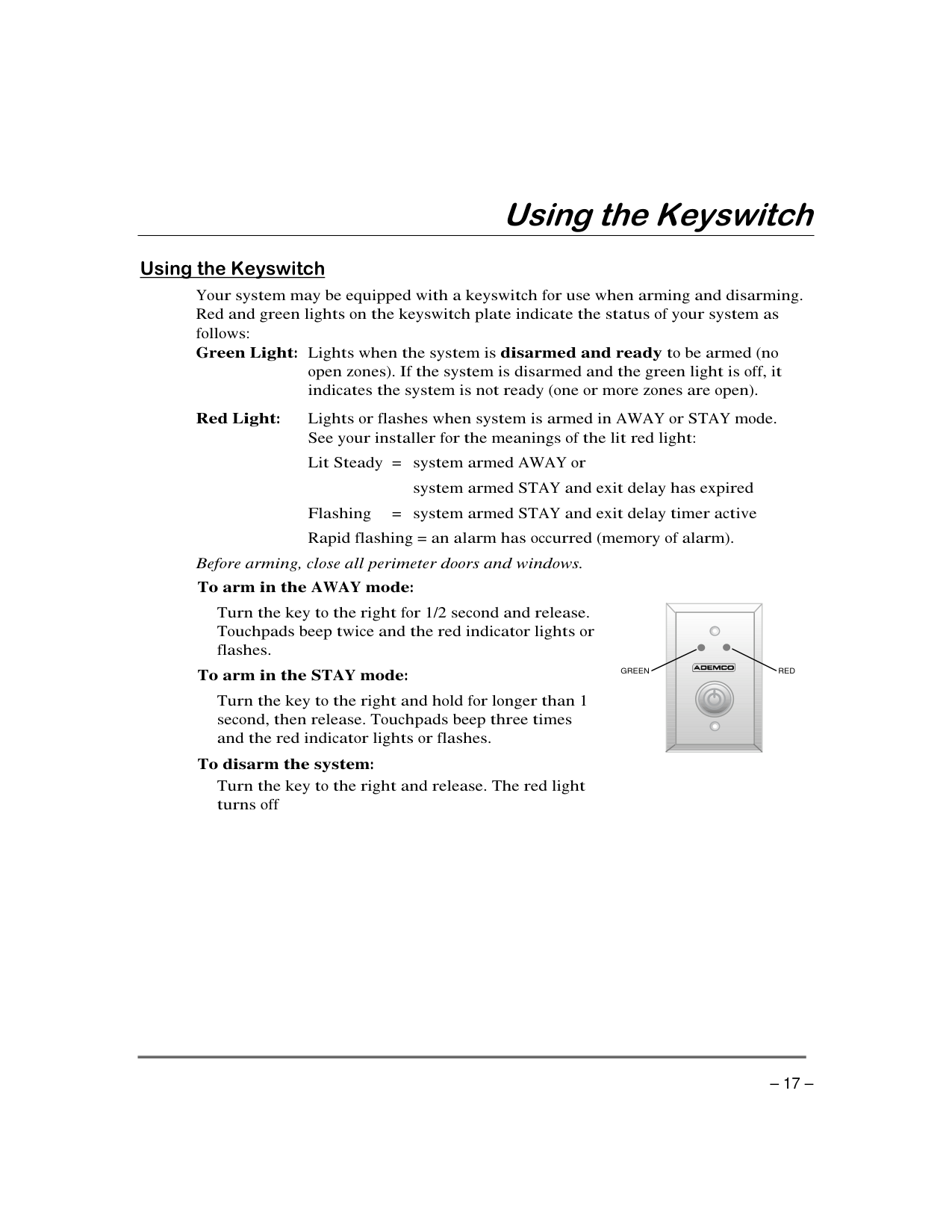
| | |---|
| | |---|
| | |---|
| | |---|
| | |---|
| | |---|
CHIME
| | |---|
| |
|---|
| | |---|
| | |---|
| | |---|
CHIME
|| | |---| | |---|
English Display: READY
|| | |---| | |---|
English Display: CHIME
| | |---|
| | |---|
| | |---|
| | |---|
“ ” “ ” “ ” “ ”
| | |---|
| | |---|
| | |---|
| |
|---|
|| | |---| | |---|
English Display: READY
|| | |---| | |---|
| | |---|
| | |---|
| | |---|
| | |---|
|| | |---| | |---|
|| | |---| | |---|
Current time display
|| | |---| | |---|
Time/date editing display
| | |…| |---|---|---| | | | | | | | | | | | | | | | |
|| |
|---| | |---|
English Display: READY
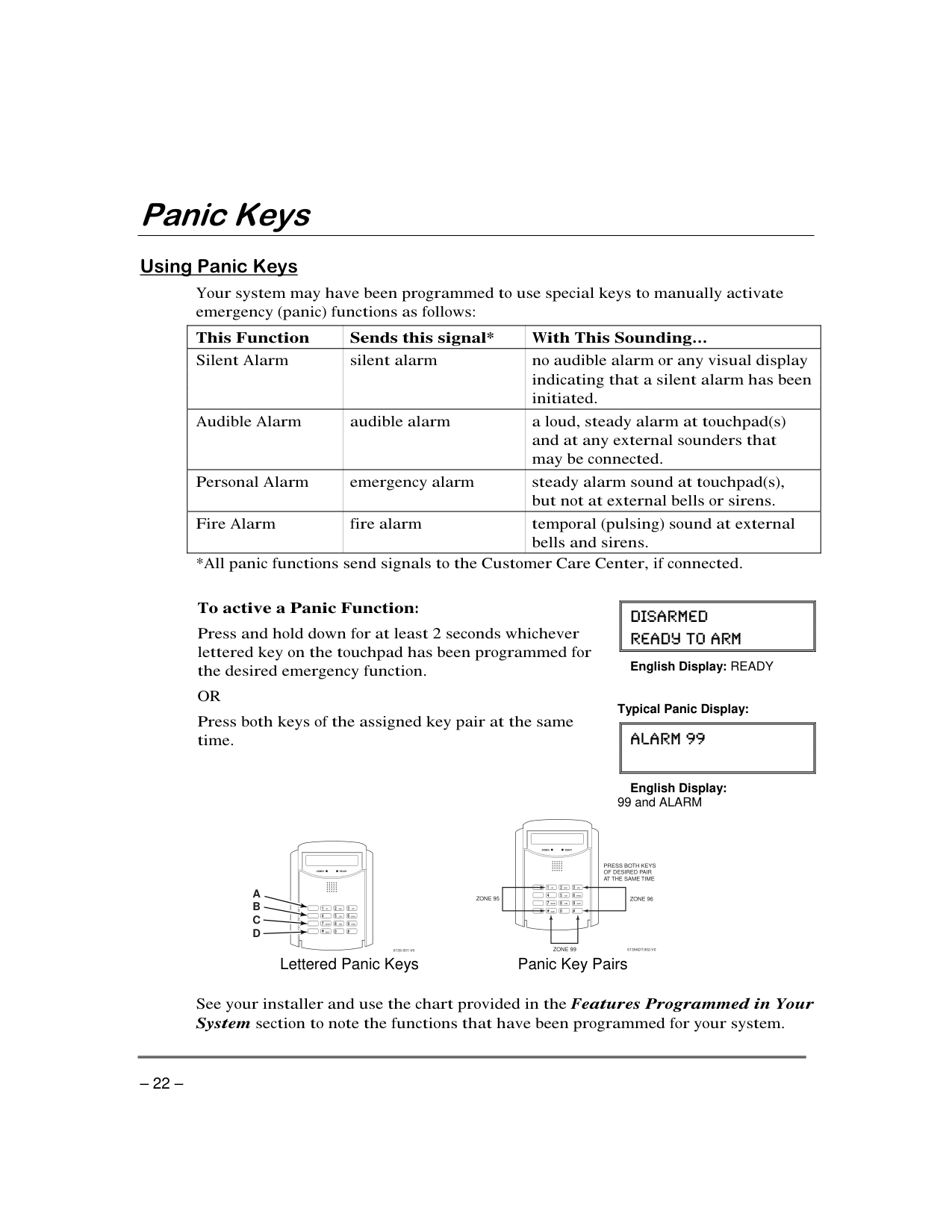
Typical Panic Display:
| | |---|
English Display: 99 and ALARM
READYARMED
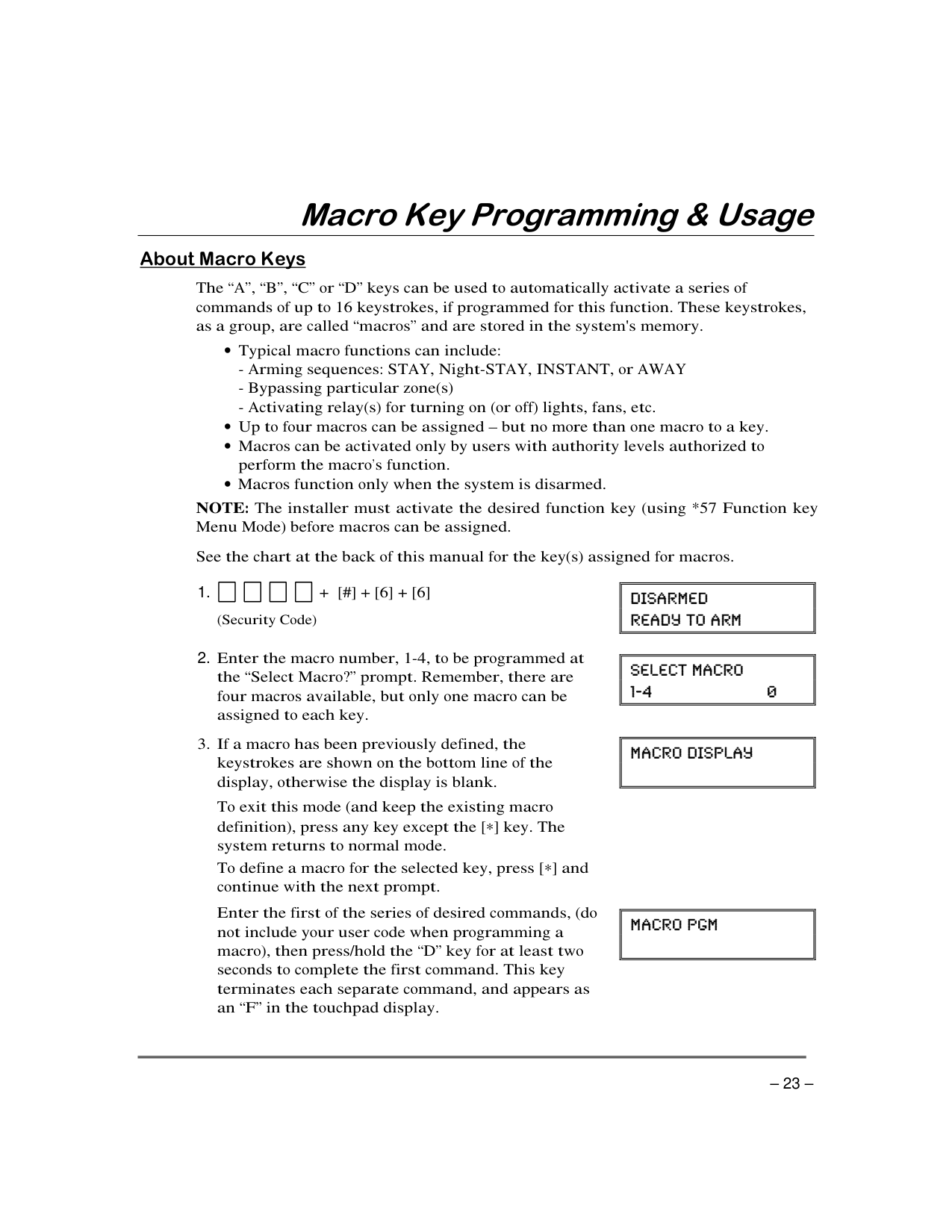
PRESS BOTH KEYS OF DESIRED PAIR AT THE SAME TIME
READYARMED
321 654 987
OFF AWAY
STAY
TEST
BYPASS
ZONE 95
ZONE 96
INSTANT
CHECK
321 654 987
*READY
AWAY
STAY
#0
TEST
BYPASS
INSTANT CODE
CHECK
*READY
#0
ZONE 99
6139ADT-002-V0
6139-001-V0
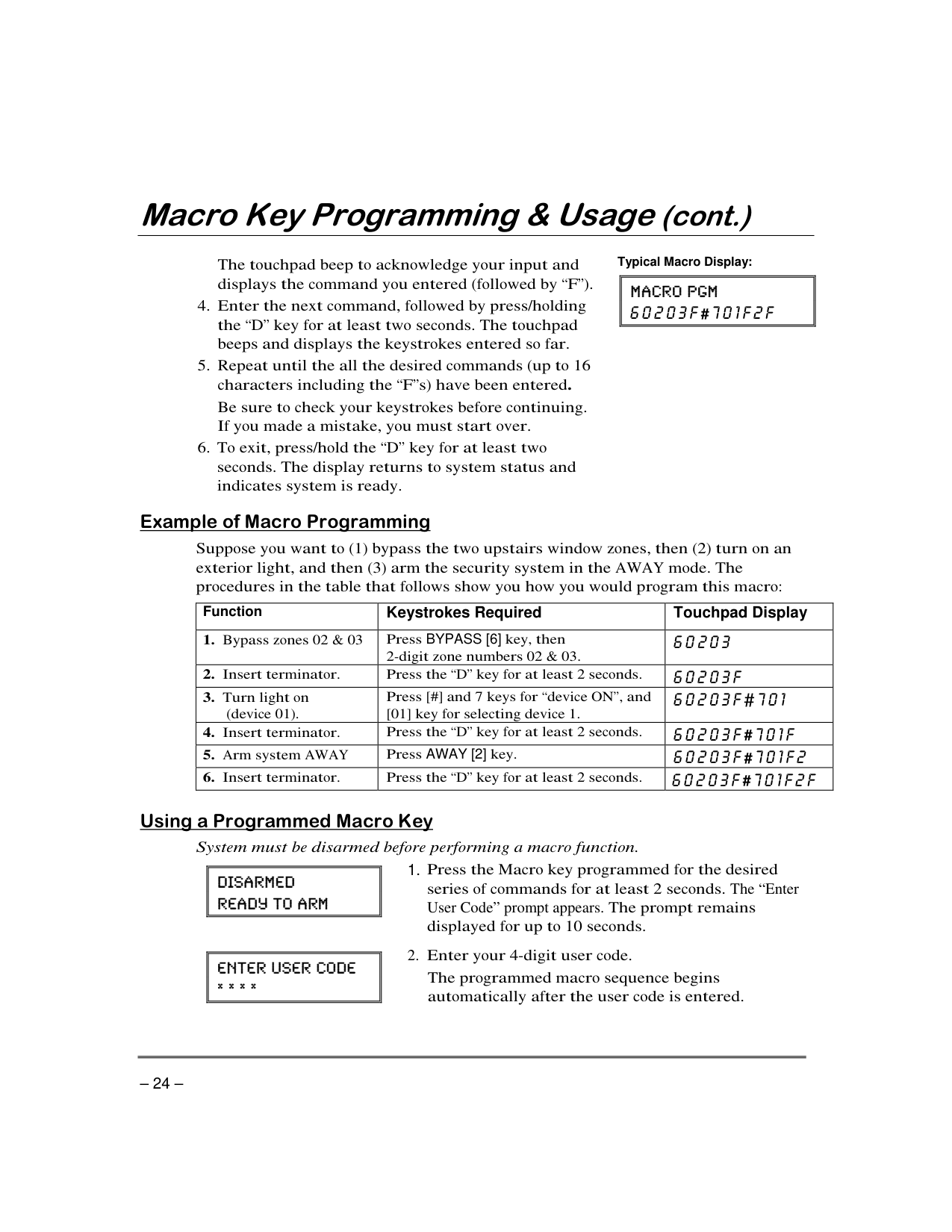
Lettered Panic Keys Panic Key Pairs
“ ” “ ” “ ” “ ”
“ ” '
–
’
| | |---|
| | |---|
| | |---|
| | |---|
|| | |---| | |---|
|| | |---| | |---|
| | |---|
“ ”
| | |---|
“ ”
“ ”
“ ”
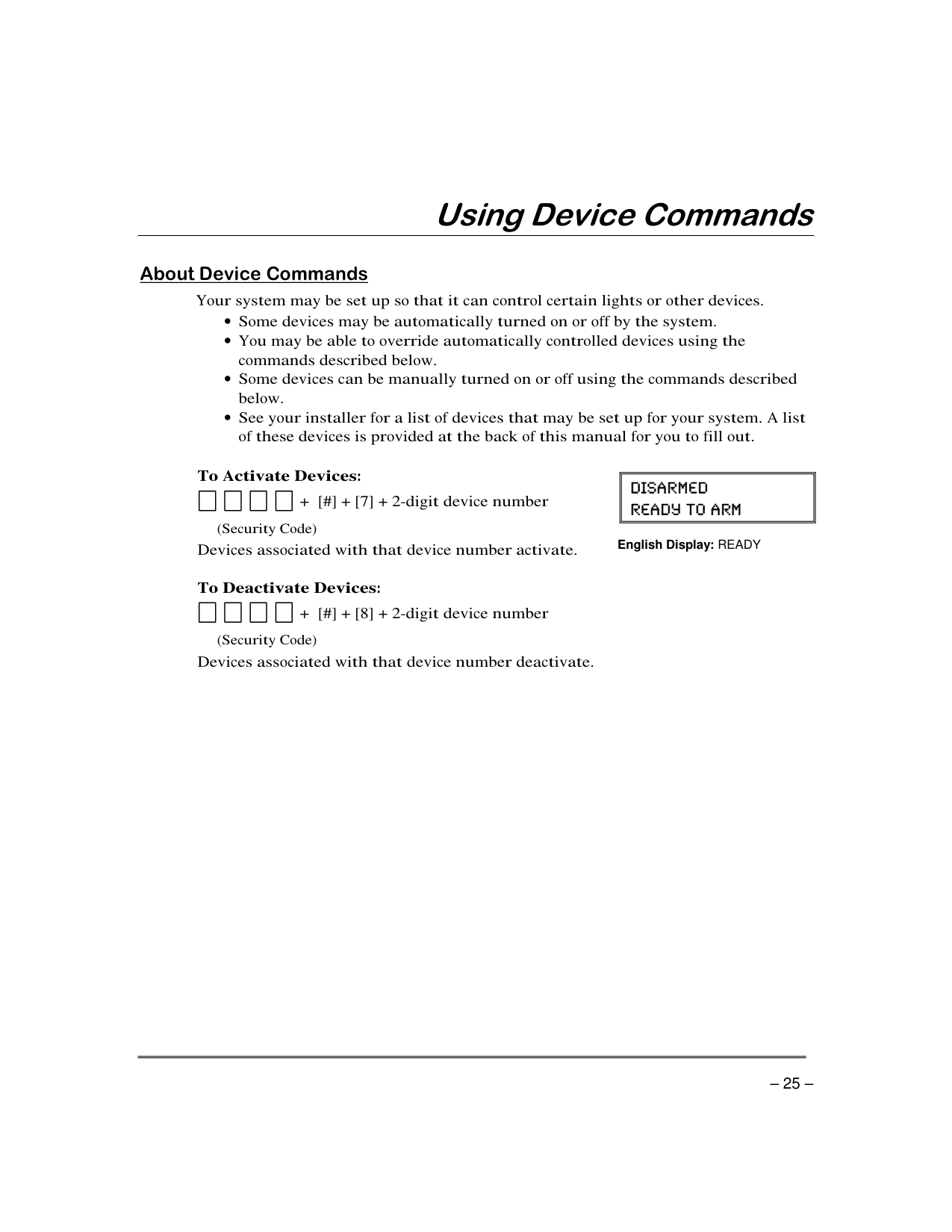
Typical Macro Display:
||#
| |---| | |---|
“ ”
“ ”
|Function|Keystrokes Required|Touchpad Display| |---|---|---| | |BYPASS [6]| | | | “ ” | | | | “ ” |#| | | “ ” |#| | |AWAY [2]|#| | | “ ” |#|
|| | |---| | |---|
User Code” prompt appears.
|| | |---| | |---|
| | |---|
| | |---|
| | |---|
| | |---|
| | |---|
| | |---|
| | |---|
| | |---|
|| | |---| | |---|
############ English Display: READY
“ ”
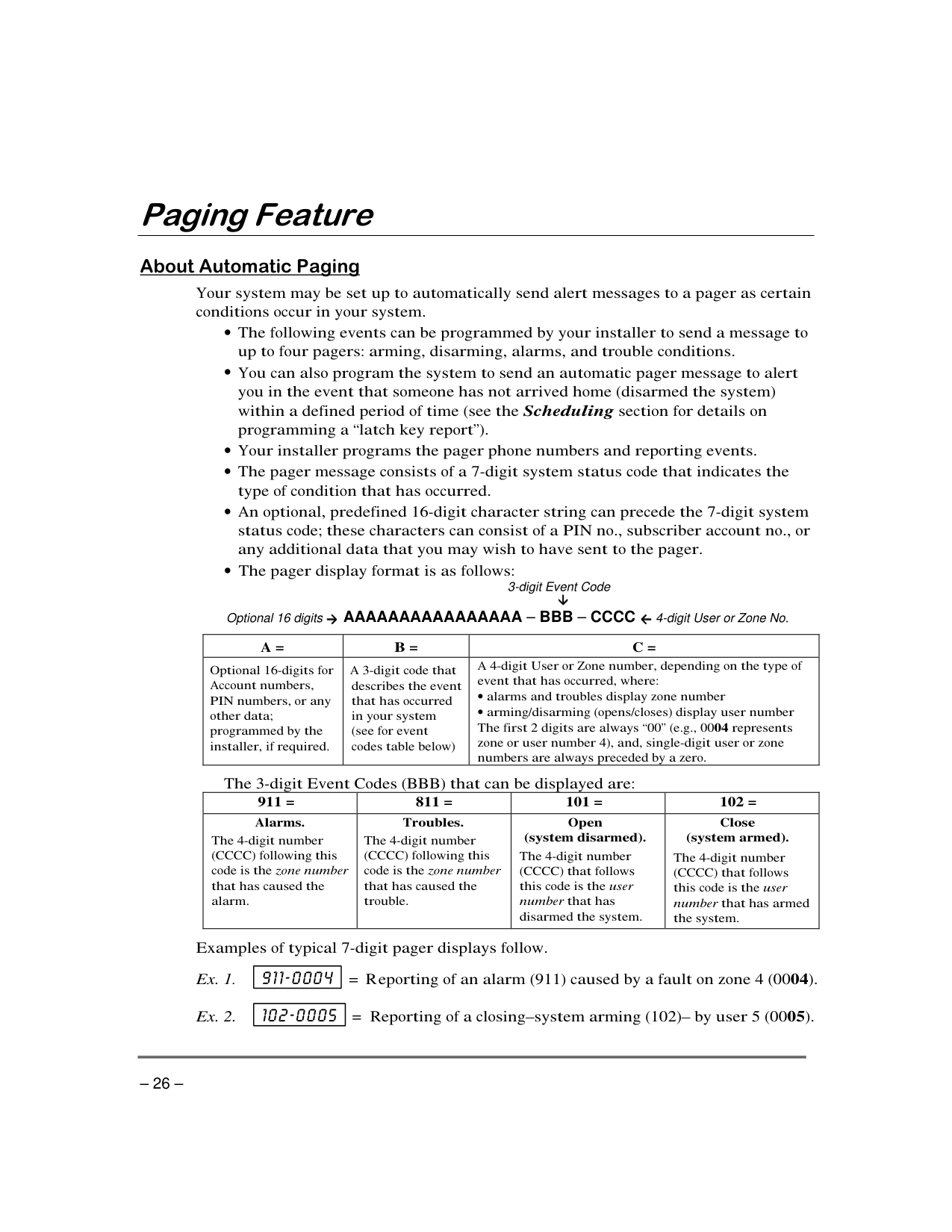
3-digit Event Code
####### Optional 16 digits AAAAAAAAAAAAAAAA – BBB – CCCC 4-digitUser or Zone No.
| | | | |---|---|---| | | | “ ” |
| | | | | |---|---|---|---| | | | | |
| | |---|
| | |---|
– –
. “ ” “ ”
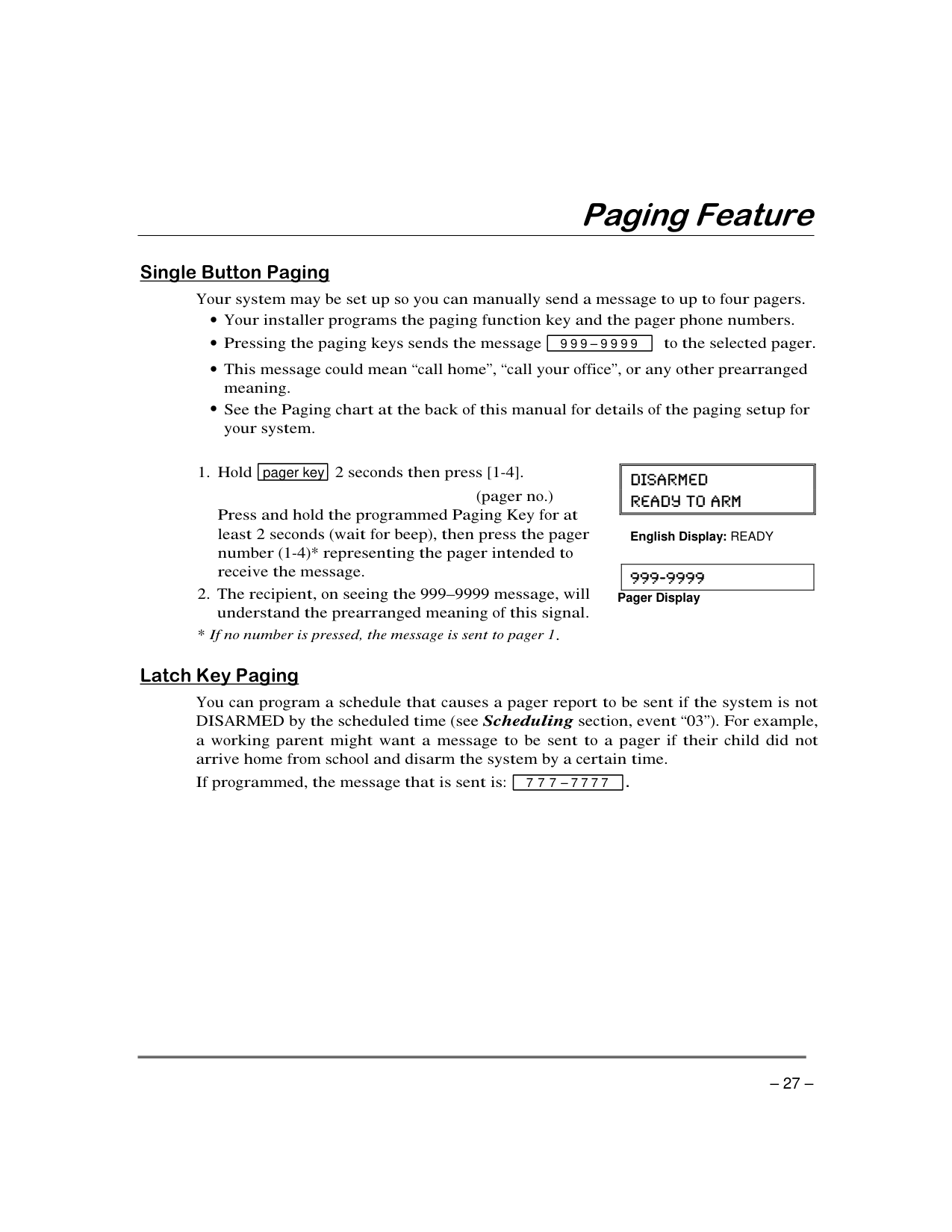
|999–9999| |---|
|pager key| |---|
–
|| | |---| | |---|
English Display: READY
| | |---|
Pager Display
“ ”
|777–7777| |---|
############ .
' '
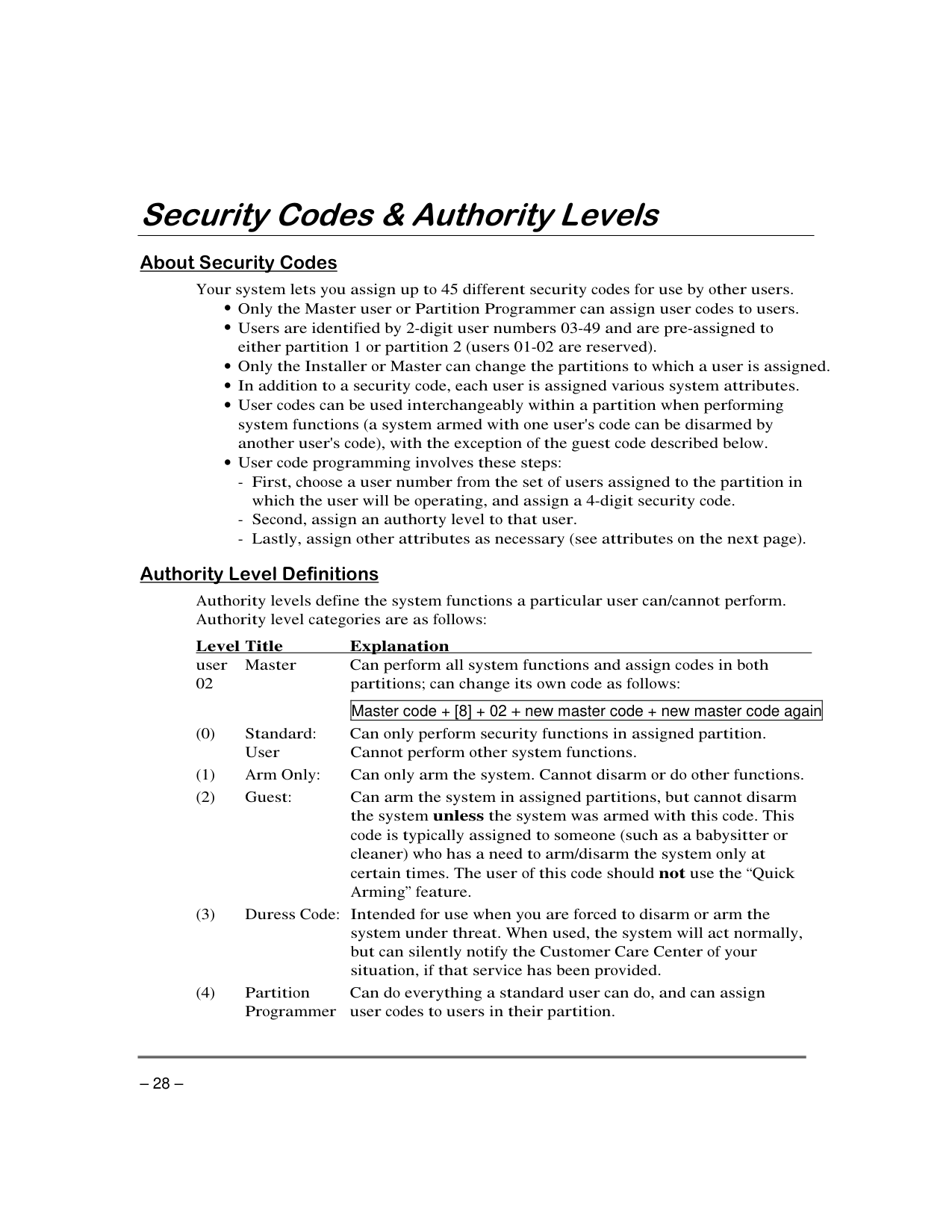
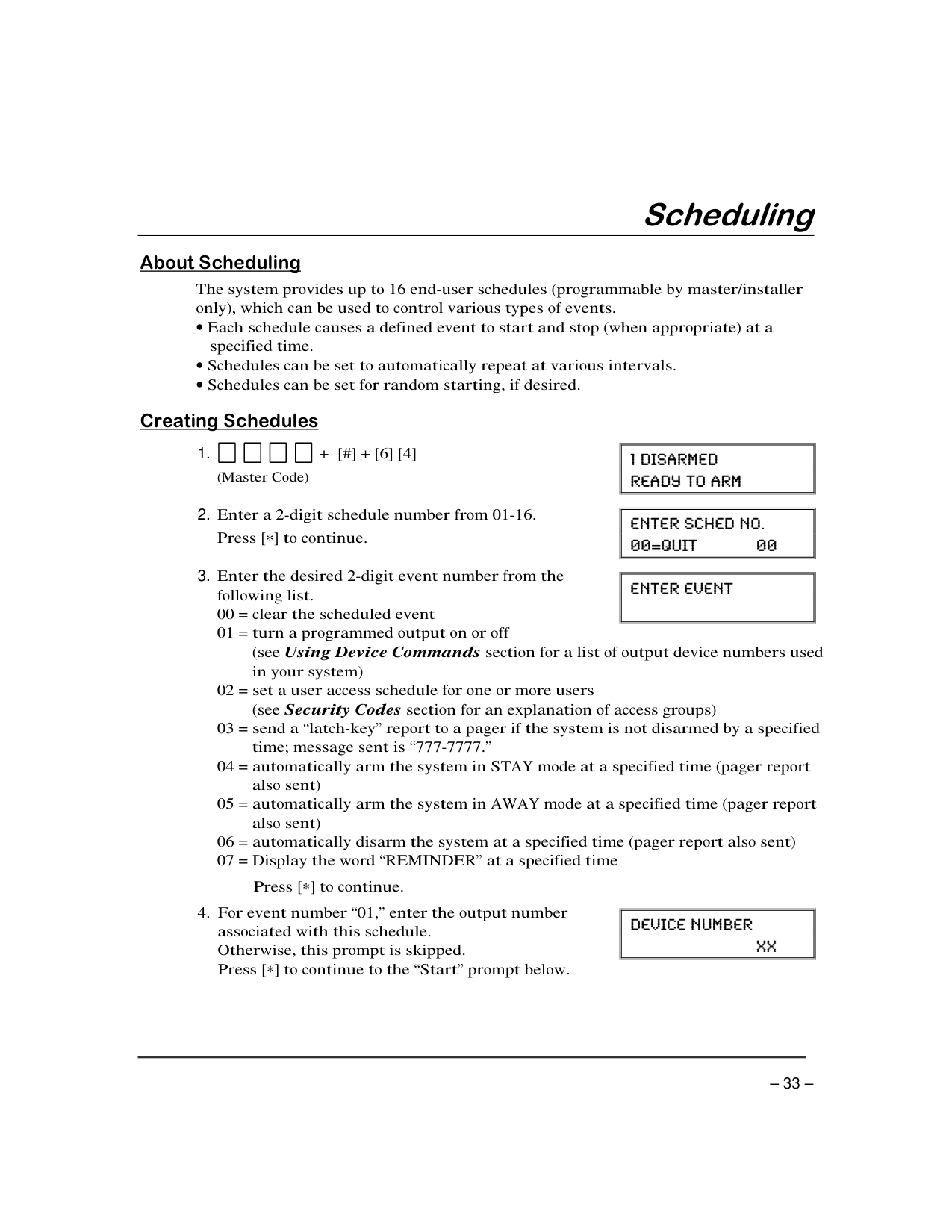
|Master code + [8] + 02 new master code + new master code again| |---|
“ ”
’
(Users 03/33 are preset to partition programmers, but can be changed.)
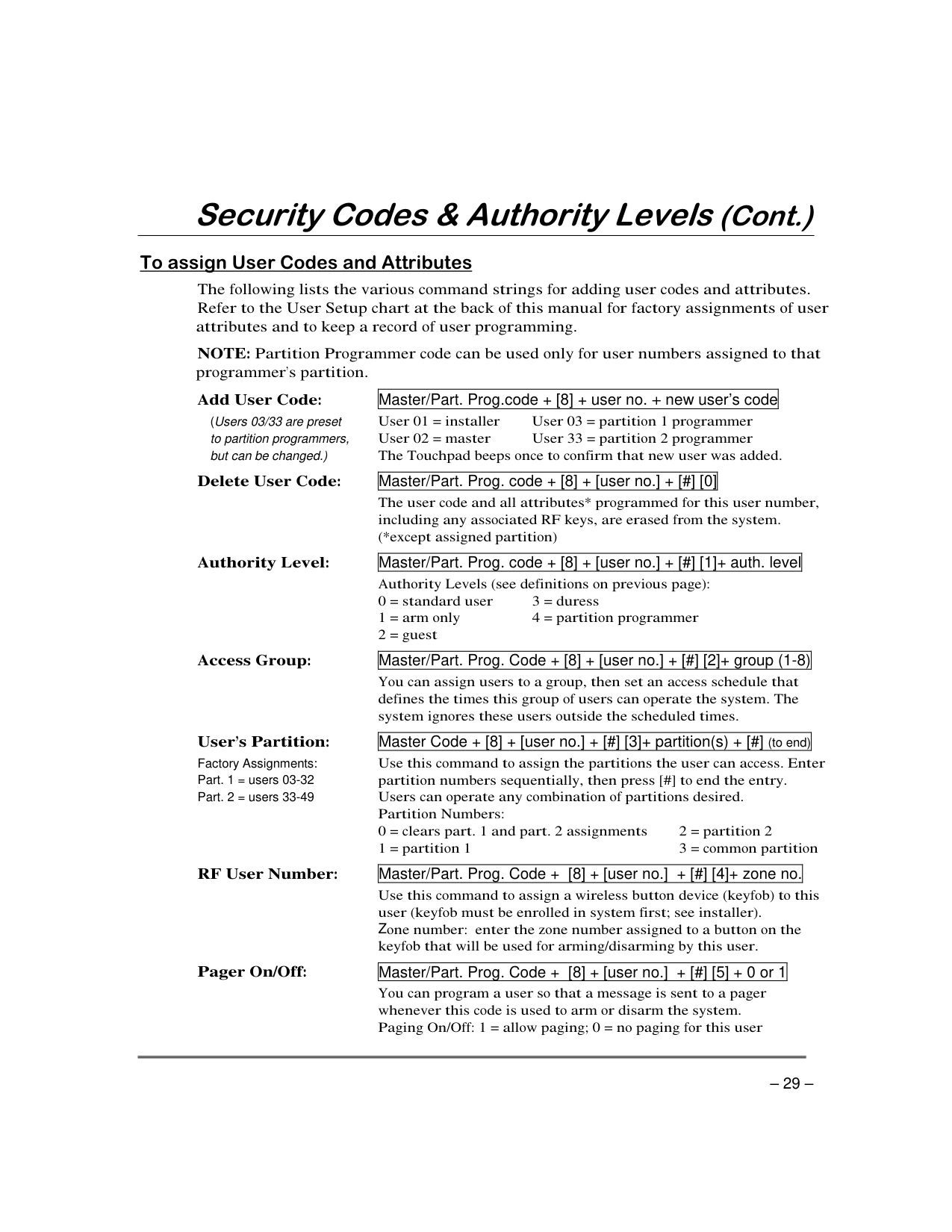
|Master/Part. Prog.code + [8] + user no. new user’s code| |---|
|Master/Part. Prog. code + [8] + [user no.] + [#] [0]| |---|
|Master/Part. Prog. code + [8] + [user no.] + [#] [1]+ auth. level| |---|
|Master/Part. Prog. Code + [8] + [user no.] + [#] [2]+ group (1-8)| |---|
’ Factory Assignments:
|Master Code + [8] + [user no.] + [#] [3]+ partition(s) + [#] (to end)| |---|
|Master/Part. Prog. Code + [8] + [user no.] + [#] [4]+ zone no.| |---|
Z
|Master/Part. Prog. Code + [8] + [user no.] + [#] [5] + 0 or 1| |---|
######## '
| | | | | | | |---|---|---|---|---|---| | | | | | | | | | | | | | | | | | | | | | | | | | | | | | | | | | | |
| | |---|
| | |---|
| | |---|
| | |---|
’
|| | |---| | |---|
English Display: READY
|| | |---| | |---|
English Display: READY
“ ” “ ”
| | |---|
| | |---|
| | |---|
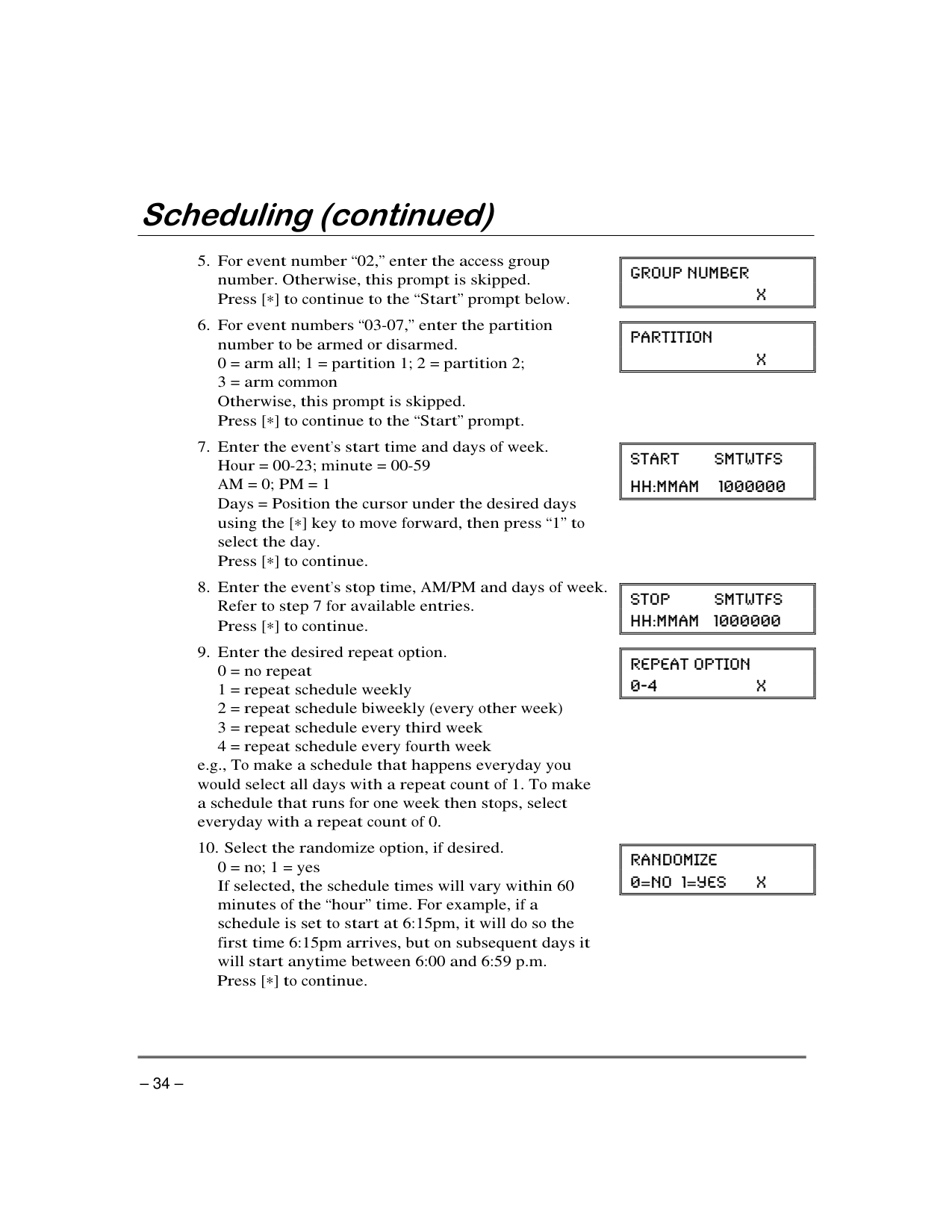
| | |---|
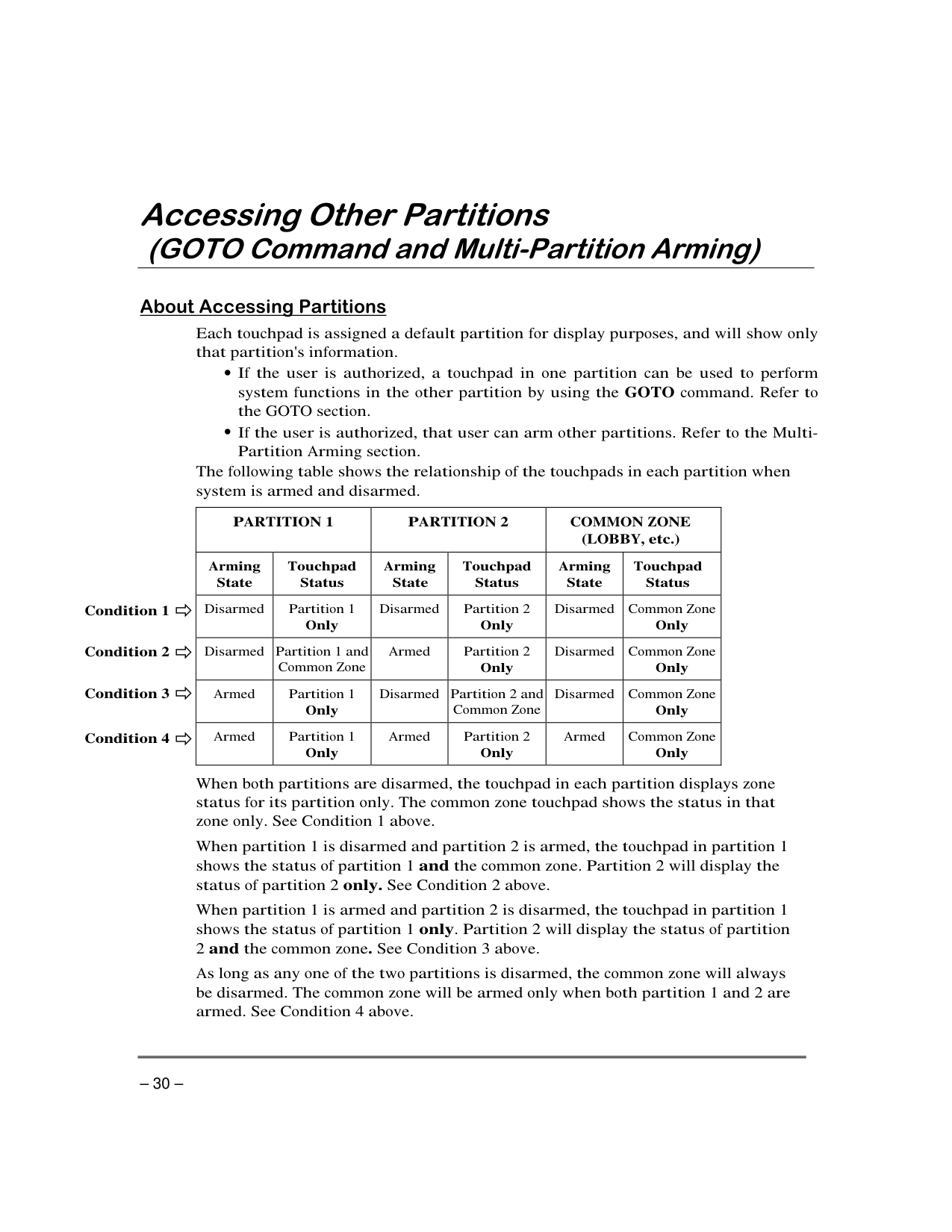
####### Multi-Partition Arming Commands
|| | |---| | |---|
English Display: READY
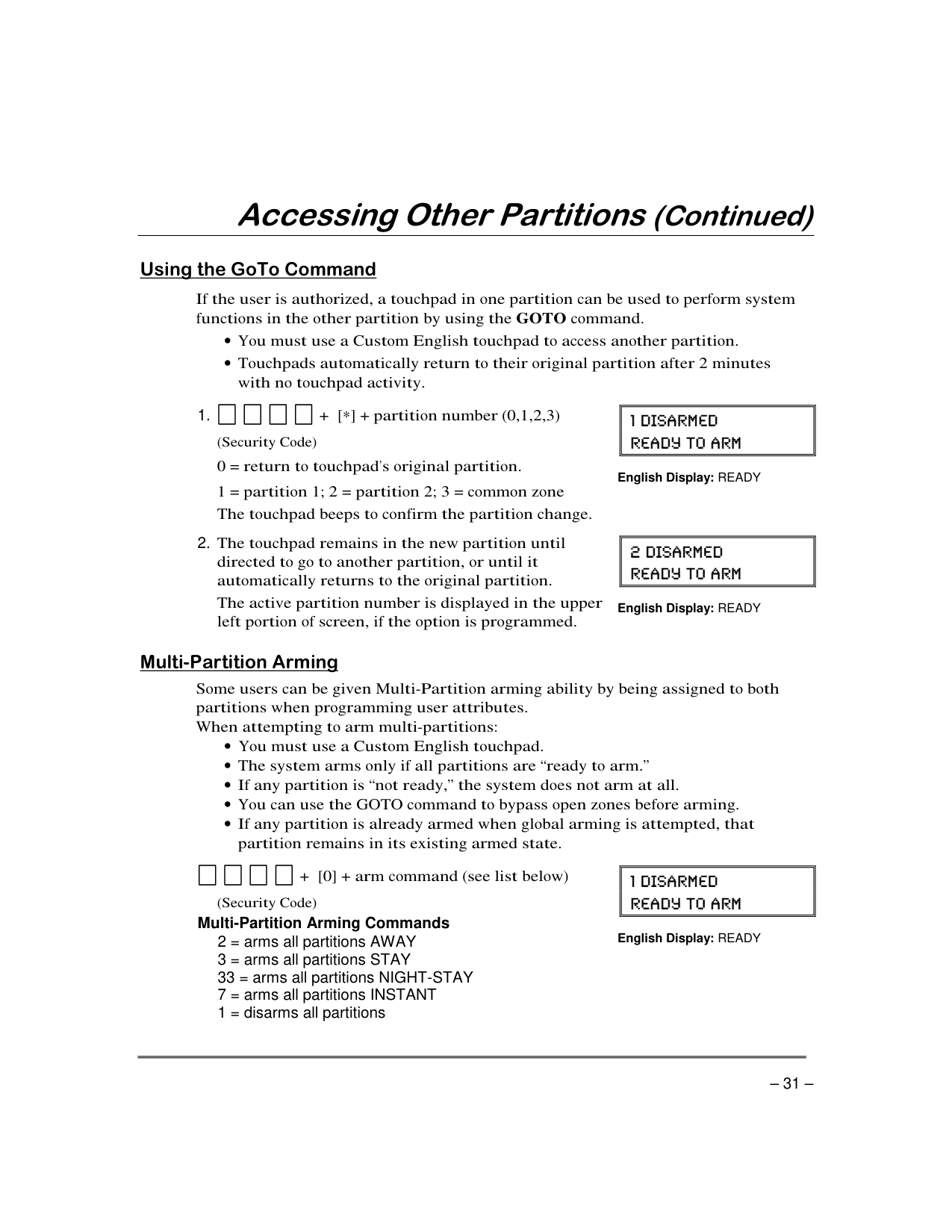
|Ask your installer if a "common zone" was assigned. If so, check
this box
| | |---|
| |---|
######## ’
| | |---|
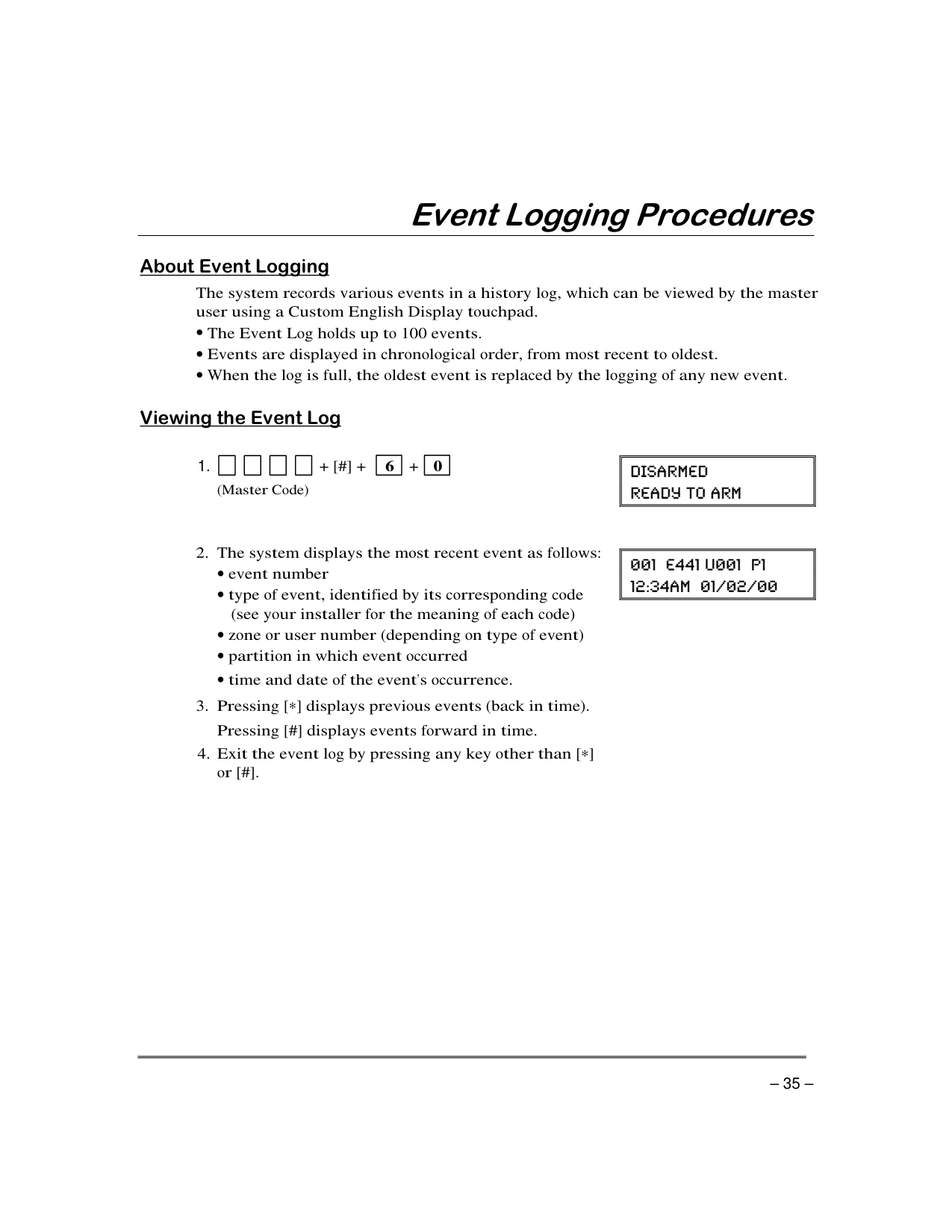
| | |---|
| | |---|
| | |---|
|| | |---| | |---|
||=
| |---| | |---|
| | |---|
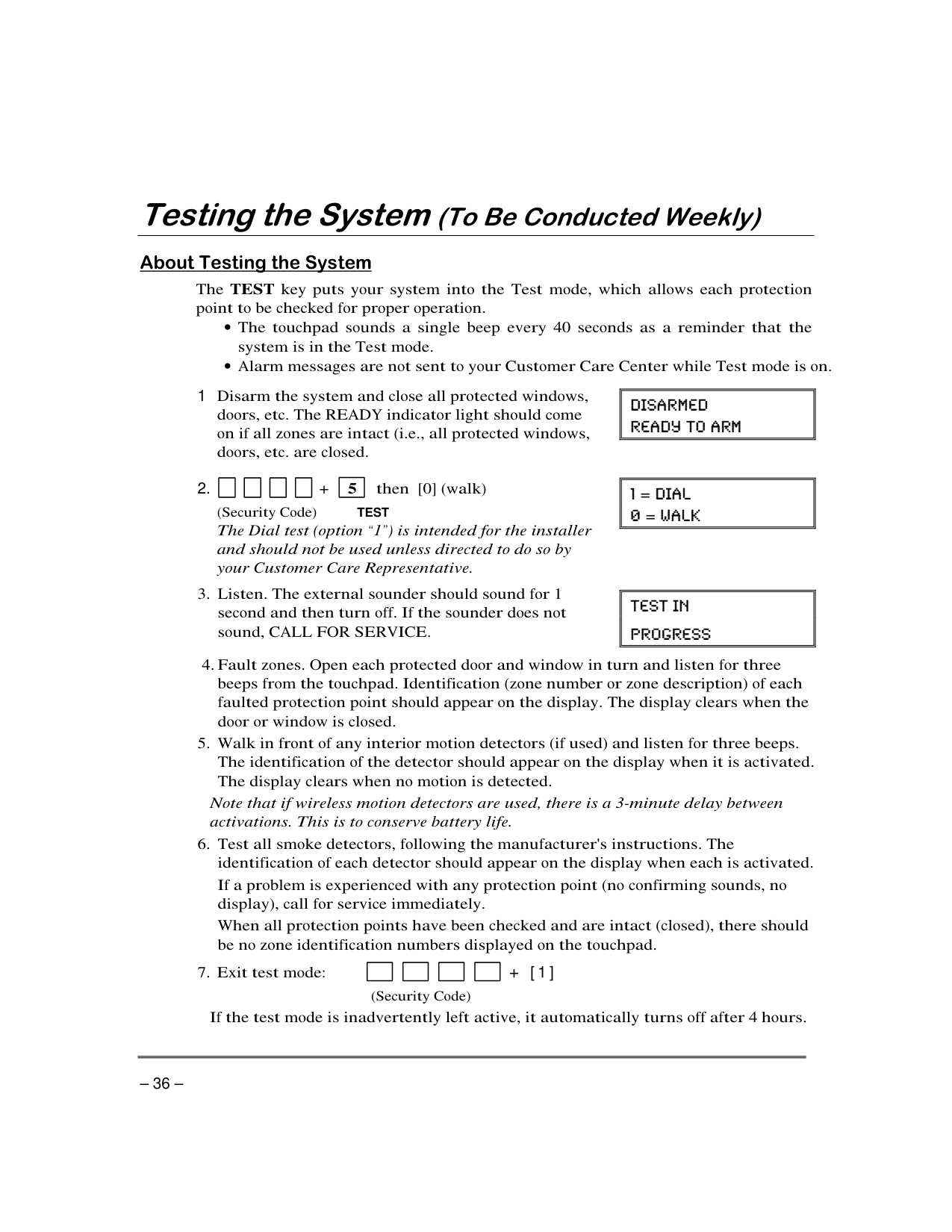
“ ” “ ”
“ ”
“ ”
“ ”
|| | |---| | |---|
“ ”
“ ” “ ”
|| | |---| | |---|
|| | |---| | |---|
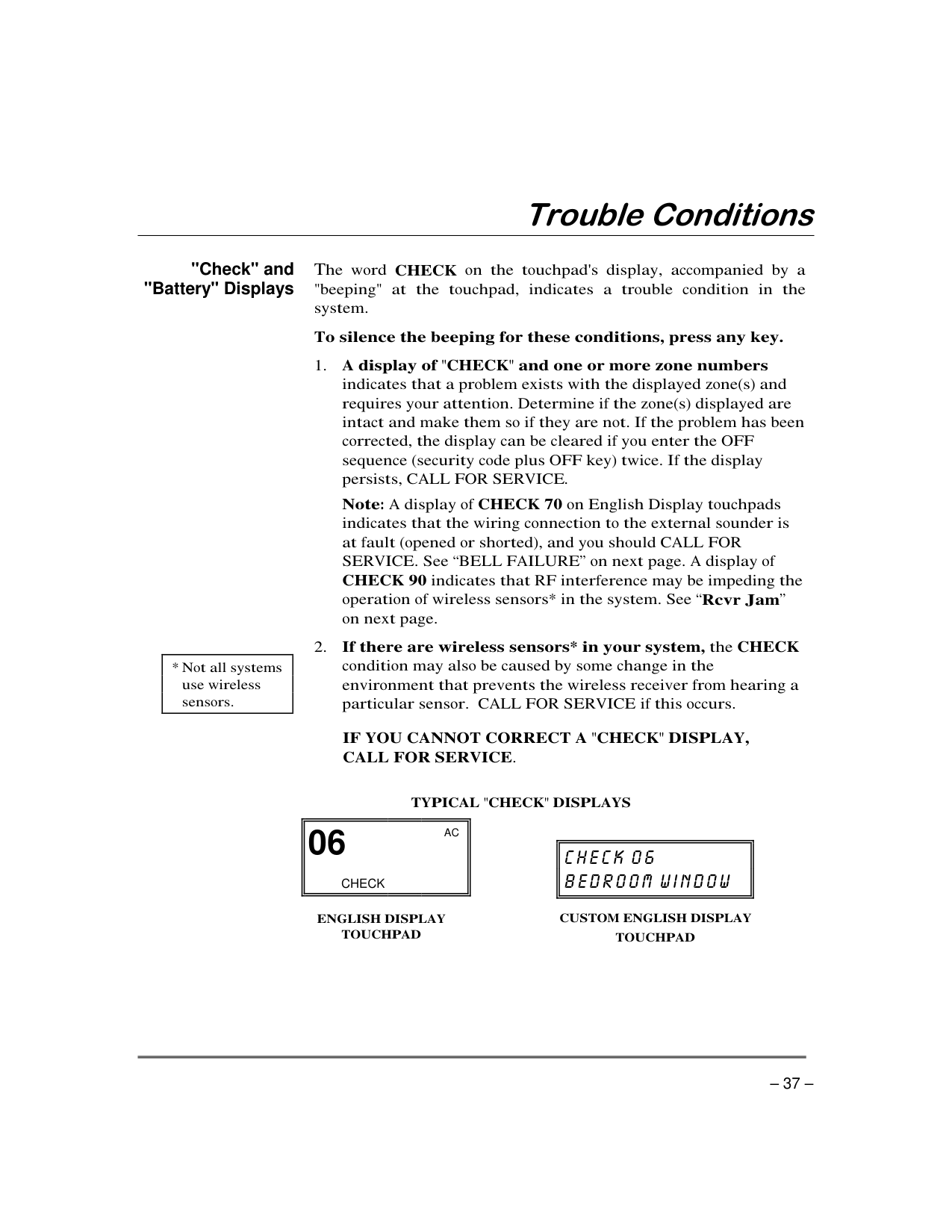
“ ” ’
“ ”
|| | |---| | |---|
’
|| | |---| | |---|
|| | |---| | |---|
“ ”
||= =
| |---| | |---|
| | |---|
| | |---|
| | |---|
| | |---|
| | |---|
’
|| | |---| | |---|
|| | |---| | |---|
|| | |---| | |---|
| | |---|
| | |---|
| | |---|
| |
|---|
| | |---|
############ TEST
“ ”
||=
=
| |---| | |---|
|| | |---| | |---|
'
| | |---|
| | |---|
| | |---|
| | |---|
+ [1]
###### "Check" and "Battery" Displays
'
| | |---|
“ ”
“ ”
||06
CHECK
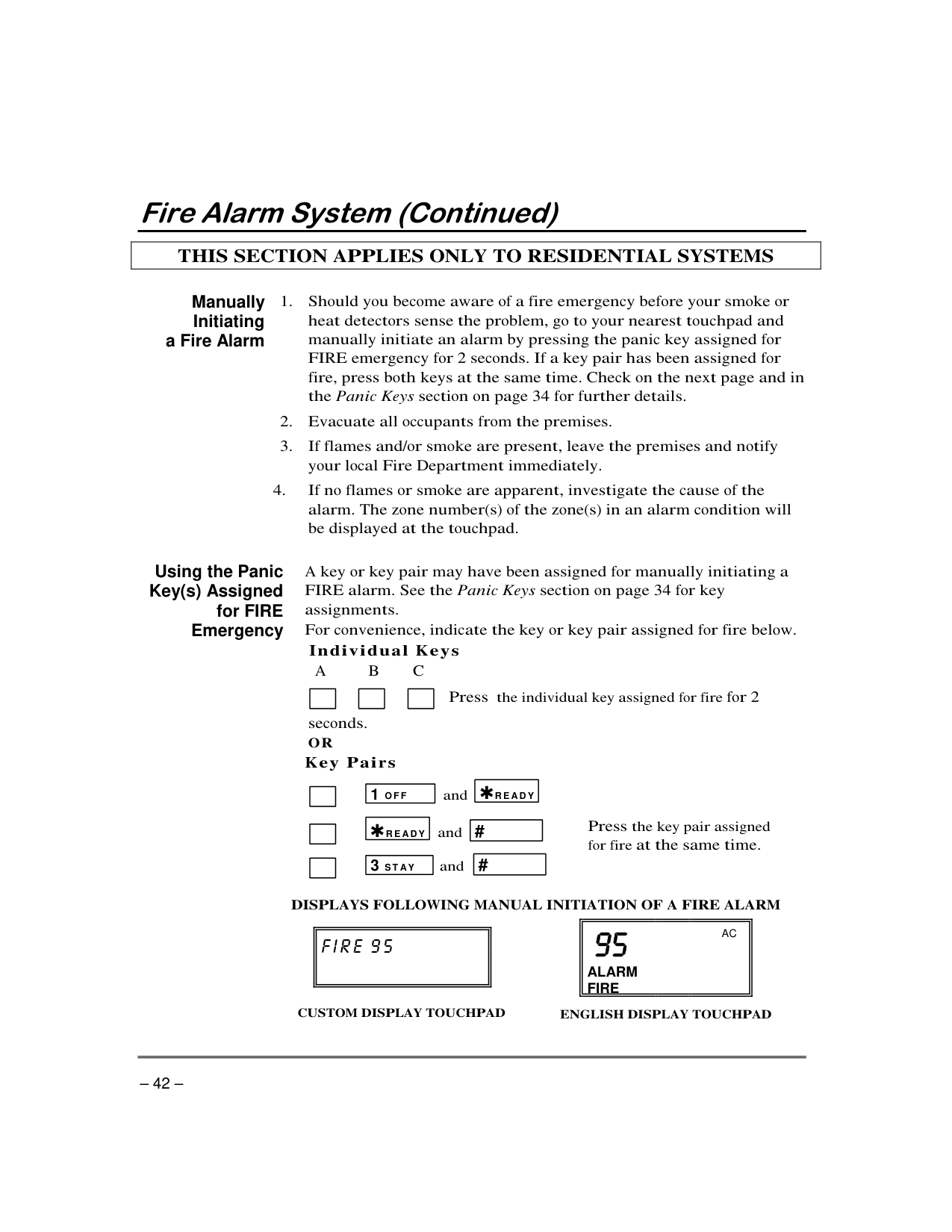
AC| |---| | |---|
|| | |---| |
|---|
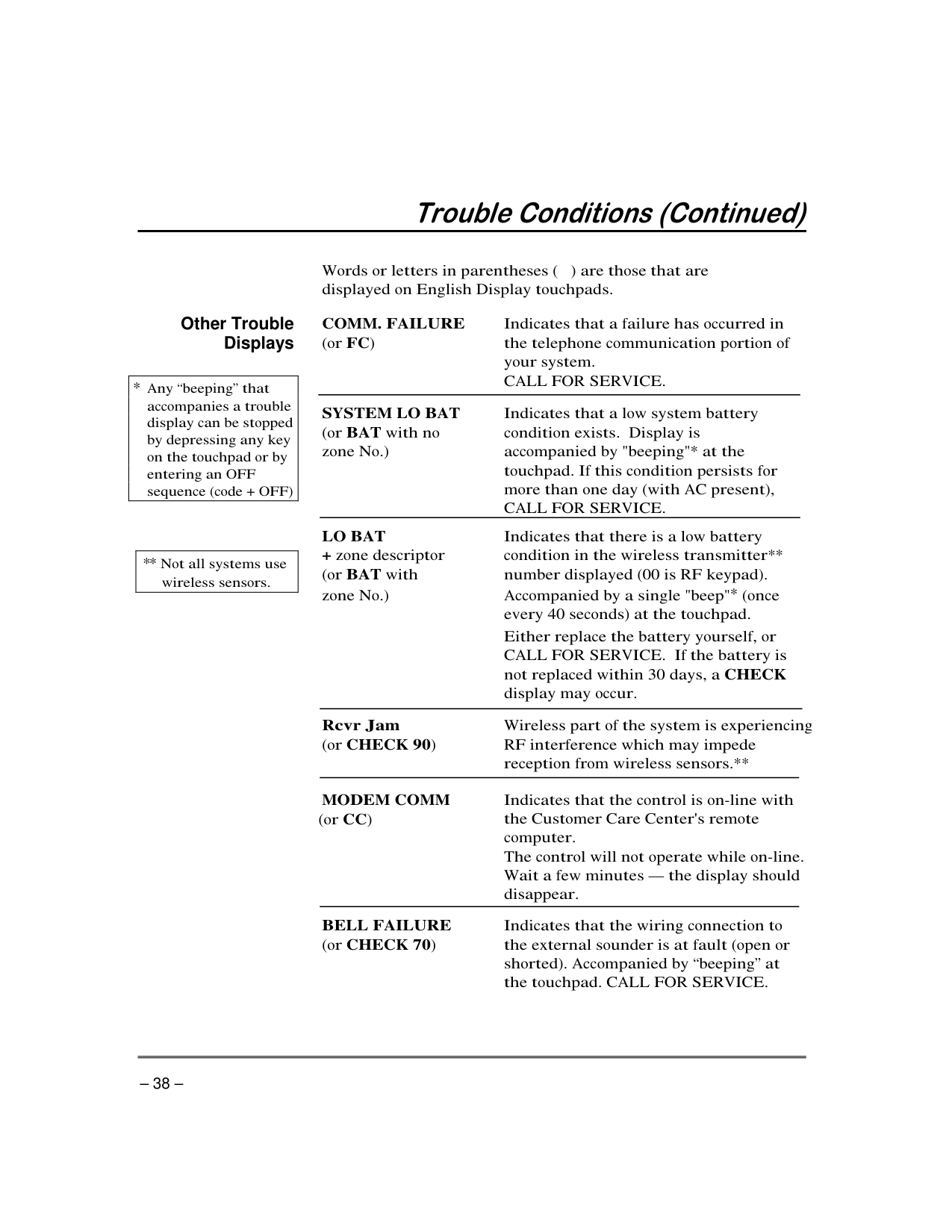
###### Other Trouble Displays
| “ ”
| |---|
| | |---|
'
—
“ ”
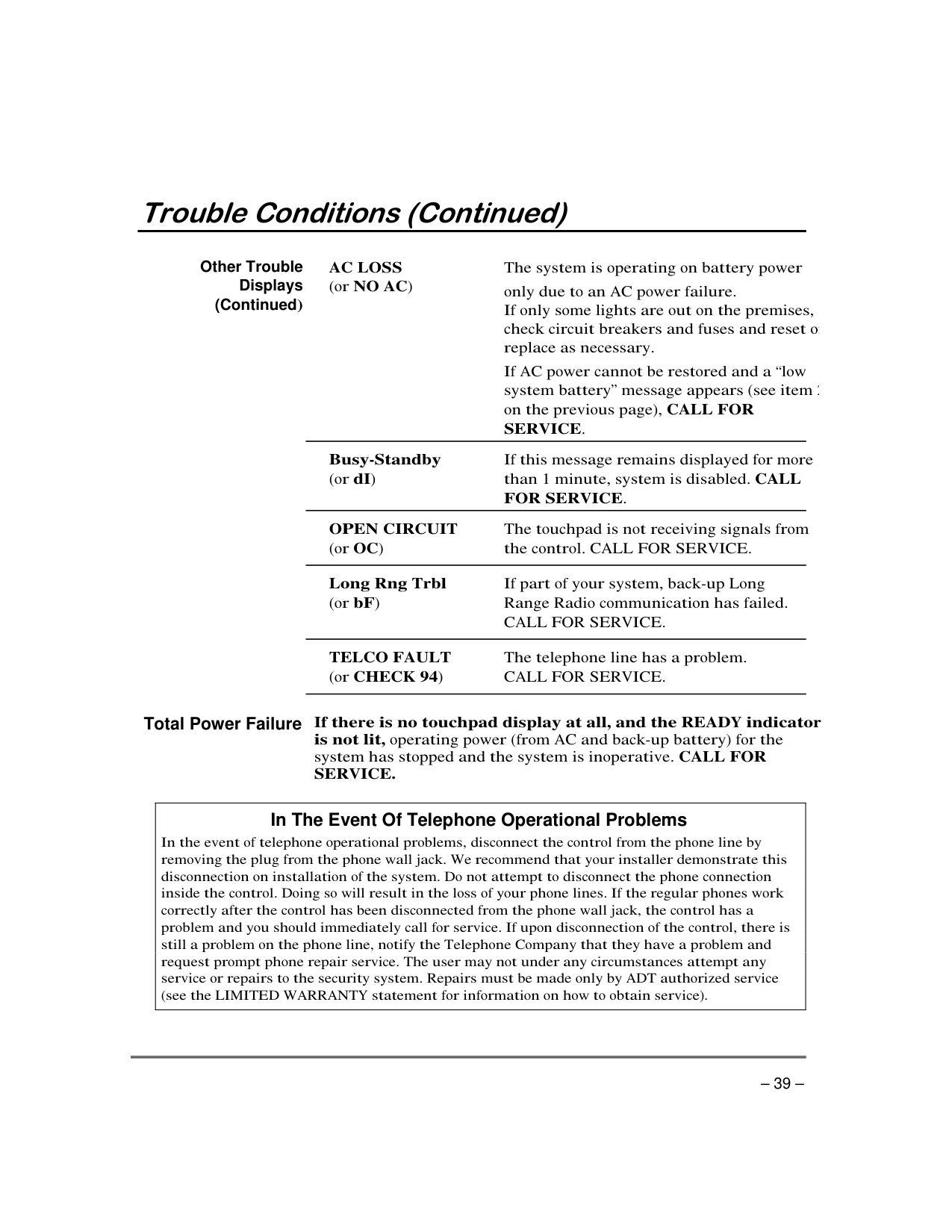
Other Trouble
Displays (Continued
“ ”
Total Power Failure
|In The Event Of Telephone Operational Problems
| |---|
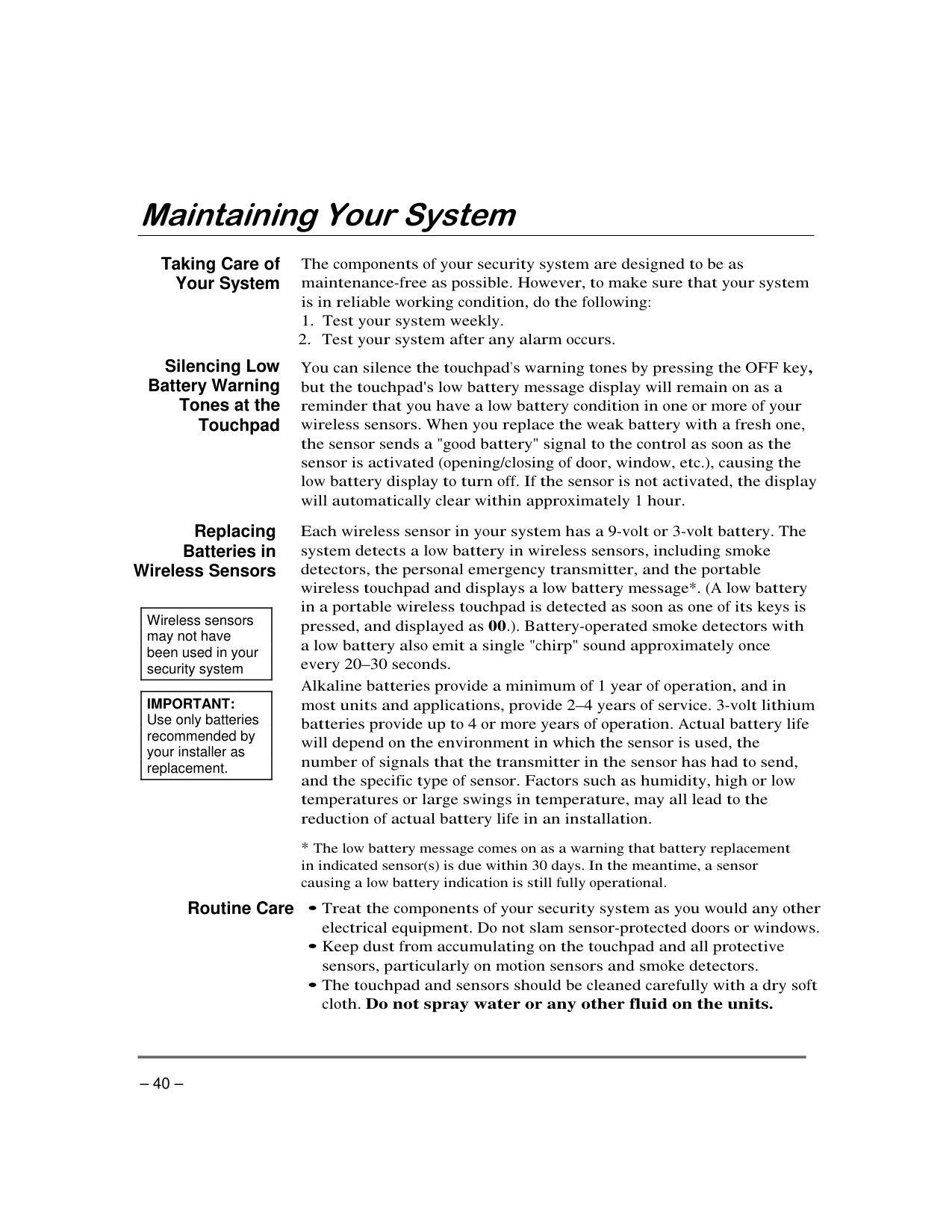
Taking Care of Your System
Silencing Low Battery Warning Tones at the Touchpad
’ '
Replacing
Batteries in Wireless Sensors
|Wireless sensors may not have been used in your security system
| |---|
|IMPORTANT: Use only batteries recommended by your installer as replacement.
| |---|
–
–
Routine Care • •
•
| | |---|
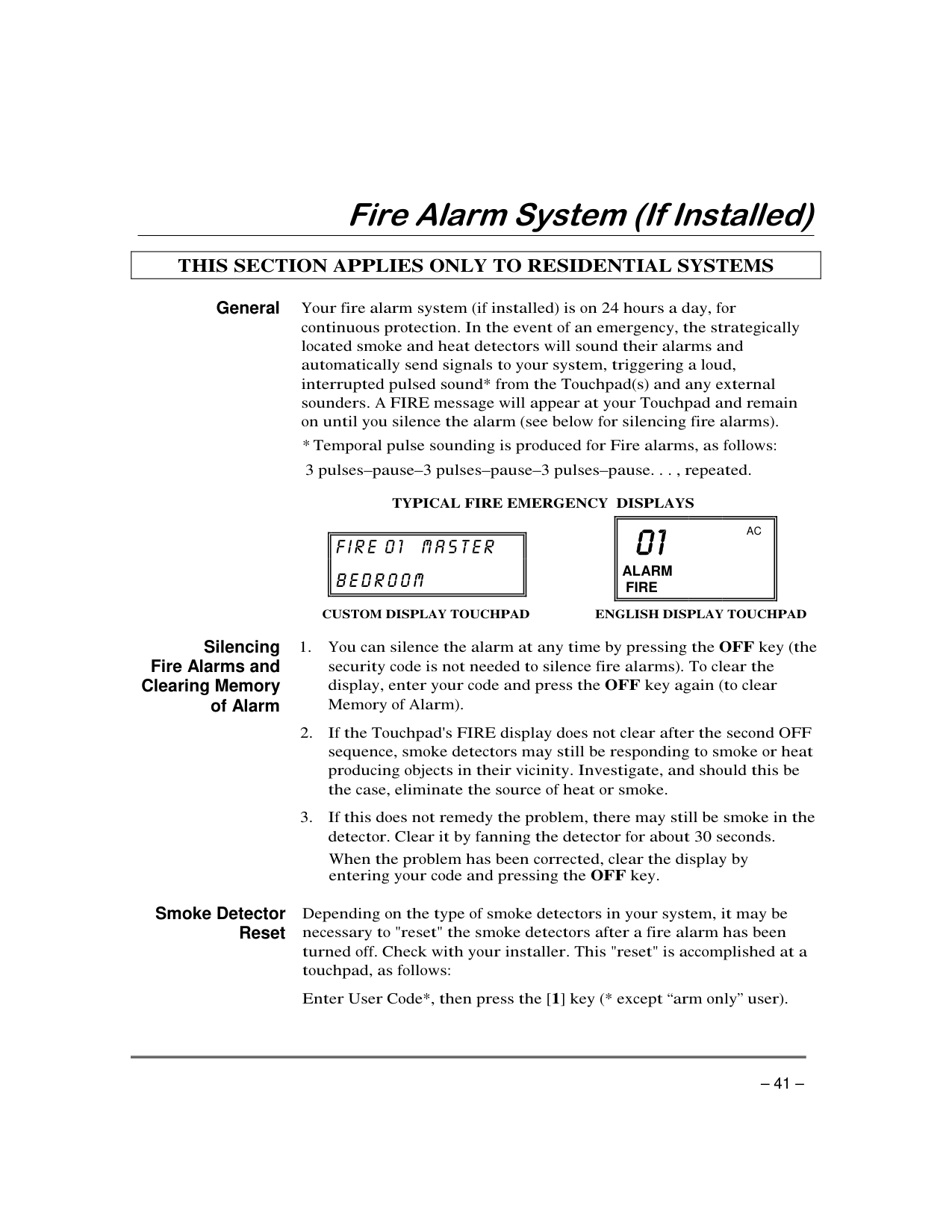
###### General
– – – – –
|| | |---| | |---|
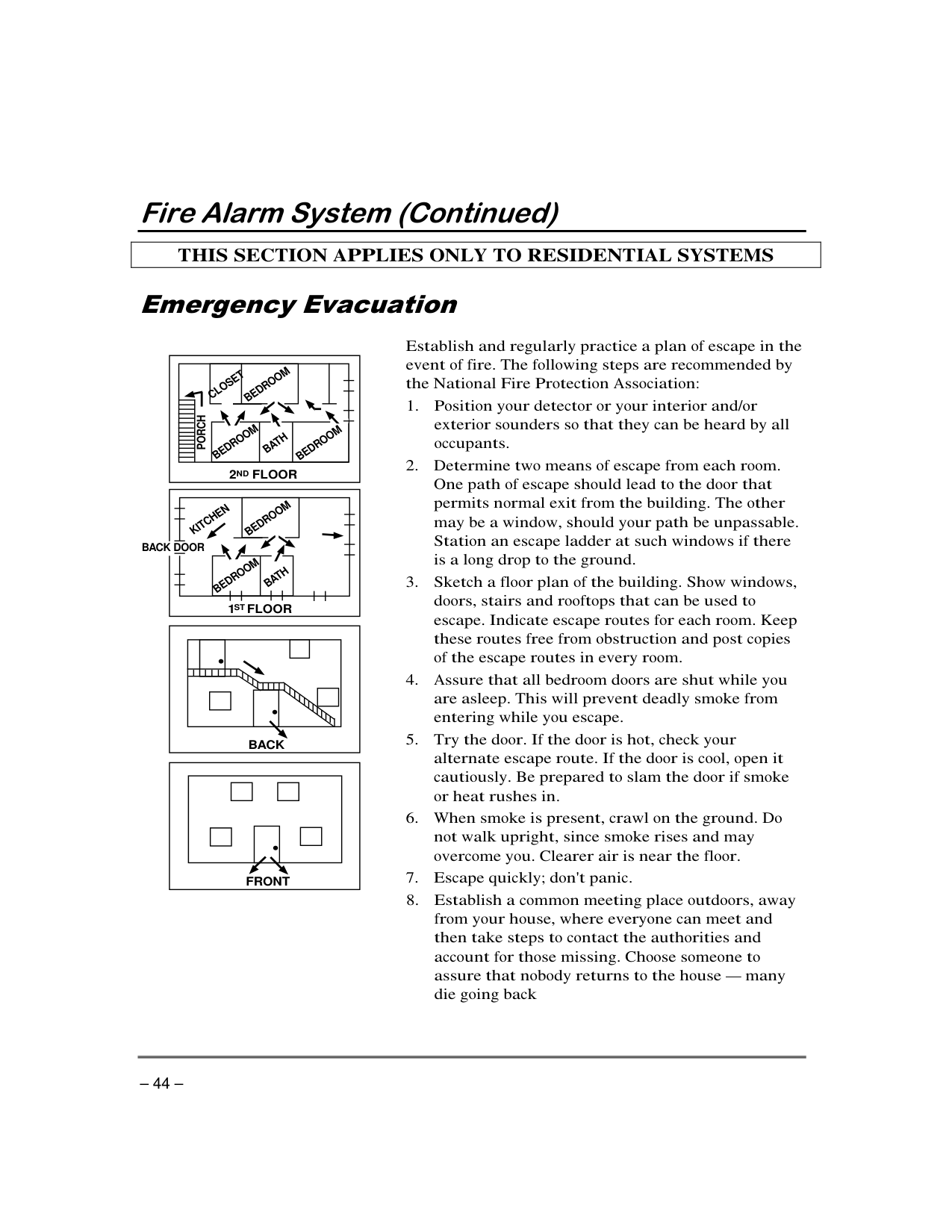
||ALARM FIRE
AC| |---| | |---|
Silencing Fire Alarms and
Clearing Memory of Alarm
'
###### Smoke Detector Reset
“ ”
| | |---|
Manually Initiating
a Fire Alarm
Using the Panic Key(s) Assigned
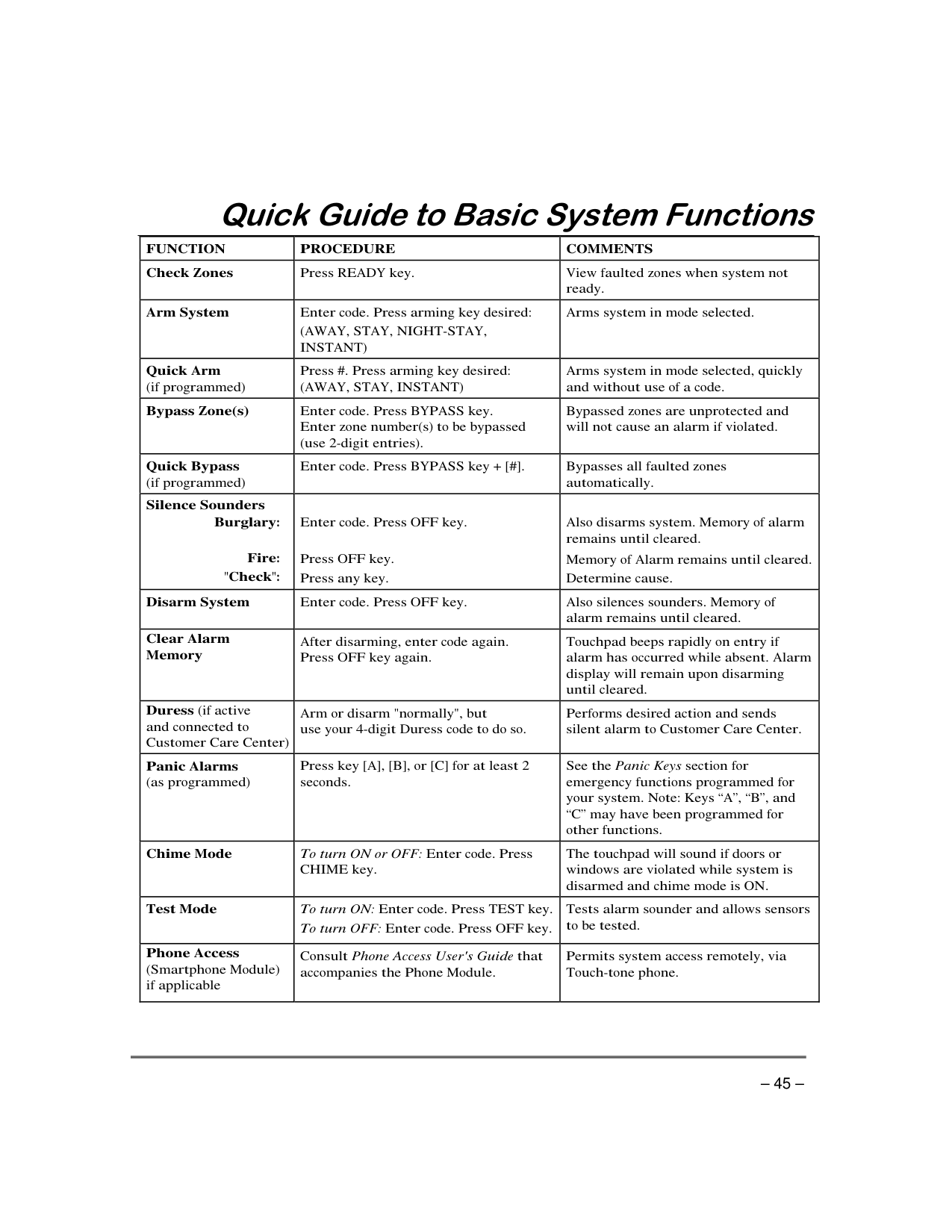
for FIRE Emergency
| | |---|
| | |---|
| | |---|
| | |---|
| | |---|
| | |---|
|1 OFF| |---|
|READY|
|---|
|3 STAY| |---|
|READY| |---|
|#| |---|
|#| |---|
|| | |---| | |---|
||ALARM FIRE
AC| |---| | |---|
| |
|---|
'
KITCHEN
TV ROOM KITCHEN
BDRM BDRM
DINING
BEDROOM
BEDROOM
DINING
LIVING ROOM
LIVING ROOM BEDROOM
BEDROOM
Smoke Detectors for Minimum Protection Smoke Detectors for Additional Protection Heat-Activated Detectors
BEDROOM
BEDROOM BEDROOM TO BR
KTCHN
. CLOSEDDOOR GARAGE
LVNG RM
BASEMENT
| | |---|
|BEDROOM
2 FLOORND
BATH BEDROOM
PORCH
CLOSET
BEDROOM| |---|
|BATH
BEDROOMKITCHEN
1 FLOORST
BEDROOM| |---|
############### BACK DOOR
|•
BACK
•| |---|
|•
FRONT| |---|
'
—
| | | | |---|---|---| | | | | | | | | | | | | | | | | | | | | | | | | | | | | | | | | | | | | | | | “ ” “ ” “ ” | | | | | | | | | | | ' | |
| | | | |---|---|---| | | | | | | | | | | | | | | | | | | | | | | | | | | | | | | | |
| | | | |---|---|---|
| | | | | | |is| | | | | | | | | | | | | | | | | | | | | | | | |
| é à
| |---|
| ’
| |---|
| ’é ’ é é é é ’ é é é é é é è ’ é à ’
’ é ’ ’ ’ ’ é é é é ê é é é ’ é ’ é é é ’ ê é
é é é ê é é é é ’ é é à ’ é à é é ’ à
’ ’ à ’ é é é ’ é ’ é é è é
’ ê à ’ é à é
’ ’é é à ê é à ’ é é à ’ ’é ’ è
| |---|
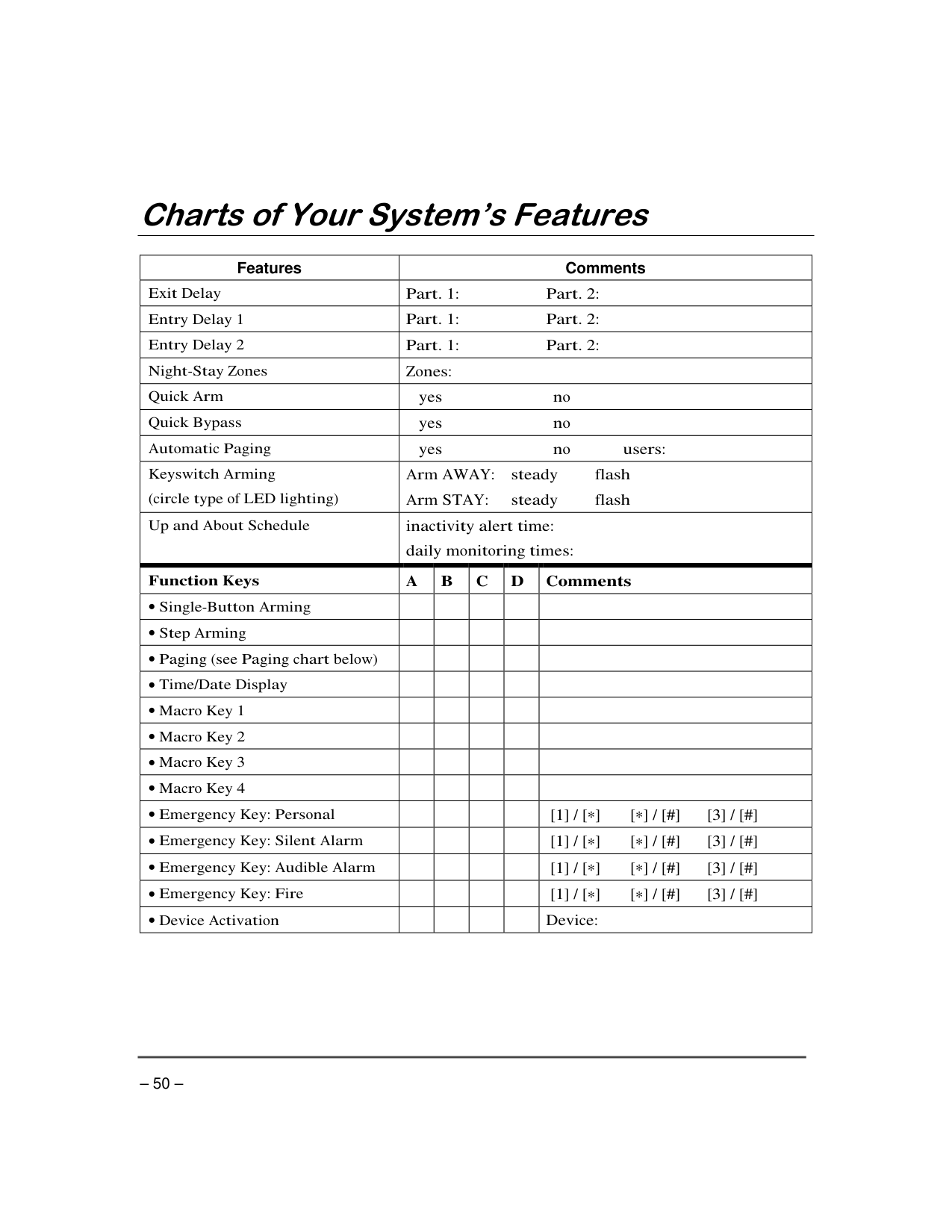
|Features|Comments|Comments|Comments|Comments|Comments| |---|---|---|---|---|---| | | | | | | | | | | | | | | | | | | | | | | | | | | | | | | | | | | | | | | | | | | | | | | | | | | | | | | | |
| | | | | | | | | | | | | | | | | | | | | | | | | | | | | | | | | | | | | | | | | | | | | | | | | | | | | | | | | | | | | | | | | | | | | | | | | | | | | | | | | | | | | | | | | | | | | | | | | | | | | | | | |
######## “ ” …
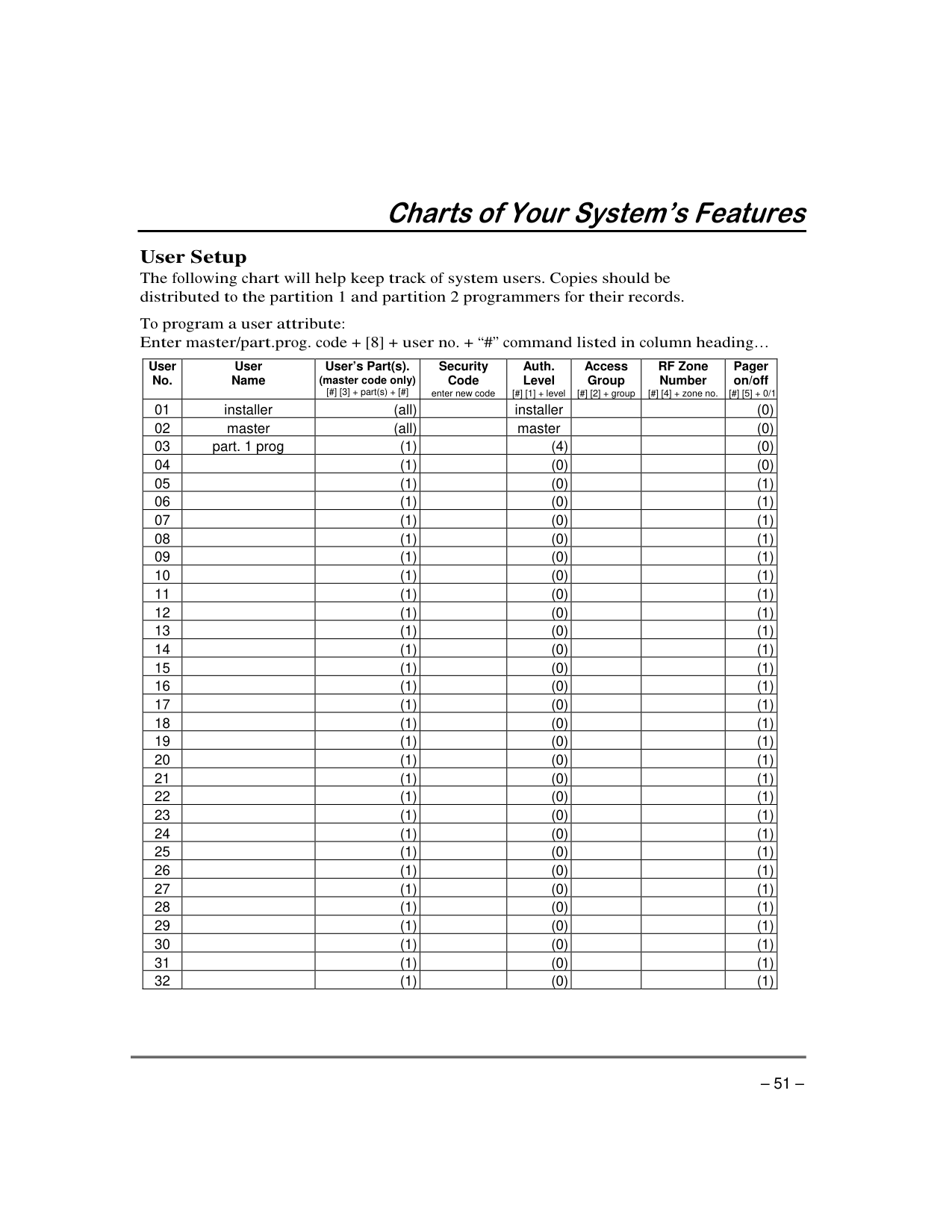
|User No.|User Name|User’s Part(s). (master code only) [#] [3] + part(s) + [#]|Security Code enter new code|Auth. Level [#] [1] + level|Access Group [#] [2] + group|RF Zone Number [#] [4] + zone no.|Pager on/off [#] [5] + 0/1| |---|---|---|---|---|---|---|---| |01|installer|(all)| |installer| | |(0)| |02|master|(all)| |master| | |(0)| |03|part. 1 prog|(1)| |(4)| | |(0)| |04| |(1)| |(0)| | |(0)| |05| |(1)| |(0)| | |(1)| |06| |(1)| |(0)| | |(1)| |07| |(1)| |(0)| | |(1)| |08| |(1)| |(0)| | |(1)| |09| |(1)| |(0)| | |(1)| |10| |(1)| |(0)| | |(1)| |11| |(1)| |(0)| | |(1)|
|12| |(1)| |(0)| | |(1)| |13| |(1)| |(0)| | |(1)| |14| |(1)| |(0)| | |(1)| |15| |(1)| |(0)| | |(1)| |16| |(1)| |(0)| | |(1)| |17| |(1)| |(0)| | |(1)| |18| |(1)| |(0)| | |(1)| |19| |(1)| |(0)| | |(1)| |20| |(1)| |(0)| | |(1)| |21| |(1)| |(0)| | |(1)| |22| |(1)| |(0)| | |(1)| |23| |(1)| |(0)| | |(1)| |24| |(1)| |(0)| | |(1)| |25| |(1)| |(0)| | |(1)| |26| |(1)| |(0)| | |(1)| |27| |(1)| |(0)| | |(1)| |28| |(1)| |(0)| | |(1)| |29| |(1)| |(0)| | |(1)| |30| |(1)| |(0)| | |(1)| |31| |(1)| |(0)| | |(1)| |32| |(1)| |(0)| | |(1)|
“ ” …
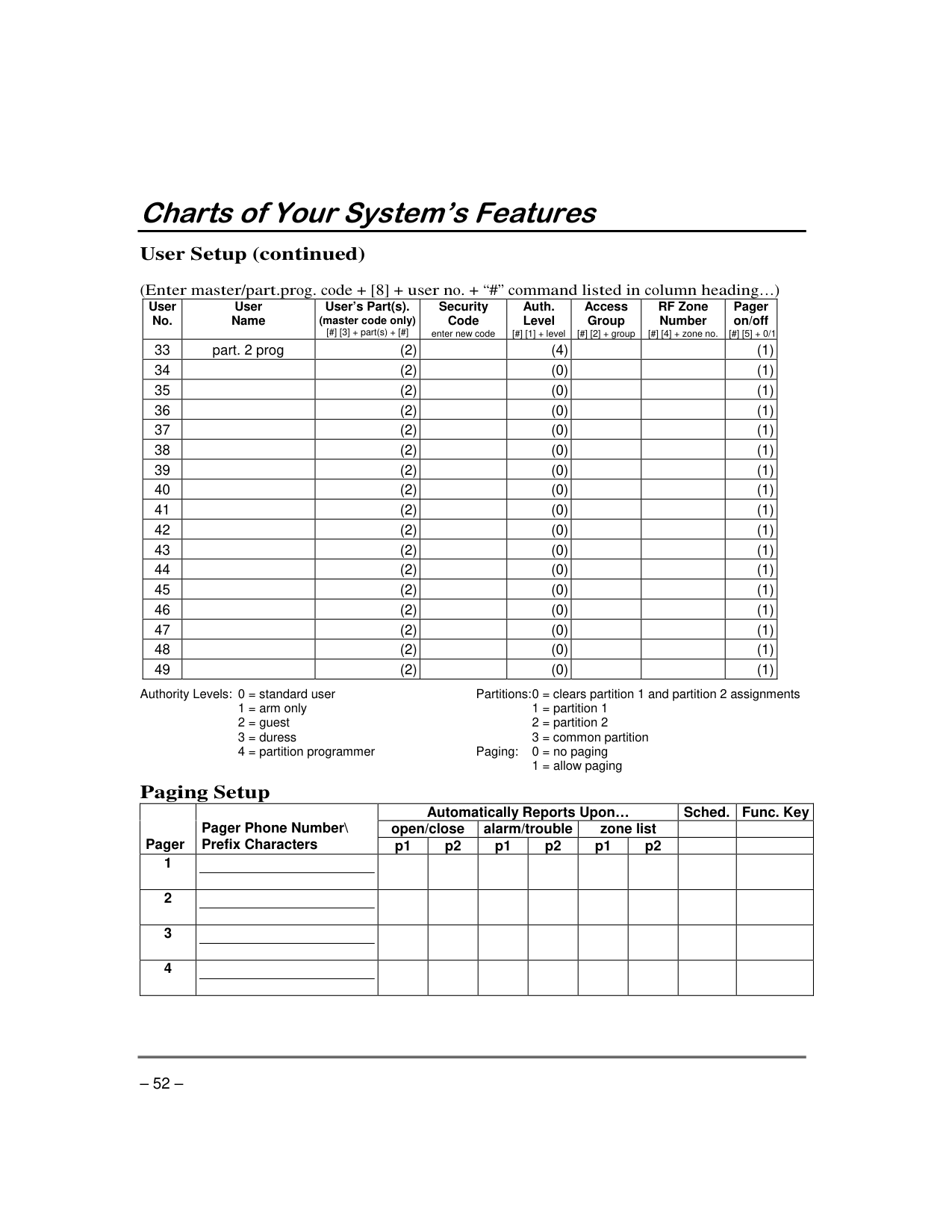
|User No.|User Name|User’s Part(s). (master code only) [#] [3] + part(s) + [#]|Security Code enter new code|Auth. Level [#] [1] + level|Access Group [#] [2] + group|RF Zone Number [#] [4] + zone no.|Pager on/off [#] [5] + 0/1| |---|---|---|---|---|---|---|---| |33|part. 2 prog|(2)| |(4)| | |(1)| |34| |(2)| |(0)| | |(1)| |35| |(2)| |(0)| | |(1)| |36| |(2)| |(0)| | |(1)| |37| |(2)| |(0)| | |(1)|
|38| |(2)| |(0)| | |(1)| |39| |(2)| |(0)| | |(1)| |40| |(2)| |(0)| | |(1)| |41| |(2)| |(0)| | |(1)| |42| |(2)| |(0)| | |(1)| |43| |(2)| |(0)| | |(1)| |44| |(2)| |(0)| | |(1)| |45| |(2)| |(0)| | |(1)| |46| |(2)| |(0)| | |(1)| |47| |(2)| |(0)| | |(1)| |48| |(2)| |(0)| | |(1)| |49| |(2)| |(0)| | |(1)|
Authority Levels: 0 = standard user Partitions:0 = clears partition 1 and partition 2 assignments
|Pager
|Pager Phone Number\ Prefix Characters|Automatically Reports Upon…|Automatically Reports Upon…|Automatically Reports Upon…|Automatically Reports Upon…|Automatically Reports Upon…|Automatically Reports Upon…|Sched.|Func. Key| |---|---|---|---|---|---|---|---|---|---| |Pager
|Pager Phone Number\ Prefix Characters|open/close|open/close|alarm/trouble|alarm/trouble|zone list|zone list| | | |Pager
|Pager Phone Number\ Prefix Characters|p1|p2|p1|p2|p1|p2| | | |1| | | | | | | | | | |2| | | | | | | | | | |3| | | | | | | | | | |4| | | | | | | | | |
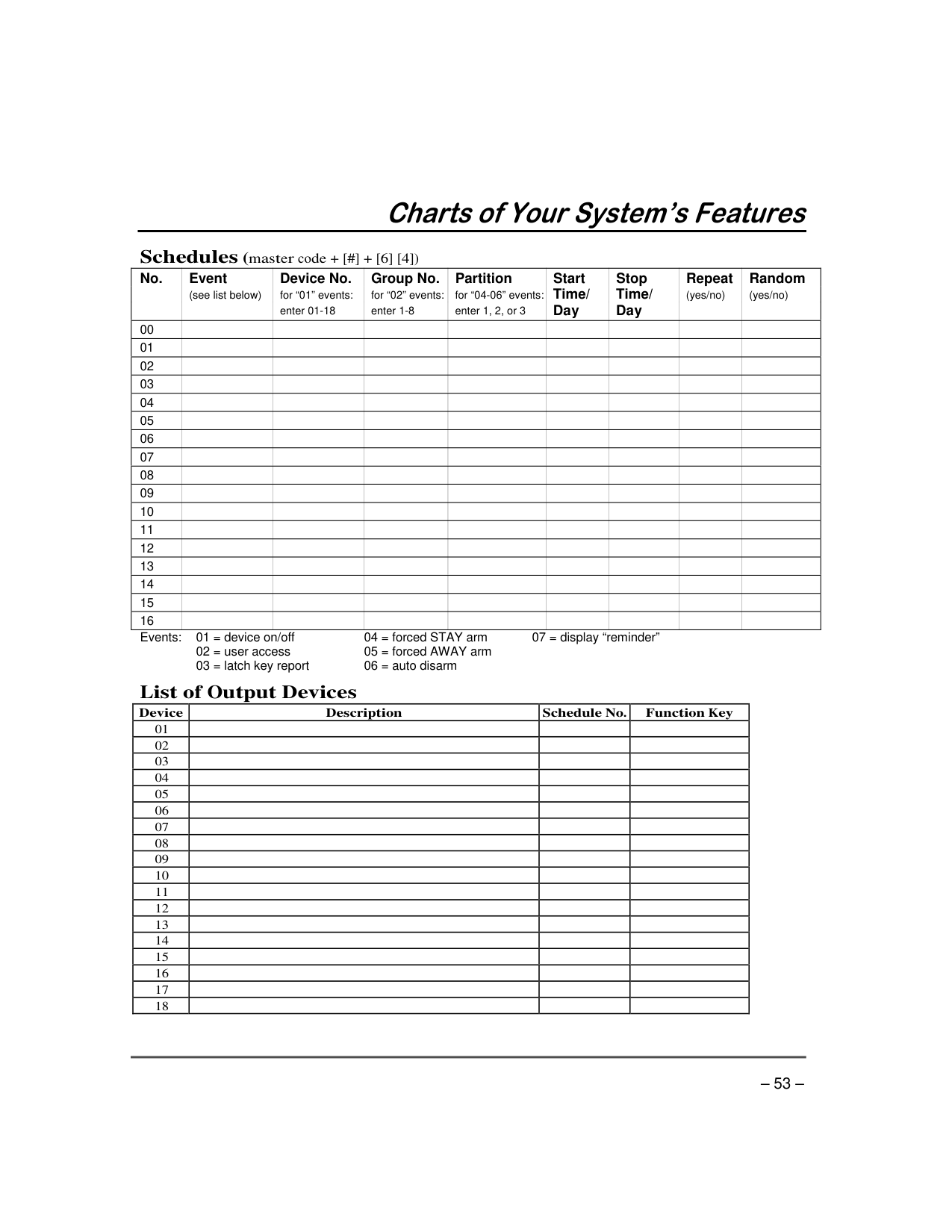
|No.|Event (see list below)|Device No. for “01” events: enter 01-18|Group No. for “02” events: enter 1-8|Partition for “04-06” events: enter 1, 2, or 3|Start Time/ Day|Stop Time/ Day|Repeat (yes/no)|Random (yes/no)
| |---|---|---|---|---|---|---|---|---| |00| | | | | | | | | |01| | | | | | | | | |02| | | | | | | | | |03| | | | | | | | | |04| | | | | | | | | |05| | | | | | | | | |06| | | | | | | | | |07| | | | | | | | | |08| | | | | | | | | |09| | | | | | | | | |10| | | | | | | | | |11| | | | | | | | | |12| | | | | | | | | |13| | | | | | | | | |14| | | | | | | | | |15| | | | | | | | | |16| | | | | | | | |
Events: 01 = device on/off 04 = forced STAY arm 07 = display “reminder”
| | | | | |---|---|---|---| | | | | | | | | | | | | | | |
| | | | | | | | | | | | | | | | | | | | | | | | | | | | | | | | | | | | | | | | | | | | | | | | | | | | | | | | | | | | | | | | | | | | | | | | | | |
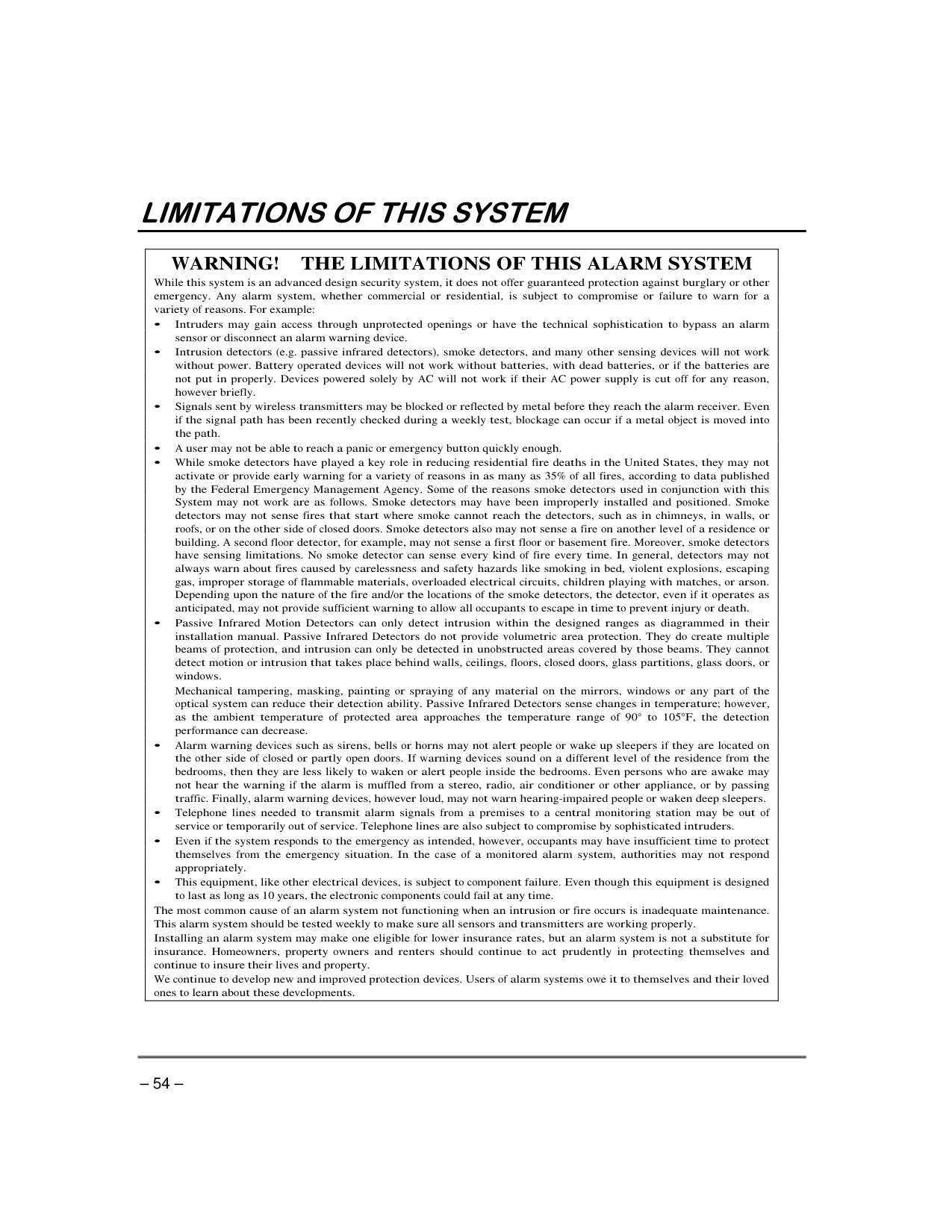
|•
•
•
•
•
•
° °
•
•
•
•
| |---|
#### Terms and Conditions Applying to Sale of Equipment
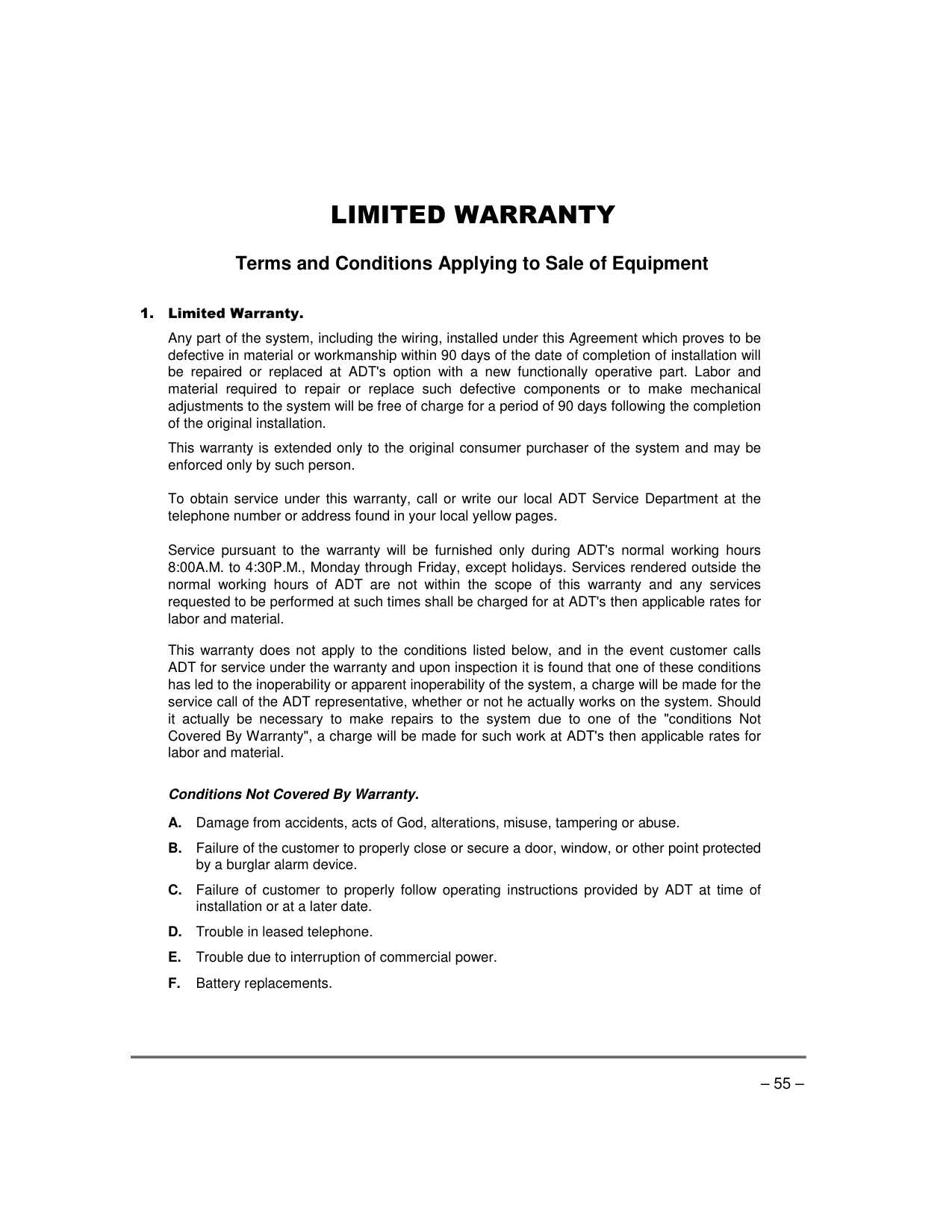
Any part of the system, including the wiring, installed under this Agreement which proves to be defective in material or workmanship within 90 days of the date of completion of installation will be repaired or replaced at ADT's option with a new functionally operative part. Labor and material required to repair or replace such defective components or to make mechanical adjustments to the system will be free of charge for a period of 90 days following the completion of the original installation.
This warranty is extended only to the original consumer purchaser of the system and may be enforced only by such person.
To obtain service under this warranty, call or write our local ADT Service Department at the telephone number or address found in your local yellow pages.
Service pursuant to the warranty will be furnished only during ADT's normal working hours 8:00A.M. to 4:30P.M., Monday through Friday, except holidays. Services rendered outside the normal working hours of ADT are not within the scope of this warranty and any services requested to be performed at such times shall be charged for at ADT's then applicable rates for labor and material.
This warranty does not apply to the conditions listed below, and in the event customer calls ADT for service under the warranty and upon inspection it is found that one of these conditions has led to the inoperability or apparent inoperability of the system, a charge will be made for the service call of the ADT representative, whether or not he actually works on the system. Should it actually be necessary to make repairs to the system due to one of the "conditions Not Covered By Warranty", a charge will be made for such work at ADT's then applicable rates for labor and material.
######### Conditions Not Covered By Warranty.
LIMITED WARRANTY (Continued)
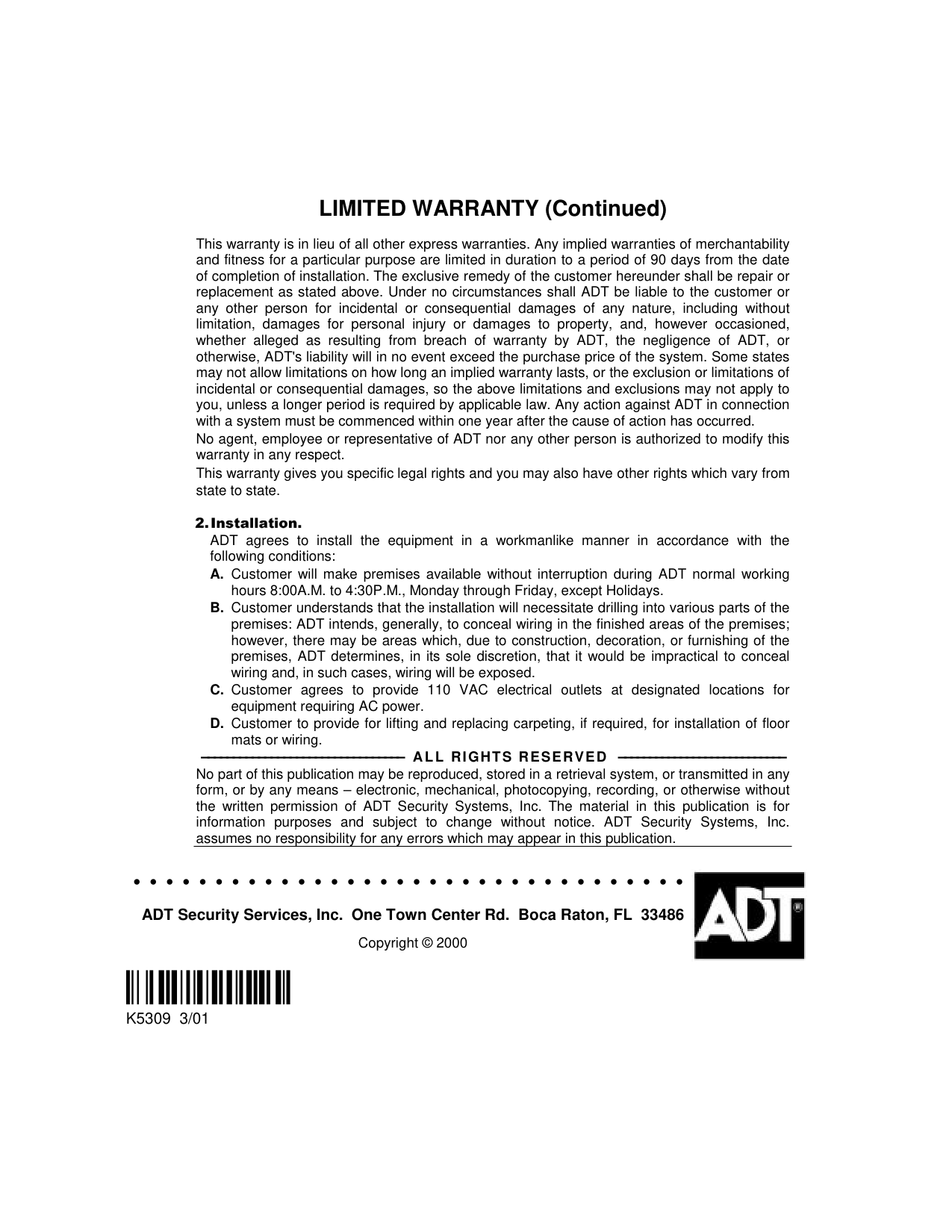
This warranty is in lieu of all other express warranties. Any implied warranties of merchantability and fitness for a particular purpose are limited in duration to a period of 90 days from the date of completion of installation. The exclusive remedy of the customer hereunder shall be repair or replacement as stated above. Under no circumstances shall ADT be liable to the customer or any other person for incidental or consequential damages of any nature, including without limitation, damages for personal injury or damages to property, and, however occasioned, whether alleged as resulting from breach of warranty by ADT, the negligence of ADT, or otherwise, ADT's liability will in no event exceed the purchase price of the system. Some states may not allow limitations on how long an implied warranty lasts, or the exclusion or limitations of incidental or consequential damages, so the above limitations and exclusions may not apply to you, unless a longer period is required by applicable law. Any action against ADT in connection with a system must be commenced within one year after the cause of action has occurred.
No agent, employee or representative of ADT nor any other person is authorized to modify this warranty in any respect. This warranty gives you specific legal rights and you may also have other rights which vary from state to state.
ADT agrees to install the equipment in a workmanlike manner in accordance with the following conditions:
–––––––––––––––––––––––––––––––– ALL RIGHTS RESERVED ––––––––––––––––––––––––––– No part of this publication may be reproduced, stored in a retrieval system, or transmitted in any form, or by any means – electronic, mechanical, photocopying, recording, or otherwise without the written permission of ADT Security Systems, Inc. The material in this publication is for information purposes and subject to change without notice. ADT Security Systems, Inc. assumes no responsibility for any errors which may appear in this publication.
ADT Security Services, Inc. One Town Center Rd. Boca Raton, FL 33486 Copyright © 2000
K5309 3/01
