
Ask AI
— answers from the official manualAnswers from the official manual.
Common questions
Common Questions
9 totalWhat is Record-After-the-Fact™?
Record-After-the-Fact allows the creation of a new event recording from background video footage after an incident has occurred. It retrieves and uploads unsaved panoramic views if needed.
How does the multiple resolution recording work?
The system records incidents in both High Definition (720p) for court-bound events and lower resolution (480p) for routine recordings, reducing storage needs. Agencies can customize event categories to determine which are recorded at high definition.
How does the panoramic camera work in WatchGuard 4RE?
The Panoramic Strip Camera is set to record continuously and provides full coverage without visual obstructions. Officers can choose to keep background recordings relevant after an event occurs.
How long does the panoramic background recording stay on the hard drive?
The background Panoramic camera view is saved for several days and can be retrieved using Record-After-the-Fact or included automatically if it becomes relevant.
Where are my recordings stored in WatchGuard 4RE?
Recordings are redundantly stored on both an integrated solid-state hard drive and a removable USB Flash Drive. The system continues recording even if the USB is full or missing.
How do I use Record-After-the-Fact to create new incident recordings?
Enter a start and stop point within the available background video loop from up to two previous shifts. This new event will be uploaded and managed like normal triggered events.
Full Manual
20 pages


CLARITY WITHOUT COMPROMISE
MULTIPLE RESOLUTION RECORDING
4RE = FOUR RESOLUTION ENCODING
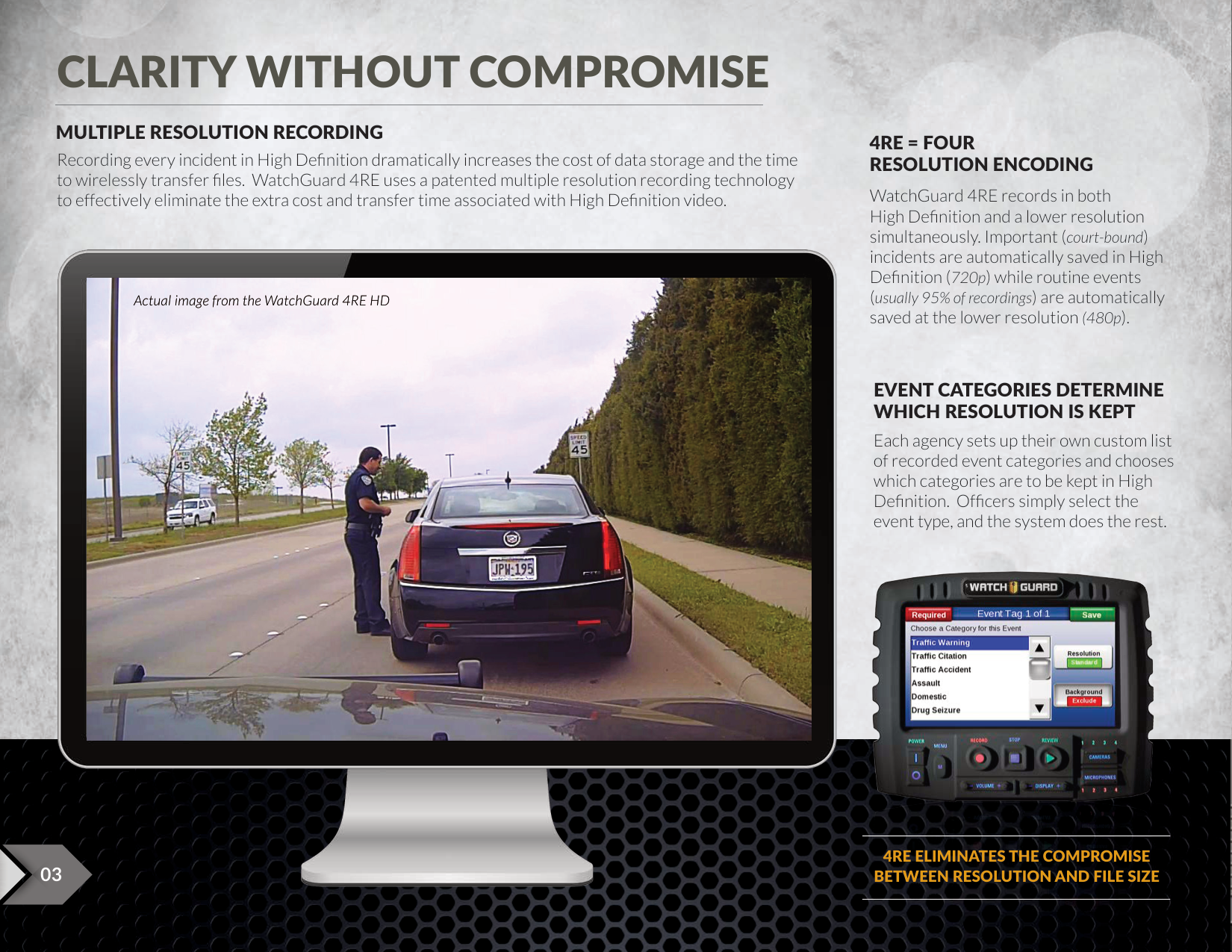
Recording every incident in High Definition dramatically increases the cost of data storage and the time to wirelessly transfer files. WatchGuard 4RE uses a patented multiple resolution recording technology to effectively eliminate the extra cost and transfer time associated with High Definition video.
WatchGuard 4RE records in both High Definition and a lower resolution simultaneously. Important (court-bound) incidents are automatically saved in High Definition (720p) while routine events (usually 95% of recordings) are automatically saved at the lower resolution (480p).


Actual image from the WatchGuard 4RE HD
###### EVENT CATEGORIES DETERMINE WHICH RESOLUTION IS KEPT
Each agency sets up their own custom list of recorded event categories and chooses which categories are to be kept in High Definition. Officers simply select the event type, and the system does the rest.


4RE ELIMINATES THE COMPROMISE
BETWEEN RESOLUTION AND FILE SIZE03

EXPAND THE VIEW – KEEP THE DETAILS

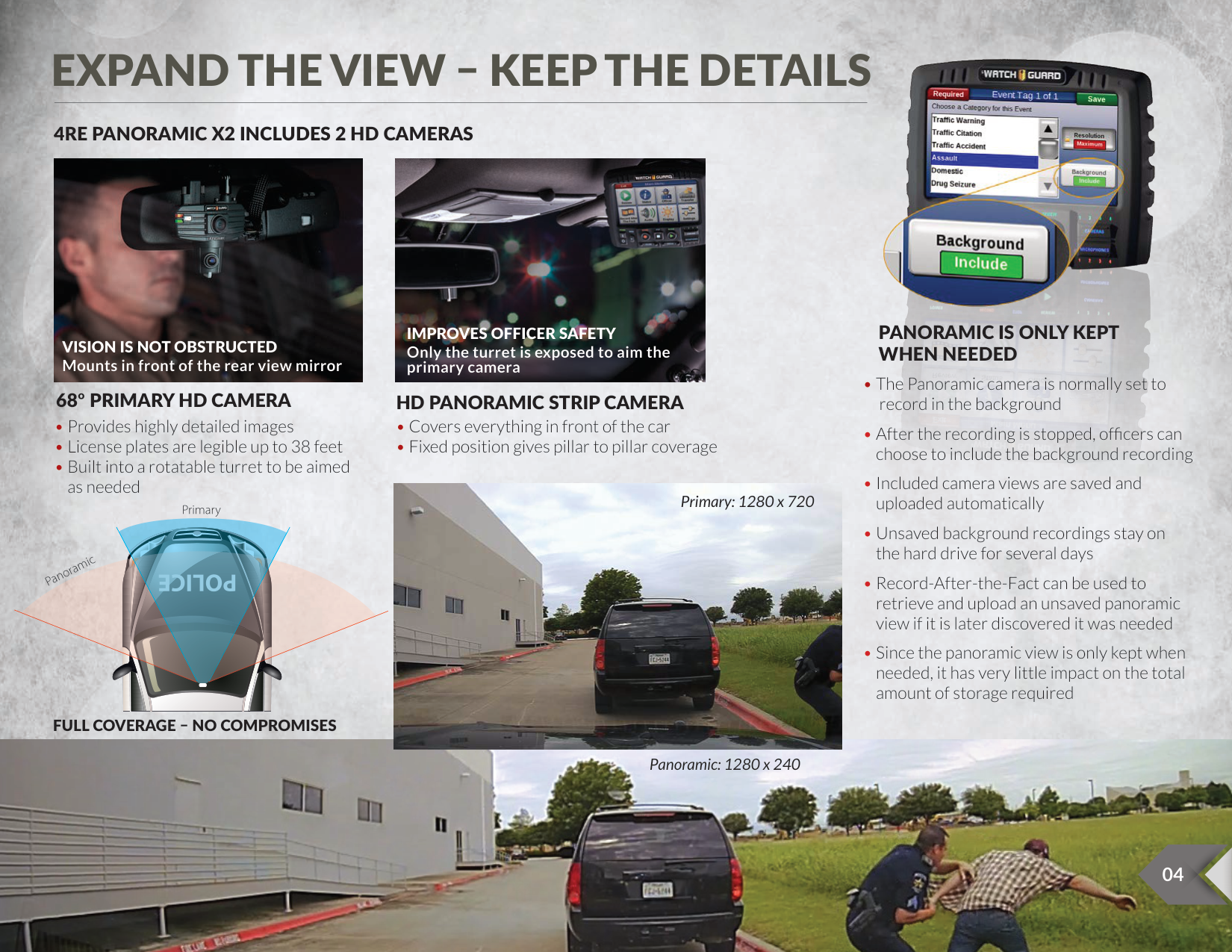
###### 4RE PANORAMIC X2 INCLUDES 2 HD CAMERAS


###### PANORAMIC IS ONLY KEPT WHEN NEEDED
VISION IS NOT OBSTRUCTED Mounts in front of the rear view mirror
Only the turret is exposed to aim the
68º PRIMARY HD CAMERA

Primary: 1280 x 720
Primary
Panoramic
FULL COVERAGE – NO COMPROMISES


Panoramic: 1280 x 240


SUPERIOR IMAGE QUALITY
##### AVAILABLE WITH 3 HD CAMERA OPTIONS


###### PANORAMIC X2 CAMERA
###### HD MINI ZOOM CAMERA

###### USES 2 SEPARATE EXPOSURES

ULTRA-WIDE DYNAMIC RANGE CAMERA TECHNOLOGY
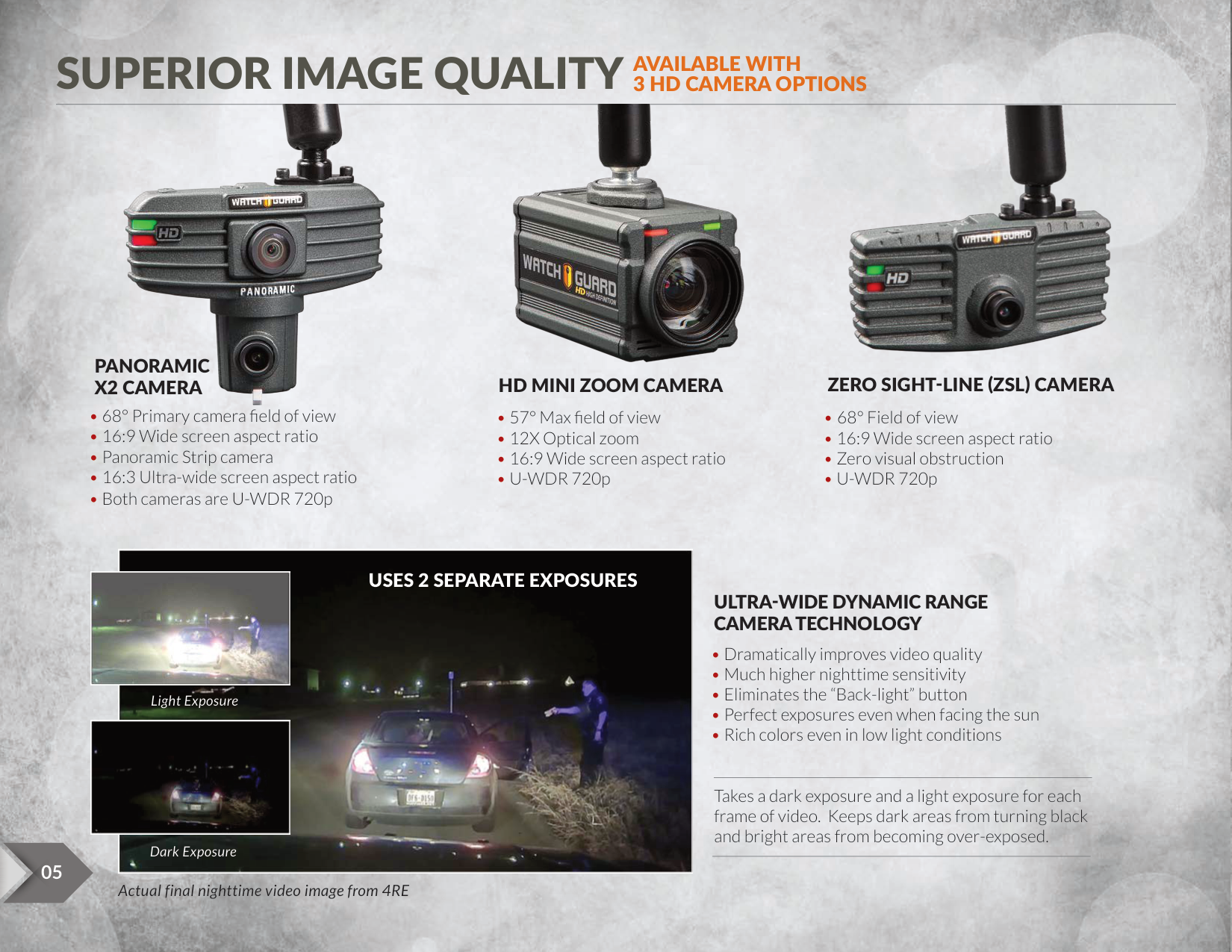
Light Exposure

Takes a dark exposure and a light exposure for each frame of video. Keeps dark areas from turning black and bright areas from becoming over-exposed.
Dark Exposure
05
6
Actual final nighttime video image from 4RE


INTEGRATED BODY-WORN CAMERAS
########## HD and SD recording time may vary based on environmental conditions and feature use
** VISTA is available in Extended and Standard versions
###### SECONDARY CAMERAS
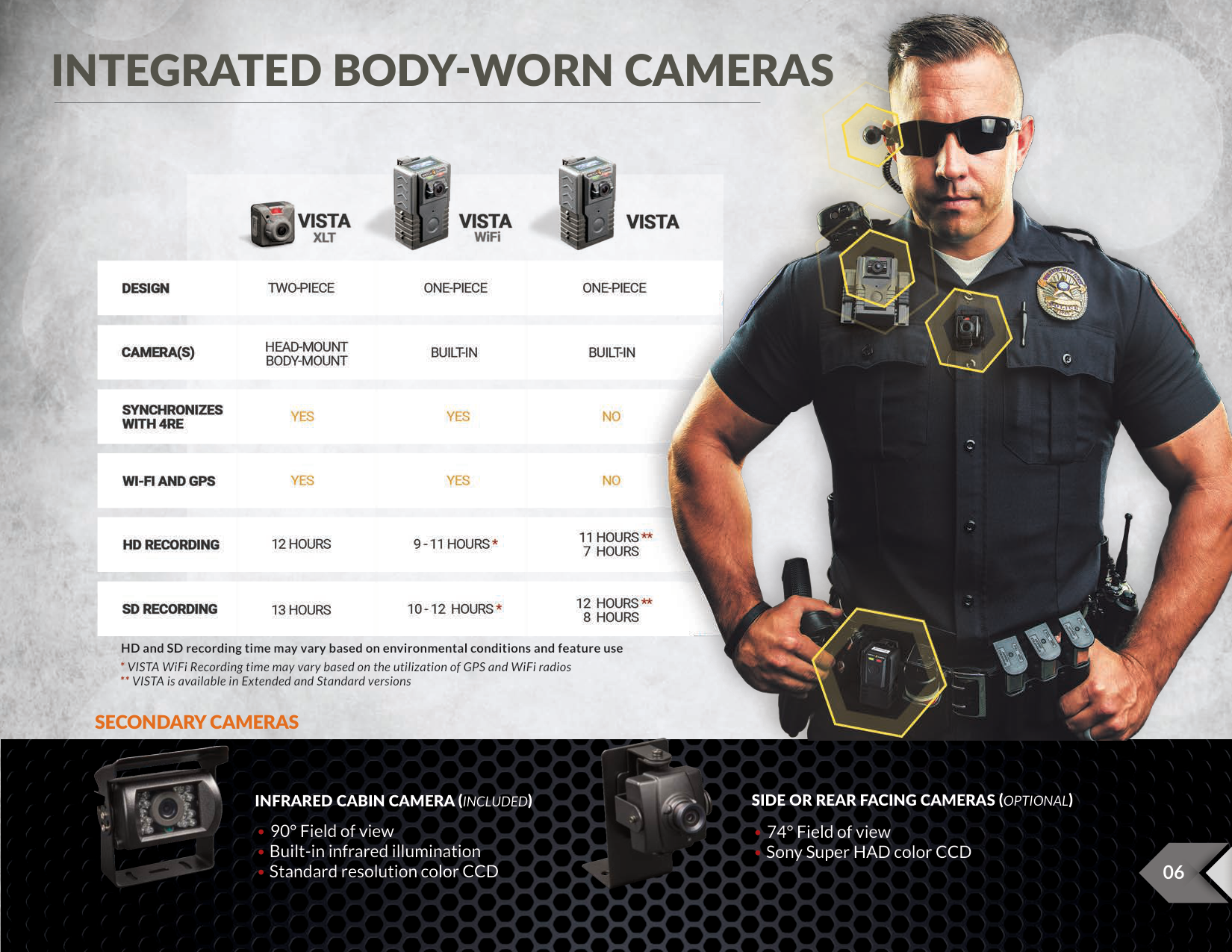


######## SIDE OR REAR FACING CAMERAS (OPTIONAL)
INFRARED CABIN CAMERA (INCLUDED)


INTUITIVE TOUCH SCREEN DISPLAY
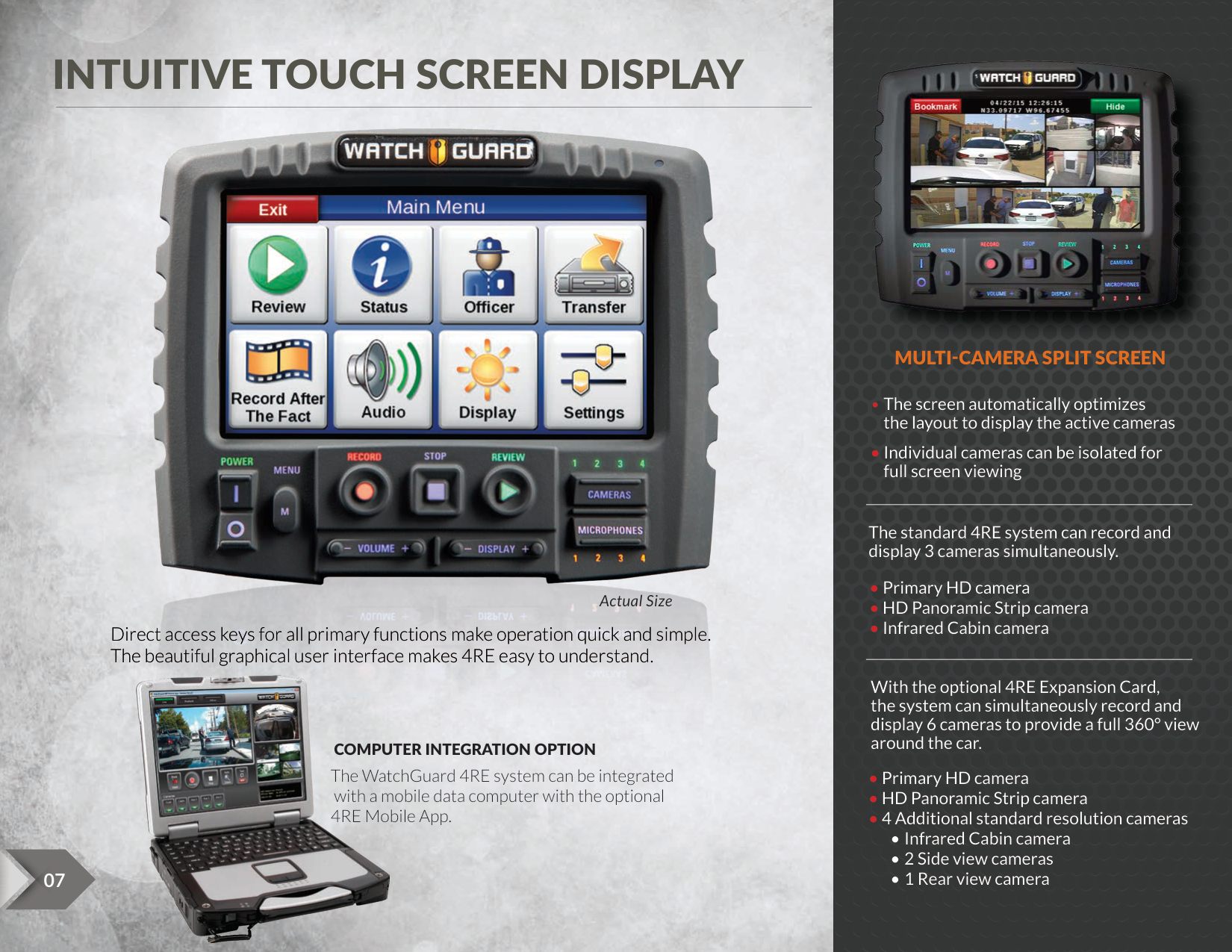
MULTI-CAMERA SPLIT SCREEN
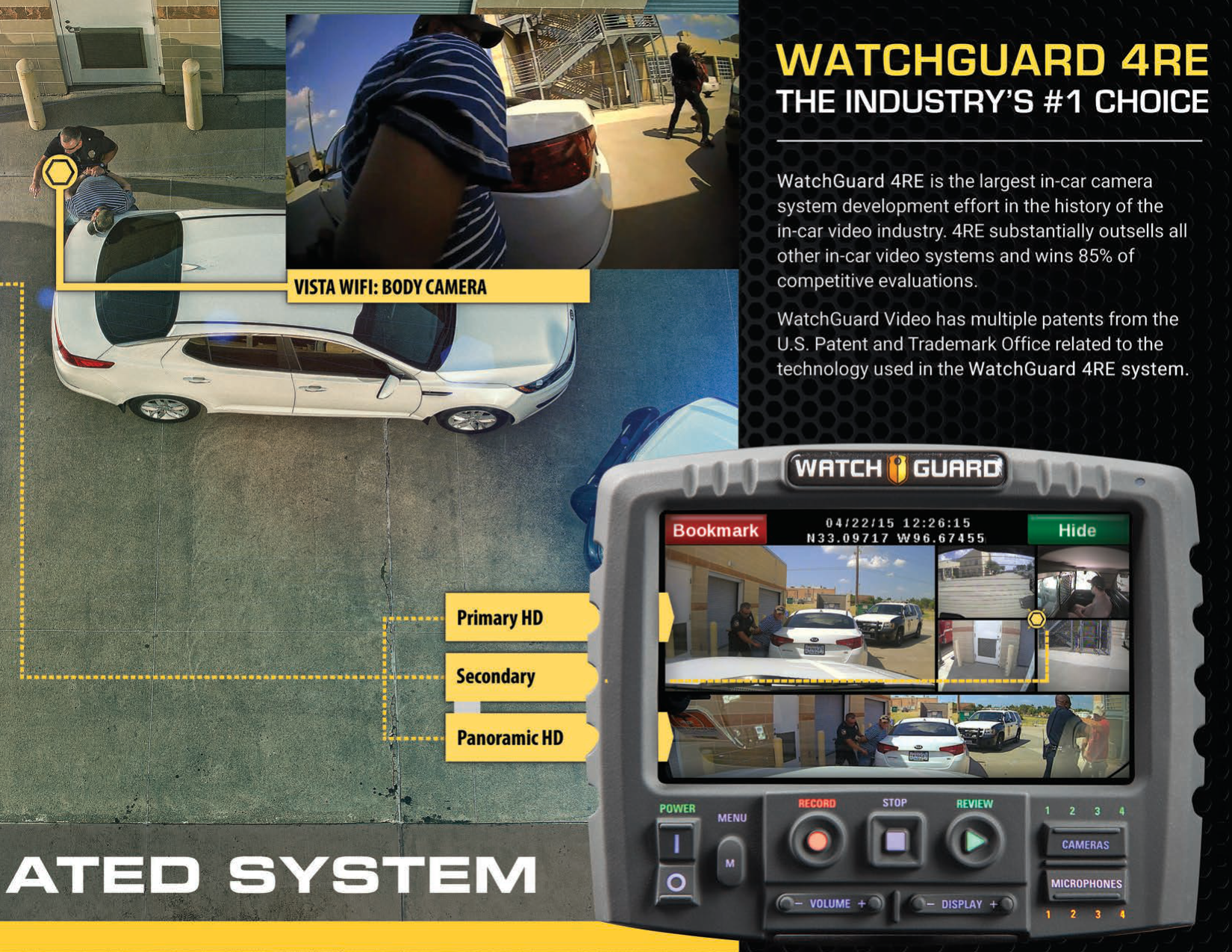
The standard 4RE system can record and display 3 cameras simultaneously.
Actual Size
Direct access keys for all primary functions make operation quick and simple. The beautiful graphical user interface makes 4RE easy to understand.

With the optional 4RE Expansion Card, the system can simultaneously record and display 6 cameras to provide a full 360° view
around the car.COMPUTER INTEGRATION OPTION
The WatchGuard 4RE system can be integrated with a mobile data computer with the optional 4RE Mobile App.


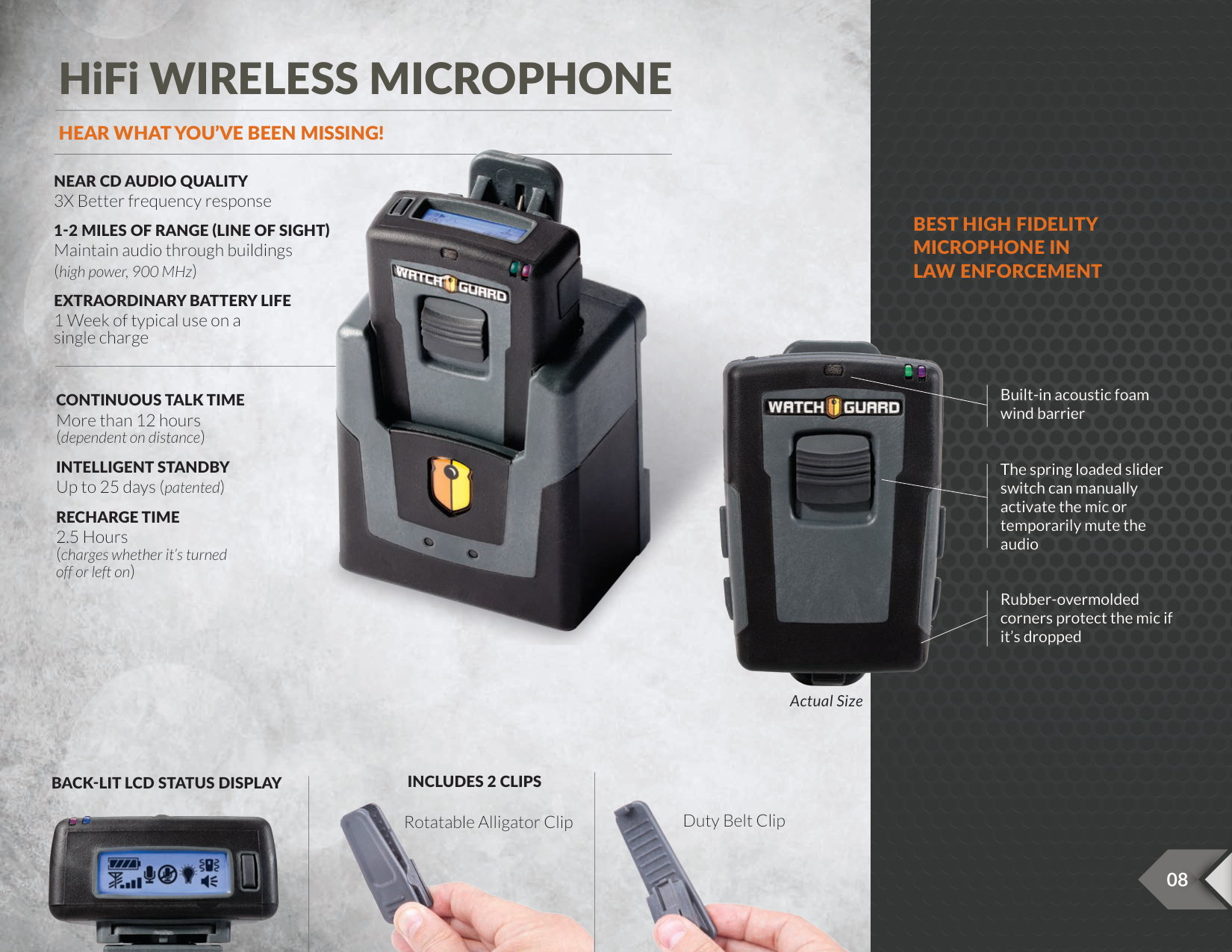
HiFi WIRELESS MICROPHONE
HEAR WHAT YOU’VE BEEN MISSING!

NEAR CD AUDIO QUALITY 3X Better frequency response
###### BEST HIGH FIDELITY MICROPHONE IN LAW ENFORCEMENT
1-2 MILES OF RANGE (LINE OF SIGHT) Maintain audio through buildings (high power, 900 MHz)
EXTRAORDINARY BATTERY LIFE 1 Week of typical use on a single charge

Built-in acoustic foam wind barrier
CONTINUOUS TALK TIME More than 12 hours (dependent on distance)
INTELLIGENT STANDBY Up to 25 days (patented)
The spring loaded slider switch can manually activate the mic or temporarily mute the audio
RECHARGE TIME 2.5 Hours (charges whether it’s turned off or left on)
Rubber-overmolded corners protect the mic if it’s dropped
Actual Size

######## INCLUDES 2 CLIPS
BACK-LIT LCD STATUS DISPLAY


Duty Belt Clip
Rotatable Alligator Clip


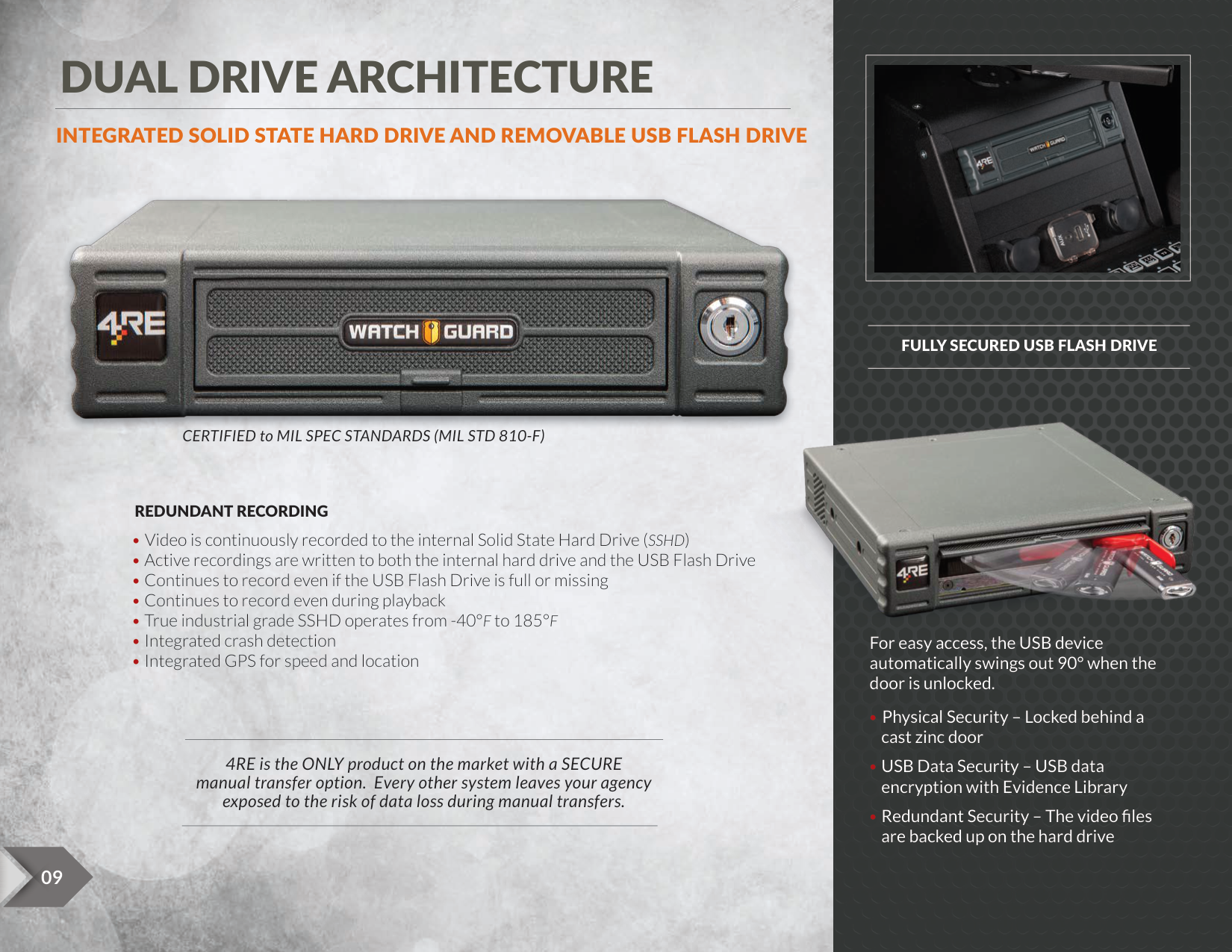
DUAL DRIVE ARCHITECTURE
|| |---|
##### INTEGRATED SOLID STATE HARD DRIVE AND REMOVABLE USB FLASH DRIVE

######## FULLY SECURED USB FLASH DRIVE

CERTIFIED to MIL SPEC STANDARDS (MIL STD 810-F)
REDUNDANT RECORDING
For easy access, the USB device automatically swings out 90° when the door is unlocked.
4RE is the ONLY product on the market with a SECURE manual transfer option. Every other system leaves your agency exposed to the risk of data loss during manual transfers.


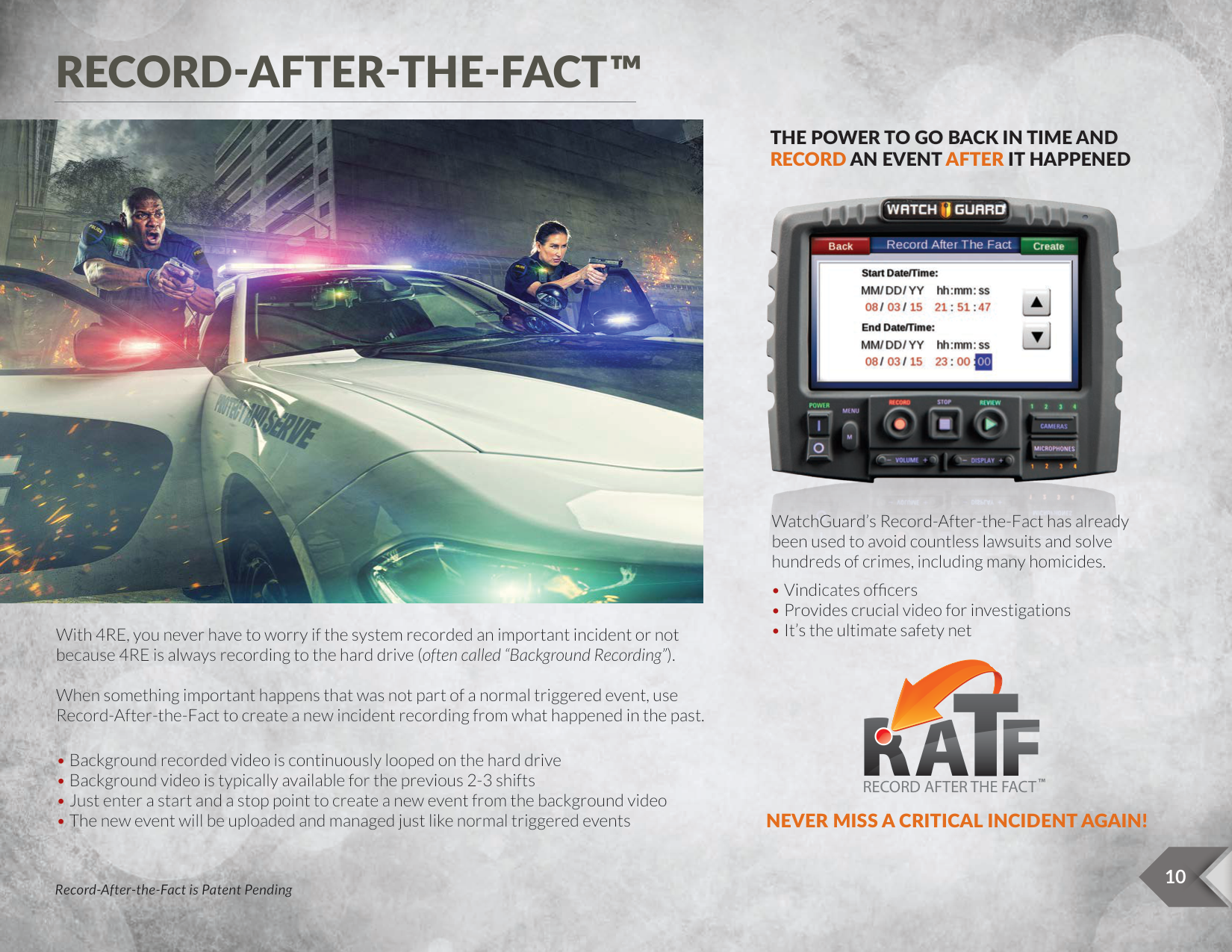
RECORD-AFTER-THE-FACT™

###### THE POWER TO GO BACK IN TIME AND RECORD AN EVENTAFTER IT HAPPENED

WatchGuard’s Record-After-the-Fact has already been used to avoid countless lawsuits and solve hundreds of crimes, including many homicides.
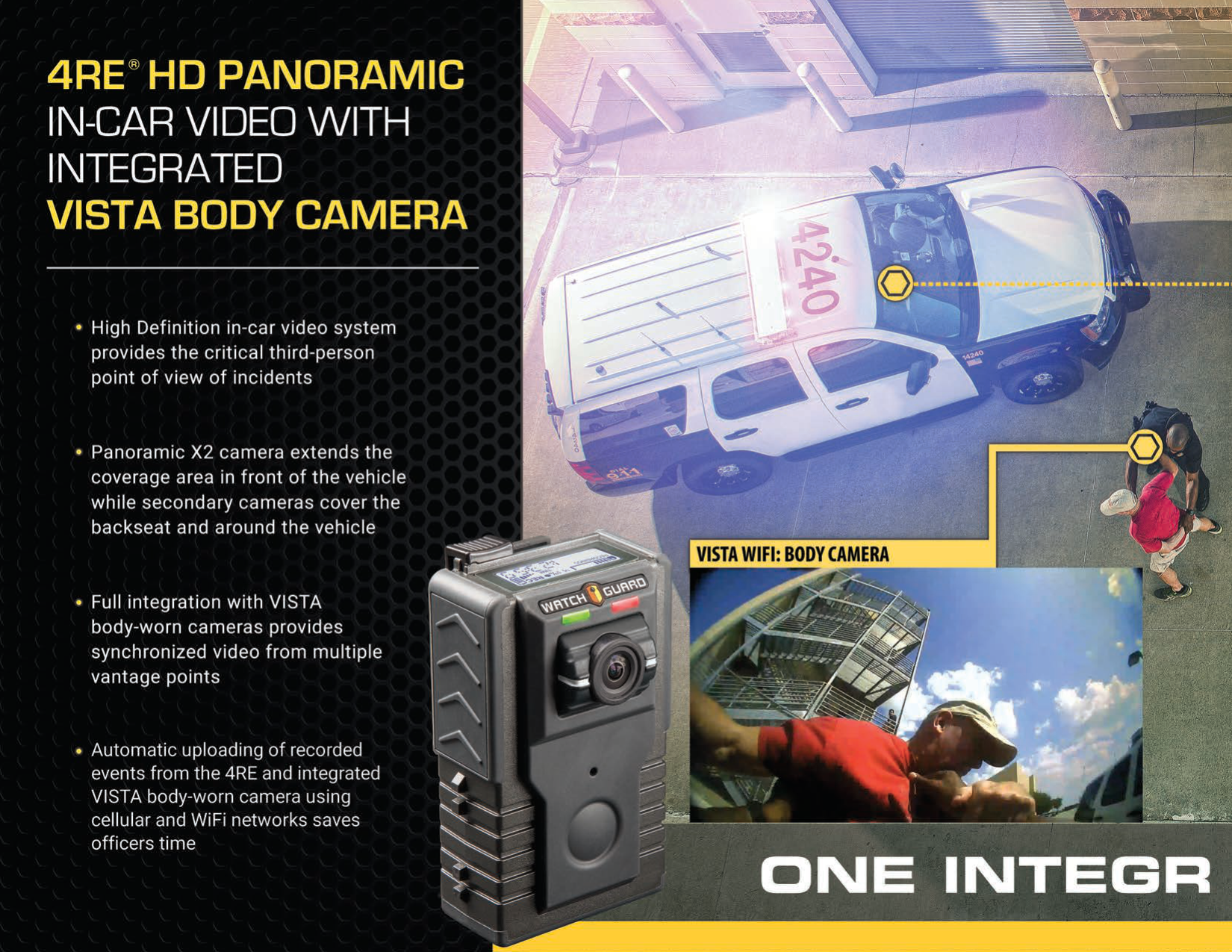
With 4RE, you never have to worry if the system recorded an important incident or not because 4RE is always recording to the hard drive (often called “Background Recording”). When something important happens that was not part of a normal triggered event, use Record-After-the-Fact to create a new incident recording from what happened in the past.
RECORD AFTER THE FACT
TM
###### NEVER MISS A CRITICAL INCIDENT AGAIN!
10
Record-After-the-Fact is Patent Pending


AUTOMATIC WIRELESS UPLOADS NEVER TIED TO THE STATION
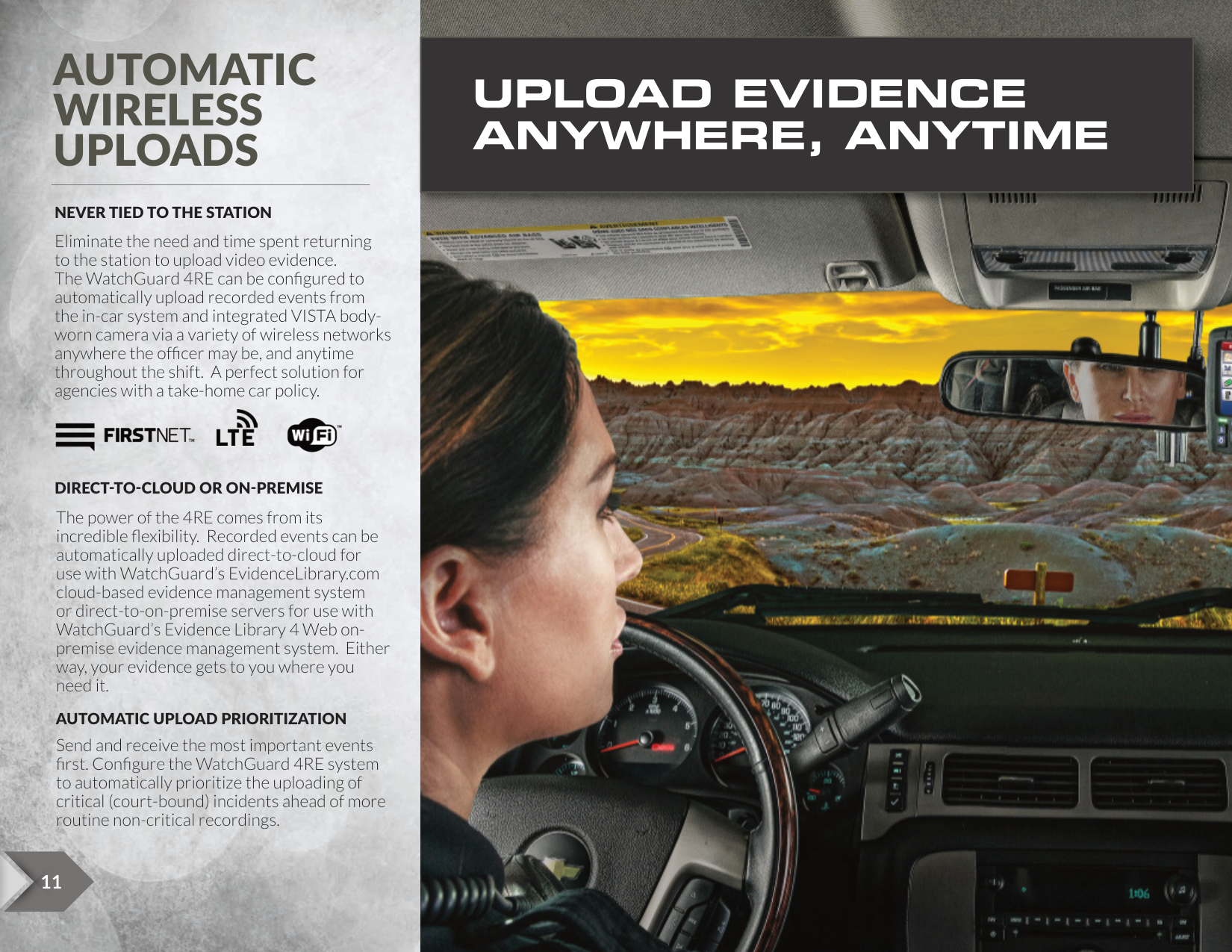
UPLOAD EVIDENCE ANYWHERE, ANYTIME
Eliminate the need and time spent returning to the station to upload video evidence. The WatchGuard 4RE can be configured to automatically upload recorded events from the in-car system and integrated VISTA bodyworn camera via a variety of wireless networks anywhere the officer may be, and anytime throughout the shift. A perfect solution for agencies with a take-home car policy.



DIRECT-TO-CLOUD OR ON-PREMISE
The power of the 4RE comes from its incredible flexibility. Recorded events can be automatically uploaded direct-to-cloud for use with WatchGuard’s EvidenceLibrary.com cloud-based evidence management system or direct-to-on-premise servers for use with WatchGuard’s Evidence Library 4 Web onpremise evidence management system. Either way, your evidence gets to you where you need it.
AUTOMATIC UPLOAD PRIORITIZATION
Send and receive the most important events first. Configure the WatchGuard 4RE system to automatically prioritize the uploading of critical (court-bound) incidents ahead of more routine non-critical recordings.


TM

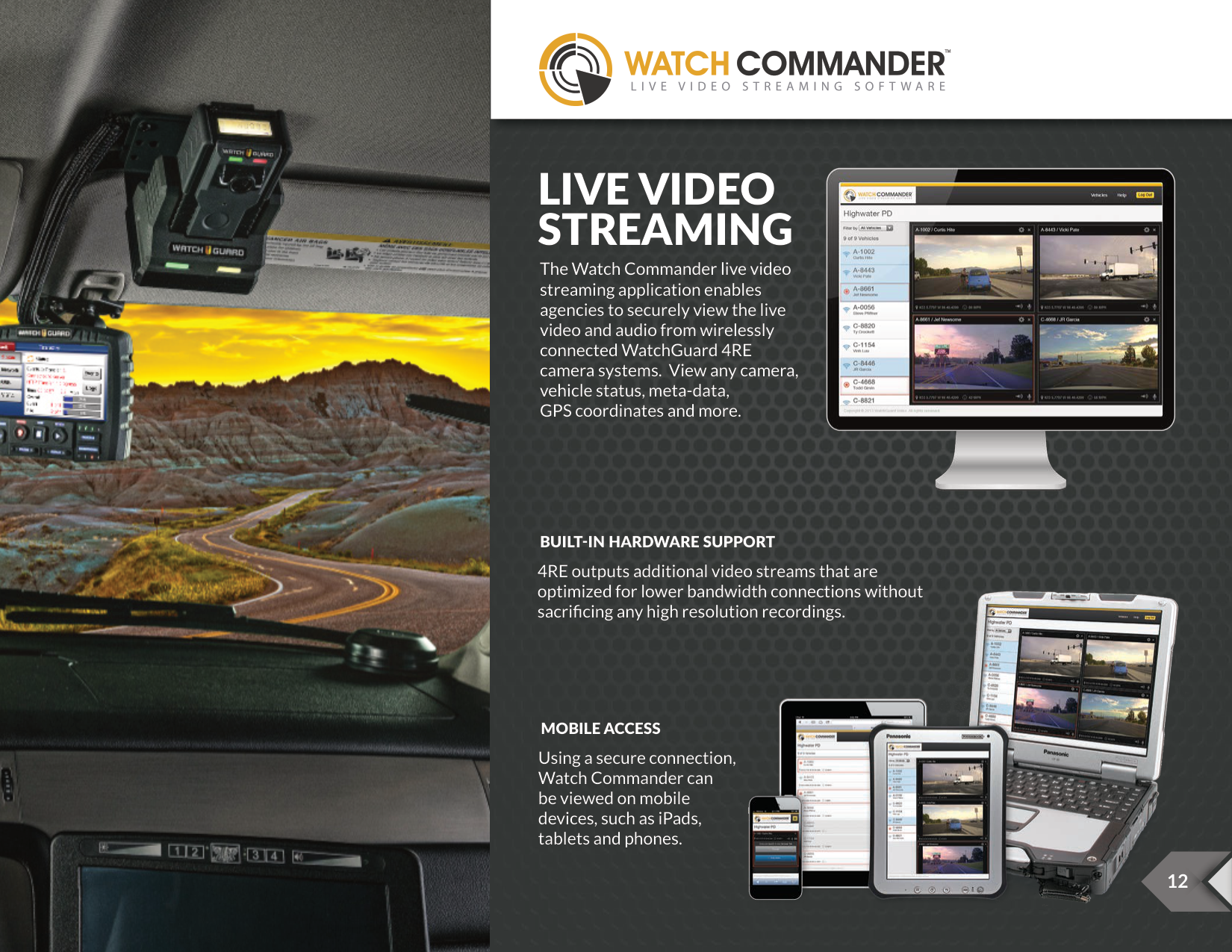
LIVE VIDEO STREAMING
The Watch Commander live video streaming application enables agencies to securely view the live video and audio from wirelessly connected WatchGuard 4RE camera systems. View any camera, vehicle status, meta-data, GPS coordinates and more.
######## BUILT-IN HARDWARE SUPPORT
4RE outputs additional video streams that are optimized for lower bandwidth connections without sacrificing any high resolution recordings.

MOBILE ACCESS
Using a secure connection, Watch Commander can be viewed on mobile devices, such as iPads, tablets and phones.

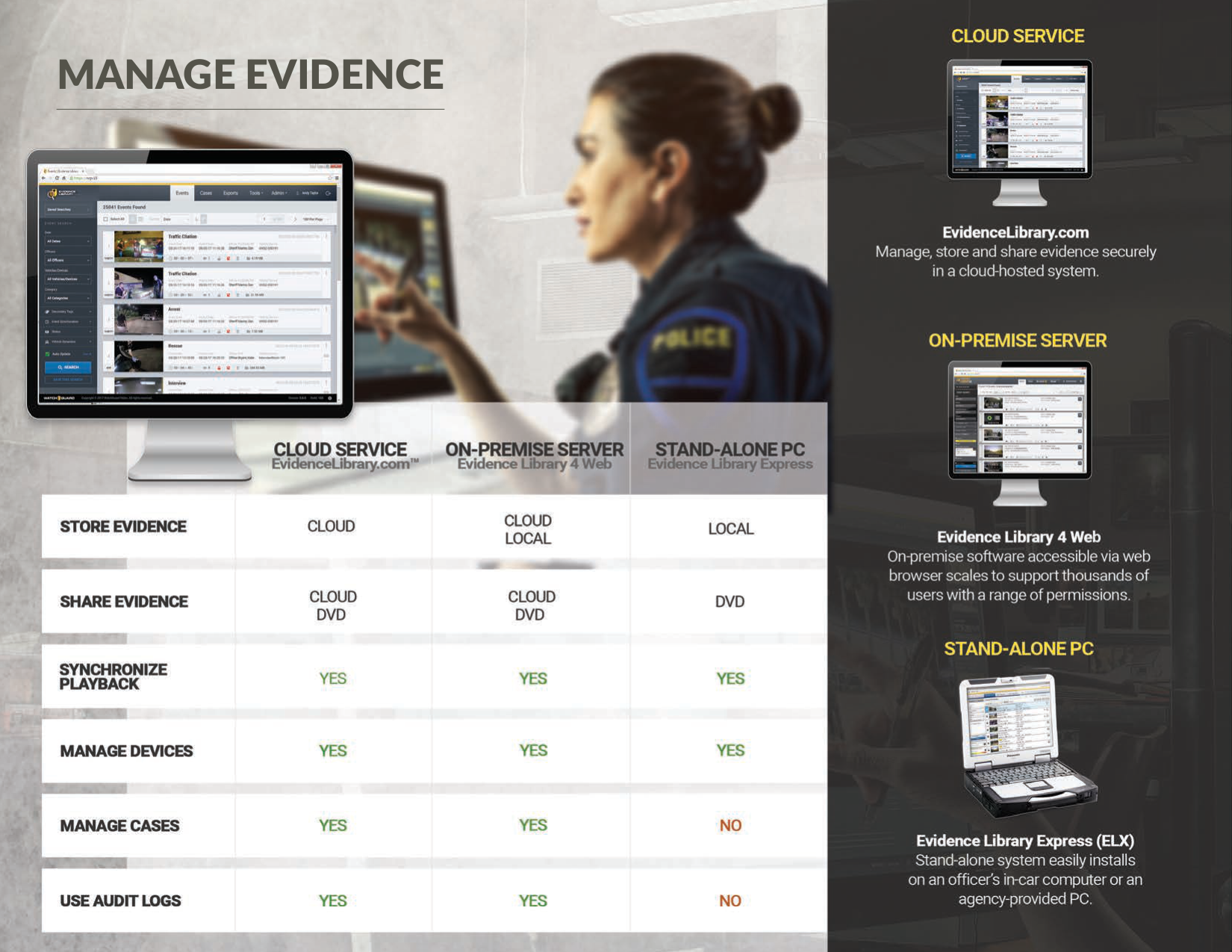
MANAGE EVIDENCE


STORE EVIDENCE
#### MULTI-TIER STORAGE

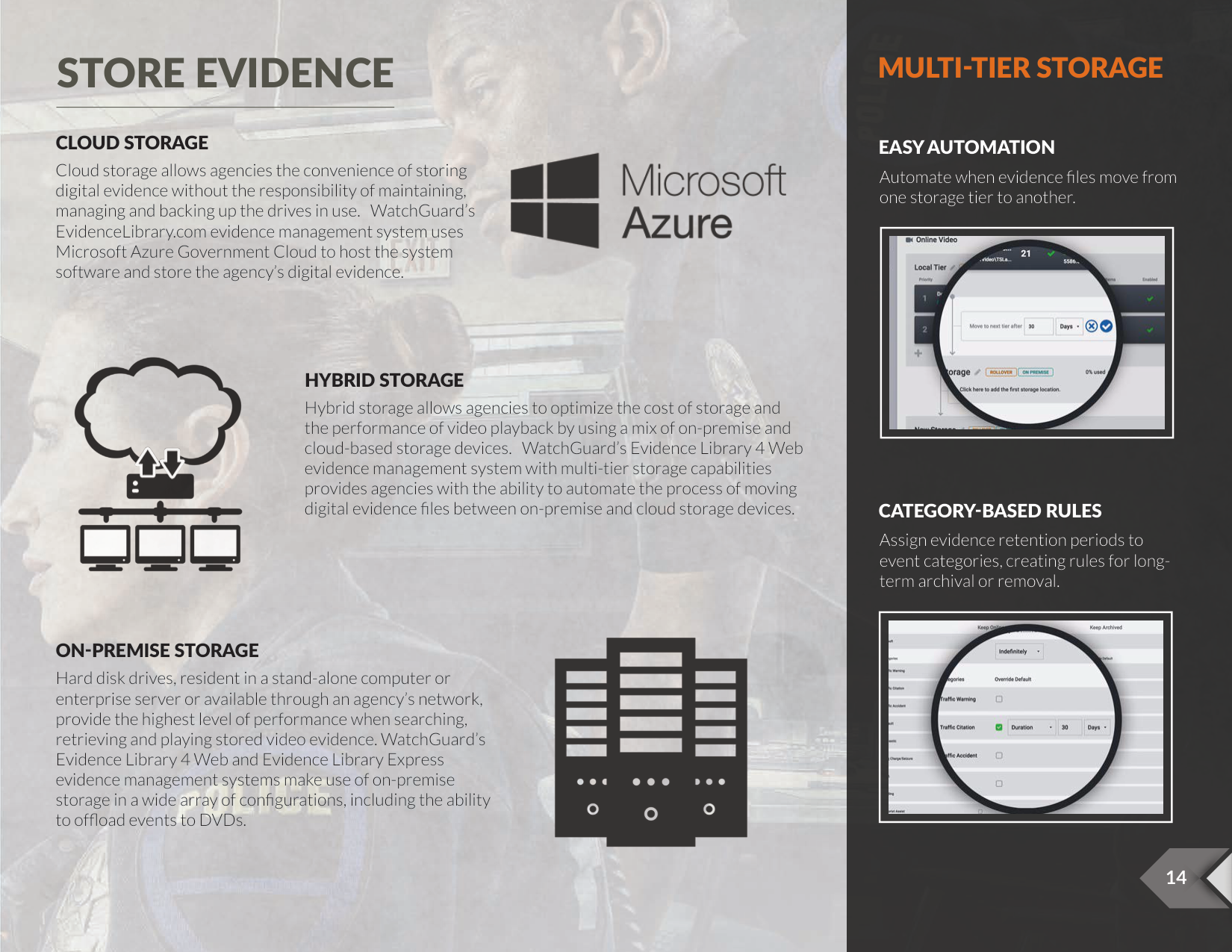
###### CLOUD STORAGE
EASY AUTOMATION
Cloud storage allows agencies the convenience of storing digital evidence without the responsibility of maintaining, managing and backing up the drives in use. WatchGuard’s EvidenceLibrary.com evidence management system uses Microsoft Azure Government Cloud to host the system software and store the agency’s digital evidence.
Automate when evidence files move from one storage tier to another.
|| |---|

###### HYBRID STORAGE
Hybrid storage allows agencies to optimize the cost of storage and the performance of video playback by using a mix of on-premise and cloud-based storage devices. WatchGuard’s Evidence Library 4 Web evidence management system with multi-tier storage capabilities provides agencies with the ability to automate the process of moving digital evidence files between on-premise and cloud storage devices.
CATEGORY-BASED RULES
Assign evidence retention periods to event categories, creating rules for longterm archival or removal.
|| |---|

###### ON-PREMISE STORAGE
Hard disk drives, resident in a stand-alone computer or enterprise server or available through an agency’s network, provide the highest level of performance when searching, retrieving and playing stored video evidence. WatchGuard’s Evidence Library 4 Web and Evidence Library Express evidence management systems make use of on-premise storage in a wide array of configurations, including the ability to offload events to DVDs.


SHARE EVIDENCE
|| |---|
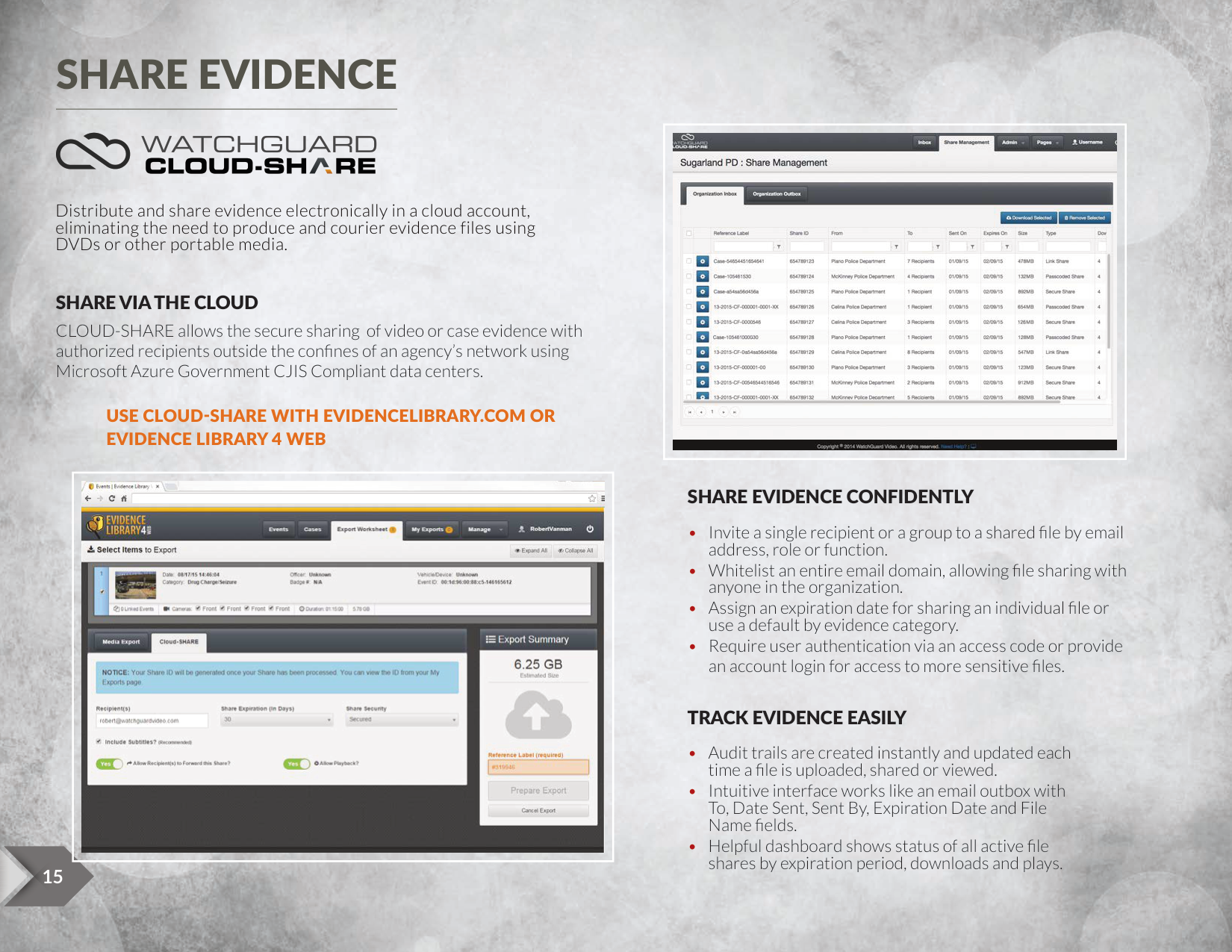
Distribute and share evidence electronically in a cloud account, eliminating the need to produce and courier evidence files using DVDs or other portable media.
###### SHARE VIA THE CLOUD
CLOUD-SHARE allows the secure sharing of video or case evidence with authorized recipients outside the confines of an agency’s network using Microsoft Azure Government CJIS Compliant data centers.
USE CLOUD-SHARE WITH EVIDENCELIBRARY.COM OR EVIDENCE LIBRARY 4 WEB
|| |---|
###### SHARE EVIDENCE CONFIDENTLY
###### TRACK EVIDENCE EASILY


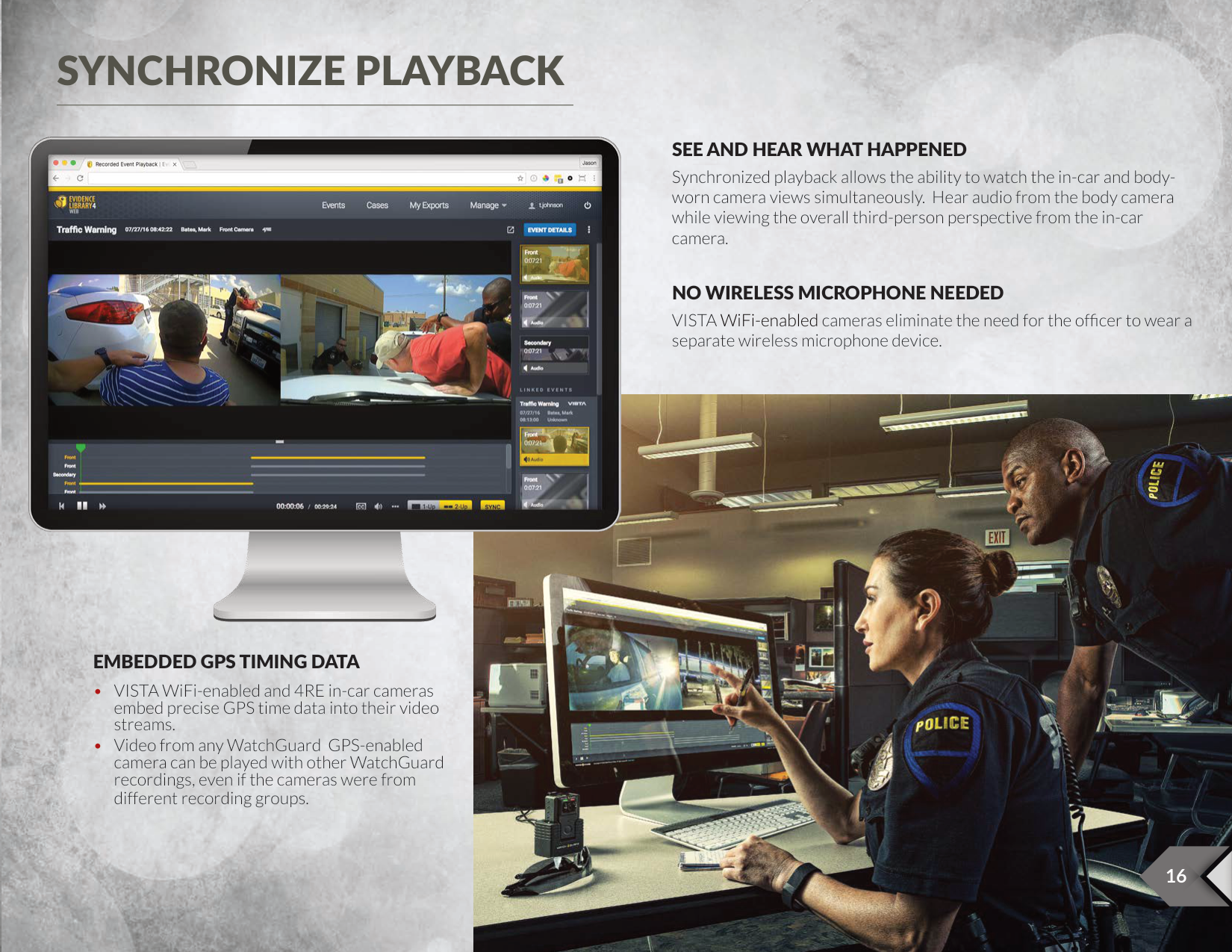
SYNCHRONIZE PLAYBACK

###### SEE AND HEAR WHAT HAPPENED
Synchronized playback allows the ability to watch the in-car and bodyworn camera views simultaneously. Hear audio from the body camera while viewing the overall third-person perspective from the in-car camera.
###### NO WIRELESS MICROPHONE NEEDED
VISTA WiFi-enabled cameras eliminate the need for the officer to wear a separate wireless microphone device.

###### EMBEDDED GPS TIMING DATA


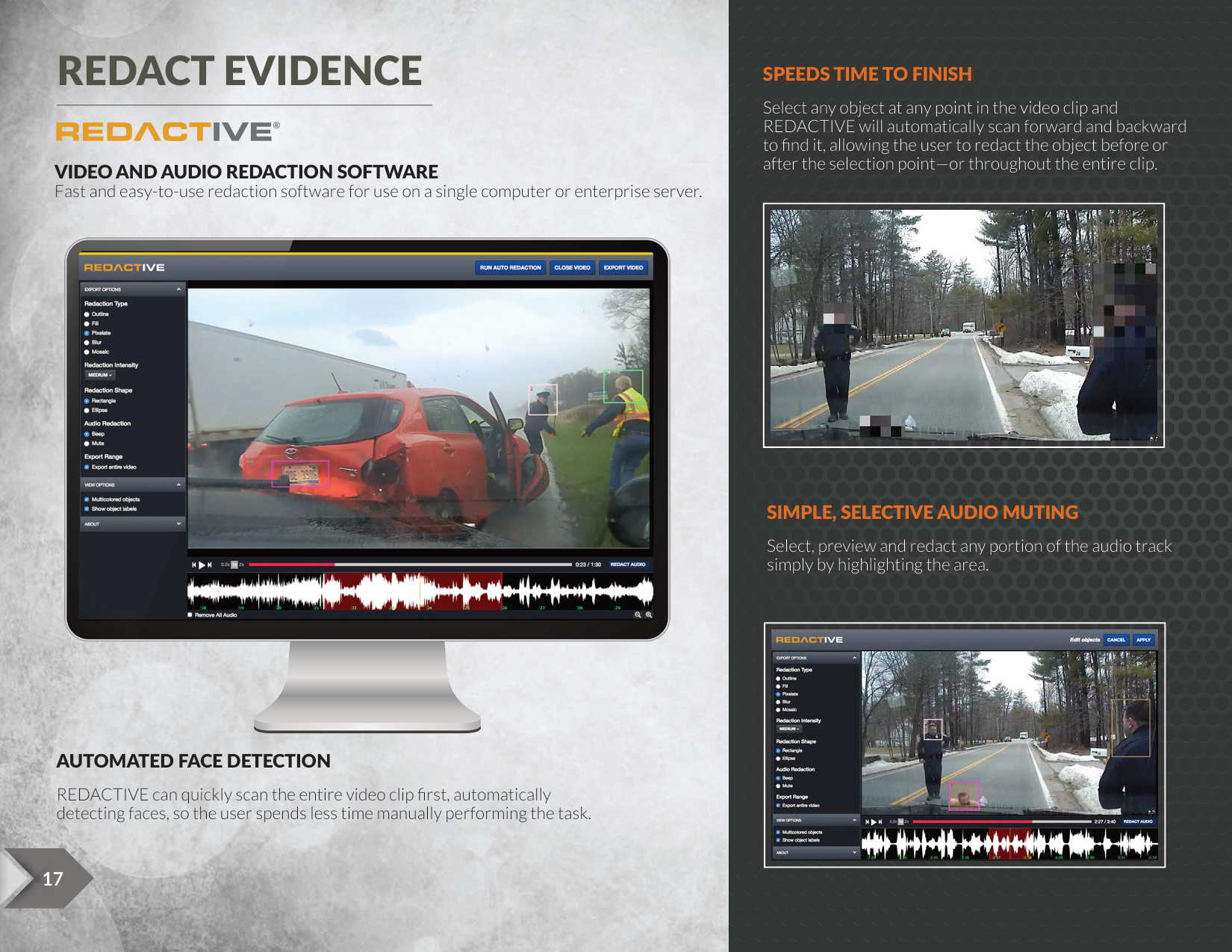
REDACT EVIDENCE

###### SPEEDS TIME TO FINISH
Select any object at any point in the video clip and REDACTIVE will automatically scan forward and backward to find it, allowing the user to redact the object before or after the selection point—or throughout the entire clip.
®
VIDEO AND AUDIO REDACTION SOFTWARE Fast and easy-to-use redaction software for use on a single computer or enterprise server.
|| |---|

###### SIMPLE, SELECTIVE AUDIO MUTING
Select, preview and redact any portion of the audio track simply by highlighting the area.
|| |---|
###### AUTOMATED FACE DETECTION
REDACTIVE can quickly scan the entire video clip first, automatically detecting faces, so the user spends less time manually performing the task.




#### SIX-MONTH MONEY-BACK GUARANTEE
WatchGuard is so confident that your agency will be satisfied with the WatchGuard® 4RE® system and the EvidenceLibrary.com™ cloud storage solution, we are offering a six-month money-back guarantee, subject to the following conditions:
######### FACTORY GUARANTEED IMPLEMENTATION GUIDELINES: EVIDENCE LIBRARY EXPRESS IMPLEMENTATIONS REQUIRE
######### EVIDENCE LIBRARY 4 WEB IMPLEMENTATIONS REQUIRE
######### EVIDENCELIBRARY.COM IMPLEMENTATIONS REQUIRE
OUR PROMISE We guarantee that the WatchGuard 4RE system, when sold as a Factory Guaranteed Implementation, and the EvidenceLibrary.com cloud storage solution, when properly configured and supported, will work effectively and to your satisfaction. If, during the initial six months after purchase, you find that either the 4RE system or EvidenceLibrary.com does not operate as intended, you have complied with all requirements, and our support is unable to resolve the issues, we will refund the purchase price.
Robert Vanman, Chief Executive Officer
