
Ask AI
— answers from the official manualAnswers from the official manual.
Common questions
Common Questions
8 totalHow do I charge my Daiso Sr1323 Bluetooth Speaker?
Connect the Micro-USB connector to the DC5V input socket at the rear of the speaker and plug the USB end into a power supply with at least 5V output (min. 1A). The LED will turn red while charging.
What do I do if my Daiso Sr1323 Bluetooth Speaker cannot pair with my devices?
Disconnect the Bluetooth connection and try pairing again, ensuring your device is in discoverable mode. Check for radio interference as well.
How do I control volume on my Daiso Sr1323 Bluetooth Speaker?
Press the '+' or '-' button to adjust volume. You can also control it from your Bluetooth device's settings.
Can I use a TF card with my Daiso Sr1323 Bluetooth Speaker?
Yes, just plug the Micro SD card into the speaker’s Card slot. The music files will play automatically.
What is the battery life of my Daiso Sr1323 Bluetooth Speaker?
The built-in rechargeable battery supports up to 10 hours of playback at medium volume.
How do I change FM radio stations on my Daiso Sr1323 Bluetooth Speaker?
Toggle the slide button to FM mode, then press and hold to start channel search. Use '+' or '-' buttons to adjust channels.
Full Manual
6 pages
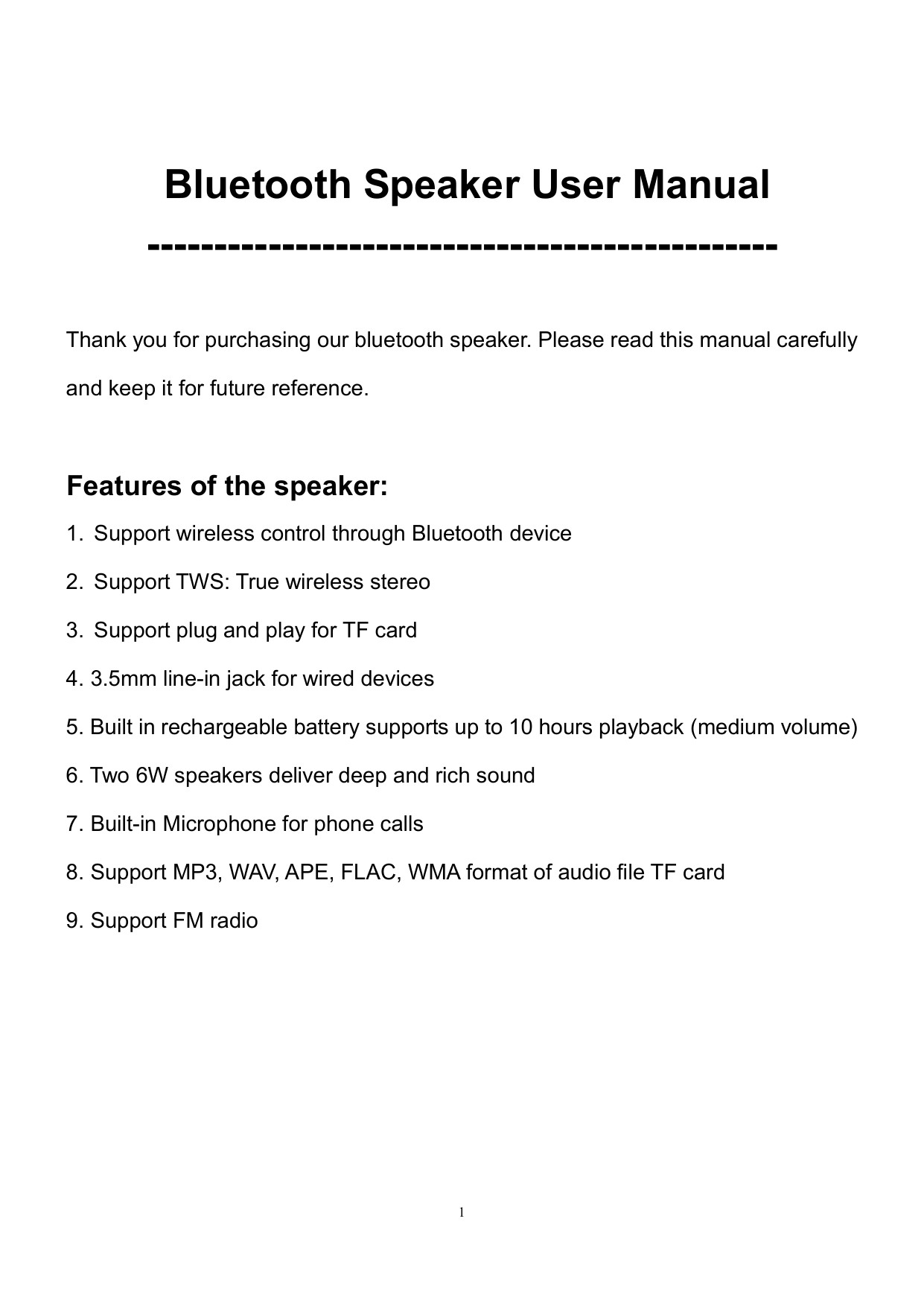
Bluetooth Speaker User Manual -----------------------------------------------
Thank you for purchasing our bluetooth speaker. Please read this manual carefully and keep it for future reference.
Features of the speaker:
Operating Instructions:
With the speaker turned off, connect the Micro-USB connector of the charging cable to the DC5V input socket at the rear side of the speaker, and plug the USB connector of the charging cable to an external USB power supply socket with a minimum supply current of 1A. The external USB power supply can be the USB socket in your computer/laptop, the USB adaptor of most cellphone USB chargers with DC5V output, or the 5V USB port of a power socket etc.
When charging, the power indicator will be red.
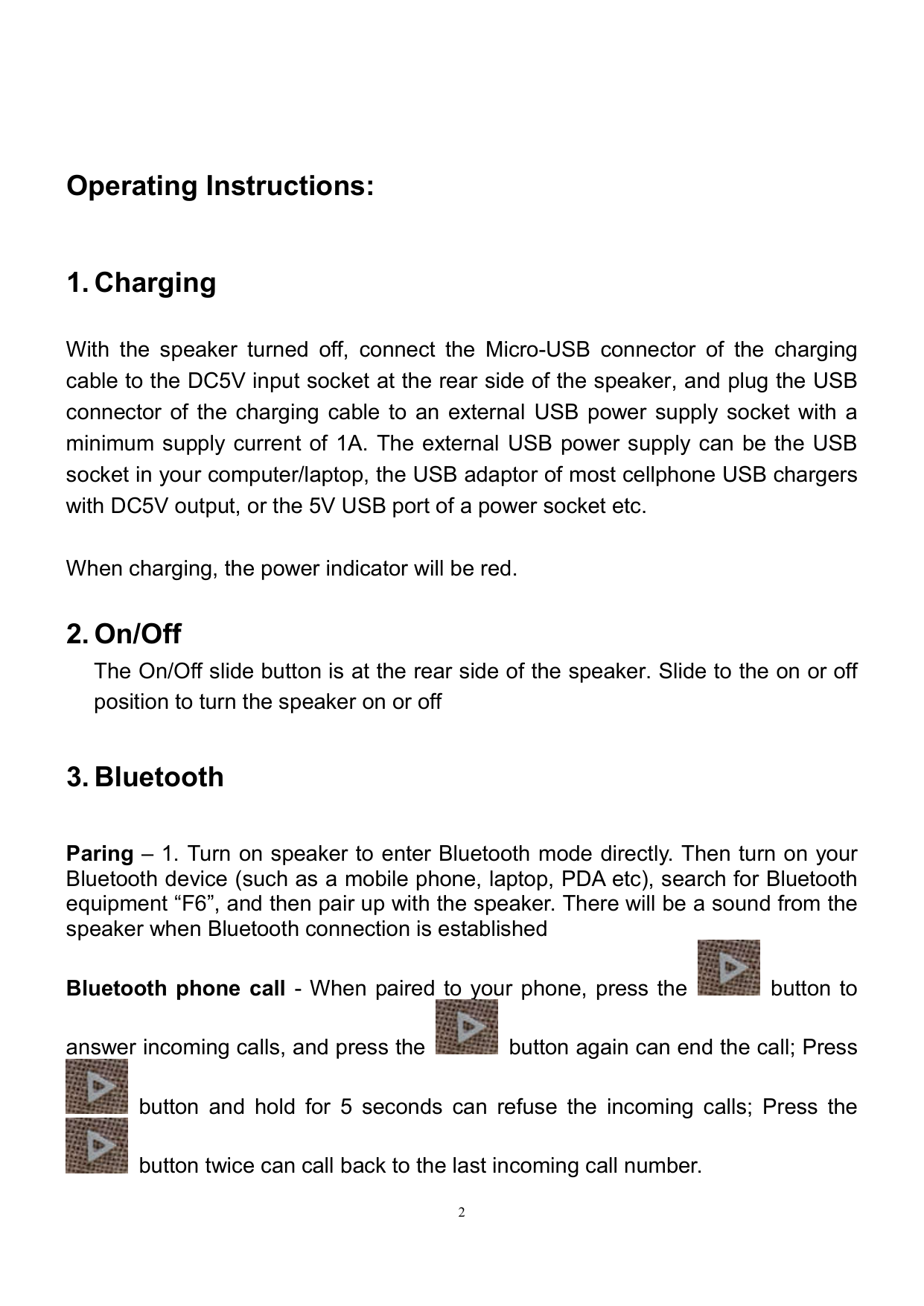
Paring – 1. Turn on speaker to enter Bluetooth mode directly. Then turn on your Bluetooth device (such as a mobile phone, laptop, PDA etc), search for Bluetooth equipment “F6”, and then pair up with the speaker. There will be a sound from the speaker when Bluetooth connection is established

Bluetooth phone call - When paired to your phone, press the button to

answer incoming calls, and press the button again can end the call; Press

button and hold for 5 seconds can refuse the incoming calls; Press the

button twice can call back to the last incoming call number.
Note: Please talk close to the microphone when making phone calls. TWS Operation: Put the two F6 speakers together, and turn on speakers to enter

Bluetooth mode, then choose one of them to press button and hold for 2 seconds, the two speakers will start automatically pair and enter TWS mode, the one which you chose to press will work as left channel.
Volume adjustment – When playing music and when making a phone call under
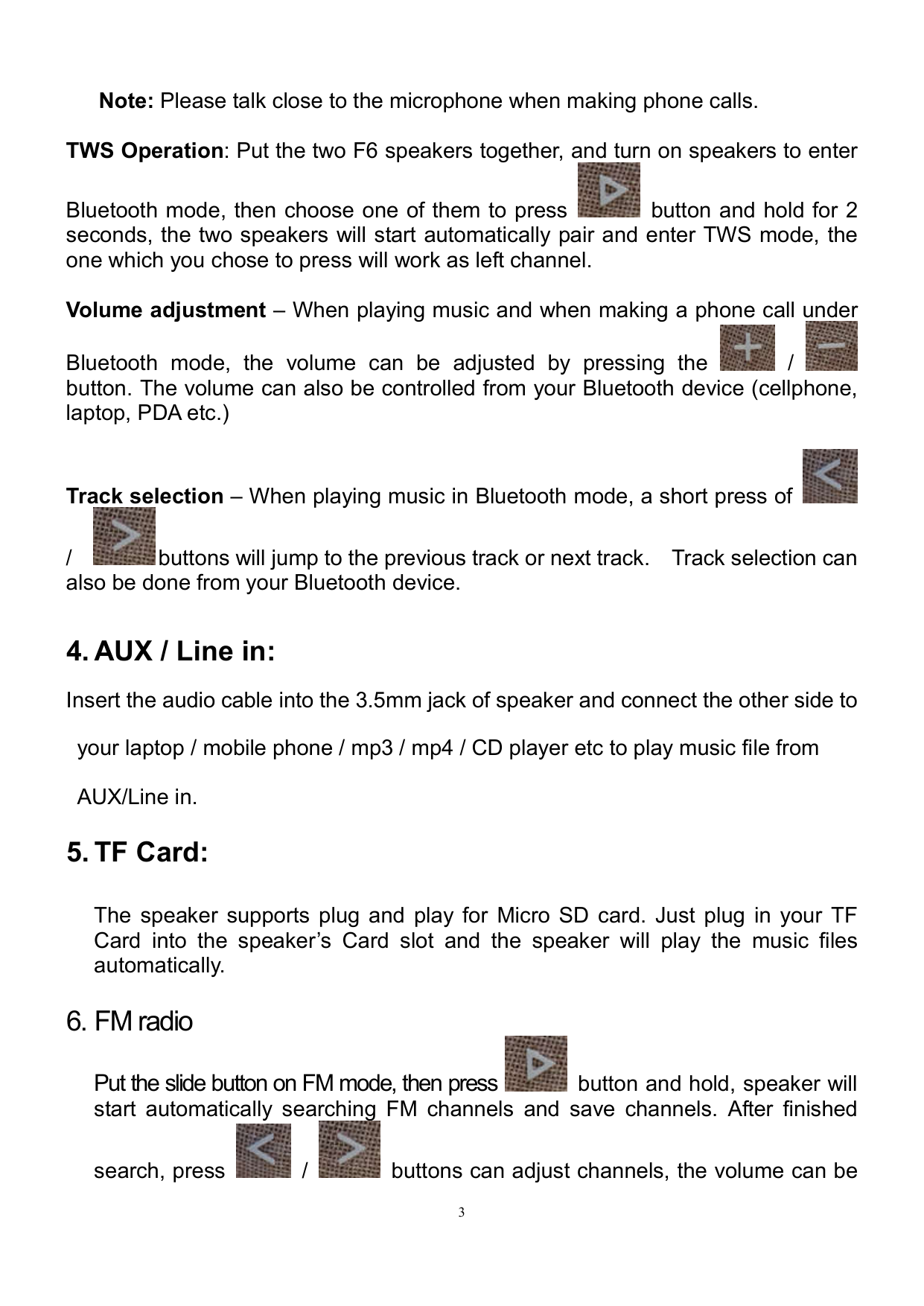


Bluetooth mode, the volume can be adjusted by pressing the / button. The volume can also be controlled from your Bluetooth device (cellphone, laptop, PDA etc.)

Track selection – When playing music in Bluetooth mode, a short press of

/ buttons will jump to the previous track or next track. Track selection can also be done from your Bluetooth device.
4. AUX / Line in:Insert the audio cable into the 3.5mm jack of speaker and connect the other side to
your laptop / mobile phone / mp3 / mp4 / CD player etc to play music file from AUX/Line in.
5. TF Card:
The speaker supports plug and play for Micro SD card. Just plug in your TF Card into the speaker’s Card slot and the speaker will play the music files automatically.
6. FM radio

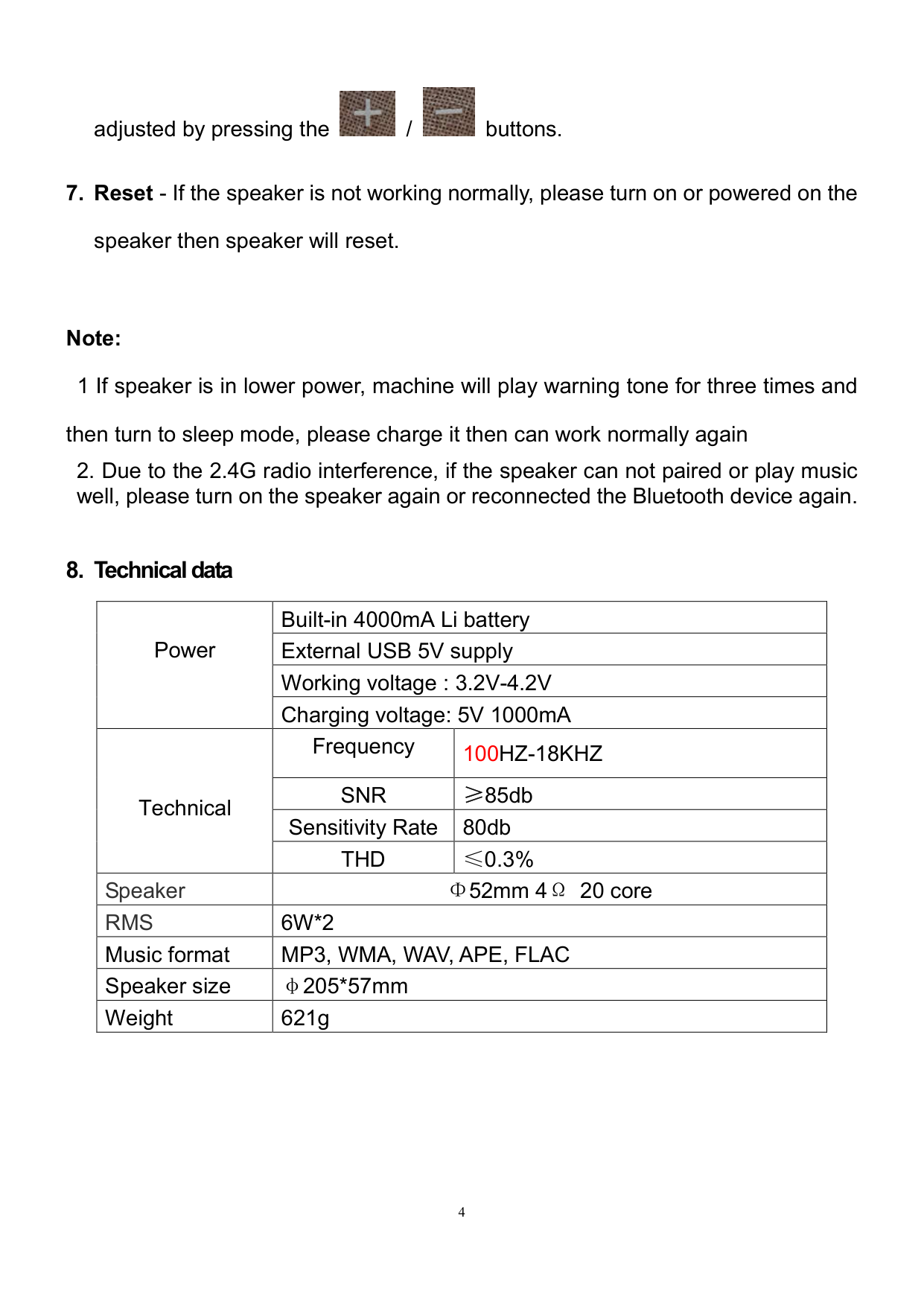
Put the slide button on FM mode, then press button and hold, speaker will start automatically searching FM channels and save channels. After finished


search, press / buttons can adjust channels, the volume can be


adjusted by pressing the / buttons.
####### 7. Reset - If the speaker is not working normally, please turn on or powered on thespeaker then speaker will reset.
Note:
then turn to sleep mode, please charge it then can work normally again
##### 8. Technical data
|Power
|Built-in 4000mA Li battery|Built-in 4000mA Li battery| |---|---|---| |Power
|External USB 5V supply|External USB 5V supply| |Power
|Working voltage : 3.2V-4.2V|Working voltage : 3.2V-4.2V| |Power
|Charging voltage: 5V 1000mA|Charging voltage: 5V 1000mA| |Technical|Frequency|100HZ-18KHZ| |Technical|SNR|≥85db| |Technical|Sensitivity Rate|80db| |Technical|THD|≤0.3%| |Speaker|Φ52mm 4Ω 20 core|Φ52mm 4Ω 20 core| |RMS|6W*2|6W*2| |Music format|MP3, WMA, WAV, APE, FLAC|MP3, WMA, WAV, APE, FLAC| |Speaker size|φ205*57mm|φ205*57mm| |Weight|621g|621g|
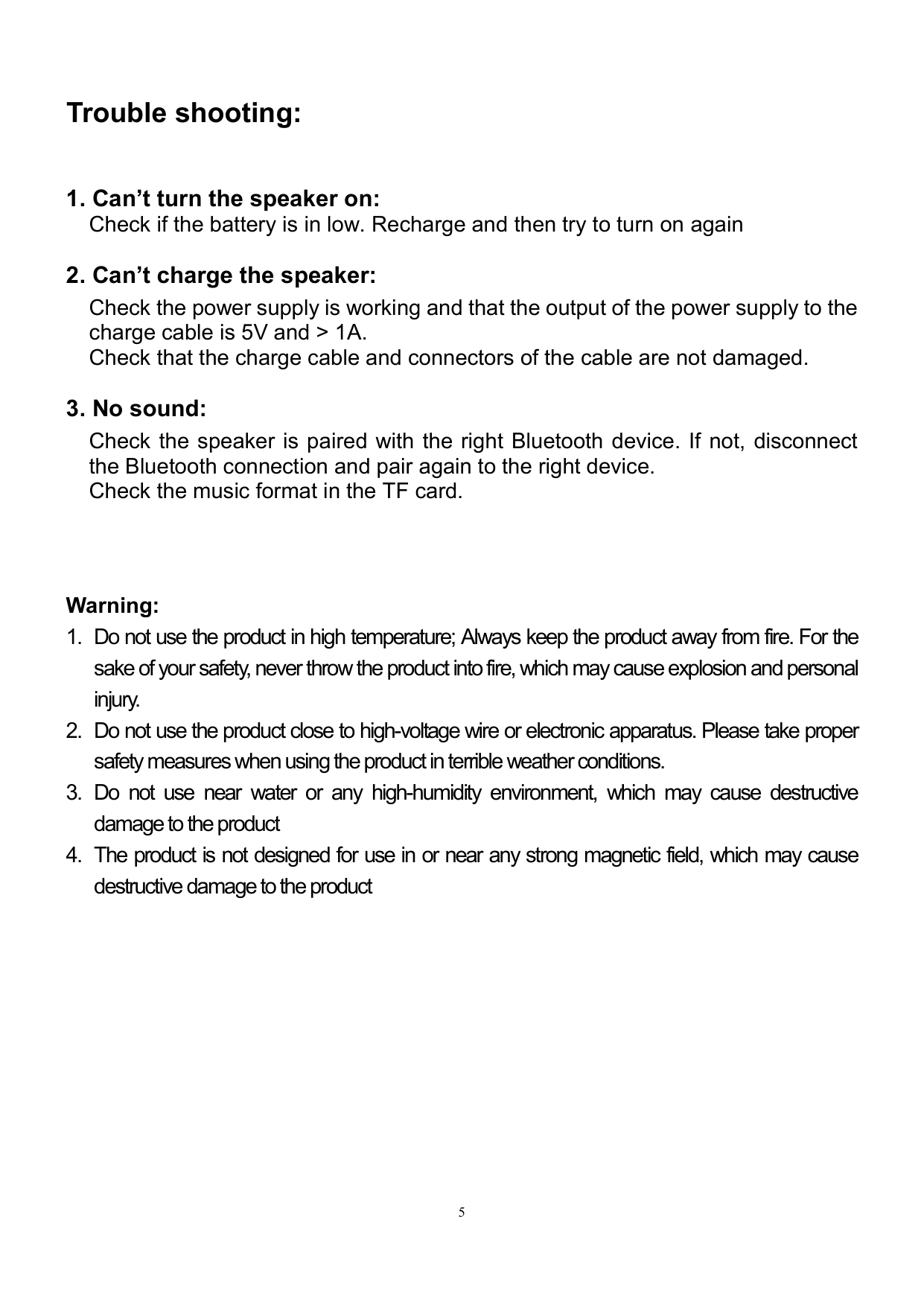
Trouble shooting:
Check the power supply is working and that the output of the power supply to the charge cable is 5V and > 1A. Check that the charge cable and connectors of the cable are not damaged.
Check the speaker is paired with the right Bluetooth device. If not, disconnect the Bluetooth connection and pair again to the right device. Check the music format in the TF card.
###### Warning:
#### FCC Warning:
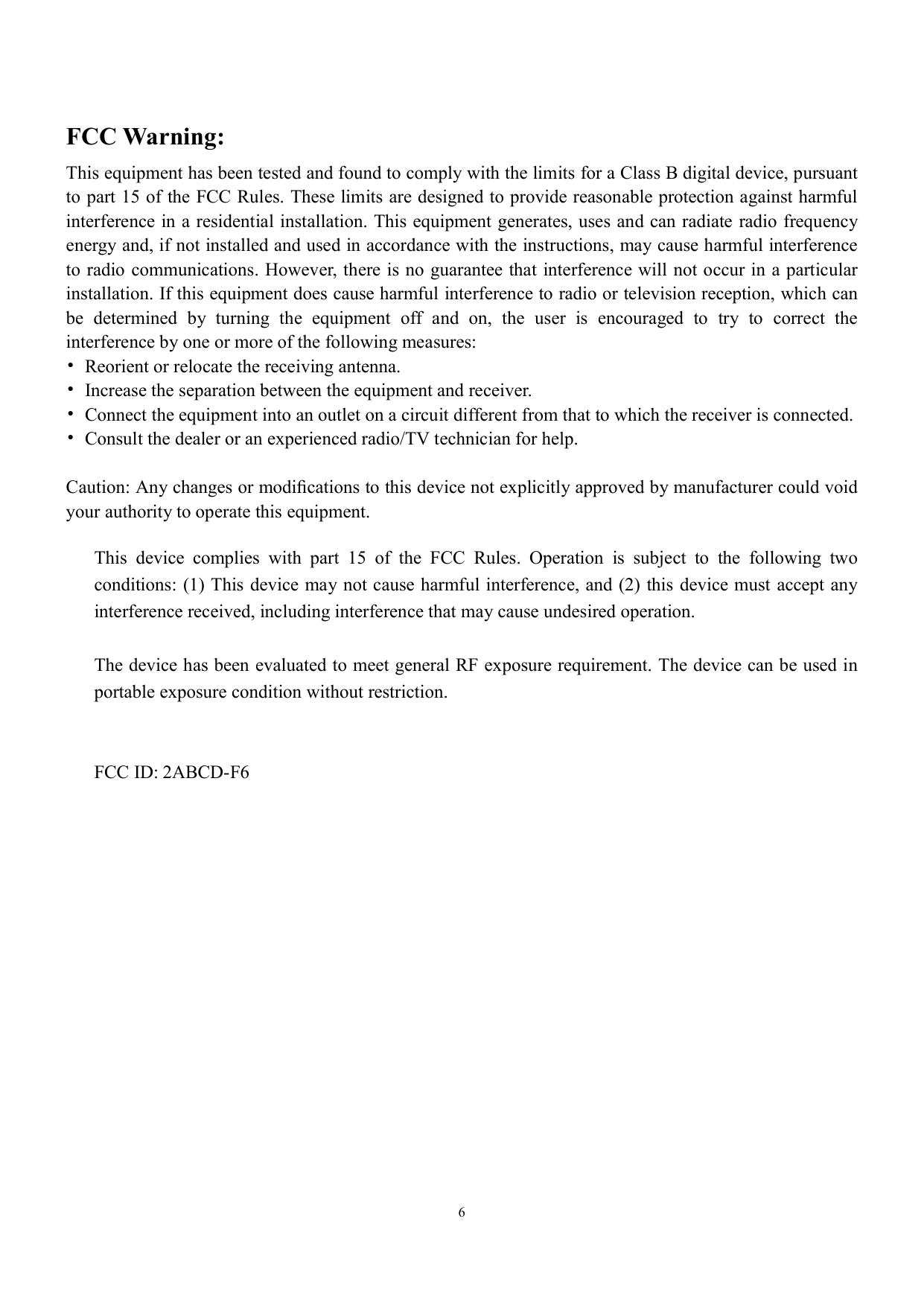
This equipment has been tested and found to comply with the limits for a Class B digital device, pursuant to part 15 of the FCC Rules. These limits are designed to provide reasonable protection against harmful interference in a residential installation. This equipment generates, uses and can radiate radio frequency energy and, if not installed and used in accordance with the instructions, may cause harmful interference to radio communications. However, there is no guarantee that interference will not occur in a particular installation. If this equipment does cause harmful interference to radio or television reception, which can be determined by turning the equipment off and on, the user is encouraged to try to correct the interference by one or more of the following measures:
Caution: Any changes or modifications to this device not explicitly approved by manufacturer could void your authority to operate this equipment.
This device complies with part 15 of the FCC Rules. Operation is subject to the following two conditions: (1) This device may not cause harmful interference, and (2) this device must accept any interference received, including interference that may cause undesired operation.
The device has been evaluated to meet general RF exposure requirement. The device can be used in portable exposure condition without restriction.
FCC ID: 2ABCD-F6