
Ask AI
— answers from the official manualAnswers from the official manual.
Common questions
Common Questions
10 totalHow do I charge the SV1106 vacuum?
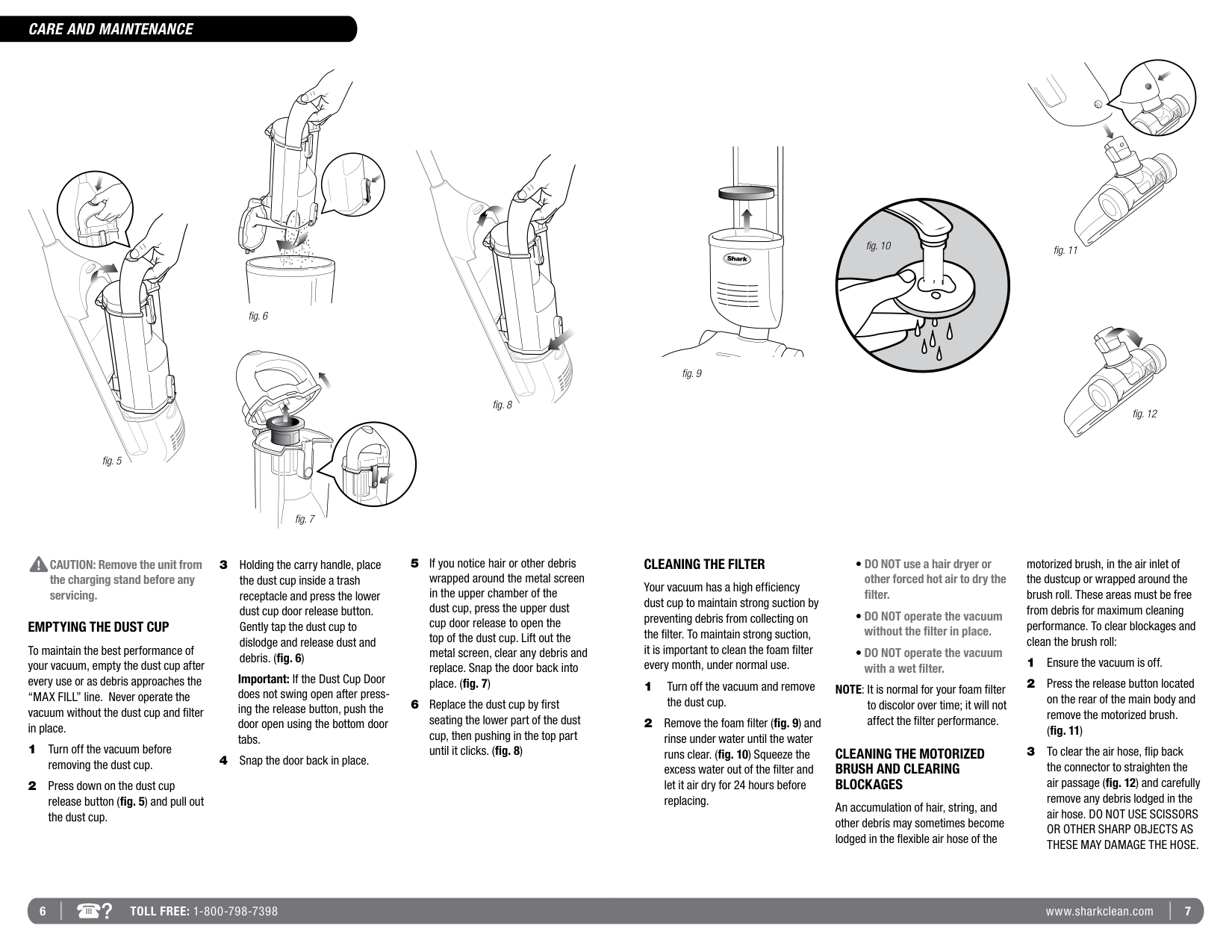
Place the vacuum on the charging base to charge. Charge the unit for 7 hours before using it for the first time or until the complete oval around the power button is illuminated, indicating a full charge.
What should I do if the battery stops working during use?
Charge the vacuum until the complete oval around the power button is illuminated. This indicates the unit has completed charging and is ready for further use. The device shuts off automatically to preserve the battery when it's almost depleted.
How often should I clean the filter?
The foam filter needs to be cleaned every month under normal usage conditions by rinsing under water until clear, and then allowing it to air dry for at least 24 hours before reinserting.
How do I empty the dust cup?
Press down on the dust cup release button, remove and empty it into a trash receptacle. Gently tap to dislodge debris and ensure no blockages are present.
What should I do if my vacuum won't pick up properly?
Empty the dust cup container, remove the filter, check for obstructions, clean or replace the filter and insert it completely into its holder below the dust cup. Additionally, ensure the motorized brush is working correctly.
How do I restart my vacuum after a jam?
Turn off the unit and allow it to cool for 10 seconds; inspect the brush roll and motorized brush area for any obstructions. After clearing these, turn the power back on and the unit should operate normally.
Full Manual
7 pages
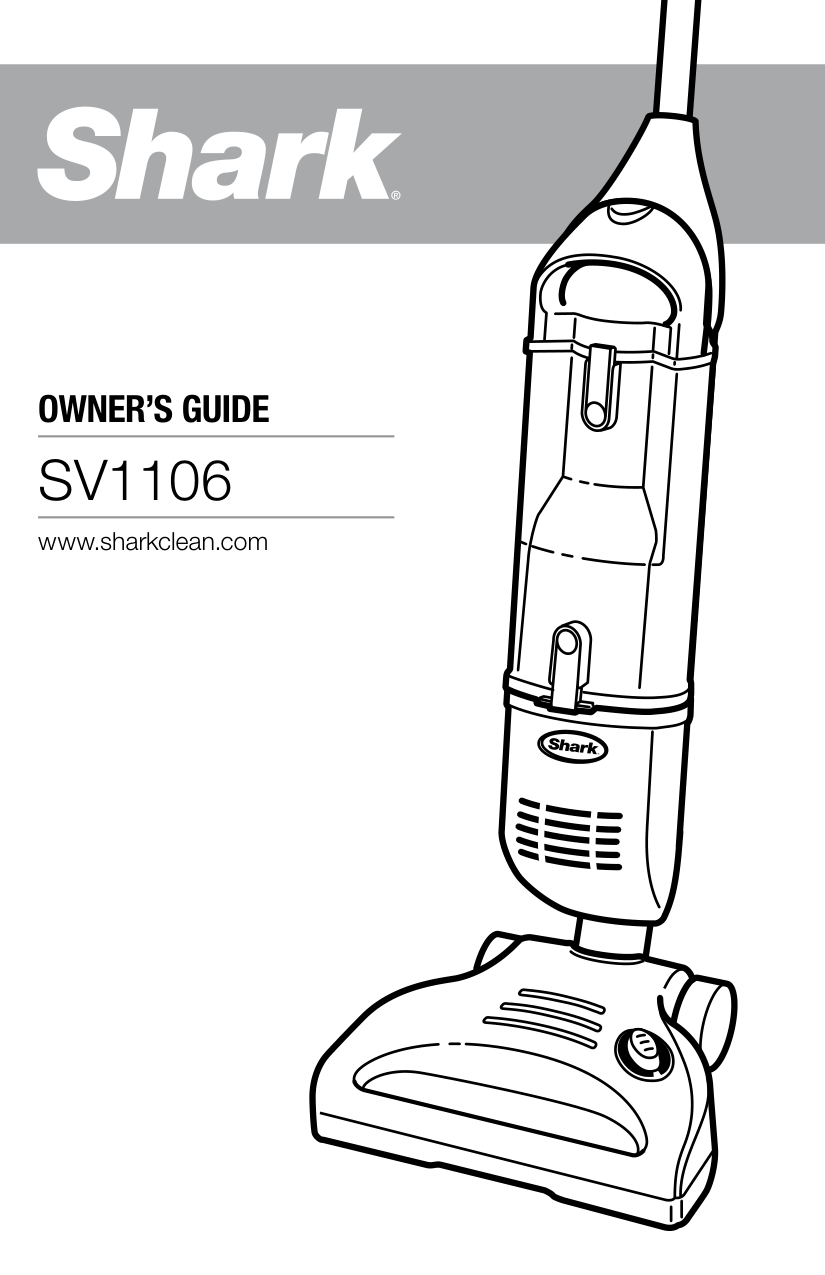
OWNER’S GUIDE
SV1106
www.sharkclean.com
#### WARNINGS
IMPORTANT SAFETY INSTRUCTIONS
For Household Use Only
WHEN USING YOUR SHARK® CORDLESS VACUUM, BASIC SAFETY PRECAUTIONS SHOULD ALWAYS BE FOLLOWED, INCLUDING THE FOLLOWING:
READ ALL INSTRUCTIONS BEFORE USING YOUR SHARK® CORDLESS VACUUM.
GENERAL ELECTRICAL SAFETY:
WARNING: TO REDUCE THE RISK OF ELECTRIC SHOCK OR INJURY DO NOT USE OUTDOORS OR ON WET SURFACES.
###### GENERAL USE:
This manual covers model SV1106
|Warning: Changes or modifications to this unit not expressly approved by the party responsible for compliance could void the user’s authority to operate the equipment. Note: This equipment has been tested and found to comply with the limits for a Class B digital device, pursuant to Part 15 of the FCC Rules. These limits are designed to provide reasonable protection against harmful interference in a residential installation. This equipment generates, uses and can radiate radio frequency energy and, if not installed and used in accordance with the instructions, may cause harmful interference to radio communications.
However, there is no guarantee that interference will not occur in a particular installation. If this equipment does cause harmful interference to radio or television reception, which can be determined by turning the equipment off and on, the user is encouraged to try to correct the interference by one or more of the following measures:
• Reorient or relocate the receiving antenna.
• Increase the separation between the equipment and receiver.
• Connect the equipment into an outlet on a circuit different from that to which the receiver is connected.
• Consult the dealer or an experienced radio/TV technician for help.
| |---|
|This device complies with Part 15 of the FCC Rules. Operation is subject to the following two conditions: (1) This device may not cause harmful interference, and (2) this device must accept any interference received, including interference that may cause undesired operation.| |---|
SAVE THESE INSTRUCTIONS
2 TOLL FREE: 1-800-798-7398 3www.sharkclean.com
#### ASSEMBLY
#### USING YOUR SHARK ® CORDLESS VACUUM
##### USE YOUR CORDLESS VACUUM TO CLEAN BARE FLOORS, CARPETS AND RUGS.
IMPORTANT: The indicator light around the power button will flash if the brush roll stops due to a jam. This feature is designed to protect the Lifetime Belt that powers the brushroll. See “Restarting After a Jam” on page 8.
On this setting, the vacuum will run for approximately 12 minutes.
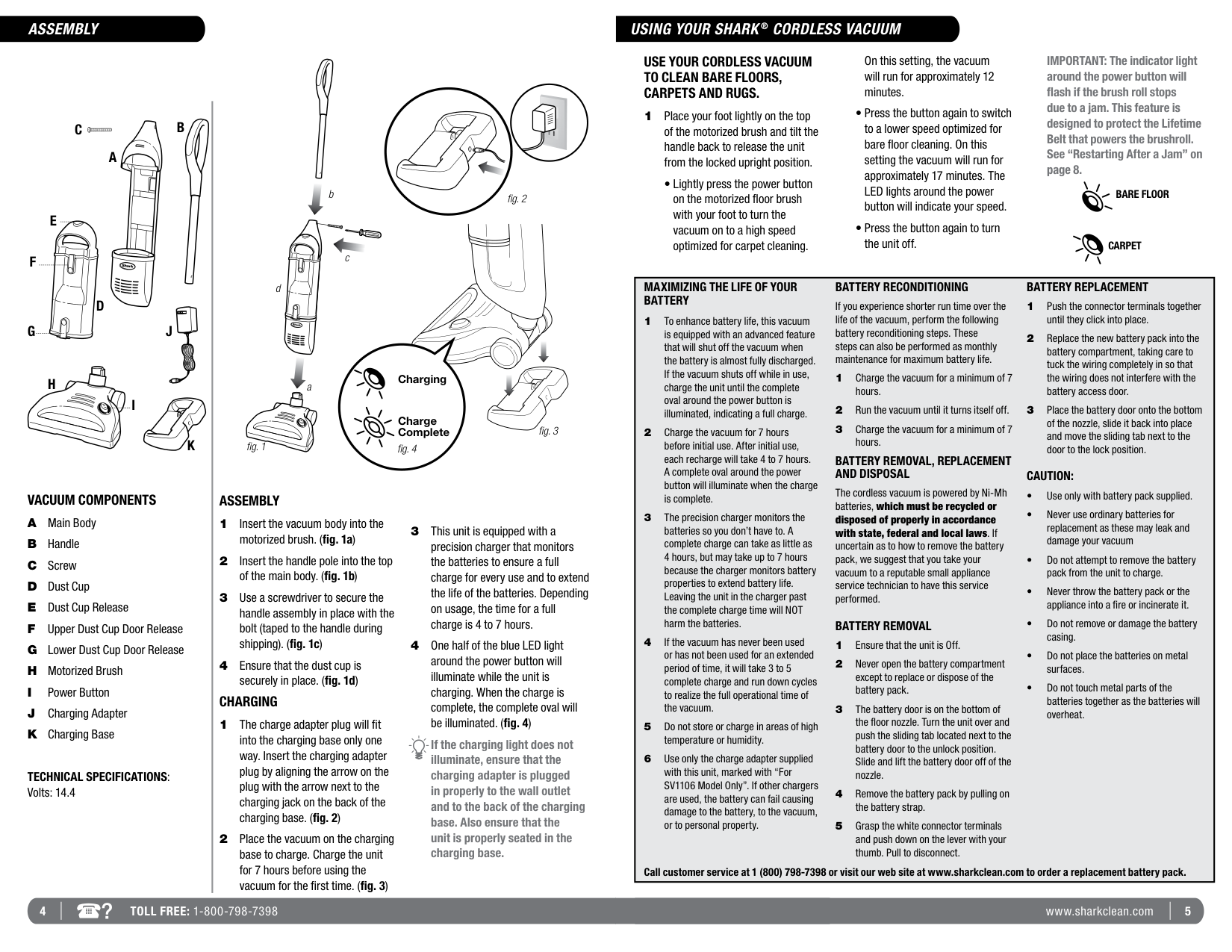
1 Place your foot lightly on the top of the motorized brush and tilt the handle back to release the unit from the locked upright position. • Lightly press the power button on the motorized floor brush with your foot to turn the vacuum on to a high speed optimized for carpet cleaning.
BC
A
b
BARE FLOOR
fig. 2
E
CARPET
c
D
|MAXIMIZING THE LIFE OF YOUR BATTERY
1 To enhance battery life, this vacuum is equipped with an advanced feature that will shut off the vacuum when the battery is almost fully discharged. If the vacuum shuts off while in use, charge the unit until the complete oval around the power button is illuminated, indicating a full charge.
2 Charge the vacuum for 7 hours before initial use. After initial use, each recharge will take 4 to 7 hours. A complete oval around the power button will illuminate when the charge is complete.
3 The precision charger monitors the batteries so you don’t have to. A complete charge can take as little as 4 hours, but may take up to 7 hours because the charger monitors battery properties to extend battery life. Leaving the unit in the charger past the complete charge time will NOT harm the batteries.
4 If the vacuum has never been used or has not been used for an extended period of time, it will take 3 to 5 complete charge and run down cycles to realize the full operational time of the vacuum.
5 Do not store or charge in areas of high temperature or humidity.
6 Use only the charge adapter supplied with this unit, marked with “For SV1106 Model Only”. If other chargers are used, the battery can fail causing damage to the battery, to the vacuum, or to personal property.
BATTERY RECONDITIONING
If you experience shorter run time over the life of the vacuum, perform the following battery reconditioning steps. These steps can also be performed as monthly maintenance for maximum battery life.
1 Charge the vacuum for a minimum of 7 hours.
2 Run the vacuum until it turns itself off.
3 Charge the vacuum for a minimum of 7 hours.
BATTERY REMOVAL, REPLACEMENT AND DISPOSAL
The cordless vacuum is powered by Ni-Mh batteries, which must be recycled or disposed of properly in accordance with state, federal and local laws. If uncertain as to how to remove the battery pack, we suggest that you take your vacuum to a reputable small appliance service technician to have this service performed.
BATTERY REMOVAL
1 Ensure that the unit is Off.
2 Never open the battery compartment except to replace or dispose of the battery pack.
3 The battery door is on the bottom of the floor nozzle. Turn the unit over and push the sliding tab located next to the battery door to the unlock position. Slide and lift the battery door off of the nozzle.
4 Remove the battery pack by pulling on the battery strap.
5 Grasp the white connector terminals and push down on the lever with your thumb. Pull to disconnect.
BATTERY REPLACEMENT
1 Push the connector terminals together until they click into place.
2 Replace the new battery pack into the battery compartment, taking care to tuck the wiring completely in so that the wiring does not interfere with the battery access door.
3 Place the battery door onto the bottom of the nozzle, slide it back into place and move the sliding tab next to the door to the lock position.
CAUTION:
• Use only with battery pack supplied.
• Never use ordinary batteries for replacement as these may leak and damage your vacuum
• Do not attempt to remove the battery pack from the unit to charge.
• Never throw the battery pack or the appliance into a fire or incinerate it.
• Do not remove or damage the battery casing.
• Do not place the batteries on metal surfaces.
• Do not touch metal parts of the batteries together as the batteries will overheat.
Call customer service at 1 (800) 798-7398 or visit our web site at www.sharkclean.com to order a replacement battery pack.| |---|
d
J
Charging
H
a
I
Charge Complete
fig. 3
K
fig. 1
fig. 4
##### VACUUM COMPONENTS
##### ASSEMBLY
##### CHARGING
If the charging light does not illuminate, ensure that the charging adapter is plugged in properly to the wall outlet and to the back of the charging base. Also ensure that the unit is properly seated in the charging base.
TECHNICAL SPECIFICATIONS: Volts: 14.4
4 TOLL FREE: 1-800-798-7398 5www.sharkclean.com
#### CARE AND MAINTENANCE
fig. 5
fig. 6
fig. 8
fig. 7
CAUTION: Remove the unit from the charging stand before any servicing.
##### EMPTYING THE DUST CUP
To maintain the best performance of your vacuum, empty the dust cup after every use or as debris approaches the “MAX FILL” line. Never operate the vacuum without the dust cup and filter in place.
Important: If the Dust Cup Door does not swing open after pressing the release button, push the door open using the bottom door tabs.
fig. 9
fig. 11fig. 10
fig. 12
##### CLEANING THE FILTER
Your vacuum has a high efficiency dust cup to maintain strong suction by preventing debris from collecting on the filter. To maintain strong suction, it is important to clean the foam filter every month, under normal use.
NOTE: It is normal for your foam filter to discolor over time; it will not affect the filter performance.
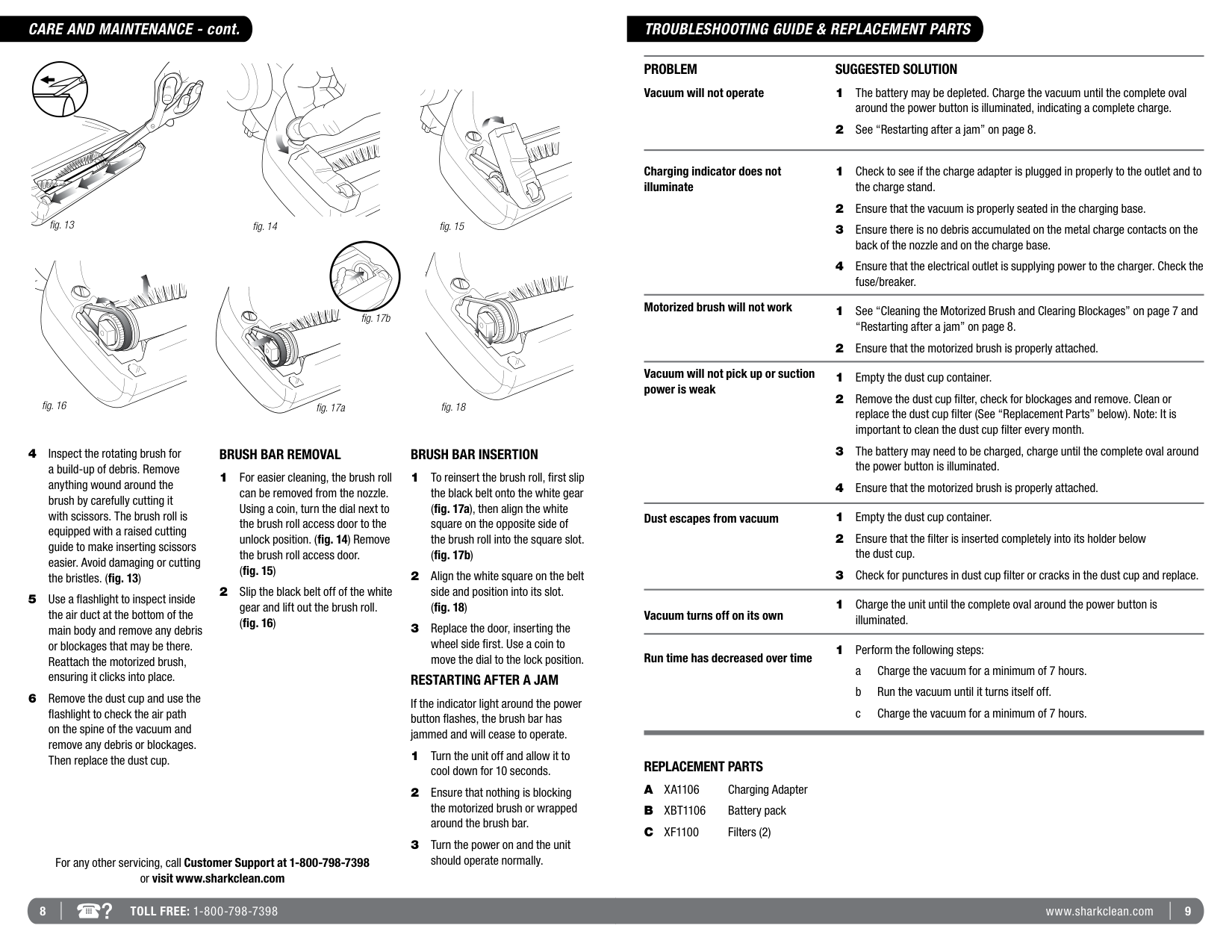
##### CLEANING THE MOTORIZED BRUSH AND CLEARING BLOCKAGES
An accumulation of hair, string, and other debris may sometimes become lodged in the flexible air hose of the
motorized brush, in the air inlet of the dustcup or wrapped around the brush roll. These areas must be free from debris for maximum cleaning performance. To clear blockages and clean the brush roll:
6 TOLL FREE: 1-800-798-7398 7www.sharkclean.com
#### CARE AND MAINTENANCE - cont.
fig. 13
fig. 14 fig. 15
fig. 17b
fig. 16 fig. 17a
fig. 18
##### BRUSH BAR REMOVAL
2 Slip the black belt off of the white
gear and lift out the brush roll.
For any other servicing, call Customer Support at 1-800-798-7398 or visit www.sharkclean.com
##### BRUSH BAR INSERTION
##### RESTARTING AFTER A JAM
If the indicator light around the power button flashes, the brush bar has jammed and will cease to operate.
#### TROUBLESHOOTING GUIDE & REPLACEMENT PARTS
PROBLEM Vacuum will not operate
##### SUGGESTED SOLUTION
Charging indicator does not illuminate
Motorized brush will not work
Vacuum will not pick up or suction power is weak
Dust escapes from vacuum
1 Charge the unit until the complete oval around the power button is
Vacuum turns off on its own

illuminated.
1 Perform the following steps:
Run time has decreased over time
##### REPLACEMENT PARTS
8 TOLL FREE: 1-800-798-7398 9www.sharkclean.com
#### WARRANTY & PRODUCT REGISTRATIONNOTES
##### EURO-PRO ONE-YEAR (1) LIMITED WARRANTY
EURO-PRO Operating LLC warrants this product to be free from defects in material and workmanship for a period of one (1) year from the date of the original purchase, when utilized for normal household use, subject to the following conditions, exclusions and exceptions.
If your appliance fails to operate properly while in use under normal household conditions within the warranty period, return the complete appliance and accessories, freight prepaid to:
If the appliance is found to be defective in material or workmanship, EURO-PRO Operating LLC will repair or replace it free of charge. Proof of purchase date and $13.95 to cover the cost of return shipping and handling must be included.*
Non-durable parts including, without limitation, filters, brushes and electrical parts which normally require replacement are specifically excluded from warranty.
The liability of EURO-PRO Operating LLC is limited solely to the cost of the repair or replacement of the unit at our option. This warranty does not cover normal wear of parts and does not apply to any unit that has been tampered with or used for commercial purposes. This limited warranty does not cover damage caused by misuse, abuse, negligent handling or damage due to faulty packaging or mishandling in transit. This warranty does not cover damage or defects caused by or resulting from damages from shipping or repairs, service or alterations to the product or any of its parts, which have been performed by a repair person not authorized by EURO-PRO Operating LLC.
This warranty is extended to the original purchaser of the unit and excludes all other legal and/or conventional warranties. The responsibility of EURO-PRO Operating LLC if any, is limited to the specific obligations expressly assumed by it under the terms of the limited warranty. In no event is EURO-PRO Operating LLC liable for incidental or consequential damages of any nature whatsoever. Some states do not permit the exclusion or limitation of incidental or consequential damages, so the above may not apply to you.
This warranty gives you specific legal rights, and you may also have other rights which vary from state to state or province to province.
##### PRODUCT REGISTRATION
Please visit www.sharkclean.com or call 1-800-798-7398 to register your new Shark® product within ten (10) days of purchase. You will be asked to provide the store name, date of purchase and model number along with your name and address.
The registration will enable us to contact you in the unlikely event of a product safety notification. By registering you acknowledge to have read and understood the instructions for use, and warnings set forth in the accompanying instructions.
10 TOLL FREE: 1-800-798-7398 11www.sharkclean.com
Copyright © 2012 Euro-Pro Operating LLC
USA: Newton, MA 02459 CANADA: Ville St-Laurent, QC H4S 1A7
Printed in China
Illustrations may differ from actual product.
SV1106.40_120822
www.sharkclean.com 1-800-798-7398