
Ask AI
— answers from the official manualAnswers from the official manual.
Common questions
Common Questions
19 totalHow do I power on and power off my device?
To power on your device, press and hold the power button until the screen turns on. To power off your device, press and hold the power button and then touch the power off option on screen. (Page 2)
What should I be careful about when inserting a SIM card?
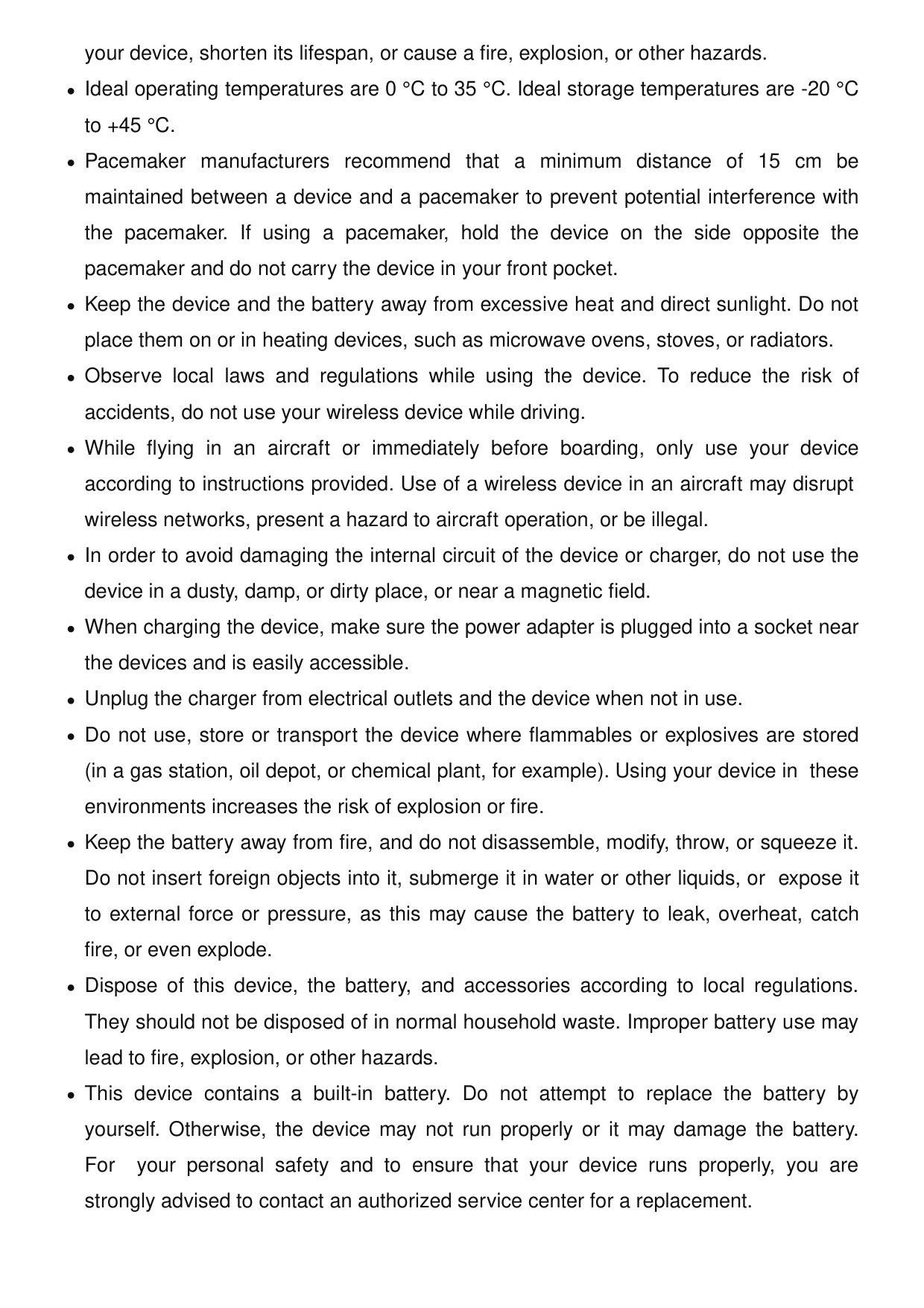
Ensure that the card is correctly aligned and that the card tray is level when you insert it into your device. Do not use cut or modified SIM cards, as these may not be recognized and could damage the card tray. If your SIM card does not match your device, contact your carrier. (Page 3)
What are the safe operating and storage temperatures for the device?
The ideal operating temperatures are 0°C to 35°C. Ideal storage temperatures are -20°C to +45°C. Avoid exposing the device to excessive heat or direct sunlight, and do not place it on or in heating devices such as microwave ovens or stoves. (Page 5)
Can I replace the battery myself on this device?
No, this device contains a built-in battery and you should not attempt to replace it yourself. Doing so may cause the device to not run properly or could damage the battery. You are strongly advised to contact an authorized service center for a battery replacement. (Page 6)
How far should I keep the device from my body when in use to comply with RF safety guidelines?
For countries that adopted the SAR limit of 1.6 W/kg over 1 gram of tissue, the device complies with RF specifications at a distance of 1.50 cm from your body. For countries using the 2.0 W/kg limit over 10 grams of tissue, the required body distance is 0.50 cm. The TFY-LX3 highest reported SAR values are: head SAR 0.94 W/kg, body SAR 0.79 W/kg, and hotspot SAR 0.99 W/kg. (Page 7)
Is it safe to use my device near a pacemaker?
Pacemaker manufacturers recommend maintaining a minimum distance of 15 cm between a device and a pacemaker to prevent potential interference. If you use a pacemaker, hold the device on the side opposite the pacemaker and do not carry the device in your front pocket. (Page 5)
Show 13 more questions
What should I do if my device is causing interference with radio or TV reception?
How do I find legal, safety, and regulatory information on my device?
How should I dispose of the device and its battery?
How can I safely dispose of my Honor Tfy Lx3 X8?
What should I do if my device gets too hot while charging or during use?
How do I avoid interference with medical devices when using my Honor Tfy Lx3 X8?
Do all models support NFC function?
How do I activate 4G service on my Honor Tfy Lx3 X8?
What are the SAR values for my TFY-LX3 model when used near the ear or body?
How can I prevent hearing damage while using my Honor Tfy Lx3 X8?
What should I do if my Honor Tfy Lx3 X8 experiences RF interference issues during operation?
How do I force restart my Honor TFY-LX3 X8 Dual SIM smartphone?
What should I do if my SIM card is not recognized by my Honor Tfy Lx3 X8?
Full Manual
10 pages
Quick Start Guide
Tfy-Lx1 Tfy-Lx2 Tfy-
Lx3
Know Your Device Before using the device, familiarize yourself with its basic operations.
Nfc
Volume button Power button/Fingerprint sensor USB Type-C port Headset jack Card slot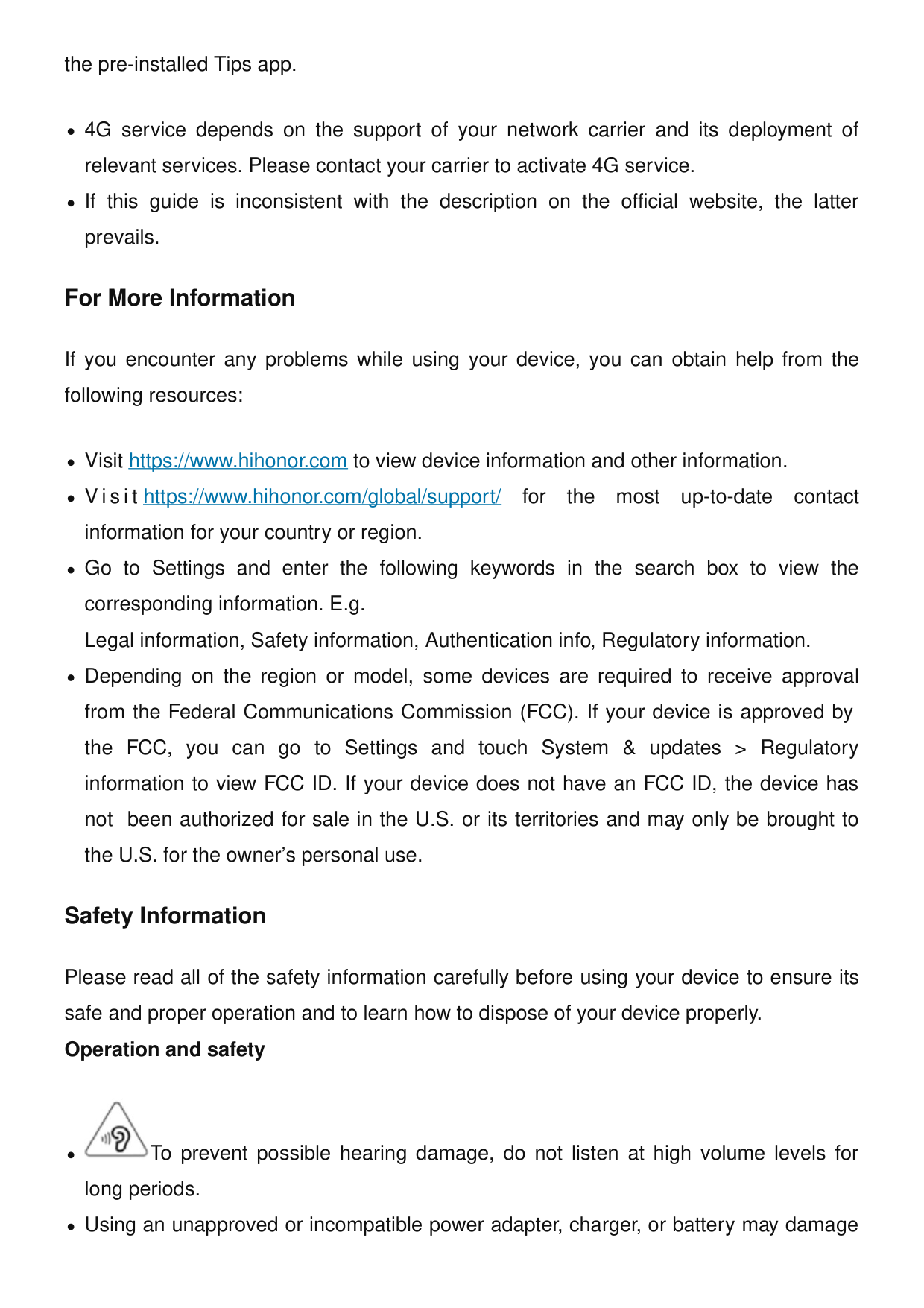
Getting Started
TFY-LX2: The highest reported SAR value: head SAR: 0.98 W/kg; body SAR: 1.24 W/kg. For the countries that adopted the SAR limit 1.6 W/kg over 1 gram of tissue. The device complies with RF specifications when used near your ear or at a distance of 1.50 cm from your body. TFY-LX1: The highest reported SAR value: head SAR: X.XX W/kg; body SAR: X.XX W/kg; hotspot SAR: X.XX W/kg. TFY-LX2: The highest reported SAR value: head SAR: X.XX W/kg; body SAR: X.XX W/kg; hotspot SAR: X.XX W/kg. TFY-LX3: The highest reported SAR value: head SAR: 0.94 W/kg; body SAR: 0.79 W/kg; hotspot SAR: 0.99 W/kg. EU Regulatory Compliance (only applies to
Tfy-Lx1 / Tfy-Lx2)
Statement Hereby, Honor Device Co., Ltd. declares that this device TFY-LX1 / TFY-LX2 is in compliance with the following Directive: RED 2014/53/EU, RoHS 2011/65/EU, ErP2009/125/Ec.
The full text of the EU declaration of conformity, the detailed ErP information and most recent information about accessories & software are available at the following internet address: https://www.hihonor.com/global/legal/certification/. This device may be operated in all member states of theEu.
Observe national and local regulations where the device is used. This device may be restricted for use, depending on the local network. Restrictions in the 5 GHz band: The 5150 to 5350 MHz frequency range is restricted to indoor use only in: AT, BE, BG, CH, CY, CZ, DE, DK, EE,El, Es, Fi, Fr, Hr, Hu, Ie, Is, It, Li, Lt, Lu, Lv, Mt, Nl,
No, Pl, Pt, Ro, Se, Si, Sk, Tr, Uk(Ni).
Frequency Bands and Power The frequency bands and transmitting power (radiated and/ or conducted) nominal limits applicable to this radio equipment are as follows: 6
Tfy-Lx1
GSM900: 35.5dBm, GSM1800: 32.5dBm, WCDMA900/2100: 25.7dBm, LTE Band 1/3/7/8/20/28: 25.7dBm, Bluetooth 2.4GHz: 20dBm, Wi-Fi 2.4GHz: 20dBm, Wi-Fi 5G: 5150-5250MHz: 23dBm, 5250-5350MHz: 23dBm, 5470-5725MHz: 23dBm, 5725-5850MHz: 14dBm, NFC 13.56MHz: 42 dBμA/m @ 10 mTfy-Lx2
GSM900: 35.5dBm, GSM1800: 32.5dBm, WCDMA900/2100: 25.7dBm, LTE Band 1/3/7/8/20/28/38/40: 25.7dBm, Bluetooth 2.4GHz: 20dBm, Wi-Fi 2.4GHz: 20dBm, Wi-Fi 5G: 5150-5250MHz: 23dBm, 5250-5350MHz: 23dBm, 5470-5725MHz: 23dBm, 5725-5850MHz: 14dBm FCC statement This equipment has been tested and found to comply with the limits for a Class B digital device, pursuant to Part 15 of the FCC Rules. These limits are designed to provide reasonable protection against harmful interference in a residential installation. This equipment generates, uses and can radiate radio frequency energy and, if not installed and used in accordance with the instructions, may cause harmful interference to radio communications. However, there is no guarantee that interference will not occur in a particular installation. If this equipment does cause harmful interference to radio or television reception, which can be determined by turning the equipment off and on, the user is encouraged to try to correct the interference by one or more of the following measures: --Reorient or relocate the receiving antenna. --Increase the separation between the equipment and receiver. --Connect the equipment into an outlet on a circuit different from that to which the receiver is connected. --Consult the dealer or an experienced radio/TV technician for help. This device complies with Part 15 of the FCC Rules. Operation is subject to the following two conditions: (1) this device may not cause harmful interference, and (2) this device must accept any interference received, including interference that may cause undesired operation. Caution: Any changes or modifications to this device not expressly approved by Honor Device Co., Ltd. for 7
compliance could void the user's authority to operate the equipment. Legal Notice Trademarks and Permissions Android is a trademark of Google LLC. LTE is a trademark of ETSI. The Bluetooth® word mark and logos are registered trademarks owned by Bluetooth SIG, Inc. and any use of such marks by Honor Device Co., Ltd. is under license. Wi-Fi®, the Wi-Fi CERTIFIED logo, and the Wi-Fi logo are trademarks of Wi-Fi Alliance. Copyright © Honor Device Co., Ltd. 2022. All rights reserved.
All Pictures And Illustrations In This Guide,
Including But Not Limited To The Device
Color, Size, And Display Content, Are For
Your Reference Only. The Actual Device May
Vary. Nothing In This Guide Constitutes A
Warranty Of Any Kind, Express Or Implied.
Privacy Policy To better understand how we protect your personal information, please see the privacy policy at https://www.hihonor.com/privacy-policy/worldwide/. 8
96727287_01