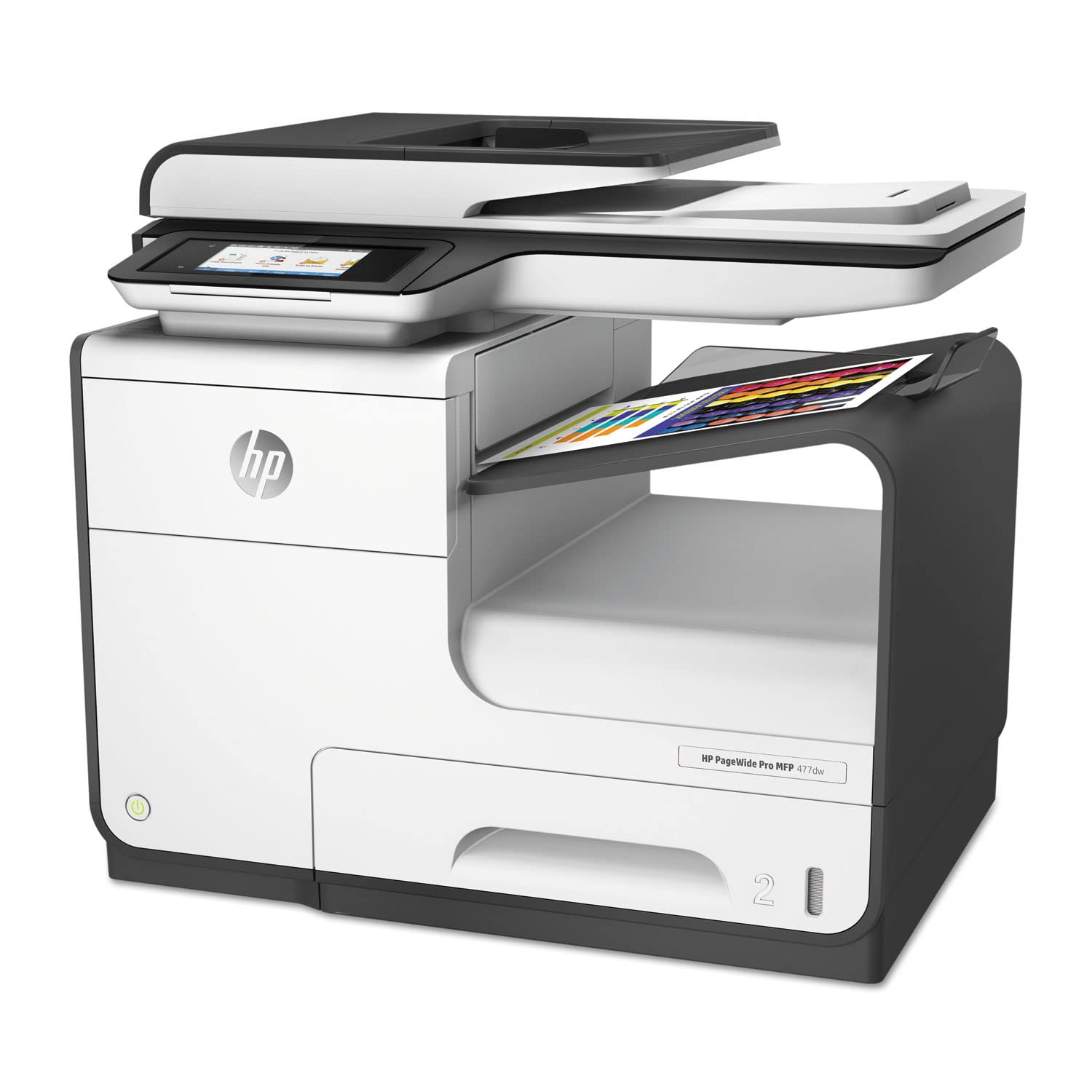
HP Pagewide Pro 477dw Multifunction Printer
Ask AI
— answers from the official manualAnswers from the official manual.
Common questions
Common Questions
29 totalWhat print speeds can I expect from the HP PageWide Pro 477dw?
The printer can print up to 40 ppm in both black and colour at normal A4 quality, and up to 55 ppm in General Office mode for both black and colour. For duplex (two-sided) printing, speeds are up to 21 ipm for both black and colour at A4 size. First page out is as fast as 6.5 seconds for black and 7 seconds for colour from ready state. (Page 3)
What cartridges come included in the box with the printer?
The printer comes with four HP 913 Setup cartridges: one black (~2,500 pages), and one each of cyan, magenta, and yellow (~1,000 pages each). These are setup cartridges and are not the high-yield replacements available for purchase separately. (Page 5)
What high-yield replacement cartridges should I buy for the HP PageWide Pro 477dw?
The recommended high-yield replacement cartridges are the HP 973X series: L0S07AE Black (~10,000 pages), F6T81AE Cyan (~7,000 pages), F6T82AE Magenta (~7,000 pages), and F6T83AE Yellow (~7,000 pages). These are Original HP PageWide cartridges designed for this printer. (Page 2)
Can I use third-party or non-HP cartridges in the HP PageWide Pro 477dw?
The HP PageWide Pro 477dw is a dynamic security enabled printer and is only intended to be used with cartridges using an HP original chip. Cartridges using a non-HP chip may not work, and those that work today may not work in the future. More information is available at http://www.hp.com/go/learnaboutsupplies. (Page 1)
What mobile printing options are supported by the HP PageWide Pro 477dw?
The printer supports HP ePrint, Apple AirPrint, Mopria, Wireless Direct Printing, Google Cloud Print 2.0, and Mobile Apps. It also supports Wi-Fi Direct and NFC touch-to-print technology, allowing printing from a mobile device without needing a network connection. Note that NFC printing requires a compatible NFC-printing-enabled mobile device. (Page 4)
What is the maximum paper input capacity of the HP PageWide Pro 477dw?
The maximum total input capacity is up to 1,550 sheets. The printer has two standard trays (a 500-sheet input tray and a 50-sheet multi-purpose tray), and an optional 500-sheet third tray can be added to increase capacity. The ADF holds a standard 50 sheets. (Page 4)
Show 23 more questions
What are the power consumption and energy specifications for the HP PageWide Pro 477dw?
What security features are built into the HP PageWide Pro 477dw?
What scan file formats does the HP PageWide Pro 477dw support?
What warranty and support options come with the HP PageWide Pro 477dw?
What is the monthly duty cycle of the HP Pagewide Pro 477dw?
How do I connect my mobile device via Wi-Fi Direct?
How do I start a two-sided scan?
What resolutions can I achieve in printing?
What type of security features does the printer have?
How do I print from a USB drive?
How do I pair my smartphone with this printer?
How large of media sheets does it handle?
Where do I find the printer software for installation?
How can I manage my printer remotely?
What are the print speed capabilities of this printer?
How do I replace a cartridge on the HP PageWide Pro 477dw Multifunction Printer?
How can I secure my print jobs on this printer?
What are the available scan file formats?
How do I set up the printer for wireless printing?
What is the monthly duty cycle for this printer?
How do I access the embedded web server?
How do I add paper to the tray?
How do I set up a custom user ID for authentication?
Full Manual
3 pages

Data sheet HP PageWide Pro 477dw Multifunction Printer
Unbeatable value. Unparalleled speed.

Ultimate value and speed – HP PageWide Pro delivers the lowest total cost of ownership and fastest speeds in its class.1,2 Get quick two-sided scanning, plus best-in-class security features and energy efficiency.3,4
Highlights


#### Professional colour, breakthrough total cost
#### The fastest MFP in its class1
#### Proven technology. Superior energy efficiency.4
#### Best-in-class security3 and management features

HP PageWide Pro 477dw Multifunction Printer Technical specifications
|Functions|Print, copy, scan, fax| |---|---| |Print speed|Up to 40 ppm ISO black (A4); Up to 40 ppm ISO colour (A4); Up to 21 ipm duplex (A4) General Office (black) Up to 55 ppm; General Office (colour) Up to 55 ppm First page out: As fast as 6.5 sec black (A4, ready); As fast as 7 sec colour (A4, ready)| |Print resolution|Up to 1200 x 1200 optimised dpi from 600 x 600 input dpi (on unspecified plain paper, HP Premium Presentation Matte, and HP Brochure Matte) black; Up to 2400 x 1200 optimised dpi from 600 x 600 input dpi (on HP Advanced Photo Papers) colour| |Print Area|Print margins: Top: 4.2 mm; Bottom: 4.2 mm; Left: 4.2 mm; Right: 4.2 mm| |Print languages|HP PCLXL (PCL6), PCL5, native PDF, HP Postscript Level 3 emulation| |Print capabilities|Borderless printing: No; Direct print supported: Storage devices not supported| |Print cartridges number|4 (1 each black, cyan, magenta, yellow)| |Mobile printing capability|HP ePrint; Apple AirPrint™; Mopria™-certified; Wireless Direct Printing; Google Cloud Print 2.0; Mobile Apps| |Monthly duty cycle|Up to 50,000 pages (A4); Recommended monthly page volume: 750 to 4,500| |Automatic paper sensor|Yes| |Processor speed|1.2 GHz| |Display|10.92 cm (4.3") CGD (Colour Graphic Display), IR touchscreen| |Wireless capability|Yes, built-in Wi-Fi 802.11b/g/n| |Connectivity|Standard: 2 Hi-Speed USB 2.0 Host; 1 Hi-Speed USB 2.0 Device; 1 Ethernet 10/100 Base-TX network; 2 RJ-11 modem port/phone line; 802.11 b/g/n Station; 802.11 b/g Access Point; Optional: Support the following external Jetdirect servers; Print only: HP Jetdirect en1700 External Print Server (J7988G), HP Jetdirect en3700 Fast-Ethernet External Print Server for Network Capable Hi-Speed USB 2.0 & 3.0 Peripherals (J7942G), HP Jetdirect ew2400 802.11b/g wireless and Fast Ethernet external print server (USB 2.0, 10/100Base-TX, 802.11b/g) (J7951G), HP Jetdirect ew2500 802.11b/g Wireless Print Server (J8021A); Other supported accessories: Apple AirPort Express, Apple AirPort Extreme, Apple Airport TimeCapsule; Wi-Fi Direct| |Memory|Standard: 768 MB; Maximum: 768 MB| |Copier settings|ID copy; Resize; Quality; Lighter/Darker; Two-sided copying; Tray selection; Collate; Binding marging; Copy preview with crop and rezise; Enhancements; Enable/Disable copy; Enable/Disable copy colour; Colour Access Control; Native authorization & authentication; Set as new defaults; Maximum number of copies: Up to 99 copies: Copy resolution: Up to 600 dpi| |Copy speed|Up to 40 cpm black ISO (A4), Up to 40 cpm colour ISO (A4)| |Copier smart software features|Reduce/Enlarge from scanner glass (25 to 400%); Collate; Two-sided copying; Image adjustments (darkness, sharpness)| |Scanner specifications|Scanner type: Flatbed, ADF; Scan technology: Contact Image Sensor (CIS); Scan input modes: Front panel applications: Copy, Scan to email with LDAP email address lookup, Scan to network folder, Scan to USB, Scan to sharepoint, Scan to computer with SW; Client applications: EWS, HP Scan App, compatible with HP Capture and Route; Twain version: Version 1.9; Duplex ADF scanning: Yes; Scan size maximum (flatbed, ADF): 216 x 356 mm; Optical scan resolution: Up to 1200 dpi| |Scan file format|Bitmap (.bmp), JPEG (.jpg), PDF (.pdf), PNG (.png), Rich Text (.rtf), searchable PDF (.pdf), Text (.txt), TIFF (.tif)| |Scan speed|Up to 25 ipm (monochrome & colour); Up to 26 ipm (monochrome & colour); duplex: Up to 26 ipm (monochrome & colour)| |Scannable area|Maximum media size: 216 x 356 mm; Maximum media size: 216 x 356 mm ADF| |Bit depth/ Greyscale levels|24-bit (color); 8-bit (gray)/ 256| |Digital sending|Standard: Scan to Email with LDAP email address lookup; Scan to Network Folder; Scan to USB; Scan to Sharepoint; Scan to Computer with SW; Fax Archive to Network Folder; Fax Archive to Email; Fax to Computer; Enable/Disable Fax; Enable/Disable colour Fax, Colour Access Control; Native Authorization & Authentication| |Fax|Yes, colour, 33.6 kbps| |Fax specifications|Fax memory: Up to 100 pages (black and white); Up to 8 pages (colour); Fax resolution: Standard: 203 x 98 dpi; Fine: 203 x 196 dpi; Quick dialing: Up to 199 numbers| |Fax smart software features|Digital Fax - fax to computer is available with Windows and Macintosh, visit http://www.hp.com/support to download the latest software| |Memory card compatibility|None| |Printer smart software features|HP ePrint; HP Mobile Apps; Google Cloud Print v2; Apple AirPrint™; HP EasyColor; Print preview; Automatic two-sided printing; Print multiple pages per sheet (2, 4, 6, 9, 16); Collation; Booklet Printing; Cover pages; Tray Selection; Scaling; Portrait/Landscape orientation; High Quality Greyscale and Black Ink only; General Office/Professional/Presentation/Maximum dpi print modes; Front USB port; Copy/Scan/Fax; Control Panel Shortcuts; HP UPD PIN Printing; HP Color Access Control; Optional: HP and third party extensibility solutions; Wireless| |Printer management|HP Web Jetadmin; Embedded Web Server; HP UPD Printer Administrator Resource Kit; HP Utility (Mac); HP JetAdvantage Security Manager| |Security management|SSL/TLS (HTTPS), LDAP authentication; Optional HP and 3rd party authentication solutions (e.g. badge readers) IPP over TLS; WPA2-Enterprise wired; 802.1x wireless authentication (EAP-TLS, LEAP, and PEAP); Pre-Shared Key Authentication for Wireless (PSK); Firewall, certificates configuration; Control panel lock; Password protect EWS; Unused protocol and service disablement; Syslog; Signed firmware; Administrator settings; Native authentication and authorization access control, native colour access control; Configurable authentication time out; UPD PIN printing; Mopy mode via UPD PIN printing; Compatible with optional HP JetAdvantage Security Manager|
|What's in the box|D3Q20B HP PageWide Pro 477dw Multifunction Printer; HP 913 Setup Black PageWide Cartridge (~3,000 pages); HP 913 Setup Cyan PageWide Cartridge, HP 913 Setup Magenta PageWide Cartridge, HP 913 Setup Yellow PageWide Cartridge: composite yield (~1,500 pages); Power cord; Phone cord; Installation guide; CD-ROMs (for software, Windows and Mac printer drivers, and User's Guide)| |---|---| |Accessories|D3Q23A HP PageWide Pro 500-sheet Paper Tray P0V04A HP PageWide Pro 2x500-sheet Paper Tray and Stand
*Only 1 additional paper handling option can be added: one additional 500-sheet tray or one 2x500-sheet tray and stand.| |Supplies|L0S07AE HP 973X High Yield Black Original PageWide Cartridge ~10,000 pages
F6T81AE HP 973X High Yield Cyan Original PageWide Cartridge ~7,000 pages
F6T82AE HP 973X High Yield Magenta Original PageWide Cartridge ~7,000 pages
F6T83AE HP 973X High Yield Yellow Original PageWide Cartridge ~7,000 pages
| |Compatible operating systems|Windows 10, Windows 8, Windows 7; OS X v10.11 El Capitan, OS X v10.10 Yosemite, OS X v10.9 Mavericks Lion; Linux (http://www.hplip.net)|

|Minimum system requirements|Windows: Windows® 10, 8.1, 8, 7: 32-bit/64-bit, 2 GB available hard disk space, CD-ROM/DVD drive or Internet connection, USB port, Internet Explorer; Windows Vista®: 32-bit only, 2 GB available hard disk space, CD-ROM/DVD drive or Internet connection, USB port, Internet Explorer 8 Mac: Apple® OS X v10.11 El Capitan, OS X v10.10 Yosemite, OS X v10.9 Mavericks; 1 GB available hard disk space; Internet required; USB| |Software included|Windows Installer and discrete PCL 6 driver; Mac Installer and PS driver; HP Participation Study; IRIS OCR| |Media types|Plain paper (light, intermediate, mid-weight, heavy, extra heavy, prepunched, recycled, bond, other inkjet plain paper), photo (glossy, gloss, soft gloss, satin, matte, other inkjet photo), envelopes, labels, cards, specialty papers (glossy brochure, matte brochure, tri-fold brochure, Hagaki, greeting cards, other inkjet specialty paper)| |Media sizes|Tray 1: Oficio, A4, A5, A6, B5 (JIS), B6 (JIS), 10 x 15 cm, envelopes (B5, C5, C6, DL);
Tray 2: A4, A5, B5 (JIS), envelopes (DL, B5, C5); Tray 3: A4, A5, B5 (JIS); Custom: Tray 1: 76 x 127 to 216 x 356 mm; Tray 2: 102 x 210 to 216 x 297 mm; Optional 500-sheet tray 3: 102 x 210 to 216 x 356 mm
| |Media Handling|Input standard: 500-sheet input tray, 50-sheet multi-purpose tray; Maximum cards: Up to 100 cards; Up to 25 sheets photo paper; Maximum envelopes: Up to 37 envelopes Output standard: 300-sheet face-down output bin; Maximum: Up to 300 sheets Duplex printing: Automatic (standard) ADF: Standard, 50 sheets| |Media weight|Tray 1: 60 to 120 g/m² (plain paper), 125 to 300 g/m² (photo), 75 to 90 g/m² (envelope), 120 to 180 g/m² (brochure), 163 to 200 g/m² (card); Tray 2: 60 to 120 g/m² (plain paper), 125 to 250 g/m² (photo), 75 to 90 g/m² (envelope), 120 to 180 g/m² (brochure), 163 to 200 g/m² (card); Tray 3: 60 to 120 g/m² (plain paper), 125 to 250 g/m² (photo), 120 to 180 g/m² (brochure), 163 to 200 g/m² (card) Media Weight Recommended: 60 to 120 g/m² (plain paper); 125 to 300 g/m² (photo); 75 to 90 g/m² (envelope); 120 to 180 g/m² (brochure); 163 to 200 g/m² (card)| |Printer dimensions (W x D x H)|530 x 407 x 467 mm| |Package dimensions (W x D x H)|600 x 495 x 594 mm| |Printer Weight|22.15 kg| |Package weight|26.39 Kg| |Storage|Temperature: -40 to 60ºC, Humidity: 5 to 90% RH| |Acoustics|Acoustic power emissions: 6.9 B(A); Acoustic pressure emissions: 56 dB(A) (monochrome/colour printing), 54 dB(A) (ADF monochrome copying), 54 dB(A) (ADF colour copying), 45 dB(A) (ADF colour scanning), 45 dB(A) (ADF monochrome scanning), inaudible (idle)| |Power|Requirements: Input voltage: 100 to 240 VAC (+/- 10%), 50/60 Hz (+/- 3 Hz) Consumption: 100 watts (maximum), 70 watts average (printing), 10 watts (ready), 4.8 watts (sleep), 1.0 watt (auto-off), 0.2 watts (manual-off); Typical Electricity Consumption (TEC): 0.839 kWh/Week Power supply: Built-in power supply| |Certifications|CISPR 22:2008-09/EN 55022:2010 (Class B); CISPR 24:2010/EN 55024:2010; EN 61000-3-2:2006 +A1:2009 +A2:2009; EN 61000-3-3:2008; EMC Directive 2004/108/EC with CE Marking (Europe); ENERGY STAR® qualified| |Country of origin|Made in China| |Warranty|One-year, on-site warranty, service and support; One-year technical phone support, chat and email| |Service and support|U8ZW7E HP 3 year Next business day PageWide Pro X477 Hardware Support
U8ZW8E HP 4 year Next business day PageWide Pro X477 Hardware Support
U8ZW9E HP 5 year Next business day PageWide Pro X477 Hardware Support
U8ZY4PE HP 1 year Post Warranty Next business day PageWide Pro X477 Hardware Support
U8ZY5PE HP 2 year Post Warranty Next business day PageWide Pro X477 Hardware Support
U8ZX8E HP 3 year Next business day Onsite Exchange PageWide Pro X477 Service U8ZX9E HP 4 year Next business day Onsite Exchange PageWide Pro X477 Service U8ZY0E HP 5 year Next business day Onsite Exchange PageWide Pro X477 Service
U8ZY8PE HP 1 year Post Warranty Next business day Onsite Exchange PageWide Pro X477 Service
|
Footnotes
Comparison based on manufacturers’ published specifications of fastest available colour mode of all colour business printers €300–€800 and MFPs €400–€1,000 as of November 2015, excluding other HP PageWide products, and products with 1% or lower market share using market share as reported by IDC as of Q3 2015. HP PageWide speeds based on General Office mode and exclude first page. Learn more at hp.com/go/pagewidebusiness. 2 Total cost of ownership comparison based on 90,000 pages, manufacturers’ published specifications for page yields and energy use, manufacturers' recommended street prices for HP hardware and supplies, average street prices for competitive devices, cost per page based on ISO yield with continuous printing in default mode with highest-available-capacity cartridges, long-life consumables of all colour business printers €300–€800 and MFPs €400–€1,000 as of November 2015, excluding products with 1% or lower market share using market share as reported by IDC as of Q3 2015. Actual prices may vary. Learn more at hp.com/go/pagewidebusiness and hp.com/go/learnaboutsupplies. 3 Best-in-class security fleet management claim based on comparison of built-in features of all colour business printers €300–€800 and MFPs €400–€1,000 as of November 2015, excluding products with 1% or lower market share using market share as reported by IDC as of Q3 2015. Learn more at hp.com/go/pagewidebusiness. 4 Energy claim based on TEC data reported on energystar.gov. Data normalised to determine energy efficiency of majority of in-class business printers €300-€800 and MFPs €400–€1,000 as of November 2015; market share as reported by IDC as of Q3 2015. Actual results may vary. Learn more at hp.com/go/pagewidebusiness. 5 HP 970X High Yield Original PageWide Cartridges are not included in printer purchase; purchase separately. Comparison based on ISO 24711 cartridge yields for HP 970 series High Yield Original PageWide Cartridges compared with HP 970 series Original PageWide Cartridges. High-yield cartridges are compatible only with HP PageWide Pro 400 and 500 series MFPs and printers. Learn more at hp.com/go/learnaboutsupplies. 6 Less scheduled maintenance based on 150,000 pages printed, and published comparisons of majority of in-class colour laser printers €300–€800 and MFPs €400–€1,000 as of November 2015; market share as reported by IDC as of Q3 2015. Learn more at hp.com/go/pagewidebusiness. 7 Comparison based on manufacturers’ published specifications of first page out from ready and sleep mode of all colour business printers €300–€800 and MFPs €400–€1,000 as of November 2015, excluding other HP PageWide products, and products with 1% or lower market share using market share as reported by IDC as of Q3 2015. Subject to device settings. Actual results may vary. Learn more at hp.com/go/pagewidebusiness. 8 Requires an Internet connection to the printer. Services may require registration. App availability varies by country, language, and agreements. For details, see hpconnected.com. 9 Feature works with Microsoft® Word and PowerPoint® 2003 and later. Only Latin language fonts are supported. 10 Mobile device needs to be connected directly to the signal of a Wi-Fi Direct® supported MFP or printer prior to printing. Depending on mobile device, an app or driver may also be required. Wi-Fi Direct is a registered trademark of Wi-Fi Alliance®. For details, see hp.com/go/mobileprinting. Requires a compatible NFC-printing-enabled mobile device. For a list of compatible NFC-printing-enabled mobile devices, see http://www.hp.com/go/nfcprinting. 12 Additional workflow solutions available through HP's software and third-party partner programme. For solution details, visit hp.com/go/gsc. 13 HP Colour Access Control available only on HP PageWide Pro devices with a 10.9-cm (4.3-inch) touchscreen. Learn more at http://www.hp.com/go/pagewidebusiness.


##### http://www.hp.com/uk

The product could differ from the images shown. © Copyright 2016 HP Development Company, L.P. The information contained herein is subject to change without notice. The only warranties for HP products and services are set forth in the express warranty statements accompanying such products and services. Nothing herein should be construed as constituting an additional warranty. HP shall not be liable for technical or editorial errors or omissions contained herein.
4AA6-3266EEM, 11/16