
Ask AI
— answers from the official manualAnswers from the official manual.
Common questions
Common Questions
20 totalHow do I charge the Pocket Charger for the first time?
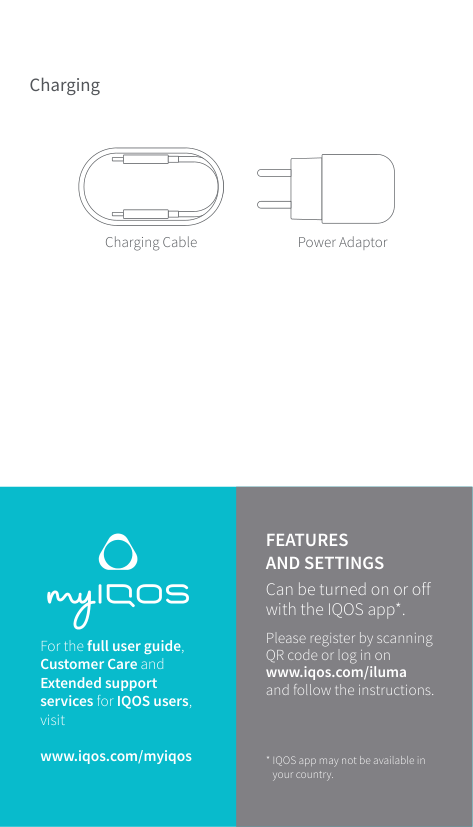
Before first use, fully charge your device with Power Adaptor and Charging Cable. The charging process will take approximately 135 minutes.
What should I do when the Holder status lights show only one light?
If there is only one light on, it indicates that the Holder is ready for one use and requires recharging after its current charge level allows for just one usage.
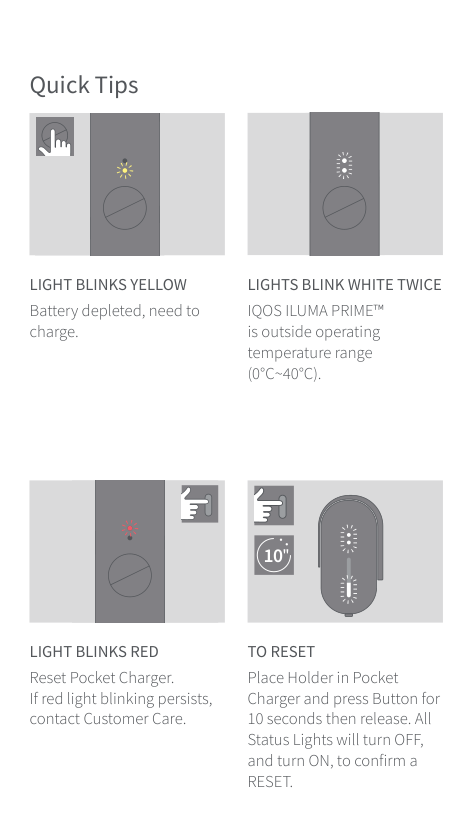
How do I reset my Pocket Charger if the lights are blinking red?
To reset Place the Holder in the Pocket Charger, press the Button for 10 seconds then release. All Status Lights will turn OFF and ON to confirm a RESET.
What does it mean if the lights on my IQOS ILUMA PRIME™ are blinking white twice?
This indicates that your device is outside of its operating temperature range (0°C~40°C).
How do I set up the IQOS Iluma Prime for the first time?
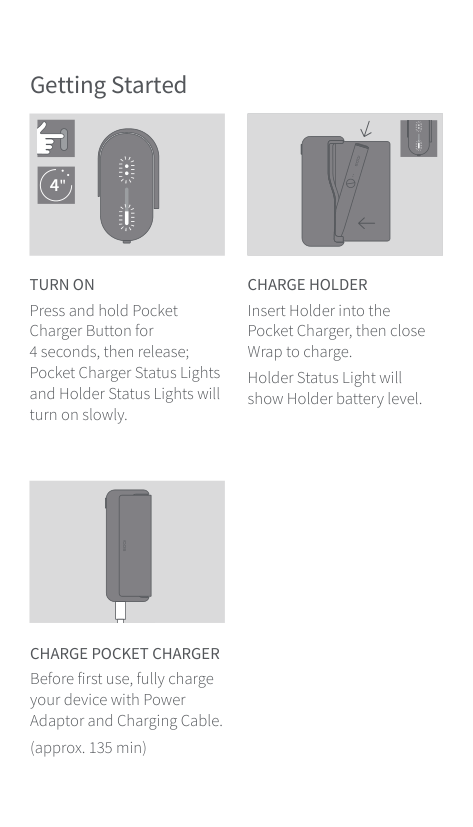
Insert the Holder into the Pocket Charger, then close the Wrap to begin charging it fully (approx. 135 minutes). Press and hold the Pocket Charger Button for 4 seconds until the Status Lights turn on slowly. (Page 4)
What should I do if my device has a flashing red light?
If your IQOS Iluma Prime™ or Pocket Charger is flashing red, place the Holder in the Pocket Charger and press the Button for 10 seconds then release. If the issue persists, contact Customer Care. (Page 8)
Show 14 more questions
Where can I find instructions on how to properly charge my IQOS Iluma Prime?
How do I reset the IQOS Iluma Prime?
What safety precautions should I follow regarding temperature?
How can I check the battery status of my IQOS Iluma Prime holder?
What should I do if the tobacco stick gets stuck in my IQOS Iluma Prime?
What should I do if my device is out of operating temperature range?
What should I do if my IQOS Iluma Prime battery becomes damaged?
How do I charge the IQOS Iluma Prime holder?
How do I turn off the Pocket Charger?
Can I use batteries not approved by Philips Morris in my IQOS ILUMA PRIME™?
What happens when the battery is depleted?
How do I check the status of my Pocket Charger?
What does it mean if IQOS ILUMA PRIME™ is flashing red during use?
How do I store my IQOS ILUMA PRIME™ and Tobacco Sticks?
Full Manual
16 pages

User Guide
IQOS ILUMA PRIME™ POCKET CHARGER
Holder Status Lights Wrap
Pocket Charger Status Lights
| | | |---|---| | |Pocket Charger Button|
Charging Port
IQOS ILUMA™ HOLDER
Ring
Holder Status Lights

Holder Button
IQOS ILUMA™ is compatible only with SPECIFICALLY DESIGNED TOBACCO STICKS
Charging
Power AdaptorCharging Cable
For the full user guide, Customer Care and Extended support services for IQOS users, visit
www.iqos.com/myiqos
##### FEATURES AND SETTINGS
Can be turned on or off with the IQOS app*.
Please register by scanning QR code or log in on www.iqos.com/iluma and follow the instructions.
IQOS app may not be available in your country.
Getting Started
####### 4"
TURN ON Press and hold Pocket Charger Button for
CHARGE HOLDER Insert Holder into the Pocket Charger, then close Wrap to charge. Holder Status Light will show Holder battery level.
| | | |---|---| | | | | | | | | |
CHARGE POCKET CHARGER Before first use, fully charge your device with Power Adaptor and Charging Cable. (approx. 135 min)
| | | |---|---| | | |
###### 20"
######## 1. INSERT SPECIFICALLY DESIGNED TOBACCO STICK
Insert the specifically designed tobacco stick to the line on filter until Holder vibrates and Light(s) pulse(s). Heating starts automatically, or by pressing Button for 1 second.
| | | | |---|---|---| | | | | | | | |
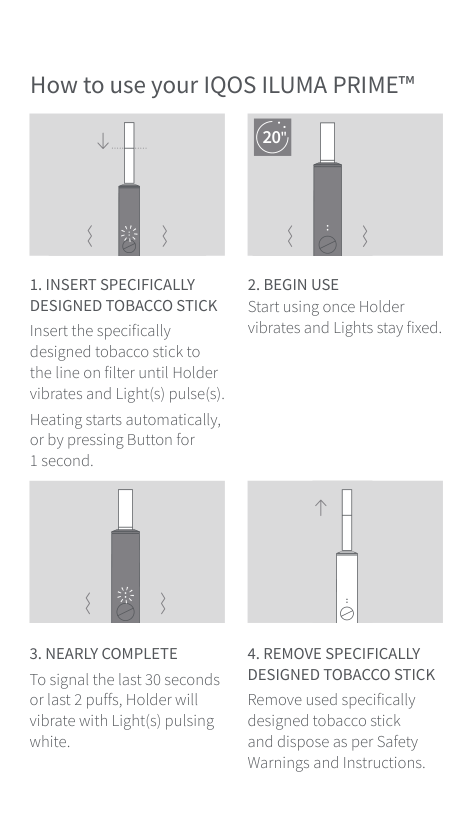
######## 4. REMOVE SPECIFICALLY DESIGNED TOBACCO STICK
Remove used specifically designed tobacco stick and dispose as per Safety Warnings and Instructions.
######## 5. RECHARGE HOLDER
Insert the Holder in the Charger for recharging.
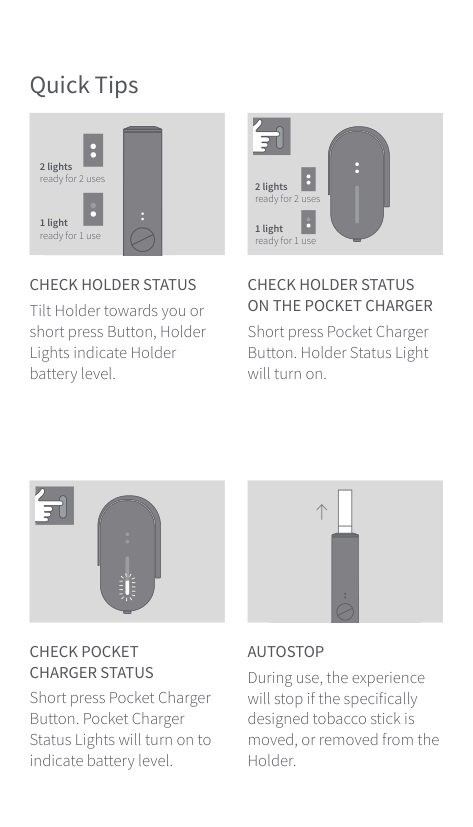
2 lights ready for 2 uses
2 lights ready for 2 uses
1 light ready for 1 use
1 light ready for 1 use
CHECK HOLDER STATUS Tilt Holder towards you or short press Button, Holder Lights indicate Holder battery level.

CHECK HOLDER STATUS ON THE POCKET CHARGER
Short press Pocket Charger Button. Holder Status Light will turn on.
CHECK POCKET CHARGER STATUS
Short press Pocket Charger Button. Pocket Charger Status Lights will turn on to indicate battery level.
| | | | |---|---|---| | | | | | | | |
AUTOSTOP During use, the experience will stop if the specifically designed tobacco stick is moved, or removed from the Holder.
LIGHT BLINKS YELLOW Battery depleted, need to charge.
LIGHTS BLINK WHITE TWICE IQOS ILUMA PRIME™ is outside operating temperature range (0°C~40°C).
#### 10"
LIGHT BLINKS RED Reset Pocket Charger. If red light blinking persists, contact Customer Care.
TO RESET Place Holder in Pocket Charger and press Button for 10 seconds then release. All Status Lights will turn OFF, and turn ON, to confirm a RESET.
This is the safety alert symbol. It is used to alert you to potential physical injury hazards.
SAFETY WARNINGS AND INSTRUCTIONS
PLEASE READ ALL SAFETY WARNINGS AND INSTRUCTIONS BEFORE USE TO AVOID INJURY. These safety warnings and instructions cannot cover all possible conditions that could occur and users should exercise care and caution.
KEEP THESE SAFETY WARNINGS AND INSTRUCTIONS FOR FUTURE REFERENCE AS THEY CONTAIN IMPORTANT INFORMATION.
These Safety Warnings and Instructions are applicable to IQOS ILUMA™ and IQOS ILUMA PRIME™
########## Intended Users
########## Tobacco and Nicotine
IMPORTANT SAFETY INFORMATION
|WARNING| |---|
Choking, Ingestion and Handling Hazard
Electronic and Battery Hazards
|WARNING| |---|
Electrical Risks
Failure to follow these Safety Warnings and Instructions could result in fire, explosion, electric shock, injury, or damage to the product or other property:
########## Battery Risks
IQOS ILUMA™ and IQOS ILUMA PRIME™ are powered with sealed Lithium-ion (Li-ion) batteries. Under normal conditions of use, the battery is sealed. If you notice that battery fluid leaks, follow these precautions:
|CAUTION|
|---|
Thermal Burn Risk
ailure to follow these Safety Warnings and Instructions could result in thermal burns:
|CAUTION| |---|
########## Use of specifically designed tobacco sticks
########## Storage
TECHNICAL DATA Holder: IQOS ILUMA™ and IQOS ILUMA PRIME™ Model C1402 Battery type: Li-ion rechargeable battery Input: 5 V 1.6 A Pocket Charger: IQOS ILUMA PRIME™ Model C1502 Battery type: Li-ion rechargeable battery Input: 5 V 2 A Bluetooth® 5.0 The IQOS ILUMA™ and IQOS ILUMA PRIME™ Pocket Chargers are marked with the symbol
########## Pocket Charger:
IQOS ILUMA™ Model M0001
Battery type: Li-ion rechargeable battery Input: 5 V 2 A Bluetooth® 5.0
followed by “SxxAxx,” which indicates the IQOS ILUMA™ and IQOS ILUMA PRIME™ Pocket Chargers can only be charged using one of the approved Power Adaptor models listed below.
| | | | |---|---|---| | | | |
Power Adaptor: Model: S52A21, S21A20, S21A22, S21A23, S21A25, S21A27, S82A40, S82A41, S82A42, S82A43, S82A45, S82A46 Input: 100 V-240 V~50-60 Hz 0.3 A Output: 5 V 2 A Output power: 10.0 W Average active efficiency: 79.0% No load power consumption: <0.09 W Use with Charging Cable
######### INFORMATION FOR DISPOSING OF IQOS ILUMA™ AND IQOS ILUMA PRIME™ Valid across European Union and EFTA
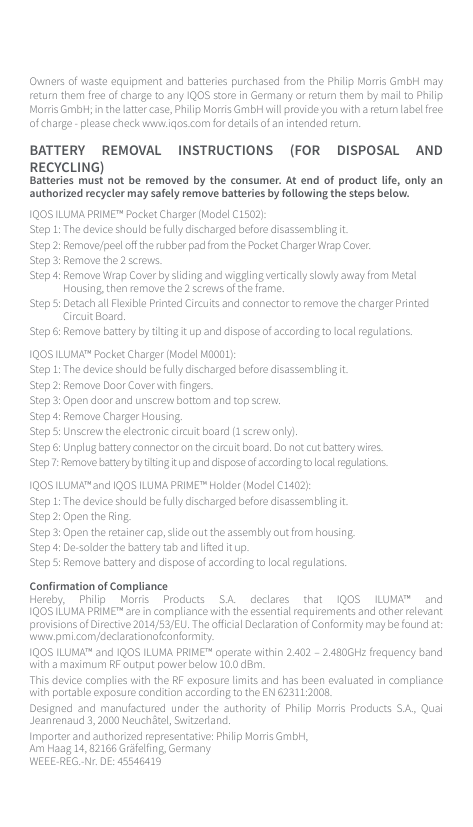
This symbol on the product or on its packaging indicates that this product and its individual parts (including batteries) must not be disposed of with your other household waste. Instead, it is your responsibility to dispose of your waste equipment by handing it over to a designated collection point for the recycling of waste electrical and electronic equipment. Batteries that
are not encased in the waste equipment must be separated from it and disposed of separately before being handed in at a collection point. In addition, waste batteries can be returned free of charge at the point of sale. The deletion of any personal data on the waste equipment is your responsibility.
########## Reuse, recycling and other forms of recovery
The separate collection and recycling of your waste equipment (including batteries) at the time of disposal will help to conserve natural resources and ensure that it is recycled in a manner that protects human health and the environment. Disposing of waste equipment as unsorted municipal waste (e.g. destined for waste incineration or landfilling) can have negative effects on the environment and human health. Owners of waste equipment can hand them in, within the framework of the possibilities, for the return or collection of waste equipment provided by public waste management authorities, so that a correct disposal of the old devices is ensured. For more information about where you can drop off your waste equipment for recycling, please contact your local household waste disposal service or the shop where you purchased the product.
Owners of waste equipment and batteries purchased from the Philip Morris GmbH may return them free of charge to any IQOS store in Germany or return them by mail to Philip Morris GmbH; in the latter case, Philip Morris GmbH will provide you with a return label free of charge - please check www.iqos.com for details of an intended return.
BATTERY REMOVAL INSTRUCTIONS (FOR DISPOSAL AND RECYCLING) Batteries must not be removed by the consumer. At end of product life, only an authorized recycler may safely remove batteries by following the steps below. IQOS ILUMA PRIME™ Pocket Charger (Model C1502):

########## Confirmation of Compliance
Hereby, Philip Morris Products S.A. declares that IQOS ILUMA™ and IQOS ILUMA PRIME™ are in compliance with the essential requirements and other relevant provisions of Directive 2014/53/EU. The official Declaration of Conformity may be found at: www.pmi.com/declarationofconformity.
IQOS ILUMA™ and IQOS ILUMA PRIME™ operate within 2.402 – 2.480GHz frequency band with a maximum RF output power below 10.0 dBm. This device complies with the RF exposure limits and has been evaluated in compliance with portable exposure condition according to the EN 62311:2008. Designed and manufactured under the authority of Philip Morris Products S.A., Quai Jeanrenaud 3, 2000 Neuchâtel, Switzerland. Importer and authorized representative: Philip Morris GmbH, Am Haag 14, 82166 Gräfelfing, Germany WEEE-REG.-Nr. DE: 45546419
The Bluetooth® word mark and logos are registered trademarks owned by the Bluetooth SIG, Inc. and any use of such marks by Philip Morris Products S.A. and its affiliates is under license. Other trademarks and trade names are those of their respective owners.
Further information regarding the firmware license for IQOS ILUMA™ and IQOS ILUMA PRIME™ is available at www.iqos.com. Not all devices listed in these Safety Warnings and Instructions are included in this mobility kit.
© 2021 Copyright Philip Morris Products S.A.