
Ask AI
— answers from the official manualAnswers from the official manual.
Common questions
Common Questions
19 totalHow do I set up the G304 X for the first time?
Connect the receiver to your computer's USB-A port, then turn the power on using the switch on the bottom of the mouse. Optionally, you can download the G HUB software from logitechG.com/ghub for additional customization. The receiver is stored in the package when the mouse ships. (Page 3)
What does a flashing red LED mean on the G304 X?
A flashing red LED indicates the battery is below 15%. You should replace or recharge the battery soon to avoid losing power during use. (Page 6)
What is the wireless range of the G304 X?
The G304 X has a wireless range of up to 10 meters, though this may vary depending on the operating environment and computer or system setup. In noisy wireless environments, it is recommended to keep the receiver within 20 cm of the mouse to ensure optimal performance. (Page 4)
How do I minimize wireless interference with the G304 X?
Keep the mouse and receiver at least 2 meters away from wireless routers or other 2.4GHz wireless devices to minimize environmental noise. In particularly noisy wireless environments, keeping the receiver within 20 cm of the mouse is also recommended. (Page 4)
How do I change the DPI on the G304 X?
Press the DPI cycle button (Button 6) to cycle through the available DPI settings. The LED indicator will change color to show the current DPI level: white for 800 DPI, orange for 1200 DPI, teal for 1600 DPI, yellow for 2400 DPI, and magenta for 3200 DPI. (Page 6)
What are the default DPI settings on the G304 X?
The default DPI settings are 800, 1200, 1600, 2400, and 3200 DPI. The G304 X supports up to 5 DPI settings, which can be customized using the G HUB software. (Page 6)
Show 13 more questions
What is the default report rate for the G304 X?
How many programmable buttons does the G304 X have?
What warranty does the G304 X come with?
How do I connect the G304 to my computer?
What should I do if the connection quality of my G304 drops?
How do I check the battery level on my G304?
How can I adjust the DPI settings on my G304?
What do the LED colors on my G304 mean?
How do I start the G Hub software?
Where is the on/off switch located on my G304?
How do I reset my G304 to factory settings?
What are the programmable buttons on my G304?
Where can I find support for my G304?
Full Manual
11 pages
G304 X
LIGHTSPEED Wireless Gaming Mouse 无线游戏鼠标Setup Guide | 设置指南
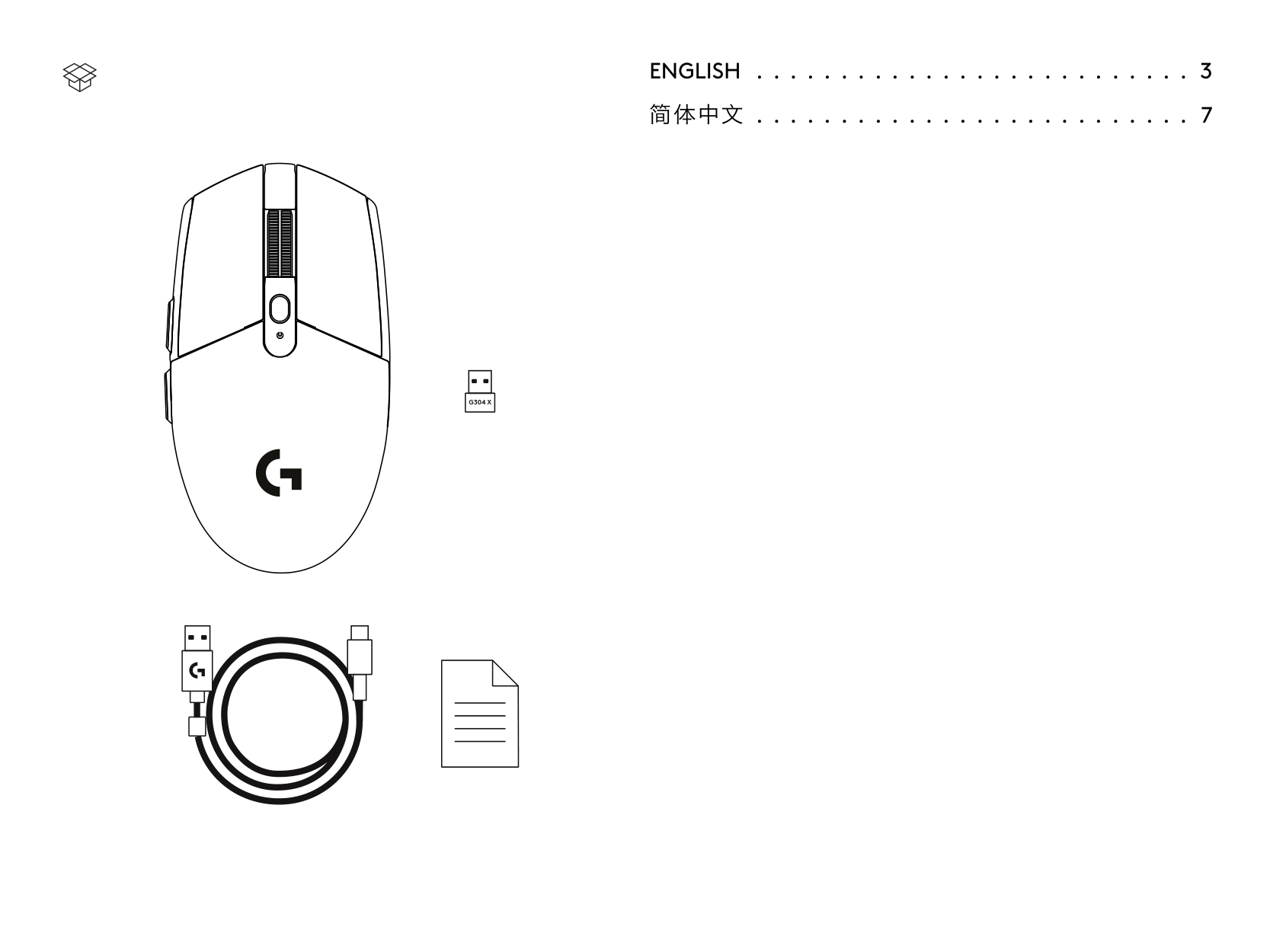
ENGLISH . . . . . . . . . . . . . . . . . . . . . . . . . . 3 简体中文 . . . . . . . . . . . . . . . . . . . . . . . . . . . 7
G304 X
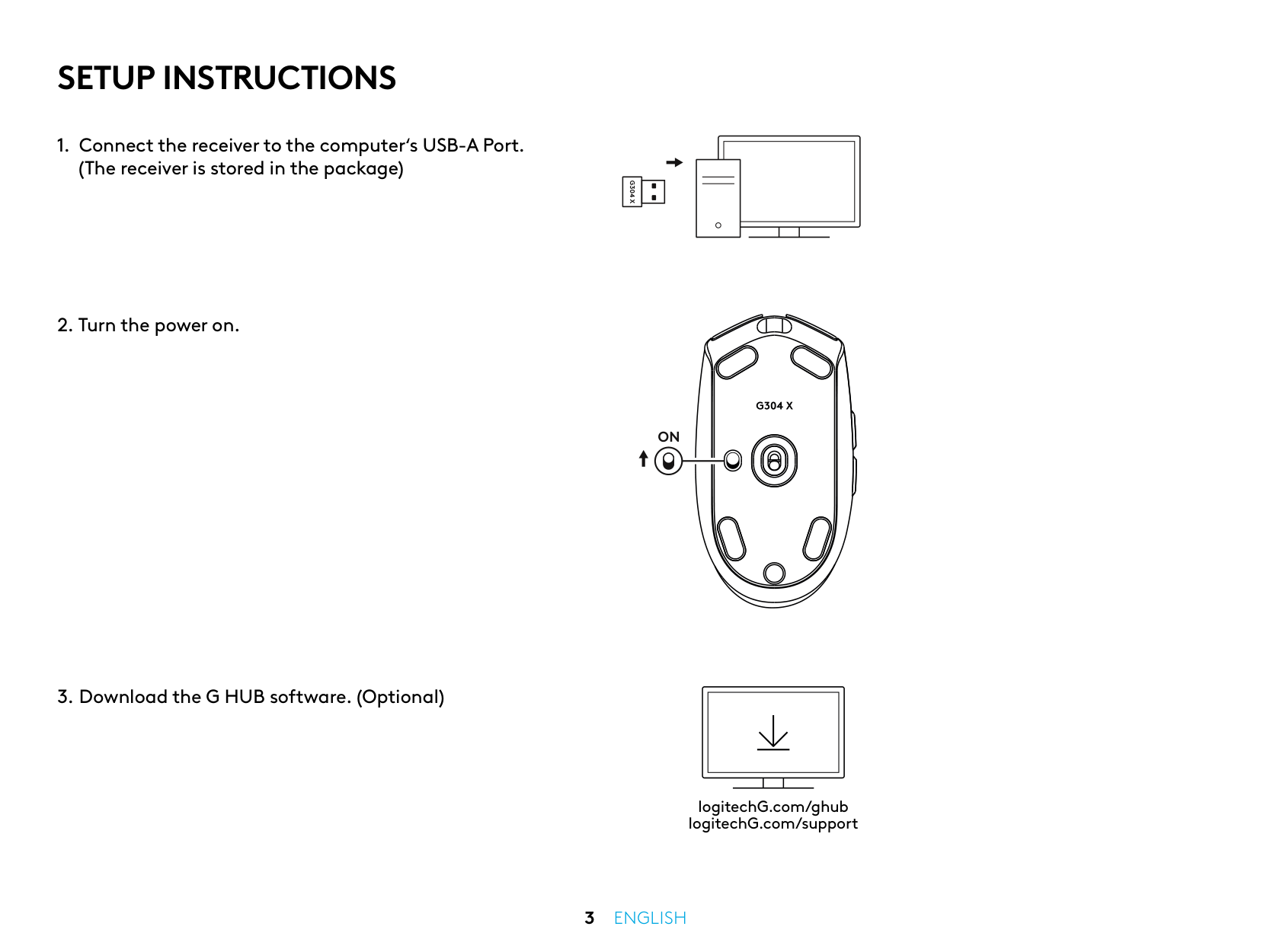
Setup Instructions
G304 X
3 English
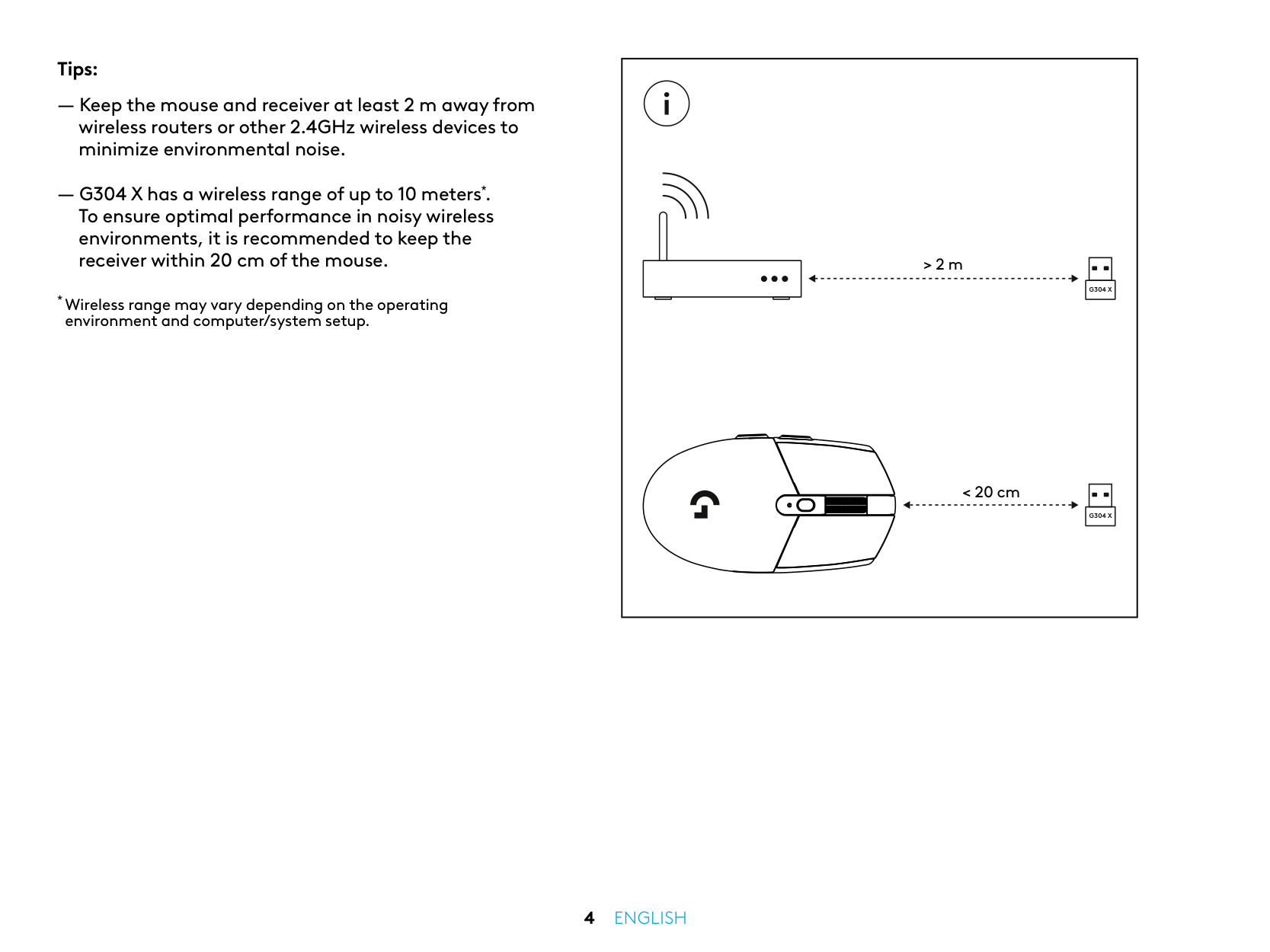
Tips: ― Keep the mouse and receiver at least 2 m away from wireless routers or other 2.4GHz wireless devices to minimize environmental noise. ― G304 X has a wireless range of up to 10 meters*. To ensure optimal performance in noisy wireless environments, it is recommended to keep the receiver within 20 cm of the mouse.
G304 X
G304 X
> 2 m < 20 cm4 English
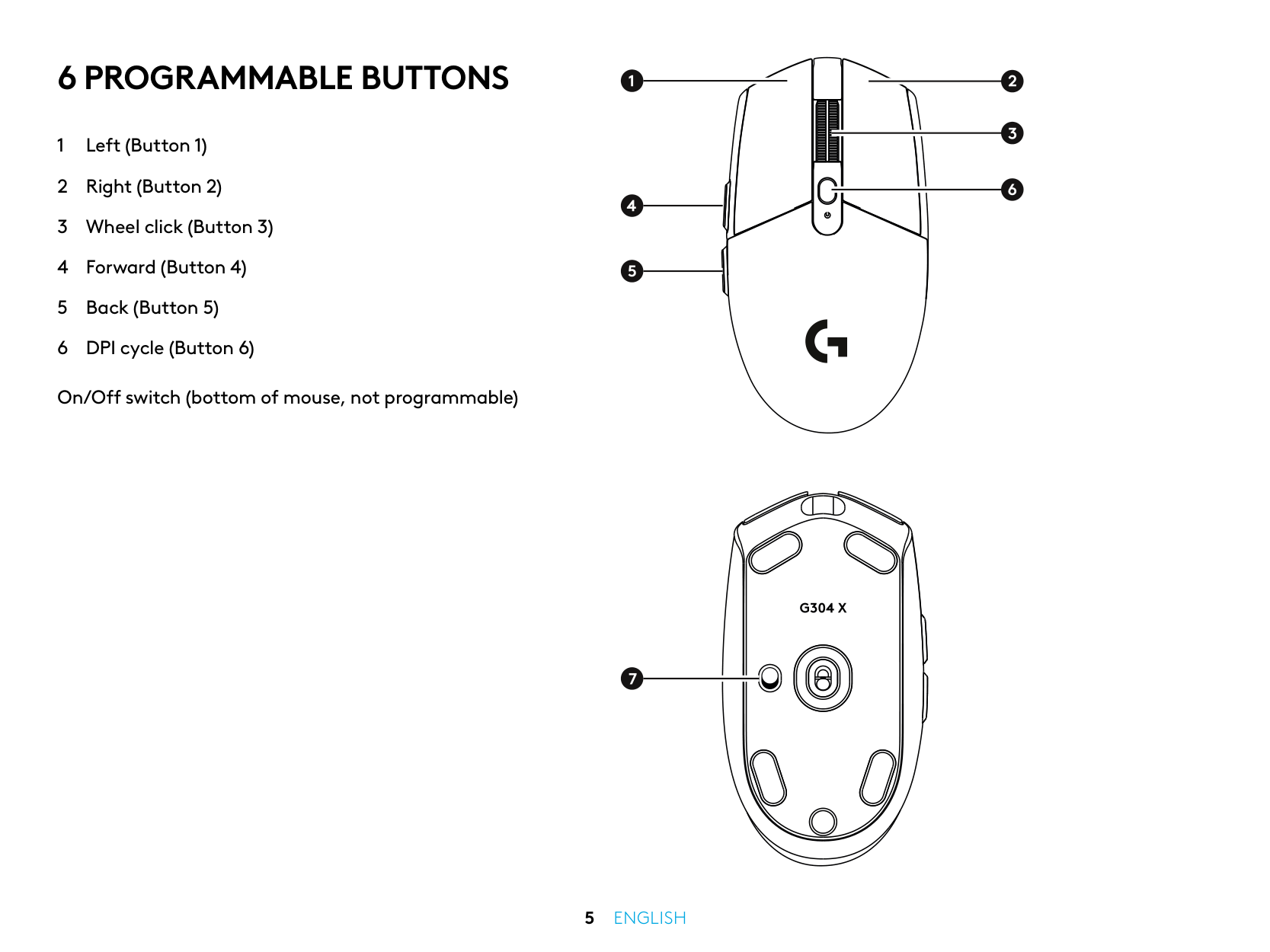
6 Programmable Buttons
1 Left (Button 1) 2 Right (Button 2) 3 Wheel click (Button 3) 4 Forward (Button 4) 5 Back (Button 5) 6 DPI cycle (Button 6) On/Off switch (bottom of mouse, not programmable)5 English
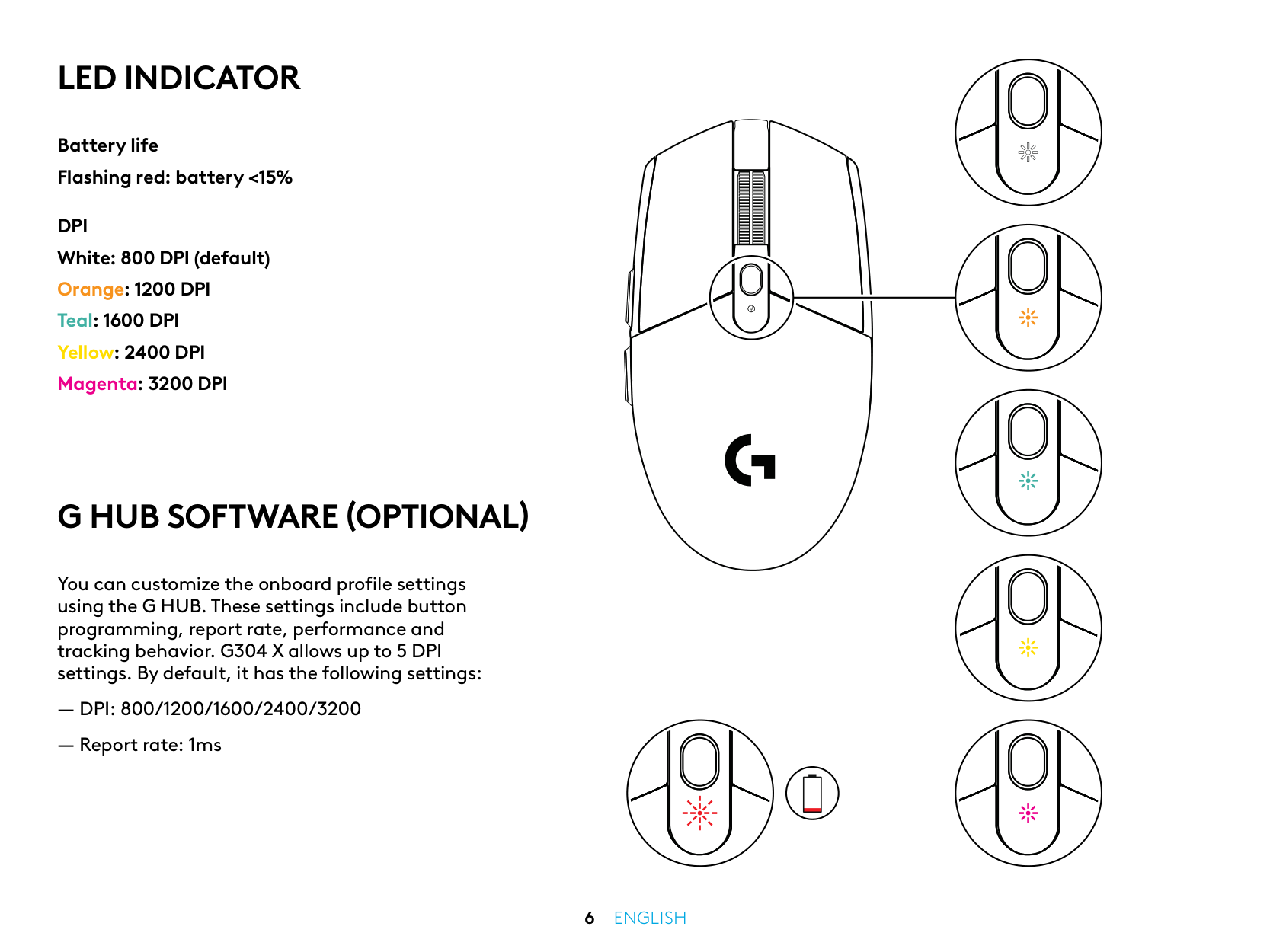
Battery life Flashing red: battery <15%
Dpi
White: 800 DPI (default) Orange: 1200 DPI Teal: 1600 DPI Yellow: 2400 DPI Magenta: 3200 DPILed Indicator
G Hub Software (Optional)
You can customize the onboard profile settings using the G HUB. These settings include button programming, report rate, performance and tracking behavior. G304 X allows up to 5 DPI settings. By default, it has the following settings:― Dpi: 800/1200/1600/2400/3200
― Report rate: 1ms6 English
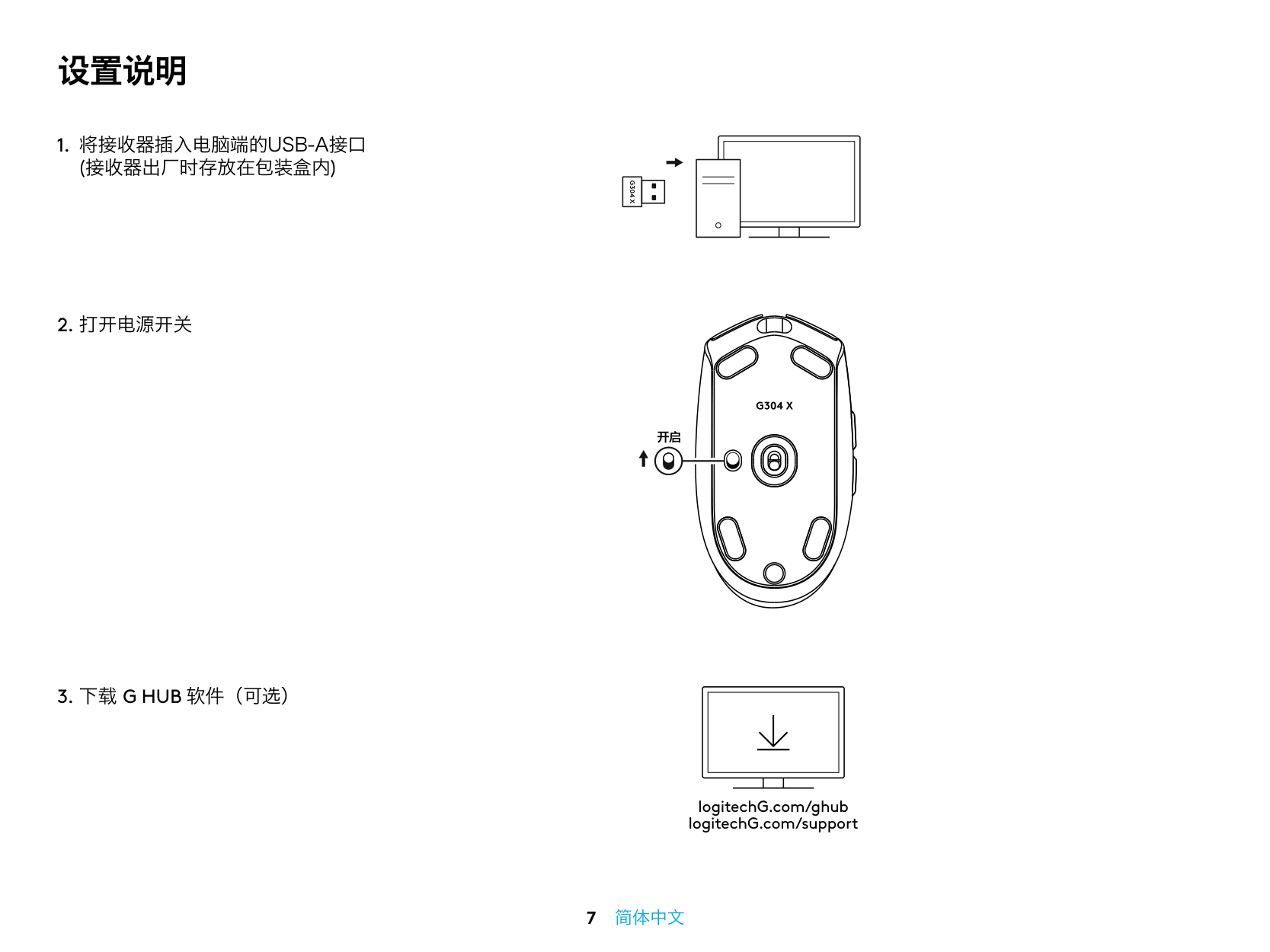
设置说明 开启
1. 将接收器插入电脑端的Usb-A接口
(接收器出厂时存放在包装盒内)G304 X
3. 下载 G Hub 软件(可选)
logitechG.com/ghub logitechG.com/support 7 简体中文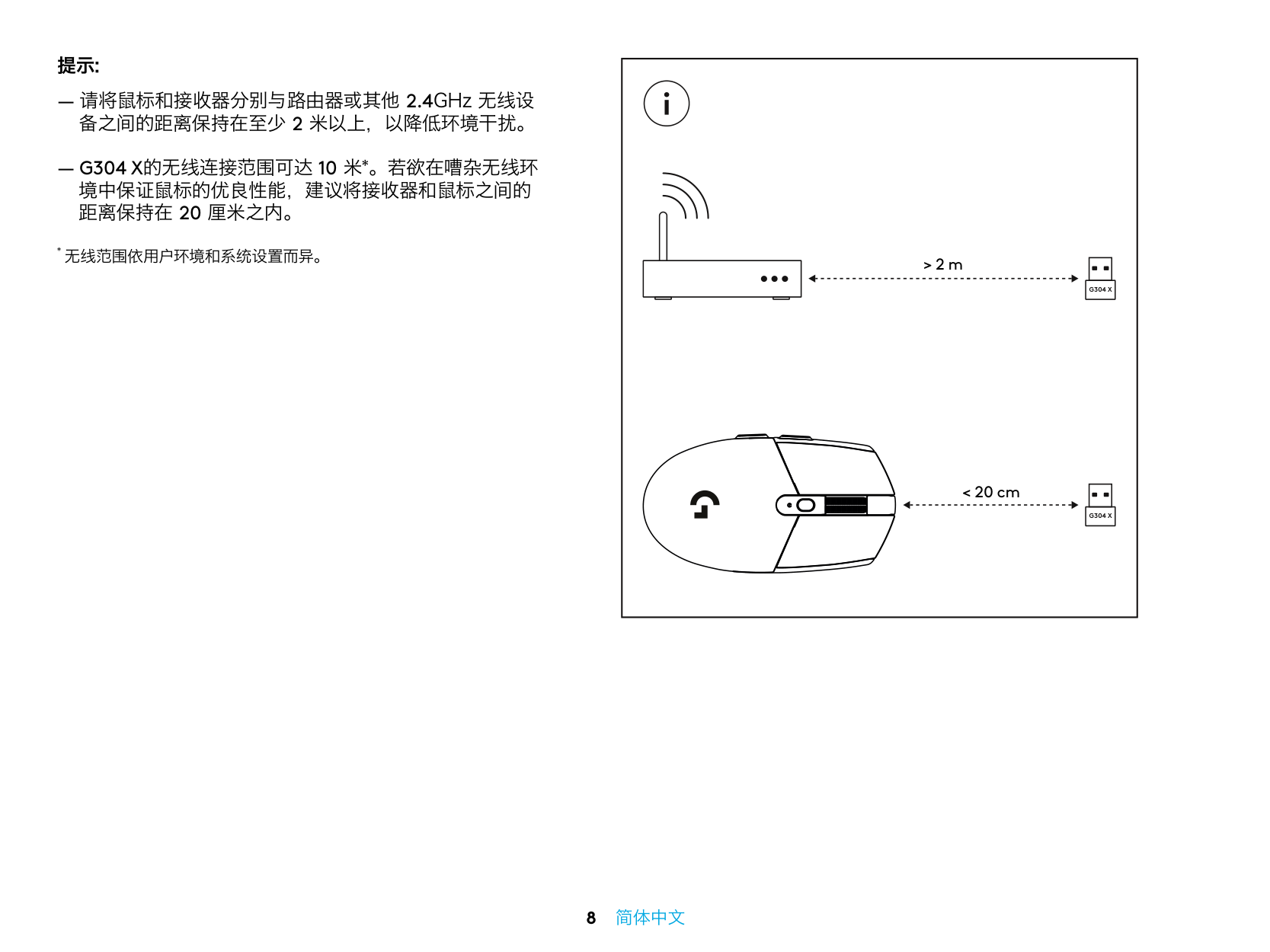
提示: ― 请将鼠标和接收器分别与路由器或其他 2.4GHz 无线设 备之间的距离保持在至少 2 米以上,以降低环境干扰。
― G304 X的无线连接范围可达 10 米*。若欲在嘈杂无线环
境中保证鼠标的优良性能,建议将接收器和鼠标之间的 距离保持在 20 厘米之内。G304 X
G304 X
> 2 m < 20 cm 8 简体中文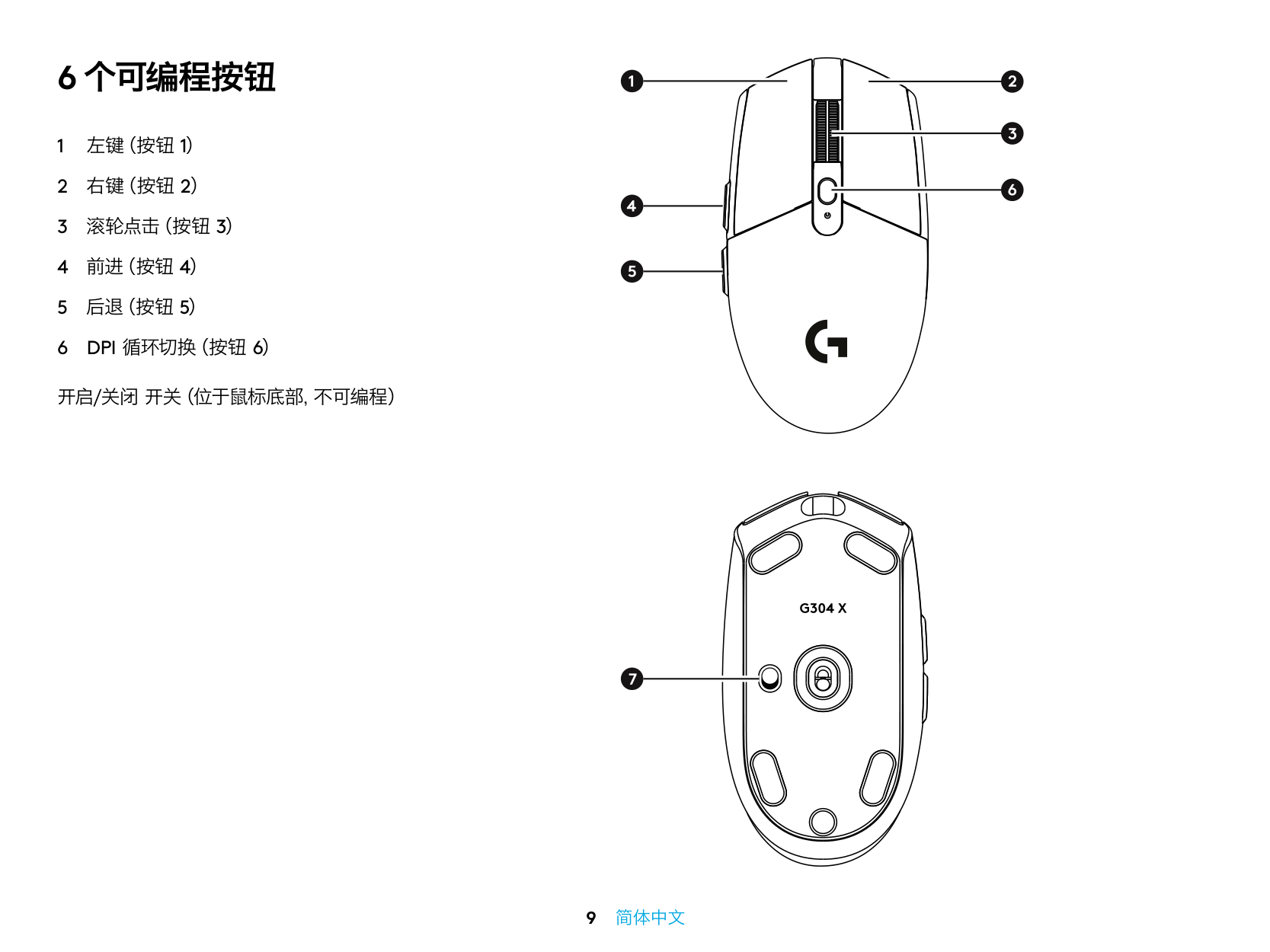
6 个可编程按钮 1 左键(按钮 1) 2 右键(按钮 2) 3 滚轮点击(按钮 3) 4 前进(按钮 4) 5 后退(按钮 5)
6 Dpi 循环切换(按钮 6)
开启/关闭 开关(位于鼠标底部,不可编程) 9 简体中文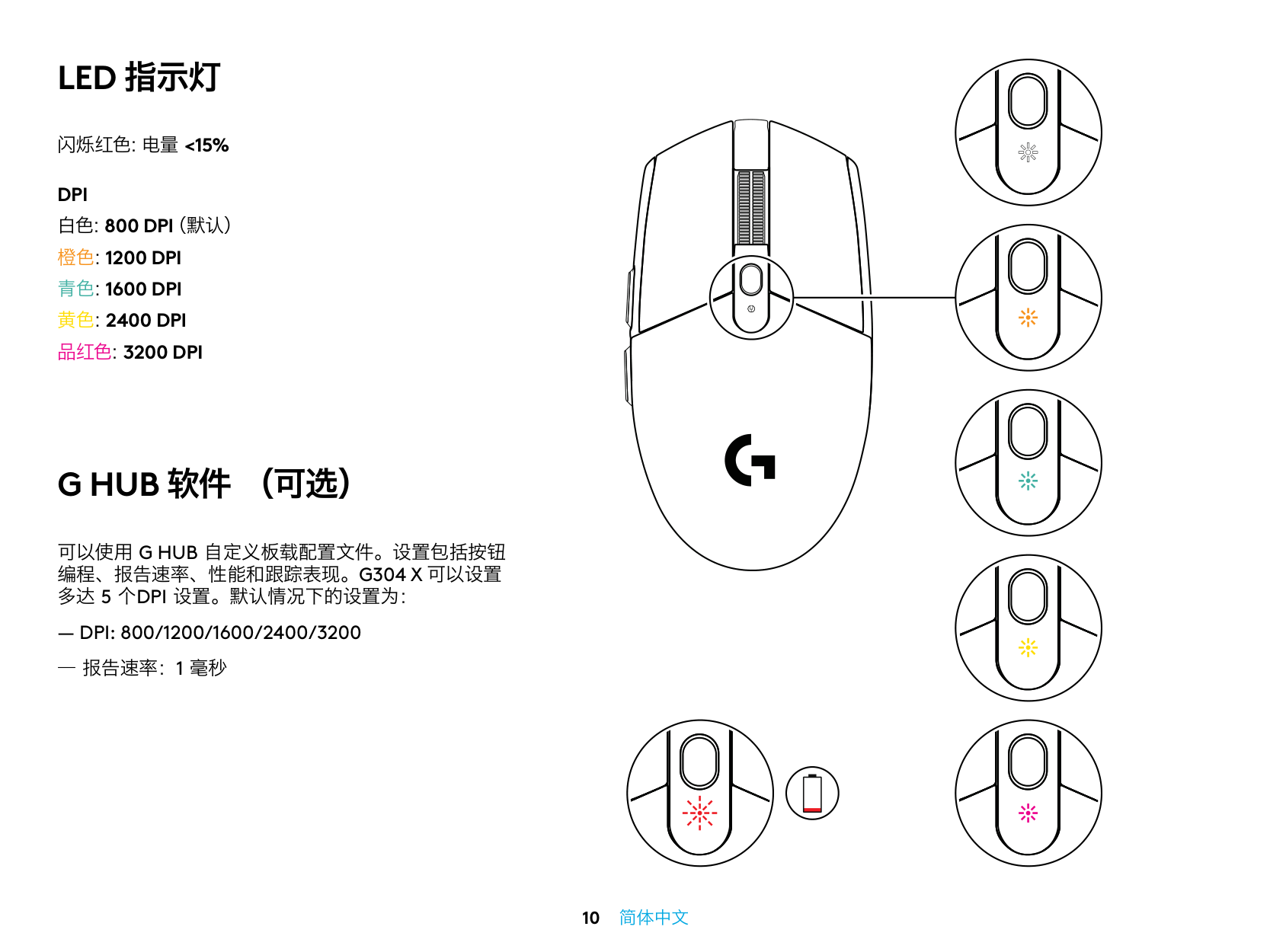
闪烁红色:电量 <15%
Dpi
白色:800 Dpi(默认)
橙色:1200 Dpi
青色:1600 Dpi
黄色:2400 Dpi
品红色:3200 Dpi
Led 指示灯
G Hub 软件 (可选)
可以使用 G Hub 自定义板载配置文件。设置包括按钮
编程、报告速率、性能和跟踪表现。G304 X 可以设置
多达 5 个Dpi 设置。默认情况下的设置为:
― Dpi: 800/1200/1600/2400/3200
― 报告速率:1 毫秒 10 简体中文
2-year limited hardware warranty. ©2025 Logitech. Logitech, Logitech G, Recycled Plastic logo and all other Logitech trademarks and logos are trademarks or registered trademarks of Logitech Europe S.A. and/or its affiliates in the U.S. and other countries. USB-A is the trademark of USB Implementers Forum. All other third party trademarks are the property of their respective owners. Images are illustrative and may vary from actual product. 2 年有限硬件质保。 版权所有©2025 年罗技。罗技、Logitech、罗技 G、Logitech G、回收塑料标志以及所有其他罗技商标和标志均为罗技欧洲