
Ask AI
— answers from the official manualAnswers from the official manual.
Common questions
Common Questions
19 totalHow do I pair this mouse with a Windows computer using Bluetooth?
Make sure your Windows machine has Bluetooth Low Energy enabled, go to Settings > Devices > Add Bluetooth or other devices, then select 'Bluetooth'. The MX Master 3S will appear in the list of available devices; click on it and follow the prompts to complete pairing. (Page 2)
How do I reset the MX Master 3S mouse?
Press and hold the Connect button on the bottom of the device for two seconds until the LED lights start flashing red, indicating a factory reset. After a successful reset, you can pair the mouse with your computer again. (QSG sticker under mouse)
How do I check battery status on the MX Master 3S?
Battery status is displayed with visual indicators: a solid LED when charging and lights blinking according to remaining charge levels. See the Quick Start Guide (QSG) for specific indicator meanings.
How can I customize button functions on my MX Master 3S?
Use Logi Options+ software to assign custom actions and profiles for each of the seven customizable buttons, as well as preset shortcuts for popular apps.
What are some common troubleshooting steps if my MX Master 3S is not working?
Ensure your USB receiver or Bluetooth connection is active and paired correctly. Check battery status; a blinking red light indicates low power. Refer to the Quick Start Guide for further diagnostic actions.
How can I ensure my MX Master 3S mouse remains secure?
Deploy Logi Bolt technology via Logi Options+, which provides encrypted Secured Connections Only mode and is FIPS compliant, ensuring a robust wireless security setup.
Show 13 more questions
How do I perform firmware updates on my MX Master 3S?
What are the environmental conditions suitable for storing and operating my MX Master 3S?
What operating systems are compatible with the MX Master 3S?
How long does the battery last on a full charge?
How do I charge the MX Master 3S?
How many devices can I connect the MX Master 3S to?
What is the warranty and expected lifespan of the MX Master 3S?
How do I charge the Logitech MX Master 3S mouse?
How do I connect the MX Master 3S to my computer?
What is the DPI of the MX Master 3S and what tracking technology does it use?
What software can I use to customize the MX Master 3S?
What are the operating and storage temperature limits for the MX Master 3S?
What is the wireless range of the MX Master 3S?
Full Manual
2 pages

The MX Master 3S for Business is our premier offering with significant upgrades for both ITDMs and users. For busy IT departments, it offers more security and better compatibility. Logi Bolt addresses rising security needs with fully encrypted Secured Connections Only mode that’s FIPS compliant and robust even in congested wireless environments. And it’s certified in 100+ countries with support for IT pros. For users, its 8000 DPI “Darkfield” tracking makes work on high-resolution monitors faster and more accurate—even on glass1. MagSpeed Scrolling zips down 1000 lines of code or spreadsheet cells in just a second. Or with line-by-line precision. Its ergonomic design lessens forearm fatigue with a sculpted shape that cradles the hand for all-day comfort. It’s also 90% quieter with Quiet Click technology for less distraction and better focus for everyone2. Performance Wireless Mouse MX MASTER 3S for Business Our best mouse, upgraded for enhanced productivity and comfort.
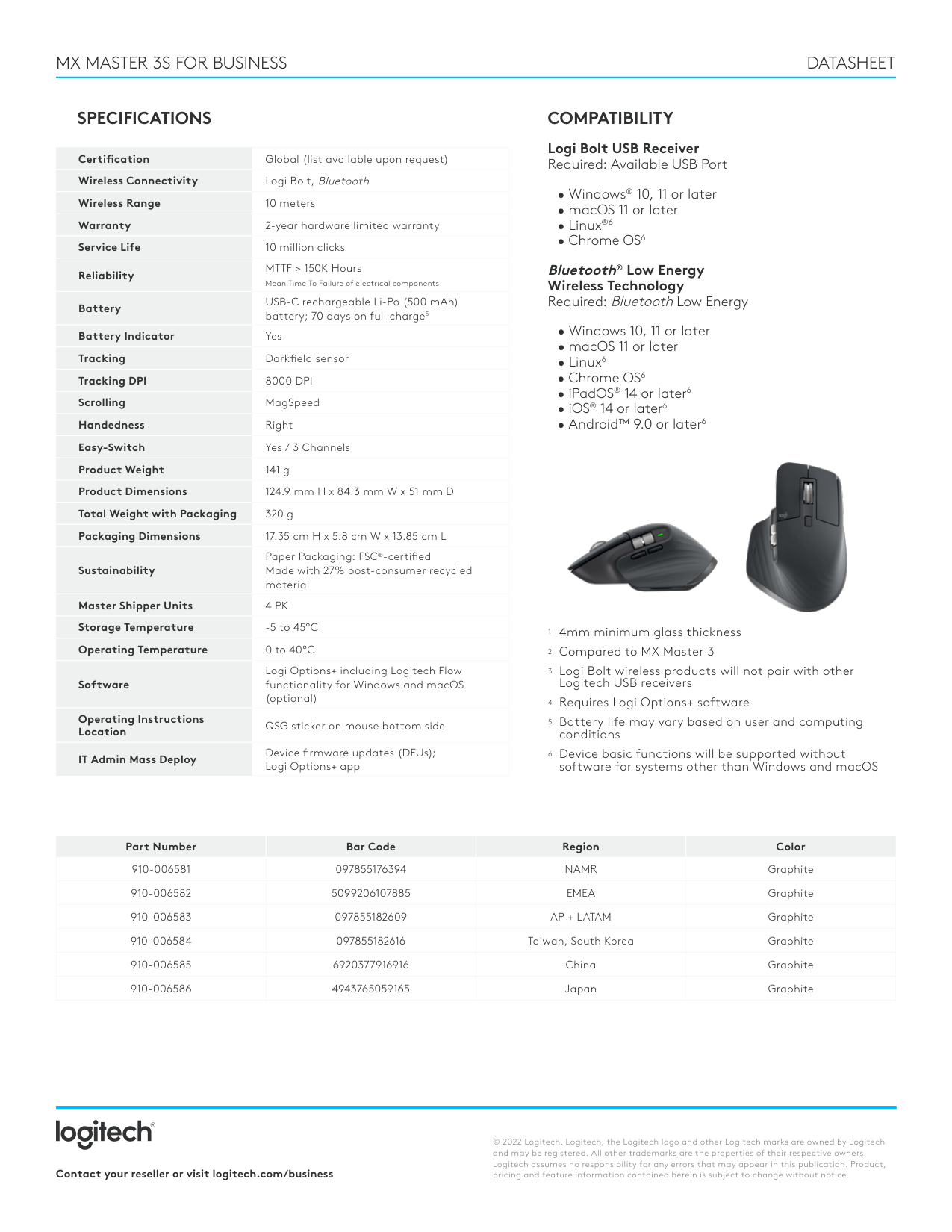
Certification Global (list available upon request) Wireless Connectivity Logi Bolt, Bluetooth Wireless Range 10 meters Warranty 2-year hardware limited warranty Service Life 10 million clicks Reliability MTTF > 150K Hours Mean Time To Failure of electrical components Battery USB-C rechargeable Li-Po (500 mAh) battery; 70 days on full charge5 Battery Indicator Yes Tracking Darkfield sensor Tracking DPI