
Ask AI
— answers from the official manualAnswers from the official manual.
Common questions
Common Questions
10 totalHow do I factory reset the TWS Wireless Earbuds?
Press and hold the power button for 10 seconds until the LED turns off. The device will revert to its default settings, requiring you to re-pair it with your phone after this process.
What does a flashing white indicator on my earbuds mean?
A flashing white indicator on the earbud indicates that the Bluetooth pairing mode is active or there might be dual-pairing taking place. This allows for establishing a new connection with your phone.
How do I clear my device’s pairing history?
After turning on the earbuds, press the touch button three times to clear all previous pairings. The LED will glow for two seconds after successful clearing of records.
What should I do if only one earbud makes a connection?
If only one side connects properly, close the charging case and wait for five seconds before reopening to attempt a fresh pairing process.
How long does it take to fully charge my T3 earbuds?
It takes approximately two hours to completely recharge your TWS Wireless Earbuds. The charging case has an indicator that shows the current battery status during this process.
What does the emergency voice feature do?
When on standby, pressing and holding the touch button for two to three seconds triggers the emergency voice mode. This allows you to activate your phone’s voice assistant function once a beep sound is heard.
Full Manual
11 pages
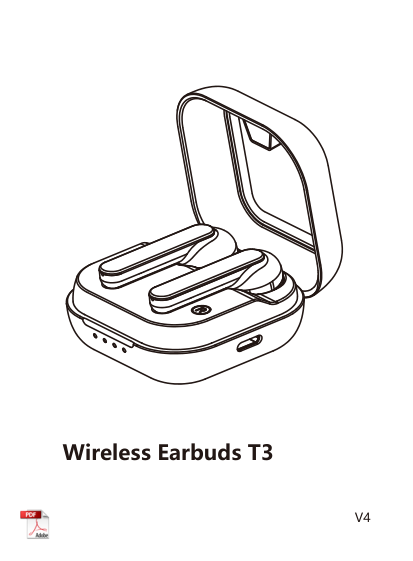
Wireless Earbuds T3

V4
English 01
V4
Operating Manual
#### 1. Product Overview

earbuds indicator
Charging contact
| | | |---|---| | | |
Touch button
Charging box indicator TYPE-C charging interface
Charging contact
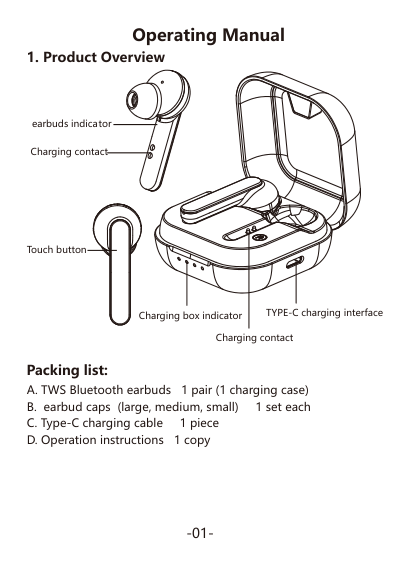
#### Packing list:
#### 2. Basic Features
|Button|Function|Operation method| |---|---|---| |Touch button|On|User may turn on the earbuds after opening the charging case
* When there is a pairing record, the earbuds will be re-connected to the device to which it is connected last time after being picked up from the charging case and turned on. If the reconnection fails, it will enter the Bluetooth pairing mode|
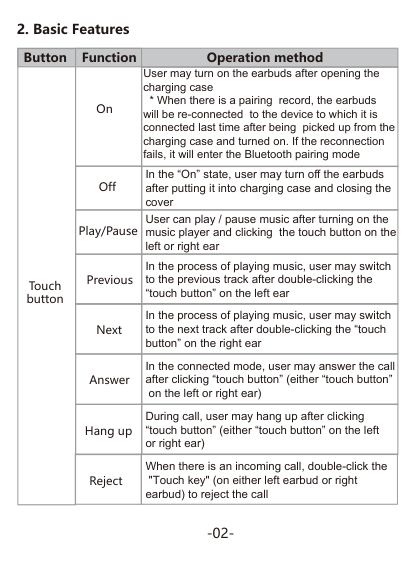
|Touch button|Off|In the “On” state, user may turn off the earbuds after putting it into charging case and closing the cover| |Touch button|Play/Pause|User can play / pause music after turning on the music player and clicking the touch button on the left or right ear| |Touch button|Previous|In the process of playing music, user may switch to the previous track after double-clicking the “touch button” on the left ear| |Touch button|Next|In the process of playing music, user may switch to the next track after double-clicking the “touch button” on the right ear| |Touch button|Answer|In the connected mode, user may answer the call after clicking “touch button” (either “touch button”
on the left or right ear)| |Touch button|Hang up|During call, user may hang up after clicking “touch button” (either “touch button” on the left or right ear)| |Touch button|Reject|When there is an incoming call, double-click the
"Touch key" (on either left earbud or right earbud) to reject the call|
| |Wake-on
-voice|In standby or music mode, user may start voice assistant (either “touch button” on the left or right ear) by pressing and holding “touch button” for 2-3 seconds and releasing after hearing the “beep” sound. * Require mobile phone support.| |---|---|---|
#### 3.Bluetooth Pairing and Connection
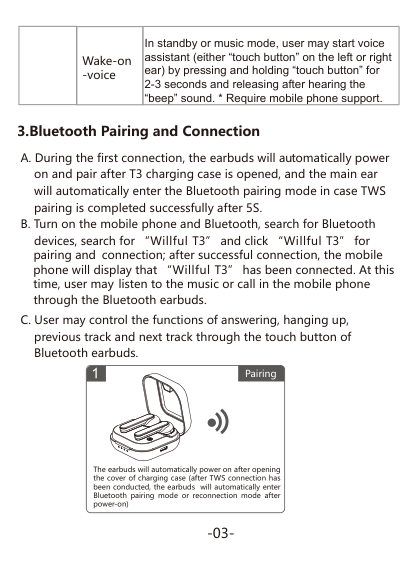
devices, search for “Willful T3” and click “Willful T3” for pairing and connection; after successful connection, the mobile phone will display that “Willful T3” has been connected. At this time, user may listen to the music or call in the mobile phone through the Bluetooth earbuds.
###### Pairing
The earbuds will automatically power on after opening the cover of charging case (after TWS connection has been conducted, the earbuds will automatically enter Bluetooth pairing mode or reconnection mode after power-on)
#### 4. Indicator
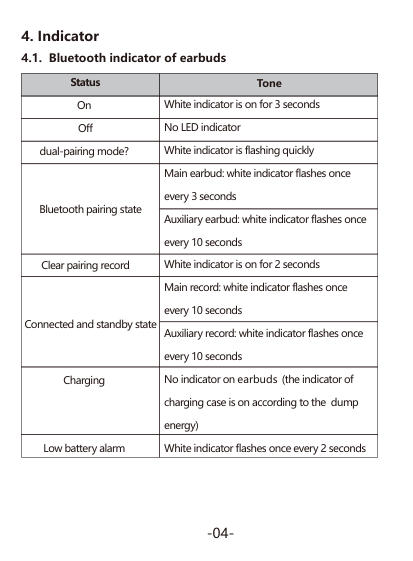
|Status|Tone| |---|---| |On|White indicator is on for 3 seconds| |Off|No LED indicator| |dual-pairing mode?|White indicator is flashing quickly| |Bluetooth pairing state|Main earbud: white indicator flashes once every 3 seconds| |Bluetooth pairing state|Auxiliary earbud: white indicator flashes once every 10 seconds| |Clear pairing record|White indicator is on for 2 seconds| |Connected and standby state|Main record: white indicator flashes once every 10 seconds| |Connected and standby state|Auxiliary record: white indicator flashes once every 10 seconds|
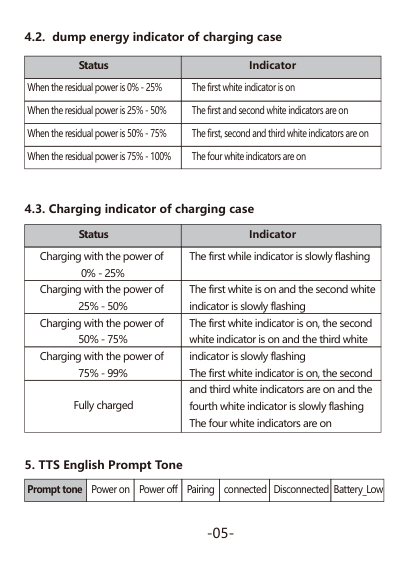
|Charging|No indicator on earbuds (the indicator of charging case is on according to the dump energy)| |Low battery alarm|White indicator flashes once every 2 seconds|
|Status|Indicator| |---|---| |When the residual power is 0% - 25%|The first white indicator is on| |When the residual power is 25% - 50%|The first and second white indicators are on| |When the residual power is 50% - 75%|The first, second and third white indicators are on| |When the residual power is 75% - 100%|The four white indicators are on|
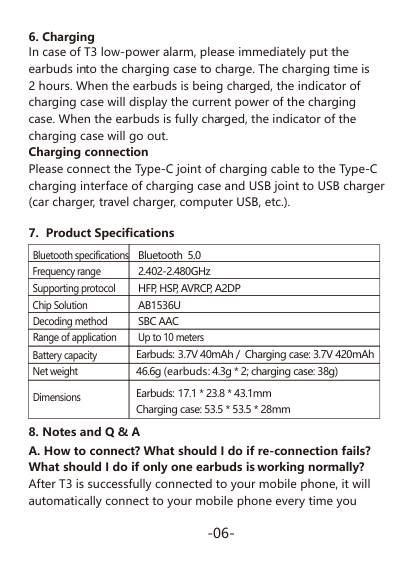
|Status|Indicator| |---|---| |Charging with the power of 0% - 25%|The first while indicator is slowly flashing| |Charging with the power of 25% - 50%|The first white is on and the second white indicator is slowly flashing| |Charging with the power of 50% - 75%|The first white indicator is on, the second white indicator is on and the third white| |Charging with the power of 75% - 99%|indicator is slowly flashing The first white indicator is on, the second| |Fully charged|and third white indicators are on and the fourth white indicator is slowly flashing The four white indicators are on|
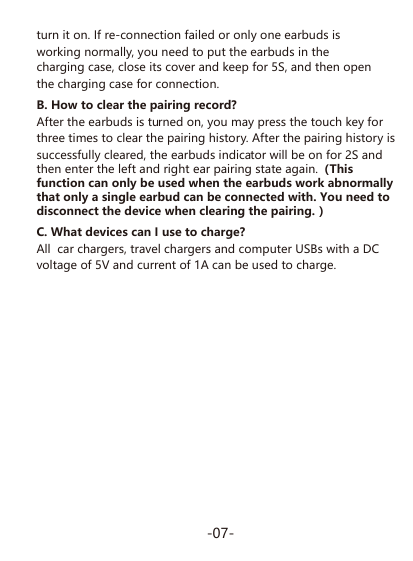
|Prompt tone|Power on|Power off|Pairing|connected|Disconnected|Battery_Low| |---|---|---|---|---|---|---|
In case of T3 low-power alarm, please immediately put the earbuds into the charging case to charge. The charging time is 2 hours. When the earbuds is being charged, the indicator of charging case will display the current power of the charging case. When the earbuds is fully charged, the indicator of the charging case will go out. Charging connection Please connect the Type-C joint of charging cable to the Type-C charging interface of charging case and USB joint to USB charger (car charger, travel charger, computer USB, etc.).
|Bluetooth specifications|Bluetooth 5.0|
|---|---| |Frequency range|2.402-2.480GHz| |Supporting protocol|HFP, HSP, AVRCP, A2DP| |Chip Solution|AB1536U| |Decoding method|SBC AAC| |Range of application|Up to 10 meters| |Battery capacity|Earbuds: 3.7V 40mAh / Charging case: 3.7V 420mAh| |Net weight|46.6g (earbuds: 4.3g * 2; charging case: 38g)| |Dimensions|Earbuds: 17.1 * 23.8 * 43.1mm Charging case: 53.5 * 53.5 * 28mm|

NOTE: This equipment has been tested and found to comply with the limits for a Class B digital device, pursuant to part 15 of the FCC Rules. These limits are designed to provide reasonable protection against harmful interference in a residential installation. This equipment generates uses and can radiate radio frequency energy and, if not installed and used in accordance with the instructions, may cause harmful interference to radio communications. However, there is no guarantee that interference will not occur in a particular installation. If this equipment does cause harmful interference to radio or television reception, which can be determined by turning the equipment off and on, the user is encouraged to try to correct the interference by one or more of the following measures:
Changes or modifications not expressly approved by the party responsible for compliance could void the user's authority to operate the equipment.
This device complies with Part 15 of the FCC Rules. Operation is subject to the following two conditions:
(1) this device may not cause harmful interference, and (2) this device must accept any interference received, including interference that may cause undesired operation.