
Soundcore R100 True Wireless Earbuds
Ask AI
— answers from the official manualAnswers from the official manual.
Common questions
Common Questions
20 totalHow do I know when my earbuds are fully charged?
The LED indicator on the charging case will turn green when fully charged. Additionally, the earbuds will show 'Not lit' status when fully charged or powered off.
What should I do before charging my earbuds?
Ensure both the earbuds and the USB port are completely dry before charging to prevent damage. This preparation step is essential before connecting the charging case to a power source.
How do I reset the Soundcore R100 earbuds if they won't connect?
Place the earbuds into the charging case and keep the lid open, then press and hold the button on the charging case for 10 seconds until the LED indicator flashes red three times. This confirms the reset was successful and your earbuds can be connected normally.
What should I do if my Soundcore R100 earbuds won’t connect properly?
Place the earbuds into the charging case and ensure they are being charged. Then press and hold the button on both earbuds for 3 seconds until the LED indicators flash red three times and then turn white to reset them.
What should I do if one of my earbuds stops working during a call?
Place either one of the malfunctioning earbuds into the charging case, after which the microphone in the other earbud will be activated within 3 to 5 seconds. (Page 2)
How do I ensure a good connection between both earbuds?
The right earbud automatically connects with the left earbud when taken out of the charging case, allowing for synchronous audio playback. (Page 2)
Show 14 more questions
How do I control volume on my Soundcore R100?
What happens if I remove an earbud during a call?
How do I enable mono mode?
What do I need to do before using my Soundcore R100 earbuds for the first time?
How do I pair my Soundcore R100 with a new Bluetooth device?
How do I reset the Soundcore R100 earbuds?
How long does it take to fully charge my Soundcore R100 earbuds?
How long does it take to fully charge the R100 earbuds?
What does a blinking red light mean on my earbuds?
How do I turn off my R100 earbuds manually?
How do I pair my R100 earbuds to a new device?
Can I use just one earbud at a time?
How do I answer and end calls on the R100?
What is the battery playtime for the R100 earbuds?
Full Manual
7 pages
Soundcore Life P2
USER MANUAL
English 01 Português 66
Čeština 06 Pусский 71
Dansk 11 Slovenský Jazyk 76
Deutsch 17 Slovenski Jezik 81
ελληνικά 21 Svenska 86
Español 26 Türkçe 91
Suomi 31 日本語 96
Français 36 한국어 101
Magyar 41 简体中文 106
Italiano 10 繁體中文 111
Nederlands 51 Portugues do Brasil 116
Norsk 56 ةيِبَرَعلا 121 Język polski 61 ברִית 126
#### Charging
########## 1
RR
########## 2
LED behaviour (Earbuds & Charging case)
| |Steady white|Being Charging| |---|---|---| | |Light off|• Fully charged
• Remaining battery >10% (when in use)
|
#### Powering On/Off
The earbuds will automatically power on when taken out of the charging case and power off when placed back into the charging case.
######### ON OFF
LED behaviour (Earbuds)
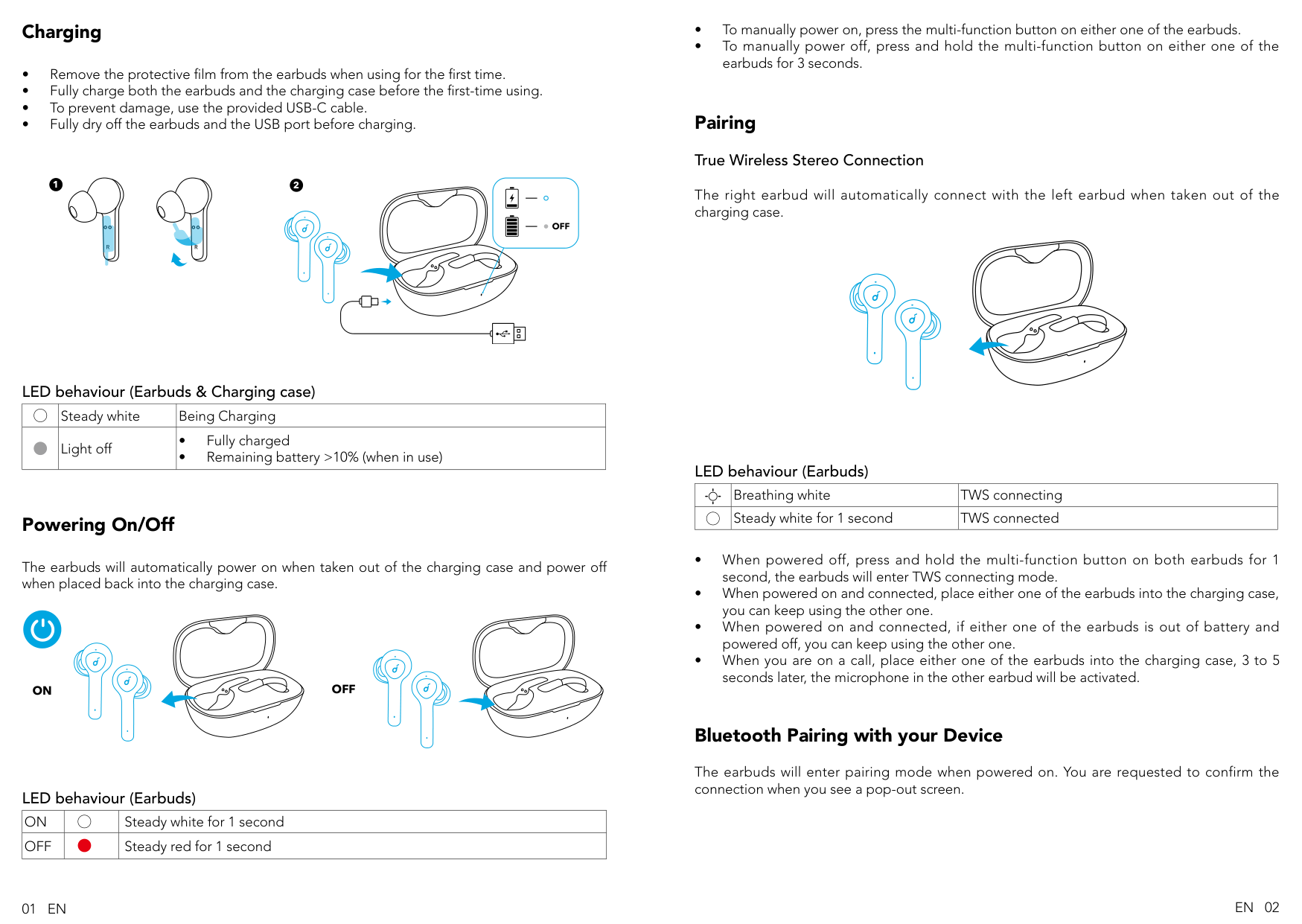
|ON| |Steady white for 1 second| |---|---|---| |OFF| |Steady red for 1 second|
##### Pairing True Wireless Stereo Connection
The right earbud will automatically connect with the left earbud when taken out of the charging case.
######## LED behaviour (Earbuds)
| |Breathing white|TWS connecting| |---|---|---| | |Steady white for 1 second|TWS connected|
#### Bluetooth Pairing with your Device
The earbuds will enter pairing mode when powered on. You are requested to confirm the connection when you see a pop-out screen.
01 EN EN 02
Soundcore Life P2
Pair
Bluetooth Pairing Request “Headset” would like to pair with your iPhone
Cancel Pair
######## LED behaviour (Earbuds)
| |Flashing white|Bluetooth pairing| |---|---|---| | |Steady white for 1 second|Bluetooth connected|
In the pairing process, some devices are incompatible with Qualcomm True Wireless PrimarySecondary dual pairing names, it may notice “connection unsuccessful” when you tap “Pair” or even no screen popped out. Don’t worry and it will not influence the using.
Once successfully paired, the primary earbud connects with your device and transfers signal to the secondary earbud, the latter one will not connect with your device. As a result, in the Bluetooth pairing list on your device, it may indicate that only one side is connected while the other side is not.
| | |---| | | | |
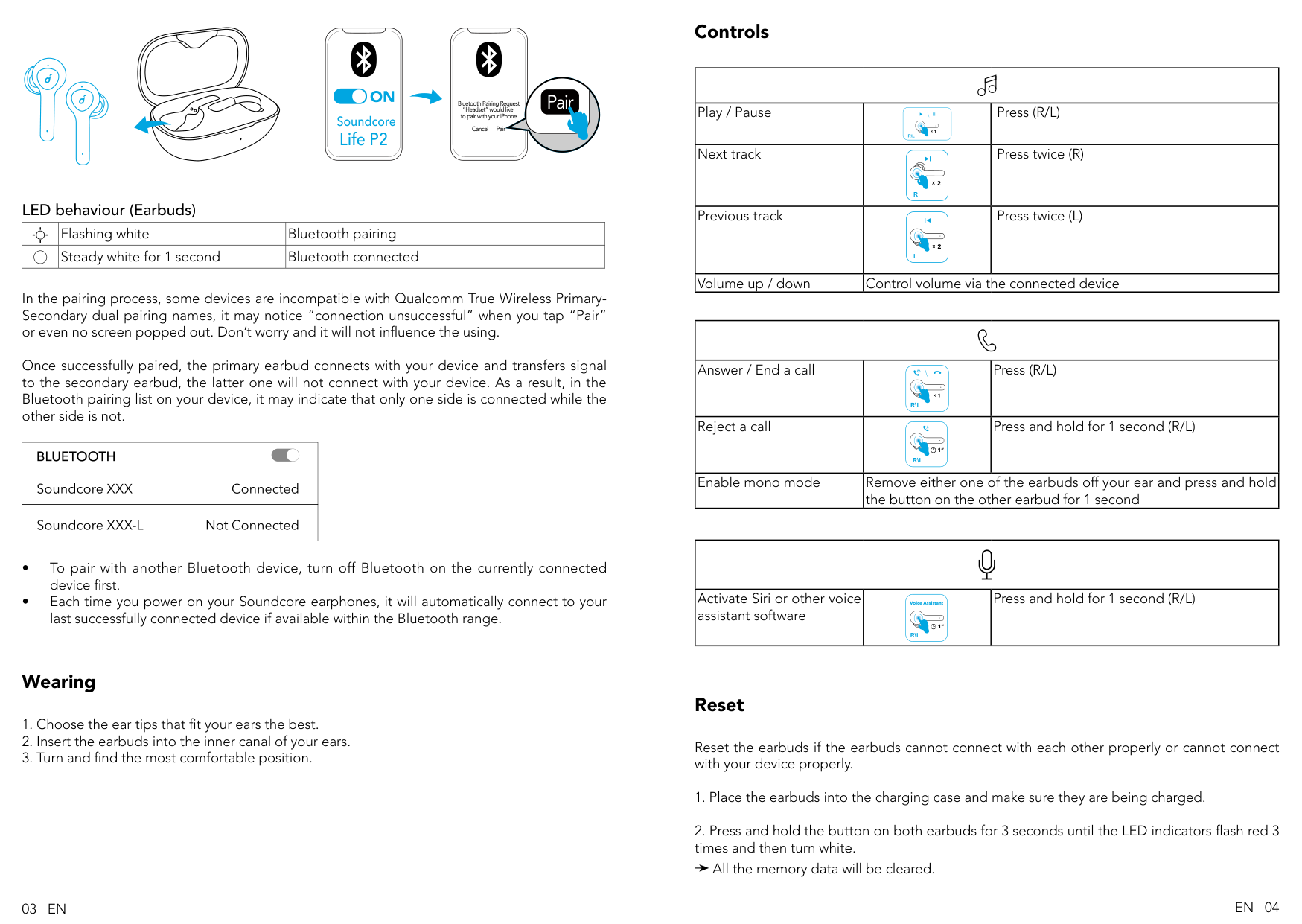
Controls
| | | | |---|---|---| |Play / Pause|1 R\L
|Press (R/L)| |Next track|R
2
|Press twice (R)| |Previous track|2 L
|Press twice (L)| |Volume up / down|Control volume via the connected device|Control volume via the connected device|
| | | | |---|---|---| |Answer / End a call|1 R\L
|Press (R/L)| |Reject a call|1” R\L
|Press and hold for 1 second (R/L)| |Enable mono mode|Remove either one of the earbuds off your ear and press and hold the button on the other earbud for 1 second|Remove either one of the earbuds off your ear and press and hold the button on the other earbud for 1 second|
| | | | |---|---|---| |Activate Siri or other voice assistant software|1” R\L
Voice Assistant|Press and hold for 1 second (R/L)|
#### Wearing
Reset
Reset the earbuds if the earbuds cannot connect with each other properly or cannot connect with your device properly.
All the memory data will be cleared.
03 EN EN 04
L R
3”
3
Specifications Specifications are subject to change without notice.
|Input|5 V 500 mA
| |---|---| |Rated output power|7 mW @ 1% THD| |Battery capacity|55 mA x 2 (earbuds); 700 mA (charging case)|
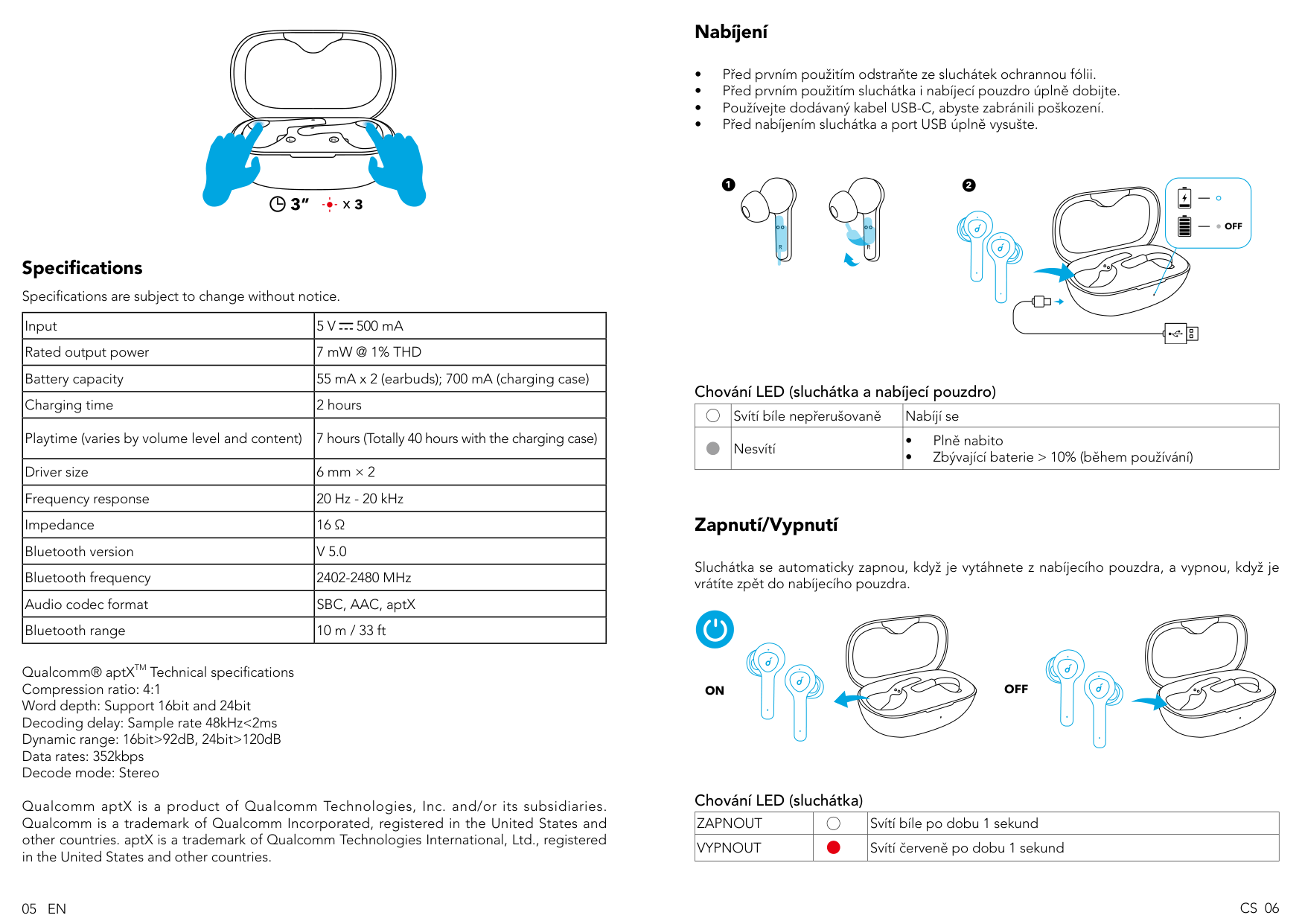
|Charging time|2 hours| |Playtime (varies by volume level and content)|7 hours (Totally 40 hours with the charging case)| |Driver size|6 mm × 2| |Frequency response|20 Hz - 20 kHz| |Impedance|16 Ω| |Bluetooth version|V 5.0| |Bluetooth frequency|2402-2480 MHz| |Audio codec format|SBC, AAC, aptX| |Bluetooth range|10 m / 33 ft|
Qualcomm® aptXTM Technical specifications Compression ratio: 4:1 Word depth: Support 16bit and 24bit Decoding delay: Sample rate 48kHz<2ms Dynamic range: 16bit>92dB, 24bit>120dB Data rates: 352kbps Decode mode: Stereo
Qualcomm aptX is a product of Qualcomm Technologies, Inc. and/or its subsidiaries. Qualcomm is a trademark of Qualcomm Incorporated, registered in the United States and other countries. aptX is a trademark of Qualcomm Technologies International, Ltd., registered in the United States and other countries.
#### Nabíjení
########## 1
RR
########## 2
Chování LED (sluchátka a nabíjecí pouzdro)
| |Svítí bíle nepřerušovaně|Nabíjí se| |---|---|---| | |Nesvítí|• Plně nabito
• Zbývající baterie > 10% (během používání)
|
#### Zapnutí/Vypnutí
Sluchátka se automaticky zapnou, když je vytáhnete z nabíjecího pouzdra, a vypnou, když je vrátíte zpět do nabíjecího pouzdra.
######### ON OFF
Chování LED (sluchátka)
|ZAPNOUT| |Svítí bíle po dobu 1 sekund| |---|---|---| |VYPNOUT| |Svítí červeně po dobu 1 sekund|
CS 0605 EN
L R
3”
###### 3
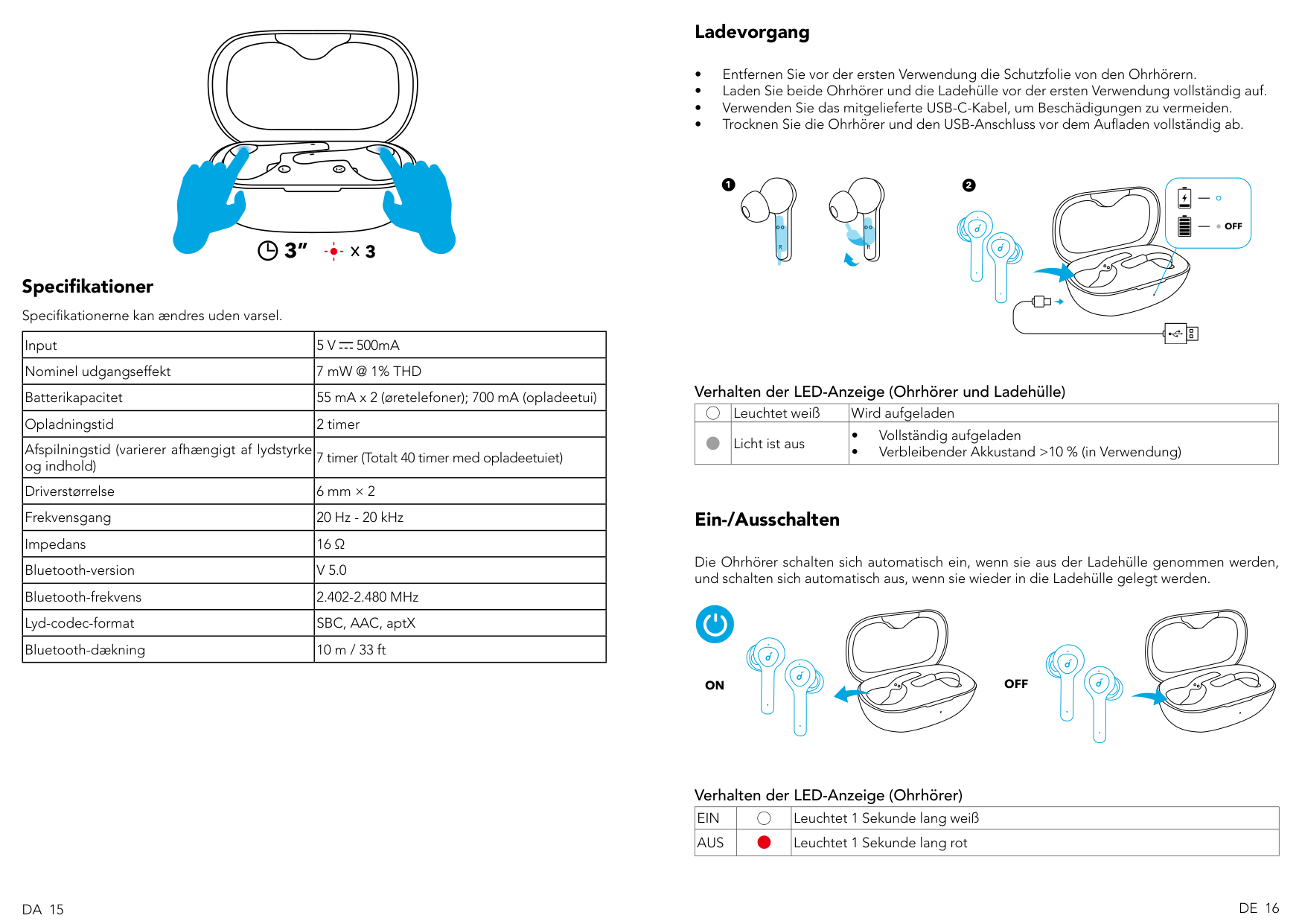
Specifikationer Specifikationerne kan ændres uden varsel.
|Input|5 V 500mA
| |---|---| |Nominel udgangseffekt|7 mW @ 1% THD| |Batterikapacitet|55 mA x 2 (øretelefoner); 700 mA (opladeetui)| |Opladningstid|2 timer| |Afspilningstid (varierer afhængigt af lydstyrke og indhold)|7 timer (Totalt 40 timer med opladeetuiet)| |Driverstørrelse|6 mm × 2| |Frekvensgang|20 Hz - 20 kHz| |Impedans|16 Ω| |Bluetooth-version|V 5.0| |Bluetooth-frekvens|2.402-2.480 MHz| |Lyd-codec-format|SBC, AAC, aptX| |Bluetooth-dækning|10 m / 33 ft|
#### Ladevorgang
########## 1
RR
########## 2
Verhalten der LED-Anzeige (Ohrhörer und Ladehülle)
| |Leuchtet weiß|Wird aufgeladen| |---|---|---| | |Licht ist aus|• Vollständig aufgeladen
• Verbleibender Akkustand >10 % (in Verwendung)
|
#### Ein-/Ausschalten
Die Ohrhörer schalten sich automatisch ein, wenn sie aus der Ladehülle genommen werden, und schalten sich automatisch aus, wenn sie wieder in die Ladehülle gelegt werden.
######### ON OFF
Verhalten der LED-Anzeige (Ohrhörer)
|EIN| |Leuchtet 1 Sekunde lang weiß| |---|---|---| |AUS| |Leuchtet 1 Sekunde lang rot|
DE 16DA 15
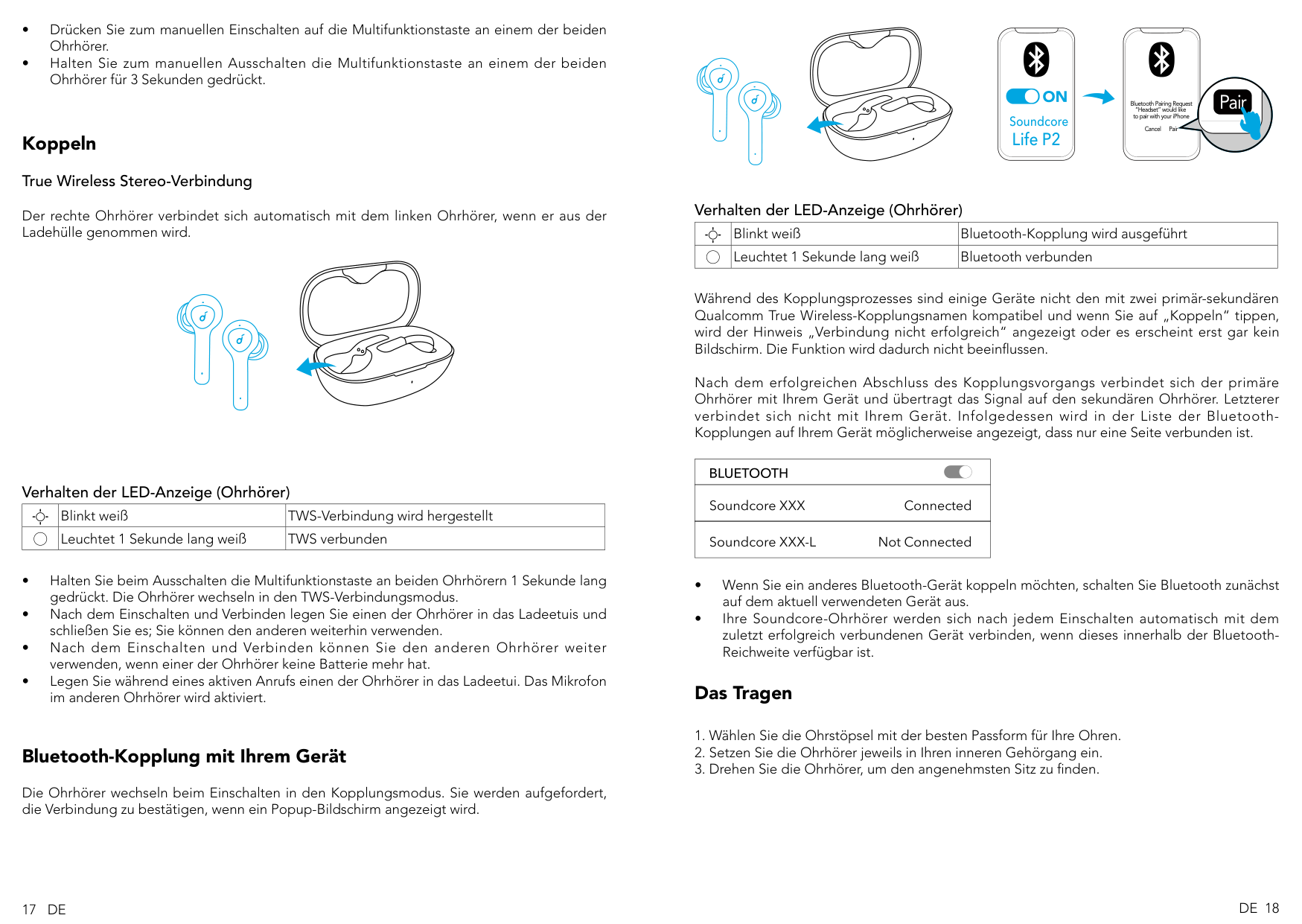
##### Koppeln True Wireless Stereo-Verbindung
Der rechte Ohrhörer verbindet sich automatisch mit dem linken Ohrhörer, wenn er aus der Ladehülle genommen wird.
######## Verhalten der LED-Anzeige (Ohrhörer)
| |Blinkt weiß|TWS-Verbindung wird hergestellt| |---|---|---| | |Leuchtet 1 Sekunde lang weiß|TWS verbunden|
#### Bluetooth-Kopplung mit Ihrem Gerät
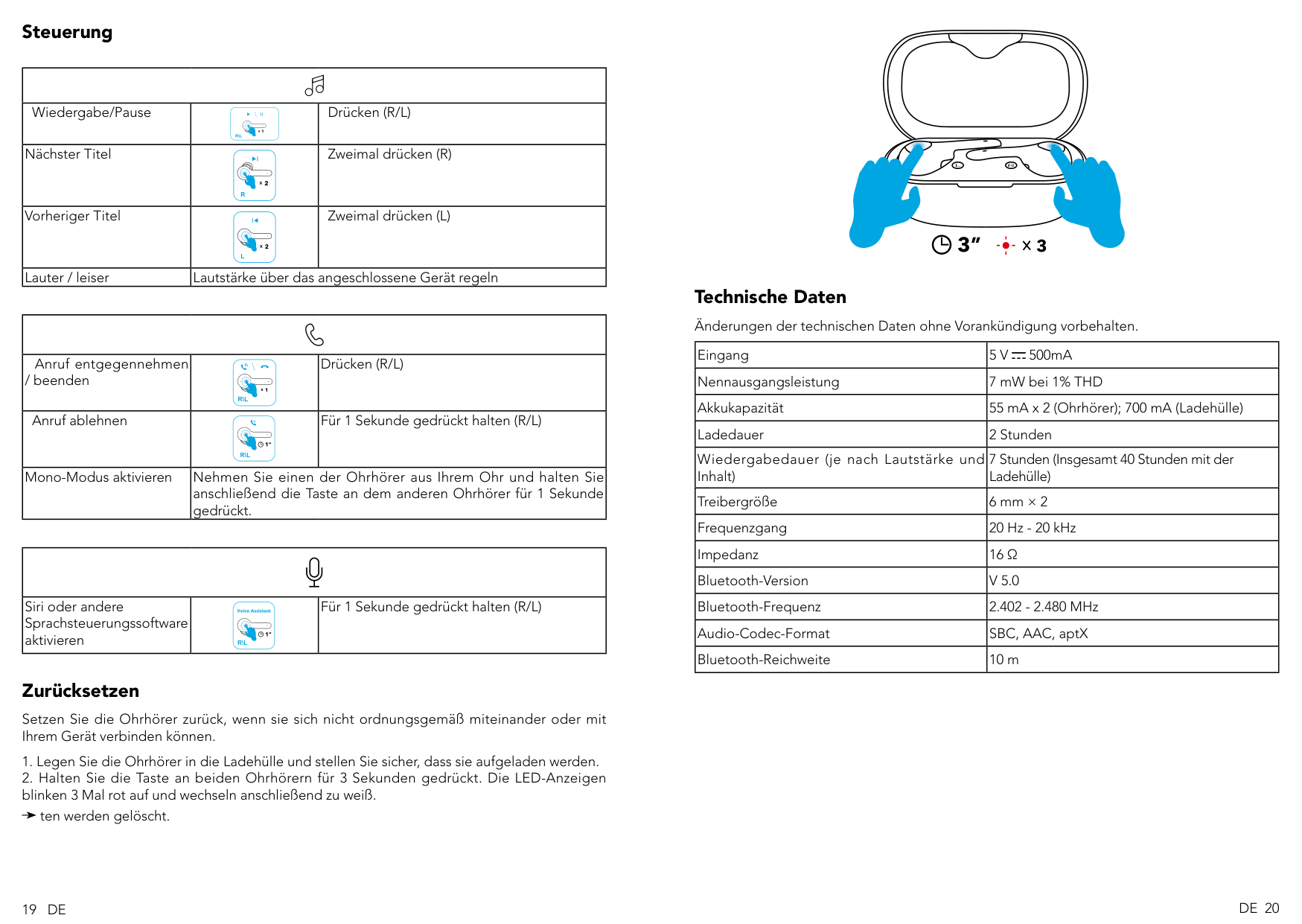
Die Ohrhörer wechseln beim Einschalten in den Kopplungsmodus. Sie werden aufgefordert, die Verbindung zu bestätigen, wenn ein Popup-Bildschirm angezeigt wird.
Soundcore Life P2
Pair
Bluetooth Pairing Request “Headset” would like to pair with your iPhone
Cancel Pair
######## Verhalten der LED-Anzeige (Ohrhörer)
| |Blinkt weiß|Bluetooth-Kopplung wird ausgeführt| |---|---|---| | |Leuchtet 1 Sekunde lang weiß|Bluetooth verbunden|
Während des Kopplungsprozesses sind einige Geräte nicht den mit zwei primär-sekundären Qualcomm True Wireless-Kopplungsnamen kompatibel und wenn Sie auf „Koppeln“ tippen, wird der Hinweis „Verbindung nicht erfolgreich“ angezeigt oder es erscheint erst gar kein Bildschirm. Die Funktion wird dadurch nicht beeinflussen.
Nach dem erfolgreichen Abschluss des Kopplungsvorgangs verbindet sich der primäre Ohrhörer mit Ihrem Gerät und übertragt das Signal auf den sekundären Ohrhörer. Letzterer verbindet sich nicht mit Ihrem Gerät. Infolgedessen wird in der Liste der BluetoothKopplungen auf Ihrem Gerät möglicherweise angezeigt, dass nur eine Seite verbunden ist.
| | |---| | | | |
#### Das Tragen
17 DE DE 18
Steuerung
| | | | |---|---|---| |Wiedergabe/Pause|1 R\L
|Drücken (R/L)| |Nächster Titel|R
2
|Zweimal drücken (R)| |Vorheriger Titel|2 L
|Zweimal drücken (L)| |Lauter / leiser|Lautstärke über das angeschlossene Gerät regeln|Lautstärke über das angeschlossene Gerät regeln|
| | | | |---|---|---| |Anruf entgegennehmen / beenden|1 R\L
|Drücken (R/L)| |Anruf ablehnen|1” R\L
|Für 1 Sekunde gedrückt halten (R/L)| |Mono-Modus aktivieren|Nehmen Sie einen der Ohrhörer aus Ihrem Ohr und halten Sie anschließend die Taste an dem anderen Ohrhörer für 1 Sekunde gedrückt.|Nehmen Sie einen der Ohrhörer aus Ihrem Ohr und halten Sie anschließend die Taste an dem anderen Ohrhörer für 1 Sekunde gedrückt.|
| | | | |---|---|---| |Siri oder andere Sprachsteuerungssoftware aktivieren|1” R\L
Voice Assistant|Für 1 Sekunde gedrückt halten (R/L)|
Zurücksetzen
Setzen Sie die Ohrhörer zurück, wenn sie sich nicht ordnungsgemäß miteinander oder mit Ihrem Gerät verbinden können.
ten werden gelöscht.
L R
3”
####### 3
Technische Daten Änderungen der technischen Daten ohne Vorankündigung vorbehalten.
|Eingang|5 V 500mA
| |---|---| |Nennausgangsleistung|7 mW bei 1% THD| |Akkukapazität|55 mA x 2 (Ohrhörer); 700 mA (Ladehülle)| |Ladedauer|2 Stunden| |Wiedergabedauer (je nach Lautstärke und Inhalt)|7 Stunden (Insgesamt 40 Stunden mit der Ladehülle)| |Treibergröße|6 mm × 2| |Frequenzgang|20 Hz - 20 kHz| |Impedanz|16 Ω| |Bluetooth-Version|V 5.0| |Bluetooth-Frequenz|2.402 - 2.480 MHz| |Audio-Codec-Format|SBC, AAC, aptX| |Bluetooth-Reichweite|10 m|
19 DE DE 20