
Whirlpool 6Th Sense Absolute Built In Oven
Ask AI
— answers from the official manualAnswers from the official manual.
Common questions
Common Questions
19 totalWhat does the 'DRAIN CYCLE IS NEEDED' message indicate?
The 'DRAIN CYCLE IS NEEDED' message indicates that you need to perform a draining cycle on the oven's steam system to maintain proper operation.
Can I delay the start of cooking or set an end time on this oven?
Yes, the oven features Delayed Start and End Time functionality that allows you to program when cooking should start and finish. After selecting a function and adjusting the temperature and duration, adjust the End Time/Delayed Start settings and confirm before pressing 'START'.
How do I get additional accessories or register my product for assistance?
Additional accessories can be purchased separately by contacting the after-sales service for orders and information on available options. To receive complete assistance, register your product on www.whirlpool.eu/register with the necessary details.
What common error codes should I be aware of and how do I address them?
If an error appears such as a letter followed by a number, it is an error indicator requiring assistance call. A 'Door' message means the door was closed for more than 5 minutes without operation; open and close the door then start the cycle to resolve. (Page 16)
How do I clean the microwave oven cavity?
Clean the cavity using mild, non-abrasive soap and water. For heavy soil, heat 1 cup of warm water for 2 to 5 minutes, then rinse and dry with a soft cloth. Avoid metal utensils or abrasive cleansers that may damage the surface. (Page 8)
How can I access additional features such as language change or energy savings?
To change settings like sound options, languages, and energy save mode, touch CLOCK/OPTIONS and follow the menu prompts. (Page 9)
Show 13 more questions
How do I use the turntable function during cooking cycles?
How often should I clean and replace filters in my microwave hood?
How do I reset the filter alert status after maintenance?
What safety precautions should be followed when using microwave cooking functions?
What are the electrical requirements for installing the microwave oven?
How can I set up the clock on my microwave oven?
What should I do before using the Whirlpool 6TH Sense Absolute Built In Oven for the first time?
How do I insert the wire shelf and other accessories into the oven?
How do I select and set a cooking function on the 6TH Sense Absolute Built In Oven?
What does the 6TH SENSE Technology feature do?
What should I do if the oven shows an 'ADD WATER' prompt?
How can I fix uneven cooking results in the Whirlpool 6TH Sense Absolute Built In Oven?
What does the 'WATER IS TOO HOT' warning mean?
Full Manual
20 pages
MICROWAVE OVEN HOOD COMBINATION USER INSTRUCTIONS
THANK YOU for purchasing this high-quality product. Register your microwave oven at www.whirlpool.com. For future reference, please make a note of your product model and serial numbers. These can be found on the label located on the microwave oven frame behind the top right side of the microwave oven door. Model Number __________________________________________ Serial Number ___________________________________________ Para una versión de estas instrucciones en español, visite www.whirlpool.com. Deberá tener a mano el número de modelo y de serie, que están ubicados en el marco del horno, detrás del lado derecho superior de la puerta del horno.
##### Table of Contents
MICROWAVE OVEN SAFETY ........................................................2 Electrical Requirements ...............................................................4
PARTS AND FEATURES ................................................................5 Feature Guide ...............................................................................5 Standby Mode ..............................................................................8 Additional Features ......................................................................8 Options .........................................................................................9 Turntable .......................................................................................9 Control Lock .................................................................................9
MICROWAVE OVEN USE .............................................................10 Food Characteristics ..................................................................10 Cooking Guidelines ....................................................................10 Cookware and Dinnerware.........................................................11 Aluminum Foil and Metal ...........................................................11 Microwave Cooking Power ........................................................11 Doneness ...................................................................................11 Sensor Cook...............................................................................11 Manual Cooking/Stage Cooking ................................................11 Add More Time ...........................................................................11 Reheat ........................................................................................12 Frozen Entrée .............................................................................12 Defrost ........................................................................................12 Soften/Melt .................................................................................12 Auto Cook ..................................................................................13 Kids Menu ..................................................................................13 Potato .........................................................................................13 Vegetable ....................................................................................13 Steam / Simmer .........................................................................14 Popcorn ......................................................................................14 Warm Hold .................................................................................14
MICROWAVE OVEN CARE ..........................................................15
General Cleaning ........................................................................15 TROUBLESHOOTING ..................................................................16 ACCESSORIES .............................................................................17 WARRANTY ..................................................................................18
W11297795B
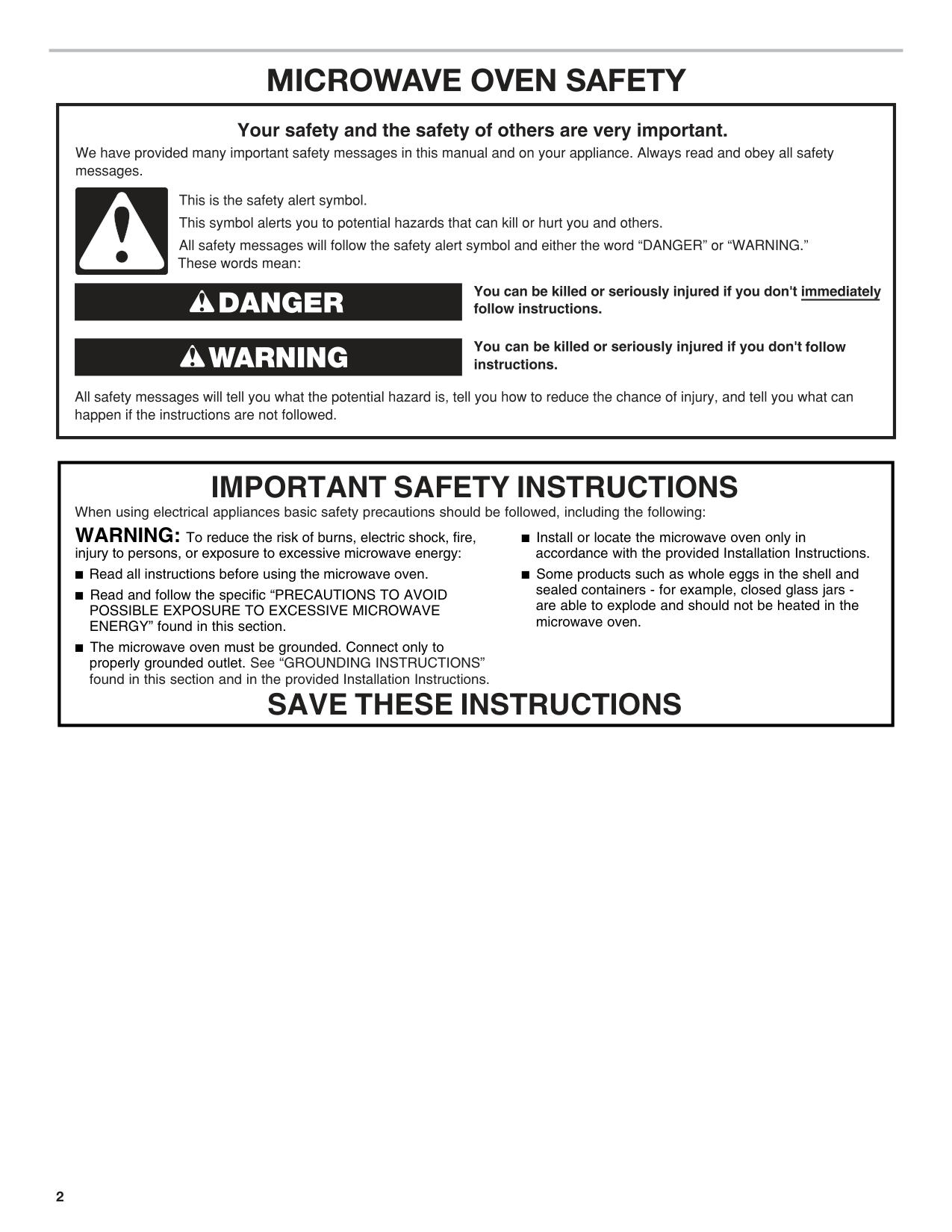
MICROWAVE OVEN SAFETY
|When using electrical appliances basic safety precautions should be followed, including the following:
IMPORTANT SAFETY INSTRUCTIONS
SAVE THESE INSTRUCTIONS
WARNING: To reduce the risk of burns, electric shock, fire,
injury to persons, or exposure to excessive microwave energy: Read all instructions before using the microwave oven. Read and follow the specific “PRECAUTIONS TO AVOID POSSIBLE EXPOSURE TO EXCESSIVE MICROWAVE ENERGY” found in this section. The microwave oven must be grounded. Connect only to properly grounded outlet. See “GROUNDING INSTRUCTIONS” found in this section and in the provided Installation Instructions.
Install or locate the microwave oven only in accordance with the provided Installation Instructions. Some products such as whole eggs in the shell and sealed containers - for example, closed glass jars are able to explode and should not be heated in the microwave oven.| |---|
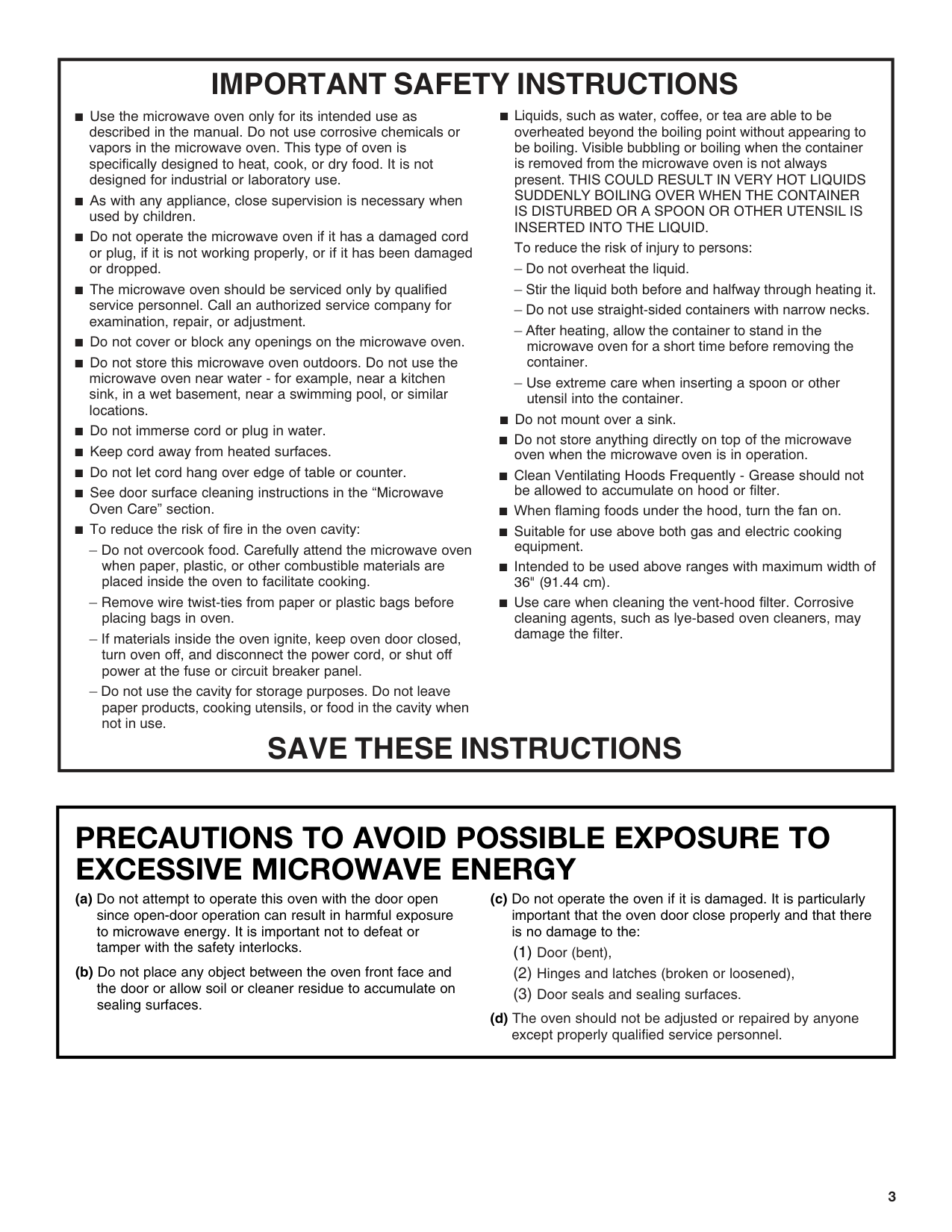
|IMPORTANT SAFETY INSTRUCTIONS
SAVE THESE INSTRUCTIONS
Use the microwave oven only for its intended use as described in the manual. Do not use corrosive chemicals or vapors in the microwave oven. This type of oven is specifically designed to heat, cook, or dry food. It is not designed for industrial or laboratory use. As with any appliance, close supervision is necessary when used by children. Do not operate the microwave oven if it has a damaged cord or plug, if it is not working properly, or if it has been damaged or dropped. The microwave oven should be serviced only by qualified service personnel. Call an authorized service company for examination, repair, or adjustment. Do not cover or block any openings on the microwave oven. Do not store this microwave oven outdoors. Do not use the microwave oven near water - for example, near a kitchen sink, in a wet basement, near a swimming pool, or similar locations. Do not immerse cord or plug in water. Keep cord away from heated surfaces. Do not let cord hang over edge of table or counter. See door surface cleaning instructions in the “Microwave Oven Care” section. To reduce the risk of fire in the oven cavity:
– Do not overcook food. Carefully attend the microwave oven when paper, plastic, or other combustible materials are placed inside the oven to facilitate cooking.
– Remove wire twist-ties from paper or plastic bags before placing bags in oven.
– If materials inside the oven ignite, keep oven door closed, turn oven off, and disconnect the power cord, or shut off power at the fuse or circuit breaker panel.
– Do not use the cavity for storage purposes. Do not leave paper products, cooking utensils, or food in the cavity when not in use.
Liquids, such as water, coffee, or tea are able to be overheated beyond the boiling point without appearing to be boiling. Visible bubbling or boiling when the container is removed from the microwave oven is not always present. THIS COULD RESULT IN VERY HOT LIQUIDS SUDDENLY BOILING OVER WHEN THE CONTAINER IS DISTURBED OR A SPOON OR OTHER UTENSIL IS INSERTED INTO THE LIQUID. To reduce the risk of injury to persons:
– Do not overheat the liquid.
– Stir the liquid both before and halfway through heating it.
– Do not use straight-sided containers with narrow necks.
– After heating, allow the container to stand in the microwave oven for a short time before removing the container.
– Use extreme care when inserting a spoon or other utensil into the container.
Do not mount over a sink. Do not store anything directly on top of the microwave oven when the microwave oven is in operation. Clean Ventilating Hoods Frequently - Grease should not be allowed to accumulate on hood or filter. When flaming foods under the hood, turn the fan on. Suitable for use above both gas and electric cooking equipment. Intended to be used above ranges with maximum width of 36" (91.44 cm). Use care when cleaning the vent-hood filter. Corrosive cleaning agents, such as lye-based oven cleaners, may damage the filter.| |---|
|PRECAUTIONS TO AVOID POSSIBLE EXPOSURE TO EXCESSIVE MICROWAVE ENERGY
(a) Do not attempt to operate this oven with the door open since open-door operation can result in harmful exposure to microwave energy. It is important not to defeat or tamper with the safety interlocks.
(b) Do not place any object between the oven front face and the door or allow soil or cleaner residue to accumulate on sealing surfaces.
(c) Do not operate the oven if it is damaged. It is particularly important that the oven door close properly and that there is no damage to the:
(1) Door (bent),
(2) Hinges and latches (broken or loosened),
(3) Door seals and sealing surfaces.
(d) The oven should not be adjusted or repaired by anyone
except properly qualified service personnel.| |---|
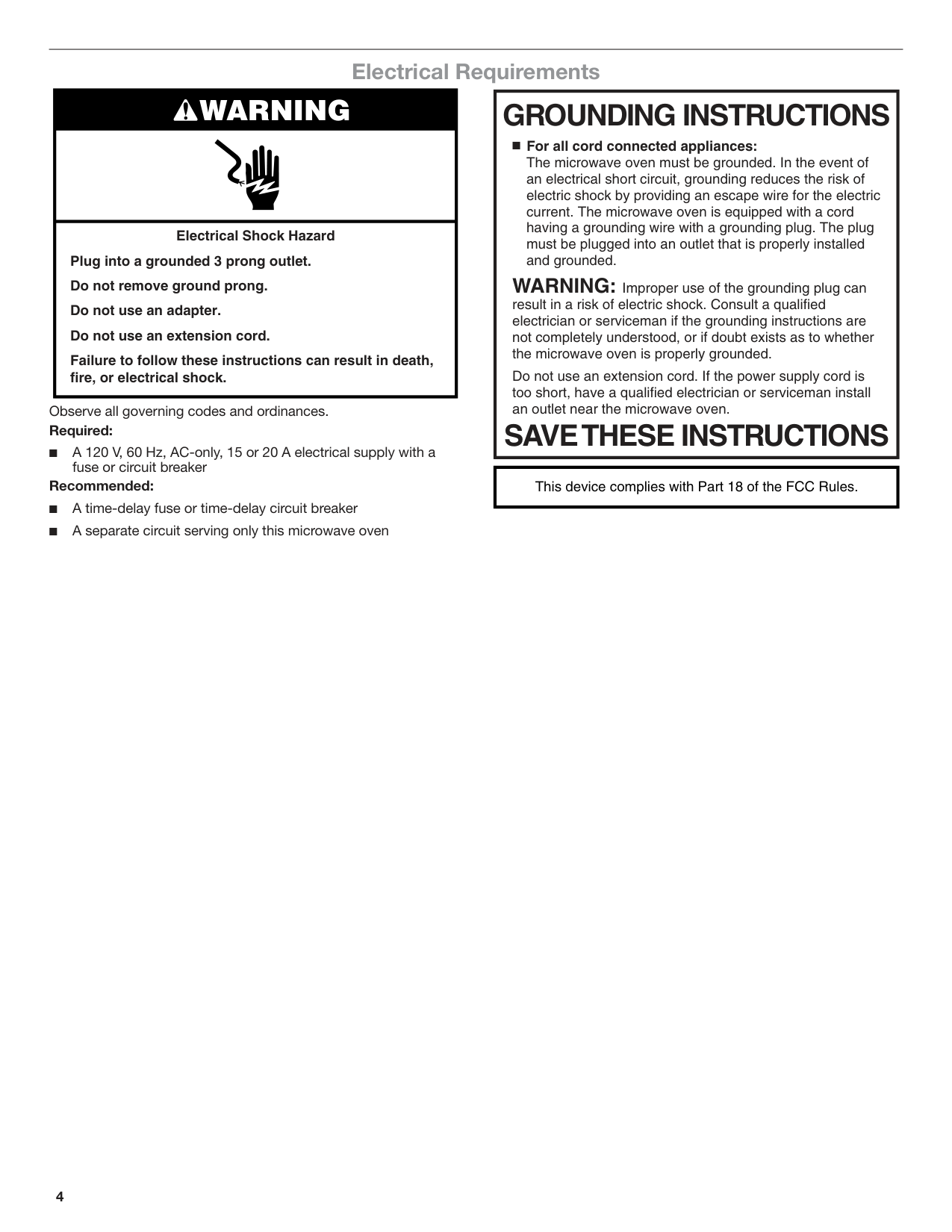
##### Electrical Requirements
|WARNING| |---| |Electrical Shock Hazard Plug into a grounded 3 prong outlet. Do not remove ground prong. Do not use an adapter. Do not use an extension cord. Failure to follow these instructions can result in death, fire, or electrical shock.|
|GROUNDING INSTRUCTIONS
SAVETHESE INSTRUCTIONS
For all cord connected appliances: The microwave oven must be grounded. In the event of an electrical short circuit, grounding reduces the risk of electric shock by providing an escape wire for the electric current. The microwave oven is equipped with a cord having a grounding wire with a grounding plug. The plug must be plugged into an outlet that is properly installed and grounded.
WARNING: Improper use of the grounding plug can result in a risk of electric shock. Consult a qualified electrician or serviceman if the grounding instructions are not completely understood, or if doubt exists as to whether the microwave oven is properly grounded.
Do not use an extension cord. If the power supply cord is too short, have a qualified electrician or serviceman install an outlet near the microwave oven.| |---|
Observe all governing codes and ordinances. Required:
■ A 120 V, 60 Hz, AC-only, 15 or 20 A electrical supply with a
fuse or circuit breaker Recommended:
|This device complies with Part 18 of the FCC Rules.| |---|
PARTS AND FEATURES
##### Feature Guide
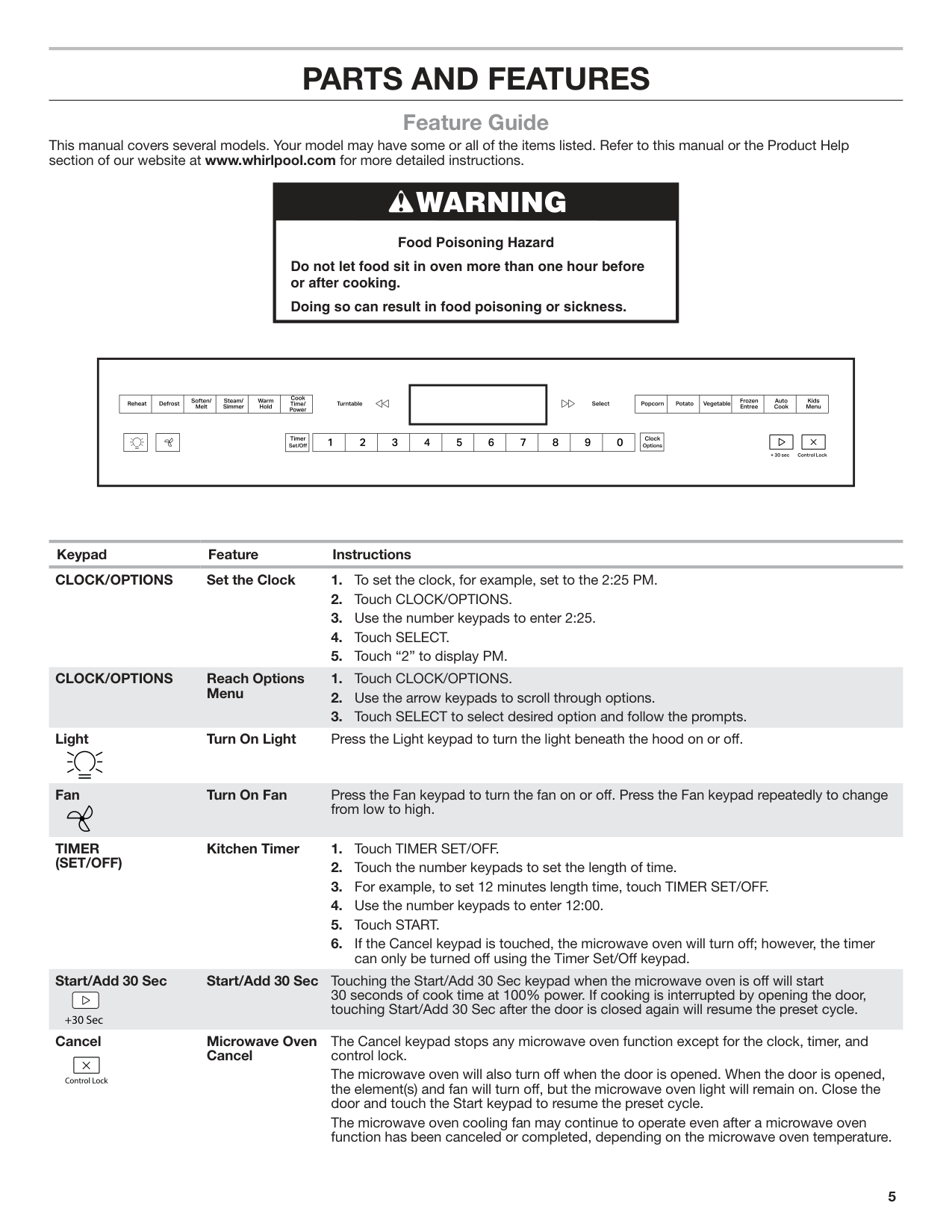
This manual covers several models. Your model may have some or all of the items listed. Refer to this manual or the Product Help section of our website at www.whirlpool.com for more detailed instructions.
|WARNING
Food Poisoning Hazard
Do not let food sit in oven more than one hour before or after cooking.
Doing so can result in food poisoning or sickness.| |---|
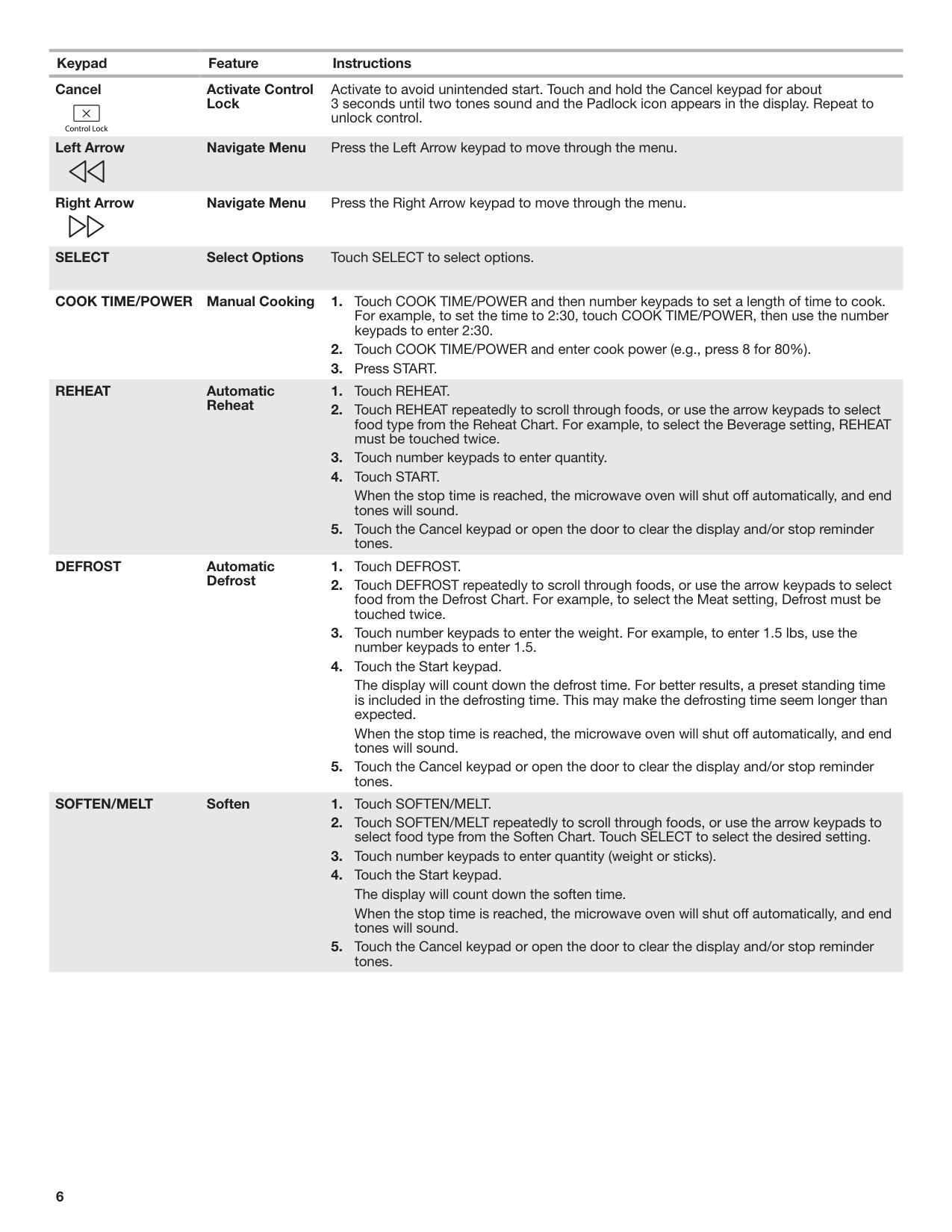
Keypad Feature Instructions CLOCK/OPTIONS Set the Clock 1. To set the clock, for example, set to the 2:25 PM.
CLOCK/OPTIONS Reach Options Menu
Light Turn On Light Press the Light keypad to turn the light beneath the hood on or off.
Fan Turn On Fan Press the Fan keypad to turn the fan on or off. Press the Fan keypad repeatedly to change
from low to high.
######## TIMER (SET/OFF)
Kitchen Timer 1. Touch TIMER SET/OFF.
Start/Add 30 Sec Start/Add 30 Sec Touching the Start/Add 30 Sec keypad when the microwave oven is off will start 30 seconds of cook time at 100% power. If cooking is interrupted by opening the door, touching Start/Add 30 Sec after the door is closed again will resume the preset cycle.
Cancel Microwave Oven Cancel
The Cancel keypad stops any microwave oven function except for the clock, timer, and control lock.
The microwave oven will also turn off when the door is opened. When the door is opened, the element(s) and fan will turn off, but the microwave oven light will remain on. Close the door and touch the Start keypad to resume the preset cycle.
The microwave oven cooling fan may continue to operate even after a microwave oven function has been canceled or completed, depending on the microwave oven temperature.
Cancel Activate Control Lock
Activate to avoid unintended start. Touch and hold the Cancel keypad for about 3 seconds until two tones sound and the Padlock icon appears in the display. Repeat to unlock control.
Left Arrow Navigate Menu Press the Left Arrow keypad to move through the menu.
Right Arrow Navigate Menu Press the Right Arrow keypad to move through the menu.
SELECT Select Options Touch SELECT to select options.
COOK TIME/POWER Manual Cooking 1. Touch COOK TIME/POWER and then number keypads to set a length of time to cook. For example, to set the time to 2:30, touch COOK TIME/POWER, then use the number keypads to enter 2:30.
REHEAT Automatic Reheat
When the stop time is reached, the microwave oven will shut off automatically, and end tones will sound.
DEFROST Automatic Defrost
The display will count down the defrost time. For better results, a preset standing time is included in the defrosting time. This may make the defrosting time seem longer than expected.
When the stop time is reached, the microwave oven will shut off automatically, and end tones will sound.
######## SOFTEN/MELT Soften 1. Touch SOFTEN/MELT.
When the stop time is reached, the microwave oven will shut off automatically, and end tones will sound.
######## SOFTEN/MELT Melt 1. Touch SOFTEN/MELT.
When the stop time is reached, the microwave oven will shut off automatically, and end tones will sound.
STEAM/SIMMER Auto Steam Cook
When the stop time is reached, the microwave oven will shut off automatically, and end tones will sound.
STEAM/SIMMER Manual Steam Cook
When the stop time is reached, the microwave oven will shut off automatically, and end tones will sound.
STEAM/SIMMER Auto Simmer Cook
When the stop time is reached, the microwave oven will shut off automatically, and end tones will sound.
STEAM/SIMMER Manual Simmer Cook
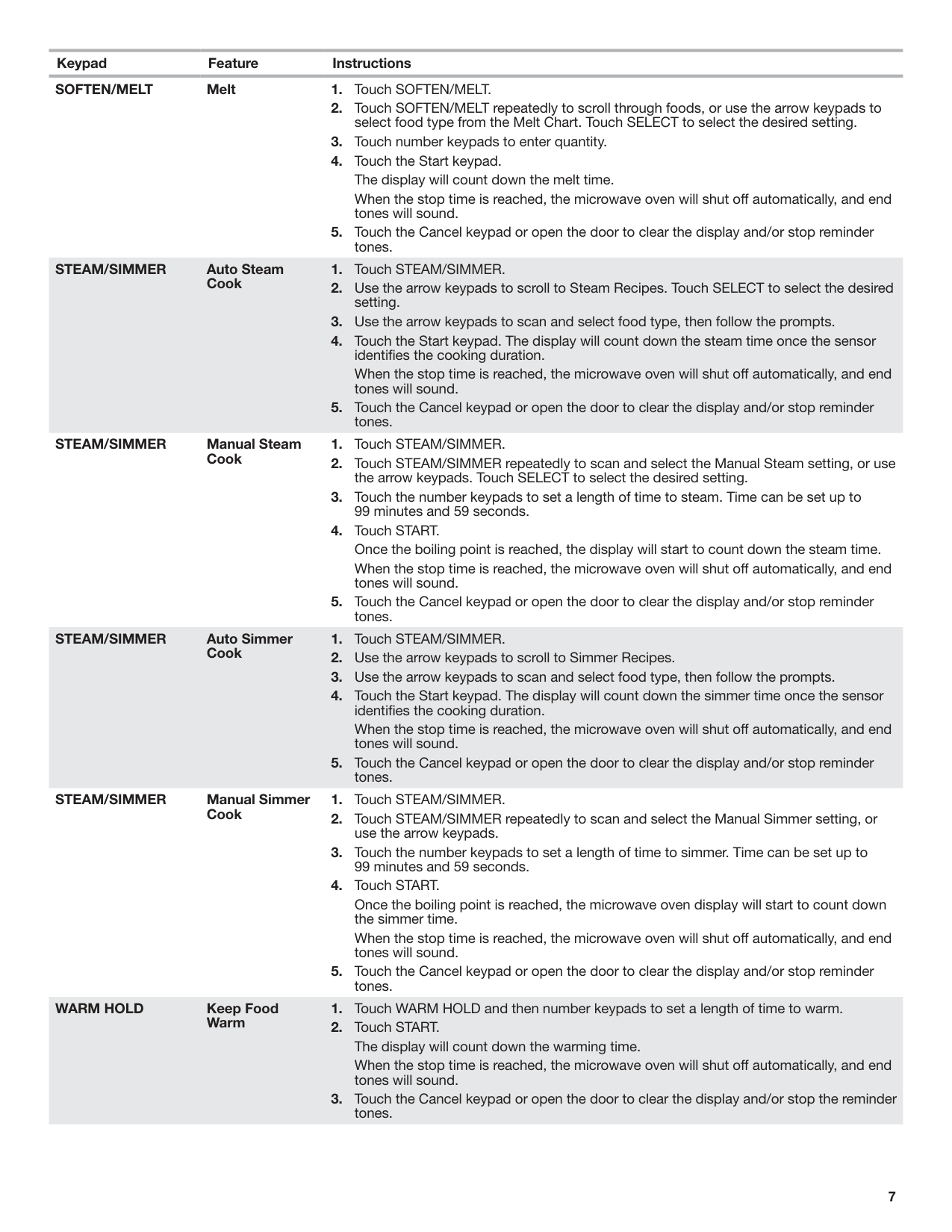
Once the boiling point is reached, the microwave oven display will start to count down the simmer time.
When the stop time is reached, the microwave oven will shut off automatically, and end tones will sound.
WARM HOLD Keep Food Warm
When the stop time is reached, the microwave oven will shut off automatically, and end tones will sound.
POPCORN Popcorn (Sensor)
When the stop time is reached, the microwave oven will shut off automatically, and end tones will sound.
POTATO Potato (Sensor)
######## VEGETABLE Vegetable 1. Touch VEGETABLE.
When the stop time is reached, the microwave oven will shut off automatically, and end tones will sound.
######## FROZEN ENTREE Frozen Entree 1. Touch FROZEN ENTREE.
When the stop time is reached, the microwave oven will shut off automatically, and end tones will sound.
######## AUTO COOK Auto Cook 1. Touch AUTO COOK.
When the stop time is reached, the microwave oven will shut off automatically, and end tones will sound.
######## KIDS MENU Kids Menu 1. Touch KIDS MENU.
When the stop time is reached, the microwave oven will shut off automatically, and end tones will sound.
TURNTABLE Turntable On/Off By touching the Turntable On/Off keypad, it is possible to switch the turntable on and off during some microwave cycles. The turntable can be turned on or off only during Manual cooking cycles.
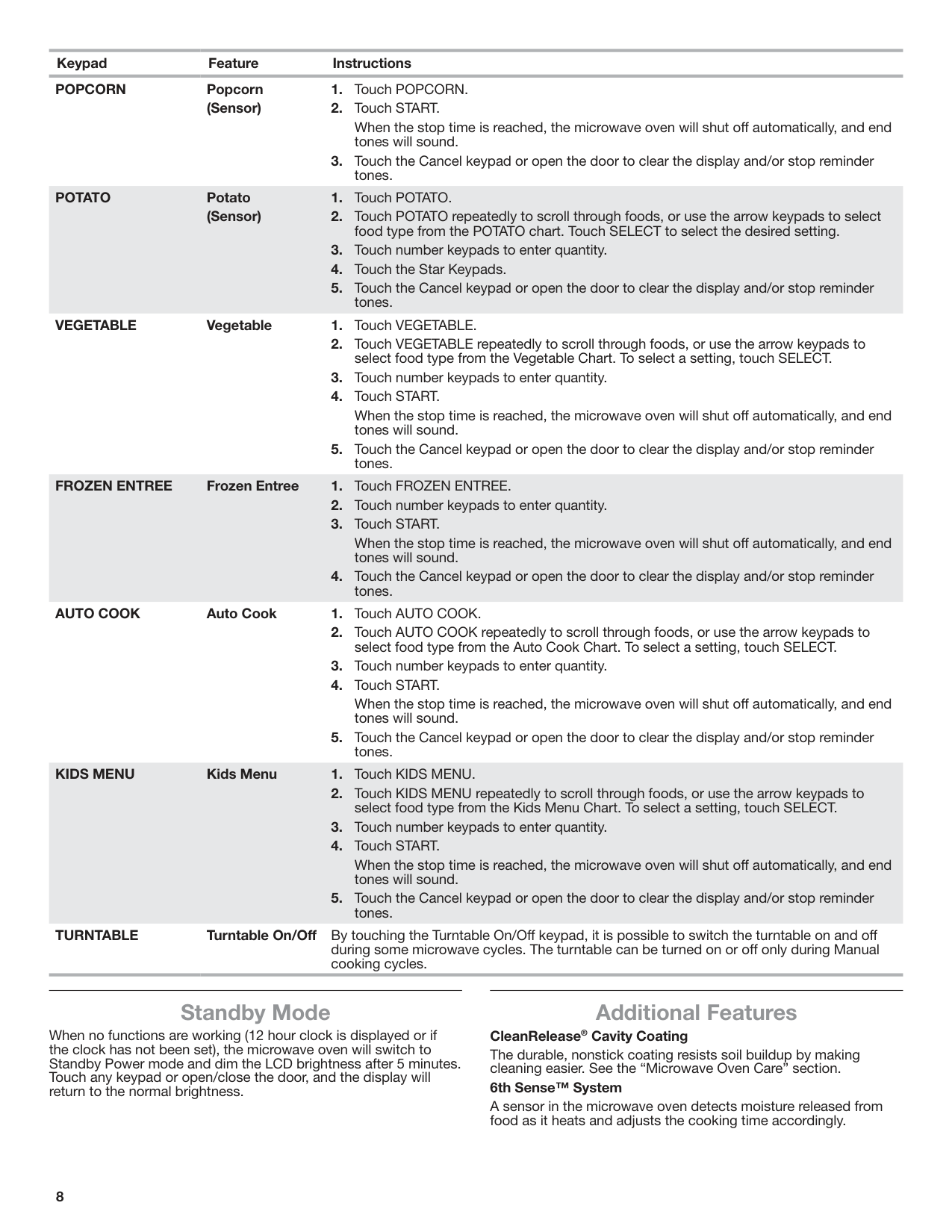
##### Standby Mode
When no functions are working (12 hour clock is displayed or if the clock has not been set), the microwave oven will switch to Standby Power mode and dim the LCD brightness after 5 minutes. Touch any keypad or open/close the door, and the display will return to the normal brightness.
##### Additional Features
######## CleanRelease® Cavity Coating
The durable, nonstick coating resists soil buildup by making cleaning easier. See the “Microwave Oven Care” section.
######## 6th Sense™ System
A sensor in the microwave oven detects moisture released from food as it heats and adjusts the cooking time accordingly.
Options Clock/Options allows access to the microwave settings. To Use:
You can also touch CLOCK/OPTIONS repeatedly to manually scroll through the list of options.
####### Clock
The clock is a 12 hour (12:00-11:59) or 24 hour (0:00-23:59) clock. Touch CLOCK/OPTIONS to reach Clock submenu and follow the prompts to set the clock. Clock format (12 hours with AM and PM, or 24 hours) may also be set in the Clock submenu.
####### Vent Fan
Various speeds ranging from high to low and off. Comes on automatically as cooling fan during any cook function.
30 Minute Fan Timer: Set vent fan to run for exactly 30 minutes or to run for only 30 minutes more (off after 30 minutes). The vent fan may be turned off at any time using the Vent Fan Control. Touch OPTION/CLOCK to reach the 30 Minute Fan Timer submenu and select the setting.
Auto Vent Fan (on some models): To keep the microwave oven from overheating, the auto vent fan will automatically turn on at high speed if the temperature from the range or cooktop below the microwave oven gets too hot. When this occurs, the vent fan cannot be turned off. “Auto FAN ON for heat circulation” appears in the display.
Dymamic Fan Sensing (on some models): To keep the microwave oven from overheating, the auto vent fan will automatically turn on at various speeds, depending on the temperature from the range or cooktop below the microwave oven. When this occurs, the vent fan cannot be turned off. “AUTO FAN Sensor Technology for heat circulation” appears in the display. As the temperature cools, the fan will automatically decrease its speed, then turn off.
####### Light Timer
Set the cooktop light to turn on and off at certain times. Touch CLOCK/OPTIONS to reach the Light Timer submenu, and follow the prompts to set the light on time and light off time in hours and minutes or to cancel Light Timer.
NOTE: Light Timer uses 12 hour clock only. Filter Alert
Reset the filter status after replacing and/or cleaning the filters. Touch CLOCK/OPTIONS to reach the Filter Alert submenu, and activate reset.
####### Sound (Tones)
Programming tones may be turned off or all tones (including endof-function signals) may be turned off. Touch CLOCK/OPTIONS to reach the Sound submenu, and then follow the prompts to turn off or on the programming tones or all tones.
####### Scroll Speed
Scroll speed of the text may be adjusted. Touch CLOCK/OPTIONS to reach the Scroll Speed submenu and follow the prompts to set speed.
####### Demo Mode
Activate to practice using the control without actually turning on the magnetron. Touch CLOCK/OPTIONS to reach the Demo mode submenu, then follow the prompts to activate. The Demo icon will light up in the display. Repeat to deactivate.
####### Energy Save
To conserve energy, the Clock will automatically turn off when the microwave oven goes into Standby mode. Touch CLOCK/ OPTIONS to reach the Clock and Energy Save submenu, and follow the prompts to turn on Clock.
####### Language (on some models)
Language of the display text may be changed. Touch CLOCK/ OPTIONS to reach the Language submenu and follow the prompts to set language to English or French.
Factory Reset User may set microwave oven back to default state.
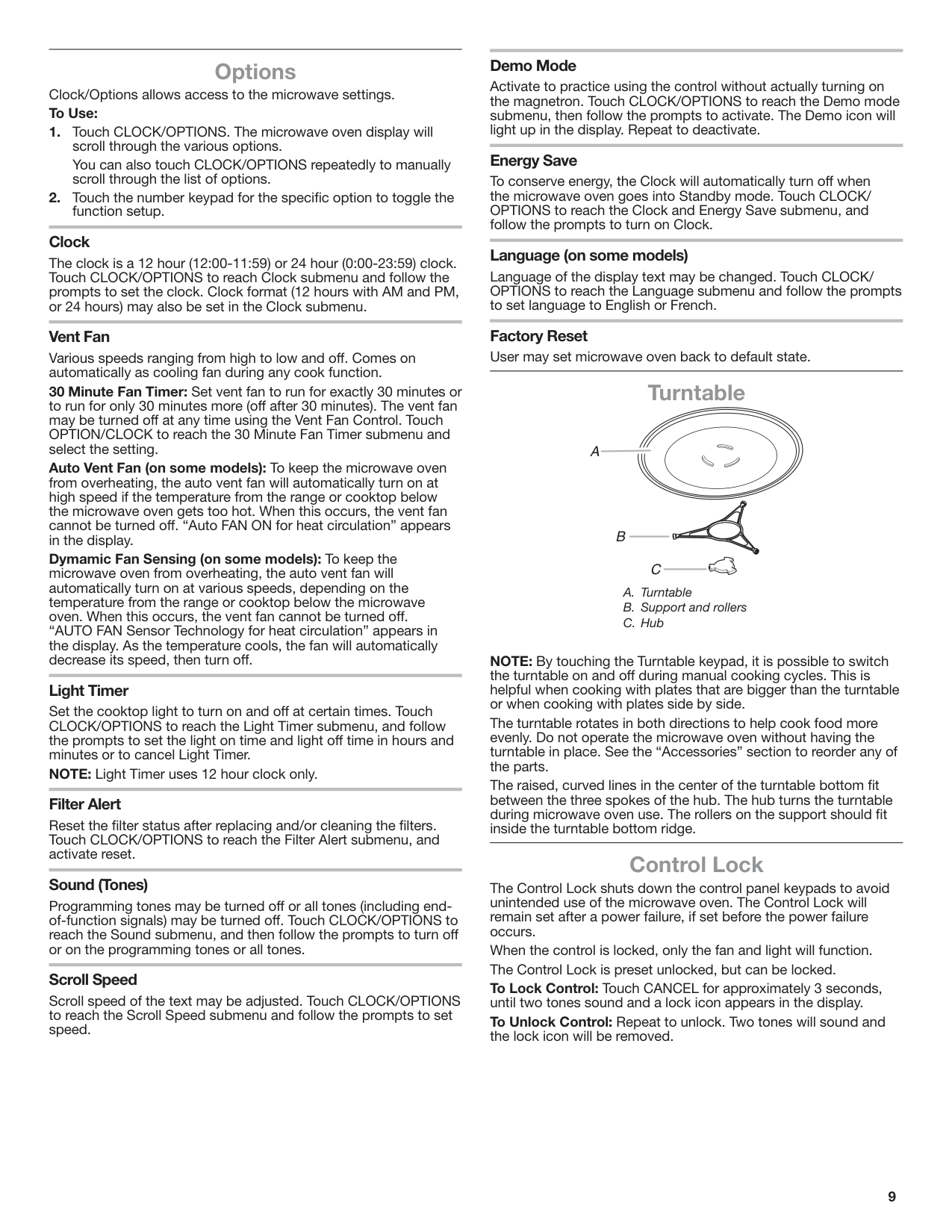
##### Turntable
A
B
C
NOTE: By touching the Turntable keypad, it is possible to switch the turntable on and off during manual cooking cycles. This is helpful when cooking with plates that are bigger than the turntable or when cooking with plates side by side.
The turntable rotates in both directions to help cook food more evenly. Do not operate the microwave oven without having the turntable in place. See the “Accessories” section to reorder any of the parts.
The raised, curved lines in the center of the turntable bottom fit between the three spokes of the hub. The hub turns the turntable during microwave oven use. The rollers on the support should fit inside the turntable bottom ridge.
##### Control Lock
The Control Lock shuts down the control panel keypads to avoid unintended use of the microwave oven. The Control Lock will remain set after a power failure, if set before the power failure occurs.
When the control is locked, only the fan and light will function. The Control Lock is preset unlocked, but can be locked. To Lock Control: Touch CANCEL for approximately 3 seconds, until two tones sound and a lock icon appears in the display. To Unlock Control: Repeat to unlock. Two tones will sound and the lock icon will be removed.
MICROWAVE OVEN USE
####### Stirring and Turning
A magnetron in the microwave oven produces microwaves which reflect off the metal floor, walls, and ceiling and pass through the turntable and appropriate cookware to the food. Microwaves are attracted to and absorbed by fat, sugar, and water molecules in the food, causing them to move, producing friction and heat which cooks the food.
Stirring and turning redistributes heat evenly to avoid overcooking the outer edges of food. Stir from outside to center. If possible, turn food over from bottom to top.
####### Arranging
If heating irregularly shaped or different-sized foods, arrange the thinner parts and smaller-sized items toward the center. If cooking several items of the same size and shape, place them in a ring pattern, leaving the center of the ring empty.
####### Piercing
Before heating, use a fork or small knife to pierce or prick foods that have a skin or membrane, such as potatoes, egg yolks, chicken livers, hot dogs, and sausage. Prick in several places to allow steam to vent.
####### Shielding
Use small, flat pieces of aluminum foil to shield the thin pieces of irregularly shaped foods, bones, and foods such as chicken wings, leg tips, and fish tails. See the “Aluminum Foil and Metal” section first.
####### Standing Time
Food will continue to cook by the natural conduction of heat, even after the microwave cooking cycle ends. The length of standing time depends on the volume and density of the food.
##### Cookware and Dinnerware
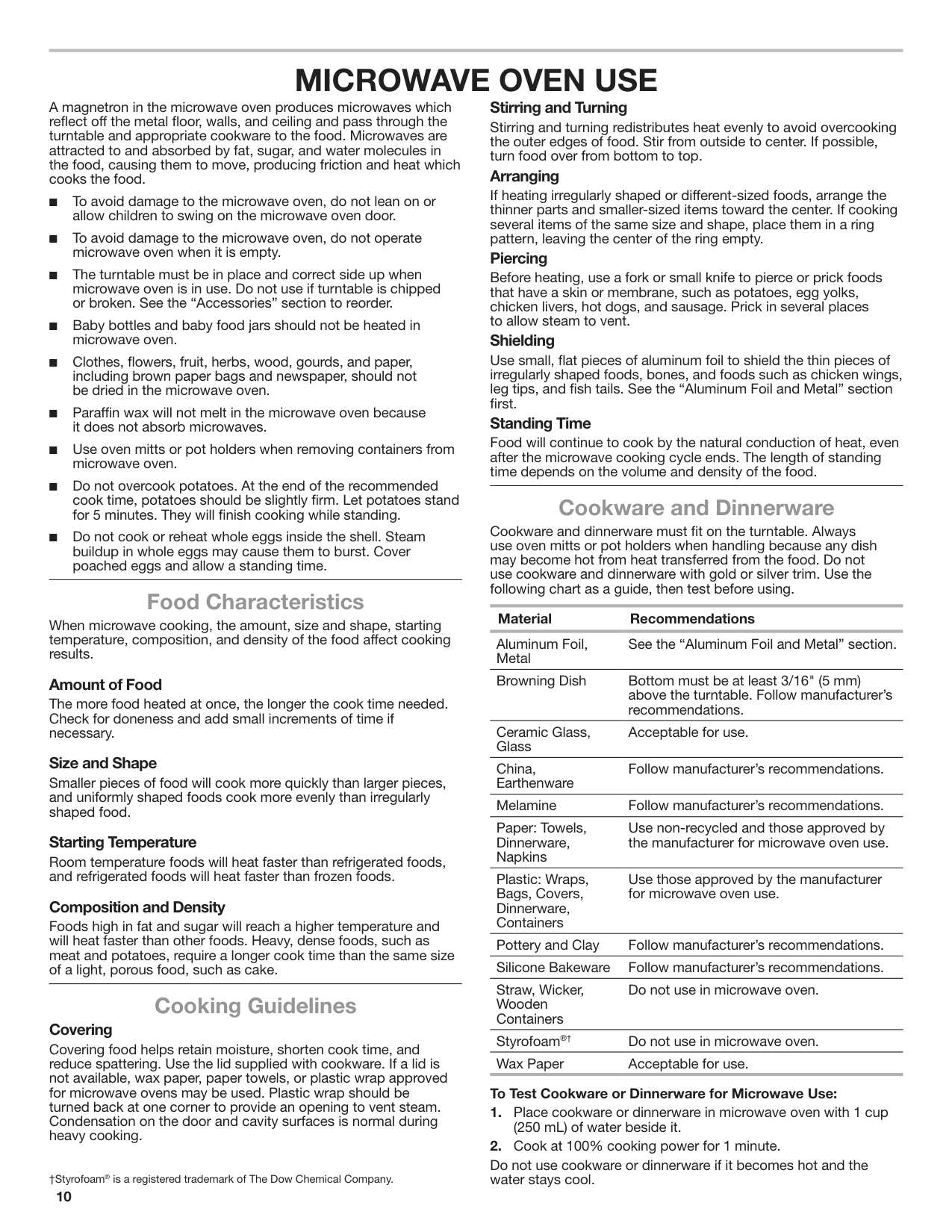
Cookware and dinnerware must fit on the turntable. Always use oven mitts or pot holders when handling because any dish may become hot from heat transferred from the food. Do not use cookware and dinnerware with gold or silver trim. Use the following chart as a guide, then test before using.
##### Food Characteristics
######## Material Recommendations
When microwave cooking, the amount, size and shape, starting temperature, composition, and density of the food affect cooking results.
Aluminum Foil, Metal
See the “Aluminum Foil and Metal” section.
Browning Dish Bottom must be at least 3/16" (5 mm) above the turntable. Follow manufacturer’s recommendations.
####### Amount of Food
The more food heated at once, the longer the cook time needed. Check for doneness and add small increments of time if necessary.
Ceramic Glass, Glass
Acceptable for use.
####### Size and Shape
China, Earthenware
Follow manufacturer’s recommendations.
Smaller pieces of food will cook more quickly than larger pieces, and uniformly shaped foods cook more evenly than irregularly shaped food.
Melamine Follow manufacturer’s recommendations. Paper: Towels, Dinnerware, Napkins
Use non-recycled and those approved by the manufacturer for microwave oven use.
####### Starting Temperature
Room temperature foods will heat faster than refrigerated foods, and refrigerated foods will heat faster than frozen foods.
Plastic: Wraps, Bags, Covers, Dinnerware, Containers
Use those approved by the manufacturer for microwave oven use.
####### Composition and Density
Foods high in fat and sugar will reach a higher temperature and will heat faster than other foods. Heavy, dense foods, such as meat and potatoes, require a longer cook time than the same size of a light, porous food, such as cake.
Pottery and Clay Follow manufacturer’s recommendations. Silicone Bakeware Follow manufacturer’s recommendations. Straw, Wicker, Wooden Containers
Do not use in microwave oven.
##### Cooking Guidelines
####### Covering
Styrofoam®† Do not use in microwave oven. Wax Paper Acceptable for use.
Covering food helps retain moisture, shorten cook time, and reduce spattering. Use the lid supplied with cookware. If a lid is not available, wax paper, paper towels, or plastic wrap approved for microwave ovens may be used. Plastic wrap should be turned back at one corner to provide an opening to vent steam. Condensation on the door and cavity surfaces is normal during heavy cooking.
######## To Test Cookware or Dinnerware for Microwave Use:
Do not use cookware or dinnerware if it becomes hot and the water stays cool.†Styrofoam®is a registered trademark of The Dow Chemical Company.
##### Aluminum Foil and Metal
Always use oven mitts or pot holders when removing dishes from the microwave oven.
Aluminum foil and some metal can be used in the microwave oven. If not used properly, arcing (a blue flash of light) can occur and cause damage to the microwave oven.
####### OK for Use
Racks and bakeware supplied with the microwave oven (on some models), aluminum foil for shielding, and approved meat thermometers may be used with the following guidelines:
####### Do Not Use
Metal cookware and bakeware, gold, silver, pewter, non-approved meat thermometers, skewers, twist ties, foil liners, such as sandwich wrappers, staples, and objects with gold or silver trim or a metallic glaze, should not be used in the microwave oven.
##### Microwave Cooking Power
Many recipes for microwave cooking specify which cooking power to use by percent, name, or number. For example, 70%=Medium-High=7.
Use the following chart as a general guide for the suggested cooking power of specific foods.
MICROWAVE COOKING POWER CHART
Percent/ Name
Number Use
100%, High (default setting)
10 Quick heating convenience foods and foods with high water content, such as soups, beverages, and most vegetables.
90% 9 Cooking small, tender pieces of meat, ground meat, poultry pieces, and fish fillets. Heating cream soups.
80% 8 Heating rice, pasta, or casseroles.
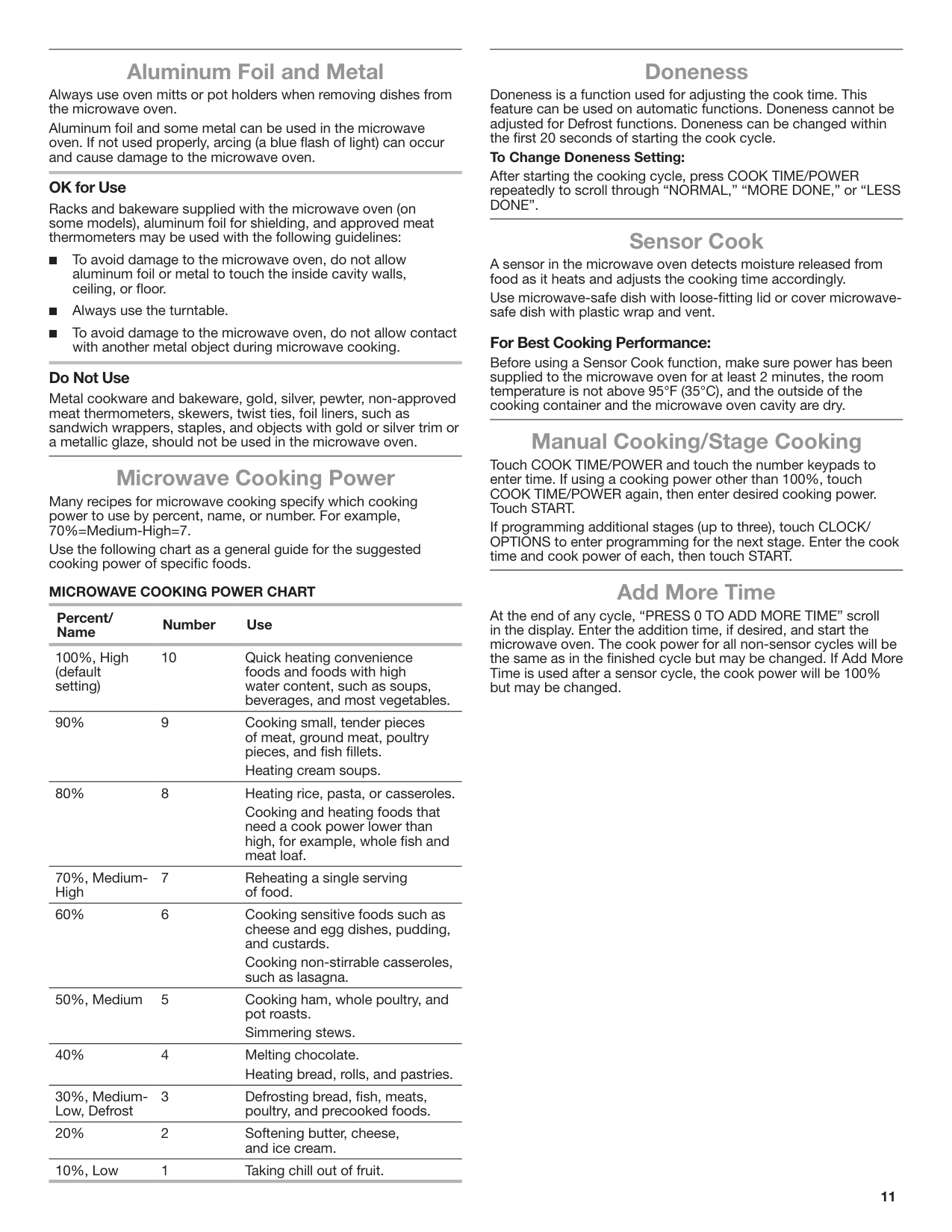
Cooking and heating foods that need a cook power lower than high, for example, whole fish and meat loaf.
70%, MediumHigh
7 Reheating a single serving of food.
60% 6 Cooking sensitive foods such as cheese and egg dishes, pudding, and custards.
Cooking non-stirrable casseroles, such as lasagna.
50%, Medium 5 Cooking ham, whole poultry, and pot roasts. Simmering stews.
40% 4 Melting chocolate. Heating bread, rolls, and pastries.
30%, MediumLow, Defrost
3 Defrosting bread, fish, meats,
poultry, and precooked foods. 20% 2 Softening butter, cheese,
and ice cream. 10%, Low 1 Taking chill out of fruit.
##### Doneness
Doneness is a function used for adjusting the cook time. This feature can be used on automatic functions. Doneness cannot be adjusted for Defrost functions. Doneness can be changed within the first 20 seconds of starting the cook cycle.
######## To Change Doneness Setting:
After starting the cooking cycle, press COOK TIME/POWER repeatedly to scroll through “NORMAL,” “MORE DONE,” or “LESS DONE”.
##### Sensor Cook
A sensor in the microwave oven detects moisture released from food as it heats and adjusts the cooking time accordingly.
Use microwave-safe dish with loose-fitting lid or cover microwavesafe dish with plastic wrap and vent.
####### For Best Cooking Performance:
Before using a Sensor Cook function, make sure power has been supplied to the microwave oven for at least 2 minutes, the room temperature is not above 95°F (35°C), and the outside of the cooking container and the microwave oven cavity are dry.
##### Manual Cooking/Stage Cooking
Touch COOK TIME/POWER and touch the number keypads to enter time. If using a cooking power other than 100%, touch COOK TIME/POWER again, then enter desired cooking power. Touch START.
If programming additional stages (up to three), touch CLOCK/ OPTIONS to enter programming for the next stage. Enter the cook time and cook power of each, then touch START.
##### Add More Time
At the end of any cycle, “PRESS 0 TO ADD MORE TIME” scroll in the display. Enter the addition time, if desired, and start the microwave oven. The cook power for all non-sensor cycles will be the same as in the finished cycle but may be changed. If Add More Time is used after a sensor cycle, the cook power will be 100% but may be changed.
##### Reheat
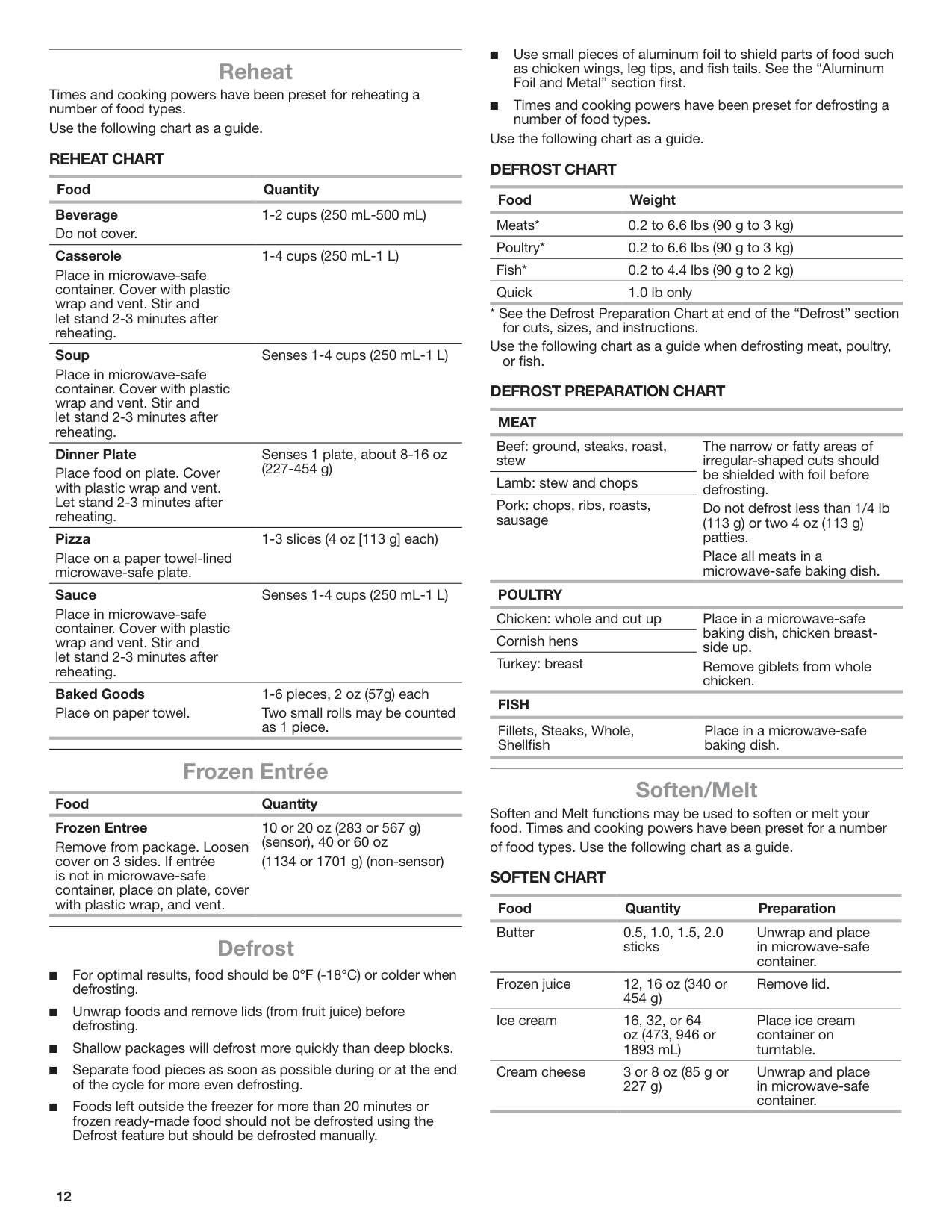
Times and cooking powers have been preset for reheating a number of food types.
Use the following chart as a guide. REHEAT CHART
Food Quantity Beverage Do not cover.
1-2 cups (250 mL-500 mL)
######## Casserole
1-4 cups (250 mL-1 L)
Place in microwave-safe container. Cover with plastic wrap and vent. Stir and let stand 2-3 minutes after reheating.
######## Soup
Senses 1-4 cups (250 mL-1 L)
Place in microwave-safe container. Cover with plastic wrap and vent. Stir and let stand 2-3 minutes after reheating.
######## Dinner Plate
Senses 1 plate, about 8-16 oz (227-454 g)
Place food on plate. Cover with plastic wrap and vent. Let stand 2-3 minutes after reheating.
######## Pizza
1-3 slices (4 oz [113 g] each)
Place on a paper towel-lined microwave-safe plate.
######## Sauce
Senses 1-4 cups (250 mL-1 L)
Place in microwave-safe container. Cover with plastic wrap and vent. Stir and let stand 2-3 minutes after reheating.
Baked Goods Place on paper towel.
1-6 pieces, 2 oz (57g) each Two small rolls may be counted as 1 piece.
Frozen Entrée Food Quantity Frozen Entree
10 or 20 oz (283 or 567 g) (sensor), 40 or 60 oz
Remove from package. Loosen cover on 3 sides. If entrée is not in microwave-safe container, place on plate, cover with plastic wrap, and vent.
(1134 or 1701 g) (non-sensor)
##### Defrost
Use the following chart as a guide. DEFROST CHART
######## Food Weight
Meats* 0.2 to 6.6 lbs (90 g to 3 kg) Poultry* 0.2 to 6.6 lbs (90 g to 3 kg) Fish* 0.2 to 4.4 lbs (90 g to 2 kg) Quick 1.0 lb only
Use the following chart as a guide when defrosting meat, poultry, or fish.
####### DEFROST PREPARATION CHART
######## MEAT
Beef: ground, steaks, roast, stew
The narrow or fatty areas of irregular-shaped cuts should be shielded with foil before defrosting.
Lamb: stew and chops Pork: chops, ribs, roasts, sausage
Do not defrost less than 1/4 lb (113 g) or two 4 oz (113 g) patties.
Place all meats in a microwave-safe baking dish.
POULTRY Chicken: whole and cut up Place in a microwave-safe
baking dish, chicken breastside up.
Cornish hens Turkey: breast
Remove giblets from whole chicken.
######## FISH
Fillets, Steaks, Whole, Shellfish
Place in a microwave-safe baking dish.
##### Soften/Melt
Soften and Melt functions may be used to soften or melt your food. Times and cooking powers have been preset for a number
of food types. Use the following chart as a guide. SOFTEN CHART
Food Quantity Preparation Butter 0.5, 1.0, 1.5, 2.0
Unwrap and place in microwave-safe container.
sticks
Frozen juice 12, 16 oz (340 or 454 g)
Remove lid.
Ice cream 16, 32, or 64 oz (473, 946 or 1893 mL)
Place ice cream container on turntable.
Cream cheese 3 or 8 oz (85 g or 227 g)
Unwrap and place in microwave-safe container.
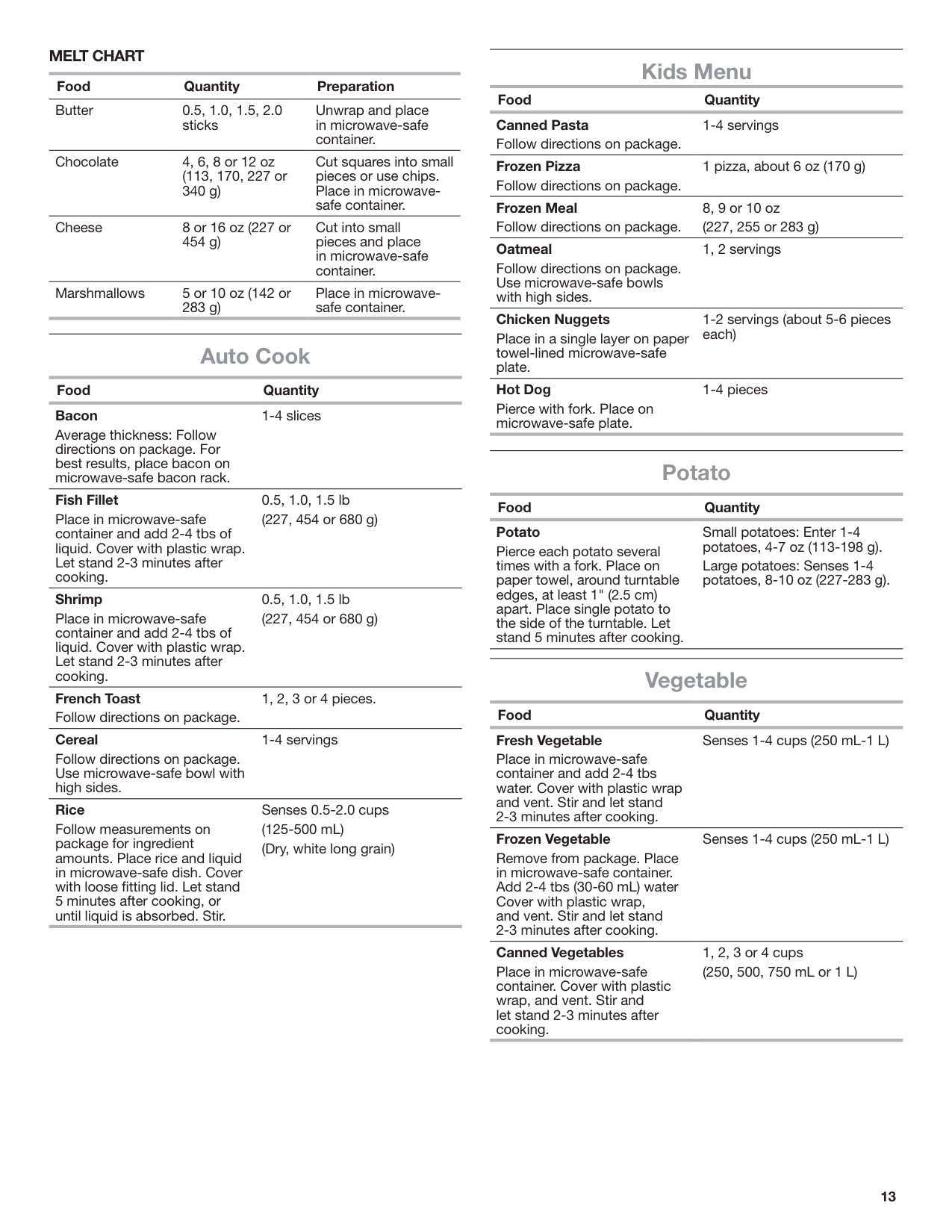
MELT CHART Food Quantity Preparation Butter 0.5, 1.0, 1.5, 2.0
Unwrap and place in microwave-safe container.
sticks
Chocolate 4, 6, 8 or 12 oz (113, 170, 227 or 340 g)
Cut squares into small pieces or use chips. Place in microwavesafe container.
Cheese 8 or 16 oz (227 or 454 g)
Cut into small pieces and place in microwave-safe container.
Marshmallows 5 or 10 oz (142 or 283 g)
Place in microwavesafe container.
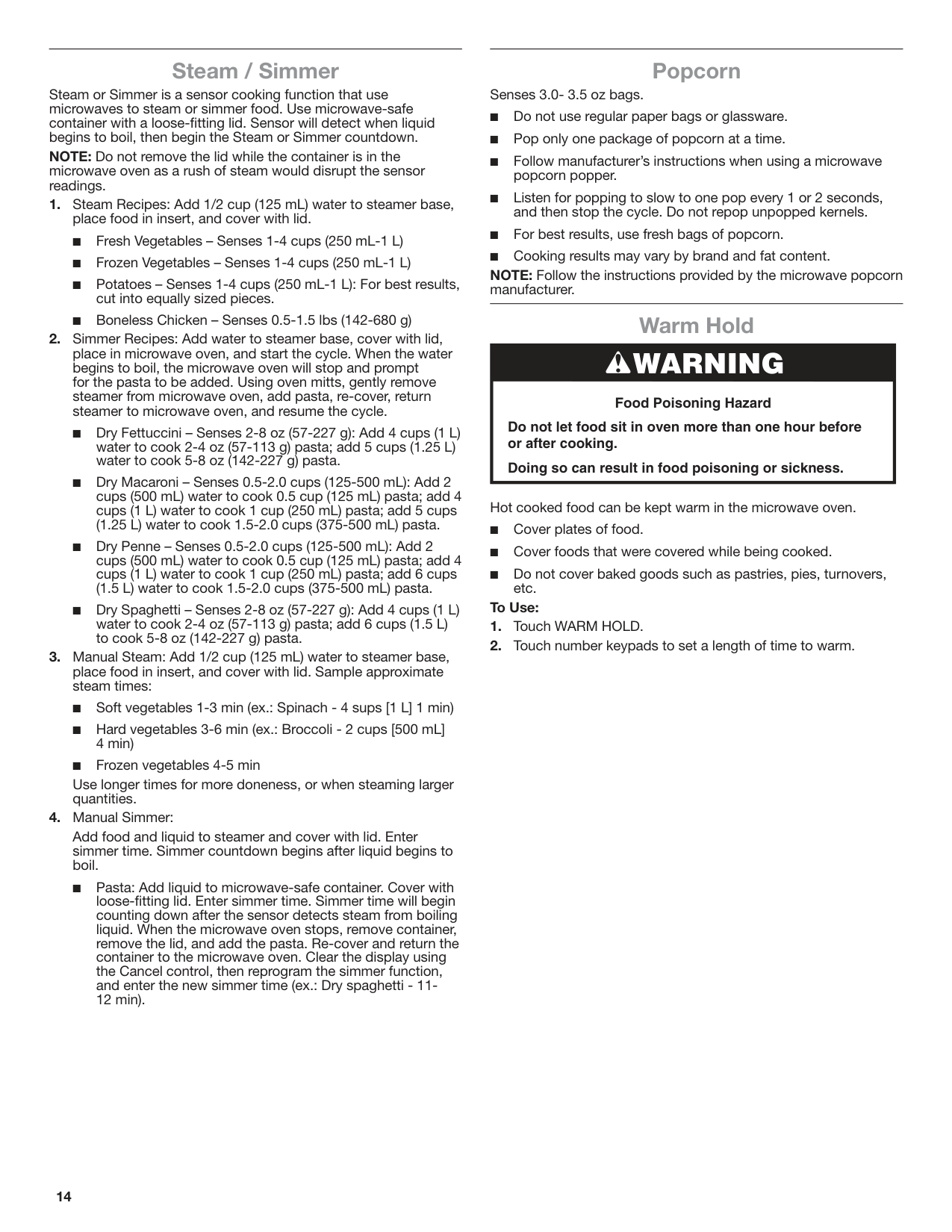
Auto Cook Food Quantity Bacon
1-4 slices
Average thickness: Follow directions on package. For best results, place bacon on microwave-safe bacon rack.
######## Fish Fillet
0.5, 1.0, 1.5 lb (227, 454 or 680 g)
Place in microwave-safe container and add 2-4 tbs of liquid. Cover with plastic wrap. Let stand 2-3 minutes after cooking.
######## Shrimp
0.5, 1.0, 1.5 lb (227, 454 or 680 g)
Place in microwave-safe container and add 2-4 tbs of liquid. Cover with plastic wrap. Let stand 2-3 minutes after cooking.
French Toast Follow directions on package.
1, 2, 3 or 4 pieces.
######## Cereal
1-4 servings
Follow directions on package. Use microwave-safe bowl with high sides.
######## Rice
Senses 0.5-2.0 cups (125-500 mL) (Dry, white long grain)
Follow measurements on package for ingredient amounts. Place rice and liquid in microwave-safe dish. Cover with loose fitting lid. Let stand 5 minutes after cooking, or until liquid is absorbed. Stir.
Kids Menu Food Quantity Canned Pasta Follow directions on package.
1-4 servings
Frozen Pizza Follow directions on package.
1 pizza, about 6 oz (170 g)
Frozen Meal Follow directions on package.
8, 9 or 10 oz (227, 255 or 283 g)
######## Oatmeal
1, 2 servings
Follow directions on package. Use microwave-safe bowls with high sides.
######## Chicken Nuggets
1-2 servings (about 5-6 pieces each)
Place in a single layer on paper towel-lined microwave-safe plate.
######## Hot Dog
1-4 pieces
Pierce with fork. Place on microwave-safe plate.
Potato Food Quantity Potato
Small potatoes: Enter 1-4 potatoes, 4-7 oz (113-198 g).
Pierce each potato several times with a fork. Place on paper towel, around turntable edges, at least 1" (2.5 cm) apart. Place single potato to the side of the turntable. Let stand 5 minutes after cooking.
Large potatoes: Senses 1-4 potatoes, 8-10 oz (227-283 g).
Vegetable Food Quantity Fresh Vegetable
Senses 1-4 cups (250 mL-1 L)
Place in microwave-safe container and add 2-4 tbs water. Cover with plastic wrap and vent. Stir and let stand 2-3 minutes after cooking.
######## Frozen Vegetable
Senses 1-4 cups (250 mL-1 L)
Remove from package. Place in microwave-safe container. Add 2-4 tbs (30-60 mL) water Cover with plastic wrap, and vent. Stir and let stand 2-3 minutes after cooking.
######## Canned Vegetables
1, 2, 3 or 4 cups (250, 500, 750 mL or 1 L)
Place in microwave-safe container. Cover with plastic wrap, and vent. Stir and let stand 2-3 minutes after cooking.
##### Steam / Simmer
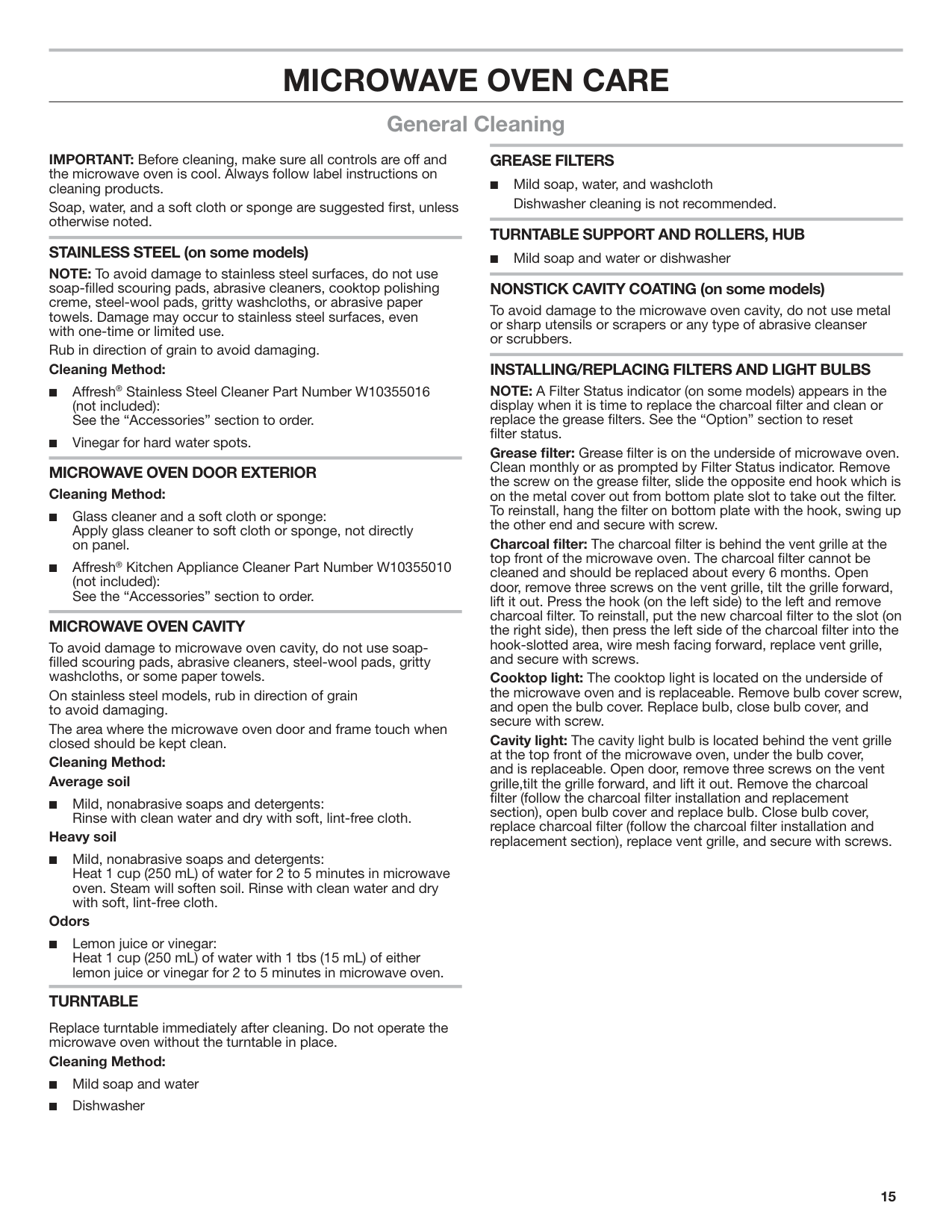
Steam or Simmer is a sensor cooking function that use microwaves to steam or simmer food. Use microwave-safe container with a loose-fitting lid. Sensor will detect when liquid begins to boil, then begin the Steam or Simmer countdown.
NOTE: Do not remove the lid while the container is in the microwave oven as a rush of steam would disrupt the sensor readings.
Use longer times for more doneness, or when steaming larger quantities.
Add food and liquid to steamer and cover with lid. Enter simmer time. Simmer countdown begins after liquid begins to boil.
■ Pasta: Add liquid to microwave-safe container. Cover with loose-fitting lid. Enter simmer time. Simmer time will begin counting down after the sensor detects steam from boiling liquid. When the microwave oven stops, remove container, remove the lid, and add the pasta. Re-cover and return the container to the microwave oven. Clear the display using the Cancel control, then reprogram the simmer function, and enter the new simmer time (ex.: Dry spaghetti - 1112 min).
##### Popcorn
Senses 3.0- 3.5 oz bags.
NOTE: Follow the instructions provided by the microwave popcorn manufacturer.
##### Warm Hold
|WARNING
Food Poisoning Hazard
Do not let food sit in oven more than one hour before or after cooking.
Doing so can result in food poisoning or sickness.| |---|
Hot cooked food can be kept warm in the microwave oven.
######## To Use:
MICROWAVE OVEN CARE
##### General Cleaning
####### GREASE FILTERS
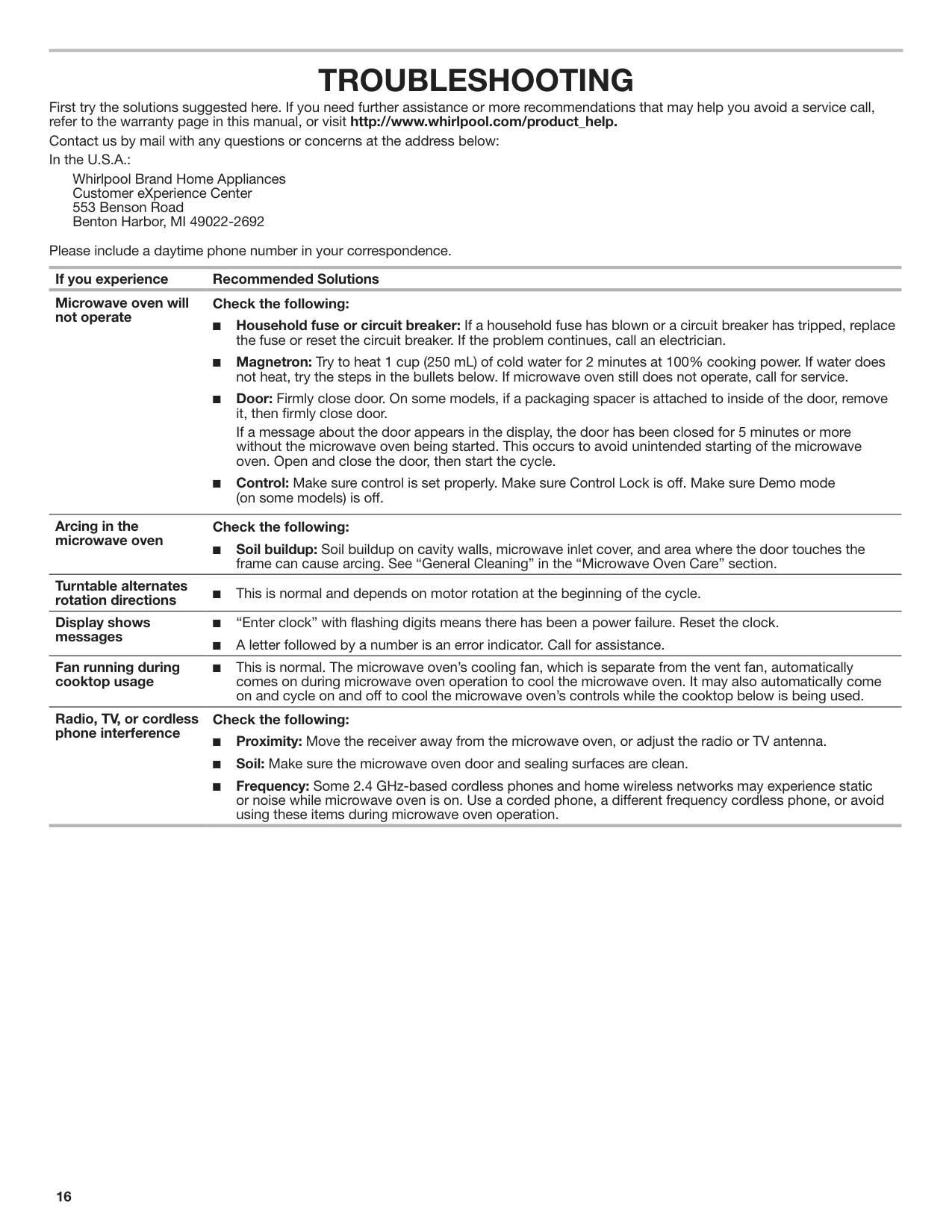
IMPORTANT: Before cleaning, make sure all controls are off and the microwave oven is cool. Always follow label instructions on cleaning products.
■ Mild soap, water, and washcloth
Dishwasher cleaning is not recommended. TURNTABLE SUPPORT AND ROLLERS, HUB
Soap, water, and a soft cloth or sponge are suggested first, unless otherwise noted.
####### STAINLESS STEEL (on some models)
■ Mild soap and water or dishwasher NONSTICK CAVITY COATING (on some models)
NOTE: To avoid damage to stainless steel surfaces, do not use soap-filled scouring pads, abrasive cleaners, cooktop polishing creme, steel-wool pads, gritty washcloths, or abrasive paper towels. Damage may occur to stainless steel surfaces, even with one-time or limited use.
To avoid damage to the microwave oven cavity, do not use metal or sharp utensils or scrapers or any type of abrasive cleanser or scrubbers.
Rub in direction of grain to avoid damaging. Cleaning Method:
INSTALLING/REPLACING FILTERS AND LIGHT BULBS NOTE: A Filter Status indicator (on some models) appears in the display when it is time to replace the charcoal filter and clean or replace the grease filters. See the “Option” section to reset filter status. Grease filter: Grease filter is on the underside of microwave oven. Clean monthly or as prompted by Filter Status indicator. Remove the screw on the grease filter, slide the opposite end hook which is on the metal cover out from bottom plate slot to take out the filter. To reinstall, hang the filter on bottom plate with the hook, swing up the other end and secure with screw. Charcoal filter: The charcoal filter is behind the vent grille at the top front of the microwave oven. The charcoal filter cannot be cleaned and should be replaced about every 6 months. Open door, remove three screws on the vent grille, tilt the grille forward, lift it out. Press the hook (on the left side) to the left and remove charcoal filter. To reinstall, put the new charcoal filter to the slot (on the right side), then press the left side of the charcoal filter into the hook-slotted area, wire mesh facing forward, replace vent grille, and secure with screws. Cooktop light: The cooktop light is located on the underside of the microwave oven and is replaceable. Remove bulb cover screw, and open the bulb cover. Replace bulb, close bulb cover, and secure with screw. Cavity light: The cavity light bulb is located behind the vent grille at the top front of the microwave oven, under the bulb cover, and is replaceable. Open door, remove three screws on the vent grille,tilt the grille forward, and lift it out. Remove the charcoal filter (follow the charcoal filter installation and replacement section), open bulb cover and replace bulb. Close bulb cover, replace charcoal filter (follow the charcoal filter installation and replacement section), replace vent grille, and secure with screws.
MICROWAVE OVEN DOOR EXTERIOR Cleaning Method:
####### MICROWAVE OVEN CAVITY
To avoid damage to microwave oven cavity, do not use soapfilled scouring pads, abrasive cleaners, steel-wool pads, gritty washcloths, or some paper towels.
On stainless steel models, rub in direction of grain to avoid damaging.
The area where the microwave oven door and frame touch when closed should be kept clean.
Cleaning Method: Average soil
■ Mild, nonabrasive soaps and detergents:
Rinse with clean water and dry with soft, lint-free cloth. Heavy soil
■ Mild, nonabrasive soaps and detergents: Heat 1 cup (250 mL) of water for 2 to 5 minutes in microwave oven. Steam will soften soil. Rinse with clean water and dry with soft, lint-free cloth.
######## Odors
■ Lemon juice or vinegar: Heat 1 cup (250 mL) of water with 1 tbs (15 mL) of either lemon juice or vinegar for 2 to 5 minutes in microwave oven.
####### TURNTABLE
Replace turntable immediately after cleaning. Do not operate the microwave oven without the turntable in place.
######## Cleaning Method:
TROUBLESHOOTING

First try the solutions suggested here. If you need further assistance or more recommendations that may help you avoid a service call, refer to the warranty page in this manual, or visit http://www.whirlpool.com/product_help.
Contact us by mail with any questions or concerns at the address below: In the U.S.A.:
Whirlpool Brand Home Appliances Customer eXperience Center 553 Benson Road Benton Harbor, MI 49022-2692
Please include a daytime phone number in your correspondence. If you experience Recommended Solutions Microwave oven will not operate
Check the following:
If a message about the door appears in the display, the door has been closed for 5 minutes or more without the microwave oven being started. This occurs to avoid unintended starting of the microwave oven. Open and close the door, then start the cycle.
Arcing in the microwave oven
Check the following:
■ Soil buildup: Soil buildup on cavity walls, microwave inlet cover, and area where the door touches the
frame can cause arcing. See “General Cleaning” in the “Microwave Oven Care” section.
Turntable alternates rotation directions ■
This is normal and depends on motor rotation at the beginning of the cycle.
Display shows messages
Fan running during cooktop usage
■ This is normal. The microwave oven’s cooling fan, which is separate from the vent fan, automatically comes on during microwave oven operation to cool the microwave oven. It may also automatically come on and cycle on and off to cool the microwave oven’s controls while the cooktop below is being used.
Radio, TV, or cordless phone interference
Check the following:
ACCESSORIES
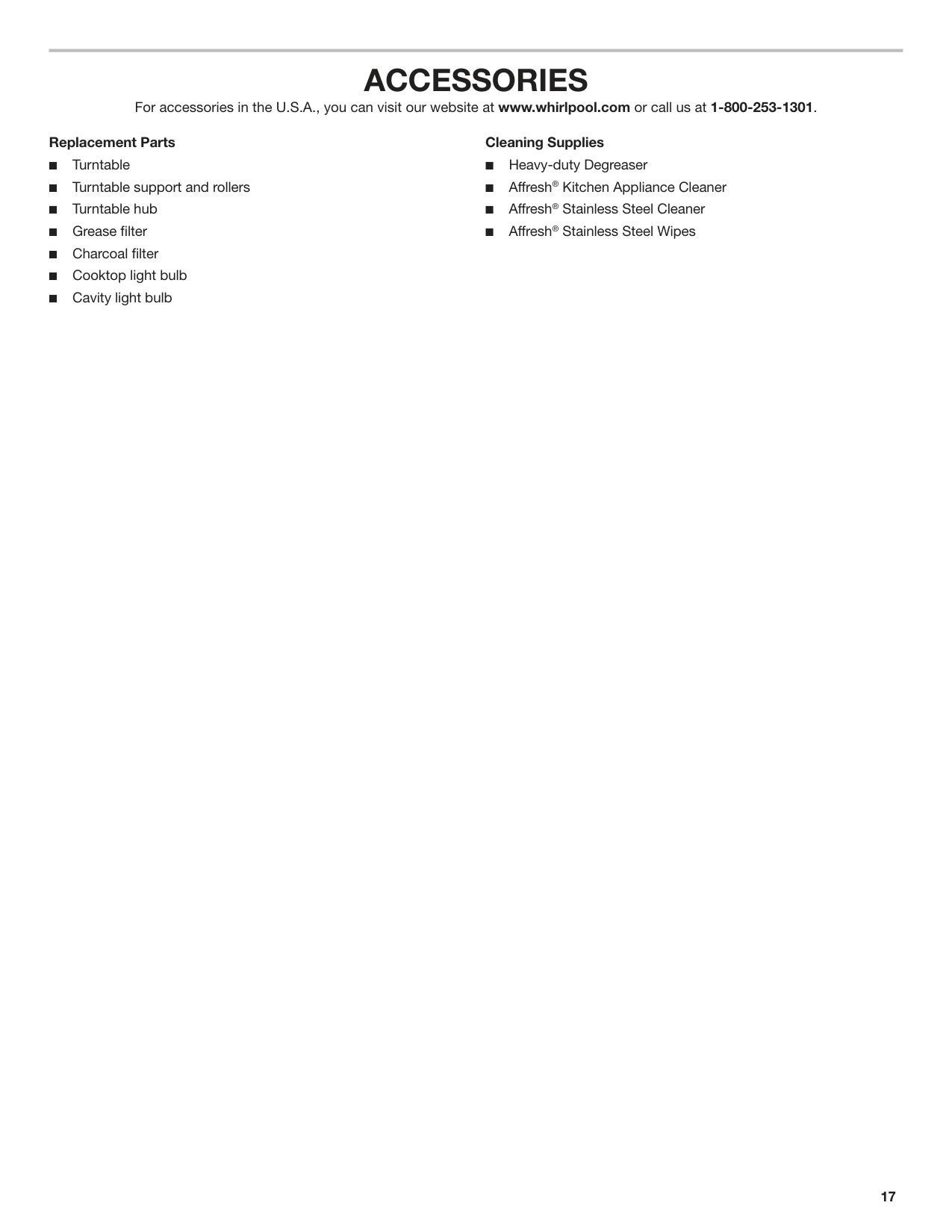
For accessories in the U.S.A., you can visit our website at www.whirlpool.com or call us at 1-800-253-1301.

######## Replacement Parts
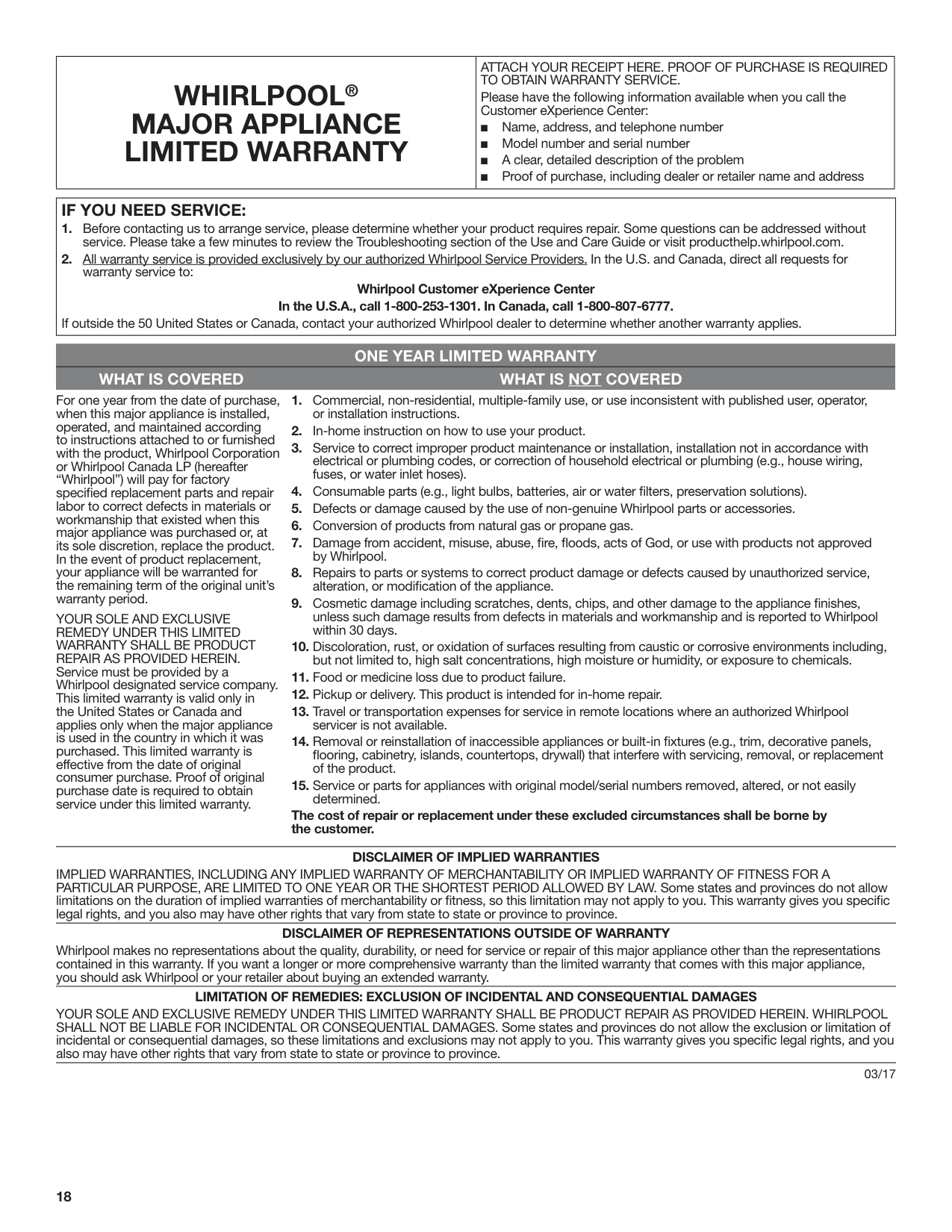
|WHIRLPOOL® MAJOR APPLIANCE LIMITED WARRANTY|ATTACH YOUR RECEIPT HERE. PROOF OF PURCHASE IS REQUIRED TO OBTAIN WARRANTY SERVICE. Please have the following information available when you call the Customer eXperience Center:
■ Name, address, and telephone number
■ Model number and serial number
■ A clear, detailed description of the problem
■ Proof of purchase, including dealer or retailer name and address
| |---|---|
|IF YOU NEED SERVICE:
1. Before contacting us to arrange service, please determine whether your product requires repair. Some questions can be addressed without service. Please take a few minutes to review the Troubleshooting section of the Use and Care Guide or visit producthelp.whirlpool.com.
2. All warranty service is provided exclusively by our authorized Whirlpool Service Providers. In the U.S. and Canada, direct all requests for warranty service to:
Whirlpool Customer eXperience Center In the U.S.A., call 1-800-253-1301. In Canada, call 1-800-807-6777.
If outside the 50 United States or Canada, contact your authorized Whirlpool dealer to determine whether another warranty applies.| |---|
####### ONE YEAR LIMITED WARRANTY WHAT IS COVERED WHAT IS NOT COVERED
For one year from the date of purchase, when this major appliance is installed, operated, and maintained according to instructions attached to or furnished with the product, Whirlpool Corporation or Whirlpool Canada LP (hereafter “Whirlpool”) will pay for factory specified replacement parts and repair labor to correct defects in materials or workmanship that existed when this major appliance was purchased or, at its sole discretion, replace the product. In the event of product replacement, your appliance will be warranted for the remaining term of the original unit’s warranty period.
YOUR SOLE AND EXCLUSIVE REMEDY UNDER THIS LIMITED WARRANTY SHALL BE PRODUCT REPAIR AS PROVIDED HEREIN. Service must be provided by a Whirlpool designated service company. This limited warranty is valid only in the United States or Canada and applies only when the major appliance is used in the country in which it was purchased. This limited warranty is effective from the date of original consumer purchase. Proof of original purchase date is required to obtain service under this limited warranty.
The cost of repair or replacement under these excluded circumstances shall be borne by the customer.
DISCLAIMER OF IMPLIED WARRANTIES IMPLIED WARRANTIES, INCLUDING ANY IMPLIED WARRANTY OF MERCHANTABILITY OR IMPLIED WARRANTY OF FITNESS FOR A PARTICULAR PURPOSE, ARE LIMITED TO ONE YEAR OR THE SHORTEST PERIOD ALLOWED BY LAW. Some states and provinces do not allow limitations on the duration of implied warranties of merchantability or fitness, so this limitation may not apply to you. This warranty gives you specific legal rights, and you also may have other rights that vary from state to state or province to province.
DISCLAIMER OF REPRESENTATIONS OUTSIDE OF WARRANTY Whirlpool makes no representations about the quality, durability, or need for service or repair of this major appliance other than the representations contained in this warranty. If you want a longer or more comprehensive warranty than the limited warranty that comes with this major appliance, you should ask Whirlpool or your retailer about buying an extended warranty.
LIMITATION OF REMEDIES: EXCLUSION OF INCIDENTAL AND CONSEQUENTIAL DAMAGES YOUR SOLE AND EXCLUSIVE REMEDY UNDER THIS LIMITED WARRANTY SHALL BE PRODUCT REPAIR AS PROVIDED HEREIN. WHIRLPOOL SHALL NOT BE LIABLE FOR INCIDENTAL OR CONSEQUENTIAL DAMAGES. Some states and provinces do not allow the exclusion or limitation of incidental or consequential damages, so these limitations and exclusions may not apply to you. This warranty gives you specific legal rights, and you also may have other rights that vary from state to state or province to province.
03/17
##### Notes
######### W11297795B SP PN W11313343 03/19®/™ ©2019 Whirlpool. All rights reserved.