
Black & Decker Bxac40007gb Portable Premium Air Conditioner
Ask AI
— answers from the official manualAnswers from the official manual.
Common questions
Common Questions
27 totalWhat battery does the remote control require and how do I install it?
The remote control requires one CR2032 coin/button cell battery. To install it, slide open the battery cover on the underside of the remote and insert the battery with the positive polarity facing upwards, then slide the cover back until it locks into place. Keep batteries away from children due to the risk of severe internal burns if swallowed. (Page 9)
How do I install the window hose correctly?
Feed the window hose through the window and attach the threaded adaptor from the outside. Clip the hose to the back of the air cooling unit, taking care to avoid any bends or kinks, as these could cause the pipe to clog and result in overheating or malfunction. Only use the hose provided with the unit and do not attempt to attach other hoses to extend the length. (Page 9-10)
What is the minimum room size required to safely operate this air conditioner?
The appliance must not be installed, operated, or stored in a room with a floor area of less than 7m². This requirement relates to the R290 refrigerant (Propane gas) used in the unit, which is flammable, making adequate room size essential for safety. (Page 6-7)
How does Sleep Mode work and when does it turn off automatically?
In Sleep Mode, the unit operates at low speed and the temperature increases or decreases by 1 degree for the first two hours, then holds a constant temperature until turned off. In cooling mode the temperature increases, and in fan mode it decreases. The unit will automatically turn itself off after 12 hours of continuous operation in Sleep Mode. (Page 11)
How do I clean the air filter and how often should it be done?
Tap the filter lightly or use a vacuum cleaner to remove loose dust and dirt, then rinse it thoroughly under running water at no more than 40 degrees centigrade. Dry the filter completely before placing it back into the unit. Never operate the unit without the filters installed. (Page 13)
What temperature range can I set the air conditioner to?
The unit's working temperature range is 18°C to 32°C, adjustable in increments of 1 degree using the Up/Down buttons on the remote or the +/- buttons on the control panel. Note that temperature cannot be manually adjusted when the unit is in Automatic mode or Fan mode. (Page 10)
Show 21 more questions
How do I set the timer and can I use it as a delay timer?
What should I do before storing the air conditioner long term?
How do I install and set up the window hose?
How do I clean the active carbon filter?
What is the sleep mode and how does it work?
How do I empty the water tank if it is full?
How do I replace the battery in the remote control?
What should I do if the unit vibrates briefly when selecting dehumidifying mode?
How do I reset the timer on this air conditioner?
What is the temperature range at which this air conditioner operates?
Why should I avoid placing the unit on a hot surface or near open windows?
How do I properly install the window slider kit for my air conditioner?
What steps should I take when setting up my air conditioner for humid conditions?
How can I troubleshoot an error code E2 displayed on my air conditioner's control panel?
How do I connect the drain hose for continuous drainage?
What should I do if my air conditioner’s remote control stops working?
How often should I clean my air conditioner's filter?
How do I operate the air conditioner's sleep mode?
What are safety precautions when operating my air conditioner?
What are the dimensions of my air conditioner model BPP10WTB?
What maintenance should I do when not using the air conditioner for an extended period?
Full Manual
27 pages
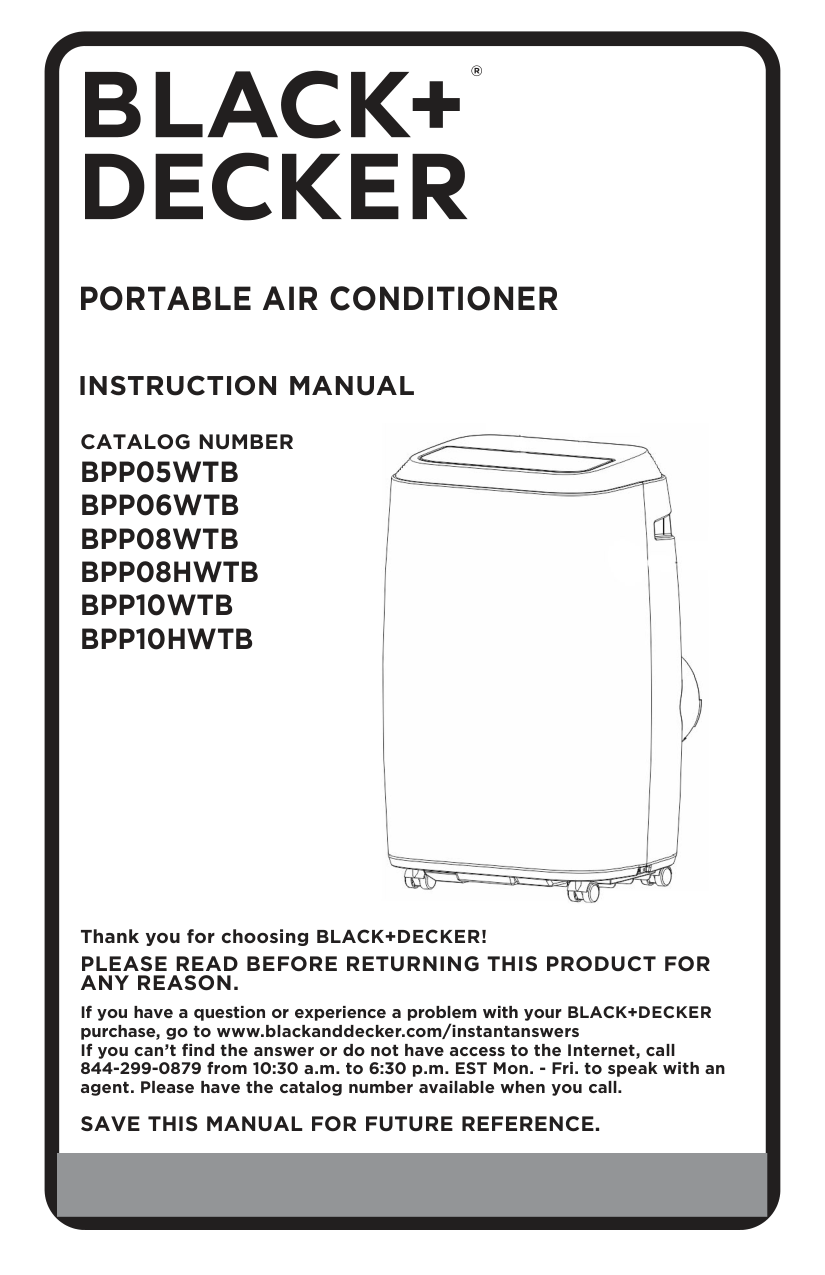
#### PORTABLE AIR CONDITIONER
INSTRUCTION MANUAL
CATALOG NUMBER

Thank you for choosing BLACK+DECKER!
########## PLEASE READ BEFORE RETURNING THIS PRODUCT FOR ANY REASON.
If you have a question or experience a problem with your BLACK+DECKER purchase, go to www.blackanddecker.com/instantanswers If you can’t find the answer or do not have access to the Internet, call 844-299-0879 from 10:30 a.m. to 6:30 p.m. EST Mon. - Fri. to speak with an agent. Please have the catalog number available when you call.
SAVE THIS MANUAL FOR FUTURE REFERENCE.
##### CONTENTS
########### SAFETY INFORMATION
Important Safety Instructions ..........................................................................................................................................3-4 Grounding Instructions .........................................................................................................................................................5 LCDI Power Cord and Plug ................................................................................................................................................6 Safety Guidelines ....................................................................................................................................................8
########### SET UP & USE
Parts & Features .......................................................................................................................................................................9 Specifications ......................................................................................................................................................... 10 Installation Guide .................................................................................................................................................. 10 Window Slider Kit Installation ............................................................................................................................11 Exhaust Hose Installation ....................................................................................................................................12 Control Panel ...........................................................................................................................................................13 Operating from the Control Panel .............................................................................................................13-15 Operating from the Remote Control .......................................................................................................16-20 Water Drainage ............................................................................................................................................... 21-22
########### CLEANING & CARE.............................................................................................................................................23 TROUBLE SHOOTING & WARRANTY
Before You Call For Service ..............................................................................................................................24 Customer Service ..................................................................................................................................................24 Troubleshooting ....................................................................................................................................................25 Limited Warranty .................................................................................................................................................................. 26
##### PRODUCT REGISTRATION
Thank you for purchasing our BLACK+DECKER product. This easy-to-use manual will guide you in getting the best use of your air conditioner. Remember to record the model and serial numbers. They are on a label on the rear.
Model number
Serial number
Date of purchase
Staple your receipt to your manual. You will need it to obtain warranty service.
Page 2
######## DANGER
######## WARNING
######## CAUTION
|DANGER - Immediate hazards which WILL result in severe personal injury or death| |---|
|WARNING - Hazards or unsafe practices which COULD result in severe personal injury or death| |---|
|CAUTION - Hazards or unsafe practices which COULD result in minor personal injury| |---|
IMPORTANT SAFETY INSTRUCTIONS
WARNING
|When using electrical appliances, basic safety precautions should be followed, including the following| |---|

Page 3
##### HANDLING ALKALINE BATTERIES
WARNING
|When handling alkaline batteries, basic safety precautions should be followed, including the following| |---|
SAVE THESE INSTRUCTIONS
Page 4
HOUSEHOLD USE ONLY
GROUNDING INSTRUCTIONS ELECTRICAL REQUIREMENTS In the event of malfunction or breakdown, grounding provides a path of least resistance for electric current to reduce the risk of electric shock. The appliance must be connected to a cord having an equipmentgrounding conductor and a grounding plug. The plug must be plugged into an appropriate outlet that is properly installed and grounded in accordance with all local codes and ordinances. DANGER - Improper connection of the equipment grounding conductor can result in a risk of electric shock. The conductor with insulation having an outer surface that is green with or without yellow stripes is the equipment grounding conductor. If repair or replacement of the cord or plug is necessary, do not connect the equipment-grounding conductor to a live terminal. Check with a qualified electrician or service person if the grounding instructions are not completely understood, or if in doubt as to whether the appliance is properly grounded. Do not modify the plug connected to the appliance – if it will not fit the outlet, have a proper outlet installed by a qualified electrician.
FOR GROUNDED, CORD-CONNECTED APPLIANCE RATED LESS THAN 15A AND INTENDED FOR USE ON A NOMINAL 120V SUPPLY CIRCUIT
The appliance is for use on a nominal 120V circuit and should be connected to a grounding outlet that looks like the one illustrated below. The use of a temporary adaptor is not recommended.
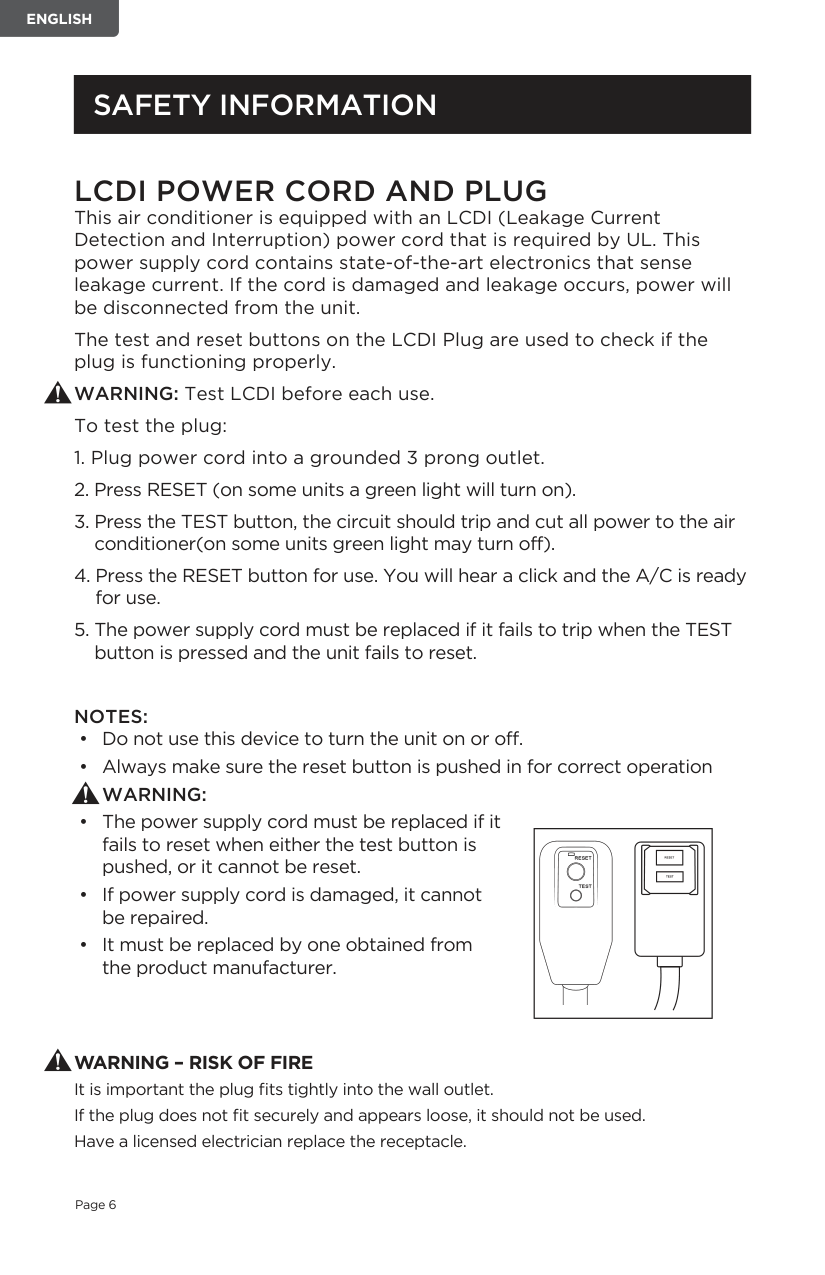
LCDI POWER CORD AND PLUG This air conditioner is equipped with an LCDI (Leakage Current Detection and Interruption) power cord that is required by UL. This power supply cord contains state-of-the-art electronics that sense leakage current. If the cord is damaged and leakage occurs, power will be disconnected from the unit.
The test and reset buttons on the LCDI Plug are used to check if the plug is functioning properly.
WARNING: Test LCDI before each use. To test the plug:
############ NOTES:
||| | |---|
| | |---| | |---|
| |---|
WARNING – RISK OF FIRE It is important the plug fits tightly into the wall outlet. If the plug does not fit securely and appears loose, it should not be used. Have a licensed electrician replace the receptacle.
##### SAFETY GUIDELINES
To prevent injury to the user or other people and property damage, the following instructions must be followed. Incorrect operation due to ignoring of instructions may cause harm or damage.
|ALWAYS DO THIS|NEVER DO THIS|ENERGY SAVE| |---|---|---| |• Your air conditioner should be used in such a way that it is protected from moisture. e.g. condensation, splashed water, etc. Do not place or store your air conditioner where it can fall or be pulled into water or any other liquid. Unplug immediately.
• Always transport your air conditioner in a vertical position and stand on a stable, level surface during use.
• Turn off the product when not in use.
• Always use the switch on the control panel to start or shut off the unit.
• Always contact a qualified person to carry out repairs. If the supply cord is damaged it must be repaired by a qualified technician.
• Keep an air path of at least 12 inches. all around the unit from walls, furniture and curtains.
• If the air conditioner is knocked over during use, turn off the unit and unplug from the power supply immediately.
|• Do not operate your air conditioner in a wet room such as a bathroom or laundry room.
• Do not touch the unit with wet or damp hands or when barefoot.
• Do not press the buttons on the control panel with anything other than your fingers.
• Do not remove any fixed covers. Never use this appliance if it is not working properly, or if it has been dropped or damaged.
• Never use the plug to start and stop the unit.
• Do not cover or obstruct the inlet or outlet grilles.
• Do not use hazardous chemicals to clean or come into contact with the unit. Do not use the unit in the presence of inflammable substances or vapour such as alcohol, insecticides, gasoline, etc.
• Do not allow children to operate the unit unsupervised.
• Do not use this product for functions other than those described in this instruction manual.
|• Use the unit in the recommended room size.
5,000 BTU up to 150 sq. ft.
6,000 BTU up to 250 sq. ft.
8,000 BTU up to 350 sq. ft.
10,000 BTU up to 450 sq. ft.
• Locate the unit where furniture cannot obstruct the air flow.
• Keep blinds / curtains drawn.
• Keep the filters clean.
• Keep doors and windows closed to keep cool air in and warm air out.
|
######### OPERATING CONDITION
The air conditioner must be operated within the temperature range indicated below:
NOTE: · Unit performance may be affected when in use outside of these operating temperatures.
|MODE|ROOM TEMPERATURE| |---|---| |COOL|64˚F (18˚C) ~ 95˚F (35˚C)| |DEHUMIDIFY|64˚F (18˚C) ~ 95˚F (35˚C)| |HEAT (ELECTRICAL HEAT TYPE)|45˚F (7°C) ~ 81˚F (27˚C)|
##### PARTS & FEATURES
Dehumidification Drain
Louver Control Panel
Filter


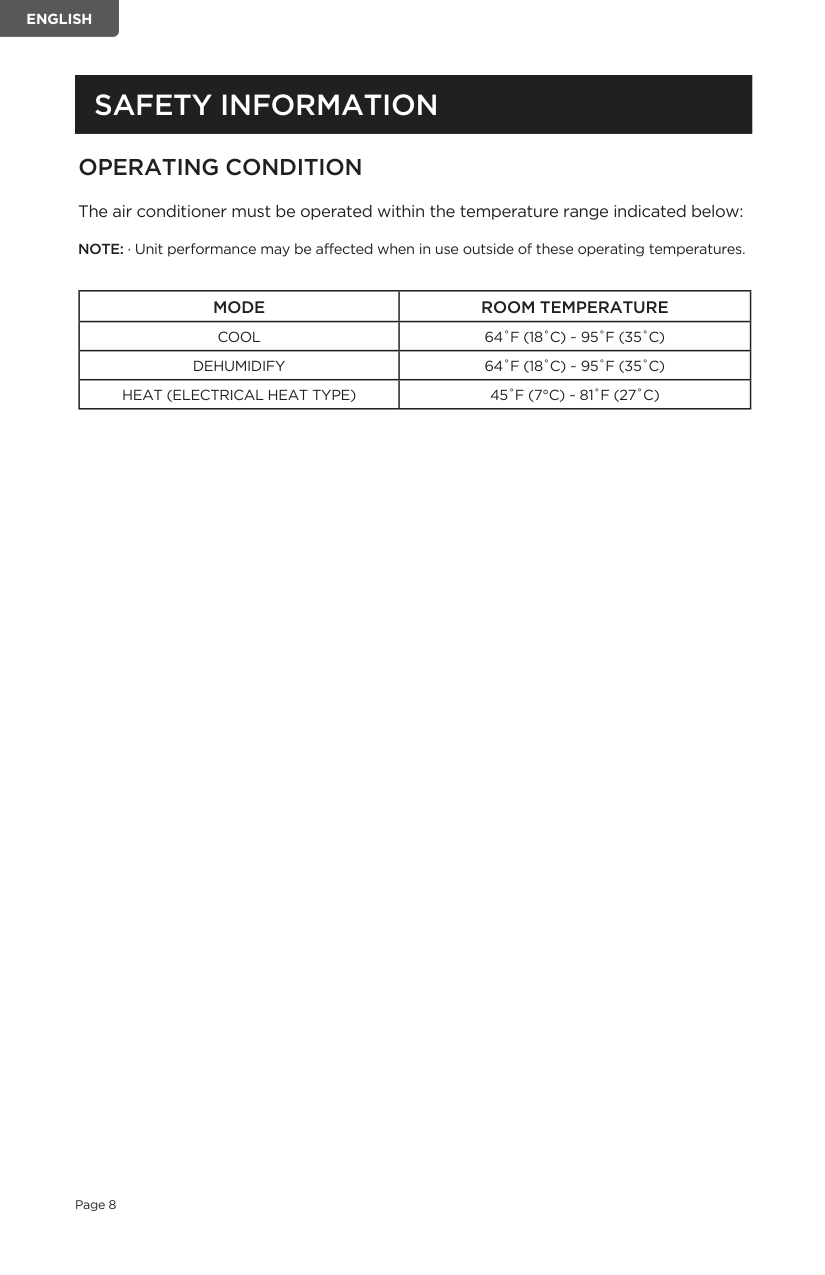
Front Panel
Power Cord
Air Exhaust Hose Housing
Condensation DrainCastors (4)
Hose outlet and inlet are pre-assembled to the hose
Air Exhaust Hose Hose Outlet Hose Inlet


Connects to window slider
Connects to air conditioner air outlet
2 Locking ScrewsDrain Hose
Window Bracket
3.3 feet long 0.6 inch diameter
Foam Seal (3 pieces)
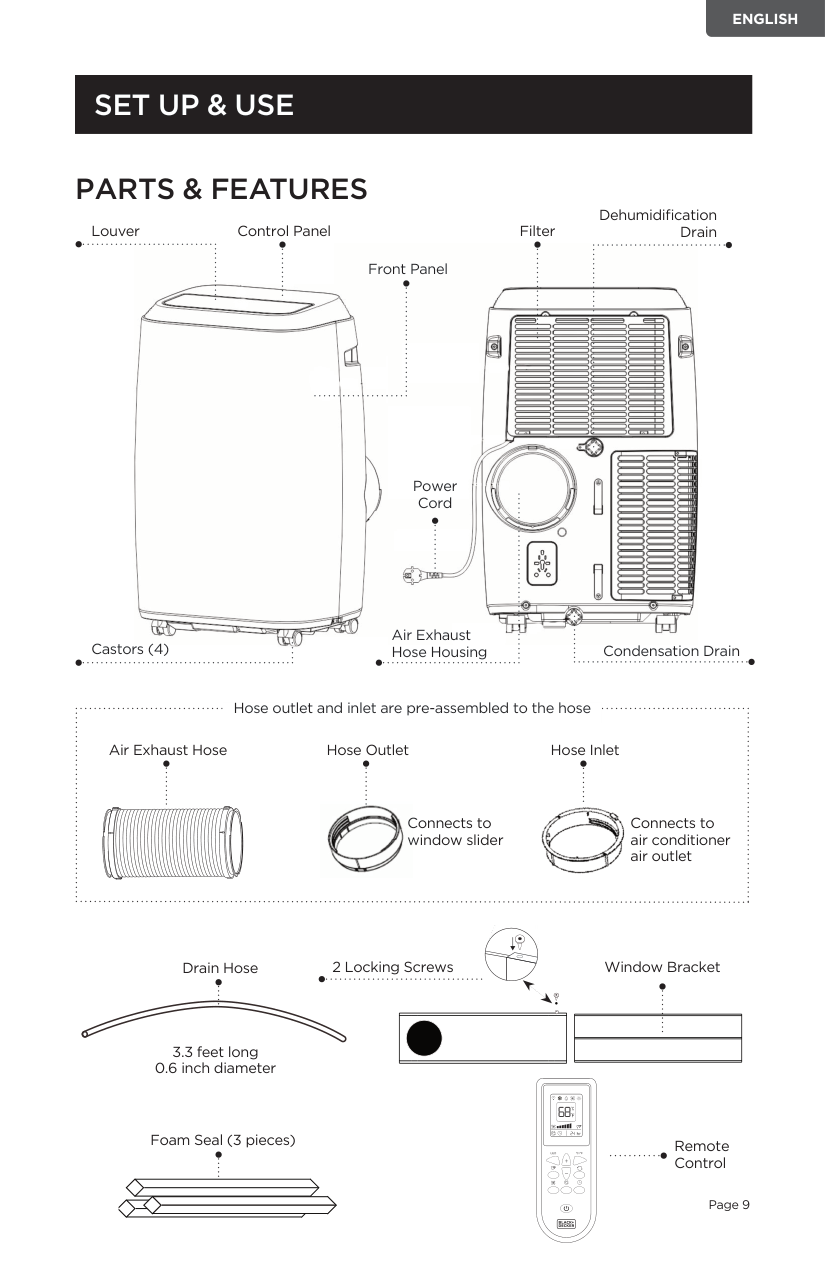
Remote Control
##### SPECIFICATIONS
##### INSTALLATION GUIDE LOCATION
######### SUGGESTED TOOLS FOR WINDOW KIT INSTALLATION
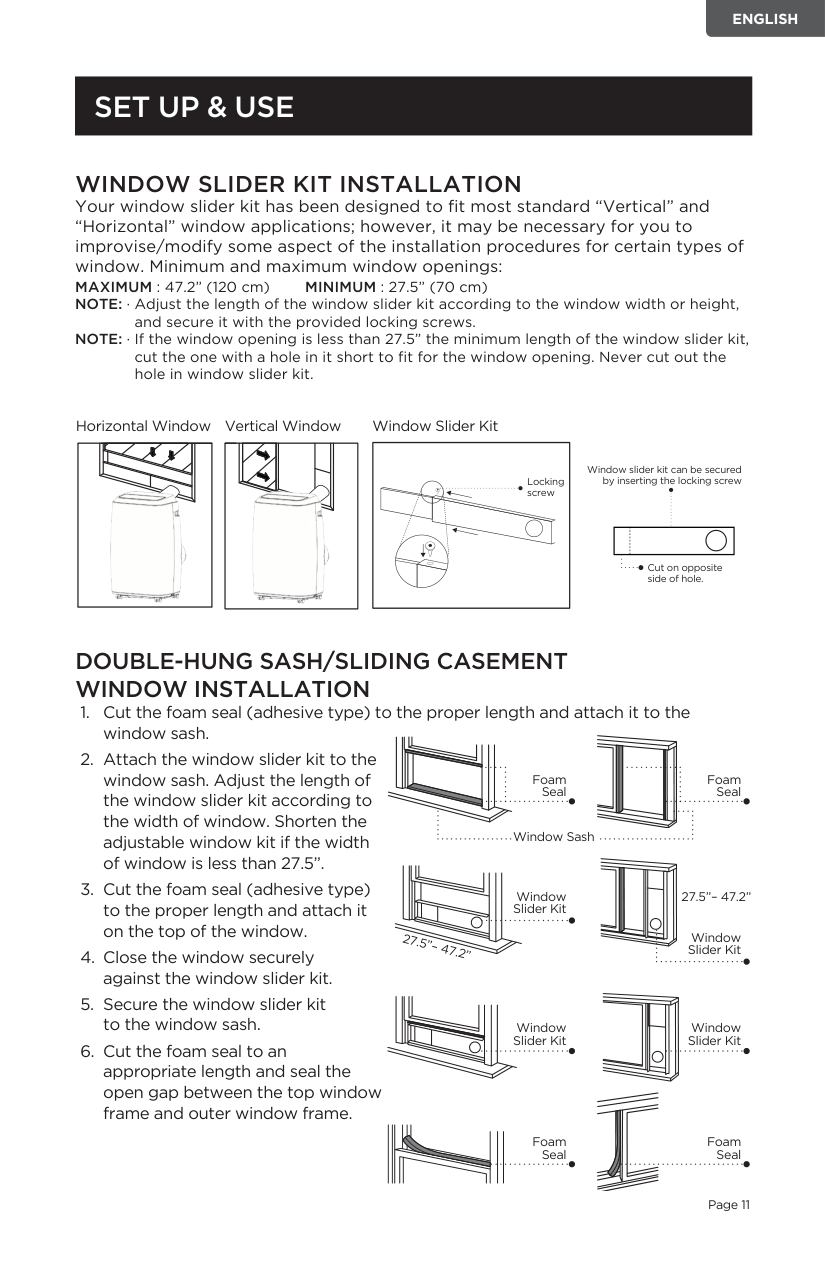
WINDOW SLIDER KIT INSTALLATION Your window slider kit has been designed to fit most standard “Vertical” and “Horizontal” window applications; however, it may be necessary for you to improvise/modify some aspect of the installation procedures for certain types of window. Minimum and maximum window openings:
MAXIMUM : 47.2” (120 cm) MINIMUM : 27.5” (70 cm) NOTE: · Adjust the length of the window slider kit according to the window width or height,
and secure it with the provided locking screws.
NOTE: · If the window opening is less than 27.5” the minimum length of the window slider kit, cut the one with a hole in it short to fit for the window opening. Never cut out the hole in window slider kit.
Horizontal Window Vertical Window Window Slider Kit
Locking screw


Window slider kit can be secured by inserting the locking screw
| | | |---|---|
Cut on opposite side of hole.
######### DOUBLE-HUNG SASH/SLIDING CASEMENT WINDOW INSTALLATION
| |Foam Seal
| |---|---| | |Foam Seal
| | | |
Foam Seal
Window Sash
| | |Window Slider Kit| |---|---|---| | | | |
27.5”– 47.2”
Window Slider Kit
27.5”– 47.2”
Window Slider Kit
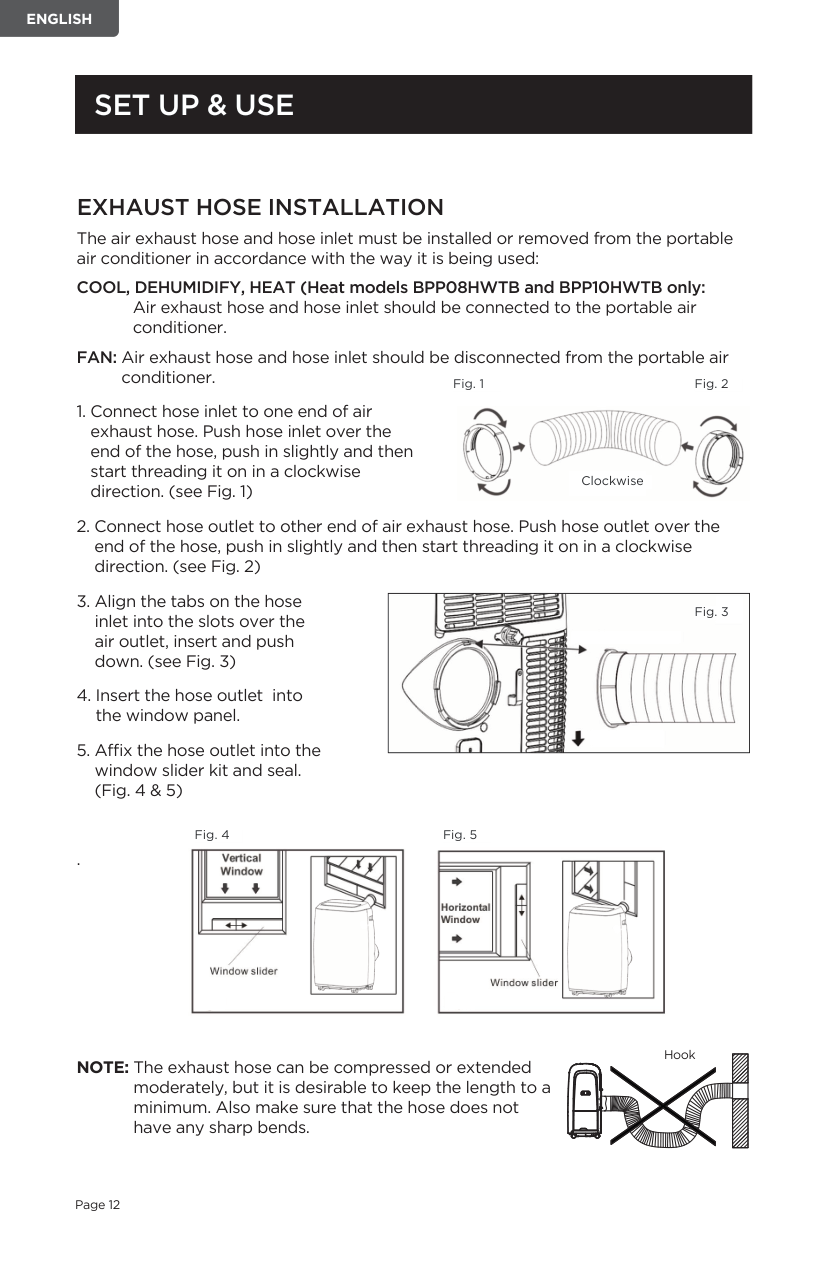
Window Slider Kit
| | |Foam Seal
| |---|---|---| | | | |
Foam Seal
######### EXHAUST HOSE INSTALLATION
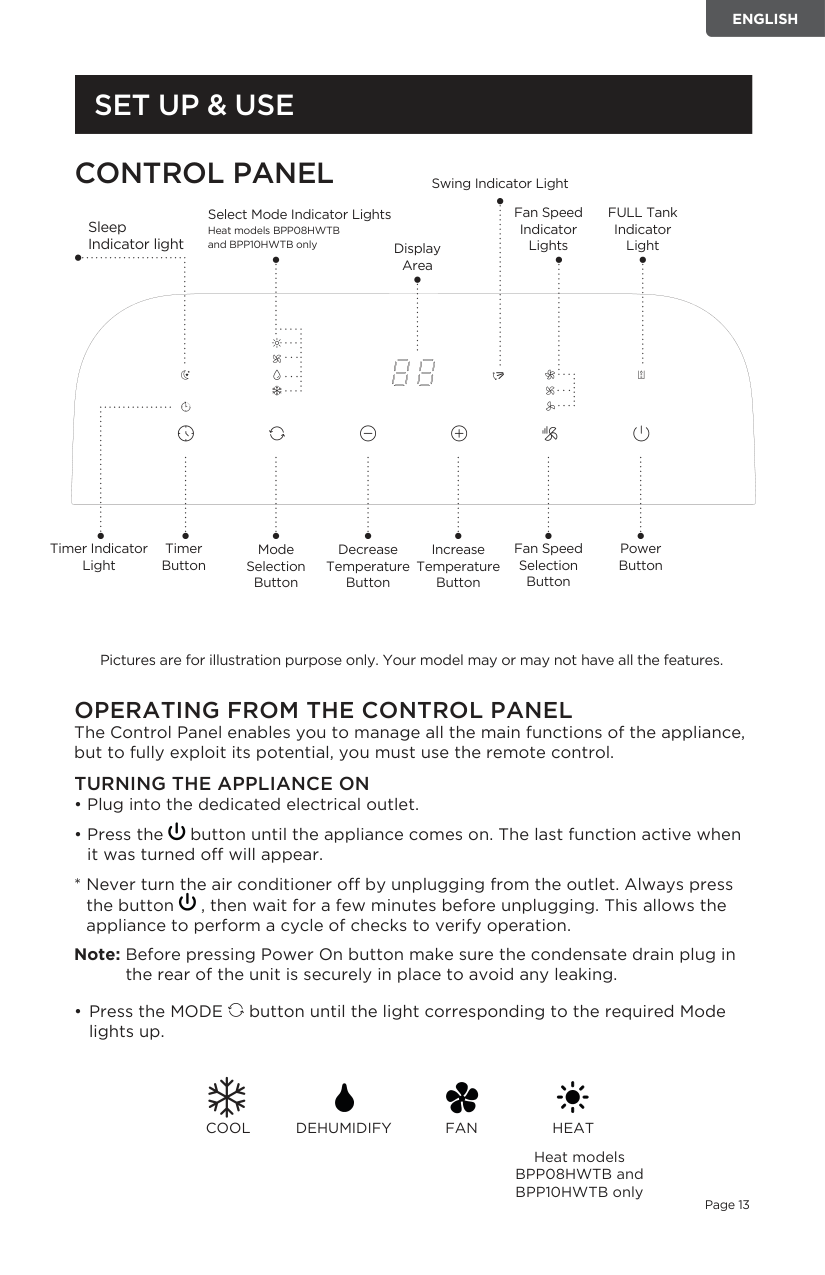
The air exhaust hose and hose inlet must be installed or removed from the portable air conditioner in accordance with the way it is being used:
COOL, DEHUMIDIFY, HEAT (Heat models BPP08HWTB and BPP10HWTB only: Air exhaust hose and hose inlet should be connected to the portable air conditioner.
FAN: Air exhaust hose and hose inlet should be disconnected from the portable air
conditioner.
Fig. 1 Fig. 2

Clockwise
|
Fig. 3| |---|
Fig. 4 Fig. 5


.


NOTE: The exhaust hose can be compressed or extended moderately, but it is desirable to keep the length to a minimum. Also make sure that the hose does not have any sharp bends.
Hook
| | |---| | | | |
##### CONTROL PANEL
Swing Indicator Light
FULL Tank Indicator LightDisplay
Fan Speed Indicator Lights
Select Mode Indicator Lights Heat models BPP08HWTB and BPP10HWTB only
Sleep Indicator light
Area
Fan Speed Selection Button
Power Button
Timer Indicator Light
Timer Button
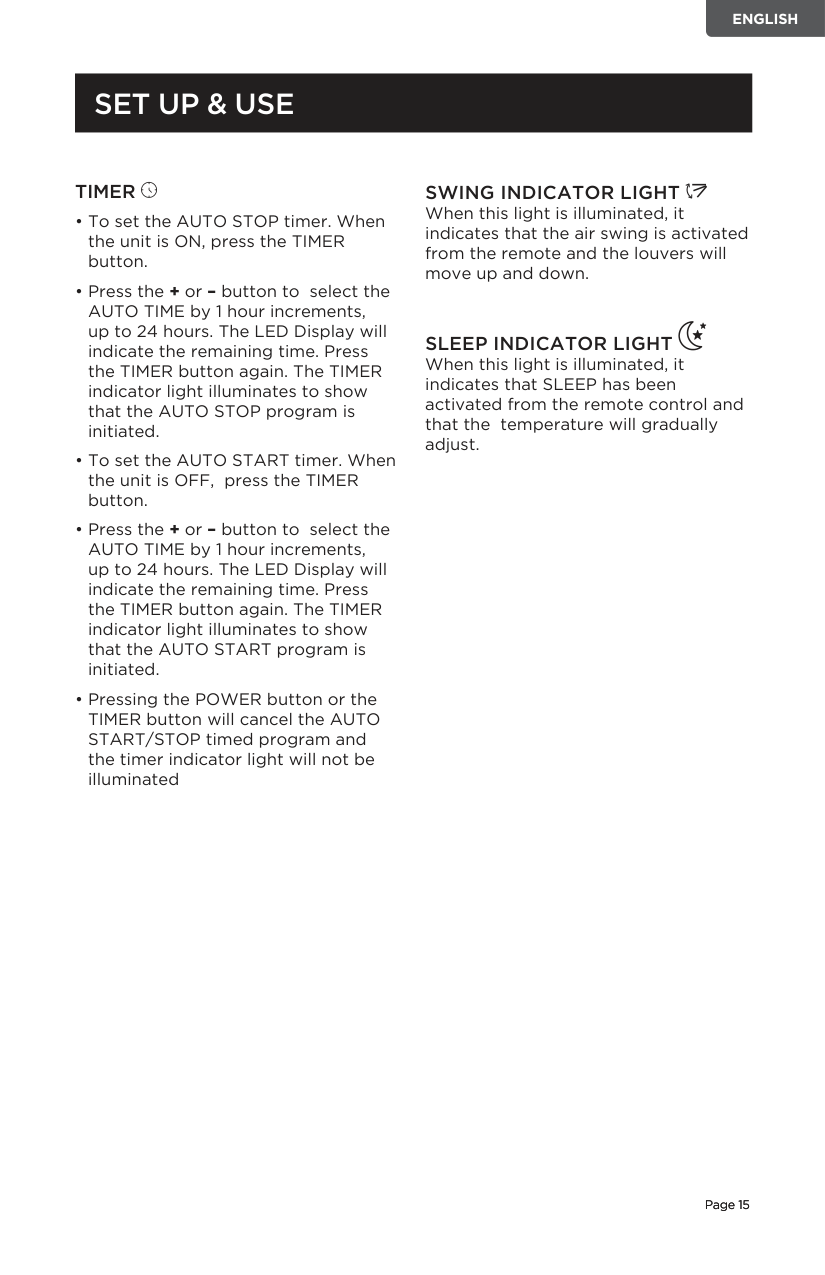
Mode Selection Button
Decrease Temperature Button
Increase Temperature Button
Pictures are for illustration purpose only. Your model may or may not have all the features.
OPERATING FROM THE CONTROL PANEL The Control Panel enables you to manage all the main functions of the appliance, but to fully exploit its potential, you must use the remote control.
############ TURNING THE APPLIANCE ON
Note: Before pressing Power On button make sure the condensate drain plug in
the rear of the unit is securely in place to avoid any leaking.
• Press the MODE button until the light corresponding to the required Mode lights up.
################# COOL FANDEHUMIDIFY HEAT
Heat models BPP08HWTB and BPP10HWTB only
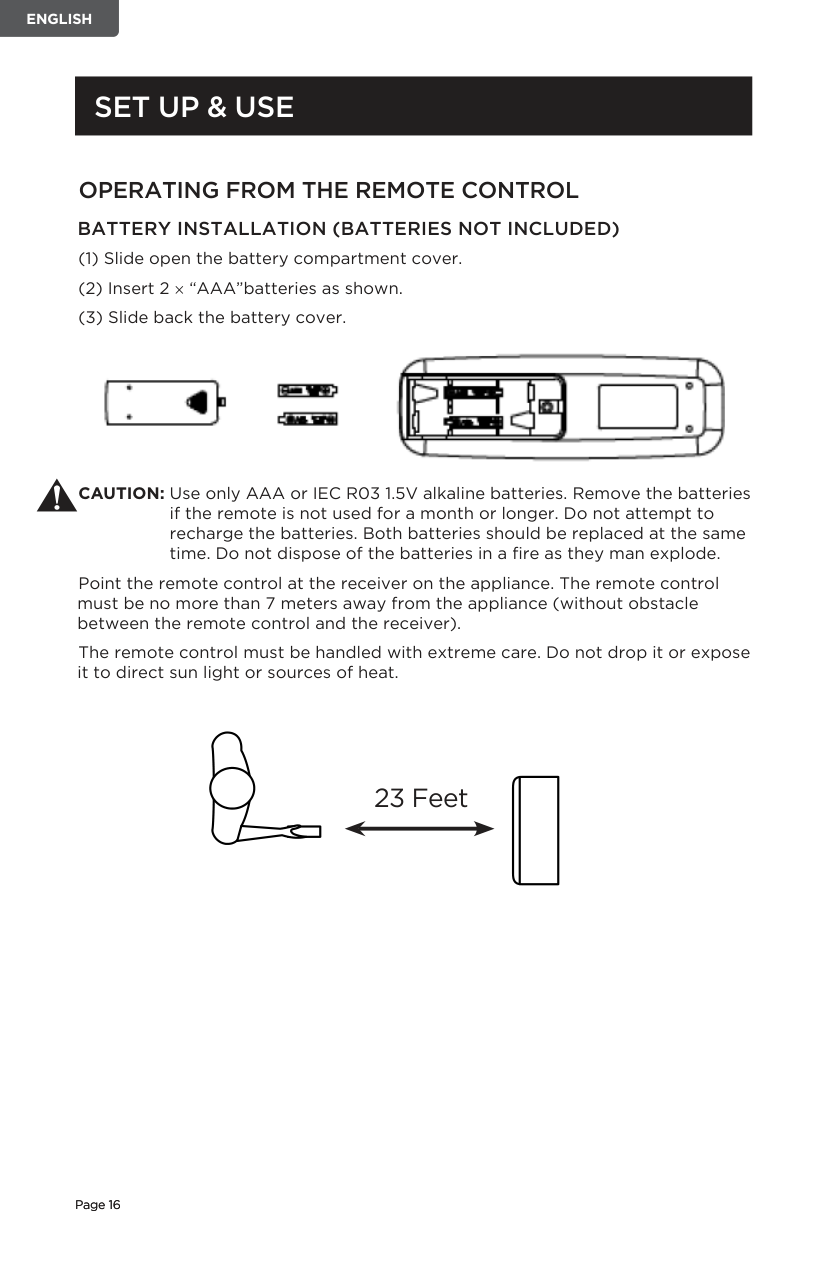
COOL MODE Ideal for hot weather when you need to cool the room. To set operation of the appliance correctly, press the + or – buttons until the desired temperature is displayed. (See Fig. 7)
Then select the fan speed by pressing the Fan Speed Button until the light corresponding to the required fan speed lights up:
HIGH: The Fan operates at maximum to reach the required temperature as rapidly as possible.
MED: Reduces Fan noise level but still maintains cooling.
LOW: For quiet operation.
DEHUMIDIFY Press the “MODE” button until the “DEHUMIDIFY” indicator light comes on.
DEHUMIDIFICATION MODE
NOTE: Refer to Water Drainage
############ section. FAN MODE
HEAT MODE (Heat models BPP08HWTB and BPP10HWTB only)
Press the “MODE” button until the “HEAT” indicator light comes on.
NOTE: At the beginning of this mode, you may have to wait a few seconds before the appliance starts to give out hot air.
DRAINING IN
############ TIMER
SWING INDICATOR LIGHT When this light is illuminated, it indicates that the air swing is activated from the remote and the louvers will move up and down.
SLEEP INDICATOR LIGHT When this light is illuminated, it indicates that SLEEP has been activated from the remote control and that the temperature will gradually adjust.
######### OPERATING FROM THE REMOTE CONTROL BATTERY INSTALLATION (BATTERIES NOT INCLUDED)

CAUTION: Use only AAA or IEC R03 1.5V alkaline batteries. Remove the batteries if the remote is not used for a month or longer. Do not attempt to recharge the batteries. Both batteries should be replaced at the same time. Do not dispose of the batteries in a fire as they man explode.
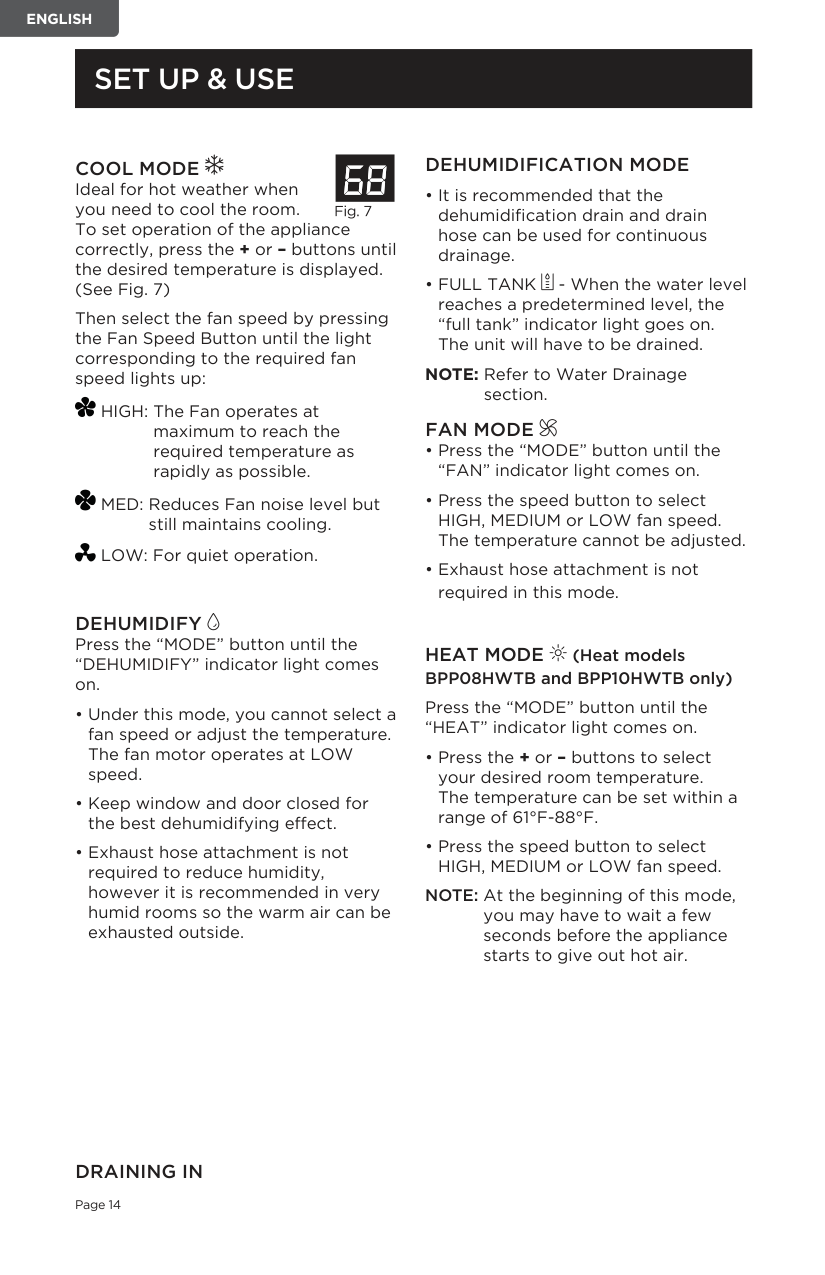
Point the remote control at the receiver on the appliance. The remote control must be no more than 7 meters away from the appliance (without obstacle between the remote control and the receiver).
The remote control must be handled with extreme care. Do not drop it or expose it to direct sun light or sources of heat.
####### 23 Feet
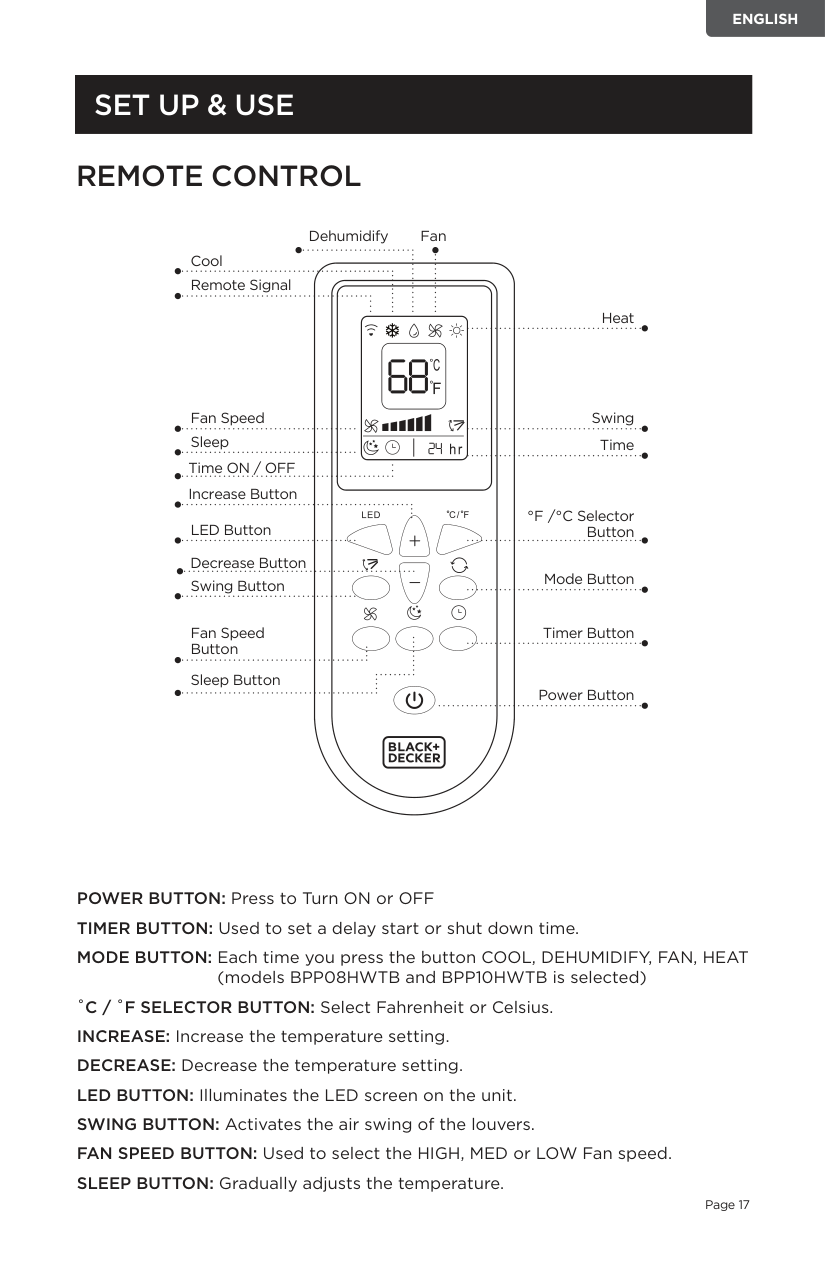
##### REMOTE CONTROL
Dehumidify
Fan
Cool Remote Signal
Heat
Fan Speed
Sleep
Time ON / OFF Increase Button
LED Button
Swing
Time
°F /°C Selector Button
Decrease Button
Swing Button Mode Button
Fan Speed Button
Sleep Button
Timer Button
Power Button
POWER BUTTON: Press to Turn ON or OFF TIMER BUTTON: Used to set a delay start or shut down time. MODE BUTTON: Each time you press the button COOL, DEHUMIDIFY, FAN, HEAT
(models BPP08HWTB and BPP10HWTB is selected) ˚C / ˚F SELECTOR BUTTON: Select Fahrenheit or Celsius. INCREASE: Increase the temperature setting. DECREASE: Decrease the temperature setting. LED BUTTON: Illuminates the LED screen on the unit. SWING BUTTON: Activates the air swing of the louvers. FAN SPEED BUTTON: Used to select the HIGH, MED or LOW Fan speed. SLEEP BUTTON: Gradually adjusts the temperature.
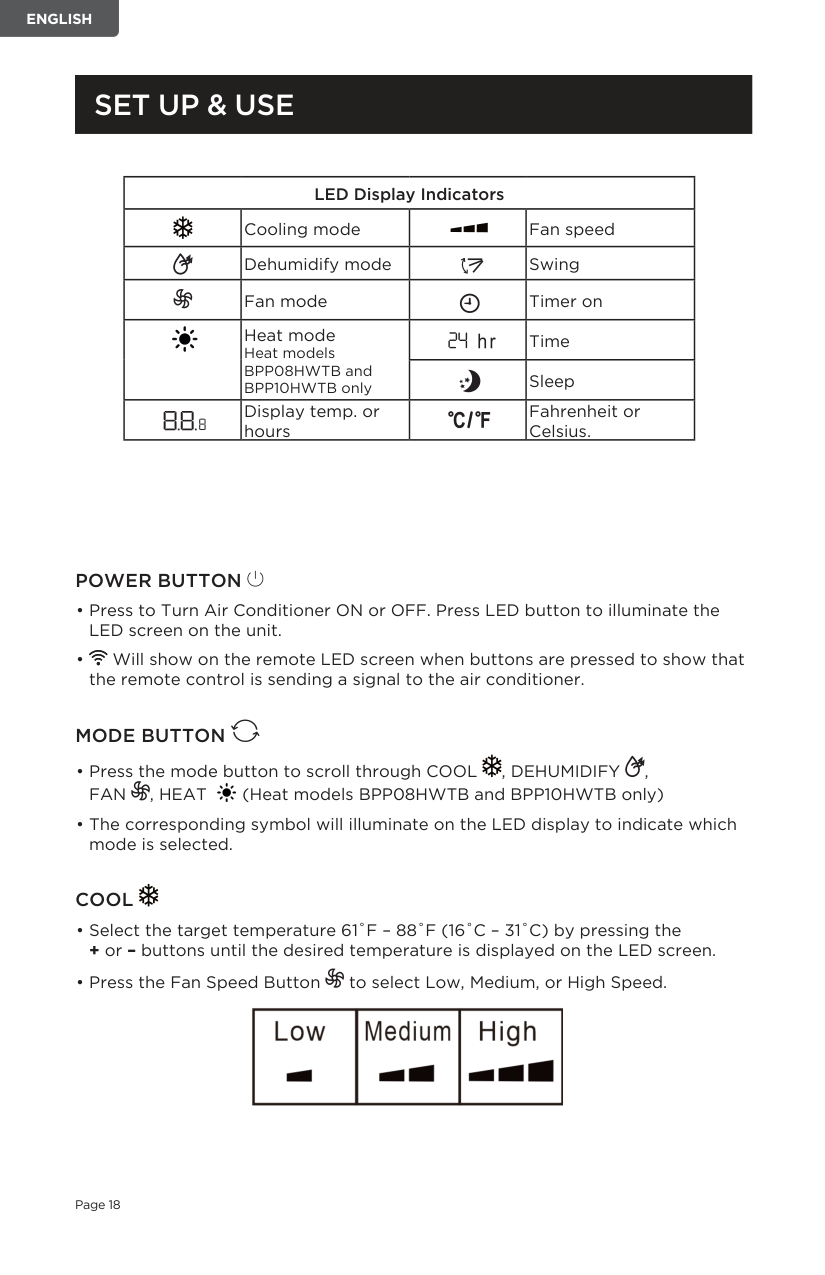
LED Display Indicators Cooling mode Fan speed Dehumidify mode Swing Fan mode Timer on
Heat mode Heat models BPP08HWTB and BPP10HWTB only
Display temp. or hours
Time Sleep
Fahrenheit or Celsius.
############ POWER BUTTON
############ MODE BUTTON
############ COOL
+ or – buttons until the desired temperature is displayed on the LED screen.

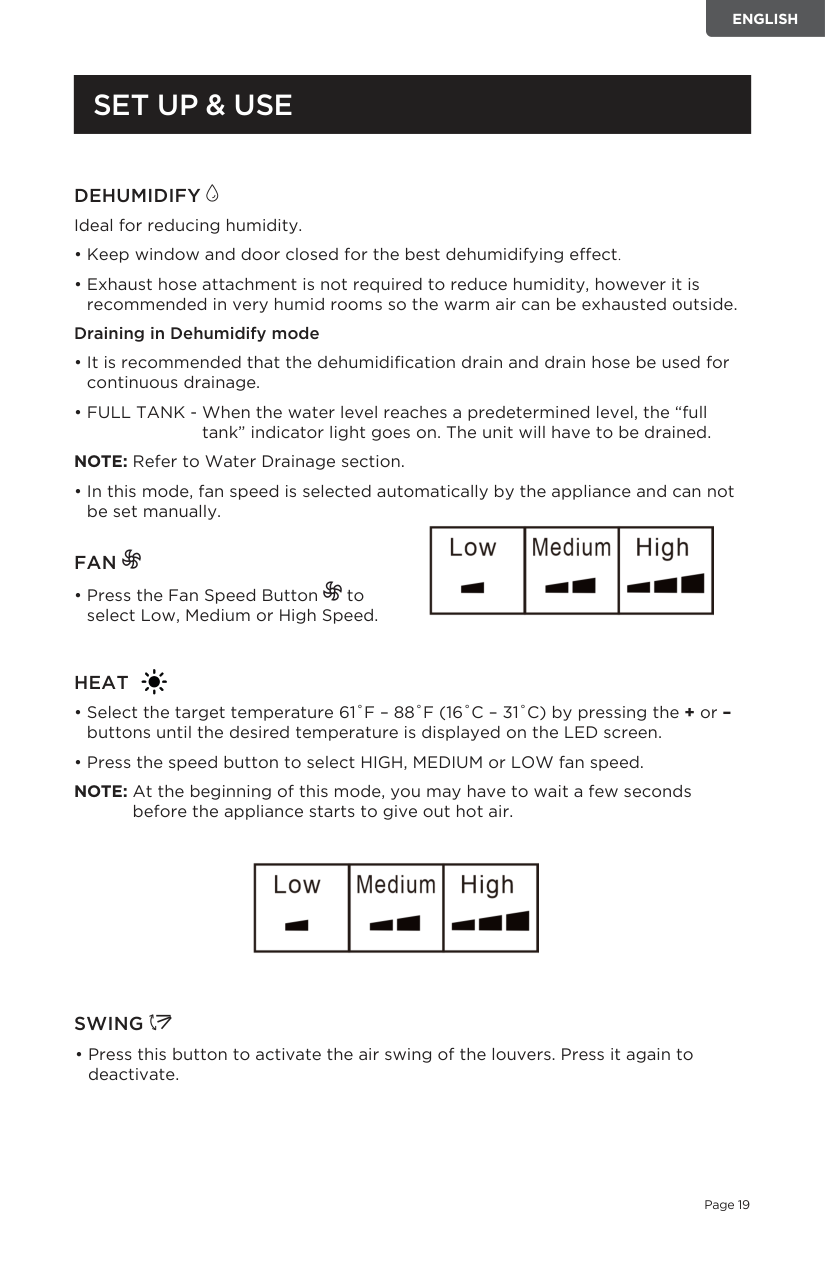
DEHUMIDIFY Ideal for reducing humidity.
############## Draining in Dehumidify mode
NOTE: Refer to Water Drainage section.
• In this mode, fan speed is selected automatically by the appliance and can not be set manually.

############ FAN
• Press the Fan Speed Button to select Low, Medium or High Speed.
############ HEAT
NOTE: At the beginning of this mode, you may have to wait a few seconds
before the appliance starts to give out hot air.

############ SWING
• Press this button to activate the air swing of the louvers. Press it again to deactivate.
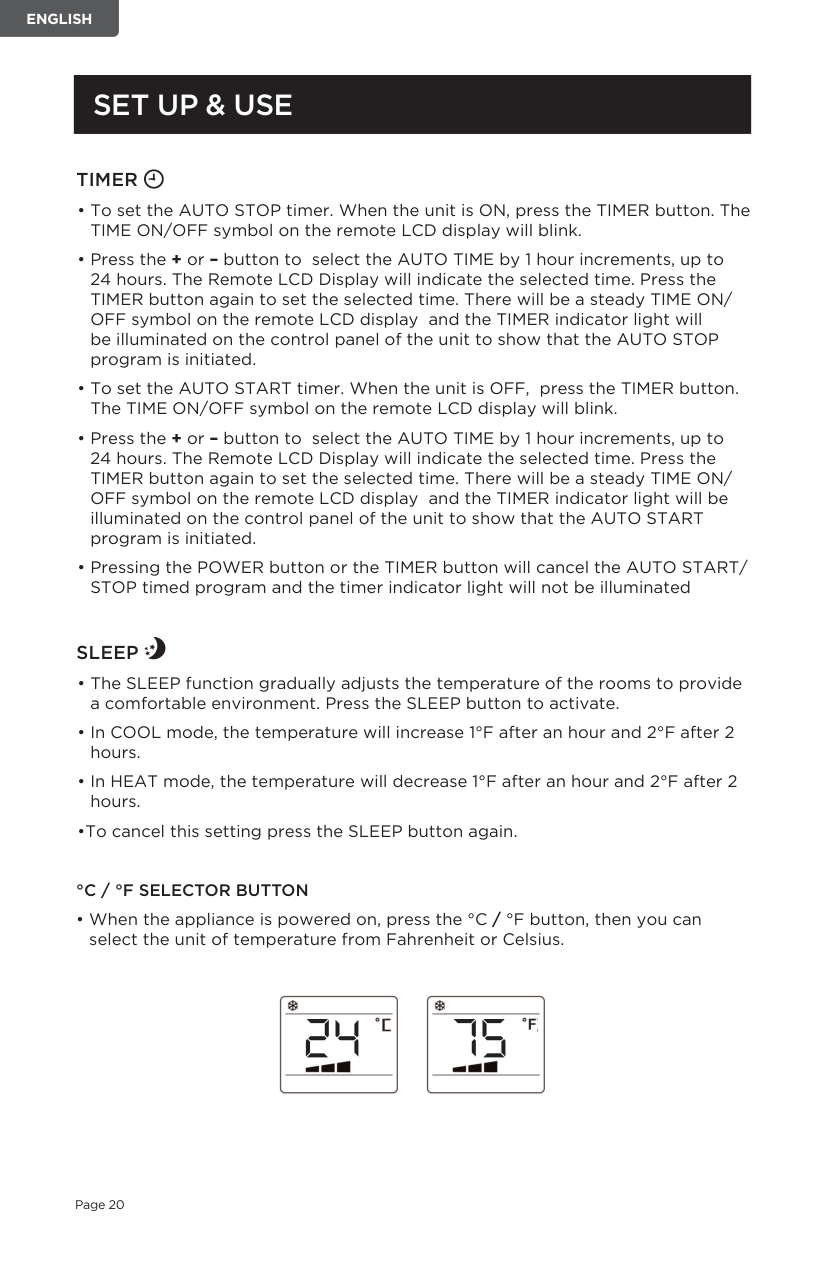
############ TIMER
############ SLEEP
°C / °F SELECTOR BUTTON


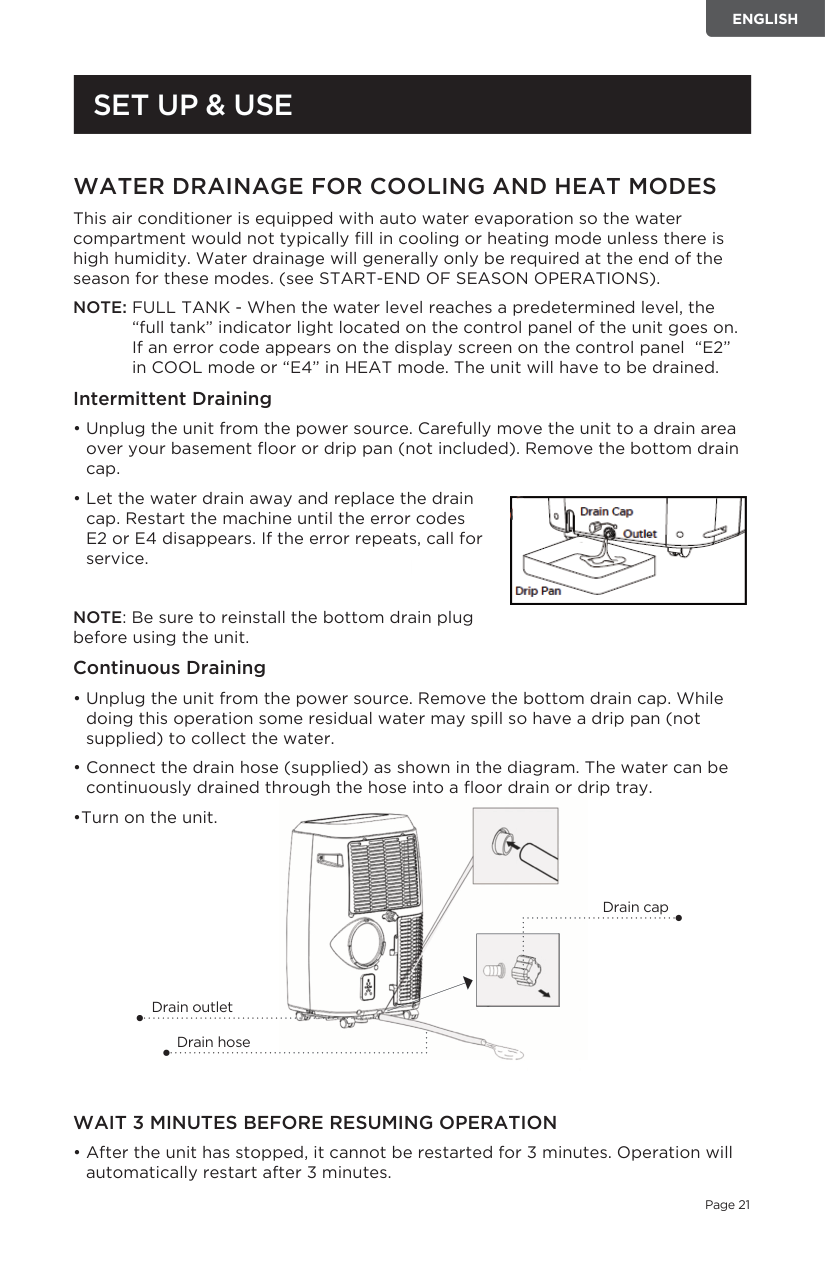
######### WATER DRAINAGE FOR COOLING AND HEAT MODES
This air conditioner is equipped with auto water evaporation so the water compartment would not typically fill in cooling or heating mode unless there is high humidity. Water drainage will generally only be required at the end of the season for these modes. (see START-END OF SEASON OPERATIONS).
NOTE: FULL TANK - When the water level reaches a predetermined level, the “full tank” indicator light located on the control panel of the unit goes on. If an error code appears on the display screen on the control panel “E2” in COOL mode or “E4” in HEAT mode. The unit will have to be drained.
############ Intermittent Draining

NOTE: Be sure to reinstall the bottom drain plug before using the unit.
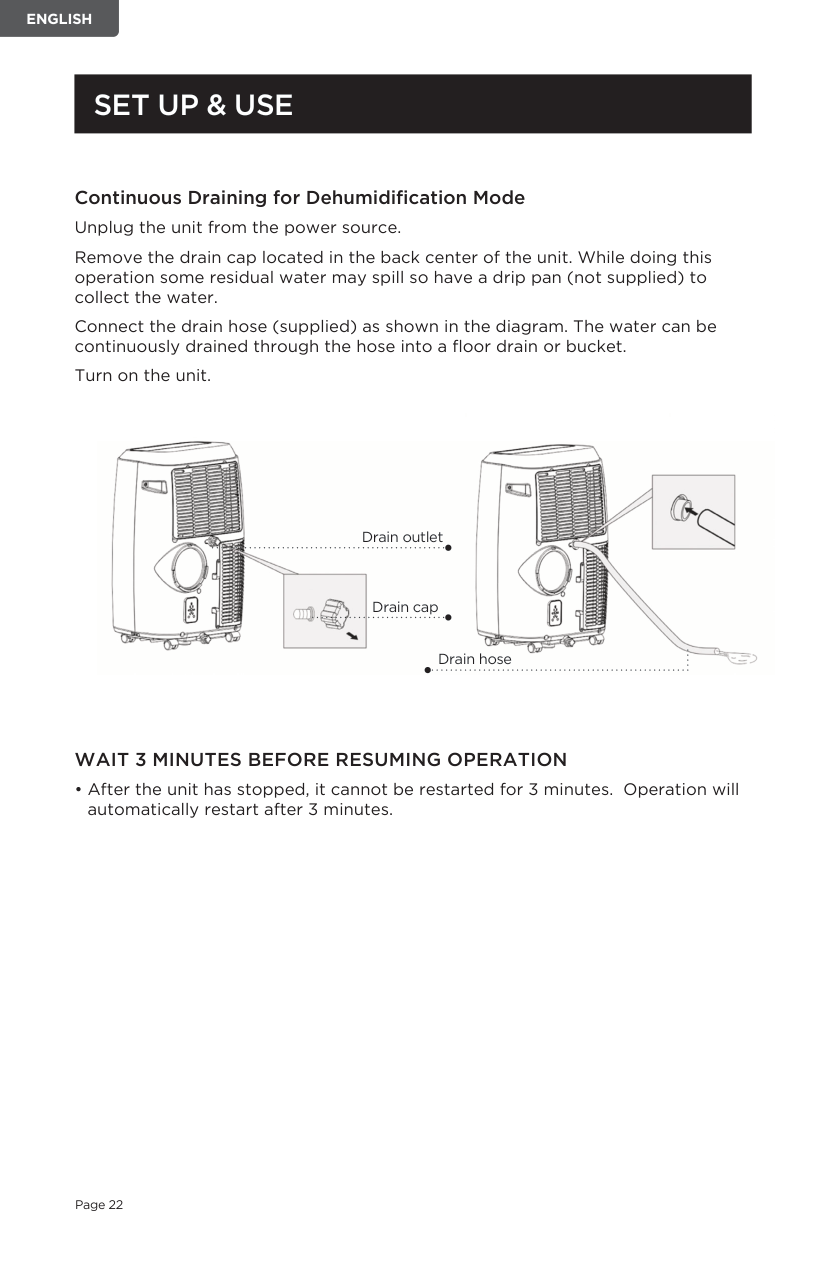
############ Continuous Draining
WAIT 3 MINUTES BEFORE RESUMING OPERATION

Drain cap

Drain outlet Drain hose
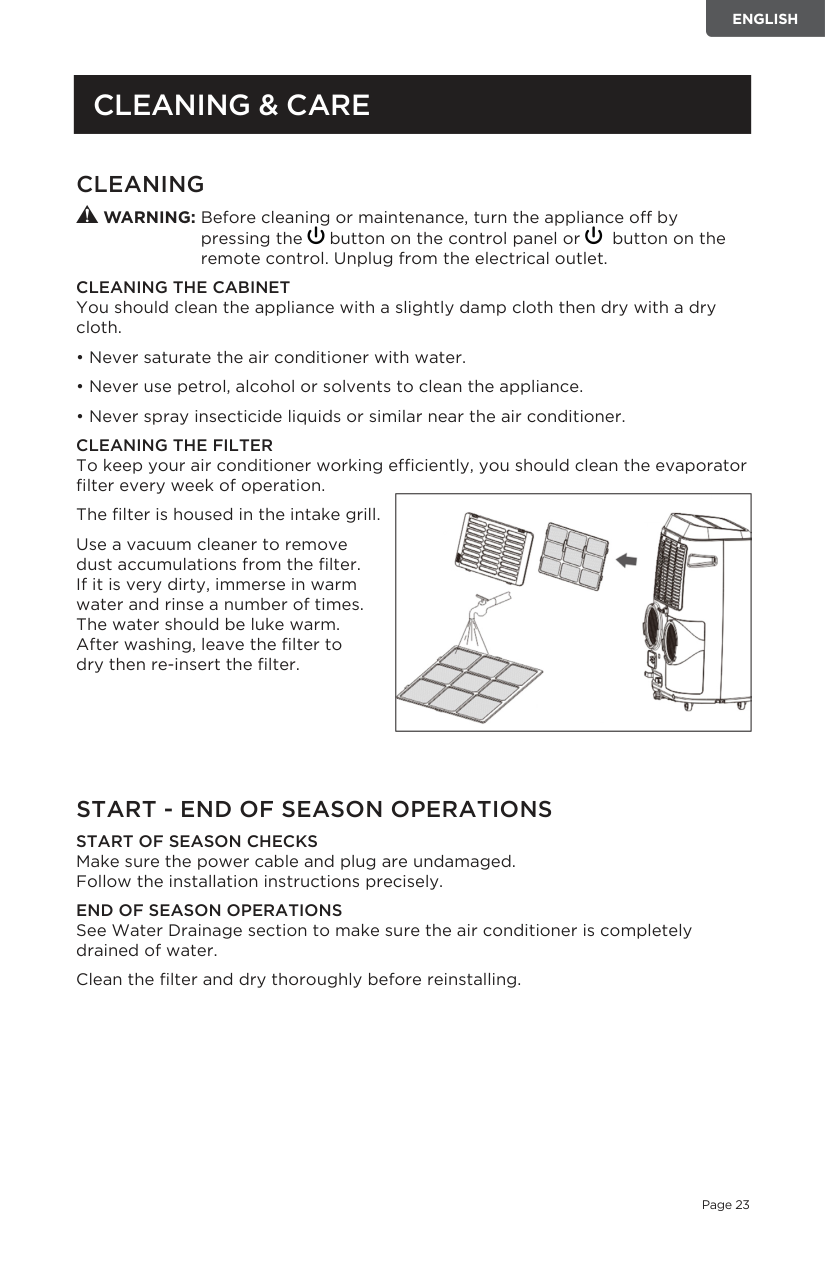
Continuous Draining for Dehumidification Mode Unplug the unit from the power source. Remove the drain cap located in the back center of the unit. While doing this operation some residual water may spill so have a drip pan (not supplied) to collect the water. Connect the drain hose (supplied) as shown in the diagram. The water can be continuously drained through the hose into a floor drain or bucket. Turn on the unit.

Drain outlet
Drain cap
Drain hose
############ WAIT 3 MINUTES BEFORE RESUMING OPERATION
• After the unit has stopped, it cannot be restarted for 3 minutes. Operation will automatically restart after 3 minutes.
##### CLEANING & CARE
######### CLEANING
WARNING: Before cleaning or maintenance, turn the appliance off by pressing the button on the control panel or button on the remote control. Unplug from the electrical outlet.
CLEANING THE CABINET You should clean the appliance with a slightly damp cloth then dry with a dry cloth.
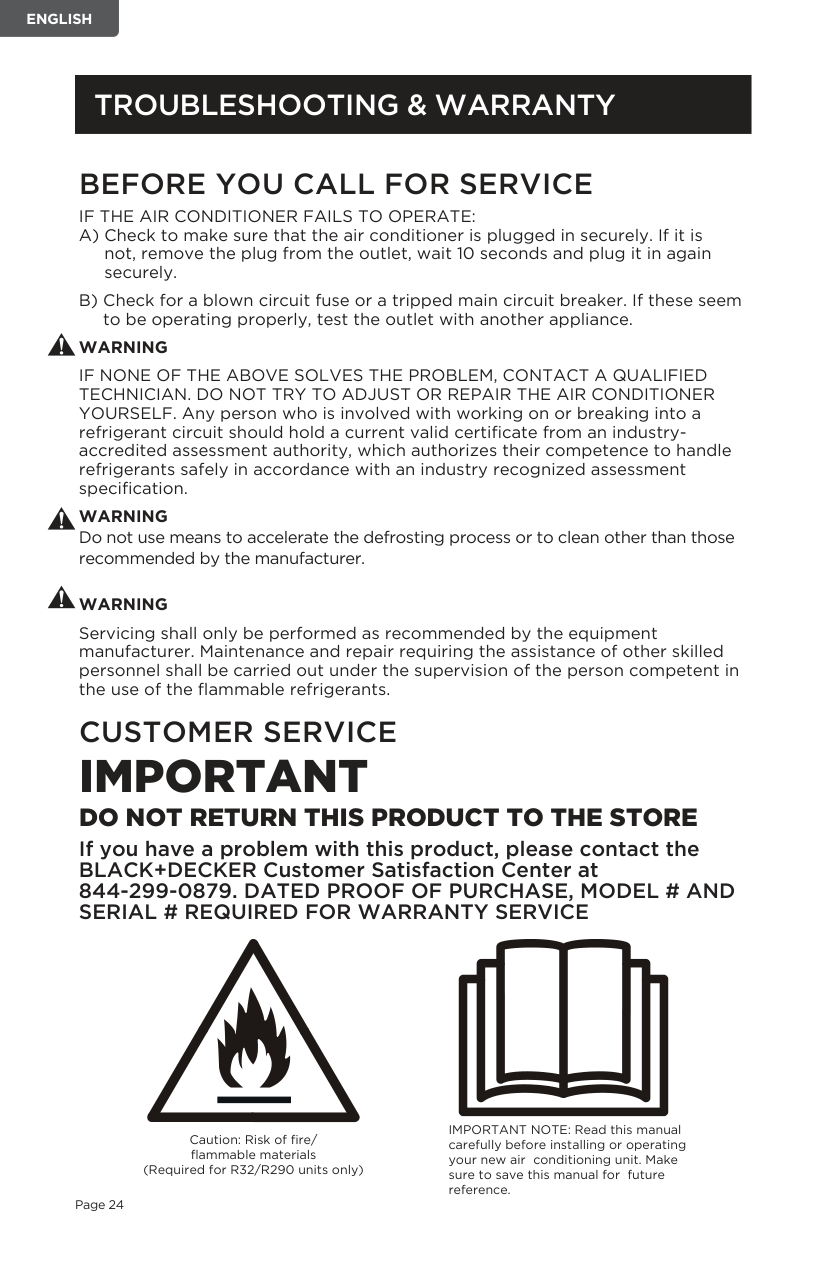
CLEANING THE FILTER To keep your air conditioner working efficiently, you should clean the evaporator filter every week of operation.
|| |---|
The filter is housed in the intake grill. Use a vacuum cleaner to remove dust accumulations from the filter. If it is very dirty, immerse in warm water and rinse a number of times. The water should be luke warm. After washing, leave the filter to dry then re-insert the filter.
START - END OF SEASON OPERATIONS START OF SEASON CHECKS Make sure the power cable and plug are undamaged. Follow the installation instructions precisely. END OF SEASON OPERATIONS See Water Drainage section to make sure the air conditioner is completely drained of water. Clean the filter and dry thoroughly before reinstalling.
##### BEFORE YOU CALL FOR SERVICE
IF THE AIR CONDITIONER FAILS TO OPERATE:
############# WARNING
IF NONE OF THE ABOVE SOLVES THE PROBLEM, CONTACT A QUALIFIED TECHNICIAN. DO NOT TRY TO ADJUST OR REPAIR THE AIR CONDITIONER YOURSELF. Any person who is involved with working on or breaking into a refrigerant circuit should hold a current valid certificate from an industryaccredited assessment authority, which authorizes their competence to handle refrigerants safely in accordance with an industry recognized assessment specification.
WARNING Do not use means to accelerate the defrosting process or to clean other than those recommended by the manufacturer.
############# WARNING
Servicing shall only be performed as recommended by the equipment manufacturer. Maintenance and repair requiring the assistance of other skilled personnel shall be carried out under the supervision of the person competent in the use of the flammable refrigerants.
##### CUSTOMER SERVICE
IMPORTANT DO NOT RETURN THIS PRODUCT TO THE STORE If you have a problem with this product, please contact the BLACK+DECKER Customer Satisfaction Center at 844-299-0879. DATED PROOF OF PURCHASE, MODEL # AND SERIAL # REQUIRED FOR WARRANTY SERVICE
Caution: Risk of fire/ flammable materials (Required for R32/R290 units only)
IMPORTANT NOTE: Read this manual carefully before installing or operating your new air conditioning unit. Make sure to save this manual for future reference.
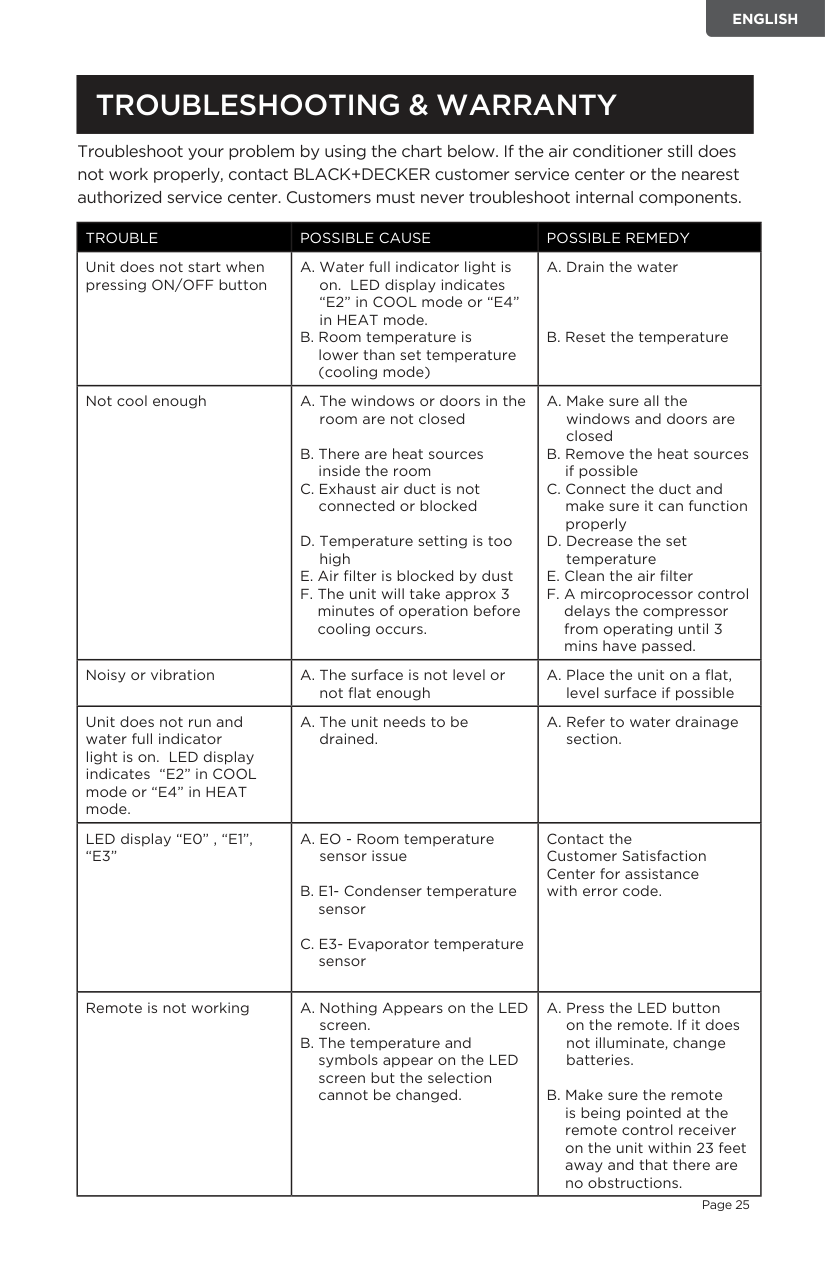
############### Troubleshoot your problem by using the chart below. If the air conditioner still does not work properly, contact BLACK+DECKER customer service center or the nearest authorized service center. Customers must never troubleshoot internal components.
|TROUBLE|POSSIBLE CAUSE|POSSIBLE REMEDY| |---|---|---| |Unit does not start when pressing ON/OFF button|A. Water full indicator light is on. LED display indicates “E2” in COOL mode or “E4” in HEAT mode.
B. Room temperature is lower than set temperature (cooling mode)
|A. Drain the water
B. Reset the temperature
| |Not cool enough|A. The windows or doors in the room are not closed
B. There are heat sources inside the room
C. Exhaust air duct is not connected or blocked
D. Temperature setting is too high
E. Air filter is blocked by dust
F. The unit will take approx 3 minutes of operation before cooling occurs.
|A. Make sure all the windows and doors are closed
B. Remove the heat sources if possible
C. Connect the duct and make sure it can function properly
D. Decrease the set temperature
E. Clean the air filter
F. A mircoprocessor control delays the compressor from operating until 3 mins have passed.
| |Noisy or vibration|A. The surface is not level or not flat enough|A. Place the unit on a flat, level surface if possible| |Unit does not run and water full indicator light is on. LED display indicates “E2” in COOL mode or “E4” in HEAT mode.|A. The unit needs to be drained.|A. Refer to water drainage section.| |LED display “E0” , “E1”, “E3”|A. EO - Room temperature sensor issue
B. E1- Condenser temperature sensor
C. E3- Evaporator temperature sensor
|Contact the Customer Satisfaction Center for assistance with error code.| |Remote is not working|A. Nothing Appears on the LED screen.
B. The temperature and symbols appear on the LED screen but the selection cannot be changed.
|A. Press the LED button on the remote. If it does not illuminate, change batteries.
B. Make sure the remote is being pointed at the remote control receiver on the unit within 23 feet away and that there are no obstructions.
|
###### LIMITED WARRANTY
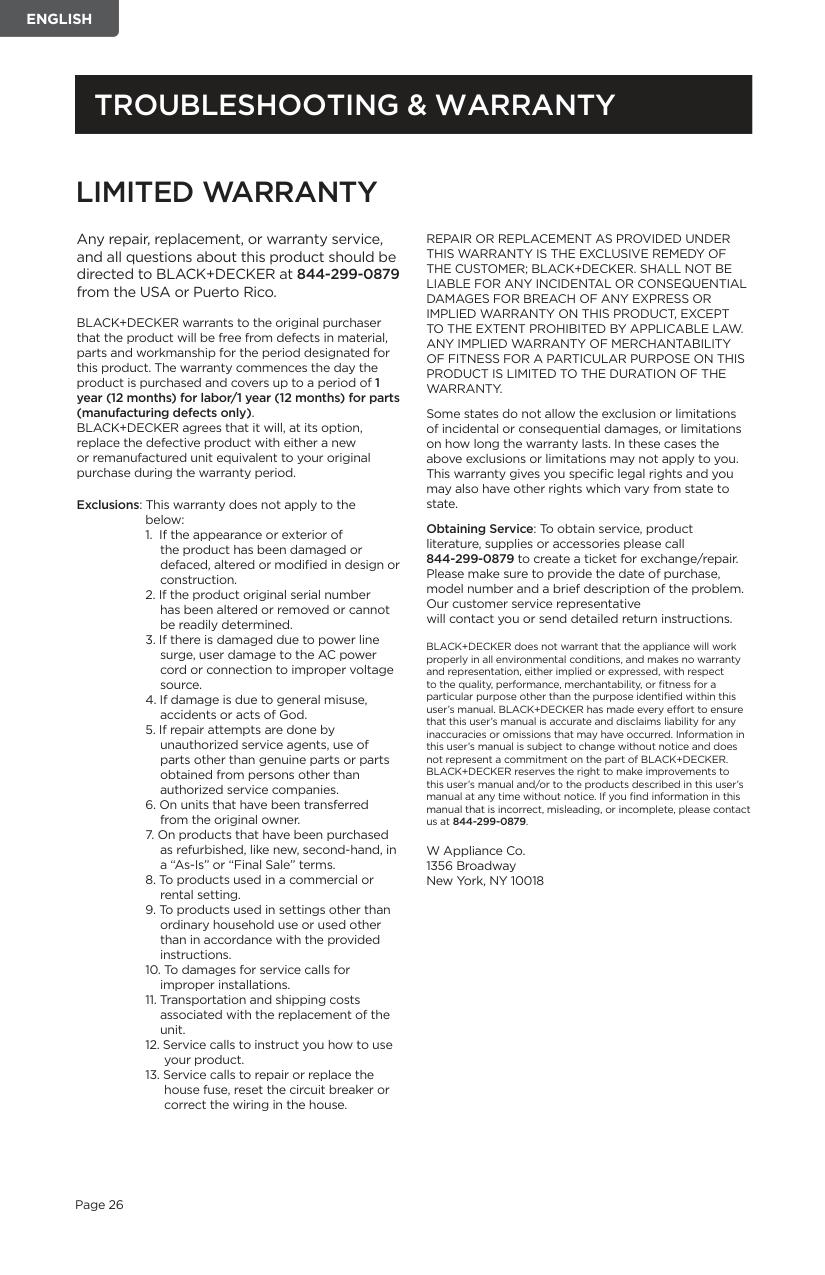
Any repair, replacement, or warranty service, and all questions about this product should be directed to BLACK+DECKER at 844-299-0879 from the USA or Puerto Rico.
BLACK+DECKER warrants to the original purchaser that the product will be free from defects in material, parts and workmanship for the period designated for this product. The warranty commences the day the product is purchased and covers up to a period of 1 year (12 months) for labor/1 year (12 months) for parts (manufacturing defects only). BLACK+DECKER agrees that it will, at its option, replace the defective product with either a new or remanufactured unit equivalent to your original purchase during the warranty period.
Exclusions: This warranty does not apply to the
below:
REPAIR OR REPLACEMENT AS PROVIDED UNDER THIS WARRANTY IS THE EXCLUSIVE REMEDY OF THE CUSTOMER; BLACK+DECKER. SHALL NOT BE LIABLE FOR ANY INCIDENTAL OR CONSEQUENTIAL DAMAGES FOR BREACH OF ANY EXPRESS OR IMPLIED WARRANTY ON THIS PRODUCT, EXCEPT TO THE EXTENT PROHIBITED BY APPLICABLE LAW. ANY IMPLIED WARRANTY OF MERCHANTABILITY OF FITNESS FOR A PARTICULAR PURPOSE ON THIS PRODUCT IS LIMITED TO THE DURATION OF THE WARRANTY.
Some states do not allow the exclusion or limitations of incidental or consequential damages, or limitations on how long the warranty lasts. In these cases the above exclusions or limitations may not apply to you. This warranty gives you specific legal rights and you may also have other rights which vary from state to state.
Obtaining Service: To obtain service, product literature, supplies or accessories please call 844-299-0879 to create a ticket for exchange/repair. Please make sure to provide the date of purchase, model number and a brief description of the problem. Our customer service representative will contact you or send detailed return instructions.
BLACK+DECKER does not warrant that the appliance will work properly in all environmental conditions, and makes no warranty and representation, either implied or expressed, with respect to the quality, performance, merchantability, or fitness for a particular purpose other than the purpose identified within this user’s manual. BLACK+DECKER has made every effort to ensure that this user’s manual is accurate and disclaims liability for any inaccuracies or omissions that may have occurred. Information in this user’s manual is subject to change without notice and does not represent a commitment on the part of BLACK+DECKER. BLACK+DECKER reserves the right to make improvements to this user’s manual and/or to the products described in this user’s manual at any time without notice. If you find information in this manual that is incorrect, misleading, or incomplete, please contact us at 844-299-0879.
W Appliance Co. 1356 Broadway New York, NY 10018
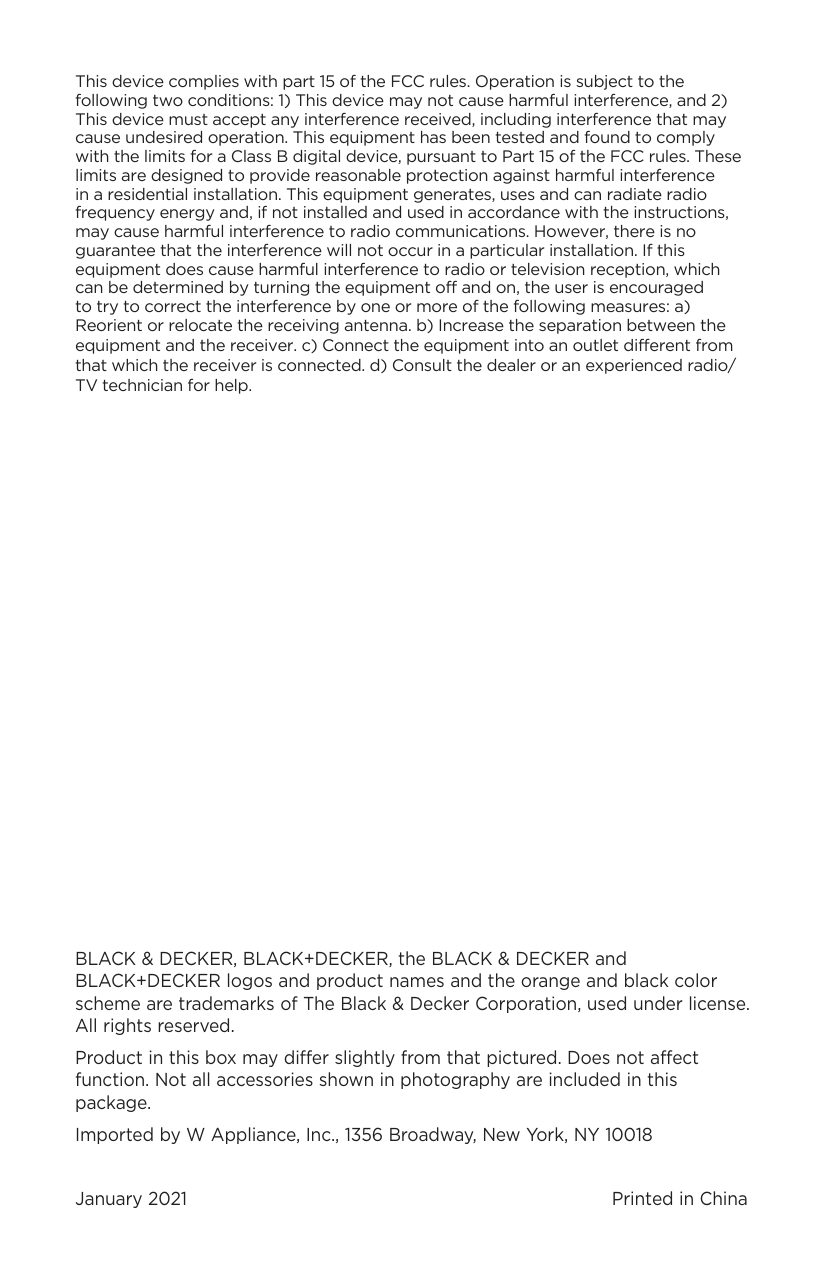
This device complies with part 15 of the FCC rules. Operation is subject to the following two conditions: 1) This device may not cause harmful interference, and 2) This device must accept any interference received, including interference that may cause undesired operation. This equipment has been tested and found to comply with the limits for a Class B digital device, pursuant to Part 15 of the FCC rules. These limits are designed to provide reasonable protection against harmful interference in a residential installation. This equipment generates, uses and can radiate radio frequency energy and, if not installed and used in accordance with the instructions, may cause harmful interference to radio communications. However, there is no guarantee that the interference will not occur in a particular installation. If this equipment does cause harmful interference to radio or television reception, which can be determined by turning the equipment off and on, the user is encouraged to try to correct the interference by one or more of the following measures: a) Reorient or relocate the receiving antenna. b) Increase the separation between the
equipment and the receiver. c) Connect the equipment into an outlet different from that which the receiver is connected. d) Consult the dealer or an experienced radio/ TV technician for help.
BLACK & DECKER, BLACK+DECKER, the BLACK & DECKER and BLACK+DECKER logos and product names and the orange and black color scheme are trademarks of The Black & Decker Corporation, used under license. All rights reserved.
Product in this box may differ slightly from that pictured. Does not affect function. Not all accessories shown in photography are included in this package.
Imported by W Appliance, Inc., 1356 Broadway, New York, NY 10018
January 2021 Printed in China