Ask AI
— answers from the official manualAnswers from the official manual.
Common questions
Common Questions
25 totalHow do I start the initial setup and connect my Lyric T6 Pro Wi-Fi thermostat?
To begin setup, press and hold the center temperature (indoor temperature) on your thermostat for 5 seconds until the screen changes. Then download the Honeywell Lyric app from the App Store or Google Play, open it, and your thermostat should appear under 'Thermostat Found' — tap SET UP NOW to continue. If your thermostat doesn't appear, tap INSTALL A DEVICE and follow the prompts. (Page 2)
What system modes are available on the Lyric T6 Pro Wi-Fi thermostat?
The thermostat supports Auto, Heat, Cool, Off, and EM Heat (Emergency Heat) system modes. You can select the desired mode using the Mode button on the thermostat screen. (Page 3)
What do I do if my thermostat doesn't appear in the Honeywell Lyric app during setup?
If your thermostat doesn't appear under 'Thermostat Found,' tap INSTALL A DEVICE and follow the prompts to continue. The app will walk you through the rest of the setup process. (Page 2)
What fan modes can I select on the thermostat?
The thermostat offers three fan modes: Auto, On, and Circulate. You can select your preferred fan mode using the Fan button on the thermostat display. (Page 3)
How do I adjust the temperature on the Lyric T6 Pro Wi-Fi thermostat?
Touch the + or - buttons on the thermostat screen to set your desired temperature. The screen will wake up by pressing the center area of the displayed temperature. (Page 3)
What features are accessible through the Menu on the thermostat?
The Menu contains features including schedule, screen lock, ventilation, Wi-Fi, clean screen, and other thermostat settings. These options allow you to customize and manage your thermostat's behavior and connectivity. (Page 3)
Show 19 more questions
Does the Lyric T6 Pro Wi-Fi thermostat support Apple HomeKit?
Where can I find additional help or a complete user guide for my thermostat?
Can I make modifications or changes to my thermostat hardware?
What FCC compliance conditions apply to my Lyric T6 Pro Wi-Fi thermostat?
How do I adjust the desired temperature on the thermostat?
How do I wake up the thermostat screen when it goes dark?
Where can I find additional help or a complete user guide for the thermostat?
Can unauthorized modifications affect the operation of my thermostat?
What are the FCC compliance conditions for the Lyric T6 Pro Wi-Fi thermostat?
What are the different system modes available on this thermostat?
What fan mode options are available?
How do I wake up the thermostat screen?
How do I set up my Honeywell Lyric T6 Pro Wi-Fi thermostat?
What should I do if my thermostat doesn't appear in the Honeywell Lyric app?
How do I adjust the temperature on my thermostat?
Does the Honeywell Lyric T6 Pro support Apple HomeKit?
What menu features are available on the thermostat?
Where can I find the complete user guide for this thermostat?
What should I know about FCC compliance for this device?
Full Manual
12 pages
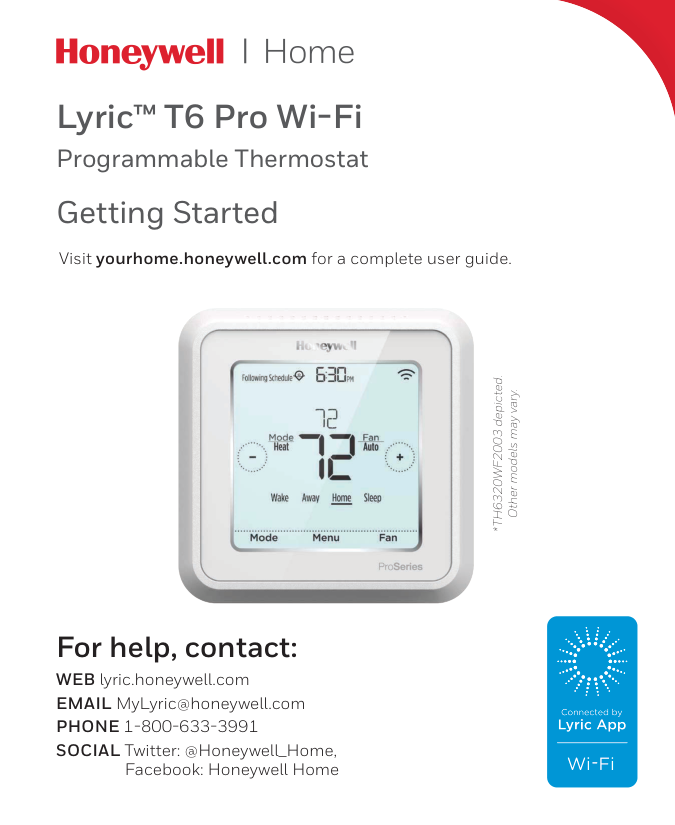
Lyric™ T6 Pro Wi-Fi Programmable Thermostat *TH6320WF2003 depicted. Other models may vary. Visit yourhome.honeywell.com for a complete user guide. For help, contact: WEB lyric.honeywell.com EMAIL MyLyric@honeywell.com
Phone 1-800-633-3991
SOCIAL Twitter: @Honeywell_Home,Facebook: Honeywell Home Getting Started

2 Get connected in 3 simple steps Step 1 Press and hold the center temperature (indoor temperature) on your thermostat for 5 seconds until the screen changes. Step 2 Download the Honeywell Lyric app from the App store or Google play. Step 3 Open the Honeywell Lyric app. Your thermostat should appear under Thermostat Found. Tap SET UP NOW as shown here to continue. If your thermostat doesn’t appear, tap INSTALL A DEVICE and follow the prompts to continue. The app will walk you through the rest of the setup. Lyric

3 How to use your thermostat Mode Select system mode Auto/Heat/Cool/Off/ EM Heat (Emergency Heat). Menu Contains features: schedule, screen lock, ventilation, Wi-Fi, clean screen, and other thermostat settings. Fan Select Fan mode Auto/On/Circulate. Desired temperature Displays desired temperature. Indoor Temperature Displays current indoor temperature. Adjust temperature Touch + or - to set your desired temperature. The screen will wake up by pressing the center area of the displayed temperature.
Pm
Menu Fan Mode Fan Auto Mode Heat
Automation and Control Solutions Honeywell International Inc. 1985 Douglas Drive North Golden Valley, MN 55422 ® U.S. Registered Trademark. © 2016 Honeywell International Inc. 33-00152EFS—03 M.S. Rev. 08-16 Printed in U.S.A.
33-00152Efs-03
Apple® HomeKit™ Setup Code The Lyric T6 Pro Wi-Fi supports Apple HomeKit. When prompted by the Lyric app, scan the code on the last page (back cover) of this guide. For technical problems, contact Company Name Number Regulatory informationFcc Regulations
§ 15.19 (a)(3) This device complies with part 15 of the FCC Rules. Operation is subject to the following two conditions: 1 This device may not cause harmful interference, and 2 This device must accept any interference received, including interference that may cause undesired operation.Ic Regulations
Rss-Gen
This device complies with Industry Canada’s license-exempt RSSs. Operation is subject to the following two conditions: 1 This device may not cause interference; and 2 This device must accept any interference, including interference that may cause undesired operation of the device. FCC Warning (Part 15.21) (USA only) Changes or modifications not expressly approved by the party responsible for compliance could void the user’s authority to operate the equipment.
Lyric™ T6 Pro Wi-Fi Thermostat programmable *TH6320WF2003 illustré. Les autres modèles peuvent varier. Visitez yourhome.honeywell.com pour obtenir le guide de l’utilisateur complet. Pour obtenir de l’aide, veuillez contacter : SITE WEB lyric.honeywell.com COURRIEL MyLyric@honeywell.com
Téléphone 1-800-633-3991
RÉSEAUX SOCIAUX Twitter : @Honeywell_Home,Facebook : Honeywell Home Pour commencer

2 Connectez-vous en trois simples étapes. Étape 1 Appuyez sur la température située au centre du thermostat (température intérieure) pendant 5 secondes jusqu’à ce que l’affichage change. Étape 2 Téléchargez l’application Lyric de Honeywell Lyric dans l’App Store ou Google Play. Étape 3 Ouvrez l’application Lyric. Votre thermostat devrait apparaitre sous Thermostat Found (Thermostat trouvé). Touchez SET UP NOW (Configurer maintenant) tel qu’illustré ici pour continuer. Si votre thermostat ne s’affiche pas, touchez INSTALL A DEVICE (Installer un appareil) et suivez les invites pour continuer. L’application vous guidera à travers des étapes restantes de la configuration. Lyric

3 Comment utiliser votre thermostat Mode Sélectionnez le mode de système Auto/Heat/Cool/ Off/EM Heat (Auto/Chauffage/ Refroidissement/ Arrêt/Chauffage d’urgence). Menu Contient les fonctions : programme, verrouillage écr`an, ventilation, Wi-Fi, nettoyage écran et d’autres réglages du thermostat. Fan (Ventilateur) Sélectionnez le mode ventilateur Auto/On (Marche)/Circulation. Température désirée Affiche la température désirée. Température intérieure Affiche la température intérieure actuelle. Réglage de la température Touchez + ou - pour régler la température désirée. L’écran s’active lorsque la zone centrale de la température affichée est pressée.
Pm
Menu Fan Mode Fan Auto Mode Heat
33-00152Efs-03
Solutions de régulation et d’automatisation Honeywell International Inc. 1985 Douglas Drive North Golden Valley, MN 55422 ® Marque de commerce déposée aux É.-U. © 2016 Honeywell International Inc. 33-00152EFS—03 M.S. Rev. 08-16 Imprimé aux États-Unis Code de configuration d’Apple® HomeKit™ Le thermostat Wi-Fi T6 Pro Lyric prend en charge Apple HomeKit. Lorsque l’application Lyric vous invite à le faire, balayez le code sur la dernière page (couvercle arrière) de ce guide. En cas de problèmes techniques, contactez Société Nom Numéro Informations réglementairesNormes Fcc
§ 15.19 (a)(3) Cet appareil est conforme à la partie 15 du règlement de la FCC. Son fonctionnement est soumis aux deux conditions suivantes : 1 Ce dispositif ne doit pas causer d’interférences nuisibles, et 2 Ce dispositif doit accepter toutes les interférences reçues, y compris celles pouvant causer un fonctionnement non souhaité.Normes Ic
Rss-Gen
Cet appareil est conforme à l’exemption de licence RSSs d’Industrie Canada. Son fonctionnement est soumis aux deux conditions suivantes : 1 Ce dispositif ne doit pas causer d’interférences, et 2 Ce dispositif doit accepter toutes les interférences, y compris celles pouvant causer un fonctionnement non souhaité. Avertissement de la FCC (Partie 15.21) (États-Unis uniquement) Toute modification qui n’est pas autorisée expressément par la partie responsable de la conformite de l’appareil peut rendre l’utilisateur inapte a faire fonctionner l’équipment.
Lyric™ T6 Pro con conexión WiFi Termostato programable *Representación de TH6320WF2003. Otros modelos pueden variar. Visite yourhome.honeywell.com para obtener una guía para el usuario completa. Información de contacto para obtener ayuda: SITIO WEB lyric.honeywell.com CORREO ELECTRÓNICO MyLyric@honeywell.com
Teléfono 1-800-633-3991
REDES SOCIALES Twitter: @Honeywell_Home,Facebook: Honeywell Home Cómo comenzar

2 Conéctese en 3 simples pasos Paso 1 Presione y mantenga presionado en la temperatura que se indica al centro (temperatura interior) de su termostato durante 5 segundos hasta que la pantalla cambie. Paso 2 Descargue la aplicación Lyric de Honeywell desde la tienda de aplicaciones o desde Google play. Paso 3 Abra la aplicación Lyric de Honeywell. Su termostato debe aparecer bajo “Thermostat Found” (termostato encontrado). Toque SET UP NOW (configurar ahora) como se ilustra más abajo para continuar. Si su termostato no aparece, toque INSTALL A DEVICE (Instalar un dispositivo) y siga las instrucciones para continuar. La aplicación le guiará a través del resto de la configuración. Lyric

3 Cómo utilizar el termostato Mode (Modo) Seleccione el modo del sistema: Auto (automático)/Heat (calefacción)/Cool (refrigeración)/ Off (apagado)/EM Heat (calefacción de emergencia). Menu (Menú) Contiene las siguientes características: programación, bloqueo de pantalla, ventilación, WiFi, borrar pantalla y otras configuraciones del termostato. Fan (Ventilador) Seleccione el modo del ventilador Auto (automático)/On (activado)/Circulate (circulación). Temperatura deseada Muestra la temperatura deseada. Temperatura interior Muestra la temperatura interior actual. Ajuste de la temperatura Toque + o - para configurar su temperatura deseada. La pantalla se activará al presionar el área central de la temperatura que se muestra.
Pm
Menu Fan Mode Fan Auto Mode Heat