
Ask AI
— answers from the official manualAnswers from the official manual.
Common questions
Common Questions
9 totalHow do I insert and replace batteries in the remote control?
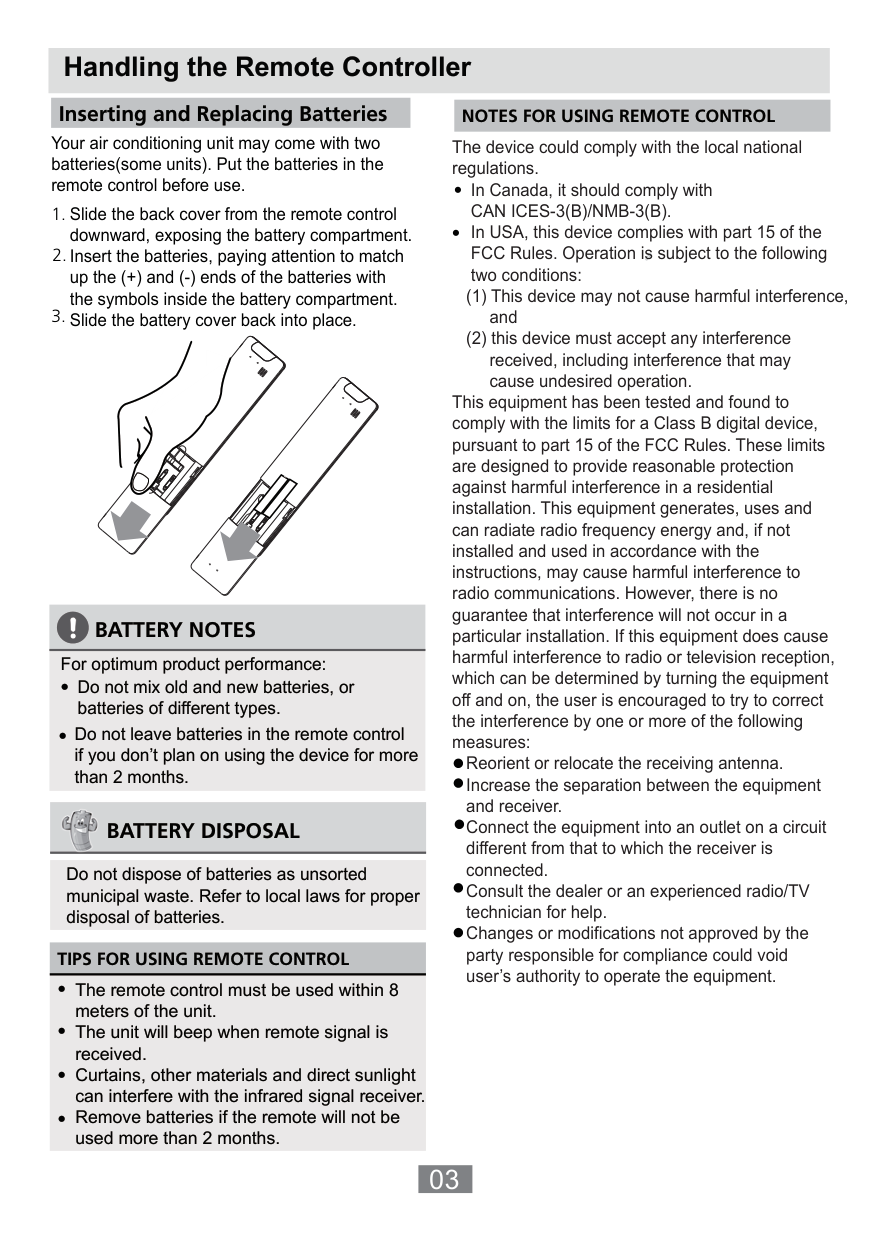
Slide the back cover from the remote controller downward to expose the battery compartment. Insert two R03/LR03 batteries, ensuring correct polarity by matching (+) ends with symbols inside the compartment. Replace the cover.
What is the operational range of the Midea Mppd25c Remote Controller?
The remote controller can operate within an 8-meter range from the air conditioning unit. Curtains, direct sunlight and other materials may interfere with signal reception.
How do I set the timer to turn off the AC unit?
Press the TIMER button once to initiate the OFF time sequence. Use the TEMP buttons to adjust the timing, then point the remote at the unit and wait one second for activation.
What are the steps to switch between temperature display formats (Celsius/Fahrenheit)?
Press both TEMP buttons together for three seconds to toggle the temperature display from Celsius to Fahrenheit or vice versa.
How do I activate the LED display on/off function?
Press the LED button once to turn on or off the indoor unit’s LED. Holding it for more than five seconds will show actual room temperature temporarily before reverting.
What is the ECO operation mode and how do I initiate it?
Press the ECO button while in COOL mode to activate energy-saving operation, which sets temperature automatically to 24°C/75°F with a fan speed of AUTO.
Full Manual
16 pages
REMOTE CONTROLLER
OWNER’S MANUAL
IMPORTANT NOTE:
Thank you for purchasing our air conditioner. Please read this manual carefully before operating your new air conditioning unit. Make sure to save this manual for future reference.
#### Table of Contents
Remote Controller Specifications ......................................................02 Handling the Remote Controller ....................................................03 Buttons and Functions ...................................................................04 Remote Screen Indicators ..............................................................06 How to Use Basic Functions ..........................................................07 How to Use Advanced Functions ..................................................10
##### Remote Controller Specifications
| |RG10A(B2S)/BGEF, RG10A(B2S)/BGEFU1,
RG10A1(B2S)/BGEF,RG10A2(B2S)/BGEFU1,
RG10A2(B2S)/BGCEFU1, RG10A2(B2S)/BGCEF, RG10A10(B2S)/BGEF.
| |---|---| | |3.0V( Dry batteries R03/LR03×2)| | |8m| | |-5°C~60°C(23°F~140°F)|
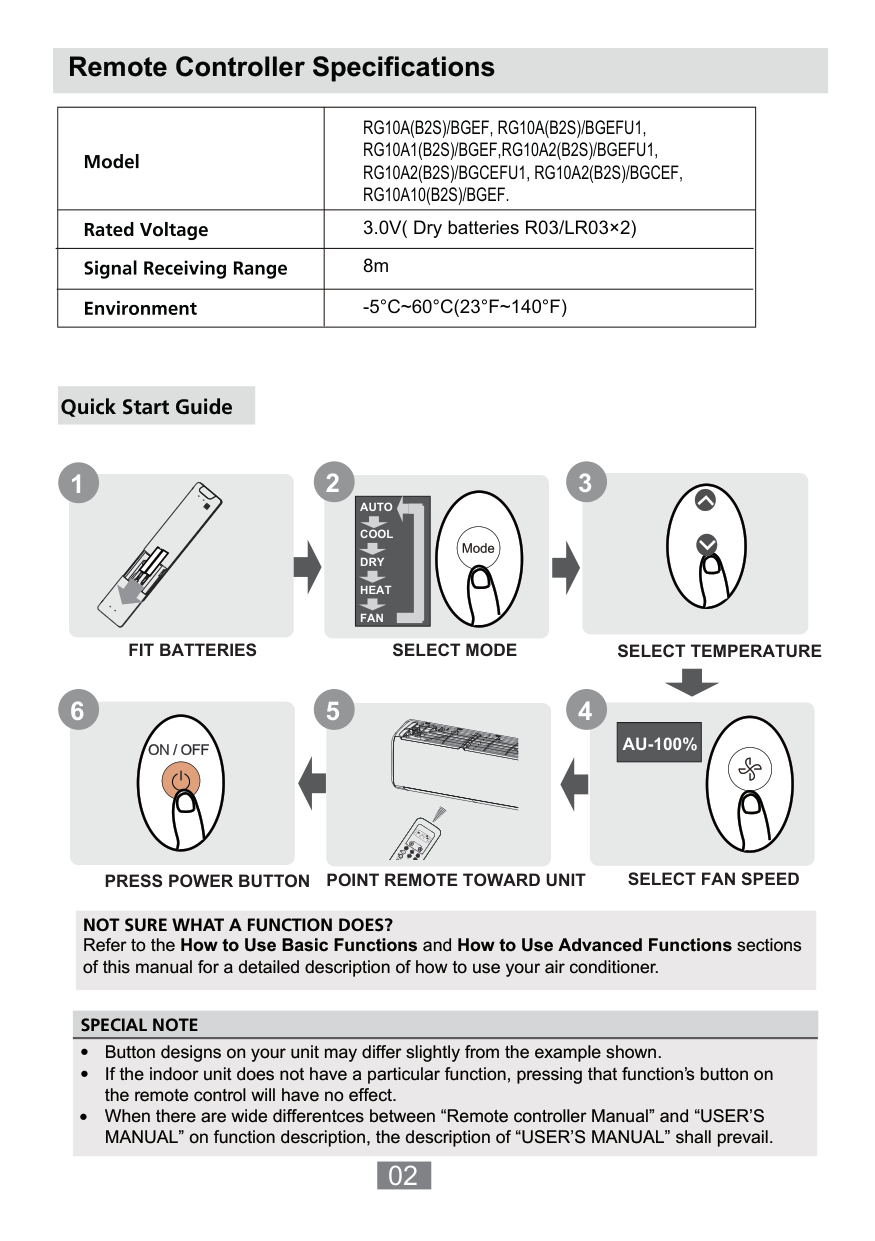
############# Quick Start Guide
2
####### 3
1
AUTO COOL DRY HEAT FAN
FIT BATTERIES
SELECT MODE SELECT TEMPERATURE
6
5 4
################### AU-100%
AUTO COOL
DRY HEAT
FAN HIGH
MED LOW
SELECT FAN SPEED
POINT REMOTE TOWARD UNITPRESS POWER BUTTON
NOT SURE WHAT A FUNCTION DOES? Refer to the How to Use Basic Functions and How to Use Advanced Functions sections of this manual for a detailed description of how to use your air conditioner.
SPECIAL NOTE
02
##### Handling the Remote Controller
Inserting and Replacing Batteries
NOTES FOR USING REMOTE CONTROL
Your air conditioning unit may come with two batteries(some units). Put the batteries in the remote control before use.
The device could comply with the local national regulations.
In Canada, it should comply with CAN ICES-3(B)/NMB-3(B). In USA, this device complies with part 15 of the FCC Rules. Operation is subject to the following two conditions:
•
•
This equipment has been tested and found to comply with the limits for a Class B digital device, pursuant to part 15 of the FCC Rules. These limits are designed to provide reasonable protection against harmful interference in a residential installation. This equipment generates, uses and can radiate radio frequency energy and, if not installed and used in accordance with the instructions, may cause harmful interference to radio communications. However, there is no guarantee that interference will not occur in a particular installation. If this equipment does cause harmful interference to radio or television reception, which can be determined by turning the equipment off and on, the user is encouraged to try to correct the interference by one or more of the following measures:
############ BATTERY NOTES
For optimum product performance:
Reorient or relocate the receiving antenna. Increase the separation between the equipment and receiver. Connect the equipment into an outlet on a circuit different from that to which the receiver is connected. Consult the dealer or an experienced radio/TV technician for help. Changes or modifications not approved by the party responsible for compliance could void user’s authority to operate the equipment.

############ BATTERY DISPOSAL
Do not dispose of batteries as unsorted municipal waste. Refer to local laws for proper disposal of batteries.
TIPS FOR USING REMOTE CONTROL
•
##### Buttons and Functions
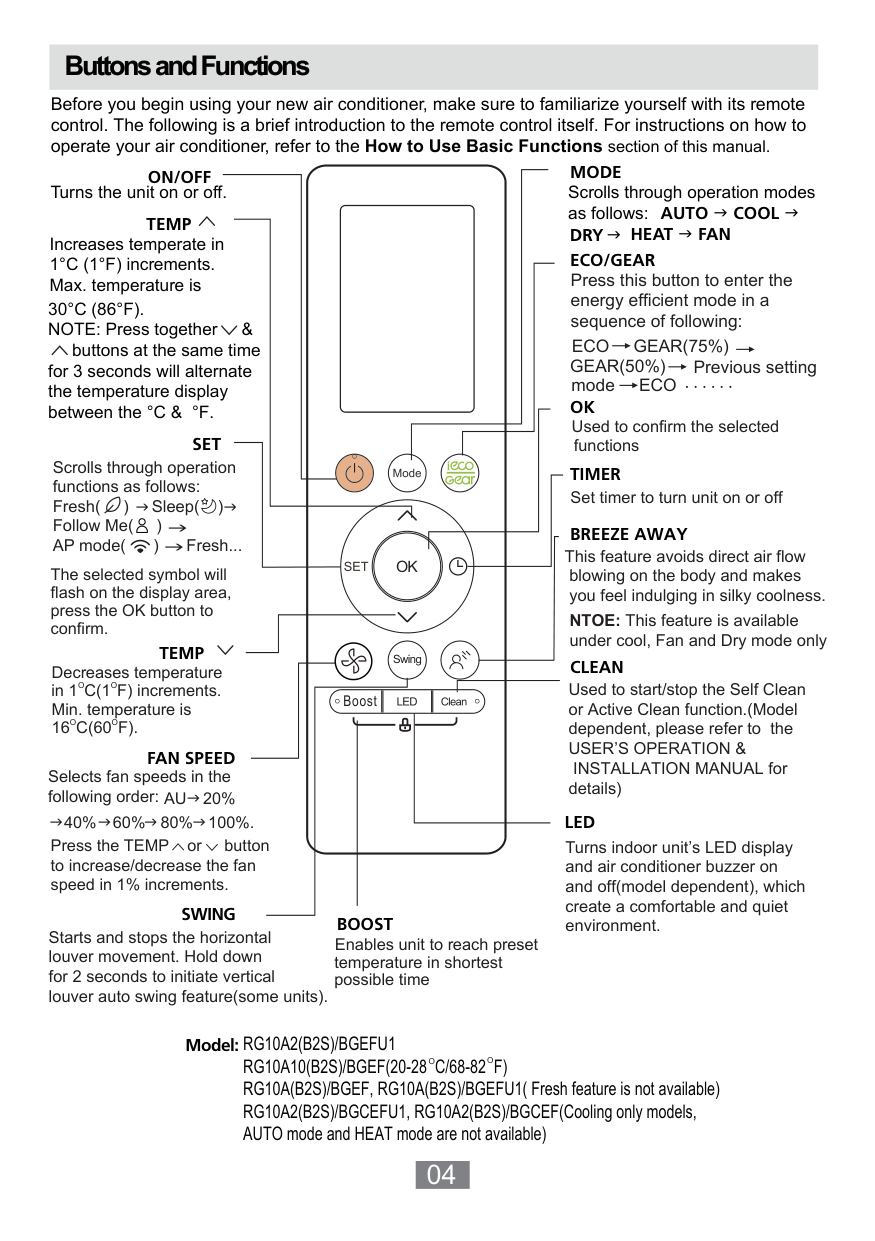
Before you begin using your new air conditioner, make sure to familiarize yourself with its remote control. The following is a brief introduction to the remote control itself. For instructions on how to operate your air conditioner, refer to the How to Use Basic Functions section of this manual.
MODE
ON/OFF
Turns the unit on or off.
Scrolls through operation modes as follows: AUTO COOL DRY HEAT FAN
TEMP
Increases temperate in 1°C (1°F) increments. Max. temperature is 30°C (86°F). NOTE: Press together &
ECO/GEAR
Press this button to enter the energy efficient mode in a sequence of following: ECO GEAR(75%) GEAR(50%) mode ECO ......
buttons at the same time for 3 seconds will alternate the temperature display between the °C & °F.
Previous setting
OK
Used to confirm the selected functions
SET
Scrolls through operation functions as follows: Fresh( ) Sleep( ) Follow Me( ) AP mode( ) Fresh...
TIMER
Set timer to turn unit on or off
BREEZE AWAY
This feature avoids direct air flow blowing on the body and makes you feel indulging in silky coolness.
The selected symbol will flash on the display area, press the OK button to confirm.
NTOE: This feature is available under cool, Fan and Dry mode only
TEMP
CLEAN
Decreases temperature O Oin 1C(1F) increments. Min. temperature is
Used to start/stop the Self Clean or Active Clean function.(Model dependent, please refer to the USER’S OPERATION &
Boost
O16C(60F).
O
FAN SPEED
INSTALLATION MANUAL for details)
Selects fan speeds in the following order: AU
20%
LED
60%40% 80% 100%. Press the TEMP or button to increase/decrease the fan speed in 1% increments.
Turns indoor unit’s LED display and air conditioner buzzer on and off(model dependent), which create a comfortable and quiet environment.
SWING
BOOST
Starts and stops the horizontal louver movement. Hold down for 2 seconds to initiate vertical louver auto swing feature(some units).
Enables unit to reach preset temperature in shortest possible time
RG10A2(B2S)/BGEFU1 RG10A10(B2S)/BGEF(20-28 C/68-82 F) RG10A(B2S)/BGEF, RG10A(B2S)/BGEFU1( Fresh feature is not available) RG10A2(B2S)/BGCEFU1, RG10A2(B2S)/BGCEF(Cooling only models, AUTO mode and HEAT mode are not available)
Model:
O O
TEMP
ON/OFF
SET
Turns the unit on or off.
MODE
OK
TIMER
FRESH
CLEAN
LED
BOOST
ECO/GEAR
Scrolls through operation modes as follows: AUTO COOL DRY HEAT FAN
FAN SPEED
SWING
Increases temperate in 1°C (1°F) increments. Max. temperature is 30°C (86°F). NOTE: Press together &
buttons at the same time
Scrolls through operation functions as follows: Breeze Away( ) Sleep ( ) Follow Me( ) AP mode( ) Breeze Away ...
The selected symbol will flash on the display area, press OK button to confirm.
TEMP
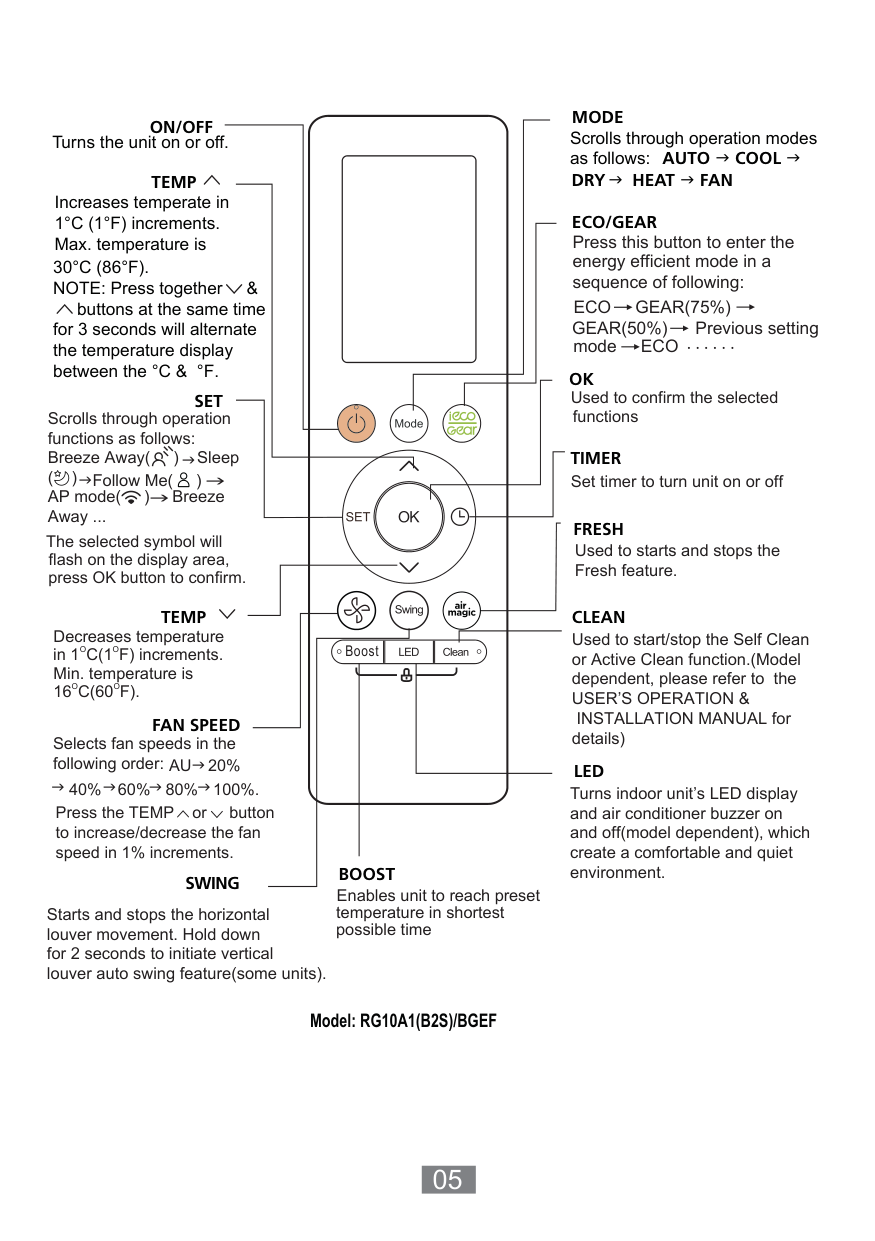
Decreases temperature O Oin 1C(1F) increments. Min. temperature is
Boost
O O16C(60F).
Selects fan speeds in the following order: AU
20%
60%40% 80% 100%. Press the TEMP or button to increase/decrease the fan speed in 1% increments.
Enables unit to reach preset temperature in shortest possible time
Starts and stops the horizontal louver movement. Hold down
Model: RG10A1(B2S)/BGEF
Press this button to enter the energy efficient mode in a sequence of following: ECO GEAR(75%) GEAR(50%) mode ECO ......
Previous setting
Used to confirm the selected functions
Set timer to turn unit on or off
Used to starts and stops the Fresh feature.
Used to start/stop the Self Clean or Active Clean function.(Model dependent, please refer to the USER’S OPERATION &
INSTALLATION MANUAL for details)
Turns indoor unit’s LED display and air conditioner buzzer on and off(model dependent), which create a comfortable and quiet environment.
Remote Screen Indicators
Information are displayed when the remote controller is power up.
Breeze Away display
Active clean feature display Fresh feature display Sleep mode display Follow me feature display Wireless control feature display Low battery detection display(If flashes)
################# Transmission Indicator
Lights up when remote sends signal to indoor unit
MODE display
Displays the current including:
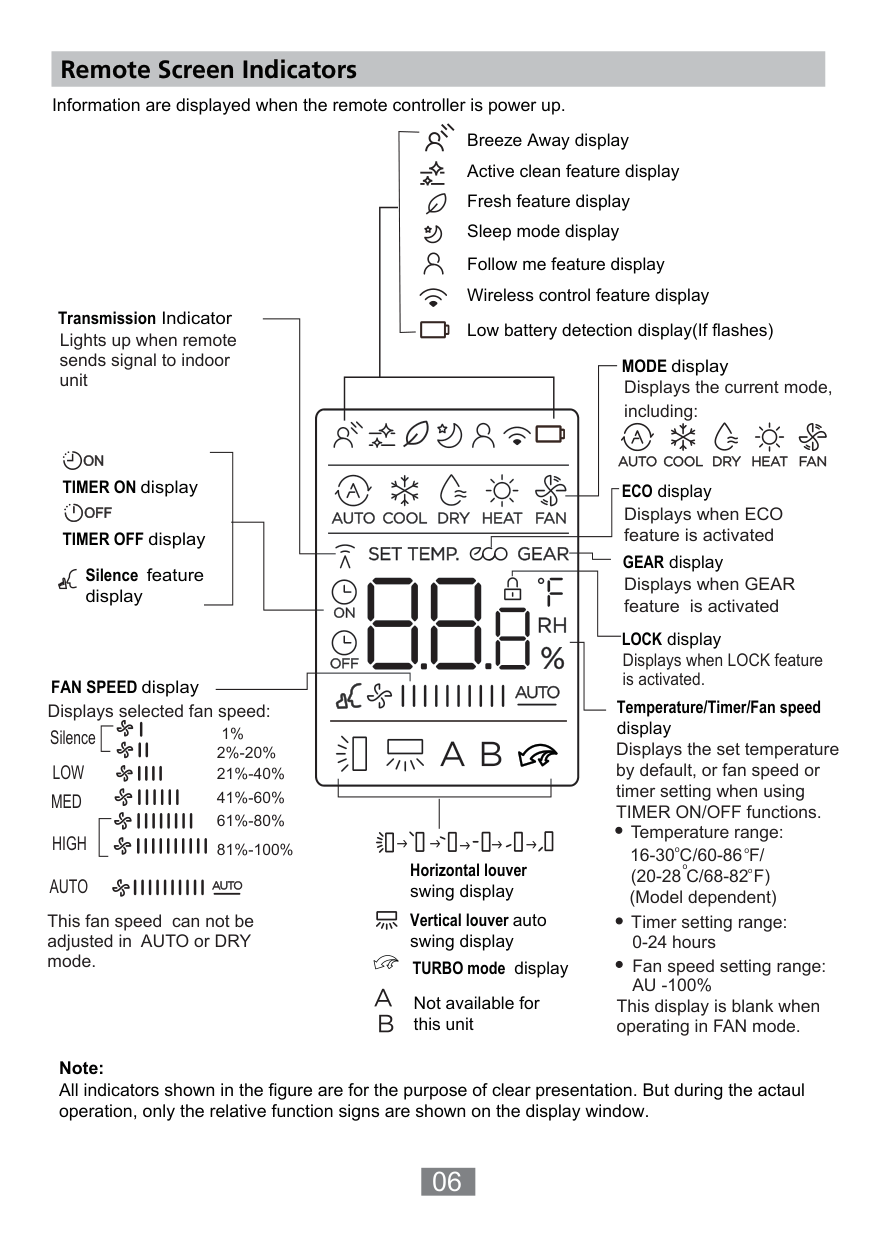
mode,
TIMER ON display
ECO display
Displays when ECO feature is activated
TIMER OFF display
GEAR display
Silence feature display
Displays when GEAR feature is activated
LOCK display
Displays when LOCK feature is activated.
FAN SPEED display
Temperature/Timer/Fan speed display
Displays selected fan speed:
1%
Silence
Displays the set temperature by default, or fan speed or timer setting when using TIMER ON/OFF functions.
2%-20% 21%-40% 41%-60% 61%-80% 81%-100%
LOW MED
| | | | |---|---|---| | | | |
Temperature range: 16-30 C //60-86F
HIGH AUTO
Horizontal louver swing display
(20-28 C/68-82 F) (Model dependent)
Vertical louver auto swing display TURBO mode display
This fan speed can not be adjusted in AUTO or DRY mode.
Timer setting range: 0-24 hours Fan speed setting range: AU -100%
Not available for this unit
This display is blank when operating in FAN mode.
Note: All indicators shown in the figure are for the purpose of clear presentation. But during the actaul operation, only the relative function signs are shown on the display window.
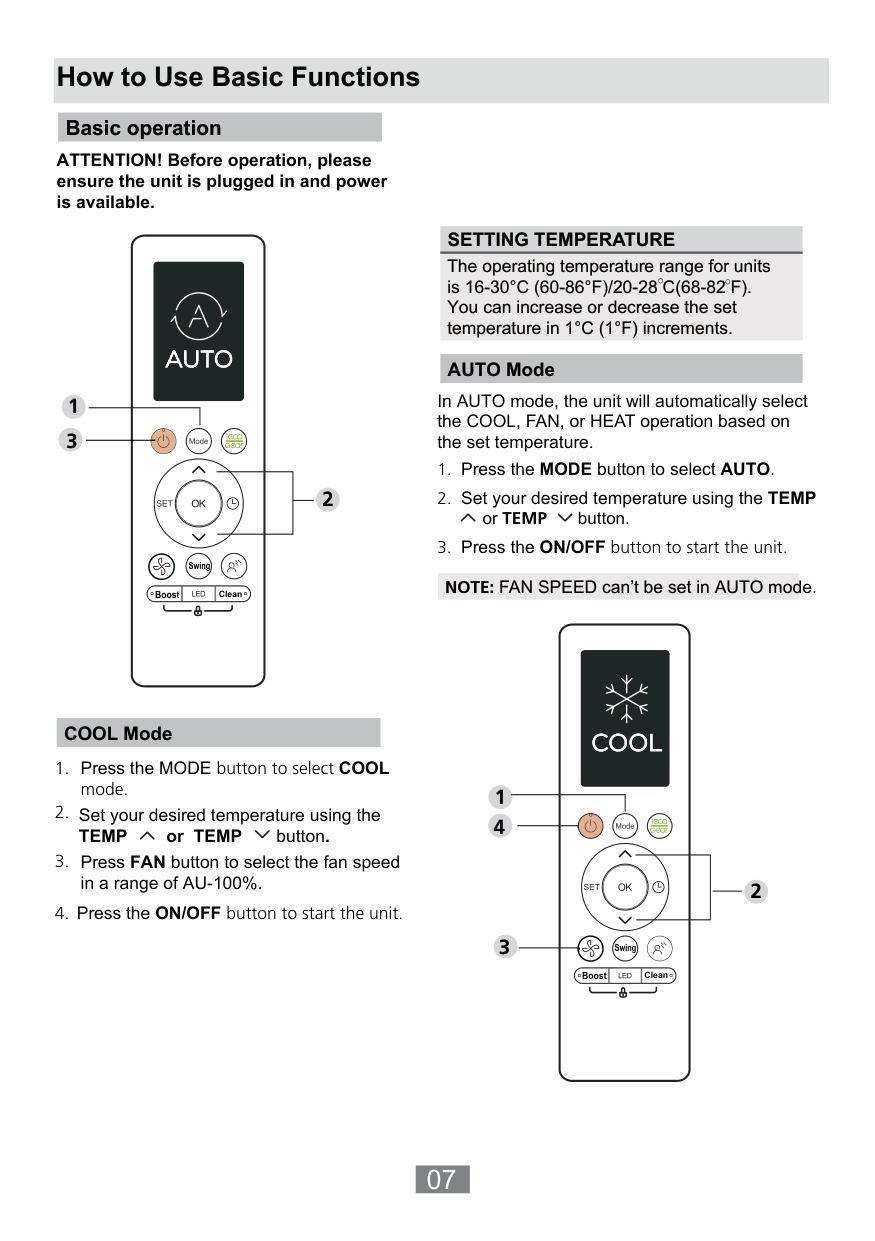
##### How to Use Basic Functions
############# Basic operation
ATTENTION! Before operation, please ensure the unit is plugged in and power is available.
1 3
Swing
Boost Clean
2
SETTING TEMPERATURE The operating temperature range for units is 16-30°C (60-86°F)/20-28 C(68-82 F). You can increase or decrease the set temperature in 1°C (1°F) increments.
AUTO Mode
In AUTO mode, the unit will automatically select the COOL, FAN, or HEAT operation based on the set temperature.
NOTE: FAN SPEED can’t be set in AUTO mode.
COOL Mode
Set your desired temperature using the TEMP or TEMP button.
Press the ON/OFF button to start the unit.
1
2
| | | |---|---| | | | |Clean| |
Swing
Boost
1 3
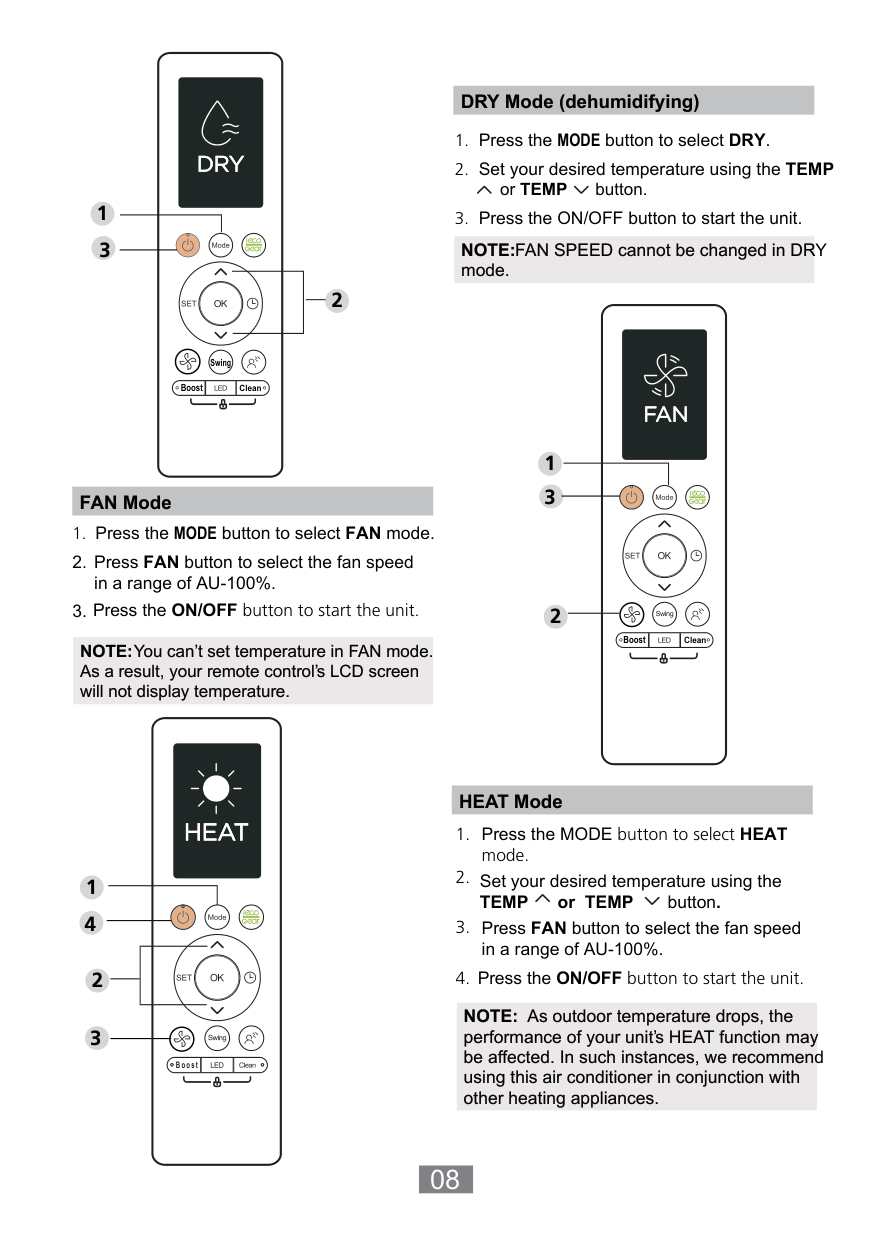
DRY Mode (dehumidifying)
2
NOTE:FAN SPEED cannot be changed in DRY mode.
################ FAN Mode
NOTE:You can’t set temperature in FAN mode. As a result, your remote control’s LCD screen will not display temperature.
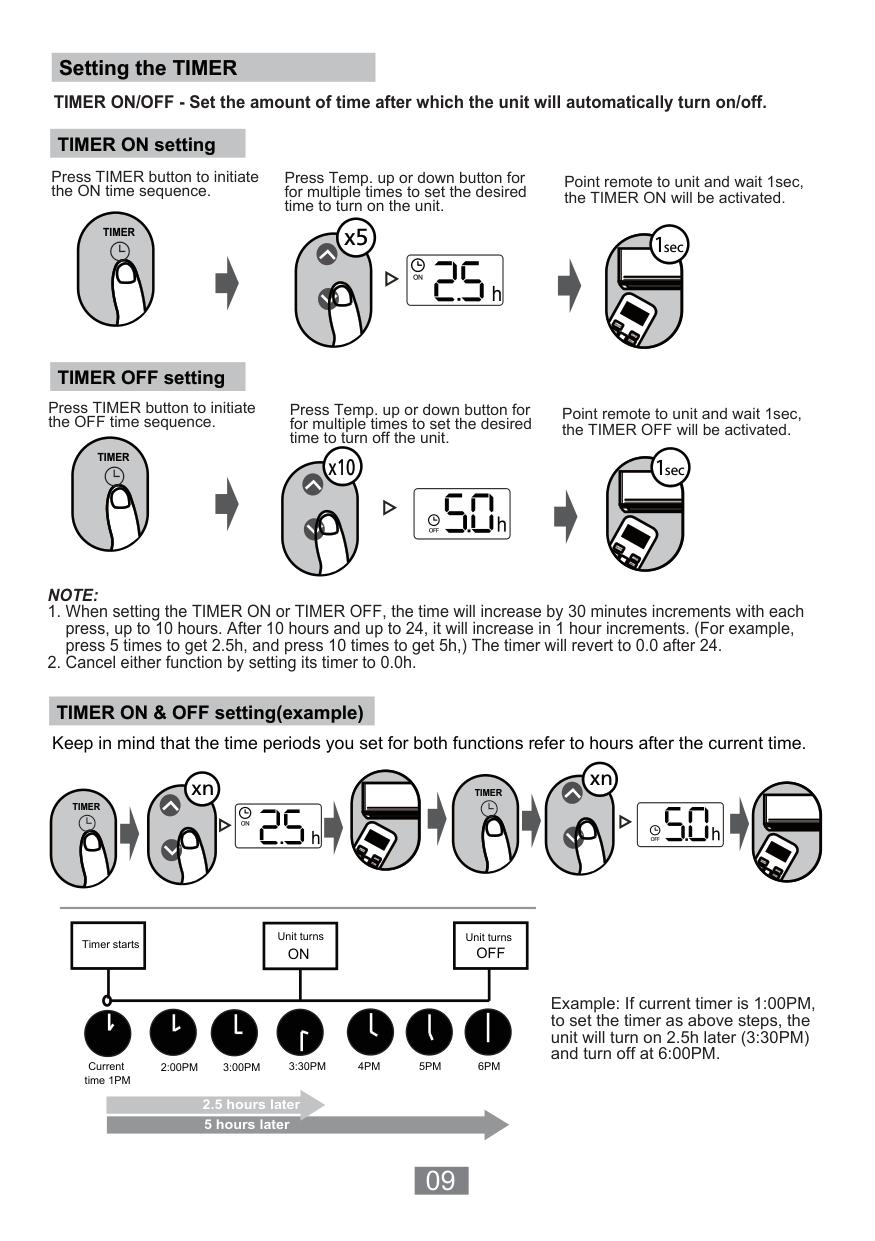
2
Press the MODE button to select FAN mode.
Press the ON/OFF button to start the unit.
Swing
Boost
| | | |---|---| | | | |Clean| |
Boost Clean
Press FAN button to select the fan speed in a range of AU-100%.
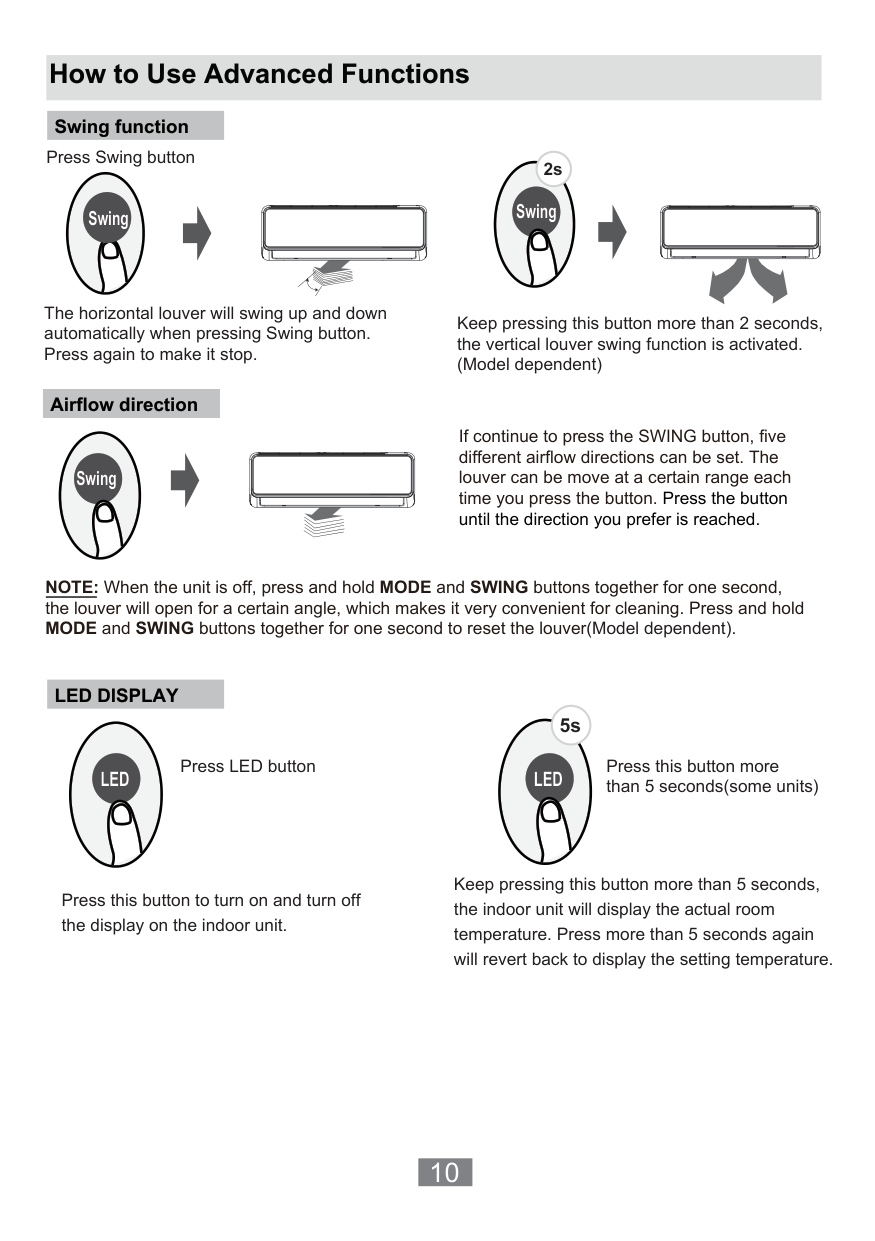
Set your desired temperature using the TEMP or TEMP button.
Press the ON/OFF button to start the unit.
| | | |---|---| | | |
################ HEAT Mode
##################### Boost
NOTE: As outdoor temperature drops, the performance of your unit’s HEAT function may be affected. In such instances, we recommend using this air conditioner in conjunction with other heating appliances.
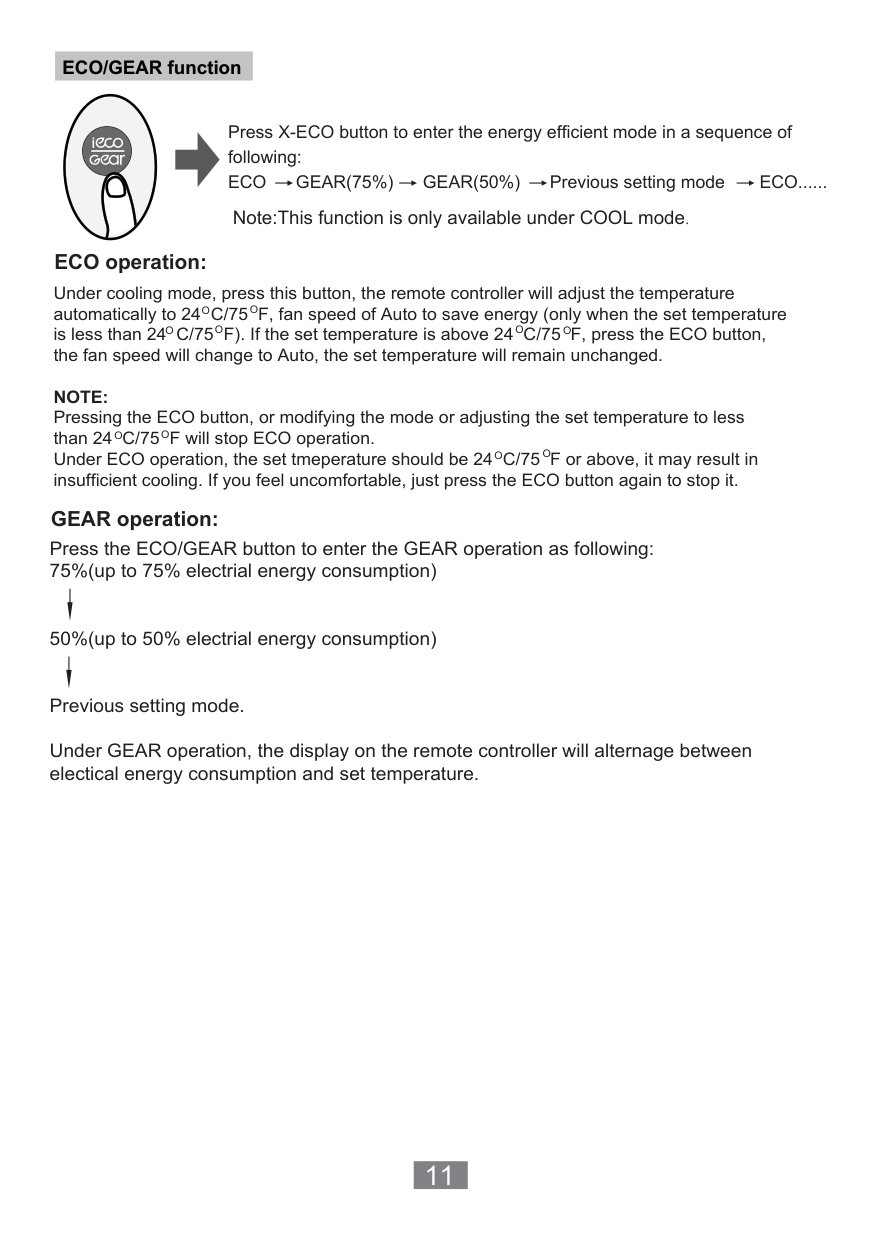
############# Setting the TIMER
TIMER ON/OFF - Set the amount of time after which the unit will automatically turn on/off.
TIMER ON setting
Press TIMER button to initiate the ON time sequence.
Press Temp. up or down button for for multiple times to set the desired time to turn on the unit.
Point remote to unit and wait 1sec, the TIMER ON will be activated.
######### x5
TIMER
1sec
| | | |---|---| | | |
O
/OFF M
OD
TCUT IME
TEMP
ON IME
O
TIMER OFF setting
Press TIMER button to initiate the OFF time sequence.
Press Temp. up or down button for for multiple times to set the desired time to turn off the unit.
Point remote to unit and wait 1sec, the TIMER OFF will be activated.
TIMER
1sec
########### x10
| | | |---|---| | | |
O
/OFF M
OD
TCUT IME
TEMP
ON IME
O
#################### NOTE:
TIMER ON & OFF setting(example)
Keep in mind that the time periods you set for both functions refer to hours after the current time.
xn
xn
| | | |---|---| | | |
TIMER
| | | |---|---| | | |
TIMER
O
/OFF M
E
CUT
ON/OF M
EM
IMERON IMER
OD
ORT T
TEMP
TIMER
N TIMERO
Timer starts
Unit turns ON
Unit turns OFF
2:00PM 3:00PM 4PM 5PM 6PM
Current time 1PM
3:30PM
2.5 hours later 5 hours later
Example: If current timer is 1:00PM, to set the timer as above steps, the unit will turn on 2.5h later (3:30PM) and turn off at 6:00PM.
##### How to Use Advanced Functions
Swing function
Press Swing button
################## 2s
Swing
The horizontal louver will swing up and down automatically when pressing Swing button. Press again to make it stop.
Swing
Keep pressing this button more than 2 seconds, the vertical louver swing function is activated. (Model dependent)
Airflow direction
Swing
If continue to press the SWING button, five different airflow directions can be set. The louver can be move at a certain range each time you press the button. Press the button until the direction you prefer is reached.
NOTE: When the unit is off, press and hold MODE and SWING buttons together for one second, the louver will open for a certain angle, which makes it very convenient for cleaning. Press and hold MODE and SWING buttons together for one second to reset the louver(Model dependent).
LED DISPLAY
############## 5s
Press LED button Press this button more than 5 seconds(some units)
LED LED
Press this button to turn on and turn off the display on the indoor unit.
Keep pressing this button more than 5 seconds, the indoor unit will display the actual room temperature. Press more than 5 seconds again will revert back to display the setting temperature.
################ ECO/GEAR function
Press X-ECO button to enter the energy efficient mode in a sequence of following: ECO GEAR(75%) GEAR(50%) Previous setting mode ECO......
Note:This function is only available under COOL mode. ECO operation:
Under cooling mode, press this button, the remote controller will adjust the temperature automatically to 24 C/75 F, fan speed of Auto to save energy (only when the set temperature is less than 24 C/75 F). If the set temperature is above 24 C/75 F, press the ECO button, the fan speed will change to Auto, the set temperature will remain unchanged.
O
O
OOO
O
NOTE: Pressing the ECO button, or modifying the mode or adjusting the set temperature to less than 24 C/75 F will stop ECO operation. Under ECO operation, the set tmeperature should be 24 C/75 F or above, it may result in insufficient cooling. If you feel uncomfortable, just press the ECO button again to stop it.
O
O
OO
GEAR operation: Press the ECO/GEAR button to enter the GEAR operation as following: 75%(up to 75% electrial energy consumption)
50%(up to 50% electrial energy consumption)
Previous setting mode. Under GEAR operation, the display on the remote controller will alternage between electical energy consumption and set temperature.
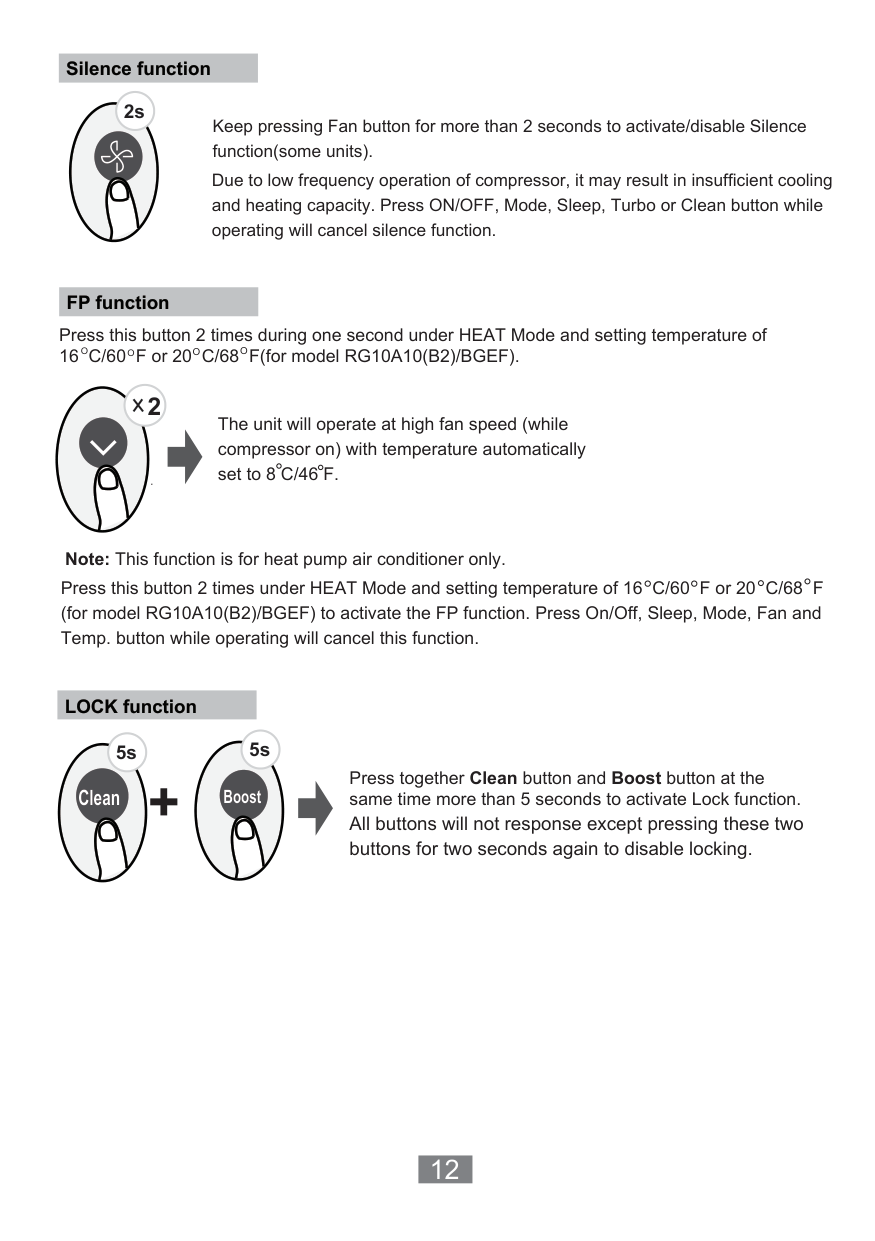
Silence function
############### 2s
Keep pressing Fan button for more than 2 seconds to activate/disable Silence function(some units). Due to low frequency operation of compressor, it may result in insufficient cooling and heating capacity. Press ON/OFF, Mode, Sleep, Turbo or Clean button while operating will cancel silence function.
FP function
Press this button 2 times during one second under HEAT Mode and setting temperature of 16 C/60 F or 20 C/68 F(for model RG10A10(B2)/BGEF).
O OOO
2
The unit will operate at high fan speed (while compressor on) with temperature automatically set to 8 C/46 F.
Note: This function is for heat pump air conditioner only.
Press this button 2 times under HEAT Mode and setting temperature of 16 C/60 F or 20 C/68 F (for model RG10A10(B2)/BGEF) to activate the FP function. Press On/Off, Sleep, Mode, Fan and Temp. button while operating will cancel this function.
LOCK function
5s5s
Press together Clean button and Boost button at the same time more than 5 seconds to activate Lock function. All buttons will not response except pressing these two buttons for two seconds again to disable locking.
+
Clean
Boost
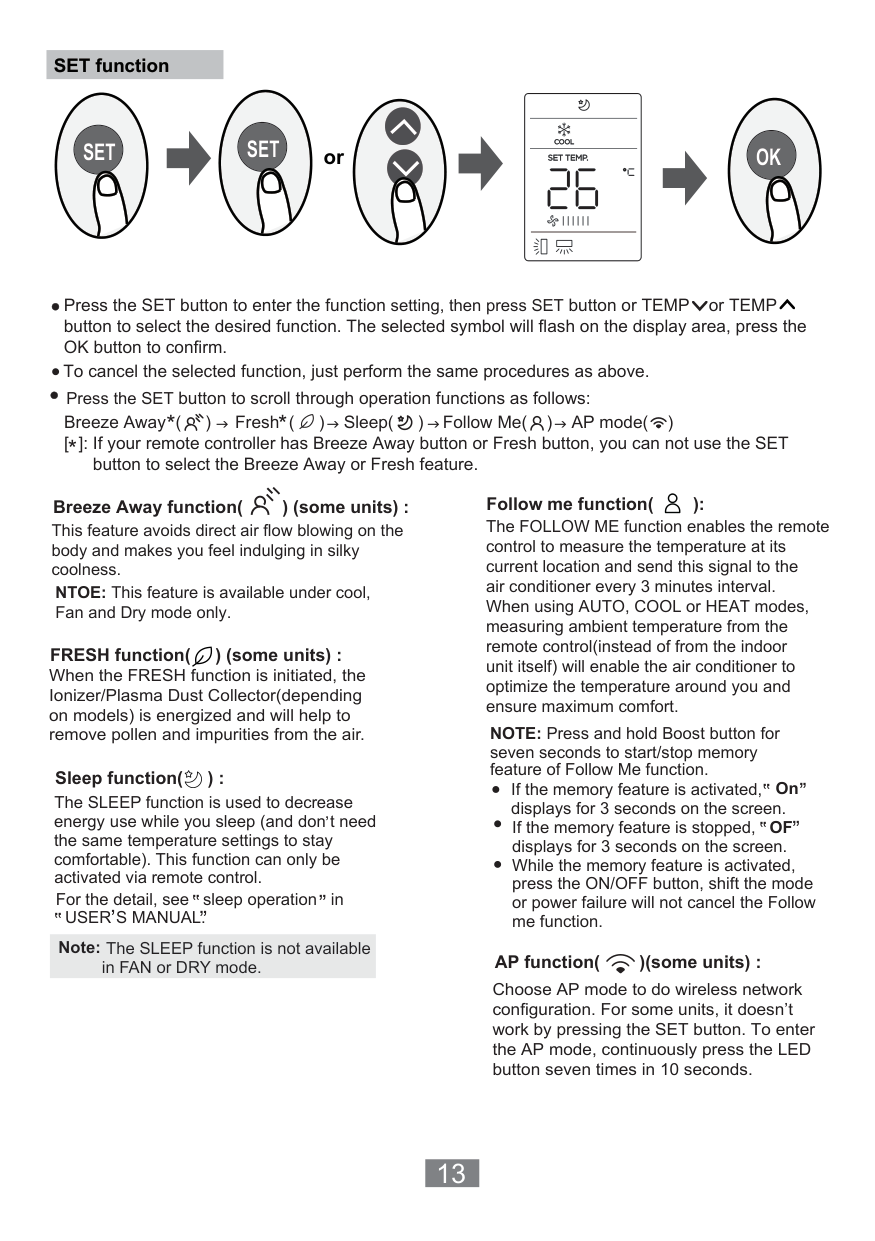
SET function
########## orSETSET OK
Press the SET button to enter the function setting, then press SET button or TEMP or TEMP button to select the desired function. The selected symbol will flash on the display area, press the OK button to confirm. To cancel the selected function, just perform the same procedures as above. Press the SET button to scroll through operation functions as follows:
**
Breeze Away ( ) Fresh ( ) Sleep( ) Follow Me( ) AP mode( ) [ ]: If your remote controller has Breeze Away button or Fresh button, you can not use the SET

######## *
button to select the Breeze Away or Fresh feature.
Follow me function( ):
Breeze Away function( ) (some units) :
The FOLLOW ME function enables the remote control to measure the temperature at its current location and send this signal to the air conditioner every 3 minutes interval. When using AUTO, COOL or HEAT modes, measuring ambient temperature from the remote control(instead of from the indoor unit itself) will enable the air conditioner to optimize the temperature around you and ensure maximum comfort.
This feature avoids direct air flow blowing on the body and makes you feel indulging in silky coolness.
NTOE: This feature is available under cool, Fan and Dry mode only.
FRESH function( ) (some units) :
When the FRESH function is initiated, the Ionizer/Plasma Dust Collector(depending on models) is energized and will help to remove pollen and impurities from the air.
NOTE: Press and hold Boost button for seven seconds to start/stop memory feature of Follow Me function.
, ,
,
, , , ,
Sleep function( ) :
If the memory feature is activated, On displays for 3 seconds on the screen.
The SLEEP function is used to decrease energy use while you sleep (and don t need the same temperature settings to stay comfortable). This function can only be activated via remote control.
,
,If the memory feature is stopped,OF displays for 3 seconds on the screen. While the memory feature is activated, press the ON/OFF button, shift the mode or power failure will not cancel the Follow me function.
,, ,,
,, ,,
For the detail, see sleep operation in
USER S MANUAL.,
Note: The SLEEP function is not available
AP function( )(some units) :
in FAN or DRY mode.
Choose AP mode to do wireless network configuration. For some units, it doesn’t work by pressing the SET button. To enter the AP mode, continuously press the LED button seven times in 10 seconds.
The design and specifications are subject to change without prior notice for product improvement. Consult with the sales agency or manufacturer for details.
CR247-RG10A(B2S) 16117000002201 2020.7.31