
Philips 1200 Series Fully Automatic Espresso Machine
Ask AI
— answers from the official manualAnswers from the official manual.
Common questions
Common Questions
20 totalHow do I restore the factory default settings on the Philips 1200 Series Espresso Machine?
Turn the machine off, then press and hold the espresso icon for 3 seconds until the middle lights in the drink setting icons light up and the start/stop light pulses. Press the start/stop button to confirm, then press the on/off button to switch the machine back on. You can only restore default settings when the machine is switched off. (Page 11)
What should I do when the Calc/Clean light starts flashing slowly?
A slowly flashing Calc/Clean light means you need to descale the machine. Use only Philips descaler — never use descalers based on sulfuric acid, hydrochloric acid, sulfamic acid, or acetic acid (vinegar), as these can damage the water circuit and will void your warranty. Failure to descale the machine will also void your warranty. (Page 16)
How often should I replace the AquaClean water filter?
Replace the AquaClean water filter at least every 3 months, even if the machine has not yet indicated that replacement is required. After 95 liters of water have flowed through the filter, the AquaClean light will turn orange and flash to remind you to replace it. As long as the light is flashing orange, you can replace the filter without descaling the machine first. (Page 15)
What does it mean when all warning icon lights are flashing simultaneously?
All warning icon lights flashing indicates an error that requires a machine reset — unplug the machine and plug it back in. Before switching back on, remove the AquaClean filter, ensure the water tank is fully seated, and check if the pre-ground coffee compartment is clogged. If the lights continue to flash after these steps, the machine may be overheated; switch it off, wait 30 minutes, and try again. (Page 19)
How do I brew coffee using pre-ground coffee instead of beans?
Open the lid of the pre-ground coffee compartment and pour one leveled measuring scoop of pre-ground coffee into it, then close the lid. Select a single drink, then press and hold the aroma strength icon for 3 seconds until the pre-ground coffee light turns on. Press the start/stop button to brew; note that you can only brew one coffee at a time with pre-ground coffee. (Page 9)
How do I set the water hardness on the machine?
With the machine switched off, press and hold the aroma strength icon until all lights in the icon turn on, then tap the aroma strength icon 1, 2, 3, or 4 times to match the number of red squares shown on the water hardness test strip supplied in the box. Press the start/stop button to confirm, then press on/off to restart the machine. The default water hardness setting is 4 (hard water). (Page 16)
Show 14 more questions
How often should I clean and lubricate the brew group?
Why is my coffee coming out watery?
What are the water tank and bean hopper capacities of the 1200 Series?
How do I activate the AquaClean water filter for the first time?
How do I reset the machine's factory settings?
What should I do if my machine doesn't dispense coffee?
How often should I descale my machine?
Can I use pre-ground coffee instead of beans?
What do I do if the 'empty coffee grounds container' light stays on?
How do I clean the brew group?
How do I deactivate and reactivate the AquaClean filter?
How do I change the machine's standby time?
What milk types are best for frothing?
How do I adjust the grind size setting?
Full Manual
66 pages
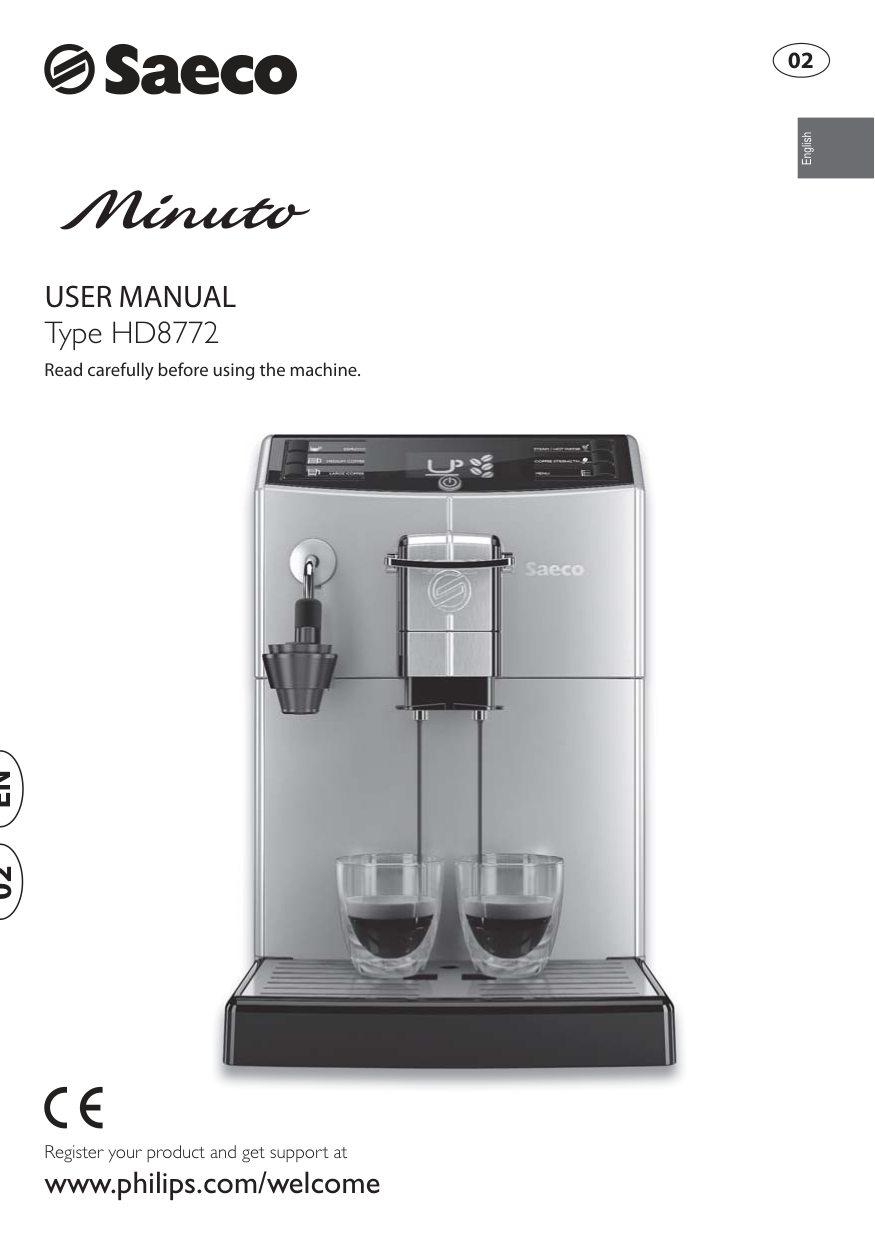
User Manual
Read carefully before using the machine. Register your product and get support at www.philips.com/welcome English Type HD8772En
02 02
Important Safeguards
When using electrical appliances, basic safety precautions should always be followed, including the following:Save These Instructions
Caution
This appliance is for household use only. Any servicing, other than cleaning and user maintenance, should be performed by an authorized service center. Do not immerse machine in water. To reduce the risk of fire or electric shock, do not disassemble the machine. There are no parts inside the machine serviceable by the user. Repair should be done by authorized service personnel only.Instructions For The Power
Supply Cord
A. A short power-supply cord (or detachable power-supply cord) is to be provided to reduce risks resulting from becoming entangled in or tripping over a longer cord. B. Longer detachable power-supply cords or extension cords are available and may used if care is exercised in their use. C. If a long detachable power-supply cord or extension cord is used,
2
English
Congratulations on your purchase of a Saeco Minuto Auto- matic Milk Frother full automatic coff ee machine! To fully benefi t from the support that Saeco off ers, please register your product at www.philips.com/welcome. This user manual applies to HD8772. The machine is made for preparing espresso and coff ee using whole coff ee beans and for dispensing steam and hot water. In this user manual you will fi nd all the information you need to install, use, clean and descale your machine.
3
English
Contents
INSTALLATION ................................................................................................. 4 Product Overview ......................................................................................................................................4 General Description ...................................................................................................................................5 PREPARING FOR USE ........................................................................................ 6 Machine Packaging ...................................................................................................................................6 Machine Installation .................................................................................................................................6 USING THE MACHINE FOR THE FIRST TIME ......................................................... 8 Circuit Priming ..........................................................................................................................................8 Automatic Rinse/Self-Cleaning Cycle.........................................................................................................9 Manual Rinse Cycle..................................................................................................................................10 Measuring and Programming Water Hardness ........................................................................................12 “INTENZA+” Water Filter Installation ......................................................................................................13 Replacing the “INTENZA+” Water Filter ...................................................................................................15 ADJUSTMENTS ................................................................................................16 Saeco Adapting System ...........................................................................................................................16 Adjusting the Ceramic Coff ee Grinder ......................................................................................................16 Adjusting the Aroma (Beverage Strength) ..............................................................................................17 Adjusting the Dispensing Spout ..............................................................................................................18 “ESPRESSO” or “COFFEE” selection lever ...................................................................................................19 Adjusting the Beverage Cup Length .......................................................................................................21 BREWING AN "ESPRESSO". ...............................................................................22 Brewing an Espresso using Coff ee Beans .................................................................................................22 Brewing an Espresso using Pre-Ground Coff ee ........................................................................................23 BREWING A COFFEE.........................................................................................24 Brewing a Coff ee Using Coff ee Beans ......................................................................................................24 Brewing a coff ee Using Pre-Ground Coff ee ..............................................................................................25 DISPENSING STEAM/CAPPUCCINO BREWING ....................................................27 HOT WATER DISPENSING .................................................................................29 CLEANING AND MAINTENANCE ........................................................................31 Daily Cleaning of the Machine .................................................................................................................31 Daily Cleaning of the Water Tank .............................................................................................................32 Daily Cleaning of the Automatic Milk Frother ..........................................................................................33 Weekly Cleaning of the Machine .............................................................................................................34 Weekly Cleaning of the Brew Group ........................................................................................................35 Monthly Cleaning of the Automatic Milk Frother.....................................................................................37 Monthly Lubrication of the Brew Group ..................................................................................................43 Monthly Cleaning of the Brew Group with “Coff ee Oil Remover” .............................................................44 Monthly Cleaning of the Coff ee Bean Hopper ..........................................................................................46 DESCALING .....................................................................................................47 PROGRAMMING ..............................................................................................51 The following settings can be adjusted ...................................................................................................51 How to Program the Machine .................................................................................................................52 MEANING OF THE DISPLAY ICONS .....................................................................54 TROUBLESHOOTING ........................................................................................58 ENERGY SAVING ..............................................................................................60 Stand-by .................................................................................................................................................60 Disposal ..................................................................................................................................................60 TECHNICAL SPECIFICATIONS ............................................................................61 WARRANTY AND SERVICE ................................................................................61 Warranty .................................................................................................................................................61 Service ....................................................................................................................................................61 ORDERING MAINTENANCE PRODUCTS ..............................................................62
4
Installation
Product Overview 33 19 21 22 24 23 20 1 2 3 4 11 12 14 5 6 7 8 9 10 26 29 27 30 28 31 17 16 18 25 32 13 15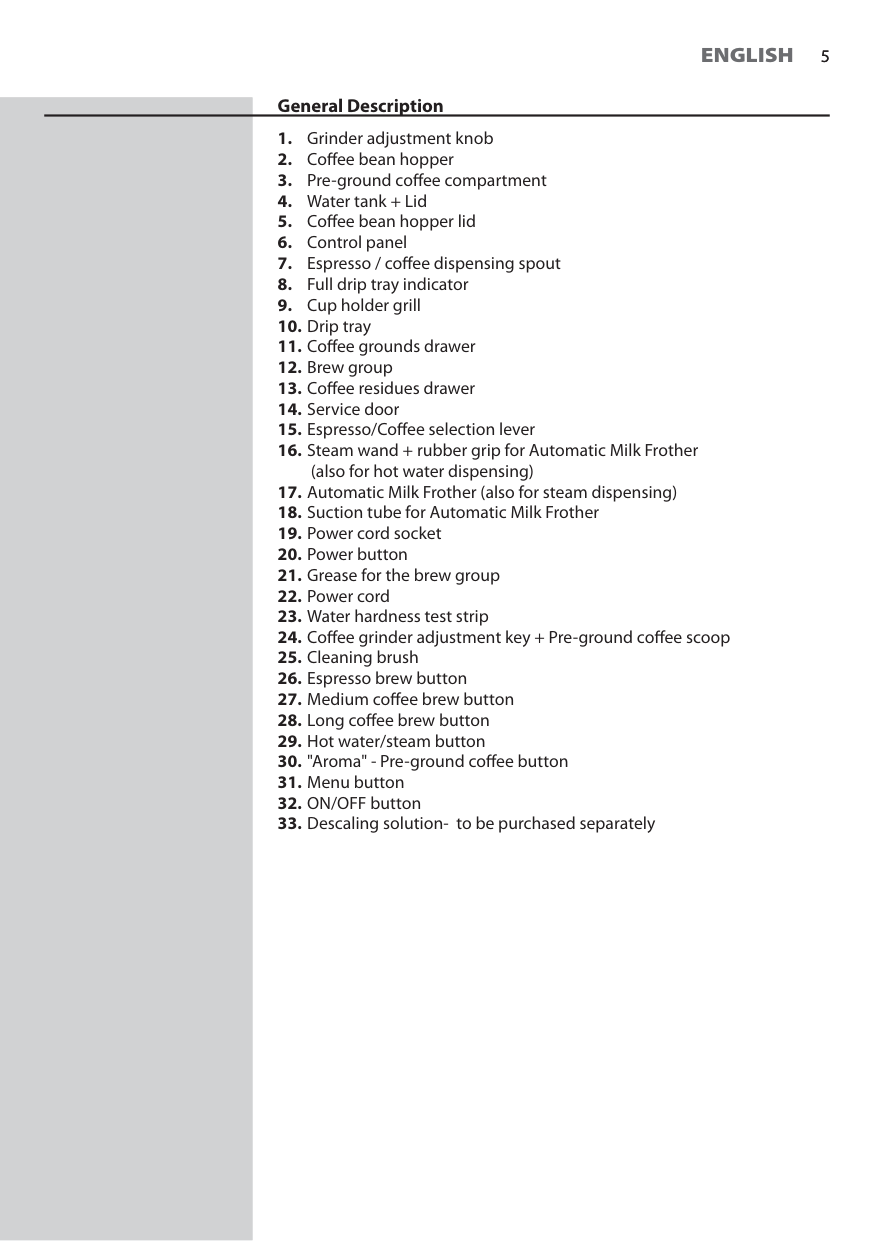
5
English
5 General Description(also for hot water dispensing)
6
English
Preparing For Use
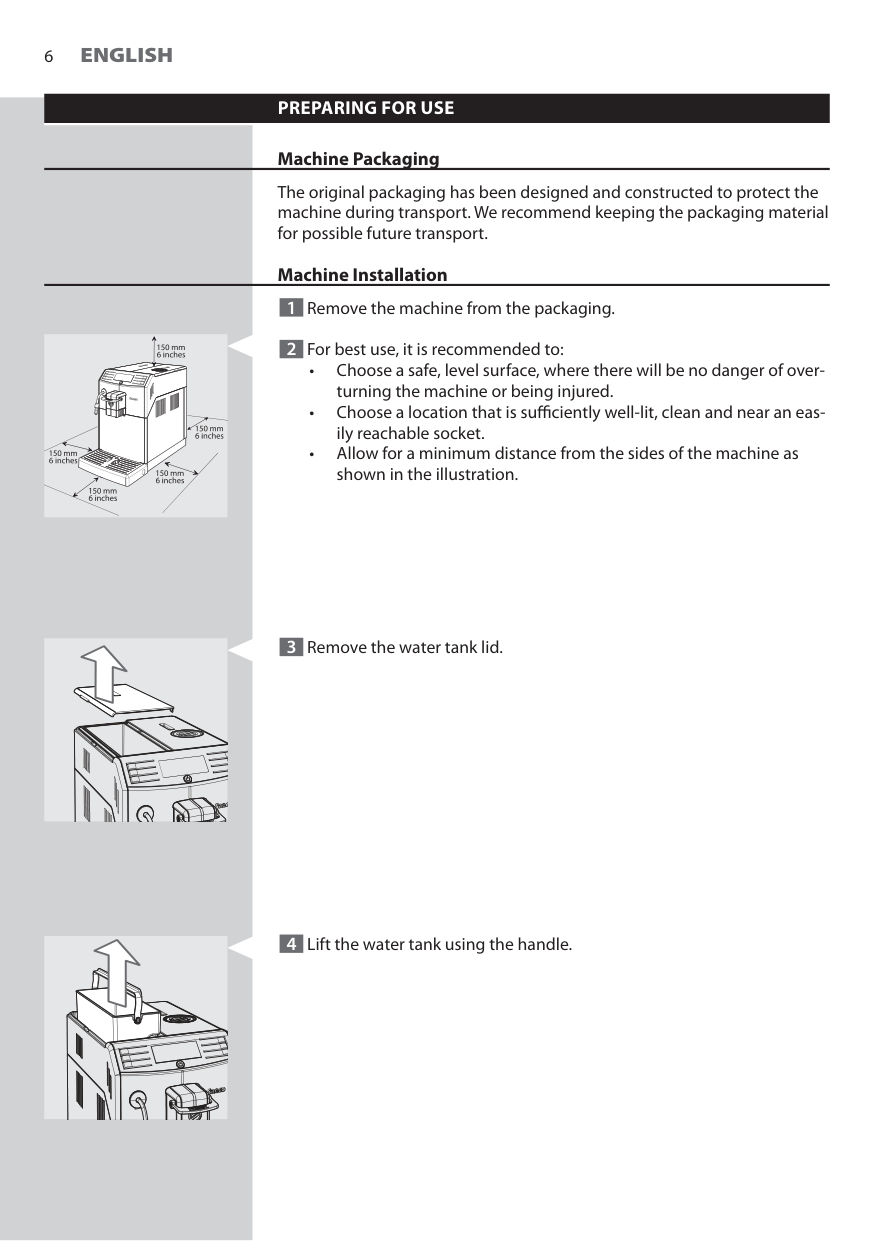
Machine Packaging The original packaging has been designed and constructed to protect the machine during transport. We recommend keeping the packaging material for possible future transport. Machine Installation 1 Remove the machine from the packaging. 2 For best use, it is recommended to: • Choose a safe, level surface, where there will be no danger of over- turning the machine or being injured. • Choose a location that is suffi ciently well-lit, clean and near an eas- ily reachable socket. • Allow for a minimum distance from the sides of the machine as shown in the illustration. 3 Remove the water tank lid. 4 Lift the water tank using the handle.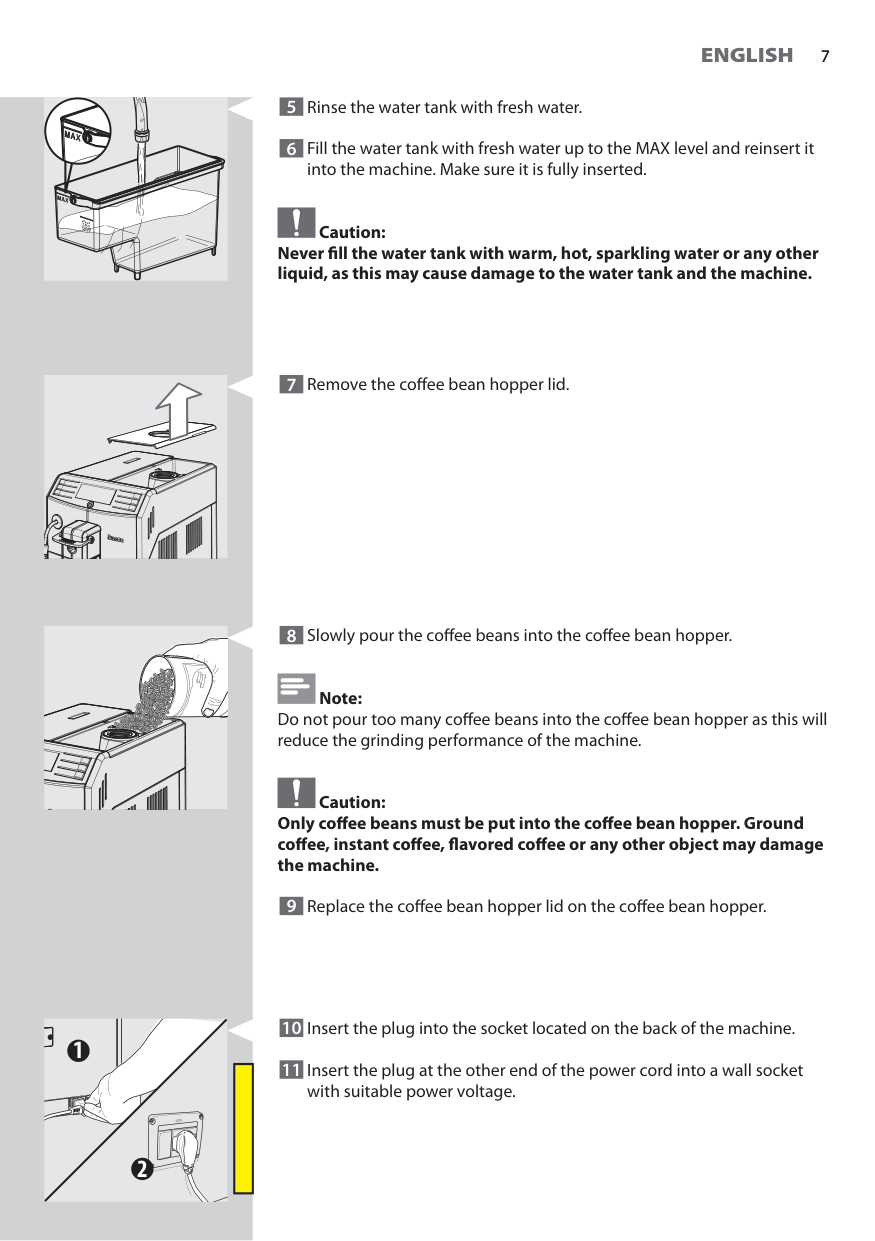
7
English
7 8 Slowly pour the coff ee beans into the coff ee bean hopper. Note: Do not pour too many coff ee beans into the coff ee bean hopper as this will reduce the grinding performance of the machine. Caution: Only coff ee beans must be put into the coff ee bean hopper. Ground coff ee, instant coff ee, fl avored coff ee or any other object may damage the machine. 9 Replace the coff ee bean hopper lid on the coff ee bean hopper. 10 Insert the plug into the socket located on the back of the machine. 11 Insert the plug at the other end of the power cord into a wall socket with suitable power voltage. 1 2 5 Rinse the water tank with fresh water. 6 Fill the water tank with fresh water up to the MAX level and reinsert it into the machine. Make sure it is fully inserted. Caution: Never fi ll the water tank with warm, hot, sparkling water or any other liquid, as this may cause damage to the water tank and the machine. 7 Remove the coff ee bean hopper lid.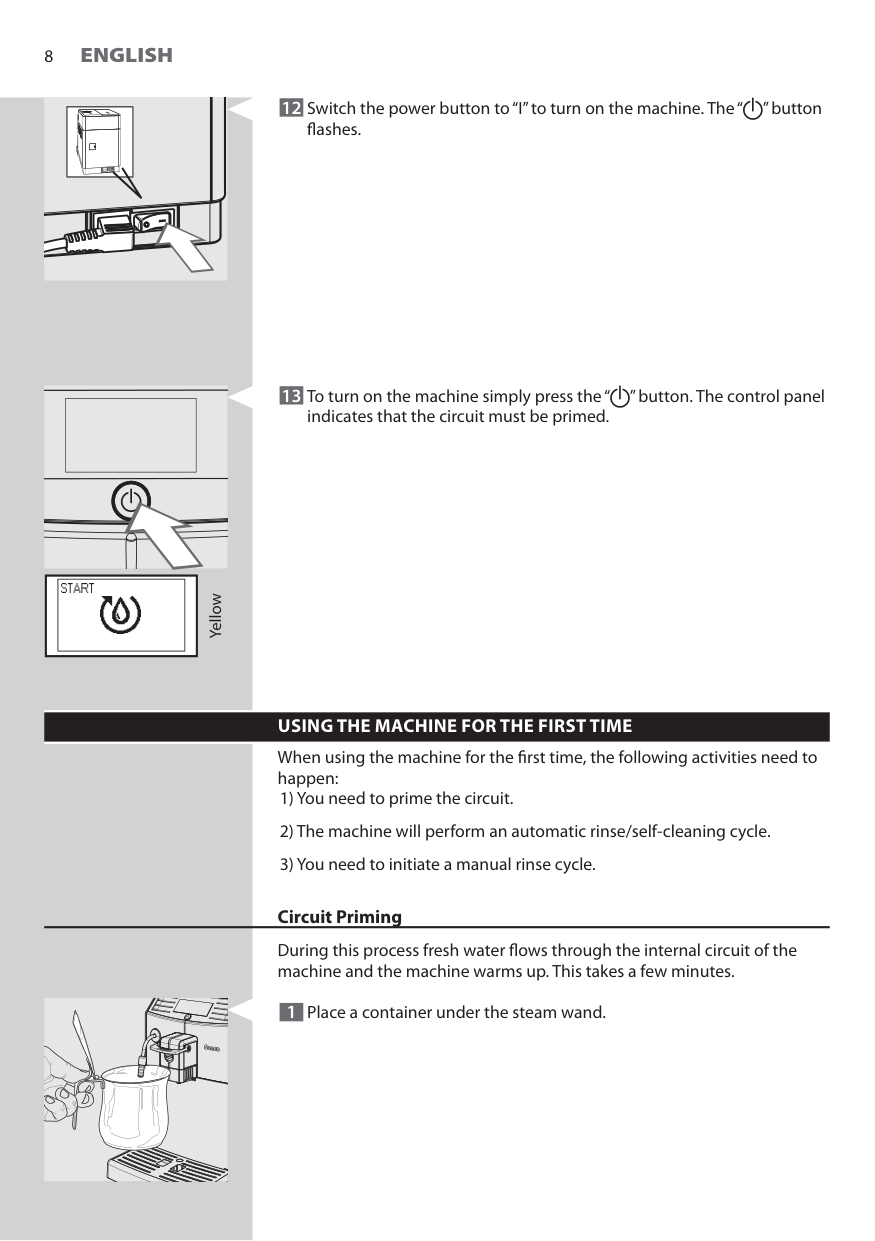
8
English
12 Switch the power button to “I” to turn on the machine. The “ ” button fl ashes. Yellow 13 To turn on the machine simply press the “ ” button. The control panel indicates that the circuit must be primed.Using The Machine For The First Time
When using the machine for the fi rst time, the following activities need to happen: 1) You need to prime the circuit. 2) The machine will perform an automatic rinse/self-cleaning cycle. 3) You need to initiate a manual rinse cycle. Circuit Priming During this process fresh water fl ows through the internal circuit of the machine and the machine warms up. This takes a few minutes. 1 Place a container under the steam wand.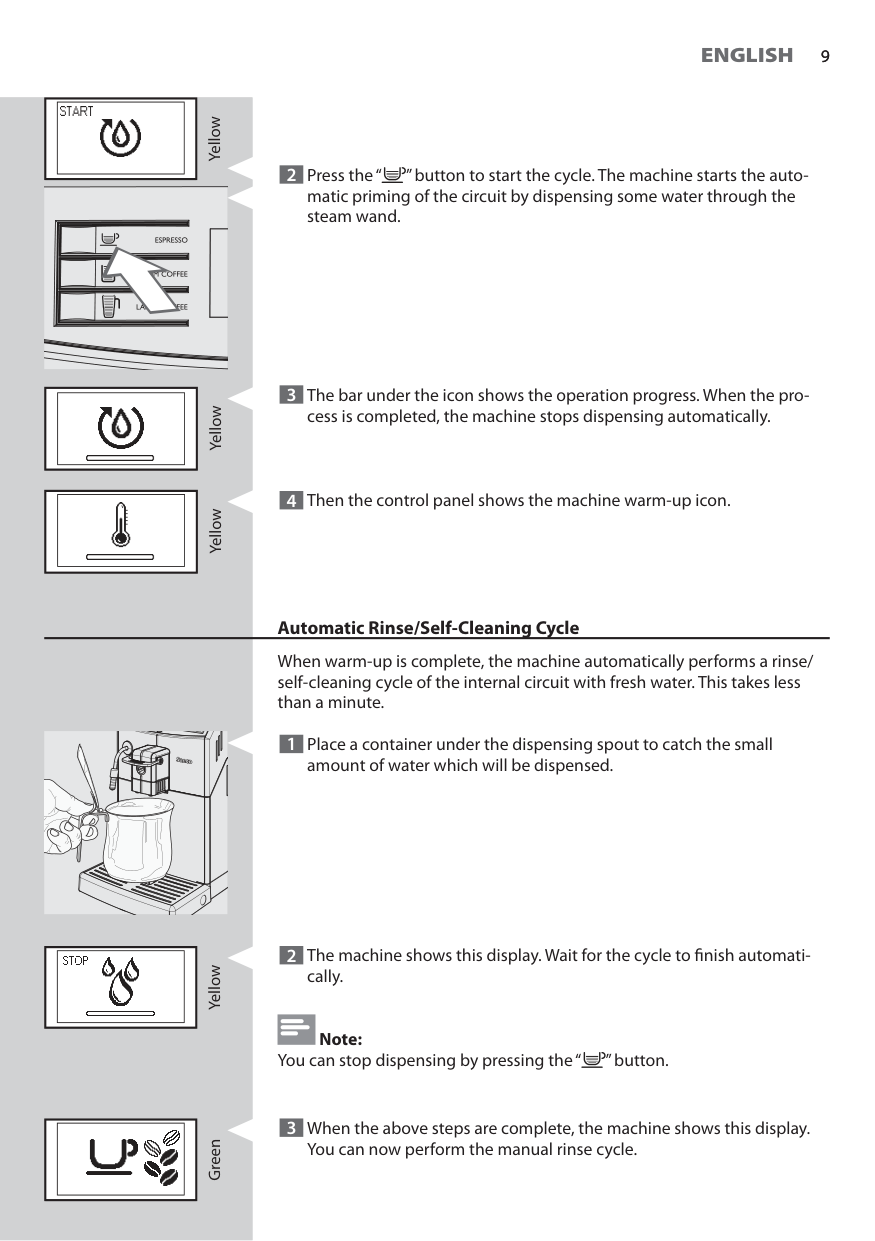
9
English
9 Yellow 2 Press the “ ” button to start the cycle. The machine starts the auto- matic priming of the circuit by dispensing some water through the steam wand. Yellow 3 The bar under the icon shows the operation progress. When the pro- cess is completed, the machine stops dispensing automatically. Yellow 4 Then the control panel shows the machine warm-up icon. Automatic Rinse/Self-Cleaning Cycle When warm-up is complete, the machine automatically performs a rinse/ self-cleaning cycle of the internal circuit with fresh water. This takes less than a minute. 1 Place a container under the dispensing spout to catch the small amount of water which will be dispensed. 2 The machine shows this display. Wait for the cycle to fi nish automati- cally. Note: You can stop dispensing by pressing the “ ” button. Yellow Green 3 When the above steps are complete, the machine shows this display. You can now perform the manual rinse cycle.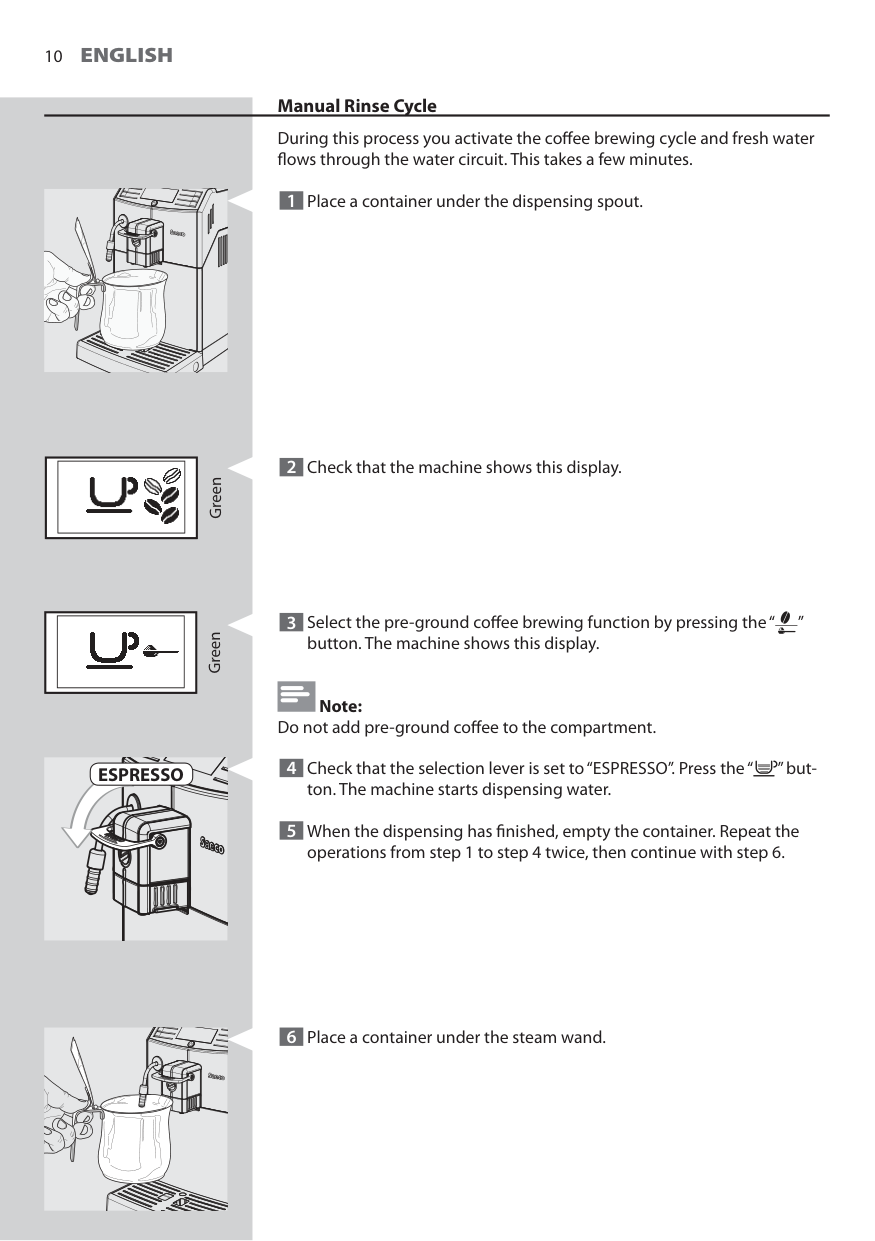
10
English
Manual Rinse Cycle During this process you activate the coff ee brewing cycle and fresh water fl ows through the water circuit. This takes a few minutes. 1 Place a container under the dispensing spout. Green 2 Check that the machine shows this display. 3 Select the pre-ground coff ee brewing function by pressing the “ ” button. The machine shows this display. Note: Do not add pre-ground coff ee to the compartment. 4 Check that the selection lever is set to “ESPRESSO”. Press the “ ” but- ton. The machine starts dispensing water. 5 When the dispensing has fi nished, empty the container. Repeat the operations from step 1 to step 4 twice, then continue with step 6. Green 6 Place a container under the steam wand.Espresso
11
English
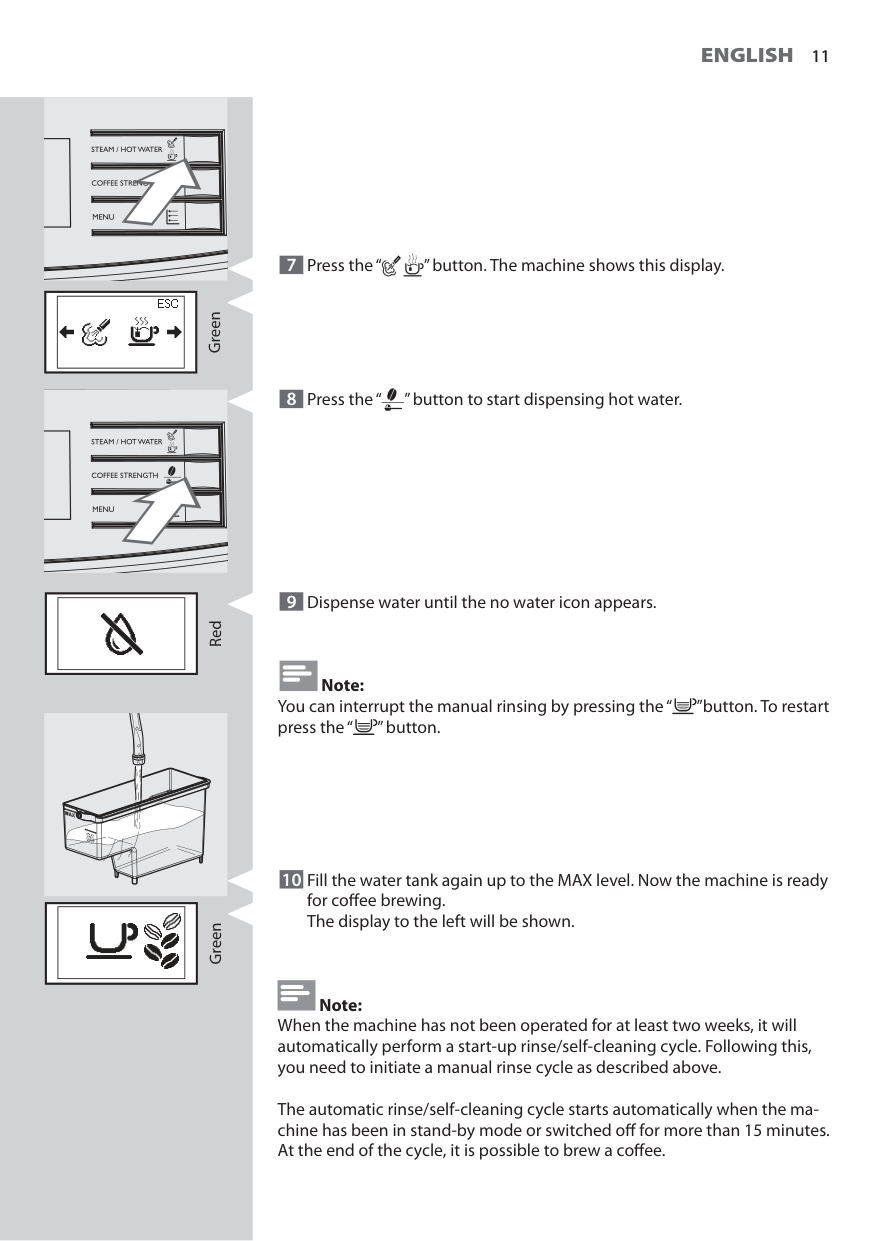
11 Green Red 7 Press the “ ” button. The machine shows this display. 9 Dispense water until the no water icon appears. Note: You can interrupt the manual rinsing by pressing the “ ”button. To restart press the “ ” button. 10 Fill the water tank again up to the MAX level. Now the machine is ready for coff ee brewing.The display to the left will be shown. Note: When the machine has not been operated for at least two weeks, it will automatically perform a start-up rinse/self-cleaning cycle. Following this, you need to initiate a manual rinse cycle as described above. The automatic rinse/self-cleaning cycle starts automatically when the ma- chine has been in stand-by mode or switched off for more than 15 minutes. At the end of the cycle, it is possible to brew a coff ee. Green 8 Press the “ ” button to start dispensing hot water.
12
English
Measuring and Programming Water Hardness Water hardness measuring is very important in order to defi ne the descal- ing frequency and to install the “INTENZA+” water fi lter (for more detail on the water fi lter, see next chapter). To measure the water hardness follow the steps below: 1 Immerse the water hardness test strip (supplied with the machine) in water for 1 second. Note: The test strip can only be used for one single measurement. 2 Wait for one minute. 2 3 4A
B
C
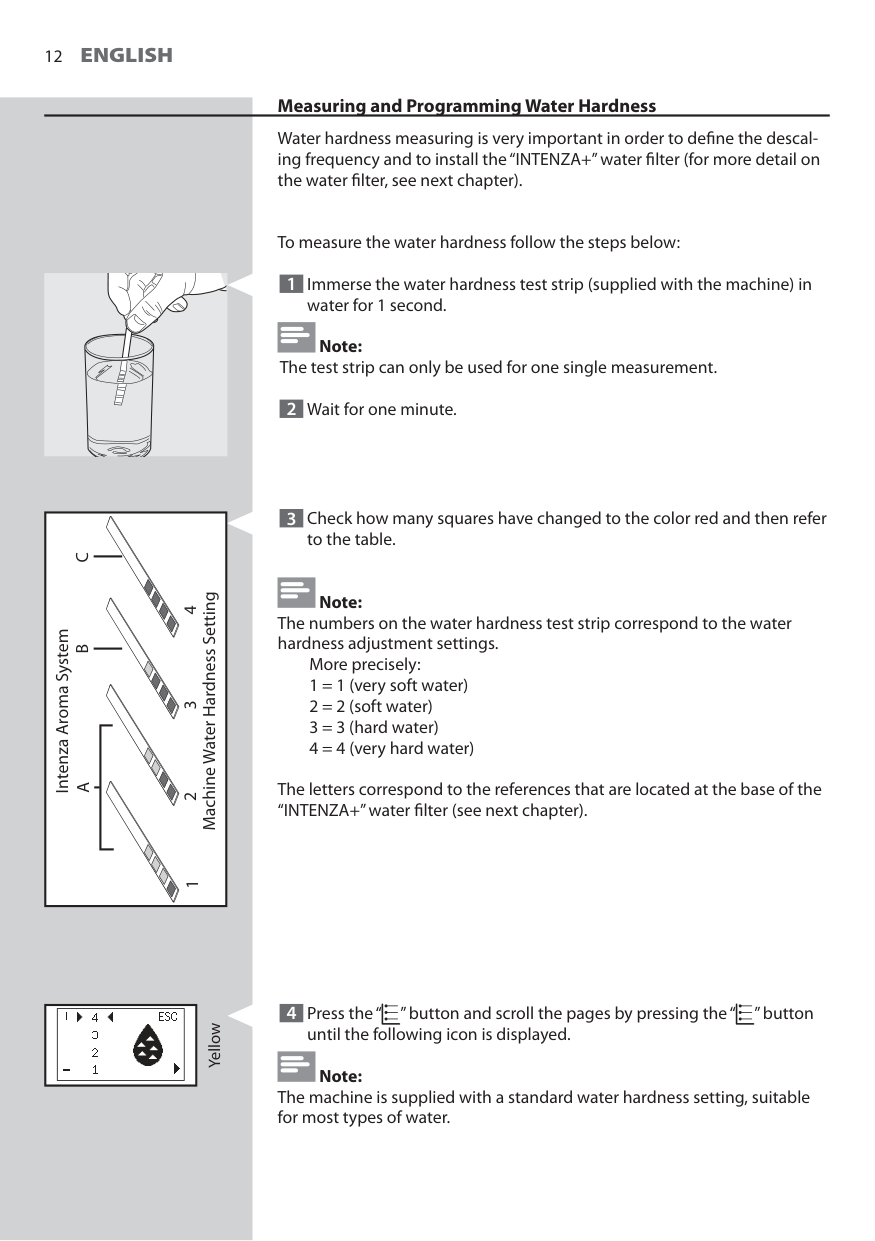
Intenza Aroma System Machine Water Hardness Setting 1 3 Check how many squares have changed to the color red and then refer to the table. Note: The numbers on the water hardness test strip correspond to the water hardness adjustment settings. More precisely: 1 = 1 (very soft water) 2 = 2 (soft water) 3 = 3 (hard water) 4 = 4 (very hard water) The letters correspond to the references that are located at the base of the “INTENZA+” water fi lter (see next chapter). Yellow 4 Press the “ ” button and scroll the pages by pressing the “ ” button until the following icon is displayed. Note: The machine is supplied with a standard water hardness setting, suitable for most types of water.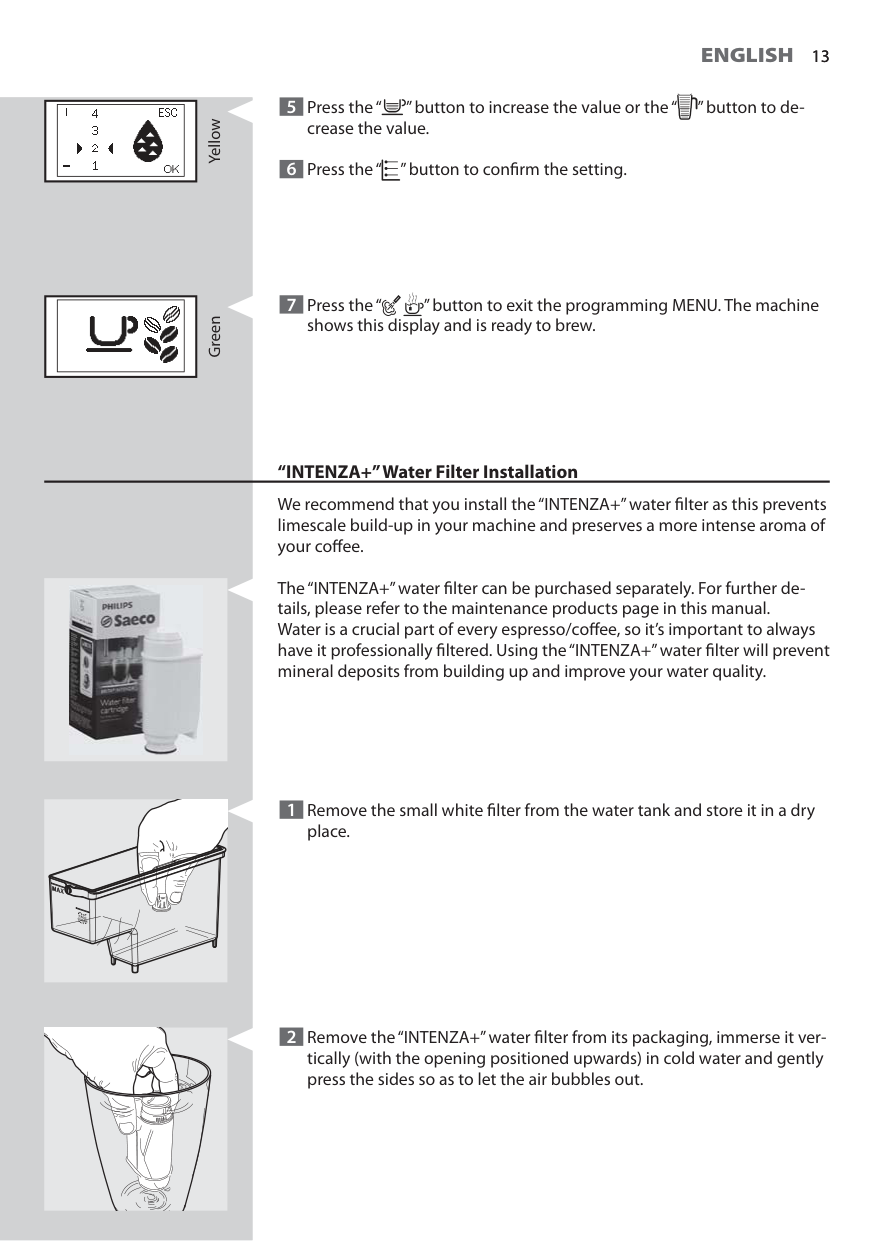
13
English
13 Yellow 5 Press the “ ” button to increase the value or the “ ” button to de- crease the value. 6 Press the “ ” button to confi rm the setting. Green 7 Press the “ ” button to exit the programming MENU. The machine shows this display and is ready to brew. “INTENZA+” Water Filter Installation We recommend that you install the “INTENZA+” water fi lter as this prevents limescale build-up in your machine and preserves a more intense aroma of your coff ee. The “INTENZA+” water fi lter can be purchased separately. For further de- tails, please refer to the maintenance products page in this manual. Water is a crucial part of every espresso/coff ee, so it’s important to always have it professionally fi ltered. Using the “INTENZA+” water fi lter will prevent mineral deposits from building up and improve your water quality. 1 Remove the small white fi lter from the water tank and store it in a dry place. 2 Remove the “INTENZA+” water fi lter from its packaging, immerse it ver- tically (with the opening positioned upwards) in cold water and gently press the sides so as to let the air bubbles out.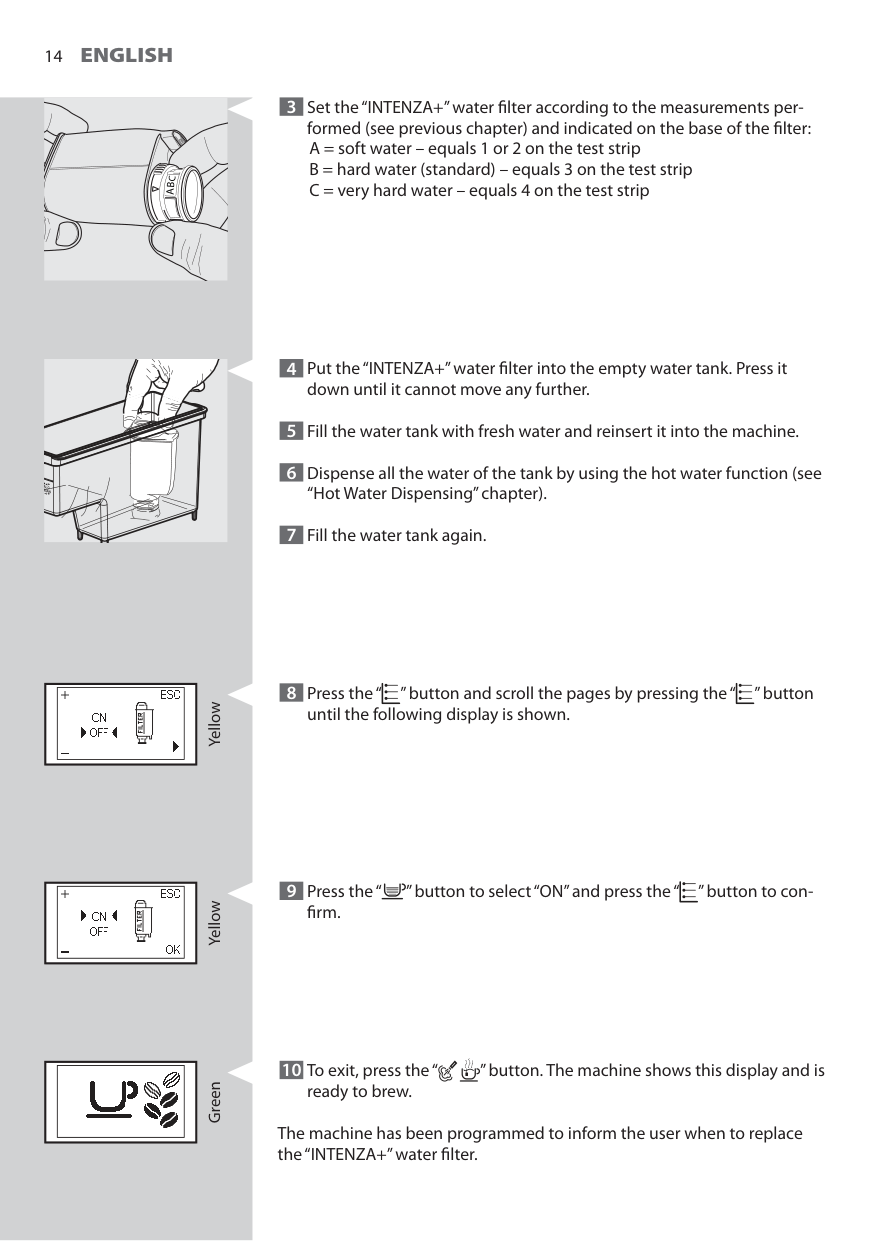
14
English
4 Put the “INTENZA+” water fi lter into the empty water tank. Press it down until it cannot move any further. 5 Fill the water tank with fresh water and reinsert it into the machine. 6 Dispense all the water of the tank by using the hot water function (see “Hot Water Dispensing” chapter). 7 Fill the water tank again. 8 Press the “ ” button and scroll the pages by pressing the “ ” button until the following display is shown. Yellow 9 Press the “ ” button to select “ON” and press the “ ” button to con- fi rm. Yellow Green 10 To exit, press the “ ” button. The machine shows this display and is ready to brew. The machine has been programmed to inform the user when to replace the “INTENZA+” water fi lter. 3 Set the “INTENZA+” water fi lter according to the measurements per- formed (see previous chapter) and indicated on the base of the fi lter: A = soft water – equals 1 or 2 on the test strip B = hard water (standard) – equals 3 on the test strip C = very hard water – equals 4 on the test strip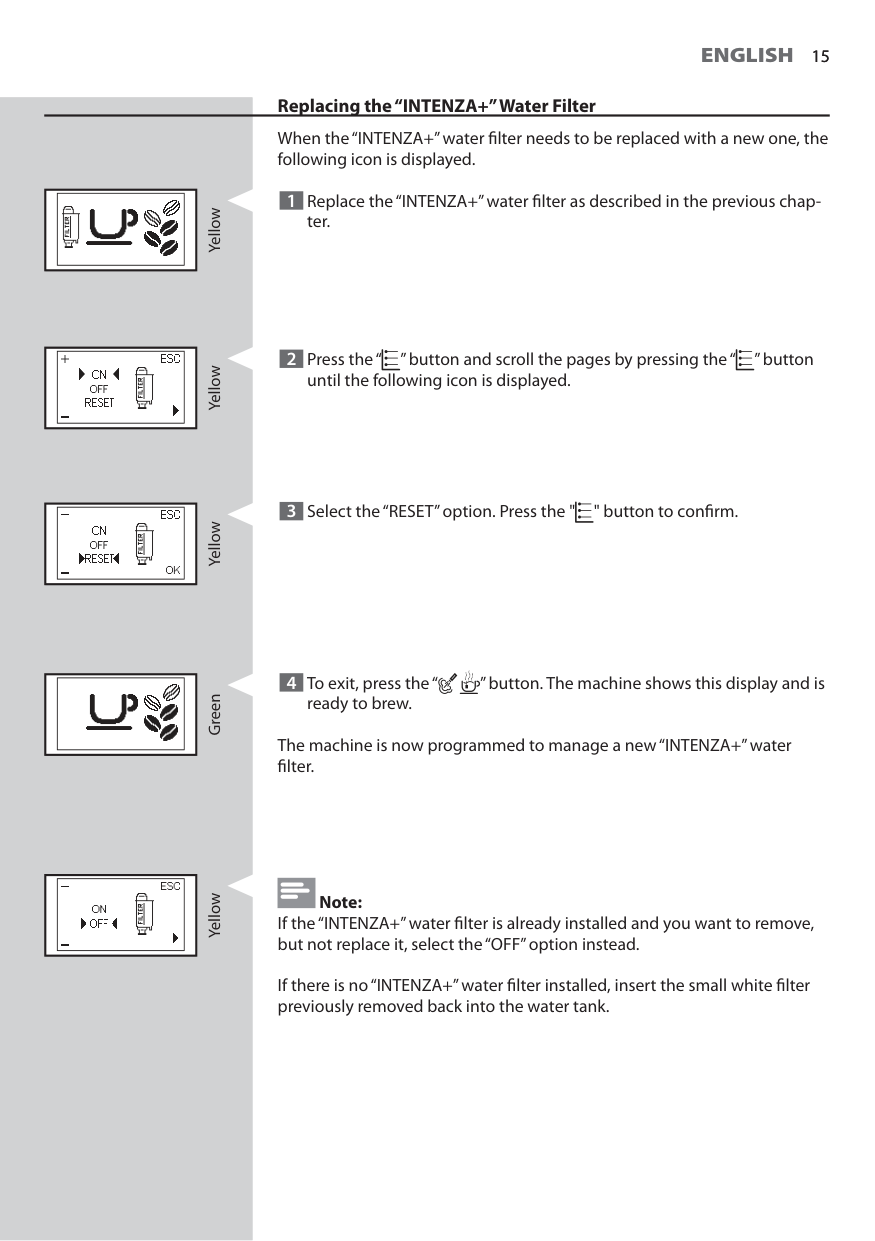
15
English
15 Yellow Replacing the “INTENZA+” Water Filter When the “INTENZA+” water fi lter needs to be replaced with a new one, the following icon is displayed. 1 Replace the “INTENZA+” water fi lter as described in the previous chap- ter. 2 Press the “ ” button and scroll the pages by pressing the “ ” button until the following icon is displayed. Yellow Yellow Green 3 Select the “RESET” option. Press the " " button to confi rm. 4 To exit, press the “ ” button. The machine shows this display and is ready to brew. The machine is now programmed to manage a new “INTENZA+” water fi lter. Note: If the “INTENZA+” water fi lter is already installed and you want to remove, but not replace it, select the “OFF” option instead. If there is no “INTENZA+” water fi lter installed, insert the small white fi lter previously removed back into the water tank. Yellow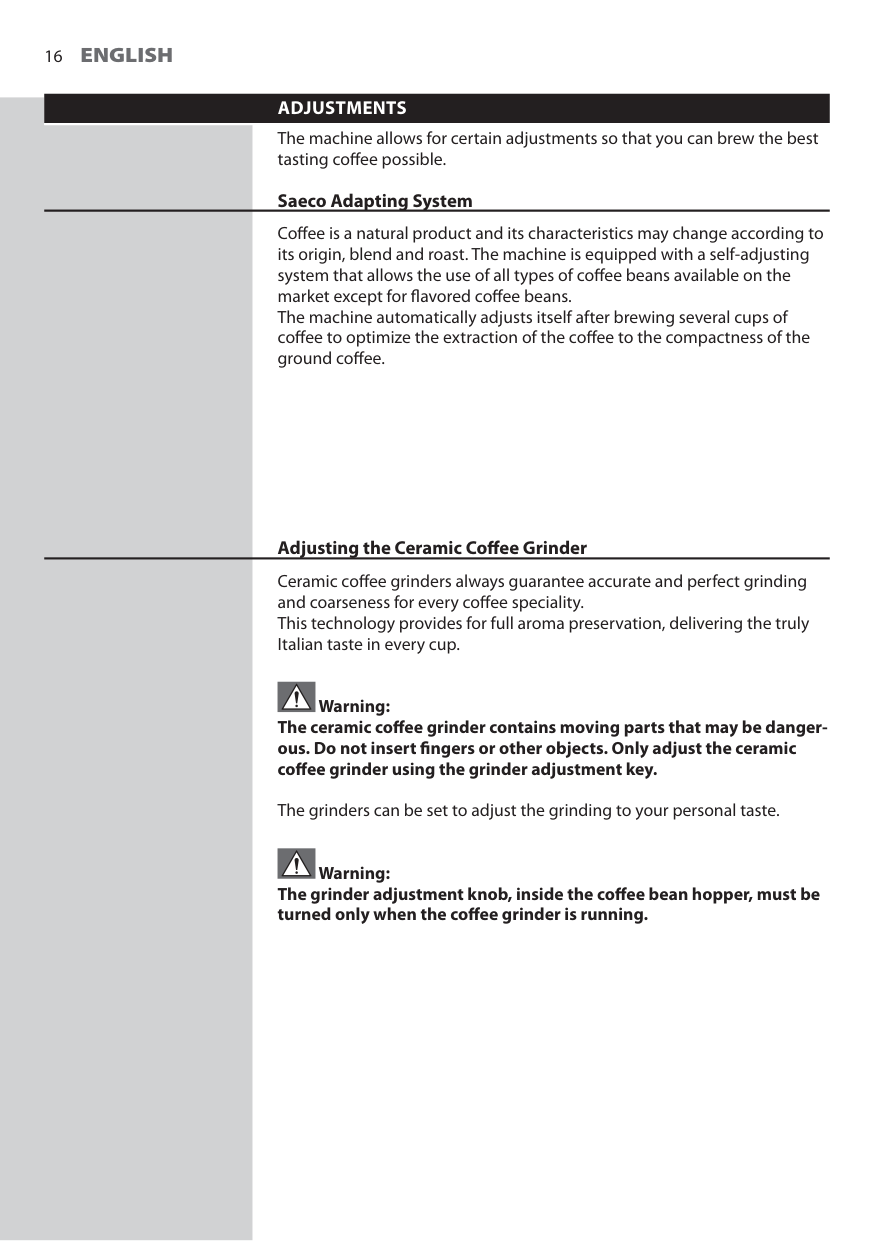
16
English
Adjustments
The machine allows for certain adjustments so that you can brew the best tasting coff ee possible. Saeco Adapting System Coff ee is a natural product and its characteristics may change according to its origin, blend and roast. The machine is equipped with a self-adjusting system that allows the use of all types of coff ee beans available on the market except for fl avored coff ee beans. The machine automatically adjusts itself after brewing several cups of coff ee to optimize the extraction of the coff ee to the compactness of the ground coff ee. Adjusting the Ceramic Coff ee Grinder Ceramic coff ee grinders always guarantee accurate and perfect grinding and coarseness for every coff ee speciality. This technology provides for full aroma preservation, delivering the truly Italian taste in every cup. Warning: The ceramic coff ee grinder contains moving parts that may be danger- ous. Do not insert fi ngers or other objects. Only adjust the ceramic coff ee grinder using the grinder adjustment key. The grinders can be set to adjust the grinding to your personal taste. Warning: The grinder adjustment knob, inside the coff ee bean hopper, must be turned only when the coff ee grinder is running.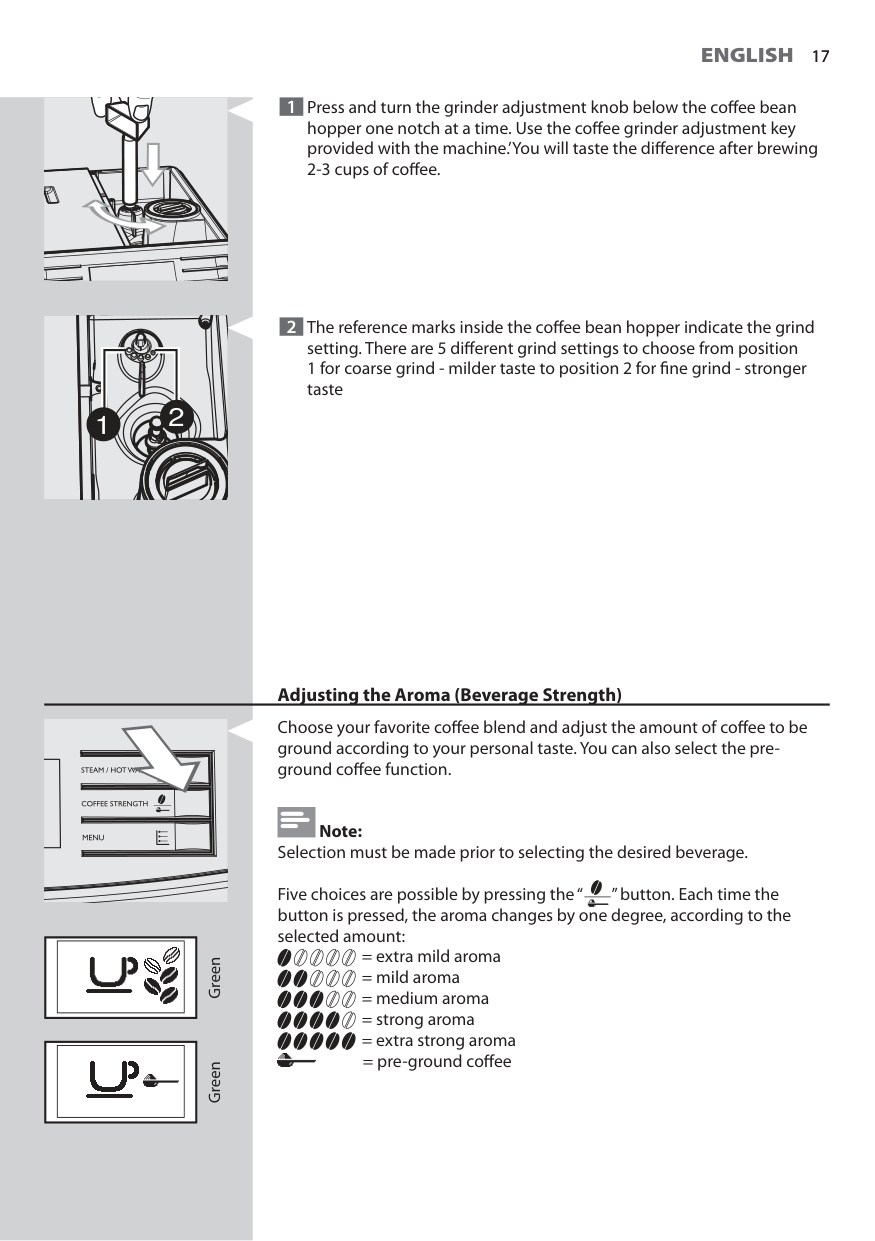
17
English
17 1 Press and turn the grinder adjustment knob below the coff ee bean hopper one notch at a time. Use the coff ee grinder adjustment key provided with the machine.’You will taste the diff erence after brewing 2-3 cups of coff ee. 1 2 2 The reference marks inside the coff ee bean hopper indicate the grind setting. There are 5 diff erent grind settings to choose from position 1 for coarse grind - milder taste to position 2 for fi ne grind - stronger taste Adjusting the Aroma (Beverage Strength) Choose your favorite coff ee blend and adjust the amount of coff ee to be ground according to your personal taste. You can also select the pre- ground coff ee function. Note: Selection must be made prior to selecting the desired beverage. Five choices are possible by pressing the “ ” button. Each time the button is pressed, the aroma changes by one degree, according to the selected amount: = extra mild aroma = mild aroma = medium aroma = strong aroma = extra strong aroma = pre-ground coff ee Green Green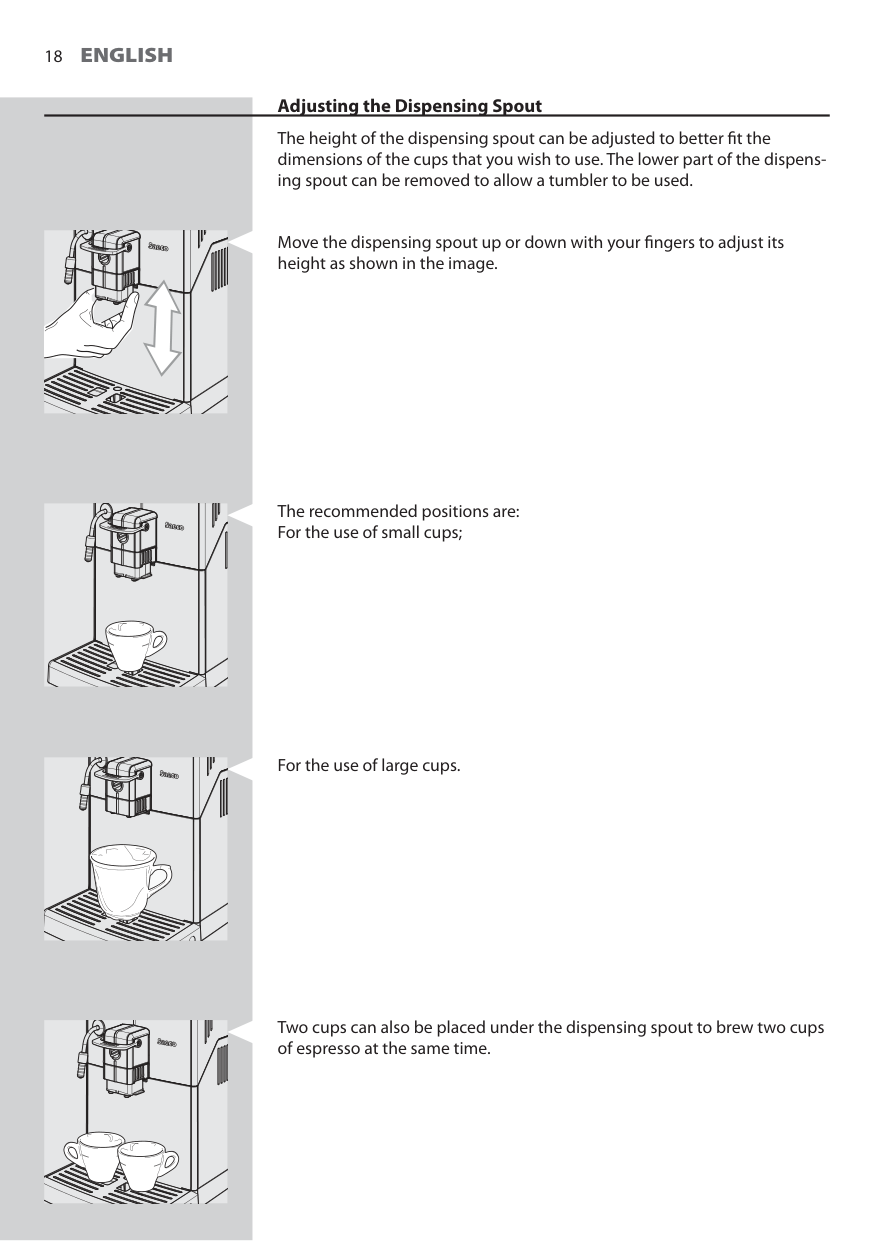
18
English
Adjusting the Dispensing Spout The height of the dispensing spout can be adjusted to better fi t the dimensions of the cups that you wish to use. The lower part of the dispens- ing spout can be removed to allow a tumbler to be used. Move the dispensing spout up or down with your fi ngers to adjust its height as shown in the image. The recommended positions are: For the use of small cups; For the use of large cups. Two cups can also be placed under the dispensing spout to brew two cups of espresso at the same time.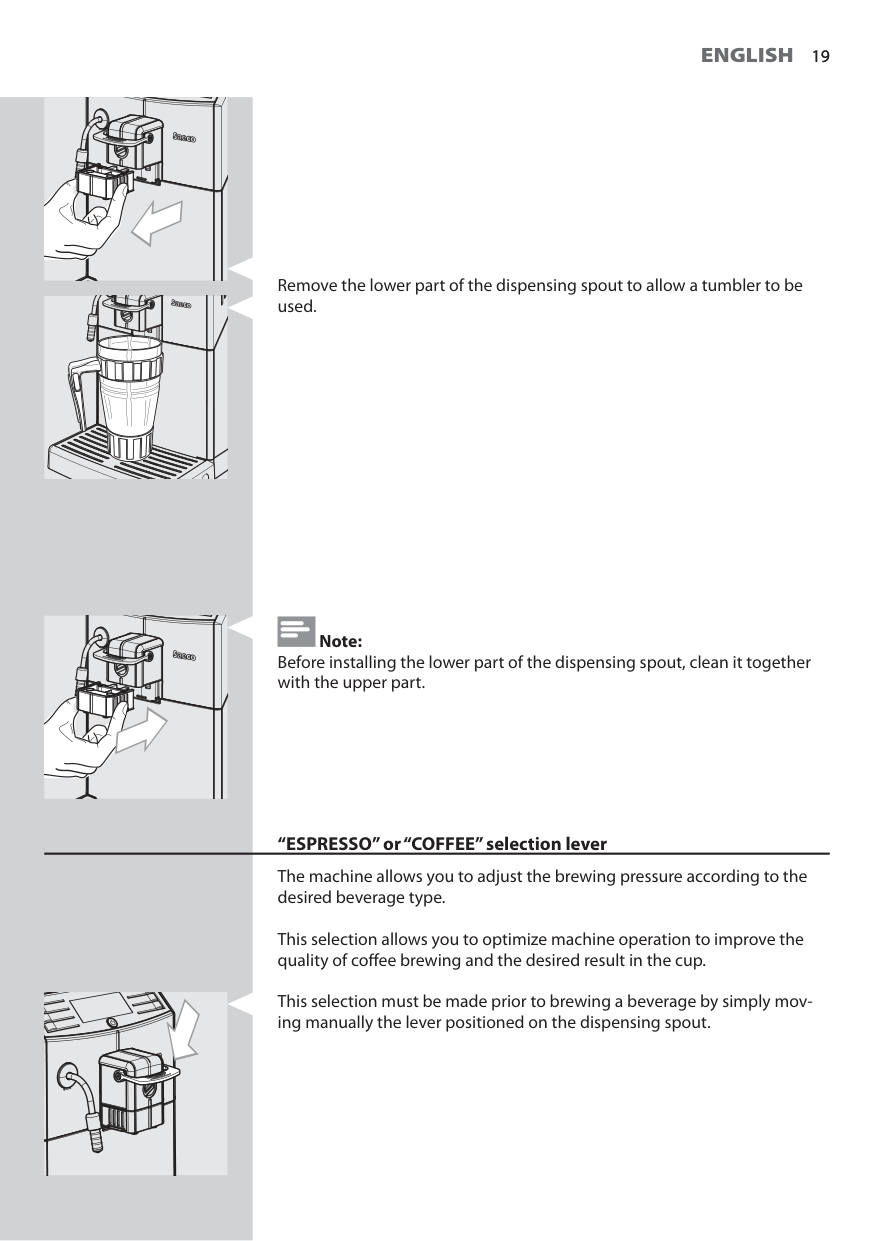
19
English
19 Remove the lower part of the dispensing spout to allow a tumbler to be used. Note: Before installing the lower part of the dispensing spout, clean it together with the upper part. “ESPRESSO” or “COFFEE” selection lever The machine allows you to adjust the brewing pressure according to the desired beverage type. This selection allows you to optimize machine operation to improve the quality of coff ee brewing and the desired result in the cup. This selection must be made prior to brewing a beverage by simply mov- ing manually the lever positioned on the dispensing spout.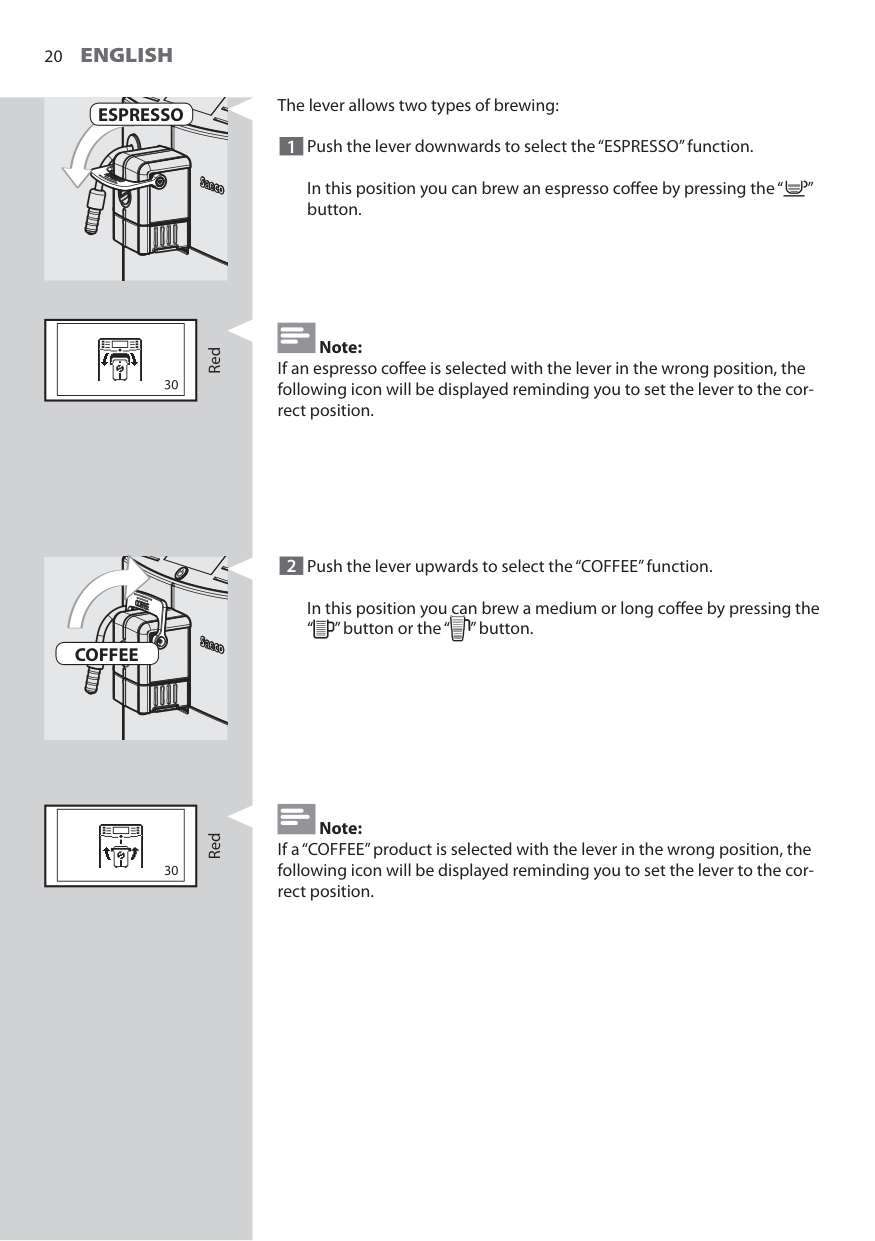
20
English
Red RedEspresso
Coffee
The lever allows two types of brewing: 1 Push the lever downwards to select the “ESPRESSO” function.In this position you can brew an espresso coff ee by pressing the “ ” button. Note: If an espresso coff ee is selected with the lever in the wrong position, the following icon will be displayed reminding you to set the lever to the cor- rect position. 2 Push the lever upwards to select the “COFFEE” function.
In this position you can brew a medium or long coff ee by pressing the “ ” button or the “ ” button. Note: If a “COFFEE” product is selected with the lever in the wrong position, the following icon will be displayed reminding you to set the lever to the cor- rect position.
21
English
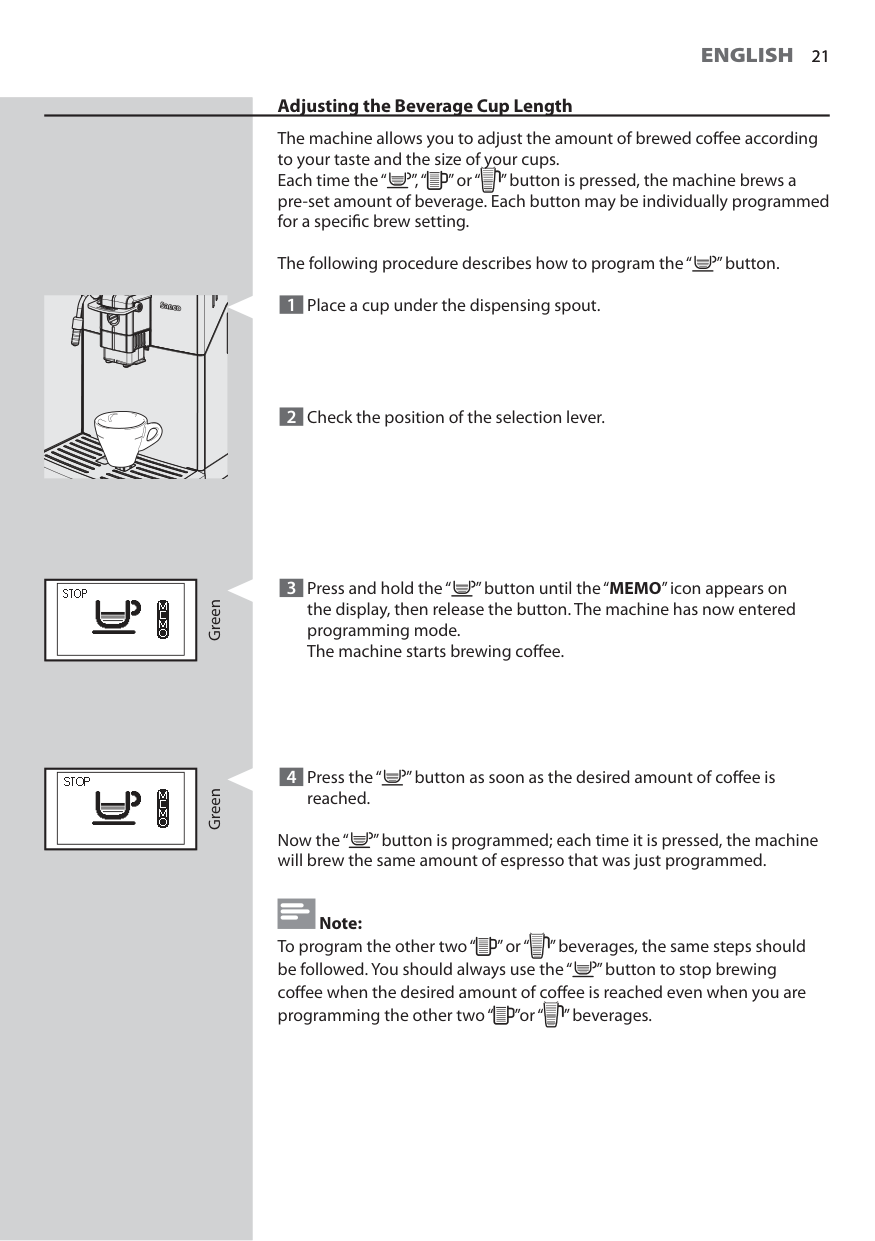
21 Adjusting the Beverage Cup Length The machine allows you to adjust the amount of brewed coff ee according to your taste and the size of your cups. Each time the “ ”, “ ” or “ ” button is pressed, the machine brews a pre-set amount of beverage. Each button may be individually programmed for a specifi c brew setting. The following procedure describes how to program the “ ” button. 1 Place a cup under the dispensing spout. Green 3 Press and hold the “ ” button until the “MEMO” icon appears on the display, then release the button. The machine has now entered programming mode.The machine starts brewing coff ee. 4 Press the “ ” button as soon as the desired amount of coff ee is reached. Now the “ ” button is programmed; each time it is pressed, the machine will brew the same amount of espresso that was just programmed. Note: To program the other two “ ” or “ ” beverages, the same steps should be followed. You should always use the “ ” button to stop brewing coff ee when the desired amount of coff ee is reached even when you are programming the other two “ ”or “ ” beverages. Green 2 Check the position of the selection lever.
22
English
Brewing An "Espresso".
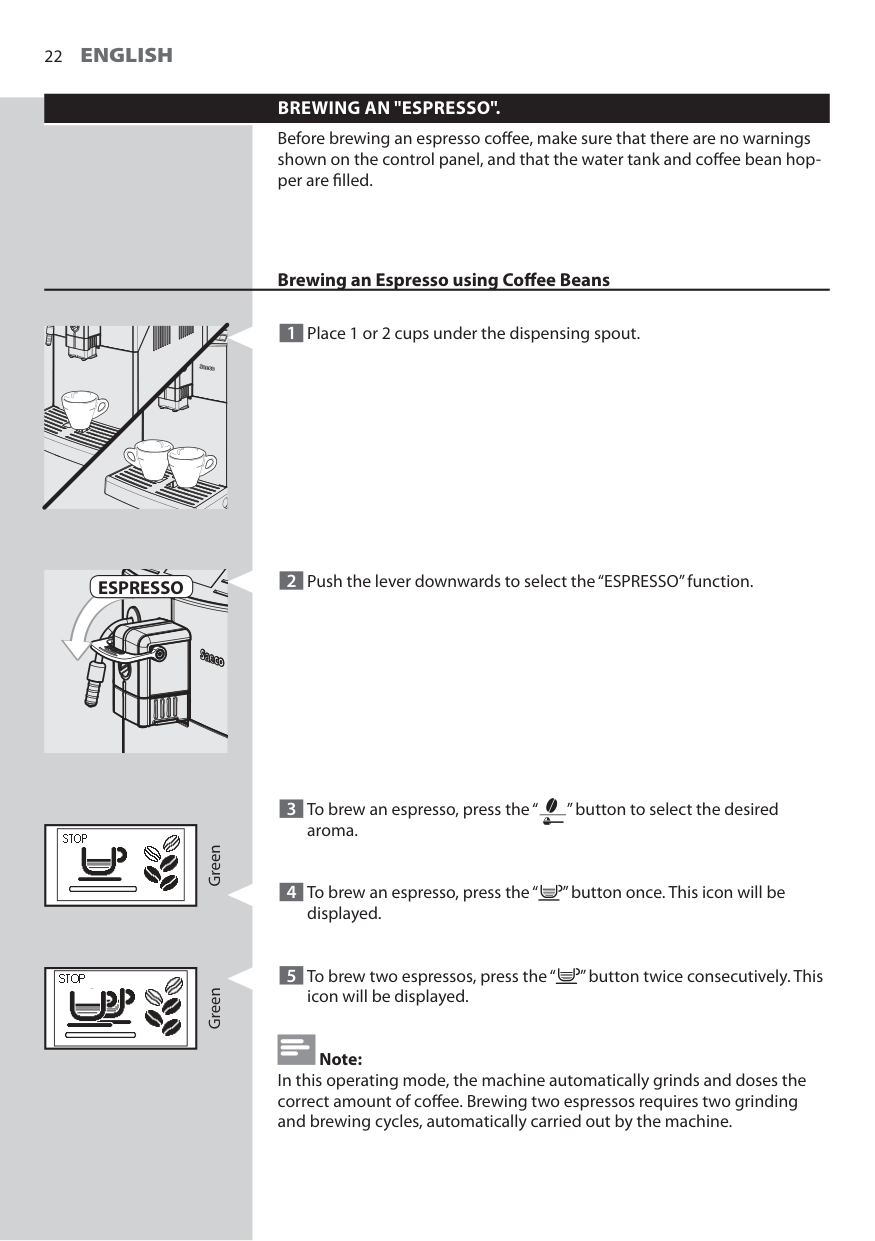
Before brewing an espresso coff ee, make sure that there are no warnings shown on the control panel, and that the water tank and coff ee bean hop- per are fi lled. 3 To brew an espresso, press the “ ” button to select the desired aroma. 4 To brew an espresso, press the “ ” button once. This icon will be displayed. 5 To brew two espressos, press the “ ” button twice consecutively. This icon will be displayed. Note: In this operating mode, the machine automatically grinds and doses the correct amount of coff ee. Brewing two espressos requires two grinding and brewing cycles, automatically carried out by the machine. Green Green Brewing an Espresso using Coff ee Beans 1 Place 1 or 2 cups under the dispensing spout.Espresso
2 Push the lever downwards to select the “ESPRESSO” function.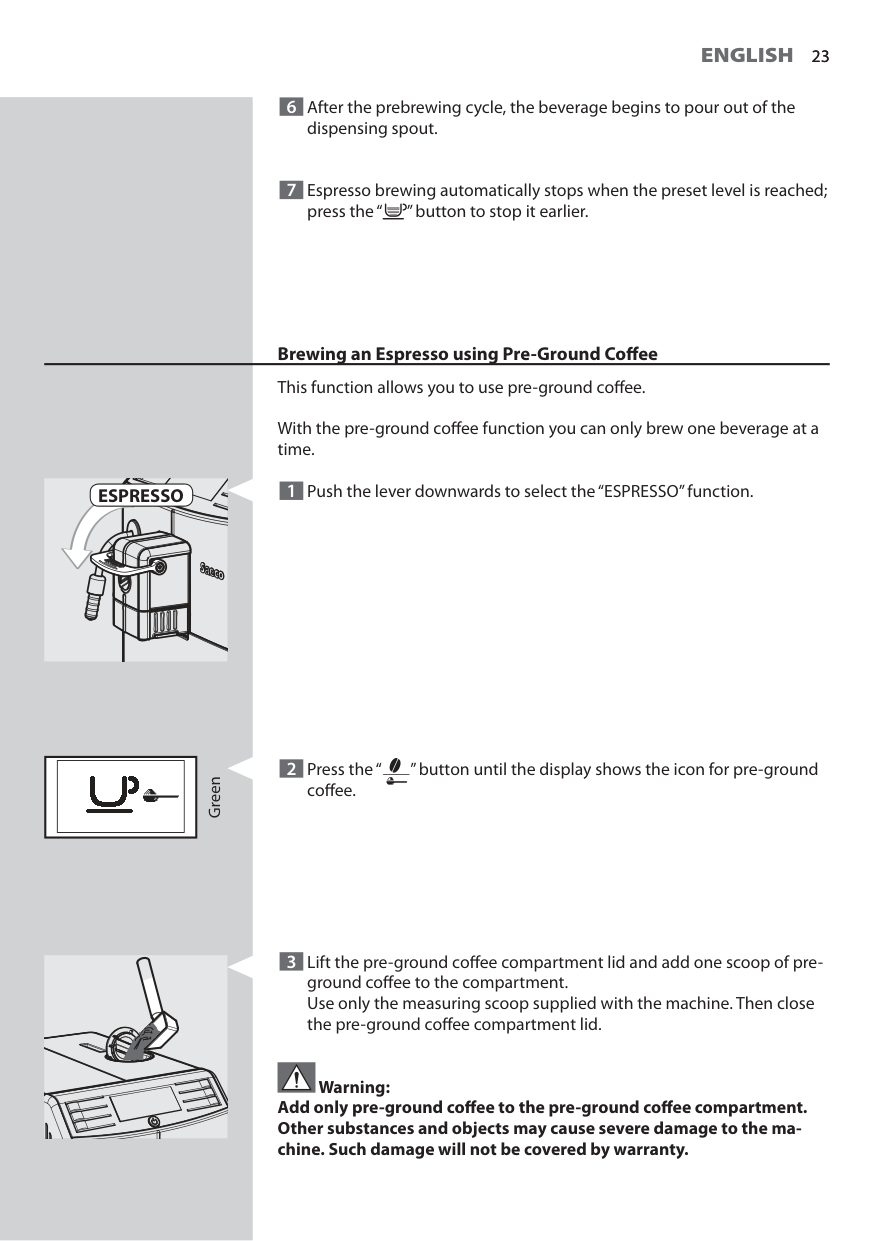
23
English
23 6 After the prebrewing cycle, the beverage begins to pour out of the dispensing spout. 7 Espresso brewing automatically stops when the preset level is reached; press the “ ” button to stop it earlier.Espresso
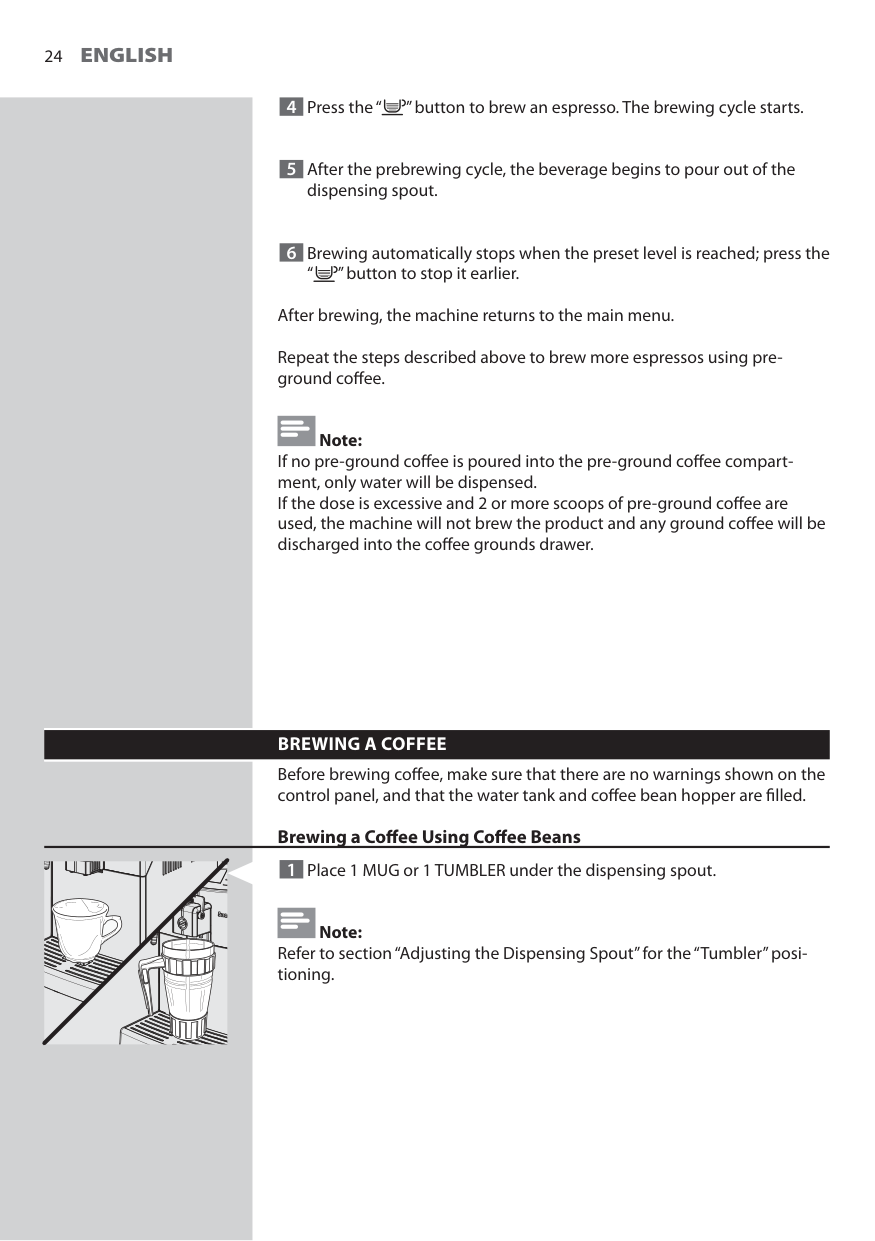
Green 2 Press the “ ” button until the display shows the icon for pre-ground coff ee. 3 Lift the pre-ground coff ee compartment lid and add one scoop of pre- ground coff ee to the compartment.Use only the measuring scoop supplied with the machine. Then close the pre-ground coff ee compartment lid. Warning: Add only pre-ground coff ee to the pre-ground coff ee compartment. Other substances and objects may cause severe damage to the ma- chine. Such damage will not be covered by warranty. Brewing an Espresso using Pre-Ground Coff ee This function allows you to use pre-ground coff ee. With the pre-ground coff ee function you can only brew one beverage at a time. 1 Push the lever downwards to select the “ESPRESSO” function.
24
English
4 Press the “ ” button to brew an espresso. The brewing cycle starts. 5 After the prebrewing cycle, the beverage begins to pour out of the dispensing spout. 6 Brewing automatically stops when the preset level is reached; press the “ ” button to stop it earlier. After brewing, the machine returns to the main menu. Repeat the steps described above to brew more espressos using pre- ground coff ee. Note: If no pre-ground coff ee is poured into the pre-ground coff ee compart- ment, only water will be dispensed. If the dose is excessive and 2 or more scoops of pre-ground coff ee are used, the machine will not brew the product and any ground coff ee will be discharged into the coff ee grounds drawer.Brewing A Coffee
Before brewing coff ee, make sure that there are no warnings shown on the control panel, and that the water tank and coff ee bean hopper are fi lled. Brewing a Coff ee Using Coff ee Beans 1 Place 1 MUG or 1 TUMBLER under the dispensing spout. Note: Refer to section “Adjusting the Dispensing Spout” for the “Tumbler” posi- tioning.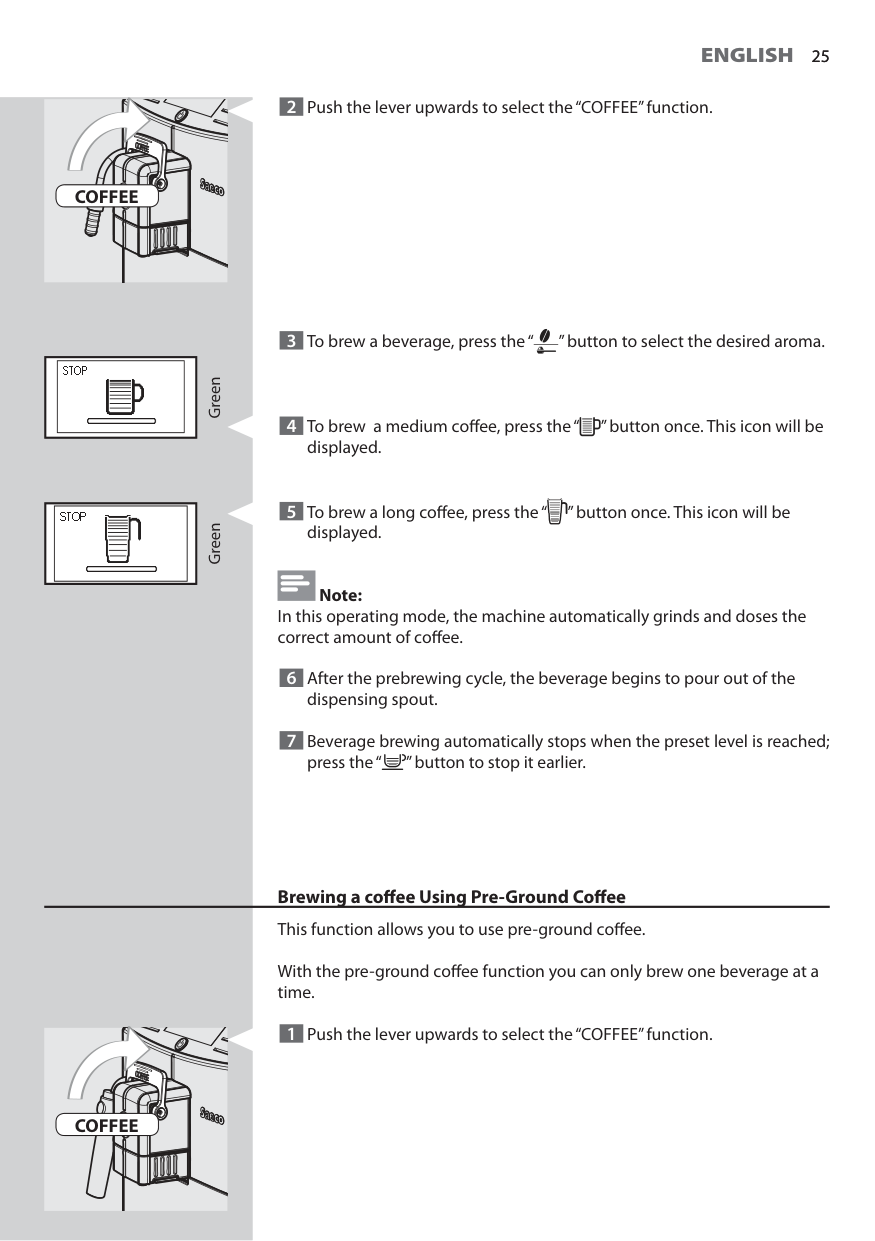
25
English
25Coffee
Green GreenCoffee
2 Push the lever upwards to select the “COFFEE” function. 3 To brew a beverage, press the “ ” button to select the desired aroma. 4 To brew a medium coff ee, press the “ ” button once. This icon will be displayed. 5 To brew a long coff ee, press the “ ” button once. This icon will be displayed. Note: In this operating mode, the machine automatically grinds and doses the correct amount of coff ee. 6 After the prebrewing cycle, the beverage begins to pour out of the dispensing spout. 7 Beverage brewing automatically stops when the preset level is reached; press the “ ” button to stop it earlier. Brewing a coff ee Using Pre-Ground Coff ee This function allows you to use pre-ground coff ee. With the pre-ground coff ee function you can only brew one beverage at a time. 1 Push the lever upwards to select the “COFFEE” function.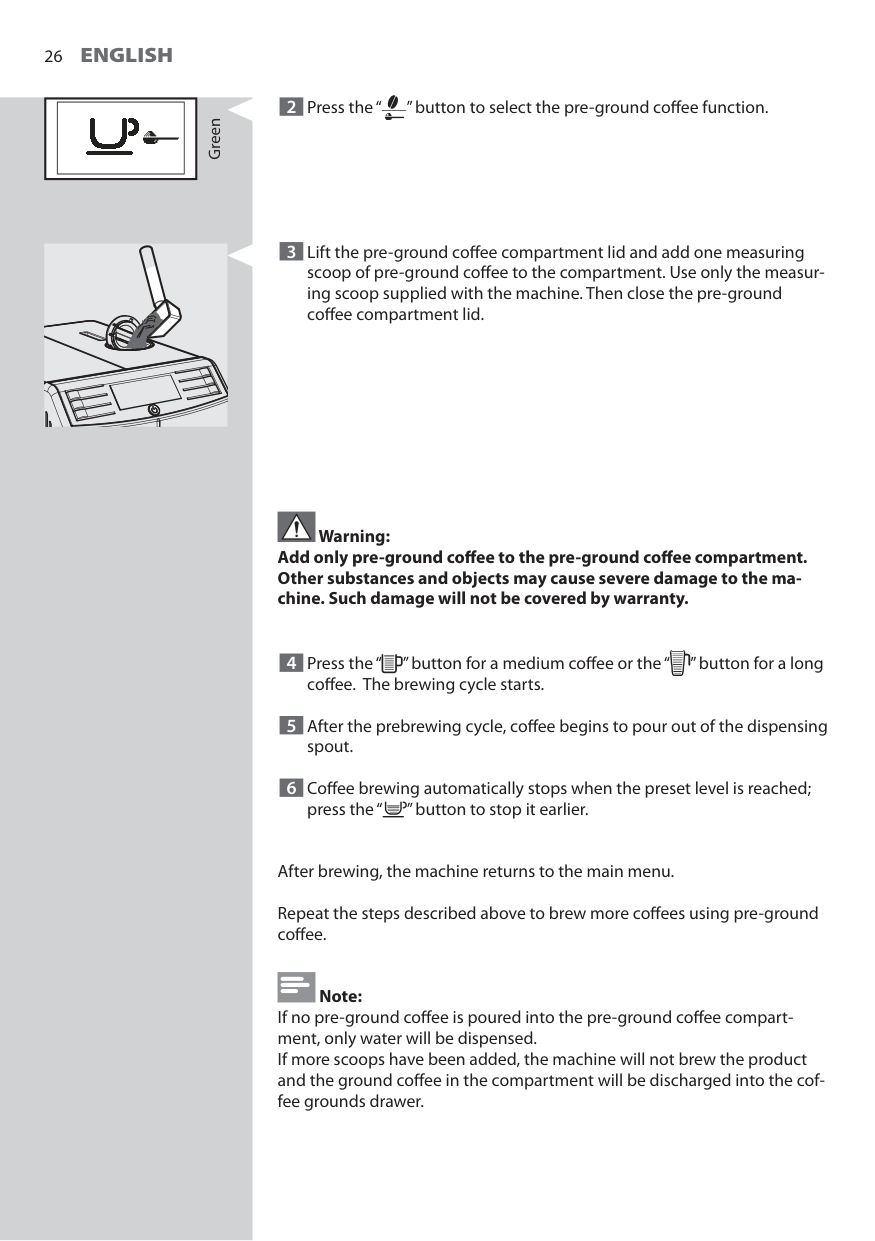
26
English
Green 2 Press the “ ” button to select the pre-ground coff ee function. 3 Lift the pre-ground coff ee compartment lid and add one measuring scoop of pre-ground coff ee to the compartment. Use only the measur- ing scoop supplied with the machine. Then close the pre-ground coff ee compartment lid. Warning: Add only pre-ground coff ee to the pre-ground coff ee compartment. Other substances and objects may cause severe damage to the ma- chine. Such damage will not be covered by warranty. 4 Press the “ ” button for a medium coff ee or the “ ” button for a long coff ee. The brewing cycle starts. 5 After the prebrewing cycle, coff ee begins to pour out of the dispensing spout. 6 Coff ee brewing automatically stops when the preset level is reached; press the “ ” button to stop it earlier. After brewing, the machine returns to the main menu. Repeat the steps described above to brew more coff ees using pre-ground coff ee. Note: If no pre-ground coff ee is poured into the pre-ground coff ee compart- ment, only water will be dispensed. If more scoops have been added, the machine will not brew the product and the ground coff ee in the compartment will be discharged into the cof- fee grounds drawer.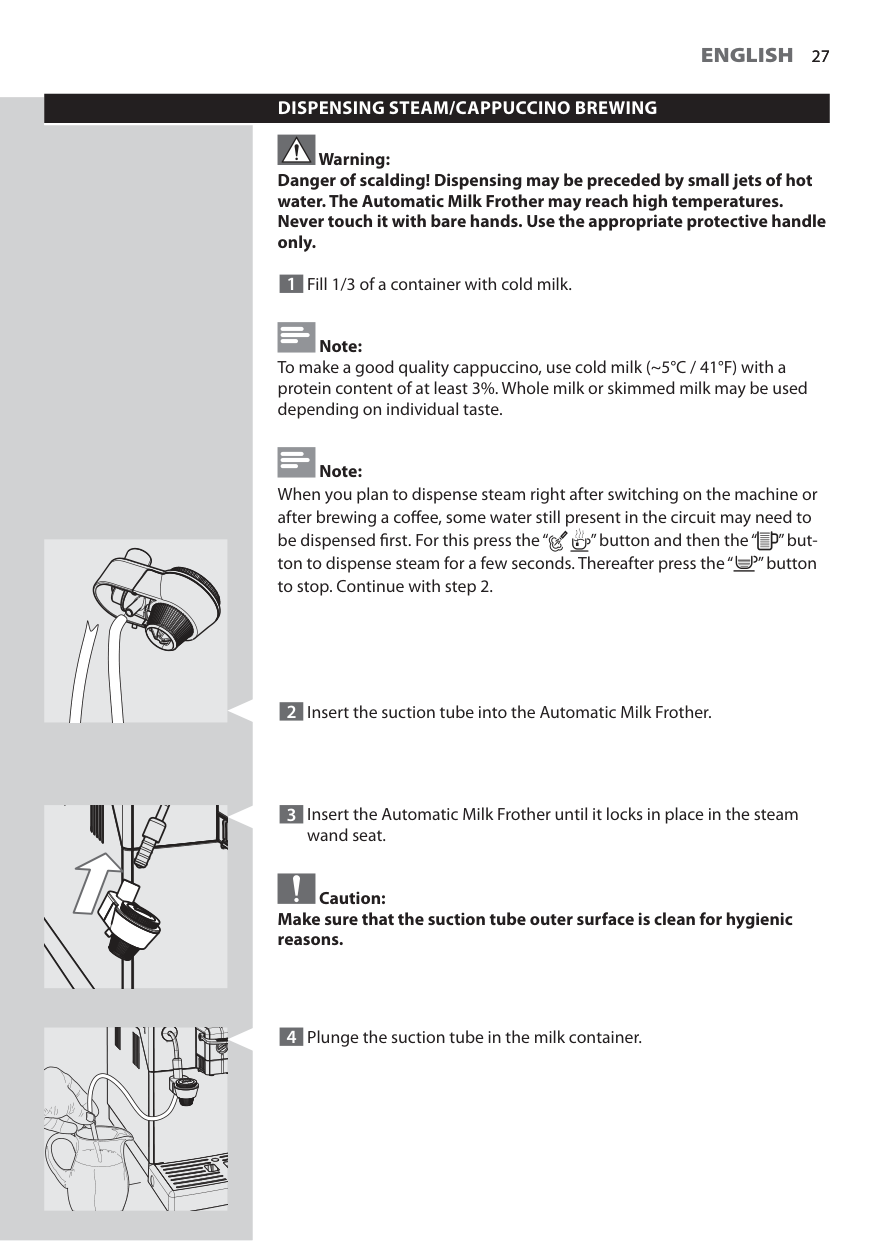
27
English
27Dispensing Steam/Cappuccino Brewing
Warning: Danger of scalding! Dispensing may be preceded by small jets of hot water. The Automatic Milk Frother may reach high temperatures. Never touch it with bare hands. Use the appropriate protective handle only. 1 Fill 1/3 of a container with cold milk. Note: To make a good quality cappuccino, use cold milk (~5°C / 41°F) with a protein content of at least 3%. Whole milk or skimmed milk may be used depending on individual taste. Note: When you plan to dispense steam right after switching on the machine or after brewing a coff ee, some water still present in the circuit may need to be dispensed fi rst. For this press the “ ” button and then the “ ” but- ton to dispense steam for a few seconds. Thereafter press the “ ” button to stop. Continue with step 2. 4 Plunge the suction tube in the milk container. 2 Insert the suction tube into the Automatic Milk Frother. 3 Insert the Automatic Milk Frother until it locks in place in the steam wand seat. Caution: Make sure that the suction tube outer surface is clean for hygienic reasons.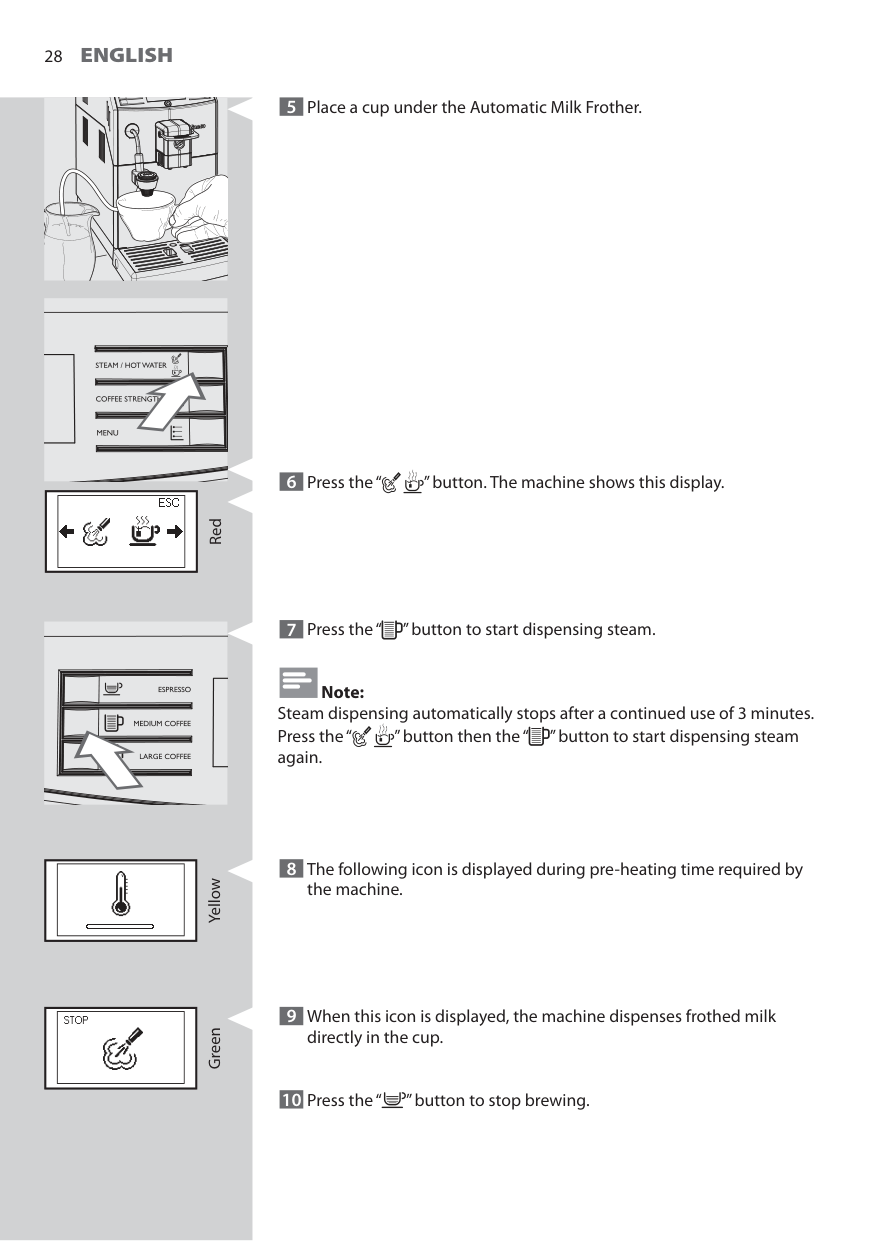
28
English
Yellow 5 Place a cup under the Automatic Milk Frother. Green Red 6 Press the “ ” button. The machine shows this display. 7 Press the “ ” button to start dispensing steam. Note: Steam dispensing automatically stops after a continued use of 3 minutes. Press the “ ” button then the “ ” button to start dispensing steam again. 8 The following icon is displayed during pre-heating time required by the machine. 9 When this icon is displayed, the machine dispenses frothed milk directly in the cup. 10 Press the “ ” button to stop brewing.
29
English
29 11 For storage you can put the suction tube as shown in the picture. Note: After having pressed the “ ” button it will take a few seconds before the machine stops dispensing steam completely. Caution: After frothing the milk, a small quantity of hot water must be dis- pensed into a container. See chapter "Daily cleaning of the Automatic Milk Frother" for detailed cleaning instructions.Hot Water Dispensing
Warning: Danger of scalding! Dispensing may be preceded by small jets of hot water. The Automatic Milk Frother may reach high temperatures. Never touch it with bare hands. Use the appropriate protective handle only. Before dispensing hot water, make sure that the machine is ready to use and the water tank is fi lled. 1 Place a container under the steam wand. Note: After frothing the milk, it is possible to brew an espresso or dispense hot water straight after. Green
30
English
2 Press the “ ” button. The machine shows this display. Red 3 Press the “ ” button to start dispensing hot water. Green Yellow 4 The following icon is displayed during pre-heating time required by the machine. 5 Pour the desired amount of hot water. To stop the hot water dispens- ing, press the “ ” button.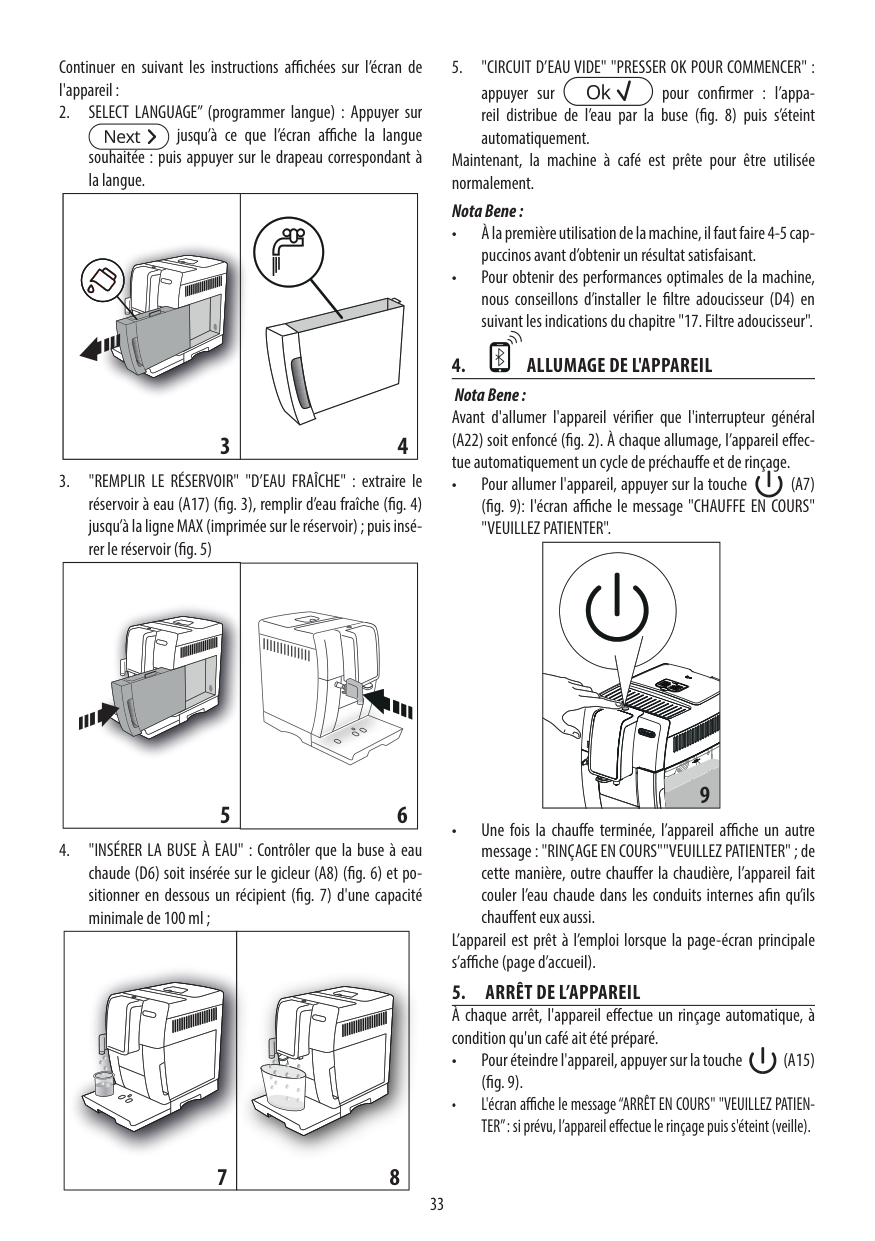
31
English
31Cleaning And Maintenance
Daily Cleaning of the Machine Caution: Timely cleaning and maintenance of your machine is very important as it prolongs the life of your machine. Your machine is continuously exposed to moisture, coff ee and limescale! The activities you need to perform and their frequency are described in detail in this chapter. Not doing this will ultimately make your machine stop working properly. This repair is NOT covered by your warranty! Note: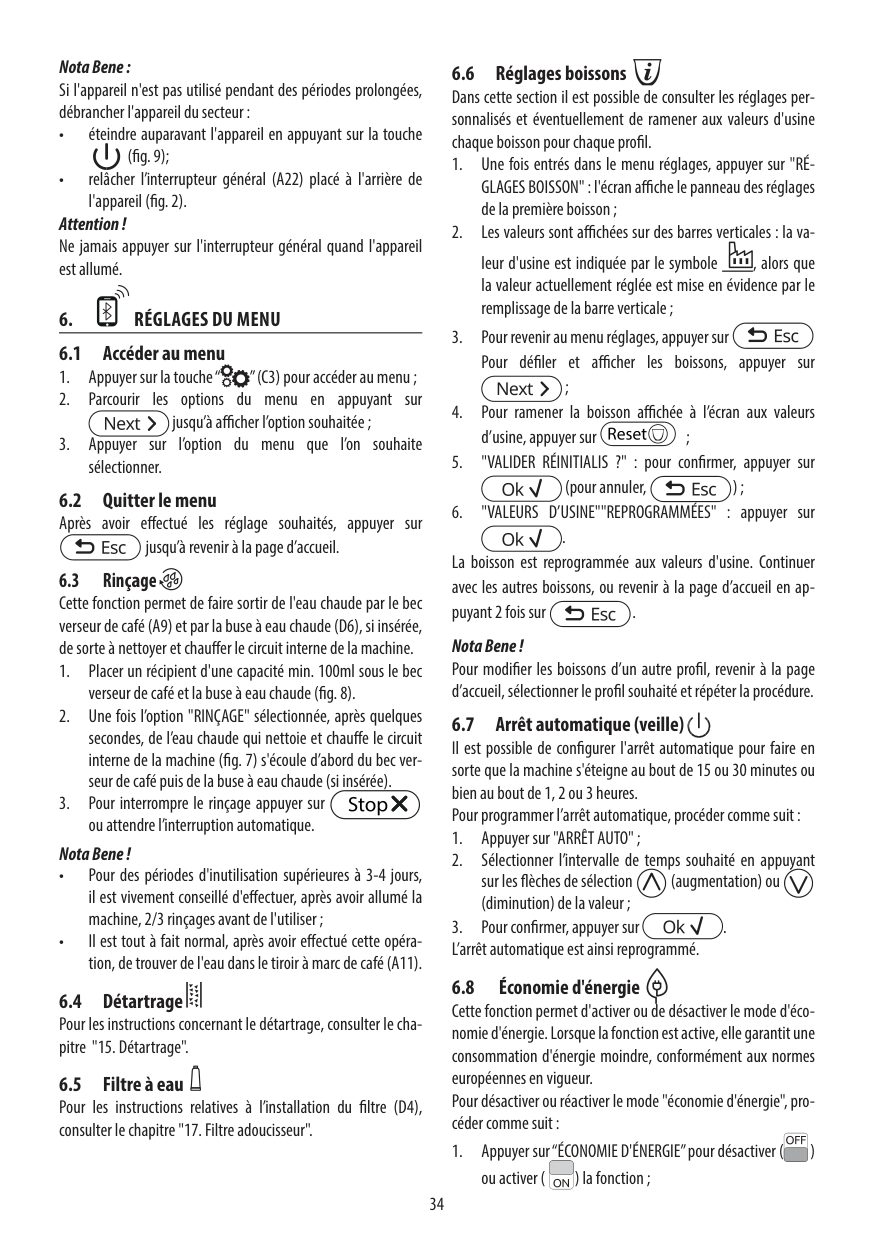
32
English
4 Insert the coff ee grounds drawer back into the drip tray and this into the machine. Note: Also empty the drip tray when the full drip tray indicator is raised. Daily Cleaning of the Water Tank 1 Remove the small white fi lter or the “INTENZA+” water fi lter (if in- stalled) from the water tank and wash it with fresh water. 2 Put the small white fi lter or the “INTENZA+” water fi lter (if installed) back in its housing by gently pressing and turning it at the same time. 3 Fill the water tank with fresh water. 1 3 2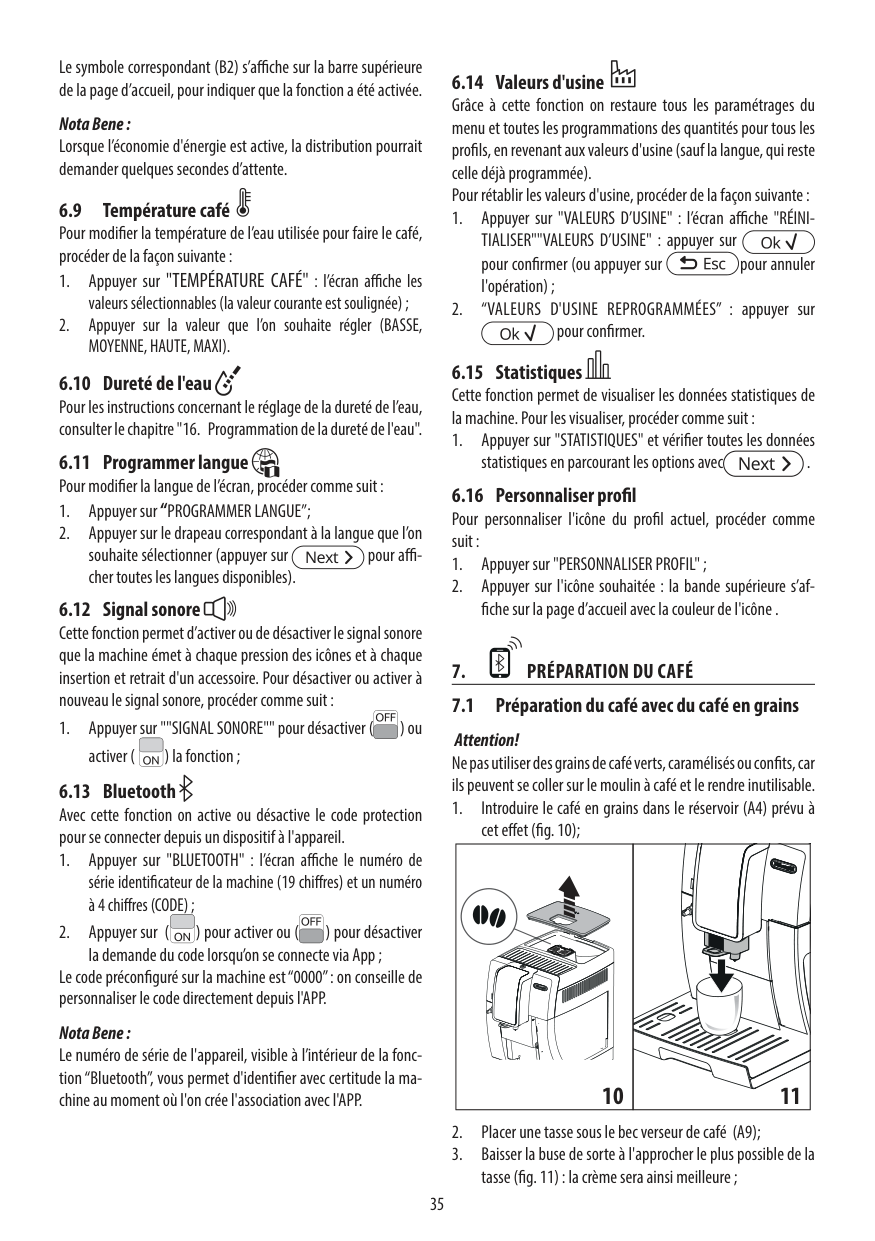
33
English
33 Daily Cleaning of the Automatic Milk Frother For hygienic reasons and to ensure a perfect milk froth consistency, it is important that the Automatic Milk Frother be cleaned after each use. Warning: Danger of scalding! Dispensing may be preceded by small jets of hot water. 2 Place an empty container under the Automatic Milk Frother. After each milk frothing you always need to: 1 Plunge the suction tube into a container fi lled with fresh water. Red 3 Press the “ ” button. The machine shows this display.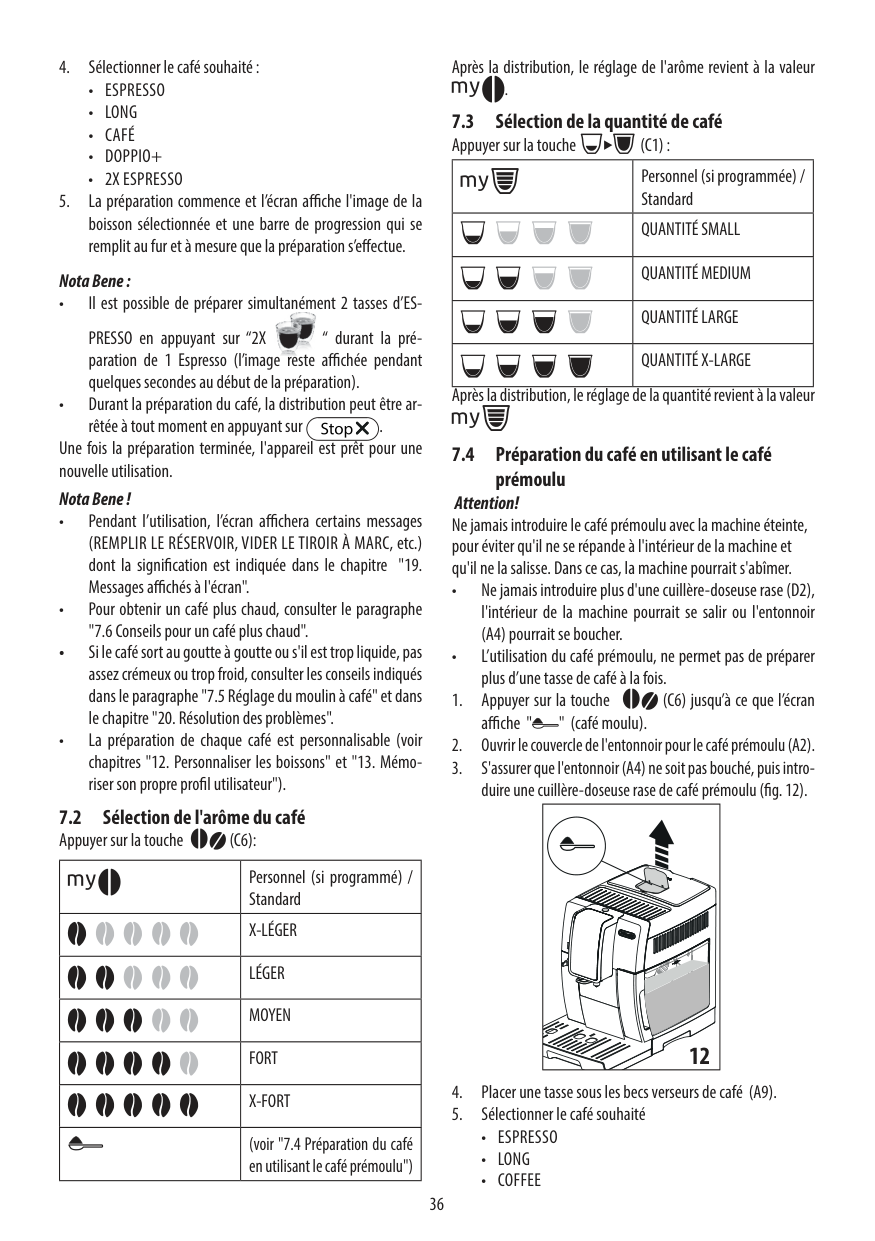
34
English
Weekly Cleaning of the Machine 1 Clean the seat of the drip tray. 2 Clean the pre-ground coff ee compartment with the cleaning brush. Yellow 4 Press the “ ” button to start dispensing steam. 5 This icon is displayed during pre-heating time required by the ma- chine. Green 6 The following icon will be displayed during the dispensing phase. Dispense water from the Automatic Milk Frother until clear water fl ows out. Press the “ ” button to stop dispensing. 7 Clean the suction tube with a damp cloth. 3 Remove the lower part of the dispensing spout and wash it with luke- warm water.
35
English
35 Weekly Cleaning of the Brew Group The brew group should be cleaned every time the coff ee bean hopper is fi lled or at least once a week. 1 Turn off the machine by pressing the “ ” button and unplug the power cord. 2 Remove the drip tray and coff ee grounds drawer. Only at this time open the service door. 1 3 2 3 To remove the brew group, press the «PUSH» button pulling it by the handle and pull it out horizontally without turning it. 4 Remove the coff ee residues drawer and wash it thoroughly.
36
English
5 Thoroughly wash the brew group with fresh, lukewarm water and care- fully clean the upper fi lter. Caution: Do not use detergent or soap to clean the brew group. 6 Let the brew group air-dry thoroughly. 7 Thoroughly clean the inside of the machine using a soft, dampened cloth. 8 Make sure the brew group is in the rest position; the two reference signs must match. If they do no match up, proceed as described in steps 9-10. 9 Gently pull down the lever until it is in contact with the brew group base and the two reference signs on the side of the brew group match. 10 Make sure the hook to lock the brew group is in the correct position by fi rmly pressing the “PUSH” button until it locks into place. Check if the hook is at the top end position. If it is not, please try again.
37
English
37 12 Insert the brew group in its seat again until it locks into place without pressing the “PUSH” button. 13 Insert the coff ee grounds drawer with the drip tray back into the ma- chine and close the service door. 11 Insert the coff ee residues drawer in its seat and ensure that it is cor- rectly in place. Note: If the coff ee residues drawer is not correctly positioned, the brew group may not fi t into the machine. Monthly Cleaning of the Automatic Milk Frother Every month you need to perform a more thorough cleaning of the Auto- matic Milk Frother using the “Saeco Milk Circuit Cleaner”. The “Saeco Milk Circuit Cleaner” can be purchased separately. Please refer to the mainte- nance product page in this user manual for further details. Warning: Danger of scalding! Dispensing may be preceded by small jets of hot water.
38
English
1 Make sure that the Automatic Milk Frother is correctly installed. 2 Pour the milk circuit cleaner into a container. Add 17 ounces of luke- warm water and wait for the product to dissolve completely. 3 Insert the suction tube into the container. 4 Place a large container (1.5 l) under the Automatic Milk Frother. Yellow 6 Press the “ ” button to start dispensing steam. 7 This icon is displayed during pre-heating time required by the ma- chine. Red 5 Press the “ ” button. The machine shows this display.
39
English
39 Green 8 The following icon will be displayed during dispensing. When the solution has been completely dispensed, press the “ ” button to stop dispensing. Note: Steam dispensing automatically stops after a continued use of 3 minutes. Press the “ ” button then the “ ” button to start dispensing steam again. Warning: Never drink the solution dispensed during this step. 9 Rinse the container thoroughly and fi ll it with 17 ounces of fresh water to be used for the rinse cycle. 10 Insert the suction tube into the container. 11 Empty the container and place it back under the Automatic Milk Frother.
40
English
Green Yellow 13 Press the “ ” button to start dispensing steam. 14 This icon is displayed during pre-heating time required by the ma- chine. 15 The following icon will be displayed during dispensing. When the solution has been completely dispensed, press the “ ” button to stop dispensing. Note: Steam dispensing stops after 3 minutes. Press the “ ” button then the “ ” button to start dispensing steam again. 16 Wash all the Automatic Milk Frother components by following the instructions below. 17 Remove the Automatic Milk Frother from the machine. 18 Remove the rubber grip from the steam wand. Caution: Warning: The tube could be hot if the machine has recently been used. Red 12 Press the “ ” button. The machine shows this display.
41
English
41 19 Take off the suction tube. 21 Remove the rubber lid as shown in the fi gure. 22 Wash all the components with lukewarm water. 20 To detach the Automatic Milk Frother, press the sides and remove it by applying light lateral movements as shown in the fi gure. 23 Attach the lid by pressing in the middle, and ensure that it is fi rmly in place.
42
English
27 Insert the Automatic Milk Frother on the rubber grip until it locks into place. Caution: Do not insert the rubber grip further than the seat shown. In this case, the Automatic Milk Frother would not function correctly as it would not be able to draw up milk. 26 Insert the rubber grip back on the steam wand. Caution: Warning: The tube could be hot if the machine has recently been used. 25 Install the suction tube. 24 Attach the Automatic Milk Frother to the fi tting and ensure it is locked into place in its seat.
43
English
43 Monthly Lubrication of the Brew Group Lubricate the brew group after approximately 500 cups of coff ee or once a month. The grease to lubricate the brew group can be purchased separately. For further details, please refer to the maintenance products page in this manual. Caution: Before lubricating the brew group, clean it with fresh water and let it dry, as described in the “Weekly Cleaning of the Brew Group” chapter. 1 Apply the grease evenly on both side guides. 2 Also lubricate the shaft.
44
English
3 Insert the brew group in its seat until it locks into place (see “Weekly Cleaning of the Brew Group” chapter). 4 Close the service door and insert the drip tray and coff ee grounds drawer. Monthly Cleaning of the Brew Group with “Coff ee Oil Remover” Besides weekly cleaning, we recommend running the cleaning cycle with “Coff ee Oil Remover” after approximately 500 cups of coff ee or once a month. This operation completes the maintenance process for the brew group. You can purchase separately the “Coff ee Oil Remover”. For further details, please refer to the maintenance products page in this manual. Caution: The “Coff ee Oil Remover” tablets are to be used for cleaning only and do not have a descaling function. For the descaling procedure use the Saeco descaling solution and follow the procedure described in the “Descaling” chapter. 1 Place a container under the dispensing spout. 2 Make sure the water tank is fi lled with fresh water up to the “MAX” level.
45
English
45 3 Put a “Coff ee Oil Remover” tablet in the pre-ground coff ee compart- ment. Green 4 Press the “ ” button to select the pre-ground coff ee function without adding pre-ground coff ee to the compartment. 5 Push the lever downwards to select the “ESPRESSO” function. 6 Press the “ ” button to start the brewing cycle. 7 Wait until the machine has dispensed half a cup of water. 8 Switch the power button on the back of the machine to “0”. 11 Remove the drip tray and the coff ee grounds drawer and open the service door. Remove the brew group. 9 Let the solution take eff ect for about 15 minutes. Make sure you dis- card the dispensed water. 10 Switch the power button on the back of the machine, to “I”. To turn on the machine, press the “ ” button.Wait until the end of the automatic rinse cycle.
46
English
Green 13 After rinsing the brew group, insert it again in its seat until it locks into place (see “Weekly Cleaning of the Brew Group” chapter). Insert the drip tray and the coff ee grounds drawer. Close the service door. 14 Press the “ ” button to select the pre-ground coff ee function without adding pre-ground coff ee to the compartment. 15 Press the “ ” button to start the brewing cycle. 16 Repeat steps 14 to 15 twice. Make sure you discard the dispensed water. 17 To clean the drip tray, place “Coff ee Oil Remover” tablet inside and fi ll it 2/3rds full with hot water. Let the cleaning solution take eff ect for about 30 minutes, then rinse thoroughly. Monthly Cleaning of the Coff ee Bean Hopper Clean the coff ee bean hopper once a month when it is empty with a damp cloth to remove coff ee oil. Thereafter refi ll it with coff ee beans. 12 Wash the brew group thoroughly with fresh water. 1 3 2
47
English
47Descaling
The descaling process takes approx. 35 minutes. Limescale builds up inside the machine during use. It needs to be removed regularly as it may clog the water and coff ee circuit of your machine. The machine tells you when descaling is needed. If the machine display shows the CALC CLEAN icon, it means that you need to descale it. Caution: Not doing this will ultimately make your machine stop working prop- erly, and in this case repair is NOT covered by your warranty. Yellow Always use the specially formulated descaling solution, since it has been designed to optimize machine performance. The descaling solution can be purchased separately. For further details, please refer to the maintenance products page in this manual. Warning: Never drink the descaling solution or any products dispensed until the cycle has been carried out to the end. Never use vinegar as a descaling solution. Note: During the descaling cycle do not switch off the machine. If the machine has been switched off , it will continue the descaling from the point at which it was interrupted the next time it is turned on. To execute the descaling cycle, follow the steps below: Before descaling: 1 Empty the drip tray and the coff ee grounds drawer. 1 3 2
48
English
Yellow 2 Remove the Automatic Milk Frother from the steam/hot water wand. 3 Remove the “INTENZA+” water fi lter from the water tank if it was in- stalled and replace it with the small white original one. Place the water tank back into the machine. 4 Press the “ ” button until the following display is shown. 5 Press the “ ” button to start the descaling process. Yellow Note: If you press the “ ” button by mistake, press the “ ” button to quit. 6 Remove the water tank and pour in the entire contents of the descal- ing solution. Then top up the tank with fresh water up to the calc clean level. 7 Place the water tank back into the machine.8 Place a large container (1.5 l) under both the steam/hot water wand and the dispensing spout.
49
English
49 9 Press the “ ” button to start the descaling cycle. Yellow Yellow 10 The machine will start dispensing the descaling solution at regular intervals. The bar on the control panel shows the cycle progress. Note: The descaling cycle may be paused by pressing the “ ” button. To resume the cycle, press the “ ” button again. This allows you to empty the container or to stay away from the machine for a brief period of time. Yellow 11 When this icon is displayed, the water tank is empty. Red Red 12 Remove the water tank, rinse it and fi ll it up to the MAX level with fresh water. Place it back into the machine. When inserting the water tank into the machine, the following display is shown. 13 Empty the drip tray and coff ee grounds drawer and place them back in position. 14 Empty the container back and place it back under both the steam/hot water wand and the dispensing spout. Yellow 15 Press the “ ” button to start the rinse cycle. 16 When this icon is displayed, the water tank is empty. Repeat steps 12-
50
English
19 When the amount of water needed for the rinse cycle has been com- pletely dispensed, this icon on the side is displayed. Press the “ ” button to quit the descaling cycle. Green Yellow 20 Press the “ ” button to prime the circuit. 21 The machine now carries out the warm-up and automatic rinse cycle to prepare for product brewing. 22 Remove and empty the container. 23 Empty the drip tray and place it back. 24 The descaling cycle is now complete. 25 Remove the small white fi lter and replace the INTENZA+ water fi lter (if fi tted) in the water tank. Reinsert the Automatic Milk Frother. Note: At the end of the descaling cycle, wash the brew group as described in the “Weekly cleaning of the brew group” chapter. The rinse cycles are performed in order to have the circuit cleaned with a preset amount of water to ensure proper machine performance. If the water tank is not fi lled up to MAX level, the machine might require three or more cycles. 17 When the water tank is empty, remove the water tank, rinse it and fi ll it up to the MAX level with fresh water. Place it back into the machine. 18 Empty the container back and place it back under both the steam/hot water wand and the dispensing spout. 1 3 2
51
English
51Programming
It is possible to customise the machine's functions via the programming menu. The following settings can be adjusted Coff ee temperature This function adjusts the coff ee brewing temperature. Yellow Yellow Yellow Yellow Yellow Yellow Timer (stand-by) This function adjusts the time taken for the machine to go into stand-by mode after the last brewing. Contrast This function adjusts the contrast of the display to better view the mes- sages. Water hardness This function adjusts the water hardness setting according to the area where you live. 1 = very soft water 2 = soft water 3 = hard water 4 = very hard water For more details, please see the “Measuring and Programming Water Hard- ness” chapter. "INTENZA+" Water Filter This function manages the “INTENZA+” water fi lter. For more details, see the chapter about fi lter handling. Descaling cycle This function activates the descaling cycle.
52
English
Yellow Green Yellow Yellow Factory settings This function allows you to reset all factory values. How to Program the Machine In this example, it is shown how to program the display contrast. Proceed in the same way to program the other functions. The programming menu can only be accessed when the machine is on and shows this display. 1 Press the “ ” button to access programming. 2 The main screen will be displayed. 3 Press the “ ” button to scroll the pages until the display contrast func- tion is displayed.
53
English
53 Yellow 4 Press the “ ” and “ ” buttons to increase or decrease the value of the function. 5 When the display value is changed, the “OK” message appears. Press the “ ” button to confi rm the change. 6 Press the “ ” button to exit the programming menu. Note: The machine automatically exits programming mode if no button is pressed for 3 minutes. The values that have been changed but not confi rmed won’t be saved.
54
English
Meaning Of The Display Icons
This machine is equipped with a color-coded system to make the user’s understanding of the display signals easier. The icons are color-coded according to the traffi c light principle. Ready Signals (Green Color) The machine is ready to brew products. The machine is ready to brew pre-ground coff ee. Steam or hot water selection. Hot water dispensing. Steam dispensing. The machine is brewing one cup of espresso. The machine is brewing two cups of espresso. The machine is programming the amount of espresso to brew. Espresso brewing using pre-ground coff ee in progress.
55
English
55 Ready Signals (Green Color) The machine is brewing one cup of medium coff ee. The machine is programming the amount of medium coff ee to be brewed. The machine is brewing one cup of long coff ee. The machine is programming the amount of long coff ee to be brewed.
56
English
Warning Signals (Yellow Color) The machine is in warm-up phase to brew beverages or dispense hot water/ steam. The machine is performing the rinse phase. Wait until the machine has com- pleted the cycle. The machine needs the "INTENZA+" water fi lter to be replaced. The brew group is being reset due to machine reset. Refi ll the coff ee bean hopper with coff ee beans and restart the cycle. Prime the circuit. The machine needs to be descaled. Press the “ ” button to start the descal- ing process. Follow the steps described in the “Descaling” chapter of this manual. If you want to descale later, press the “ ” button to continue using the machine. Please note that not descaling your machine will ultimately make it stop working properly. In this case repair is NOT covered under your warranty.
57
English
57 Warning Signals (Red Color) Completely insert the drip tray with the coff ee grounds drawer into the ma- chine and close the service door. Fill the coff ee bean hopper. The brew group must be inserted into the machine. Empty the coff ee grounds drawer. Wait about 5 seconds before placing it back. Set the “ESPRESSO” or “COFFEE” selection lever to “ESPRESSO” within 30 seconds to complete brewing. Set the “ESPRESSO” or “COFFEE” selection lever to “COFFEE” within 30 seconds to complete brewing. Fill the water tank. A beverage has been selected without the coff ee bean hopper inner lid on the machine. Place the coff ee bean hopper inner lid on the machine within 30 seconds to complete brewing. Exx Turn off the machine. After 30 seconds, turn it on again. Try this 2 or 3 times. If the machine will not start, contact the Philips SAECO hotline in your coun- try and quote the error code shown on the display. You can fi nd its contact details in the warranty booklet packed separately or on www.philips.com/ support.
58
English
Troubleshooting
This chapter summarizes the most common problems you could encoun- ter with your machine. If you are unable to solve the problem with the information below, visit www.philips.com/support for a list of frequently asked questions or contact the Philips Saeco hotline in your country. The contact details can be found in the warranty booklet supplied sepa- rately or on www.philips.com/support. Machine actions Causes Solutions The machine does not switch on. The machine is not connected to the electric network, or the power button is in the “O” position. Connect the machine to the electric network and turn the power button to the “I” position. The drip tray gets fi lled al- though no water is drained. Sometimes water is drained auto- matically by the machine into the drip tray to manage the rinsing of the circuits and ensure optimum machine performance. This is seen as normal machine behavior. The red icon is always displayed on the machine. The coff ee grounds drawer was emptied with the machine off . The coff ee grounds drawer must always be emptied with the machine on. Wait until the icon is dis- played before refi tting the drawer. The espresso is not hot enough. The cups are cold. Preheat the cups with hot water. No hot water or steam is dispensed. The hole of the hot water/steam wand is clogged. Clean the hole of the steam wand using a pin. Make sure that the machine is off and has cooled down before performing this operation. The espresso is not creamy enough (See note) The blend is unsuitable, coff ee is not freshly roasted or the grind is too coarse. Change coff ee blend or adjust the degree of grind as explained in the “Adjusting the Ceramic Coff ee Grinder” chapter. The machine takes a long time to warm up or the amount of water dispensed is too little. The machine circuit is clogged by limescale. Descale the machine. The brew group cannot be removed. The brew group is out of place. Turn the machine on. Close the ser- vice door. The brew group automati- cally returns to the initial position. The coff ee grounds drawer is inserted. Remove the coff ee grounds drawer before removing the brew group.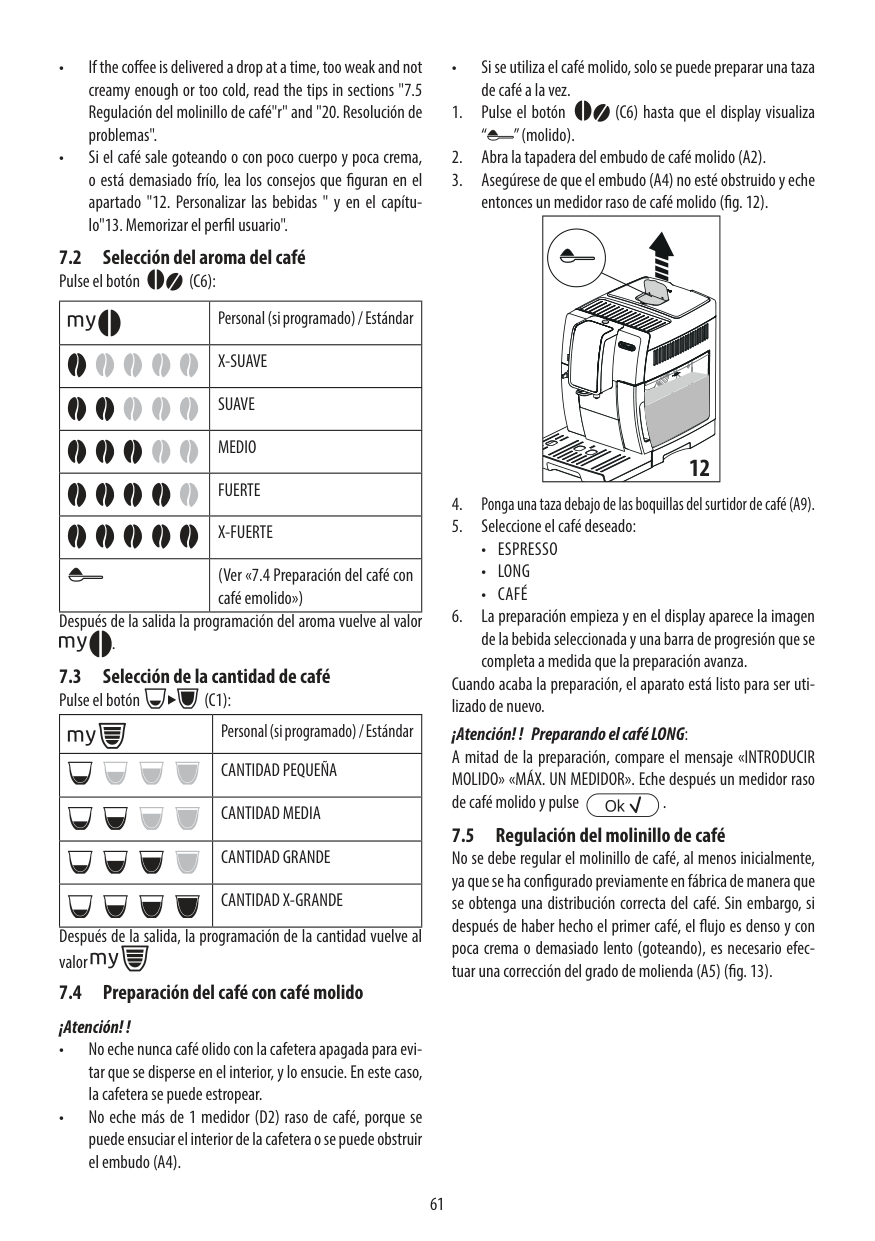
59
English
59 Machine actions Causes Solutions The machine grinds the coff ee beans but no coff ee comes out. (See note) There is no water. Fill the water tank and prime the circuit (see "Using the Machine for the First Time" chapter). The brew group is dirty. Clean the brew group (see "Weekly Cleaning of the Brew Group" chap- ter). The circuit is not primed. Prime the circuit (see "Using the Machine for the First Time" chapter). This might occur when the ma- chine is automatically adjusting the dose. Brew a few cups of coff ee as described in the “Saeco Adapting System” chapter. The dispensing spout is dirty. Clean the dispensing spout. The beverage is too weak. (See note) This might occur when the ma- chine is automatically adjusting the dose. Brew a few cups of coff ee as described in the “Saeco Adapting System” chapter. The beverage is brewed slowly. (See note) The coff ee grind is too fi ne. Change coff ee blend or adjust the grind as explained in the “Adjusting the Ceramic Coff ee Grinder” chapter. The circuit is not primed. Prime the circuit (see "Using the Machine for the First Time" chapter). The brew group is dirty. Clean the brew group (see "Weekly Cleaning of the Brew Group" chap- ter). Coff ee leaks out of the dis- pensing spout. The dispensing spout is clogged. Clean the dispensing spout and its holes. Milk does not froth. The Automatic Milk Frother is in- serted too deep. No milk is being suctioned. Leave the Automatic Milk Frother to cool down. Move it slightly down- wards. Reposition it in its correct seat. Frothed milk is too cold. The cups are cold. Preheat the cups with hot water. Note: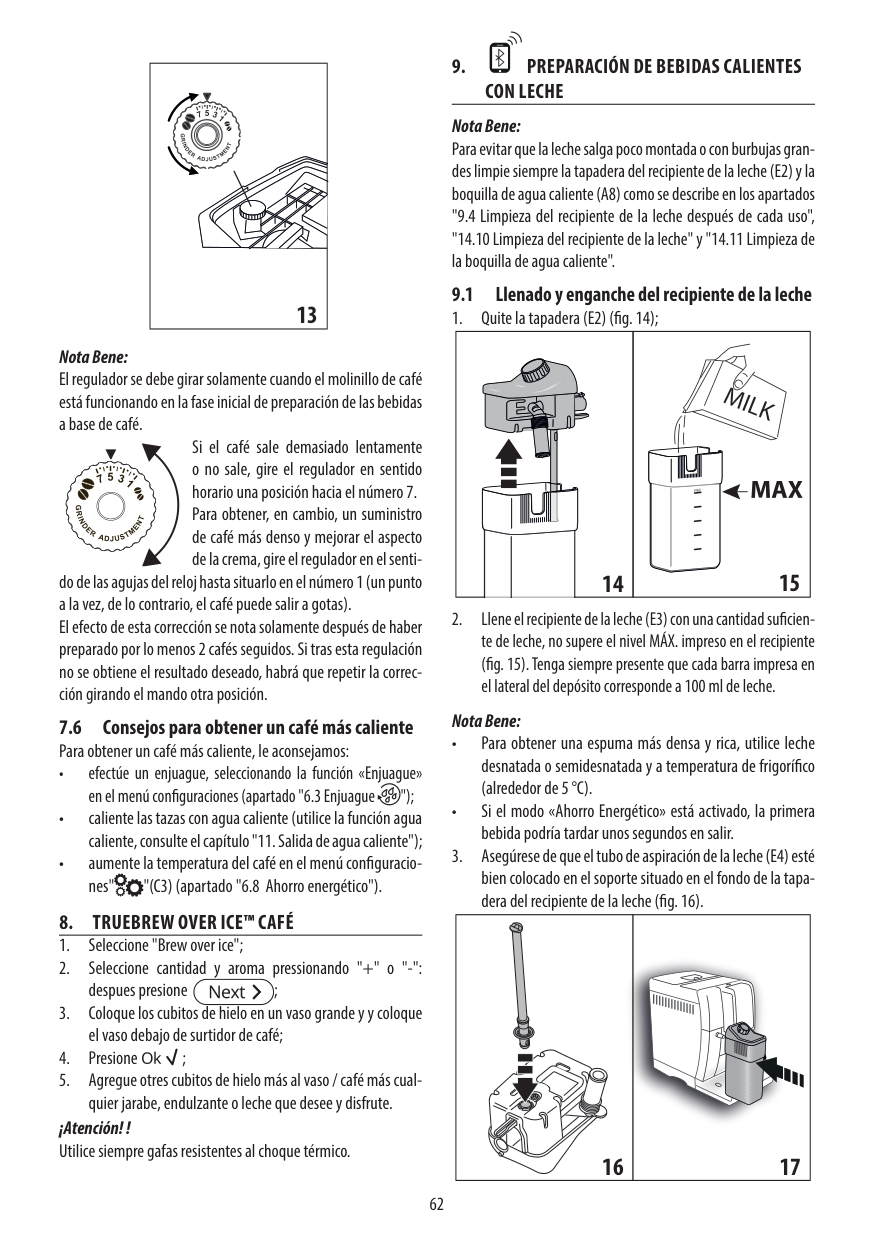
60
English
Energy Saving
Stand-by The Saeco full automatic espresso machine is designed for energy saving proven by the Class A energy label. After 30 minutes of inactivity, the machine turns off automatically (unless a diff erent stand-by time has been programmed). If a product has been brewed the machine performs a rinse cycle. In stand-by mode, the energy consumption is below 1Wh. To turn on the machine, press the “ ” button (if power button on the back of the machine is set to “I”). If the boiler is cold the machine performs a rinse cycle. Disposal Do not throw away the machine with the normal household waste at the end of its life, but hand it in at an offi cial collection point for recycling. By doing this, you help to preserve the environment.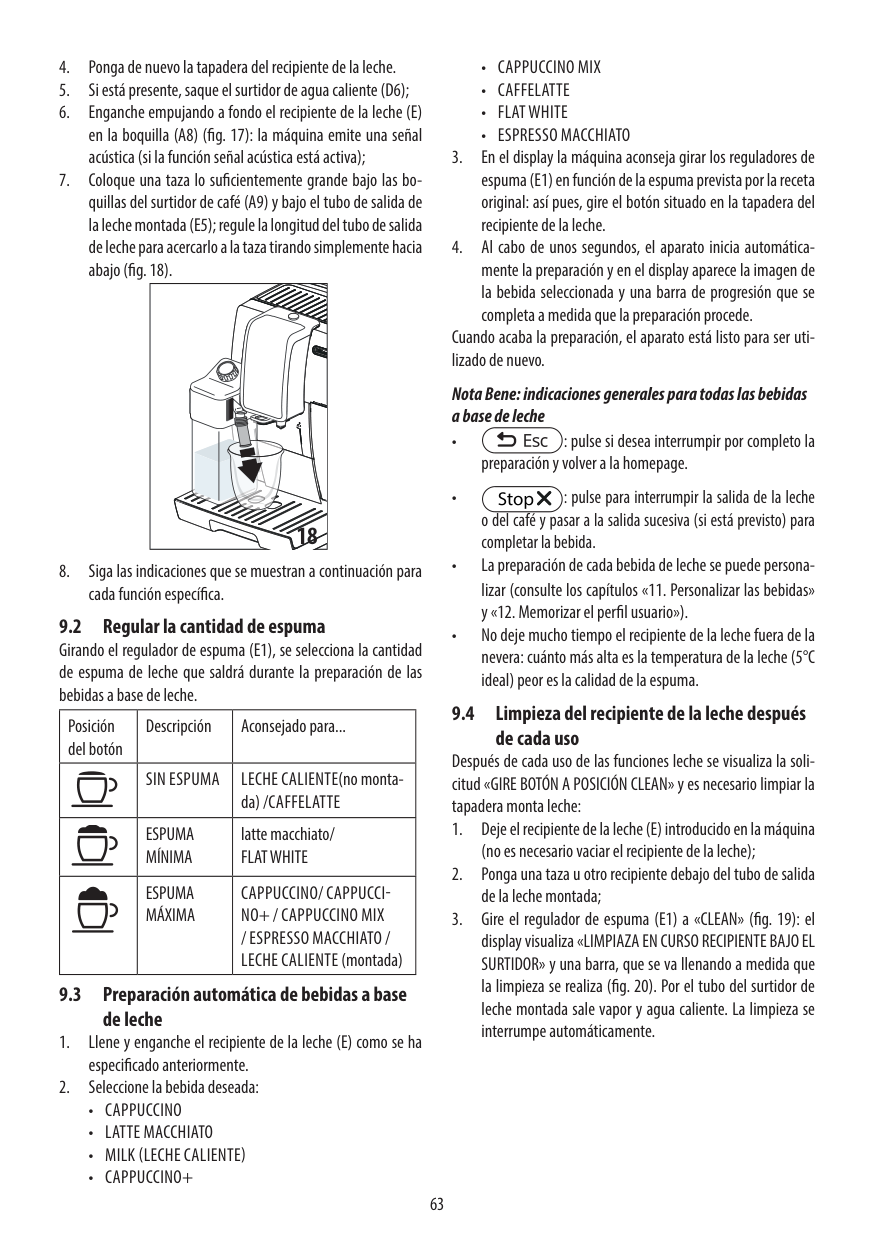
61
English
61Technical Specifications
The manufacturer reserves the right to make changes to the technical specifi cations of the product Nominal Voltage - Power Rating - Power Supply See label on the inside of the service door Housing material Thermoplastic material Size (w x h x d) 215 x 330 x 429 mm Weight 7.2 kg Power cord length 800 - 1200 mm Control panel Front panel Automatic Milk Frother Special for cappuccino Cup sizes up to 178mm Water Tank 1.8 litres - Removable type Coff ee bean hopper capacity 250 g Coff ee grounds drawer capacity 15 Pump pressure 15 bar Boiler Stainless steel type Safety devices Thermal fuseWarranty And Service
Warranty For detailed information on your warranty and related conditions, please read the warranty booklet supplied separately. Service We want to ensure that you remain satisfi ed with your machine. If you have not already done so, please register your purchase at www.philips.com/welcome. This will enable us to stay in contact with you and send you cleaning and descaling reminders. If you need service or support, please visit the Philips website at www.philips.com/support or contact the Philips Saeco hotline in your country. The contact details can be found in the warranty booklet supplied separately or on www.philips.com/support.
62
English
Ordering Maintenance Products
For cleaning and descaling, use Saeco maintenance products only. You can purchase these at the Philips online shop at www.shop.philips.com/service, your local dealer or at authorised service centres. If you have any diffi culties obtaining maintenance products for your ma- chine, please contact the Philips Saeco hotline in your country. The contact details can be found in the warranty booklet supplied sepa- rately or on www.philips.com/support. Overview of maintenance products:
63
English
63
www.philips.com/welcome The manufacturer reserves the right to make changes without prior notice. Rev.00 del 15-06-13 02