Confidence Fitness Power Plus manual
Fitness Equipment · 8 Q&As

Confidence Fitness Power Plus

Ask AI

— answers from the official manual

Answers from the official manual.

Common questions

Common Questions

8 total
Show 2 more questions

Full Manual

12 pages
Page 1

Confidence

Fitness

![image 1](NHCFT-1120_images/imageFile1.png)

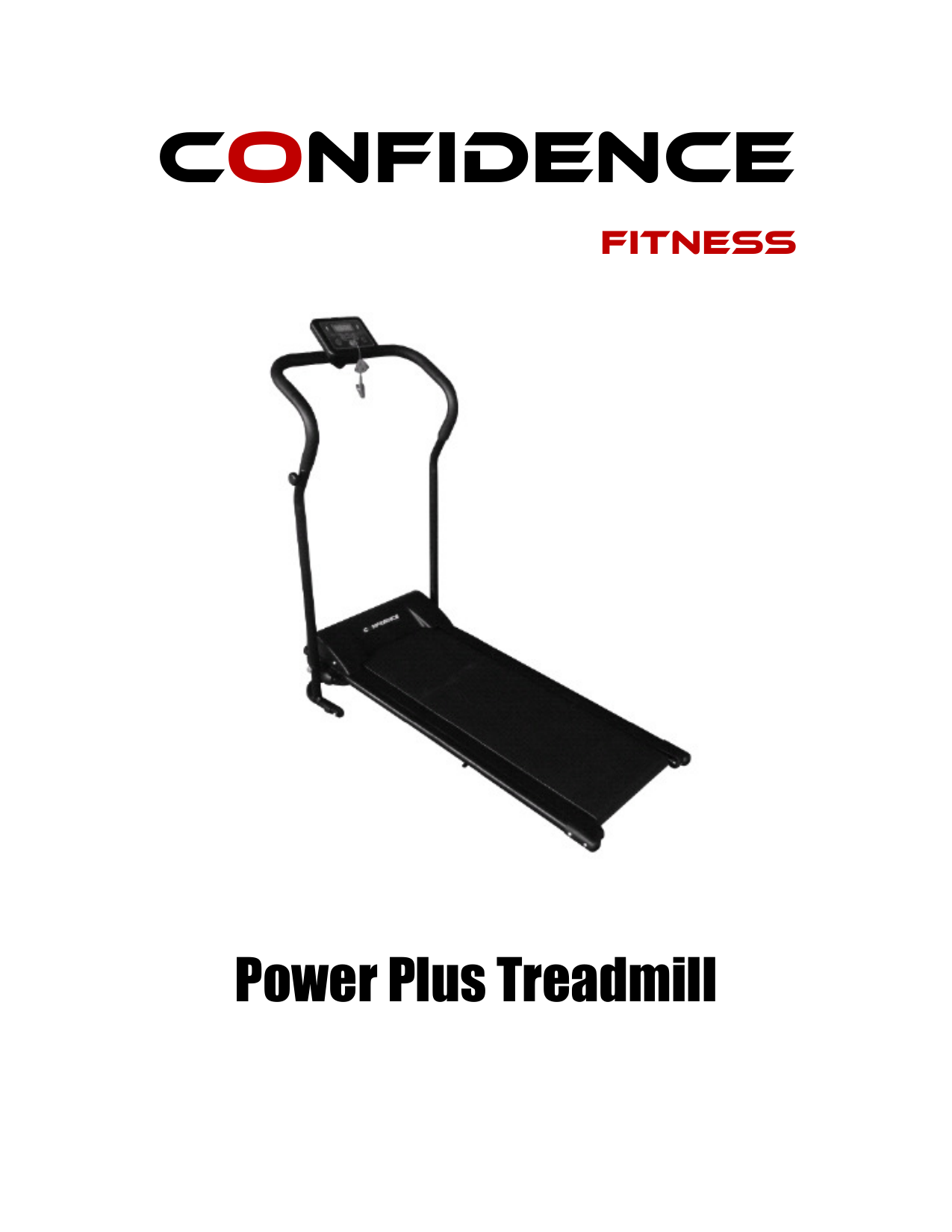
Power Plus Treadmill

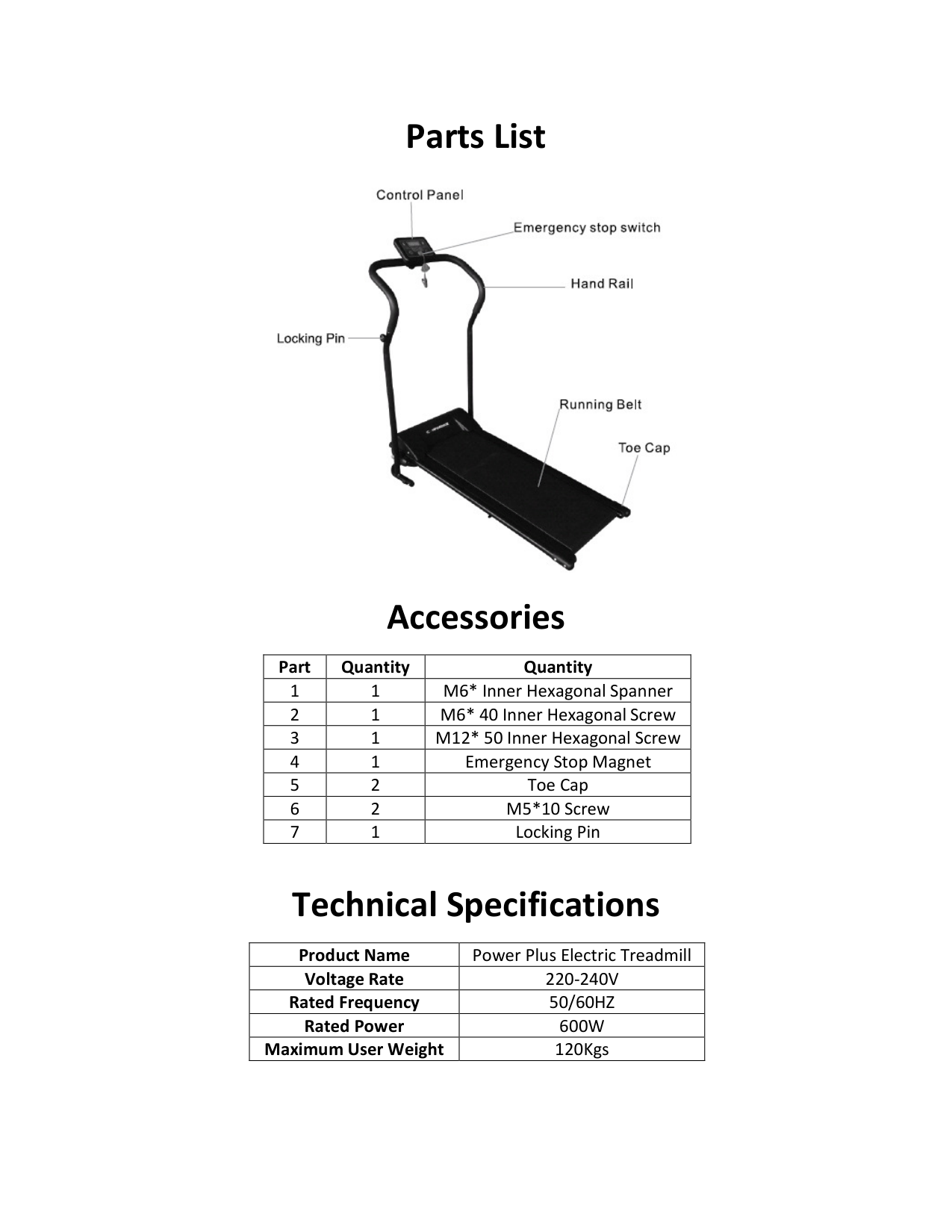
Parts List

![image 2](NHCFT-1120_images/imageFile2.png)

Accessories

|Part|Quantity|Quantity| |---|---|---|
Page 2

|1|1|M6* Inner Hexagonal Spanner| |2|1|M6* 40 Inner Hexagonal Screw| |3|1|M12* 50 Inner Hexagonal Screw| |4|1|Emergency Stop Magnet| |5|2|Toe Cap| |6|2|M5*10 Screw| |7|1|Locking Pin|

Technical Specifications

|Product Name|Power Plus Electric Treadmill| |---|---| |Voltage Rate|220-240V| |Rated Frequency|50/60HZ| |Rated Power|600W|
Page 3

|Maximum User Weight|120Kgs|

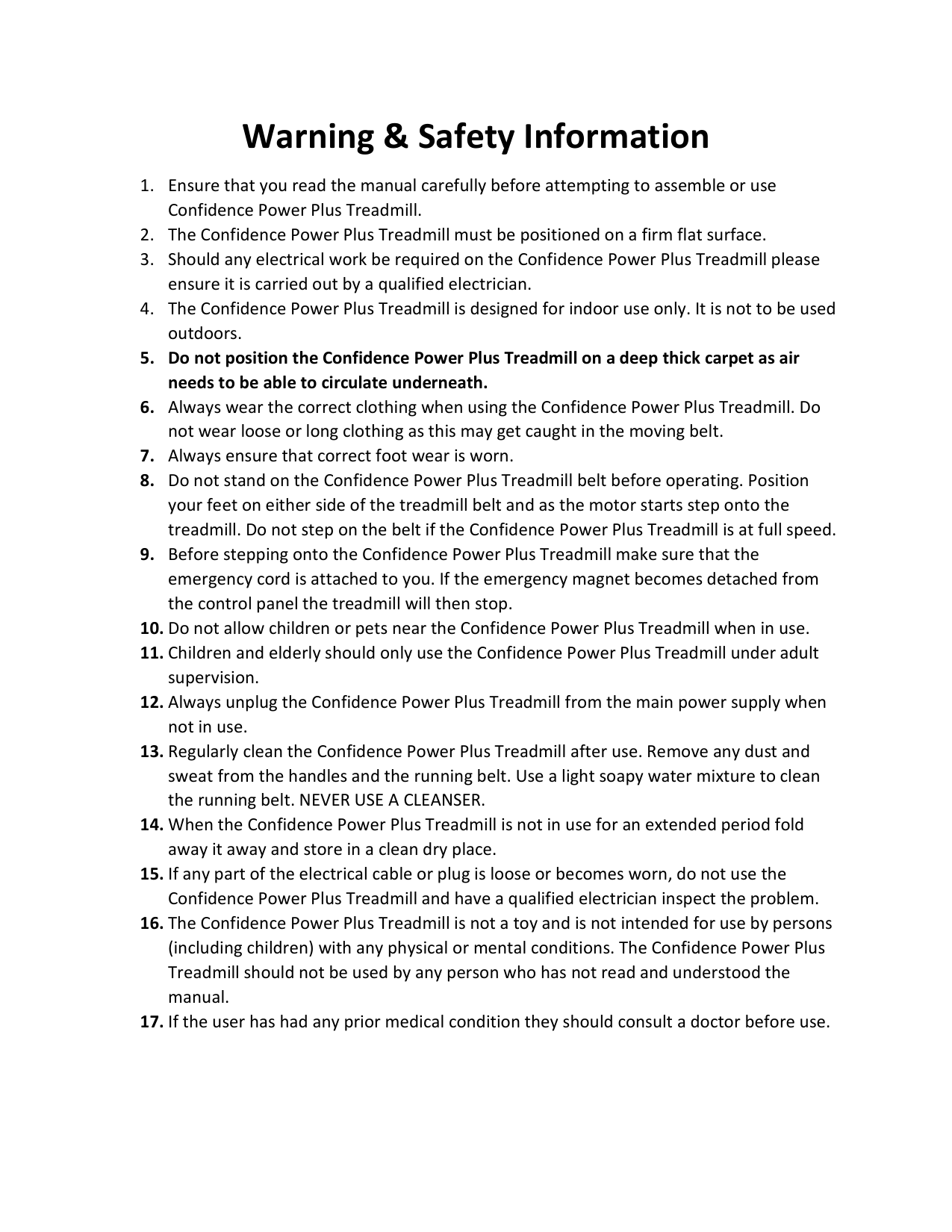
Warning & Safety Information
  • 1. Ensure that you read the manual carefully before attempting to assemble or use Confidence Power Plus Treadmill.
  • 2. The Confidence Power Plus Treadmill must be positioned on a firm flat surface.
  • 3. Should any electrical work be required on the Confidence Power Plus Treadmill please ensure it is carried out by a qualified electrician.
  • 4. The Confidence Power Plus Treadmill is designed for indoor use only. It is not to be used outdoors.
  • 5. Do not position the Confidence Power Plus Treadmill on a deep thick carpet as air needs to be able to circulate underneath.
  • 6. Always wear the correct clothing when using the Confidence Power Plus Treadmill. Do not wear loose or long clothing as this may get caught in the moving belt.
  • 7. Always ensure that correct foot wear is worn.
  • 8. Do not stand on the Confidence Power Plus Treadmill belt before operating. Position your feet on either side of the treadmill belt and as the motor starts step onto the treadmill. Do not step on the belt if the Confidence Power Plus Treadmill is at full speed.
  • 9. Before stepping onto the Confidence Power Plus Treadmill make sure that the emergency cord is attached to you. If the emergency magnet becomes detached from the control panel the treadmill will then stop.
  • 10. Do not allow children or pets near the Confidence Power Plus Treadmill when in use.
  • 11. Children and elderly should only use the Confidence Power Plus Treadmill under adult supervision.
  • Page 4

  • 12. Always unplug the Confidence Power Plus Treadmill from the main power supply when not in use.
  • 13. Regularly clean the Confidence Power Plus Treadmill after use. Remove any dust and sweat from the handles and the running belt. Use a light soapy water mixture to clean the running belt. NEVER USE A CLEANSER.
  • 14. When the Confidence Power Plus Treadmill is not in use for an extended period fold away it away and store in a clean dry place.
  • 15. If any part of the electrical cable or plug is loose or becomes worn, do not use the Confidence Power Plus Treadmill and have a qualified electrician inspect the problem.
  • 16. The Confidence Power Plus Treadmill is not a toy and is not intended for use by persons (including children) with any physical or mental conditions. The Confidence Power Plus Treadmill should not be used by any person who has not read and understood the manual.
  • 17. If the user has had any prior medical condition they should consult a doctor before use.
  • Assembly Instructions

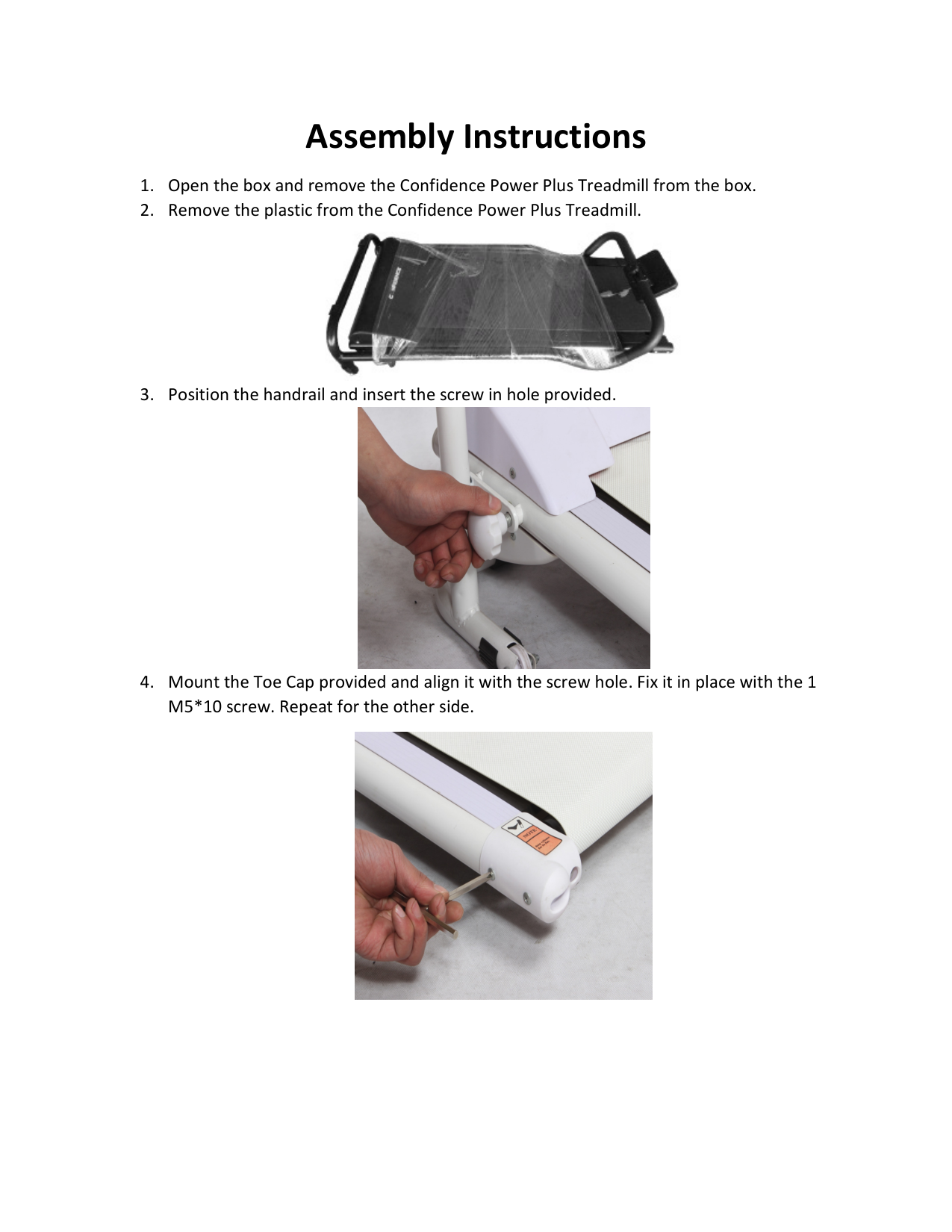
  • 1. Open the box and remove the Confidence Power Plus Treadmill from the box.
  • 2. Remove the plastic from the Confidence Power Plus Treadmill.
  • 3. Position the handrail and insert the screw in hole provided.
  • 4. Mount the Toe Cap provided and align it with the screw hole. Fix it in place with the 1 M5*10 screw. Repeat for the other side.
  • Page 5

    ![image 3](NHCFT-1120_images/imageFile3.png)

    ![image 4](NHCFT-1120_images/imageFile4.png)

    ![image 5](NHCFT-1120_images/imageFile5.png)

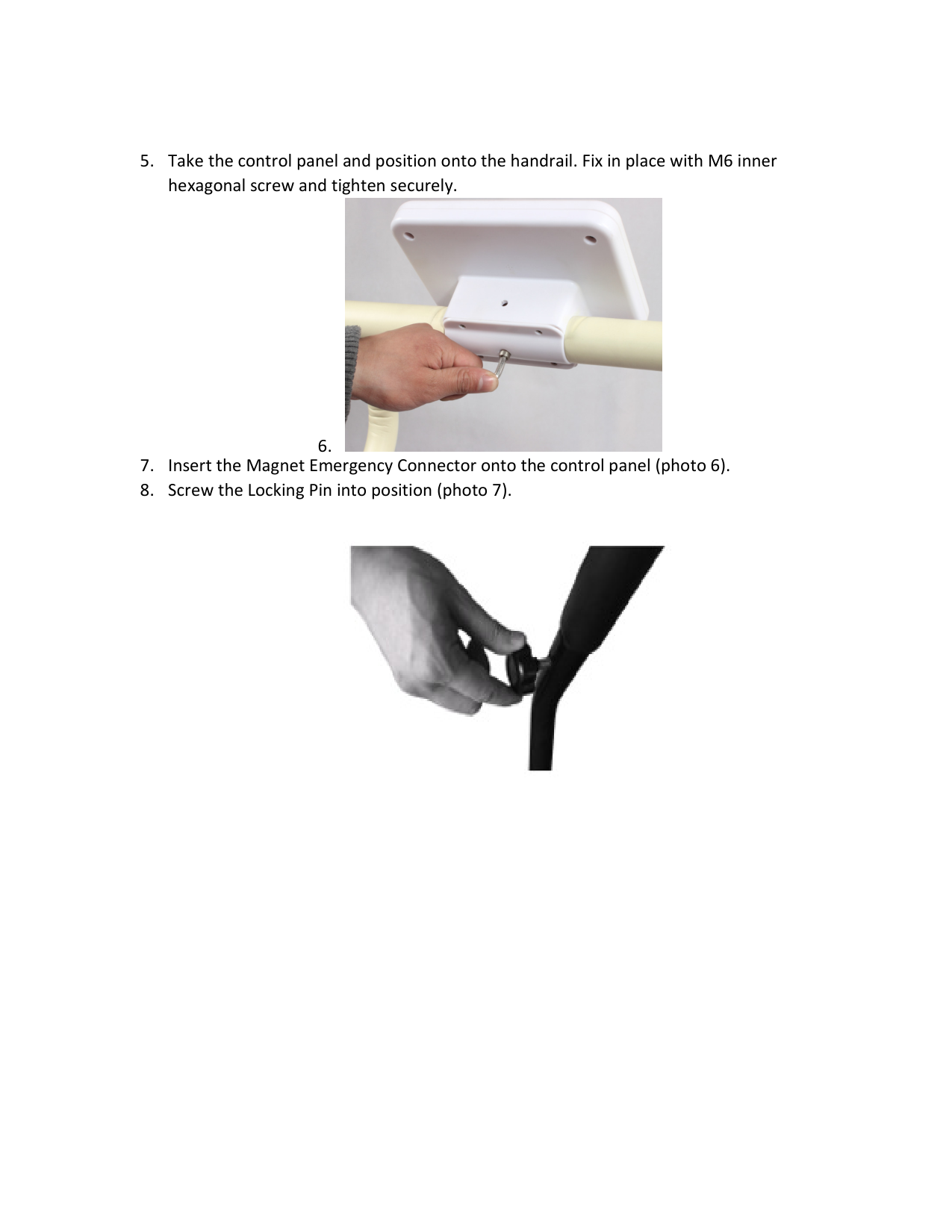
  • 5. Take the control panel and position onto the handrail. Fix in place with M6 inner hexagonal screw and tighten securely.
  • ![image 6](NHCFT-1120_images/imageFile6.png)

  • - 7. Insert the Magnet Emergency Connector onto the control panel (photo 6).
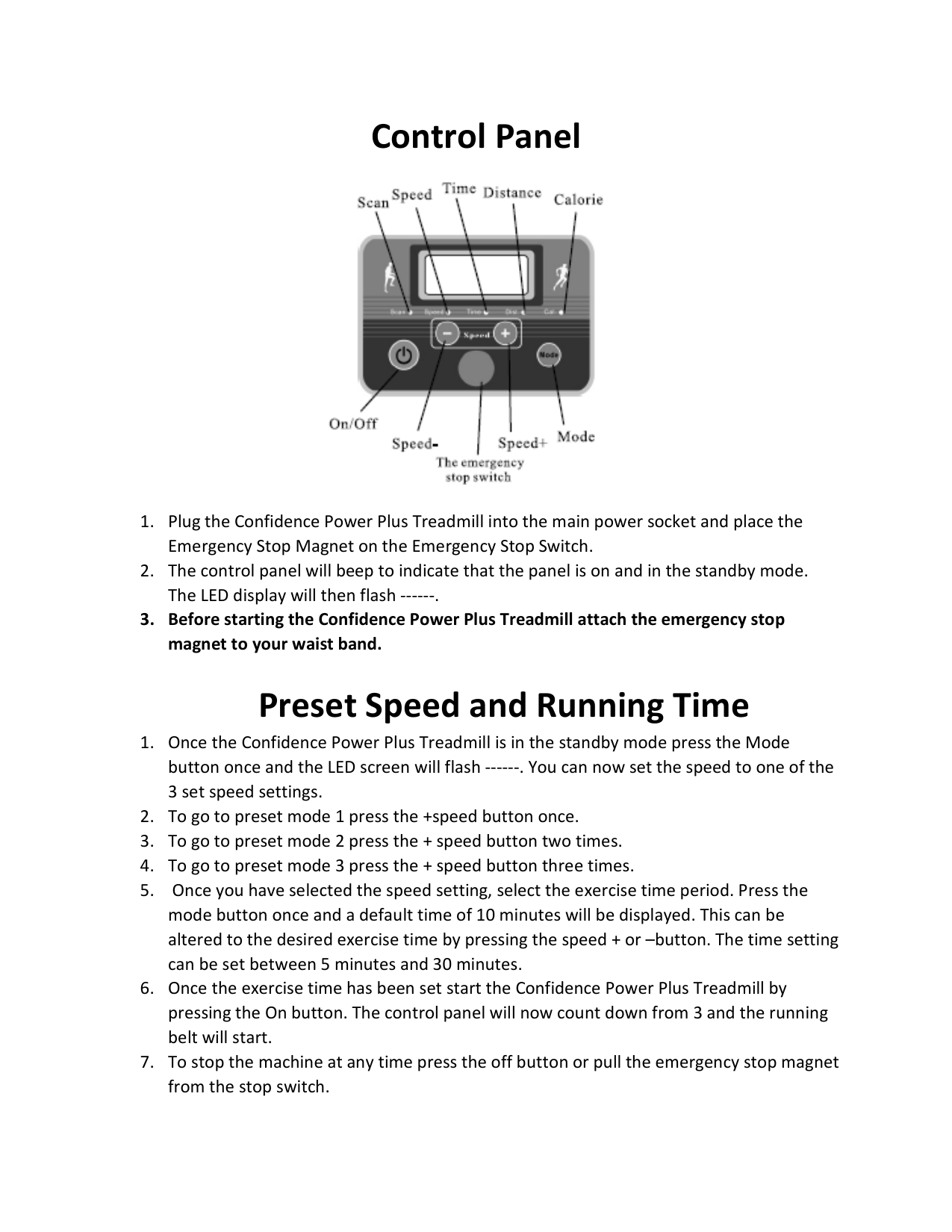
  • 8. Screw the Locking Pin into position (photo 7).
  • Page 6

    ![image 7](NHCFT-1120_images/imageFile7.png)

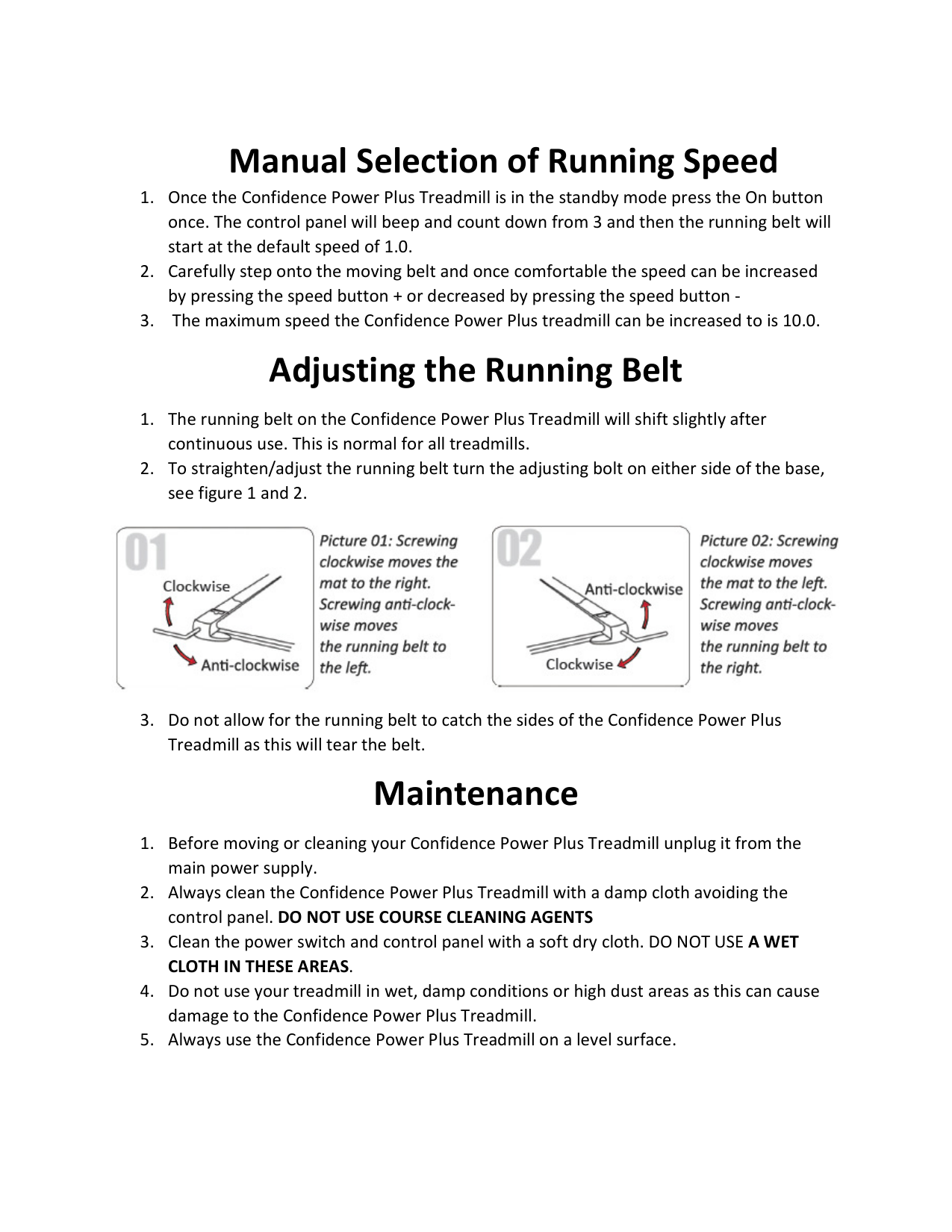
    Control Panel

    ![image 8](NHCFT-1120_images/imageFile8.png)

  • 1. Plug the Confidence Power Plus Treadmill into the main power socket and place the Emergency Stop Magnet on the Emergency Stop Switch.
  • 2. The control panel will beep to indicate that the panel is on and in the standby mode. The LED display will then flash ------.
  • 3. Before starting the Confidence Power Plus Treadmill attach the emergency stop magnet to your waist band.
  • Preset Speed and Running Time

  • 1. Once the Confidence Power Plus Treadmill is in the standby mode press the Mode button once and the LED screen will flash ------. You can now set the speed to one of the 3 set speed settings.
  • 2. To go to preset mode 1 press the +speed button once.
  • Page 7

  • 3. To go to preset mode 2 press the + speed button two times.
  • 4. To go to preset mode 3 press the + speed button three times.
  • 5. Once you have selected the speed setting, select the exercise time period. Press the mode button once and a default time of 10 minutes will be displayed. This can be altered to the desired exercise time by pressing the speed + or –button. The time setting can be set between 5 minutes and 30 minutes.
  • 6. Once the exercise time has been set start the Confidence Power Plus Treadmill by pressing the On button. The control panel will now count down from 3 and the running belt will start.
  • 7. To stop the machine at any time press the off button or pull the emergency stop magnet from the stop switch.
  • Manual Selection of Running Speed

  • 1. Once the Confidence Power Plus Treadmill is in the standby mode press the On button once. The control panel will beep and count down from 3 and then the running belt will start at the default speed of 1.0.
  • 2. Carefully step onto the moving belt and once comfortable the speed can be increased by pressing the speed button + or decreased by pressing the speed button -
  • 3. The maximum speed the Confidence Power Plus treadmill can be increased to is 10.0.
  • Adjusting the Running Belt

    Page 8

  • 1. The running belt on the Confidence Power Plus Treadmill will shift slightly after continuous use. This is normal for all treadmills.
  • 2. To straighten/adjust the running belt turn the adjusting bolt on either side of the base, see figure 1 and 2.
  • 3. Do not allow for the running belt to catch the sides of the Confidence Power Plus Treadmill as this will tear the belt.
  • ![image 9](NHCFT-1120_images/imageFile9.png)

    Maintenance

  • 1. Before moving or cleaning your Confidence Power Plus Treadmill unplug it from the main power supply.
  • 2. Always clean the Confidence Power Plus Treadmill with a damp cloth avoiding the control panel. DO NOT USE COURSE CLEANING AGENTS
  • 3. Clean the power switch and control panel with a soft dry cloth. DO NOT USE A WET CLOTH IN THESE AREAS.
  • 4. Do not use your treadmill in wet, damp conditions or high dust areas as this can cause damage to the Confidence Power Plus Treadmill.
  • 5. Always use the Confidence Power Plus Treadmill on a level surface.
  • Page 9

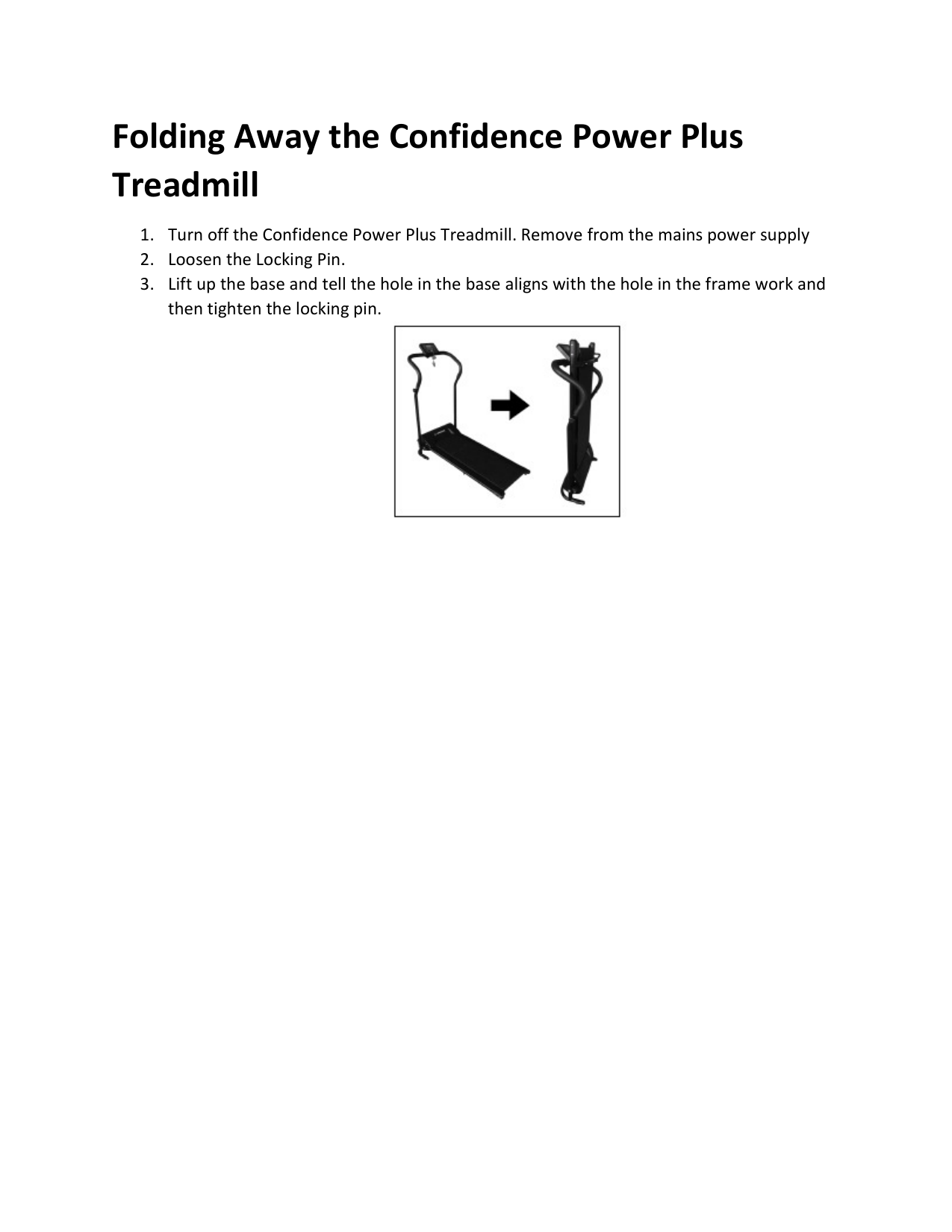
    Folding Away the Confidence Power Plus Treadmill

  • 1. Turn off the Confidence Power Plus Treadmill. Remove from the mains power supply
  • 2. Loosen the Locking Pin.
  • 3. Lift up the base and tell the hole in the base aligns with the hole in the frame work and then tighten the locking pin.
  • ![image 10](NHCFT-1120_images/imageFile10.png)

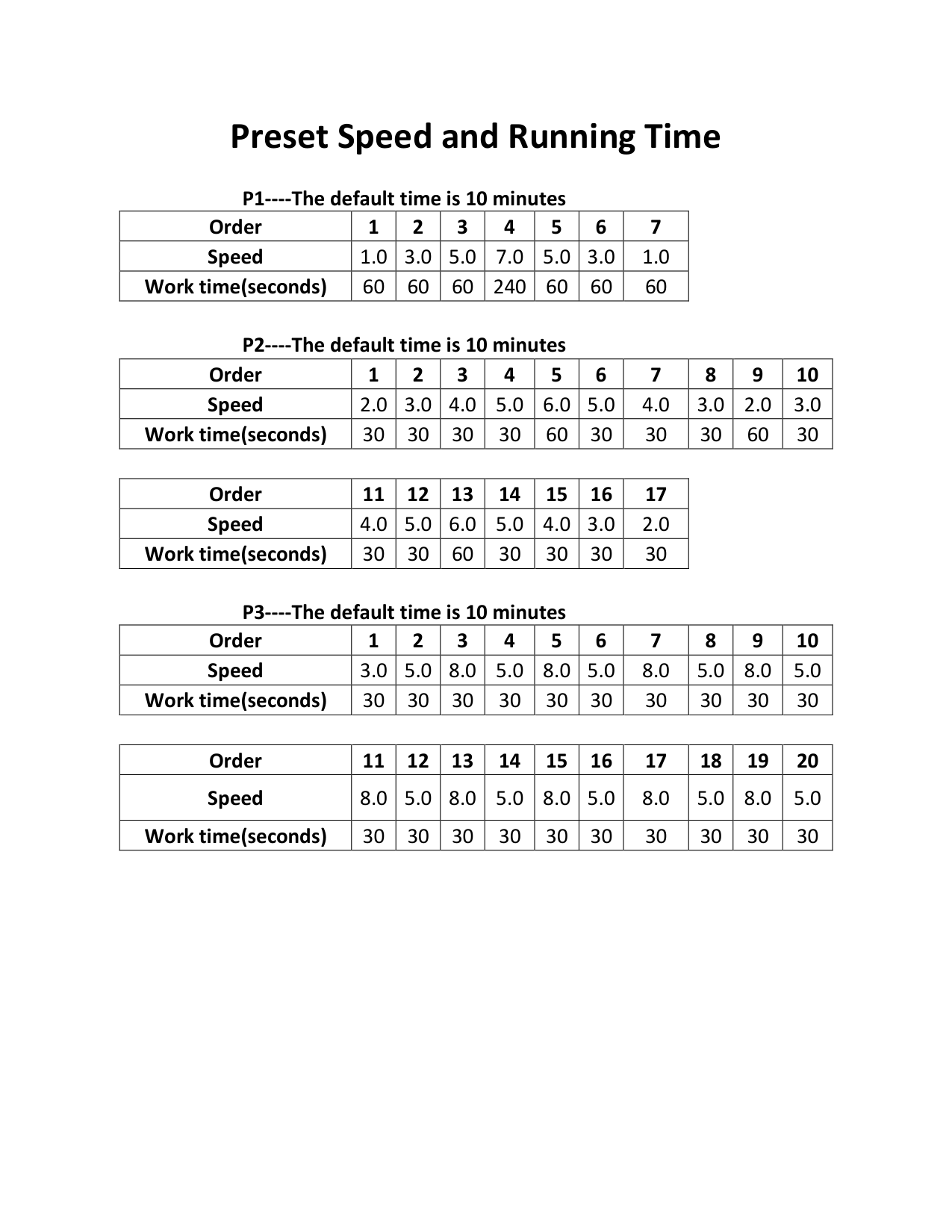
    Preset Speed and Running Time

  • P1----The default time is 10 minutes
  • |Order|1|2|3|4|5|6|7| |---|---|---|---|---|---|---|---| |Speed|1.0|3.0|5.0|7.0|5.0|3.0|1.0|

    Page 10

    |Work time(seconds)|60|60|60|240|60|60|60|

  • P2----The default time is 10 minutes
  • |Order|1|2|3|4|5|6|7|8|9|10| |---|---|---|---|---|---|---|---|---|---|---| |Speed|2.0|3.0|4.0|5.0|6.0|5.0|4.0|3.0|2.0|3.0| |Work time(seconds)|30|30|30|30|60|30|30|30|60|30|

    |Order|11|12|13|14|15|16|17| |---|---|---|---|---|---|---|---| |Speed|4.0|5.0|6.0|5.0|4.0|3.0|2.0| |Work time(seconds)|30|30|60|30|30|30|30|

    Page 11

  • P3----The default time is 10 minutes
  • |Order|1|2|3|4|5|6|7|8|9|10| |---|---|---|---|---|---|---|---|---|---|---| |Speed|3.0|5.0|8.0|5.0|8.0|5.0|8.0|5.0|8.0|5.0| |Work time(seconds)|30|30|30|30|30|30|30|30|30|30|

    |Order|11|12|13|14|15|16|17|18|19|20| |---|---|---|---|---|---|---|---|---|---|---| |Speed|8.0|5.0|8.0|5.0|8.0|5.0|8.0|5.0|8.0|5.0| |Work time(seconds)|30|30|30|30|30|30|30|30|30|30|

    Page 12

    Confidence

    Fitness UK & Europe

    www.shop247.co.uk Units 3 & 4 Lower Park Farm Storrage Lane Alvechurch, Worcestershire B48 7ER United Kingdom Telephone: 01527 598388

    USA

    www.shop247.com Suite 110-120 16 Sunset Way Henderson, Nevada 89014 Telephone: 1-800-603-0004

    AUS/NZ

    www.shop247.com.au Unit 7/350 Edgar Street Condell Park, NSW 2018 Australia Phone: 1300 795 828

    ![image 11](NHCFT-1120_images/imageFile11.png)

    More from Confidence

    Similar Fitness Equipment