
Ask AI
— answers from the official manualAnswers from the official manual.
Common questions
Common Questions
7 totalHow do I properly assemble and unfold my Weslo Cadence 860 Treadmill?
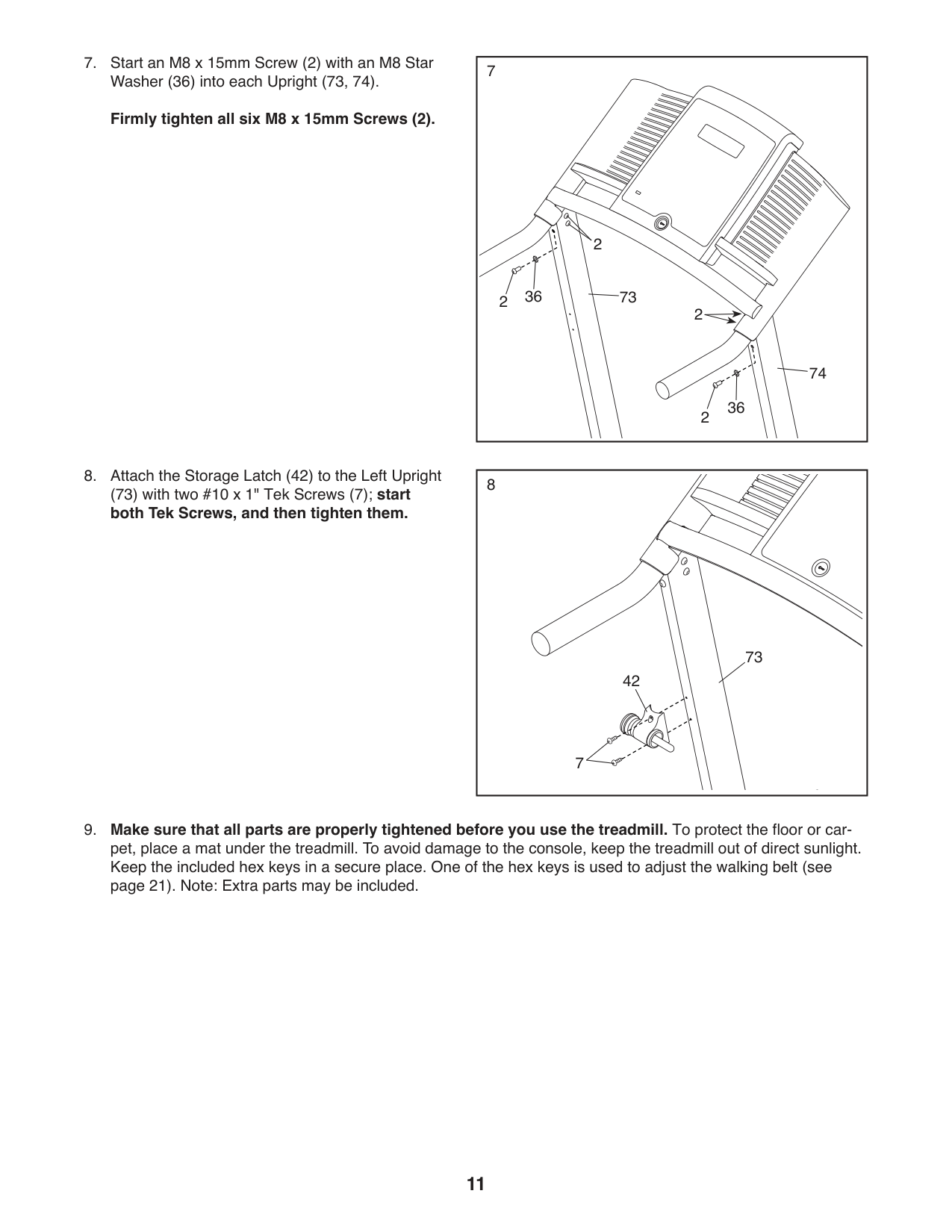
Unfold the frame carefully with a second person’s assistance, aligning the Base (72) flat on the floor attached to Uprights (73, 74) using six M8 x 15mm Screws and four Star Washers.
How do I connect a Bluetooth heart rate monitor?
Press the iFit Sync button on the console; when a connection is established, the LED will turn solid blue. Follow instructions in the app for further setup.
How do I use the manual mode on my Weslo Cadence Treadmill?
After inserting key into console, select manual mode from program options. Use speed buttons in increments of 0.1 mph or hold for continuous increases.
What should I do if the power turns off unexpectedly during a workout?
Wait five minutes and press power switch back into place, check cord connection, remove key from console and reinsert it. If issues persist contact service.
What are safety precautions before using my Weslo Cadence 860 Treadmill?
Read all warnings and precautions in your manual, consult a physician if over age 35 or with pre-existing conditions. Ensure the treadmill is properly assembled indoors on a level surface.
How do I clean and maintain my Weslo Cadence 860 Treadmill?
Unplug power cord, wipe exterior with mild soap diluted in water, then dry thoroughly. Regularly inspect and tighten all parts.
Show 1 more questions
Full Manual
28 pages
www.weslo.com
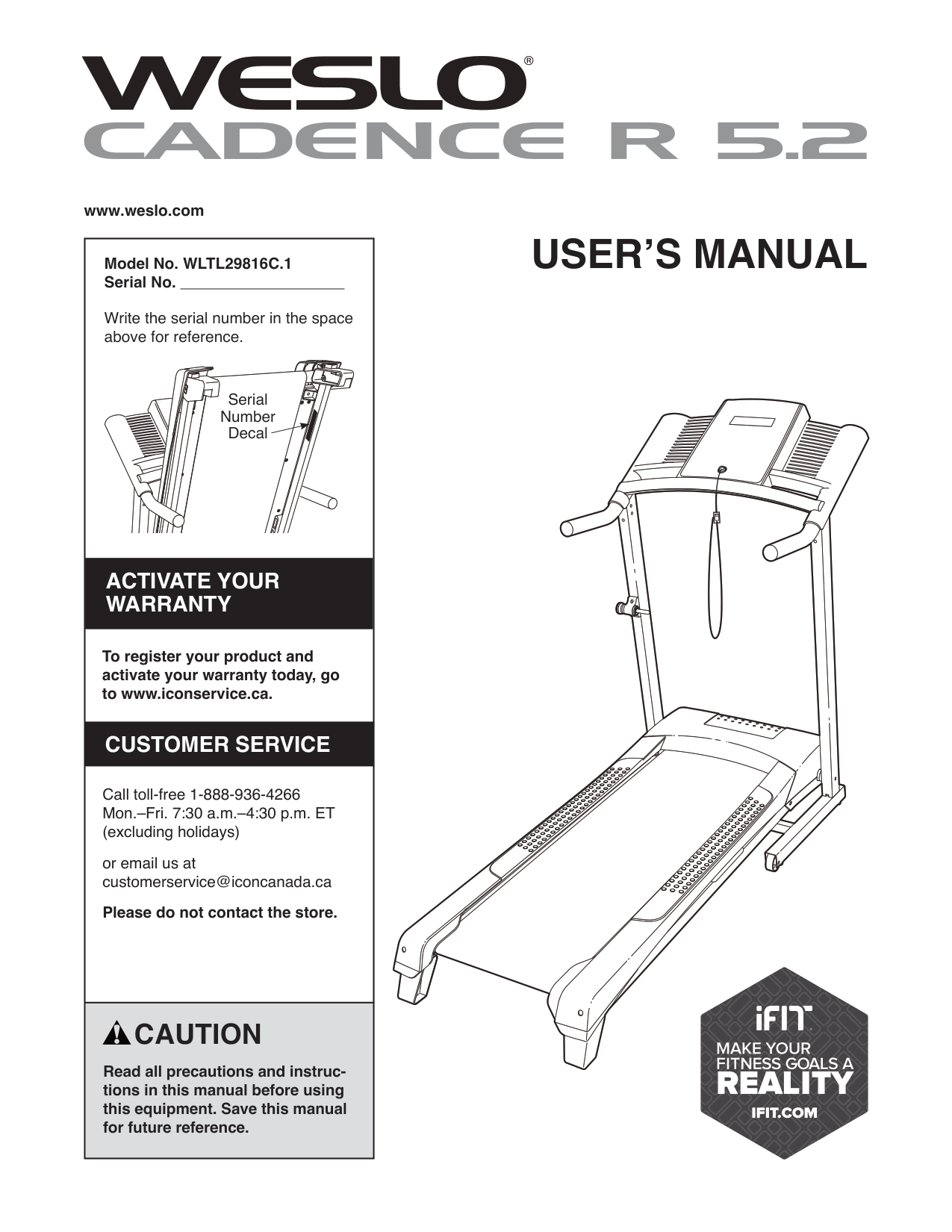
|Model No. WLTL29816C.1 Serial No.
Write the serial number in the space above for reference.
Serial Number Decal
To register your product and activate your warranty today, go to www.iconservice.ca.
Call toll-free 1-888-936-4266 Mon.–Fri. 7:30 a.m.–4:30 p.m. ET (excluding holidays)
or email us at customerservice@iconcanada.ca
Please do not contact the store.
ACTIVATE YOUR WARRANTY
CUSTOMER SERVICE
| |---| |CAUTION
Read all precautions and instructions in this manual before using this equipment. Save this manual for future reference.
|
USER’S MANUAL
TABLE OF CONTENTS
WARNING DECAL PLACEMENT . . . . . . . . . . . . . . . . . . . . . . . . . . . . . . . . . . . . . . . . . . . . . . . . . . . . . . . . . . . . . . .2 IMPORTANT PRECAUTIONS ..................................................................3 BEFORE YOU BEGIN. . . . . . . . . . . . . . . . . . . . . . . . . . . . . . . . . . . . . . . . . . . . . . . . . . . . . . . . . . . . . . . . . . . . . . . .6 PART IDENTIFICATION CHART. . . . . . . . . . . . . . . . . . . . . . . . . . . . . . . . . . . . . . . . . . . . . . . . . . . . . . . . . . . . . . . .7 ASSEMBLY . . . . . . . . . . . . . . . . . . . . . . . . . . . . . . . . . . . . . . . . . . . . . . . . . . . . . . . . . . . . . . . . . . . . . . . . . . . . . . . .8 HOW TO USE THE TREADMILL ..............................................................12 FCC INFORMATION . . . . . . . . . . . . . . . . . . . . . . . . . . . . . . . . . . . . . . . . . . . . . . . . . . . . . . . . . . . . . . . . . . . . . . . .18 HOW TO FOLD AND MOVE THE TREADMILL . . . . . . . . . . . . . . . . . . . . . . . . . . . . . . . . . . . . . . . . . . . . . . . . . . .19 MAINTENANCE AND TROUBLESHOOTING .....................................................20 EXERCISE GUIDELINES ....................................................................22 PART LIST. . . . . . . . . . . . . . . . . . . . . . . . . . . . . . . . . . . . . . . . . . . . . . . . . . . . . . . . . . . . . . . . . . . . . . . . . . . . . . . .23 EXPLODED DRAWING. . . . . . . . . . . . . . . . . . . . . . . . . . . . . . . . . . . . . . . . . . . . . . . . . . . . . . . . . . . . . . . . . . . . . .24 ORDERING REPLACEMENT PARTS. . . . . . . . . . . . . . . . . . . . . . . . . . . . . . . . . . . . . . . . . . . . . . . . . . . Back Cover LIMITED WARRANTY. . . . . . . . . . . . . . . . . . . . . . . . . . . . . . . . . . . . . . . . . . . . . . . . . . . . . . . . . . . . . . . Back Cover
WARNING DECAL PLACEMENT
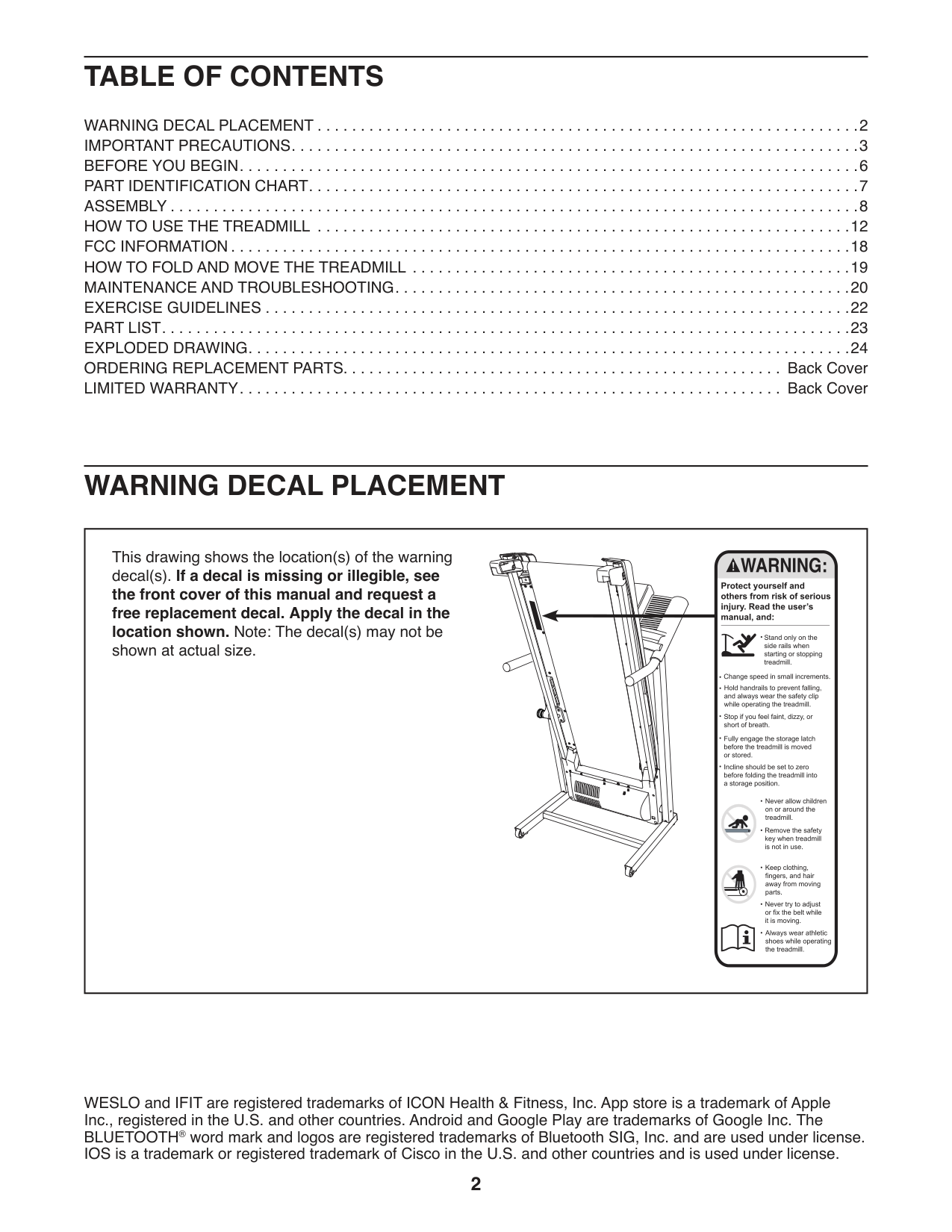
|This drawing shows the location(s) of the warning decal(s). If a decal is missing or illegible, see the front cover of this manual and request a free replacement decal. Apply the decal in the location shown. Note: The decal(s) may not be shown at actual size.
| |---|
305284
WESLO and IFIT are registered trademarks of ICON Health & Fitness, Inc. App store is a trademark of Apple Inc., registered in the U.S. and other countries. Android and Google Play are trademarks of Google Inc. The BLUETOOTH® word mark and logos are registered trademarks of Bluetooth SIG, Inc. and are used under license. IOS is a trademark or registered trademark of Cisco in the U.S. and other countries and is used under license.
IMPORTANT PRECAUTIONS
WARNING: To reduce the risk of burns, fire, electric shock, or injury to persons, read all important precautions and instructions in this manual and all warnings on your treadmill before using your treadmill. ICON assumes no responsibility for personal injury or property damage sustained by or through the use of this product.
cord immediately after use, before cleaning the treadmill, and before performing the maintenance and adjustment procedures described in this manual. Never remove the motor hood unless instructed to do so by an authorized service representative. Servicing other than the procedures in this manual should be performed by an authorized service representative only.
SAVE THESE INSTRUCTIONS
BEFORE YOU BEGIN
Thank you for selecting the new WESLO
CADENCE R 5.2 treadmill. The CADENCE R 5.2 treadmill offers a selection of features designed to make your workouts at home more effective. And when you’re not exercising, the unique treadmill can be folded up, requiring less than half the floor space of other treadmills.
®
For your benefit, read this manual carefully before using the treadmill. If you have questions after
reading this manual, please see the front cover of this manual. To help us assist you, note the product model number and serial number before contacting us. The model number and the location of the serial number decal are shown on the front cover of this manual.
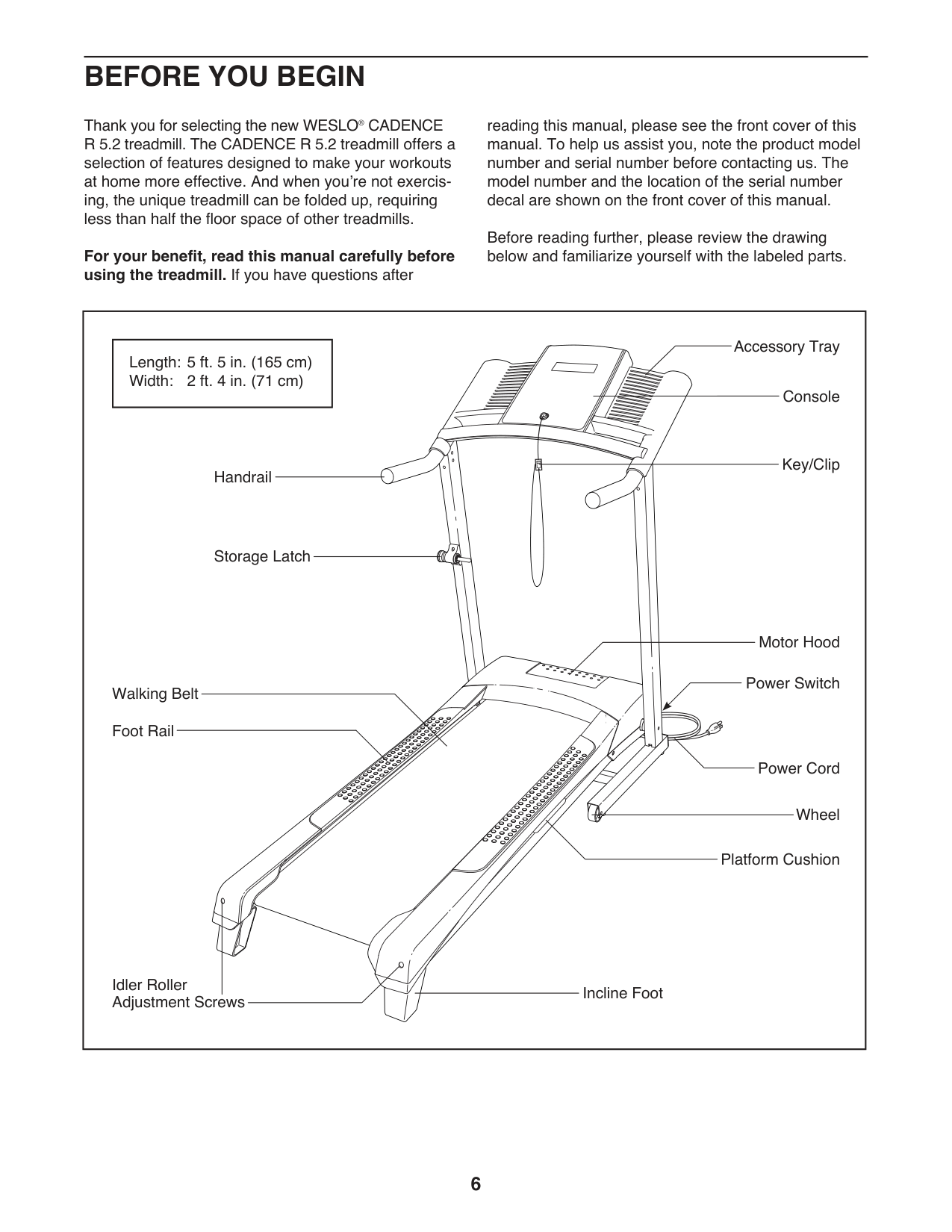
Before reading further, please review the drawing below and familiarize yourself with the labeled parts.
|Handrail
Storage Latch
Console
Key/Clip
Power Switch
Power Cord
Walking Belt
Motor Hood
Wheel
Foot Rail
Idler Roller Adjustment Screws
Accessory Tray
Platform Cushion
Incline Foot
|Length: 5 ft. 5 in. (165 cm) Width: 2 ft. 4 in. (71 cm)| |---|
| |---|
PART IDENTIFICATION CHART
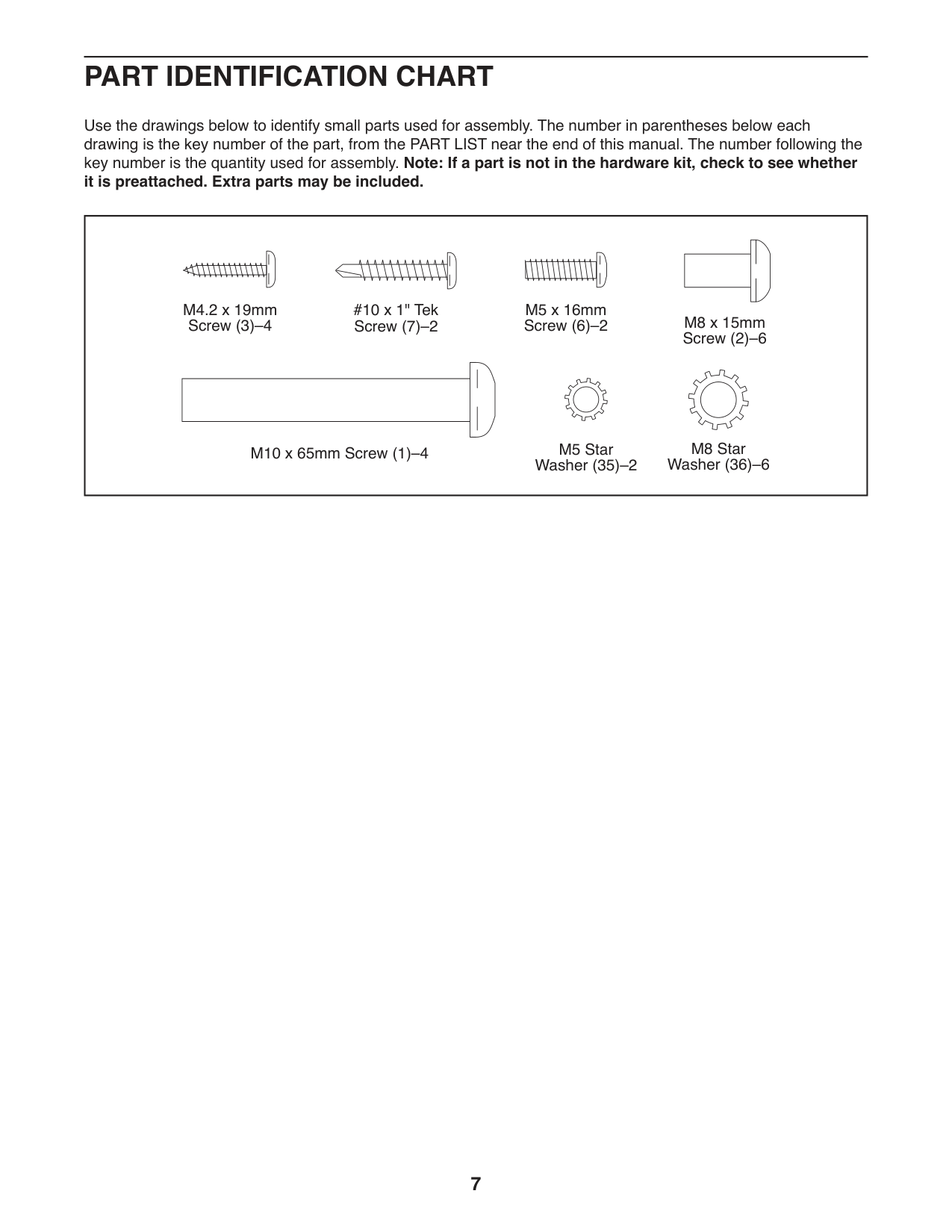
Use the drawings below to identify small parts used for assembly. The number in parentheses below each drawing is the key number of the part, from the PART LIST near the end of this manual. The number following the key number is the quantity used for assembly. Note: If a part is not in the hardware kit, check to see whether it is preattached. Extra parts may be included.
|M10 x 65mm Screw (1)–4
| | | |---|---| | | | | | |
#10 x 1" Tek Screw (7)–2
M5 x 16mm Screw (6)–2
| | | |---|---| | | | | | |
M5 Star Washer (35)–2
M8 Star Washer (36)–6
M4.2 x 19mm
Screw (3)–4 M8 x 15mm Screw (2)–6
| | | |---|---| | | | | | | | |---|
ASSEMBLY
registration and register your product.
Note: If you do not have Internet access, call Customer Service (see the front cover of this manual) and register your product.
|1| |---|
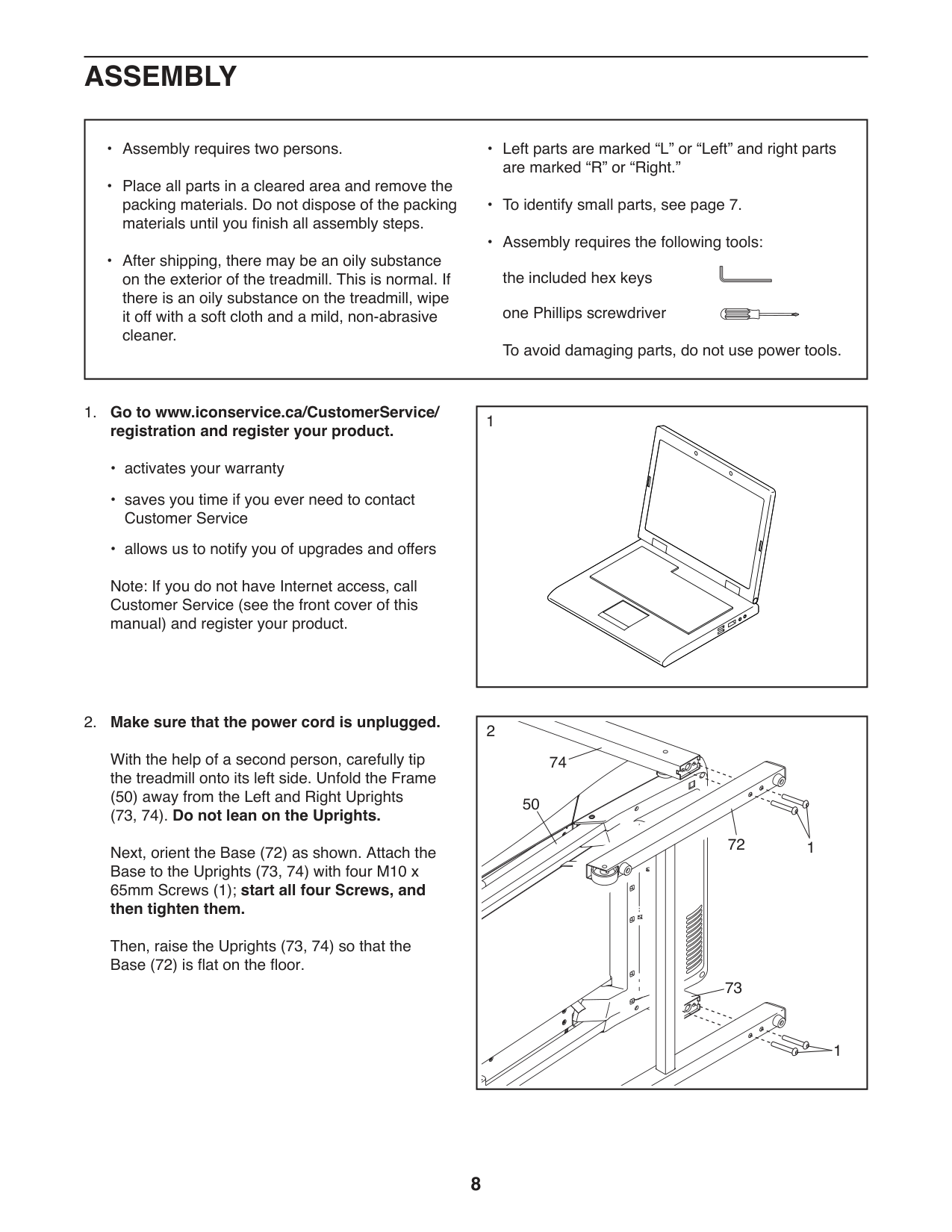
##### 2. Make sure that the power cord is unplugged.
With the help of a second person, carefully tip the treadmill onto its left side. Unfold the Frame
(50) away from the Left and Right Uprights (73, 74). Do not lean on the Uprights.
Next, orient the Base (72) as shown. Attach the Base to the Uprights (73, 74) with four M10 x 65mm Screws (1); start all four Screws, and then tighten them.
Then, raise the Uprights (73, 74) so that the Base (72) is flat on the floor.
|1
74
73
72
1
2
50
| |---|
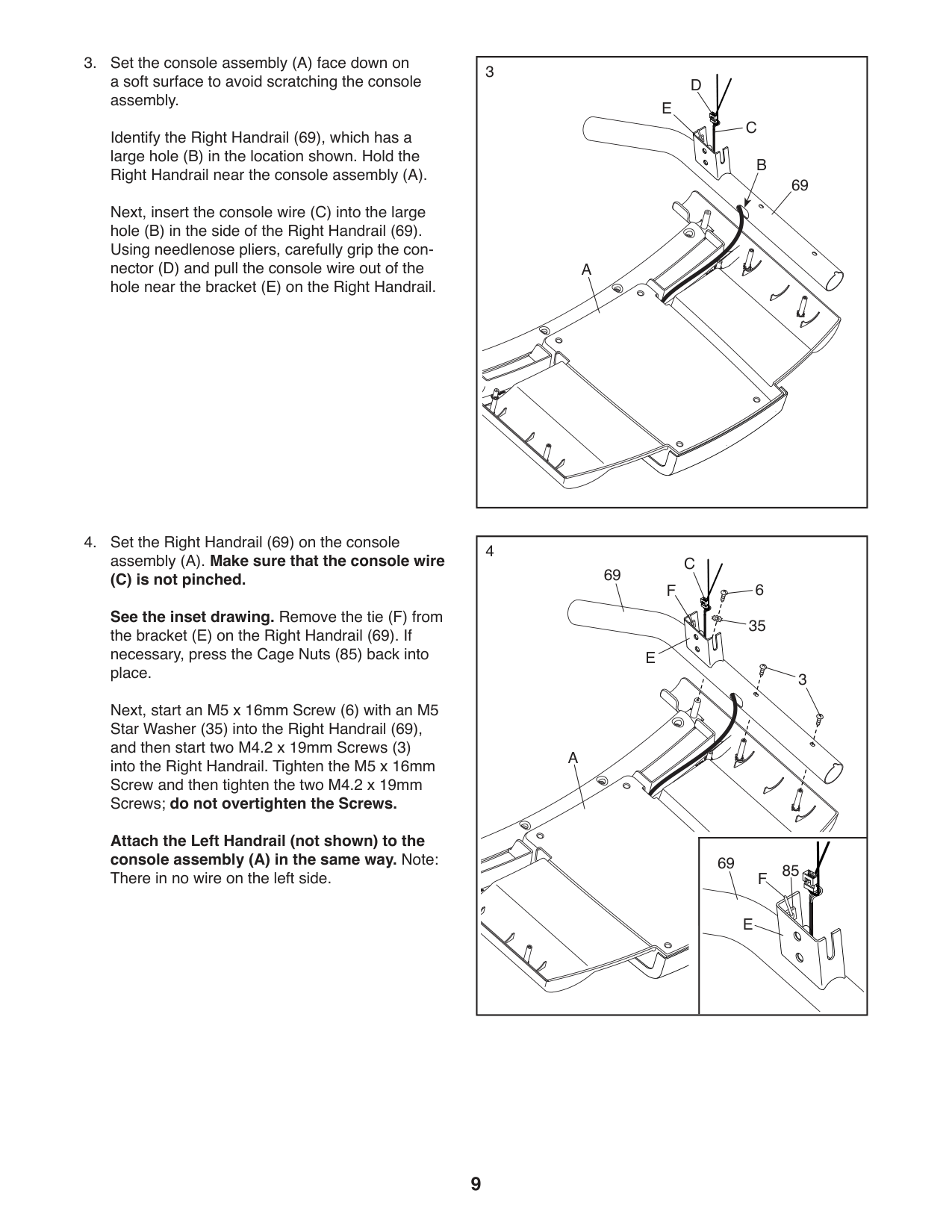
Identify the Right Handrail (69), which has a large hole (B) in the location shown. Hold the Right Handrail near the console assembly (A). Next, insert the console wire (C) into the large hole (B) in the side of the Right Handrail (69). Using needlenose pliers, carefully grip the connector (D) and pull the console wire out of the hole near the bracket (E) on the Right Handrail.
See the inset drawing. Remove the tie (F) from the bracket (E) on the Right Handrail (69). If necessary, press the Cage Nuts (85) back into place.
Next, start an M5 x 16mm Screw (6) with an M5 Star Washer (35) into the Right Handrail (69), and then start two M4.2 x 19mm Screws (3) into the Right Handrail. Tighten the M5 x 16mm Screw and then tighten the two M4.2 x 19mm Screws; do not overtighten the Screws.
Attach the Left Handrail (not shown) to the console assembly (A) in the same way. Note: There in no wire on the left side.
|3
C
E
A
D
69
B| |---|
4
C
69
6
F
35 E
3
A
69
85
F
E
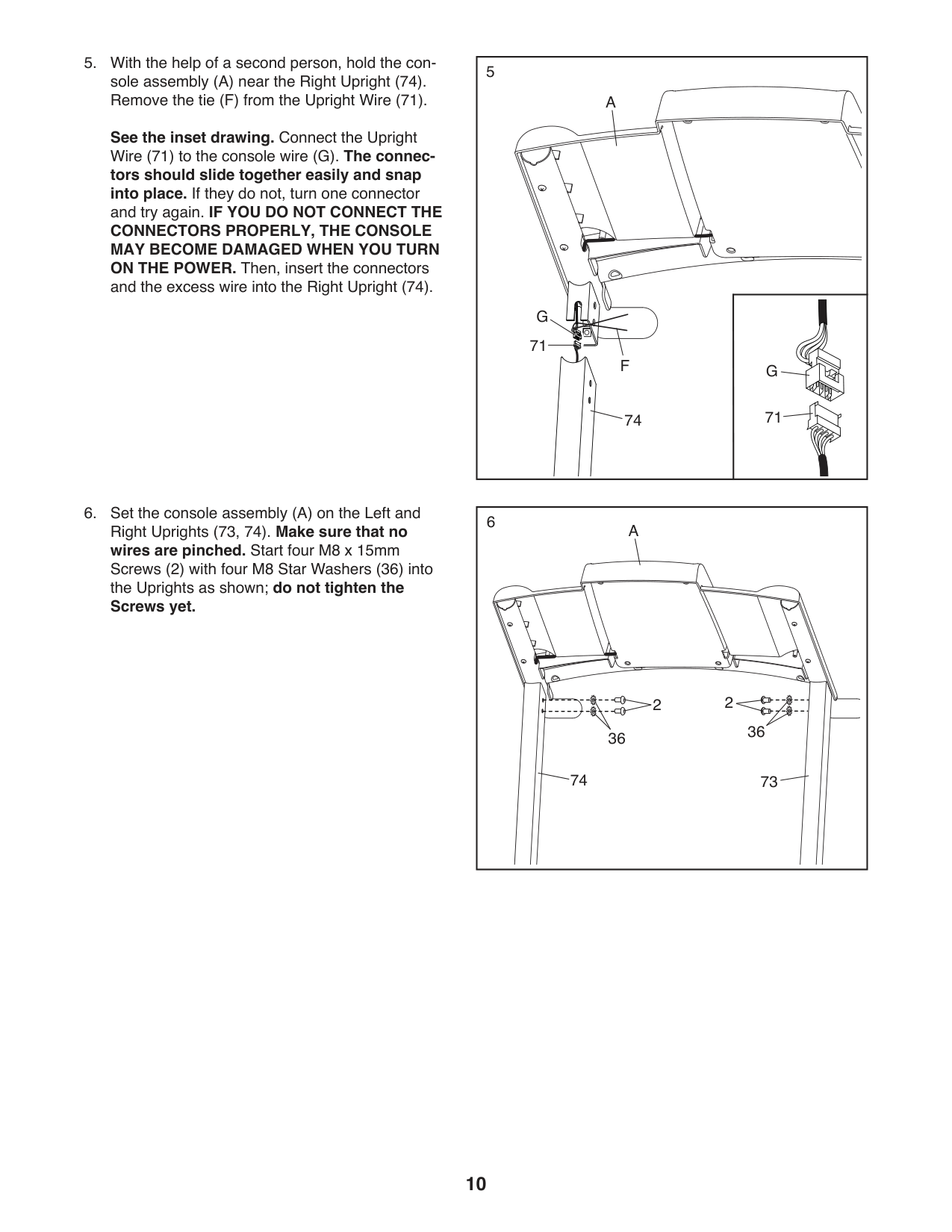
See the inset drawing. Connect the Upright Wire (71) to the console wire (G). The connec-
tors should slide together easily and snap into place. If they do not, turn one connector and try again. IF YOU DO NOT CONNECT THE
CONNECTORS PROPERLY, THE CONSOLE MAY BECOME DAMAGED WHEN YOU TURN ON THE POWER. Then, insert the connectors and the excess wire into the Right Upright (74).
5
74
A
F
71
71
G
G
6
A
22
3636
74 73
|7
36
36
73
74
2
2
2
2
| |---|
8
73 42
7
HOW TO USE THE TREADMILL HOW TO CONNECT THE POWER CORD Use a Surge Suppressor
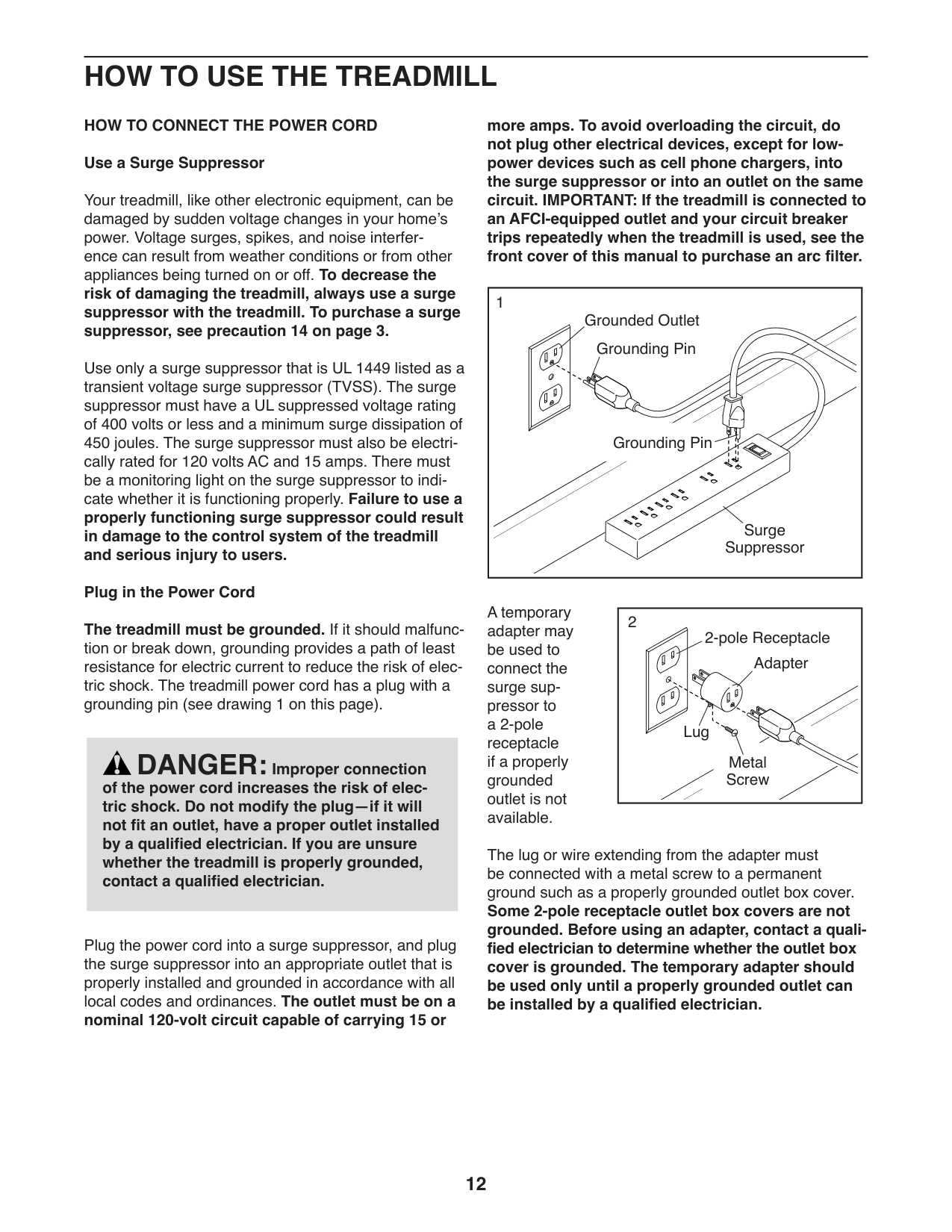
more amps. To avoid overloading the circuit, do not plug other electrical devices, except for lowpower devices such as cell phone chargers, into the surge suppressor or into an outlet on the same circuit. IMPORTANT: If the treadmill is connected to an AFCI-equipped outlet and your circuit breaker trips repeatedly when the treadmill is used, see the front cover of this manual to purchase an arc filter.
Your treadmill, like other electronic equipment, can be damaged by sudden voltage changes in your home’s power. Voltage surges, spikes, and noise interference can result from weather conditions or from other appliances being turned on or off. To decrease the risk of damaging the treadmill, always use a surge suppressor with the treadmill. To purchase a surge suppressor, see precaution 14 on page 3.
|1
Surge Suppressor
Grounding Pin
Grounded Outlet
Grounding Pin| |---|
Use only a surge suppressor that is UL 1449 listed as a transient voltage surge suppressor (TVSS). The surge suppressor must have a UL suppressed voltage rating of 400 volts or less and a minimum surge dissipation of 450 joules. The surge suppressor must also be electrically rated for 120 volts AC and 15 amps. There must be a monitoring light on the surge suppressor to indicate whether it is functioning properly. Failure to use a properly functioning surge suppressor could result in damage to the control system of the treadmill and serious injury to users.
Plug in the Power Cord The treadmill must be grounded. If it should malfunction or break down, grounding provides a path of least resistance for electric current to reduce the risk of electric shock. The treadmill power cord has a plug with a grounding pin (see drawing 1 on this page).
A temporary adapter may be used to connect the surge suppressor to a 2-pole receptacle if a properly grounded outlet is not available.
|2
Adapter
2-pole Receptacle
Lug
Metal Screw
| |---|
DANGER: Improper connection of the power cord increases the risk of electric shock. Do not modify the plug—if it will not fit an outlet, have a proper outlet installed by a qualified electrician. If you are unsure whether the treadmill is properly grounded, contact a qualified electrician.
The lug or wire extending from the adapter must be connected with a metal screw to a permanent ground such as a properly grounded outlet box cover. Some 2-pole receptacle outlet box covers are not grounded. Before using an adapter, contact a qualified electrician to determine whether the outlet box cover is grounded. The temporary adapter should be used only until a properly grounded outlet can be installed by a qualified electrician.
Plug the power cord into a surge suppressor, and plug the surge suppressor into an appropriate outlet that is properly installed and grounded in accordance with all local codes and ordinances. The outlet must be on a nominal 120-volt circuit capable of carrying 15 or
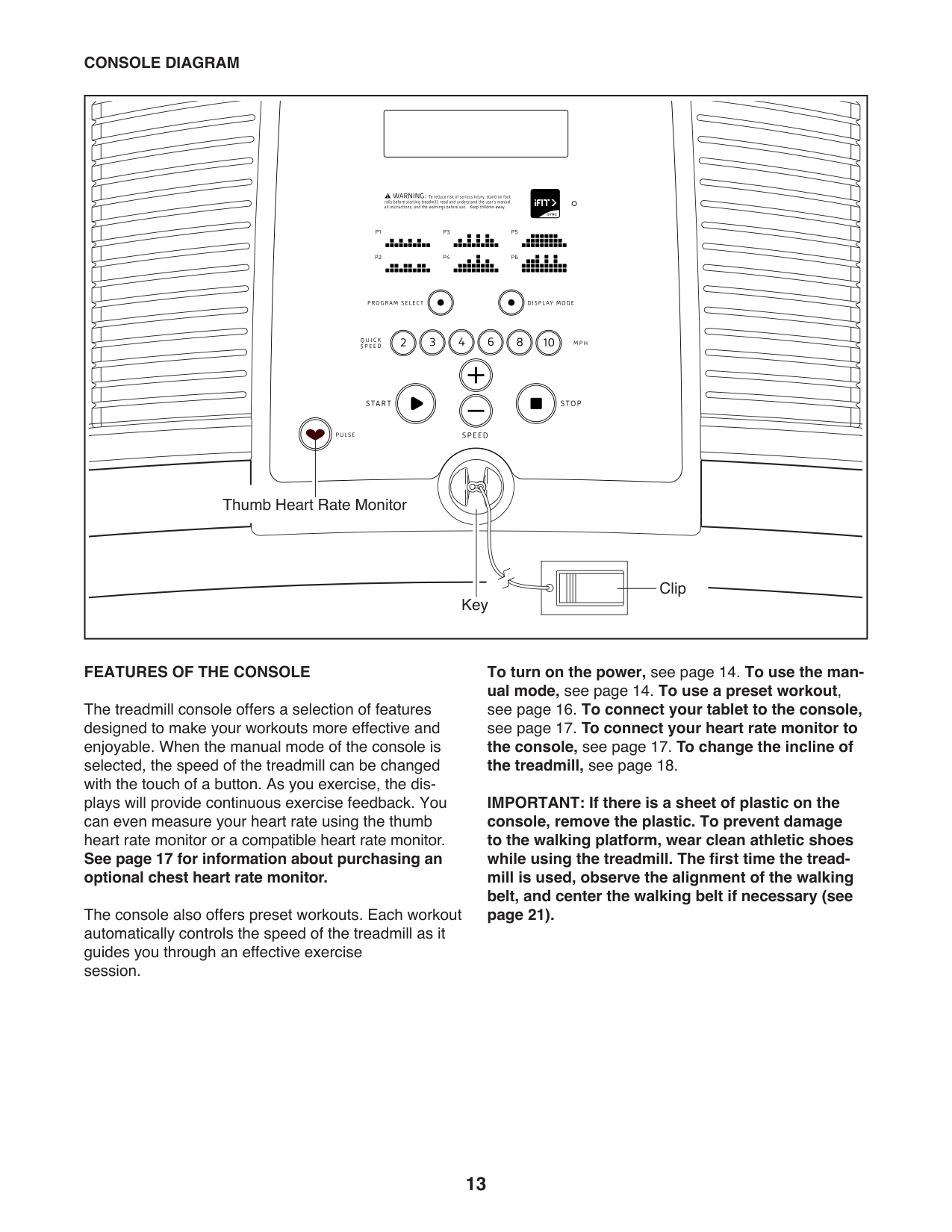
CONSOLE DIAGRAM
Thumb Heart Rate Monitor
Clip Key
##### FEATURES OF THE CONSOLE
The treadmill console offers a selection of features designed to make your workouts more effective and enjoyable. When the manual mode of the console is selected, the speed of the treadmill can be changed with the touch of a button. As you exercise, the displays will provide continuous exercise feedback. You can even measure your heart rate using the thumb heart rate monitor or a compatible heart rate monitor. See page 17 for information about purchasing an optional chest heart rate monitor.
The console also offers preset workouts. Each workout automatically controls the speed of the treadmill as it guides you through an effective exercise session.
To turn on the power, see page 14. To use the manual mode, see page 14. To use a preset workout,
IMPORTANT: If there is a sheet of plastic on the console, remove the plastic. To prevent damage to the walking platform, wear clean athletic shoes while using the treadmill. The first time the treadmill is used, observe the alignment of the walking belt, and center the walking belt if necessary (see page 21).
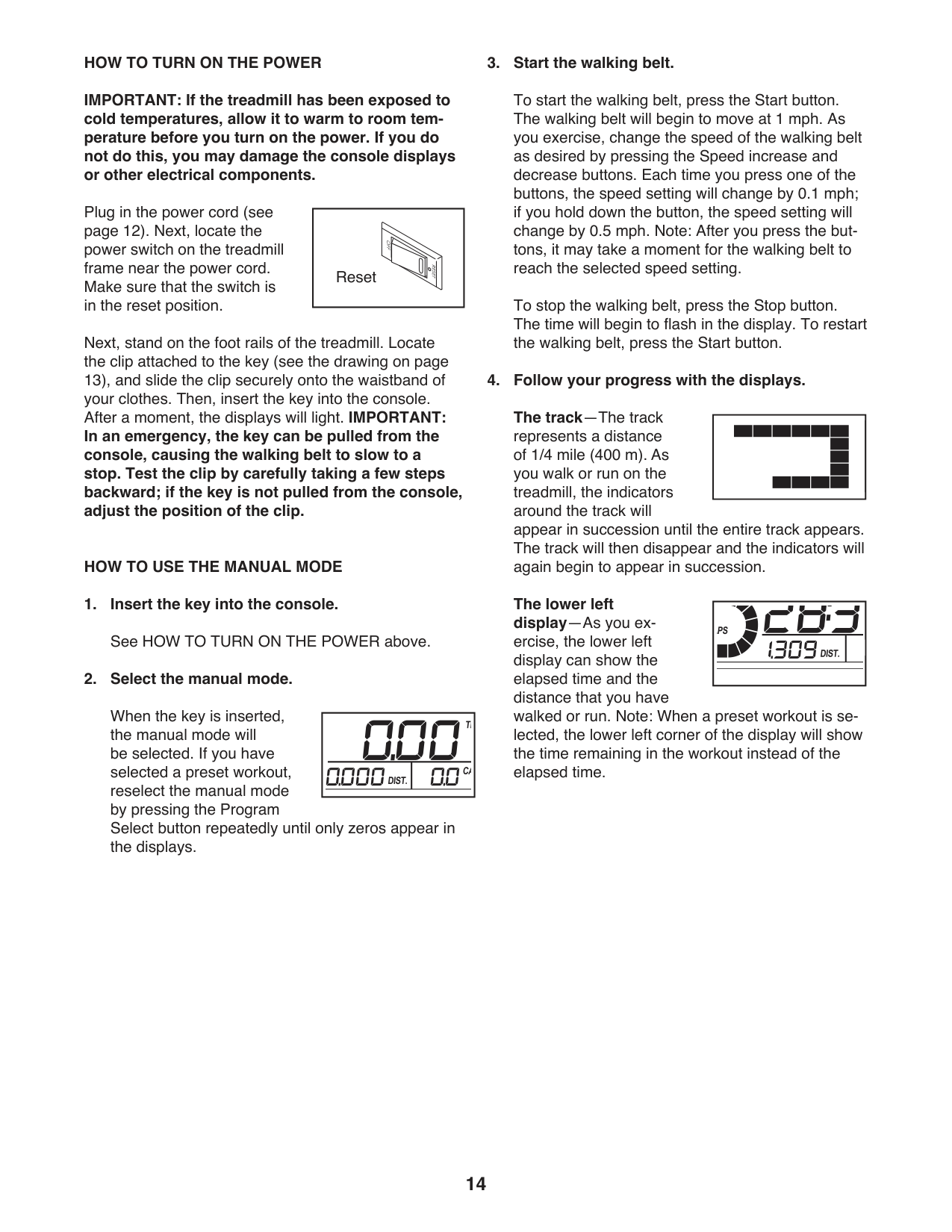
HOW TO TURN ON THE POWER IMPORTANT: If the treadmill has been exposed to cold temperatures, allow it to warm to room temperature before you turn on the power. If you do not do this, you may damage the console displays or other electrical components.
##### 3. Start the walking belt.
To start the walking belt, press the Start button. The walking belt will begin to move at 1 mph. As you exercise, change the speed of the walking belt as desired by pressing the Speed increase and decrease buttons. Each time you press one of the buttons, the speed setting will change by 0.1 mph; if you hold down the button, the speed setting will change by 0.5 mph. Note: After you press the buttons, it may take a moment for the walking belt to reach the selected speed setting.
| | |---|
Plug in the power cord (see page 12). Next, locate the power switch on the treadmill frame near the power cord. Make sure that the switch is in the reset position.
Reset
To stop the walking belt, press the Stop button. The time will begin to flash in the display. To restart the walking belt, press the Start button.
Next, stand on the foot rails of the treadmill. Locate the clip attached to the key (see the drawing on page 13), and slide the clip securely onto the waistband of your clothes. Then, insert the key into the console. After a moment, the displays will light. IMPORTANT: In an emergency, the key can be pulled from the console, causing the walking belt to slow to a stop. Test the clip by carefully taking a few steps backward; if the key is not pulled from the console, adjust the position of the clip.
##### 4. Follow your progress with the displays.
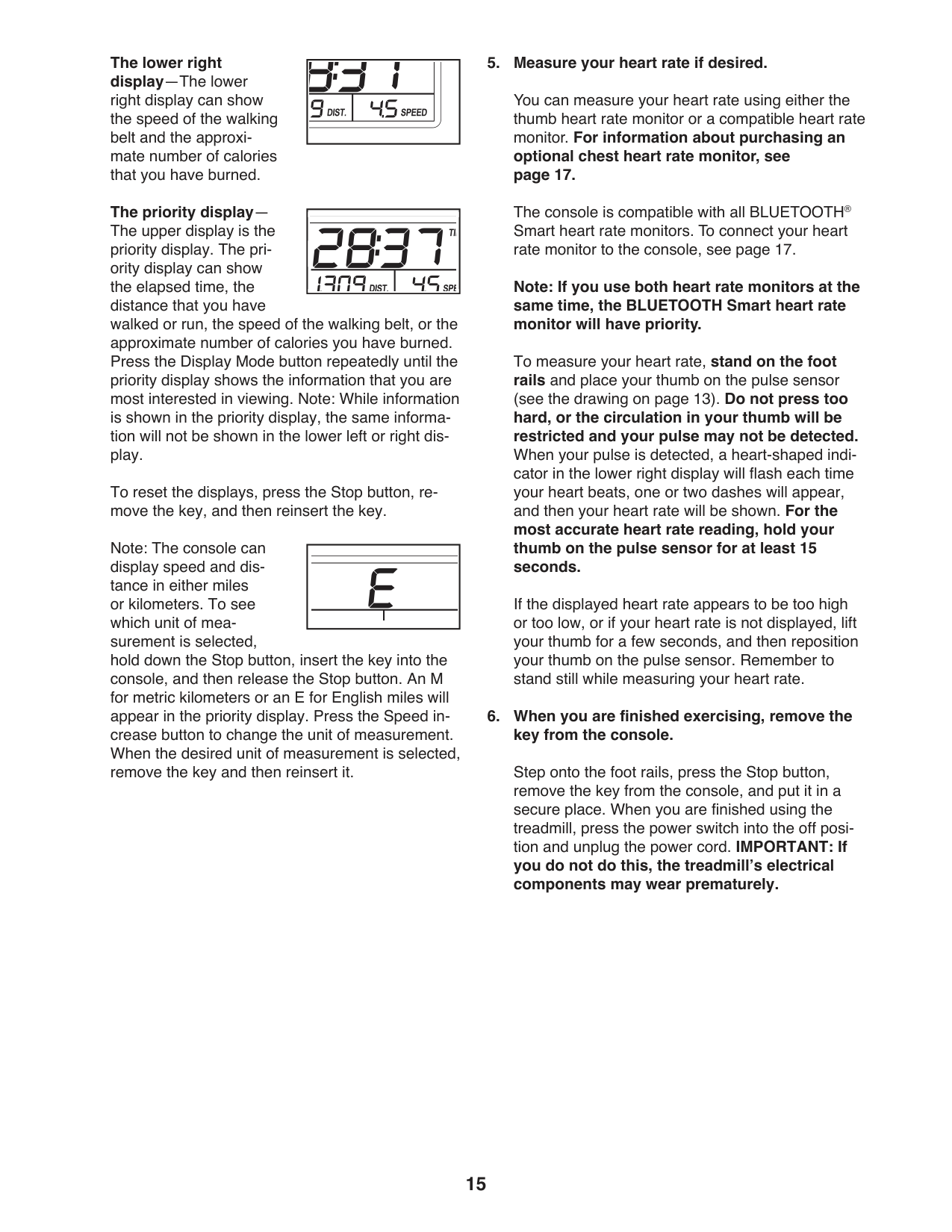
The track—The track represents a distance of 1/4 mile (400 m). As you walk or run on the treadmill, the indicators around the track will appear in succession until the entire track appears. The track will then disappear and the indicators will again begin to appear in succession.
| | | | |---|---|---| | | | |
HOW TO USE THE MANUAL MODE
The lower left display—As you exercise, the lower left display can show the elapsed time and the distance that you have walked or run. Note: When a preset workout is selected, the lower left corner of the display will show the time remaining in the workout instead of the elapsed time.
When the key is inserted, the manual mode will be selected. If you have selected a preset workout, reselect the manual mode by pressing the Program Select button repeatedly until only zeros appear in the displays.
The lower right display—The lower right display can show the speed of the walking belt and the approximate number of calories that you have burned.
##### 5. Measure your heart rate if desired.
You can measure your heart rate using either the thumb heart rate monitor or a compatible heart rate monitor. For information about purchasing an optional chest heart rate monitor, see page 17.
The priority displayThe upper display is the priority display. The priority display can show the elapsed time, the distance that you have walked or run, the speed of the walking belt, or the approximate number of calories you have burned. Press the Display Mode button repeatedly until the priority display shows the information that you are most interested in viewing. Note: While information is shown in the priority display, the same information will not be shown in the lower left or right display.
The console is compatible with all BLUETOOTH® Smart heart rate monitors. To connect your heart rate monitor to the console, see page 17.
Note: If you use both heart rate monitors at the same time, the BLUETOOTH Smart heart rate monitor will have priority.
To measure your heart rate, stand on the foot rails and place your thumb on the pulse sensor (see the drawing on page 13). Do not press too
hard, or the circulation in your thumb will be restricted and your pulse may not be detected. When your pulse is detected, a heart-shaped indicator in the lower right display will flash each time your heart beats, one or two dashes will appear, and then your heart rate will be shown. For the most accurate heart rate reading, hold your thumb on the pulse sensor for at least 15 seconds.
To reset the displays, press the Stop button, remove the key, and then reinsert the key.
Note: The console can display speed and distance in either miles or kilometers. To see which unit of measurement is selected, hold down the Stop button, insert the key into the console, and then release the Stop button. An M for metric kilometers or an E for English miles will appear in the priority display. Press the Speed increase button to change the unit of measurement. When the desired unit of measurement is selected, remove the key and then reinsert it.
If the displayed heart rate appears to be too high or too low, or if your heart rate is not displayed, lift your thumb for a few seconds, and then reposition your thumb on the pulse sensor. Remember to stand still while measuring your heart rate.
##### 6. When you are finished exercising, remove thekey from the console.
Step onto the foot rails, press the Stop button, remove the key from the console, and put it in a secure place. When you are finished using the treadmill, press the power switch into the off position and unplug the power cord. IMPORTANT: If you do not do this, the treadmill’s electrical components may wear prematurely.
##### HOW TO USE A PRESET WORKOUT
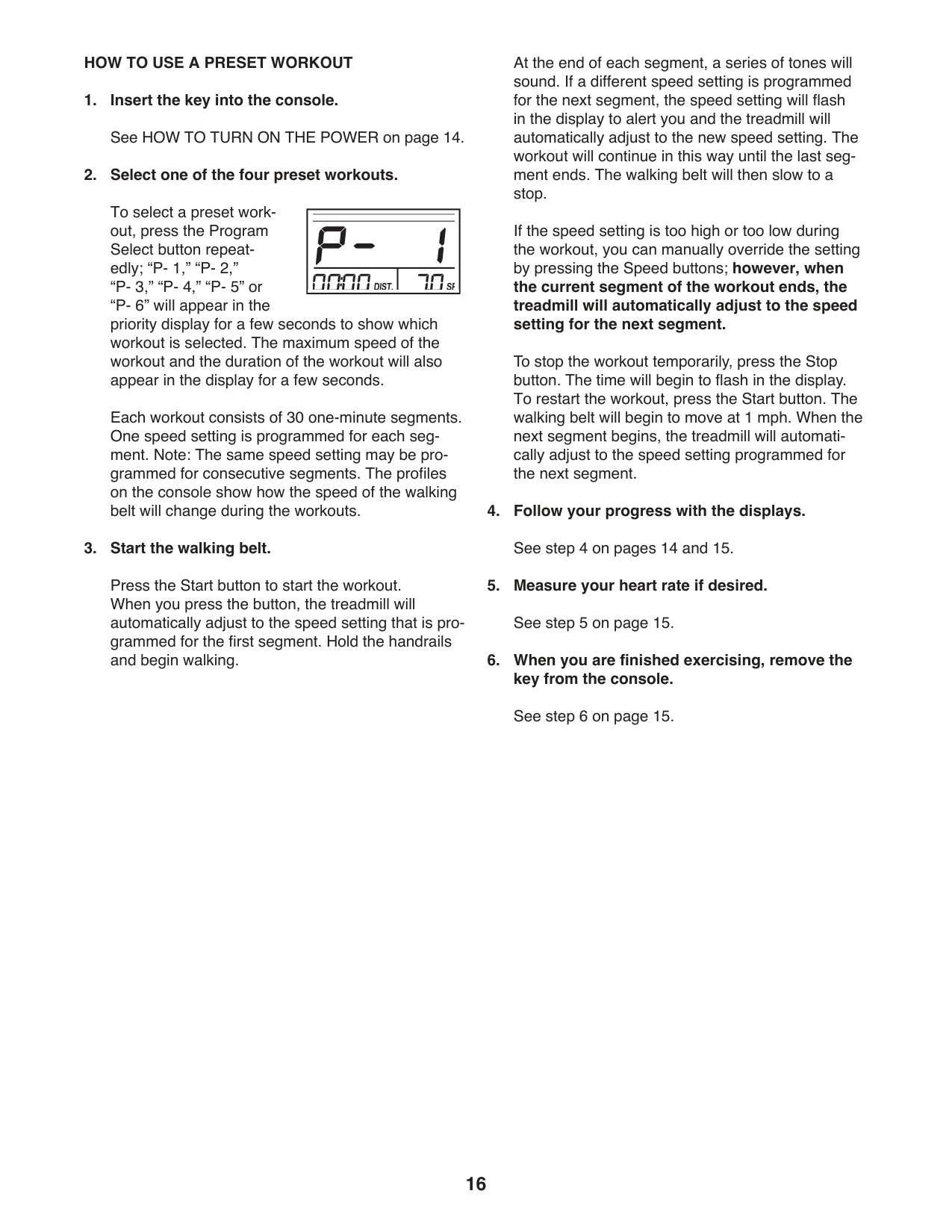
At the end of each segment, a series of tones will sound. If a different speed setting is programmed for the next segment, the speed setting will flash in the display to alert you and the treadmill will automatically adjust to the new speed setting. The workout will continue in this way until the last segment ends. The walking belt will then slow to a stop.
To select a preset workout, press the Program Select button repeatedly; “P- 1,” “P- 2,” “P- 3,” “P- 4,” “P- 5” or “P- 6” will appear in the priority display for a few seconds to show which workout is selected. The maximum speed of the workout and the duration of the workout will also appear in the display for a few seconds.
Each workout consists of 30 one-minute segments. One speed setting is programmed for each segment. Note: The same speed setting may be programmed for consecutive segments. The profiles on the console show how the speed of the walking belt will change during the workouts.
| | | | | |---|---|---|---| | | | | | | | | | | | | | | |
If the speed setting is too high or too low during the workout, you can manually override the setting by pressing the Speed buttons; however, when the current segment of the workout ends, the treadmill will automatically adjust to the speed setting for the next segment.
To stop the workout temporarily, press the Stop button. The time will begin to flash in the display. To restart the workout, press the Start button. The walking belt will begin to move at 1 mph. When the next segment begins, the treadmill will automatically adjust to the speed setting programmed for the next segment.
##### 4. Follow your progress with the displays.
Press the Start button to start the workout. When you press the button, the treadmill will automatically adjust to the speed setting that is programmed for the first segment. Hold the handrails and begin walking.
##### HOW TO CONNECT YOUR TABLET TO THE CONSOLE
The console supports BLUETOOTH connections to tablets via the iFit Bluetooth Tablet app and to compatible heart rate monitors. Note: Other BLUETOOTH connections are not supported.
##### 1. Download and install the iFit Bluetooth Tabletapp on your tablet.
On your iOS® or Android™ tablet, open the App Store℠ or the Google Play™ store, search for the free iFit Bluetooth Tablet app, and then install the app on your tablet. Make sure that the BLUETOOTH option is enabled on your tablet.
Then, open the iFit Bluetooth Tablet app and follow the instructions to set up an iFit account and customize settings.
##### 2. Connect your heart rate monitor to the consoleif desired.
If you are connecting both your heart rate monitor and your tablet to the console, you must connect your heart rate monitor before you connect your tablet. See HOW TO CONNECT YOUR HEART RATE MONITOR TO THE CONSOLE at the left.
##### 3. Connect your tablet to the console.
Press the iFit Sync button on the console; the console pairing number will appear in the display. Then, follow the instructions in the iFit Bluetooth Tablet app to connect your tablet to the console.
When a connection is established, the LED on the console will turn solid blue.
##### 4. Record and track your workout information.
Follow the instructions in the iFit Bluetooth Tablet app to record and track your workout information.
##### 5. Disconnect your tablet from the console ifdesired.
To disconnect your tablet from the console, first select the disconnect option in the iFit Bluetooth Tablet app. Then, press and hold the iFit Sync button on the console until the LED on the console turns solid green.
Note: All BLUETOOTH connections between the console and other devices (including any tablets, heart rate monitors, and so forth) will be disconnected.
##### THE OPTIONAL CHEST HEART RATE MONITOR
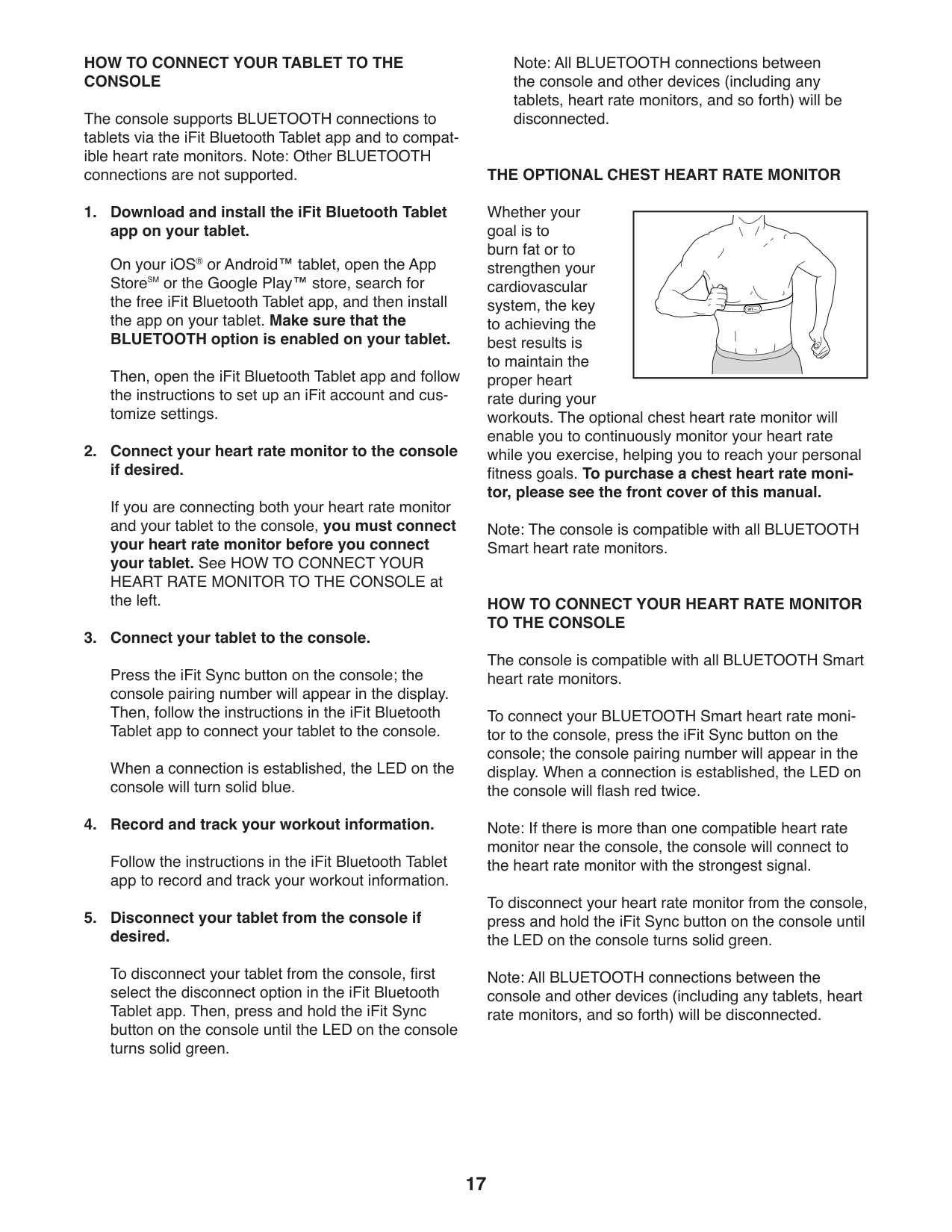
Whether your goal is to burn fat or to strengthen your cardiovascular system, the key to achieving the best results is to maintain the proper heart rate during your workouts. The optional chest heart rate monitor will enable you to continuously monitor your heart rate while you exercise, helping you to reach your personal fitness goals. To purchase a chest heart rate monitor, please see the front cover of this manual.
| | |---|
Note: The console is compatible with all BLUETOOTH Smart heart rate monitors.
##### HOW TO CONNECT YOUR HEART RATE MONITOR TO THE CONSOLE
The console is compatible with all BLUETOOTH Smart heart rate monitors.
To connect your BLUETOOTH Smart heart rate monitor to the console, press the iFit Sync button on the console; the console pairing number will appear in the display. When a connection is established, the LED on the console will flash red twice.
Note: If there is more than one compatible heart rate monitor near the console, the console will connect to the heart rate monitor with the strongest signal.
To disconnect your heart rate monitor from the console, press and hold the iFit Sync button on the console until the LED on the console turns solid green.
Note: All BLUETOOTH connections between the console and other devices (including any tablets, heart rate monitors, and so forth) will be disconnected.
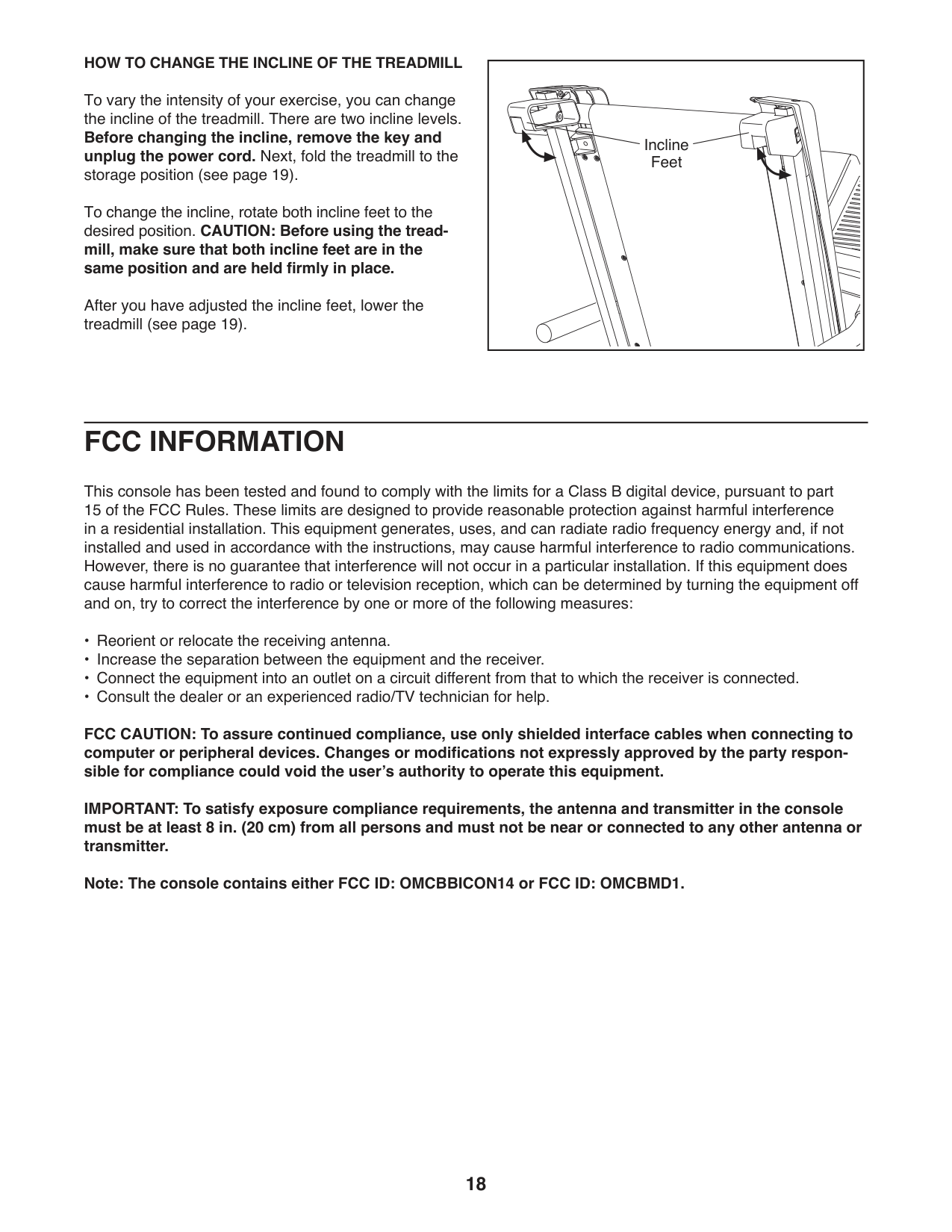
HOW TO CHANGE THE INCLINE OF THE TREADMILL To vary the intensity of your exercise, you can change the incline of the treadmill. There are two incline levels. Before changing the incline, remove the key and unplug the power cord. Next, fold the treadmill to the storage position (see page 19). To change the incline, rotate both incline feet to the desired position. CAUTION: Before using the treadmill, make sure that both incline feet are in the same position and are held firmly in place.
After you have adjusted the incline feet, lower the treadmill (see page 19).
|Incline Feet
| |---|
FCC INFORMATION
This console has been tested and found to comply with the limits for a Class B digital device, pursuant to part 15 of the FCC Rules. These limits are designed to provide reasonable protection against harmful interference in a residential installation. This equipment generates, uses, and can radiate radio frequency energy and, if not installed and used in accordance with the instructions, may cause harmful interference to radio communications. However, there is no guarantee that interference will not occur in a particular installation. If this equipment does cause harmful interference to radio or television reception, which can be determined by turning the equipment off and on, try to correct the interference by one or more of the following measures:
FCC CAUTION: To assure continued compliance, use only shielded interface cables when connecting to computer or peripheral devices. Changes or modifications not expressly approved by the party responsible for compliance could void the user’s authority to operate this equipment.
IMPORTANT: To satisfy exposure compliance requirements, the antenna and transmitter in the console must be at least 8 in. (20 cm) from all persons and must not be near or connected to any other antenna or transmitter.
Note: The console contains either FCC ID: OMCBBICON14 or FCC ID: OMCBMD1.
HOW TO FOLD AND MOVE THE TREADMILL
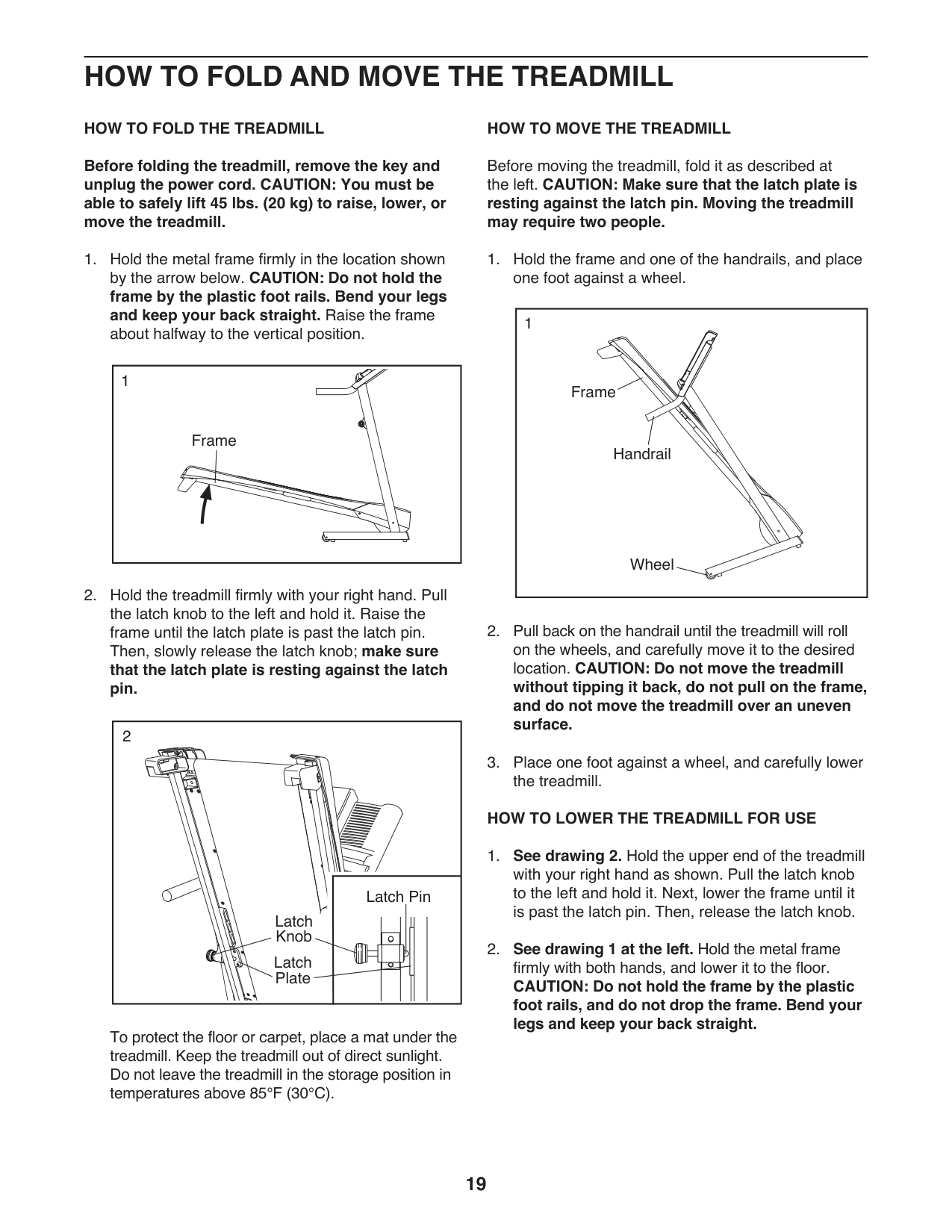
HOW TO FOLD THE TREADMILL Before folding the treadmill, remove the key and unplug the power cord. CAUTION: You must be able to safely lift 45 lbs. (20 kg) to raise, lower, or move the treadmill.
|Frame
1
| |---|
2
Latch Pin
Latch Knob
Latch Plate
To protect the floor or carpet, place a mat under the treadmill. Keep the treadmill out of direct sunlight. Do not leave the treadmill in the storage position in temperatures above 85°F (30°C).
HOW TO MOVE THE TREADMILL
Before moving the treadmill, fold it as described at the left. CAUTION: Make sure that the latch plate is resting against the latch pin. Moving the treadmill may require two people.
|1
Handrail
Frame
Wheel
| |---|
##### HOW TO LOWER THE TREADMILL FOR USE
MAINTENANCE AND TROUBLESHOOTING
##### MAINTENANCE
Regular maintenance is important for optimal performance and to reduce wear. Inspect and properly tighten all parts each time the treadmill is used.
Regularly clean the treadmill and keep the walking belt clean and dry. First, press the power switch into the off position and unplug the power cord. Wipe exterior parts of the treadmill with a damp cloth and a small amount of mild soap. IMPORTANT: Do not spray liquids directly onto the treadmill. To avoid damage to the console, keep liquids away from the console. Then, thoroughly dry the treadmill with a soft towel.
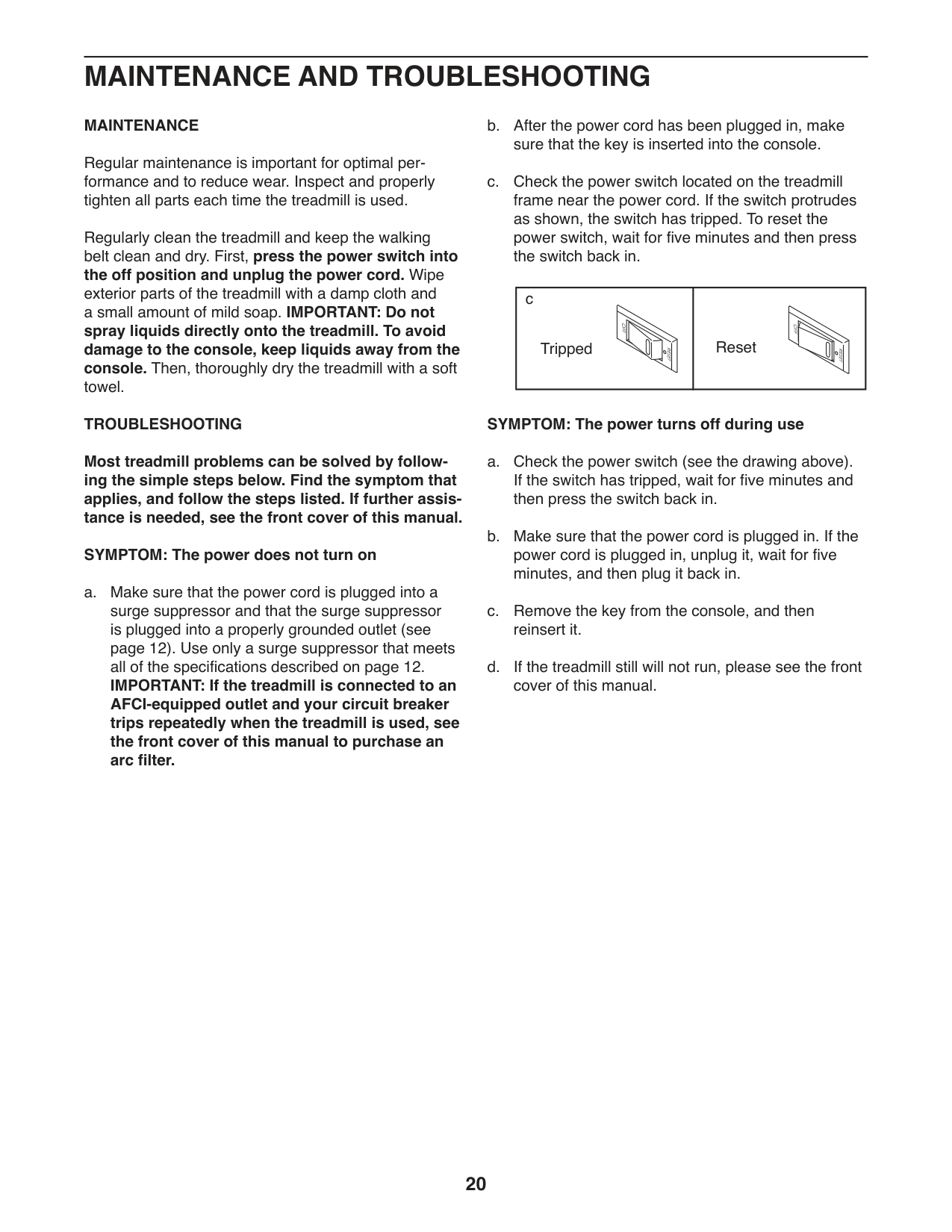
c
ResetTripped
TROUBLESHOOTING Most treadmill problems can be solved by following the simple steps below. Find the symptom that applies, and follow the steps listed. If further assistance is needed, see the front cover of this manual. SYMPTOM: The power does not turn on a. Make sure that the power cord is plugged into a
##### SYMPTOM: The power turns off during use
surge suppressor and that the surge suppressor is plugged into a properly grounded outlet (see page 12). Use only a surge suppressor that meets all of the specifications described on page 12. IMPORTANT: If the treadmill is connected to an AFCI-equipped outlet and your circuit breaker trips repeatedly when the treadmill is used, see the front cover of this manual to purchase an arc filter.
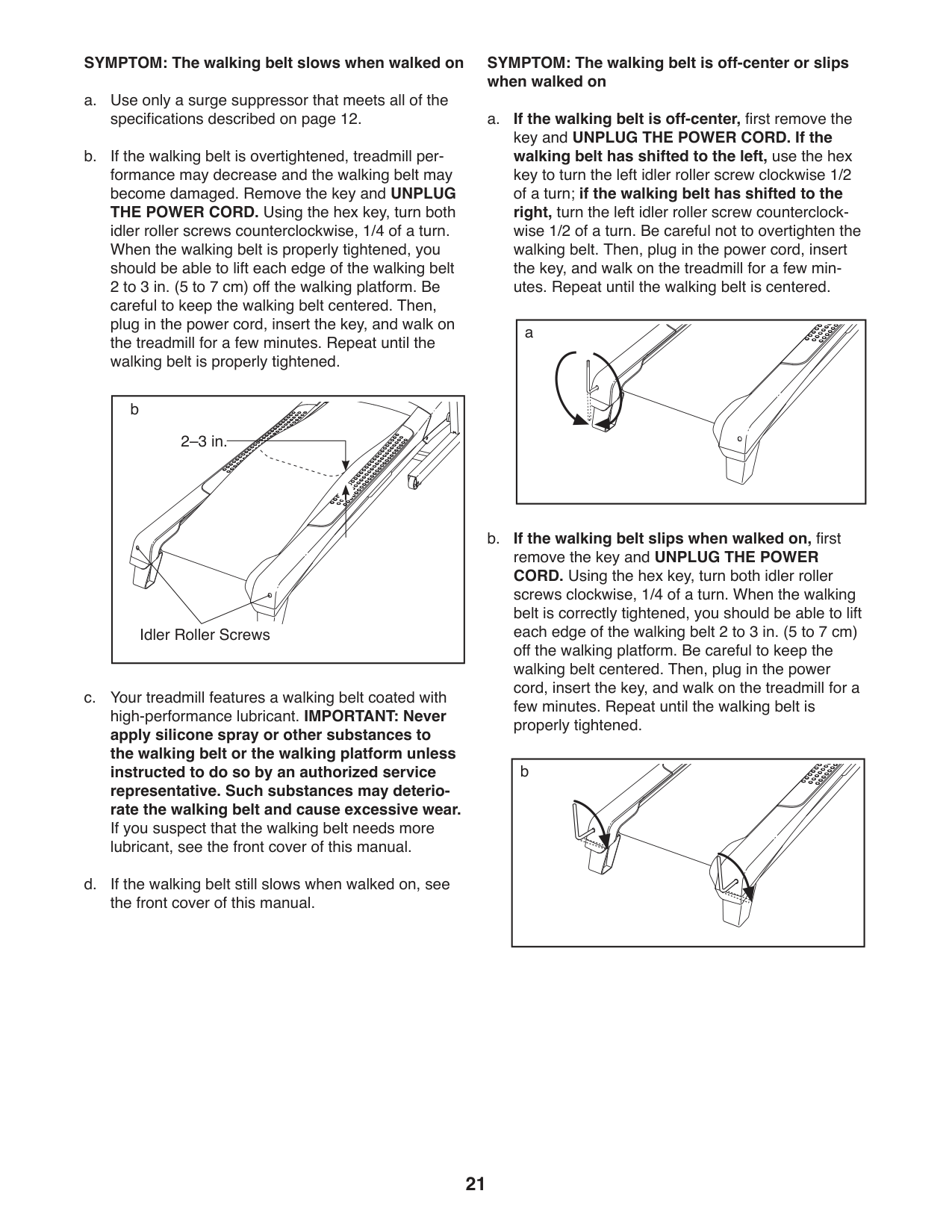
##### SYMPTOM: The walking belt slows when walked on
|Idler Roller Screws
2–3 in.
b
| |---|
SYMPTOM: The walking belt is off-center or slips when walked on
|a| |---|
|b| |---|
EXERCISE GUIDELINES
WARNING:Before beginning this or any exercise program, consult your physician. This is especially important for persons over age 35 or persons with pre-existing health problems.
The heart rate monitor is not a medical device. Various factors may affect the accuracy of heart rate readings. The heart rate monitor is intended only as an exercise aid in determining heart rate trends in general.
These guidelines will help you to plan your exercise program. For detailed exercise information, obtain a reputable book or consult your physician. Remember, proper nutrition and adequate rest are essential for successful results.
##### EXERCISE INTENSITY
Whether your goal is to burn fat or to strengthen your cardiovascular system, exercising at the proper intensity is the key to achieving results. You can use your heart rate as a guide to find the proper intensity level. The chart below shows recommended heart rates for fat burning and aerobic exercise.
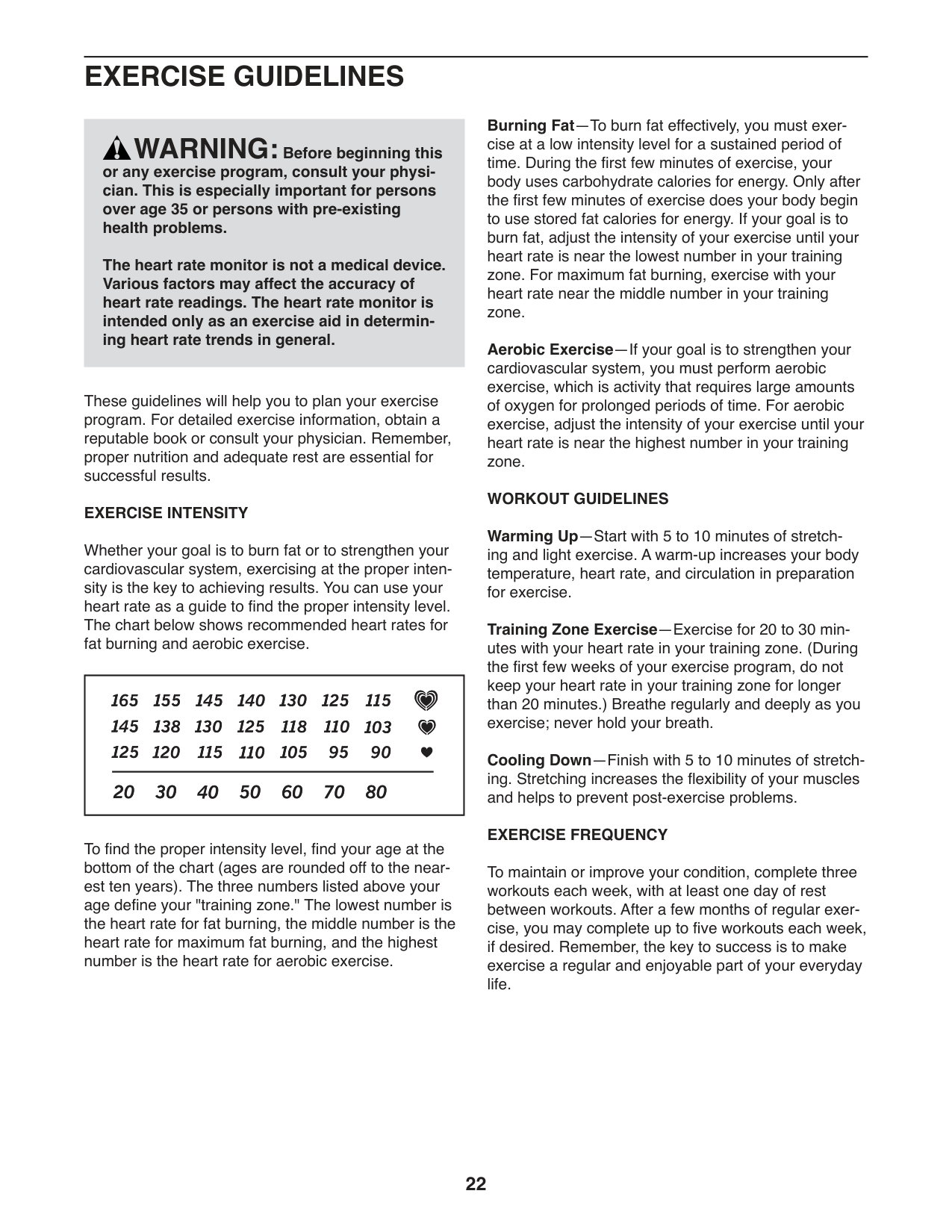
| | |---|
To find the proper intensity level, find your age at the bottom of the chart (ages are rounded off to the nearest ten years). The three numbers listed above your age define your "training zone." The lowest number is the heart rate for fat burning, the middle number is the heart rate for maximum fat burning, and the highest number is the heart rate for aerobic exercise.
Burning Fat—To burn fat effectively, you must exercise at a low intensity level for a sustained period of time. During the first few minutes of exercise, your body uses carbohydrate calories for energy. Only after the first few minutes of exercise does your body begin to use stored fat calories for energy. If your goal is to burn fat, adjust the intensity of your exercise until your heart rate is near the lowest number in your training zone. For maximum fat burning, exercise with your heart rate near the middle number in your training zone.
Aerobic Exercise—If your goal is to strengthen your cardiovascular system, you must perform aerobic exercise, which is activity that requires large amounts of oxygen for prolonged periods of time. For aerobic exercise, adjust the intensity of your exercise until your heart rate is near the highest number in your training zone.
WORKOUT GUIDELINES Warming Up—Start with 5 to 10 minutes of stretching and light exercise. A warm-up increases your body temperature, heart rate, and circulation in preparation for exercise. Training Zone Exercise—Exercise for 20 to 30 minutes with your heart rate in your training zone. (During the first few weeks of your exercise program, do not keep your heart rate in your training zone for longer than 20 minutes.) Breathe regularly and deeply as you exercise; never hold your breath. Cooling Down—Finish with 5 to 10 minutes of stretching. Stretching increases the flexibility of your muscles and helps to prevent post-exercise problems. EXERCISE FREQUENCY
To maintain or improve your condition, complete three workouts each week, with at least one day of rest between workouts. After a few months of regular exercise, you may complete up to five workouts each week, if desired. Remember, the key to success is to make exercise a regular and enjoyable part of your everyday life.
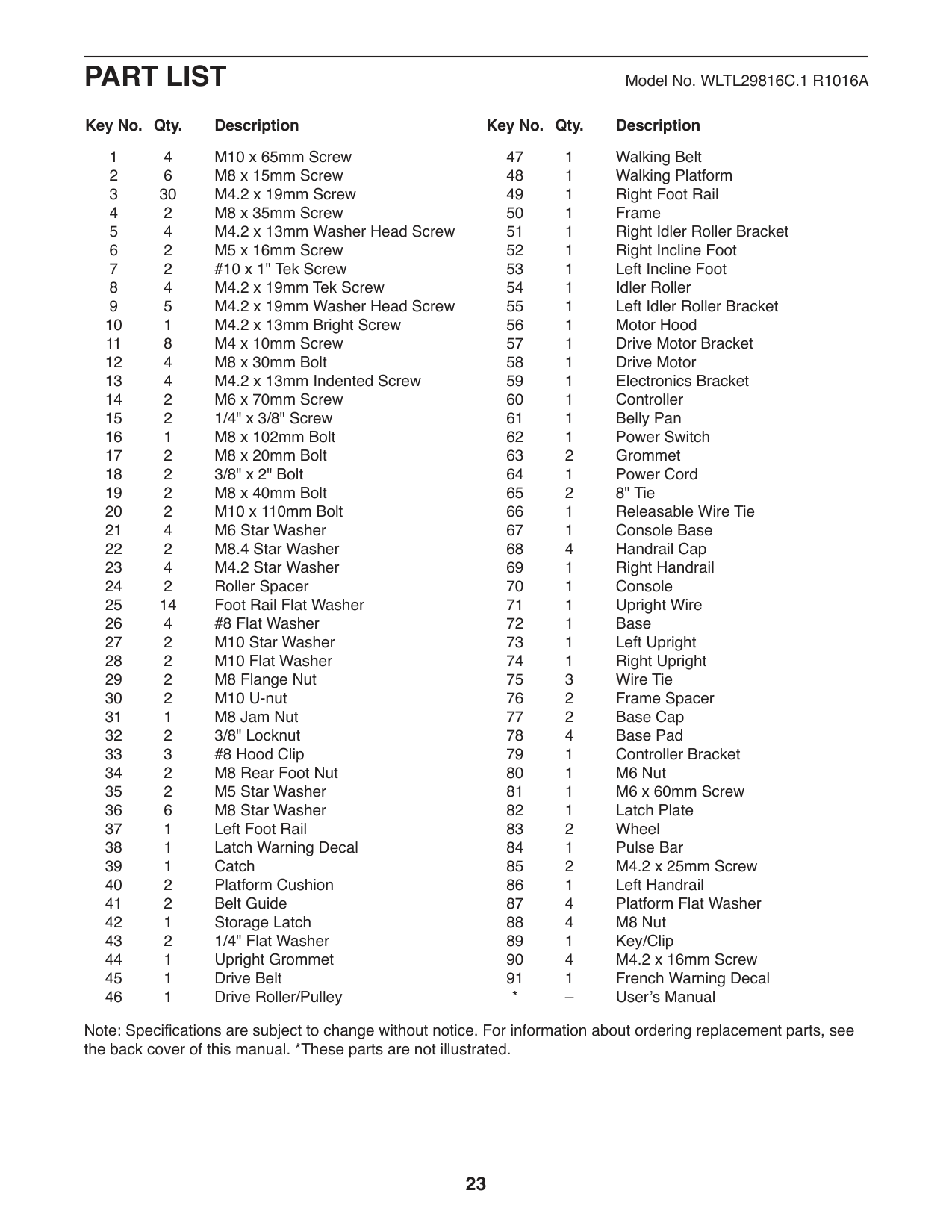
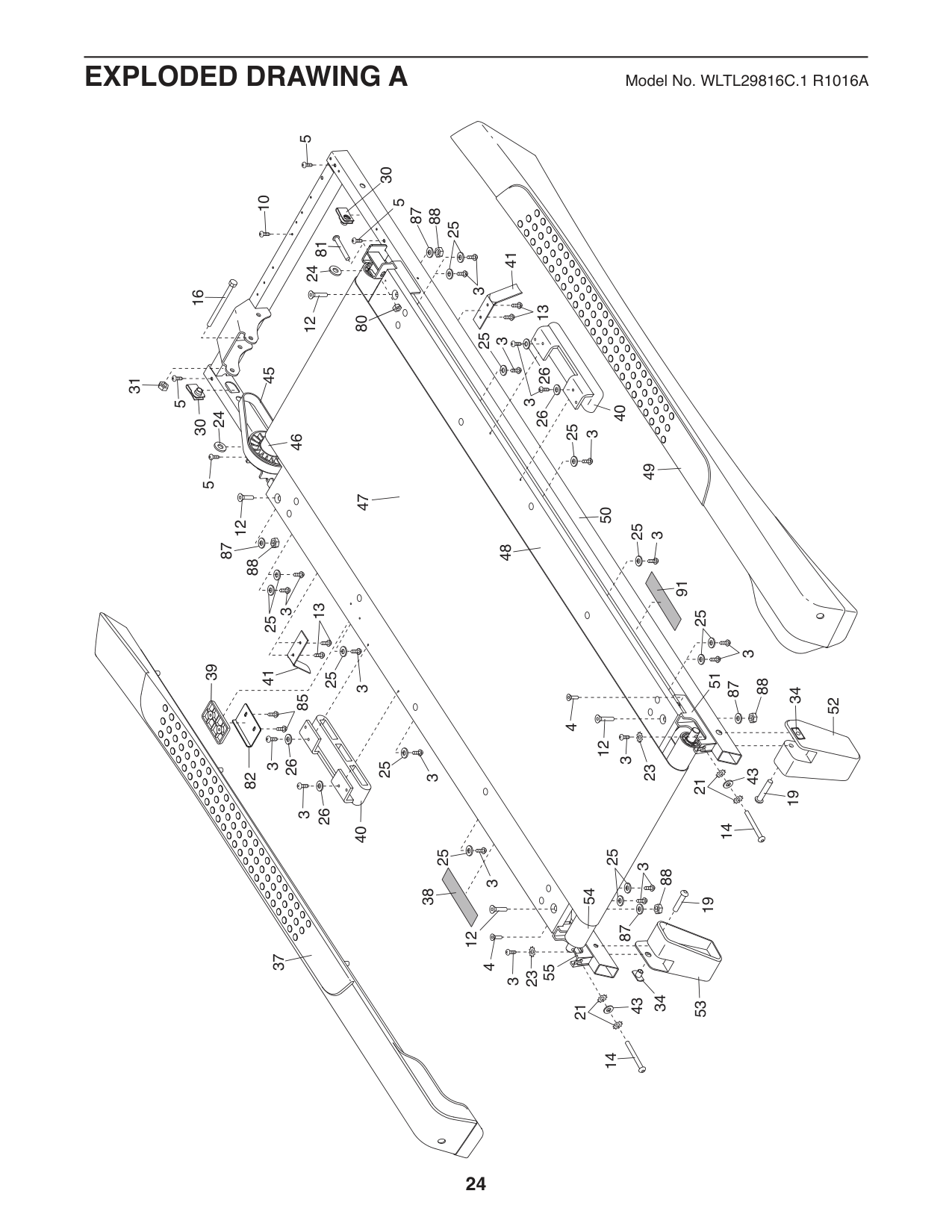
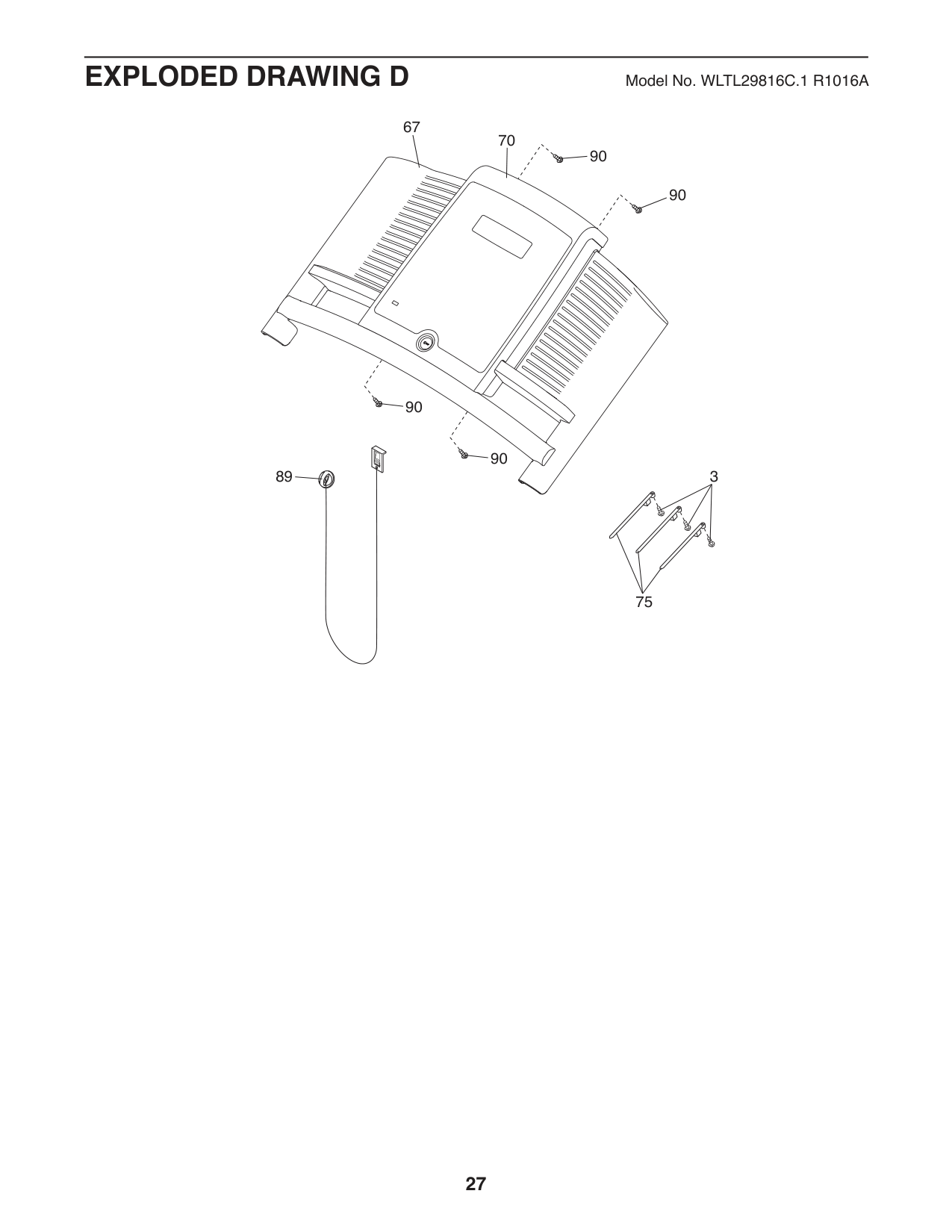
PART LIST Model No. WLTL29816C.1 R1016A
##### Key No. Qty. Description Key No. Qty. Description
Note: Specifications are subject to change without notice. For information about ordering replacement parts, see the back cover of this manual. *These parts are not illustrated.
5
30
10
5
88 87
25
81
41
24
3
3016
13
80
12
25
3
45
2626
31
3
5
49 40
24
25
3
46
5
47
50
12
25
3
88 87
48
91
13
3
25
25
3
39
37 41
2625
51
88
1487
3
3419
85
4
12
3
26
25
3
23
43
82
3
21
3
40
25
25
3
88
3
54
38
5319
87
12
4
55
23
3
34
43
21
14
52
9
56
9
33
9
9
33
33
17
15
22
29
22
9
17
57
11 23
79
11
58
23 11
11
59
61
62
60
64
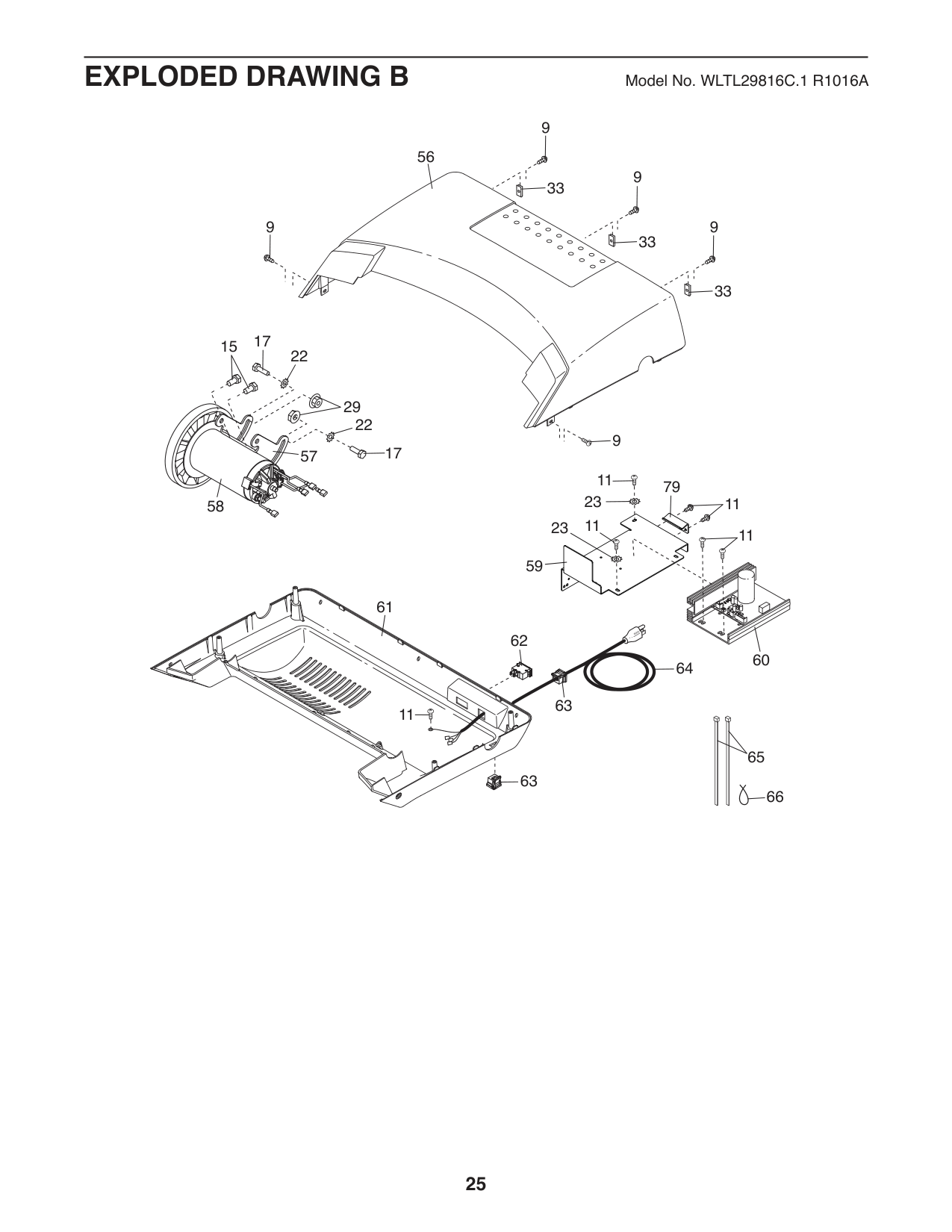
63
11
65
63
66
84
68
3
3
3
68
35
3
3
69
6
3
3
36
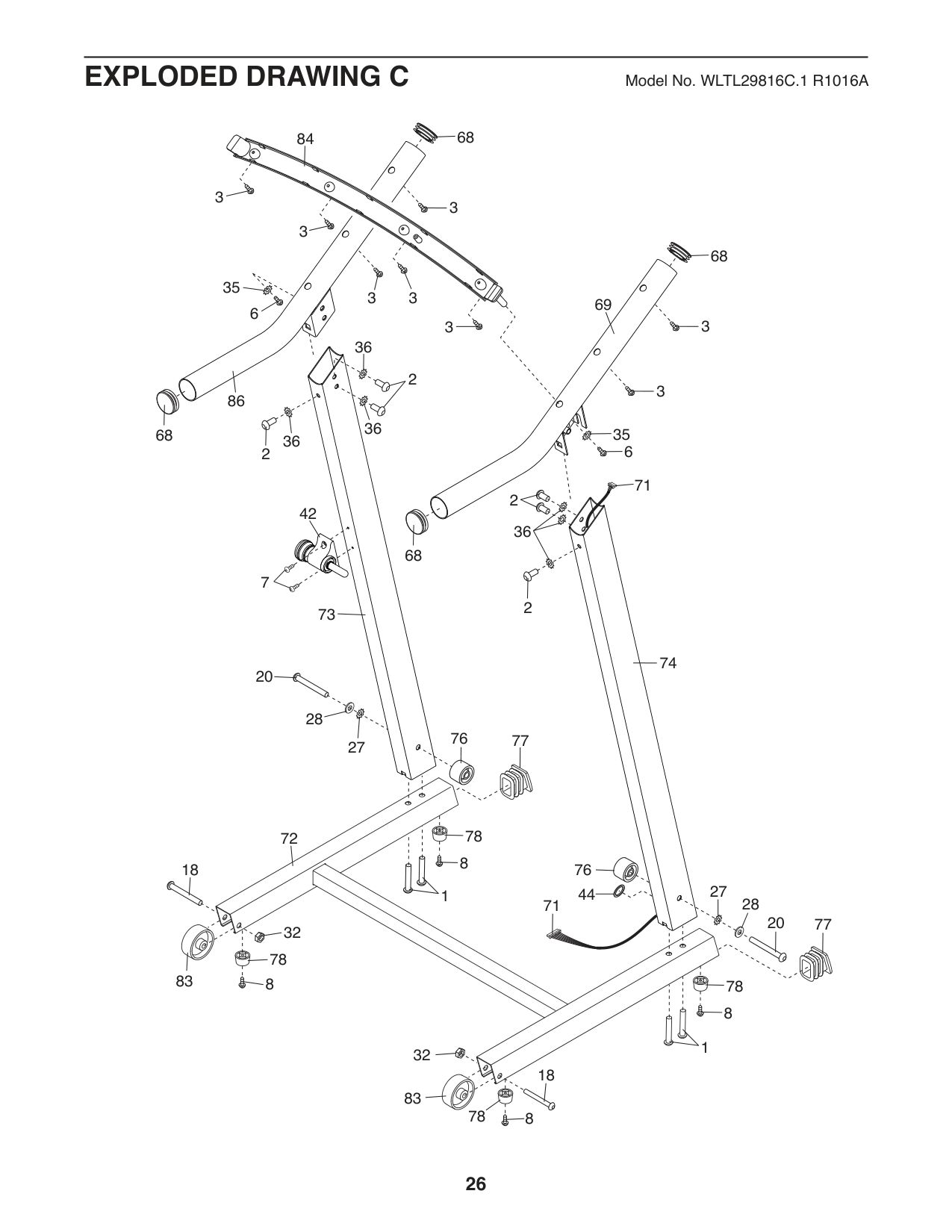
2
3
86
36
35 2
68
36
6
71
2
42
36
68
7
2
73
74
20
28
76
77
27
78
72
8
76
18
27
1 44
28
71
20
77
32
78
7883
8
8
1
32
18
83
78
8
67
70
90
90
90
90
3
89
75
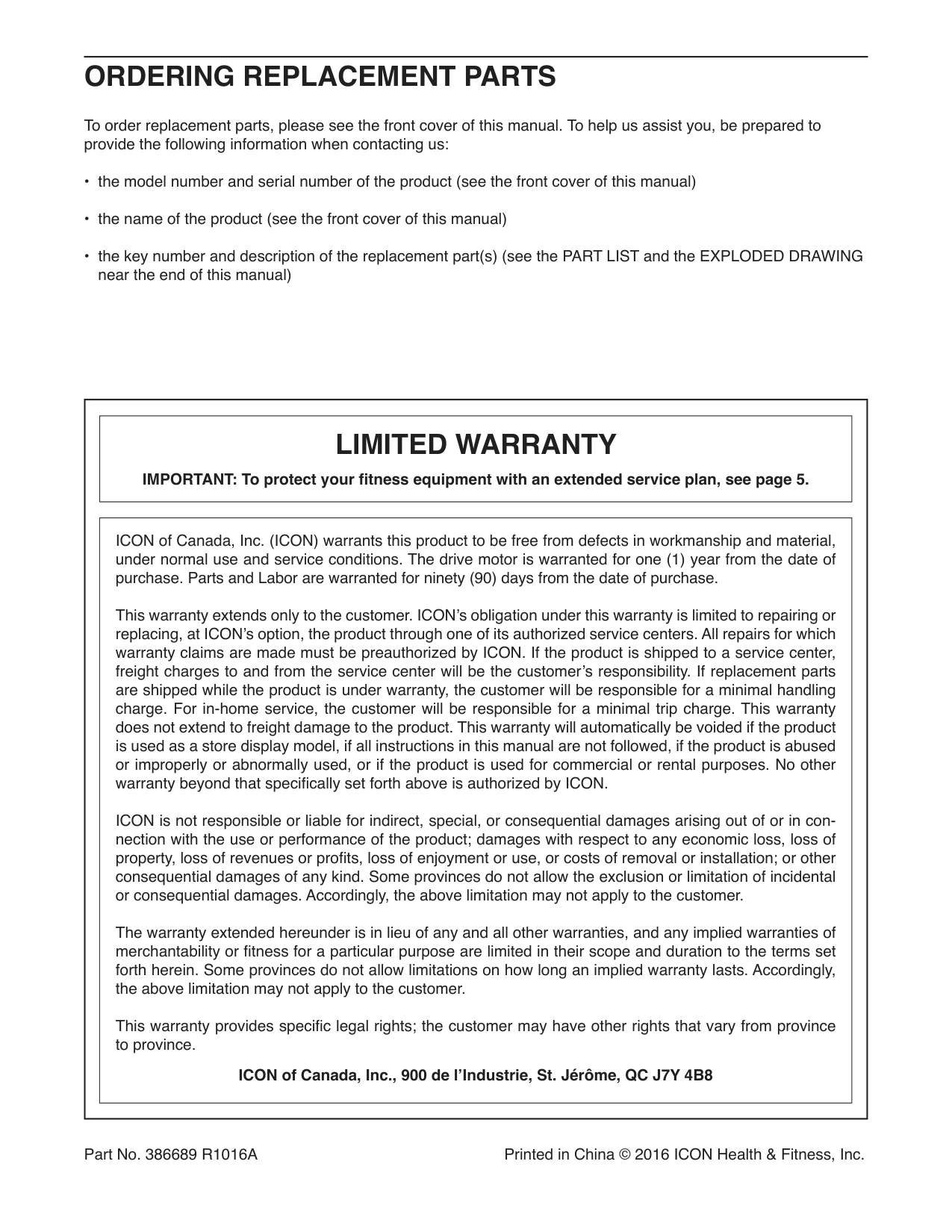
ORDERING REPLACEMENT PARTS
To order replacement parts, please see the front cover of this manual. To help us assist you, be prepared to provide the following information when contacting us:
||LIMITED WARRANTY
IMPORTANT: To protect your fitness equipment with an extended service plan, see page 5.| |---|
|ICON of Canada, Inc. (ICON) warrants this product to be free from defects in workmanship and material, under normal use and service conditions. The drive motor is warranted for one (1) year from the date of purchase. Parts and Labor are warranted for ninety (90) days from the date of purchase.
This warranty extends only to the customer. ICON’s obligation under this warranty is limited to repairing or replacing, at ICON’s option, the product through one of its authorized service centers. All repairs for which warranty claims are made must be preauthorized by ICON. If the product is shipped to a service center, freight charges to and from the service center will be the customer’s responsibility. If replacement parts are shipped while the product is under warranty, the customer will be responsible for a minimal handling charge. For in-home service, the customer will be responsible for a minimal trip charge. This warranty does not extend to freight damage to the product. This warranty will automatically be voided if the product is used as a store display model, if all instructions in this manual are not followed, if the product is abused or improperly or abnormally used, or if the product is used for commercial or rental purposes. No other warranty beyond that specifically set forth above is authorized by ICON.
ICON is not responsible or liable for indirect, special, or consequential damages arising out of or in connection with the use or performance of the product; damages with respect to any economic loss, loss of property, loss of revenues or profits, loss of enjoyment or use, or costs of removal or installation; or other consequential damages of any kind. Some provinces do not allow the exclusion or limitation of incidental or consequential damages. Accordingly, the above limitation may not apply to the customer.
The warranty extended hereunder is in lieu of any and all other warranties, and any implied warranties of merchantability or fitness for a particular purpose are limited in their scope and duration to the terms set forth herein. Some provinces do not allow limitations on how long an implied warranty lasts. Accordingly, the above limitation may not apply to the customer.
This warranty provides specific legal rights; the customer may have other rights that vary from province to province.
ICON of Canada, Inc., 900 de l’Industrie, St. Jérôme, QC J7Y 4B8| |---| | |---|
Part No. 386689 R1016A Printed in China © 2016 ICON Health & Fitness, Inc.