
Ask AI
— answers from the official manualAnswers from the official manual.
Common questions
Common Questions
28 totalWhat type of surge suppressor do I need to plug in the treadmill?
You must use a single-outlet surge suppressor that is UL 1449 listed as a transient voltage surge suppressor (TVSS), with a UL suppressed voltage rating of 400 volts or less and a minimum surge dissipation of 450 joules. The surge suppressor must be electrically rated for 120 volts AC and 15 amps, and must have a monitoring light to indicate whether it is functioning properly. Failure to use a properly functioning surge suppressor could damage the control system, causing the walking belt to change speed or stop unexpectedly. Note that the treadmill is not compatible with GFCI-equipped outlets. (Page 8)
What should I do if the circuit breaker trips and the treadmill loses power?
Locate the circuit breaker on the treadmill near the power cord — if the switch protrudes, the circuit breaker has tripped. Wait five minutes and then press the switch back in to reset it. If the treadmill still will not run after resetting, call Customer Service toll-free at 1-888-825-2588. (Page 26)
How do I adjust the walking belt if it shifts off-center?
First remove the key and unplug the power cord. If the walking belt has shifted to the left, use the included allen wrench to turn the left rear roller adjustment bolt clockwise 1/2 of a turn; if it has shifted to the right, turn the left rear roller bolt counterclockwise 1/2 of a turn. Plug in the power cord, reinsert the key, and run the treadmill for a few minutes, repeating the adjustment until the belt is centered. (Page 27)
What is the speed range and incline range of the treadmill?
The speed range of the walking belt is 0.5 mph to 10 mph. The incline range is 0% to 12%. Speed can be adjusted in increments of 0.1 mph per button press, or 0.5 mph increments when the button is held down, and incline changes in 0.5% increments per button press. (Page 11)
How do I fold and store the treadmill when not in use?
Before folding, adjust the incline to the lowest position — failure to do so may permanently damage the treadmill. Remove the key and unplug the power cord, then raise the frame by bending your legs and lifting with your legs rather than your back. Pull the lock knob to the left while raising the treadmill until the lock pin aligns with and fully inserts into the catch hole. You must be able to safely lift 45 pounds (20 kg) to perform this task. (Page 25)
Can I apply lubricant or silicone spray to the walking belt?
Never apply silicone spray or other substances to the walking belt or the walking platform, as such substances will deteriorate the walking belt and cause excessive wear. The treadmill already features a walking belt coated with PERFORMANT LUBE, a high-performance lubricant applied at the factory. (Page 8)
Show 22 more questions
What should I do if the incline does not change correctly or fails to respond to iFIT.com programs?
How do I measure my heart rate while using the treadmill?
What safety steps should I take when I am done using the treadmill?
What is the maximum weight limit for users of the Cadence 200cs treadmill?
How do I factory reset the treadmill?
What do I do if my treadmill's power doesn't turn on?
How do I tighten the walking belt when it shifts?
How do I reset the incline system if it’s not working properly?
What should I do if my console displays are not functioning?
How do I properly fold the treadmill for storage?
What steps should I follow when using the manual mode?
What steps are involved in assembling the CADENCE 21.0 treadmill?
How do I adjust the walking belt tension?
What is the procedure to lower the treadmill from its folded position?
When does the power switch need resetting?
How can I adjust the speed of the treadmill safely?
Why is it important to wear appropriate clothes while using a treadmill?
How do I turn off the display demo mode?
What should I do if the walking belt shifts?
How do I recalibrate the incline system?
How do I stop or use emergency stop procedure?
What is included in the TROUBLESHOOTING section?
Full Manual
24 pages
|Model No. WETL49710.0 Serial No.
Write the serial number in the space above for future reference.
Serial Number Decal
| |---| |QUESTIONS?
If you have questions, or if there are missing parts, please contact us:
UK Call: 08457 089 009 From Ireland: 053 92 36102
Website: www.iconsupport.eu Write: ICON Health & Fitness,Ltd. c/o HI Group PLC, ExpressWay Whitwood, West Yorkshire WF10 5QJ UK AUSTRALIA Call: 1-800-237-173 E-mail: australiacc@iconfitness.com| |CAUTION
Read all precautions and instructions in this manual before using this equipment. Save this manual for future reference.|
USER'S MANUAL
www.iconeurope.com
TABLE OF CONTENTS
WARNING DECAL PLACEMENT . . . . . . . . . . . . . . . . . . . . . . . . . . . . . . . . . . . . . . . . . . . . . . . . . . . . . . . . . . . . . .2 IMPORTANT PRECAUTIONS . . . . . . . . . . . . . . . . . . . . . . . . . . . . . . . . . . . . . . . . . . . . . . . . . . . . . . . . . . . . . . . . .3 BEFORE YOU BEGIN . . . . . . . . . . . . . . . . . . . . . . . . . . . . . . . . . . . . . . . . . . . . . . . . . . . . . . . . . . . . . . . . . . . . . . .5 ASSEMBLY . . . . . . . . . . . . . . . . . . . . . . . . . . . . . . . . . . . . . . . . . . . . . . . . . . . . . . . . . . . . . . . . . . . . . . . . . . . . . . .6 OPERATION AND ADJUSTMENT . . . . . . . . . . . . . . . . . . . . . . . . . . . . . . . . . . . . . . . . . . . . . . . . . . . . . . . . . . . . .9 HOW TO FOLD AND MOVE THE TREADMILL . . . . . . . . . . . . . . . . . . . . . . . . . . . . . . . . . . . . . . . . . . . . . . . . . .15 TROUBLESHOOTING . . . . . . . . . . . . . . . . . . . . . . . . . . . . . . . . . . . . . . . . . . . . . . . . . . . . . . . . . . . . . . . . . . . . . .16 EXERCISE GUIDELINES . . . . . . . . . . . . . . . . . . . . . . . . . . . . . . . . . . . . . . . . . . . . . . . . . . . . . . . . . . . . . . . . . . .19 PART LIST . . . . . . . . . . . . . . . . . . . . . . . . . . . . . . . . . . . . . . . . . . . . . . . . . . . . . . . . . . . . . . . . . . . . . . . . . . . . . . .20 EXPLODED DRAWING . . . . . . . . . . . . . . . . . . . . . . . . . . . . . . . . . . . . . . . . . . . . . . . . . . . . . . . . . . . . . . . . . . . . .21 ORDERING REPLACEMENT PARTS . . . . . . . . . . . . . . . . . . . . . . . . . . . . . . . . . . . . . . . . . . . . . . . . . .Back Cover RECYCLING INFORMATION . . . . . . . . . . . . . . . . . . . . . . . . . . . . . . . . . . . . . . . . . . . . . . . . . . . . . . . . .Back Cover
WARNING DECAL PLACEMENT
|This drawing shows the location(s) of the warning decal(s). If a decal is missing or illegible, call
the telephone number on the front cover of this manual and request a free replacement decal. Apply the decal in the location shown.
Note: The decal(s) may not be shown at actual size.| |---|
WESLO is a registered trademark of ICON IP, Inc.
IMPORTANT PRECAUTIONS
WARNING:Toreducetheriskofseriousinjury,readallimportantprecautionsandinstructions in this manual and all warnings on your treadmill before using your treadmill. ICON assumes no responsibility for personal injury or property damage sustained by or through the use of this product.
conductor, 14-gauge (1 mm
2
) cord that is no longer than 5 ft. (1.5 m).

cord immediately after use, before cleaning the treadmill, and before performing the maintenance and adjustment procedures described in this manual. Never remove the motor hood unless instructed to do so by an authorized service representative. Servicing other than the procedures in this manual should be performed by an authorized service representative only.
SAVE THESE INSTRUCTIONS
BEFORE YOU BEGIN
Thank you for selecting the new WESLO
CADENCE 21.0 treadmill. The CADENCE 21.0 treadmill offers a selection of features designed to make your workouts at home more effective. And when youʼre not exercising, the unique treadmill can be folded up, requiring less than half the floor space of other treadmills.
®
For your benefit, read this manual carefully before using the treadmill. If you have questions after read-
ing this manual, please see the front cover of this manual. To help us assist you, note the product model number and serial number before contacting us. The model number and the location of the serial number decal are shown on the front cover of this manual.
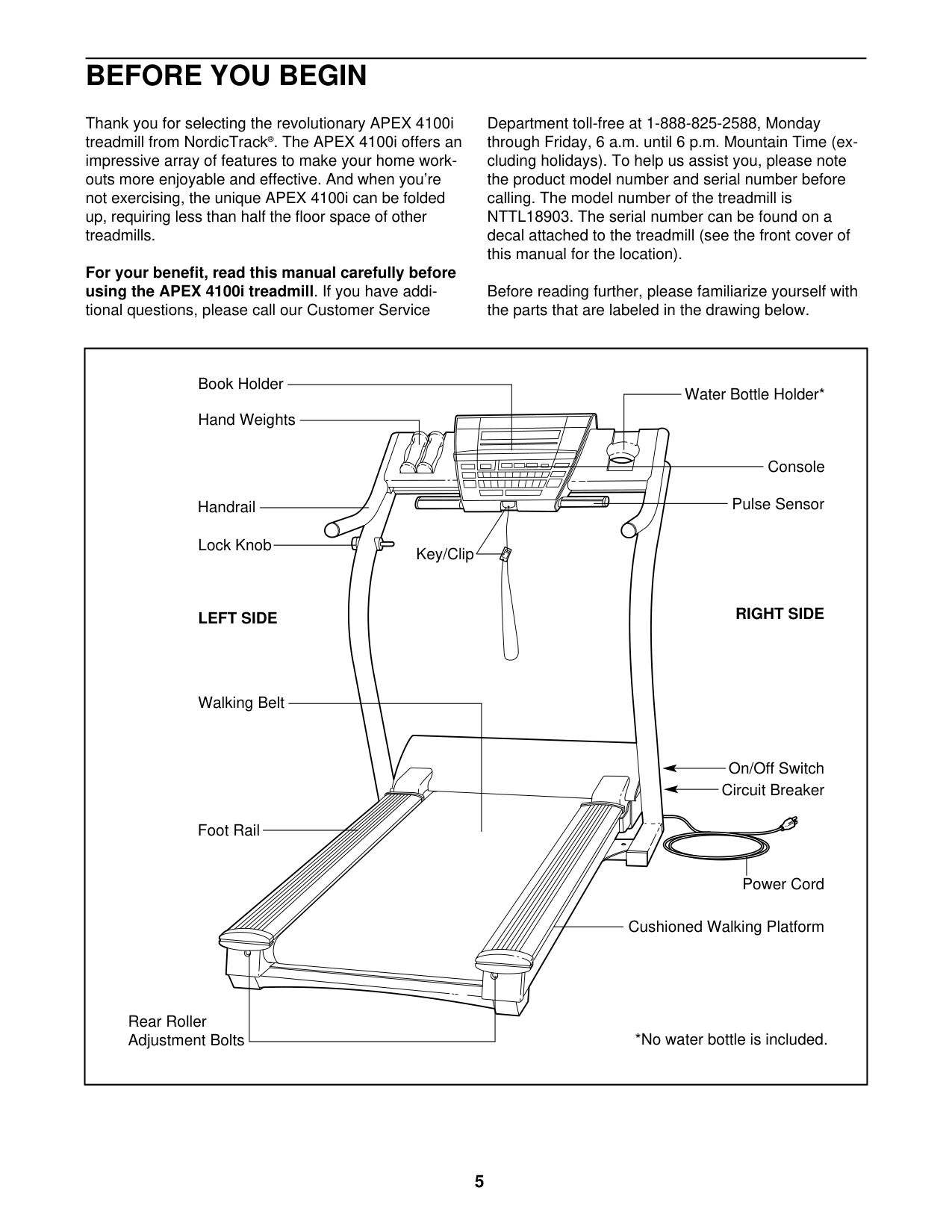
Before reading further, please review the drawing below and familiarize yourself with the labeled parts.
|Handrail
Storage Latch
Console
Key/Clip
Power Switch
Power Cord
Walking Belt
Motor Hood
Wheel
Foot Rail
Idler Roller Adjustment Bolts
Accessory Tray
Platform Cushion
| |---|
ASSEMBLY
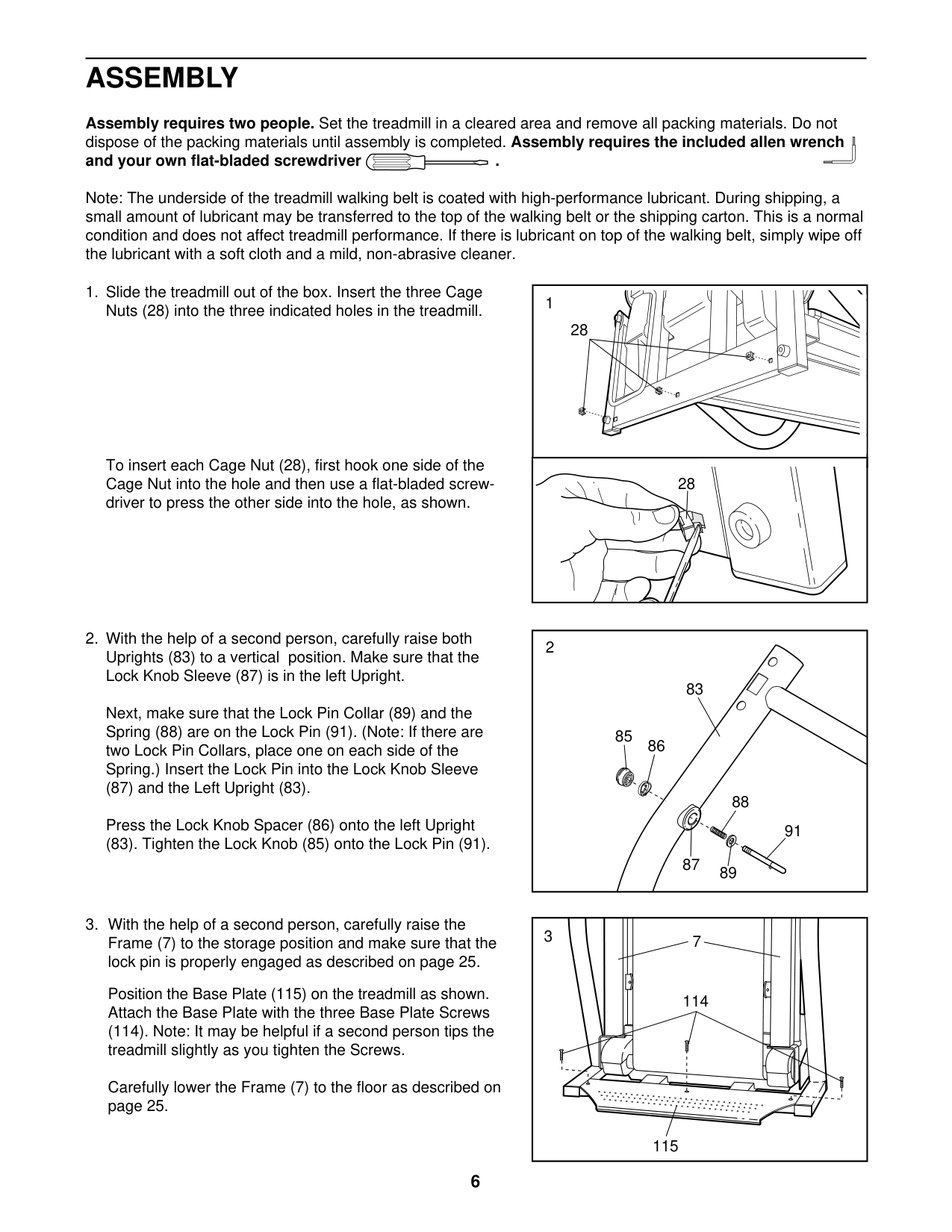
Assembly requires two persons. Set the treadmill in a cleared area and remove all packing materials; do not dispose of the packing materials until assembly is completed. Note: The underside of the treadmill walking
belt is coated with high-performance lubricant. During shipping, some lubricant may be transferred to the top of the walking belt or the shipping carton. This does not affect treadmill performance. If there is lubricant on top of the walking belt, simply wipe off the lubricant with a soft cloth and a mild, non-abrasive cleaner.
Assembly requires the included hex keys and your own Phillips screwdriver , standard screwdriver , and needlenose pliers .
Use the drawings below to identify the assembly hardware. The number in parentheses below each drawing is the key number of the part, from the PART LIST near the end of this manual. The number after the parentheses is the quantity needed for assembly. Note: Some small parts may have been pre-assembled. To avoid damaging parts, do not use power tools for assembly. Extra hardware may be included.
|M10 x 65mm Bolt (1)–4
| | | |---|---| | | | | | |
M10 x 45mm Bolt (2)–4
| | | |---|---| | | | | | |
4.2 x 19mm Screw (3)–6
| | | |---|---| | | | | | |
#10 x 1" Tek Screw (83)–2| |---|
#### 1. Make sure that the power cord is unplugged.
|1
73
80
1
1
50| |---|
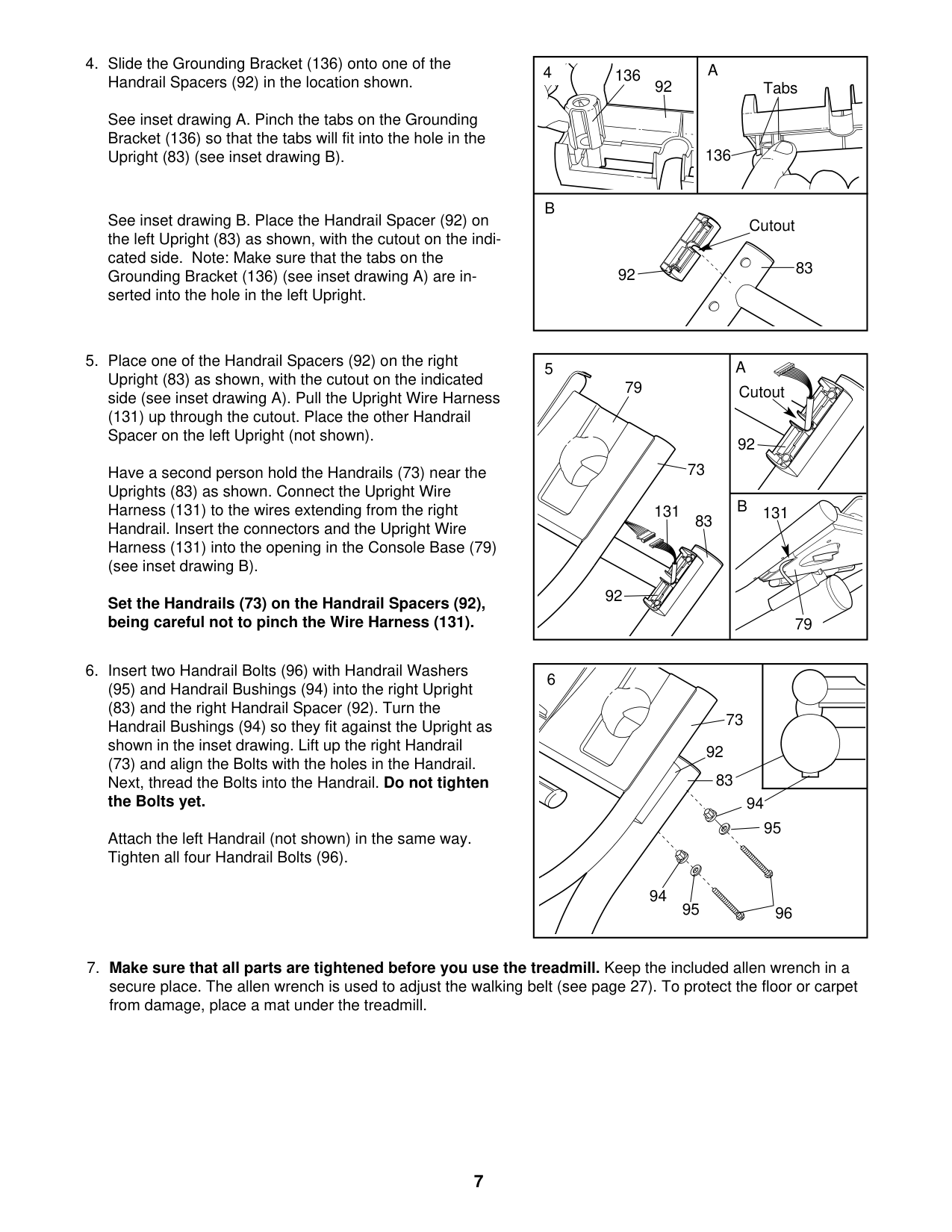
With the help of a second person, carefully tip the treadmill onto its left side. Unfold the Frame
(50) away from the Uprights (73). Do not lean on the Uprights.
Orient the Base (80) as shown. Attach the Base to the Uprights (73) with four M10 x 65mm Bolts (1). Start all four Bolts, and then tighten each of them.
Raise the Uprights (73), so that the Base (80) is flat on the floor.
Connect the Upright Wire (71) to the console wire. See the inset drawing. The connectors should slide together easily and snap into place. If they do not, turn one connector and try again. IF YOU DO NOT CONNECT THE CONNECTORS PROPERLY, THE CONSOLE MAY BECOME DAMAGED WHEN YOU TURN ON THE POWER. Insert the connectors and the excess wire into the crossbar on the Uprights (73).
|2
2
2
73
69
69| |---|
3
71
Console Assembly
Console Wire
73
71
Tie Console
Wire
(73) and the Handrails (69) with six M4.2 x 19mm Screws (3). Be careful not to pinch the wires.
|4
369 69
3
3
Console Assembly
73
| |---|
(73) with two #10 x 1" Tek Screws (83); start both Screws, and then tighten each of them.
See the inset drawing. Insert the Spring Clip
(86) into the two indicated small holes in the Gas Spring (85). Rotate the Spring Clip until it clips onto the Gas Spring.
Lower the treadmill. See HOW TO LOWER THE TREADMILL FOR USE on page 15.
|5
83
73
72
| |---|
Next, press the rod end of the Gas Spring (85) as far as possible onto the Mount (92) on the bracket in the center of the Frame (50).
See drawing 6a. Insert the Spring Clip (86) into the two indicated small holes in the rod end of the Gas Spring (85). Then, rotate the Spring Clip until it clips onto the Gas Spring.
6
6a
7
50
86
Bracket
86
86
Rod
85
50
Holes
92
86
85
85
85
86
86
Holes Bracket
80
Bracket
80 92
OPERATION AND ADJUSTMENT
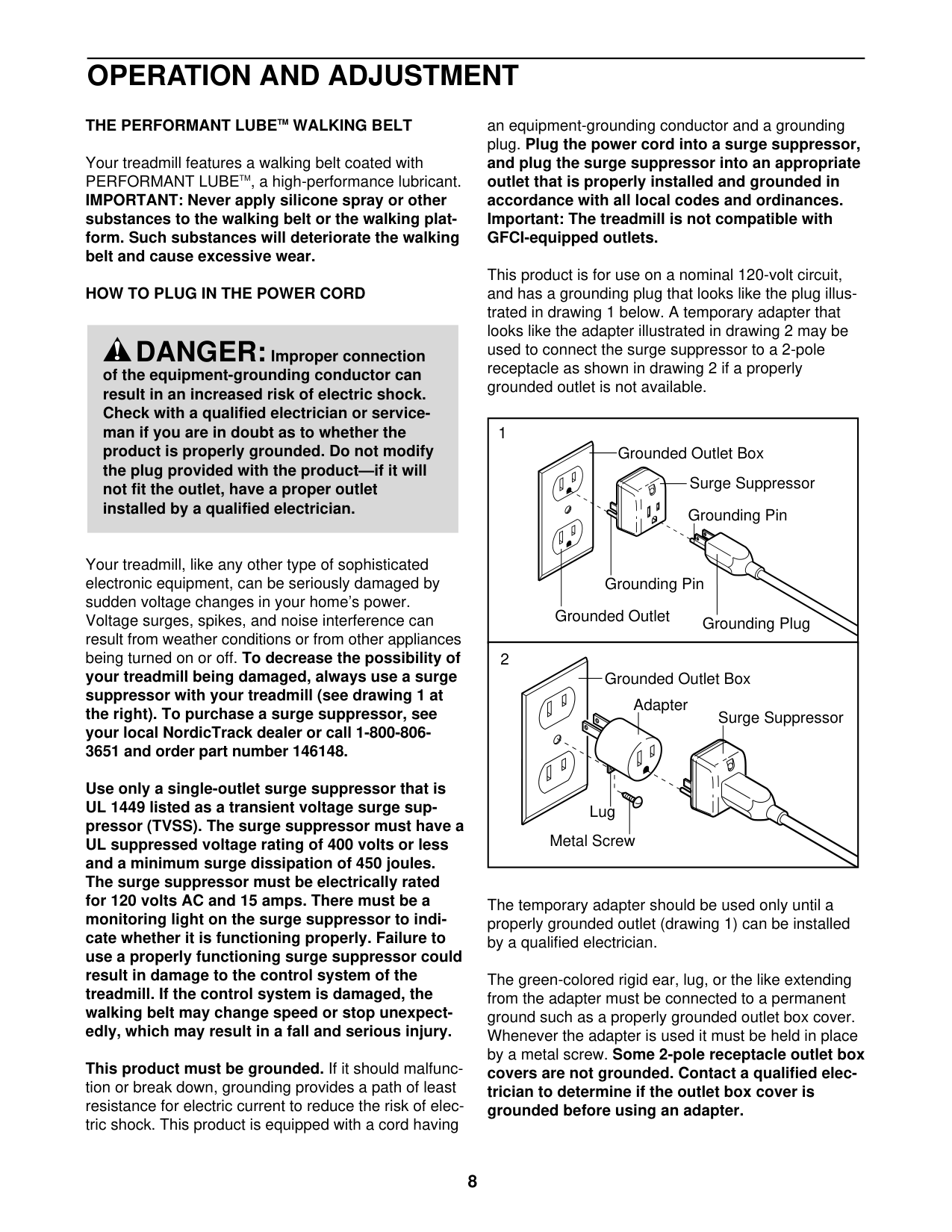
THE PRE-LUBRICATED WALKING BELT
If you are plugging in the power cord in the UK, first press the pins on the power cord into the metal clips in the adapter as shown. Close the adapter cover over the end of the power cord and tighten the screw in the adapter. IMPORTANT: Make sure that the screw is tightened into the adapter cover. Then, go to step 3.
Your treadmill features a walking belt coated with highperformance lubricant. IMPORTANT: Never apply silicone spray or other substances to the walking belt or the walking platform. Such substances will deteriorate the walking belt and cause excessive wear.
HOW TO PLUG IN THE POWER CORD This product must be earthed. If it should malfunction or break down, earthing provides a path of least resistance for electric current to reduce the risk of electric shock. This product is equipped with a power cord having an equipment-earthing conductor and an earthing plug. IMPORTANT: If the power cord is damaged, it must be replaced with a manufacturerrecommended power cord.
|Metal Clips
Pins
Screw
Adapter
Adapter Cover| |---|
DANGER:Improperconnectionof the equipment-earthing conductor can result in an increased risk of electric shock. Check with a qualified electrician or serviceman if you are in doubt as to whether the product is properly earthed. Do not modify the plug provided with the product—if it will not fit the outlet, have a proper outlet installed by a qualified electrician.
|Outlet
UK
|Australia
Outlet| |---|---|
#### Follow the steps below to plug in the power cord.
|Socket on Treadmill
Power Cord| |---|
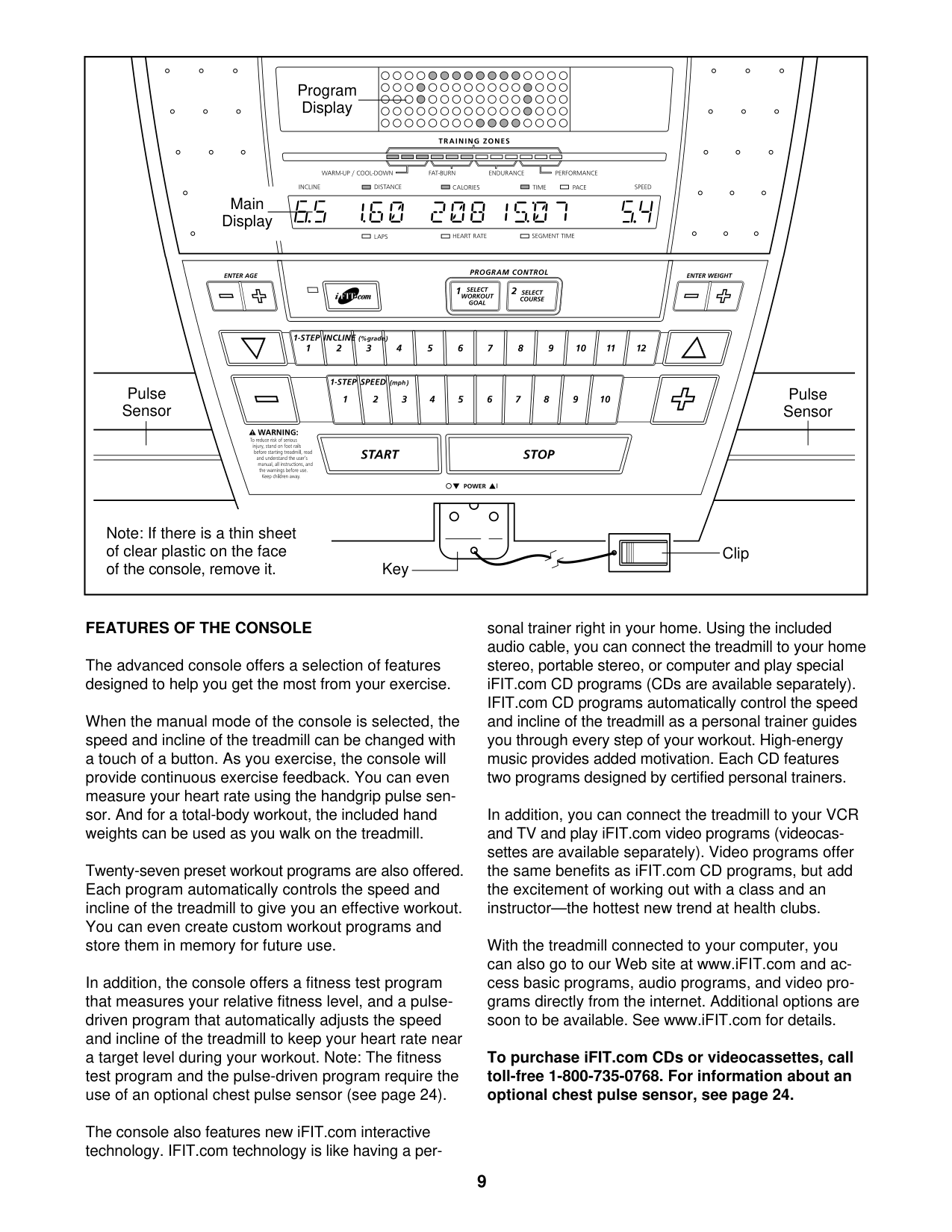
#### CONSOLE DIAGRAM
Thumb Pulse Sensor
| | | |---|---| | | |
Key
Clip
#### FEATURES OF THE CONSOLE
The treadmill console offers a selection of features designed to make your workouts more effective. When you select the manual mode of the console, you can change the speed and incline of the treadmill with the touch of a button. As you exercise, the displays will provide continuous exercise feedback. You can even measure your heart rate using the built-in pulse sensor.
The console also offers eight preset workouts. Each workout automatically controls the speed and incline of the treadmill as it guides you through an effective exercise session.
To turn on the power, see page 11. To use the manual mode, see page 11. To use a preset workout, see page 13. To use the information mode, see page 14.
IMPORTANT: If there is a sheet of plastic on the face of the console, remove the plastic. To prevent damage to the walking platform, wear clean athletic shoes while using the treadmill. The first time the treadmill is used, observe the alignment of the walking belt, and center the walking belt if necessary (see page 18).
Note: The console can display speed and distance in either kilometers or miles. To find which unit of measurement is selected, see THE INFORMATION MODE on page 14. For simplicity, all instructions in this manual refer to kilometers.
HOW TO TURN ON THE POWER IMPORTANT: If the treadmill has been exposed to cold temperatures, allow it to warm to room temperature before turning on the power. If you do not do this, you may damage the console displays or other electrical components.
HOW TO USE THE MANUAL MODE
When the key is inserted, the manual mode will be selected. If you have selected a preset workout, remove the key and then reinsert it.
Plug in the power cord (see page 9). Next, locate the power switch on the treadmill frame near the power cord. Make sure that the switch is in the reset position.
|Reset| |---|
IMPORTANT: The console features a display demo mode, designed to be used if the treadmill is displayed in a store. If the displays light as soon as you plug in the power cord and press the power switch into the reset position, the demo mode is turned on. To turn off the demo mode, hold down the Stop button for a few seconds. If the displays remain lit, see THE INFORMATION MODE on page 14 to turn off the demo mode.
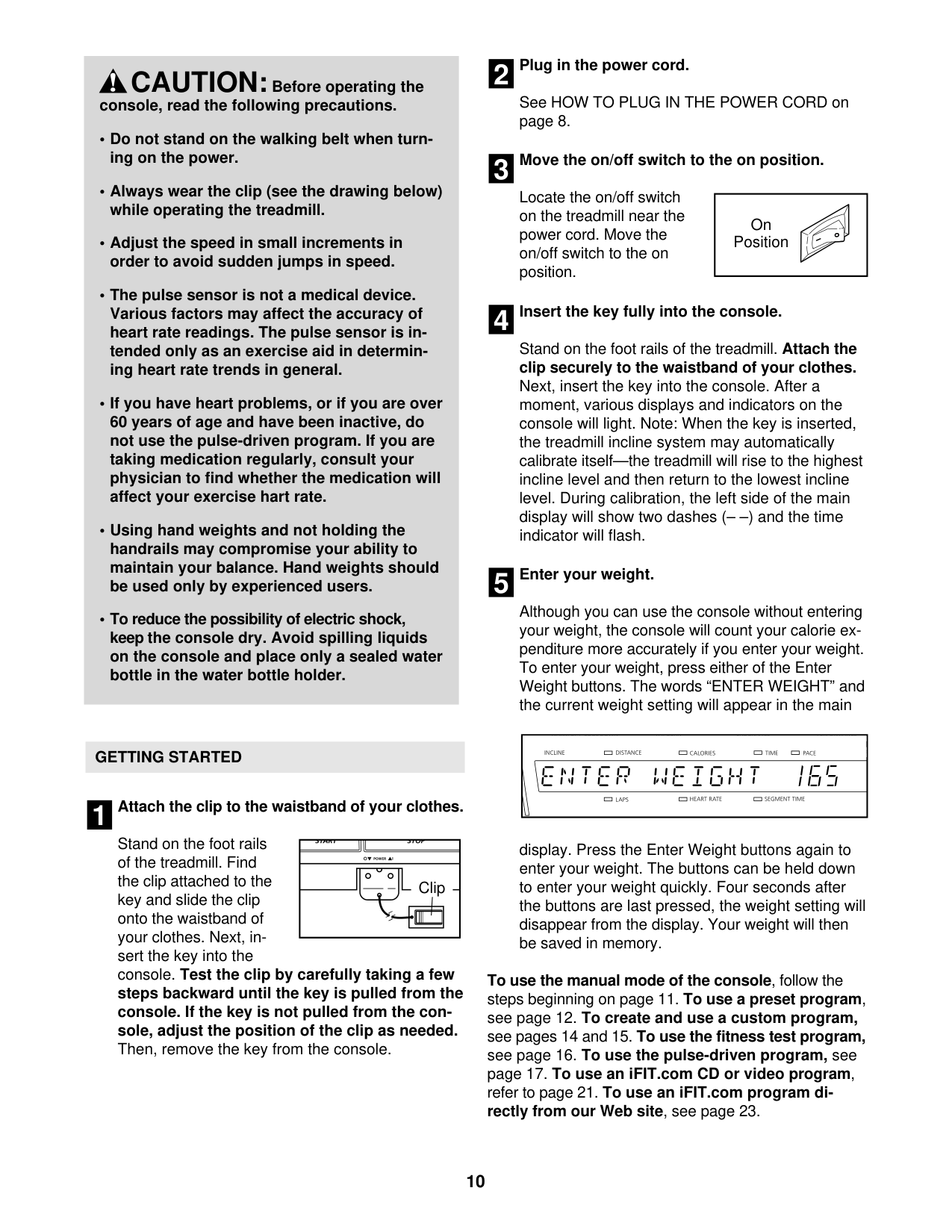
To start the walking belt, press the Start button, the Speed increase button, or one of the numbered speed buttons.
If you press the Start button or the Speed increase button, the walking belt will begin to move at 2 Km/H. As you exercise, change the speed of the walking belt as desired by pressing the Speed increase and decrease buttons. Each time you press one of the buttons, the speed setting will change by 0.1 Km/H; if you hold down the button, the speed setting will change in increments of 0.5 Km/H. Note: After you press the buttons, it may take a moment for the walking belt to reach the selected speed setting.
Next, stand on the foot rails of the treadmill. Find the clip attached to the key (see the drawing on page 10), and slide the clip onto the waistband of your clothes. Then, insert the key into the console. After a moment, the displays will light. IMPORTANT: In an emergency, the key can be pulled from the console, causing the walking belt to slow to a stop. Test the clip by carefully taking a few steps backward; if the key is not pulled from the console, adjust the position of the clip.
If you press one of the numbered speed buttons, the walking belt will gradually change speed until it reaches the selected speed setting.
To stop the walking belt, press the Stop button. The time will begin to flash in the left display. To restart the walking belt, press the Start button or the Speed increase button.
#### 4. Change the incline of the treadmill as desired.
To change the incline of the treadmill, press the Incline increase and decrease buttons. Each time you press a button, the incline setting will change by 0.5 percent; if you hold down a button, the incline setting will change quickly.
#### 5. Follow your progress with the displays.
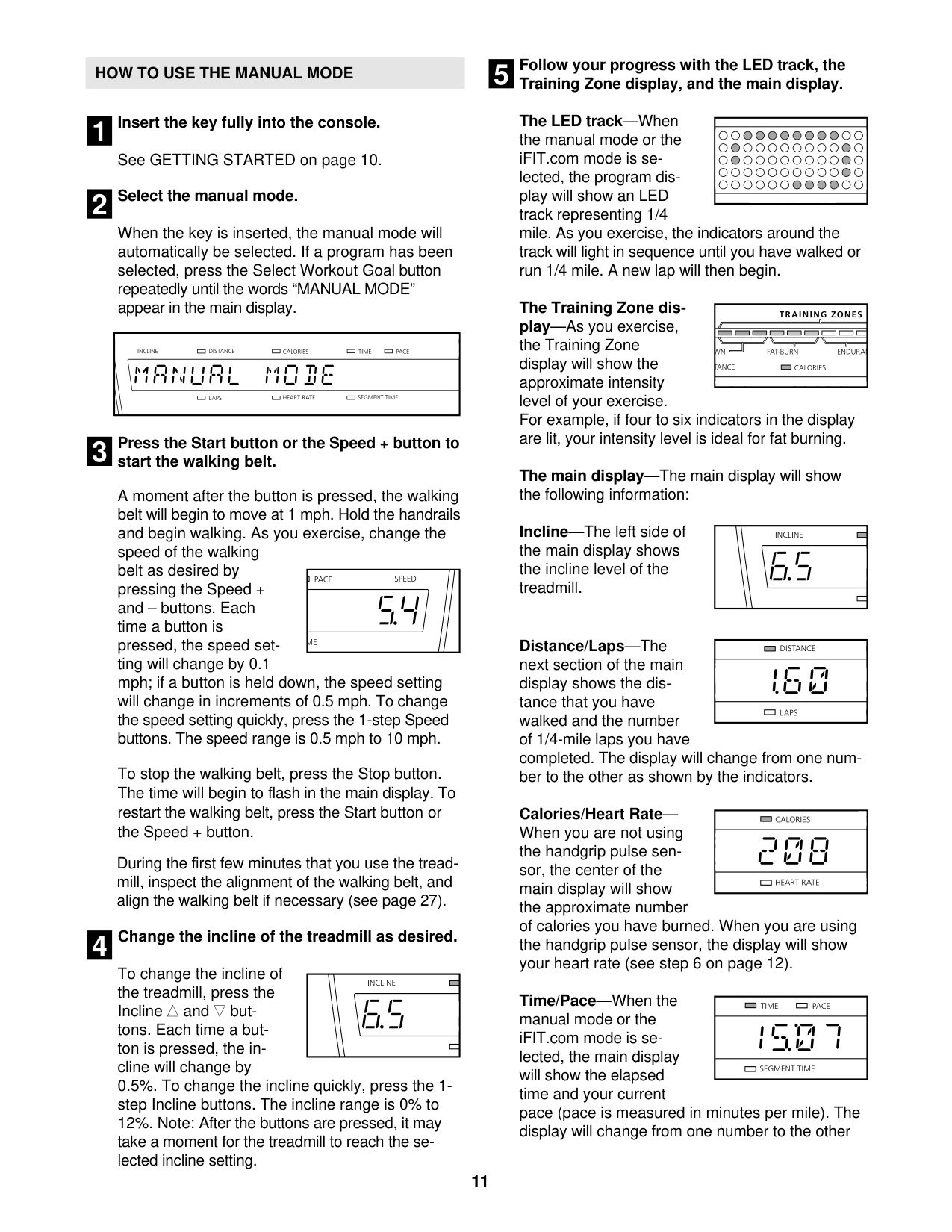
The track—The track represents a distance of 1/4 mile (402 meters). As you walk or run on the treadmill, the indicators around the track will appear in succession until the entire track appears. The track will then disappear and the indicators will again begin to appear in succession.
The left display—As you exercise, the left display can show the elapsed time and the approximate number of calories that you have burned. The left display will also show the incline of the treadmill each time the incline level changes. The display also shows your heart rate when you use the pulse sensor (see step 5 on this page). Note: When you use a preset workout, the left display will show the time remaining in the workout instead of the elapsed time.
The right displayThe right display can show the speed of the walking belt and the distance that you have walked or run.
To reset the displays, press the Stop button, remove the key, and then reinsert the key.
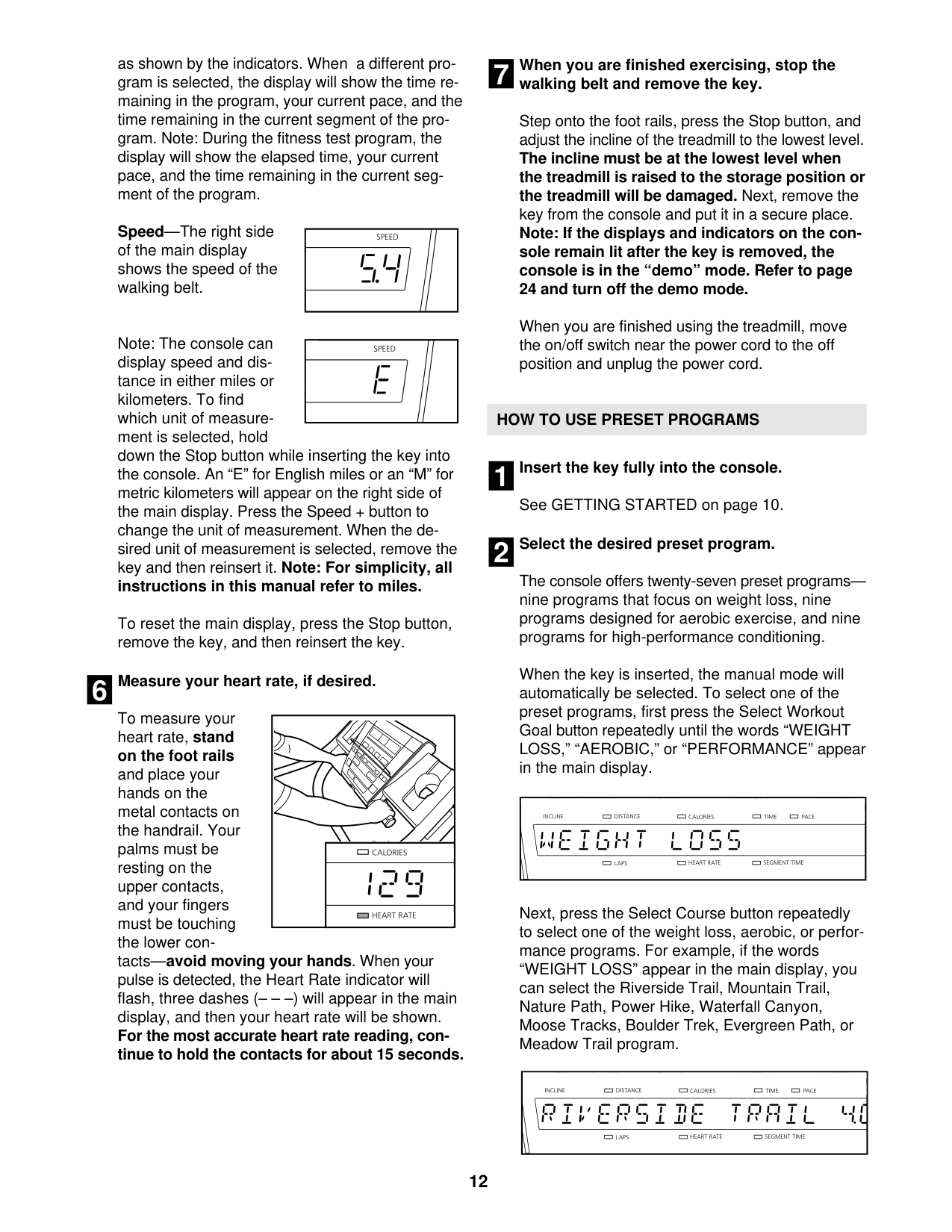
To measure your heart rate, stand on the foot rails and place your thumb on the pulse sensor (see the drawing on page 10). Do not press too
hard, or the circulation in your thumb will be restricted and your pulse may not be detected. When your pulse is detected, the small heart symbol in the left display will flash and your heart rate will be shown. For the most accurate heart rate reading, hold your thumb on the pulse sensor for at least 15 seconds.
If the displayed heart rate appears to be too high or too low, or if your heart rate is not displayed, lift your thumb for a few seconds, and then reposition your thumb on the pulse sensor. Remember to stand still while measuring your heart rate.
Step onto the foot rails, press the Stop button, and adjust the incline of the treadmill to the lowest setting. The incline must be at the lowest setting or you may damage the treadmill when you fold it to the storage position. Next, remove the key from the console and put it in a secure place.
When you are finished using the treadmill, press the power switch into the off position and unplug the power cord. IMPORTANT: If you do not do this, the treadmillʼs electrical components may wear prematurely.
#### HOW TO USE A PRESET WORKOUT
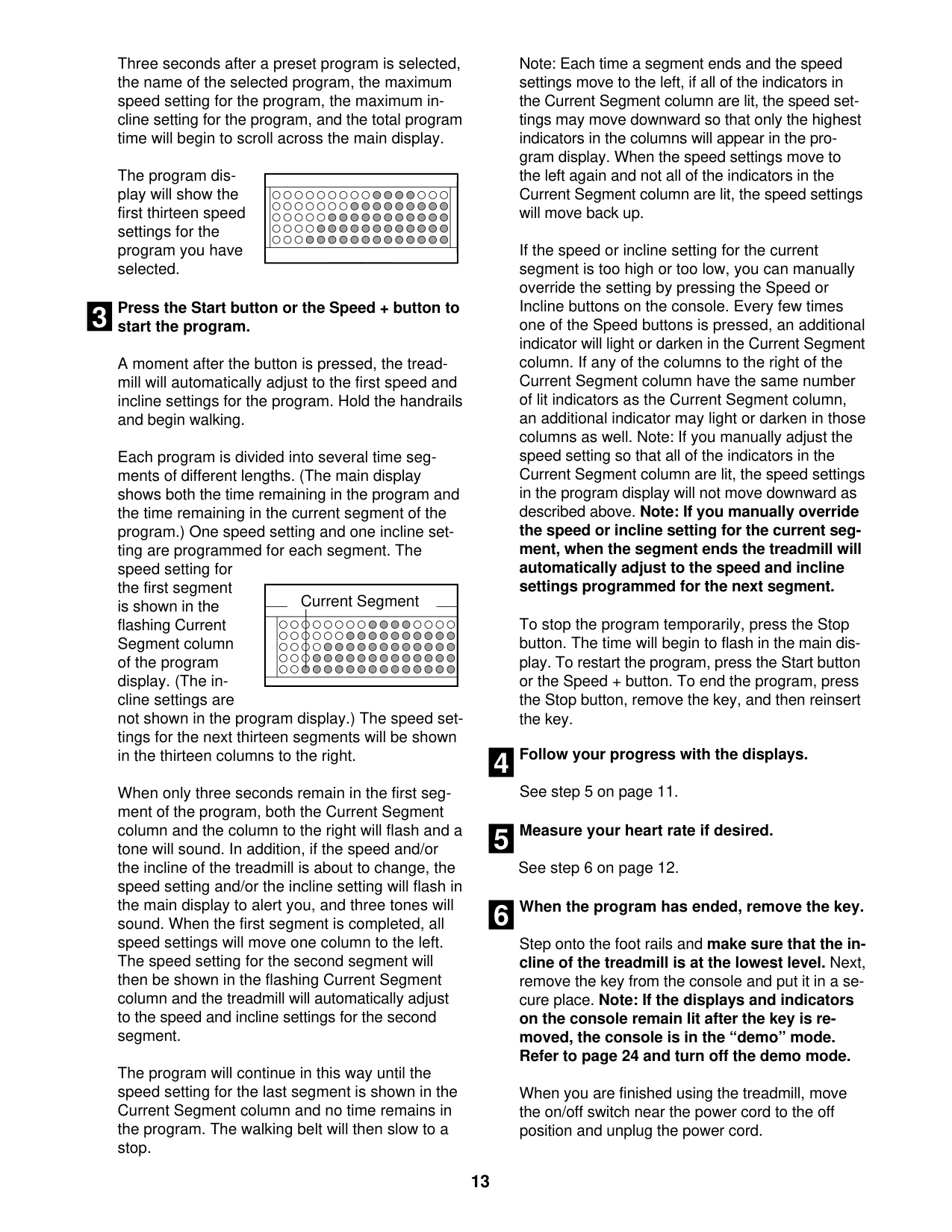
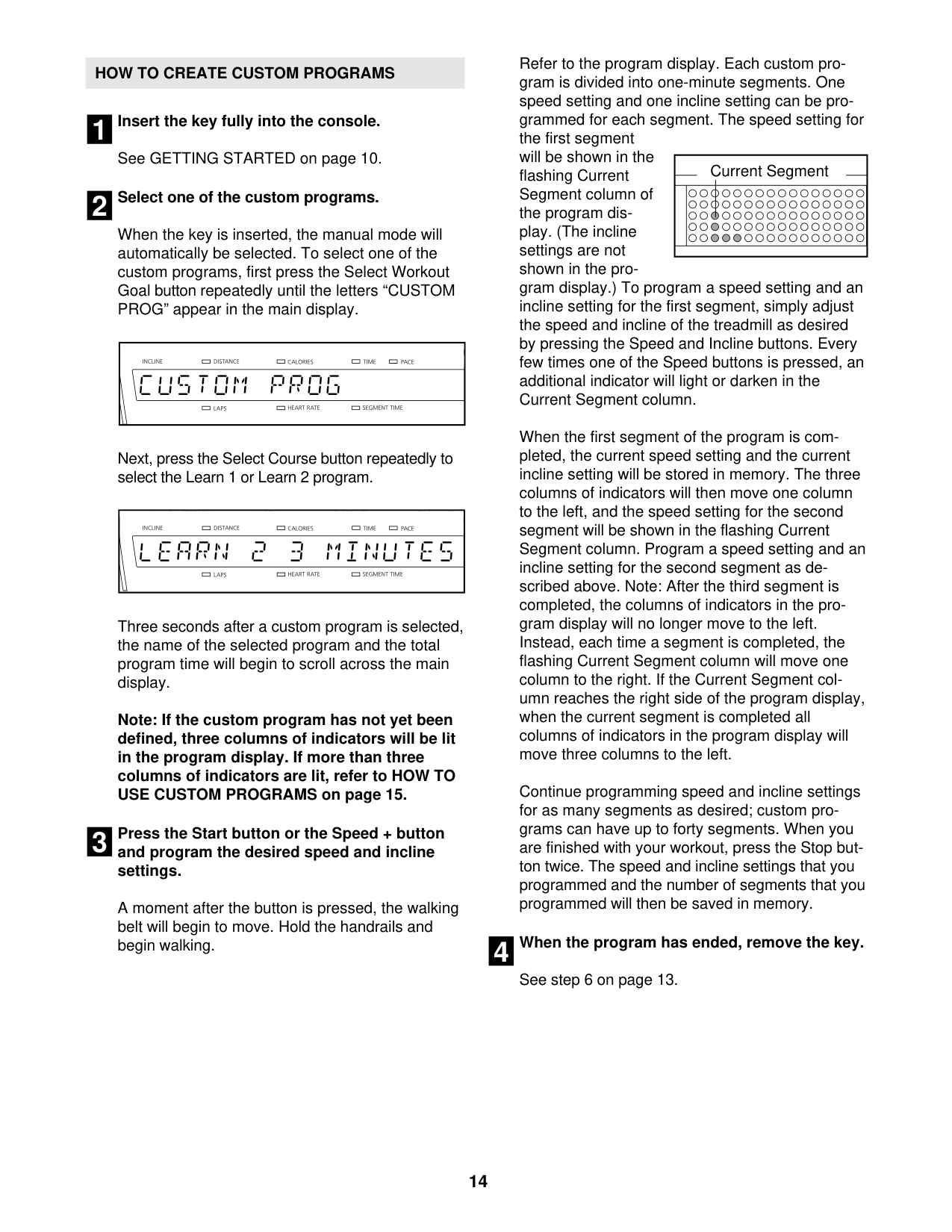
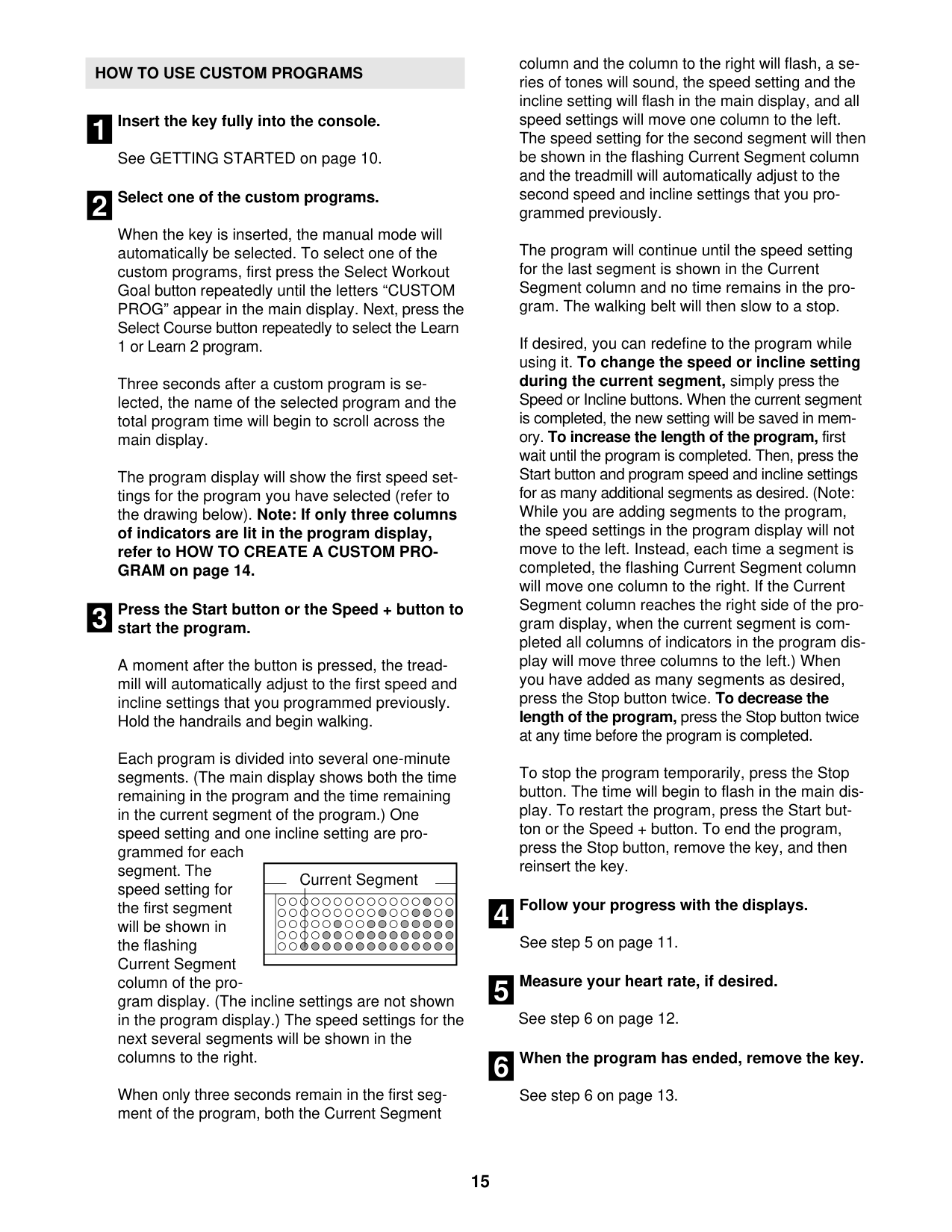
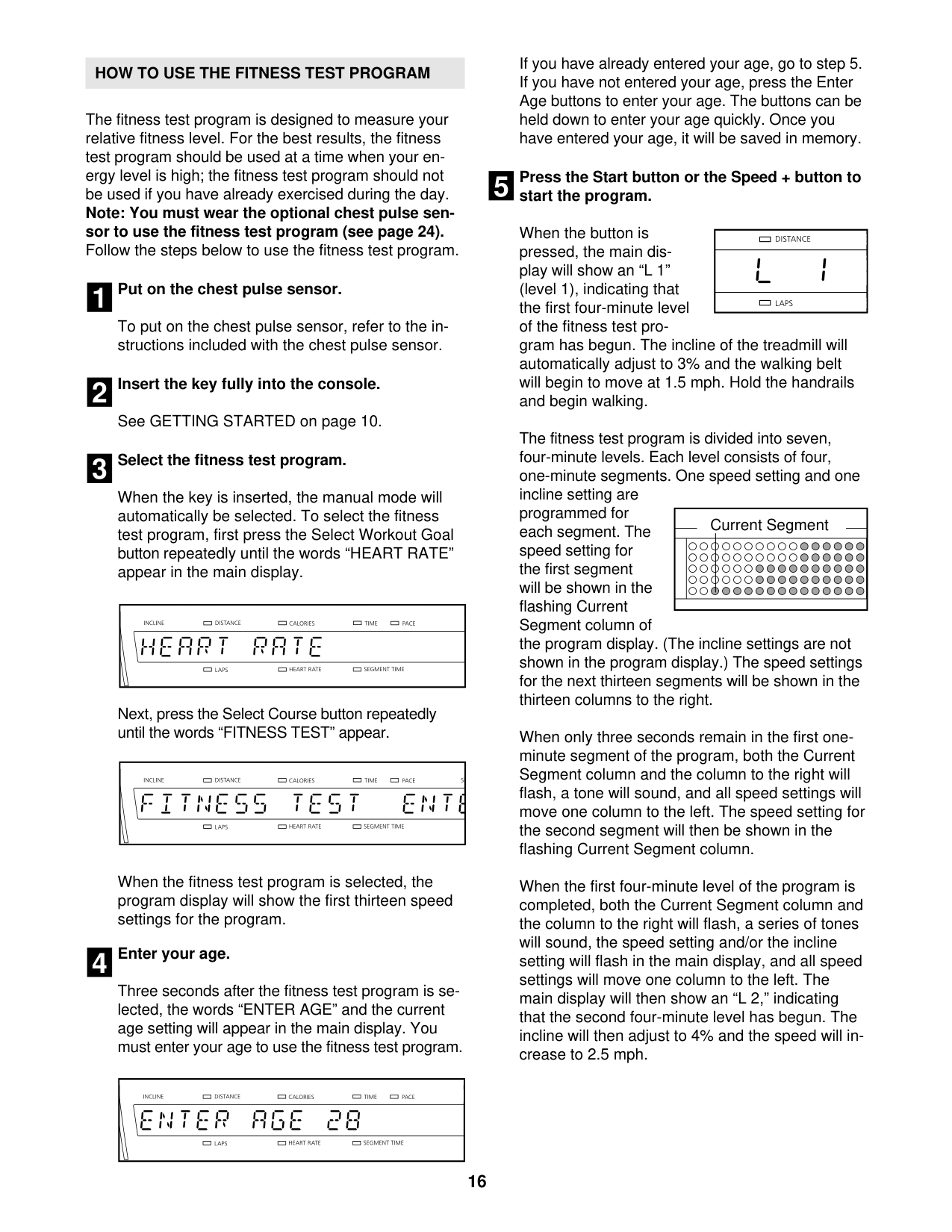
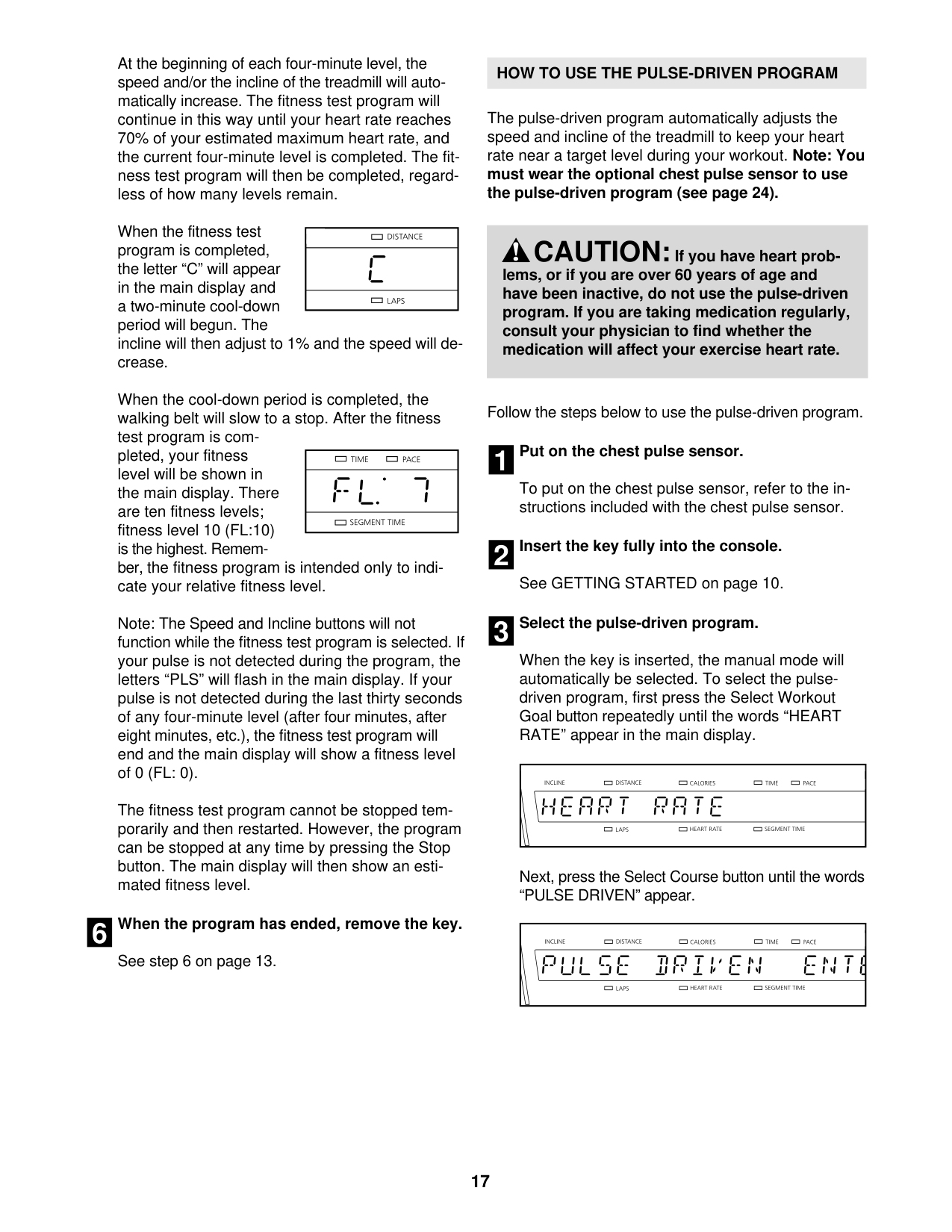
To select a preset workout, press the Weight Loss Workouts button or the Intensity Training Workouts button repeatedly until the number of the desired workout appears in the display. The maximum speed setting of the selected workout will flash in the right display for a few seconds and then the duration of the workout will appear. In addition, a profile of the speed settings of the workout will scroll across the display.
Press the Start button or the Speed increase button to start the workout. A moment after you press the button, the treadmill will automatically adjust to the first speed and incline settings of the workout. Hold the handrails and begin walking.
Each preset workout is divided into segments. One speed setting and one incline setting are programmed for each segment. Note: The same speed and/or incline setting may be programmed for consecutive segments.
During the workout, the profile will show your progress. The flashing segment of the profile represents the current segment of the workout. The height of the flashing segment indicates the speed setting for the current segment.
|Current Segment
| |---|
At the end of each segment, a series of tones will sound and the next segment of the profile will begin to flash. If a new speed and/or incline setting is programmed for the next segment, the speed and/or incline will appear in the display and the treadmill will automatically adjust to the new speed and incline settings.
The workout will continue in this way until the last segment of the profile flashes in the display and the last segment ends. The walking belt will then slow to a stop.
If the speed or incline setting is too high or too low at any time during the workout, you can manually override the setting by pressing the Speed or Incline buttons; however, when the next segment of the workout begins, the treadmill will automatically adjust to the speed and incline settings for the next segment.
To stop the workout at any time, press the Stop button. To restart the workout, press the Start button or the Speed increase button. The walking belt will begin to move at 2 Km/H. When the next segment of the workout begins, the treadmill will automatically adjust to the speed setting for that segment.
#### 4. Follow your progress with the displays.
#### THE INFORMATION MODE
The console features an information mode that allows you to turn on and turn off the demo mode and to select miles or kilometers as the unit of measurement. The information mode also keeps track of treadmill usage information.
To select the information mode, hold down the Stop button, insert the key into the console, and then release the Stop button. When the information mode is selected, the following information will appear in the display:
The console features a display demo mode, designed to be used if the treadmill is displayed in a store. While the demo mode is turned on, the console will function normally when you plug in the power cord, press the power switch into the reset position, and insert the key
into the console. However, when you remove the key, the displays will remain lit, although the buttons will not function. If the demo mode is turned on, a “d” will appear in the left display while the information mode is selected. To turn on or turn off the demo mode, press the Speed decrease button.
The left display will also show an “M” for metric kilometers or an “E” for English miles. To change the unit of measurement, press the Speed increase button.
The right display will show the total number of hours that the treadmill has been operated and the total number of miles or kilometers that the walking belt has moved, for a few seconds each.
To exit the information mode, remove the key from the console.
HOW TO FOLD AND MOVE THE TREADMILL
HOW TO FOLD THE TREADMILL
HOW TO MOVE THE TREADMILL
Before folding the treadmill, adjust the incline to the lowest position.If you do not do this, you may damage the treadmillwhen you fold it. Remove the key and unplug the powercord. CAUTION: You must be able to safely lift 45 lbs. (20 kg) to raise, lower, or move the treadmill.
Before moving the treadmill, fold it as described at the left. CAUTION: Make sure that the catch is resting against the latch pin. Moving the treadmill may require two people.
|1
Handrail
Frame
Wheel| |---|
|Frame
1| |---|
2
#### HOW TO LOWER THE TREADMILL FOR USE
Latch Pin
Latch Knob
Catch
To protect the floor or carpet, place a mat under the treadmill. Keep the treadmill out of direct sunlight. Do not leave the treadmill in the storage position in temperatures above 85° F (30° C).
TROUBLESHOOTING
Most treadmill problems can be solved by following the steps below. Find the symptom that applies, and follow the steps listed. If further assistance is needed, please see the front cover of this manual.
PROBLEM: The power does not turn on SOLUTION: a. Make sure that the power cord is plugged into a properly earthed outlet (see page 9). If an exten-
) cord that is no longer than 5 ft. (1.5 m).
sion cord is needed, use only a 3-conductor, 14-gauge (1 mm
2
|Tripped
c|Reset| |---|---|
PROBLEM: The power turns off during use SOLUTION: a. Check the power switch (see the drawing above). If the switch has tripped, wait for five minutes
and then press the switch back in.
PROBLEM: The console displays remain lit when you remove the key from the console SOLUTION: a. The console features a display demo mode, designed to be used if the treadmill is displayed in a
store. If the displays remain lit when you remove the key, the demo mode is turned on. To turn off the demo mode, hold down the Stop button for a few seconds. If the displays are still lit, see THE INFORMATION MODE on page 14 to turn off the demo mode.
PROBLEM: The displays of the console do not function properly SOLUTION: a. Remove the key from the console and UNPLUG THE POWER CORD. Place the treadmill in the
storage position (see HOW TO FOLD THE TREADMILL on page 15). Remove the six indicated M4.2 x 13mm Washer Head Screws (5) and the six Foot Rail Flat Washers (25). Next, lower the Frame (50) (see HOW TO LOWER THE TREADMILL FOR USE on page 15).
|5
5
5
50
5
25
25
| |---|
Remove the five indicated M4.2 x 19mm Washer Head Screws (9). Then, carefully remove the Motor Hood
56 9
(56).
9
9
Locate the Reed Switch (42) and the Magnet (44) on the left side of the Pulley (46). Turn the Pulley until the Magnet is aligned with the Reed Switch. Make sure that the gap between the Magnet and the Reed Switch is about 1/8 in. (3 mm). If necessary, loosen the M4.2 x 13mm Tek Screw (7), move the Reed Switch slightly, and then retighten the Screw. Reattach the Motor Hood (not shown), and run the treadmill for
1/8 in. 7
46
4442
Top View
PROBLEM: The walking belt slows when walked on SOLUTION: a. If an extension cord is needed, use only a 3-conductor, 14-gauge (1 mm
2
) cord that is no longer than 5 ft. (1.5 m).
|2–3 in.
Idler Roller Bolts
b|
|---|
PROBLEM: The walking belt is off-center or slips when walked on SOLUTION: a. If the walking belt has shifted to the left, first re-
move the key and UNPLUG THE POWER CORD. Using the hex key, turn the left idler roller bolt clockwise 1/2 of a turn. Be careful not to overtighten the walking belt. If the walking belt has shifted to the right, turn the left idler roller bolt counterclockwise 1/2 of a turn. Then, plug in the power cord, insert the key, and run the treadmill for a few minutes. Repeat until the walking belt is centered.
b. If the walking belt slips when walked on, first remove the key and UNPLUG THE POWER CORD. Using the hex key, turn both idler roller bolts clockwise, 1/4 of a turn. When the walking belt is correctly tightened, you should be able to lift each edge of the walking belt 2 to 3 in. (5 to 7 cm) off the walking platform. Be careful to keep the walking belt centered. Then, plug in the power cord, insert the key, and carefully walk on the treadmill for a few minutes. Repeat until the walking belt is properly tightened.
|a| |---|
|b| |---|
PROBLEM: The incline of the treadmill does not change correctly SOLUTION: a. With the key in the console, press one of the Incline buttons. While the incline is changing, re-
move the key. After a few seconds, re-insert the key. The treadmill will automatically rise to the maximum incline level and then return to the minimum level. This will recalibrate the incline system.
EXERCISE GUIDELINES
WARNING:Beforebeginningany exercise program, consult your physician. This is especially important for persons over age 35 or persons with pre-existing health problems.
The pulse sensor is not a medical device. Various factors may affect the accuracy of heart rate readings. The pulse sensor is intended only as an exercise aid in determining heart rate trends in general.
These guidelines will help you to plan your exercise program. For detailed exercise information, obtain a reputable book or consult your physician. Remember, proper nutrition and adequate rest are essential for successful results.
#### EXERCISE INTENSITY
Whether your goal is to burn fat or to strengthen your cardiovascular system, exercising at the proper intensity is the key to achieving results. You can use your heart rate as a guide to find the proper intensity level. The chart below shows recommended heart rates for fat burning and aerobic exercise.
To find the proper intensity level, find your age at the bottom of the chart (ages are rounded off to the nearest ten years). The three numbers listed above your age define your “training zone.” The lowest number is the heart rate for fat burning, the middle number is the heart rate for maximum fat burning, and the highest number is the heart rate for aerobic exercise.
Burning Fat—To burn fat effectively, you must exercise at a low intensity level for a sustained period of time. During the first few minutes of exercise, your body uses carbohydrate calories for energy. Only after the first few minutes of exercise does your body begin to use stored fat calories for energy. If your goal is to burn fat, adjust the intensity of your exercise until your heart rate is near the lowest number in your training zone. For maximum fat burning, exercise with your heart rate near the middle number in your training zone.
Aerobic Exercise—If your goal is to strengthen your cardiovascular system, you must perform aerobic exercise, which is activity that requires large amounts of oxygen for prolonged periods of time. For aerobic exercise, adjust the intensity of your exercise until your heart rate is near the highest number in your training zone.
WORKOUT GUIDELINES Warming Up—Start with 5 to 10 minutes of stretching and light exercise. A warm-up increases your body temperature, heart rate, and circulation in preparation for exercise. Training Zone Exercise—Exercise for 20 to 30 minutes with your heart rate in your training zone. (During the first few weeks of your exercise program, do not keep your heart rate in your training zone for longer than 20 minutes.) Breathe regularly and deeply as you exercise–never hold your breath. Cooling Down—Finish with 5 to 10 minutes of stretching. Stretching increases the flexibility of your muscles and helps to prevent post-exercise problems. EXERCISE FREQUENCY
To maintain or improve your condition, complete three workouts each week, with at least one day of rest between workouts. After a few months of regular exercise, you may complete up to five workouts each week, if desired. Remember, the key to success is to make exercise a regular and enjoyable part of your everyday life.
PART LIST—Model No. WETL49710.0 R0610A
To locate the parts listed below, see the EXPLODED DRAWING near the end of this manual.
#### Key No. Qty. Description Key No. Qty. Description
14M10 x 65mm Bolt 24M10 x 45mm Bolt 3 21 M4.2 x 19mm Screw 42M8 x 35mm Bolt 5 18 M4.2 x 13mm Washer Head Screw 66M4.2 x 13mm Screw 71M4.2 x 13mm Tek Screw 84M4.2 x 19mm Tek Screw 95M4.2 x 19mm Washer Head Screw
*–Userʼs Manual
Note: Specifications are subject to change without notice. For information about ordering replacement parts, see the back cover of this manual. *These parts are not illustrated.
6
7
0
0
1
9
9
3
2
5
2
11
5
5
52
6
2
1
4
1
1
6
4
6
4
7
1
3
6
2
9
5
5 2
4
3
5
0
6
4
4
2
2
7
5
52
9
35
4
4
4
4
4
5
52
6
7
8
4
9
2
3
5 2
0
1
5
5
5
2
5
9
1
1
3
5
7
5
52
3
5
5
6
1
2
3
2
2
2
8
4
6
3
1
2
5
0
5
2
4
2
5 5
4
8 5
9
3
2
3
54
5
3
2
1 8
2
4
1
0
3
5
3
3
9
56
33
9
33
33
19
53
61
62
89
9
9
17
15
22
29
22
17
57
58
9
94
93
32
11 23
11
32 52
23 11
11
59
60
87
11
19
88
63
64
67
68
70
69
2
3
6
3
6
68 71
6
6
69
68
3
2
74
3
3
72 84
68
3
83
73
75
20
28
76
27
77
95
78
80
8
76
711
18
27
81
28
20
77
92
11
32
78
7879
85 91
8
8
95
1 86
91
32 78
92
8
79 18
ORDERING REPLACEMENT PARTS
To order replacement parts, see the front cover of this manual. To help us assist you, please be prepared to provide the following information when contacting us:
RECYCLING INFORMATION
This electronic product must not be disposed of in municipal waste. To preserve the environment, this product must be recycled after its useful life as required by law.
Please use recycling facilities that are authorized to collect this type of waste in your area. In doing so, you will help to conserve natural resources and improve European standards of environmental protection. If you require more information about safe and correct disposal methods, please contact your local city office or the establishment where you purchased this product.
| | |---|
Part No. 298502 R0610A Printed in China © 2010 ICON IP, Inc.