
Fujitsu Air Conditioner Remote Buttons And Functions Guide
Ask AI
— answers from the official manualAnswers from the official manual.
Common questions
Common Questions
10 totalHow do I set up the timer for an ON/OFF schedule?
Press the TIMER SETTING button, select either 'ON' or 'OFF', choose a specific time using SELECT and NEXT buttons, then press SEND to finalize. To stop setting, press STOP/START if needed (Page 14).
What should I do if the air conditioner is not operating after resetting power?
If the unit does not operate immediately after a reset or start-up, it may take up to 3 minutes before operation resumes to prevent fuse blowouts (No additional page reference).
How do I clean and maintain the air filters?
To clean the air filter: Remove using handle and tabs, vacuum or wash in neutral detergent solution, dry thoroughly. Reinstall correctly and close intake grille (Page 20).
What does a flashing economy lamp indicate?
Flashing Economy Lamp indicates it is time to clean the air filters; after cleaning, press MANUAL AUTO button for less than 2 seconds (Page 23).
How do I set up a weekly timer schedule?
Press WEEKLY button, use SELECT and NEXT buttons to choose program number and day, then set ON/OFF times. Press SEND to complete (Page 19).
How do I reset the filter indicator light?
Clean air filters according to instructions on page 20, after cleaning, press MANUAL AUTO button for up to 2 seconds. Consult authorized service personnel if necessary (Page 23).
Full Manual
24 pages
AIR CONDITIONER Compact Wall Mounted Type
OPERATING MANUAL MODE D’EMPLOI MANUAL DE FUNCIONAMIENTO
EnglishFrançaisEspañol
####### KEEP THIS OPERATING MANUAL FOR FUTURE REFERENCE CONSERVER CE MANUEL D’UTILISATION POUR POUVOIR LE CONSULTER ULTÉRIEUREMENT CONSERVE ESTE MANUAL DE FUNCIONAMIENTO PARA FUTURA REFERENCIA
PART NO. 9319356051
P/N9319356051CONTENTS
|SAFETY PRECAUTIONS..................................................... 2 FEATURES AND FUNCTIONS ............................................ 3 NAME OF PARTS ................................................................ 4 PREPARATION .................................................................... 6 OPERATION......................................................................... 7 ADJUSTING THE DIRECTION OF AIR CIRCULATION ...... 9 SWING OPERATION ........................................................... 9 ENERGY SAVING PROGRAM .......................................... 10 POWERFUL OPERATION ..................................................11 ECONOMY OPERATION ....................................................11
MIN. (Minimum) HEAT OPERATION .................................. 12 OUTDOOR UNIT LOW NOISE OPERATION .................... 12 MANUAL AUTO OPERATION ............................................ 12 ON/OFF TIMER OPERATION ............................................ 13 PROGRAM TIMER OPERATION ....................................... 14 SLEEP TIMER OPERATION .............................................. 15 WEEKLY TIMER OPERATION ........................................... 16 TROUBLESHOOTING ....................................................... 22 OPERATING TIPS .............................................................. 23| |---|
SAFETY PRECAUTIONS
|DANGER
|This mark indicates procedures which, if improperly performed, are most likely to result in the death or serious injury to the user or service personnel.| |---|---| |WARNING
|This mark indicates procedures which, if improperly performed, might lead to the death or serious injury of the user or service personnel.| |CAUTION
|This mark indicates procedures which, if improperly performed, might possibly result in personal harm to the user, or damage to property.|

DANGER
CAUTION
FEATURES AND FUNCTIONS
##### ■ Energy saving and Comfortable function INVERTER
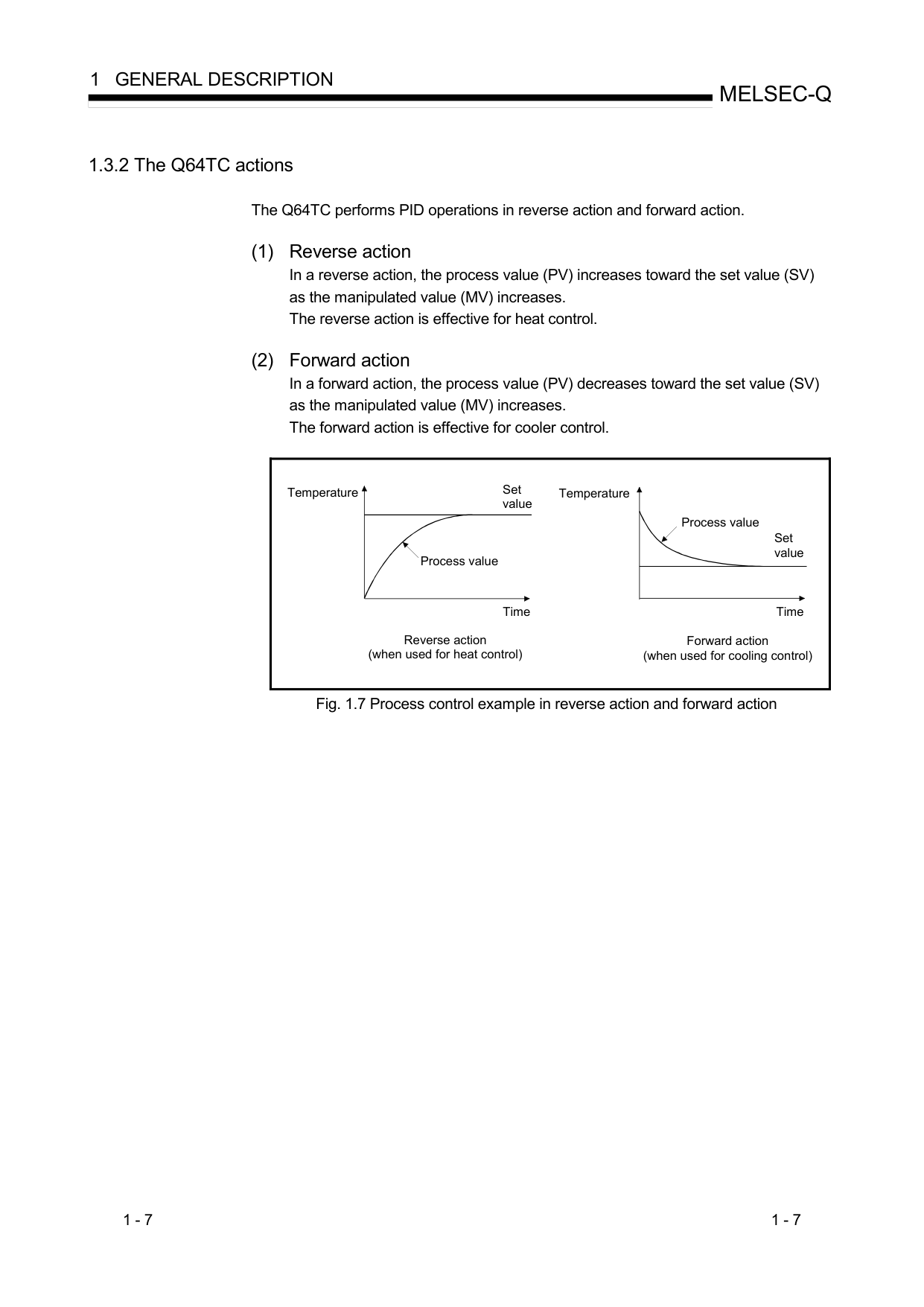
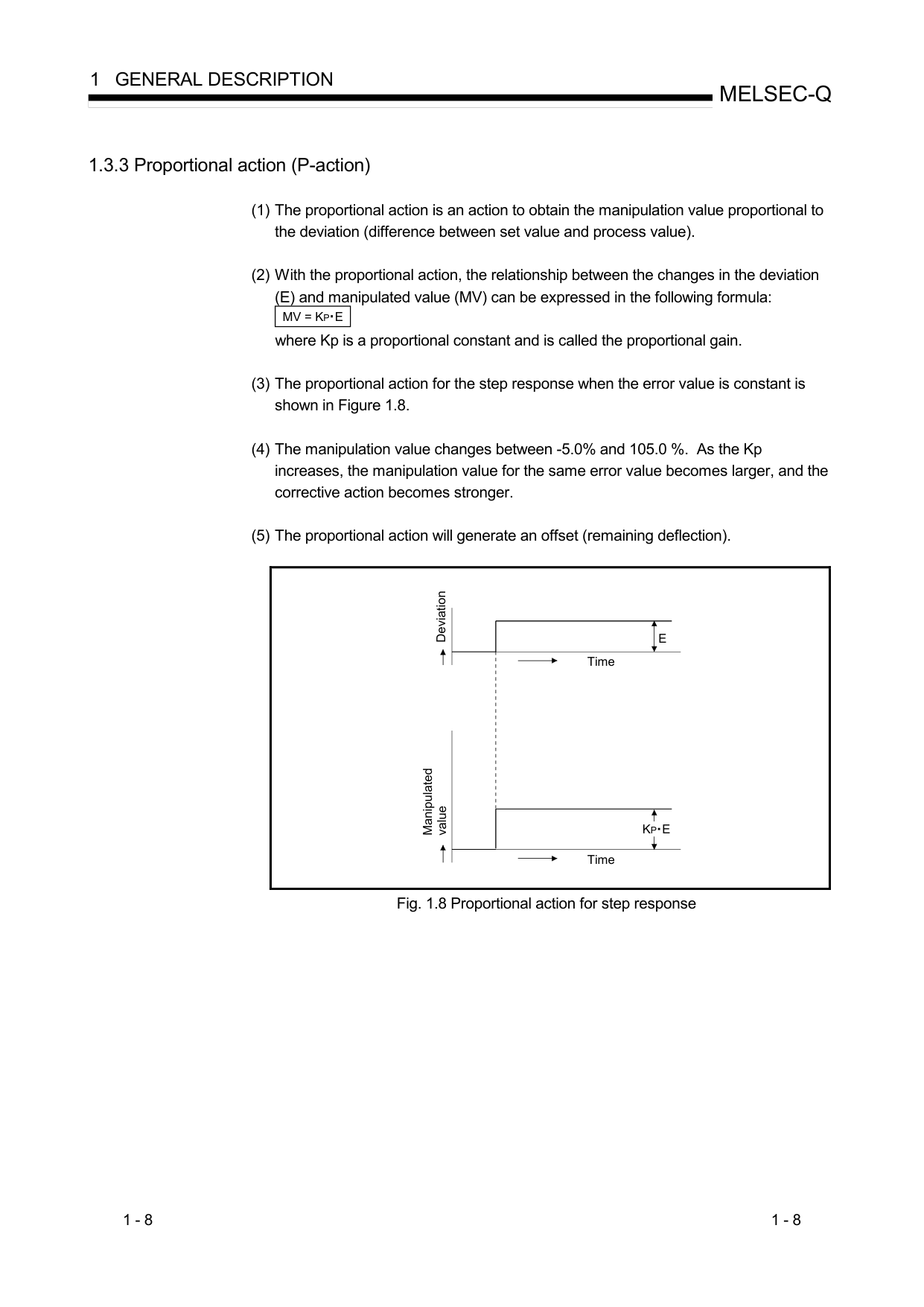
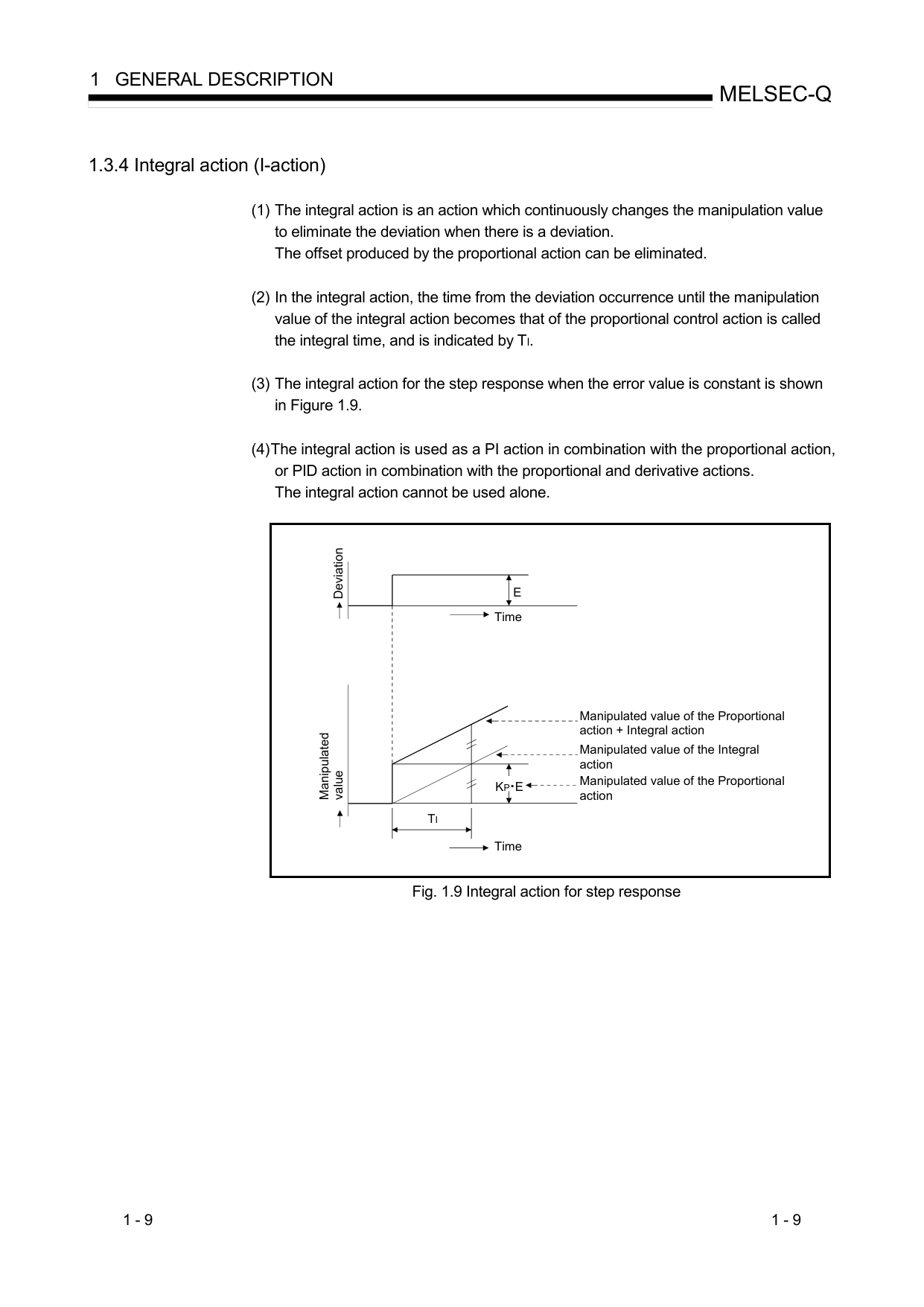
At the start of operation, large amount of power is used to bring the room quickly to the desired temperature. Afterward, the air conditioner automatically switches to a low power setting for economic and comfortable operation.
##### ENERGY SAVING PROGRAM
When the sensor detects that there is no one in the room, it automatically reduces the operating power. It saves you money by reducing the power consumed.
##### ECONOMY OPERATION
When ECONOMY operation mode is operated, the room temperature will be little higher than the set-temp under cooling mode and lower than set-temp under heating mode. Therefore, the ECONOMY mode is able to save more energy than other normal mode.
##### SWING OPERATION
The Airflow Direction Louvers swings automatically up and down so that the air speeds to every nook and corner of your room.
##### AUTO CHANGEOVER
The operation mode (cooling, dry, heating) is switched automatically to maintain the set temperature, and the temperature is kept constant at all times.
##### SUPER QUIET OPERATION
The indoor unit’s airflow is reduced to produce quieter operation.
##### MIN. (Minimum) HEAT OPERATION
The room temperature can be maintained at 50 °F so as to prevent the room temperature from falling too far.
##### OUTDOOR UNIT LOW NOISE OPERATION
OUTDOOR UNIT LOW NOISE operation mode reduces the noise level of the outdoor unit by suppressing the fan speed and the rotation number of the compressor. It is effective when the surrounding area is quiet, such as in the night.
##### ■ Convenient function WEEKLY TIMER
The combination of the temperature setting and the timer function, which you can choose any day between Monday and Sunday, can be set freely.
You can set up to four ON Timers or OFF Timers in one day.
##### PROGRAM TIMER
The program timer allows you to integrate OFF timer and ON timer operations in a single sequence. The sequence can involve 1 transition from OFF timer to ON timer, or from ON timer to OFF timer, within a 24 hour period.
##### SLEEP TIMER
When the SLEEP button is pressed during Heating mode, the indoor unit’s temperature setting is gradually lowered during the period of operation; during cooling mode, the temperature setting is gradually raised during the period of operation. When the set time is reached, the indoor unit automatically turns off.
##### POWERFUL OPERATION
The product will operate at maximum power, which is convenient when you want to quickly cool down or warm up the room.
##### ■ Clean function MILDEW-RESISTANT FILTER
The Air Filter has been treated to resist mildew growth, thus allowing cleaner use and easier care.
##### POLYPHENOL CATECHIN AIR CLEANING FILTER
The Polyphenol Catechin Air Cleaning filter uses static electricity to clean fine particles and dust in the air such as tobacco smoke and plant pollen that are too small to see. The filter contains catechin, which is highly effective against various bacteria by suppressing the growth of the bacteria adsorbed to the filter. Note that when the Air Cleaning Filter is installed, the amount of air produced decreases, causing a slight decrease in the indoor unit’s performance.
##### NEGATIVE AIR IONS DEODORIZING FILTER
It comprises pottery super micro particles which can produce negative air ions having the effect of deodorizing and can absorb and remit the peculiar smell at home.
##### ■ Remote controller WIRELESS REMOTE CONTROLLER
The Wireless Remote Controller allows convenient control of indoor unit operation.
##### WIRED REMOTE CONTROLLER (OPTION)
The optional wired remote controller can be used. When you use remote controller, there are following different points as compared with using wireless remote controller.
And you can use both wired and wireless remote controller simultaneously. (But function is limited) When the restricted functions on the remote controller are used, beeping sound will be heard, OPERATION, TIMER and the 3rd lamp of the indoor unit will flash.
[The restricted functions for wireless ones]
NAME OF PARTS
INDOOR UNIT
####### Intake Grille
Open Panel
It opens at the same time of operation, and shuts when operation stops.
● Before starting operation, make sure that the intake grille has been shut completely. (See page 20.) Incomplete closing of the intake grille might have an effect on the proper working or performance of the air conditioner.
Human Sensor
####### Indicator
Right-Left Louver (behind Airflow Direction Louver)
####### Remote Control Signal Receiver & MANUAL AUTO button
OPERATION Indicator Lamp (green) Lights during the normal operation, and flashes slowly during the Automatic Defrosting operation. TIMER Indicator Lamp (orange)
If the TIMER indicator lamp flashes when the timer is operating, it indicates that a fault has occurred with the timer setting. (See page 23).
####### ECONOMY Indicator Lamp (green)
ECONOMY indicator lamp lights when ECONOMY OPERATION and MIN. HEAT OPERATION is operating.
###### Open the Intake Grille (See page 20)
Air Cleaning Filter
Accessories of the indoor unit
Air Filter
Drain Hose
Airflow Direction Louver
Remote controller
Remote controller holder
Tapping screws
Batteries Air cleaning filters
REMOTE CONTROLLER
Signal Transmitter
MIN. HEAT button
TEMP. button
► 10
►
► 12
► 11
► 12
START/STOP button
POWERFUL button




###### : See page
MODE button
► 7
SENSOR button
► 10
FAN button
► 7
SWING buttonECONOMY button
► 9


► 11
OUTDOOR UNIT LOW NOISE button SET button
► 9
TIMER SETTING button
SEND button
SELECT button
NEXT button
BACK button
► 6 • 13~19


WEEKLY button
ON/OFF button
SLEEP button
► 13~19
RESET button
► 6
CLOCK ADJUST button
► 6
REMOTE CONTROLLER DISPLAY
Signal transmission indicator
TEMPERATURE indicator
► 7
| |FAN speed indicator| |---|---| | |► 7
SWING indicator| | |► 9 CLOCK & TIMER indicator| | |► 5 • 13~19|
MODE indicator
► 7
ENERGY SAVING PROGRAM indicator
LOW NOISE MODE indicator
► 12
SEND indicator
To facilitate explanation, the accompanying illustration has been drawn to show all possible indicators; in actual operation, however, the display will only show those indicators appropriate to the current operation.
■ About the button operation and display of remote controller Signal transmission indicator
After the button is pressed on remote controller, only the operated part is displayed until the transmission of the signal is completed. It is a convenient function to confirm the content of the operation easily. Ex.) When you change the preset temperature from 74˚F to 78˚F during the cooling operation.
Transmission completed
Before the button is pressed
When the button is pressed
PREPARATION
##### Turn on the Power Turn on the circuit breaker
Load Batteries (AAA/R03/LR03 × 2)
Slide in the direction of the arrow.
Be sure to align the battery polarities (+ / -) correctly.
Set the day of the week and the current time
the week
Press the NEXT button
the current time.
button : Press to advance the time.
button : Press to reverse the time.
(Each time the buttons are pressed, the time will be advanced/reversed in 1-minute increments; hold the buttons depressed to change the time quickly in 10-minute increments.)
MO TU WE TH FR SA SU
This completes the time setting and starts the clock.
● Press the SEND button, when you are close to the main unit. If you do so when far from the main unit, the signal may not get properly sent, and the settings may not get properly configured.
##### To Use the Remote Controller
En-6
Screws
1 Mount the Holder.
Insert
Press in
2 Set the Remote Controller.
Slide up
Pull out
3 To remove the Remote Controller (when use at hand).
###### CAUTION
|Never mix new and used batteries, or batteries of different types. Also, do not use together with rechargeable batteries or other types of battery. Batteries should last about 1 year under normal use. If the Remote Controller's operating range becomes appreciably reduced, replace the batteries and press the RESET button with the tip of a ballpoint pen or other small object.| |---|
RESET
No good
|In the initial state (or, when resetting it), ENERGY SAVING becomes enables. (See page 10.)| |---|
###### CAUTION
To Start Operation
Press the START/STOP button .
The indoor unit’s OPERATION Indicator Lamp (green) will light. The air conditioner will start operating.
##### To Select Mode Operation
Press the MODE button to select the desired mode. Each time the button is pressed, the mode will change in the following order.
AUTO COOL DRY HEAT FAN
▲
▲
▲
▼
▼
About 3 seconds later, the entire display will reappear. To Set the Temperature
##### Press the TEMP. button .
button: Press to raise the temperature settings.
button: Press to lower the temperature settings.
###### ● Temperature setting range:
AUTO ....................................64–88 °F COOL/DRY ...........................64–88 °F HEAT .....................................60–88 °F
The temperature cannot be used to set room temperature during the FAN mode (the temperature will not appear on the Remote Controller's Display).
About 3 seconds later, the entire display will reappear.
The temperature setting should be considered a standard value, and may differ somewhat from the actual room temperature.
##### To Set the Fan Speed
Press the FAN button . Each time the button is pressed, the fan speed changes in the following order:
(AUTO) (HIGH) (MED) (LOW) (QUIET) About 3 seconds later, the entire display will reappear. When set to AUTO:
Heating : Fan operates so as to optimally circulate warmed air. However, the fan will operate at very low speed when the temperature of the air issued from the indoor unit is low.
Cooling : As the room temperature approaches that of the temperature setting, the fan speed becomes slower. When the room temperature is close to the set temperature, the inner room fan may occasionally stop, in order to save energy.
Fan : The fan runs at the MED fan speed.


Example: When set to COOL.


Example: When set to 78 °F.


Example: When set to AUTO.
##### SUPER QUIET Operation
SUPER QUIET operation begins. The indoor unit’s airflow will be reduced for quieter operation.
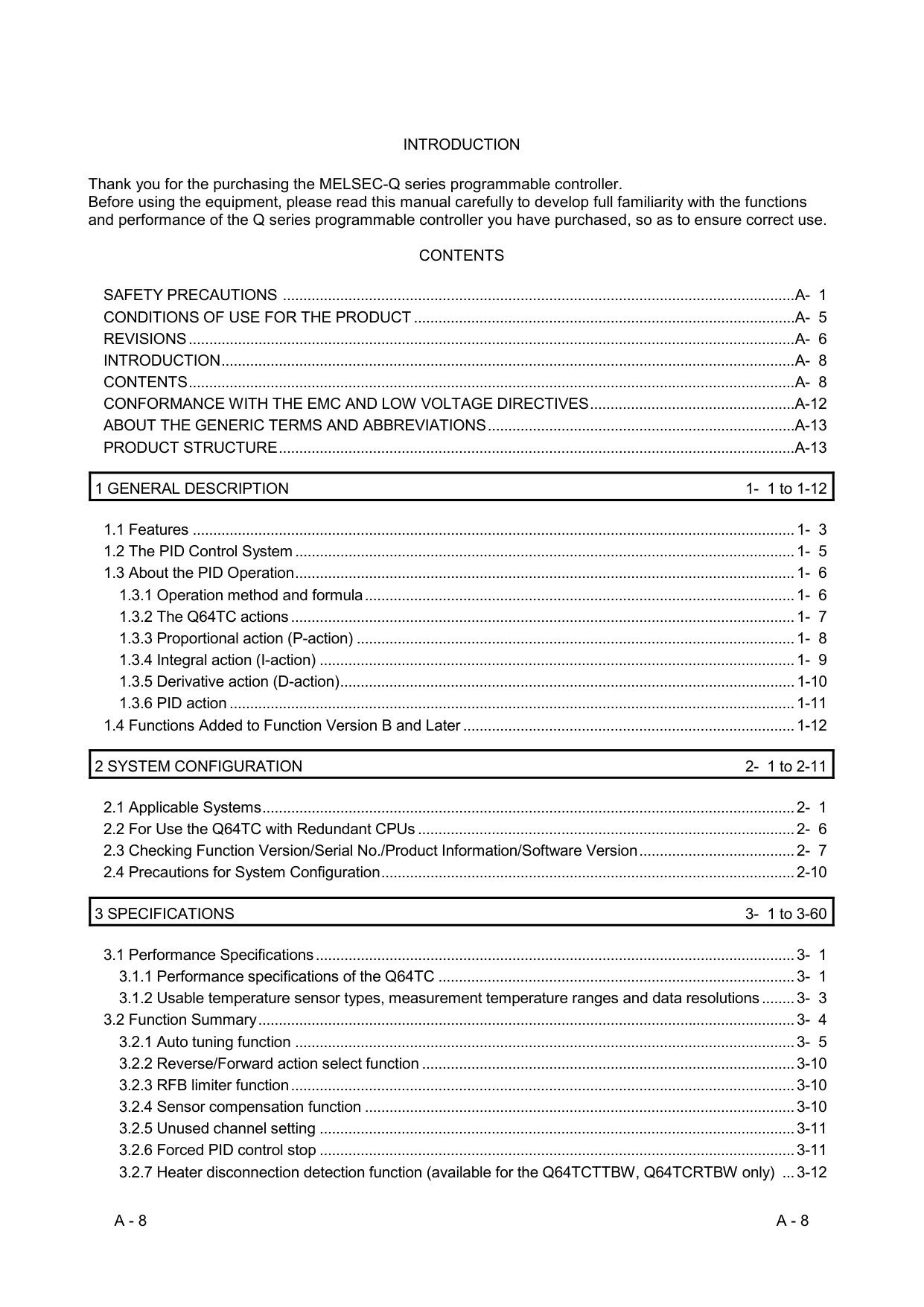
###### About AUTO CHANGEOVER Operation
AUTO: ● When AUTO CHANGEOVER operation first selected, the fan will operate at very low speed for about a few minutes, during which time the indoor unit detects the room conditions and selects the proper operation mode.
Room temperature is higher than the defined temperature in temperature setting → Cooling mode or dry mode
Room temperature is close to the defined temperature in temperature setting → Determined by outdoor temperature
Room temperature is lower than the defined temperature in temperature setting → Heating mode
###### About Mode Operation
Heating: ● Use to warm your room.
Cooling: ● Use to cool your room. Dry: ● Use for gently cooling while dehumidifying your room.
Fan: ● Use to circulate the air throughout your room.
Cooling or Dry
Defined temperature in temperature setting
Determined by outdoor temperature
Heating
During Heating:
Set the temperature to a temperature setting that is higher than the present room temperature. The Heating mode will not operate if the temperature is set lower than the actual room temperature.
######## During Cooling/Dry:
Set the temperature to a temperature setting that is lower than the present room temperature. The Cooling and Dry modes will not operate if the temperature is set higher than the actual room temperature (in Cooling mode, the fan alone will operate).
During Fan: You can not use the indoor unit to heat and cool your room.
##### To Stop Operation
Press the START/STOP button . The OPERATION Indicator Lamp (green) will go out.
ADJUSTING THE DIRECTION OF AIR CIRCULATION
Vertical (up-down) direction of airflow is adjusted by pressing the Remote Controller's SET button. Horizontal (right-left) airflow direction is adjusted manually, by moving the Airflow Direction Louvers. Whenever making horizontal airflow adjustments, start air conditioner operation and be sure that the vertical air direction louvers are stopped.
##### Vertical Air Direction Adjustment
###### DANGER
Press the SET button . Each time the button is pressed, the air direction range will change as follows:
######### ● Never place fingers or foreign objects in-side the outlet ports, since the internal fanoperates at high speed, and personal injurycould be caused.
1 2 3 4 5 6 7
|● Always use the Remote Controller's SET button to adjust the vertical airflow louvers. Attempting to move them manually could result in improper operation; in this case, stop operation and restart. The louvers should begin to operate properly again.
● During use of the Cooling and Dry modes, do not set the Airflow Direction Louvers in the Heating range (4 - 7) for many hours, since water vapor may condense near the outlet louvers and drops of water may drip from the indoor unit. During the Cooling and Dry modes, if the Airflow Direction Louvers are left in the heating range for more than 30 minutes, they will automatically return to position 3.
● When used in a room with infants, children, elderly or sick persons, the airflow direction and room temperature should be considered carefully when making settings.
| |---|
Types of Airflow Direction Setting: 1, 2, 3 : During Cooling/Dry 4, 5, 6, 7 : During Heating
The Remote Controller's display does not change.
During Cooling/Dry : Horizontal flow 1 During Heating : Downward flow 6
The airflow direction setting will temporarily become 1 when the temperature of the airflow is low at the start of the Heating mode.
##### Right-Left Adjustment Adjust the Right-Left louvers.
● Move the Right-Left louvers to adjust airflow in the direction you prefer.
CAUTION
Right-Left Louvers
Knob Knob (2 places)
######### ● When adjusting the Right-Left Louvers, itis necessary to stop the Vertical (up-down)louvers first and make sure that it stopscompletely before adjusting the direction.
SWING OPERATION
The product moves the airflow vents up and down to move cool or warm air around all parts of the room.
##### To select SWING Operation
Press the SWING button . The SWING indicator “ ” will light. In this mode, the Airflow Direction Louvers will swing automatically to direct the airflow both up and down.
##### To stop SWING Operation
Press the SWING button once again. The SWING indicator “ ” will go out. Airflow direction will return to the setting before swing was begun.
|About SWING Operation| |---|
During Cooling/Dry : Swings between 1 and 4. During Heating : Swings between 4 and 7. ● The SWING operation may stop temporarily when the air conditioner’s fan is not operating, or when operating at very low speeds.
ENERGY SAVING PROGRAM
This program automatically controls the temperature setting when there is no one in the room for a while, and prevents electricity from being wasted.
##### To enable the ENERGY SAVING ENERGY SAVING is set at the time of purchase. Press the SENSOR button . “ ” on the remote controller will be displayed flashing.
##### Press the SENSOR button . “ ” on the remote controller will be no longer displayed.
● ENERGY SAVING is turned off.
##### About the ENERGY SAVING Operation
If no one enters the room for approximately 20 minutes, the set temperature will be automatically controlled. (When someone comes back into the room, the human sensor will detect this, and automatically revert to the original settings.)
|Operation mode|Operating details (if there is no one in the room for a while)|
|---|---| |Cooling mode/Drying|The set temperature will be increased by a maximum of approximately 4 ˚F.| |Heating mode|The set temperature will be decreased by a maximum of approximately 8 ˚F.| |Automatic operation|This runs the ENERGY SAVING program for the automatically selected mode (Cooling/ Heating/ Drying).|
● Application range is follows. Vertical angle 90° (Side view) Horizontal angle 100° (Top view)
20 ft.
90°20 ft.
50° 50°
ENERGY SAVING program may not work when the room temperature is very different from the temperature defined in temperature setting, such as when immediately after starting the operation.
(If ENERGY SAVING is set)
(If ENERGY SAVING is off)
|● When using together with the SLEEP TIMER (P. 15), the SLEEP TIMER will be prioritized.
● During MIN. HEAT OPERATION, if there is no one in the room the set temperature will not be changed.
| |---|
|About the HUMAN SENSOR| | |---|---| |Since the human sensor detects infrared light given out by people, there may be cases where this detection is incorrect.●
Situations in which the sensor will detect no people in the room, even when there is someone there When the temperature is high and the difference with between people’s body temperature is small.●
(Such as during the summer when the temperature is 88 ˚F or higher) When there is someone in the room, but they do not move for a long period of time.● When someone is hidden behind a sofa, other furniture, glass, or in similar situations.● When someone is wearing extremely thick clothing and has their back facing the sensor.●
Situations in which the sensor will incorrectly detect people in the room, even when there is no one there When there is a dog or a cat moving around in the room.● When the wind is making curtains or plan leaves move.● When there is an oscillating electric fan operating.●
Notice
Details about detection with the human sensor● The human sensor detects whether there are people in the room by● looking for movement by people in the room.|Since the human sensor detects infrared light given out by people, there may be cases where this detection is incorrect.●
Situations in which the sensor will detect no people in the room, even when there is someone there When the temperature is high and the difference with between people’s body temperature is small.●
(Such as during the summer when the temperature is 88 ˚F or higher) When there is someone in the room, but they do not move for a long period of time.● When someone is hidden behind a sofa, other furniture, glass, or in similar situations.● When someone is wearing extremely thick clothing and has their back facing the sensor.●
Situations in which the sensor will incorrectly detect people in the room, even when there is no one there When there is a dog or a cat moving around in the room.● When the wind is making curtains or plan leaves move.● When there is an oscillating electric fan operating.●
Notice
Details about detection with the human sensor● The human sensor detects whether there are people in the room by● looking for movement by people in the room.|
POWERFUL OPERATION
The product will operate at maximum power, which is convenient when you want to quickly cool down or warm up the room. Begin Air Conditioner operation before performing this procedure.
##### To use POWERFUL Operation
Press the POWERFUL button . Only as for this button operation, the beep sound is different from the others. Powerful operation start: Beep 3 times (Pi Pi Pi !) / Others: Beep 2 times (Pi Pi !)
To stop POWERFUL Operation
Press the POWERFUL button again. Normal operation begins.
About the POWERFUL Operation
Cooling/Dry ● Powerful Operation mode is automatically turned off when the room temperature has fallen to the set temperature or when 20 minutes have passed after setting the POWERFUL Operation mode. However, it does not turn off automatically within a certain time of setting the POWERFUL Operation mode.
Heating ● Powerful Operation mode is automatically turned off when the room temperature has risen to the set temperature or when 20 minutes have passed after setting the POWERFUL Operation mode. However, it does not turn off automatically within a certain time of setting the POWERFUL Operation mode.
ECONOMY OPERATION
Begin Air Conditioner operation before performing this procedure.
##### To Use the ECONOMY Operation
Press the ECONOMY button . The ECONOMY indicator Lamp (green) will light. ECONOMY operation begins.
##### To Stop the ECONOMY Operation
Press the ECONOMY button again. The ECONOMY Indicator Lamp (green) will go out. Normal operation begins.
Indicator Lamp
OPERATION ECONOMYTIMER
: Lighting : OFF
###### About ECONOMY Operation
MIN. (Minimum) HEAT OPERATION
##### To use MIN. HEAT Operation
Press the MIN. HEAT button . The ECONOMY indicator lamp (green) will light.
##### To stop MIN. HEAT Operation
Press the START/STOP button . The ECONOMY indicator lamp (green) will go out. Then the operation stops.
###### About the MIN. HEAT Operation
so as to prevent the room temperature from falling too far.
While MIN. HEAT OPERATION is in progress, only the following operation can be used.
• SET
Indicator Lamp OPERATION ECONOMYTIMER
: Lighting : OFF
OUTDOOR UNIT LOW NOISE OPERATION
OUTDOOR UNIT LOW NOISE Operation mode reduces the noise level of the outdoor unit by suppressing the fan speed and the rotation number of the compressor. It is effective when the surrounding area is quiet, such as in the night.
To use the OUTDOOR UNIT LOW NOISE Operation
Press the OUTDOOR UNIT LOW NOISE button . “LOW NOISE” appears on the Remote Controller display “ ”.
To stop the OUTDOOR UNIT LOW NOISE Operation
Press the OUTDOOR UNIT LOW NOISE button . “LOW NOISE” disappears from the Remote Controller display “ ”. Normal operation begins.
###### About OUTDOOR UNIT LOW NOISE Operation
MANUAL AUTO OPERATION
Use the MANUAL AUTO operation in the event the Remote Controller is lost or when the battery runs out.
How To Use the Main Unit Controls
Press the MANUAL AUTO button more than 3 seconds and less than 10 seconds on indicator. To stop operation, press the MANUAL AUTO button for 3 seconds. About the MANUAL AUTO button , please see page 4.
ON/OFF TIMER OPERATION
To use the ON timer or OFF timer
1 Press the TIMER SETTING button .
At the beginning, “ ” will be flashing, so press the SELECT button to select either “ ” or “ ” within “ ”.
Press the NEXT button .


2 Press the SELECT button to set the desired On
time or OFF timer.
3 Press the SEND button .


“ ” • “ ” or “ ” will be flashing
In the case of the ON timer, the air conditioner will stop running.
To Stop Air Conditioner Operation while the Timer is Operating
If you want to cancel the setting midway, please press the TIMER SETTING button instead of pressing the SEND button .
Press the START/STOP button .
To cancel the ON timer or OFF timer
displayed.
PROGRAM TIMER OPERATION
To use the PROGRAM Timer
At the beginning, “ ” will be flashing, so press the SELECT button to select “ ” within “ ”. Press the NEXT button .
Press the NEXT button .


Flashing the “ ”・“ ”.
To Stop Air Conditioner Operation while the Timer is Operating
Press the START/STOP button .
In the case of the ON timer, the air conditioner will stop running.
If you want to cancel the setting midway, please press the TIMER SETTING button instead of pressing the SEND button .
To cancel the PROGRAM timer
displayed.
SLEEP TIMER OPERATION
You can set the OFF TIMER to any time you want when you go to sleep. The product adjusts the temperature to make it suitable for sleeping, which helps you sleep comfortably.
Once you set the time you want, you can easy set the timer to run from the next time, simply by pressing the SLEEP button once.
To use the SLEEP timer
“ ” will be firstly displayed flashing. Press the SELECT button to select “ ”.
Press the NEXT button .
button:
▲
▲
▲
▲
▲
▲
▲
0.5H 1H 2H 3H 5H 7H 9H
button:
▲
▲
▲
▲
▲
▲
▲
0.5H7H 5H 3H 2H 1H9H


(30 min)
(30 min)


Flashing the “ ”・“ ”.If you want to cancel the setting midway, please press the TIMER SETTING button instead of pressing the SEND button .
To Stop Air Conditioner Operation while the Timer is Operating
Press the START/STOP button .
To cancel the SLEEP timer
while is no longer displayed, the SLEEP TIMER you set last time will be set again.
displayed.
###### About the SLEEP timer
To prevent excessive warming or cooling during sleep, the SLEEP timer function automatically modifies the temperature setting in accordance with the set time setting. When the set time has elapsed, the air conditioner completely stops.
####### During Heating operation:
When the SLEEP timer is set, the temperature setting is automatically lowered 2 ˚F every 30 minutes. When the temperature setting is lowered a total of 8 ˚F, the temperature setting at that time is maintained until the set time elapses, at which time the air conditioner automatically turns off.
####### During Cooling/Dry operation:
When the SLEEP timer is set, the temperature setting is automatically raised 2 ˚F every 1 hour. When the temperature setting is raised a total of 4 ˚F, the temperature setting at that time is maintained until the set time elapses, at which time the air conditioner automatically turns off.
SLEEP timer setting
SLEEP timer setting
Set temp Set time


2 ˚F
4 ˚F 6 ˚F 8 ˚F
1 hour
30 minutes
2 ˚F 4 ˚FSet temp
1 hour
1 hour 30 minutes
Set time
##### Using in these cases of WEEKLY timer
The “OFF Timer” at which the operation will be stopped and the “ON Timer” at which the operation will be started can be combined, and up to 4 reservations (program ) can be applied for one day, and 28 reservations for a week. Before creating the program, please adjust the week and time first, and than send it to the air conditioner. If the week and time are not adjusted, the program will not be operated at the set time. Please refer to [Set the day of the week and current time] (page 6).
Once you set this, the set operation will run on every day and every week.
Example of how to set the timer 1 Monday to Friday
Program Set the ON Timer with a temperature of 74°F for 7:00 AM. Program Set the OFF timer for 9:00 AM. Program Set the ON Timer with a temperature of 78°F for 5:00 PM. Program Set the OFF timer for 11:00 PM.
####### Saturday
Program ~ No timer settings. Sunday
If you set the OFF Timer for Program at 9:00 AM, Program at 11:00 AM, Program at 5:00 PM, and Program at 11:00 PM.
Monday to Friday
Program 7:00 AM ON 74°F
Program 9:00 AM OFF
Leave for work
Wake up
Program 5:00 PM ON 78°F
Program 11:00 PM OFF
Come back home
Go to sleep
Saturday
No timer settings
Sunday
Program 9:00 AM OFF
Program 11:00 AM OFF
Program 5:00 PM OFF
####### ON ON ON ON
Program 11:00 PM OFF
Example of how to set the timer 2 You can specify a given temperature in the ON setting in WEEKLY TIMER.
Program 7:00 ON 72 °F
Program 9:00 ON 76 °F
Program 17:00 ON 80 °F
Program 23:00 ON 76 °F
CAUTION ● Operations other than the temperature setting will be the same at the last time operation was stopped,so Cooling → Heating → Cooling → Heating type of operations cannot be automatically set.
To use WEEKLY timer operation
Firstly, since “ ” will be flashing.
Press the NEXT button .
Press the NEXT button , when the program number and day you want to set are flashing.


Flashing the “ ” .
Program 1Week Program Monday Program Tuesday Program Sunday


Program 1Week Program Monday Program Saturday Program Sunday


The program and day of the week / “ ” will be flashing
the ON Timer, OFF Timer, or without a timer.


To operate without a timer


Flashing the “ ”or “ ”・“ ” .
Press the NEXT button .
time or OFF time.
If you selected OFF in step 3
Press the NEXT button .


The time indicator / “ ” will be flashing
If you want to move on to the next setting, press the NEXT button , return to step 2 and configure the next setting. To complete the setting, Press the SEND button .


If you want to cancel the setting midway, please press the TIMER SETTING button instead of pressing the SEND button .


The temperature indicator / “ ” will be flashing
CAUTION ● When canceling the WEEKLY TIMER, select No Timer Operation in Step 3 in To use WEEKLY TIMEROperation.
Check the schedule
Firstly, since “ ” will be flashing. Press the NEXT button .
SELECT button .
the regular screen.


To cancel the WEEKLY timer
1 Press the WEEKLY button when “ ” is
displayed.
2 “ ” will disappear from the display.


##### CAUTION
##### 1. The tab on both sides of the intake grille is pulled forward.
| | | |---|---| | | |
| | | |---|---| | | |
Do not open the Open Panel only.
Open Panel
###### Good PROHIBITED
Intake grille tab Intake grille tab
##### 2. Fix the intake grille with the grille stay.
Grille stay
Cleaning the Air Filters
Lift up the air filter handle, disconnect the 2 lower tabs, and pull out.
Air filter handles
Air filter tabs (2 places)
##### 3. Replace the air filters.
Align the sides of the air filter with the panel, and push in fully, making sure the 2 lower tabs are returned properly to their holes in the panel.
Air filter tabs (2 places) Close the Intake Grille
Grille stay
If the intake grille is not complete closed, the air-conditioner will not operate and the lamp will flash as shown below.
Indicator Lamp
OPERATION ECONOMYTIMER
: Flashing
|● When used for extended periods, the indoor unit may accumulate dust inside, reducing its performance. We recommend that the indoor unit be inspected regularly, in addition to your own cleaning and care. For more information, consult authorized service personnel.
● When cleaning the indoor unit’s body, do not use water hotter than 104 °F, harsh abrasive cleansers, or volatile agents like benzene or thinner.
● Do not expose the indoor unit’s body to liquid insecticides or hair sprays.
● When shutting down the indoor unit for 1 month or more, first allow the fan mode to operate continuously for half a day to allow internal parts to dry thoroughly.
| |---|
Install or Replace the Air Cleaning Filter
Air cleaning filter frame
Air cleaning filters
Air cleaning filter frame
Air cleaning filter
Tabs (7 places)
Tabs (7 places)
The new air cleaning filters can be attached to any of the right frame or the left frame.
Replace filters with the following components (purchased separately).
|About the Air Cleaning Filters| |---|
● When Air Cleaning Filters are used, the effect will increased
by setting the fan speed to “High”. [POLYPHENOL CATECHIN AIR CLEANING FILTER] (1 sheet)
|Please buy dedicated air cleaning filters (UTR-FA16) (Sold separately) to exchange the used dirty air cleaning filter.| |---|
[NEGATIVE AIR IONS DEODORIZING FILTER (light blue)] (1 sheet)
|Please buy dedicated deodorizing filter (UTR-FA16-2) (Sold separately) when exchanging the filter.| |---|
|Maintenance of Deodorizing Filters In order to maintain the deodorizing effect, please clean the filter in the follow way once 3 months.
(1) Remove the deodorizing filter.
(2) Clean with water and dry in the air.
1) Flush the filter with high-pressure hot water until the surface of the filter is covered with water. Please flush with diluent neutral detergent. Never wash by reaming or rubbing, otherwise it will damage the deodorizing effect.
2) Rinse with water flow.
3) Dry in shade.
(3) Reinstall the deodorizing filter.
| |---|
##### Filter Indicator Reset (The special setting)
Can be used if set correctly during installation. Please consult authorized serviceman when using this function.
Indicator Lamp
OPERATION ECONOMYTIMER
: Flashing
##### WARNING
In the event of a malfunction (burning smell, etc.), immediately stop operation, turn off the electrical breaker and consult authorized service personnel. Merely turning off the unit’s power switch will not completely disconnect the unit from the power source. Always be sure to turn off the electrical breaker to ensure that power is completely off.
Before requesting service, perform the following checks:
| |Symptom|Problem|See Page| |---|---|---|---| |NORMAL FUNCTION|Doesn’t operate immediately:|● If the indoor unit is stopped and then immediately started again, the compressor will not operate for about 3 minutes, in order to prevent fuse blowouts.
● Whenever the electrical breaker is turned off then on again the protection circuit will operate for about 3 minutes, preventing unit operation during that period.
|—| |NORMAL FUNCTION|Noise is heard:|● During operation or immediately after stopping the unit, the sound of water flowing in the air conditioner’s piping may be heard. Also, noise may be particularly noticeable for about 2 to 3 minutes after starting operation (sound of refrigerant flowing).
● During operation, a slight squeaking sound may be heard. This is the result of minute expansion and contraction of the front panel due to temperature changes.
|—| |NORMAL FUNCTION|Noise is heard:|● During Heating operation, a sizzling sound may be heard occasional.
This sound is produced by the Automatic Defrosting operation.|23| |NORMAL FUNCTION|Smells:|● Some smell may be emitted from the indoor unit. This smell is the result of room smells (furniture, tobacco, etc.) which have been taken into the indoor unit.|—| |NORMAL FUNCTION|Mist or steam is emitted:|● During Cooling or Dry operation, a thin mist may be seen emitted from the indoor unit. This results from the sudden Cooling of room air by the cool air emitted from the indoor unit, resulting in condensation and misting.|—| |NORMAL FUNCTION|Mist or steam is emitted:|● During Heating operation, the outdoor unit’s fan may stop, and steam may be seen rising from the unit. This is due to Automatic Defrosting operation.|23| |NORMAL FUNCTION|Airflow is weak or stops:|● When Heating operation is started, fan speed is temporarily very low, to allow internal parts to warm up.
● During Heating operation, if the room temperature rises above the temperature setting, the outdoor unit will stop, and the indoor unit will operate at very low fan speed. If you wish to warm the room further, set the temperature for a higher setting.
|—| |NORMAL FUNCTION|Airflow is weak or stops:|● During Heating operation, the indoor unit will temporarily stop operation (Max.15 minutes) as the Automatic Defrosting mode operates. During Automatic Defrosting operation, the OPERATION Indicator Lamp will flash.|23| |NORMAL FUNCTION|Airflow is weak or stops:|● During Dry mode, the indoor unit will operate at low speed; in order to adjust room humidity, the indoor unit’s fan may stop from time to time. Also, the fan may operate at very low speed when adjusting room humidity.|8| |NORMAL FUNCTION|Airflow is weak or stops:|● During SUPER QUIET operation, the fan will operate at very low speed.|7| |NORMAL FUNCTION|Airflow is weak or stops:|● In the monitor of AUTO operation, the fan will operate at very low
speed.|8| |NORMAL FUNCTION|Water is produced from the outdoor unit:|● During Heating operation, water may be produced from the outdoor
unit due to Automatic Defrosting operation.|23|
| |Symptom|Items to check|See Page| |---|---|---|---| |CHECK ONCE MORE|Doesn’t operate at all:|● Has the circuit breaker been turn off?
● Has there been a power failure?
● Has a fuse blown out, or a circuit breaker been tripped?
|—| |CHECK ONCE MORE|Doesn’t operate at all:|● Is the intake grille completely closed?|20| |CHECK ONCE MORE|Doesn’t operate at all:|● Is the timer operating?|13 - 19| |CHECK ONCE MORE|Poor Cooling (or Heating) performance:|● Is the Air Filter dirty?
● Are the air conditioner’s intake grille or outlet port blocked?
● Did you adjust the room temperature settings (temperature) correctly?
● Is there a window or door open?
● In the case of Cooling operation, is a window allowing bright sunlight to enter? (Close the curtains.)
● In the case of Cooling operation, are there heating apparatus and computers inside the room, or are there too many people in the room?
|—| |CHECK ONCE MORE|Poor Cooling (or Heating) performance:|● Has OUTDOOR UNIT LOW NOISE not been set?|12| |CHECK ONCE MORE|Poor Cooling (or Heating) performance:|● Is the unit set for SUPER QUIET operation?|7| |CHECK ONCE MORE|The unit operates differently from the Remote Controller’s setting:|● Are the Remote Controller’s batteries dead?
● Are the Remote Controller’s batteries loaded properly?
|6|
If the problem persists after performing these checks, or if you notice burning smells, or the OPERATION Indicator Lamp and the TIMER Indicator Lamp flashes, and ECONOMY Indicator Lamp flashes fast. Immediately stop operation, turn off the electrical breaker and consult authorized service personnel.
OPERATING TIPS
##### Operation and Performance
|Heating Performance| |---|
|Microcomputer-controlled Automatic Defrosting| |---|
In order to prevent this kind of reduced performance, this air conditioner is equipped with a Microcomputer-controlled Automatic Defrosting function. If frost forms, the air conditioner will temporarily stop, and the defrosting circuit will operate briefly (Max. 15 minutes).
During Automatic Defrosting operation, the OPERATION Indicator Lamp (green) will flash.
AUTO Restart
|In Event of Power Interruption| |---|