
Ask AI
— answers from the official manualAnswers from the official manual.
Common questions
Common Questions
19 totalWhat should I do if the air conditioner smells strange during operation?
Some smell from the indoor unit is normal and results from room smells such as furniture and tobacco that have been taken into the indoor unit. This is not a malfunction. However, if you notice a burning smell, immediately stop operation, turn off the electrical breaker, and consult authorized service personnel. (Page 15)
How often should I clean the air filter?
During periods of normal use, the air filters should be cleaned every two weeks. Dust can be removed with a vacuum cleaner or by washing the filter in a solution of neutral detergent and warm water. If washed, the filter must be allowed to dry thoroughly in a shady place before reinstalling. (Page 13)
Why does my air conditioner not start immediately after I turn it back on?
If the indoor unit is stopped and then immediately restarted, the compressor will not operate for about 3 minutes to prevent fuse blowouts. Additionally, whenever the electrical breaker is turned off and then on again, the protection circuit will operate for about 3 minutes, preventing unit operation during that period. (Page 15)
What does it mean when the OPERATION Indicator Lamp is flashing during heating mode?
A flashing OPERATION Indicator Lamp during heating mode indicates that the air conditioner has entered Automatic Defrosting operation. During this time, heat operation is temporarily interrupted for about 7 to 15 minutes while frost is removed from the outdoor unit. Once defrosting is complete, normal heating operation will resume. (Pages 7, 16)
What does it mean if both the OPERATION Indicator Lamp and TIMER Indicator Lamp flash simultaneously?
If both the OPERATION Indicator Lamp and the TIMER Indicator Lamp flash simultaneously, it means the unit has been accidentally switched to test operation mode by pressing the TEST RUN button. To stop the test operation mode, press the START/STOP button to turn off the air conditioner. (Page 4)
How does the Sleep Timer work during cooling mode?
During Cooling or Dry operation, when the Sleep Timer is set, the thermostat setting is automatically raised 2°F every sixty minutes. Once the thermostat setting has been raised a total of 4°F, that setting is maintained until the set time elapses, at which point the air conditioner automatically turns off. (Page 9)
Show 13 more questions
What is the Minimum Heat Operation and how do I use it?
How do I operate the air conditioner if I lose the Remote Controller?
How do I set the clock on the Remote Controller?
How do I clean and maintain the intake grille?
What should I do if my air conditioner doesn't operate at all?
How do I replace air cleaning filters?
How do I clean the air filter?
What should I do if the unit emits a smell?
How do I use ECONOMY Operation?
How long does it take for the air conditioner to reboot after power loss?
How long do the Polyphenol Catechin Air Cleaning Filters last and can they be washed?
Can I adjust fan speed during dry mode?
How does Automatic Defrosting work?
Full Manual
18 pages
Part No.9332280012-02
Compact Wall Mounted Type
En-1
Contents
SAFETY PRECAUTIONS ......................................En-1 FEATURES AND FUNCTIONS .............................En-2 NAME OF PARTS .................................................En-3 PREPARATION ......................................................En-5 OPERATION ..........................................................En-6 TIMER OPERATION ..............................................En-8 SLEEP TIMER OPERATION ..................................En-9Adjusting The Direction Of
AIR CIRCULATION ............................................ En-10 SWING OPERATION ..........................................En-11 ECONOMY OPERATION ....................................En-11 MINIMUM HEAT OPERATION ...........................En-12 MANUAL AUTO OPERATION ...........................En-12 CLEANING AND CARE ......................................En-13 TROUBLESHOOTING ........................................En-15 OPERATING TIPS ...............................................En-16Safety Precautions
● Before using the appliance, read these “PRECAUTIONS” thoroughly and operate in the correct way. ● The instructions in this section all relate to safety; be sure to maintain safe operating conditions. ● “DANGER”, “WARNING” and “CAUTION” have the following meanings in these instructions:Danger!
This mark indicates procedures which, if improperly performed, are most likely to result in the death or serious injury to the user or service personnel.Warning!
This mark indicates procedures which, if improperly performed, might lead to the death or serious injury of the user or service personnel.Caution!
This mark indicates procedures which, if improperly performed, might possibly result in personal harm to the user, or damage to property. ● Do not attempt to install this air conditioner by yourself. ● This air conditioner contains no user-serviceable parts. Always consult authorized service personnel for repairs. ● When moving, consult authorized service personnel for disconnection and installa- tion of the air conditioner. ● Do not become excessively chilled by staying for many hours in the direct cooling airfl ow. ● Do not insert fi ngers or objects into the outlet port or intake grille. ● Do not start and stop air conditioner operation by disconnecting the power supply cord and so on. ● Take care not to damage the power supply cord. ● If the power supply cord of this appliance is damaged, it should only be replaced by the authorized service personal, since special purpose tools and specifi ed cord are required. ● In the event of a malfunction (burning smell, etc.), immediately stop operation, turn off the breaker, and consult authorized service personnel. ● Provide occasional ventilation during use. ● Do not direct airfl ow at fi replaces or heating apparatus. ● Do not climb on, or place objects on, the air conditioner. ● Do not hang objects from the indoor unit. ● Do not set fl ower vases or water containers on top of air conditioners. ● Do not expose the air conditioner directly to water. ● Do not operate the air conditioner with wet hands. ● Do not pull power supply cord. ● Turn off power supply when not using the indoor unit for extended periods. ● Check the condition of the installation stand for damage. ● Do not place animals or plants in the direct path of the airfl ow. ● Do not drink the water drained from the air conditioner. ● Do not use in applications involving the storage of foods, plants or animals, preci- sion equipment, or art works. ● Connection valves become hot during Heating; handle with care. ● Do not apply any heavy pressure to radiator fi ns. ● Operate only with air fi lters installed. ● Do not block or cover the intake grille and outlet port.Danger!
Caution!
En-2
Features And Functions
Inverter
At the start of operation, a large power is used to bring the room quickly to the desired temperature. Afterward, the air conditioner automatically switches to a low power set- ting for economic and comfortable operation.Wireless Remote Controller
The Wireless Remote Controller allows convenient control of indoor unit operation.Economy Operation
When ECONOMY operation mode is operated, the room temperature will be little higher than the set-temp under cooling mode and lower than set-temp under heating mode. Therefore, the ECONOMY mode is able to save more energy than other normal mode.Auto Changeover
The operation mode (cooling, dry, heating) is switched au- tomatically to maintain the set temperature, and the tem- perature is kept constant at all times.Minimum Heat Operation
The room temperature can be maintained at 50 °F so as to prevent the room temperature from falling too far.Program Timer
The program timer allows you to integrate OFF timer and ON timer operations in a single sequence. The sequence can involve one transition from OFF timer to ON timer, or from ON timer to OFF timer, within a twenty-four hour pe- riod.Sleep Timer
When the SLEEP button is pressed during Heating mode, the indoor unit’s thermostat setting is gradually lowered during the period of operation; during cooling mode, the thermostat setting is gradually raised during the period of operation. When the set time is reached, the indoor unit automatically turns off.Swing Operation
The Air Flow Direction Louvers swings automatically up and down so that the air speeds to every nook and corner of your room.Removable Intake Grille
The indoor unit’s Intake Grille can be removed for easy cleaning and maintenance.Mildew-Resistant Filter
The AIR FILTER has been treated to resist mildew growth, thus allowing cleaner use and easier care.Super Quiet Operation
When the FAN button is used to select QUIET, the indoor unit begins super-quiet operation; the indoor unit’s airfl ow is reduced to produce quieter operation.Polyphenol Catechin Air Cleaning Filter
The polyphenol catechin air cleaning filter uses static electricity to clean fi ne particles and dust in the air such as tobacco smoke and plant pollen that are too small to see. The fi lter contains catechin, which is highly effective against various bacteria by suppressing the growth of the bacteria adsorbed to the fi lter. Note that when the air cleaning filter is installed, the amount of air produced decreases, causing a slight de- crease in the indoor unit’s performance.Negative Air Ions Deodorizing Filter
It comprises pottery super micro particles which can pro- duce negative air ions having the effect of deodorizing and can absorb and remit the peculiar smell at home. ● Ensure that any electronic equipment is at least 3.3ft (1m) away from either the in- door or outdoor units. ● Avoid installing the air conditioner near a fi replace or other heating apparatus. ● When installing the indoor and outdoor unit, take precautions to prevent access to infants. ● Do not use infl ammable gases near the air conditioner. ● This appliance is not intended for use by persons (including children) with reduced physical, sensory or mental capabilities, or lack of experience and knowledge, unless they have been given supervision or instruction concerning use of the appliance by a person responsible for their safety. Children should be supervised to ensure that they do not play with the appliance.Caution!
En-3 Fig. 1
Name Of Parts
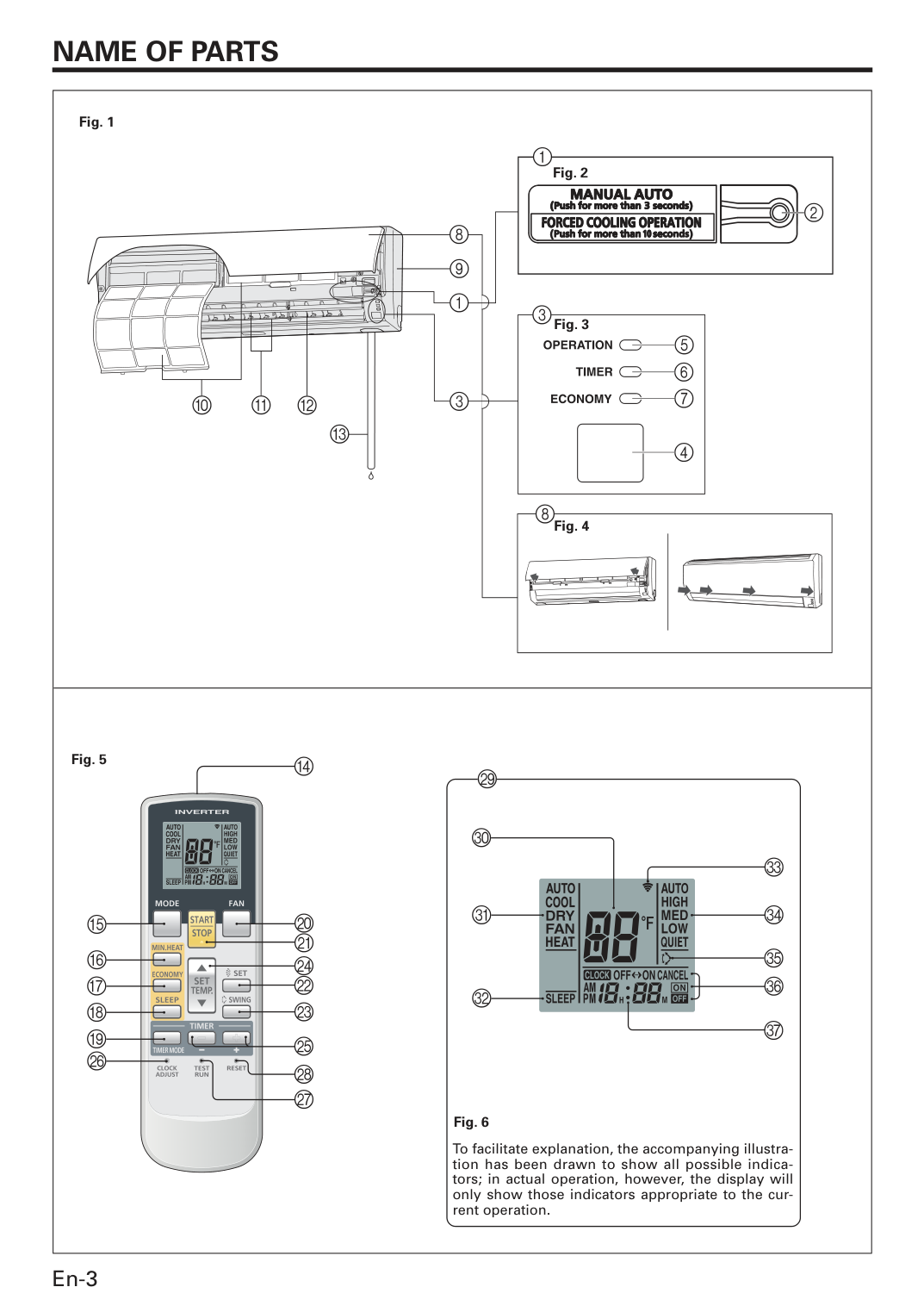
Fig. 5 To facilitate explanation, the accompanying illustra- tion has been drawn to show all possible indica- tors; in actual operation, however, the display will only show those indicators appropriate to the cur- rent operation. Fig. 6 Fig. 2 Fig. 3 Fig. 4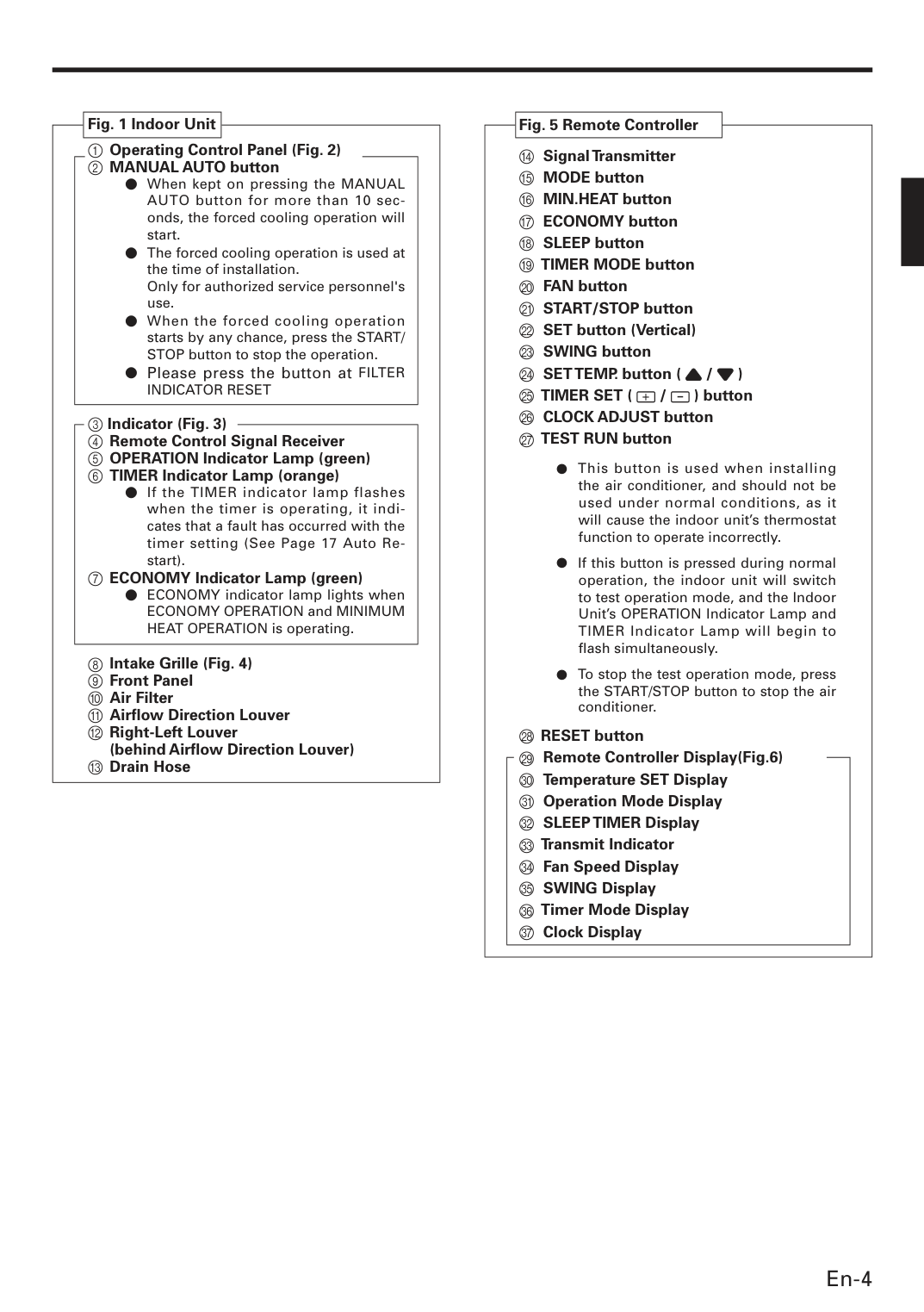
En-4 Fig. 1 Indoor Unit 1 Operating Control Panel (Fig. 2) 2 MANUAL AUTO button ● When kept on pressing the MANUAL AUTO button for more than 10 sec- onds, the forced cooling operation will start. ● The forced cooling operation is used at the time of installation.
Only for authorized service personnel's use. ● When the forced cooling operation starts by any chance, press the START/ STOP button to stop the operation. ● Please press the button at FILTER
Indicator Reset
3 Indicator (Fig. 3) 4 Remote Control Signal Receiver 5 OPERATION Indicator Lamp (green) 6 TIMER Indicator Lamp (orange) ● If the TIMER indicator lamp flashes when the timer is operating, it indi- cates that a fault has occurred with the timer setting (See Page 17 Auto Re- start). 7 ECONOMY Indicator Lamp (green) ● ECONOMY indicator lamp lights when ECONOMY OPERATION and MINIMUM HEAT OPERATION is operating. 8 Intake Grille (Fig. 4) 9 Front Panel 0 Air Filter A Airfl ow Direction Louver B Right-Left Louver(behind Airfl ow Direction Louver) C Drain Hose Fig. 5 Remote Controller D Signal Transmitter E MODE button F MIN.HEAT button G ECONOMY button H SLEEP button I TIMER MODE button J FAN button K START/STOP button L SET button (Vertical) M SWING button N SET TEMP. button ( / )
O Timer Set (
/ ) button P CLOCK ADJUST button Q TEST RUN button ● This button is used when installing the air conditioner, and should not be used under normal conditions, as it will cause the indoor unit’s thermostat function to operate incorrectly. ● If this button is pressed during normal operation, the indoor unit will switch to test operation mode, and the Indoor Unit’s OPERATION Indicator Lamp and TIMER Indicator Lamp will begin to fl ash simultaneously. ● To stop the test operation mode, press the START/STOP button to stop the air conditioner. R RESET button S Remote Controller Display(Fig.6) T Temperature SET Display U Operation Mode Display V SLEEP TIMER Display W Transmit Indicator X Fan Speed Display Y SWING Display Z Timer Mode Display [ Clock Display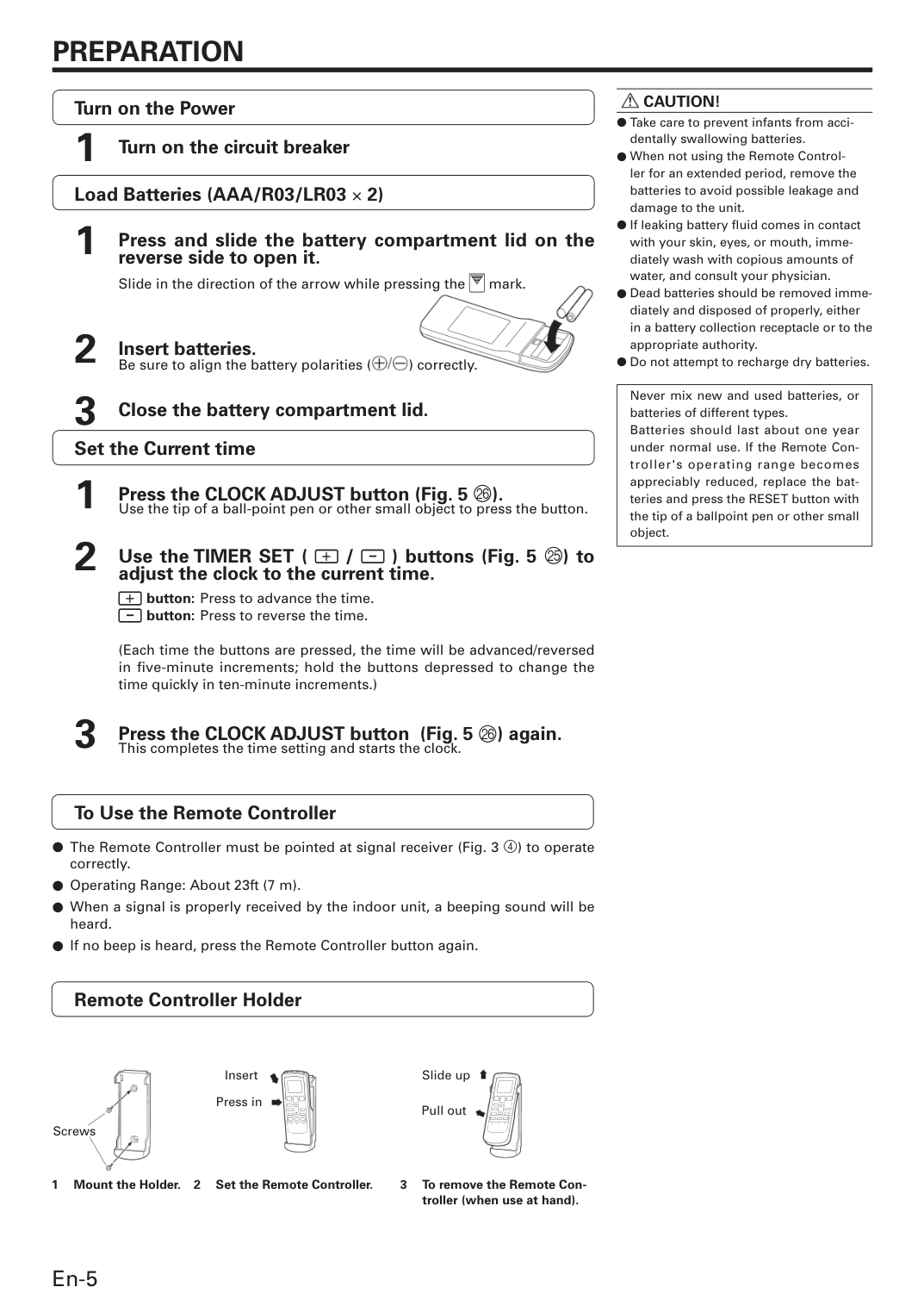
En-5
Preparation
Caution!
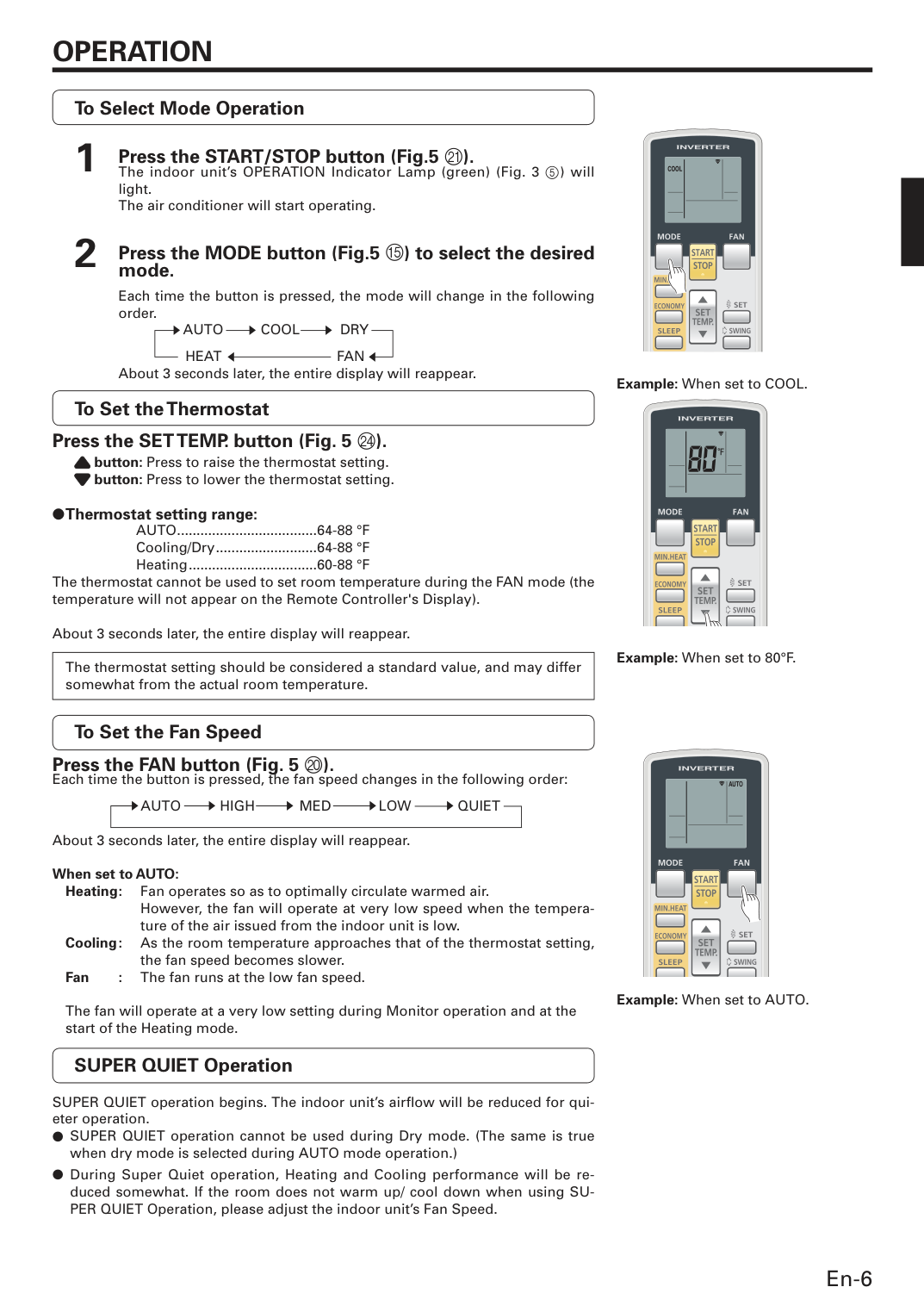
● Take care to prevent infants from acci- dentally swallowing batteries. ● When not using the Remote Control- ler for an extended period, remove the batteries to avoid possible leakage and damage to the unit. ● If leaking battery fl uid comes in contact with your skin, eyes, or mouth, imme- diately wash with copious amounts of water, and consult your physician. ● Dead batteries should be removed imme- diately and disposed of properly, either in a battery collection receptacle or to the appropriate authority. ● Do not attem pt to recharge dry batteries. Never mix new and used batteries, or batteries of different types. Batteries should last about one year under normal use. If the Remote Con- troller's operating range becomes appreciably reduced, replace the bat- teries and press the RESET button with the tip of a ballpoint pen or other small object. Load Batteries (AAA/R03/LR03 × 2) 1 Press and slide the battery compartment lid on the reverse side to open it.Slide in the direction of the arrow while pressing the mark. 2 Insert batteries.
Be sure to align the battery polarities ( ) correctly. 3 Close the battery compartment lid. Set the Current time 1 Press the CLOCK ADJUST button (Fig. 5 P).
Use the tip of a ball-point pen or other small object to press the button. 2 Use the TIMER SET ( / ) buttons (Fig. 5 O) to adjust the clock to the current time.
button: Press to advance the time.
button: Press to reverse the time.
(Each time the buttons are pressed, the time will be advanced/reversed in five-minute increments; hold the buttons depressed to change the time quickly in ten-minute increments.) 3 Press the CLOCK ADJUST button (Fig. 5 P) again.
This completes the time setting and starts the clock. To Use the Remote Controller ● The Remote Controller must be pointed at signal receiver (Fig. 3 4) to operate correctly. ● Operating Range: About 23ft (7 m). ● When a signal is properly received by the indoor unit, a beeping sound will be heard. ● If no beep is heard, press the Remote Controller button again. Remote Controller Holder 3 To remove the Remote Con- troller (when use at hand). 1 Mount the Holder. 2 Set the Remote Controller. Screws Insert Press in Slide up Pull out Turn on the Power 1 Turn on the circuit breaker
En-6 To Select Mode Operation 1 Press the START/STOP button (Fig.5 K).
The indoor unit’s OPERATION Indicator Lamp (green) (Fig. 3 5) will light.
The air conditioner will start operating. 2 Press the MODE button (Fig.5 E) to select the desired mode.
Each time the button is pressed, the mode will change in the following order.
Auto
Cool
Dry
Heat
Fan
About 3 seconds later, the entire display will reappear. To Set the Thermostat Press the SET TEMP. button (Fig. 5 N). button: Press to raise the thermostat setting. button: Press to lower the thermostat setting. ● Thermostat setting range:
Auto ....................................64-88 °F
Cooling/Dry ..........................64-88 °F
Heating .................................60-88 °F The thermostat cannot be used to set room temperature during the FAN mode (the temperature will not appear on the Remote Controller's Display). About 3 seconds later, the entire display will reappear. The thermostat setting should be considered a standard value, and may differ somewhat from the actual room temperature. To Set the Fan Speed Press the FAN button (Fig. 5 J). Each time the button is pressed, the fan speed changes in the following order:
Auto
High
Med
Low
Quiet
About 3 seconds later, the entire display will reappear. When set to AUTO: Heating : Fan operates so as to optimally circulate warmed air.However, the fan will operate at very low speed when the tempera- ture of the air issued from the indoor unit is low. Cooling : As the room temperature approaches that of the thermostat setting, the fan speed becomes slower. Fan : The fan runs at the low fan speed. The fan will operate at a very low setting during Monitor operation and at the start of the Heating mode. SUPER QUIET Operation SUPER QUIET operation begins. The indoor unit’s airfl ow will be reduced for qui- eter operation. ● SUPER QUIET operation cannot be used during Dry mode. (The same is true when dry mode is selected during AUTO mode operation.) ● During Super Quiet operation, Heating and Cooling performance will be re- duced somewhat. If the room does not warm up/ cool down when using SU- PER QUIET Operation, please adjust the indoor unit’s Fan Speed.
Operation
Example: When set to COOL. Example: When set to 80°F. Example: When set to AUTO. s s s s s s s s t t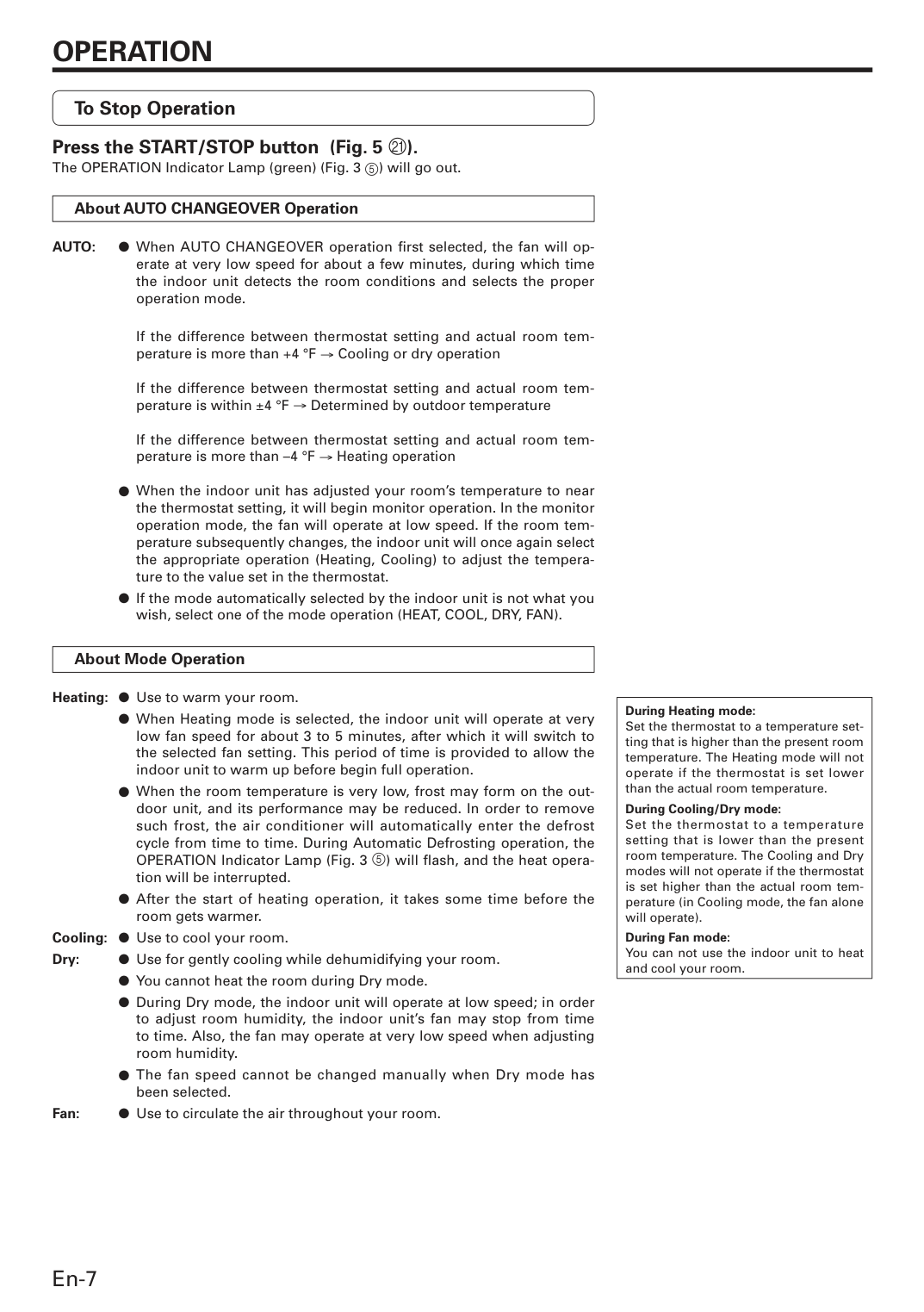
En-7 To Stop Operation Press the START/STOP button (Fig. 5 K). The OPERATION Indicator Lamp (green) (Fig. 3 5) will go out. About AUTO CHANGEOVER Operation
Auto:
● When AUTO CHANGEOVER operation fi rst selected, the fan will op- erate at very low speed for about a few minutes, during which time the indoor unit detects the room conditions and selects the proper operation mode.If the difference between thermostat setting and actual room tem- perature is more than +4 °F → Cooling or dry operation
If the difference between thermostat setting and actual room tem- perature is within ±4 °F → Determined by outdoor temperature
If the difference between thermostat setting and actual room tem- perature is more than –4 °F → Heating operation
● When the indoor unit has adjusted your room’s temperature to near the thermostat setting, it will begin monitor operation. In the monitor operation mode, the fan will operate at low speed. If the room tem- perature subsequently changes, the indoor unit will once again select the appropriate operation (Heating, Cooling) to adjust the tempera- ture to the value set in the thermostat.
● If the mode automatically selected by the indoor unit is not what you wish, select one of the mode operation (HEAT, COOL, DRY, FAN). About Mode Operation Heating: ● Use to warm your room.
● When Heating mode is selected, the indoor unit will operate at very low fan speed for about 3 to 5 minutes, after which it will switch to the selected fan setting. This period of time is provided to allow the indoor unit to warm up before begin full operation.
● When the room temperature is very low, frost may form on the out- door unit, and its performance may be reduced. In order to remove such frost, the air conditioner will automatically enter the defrost cycle from time to time. During Automatic Defrosting operation, the OPERATION Indicator Lamp (Fig. 3 5) will fl ash, and the heat opera- tion will be interrupted.
● After the start of heating operation, it takes some time before the room gets warmer. Cooling: ● Use to cool your room. Dry: ● Use for gently cooling while dehumidifying your room.
● You cannot heat the room during Dry mode.
● During Dry mode, the indoor unit will operate at low speed; in order to adjust room humidity, the indoor unit’s fan may stop from time to time. Also, the fan may operate at very low speed when adjusting room humidity.
● The fan speed cannot be changed manually when Dry mode has been selected. Fan: ● Use to circulate the air throughout your room. During Heating mode: Set the thermostat to a temperature set- ting that is higher than the present room temperature. The Heating mode will not operate if the thermostat is set lower than the actual room temperature. During Cooling/Dry mode: Set the thermostat to a temperature setting that is lower than the present room temperature. The Cooling and Dry modes will not operate if the thermostat is set higher than the actual room tem- perature (in Cooling mode, the fan alone will operate). During Fan mode: You can not use the indoor unit to heat and cool your room.
Operation
En-8
Timer Operation
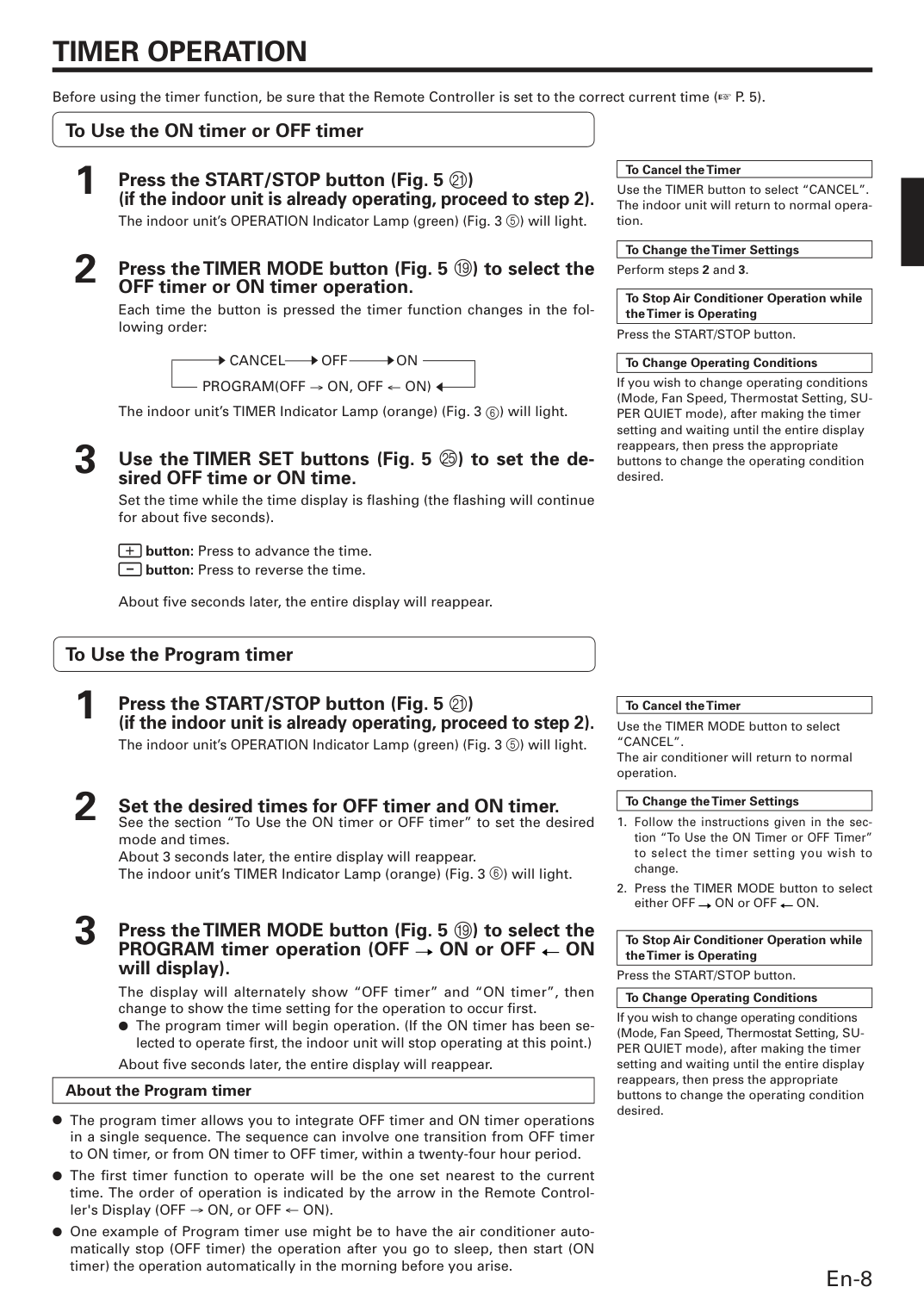
s Before using the timer function, be sure that the Remote Controller is set to the correct current time (☞ P. 5). To Use the ON timer or OFF timer 1 Press the START/STOP button (Fig. 5 K)(if the indoor unit is already operating, proceed to step 2).
The indoor unit’s OPERATION Indicator Lamp (green) (Fig. 3 5) will light. 2 Press the TIMER MODE button (Fig. 5 I) to select the OFF timer or ON timer operation.
Each time the button is pressed the timer function changes in the fol- lowing order:
Cancel
Off
On
Program(Off → On, Off ← On)
The indoor unit’s TIMER Indicator Lamp (orange) (Fig. 3 6) will light. 3 Use the TIMER SET buttons (Fig. 5 O) to set the de- sired OFF time or ON time.
Set the time while the time display is fl ashing (the fl ashing will continue for about fi ve seconds). button: Press to advance the time. button: Press to reverse the time.
About fi ve seconds later, the entire display will reappear. To Use the Program timer 1 Press the START/STOP button (Fig. 5 K)
(if the indoor unit is already operating, proceed to step 2).
The indoor unit’s OPERATION Indicator Lamp (green) (Fig. 3 5) will light. 2 Set the desired times for OFF timer and ON timer.
See the section “To Use the ON timer or OFF timer” to set the desired mode and times.
About 3 seconds later, the entire display will reappear.
The indoor unit’s TIMER Indicator Lamp (orange) (Fig. 3 6) will light. 3 Press the TIMER MODE button (Fig. 5 I) to select the PROGRAM timer operation (OFF ON or OFF
On
will display).The display will alternately show “OFF timer” and “ON timer”, then change to show the time setting for the operation to occur fi rst. ● The program timer will begin operation. (If the ON timer has been se- lected to operate fi rst, the indoor unit will stop operating at this point.)
About fi ve seconds later, the entire display will reappear. About the Program timer ● The program timer allows you to integrate OFF timer and ON timer operations in a single sequence. The sequence can involve one transition from OFF timer to ON timer, or from ON timer to OFF timer, within a twenty-four hour period. ● The fi rst timer function to operate will be the one set nearest to the current time. The order of operation is indicated by the arrow in the Remote Control- ler's Display (OFF → ON, or OFF ← ON). ● One example of Program timer use might be to have the air conditioner auto- matically stop (OFF timer) the operation after you go to sleep, then start (ON timer) the operation automatically in the morning before you arise. To Cancel the Timer Use the TIMER button to select “CANCEL”. The indoor unit will return to normal opera- tion. To Change the Timer Settings Perform steps 2 and 3. To Stop Air Conditioner Operation while the Timer is Operating Press the START/STOP button. To Change Operating Conditions If you wish to change operating conditions (Mode, Fan Speed, Thermostat Setting, SU- PER QUIET mode), after making the timer setting and waiting until the entire display reappears, then press the appropriate buttons to change the operating condition desired. s s t To Cancel the Timer Use the TIMER MODE button to select
“Cancel”.
The air conditioner will return to normal operation. To Change the Timer SettingsOn.
To Stop Air Conditioner Operation while the Timer is Operating Press the START/STOP button. To Change Operating Conditions If you wish to change operating conditions (Mode, Fan Speed, Thermostat Setting, SU- PER QUIET mode), after making the timer setting and waiting until the entire display reappears, then press the appropriate buttons to change the operating condition desired.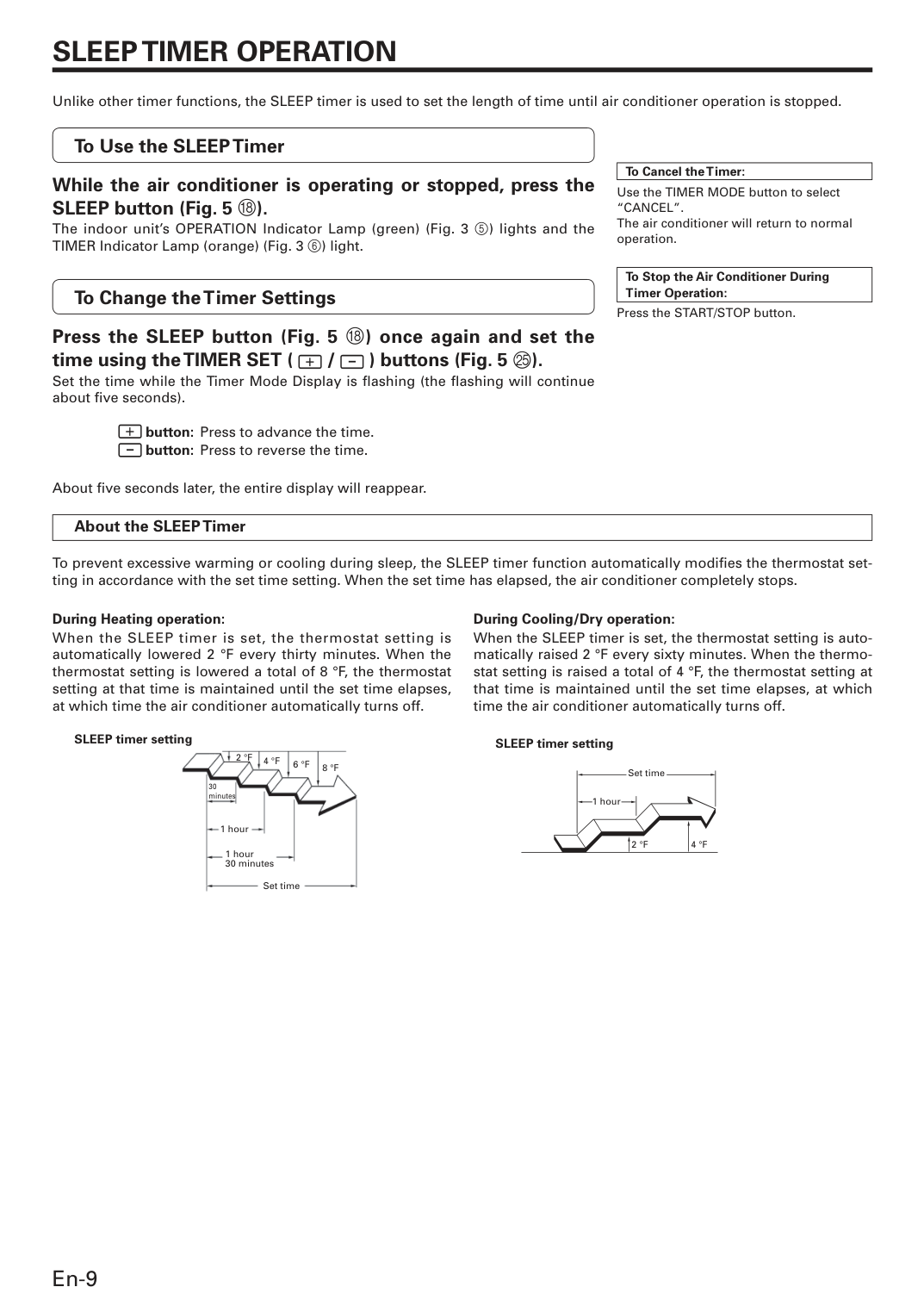
En-9
Sleep Timer Operation
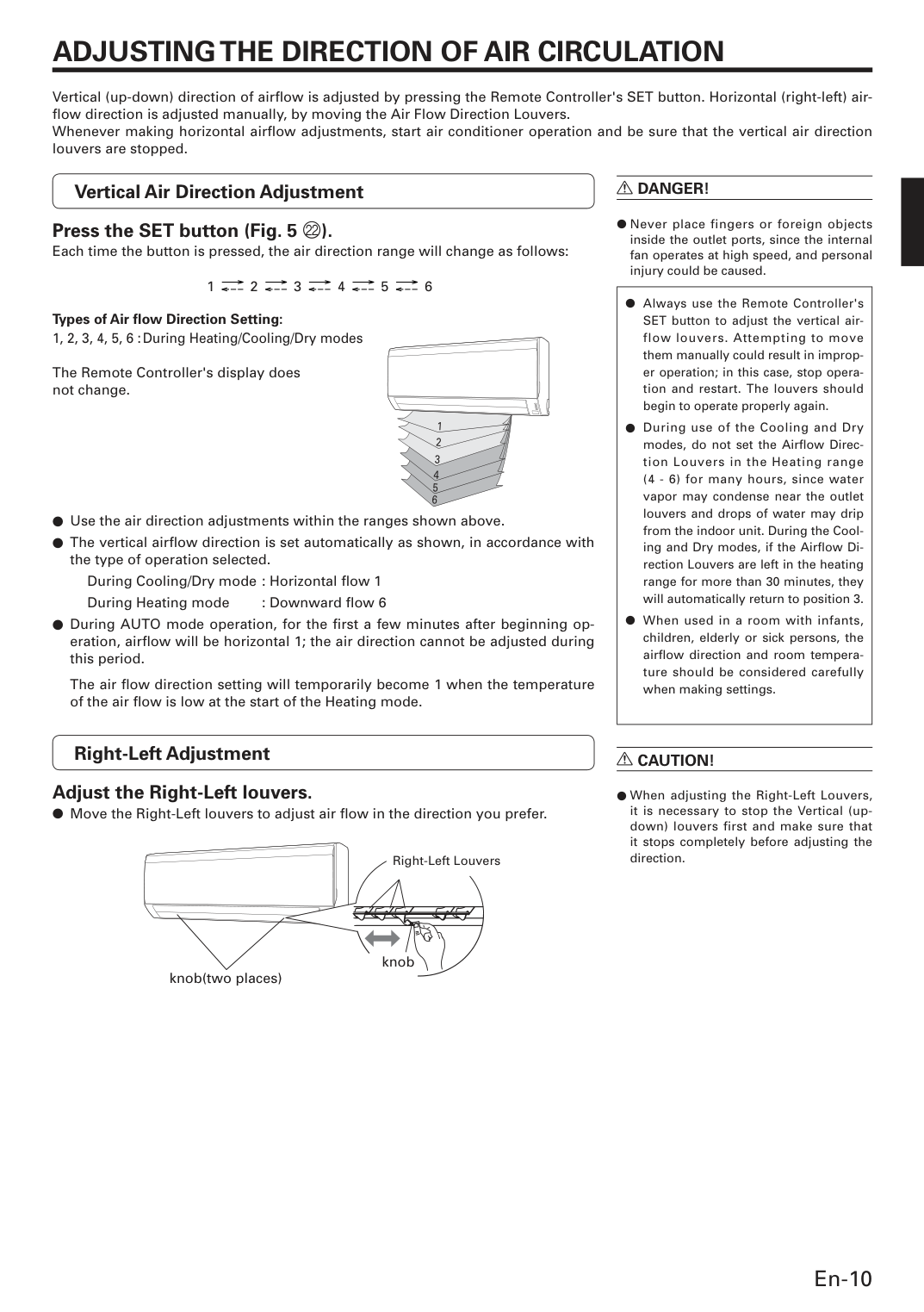
Unlike other timer functions, the SLEEP timer is used to set the length of time until air conditioner operation is stopped. To Use the SLEEP Timer While the air conditioner is operating or stopped, press the SLEEP button (Fig. 5 H). The indoor unit’s OPERATION Indicator Lamp (green) (Fig. 3 5) lights and the TIMER Indicator Lamp (orange) (Fig. 3 6) light. To Change the Timer Settings Press the SLEEP button (Fig. 5 H) once again and set the time using the TIMER SET ( / ) buttons (Fig. 5 O). Set the time while the Timer Mode Display is fl ashing (the fl ashing will continue about fi ve seconds). button: Press to advance the time. button: Press to reverse the time. About fi ve seconds later, the entire display will reappear. To Cancel the Timer: Use the TIMER MODE button to select“Cancel”.
The air conditioner will return to normal operation. To Stop the Air Conditioner During Timer Operation: Press the START/STOP button. About the SLEEP Timer To prevent excessive warming or cooling during sleep, the SLEEP timer function automatically modifi es the thermostat set- ting in accordance with the set time setting. When the set time has elapsed, the air conditioner completely stops. During Cooling/Dry operation: When the SLEEP timer is set, the thermostat setting is auto- matically raised 2 °F every sixty minutes. When the thermo- stat setting is raised a total of 4 °F, the thermostat setting at that time is maintained until the set time elapses, at which time the air conditioner automatically turns off. SLEEP timer setting During Heating operation: When the SLEEP timer is set, the thermostat setting is automatically lowered 2 °F every thirty minutes. When the thermostat setting is lowered a total of 8 °F, the thermostat setting at that time is maintained until the set time elapses, at which time the air conditioner automatically turns off. SLEEP timer setting4 °F
6 °F
8 °F
30 minutes2 °F
1 hour 1 hour 30 minutes Set time Set time 1 hour2 °F
4 °F
En-10 Vertical Air Direction Adjustment Press the SET button (Fig. 5 L). Each time the button is pressed, the air direction range will change as follows:
1 2 3 4 5 6 Types of Air fl ow Direction Setting: 1, 2, 3, 4, 5, 6 : During Heating/Cooling/Dry modes
The Remote Controller's display does not change. ● Use the air direction adjustments within the ranges shown above. ● The vertical airfl ow direction is set automatically as shown, in accordance with the type of operation selected.
During Cooling/Dry mode : Horizontal fl ow 1
During Heating mode : Downward fl ow 6 ● During AUTO mode operation, for the fi rst a few minutes after beginning op- eration, airfl ow will be horizontal 1; the air direction cannot be adjusted during this period.
The air fl ow direction setting will temporarily become 1 when the temperature of the air fl ow is low at the start of the Heating mode. Right-Left Adjustment Adjust the Right-Left louvers. ● Move the Right-Left louvers to adjust air fl ow in the direction you prefer. knob(two places) Right-Left Louvers
Adjusting The Direction Of Air Circulation
Vertical (up-down) direction of airfl ow is adjusted by pressing the Remote Controller's SET button. Horizontal (right-left) air- fl ow direction is adjusted manually, by moving the Air Flow Direction Louvers. Whenever making horizontal airfl ow adjustments, start air conditioner operation and be sure that the vertical air direction louvers are stopped.R Danger!
● Never place fingers or foreign objects inside the outlet ports, since the internal fan operates at high speed, and personal injury could be caused. ● Always use the Remote Controller's SET button to adjust the vertical air- flow louvers. Attempting to move them manually could result in improp- er operation; in this case, stop opera- tion and restart. The louvers should begin to operate properly again. ● During use of the Cooling and Dry modes, do not set the Airfl ow Direc- tion Louvers in the Heating range (4 - 6) for many hours, since water vapor may condense near the outlet louvers and drops of water may drip from the indoor unit. During the Cool- ing and Dry modes, if the Airfl ow Di- rection Louvers are left in the heating range for more than 30 minutes, they will automatically return to position 3. ● When used in a room with infants, children, elderly or sick persons, the airfl ow direction and room tempera- ture should be considered carefully when making settings.R Caution!
● When adjusting the Right-Left Louvers, it is necessary to stop the Vertical (up- down) louvers first and make sure that it stops completely before adjusting the direction. 1 2 3 4 5 6 knob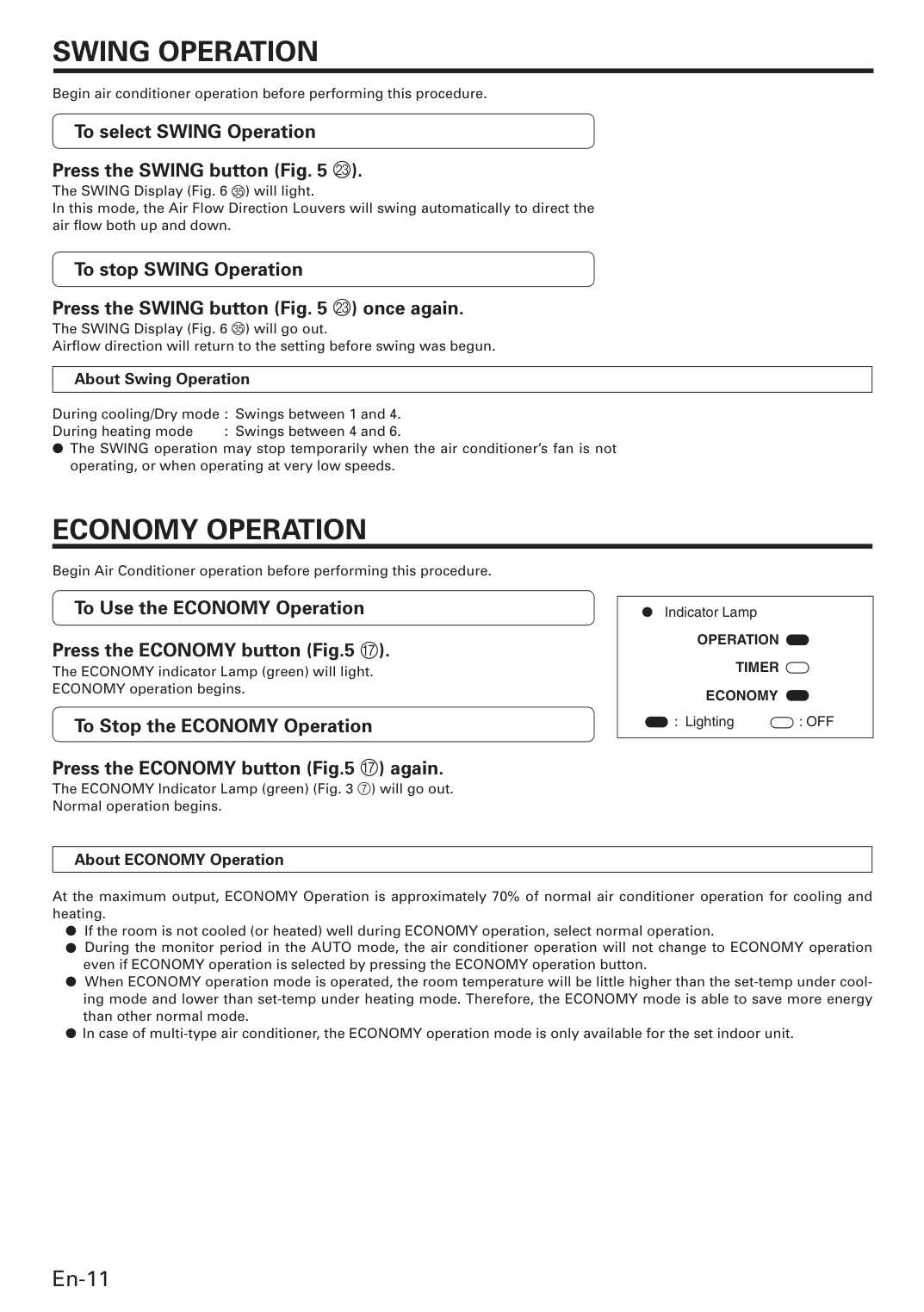
En-11
Economy Operation
Begin Air Conditioner operation before performing this procedure. To Use the ECONOMY Operation Press the ECONOMY button (Fig.5 G). The ECONOMY indicator Lamp (green) will light. ECONOMY operation begins. To Stop the ECONOMY Operation Press the ECONOMY button (Fig.5 G) again. The ECONOMY Indicator Lamp (green) (Fig. 3 7) will go out. Normal operation begins. About ECONOMY Operation At the maximum output, ECONOMY Operation is approximately 70% of normal air conditioner operation for cooling and heating. ● If the room is not cooled (or heated) well during ECONOMY operation, select normal operation. ● During the monitor period in the AUTO mode, the air conditioner operation will not change to ECONOMY operation even if ECONOMY operation is selected by pressing the ECONOMY operation button. ● When ECONOMY operation mode is operated, the room temperature will be little higher than the set-temp under cool- ing mode and lower than set-temp under heating mode. Therefore, the ECONOMY mode is able to save more energy than other normal mode. ● In case of multi-type air conditioner, the ECONOMY operation mode is only available for the set indoor unit.Operation
● Indicator Lamp : Lighting: Off
Timer
Economy
Swing Operation
Begin air conditioner operation before performing this procedure. To select SWING Operation Press the SWING button (Fig. 5 M). The SWING Display (Fig. 6 Y) will light. In this mode, the Air Flow Direction Louvers will swing automatically to direct the air fl ow both up and down. To stop SWING Operation Press the SWING button (Fig. 5 M) once again. The SWING Display (Fig. 6 Y) will go out. Airfl ow direction will return to the setting before swing was begun. About Swing Operation During cooling/Dry mode : Swings between 1 and 4. During heating mode : Swings between 4 and 6. ● The SWING operation may stop temporarily when the air conditioner’s fan is not operating, or when operating at very low speeds.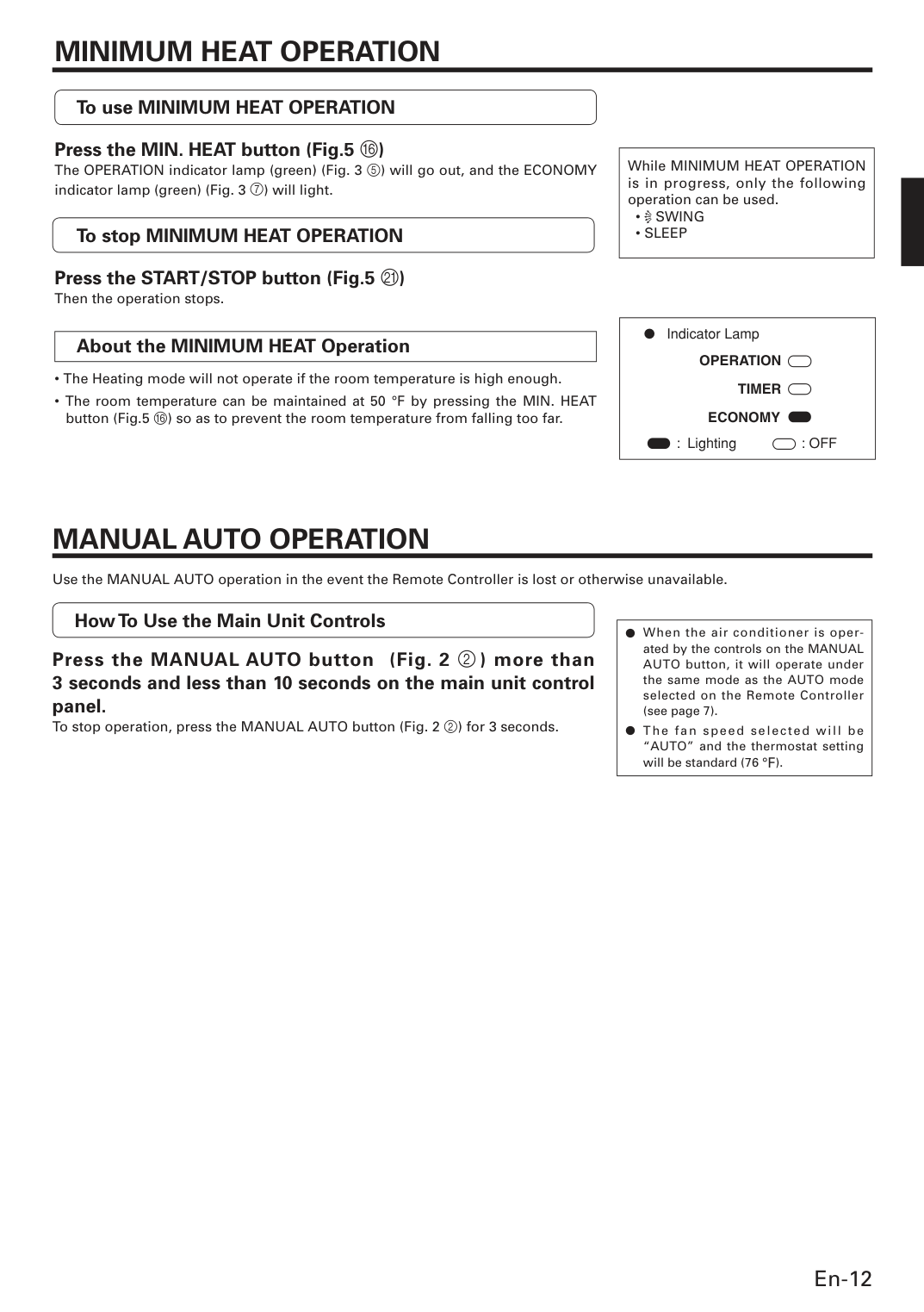
En-12
Manual Auto Operation
Use the MANUAL AUTO operation in the event the Remote Controller is lost or otherwise unavailable. How To Use the Main Unit Controls Press the MANUAL AUTO button (Fig. 2 2 ) more than 3 seconds and less than 10 seconds on the main unit control panel. To stop operation, press the MANUAL AUTO button (Fig. 2 2) for 3 seconds. ● When the air conditioner is oper- ated by the controls on the MANUAL AUTO button, it will operate under the same mode as the AUTO mode selected on the Remote Controller (see page 7). ● The fan speed selected will be “AUTO” and the thermostat setting will be standard (76 °F).Minimum Heat Operation
• Swing
• Sleep
Operation
● Indicator Lamp : Lighting: Off
Timer
Economy
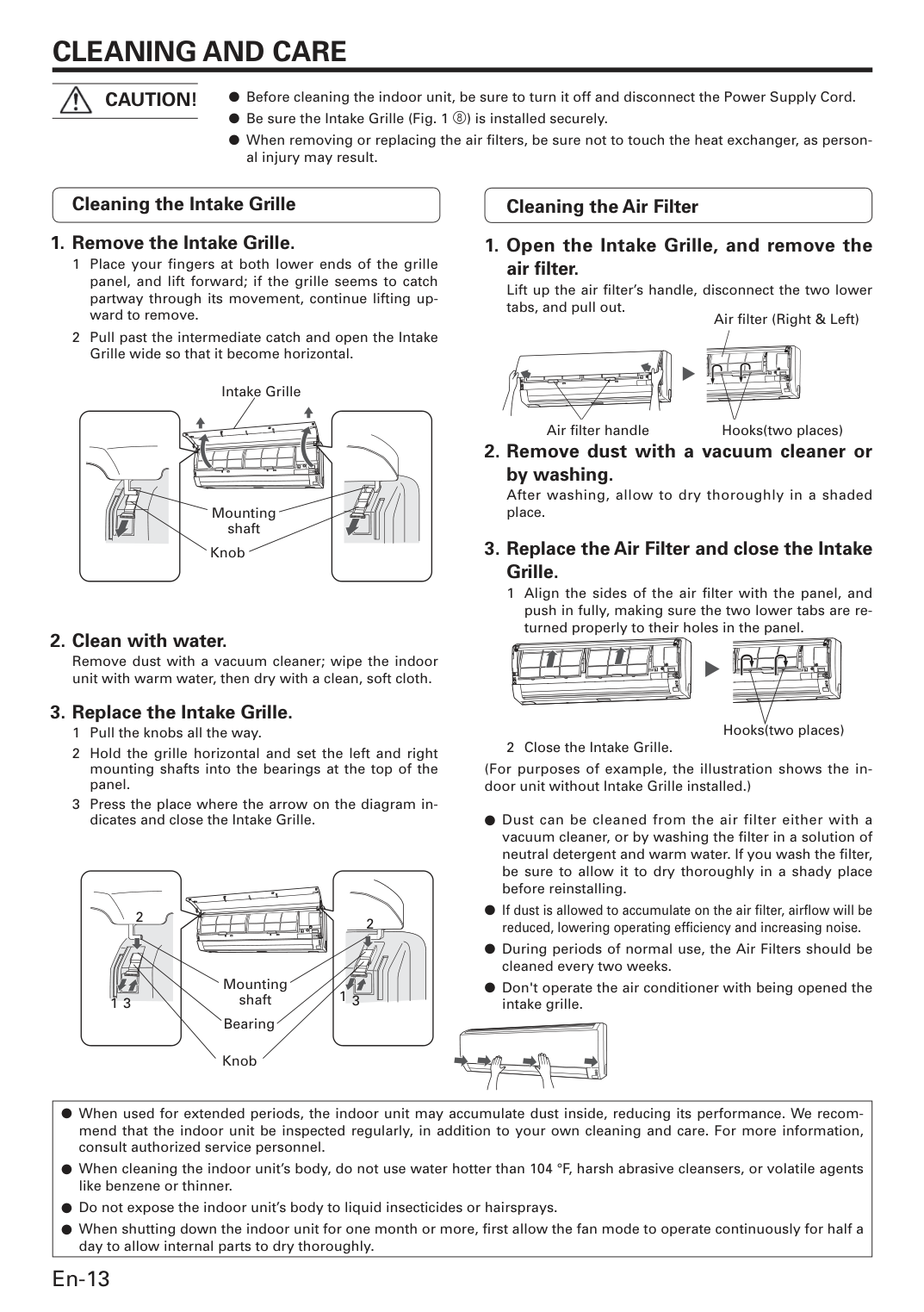
En-13
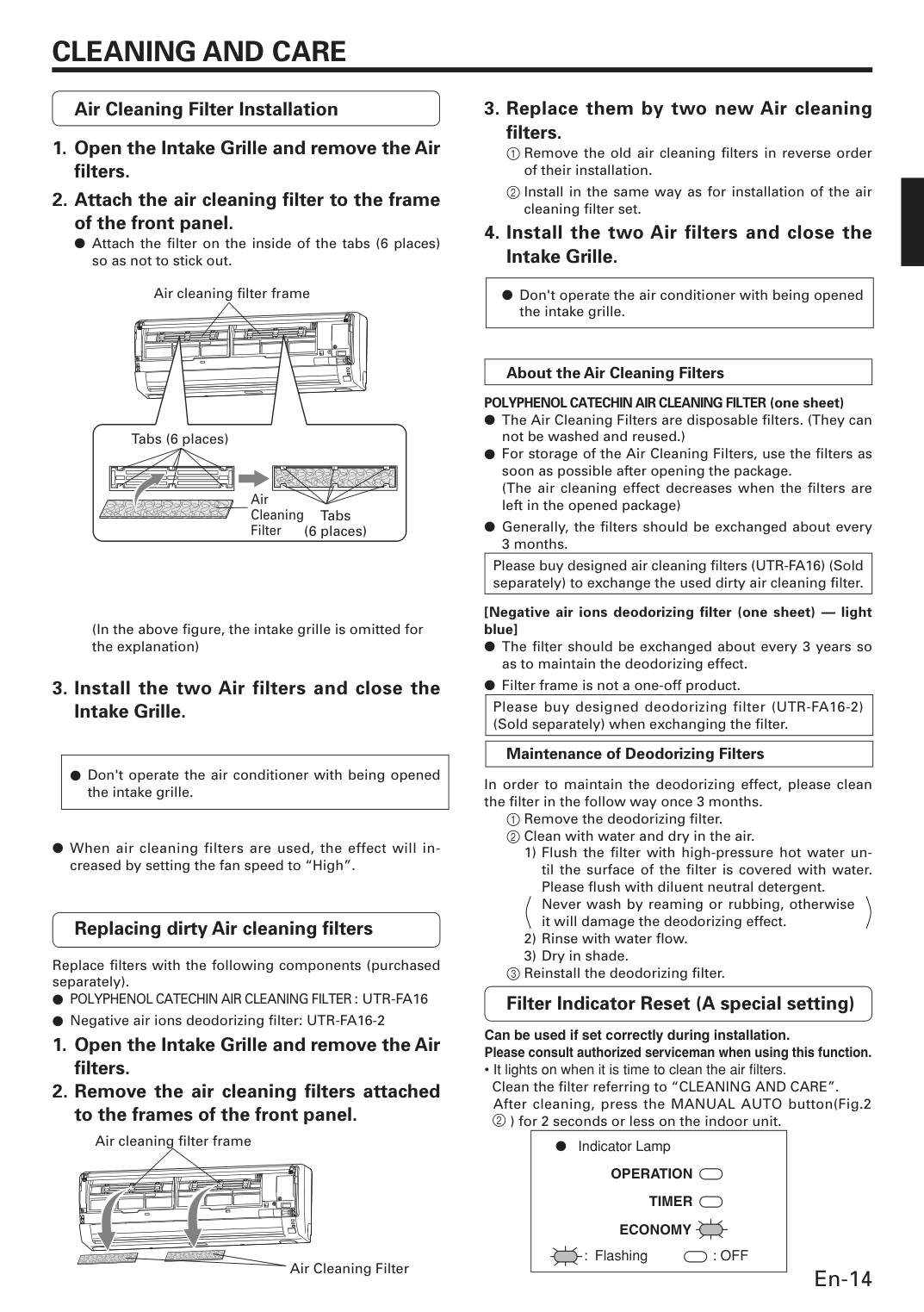
Cleaning And Care
● Before cleaning the indoor unit, be sure to turn it off and disconnect the Power Supply Cord. ● Be sure the Intake Grille (Fig. 1 8) is installed securely. ● When removing or replacing the air fi lters, be sure not to touch the heat exchanger, as person- al injury may result.Caution!
Cleaning the Intake GrilleRemove dust with a vacuum cleaner; wipe the indoor unit with warm water, then dry with a clean, soft cloth.
Lift up the air fi lter’s handle, disconnect the two lower tabs, and pull out.
After washing, allow to dry thoroughly in a shaded place.
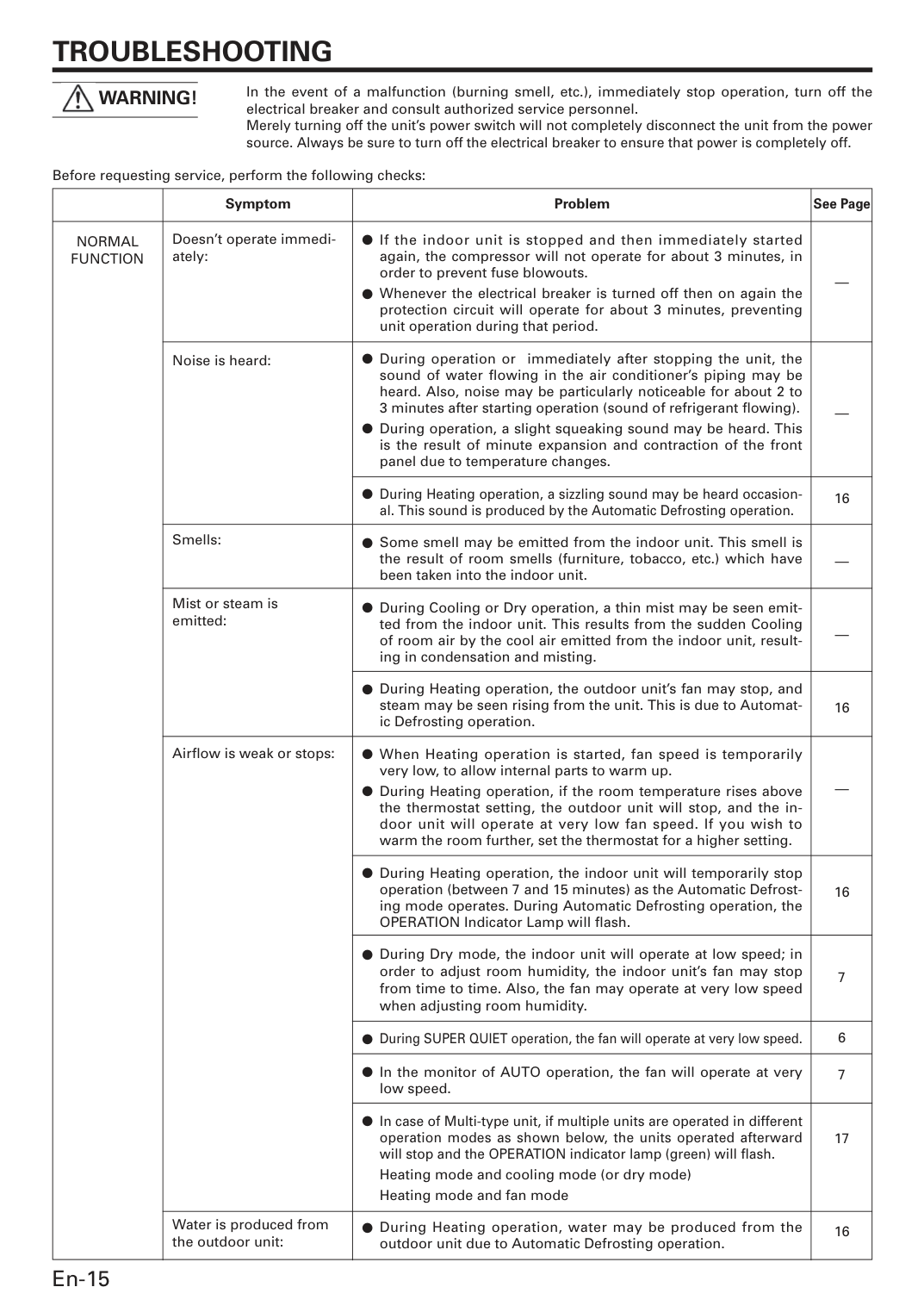
En-14 Air Cleaning Filter Installation
(In the above fi gure, the intake grille is omitted for the explanation)
(The air cleaning effect decreases when the fi lters are left in the opened package) ● Generally, the fi lters should be exchanged about every 3 months. Please buy designed air cleaning fi lters (UTR-FA16) (Sold separately) to exchange the used dirty air cleaning fi lter. [Negative air ions deodorizing filter (one sheet) — light blue] ● The fi lter should be exchanged about every 3 years so as to maintain the deodorizing effect. ● Filter frame is not a one-off product. Please buy designed deodorizing filter (UTR-FA16-2) (Sold separately) when exchanging the fi lter. Maintenance of Deodorizing Filters In order to maintain the deodorizing effect, please clean the fi lter in the follow way once 3 months. 1 Remove the deodorizing fi lter. 2 Clean with water and dry in the air. 1) Flush the fi lter with high-pressure hot water un- til the surface of the fi lter is covered with water. Please fl ush with diluent neutral detergent.
Never wash by reaming or rubbing, otherwise it will damage the deodorizing effect. 2) Rinse with water fl ow. 3) Dry in shade. 3 Reinstall the deodorizing fi lter.
Cleaning And Care
Replacing dirty Air cleaning fi lters Replace fi lters with the following components (purchased separately).● Polyphenol Catechin Air Cleaning Filter : Utr-Fa16
● Negative air ions deodorizing fi lter: UTR-FA16-2Operation
● Indicator Lamp : Flashing: Off
Timer
Economy
En-15
Troubleshooting
Warning!
Symptom Doesn’t operate immedi- ately: Noise is heard: Smells: Mist or steam is emitted: Airfl ow is weak or stops: Water is produced from the outdoor unit: Problem ● If the indoor unit is stopped and then immediately started again, the compressor will not operate for about 3 minutes, in order to prevent fuse blowouts. ● Whenever the electrical breaker is turned off then on again the protection circuit will operate for about 3 minutes, preventing unit operation during that period. ● During operation or immediately after stopping the unit, the sound of water fl owing in the air conditioner’s piping may be heard. Also, noise may be particularly noticeable for about 2 to 3 minutes after starting operation (sound of refrigerant fl owing). ● During operation, a slight squeaking sound may be heard. This is the result of minute expansion and contraction of the front panel due to temperature changes. ● During Heating operation, a sizzling sound may be heard occasion- al. This sound is produced by the Automatic Defrosting operation. ● Some smell may be emitted from the indoor unit. This smell is the result of room smells (furniture, tobacco, etc.) which have been taken into the indoor unit. ● During Cooling or Dry operation, a thin mist may be seen emit- ted from the indoor unit. This results from the sudden Cooling of room air by the cool air emitted from the indoor unit, result- ing in condensation and misting. ● During Heating operation, the outdoor unit’s fan may stop, and steam may be seen rising from the unit. This is due to Automat- ic Defrosting operation. ● When Heating operation is started, fan speed is temporarily very low, to allow internal parts to warm up. ● During Heating operation, if the room temperature rises above the thermostat setting, the outdoor unit will stop, and the in- door unit will operate at very low fan speed. If you wish to warm the room further, set the thermostat for a higher setting. ● During Heating operation, the indoor unit will temporarily stop operation (between 7 and 15 minutes) as the Automatic Defrost- ing mode operates. During Automatic Defrosting operation, the OPERATION Indicator Lamp will fl ash. ● During Dry mode, the indoor unit will operate at low speed; in order to adjust room humidity, the indoor unit’s fan may stop from time to time. Also, the fan may operate at very low speed when adjusting room humidity. ● During SUPER QUIET operation, the fan will operate at very low speed. ● In the monitor of AUTO operation, the fan will operate at very low speed. ● In case of Multi-type unit, if multiple units are operated in different operation modes as shown below, the units operated afterward will stop and the OPERATION indicator lamp (green) will fl ash. Heating mode and cooling mode (or dry mode) Heating mode and fan mode ● During Heating operation, water may be produced from the outdoor unit due to Automatic Defrosting operation. See Page — — 16 — — 16 — 16 7 6 7 17 16Normal
Function
In the event of a malfunction (burning smell, etc.), immediately stop operation, turn off the electrical breaker and consult authorized service personnel. Merely turning off the unit’s power switch will not completely disconnect the unit from the power source. Always be sure to turn off the electrical breaker to ensure that power is completely off. Before requesting service, perform the following checks: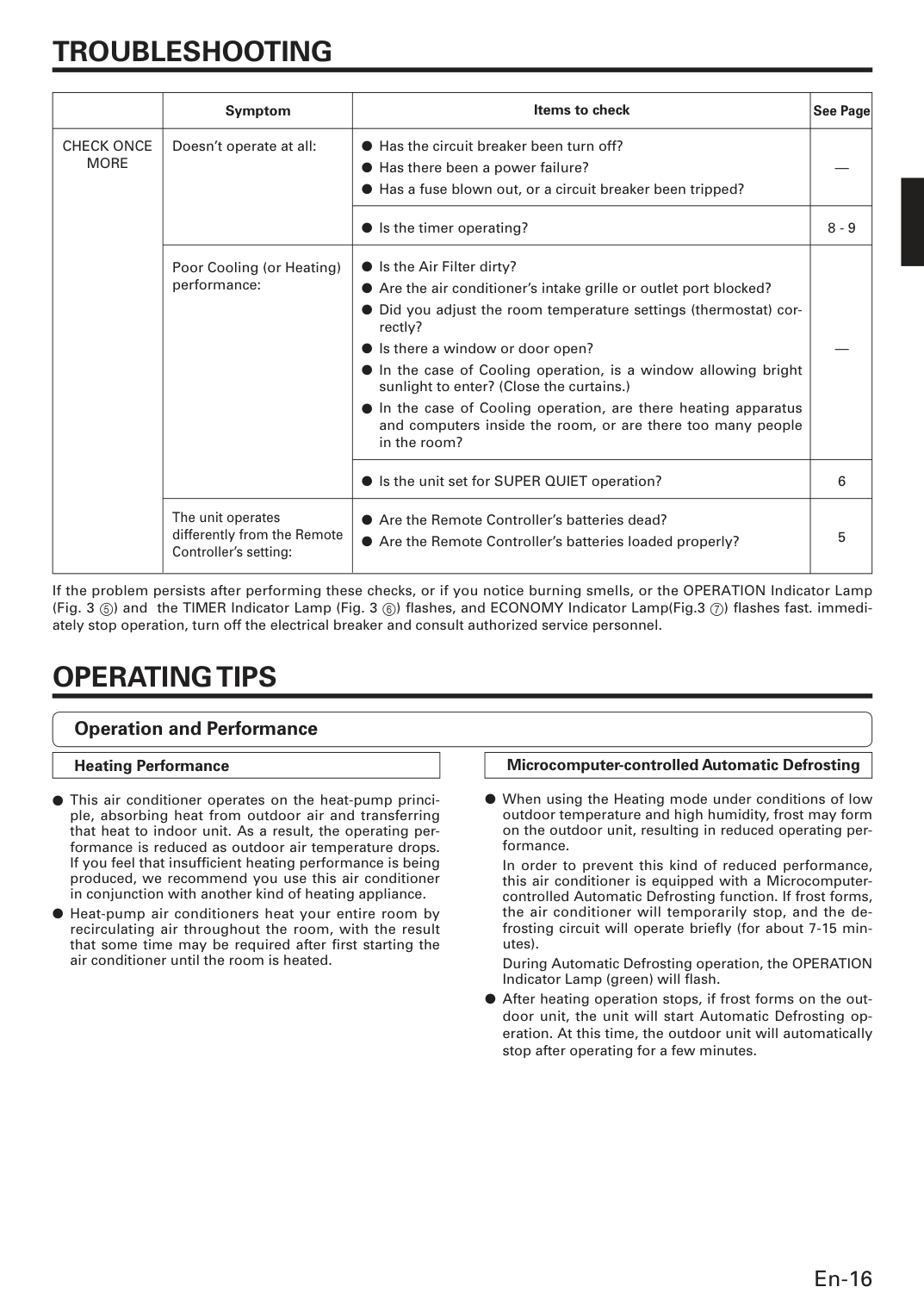
En-16
Troubleshooting
Symptom Doesn’t operate at all: Poor Cooling (or Heating) performance: The unit operates differently from the Remote Controller’s setting: See Page — 8 - 9 — 6 5Check Once
More
Items to check ● Has the circuit breaker been turn off? ● Has there been a power failure? ● Has a fuse blown out, or a circuit breaker been tripped? ● Is the timer operating? ● Is the Air Filter dirty? ● Are the air conditioner’s intake grille or outlet port blocked? ● Did you adjust the room temperature settings (thermostat) cor- rectly? ● Is there a window or door open? ● In the case of Cooling operation, is a window allowing bright sunlight to enter? (Close the curtains.) ● In the case of Cooling operation, are there heating apparatus and computers inside the room, or are there too many people in the room? ● Is the unit set for SUPER QUIET operation? ● Are the Remote Controller’s batteries dead? ● Are the Remote Controller’s batteries loaded properly?Operating Tips
If the problem persists after performing these checks, or if you notice burning smells, or the OPERATION Indicator Lamp (Fig. 3 5) and the TIMER Indicator Lamp (Fig. 3 6) fl ashes, and ECONOMY Indicator Lamp(Fig.3 7) fl ashes fast. immedi- ately stop operation, turn off the electrical breaker and consult authorized service personnel. Operation and Performance Heating Performance ● This air conditioner operates on the heat-pump princi- ple, absorbing heat from outdoor air and transferring that heat to indoor unit. As a result, the operating per- formance is reduced as outdoor air temperature drops. If you feel that insuffi cient heating performance is being produced, we recommend you use this air conditioner in conjunction with another kind of heating appliance. ● Heat-pump air conditioners heat your entire room by recirculating air throughout the room, with the result that some time may be required after fi rst starting the air conditioner until the room is heated. Microcomputer-controlled Automatic Defrosting ● When using the Heating mode under conditions of low outdoor temperature and high humidity, frost may form on the outdoor unit, resulting in reduced operating per- formance.In order to prevent this kind of reduced performance, this air conditioner is equipped with a Microcomputer- controlled Automatic Defrosting function. If frost forms, the air conditioner will temporarily stop, and the de- frosting circuit will operate briefl y (for about 7-15 min- utes).
During Automatic Defrosting operation, the OPERATION Indicator Lamp (green) will fl ash. ● After heating operation stops, if frost forms on the out- door unit, the unit will start Automatic Defrosting op- eration. At this time, the outdoor unit will automatically stop after operating for a few minutes.
En-17
Operating Tips
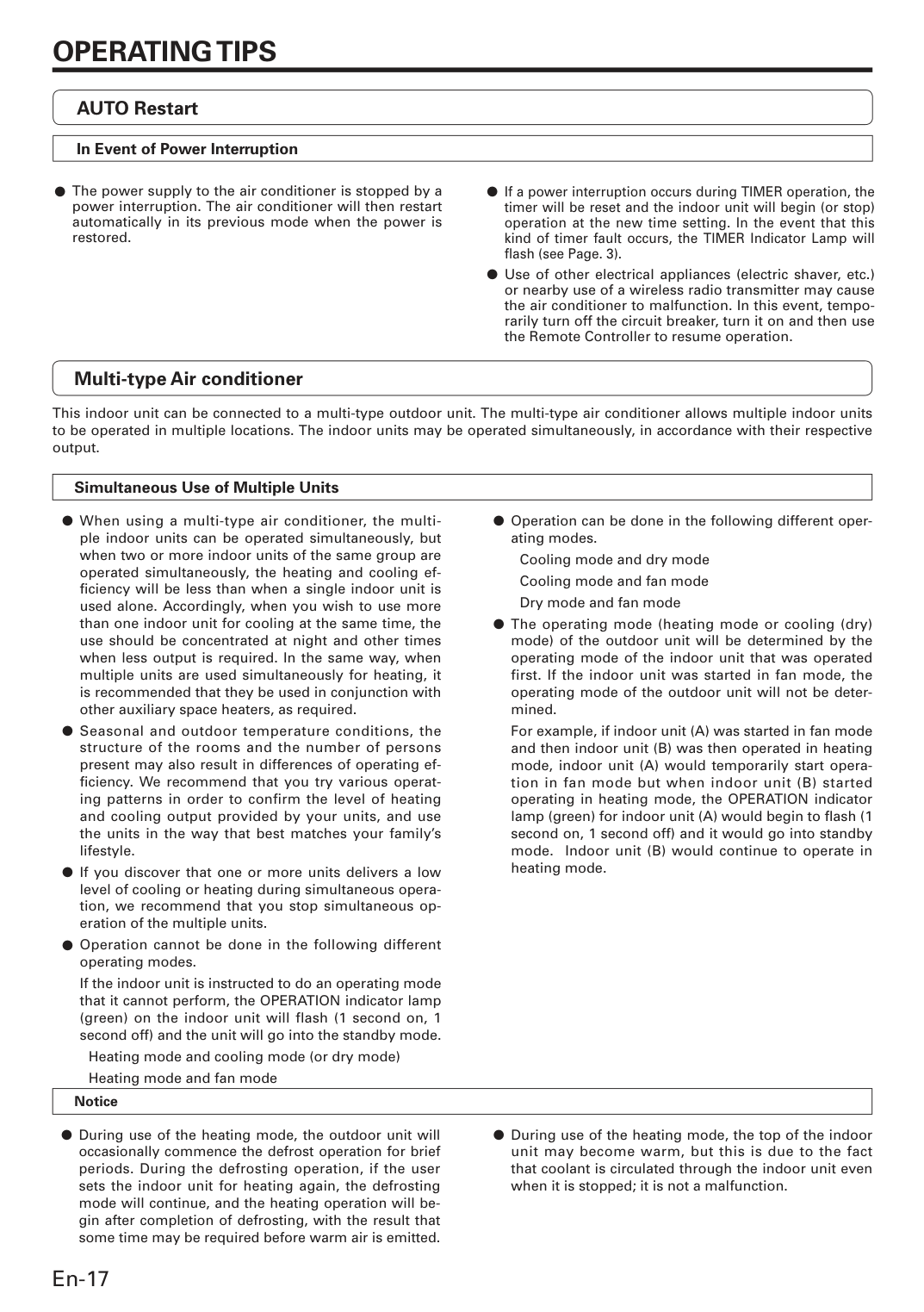
Multi-type Air conditioner This indoor unit can be connected to a multi-type outdoor unit. The multi-type air conditioner allows multiple indoor units to be operated in multiple locations. The indoor units may be operated simultaneously, in accordance with their respective output. ● Operation can be done in the following different oper- ating modes.Cooling mode and dry mode
Cooling mode and fan mode
Dry mode and fan mode ● The operating mode (heating mode or cooling (dry) mode) of the outdoor unit will be determined by the operating mode of the indoor unit that was operated first. If the indoor unit was started in fan mode, the operating mode of the outdoor unit will not be deter- mined.
For example, if indoor unit (A) was started in fan mode and then indoor unit (B) was then operated in heating mode, indoor unit (A) would temporarily start opera- tion in fan mode but when indoor unit (B) started operating in heating mode, the OPERATION indicator lamp (green) for indoor unit (A) would begin to fl ash (1 second on, 1 second off) and it would go into standby mode. Indoor unit (B) would continue to operate in heating mode. ● During use of the heating mode, the top of the indoor unit may become warm, but this is due to the fact that coolant is circulated through the indoor unit even when it is stopped; it is not a malfunction. Notice Simultaneous Use of Multiple Units ● When using a multi-type air conditioner, the multi- ple indoor units can be operated simultaneously, but when two or more indoor units of the same group are operated simultaneously, the heating and cooling ef- fi ciency will be less than when a single indoor unit is used alone. Accordingly, when you wish to use more than one indoor unit for cooling at the same time, the use should be concentrated at night and other times when less output is required. In the same way, when multiple units are used simultaneously for heating, it is recommended that they be used in conjunction with other auxiliary space heaters, as required. ● Seasonal and outdoor temperature conditions, the structure of the rooms and the number of persons present may also result in differences of operating ef- fi ciency. We recommend that you try various operat- ing patterns in order to confirm the level of heating and cooling output provided by your units, and use the units in the way that best matches your family’s lifestyle. ● If you discover that one or more units delivers a low level of cooling or heating during simultaneous opera- tion, we recommend that you stop simultaneous op- eration of the multiple units. ● Operation cannot be done in the following different operating modes.
If the indoor unit is instructed to do an operating mode that it cannot perform, the OPERATION indicator lamp (green) on the indoor unit will flash (1 second on, 1 second off) and the unit will go into the standby mode. Heating mode and cooling mode (or dry mode) Heating mode and fan mode ● During use of the heating mode, the outdoor unit will occasionally commence the defrost operation for brief periods. During the defrosting operation, if the user sets the indoor unit for heating again, the defrosting mode will continue, and the heating operation will be- gin after completion of defrosting, with the result that some time may be required before warm air is emitted. AUTO Restart In Event of Power Interruption ● The power supply to the air conditioner is stopped by a power interruption. The air conditioner will then restart automatically in its previous mode when the power is restored. ● If a power interruption occurs during TIMER operation, the timer will be reset and the indoor unit will begin (or stop) operation at the new time setting. In the event that this kind of timer fault occurs, the TIMER Indicator Lamp will fl ash (see Page. 3). ● Use of other electrical appliances (electric shaver, etc.) or nearby use of a wireless radio transmitter may cause the air conditioner to malfunction. In this event, tempo- rarily turn off the circuit breaker, turn it on and then use the Remote Controller to resume operation.