
Ask AI
— answers from the official manualAnswers from the official manual.
Common questions
Common Questions
20 totalWhat is the native resolution of the HP EliteDisplay E231 monitor?
The native resolution of the HP EliteDisplay E231 is 1920 x 1080 at 60 Hz. The monitor also supports a wide range of other resolutions from 640 x 480 up to 1920 x 1080, all at 60 Hz. The panel has a 16:9 aspect ratio. (Page 2)
What video input connections are available on the HP EliteDisplay E231?
The monitor supports VGA (analog), DVI-D, and DisplayPort inputs. HDCP support is available on both the DVI-D and DisplayPort connections. These inputs provide flexible connectivity options for various devices. (Page 2)
How many USB ports does the HP EliteDisplay E231 have?
The HP EliteDisplay E231 features an integrated USB 2.0 hub with two downstream ports and one upstream port, for a total of three USB ports. This built-in hub allows you to connect USB devices directly to the monitor. (Page 2)
What are the ergonomic adjustment options on the HP EliteDisplay E231?
The monitor offers tilt adjustment from -5 to +30 degrees, 360-degree swivel, 150 mm of height adjustment, and 90-degree pivot rotation. These options are described as the most adjustability available on an HP business display, helping users find their most comfortable working position. (Page 2)
What is the power consumption of the HP EliteDisplay E231?
The maximum power consumption is 36 W, with a typical usage of 33 W. In power saving mode, consumption drops to just 0.5 W, reflecting the monitor's energy-efficient design. The monitor is also ENERGY STAR certified. (Page 2)
What is the warranty on the HP EliteDisplay E231?
The HP EliteDisplay E231 is protected by a 3-year standard limited warranty from HP. Optional HP Care Pack Services are available as extended service contracts that go beyond the standard warranty coverage. Service levels and response times may vary depending on geographic location. (Page 2)
Show 14 more questions
What are the brightness and contrast ratio specs for the HP EliteDisplay E231?
What are the viewing angles on the HP EliteDisplay E231?
What environmental certifications does the HP EliteDisplay E231 have?
What optional accessories are available for the HP EliteDisplay E231?
How do I adjust the tilt and height of my monitor?
How do I reset my monitor if it shows error code E0X?
What USB ports are available for use on the monitor?
How can I prevent unauthorized use of my monitor?
What energy efficiency certifications does my HP EliteDisplay E231 have?
How can I extend my warranty beyond the standard three years?
What is the maximum power consumption of my monitor?
How do I connect additional screens and manage multiple applications?
How do I set up HP Display Assistant for partitioning my screen?
What kind of input signals can this monitor support?
Full Manual
2 pages
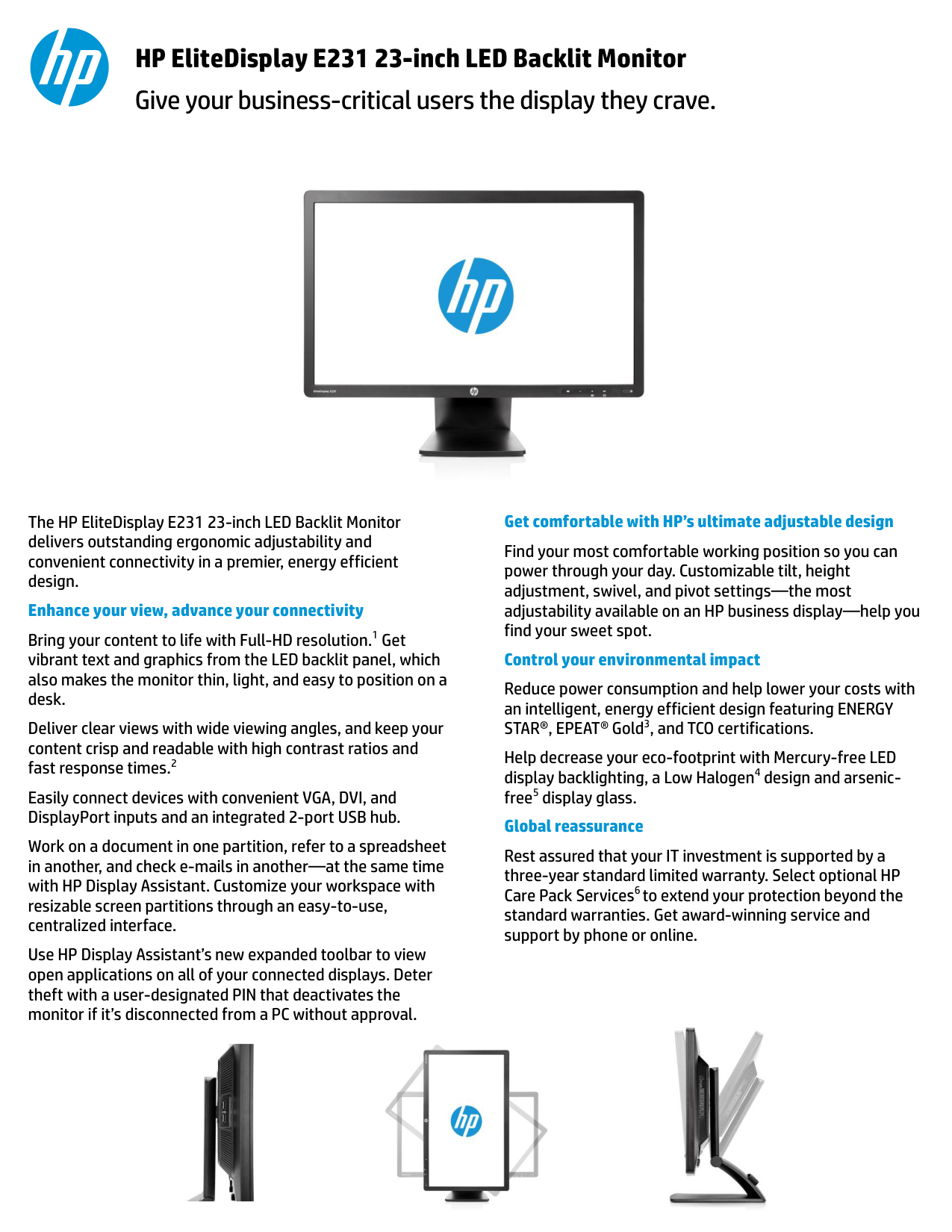
The HP EliteDisplay E231 23-inch LED Backlit Monitor delivers outstanding ergonomic adjustability and convenient connectivity in a premier, energy efficient design. Enhance your view, advance your connectivity Bring your content to life with Full-HD resolution.1 Get vibrant text and graphics from the LED backlit panel, which also makes the monitor thin, light, and easy to position on a desk. Deliver clear views with wide viewing angles, and keep your content crisp and readable with high contrast ratios and fast response times.2 Easily connect devices with convenient VGA, DVI, and DisplayPort inputs and an integrated 2-port USB hub. Work on a document in one partition, refer to a spreadsheet in another, and check e-mails in another—at the same time with HP Display Assistant. Customize your workspace with resizable screen partitions through an easy-to-use, centralized interface. Use HP Display Assistant’s new expanded toolbar to view open applications on all of your connected displays. Deter theft with a user-designated PIN that deactivates the monitor if it’s disconnected from a PC without approval.
Get comfortable with HP’s ultimate adjustable design Find your most comfortable working position so you can power through your day. Customizable tilt, height adjustment, swivel, and pivot settings—the most adjustability available on an HP business display—help you find your sweet spot. Control your environmental impact Reduce power consumption and help lower your costs with an intelligent, energy efficient design featuring ENERGY STAR®, EPEAT® Gold3, and TCO certifications. Help decrease your eco-footprint with Mercury-free LED display backlighting, a Low Halogen4 design and arsenic- free5 display glass. Global reassurance Rest assured that your IT investment is supported by a three-year standard limited warranty. Select optional HP Care Pack Services6 to extend your protection beyond the standard warranties. Get award-winning service and support by phone or online. Give your business-critical users the display they crave. HP EliteDisplay E231 23-inch LED Backlit Monitor
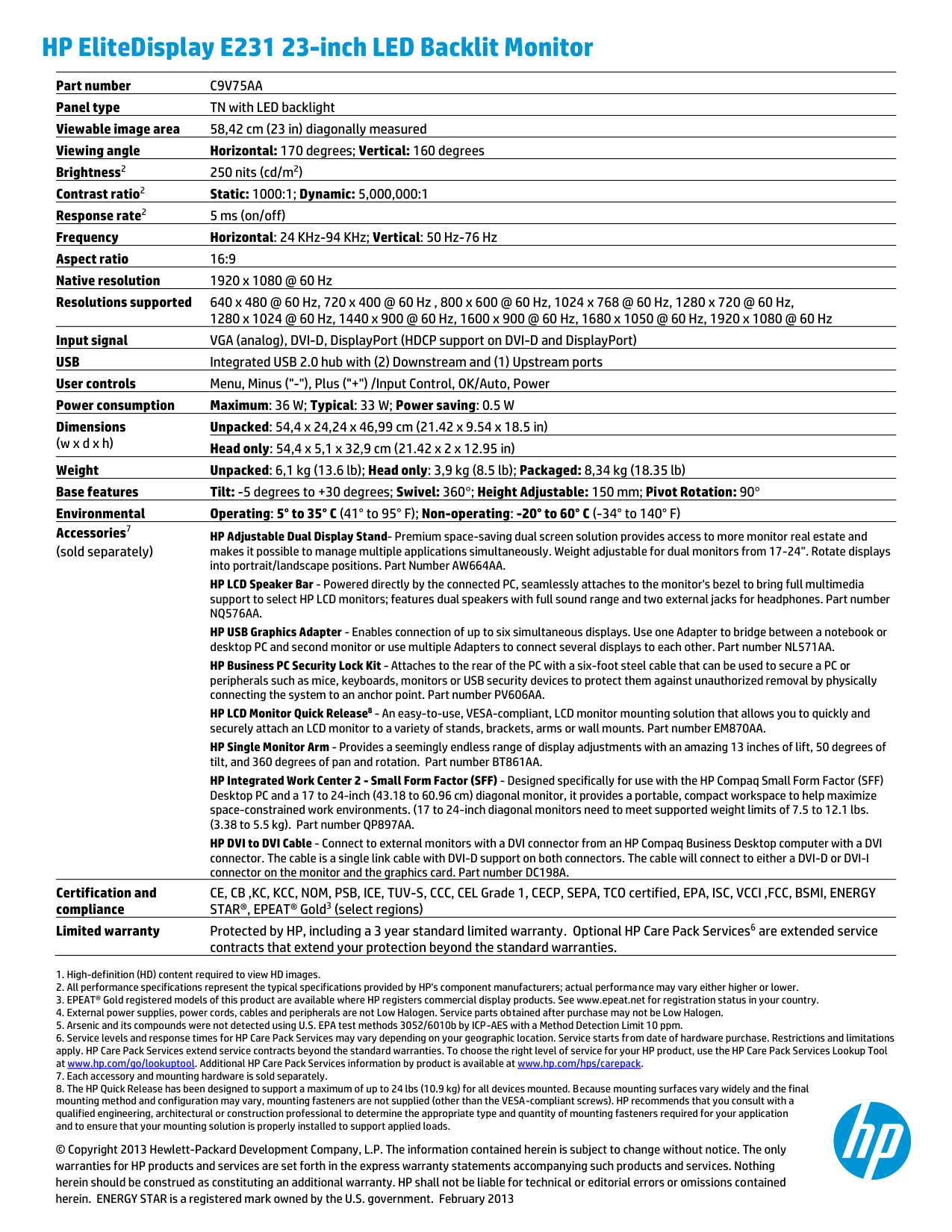
Part number
C9V75Aa
Panel type TN with LED backlight Viewable image area 58,42 cm (23 in) diagonally measured Viewing angle Horizontal: 170 degrees; Vertical: 160 degrees Brightness2 250 nits (cd/m2) Contrast ratio2 Static: 1000:1; Dynamic: 5,000,000:1 Response rate2 5 ms (on/off) Frequency Horizontal: 24 KHz-94 KHz; Vertical: 50 Hz-76 Hz Aspect ratio 16:9 Native resolution 1920 x 1080 @ 60 Hz Resolutions supported 640 x 480 @ 60 Hz, 720 x 400 @ 60 Hz , 800 x 600 @ 60 Hz, 1024 x 768 @ 60 Hz, 1280 x 720 @ 60 Hz, 1280 x 1024 @ 60 Hz, 1440 x 900 @ 60 Hz, 1600 x 900 @ 60 Hz, 1680 x 1050 @ 60 Hz, 1920 x 1080 @ 60 Hz Input signal VGA (analog), DVI-D, DisplayPort (HDCP support on DVI-D and DisplayPort)Usb
Integrated USB 2.0 hub with (2) Downstream and (1) Upstream ports User controls Menu, Minus ("-"), Plus ("+") /Input Control, OK/Auto, Power Power consumption Maximum: 36 W; Typical: 33 W; Power saving: 0.5 W Dimensions (w x d x h) Unpacked: 54,4 x 24,24 x 46,99 cm (21.42 x 9.54 x 18.5 in) Head only: 54,4 x 5,1 x 32,9 cm (21.42 x 2 x 12.95 in) Weight Unpacked: 6,1 kg (13.6 lb); Head only: 3,9 kg (8.5 lb); Packaged: 8,34 kg (18.35 lb) Base features Tilt: -5 degrees to +30 degrees; Swivel: 360°; Height Adjustable: 150 mm; Pivot Rotation: 90° Environmental Operating: 5° to 35° C (41° to 95° F); Non-operating: -20° to 60° C (-34° to 140° F) Accessories7 (sold separately) HP Adjustable Dual Display Stand- Premium space-saving dual screen solution provides access to more monitor real estate and makes it possible to manage multiple applications simultaneously. Weight adjustable for dual monitors from 17-24”. Rotate displays into portrait/landscape positions. Part Number AW664AA. HP LCD Speaker Bar - Powered directly by the connected PC, seamlessly attaches to the monitor's bezel to bring full multimedia support to select HP LCD monitors; features dual speakers with full sound range and two external jacks for headphones. Part numberNq576Aa.
HP USB Graphics Adapter - Enables connection of up to six simultaneous displays. Use one Adapter to bridge between a notebook or desktop PC and second monitor or use multiple Adapters to connect several displays to each other. Part number NL571AA. HP Business PC Security Lock Kit - Attaches to the rear of the PC with a six-foot steel cable that can be used to secure a PC or peripherals such as mice, keyboards, monitors or USB security devices to protect them against unauthorized removal by physically connecting the system to an anchor point. Part number PV606AA. HP LCD Monitor Quick Release8 - An easy-to-use, VESA-compliant, LCD monitor mounting solution that allows you to quickly and securely attach an LCD monitor to a variety of stands, brackets, arms or wall mounts. Part number EM870AA. HP Single Monitor Arm - Provides a seemingly endless range of display adjustments with an amazing 13 inches of lift, 50 degrees of tilt, and 360 degrees of pan and rotation. Part number BT861AA. HP Integrated Work Center 2 - Small Form Factor (SFF) - Designed specifically for use with the HP Compaq Small Form Factor (SFF) Desktop PC and a 17 to 24-inch (43.18 to 60.96 cm) diagonal monitor, it provides a portable, compact workspace to help maximize space-constrained work environments. (17 to 24-inch diagonal monitors need to meet supported weight limits of 7.5 to 12.1 lbs. (3.38 to 5.5 kg). Part number QP897AA. HP DVI to DVI Cable - Connect to external monitors with a DVI connector from an HP Compaq Business Desktop computer with a DVI connector. The cable is a single link cable with DVI-D support on both connectors. The cable will connect to either a DVI-D or DVI-I connector on the monitor and the graphics card. Part number DC198A. Certification and compliance CE, CB ,KC, KCC, NOM, PSB, ICE, TUV-S, CCC, CEL Grade 1, CECP, SEPA, TCO certified, EPA, ISC, VCCI ,FCC, BSMI, ENERGY STAR®, EPEAT® Gold3 (select regions) Limited warranty Protected by HP, including a 3 year standard limited warranty. Optional HP Care Pack Services6 are extended service contracts that extend your protection beyond the standard warranties.HP EliteDisplay E231 23-inch LED Backlit Monitor © Copyright 2013 Hewlett-Packard Development Company, L.P. The information contained herein is subject to change without notice. The only warranties for HP products and services are set forth in the express warranty statements accompanying such products and services. Nothing herein should be construed as constituting an additional warranty. HP shall not be liable for technical or editorial errors or omissions contained herein. ENERGY STAR is a registered mark owned by the U.S. government. February 2013