Ask AI
— answers from the official manualAnswers from the official manual.
Common questions
Common Questions
10 totalHow do I adjust the display brightness using command sequences?
Send a US X n command to set the brightness level where 'n' can range from 1 to 4 for increasing levels of brightness.
Can this HP Value Display show Japanese characters?
Yes, it supports language codes that include Japanese (Codepage: Katakana and CP932-Japanese Shift JIS), allowing for the display of Katakana and Kanji characters as per Table 1.
How do I scroll the content vertically on a single line?
To specify vertical scroll mode, send the command sequence US MD2.
What voltage and current does this display require for operation?
The power requirements are 12 VDC ±10%, with typical current consumption of 400 mA.
How do I move the cursor up a line in command mode?
Use US LF (hexadecimal sequence: 1F 0A) to move the cursor up one line.
How do I set the time on my HP Value 25 Inch Display?
Use the command sequence ESC u E hh:mm CR to set and display a 24-hour time, where 'hh' and 'mm' are hexadecimal values representing hours and minutes (e.g., 0x31:0x36 for 1:06 PM).
Full Manual
11 pages


User Guide
*M42381-001*
M42381-001
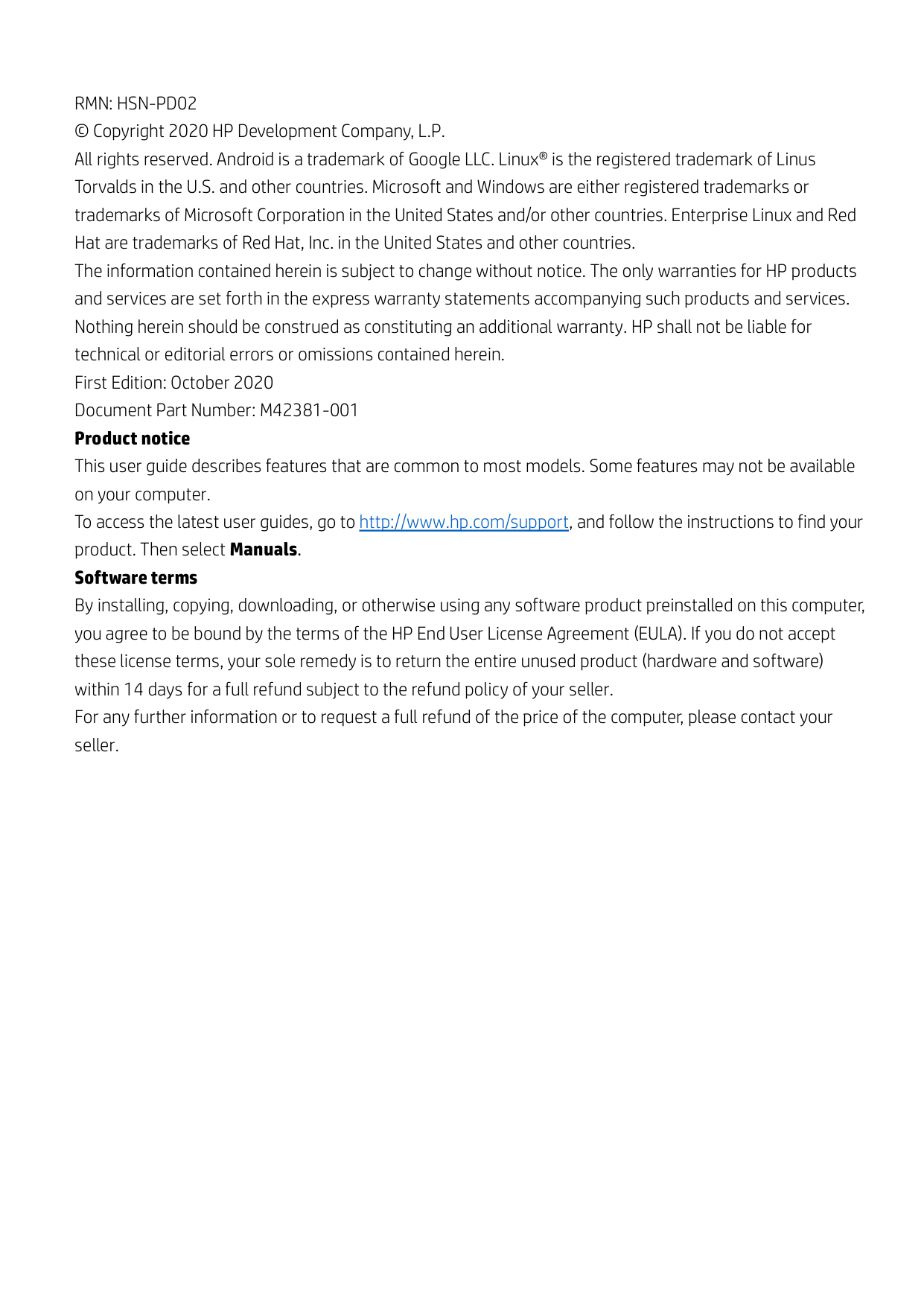
RMN: HSN-PD02 © Copyright 2020 HP Development Company, L.P. All rights reserved. Android is a trademark of Google LLC. Linux® is the registered trademark of Linus Torvalds in the U.S. and other countries. Microsoft and Windows are either registered trademarks or trademarks of Microsoft Corporation in the United States and/or other countries. Enterprise Linux and Red Hat are trademarks of Red Hat, Inc. in the United States and other countries. The information contained herein is subject to change without notice. The only warranties for HP products and services are set forth in the express warranty statements accompanying such products and services. Nothing herein should be construed as constituting an additional warranty. HP shall not be liable for technical or editorial errors or omissions contained herein. First Edition: October 2020 Document Part Number: M42381-001 Product notice This user guide describes features that are common to most models. Some features may not be available on your computer. To access the latest user guides, go to http://www.hp.com/support, and follow the instructions to find your product. Then select Manuals. Software terms By installing, copying, downloading, or otherwise using any software product preinstalled on this computer, you agree to be bound by the terms of the HP End User License Agreement (EULA). If you do not accept these license terms, your sole remedy is to return the entire unused product (hardware and software) within 14 days for a full refund subject to the refund policy of your seller. For any further information or to request a full refund of the price of the computer, please contact your seller.
|Contents
1. Introduction...........................................................................................................................................................4
1.1. Use and disclosure ............................................................................................................................................4
2. Specification..........................................................................................................................................................5
2.1. General specification ........................................................................................................................................5
2.2. Electrical specification ......................................................................................................................................6
2.2.1. Block diagram........................................................................................................................................6
2.2.2. Power request .......................................................................................................................................6
2.2.3. Communication interface ....................................................................................................................6
2.2.4. Mechanical drawing..............................................................................................................................7
3. Software ................................................................................................................................................................8
3.1. Supported operating systems ........................................................................................................................8
3.2. Command list .....................................................................................................................................................9 3.2.1. ULTIMATE command mode .................................................................................................................9
4. Appendix............................................................................................................................................................. 11
4.1. Table 1 Codepage list..................................................................................................................................... 11
4.2. Table 2 International character set ............................................................................................................. 11
| |---|
1. Introduction
#### 1.1. Use and disclosure
This document shall apply only to the product(s) identified herein. This technical specification defines the requirements for HP Engage 3x16 Pole Display, using a USB bus power interface. The supplier is requested to implement a change control process for tracking all changes, including revision history. Devices shall be labeled and identifiable based on the revision. After the release to production, all changes must be communicated as an Engineering Change.
2. Specification
|Item|HSN-PD02| |---|---| |Display Method|Vacuum Fluorescent Display (Blue-green)| |Resolution|256 × 64 Dots| |Display Mode|Alphanumeric:
32 digits × 3 lines
32 digits × 4 lines
| |Character Dot Matrix|8 × 16 dots for single-byte characters 16 × 16 dots for double-bytes characters| |Dot Size|0.49 (W) × 0.48 (H) mm| |Dot Pitch|0.64 (H) × 0.63 (V) mm| |Viewing Direction|Maximum 90°| |Average Brightness|600 cd/m2| |Character type|Alphanumeric and Compound (2-Bytes) Words| |Character size|Font 8 × 16 – 4.97 (W) × 9.93 (H) mm Font 16 × 16 – 10.09 (W) × 9.93 (H)mm| |User Define Character|96 characters| |Viewing Area|163.69(W)X40.17 (H) mm| |Module Dimension|230 (L) × 66.5 (W) × 26 (D) mm| |Top Head Dimension|240 (L) × 95 (W) × 49 (D) mm| |Viewing Angle|Maximum 90°| |Net Weight|Approximately 1650 grams| |Commands Mode|UITIMATE|
|Language|US English, Japanese| |Interface|USB| |Baud rate|Direct connection 9600 or 19200 bps| |MTBF|30,000 hours| |Power Consumption|12 V – 400 mA| |EMC / Safety standards|CB, VCCI|
#### 2.2. Electrical specification
|Voltage (typical): 12 VDC +/- 10%| |---| |Current consumption (typical): 400 mA|


VFD


Control & Data


MCU
EEPROM

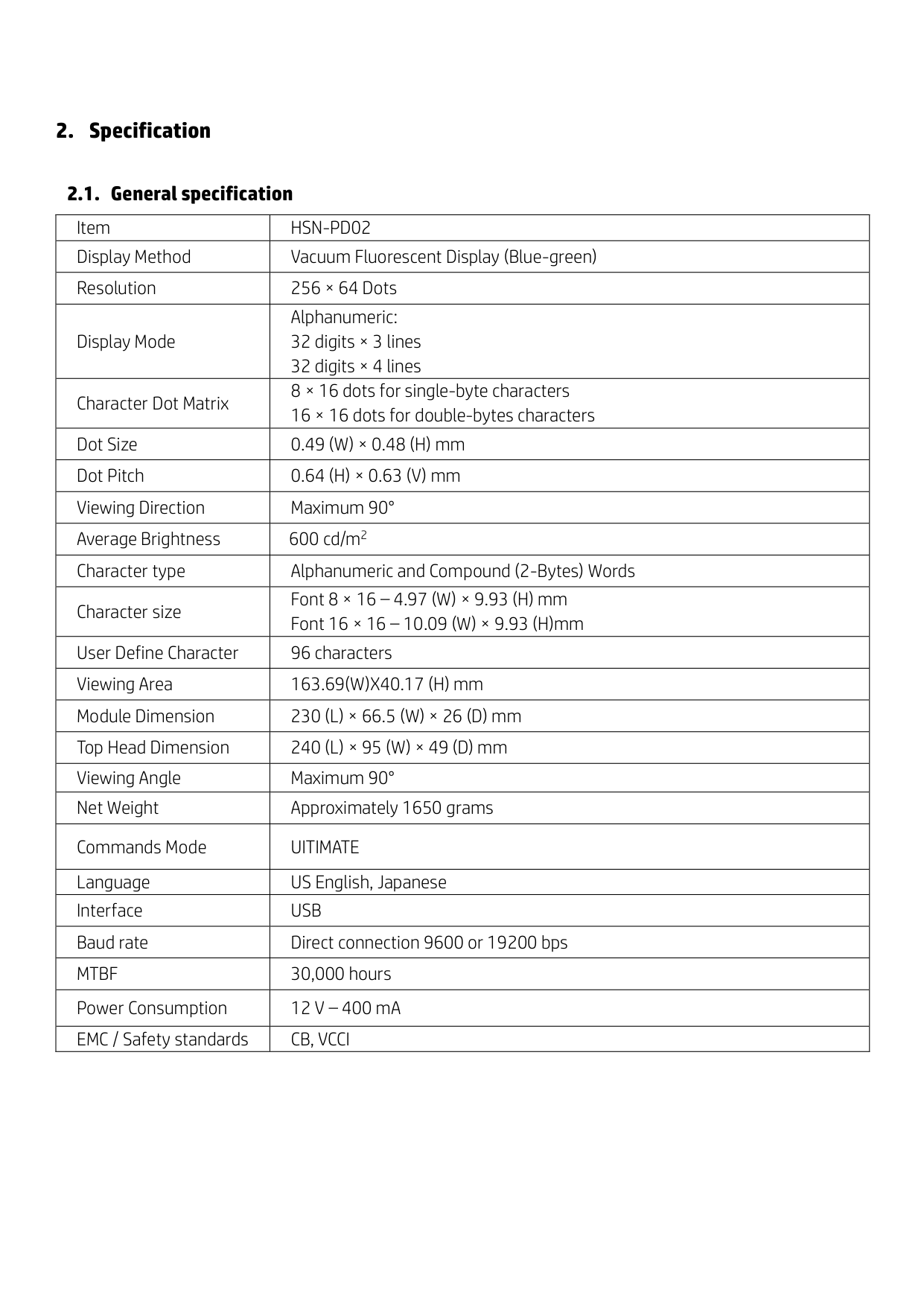


Power
USB UART


USB INPUT DC INPUT
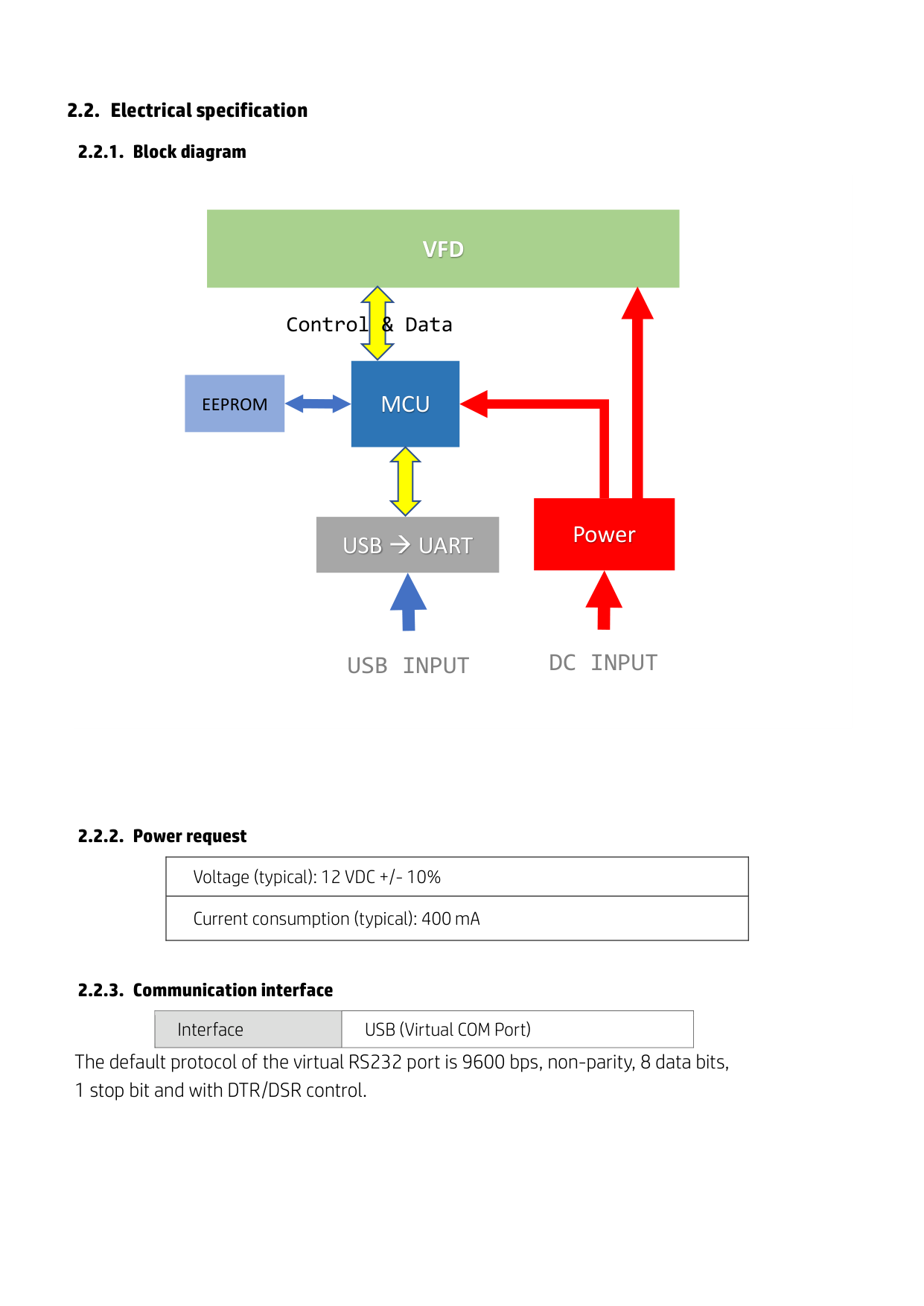
|Interface|USB (Virtual COM Port)|
|---|---|
The default protocol of the virtual RS232 port is 9600 bps, non-parity, 8 data bits, 1 stop bit and with DTR/DSR control.
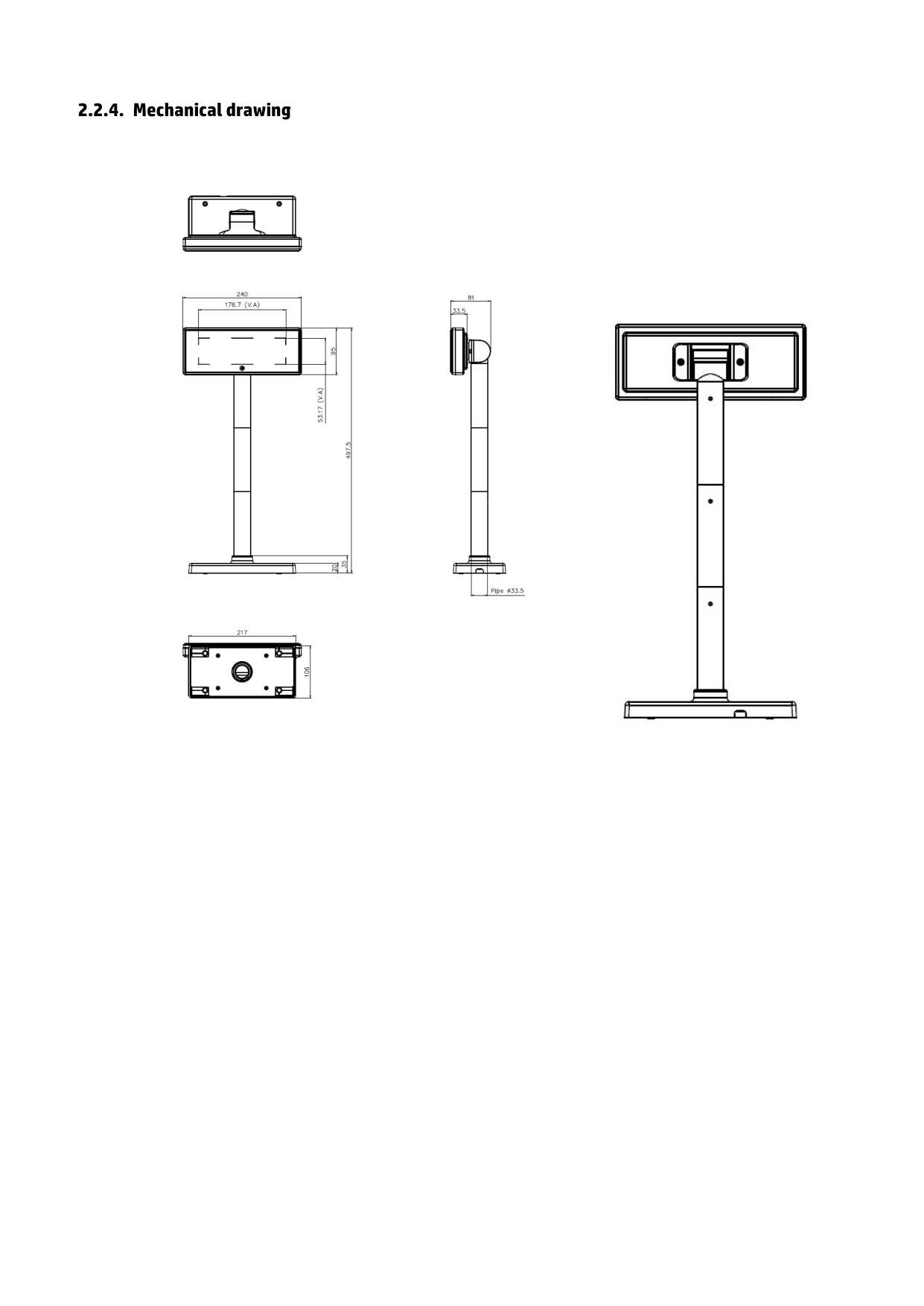
##### 2.2.4. Mechanical drawing


3. Software
#### 3.1. Supported operating systems
##### Windows
Windows® 10
Windows 8.1/8 Pro (64 and 32 bit)
Windows Embedded 8.1/8 Industry
Windows Embedded POSReady 7 (64 and 32 bit)
Windows 7 Professional (64 and 32 bit)
Windows Embedded POSReady 2009
##### Linux
Red Hat® Enterprise Linux®/CentOS 6 (64 and 32 bit) and newer
Suse Linux® Enterprise Point of Service 11 (64 or 32 bit) and newer
Ubuntu 12.04 LTS (64 or 32 bit) and newer
##### Android
Android™ 4.0 and newer
#### 3.2. Command list
3.2.1. ULTIMATE command mode
|Command|Hex|Function Description| |---|---|---| |HT|09|Move cursor right| |BS|08|Move cursor left| |US LF|1F 0A|Move cursor up| |LF|0A|Move cursor down| |US CR|1F 0D|Move cursor to right-most position| |CR|0D|Move cursor to left-most position| |HOM|0B|Move cursor to home position| |US B|1F 42|Move cursor to bottom position| |US $ x y|1F 24 x y|Move cursor to specified position 1≦x(column)≦20 ; 1≦y(row)≦2| |US C n|1F 43 n|Select/cancel cursor display n=0, canceled ; n=1, selected| |CLR|0C|Clear display screen| |CAN|18|Clear cursor line| |US X n|1F 58 n|Brightness adjustment 1 ≦ n ≦ 4| |US E n|1F 45 n|Blink display screen 0≦n≦255 (n*50msec) ON / (n*50msec) OFF n=0, blinking is canceled n=255, display is turned off| |ESC @|1B 40|Initialize display| |ESC t n|1B 74 n|Select character code table (see Table 1)| |ESC R n|1B 52 n|Select international character set (see Table 2)| |US r n|1F 72 n|Select/cancel reverse character n=0, canceled; n=1, selected| |US MD1|1F 01|Specify overwrite mode|
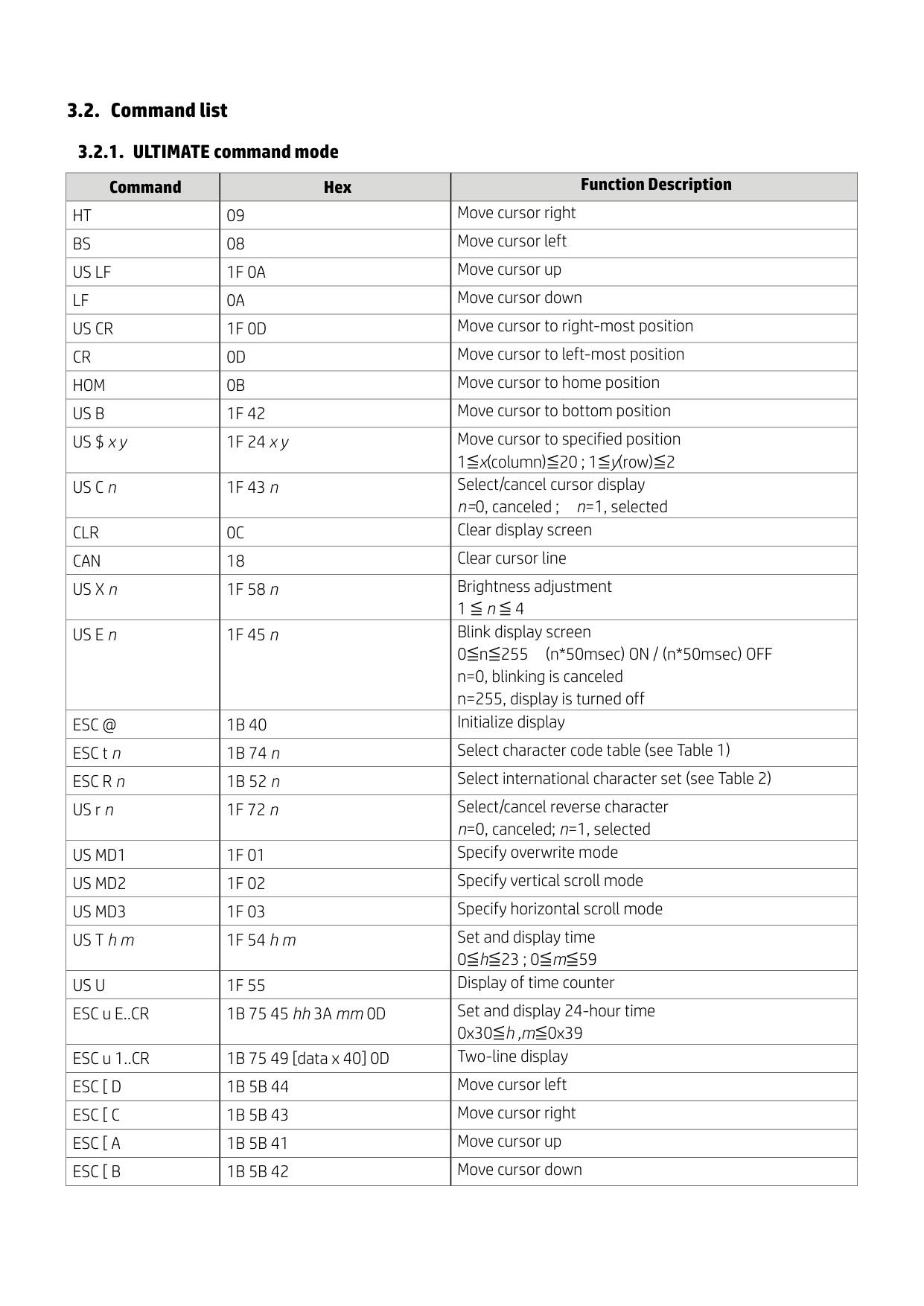
|US MD2|1F 02|Specify vertical scroll mode| |US MD3|1F 03|Specify horizontal scroll mode| |US T h m|1F 54 h m|Set and display time 0≦h≦23 ; 0≦m≦59| |US U|1F 55|Display of time counter| |ESC u E..CR|1B 75 45 hh 3A mm 0D|Set and display 24-hour time 0x30≦h ,m≦0x39| |ESC u 1..CR|1B 75 49 [data x 40] 0D|Two-line display| |ESC [ D|1B 5B 44|Move cursor left| |ESC [ C|1B 5B 43|Move cursor right| |ESC [ A|1B 5B 41|Move cursor up| |ESC [ B|1B 5B 42|Move cursor down|
|ESC [ H|1B 5B 48|Move cursor to home position| |---|---|---| |ESC [ L|1B 5B 4C|Move cursor to left-most position| |ESC [ R|1B 5B 52|Move cursor to right-most position| |ESC [ K|1B 5B 4B|Move cursor to bottom position| |ESC l x y|1B 6C x y|Move cursor to specified position 1≦x≦20, y=1,2| |ESC u A..CR|1B 75 41 [data x 32] 0D|Display data on line 1| |ESC u B..CR|1B 75 42 [data x 32] 0D|Display data on line 2| |ESC u C..CR|1B 75 43 [data x 32] 0D|Display data on line 3| |GS r A|1D 72 41 [data x 96] 0D|Marquee on line 1|
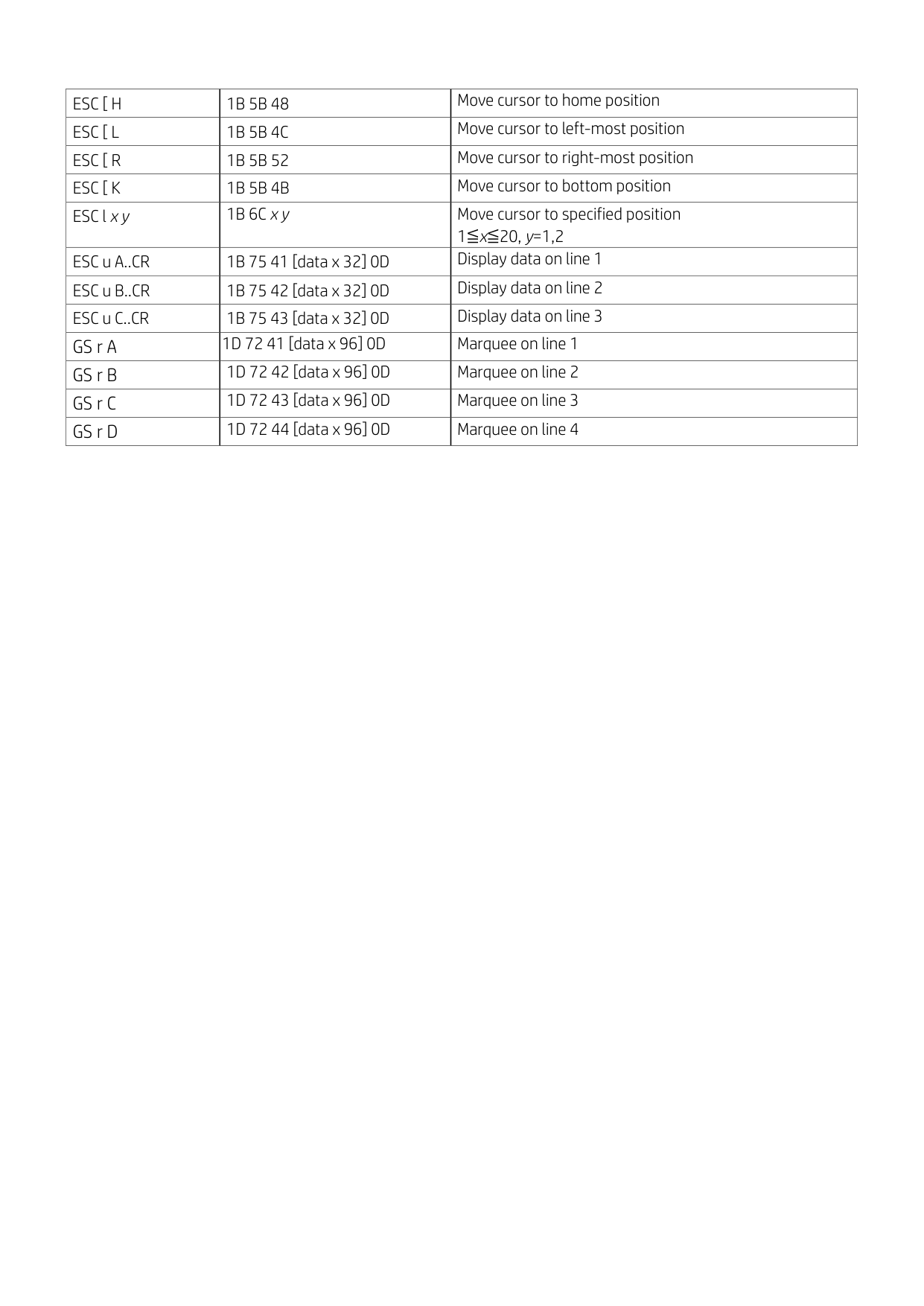
|GS r B|1D 72 42 [data x 96] 0D|Marquee on line 2| |GS r C|1D 72 43 [data x 96] 0D|Marquee on line 3| |GS r D|1D 72 44 [data x 96] 0D|Marquee on line 4|
4. Appendix
|Page|Page|Codepage|Language
| |---|---|---|---| |Dec|Hex|Codepage|Language
| |0|0x00|PC437|USA, Standard Europe| |1|0x01|Katakana|Japanese| |244|0xF4|CP932|Japanese Shift JIS|
|Index n|Index n|Country|ASCII code|ASCII code|ASCII code|ASCII code|ASCII code|ASCII code|ASCII code|ASCII code|ASCII code|ASCII code|ASCII code|ASCII code| |---|---|---|---|---|---|---|---|---|---|---|---|---|---|---|
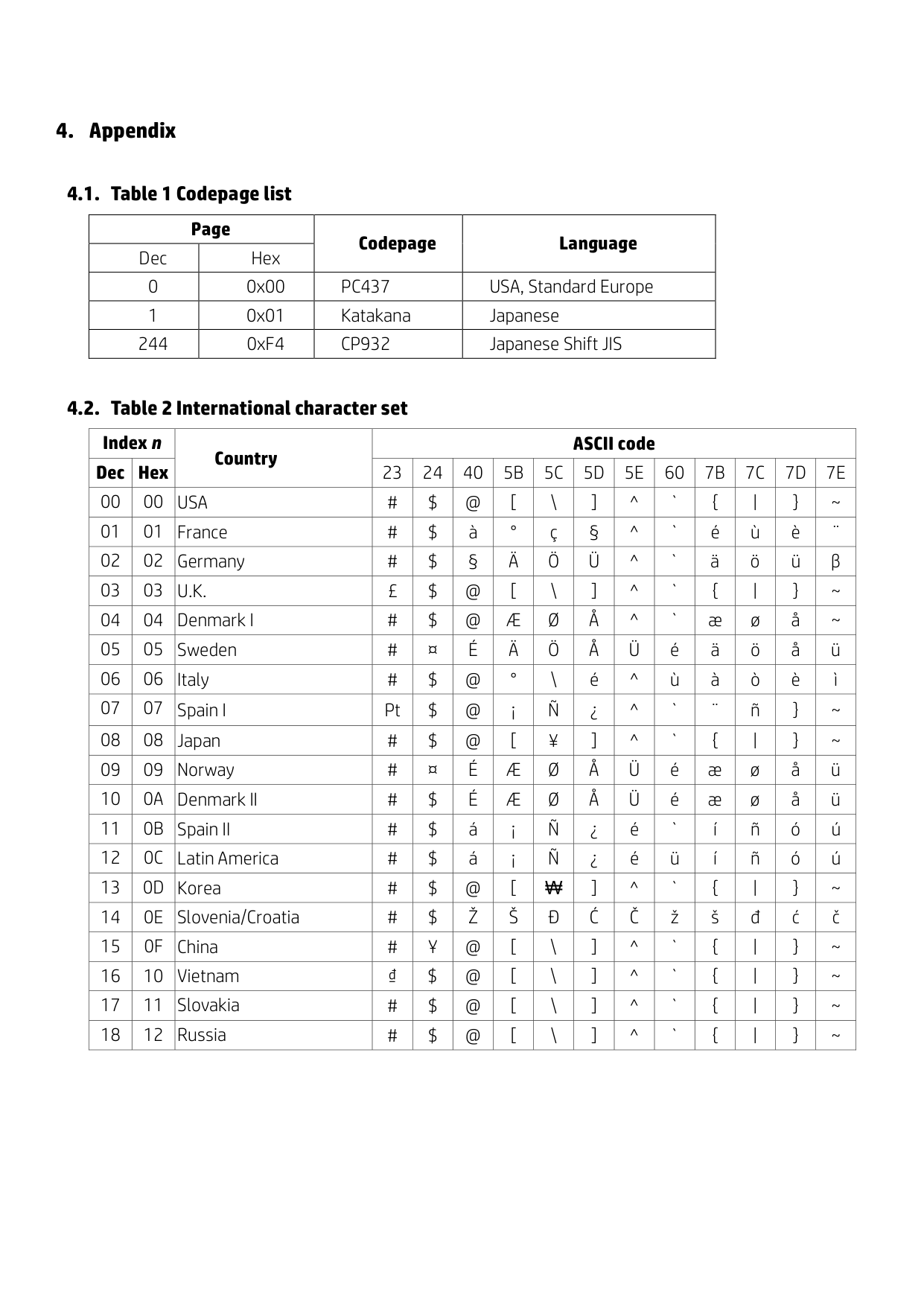
|Dec|Hex|Country|23|24|40|5B|5C|5D|5E|60|7B|7C|7D|7E| |00|00|USA|#|$|@|[|\|]|^|`|{|||}|~| |01|01|France|#|$|à|°|ç|§|^|`|é|ù|è|¨| |02|02|Germany|#|$|§|Ä|Ö|Ü|^|`|ä|ö|ü|β| |03|03|U.K.|£|$|@|[|\|]|^|`|{|||}|~| |04|04|Denmark I|#|$|@|Æ|Ø|Å|^|`|æ|ø|å|~| |05|05|Sweden|#|¤|É|Ä|Ö|Å|Ü|é|ä|ö|å|ü| |06|06|Italy|#|$|@|°|\|é|^|ù|à|ò|è|ì| |07|07|Spain I|Pt|$|@|¡|Ñ|¿|^|`|¨|ñ|}|~| |08|08|Japan|#|$|@|[|¥|]|^|`|{|||}|~| |09|09|Norway|#|¤|É|Æ|Ø|Å|Ü|é|æ|ø|å|ü| |10|0A|Denmark II|#|$|É|Æ|Ø|Å|Ü|é|æ|ø|å|ü| |11|0B|Spain II|#|$|á|¡|Ñ|¿|é|`|í|ñ|ó|ú| |12|0C|Latin America|#|$|á|¡|Ñ|¿|é|ü|í|ñ|ó|ú| |13|0D|Korea|#|$|@|[|₩|]|^|`|{|||}|~| |14|0E|Slovenia/Croatia|#|$|Ž|Š|Đ|Ć|Č|ž|š|đ|ć|č| |15|0F|China|#|Ұ|@|[|\|]|^|`|{|||}|~| |16|10|Vietnam|₫|$|@|[|\|]|^|`|{|||}|~| |17|11|Slovakia|#|$|@|[|\|]|^|`|{|||}|~| |18|12|Russia|#|$|@|[|\|]|^|`|{|||}|~|