
Ask AI
— answers from the official manualAnswers from the official manual.
Common questions
Common Questions
29 totalHow do I configure connectivity settings for my EliteBook Folio 9470m?
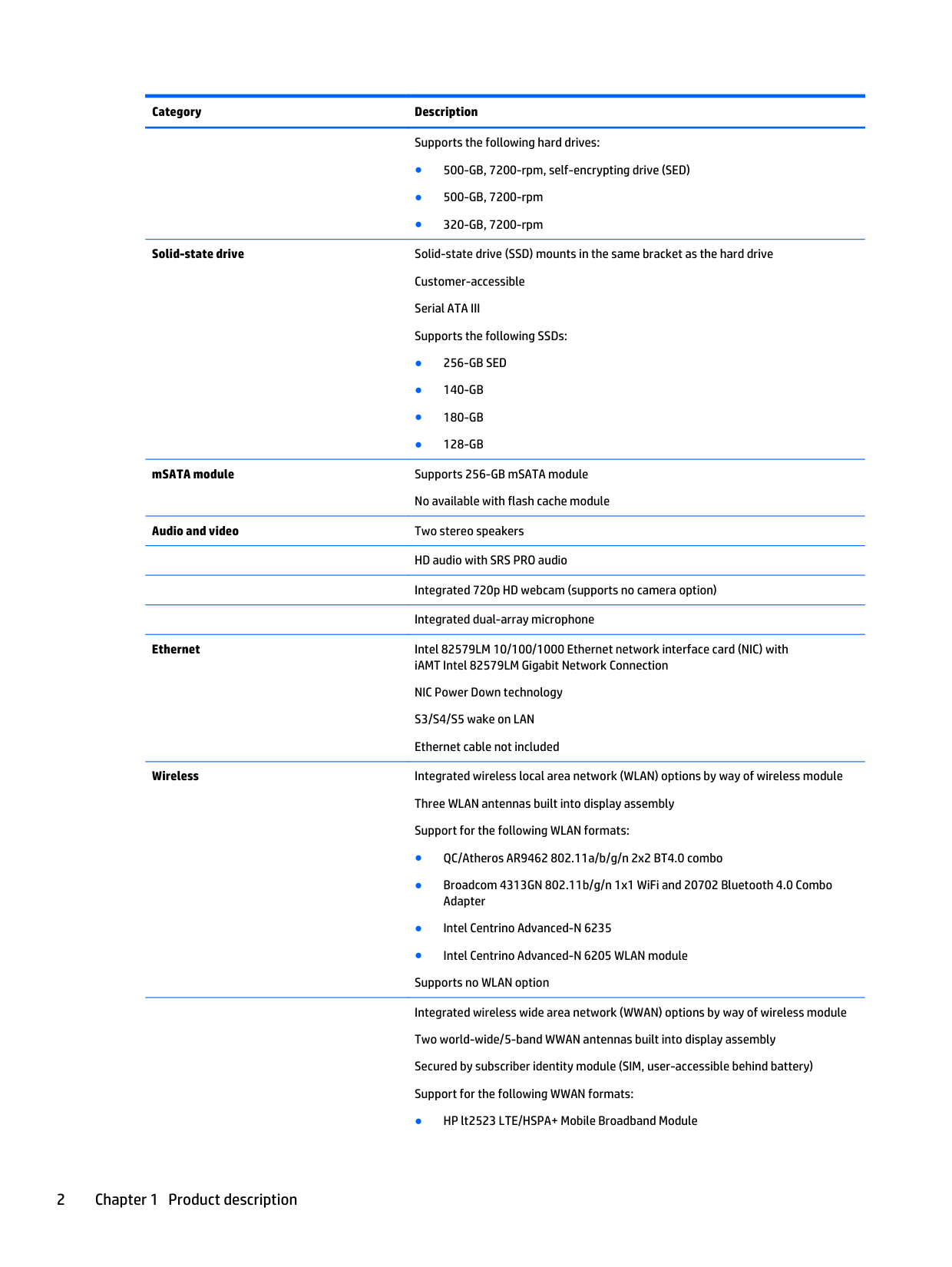
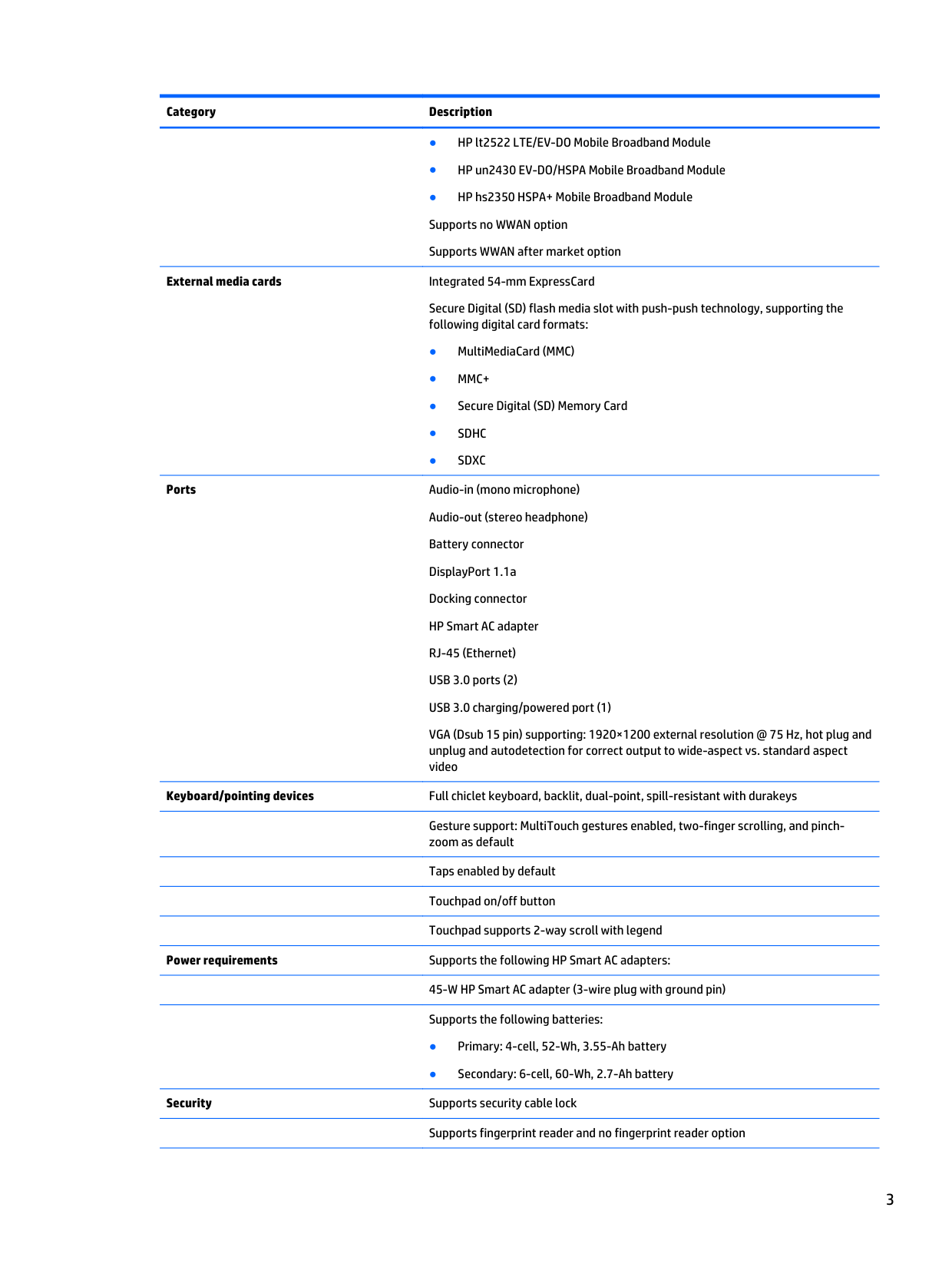
Use HP Connection Manager to integrate mobile broadband activation and ease of Internet connectivity management with a single UI that provides access controls for managing various wireless devices. This tool manages battery life efficiently by enabling/disabling specific wireless components as needed.
How do I reset the HP Elitebook Folio 9470m to factory defaults?
Utilize the preinstalled HP Recovery Manager, accessible via F11 at boot, which retains and allows you to restore a factory image including OS, drivers, utilities, and applications stored in a partition on your internal drive. (Page 3)
What security features are included with my EliteBook Folio 9470m?
HP includes built-in security solutions designed to integrate optimally with hardware, providing robust defense. This involves tools like Client Security Manager and Device Access Manager for comprehensive protection.
How do I manage mobile broadband costs on my Elitebook Folio 9470m?
HP Connection Manager allows users to better manage notebook WWA N devices, facilitating a reduction in 3G mobile broadband costs by integrating it with Internet connectivity management through a single user interface.
How do I access my pre-installed software on the HP EliteBook Folio?
Launch 'Software Setup' from the Start menu under All Programs to easily install multiple software components by selecting and clicking 'Next'. This method expedites the process of loading your system’s suite of software packages.
What does it mean when the battery light is blinking amber on the HP EliteBook 9470m?
A blinking amber battery light means a battery that is the only available power source has reached a low battery level. When the battery reaches a critical battery level, the battery light begins blinking rapidly. When the battery light is solid amber, the computer is connected to external power and the battery is charged from 0 to 90 percent. (Page 20)
Show 23 more questions
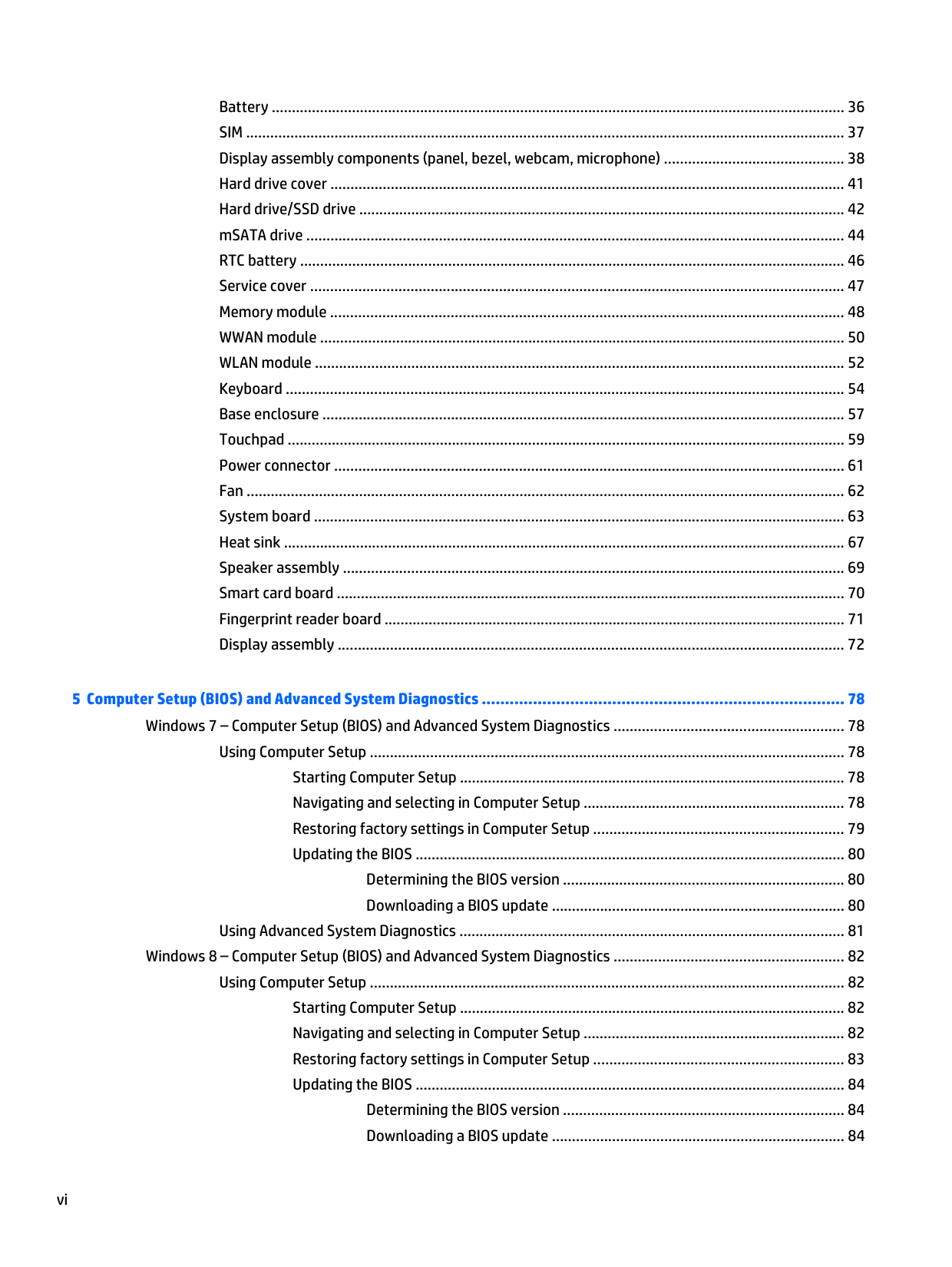
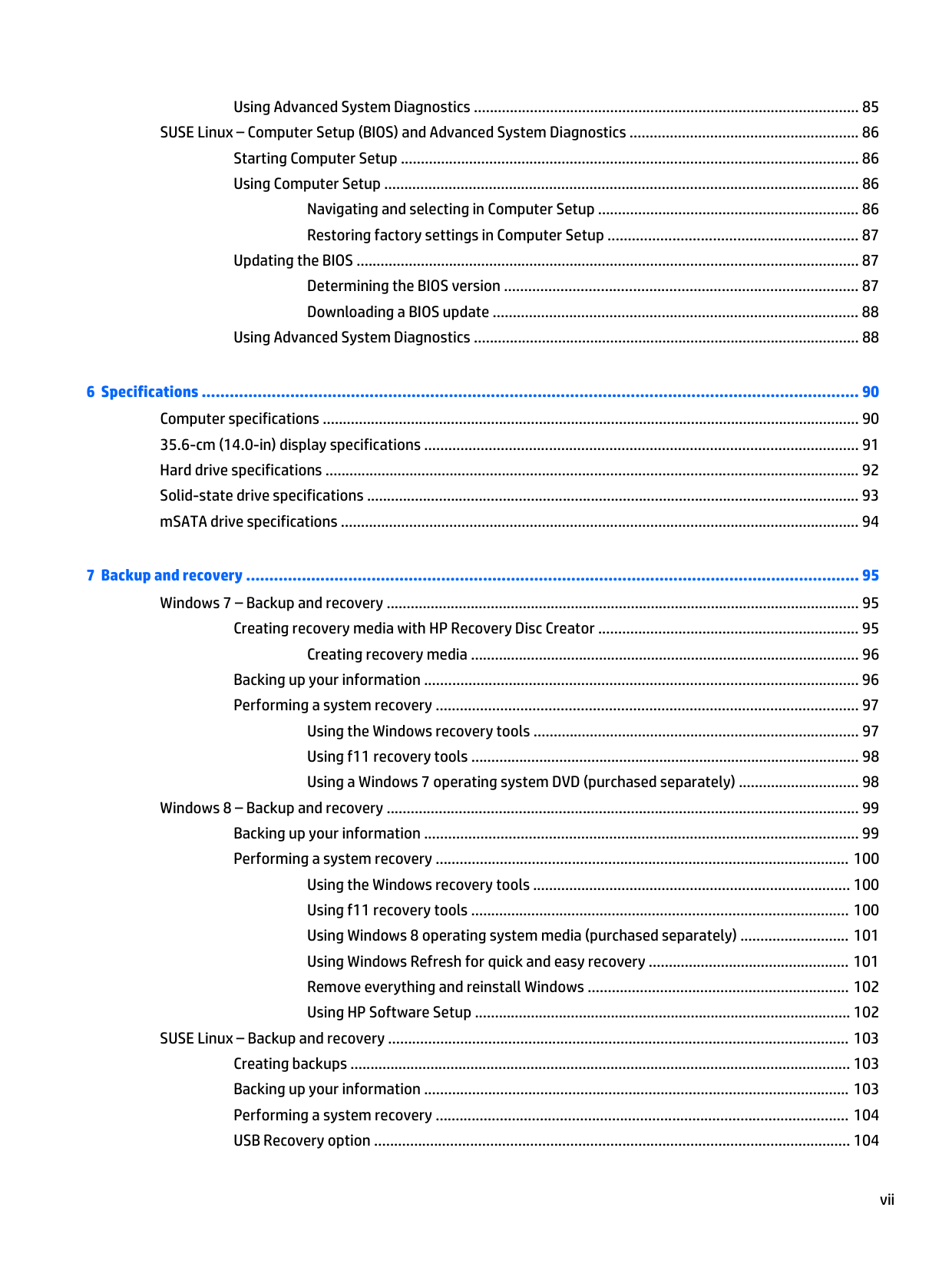
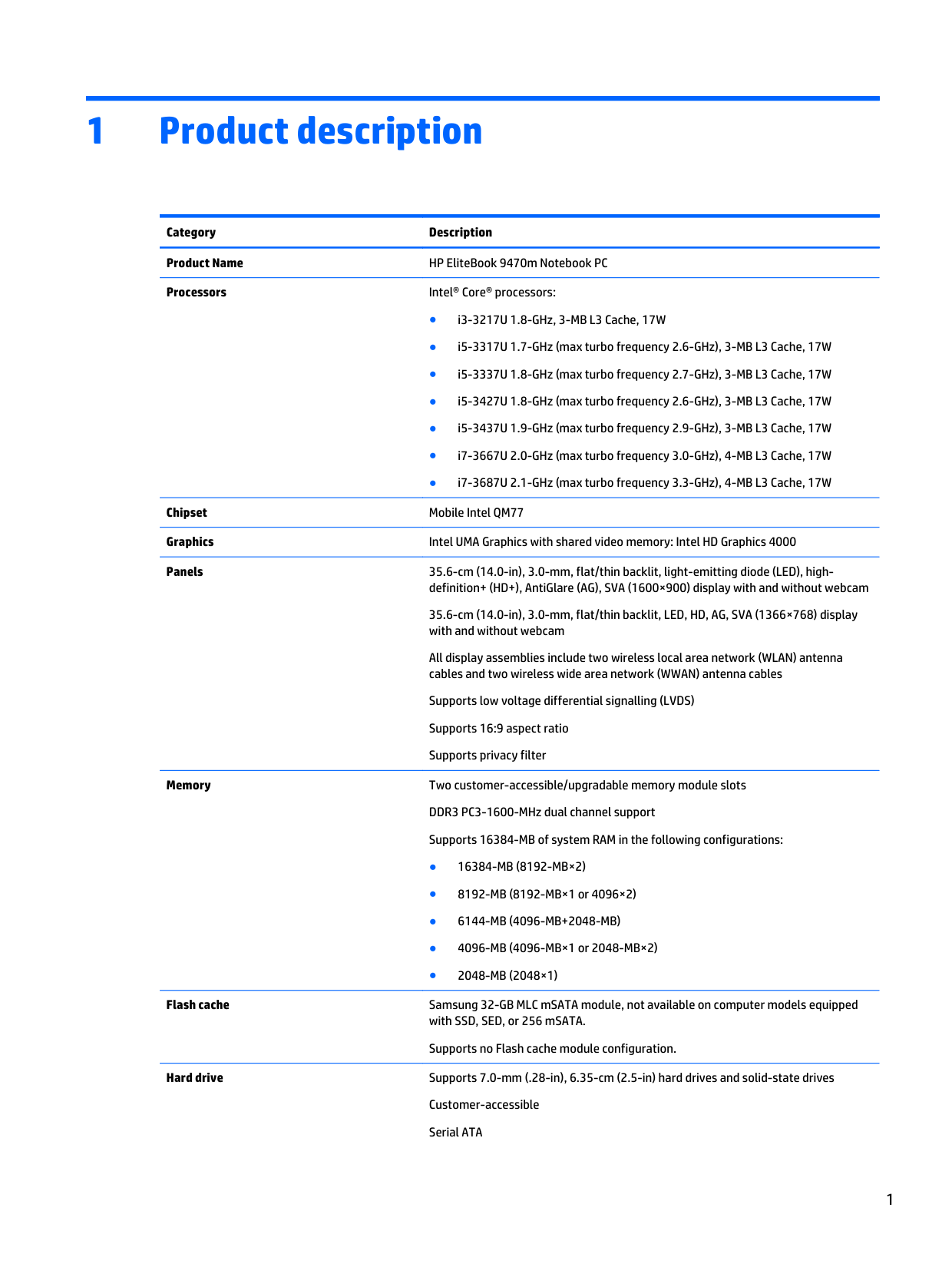
What is the maximum amount of RAM supported by the HP EliteBook 9470m, and what configurations are available?
Which processors are available in the HP EliteBook 9470m?
What tools do I need to perform hardware removal and replacement on the HP EliteBook 9470m?
How do I remove the battery from the HP EliteBook 9470m?
What components can be replaced by the end user on the HP EliteBook 9470m?
What display options are available on the HP EliteBook 9470m?
How do I safely handle and remove the hard drive to avoid damage or data loss?
How do I safely handle electrostatic discharge (ESD) when removing or installing internal components?
What is the procedure for factory resetting the HP EliteBook 9470m Notebook PC?
How do I replace the battery on my HP EliteBook 9470m Notebook PC?
How do I replace a hard drive in my HP EliteBook 9470m Notebook PC?
What safety precautions should I take while handling memory modules?
How do I access and replace internal components without damaging parts?
What is the procedure for accessing the WLAN antenna transceivers?
What safety precautions should I follow to prevent overheating the HP EliteBook 9470m?
How do I force shut down the HP EliteBook 9470m if it stops responding?
What operating systems are preinstalled on the HP EliteBook Folio 9470m?
How can I update the drivers on my HP EliteBook Folio 9470m?
What software is pre-installed on the HP Elitebook Folio 9470m?
Can I install other versions of Windows on my HP EliteBook Folio 9470m?
Where is the SIM card located in my HP EliteBook 9470m, and how do I remove it?
What are the specifications for CPU models available on HP EliteBook 9470m Notebook PC?
How can I find recovery tools in my HP EliteBook 9470m Notebook PC?
Full Manual
11 pages
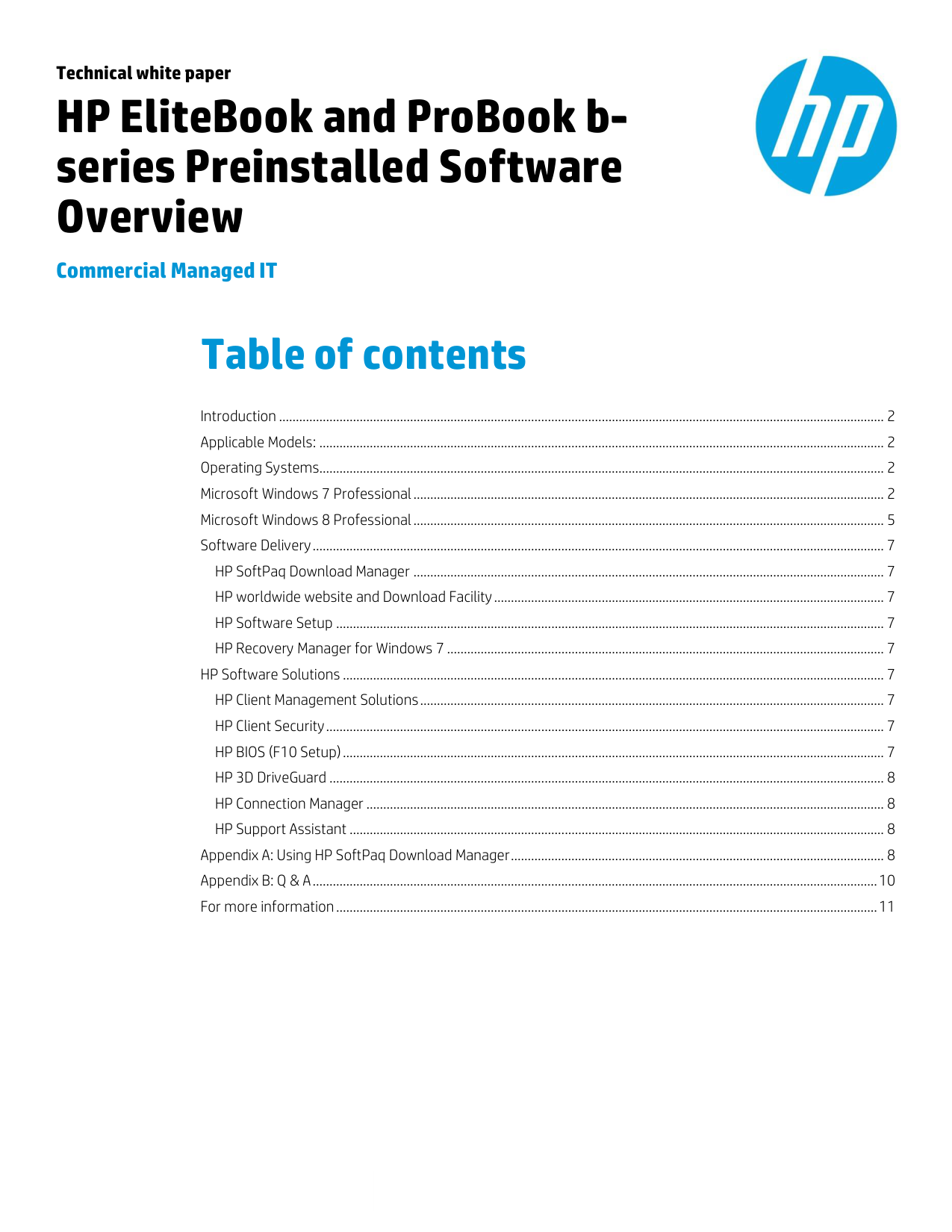
Technical white paper
HP EliteBook and ProBook bseries Preinstalled Software Overview
Commercial Managed IT

Table of contents
Introduction .................................................................................................................................................................................... 2 Applicable Models: ........................................................................................................................................................................ 2 Operating Systems........................................................................................................................................................................ 2
HP SoftPaq Download Manager ............................................................................................................................................ 7 HP worldwide website and Download Facility.................................................................................................................... 7 HP Software Setup ................................................................................................................................................................... 7 HP Recovery Manager for Windows 7 .................................................................................................................................. 7
HP Software Solutions ................................................................................................................................................................. 7 HP Client Management Solutions.......................................................................................................................................... 7 HP Client Security...................................................................................................................................................................... 7 HP BIOS (F10 Setup) ................................................................................................................................................................. 7 HP 3D DriveGuard ..................................................................................................................................................................... 8 HP Connection Manager .......................................................................................................................................................... 8 HP Support Assistant ............................................................................................................................................................... 8
Introduction
The purpose of this white paper is to present both an overview of the preinstalled software with operating system support and a brief description of major software components and features. This white paper covers the HP EliteBook Business Notebook models listed below.
This document is intended for HP personnel and customers who need information about the software provided on the HP EliteBook series preinstall images.
Target audience: This document is intended for HP personnel and customers who need information about the software provided on the HP EliteBook series preinstall images.
Applicable Models:
Operating Systems
The following operating systems are available pre-installed from HP:
The following operating systems are supported by HP with drivers on the web:
– Service Pack 1
– Service Pack 3
Microsoft Windows 7 Professional
Name 2170p 2570p 6470b/6570b/ 8470p/8570p
9470m
Adobe Flash Player 11.2.202.228 A 11.2.202.228 A 11.2.202.228 A 11.2.202.228 A
Alcor Micro Smart Card Reader Driver 1.7.28.0 A 1.7.28.0 A 1.7.28.0 A 1.7.31.0
ArcSoft Webcam Sharing Manager N/A 2.0.0.38 A N/A N/A

AMD Video Driver N/A N/A 8.951.6 A N/A
Atheros AR3012 and AR9462 Bluetooth 4.0+HS Driver
Atheros AR9485 802.11b/g/n Wireless LAN Driver
Broadcom Bluetooth Software 6.5 K 6.5 K 6.5 K 6.5 K
Broadcom WLAN Driver and Utility Package
5.100.82.130 A 5.100.82.130 A 5.100.82.130 A 5.100.82.130 A
Computrace for HP ProtectTools 7.0.0.10 A 7.0.0.10 A 7.0.0.10 A N/A
Cyberlink Media Suite 10.0.1.2106 A N/A 10.0.1.2106 A 10.0.1.2001 A
Cyberlink PhotoDirector 2.0.1.3317 A N/A 2.0.1.3317 A 2.0.1.3223 A
Cyberlink Power2Go 8.0.1.1924 A N/A 8.0.1.1924 A N/A
Cyberlink PowerDirector 10.0.2.2531 A N/A 10.0.2.2531 A 10.0.1.2006 A
Cyberlink PowerDVD 10.0.6.5004 A N/A 10.0.6.5004 A 10.0.6.4507 A
Cyberlink YouCam BE 4.1.1.3423 A N/A 4.1.1.3423 A 4.1.1.3231 A
Device Access Manager for HP ProtectTools
7.1.2.0 A 7.0.0.4 A 7.1.2.0 A 7.1.1.0
Drive Encryption for HP ProtectTools 7.0.34.31058 A 7.0.34.31058 A 7.0.28.30376 A 7.0.39.32378 A
Embedded Security for HP ProtectTools
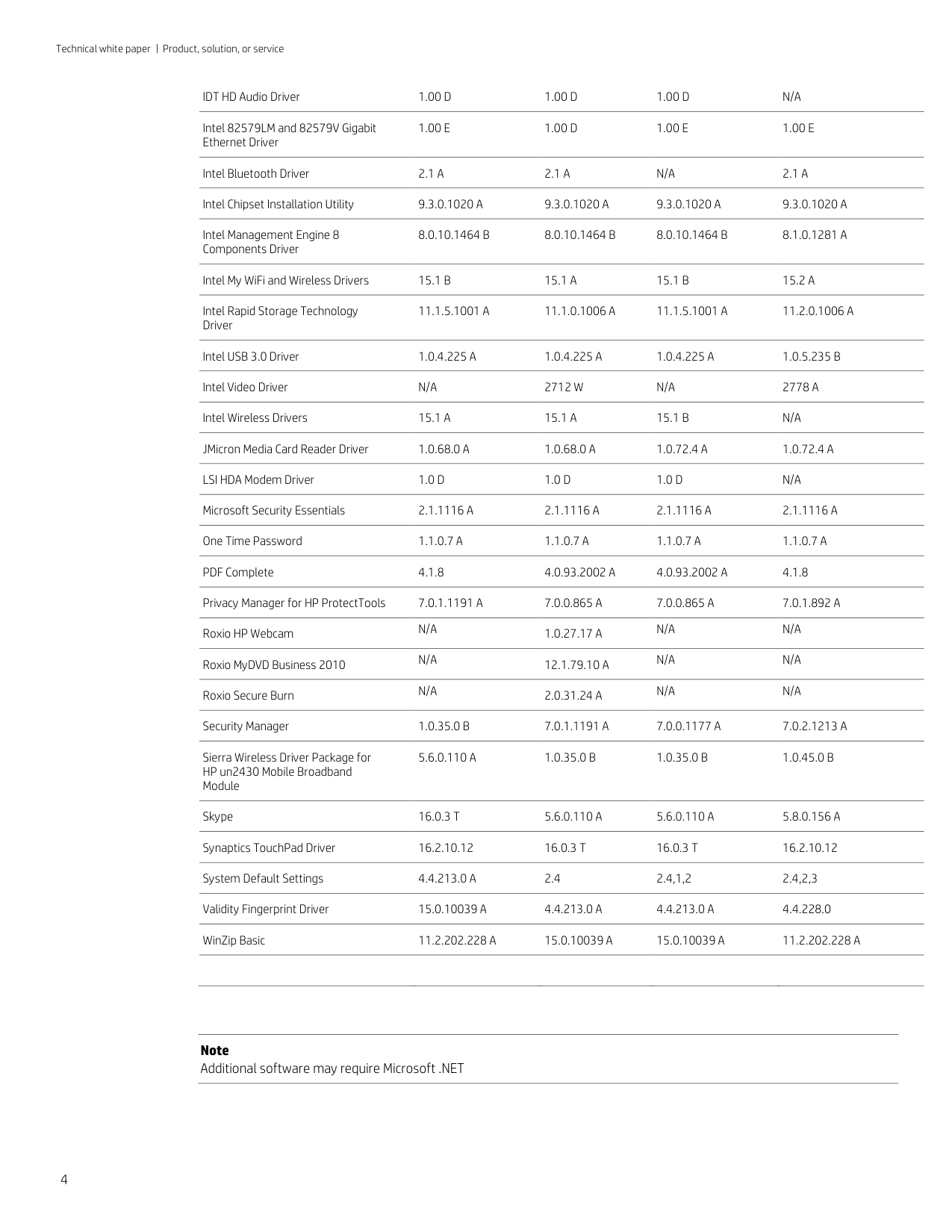
Ericsson Mobile Broadband Drivers 7.2.2.0 A 7.2.0.12 B 7.2.2.0 A 7.2.2.0 B
Essential System Updates N/A 2.6 N/A N/A
Evernote N/A N/A N/A 4.5.7.7146
Face Recognition for HP ProtectTools
File Sanitizer for HP ProtectTools 7.0.0.6 A 7.0.0.6 A 7.0.0.5 A 7.0.2.2 A
IDT HD Audio Driver 1.00 D 1.00 D 1.00 D N/A
Intel 82579LM and 82579V Gigabit Ethernet Driver
1.00 E 1.00 D 1.00 E 1.00 E
Intel Bluetooth Driver 2.1 A 2.1 A N/A 2.1 A
Intel Chipset Installation Utility 9.3.0.1020 A 9.3.0.1020 A 9.3.0.1020 A 9.3.0.1020 A
Intel Management Engine 8 Components Driver
8.0.10.1464 B 8.0.10.1464 B 8.0.10.1464 B 8.1.0.1281 A
Intel My WiFi and Wireless Drivers 15.1 B 15.1 A 15.1 B 15.2 A
Intel Rapid Storage Technology Driver
11.1.5.1001 A 11.1.0.1006 A 11.1.5.1001 A 11.2.0.1006 A
Intel USB 3.0 Driver 1.0.4.225 A 1.0.4.225 A 1.0.4.225 A 1.0.5.235 B
Intel Video Driver N/A 2712 W N/A 2778 A
Intel Wireless Drivers 15.1 A 15.1 A 15.1 B N/A
JMicron Media Card Reader Driver 1.0.68.0 A 1.0.68.0 A 1.0.72.4 A 1.0.72.4 A
LSI HDA Modem Driver 1.0 D 1.0 D 1.0 D N/A
Microsoft Security Essentials 2.1.1116 A 2.1.1116 A 2.1.1116 A 2.1.1116 A
One Time Password 1.1.0.7 A 1.1.0.7 A 1.1.0.7 A 1.1.0.7 A
PDF Complete 4.1.8 4.0.93.2002 A 4.0.93.2002 A 4.1.8
Privacy Manager for HP ProtectTools 7.0.1.1191 A 7.0.0.865 A 7.0.0.865 A 7.0.1.892 A
Roxio HP Webcam N/A 1.0.27.17 A N/A N/A
Roxio MyDVD Business 2010 N/A 12.1.79.10 A N/A N/A
Roxio Secure Burn N/A 2.0.31.24 A N/A N/A
Security Manager 1.0.35.0 B 7.0.1.1191 A 7.0.0.1177 A 7.0.2.1213 A
Sierra Wireless Driver Package for HP un2430 Mobile Broadband Module
5.6.0.110 A 1.0.35.0 B 1.0.35.0 B 1.0.45.0 B
Skype 16.0.3 T 5.6.0.110 A 5.6.0.110 A 5.8.0.156 A
Synaptics TouchPad Driver 16.2.10.12 16.0.3 T 16.0.3 T 16.2.10.12
System Default Settings 4.4.213.0 A 2.4 2.4,1,2 2.4,2,3
Validity Fingerprint Driver 15.0.10039 A 4.4.213.0 A 4.4.213.0 A 4.4.228.0
WinZip Basic 11.2.202.228 A 15.0.10039 A 15.0.10039 A 11.2.202.228 A
Note Additional software may require Microsoft .NET
Microsoft Windows 8 Professional
Name 2170p 2570p 6470b/6570b/ 8470p/8570p
9470m
Adobe Flash Player 11.2.202.228 A N/A 11.2.202.228 A N/A
Alcor Micro Smart Card Reader Driver 1.7.28.0 A 1.7.31.0 A 1.7.28.0 A 1.7.31.0 A
AMD Video Driver N/A N/A 8.951.6 A N/A
Atheros AR3012 and AR9462 Bluetooth 4.0+HS Driver
Atheros AR9485 802.11b/g/n Wireless LAN Driver
Broadcom Bluetooth Software 6.5 K 12.0.0.2100 F 6.5 K 12.0.0.2100 F
Broadcom WLAN Driver and Utility Package
5.100.82.130 A 6.30.59.49 F 5.100.82.130 A 6.30.59.49 F
Computrace for HP ProtectTools 7.0.0.10 A 7.0.0.10 A 7.0.0.10 A 7.0.0.10 A
Cyberlink Media Suite 10.0.1.2106 A 10.0.1.2027 A 10.0.1.2106 A 10.0.1.2027 A
Cyberlink PhotoDirector 2.0.1.3317 A 2.0.1.3109 A 2.0.1.3317 A 2.0.1.3109 A
Cyberlink Power2Go 8.0.1.1924 A 8.0.1.1924 A 8.0.1.1924 A N/A
Cyberlink PowerDirector 10.0.2.2531 A 10.0.1.2020 A 10.0.2.2531 A 10.0.1.2020 A
Cyberlink PowerDVD 10.0.6.5004 A 10.0.6.4506 A 10.0.6.5004 A 10.0.6.4506 A
Cyberlink YouCam BE 4.1.1.3423 A 4.1.1.3231 A 4.1.1.3423 A 4.1.1.3231 A
Device Access Manager for HP ProtectTools
7.1.2.0 A 7.1.1.0 A 7.1.2.0 A 7.1.1.0 A
Drive Encryption for HP ProtectTools 7.0.34.31058 A N/A 7.0.28.30376 A N/A
Embedded Security for HP ProtectTools
7.0.000.2882 A N/A 7.0.000.2882 A N/A
Ericsson Mobile Broadband Drivers 7.2.2.0 A N/A 7.2.2.0 A N/A
Essential System Updates N/A 1.0 N/A 1.0
Evernote N/A 4.5.7.7146 A N/A 4.5.7.7146 A
Face Recognition for HP ProtectTools 7.0.1.4525 A 7.2.1.4548 A 7.0.1.4525 A 7.2.1.4548 A
File Sanitizer for HP ProtectTools 7.0.0.6 A N/A 7.0.0.5 A N/A
Intel 82579LM and 82579V Gigabit Ethernet Driver
1.00 E 1.0 E 1.00 E 1.0 E
Intel Bluetooth Driver 2.1 A 2.5 D N/A 2.5 D
Intel Chipset Installation Utility 9.3.0.1020 A N/A 9.3.0.1020 A N/A
Intel Management Engine 8 Components Driver
8.0.10.1464 B 8.1.0.1281 A 8.0.10.1464 B 8.1.0.1281 A
Intel My WiFi and Wireless Drivers 15.1 B N/A 15.1 B N/A
Intel Rapid Storage Technology Driver 11.1.5.1001 A 11.5.6.1002 A 11.1.5.1001 A 11.5.6.1002 A
Intel USB 3.0 Driver 1.0.4.225 A N/A 1.0.4.225 A N/A
Intel Video Driver N/A 2843 A N/A 2843 A
Intel Wireless Drivers 15.1 A 15.5 D 15.1 B 15.5 D
JMicron Media Card Reader Driver 1.0.68.0 A 1.0.72.4 A 1.0.72.4 A 1.0.72.4 A
LSI HDA Modem Driver 1.00 D N/A 1.00 D N/A
Microsoft Security Essentials 2.1.1116 A N/A 2.1.1116 A N/A
One Time Password 1.1.0.7 A N/A 1.1.0.7 A N/A
PDF Complete 4.0.93.2002 A 4.1.8.2002 A 4.0.93.2002 A 4.1.8.2002 A
Privacy Manager for HP ProtectTools 7.0.0.865 A N/A 7.0.0.865 A N/A
Security Manager 7.0.1.1191 A 8.0.1.1328 A 7.0.0.1177 A 8.0.1.1328 A
Skype 1.0.0.128 A 1.0.0.128 A 1.0.0.128 A 1.0.0.128 A
Synaptics TouchPad Driver 16.0.3 T 16.2.10.12 W 16.0.3 T 16.2.10.12 W
System Default Settings 1.00 A 1.00 A 1.00 A 1.00 A
Validity Fingerprint Driver 4.4.213.0 A 4.4.228.0 A 4.4.213.0 A 4.4.228.0 A
WinZip Basic 15.0.10039 A N/A 15.0.10039 A N/A
Software Delivery Delivery methods for software updates available for HP commercial computers include: HP SoftPaq Download Manager
HP SoftPaq Download Manager provides a simple, powerful way to download software updates for the HP client PC models in your environment. HP SDM can significantly reduce the amount of time it takes to locate and download updates. SoftPaqs can be downloaded in as few as three easy steps from a single user interface after initial setup. For more information, visit the website at http://www.hp.com/go/sdm.
#### HP worldwide website and Download Facility
Individual drivers and utilities can be downloaded, in the form of SoftPaqs, from the HP Download Facility or from the website at http://h18000.www1.hp.com/support/files/ or ftp://ftp.hp.com/pub/softpaq/. SoftPaqs provide a distribution method for driver and ROM updates and product software enhancements.
#### HP Software Setup
Software Setup provides easy access to all preinstalled and preloaded applications. Through Software Setup, installation of multiple software components is quick and easy. Simply launch by going to Start>All Programs>Software Setup, select the drivers and utilities to be installed and click Next. Within minutes, the selected software is installed.
#### HP Recovery Manager for Windows 7
HP Recovery Manager retains your factory preinstall software image in a protected partition on the internal hard drive, including the factory installed operating system, drivers, utilities and applications. HP Recovery Manager makes it easy to quickly restore this software by hitting F11 at boot.
HP Software Solutions
This section discusses the following software enhancements:
#### HP Client Management Solutions
HP provides a comprehensive portfolio of HP Client Management Solutions to help reduce the complexity and cost of managing commercial PCs throughout their lifecycles. This portfolio includes client management software from HP and third-parties, jointly-developed value-adds, and HP manageability tools and technologies. For more information, please visit www.hp.com/go/easydeploy or refer to the HP Client Management Solutions White Paper.
#### HP Client Security
HP Security is built in, not bolted on. Rather than simply installing third-party software on HP Business Notebooks and Desktops, HP works with software partners to design software that is optimized for HP hardware. Each security software solution receives thousands of hour’s development, coding, testing, and user validation. With HP, security is much more than just software, it is holistic. HP Security is also built into the BIOS, the hardware, and the specially developed console – the HP Client Security Manager. For more information, please refer to the HP Client Security White Paper.
#### HP BIOS (F10 Setup)
HP BIOS was designed to work seamlessly with HP Professional Innovations like HP Client Security Manager, HP Device Access Manager, HP Client Management Solutions and other HP software. HP has been developing BIOS
for over three decades. The HP BIOS team works closely with key partners such as AMD, Intel®, LANDesk, Microsoft® and Novell along other partners. These partnerships have allowed HP to manage the support of new technologies, provide tight integration with software components and effectively respond to customer needs. For more information, please refer to the HP Business PC F10 Setup Overview White Paper.
#### HP 3D DriveGuard
HP 3D DriveGuard mitigates the risk of hard drive failure by protecting against short drops, rough handling, excessive vibration and other everyday wear and tear. With this HP developed solution, your critical information is not only better protected, but is more easily protected, whenever you’re on the move. When the 3D Digital Accelerometer detects motion, it immediately notifies the system software of the danger. This gives the system time to temporarily stop the hard drive by parking the head. This automatic adjustment helps protect your hard drive from scratches—and the possible data loss that comes with them.
#### HP Connection Manager
HP Connection Manager simplifies Internet connectivity by integrating mobile broadband activation and connectivity. It allows you to take control of your connectivity experience with a single user interface that provides at-a-glance access to the controls you need to manage your different connections. Automatically connect wirelessly to the Internet and email based on profiles that the user sets up as frequently visited locations. HP Connection Manager can help you better manage battery life in your HP Business Notebook by allowing you to turn individual wireless devices on or off.. With HP Connection Manager, IT administrators can better manage notebook WWA N devices and work to reduce 3G mobile broadband costs.
#### HP Support Assistant
HP Support Assistant helps you maintain your PC and avoid or resolve problems using automated updates and self-help options. One simple menu guides you to expert support should you need it. It’s preinstalled and ready to go on new HP PCs with Windows® 7 or Windows® 8. For more information, please visit www.hp.com/go/hpsupportassistant.
Appendix A: Using HP SoftPaq Download Manager
Perform the following procedure to use HP SoftPaq Download Manager to update your current platform:
Note Use the Check software updates for this model option to automatically install updates on the current system or to download SoftPaqs to install on systems similar to the current platform.
####### Figure A-1. SoftPaq Download Manager menu

The current platform is automatically be displayed and selected in the Product Catalog window.
####### Figure A-2. Available SoftPaqs list

Only, Download and Unpack, or Download and Install, as shown in Figure A-3.
####### Figure A-3. Downloaded SoftPaqs window

Select the appropriate download option based on the following:
Download Only – Download selected SoftPaqs to C:\ProgramData\HP\HP SoftPaq Download Manger\SWDownload
For more information on using HP SoftPaq Download Manager, refer to the User Guide at www.hp.com/go/sdm .
Appendix B: Q & A
Q: Are my accessories compatible with Windows 8? A: Software and hardware compatibility can be checked at the Compatibility Center for Windows 8 on Microsoft’s website.
Q: How can I install HP PageLift? A: Some HP software must be downloaded using the HP Store in Windows 8. The HP Store is only available when Windows 8 is installed using OS recovery media provided by HP.
For more information
Microsoft .NET Framework: http://www.microsoft.com/net/
Microsoft Windows 8 Compatibility Center: http://www.microsoft.com/en-us/windows/compatibility/enus/CompatCenter/Home
HP Support & Drivers Page: http://www.hp.com/go/support
To learn more about HP business notebooks, contact your local HP sales representative or visit www.hp.com/go/notebooks.
To help us improve our documents, please provide feedback at hp.com/solutions/feedback.
##### Sign up for updates hp.com/go/getupdated
© Copyright 2013 Hewlett-Packard Development Company, L.P. The information contained herein is subject to change without notice. The only warranties for HP products and services are set forth in the express warranty statements accompanying such products and services. Nothing herein should be construed as constituting an additional warranty. HP shall not be liable for technical or editorial errors or omissions contained herein.
Microsoft and Windows are U.S. registered trademarks of Microsoft Corporation. AMD is a trademark of Advanced Micro Devices, Inc. Intel and Xeon are trademarks of Intel Corporation in the U.S. and other countries. Oracle and Java are registered trademarks of Oracle and/or its affiliates.
Bluetooth is a trademark of its proprietor and used by Hewlett-Packard Company under license.
Adobe is a trademark of Adobe Systems Incorporated.
735578-001, June 2013