
Ask AI
— answers from the official manualAnswers from the official manual.
Common questions
Common Questions
20 totalWhat is the 'd-o' alarm and how do I clear it?
The 'd-o' alarm is displayed if the door remains open for more than 90 seconds, at which point the audible alarm will sound. Unlike some other alarms, this one does not cancel automatically when the door is closed — you must press the Mute button to clear it and turn off the red alarm indicator. (Page 18–19)
What steps should I take before moving a fully loaded IntelliCold® Pharmacy Refrigerator?
Before moving the refrigerator, switch it off and disconnect from its mains supply. Disconnect wiring to the External Alarm Connector. Remove any shelves or drawers if necessary, then empty all products inside. Clean and decontaminate the device as described in section 7.1 before securing it for transportation.
How do I acknowledge an alarm on the IntelliCold® Pharmacy Refrigerator?
To mute an active alarm, wake the controller and press the 'Mute' button to silence the audible alarm. The red light will remain lit until the alarm condition is corrected.
What happens if there’s a refrigerant leak on my IntelliCold® Pharmacy Refrigerator?
Contact Labcold Ltd or its service agents immediately if you suspect a refrigerant leak. Do not touch the refrigerant, as it can cause severe eye irritation and possible freeze burns.
How do I defrost an IntelliCold® Pharmacy Refrigerator?
To manually defrost your refrigerator, unplug it from mains power to avoid electric shock. Place paper towels around the device to catch excess water if needed. Leave with door open for at least 6 hours or until ice melts completely. After removing any surplus water, ensure thorough drying before returning to use.
How do I install the door handle on my IntelliCold® Pharmacy Refrigerator?
To fit the door handle, remove two screws from the door and align them with holes in the new handle. Place the handle against the door so it sits flush and straight, then securely attach using the two screws you removed.
Show 14 more questions
How do I check if my IntelliCold® Pharmacy Refrigerator has adequate airflow?
How should I clean the drip tray on my IntelliCold® Refrigerator?
How do I pair my IntelliCold® Controller with the Labcold Connect App?
What should I do if 't3L' alarm appears on my IntelliCold® Pharmacy Refrigerator?
How much clearance does the refrigerator need around it, and where should I not position it?
How do I reset the minimum and maximum temperatures on the IntelliCold® Pharmacy Refrigerator?
What does the 't3L' alarm code mean on the controller display?
How long should I wait before loading vaccines or medicines after first switching on the refrigerator?
How do I check and reset the minimum and maximum recorded temperatures?
What type of batteries does the backup system require, and what do they power?
How do I connect the Labcold Connect App to the refrigerator for the first time?
How do I manually defrost the refrigerator if ice builds up?
What cleaning products can I use inside the refrigerator, and are there any I should avoid?
How do I check if the door gasket (seal) is working properly?
Full Manual
62 pages
Instructions For Use IntelliCold® Pharmacy Refrigerator
Rldf/G24
C403-003
Revision E Issued 12-Feb-2026Manufactured by: Labcold Ltd Cherrywood, Chineham Park, Basingstoke, Hampshire, RG24 8WF United Kingdom
IntelliCold Pharmacy (RLDF/G24)
Instructions For Use
C403-003-E
Page 2 of 62 Contents 1 General Information ................................................................................................................................................ 5 1.1 Introduction ..................................................................................................................................................... 5 1.2 Serial Number Record .................................................................................................................................. 5 1.3 Available Models ............................................................................................................................................ 5 1.4 Intended Use ................................................................................................................................................... 6 1.5 Scope of Supply ............................................................................................................................................. 6 1.6 Declaration of Conformity ......................................................................................................................... 6 2 Warnings and Precautions ..................................................................................................................................... 7 2.1 General Device Safety ................................................................................................................................ 8 2.2 Electrical Safety .............................................................................................................................................. 9 3 IntelliCold® Pharmacy Refrigerator Layout .................................................................................................. 10 3.1 Labels on the Device ................................................................................................................................... 11 4 handling and positioning ...................................................................................................................................... 12 4.1 Unpacking ....................................................................................................................................................... 12 4.2 Location ........................................................................................................................................................... 12 4.3 Connecting to the Mains Supply ........................................................................................................... 13 4.3.1 Plug Connection (Standard Installation) ............................................................................ 13 4.3.2 Permanent Connection (Optional Installation) ............................................................... 13 5 Initial Setup / Assembly ........................................................................................................................................ 13 6 Switch On .................................................................................................................................................................. 13 6.1 Initial Start-Up Behaviour ......................................................................................................................... 14 7 General Use ............................................................................................................................................................... 14 7.1 Repacking the Refrigerator....................................................................................................................... 15 7.2 Moving the Refrigerator ............................................................................................................................ 15 8 Operating Elements ............................................................................................................................................... 16 8.1 The IntelliCold® Controller ...................................................................................................................... 16 8.1.1 Overview ......................................................................................................................................... 16 8.1.2 Waking the Controller ................................................................................................................ 16 8.1.3 Controller Screen Layout ......................................................................................................... 17 8.1.4 Alarm Conditions ......................................................................................................................... 18 8.1.5 Acknowledging / Muting an Alarm ........................................................................................ 19 8.1.6 Max / Min Temperatures ......................................................................................................... 20 8.1.7 Accessing the Settings Menu .................................................................................................. 21 8.1.8 Data Logging ................................................................................................................................ 22 8.1.9 Viewing Live Data and Log File Data .................................................................................. 24 8.1.10 Viewing Exported Data ............................................................................................................. 25 8.2 Door Handle ................................................................................................................................................. 25 8.3 Battery Backup ............................................................................................................................................. 26 8.4 Door Lock ...................................................................................................................................................... 27 8.5 Positioning and Levelling your Refrigerator ..................................................................................... 27 8.5.1 Compact Models......................................................................................................................... 28 8.5.2 Larger Models ............................................................................................................................... 28 8.6 Internal Fan ................................................................................................................................................... 29 8.7 Simulated Load ........................................................................................................................................... 29 8.8 Drip Tray ......................................................................................................................................................... 29 8.9 Condensate Removal Tray ..................................................................................................................... 30 8.10 Access Port ................................................................................................................................................... 30
IntelliCold Pharmacy (RLDF/G24)
Instructions For Use
C403-003-E
Page 3 of 62 8.11 Shelves .......................................................................................................................................................... 30 9 Accessories ................................................................................................................................................................ 31 9.1 Pharmacy Drawers ...................................................................................................................................... 31 9.2 Repeat Alarm ................................................................................................................................................ 32 9.3 Stacking Kits ................................................................................................................................................. 32 9.4 Wireless Monitoring ................................................................................................................................... 33 9.5 Data Loggers ................................................................................................................................................. 34 9.5.1 Our Data Logger Range ............................................................................................................ 34 10 External Connections ........................................................................................................................................... 35 10.1 Connection of External Alarm Systems............................................................................................. 35 11 Cleaning and Maintenance................................................................................................................................. 36 11.1 Cleaning .......................................................................................................................................................... 36 11.1.1 General Cleaning ........................................................................................................................ 36 11.1.2 Decontamination ....................................................................................................................... 36 11.1.3 Drip Tray ........................................................................................................................................ 37 11.2 Maintenance ................................................................................................................................................. 37 11.2.1 Door Gasket (Seal) ..................................................................................................................... 37 11.2.2 Defrosting ...................................................................................................................................... 38 11.2.3 Maintenance Service Contracts ............................................................................................ 38 12 Servicing and Repair ............................................................................................................................................. 38 13 Technical information .......................................................................................................................................... 39 13.1 Refrigeration System ................................................................................................................................ 39 13.2 Parts Lists ....................................................................................................................................................... 39 13.3 Wiring Diagrams .......................................................................................................................................... 39 13.4 Service Manual ............................................................................................................................................ 39 13.5 Specifications .............................................................................................................................................. 40 14 Troubleshooting ..................................................................................................................................................... 42 15 Warranty.................................................................................................................................................................... 44 16 Terms and Conditions .......................................................................................................................................... 44 17 Disposal ..................................................................................................................................................................... 44 18 Contact Us ................................................................................................................................................................ 45 19 Bibliography / Further Reading ......................................................................................................................... 46 20 Index ........................................................................................................................................................................... 47 Appendix A Fitting Drawers ........................................................................................................................... 49
A.1
Installing the PHARMDRAWER1901 ................................................................................................... 49A.2
Installing the PHARMADRAWER0519 ............................................................................................... 52 Appendix B Digital Lock Operation .............................................................................................................. 57 Appendix C Controller Parameters .............................................................................................................. 59C.1
Logged Alarms and Events ..................................................................................................................... 59C.2
Firmware Settings ..................................................................................................................................... 60 Appendix D Shelf Dimensions and Maximum Load Capacity ............................................................ 61
IntelliCold Pharmacy (RLDF/G24)
Instructions For Use
C403-003-E
Page 4 of 62
Caution!
Please read the following instructions carefully before using the device. Follow the directions for installing and using the device.Caution!
Ensure these instructions are kept in a safe location and are easily accessible to user of the instrument.This equipment is designed to be safe at least under the following conditions (based upon
En 61010-1):
Trademark All product and brand names used in this document are trademarks or registered trademarks of their respective holders.
Every effort was made to avoid mistakes in the text and illustrations. Should any errors come to light, Labcold Ltd accepts no liability for them.
The pictures and screenshots contained in this manual may deviate from the actual product.
Manufacturer Labcold Ltd Cherrywood, Chineham Park, Basingstoke, Hampshire, RG24 8WF United Kingdom Tel: +44 (0) 1256 705 555 www.labcold.com
IntelliCold Pharmacy (RLDF/G24)
Instructions For Use
C403-003-E
Page 5 of 62
1 General Information
1.1 Introduction Thank you for purchasing a Labcold IntelliCold® Pharmacy Refrigerator. Your fridge has been purposely designed and precision built for the safe storage of vaccines, samples, reagents and other temperature sensitive pharmaceuticals, between the temperatures of 2˚C and 8˚C, at a set point of5˚C.
You have opted for a high-quality product that will give you many years of reliable service.
Within these instructions you will find all the information needed to use your IntelliCold® Pharmacy Refrigerator, please read them carefully before using the product and follow them for safe operation.
This product is supplied subject to Labcold Ltd’s Terms & Conditions of Sale. These govern warranty, servicing, and limitations of liability. For full details, please visit https://labcold.com/terms-and- conditions or request a printed copy from our Customer Service team.
Please keep these instructions in a safe place so that they can be referred to as required.
1.2 Serial Number Record Your IntelliCold® Pharmacy Refrigerator serial number is located on the ratings label inside the chamber (see Figure 3). Please record it here for future reference:
Serial Number
(Required for warranty claims and service support) 1.3 Available Models These instructions relate to the following Labcold-manufactured models of refrigerator:
Model Designation Model Type Size Code Capacity (litres)
Rldf0124
Solid Door 01 28Rldf0224
Solid Door 02 47Rldf0524
Solid Door 05 125Rldf1024
Solid Door 10 318Rldf1524
Solid Door 15 419Rldf1824
Solid Door 18 523Rldg0124
Glass Door 01 28Rldg0224
Glass Door 02 47Rldg0524
Glass Door 05 125Rldg1024
Glass Door 10 318Rldg1524
Glass Door 15 419Rldg1824
Glass Door 18 523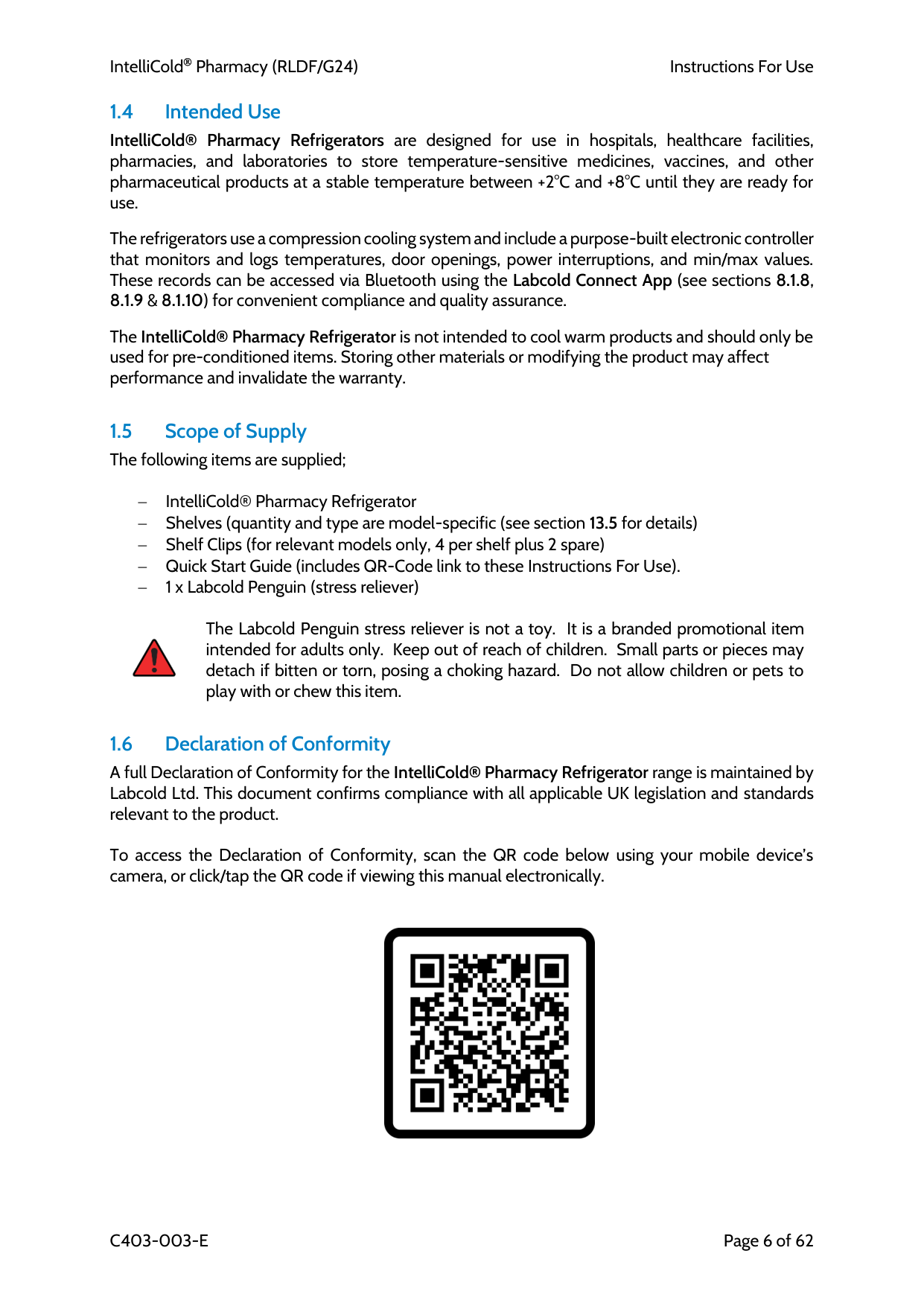
IntelliCold Pharmacy (RLDF/G24)
Instructions For Use
C403-003-E
Page 6 of 62 1.4 Intended Use IntelliCold® Pharmacy Refrigerators are designed for use in hospitals, healthcare facilities, pharmacies, and laboratories to store temperature-sensitive medicines, vaccines, and other pharmaceutical products at a stable temperature between +2°C and +8°C until they are ready for use.
The refrigerators use a compression cooling system and include a purpose-built electronic controller that monitors and logs temperatures, door openings, power interruptions, and min/max values. These records can be accessed via Bluetooth using the Labcold Connect App (see sections 8.1.8, 8.1.9 & 8.1.10) for convenient compliance and quality assurance.
The IntelliCold® Pharmacy Refrigerator is not intended to cool warm products and should only be used for pre-conditioned items. Storing other materials or modifying the product may affect performance and invalidate the warranty.
1.5 Scope of Supply The following items are supplied;
− IntelliCold® Pharmacy Refrigerator − Shelves (quantity and type are model-specific (see section 13.5 for details) − Shelf Clips (for relevant models only, 4 per shelf plus 2 spare) − Quick Start Guide (includes QR-Code link to these Instructions For Use). − 1 x Labcold Penguin (stress reliever)
The Labcold Penguin stress reliever is not a toy. It is a branded promotional item intended for adults only. Keep out of reach of children. Small parts or pieces may detach if bitten or torn, posing a choking hazard. Do not allow children or pets to play with or chew this item.
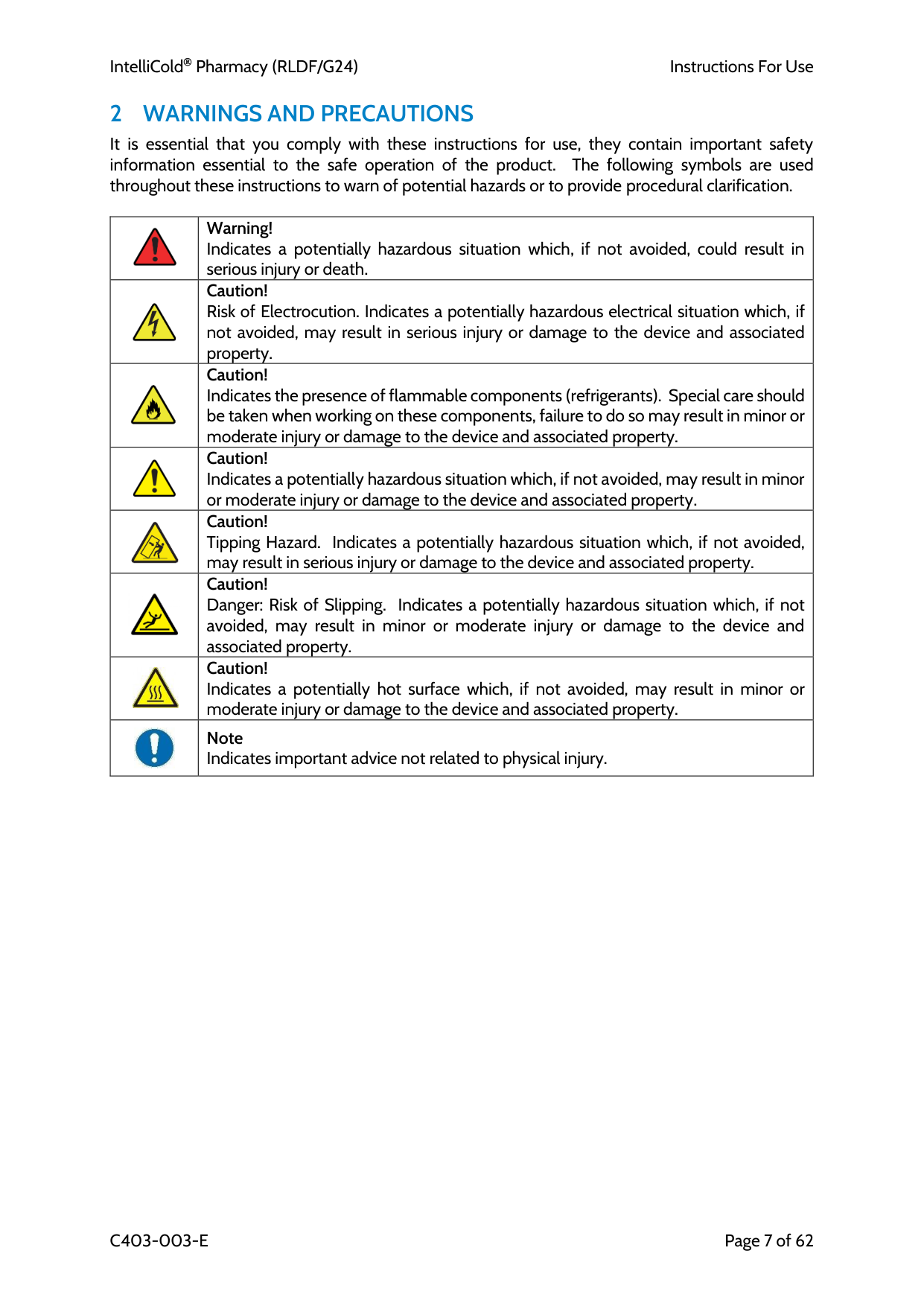
1.6 Declaration of Conformity A full Declaration of Conformity for the IntelliCold® Pharmacy Refrigerator range is maintained by Labcold Ltd. This document confirms compliance with all applicable UK legislation and standards relevant to the product.
To access the Declaration of Conformity, scan the QR code below using your mobile device’s camera, or click/tap the QR code if viewing this manual electronically.
IntelliCold Pharmacy (RLDF/G24)
Instructions For Use
C403-003-E
Page 7 of 62
2 Warnings And Precautions
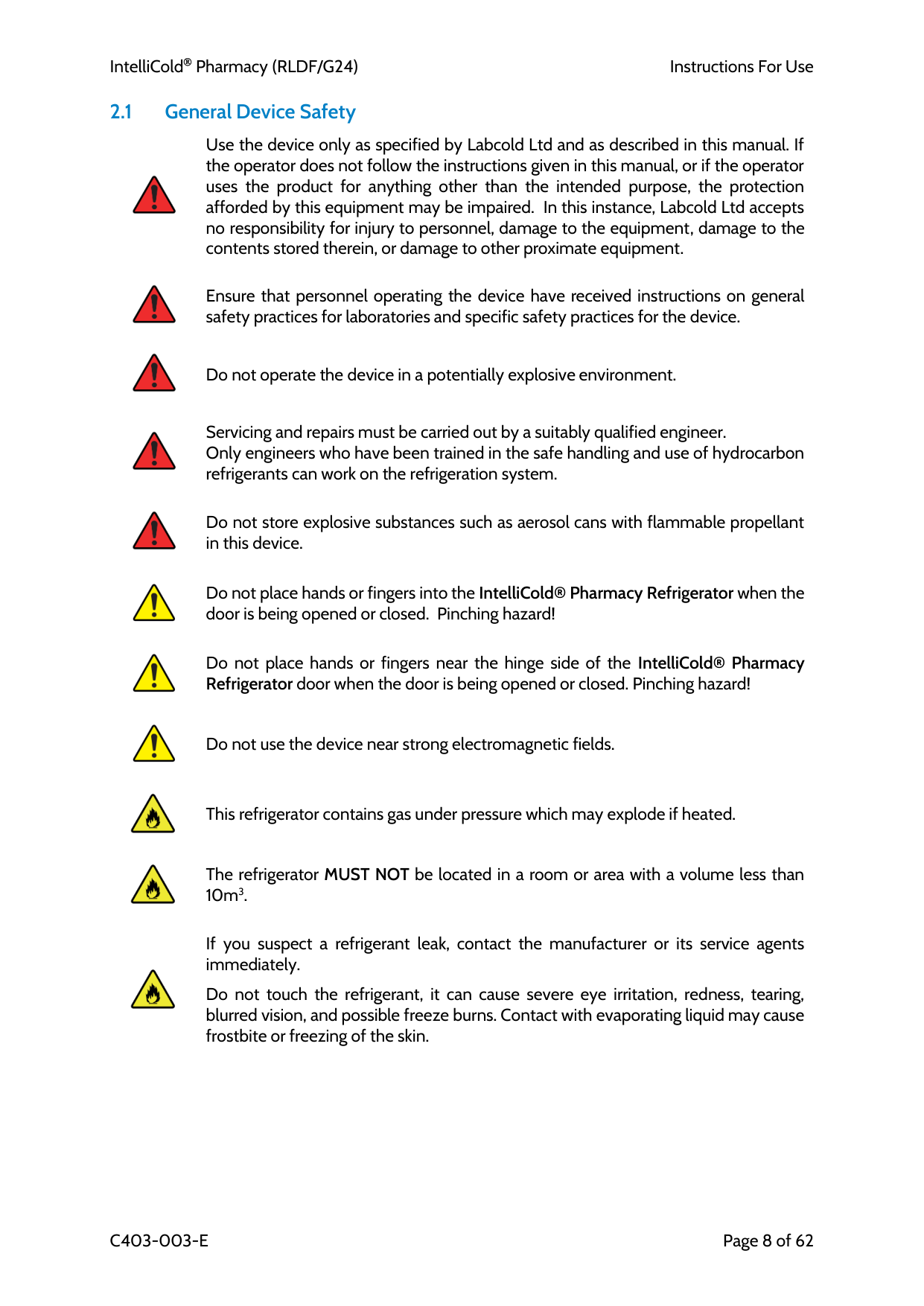
It is essential that you comply with these instructions for use, they contain important safety information essential to the safe operation of the product. The following symbols are used throughout these instructions to warn of potential hazards or to provide procedural clarification.Warning! Indicates a potentially hazardous situation which, if not avoided, could result in serious injury or death.
Caution! Risk of Electrocution. Indicates a potentially hazardous electrical situation which, if not avoided, may result in serious injury or damage to the device and associated property.
Caution! Indicates the presence of flammable components (refrigerants). Special care should be taken when working on these components, failure to do so may result in minor or moderate injury or damage to the device and associated property.
Caution! Indicates a potentially hazardous situation which, if not avoided, may result in minor or moderate injury or damage to the device and associated property.
Caution! Tipping Hazard. Indicates a potentially hazardous situation which, if not avoided, may result in serious injury or damage to the device and associated property.
Caution! Danger: Risk of Slipping. Indicates a potentially hazardous situation which, if not avoided, may result in minor or moderate injury or damage to the device and associated property.
Caution! Indicates a potentially hot surface which, if not avoided, may result in minor or moderate injury or damage to the device and associated property.
Note Indicates important advice not related to physical injury.
IntelliCold Pharmacy (RLDF/G24)
Instructions For Use
C403-003-E
Page 8 of 62 2.1 General Device Safety
Use the device only as specified by Labcold Ltd and as described in this manual. If the operator does not follow the instructions given in this manual, or if the operator uses the product for anything other than the intended purpose, the protection afforded by this equipment may be impaired. In this instance, Labcold Ltd accepts no responsibility for injury to personnel, damage to the equipment, damage to the contents stored therein, or damage to other proximate equipment. Ensure that personnel operating the device have received instructions on general safety practices for laboratories and specific safety practices for the device. Do not operate the device in a potentially explosive environment.
Servicing and repairs must be carried out by a suitably qualified engineer. Only engineers who have been trained in the safe handling and use of hydrocarbon refrigerants can work on the refrigeration system.
Do not store explosive substances such as aerosol cans with flammable propellant in this device.
Do not place hands or fingers into the IntelliCold® Pharmacy Refrigerator when the door is being opened or closed. Pinching hazard!
Do not place hands or fingers near the hinge side of the IntelliCold® Pharmacy Refrigerator door when the door is being opened or closed. Pinching hazard!
Do not use the device near strong electromagnetic fields.
This refrigerator contains gas under pressure which may explode if heated.
The refrigerator MUST NOT be located in a room or area with a volume less than 10m3.
If you suspect a refrigerant leak, contact the manufacturer or its service agents immediately.
Do not touch the refrigerant, it can cause severe eye irritation, redness, tearing, blurred vision, and possible freeze burns. Contact with evaporating liquid may cause frostbite or freezing of the skin.
IntelliCold Pharmacy (RLDF/G24)
Instructions For Use
C403-003-E
Page 9 of 62 2.2 Electrical Safety
Do not use device outdoors. Risk of current leakage or electric shock!
Improper fuses or line voltage supply can damage the device wiring system and can cause a fire. Before turning on the device, verify that all fuses are installed properly and that the device voltage matches your power supply.
Grounding circuit continuity is crucial for safe operation of the device. Always connect equipment to a correctly grounded power outlet. If in doubt have the outlet checked by a qualified electrician. Do not use an adapter to a two-terminal outlet since this does not provide positive ground protection.
Any connected devices/signal equipment must be provided with reinforced or double insulation for protection against electric shock.
Do not remove covers that require tool access. Electric shock hazard!
Do not use electrical appliances inside the refrigerator.
Do not touch any switches or outlets with wet hands. Electric shock hazard!
Do not use the device if the power cable is damaged.
Replace all fuses with exactly the same type and rating.
Only use the mains supply cord supplied or one of an equivalent rating.
For cleaning or repair work on the device, it must be disconnected from the mains power supply. In order to avoid an electric shock, disconnect the power supply, unplug the power cable, and wait at least one minute before working on the device.
In case of an emergency switch off the device at the on-off switch at the mains supply or spur isolator switch.
If a large quantity of water accumulates in the device, disconnect it from the power supply and immediately mop up spilled liquid completely. If you suspect that fluid has entered the mechanisms or electronics of the device, please refer to your local Labcold representative.
IntelliCold Pharmacy (RLDF/G24)
Instructions For Use
C403-003-E
Page 10 of 62
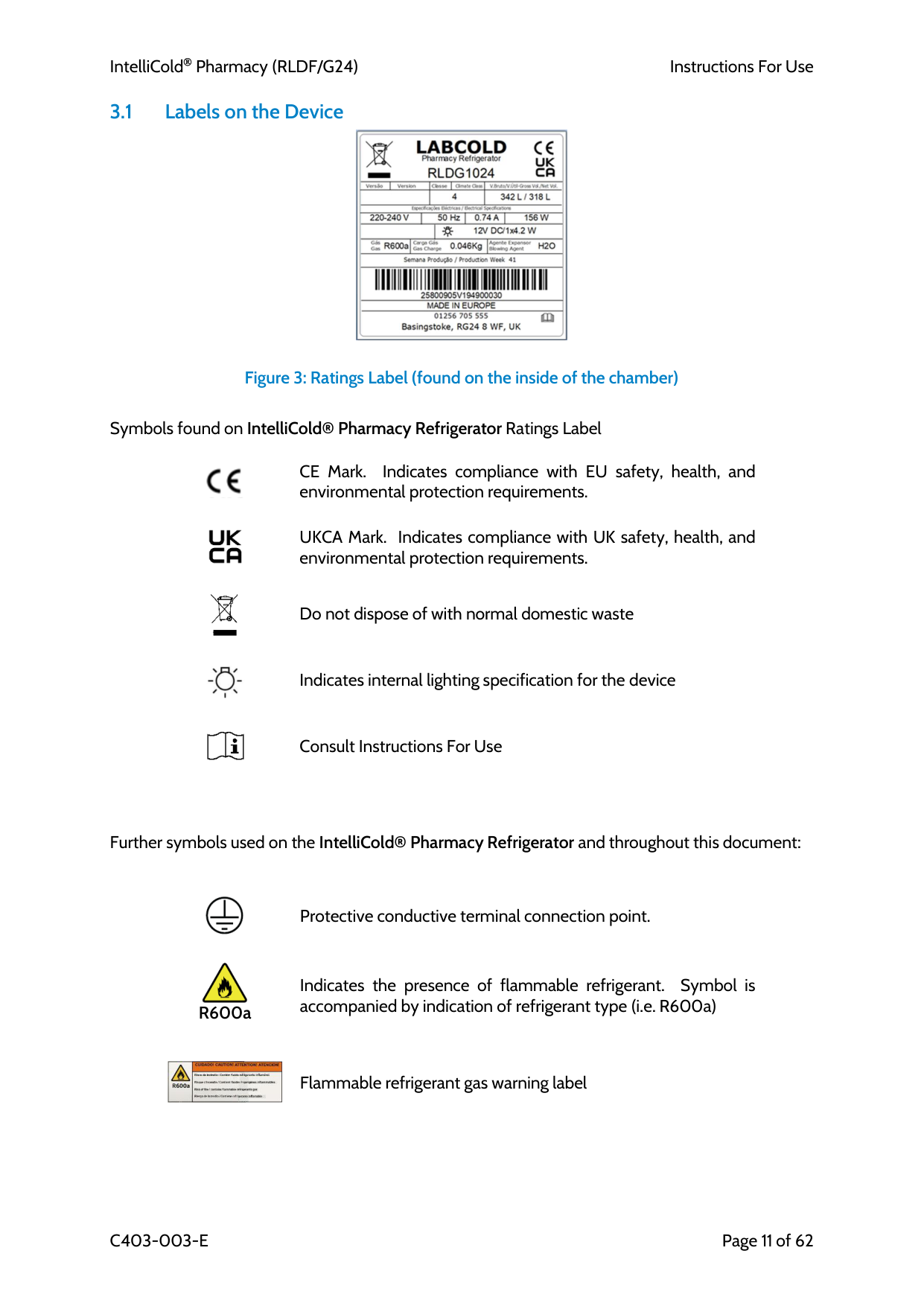
3 Intellicold® Pharmacy Refrigerator Layout
Figure 1: Front view of IntelliCold® Pharmacy Refrigerator (pictured RLDG0224)
Figure 2: Rear view of IntelliCold® Pharmacy Refrigerator (pictured: RLDG0224) Door Lock Internal Fan IntelliCold® Controller t°3 Probe (exact position depends on model)
Ratings label t°2 Probe and Simulated load Drip Tray Ventilation Ventilation Ventilation Access port (exact position depends on model) Battery Compartment External Alarm Connector
IntelliCold Pharmacy (RLDF/G24)
Instructions For Use
C403-003-E
Page 11 of 62 3.1 Labels on the Device
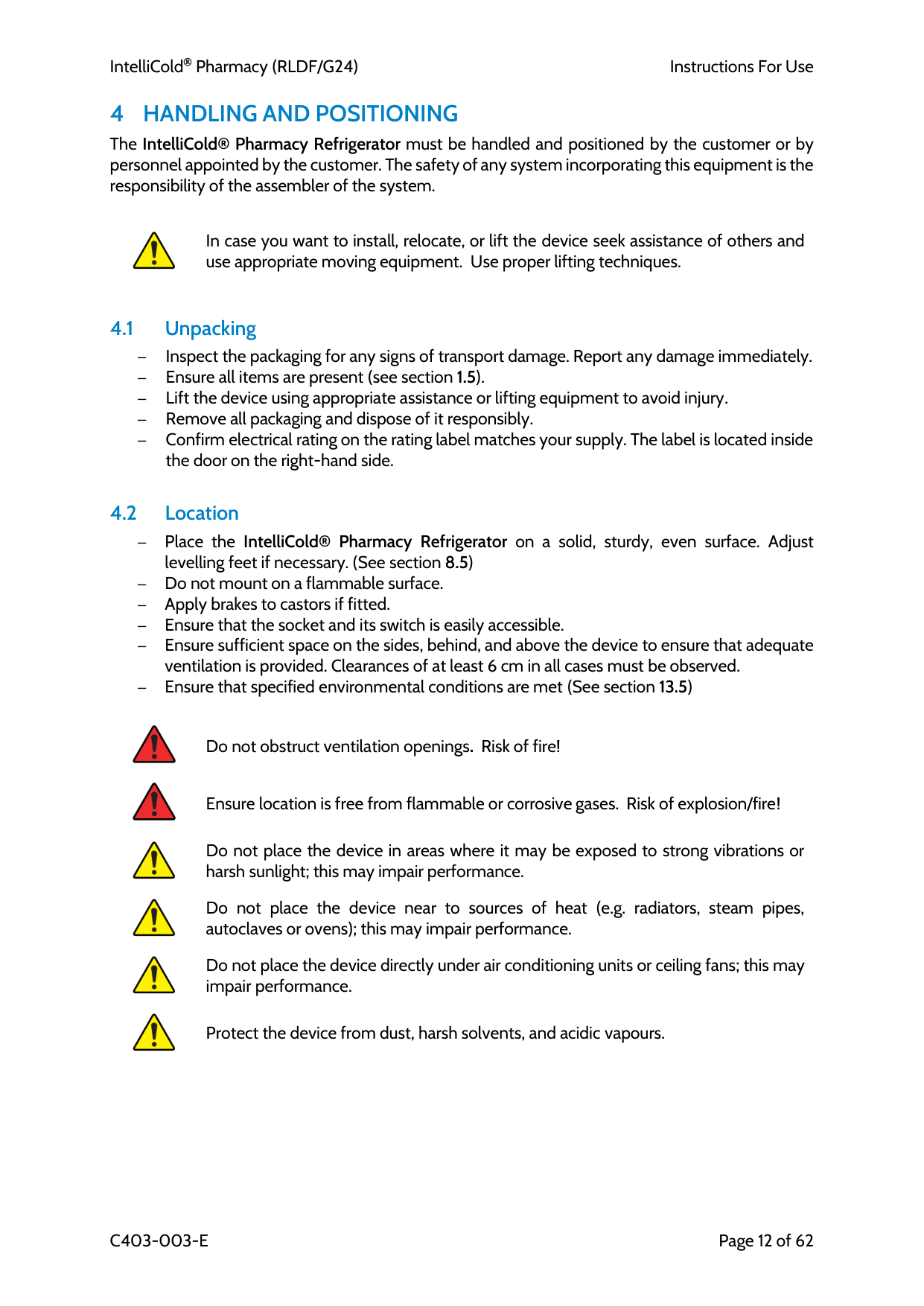
Figure 3: Ratings Label (found on the inside of the chamber)
Symbols found on IntelliCold® Pharmacy Refrigerator Ratings Label
CE Mark. Indicates compliance with EU safety, health, and environmental protection requirements.
UKCA Mark. Indicates compliance with UK safety, health, and environmental protection requirements. Do not dispose of with normal domestic waste
Indicates internal lighting specification for the device
Consult Instructions For Use
Further symbols used on the IntelliCold® Pharmacy Refrigerator and throughout this document:
Protective conductive terminal connection point.
Indicates the presence of flammable refrigerant. Symbol is accompanied by indication of refrigerant type (i.e. R600a)
Flammable refrigerant gas warning label
R600a
IntelliCold Pharmacy (RLDF/G24)
Instructions For Use
C403-003-E
Page 12 of 62
4 Handling And Positioning
The IntelliCold® Pharmacy Refrigerator must be handled and positioned by the customer or by personnel appointed by the customer. The safety of any system incorporating this equipment is the responsibility of the assembler of the system.In case you want to install, relocate, or lift the device seek assistance of others and use appropriate moving equipment. Use proper lifting techniques.
4.1 Unpacking – Inspect the packaging for any signs of transport damage. Report any damage immediately. – Ensure all items are present (see section 1.5). – Lift the device using appropriate assistance or lifting equipment to avoid injury. – Remove all packaging and dispose of it responsibly. – Confirm electrical rating on the rating label matches your supply. The label is located inside the door on the right-hand side.
4.2 Location – Place the IntelliCold® Pharmacy Refrigerator on a solid, sturdy, even surface. Adjust levelling feet if necessary. (See section 8.5) – Do not mount on a flammable surface. – Apply brakes to castors if fitted. – Ensure that the socket and its switch is easily accessible. – Ensure sufficient space on the sides, behind, and above the device to ensure that adequate ventilation is provided. Clearances of at least 6 cm in all cases must be observed. – Ensure that specified environmental conditions are met (See section 13.5)
Do not obstruct ventilation openings. Risk of fire!
Ensure location is free from flammable or corrosive gases. Risk of explosion/fire!
Do not place the device in areas where it may be exposed to strong vibrations or harsh sunlight; this may impair performance.
Do not place the device near to sources of heat (e.g. radiators, steam pipes, autoclaves or ovens); this may impair performance.
Do not place the device directly under air conditioning units or ceiling fans; this may impair performance.
Protect the device from dust, harsh solvents, and acidic vapours.
IntelliCold Pharmacy (RLDF/G24)
Instructions For Use
C403-003-E
Page 13 of 62 4.3 Connecting to the Mains Supply – Plug the IntelliCold® Pharmacy Refrigerator into the mains supply (or switch on the fused spur if wired into a secure supply), but do not switch it on at this stage.
This device must only be connected to a mains supply with a protective earth. Risk of electric shock!
The refrigerator must remain switched off until all installation steps are complete and the device has been upright for at least 6 hours. Switching on too early may cause compressor damage and impair performance.
4.3.1 Plug Connection (Standard Installation) The IntelliCold® Pharmacy Refrigerator is supplied with a factory-fitted power cord and plug.
– Connect the plug to an easily accessible socket outlet. – Ensure the socket includes a switch to allow isolation of the device from the mains supply.
4.3.2 Permanent Connection (Optional Installation) If the device is to be hard-wired into the building supply, the installation shall include a disconnecting device (such as a switch or circuit breaker) in the fixed wiring. The disconnecting device shall:
– Comply with relevant standards for isolation and switching (e.g., BS EN 60947‑3) – Provide all-pole disconnection and be rated for the device’s supply voltage and current (see section 13.5). – Be easily accessible and located near the device.
Overcurrent protection shall be provided by a suitable protective device in accordance with local regulations.
5 Initial Setup / Assembly
– Fit door handle (see section 8.2) – Install Backup batteries (see section 8.3) – Install shelves or drawers (see 8.11 and Appendix A) – Connect external alarm system, if applicable (see section 10.1)6 Switch On
– Switch on the IntelliCold® Pharmacy Refrigerator using the socket outlet switch (or fused spur if hard-wired). – After a brief period, the IntelliCold® Pharmacy Refrigerator will begin cooling, and the IntelliCold® Controller will display the current temperature as it decreases toward the operating setpoint.
IntelliCold Pharmacy (RLDF/G24)
Instructions For Use
C403-003-E
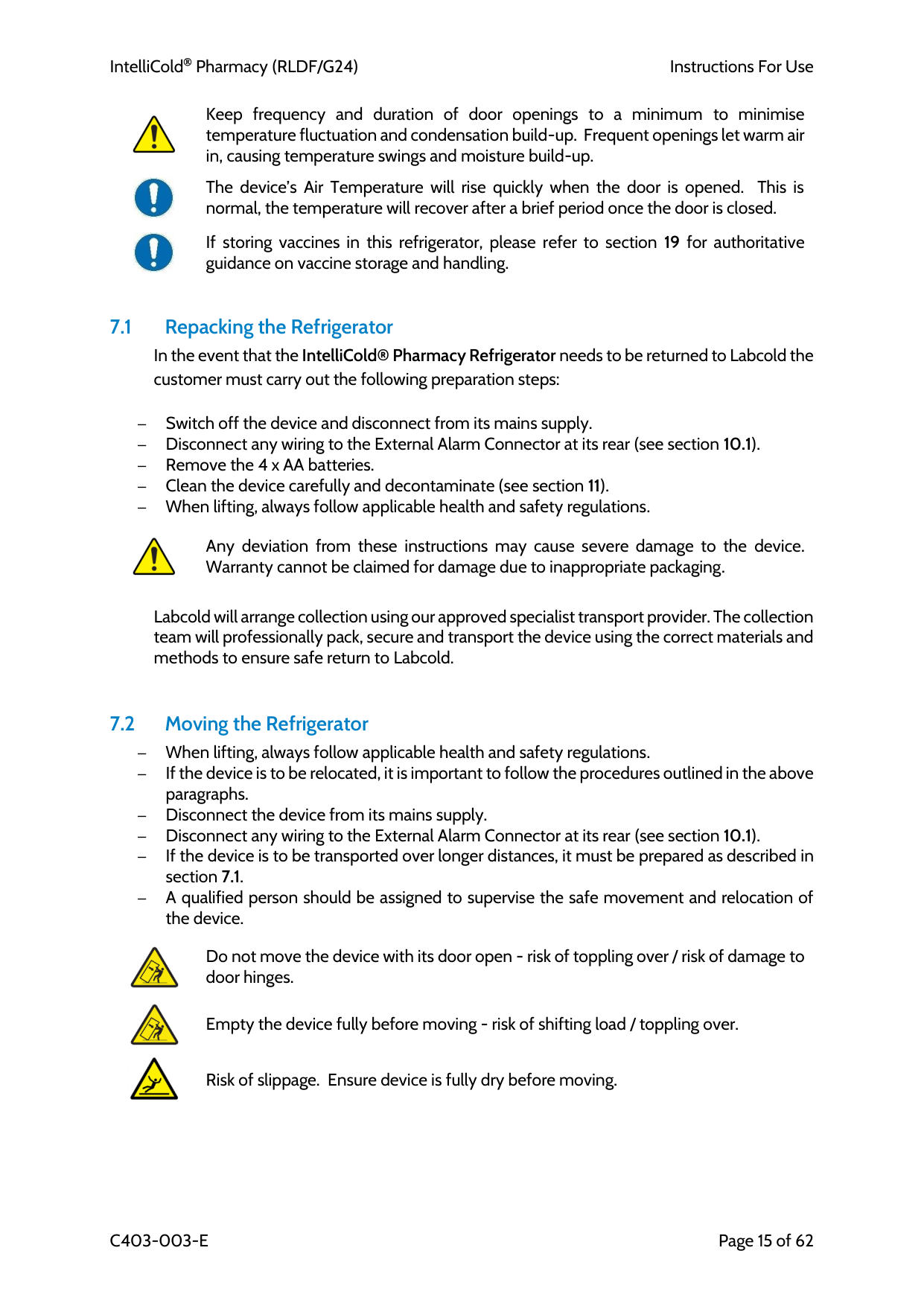
Page 14 of 62 6.1 Initial Start-Up Behaviour – When first switched on, all icons and buttons will illuminate. Because the refrigerator interior has not yet reached operating temperature, the controller will alarm; the alarm will sound, and the display will show the red alarm indicator.
– After a few seconds, the controller will start alternating between the current temperatures, either t°1 (air probe) or t°2 (load probe) and active temperature-high alarm screens, (example below shows screens for t°1)
– Press to temporarily silence the audible alarm.
– The alarm will recall and resound periodically until the refrigerator has reached set temperature, this is quite normal; just wake the controller (see section 8.1.2) and repeat the mute process if required.
Although the refrigerator will reach 5 °C within approximately one hour, allow it to stabilise for 24 hours before loading temperature-sensitive vaccines or pharmaceuticals
7 General Use
Once stabilised at its set temperature you can begin using your IntelliCold® Pharmacy Refrigerator. When loading it is important that the following guidelines are followed;Load pre-cooled products only. The device is not suitable for cooling down items that are not already at the correct storage temperature.
Only store temperature-sensitive healthcare products within the device. Storage of cold packs, food, or other non-medical items may affect performance and compromise safety.
Only store items on the shelves or in the drawers provided. Ensure that stored items do not touch each other, as this can restrict airflow and may lead to ice formation
Ensure stored items are not packed too closely together. This allows effective air circulation for even cooling and stable temperature.
Do not allow stored items to touch the door, wall or the bottom of the fridge. Contact with surfaces can block airflow and cause uneven cooling or freezing, risking product damage and temperature excursions.
Do not block airflow to the internal fan. Blocking the fan will disrupt air circulation, causing temperature instability.
Always distribute stock evenly throughout the device. Even distribution prevents hot/cold spots and maintains uniform temperature
IntelliCold Pharmacy (RLDF/G24)
Instructions For Use
C403-003-E
Page 15 of 62
Keep frequency and duration of door openings to a minimum to minimise temperature fluctuation and condensation build-up. Frequent openings let warm air in, causing temperature swings and moisture build-up.
The device’s Air Temperature will rise quickly when the door is opened. This is normal, the temperature will recover after a brief period once the door is closed.
If storing vaccines in this refrigerator, please refer to section 19 for authoritative guidance on vaccine storage and handling.
7.1 Repacking the Refrigerator
In the event that the IntelliCold® Pharmacy Refrigerator needs to be returned to Labcold the customer must carry out the following preparation steps:
– Switch off the device and disconnect from its mains supply. – Disconnect any wiring to the External Alarm Connector at its rear (see section 10.1). – Remove the 4 x AA batteries. – Clean the device carefully and decontaminate (see section 11). – When lifting, always follow applicable health and safety regulations.
Any deviation from these instructions may cause severe damage to the device. Warranty cannot be claimed for damage due to inappropriate packaging.
Labcold will arrange collection using our approved specialist transport provider. The collection team will professionally pack, secure and transport the device using the correct materials and methods to ensure safe return to Labcold.
7.2 Moving the Refrigerator – When lifting, always follow applicable health and safety regulations. – If the device is to be relocated, it is important to follow the procedures outlined in the above paragraphs. – Disconnect the device from its mains supply. – Disconnect any wiring to the External Alarm Connector at its rear (see section 10.1). – If the device is to be transported over longer distances, it must be prepared as described in section 7.1. – A qualified person should be assigned to supervise the safe movement and relocation of the device.
Do not move the device with its door open - risk of toppling over / risk of damage to door hinges.
Empty the device fully before moving - risk of shifting load / toppling over.
Risk of slippage. Ensure device is fully dry before moving.
IntelliCold Pharmacy (RLDF/G24)
Instructions For Use
C403-003-E
Page 16 of 62
8 Operating Elements
8.1 The IntelliCold® Controller 8.1.1 Overview The IntelliCold® Controller, located on the front of your IntelliCold® Pharmacy Refrigerator, has been specifically designed by Labcold to ensure the safe storage of temperature-sensitive products such as vaccines, medicines, samples, and reagents. This advanced touchscreen controller displays the temperature measured by two probes:– Fixed Probe (t°1): Located at the back of the refrigerator to monitor air temperature. – Movable Load Probe: (t°2): Can be positioned by you, for example inside a product pack, to monitor load temperature.
In addition, the refrigerator includes a third probe:
– Low Limit Detection Probe (t°3): Permanently located at the bottom of the chamber to help prevent contents from freezing. This probe does not display on the controller screen, but it continuously monitors for low temperatures. If it detects an air temperature below 2°C, the controller will:
• Trigger an alarm • Display t3L on the screen • Temporarily stop the compressor to allow the temperature to recover
This feature protects against freezing in situations such as fan failure, where cold air may settle at the bottom while the t°1 probe still reads a safe temperature.
If t3L appears on the display, the anti-freeze countermeasure has activated and your samples remain safe. However, this alarm indicates a fault condition that requires attention. Contact the Labcold Service Team (see section 18) immediately for advice and to arrange inspection or repair. Do not ignore this alarm, even if the temperature appears normal.
8.1.2 Waking the Controller Unlike traditional controllers with physical buttons, the IntelliCold® Controller uses capacitive touch technology, similar to a smartphone or tablet. When you place your hand near the screen the controller will wake, the icons and controls will appear, allowing you to access various functions.
Like a mobile phone screen, the touch interface may not respond if you are wearing gloves.
30 seconds after waking the controller the icons/buttons will disappear from the front of the controller, and it will return to normal running mode; displaying temperature alternately with any active alarms.
Terminology in this manual:
– Press means touch the icon or button as you would an app on your phone. – Press and hold means keep your finger on the icon or button until the controller confirms the action. (The controller emits an audible tone to confirm that your input has been registered).
IntelliCold Pharmacy (RLDF/G24)
Instructions For Use
C403-003-E
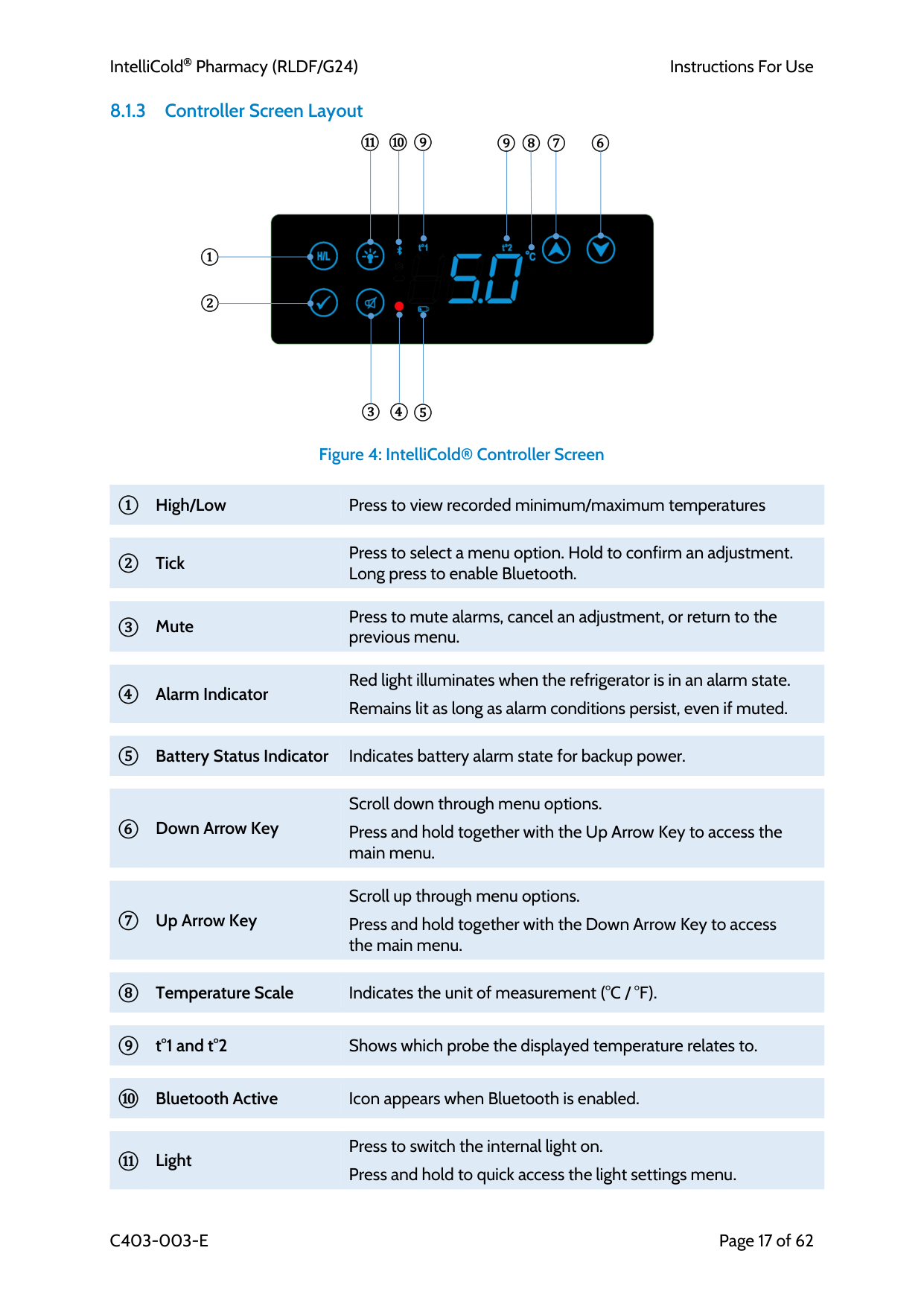
Page 17 of 62 8.1.3 Controller Screen Layout
Figure 4: IntelliCold® Controller Screen
① High/Low Press to view recorded minimum/maximum temperatures
② Tick Press to select a menu option. Hold to confirm an adjustment. Long press to enable Bluetooth.
③ Mute Press to mute alarms, cancel an adjustment, or return to the previous menu.
④ Alarm Indicator Red light illuminates when the refrigerator is in an alarm state.
Remains lit as long as alarm conditions persist, even if muted.
⑤ Battery Status Indicator Indicates battery alarm state for backup power.
⑥ Down Arrow Key Scroll down through menu options.
Press and hold together with the Up Arrow Key to access the main menu.
⑦ Up Arrow Key Scroll up through menu options.
Press and hold together with the Down Arrow Key to access the main menu.
⑧ Temperature Scale Indicates the unit of measurement (°C / °F).
⑨ t°1 and t°2 Shows which probe the displayed temperature relates to.
⑩ Bluetooth Active Icon appears when Bluetooth is enabled.
⑪ Light Press to switch the internal light on.
Press and hold to quick access the light settings menu. ⑥ ③ ① ② ⑤ ④
⑧ ⑨ ⑩ ⑪ ⑨ ⑦
IntelliCold Pharmacy (RLDF/G24)
Instructions For Use
C403-003-E
Page 18 of 62 8.1.4 Alarm Conditions
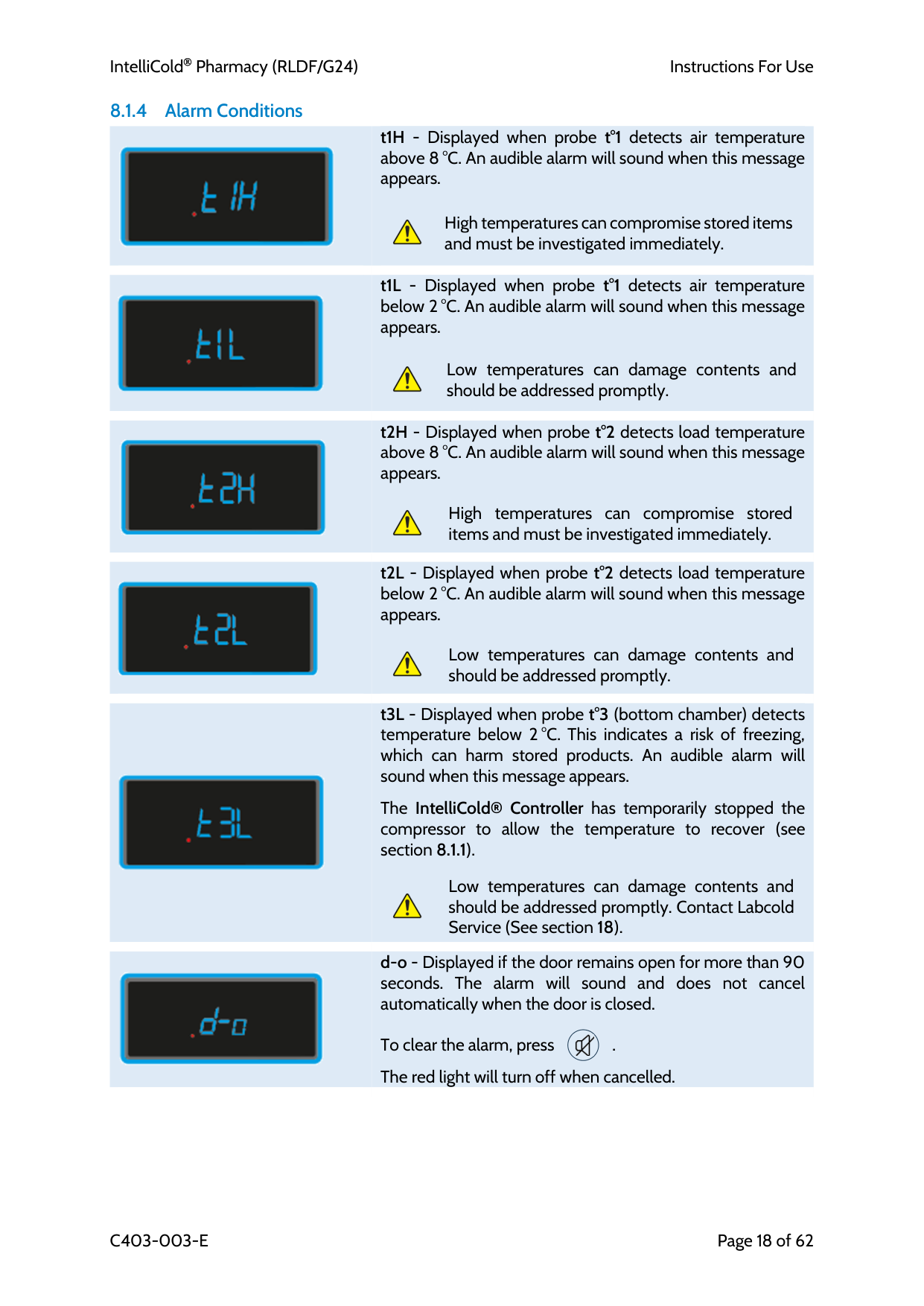
t1H - Displayed when probe t°1 detects air temperature above 8 °C. An audible alarm will sound when this message appears.
High temperatures can compromise stored items and must be investigated immediately.
t1L - Displayed when probe t°1 detects air temperature below 2 °C. An audible alarm will sound when this message appears.
Low temperatures can damage contents and should be addressed promptly.
t2H - Displayed when probe t°2 detects load temperature above 8 °C. An audible alarm will sound when this message appears.
High temperatures can compromise stored items and must be investigated immediately.
t2L - Displayed when probe t°2 detects load temperature below 2 °C. An audible alarm will sound when this message appears.
Low temperatures can damage contents and should be addressed promptly.
t3L - Displayed when probe t°3 (bottom chamber) detects temperature below 2 °C. This indicates a risk of freezing, which can harm stored products. An audible alarm will sound when this message appears.
The IntelliCold® Controller has temporarily stopped the compressor to allow the temperature to recover (see section 8.1.1).
Low temperatures can damage contents and should be addressed promptly. Contact Labcold Service (See section 18).
d-o - Displayed if the door remains open for more than 90 seconds. The alarm will sound and does not cancel automatically when the door is closed.
To clear the alarm, press .
The red light will turn off when cancelled.
IntelliCold Pharmacy (RLDF/G24)
Instructions For Use
C403-003-E
Page 19 of 62
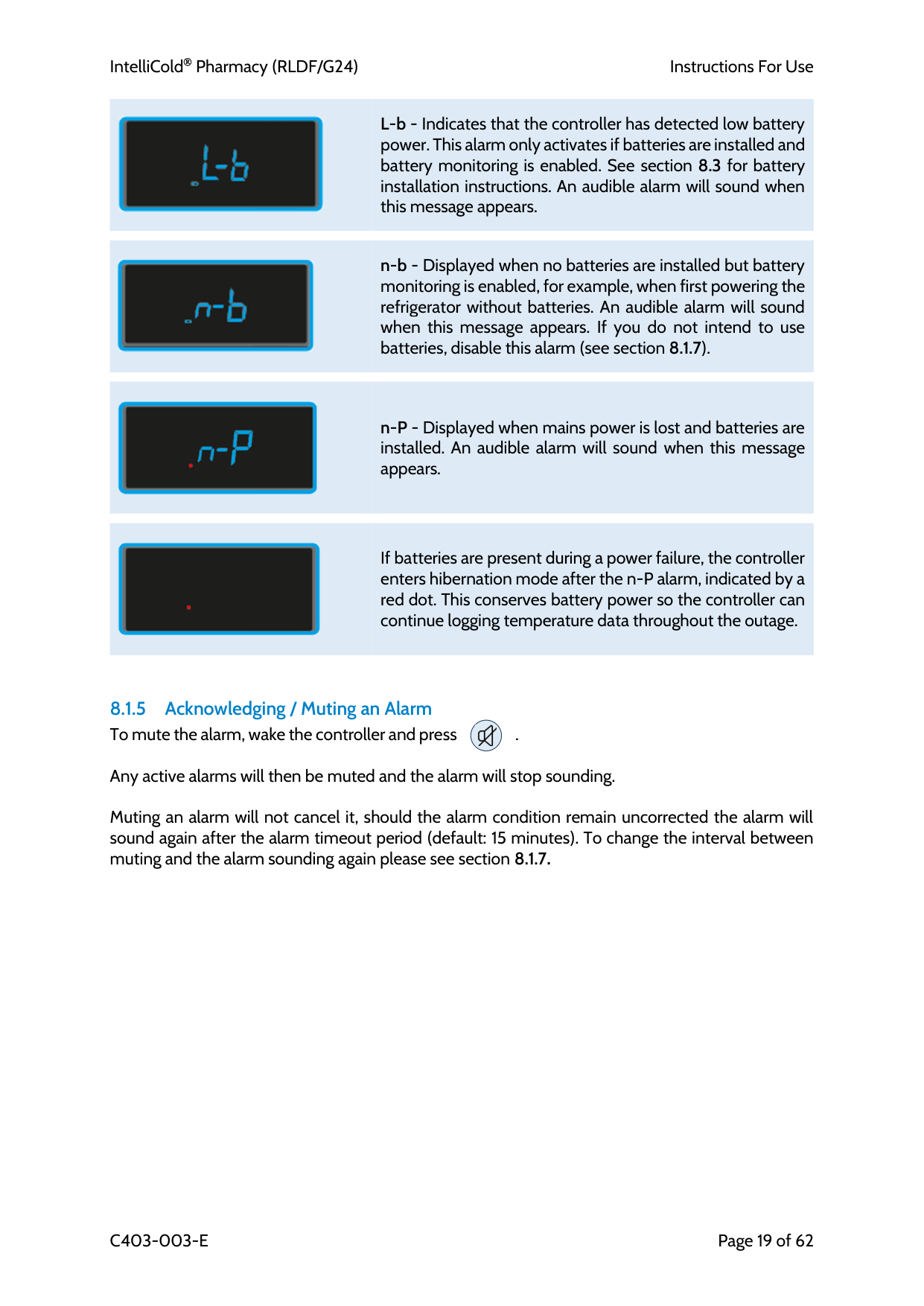
L-b - Indicates that the controller has detected low battery power. This alarm only activates if batteries are installed and battery monitoring is enabled. See section 8.3 for battery installation instructions. An audible alarm will sound when this message appears.
n-b - Displayed when no batteries are installed but battery monitoring is enabled, for example, when first powering the refrigerator without batteries. An audible alarm will sound when this message appears. If you do not intend to use batteries, disable this alarm (see section 8.1.7).
n-P - Displayed when mains power is lost and batteries are installed. An audible alarm will sound when this message appears.
If batteries are present during a power failure, the controller enters hibernation mode after the n-P alarm, indicated by a red dot. This conserves battery power so the controller can continue logging temperature data throughout the outage.
8.1.5 Acknowledging / Muting an Alarm To mute the alarm, wake the controller and press .
Any active alarms will then be muted and the alarm will stop sounding.
Muting an alarm will not cancel it, should the alarm condition remain uncorrected the alarm will sound again after the alarm timeout period (default: 15 minutes). To change the interval between muting and the alarm sounding again please see section 8.1.7.
IntelliCold Pharmacy (RLDF/G24)
Instructions For Use
C403-003-E
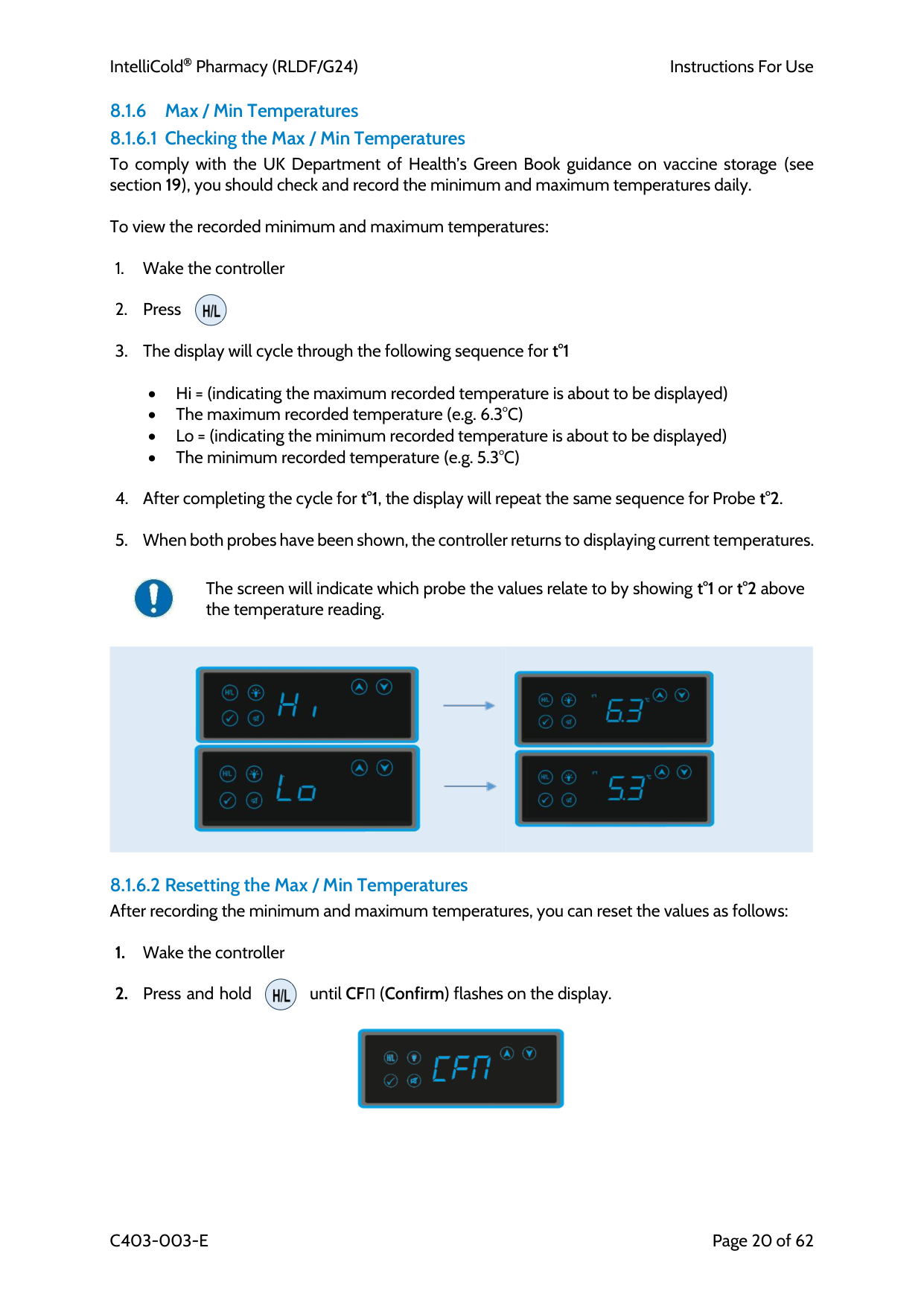
Page 20 of 62 8.1.6 Max / Min Temperatures 8.1.6.1 Checking the Max / Min Temperatures To comply with the UK Department of Health’s Green Book guidance on vaccine storage (see section 19), you should check and record the minimum and maximum temperatures daily.
To view the recorded minimum and maximum temperatures:
• Hi = (indicating the maximum recorded temperature is about to be displayed) • The maximum recorded temperature (e.g. 6.3°C) • Lo = (indicating the minimum recorded temperature is about to be displayed) • The minimum recorded temperature (e.g. 5.3°C)
The screen will indicate which probe the values relate to by showing t°1 or t°2 above the temperature reading.
8.1.6.2 Resetting the Max / Min Temperatures After recording the minimum and maximum temperatures, you can reset the values as follows:
IntelliCold Pharmacy (RLDF/G24)
Instructions For Use
C403-003-E
Page 21 of 62
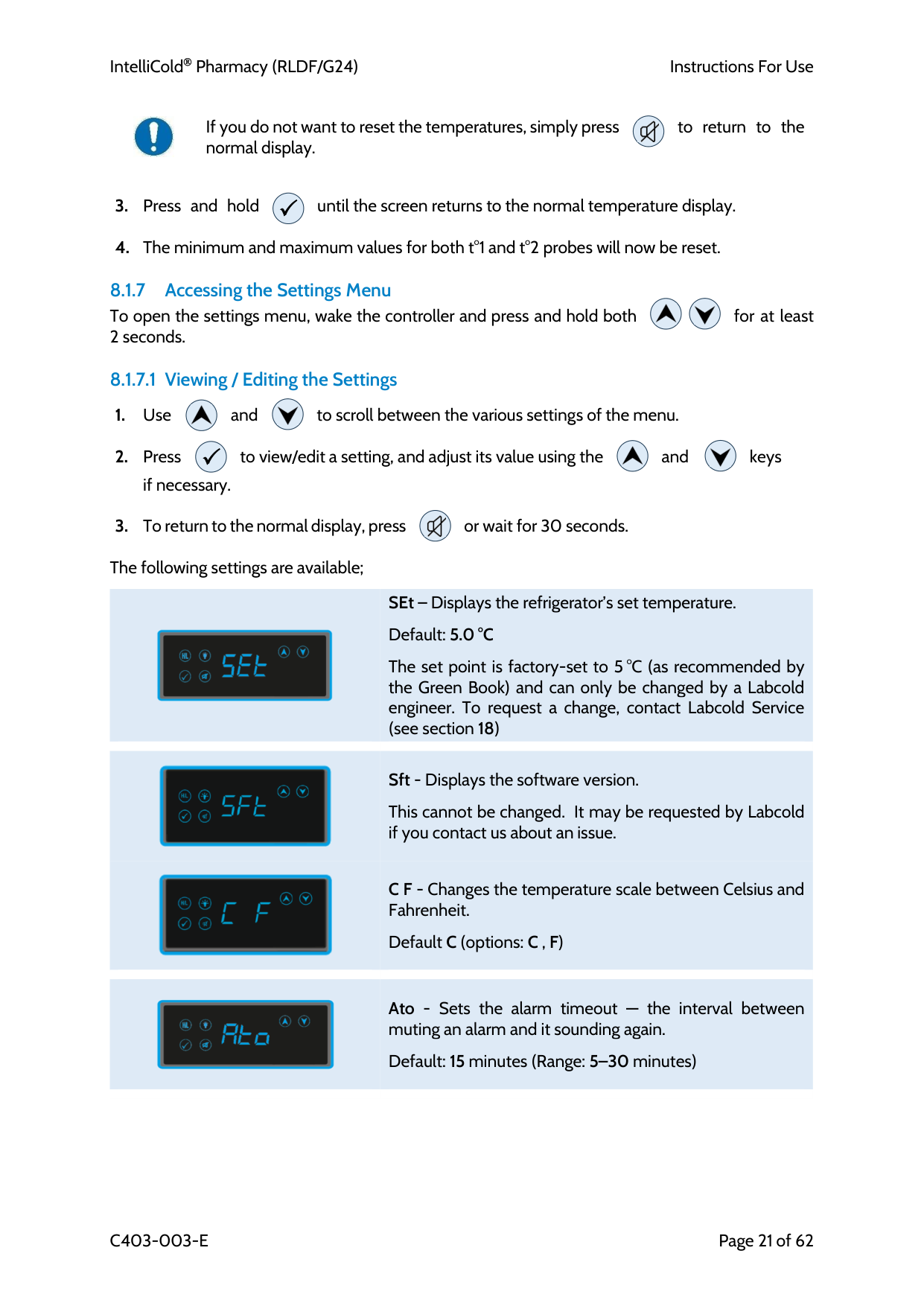
If you do not want to reset the temperatures, simply press to return to the normal display.
8.1.7 Accessing the Settings Menu To open the settings menu, wake the controller and press and hold both for at least 2 seconds.
8.1.7.1 Viewing / Editing the Settings
if necessary.
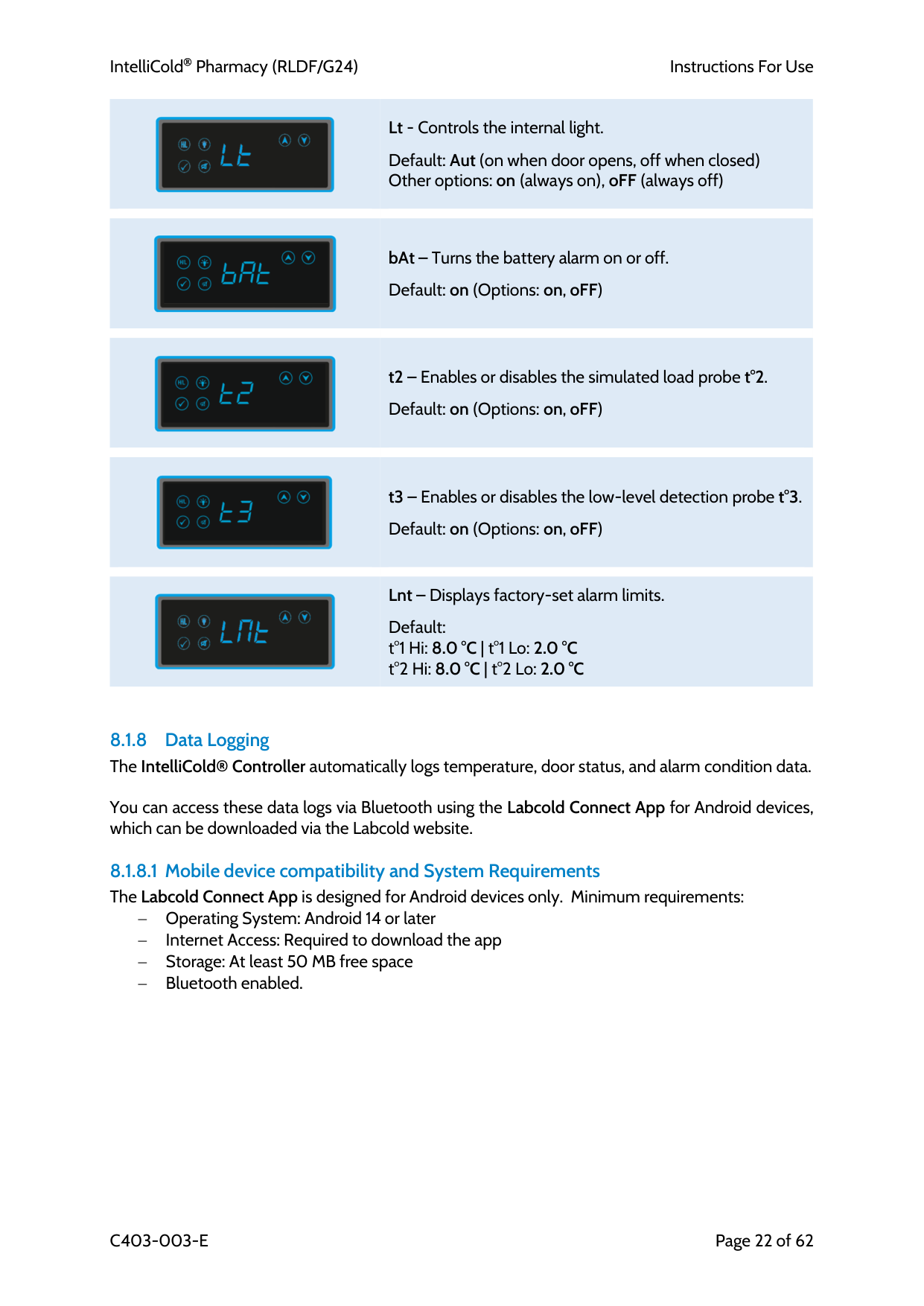
The following settings are available;
SEt – Displays the refrigerator’s set temperature.
Default: 5.0 °C
The set point is factory-set to 5 °C (as recommended by the Green Book) and can only be changed by a Labcold engineer. To request a change, contact Labcold Service (see section 18)
Sft - Displays the software version.
This cannot be changed. It may be requested by Labcold if you contact us about an issue.
C F - Changes the temperature scale between Celsius and Fahrenheit.
Default C (options: C , F)
Ato - Sets the alarm timeout — the interval between muting an alarm and it sounding again.
Default: 15 minutes (Range: 5–30 minutes)
IntelliCold Pharmacy (RLDF/G24)
Instructions For Use
C403-003-E
Page 22 of 62
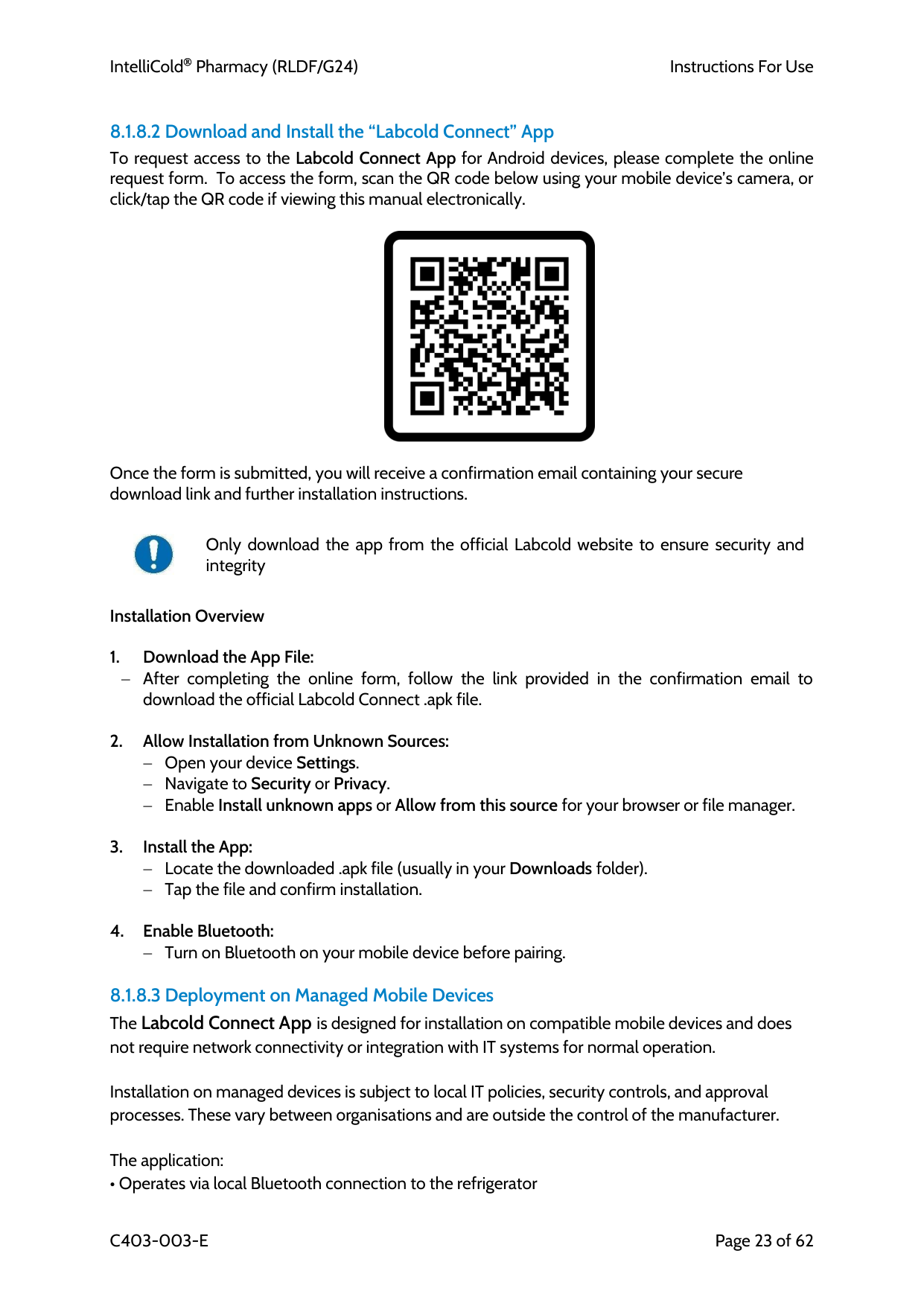
Lt - Controls the internal light.
Default: Aut (on when door opens, off when closed) Other options: on (always on), oFF (always off)
bAt – Turns the battery alarm on or off.
Default: on (Options: on, oFF)
t2 – Enables or disables the simulated load probe t°2.
Default: on (Options: on, oFF)
t3 – Enables or disables the low-level detection probe t°3.
Default: on (Options: on, oFF)
Lnt – Displays factory-set alarm limits.
Default: t°1 Hi: 8.0 °C | t°1 Lo: 2.0 °C t°2 Hi: 8.0 °C | t°2 Lo: 2.0 °C
8.1.8 Data Logging The IntelliCold® Controller automatically logs temperature, door status, and alarm condition data.
You can access these data logs via Bluetooth using the Labcold Connect App for Android devices, which can be downloaded via the Labcold website.
8.1.8.1 Mobile device compatibility and System Requirements The Labcold Connect App is designed for Android devices only. Minimum requirements: − Operating System: Android 14 or later − Internet Access: Required to download the app − Storage: At least 50 MB free space − Bluetooth enabled.
IntelliCold Pharmacy (RLDF/G24)
Instructions For Use
C403-003-E
Page 23 of 62
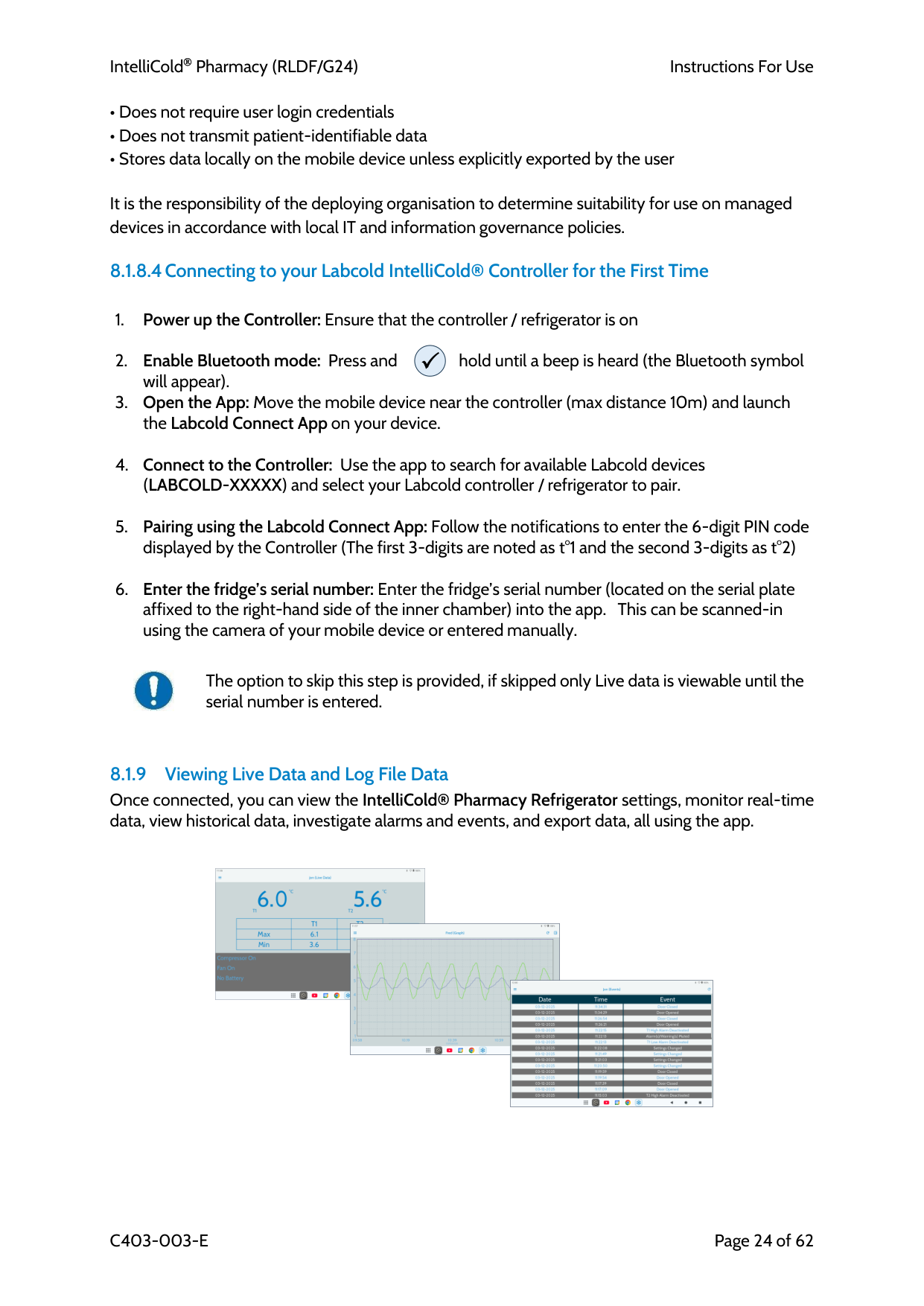
8.1.8.2 Download and Install the “Labcold Connect” App To request access to the Labcold Connect App for Android devices, please complete the online request form. To access the form, scan the QR code below using your mobile device’s camera, or click/tap the QR code if viewing this manual electronically.
Once the form is submitted, you will receive a confirmation email containing your secure download link and further installation instructions.
Only download the app from the official Labcold website to ensure security and integrity
Installation Overview
8.1.8.3 Deployment on Managed Mobile Devices The Labcold Connect App is designed for installation on compatible mobile devices and does not require network connectivity or integration with IT systems for normal operation. Installation on managed devices is subject to local IT policies, security controls, and approval processes. These vary between organisations and are outside the control of the manufacturer. The application:
IntelliCold Pharmacy (RLDF/G24)
Instructions For Use
C403-003-E
Page 24 of 62
The option to skip this step is provided, if skipped only Live data is viewable until the serial number is entered.
8.1.9 Viewing Live Data and Log File Data Once connected, you can view the IntelliCold® Pharmacy Refrigerator settings, monitor real-time data, view historical data, investigate alarms and events, and export data, all using the app.
IntelliCold Pharmacy (RLDF/G24)
Instructions For Use
C403-003-E
Page 25 of 62
The IntelliCold® Controller will store logged data for 12 months, but we recommend that you download the data once a week, especially as the more data there is to download, the longer it takes.
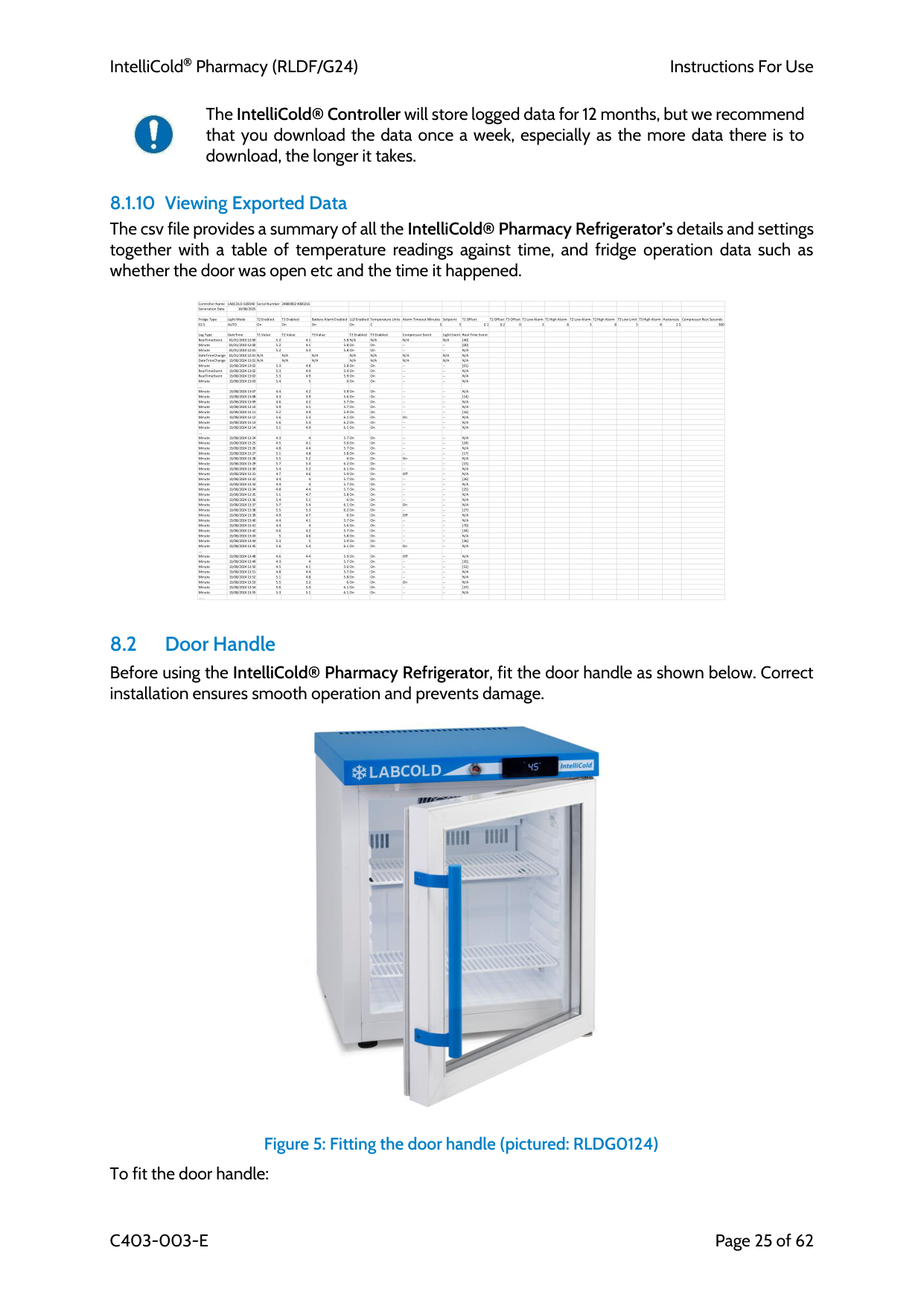
8.1.10 Viewing Exported Data The csv file provides a summary of all the IntelliCold® Pharmacy Refrigerator’s details and settings together with a table of temperature readings against time, and fridge operation data such as whether the door was open etc and the time it happened.
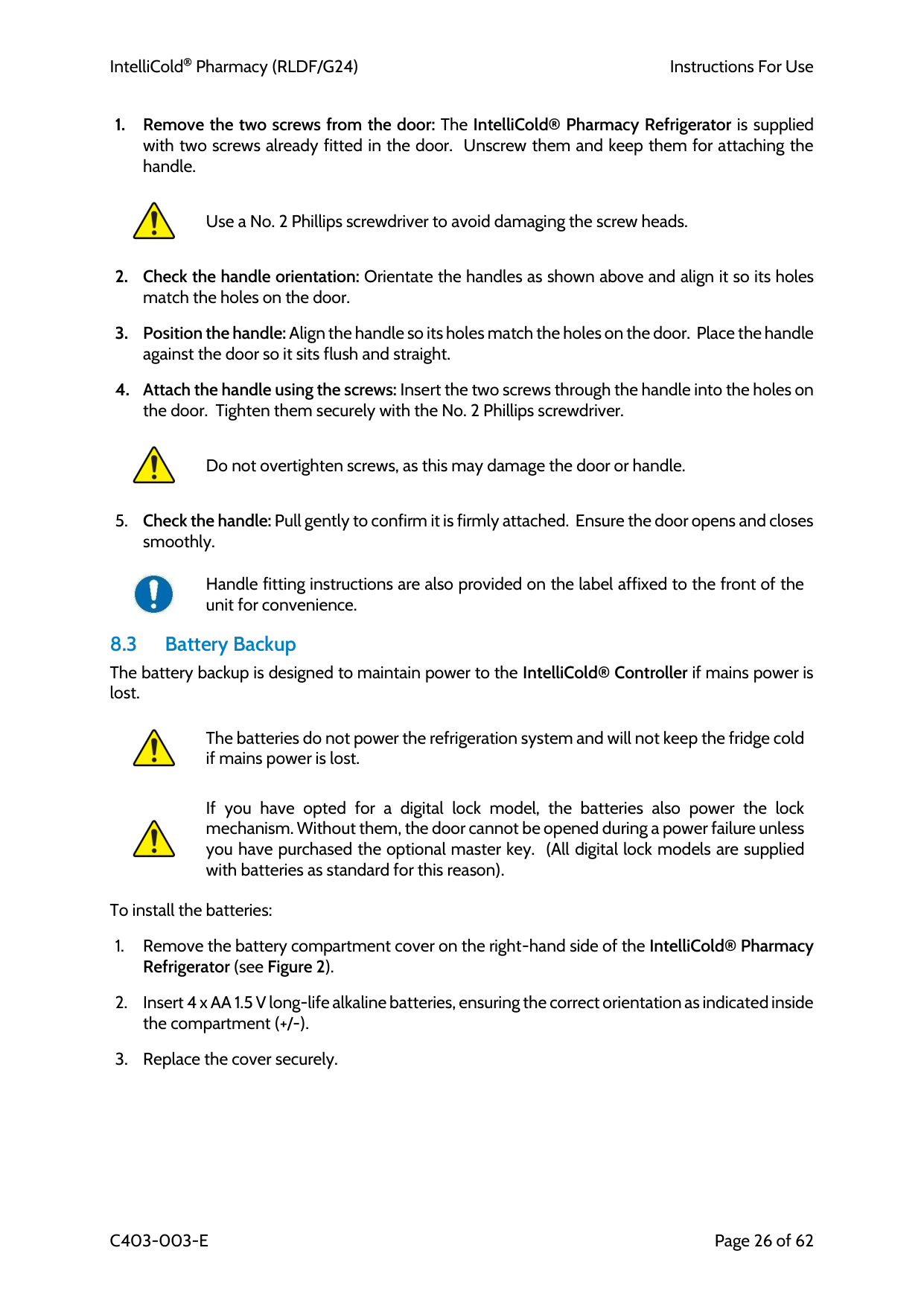
8.2 Door Handle Before using the IntelliCold® Pharmacy Refrigerator, fit the door handle as shown below. Correct installation ensures smooth operation and prevents damage.
Figure 5: Fitting the door handle (pictured: RLDG0124) To fit the door handle: Controller Name LABCOLD-020D40 Serial Number 24800902 4000216 Generation Date 16/08/2025 Fridge Type Light Mode T2 Enabled T3 Enabled Battery Alarm Enabled LLD Enabled Temperature Units Alarm Timeout Minutes Setpoint T1 Offset T2 Offset T3 Offset T1 Low Alarm T1 High Alarm T2 Low Alarm T2 High Alarm T3 Low Limit T3 High Alarm Hysteresis Compressor Rest Seconds
01-S
Auto
On On On OnC
5 5 0.1 0.2 0 3 8 3 8 3 8 2.5 300 Log Type DateTime T1 Value T2 Value T3 Value T2 Enabled T3 Enabled Compressor Event Light Event Real Time Event RealTimeEvent 01/01/2010 12:00 5.2 4.15.8 N/A
N/A
N/A
N/A
[40] Minute 01/01/2010 12:00 5.2 4.1 5.8 On On -- -- [00] Minute 01/01/2010 12:01 5.2 4.3 5.8 On On -- --N/A
DateTimeChange01/01/2010 12:01 N/A
N/A
N/A
N/A
N/A
N/A
N/A
N/A
DateTimeChange13/08/2024 13:01 N/A
N/A
N/A
N/A
N/A
N/A
N/A
N/A
Minute 13/08/2024 13:02 5.3 4.8 5.8 On On -- -- [01] RealTimeEvent 13/08/2024 13:02 5.3 4.9 5.9 On On -- --N/A
RealTimeEvent 13/08/2024 13:02 5.3 4.9 5.9 On On -- --N/A
Minute 13/08/2024 13:03 5.4 5 6 On On -- --N/A
…. Minute 13/08/2024 13:07 4.4 4.2 5.8 On On -- --N/A
Minute 13/08/2024 13:08 4.3 3.9 5.6 On On -- -- [14] Minute 13/08/2024 13:09 4.6 4.2 5.7 On On -- --N/A
Minute 13/08/2024 13:10 4.9 4.5 5.7 On On -- --N/A
Minute 13/08/2024 13:11 5.2 4.9 5.9 On On -- -- [16] Minute 13/08/2024 13:12 5.6 5.3 6.1 On On On --N/A
Minute 13/08/2024 13:13 5.6 5.4 6.2 On On -- --N/A
Minute 13/08/2024 13:14 5.1 4.9 6.1 On On -- --N/A
…. Minute 13/08/2024 13:24 4.3 4 5.7 On On -- --N/A
Minute 13/08/2024 13:25 4.5 4.1 5.6 On On -- -- [24] Minute 13/08/2024 13:26 4.8 4.4 5.7 On On -- --N/A
Minute 13/08/2024 13:27 5.1 4.8 5.8 On On -- -- [17] Minute 13/08/2024 13:28 5.5 5.2 6 On On On --N/A
Minute 13/08/2024 13:29 5.7 5.4 6.2 On On -- -- [15] Minute 13/08/2024 13:30 5.4 5.2 6.1 On On -- --N/A
Minute 13/08/2024 13:31 4.7 4.6 5.9 On On Off --N/A
Minute 13/08/2024 13:32 4.4 4 5.7 On On -- -- [26] Minute 13/08/2024 13:33 4.4 4 5.7 On On -- --N/A
Minute 13/08/2024 13:34 4.8 4.4 5.7 On On -- -- [25] Minute 13/08/2024 13:35 5.1 4.7 5.8 On On -- --N/A
Minute 13/08/2024 13:36 5.4 5.1 6 On On -- --N/A
Minute 13/08/2024 13:37 5.7 5.4 6.1 On On On --N/A
Minute 13/08/2024 13:38 5.5 5.3 6.2 On On -- -- [27] Minute 13/08/2024 13:39 4.9 4.7 6 On On Off --N/A
Minute 13/08/2024 13:40 4.4 4.1 5.7 On On -- --N/A
Minute 13/08/2024 13:41 4.4 4 5.6 On On -- -- [70] Minute 13/08/2024 13:42 4.6 4.2 5.7 On On -- -- [34] Minute 13/08/2024 13:43 5 4.6 5.8 On On -- --N/A
Minute 13/08/2024 13:44 5.3 5 5.9 On On -- -- [36] Minute 13/08/2024 13:45 5.6 5.4 6.1 On On On --N/A
…. Minute 13/08/2024 13:48 4.6 4.4 5.9 On On Off --N/A
Minute 13/08/2024 13:49 4.3 4 5.7 On On -- -- [35] Minute 13/08/2024 13:50 4.5 4.1 5.6 On On -- -- [52] Minute 13/08/2024 13:51 4.8 4.4 5.7 On On -- --N/A
Minute 13/08/2024 13:52 5.1 4.8 5.8 On On -- --N/A
Minute 13/08/2024 13:53 5.5 5.2 6 On On On --N/A
Minute 13/08/2024 13:54 5.6 5.4 6.1 On On -- -- [37] Minute 13/08/2024 13:55 5.3 5.1 6.1 On On -- --N/A
…....
IntelliCold Pharmacy (RLDF/G24)
Instructions For Use
C403-003-E
Page 26 of 62
Use a No. 2 Phillips screwdriver to avoid damaging the screw heads.
Do not overtighten screws, as this may damage the door or handle.
Handle fitting instructions are also provided on the label affixed to the front of the unit for convenience. 8.3 Battery Backup The battery backup is designed to maintain power to the IntelliCold® Controller if mains power is lost.
The batteries do not power the refrigeration system and will not keep the fridge cold if mains power is lost.
If you have opted for a digital lock model, the batteries also power the lock mechanism. Without them, the door cannot be opened during a power failure unless you have purchased the optional master key. (All digital lock models are supplied with batteries as standard for this reason).
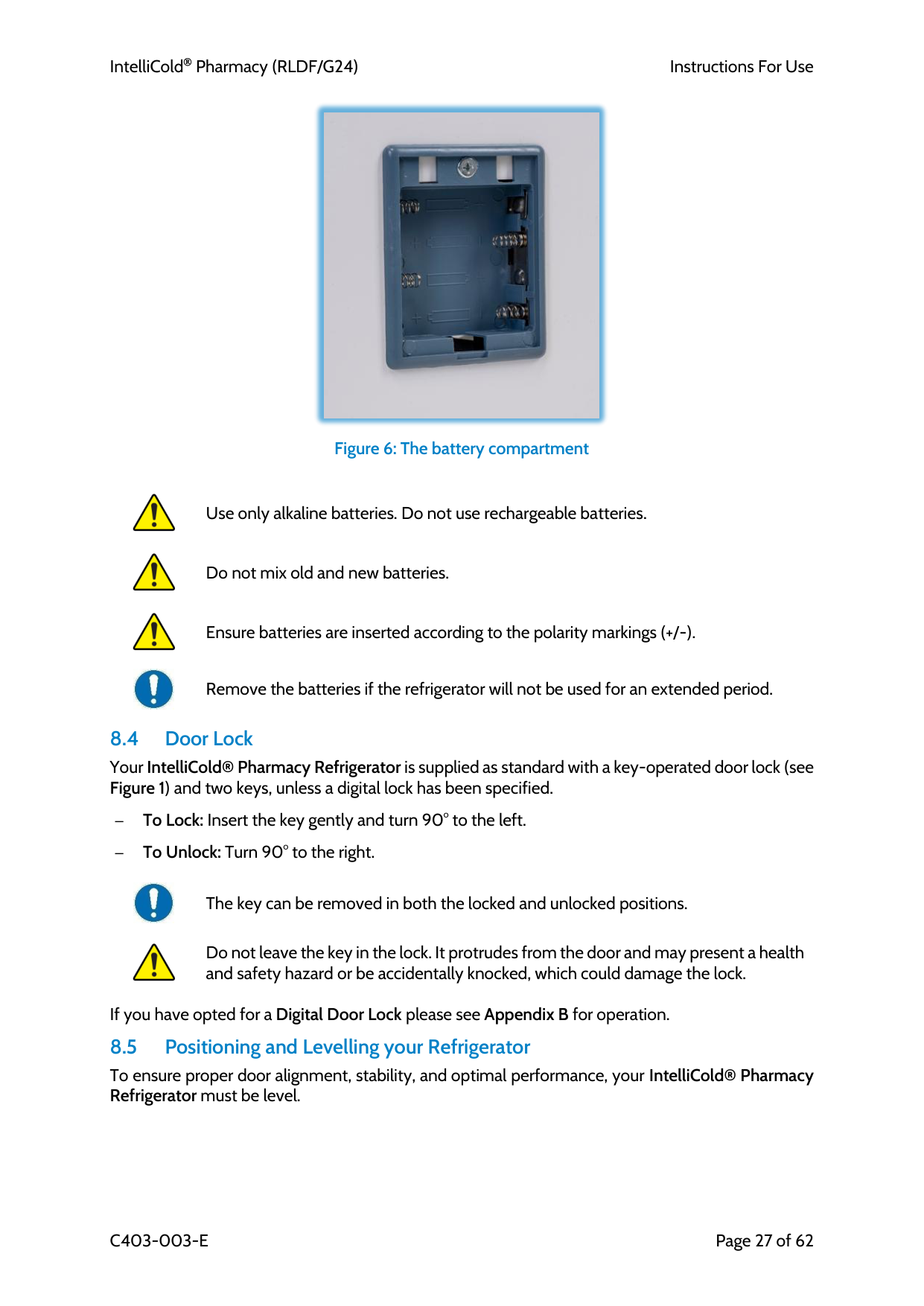
To install the batteries:
IntelliCold Pharmacy (RLDF/G24)
Instructions For Use
C403-003-E
Page 27 of 62
Figure 6: The battery compartment
Use only alkaline batteries. Do not use rechargeable batteries.
Do not mix old and new batteries.
Ensure batteries are inserted according to the polarity markings (+/-).
Remove the batteries if the refrigerator will not be used for an extended period. 8.4 Door Lock Your IntelliCold® Pharmacy Refrigerator is supplied as standard with a key-operated door lock (see Figure 1) and two keys, unless a digital lock has been specified.
– To Lock: Insert the key gently and turn 90° to the left.
– To Unlock: Turn 90° to the right.
The key can be removed in both the locked and unlocked positions.
Do not leave the key in the lock. It protrudes from the door and may present a health and safety hazard or be accidentally knocked, which could damage the lock.
If you have opted for a Digital Door Lock please see Appendix B for operation. 8.5 Positioning and Levelling your Refrigerator To ensure proper door alignment, stability, and optimal performance, your IntelliCold® Pharmacy Refrigerator must be level.
IntelliCold Pharmacy (RLDF/G24)
Instructions For Use
C403-003-E
Page 28 of 62
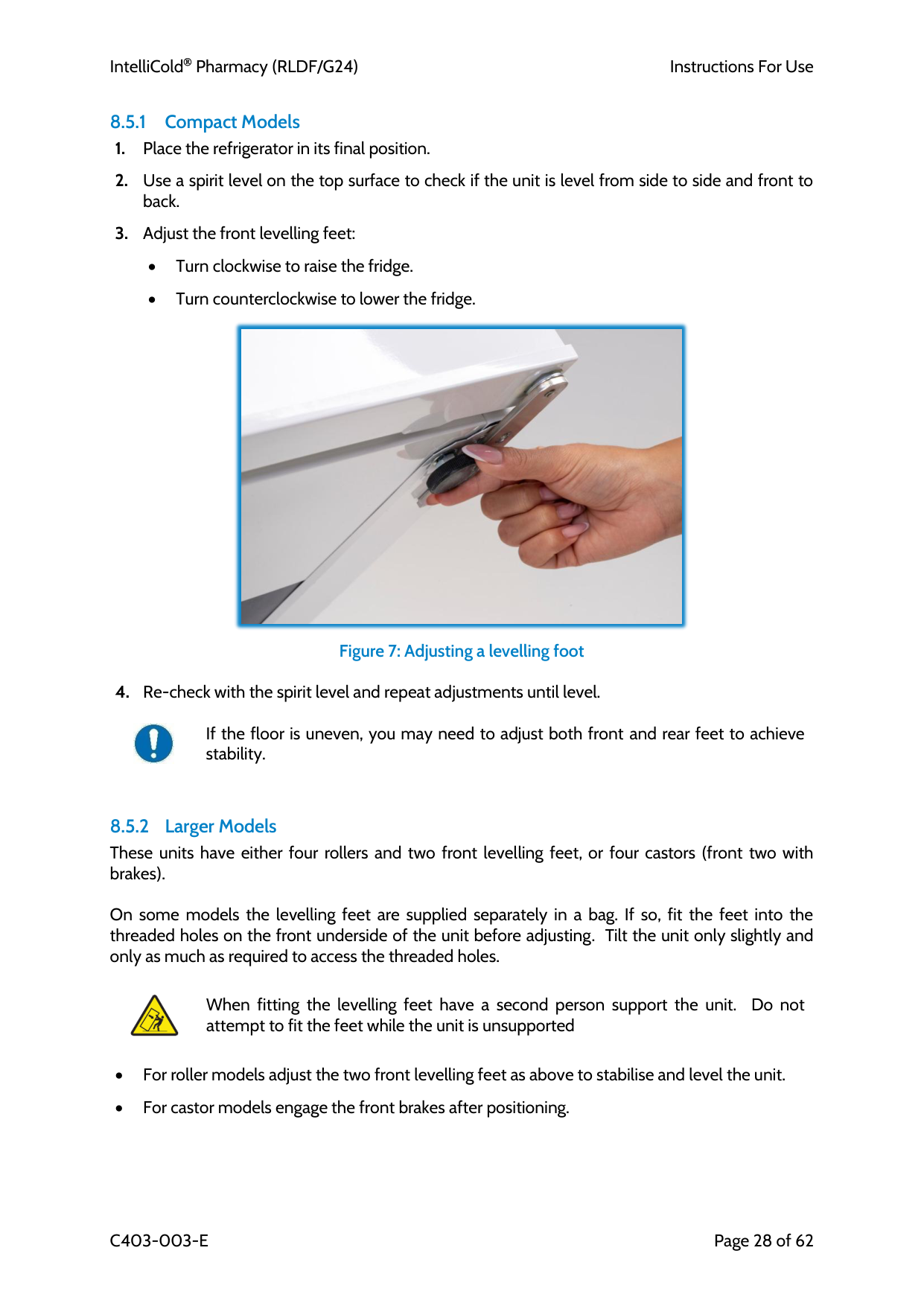
8.5.1 Compact Models
• Turn clockwise to raise the fridge.
• Turn counterclockwise to lower the fridge.
Figure 7: Adjusting a levelling foot
If the floor is uneven, you may need to adjust both front and rear feet to achieve stability.
8.5.2 Larger Models These units have either four rollers and two front levelling feet, or four castors (front two with brakes).
On some models the levelling feet are supplied separately in a bag. If so, fit the feet into the threaded holes on the front underside of the unit before adjusting. Tilt the unit only slightly and only as much as required to access the threaded holes.
When fitting the levelling feet have a second person support the unit. Do not attempt to fit the feet while the unit is unsupported
• For roller models adjust the two front levelling feet as above to stabilise and level the unit.
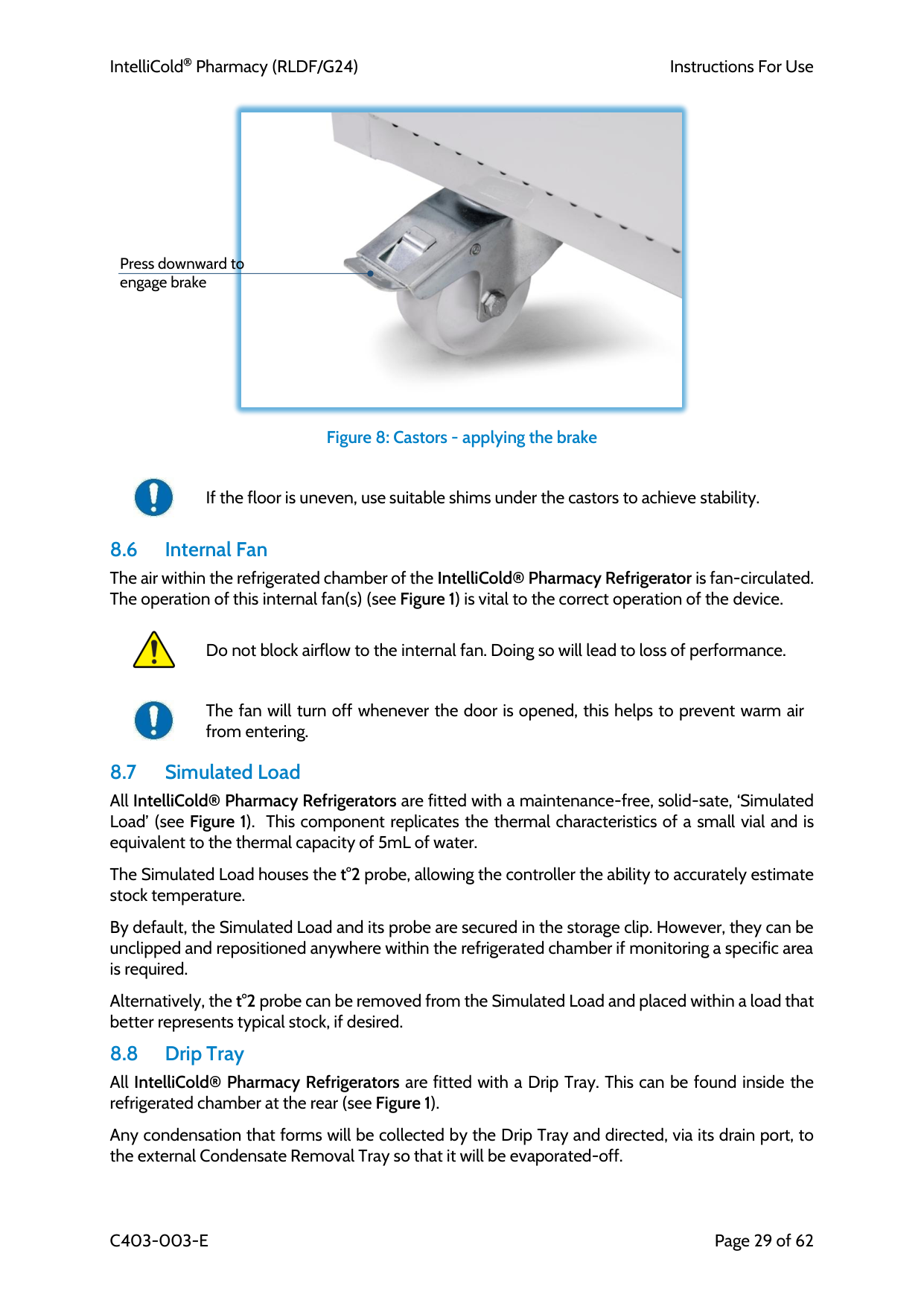
• For castor models engage the front brakes after positioning.
IntelliCold Pharmacy (RLDF/G24)
Instructions For Use
C403-003-E
Page 29 of 62
Figure 8: Castors - applying the brake
If the floor is uneven, use suitable shims under the castors to achieve stability. 8.6 Internal Fan The air within the refrigerated chamber of the IntelliCold® Pharmacy Refrigerator is fan-circulated. The operation of this internal fan(s) (see Figure 1) is vital to the correct operation of the device.
Do not block airflow to the internal fan. Doing so will lead to loss of performance.
The fan will turn off whenever the door is opened, this helps to prevent warm air from entering. 8.7 Simulated Load All IntelliCold® Pharmacy Refrigerators are fitted with a maintenance-free, solid-sate, ‘Simulated Load’ (see Figure 1). This component replicates the thermal characteristics of a small vial and is equivalent to the thermal capacity of 5mL of water.
The Simulated Load houses the t°2 probe, allowing the controller the ability to accurately estimate stock temperature.
By default, the Simulated Load and its probe are secured in the storage clip. However, they can be unclipped and repositioned anywhere within the refrigerated chamber if monitoring a specific area is required.
Alternatively, the t°2 probe can be removed from the Simulated Load and placed within a load that better represents typical stock, if desired. 8.8 Drip Tray All IntelliCold® Pharmacy Refrigerators are fitted with a Drip Tray. This can be found inside the refrigerated chamber at the rear (see Figure 1).
Any condensation that forms will be collected by the Drip Tray and directed, via its drain port, to the external Condensate Removal Tray so that it will be evaporated-off.
Press downward to engage brake
IntelliCold Pharmacy (RLDF/G24)
Instructions For Use
C403-003-E
Page 30 of 62 8.9 Condensate Removal Tray All IntelliCold® Pharmacy Refrigerators are fitted with a maintenance-free, heated, Condensate Removal Tray. Any condensate collected by the Drip Tray passes into the Condensate Removal Tray where it is automatically evaporated-off. The Condensate Removal Tray can be found at the rear of the IntelliCold® Pharmacy Refrigerator.
8.10 Access Port All IntelliCold® Pharmacy Refrigerators are fitted with an Access Port.
In circumstances where the use of a supplementary, external temperature monitoring system is required any wired sensors passing from it and into the refrigerated chamber should be routed through the Access Port provided. This port can be found at the rear of the IntelliCold® Pharmacy Refrigerator (see Figure 2).
Once the sensors are fitted, the area around their wires, where they pass through the Access Port, should be sealed with a pliable, non-hardening sealing compound, such as a putty, to prevent condensation.
Do not route wires / cables through the door. Doing so will compromise the effectiveness of the seal and can lead to loss of performance.
Replace caps/bung when Access Port is not in use. Failure to do so may cause condensation to form around the port and can lead to loss of performance.
When placing supplementary temperature sensors, ensure they do not make direct contact with shelves or walls of the device. Doing so may lead to inaccurate air temperature readings
Labcold offer several temperature monitoring systems, including wireless monitoring systems (see section 9.4) and data loggers (see section 9.5).
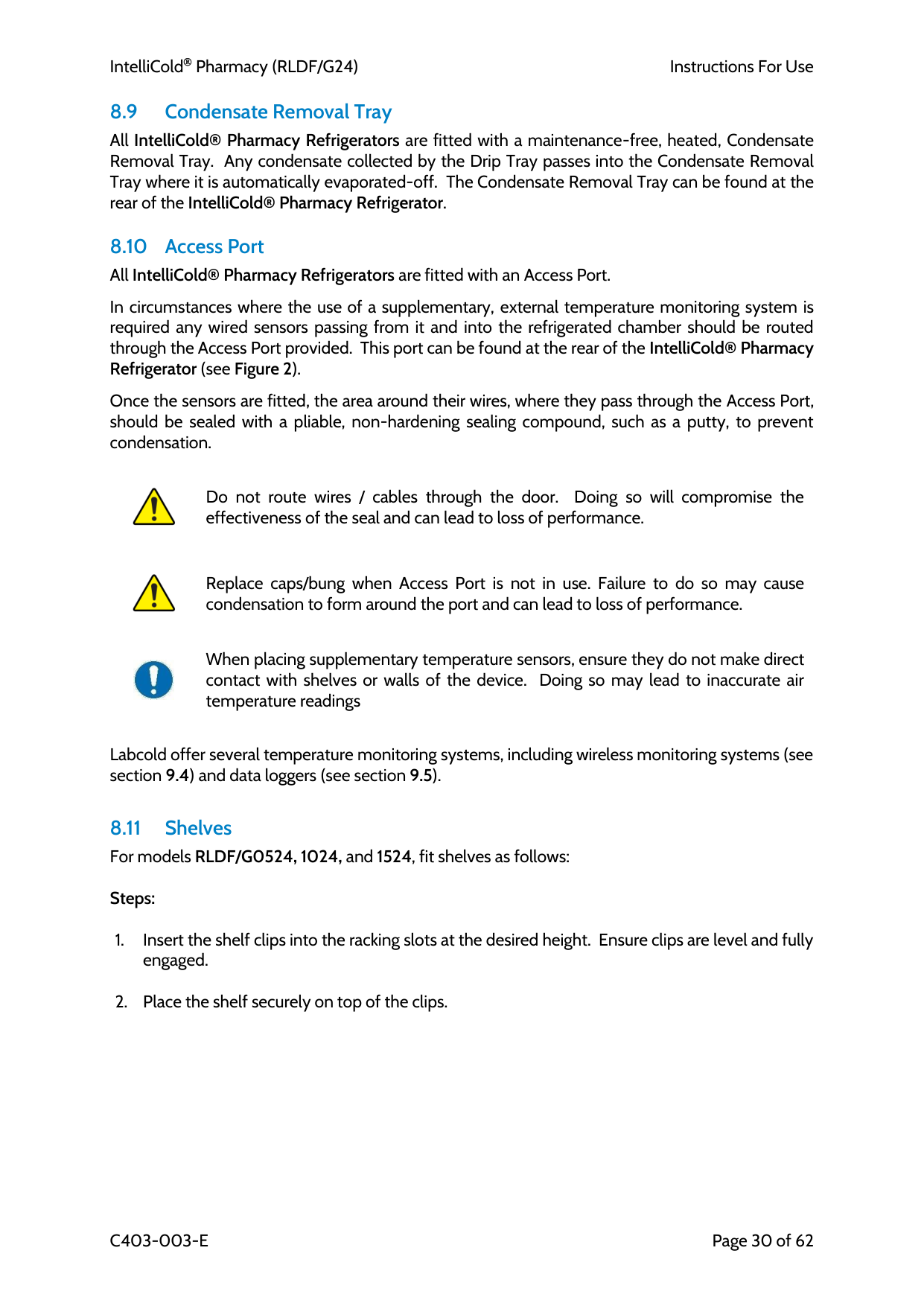
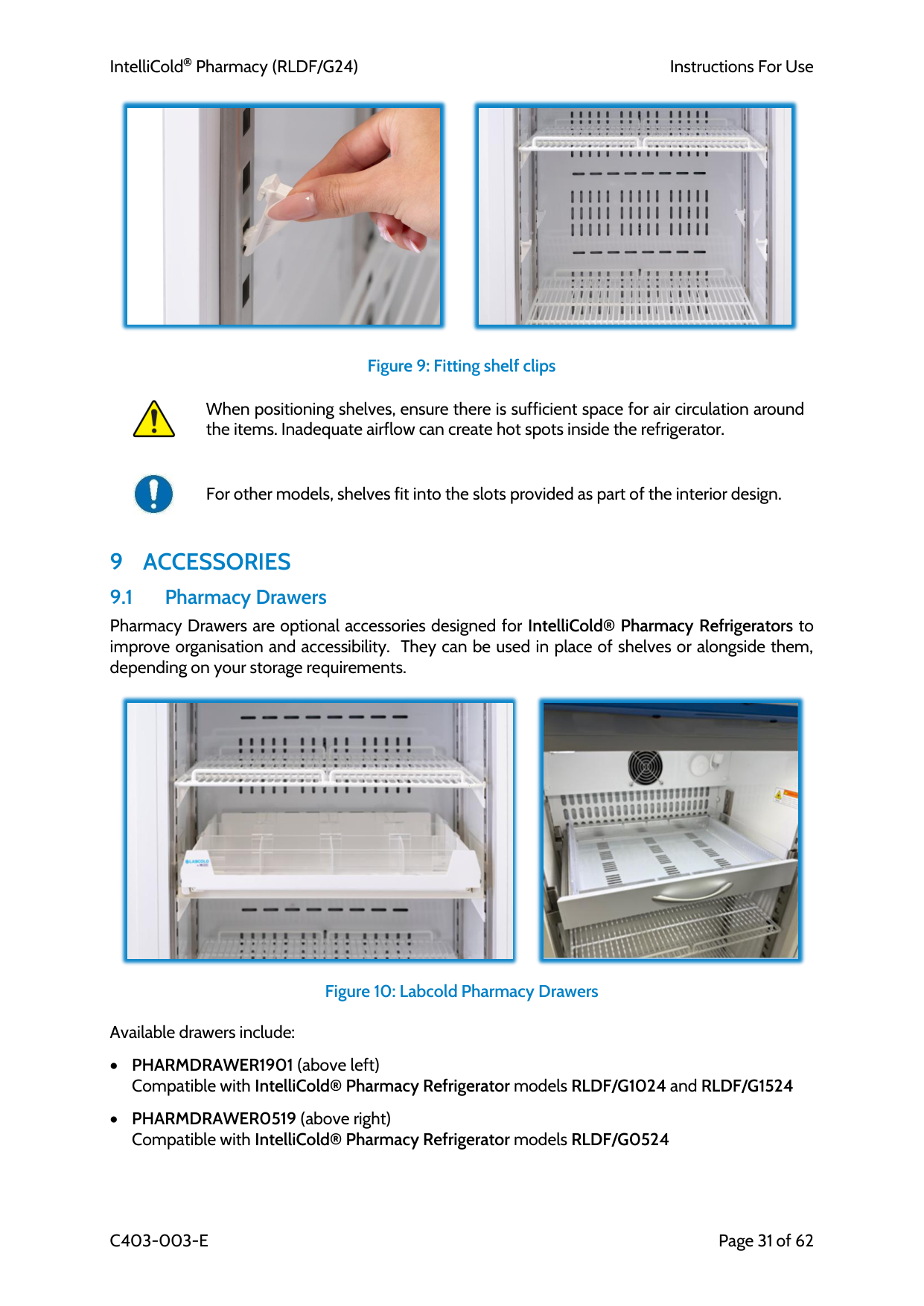
8.11 Shelves For models RLDF/G0524, 1024, and 1524, fit shelves as follows:
Steps:
IntelliCold Pharmacy (RLDF/G24)
Instructions For Use
C403-003-E
Page 31 of 62
Figure 9: Fitting shelf clips
When positioning shelves, ensure there is sufficient space for air circulation around the items. Inadequate airflow can create hot spots inside the refrigerator.
For other models, shelves fit into the slots provided as part of the interior design.
9 Accessories
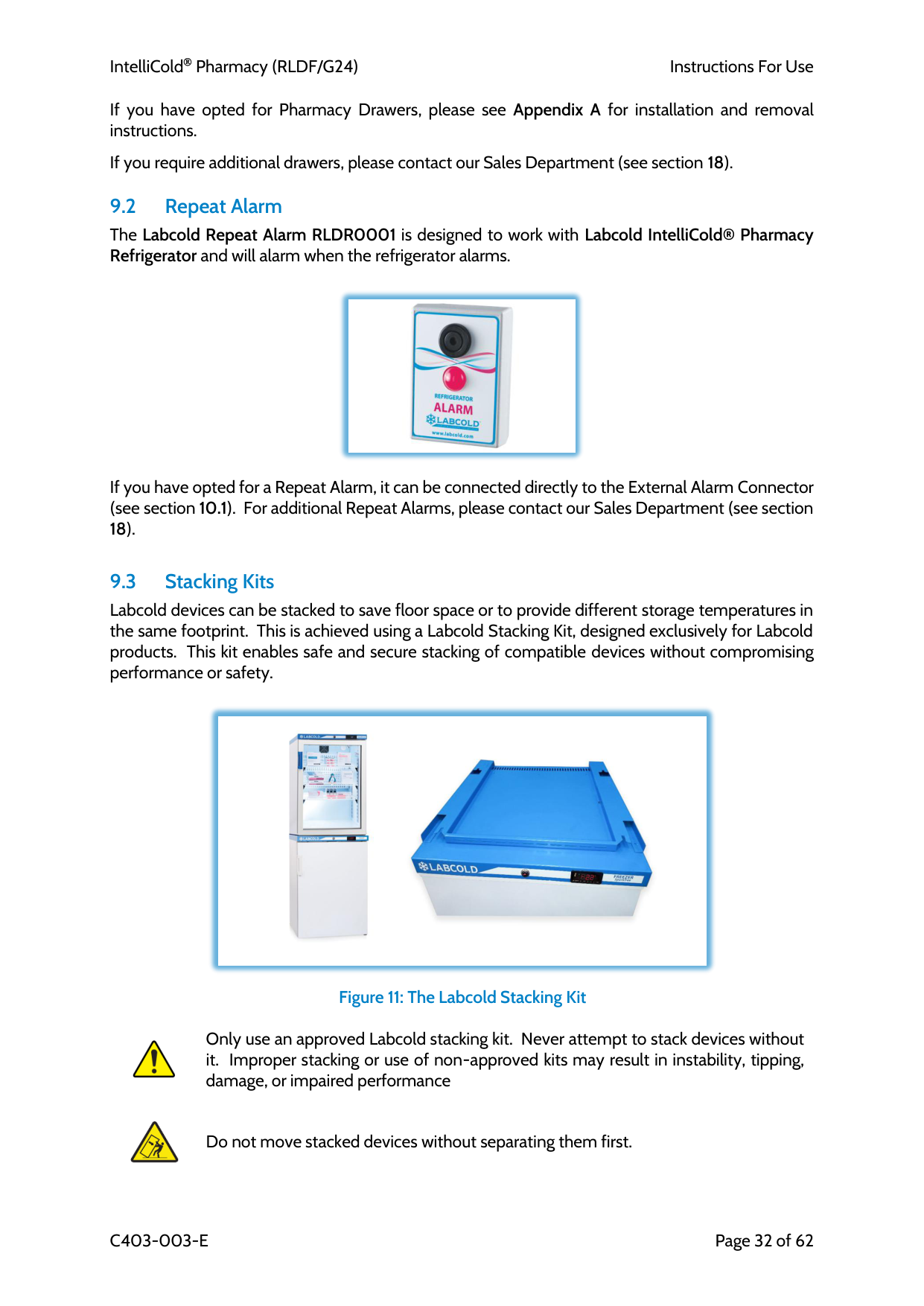
9.1 Pharmacy Drawers Pharmacy Drawers are optional accessories designed for IntelliCold® Pharmacy Refrigerators to improve organisation and accessibility. They can be used in place of shelves or alongside them, depending on your storage requirements.Figure 10: Labcold Pharmacy Drawers
Available drawers include:
IntelliCold Pharmacy (RLDF/G24)
Instructions For Use
C403-003-E
Page 32 of 62 If you have opted for Pharmacy Drawers, please see Appendix A for installation and removal instructions.
If you require additional drawers, please contact our Sales Department (see section 18).
9.2 Repeat Alarm The Labcold Repeat Alarm RLDR0001 is designed to work with Labcold IntelliCold® Pharmacy Refrigerator and will alarm when the refrigerator alarms.
If you have opted for a Repeat Alarm, it can be connected directly to the External Alarm Connector (see section 10.1). For additional Repeat Alarms, please contact our Sales Department (see section 18).
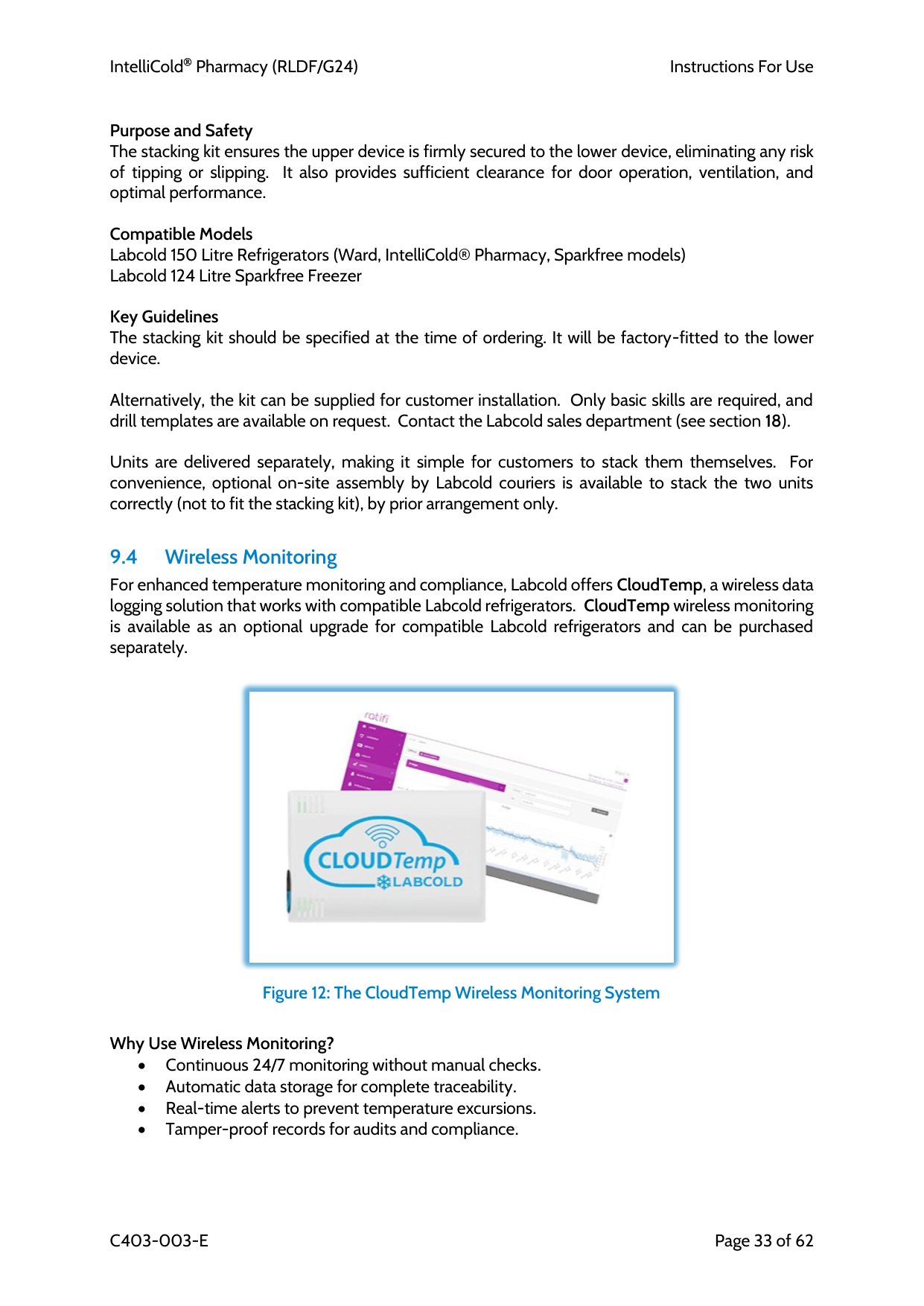
9.3 Stacking Kits Labcold devices can be stacked to save floor space or to provide different storage temperatures in the same footprint. This is achieved using a Labcold Stacking Kit, designed exclusively for Labcold products. This kit enables safe and secure stacking of compatible devices without compromising performance or safety.
Figure 11: The Labcold Stacking Kit
Only use an approved Labcold stacking kit. Never attempt to stack devices without it. Improper stacking or use of non-approved kits may result in instability, tipping, damage, or impaired performance
Do not move stacked devices without separating them first.
IntelliCold Pharmacy (RLDF/G24)
Instructions For Use
C403-003-E
Page 33 of 62
Purpose and Safety The stacking kit ensures the upper device is firmly secured to the lower device, eliminating any risk of tipping or slipping. It also provides sufficient clearance for door operation, ventilation, and optimal performance.
Compatible Models Labcold 150 Litre Refrigerators (Ward, IntelliCold® Pharmacy, Sparkfree models) Labcold 124 Litre Sparkfree Freezer
Key Guidelines The stacking kit should be specified at the time of ordering. It will be factory-fitted to the lower device.
Alternatively, the kit can be supplied for customer installation. Only basic skills are required, and drill templates are available on request. Contact the Labcold sales department (see section 18).
Units are delivered separately, making it simple for customers to stack them themselves. For convenience, optional on-site assembly by Labcold couriers is available to stack the two units correctly (not to fit the stacking kit), by prior arrangement only.
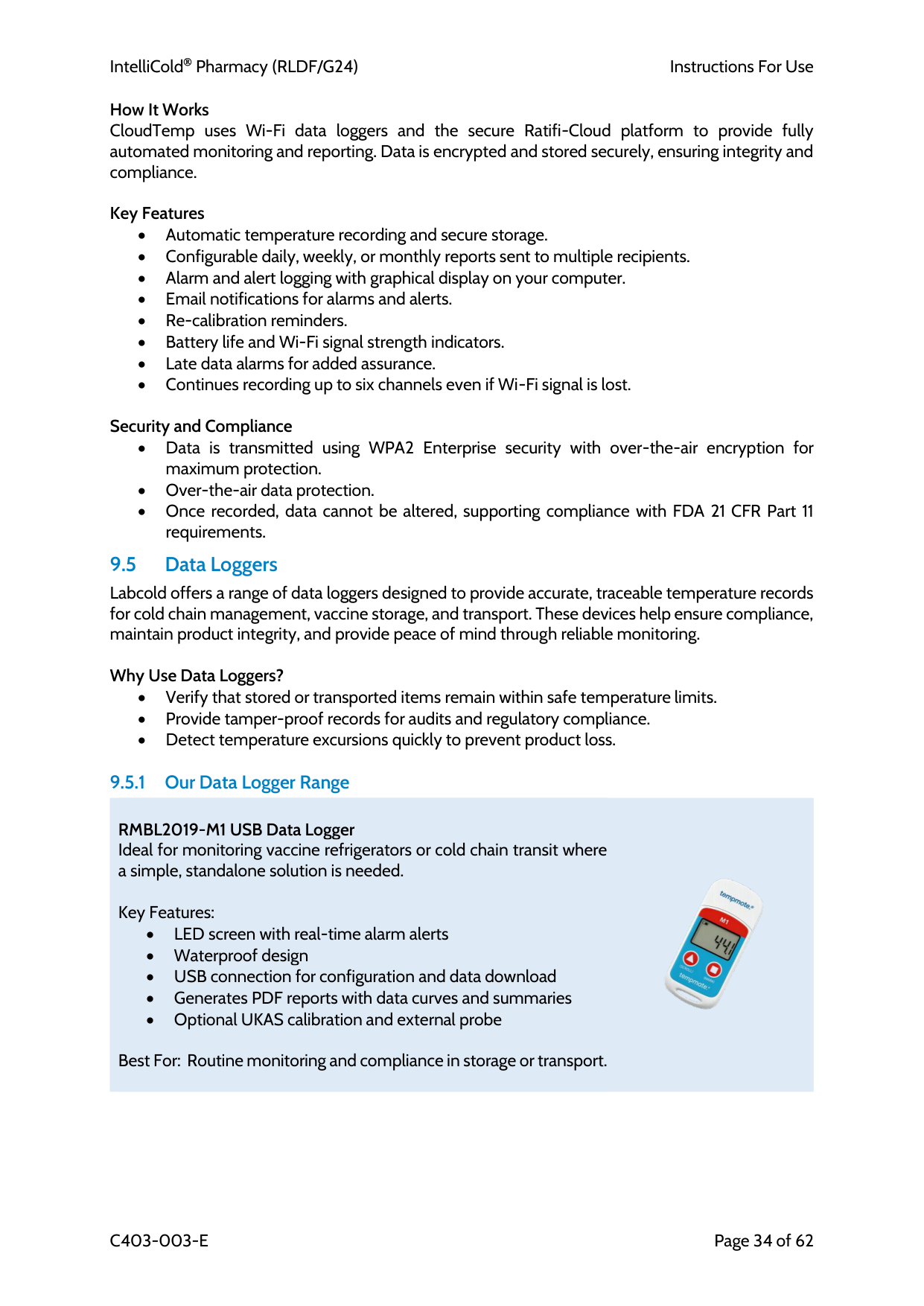
9.4 Wireless Monitoring For enhanced temperature monitoring and compliance, Labcold offers CloudTemp, a wireless data logging solution that works with compatible Labcold refrigerators. CloudTemp wireless monitoring is available as an optional upgrade for compatible Labcold refrigerators and can be purchased separately.
Figure 12: The CloudTemp Wireless Monitoring System
Why Use Wireless Monitoring? • Continuous 24/7 monitoring without manual checks. • Automatic data storage for complete traceability. • Real-time alerts to prevent temperature excursions. • Tamper-proof records for audits and compliance.
IntelliCold Pharmacy (RLDF/G24)
Instructions For Use
C403-003-E
Page 34 of 62 How It Works CloudTemp uses Wi-Fi data loggers and the secure Ratifi-Cloud platform to provide fully automated monitoring and reporting. Data is encrypted and stored securely, ensuring integrity and compliance.
Key Features • Automatic temperature recording and secure storage. • Configurable daily, weekly, or monthly reports sent to multiple recipients. • Alarm and alert logging with graphical display on your computer. • Email notifications for alarms and alerts. • Re-calibration reminders. • Battery life and Wi-Fi signal strength indicators. • Late data alarms for added assurance. • Continues recording up to six channels even if Wi-Fi signal is lost.
Security and Compliance • Data is transmitted using WPA2 Enterprise security with over-the-air encryption for maximum protection. • Over-the-air data protection. • Once recorded, data cannot be altered, supporting compliance with FDA 21 CFR Part 11 requirements. 9.5 Data Loggers Labcold offers a range of data loggers designed to provide accurate, traceable temperature records for cold chain management, vaccine storage, and transport. These devices help ensure compliance, maintain product integrity, and provide peace of mind through reliable monitoring.
Why Use Data Loggers? • Verify that stored or transported items remain within safe temperature limits. • Provide tamper-proof records for audits and regulatory compliance. • Detect temperature excursions quickly to prevent product loss.
9.5.1 Our Data Logger Range
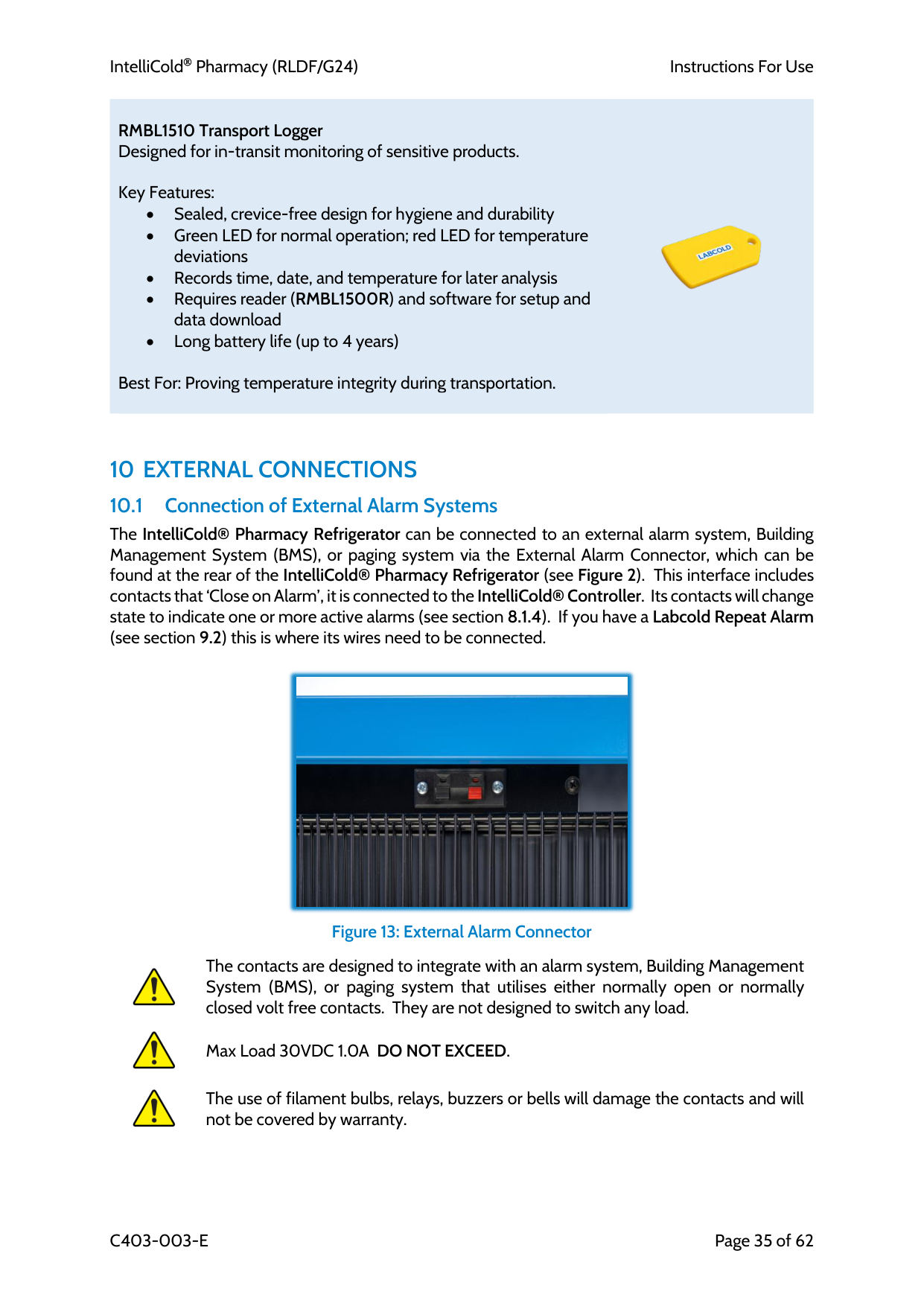
RMBL2019-M1 USB Data Logger Ideal for monitoring vaccine refrigerators or cold chain transit where a simple, standalone solution is needed.
Key Features: • LED screen with real-time alarm alerts • Waterproof design • USB connection for configuration and data download • Generates PDF reports with data curves and summaries • Optional UKAS calibration and external probe
Best For: Routine monitoring and compliance in storage or transport.
IntelliCold Pharmacy (RLDF/G24)
Instructions For Use
C403-003-E
Page 35 of 62
RMBL1510 Transport Logger Designed for in-transit monitoring of sensitive products.
Key Features: • Sealed, crevice-free design for hygiene and durability • Green LED for normal operation; red LED for temperature deviations • Records time, date, and temperature for later analysis • Requires reader (RMBL1500R) and software for setup and data download • Long battery life (up to 4 years)
Best For: Proving temperature integrity during transportation.
10 External Connections
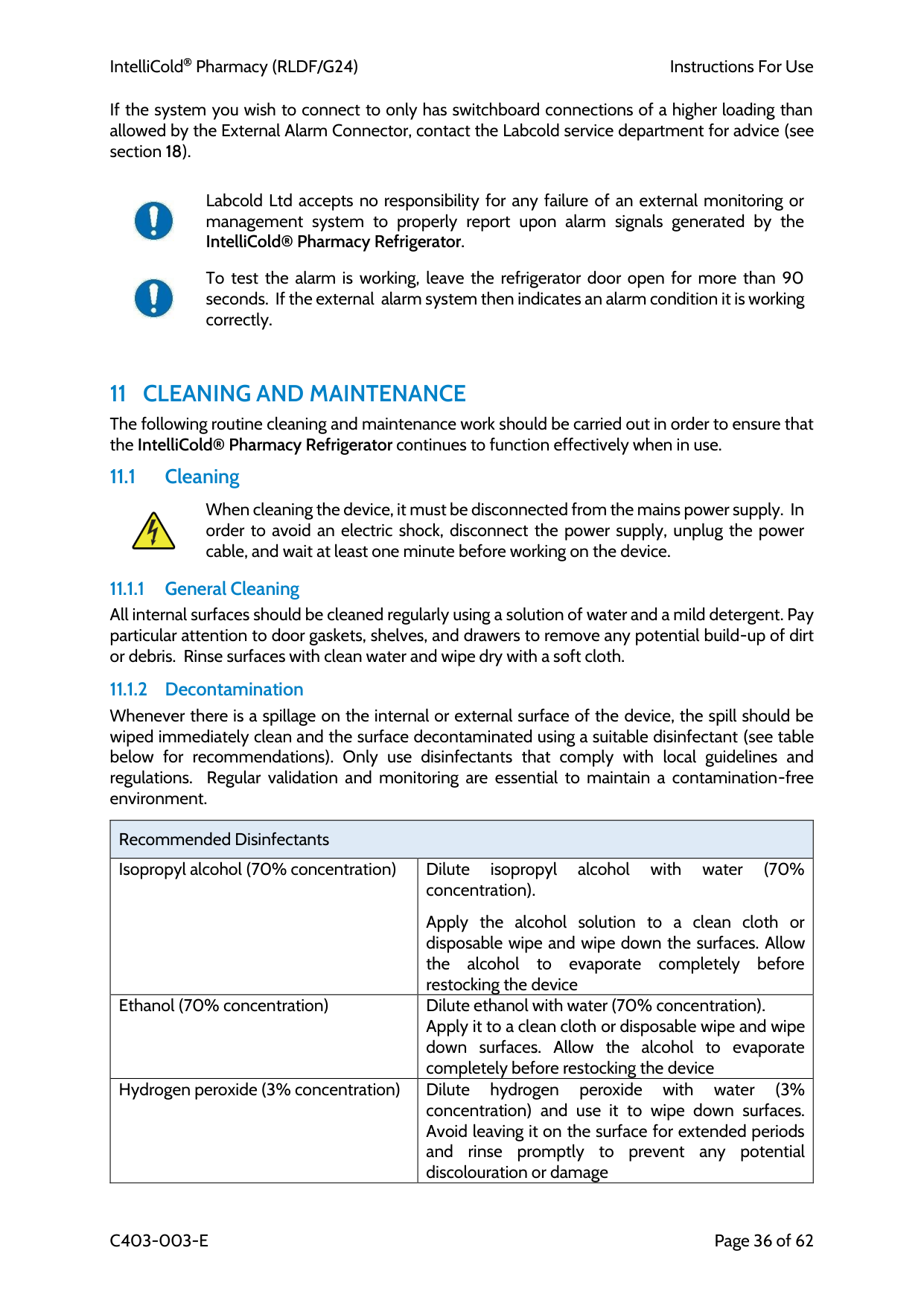
10.1 Connection of External Alarm Systems The IntelliCold® Pharmacy Refrigerator can be connected to an external alarm system, Building Management System (BMS), or paging system via the External Alarm Connector, which can be found at the rear of the IntelliCold® Pharmacy Refrigerator (see Figure 2). This interface includes contacts that ‘Close on Alarm’, it is connected to the IntelliCold® Controller. Its contacts will change state to indicate one or more active alarms (see section 8.1.4). If you have a Labcold Repeat Alarm (see section 9.2) this is where its wires need to be connected.Figure 13: External Alarm Connector
The contacts are designed to integrate with an alarm system, Building Management System (BMS), or paging system that utilises either normally open or normally closed volt free contacts. They are not designed to switch any load.
Max Load 30VDC 1.0A DO NOT EXCEED.
The use of filament bulbs, relays, buzzers or bells will damage the contacts and will not be covered by warranty.
IntelliCold Pharmacy (RLDF/G24)
Instructions For Use
C403-003-E
Page 36 of 62 If the system you wish to connect to only has switchboard connections of a higher loading than allowed by the External Alarm Connector, contact the Labcold service department for advice (see section 18).
Labcold Ltd accepts no responsibility for any failure of an external monitoring or management system to properly report upon alarm signals generated by the IntelliCold® Pharmacy Refrigerator.
To test the alarm is working, leave the refrigerator door open for more than 90 seconds. If the external alarm system then indicates an alarm condition it is working correctly.
11 Cleaning And Maintenance
The following routine cleaning and maintenance work should be carried out in order to ensure that the IntelliCold® Pharmacy Refrigerator continues to function effectively when in use. 11.1 CleaningWhen cleaning the device, it must be disconnected from the mains power supply. In order to avoid an electric shock, disconnect the power supply, unplug the power cable, and wait at least one minute before working on the device.
11.1.1 General Cleaning All internal surfaces should be cleaned regularly using a solution of water and a mild detergent. Pay particular attention to door gaskets, shelves, and drawers to remove any potential build-up of dirt or debris. Rinse surfaces with clean water and wipe dry with a soft cloth.
11.1.2 Decontamination Whenever there is a spillage on the internal or external surface of the device, the spill should be wiped immediately clean and the surface decontaminated using a suitable disinfectant (see table below for recommendations). Only use disinfectants that comply with local guidelines and regulations. Regular validation and monitoring are essential to maintain a contamination-free environment.
Recommended Disinfectants Isopropyl alcohol (70% concentration) Dilute isopropyl alcohol with water (70% concentration).
Apply the alcohol solution to a clean cloth or disposable wipe and wipe down the surfaces. Allow the alcohol to evaporate completely before restocking the device Ethanol (70% concentration) Dilute ethanol with water (70% concentration). Apply it to a clean cloth or disposable wipe and wipe down surfaces. Allow the alcohol to evaporate completely before restocking the device Hydrogen peroxide (3% concentration) Dilute hydrogen peroxide with water (3% concentration) and use it to wipe down surfaces. Avoid leaving it on the surface for extended periods and rinse promptly to prevent any potential discolouration or damage
IntelliCold Pharmacy (RLDF/G24)
Instructions For Use
C403-003-E
Page 37 of 62
Do not use chlorine-releasing agents (e.g. bleach). These can be corrosive and may damage the device.
Avoid abrasive cleaners that could scratch surfaces.
Always use appropriate personal protective equipment (PPE).
11.1.3 Drip Tray It is recommended that the Drip Tray (see Figure 1) and drainage hole be checked and cleared of any debris, if required, once a week during normal use, to prevent accidental blockages.
Should standing water be observed in the drip tray then the drainage hole has been obstructed and should be cleared using a suitable semi-flexible implement.
11.2 Maintenance 11.2.1 Door Gasket (Seal) The door gasket(s) should be visually checked for deterioration and air leakage at least once each week.
The integrity of the door gasket is crucial. An ineffective seal can lead to frost build-up and compromised thermal performance
To check the door gasket for air leakage;
The most unfavourable points may be found by inspecting the area round the seal with the device closed and illuminated from the inside.
If the door does not seal properly, the gasket may need replacing or the door may need adjustment.
IntelliCold Pharmacy (RLDF/G24)
Instructions For Use
C403-003-E
Page 38 of 62 11.2.2 Defrosting Although your IntelliCold® Pharmacy Refrigerator features automatic off-cycle defrosting, it is recommended that it is defrosted manually if there is a build-up of ice. This can happen for a number of reasons, for example in times of high humidity, if the door has been opened for a long time, the refrigerator is overstocked or the ambient temperature is high.
It is essential that you unplug the refrigerator from the mains to prevent electric shock and transfer the contents where they can be stored and monitored at the correct temperatures before defrosting.
To defrost you should:
Do not use a sharp implement to remove ice as this will damage the internal surface of the fridge.
Risk of slippage. During defrosting water may leak from the device.
It may be prudent to place paper towels or similar around the device to catch any excess water that cannot be accommodated by the condensate removal tray.
To stop the alarm sounding during loss of mains power, temporarily remove the four AA batteries from the device.
11.2.3 Maintenance Service Contracts Labcold offers a variety of annual maintenance service contracts designed to provide users with support and peace of mind. Please visit www.labcold.com for further details.
12 Servicing And Repair
It is considered good practice that IntelliCold® Pharmacy Refrigerators are serviced and calibrated on at least an annual basis by a Labcold service technician or similarly approved and trained person.All servicing and repair work must be carried out by an authorised, qualified engineer familiar with hydrocarbon refrigerants. Any work carried out by unauthorised personnel may adversely affect performance of the cabinet or cause physical injury or damage to the equipment
Use genuine IntelliCold® Pharmacy Refrigerator spare parts only! Failure to do so may affect performance or cause physical injury or damage to the equipment
For any servicing and repair work on the device, it must be disconnected from the mains power supply. In order to avoid an electric shock, disconnect the power supply, unplug the power cable, and wait at least one minute before working on the device
Device contains flammable refrigerant! Risk of fire/explosion! Special care should be taken when working on any part of the refrigeration system.
IntelliCold Pharmacy (RLDF/G24)
Instructions For Use
C403-003-E
Page 39 of 62
13 Technical Information
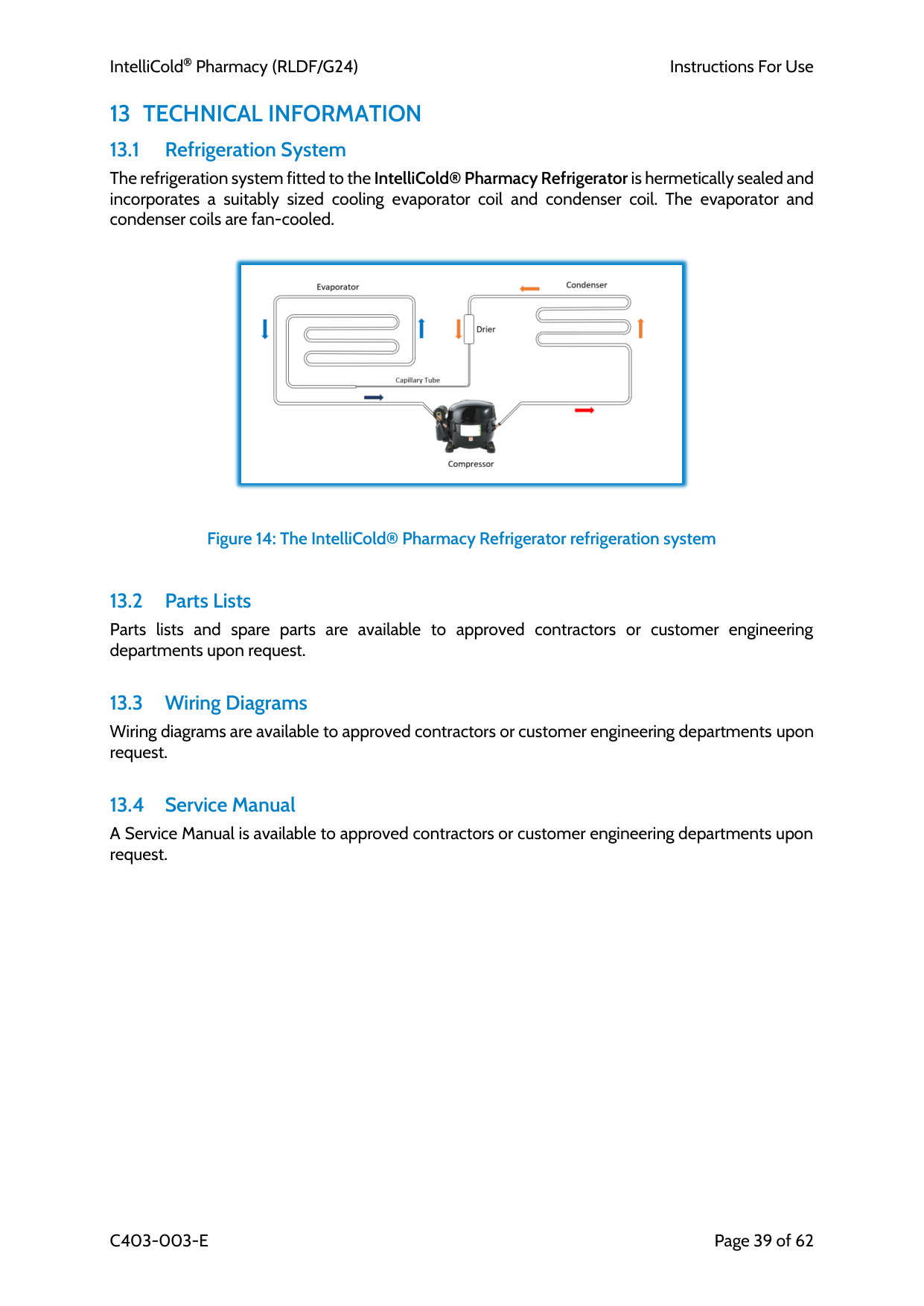
13.1 Refrigeration System The refrigeration system fitted to the IntelliCold® Pharmacy Refrigerator is hermetically sealed and incorporates a suitably sized cooling evaporator coil and condenser coil. The evaporator and condenser coils are fan-cooled.Figure 14: The IntelliCold® Pharmacy Refrigerator refrigeration system
13.2 Parts Lists Parts lists and spare parts are available to approved contractors or customer engineering departments upon request.
13.3 Wiring Diagrams Wiring diagrams are available to approved contractors or customer engineering departments upon request.
13.4 Service Manual A Service Manual is available to approved contractors or customer engineering departments upon request.
IntelliCold Pharmacy (RLDF/G24)
Instructions For Use
C403-003-E
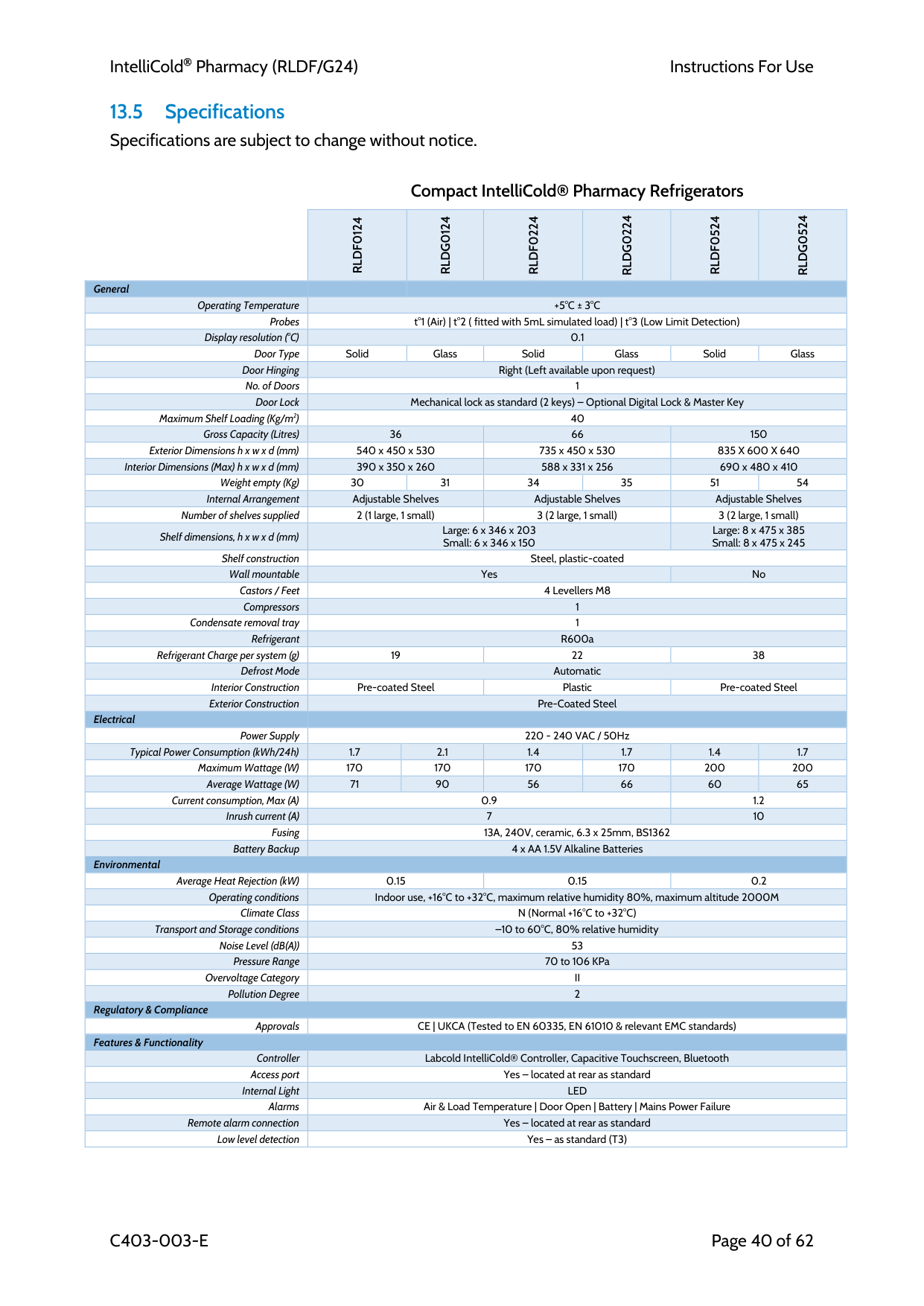
Page 40 of 62 13.5 Specifications Specifications are subject to change without notice.
Compact IntelliCold® Pharmacy Refrigerators
Rldf0124
Rldg0124
Rldf0224
Rldg0224
Rldf0524
Rldg0524
GeneralOperating Temperature
+5°C ± 3°C
Probes t°1 (Air) | t°2 ( fitted with 5mL simulated load) | t°3 (Low Limit Detection) Display resolution (°C) 0.1 Door Type Solid Glass Solid Glass Solid Glass Door Hinging Right (Left available upon request) No. of Doors 1 Door Lock Mechanical lock as standard (2 keys) – Optional Digital Lock & Master Key Maximum Shelf Loading (Kg/m2) 40 Gross Capacity (Litres) 36 66 150 Exterior Dimensions h x w x d (mm) 540 x 450 x 530 735 x 450 x 530835 X 600 X 640
Interior Dimensions (Max) h x w x d (mm) 390 x 350 x 260 588 x 331 x 256 690 x 480 x 410 Weight empty (Kg) 30 31 34 35 51 54 Internal Arrangement Adjustable Shelves Adjustable Shelves Adjustable Shelves Number of shelves supplied 2 (1 large, 1 small) 3 (2 large, 1 small) 3 (2 large, 1 small) Shelf dimensions, h x w x d (mm) Large: 6 x 346 x 203 Small: 6 x 346 x 150 Large: 8 x 475 x 385 Small: 8 x 475 x 245 Shelf construction Steel, plastic-coated Wall mountable Yes No Castors / Feet 4 Levellers M8 Compressors 1 Condensate removal tray 1 Refrigerant R600a Refrigerant Charge per system (g) 19 22 38 Defrost Mode Automatic Interior Construction Pre-coated Steel Plastic Pre-coated Steel Exterior Construction Pre-Coated Steel ElectricalPower Supply 220 - 240 VAC / 50Hz Typical Power Consumption (kWh/24h) 1.7 2.1 1.4 1.7 1.4 1.7 Maximum Wattage (W) 170 170 170 170 200 200 Average Wattage (W) 71 90 56 66 60 65 Current consumption, Max (A) 0.9 1.2 Inrush current (A) 7 10 Fusing 13A, 240V, ceramic, 6.3 x 25mm, BS1362 Battery Backup 4 x AA 1.5V Alkaline Batteries Environmental Average Heat Rejection (kW) 0.15 0.15 0.2 Operating conditions Indoor use, +16°C to +32°C, maximum relative humidity 80%, maximum altitude 2000M Climate Class N (Normal +16°C to +32°C) Transport and Storage conditions –10 to 60°C, 80% relative humidity Noise Level (dB(A)) 53 Pressure Range 70 to 106 KPa Overvoltage Category
Ii
Pollution Degree 2 Regulatory & Compliance Approvals CE | UKCA (Tested to EN 60335, EN 61010 & relevant EMC standards) Features & Functionality Controller Labcold IntelliCold® Controller, Capacitive Touchscreen, Bluetooth Access port Yes – located at rear as standard Internal LightLed
Alarms Air & Load Temperature | Door Open | Battery | Mains Power Failure Remote alarm connection Yes – located at rear as standard Low level detection Yes – as standard (T3)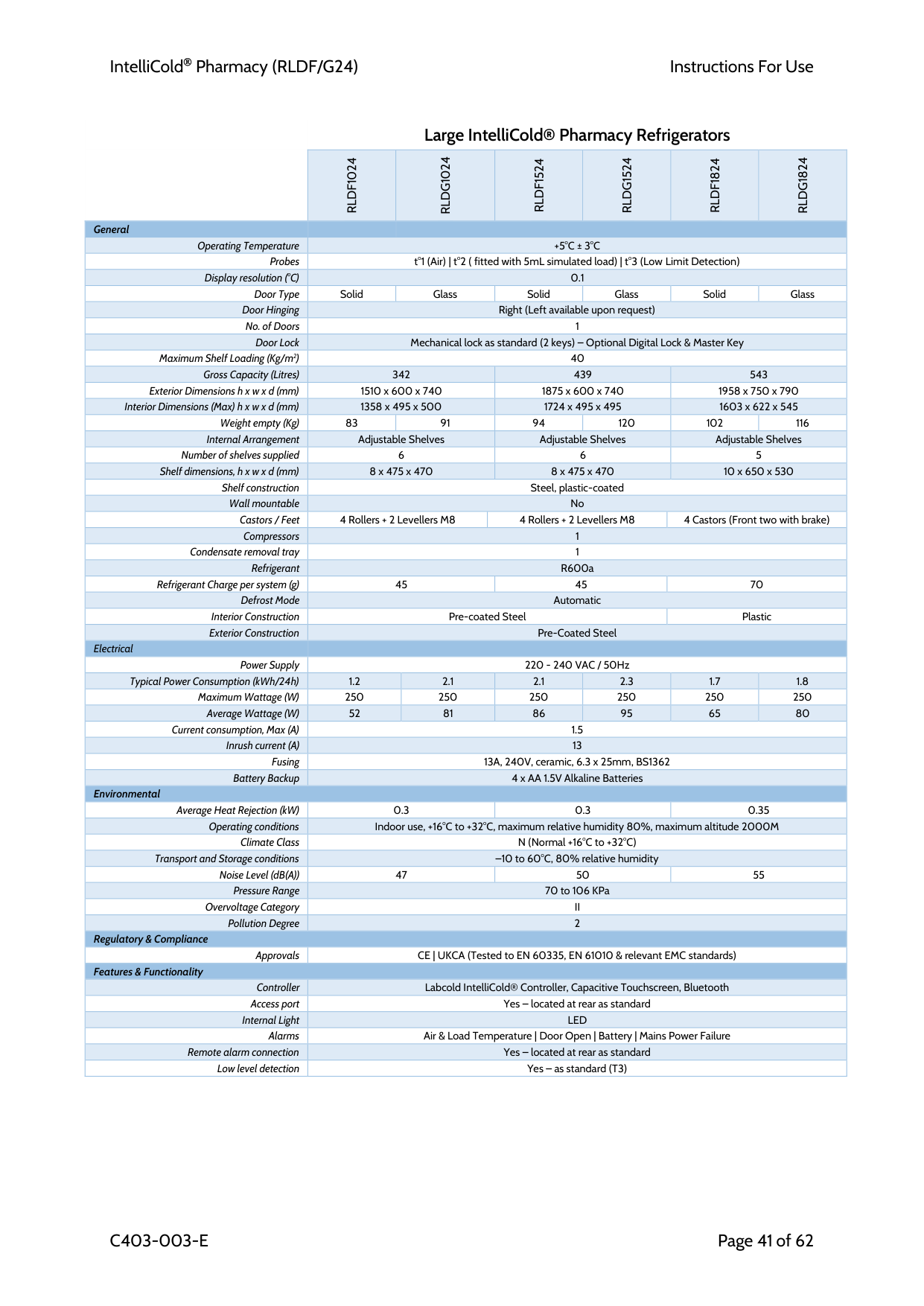
IntelliCold Pharmacy (RLDF/G24)
Instructions For Use
C403-003-E
Page 41 of 62
Large IntelliCold® Pharmacy Refrigerators
Rldf1024
Rldg1024
Rldf1524
Rldg1524
Rldf1824
Rldg1824
GeneralOperating Temperature
+5°C ± 3°C
Probes t°1 (Air) | t°2 ( fitted with 5mL simulated load) | t°3 (Low Limit Detection) Display resolution (°C) 0.1 Door Type Solid Glass Solid Glass Solid Glass Door Hinging Right (Left available upon request) No. of Doors 1 Door Lock Mechanical lock as standard (2 keys) – Optional Digital Lock & Master Key Maximum Shelf Loading (Kg/m2) 40 Gross Capacity (Litres) 342 439 543 Exterior Dimensions h x w x d (mm) 1510 x 600 x 740 1875 x 600 x 740 1958 x 750 x 790 Interior Dimensions (Max) h x w x d (mm) 1358 x 495 x 500 1724 x 495 x 495 1603 x 622 x 545 Weight empty (Kg) 83 91 94 120 102 116 Internal Arrangement Adjustable Shelves Adjustable Shelves Adjustable Shelves Number of shelves supplied 6 6 5 Shelf dimensions, h x w x d (mm) 8 x 475 x 470 8 x 475 x 470 10 x 650 x 530 Shelf construction Steel, plastic-coated Wall mountable No Castors / Feet 4 Rollers + 2 Levellers M8 4 Rollers + 2 Levellers M8 4 Castors (Front two with brake) Compressors 1 Condensate removal tray 1 Refrigerant R600a Refrigerant Charge per system (g) 45 45 70 Defrost Mode Automatic Interior Construction Pre-coated Steel Plastic Exterior Construction Pre-Coated Steel ElectricalPower Supply 220 - 240 VAC / 50Hz Typical Power Consumption (kWh/24h) 1.2 2.1 2.1 2.3 1.7 1.8 Maximum Wattage (W) 250 250 250 250 250 250 Average Wattage (W) 52 81 86 95 65 80 Current consumption, Max (A) 1.5 Inrush current (A) 13 Fusing 13A, 240V, ceramic, 6.3 x 25mm, BS1362 Battery Backup 4 x AA 1.5V Alkaline Batteries Environmental Average Heat Rejection (kW) 0.3 0.3 0.35 Operating conditions Indoor use, +16°C to +32°C, maximum relative humidity 80%, maximum altitude 2000M Climate Class N (Normal +16°C to +32°C) Transport and Storage conditions –10 to 60°C, 80% relative humidity Noise Level (dB(A)) 47 50 55 Pressure Range 70 to 106 KPa Overvoltage Category
Ii
Pollution Degree 2 Regulatory & Compliance Approvals CE | UKCA (Tested to EN 60335, EN 61010 & relevant EMC standards) Features & Functionality Controller Labcold IntelliCold® Controller, Capacitive Touchscreen, Bluetooth Access port Yes – located at rear as standard Internal LightLed
Alarms Air & Load Temperature | Door Open | Battery | Mains Power Failure Remote alarm connection Yes – located at rear as standard Low level detection Yes – as standard (T3)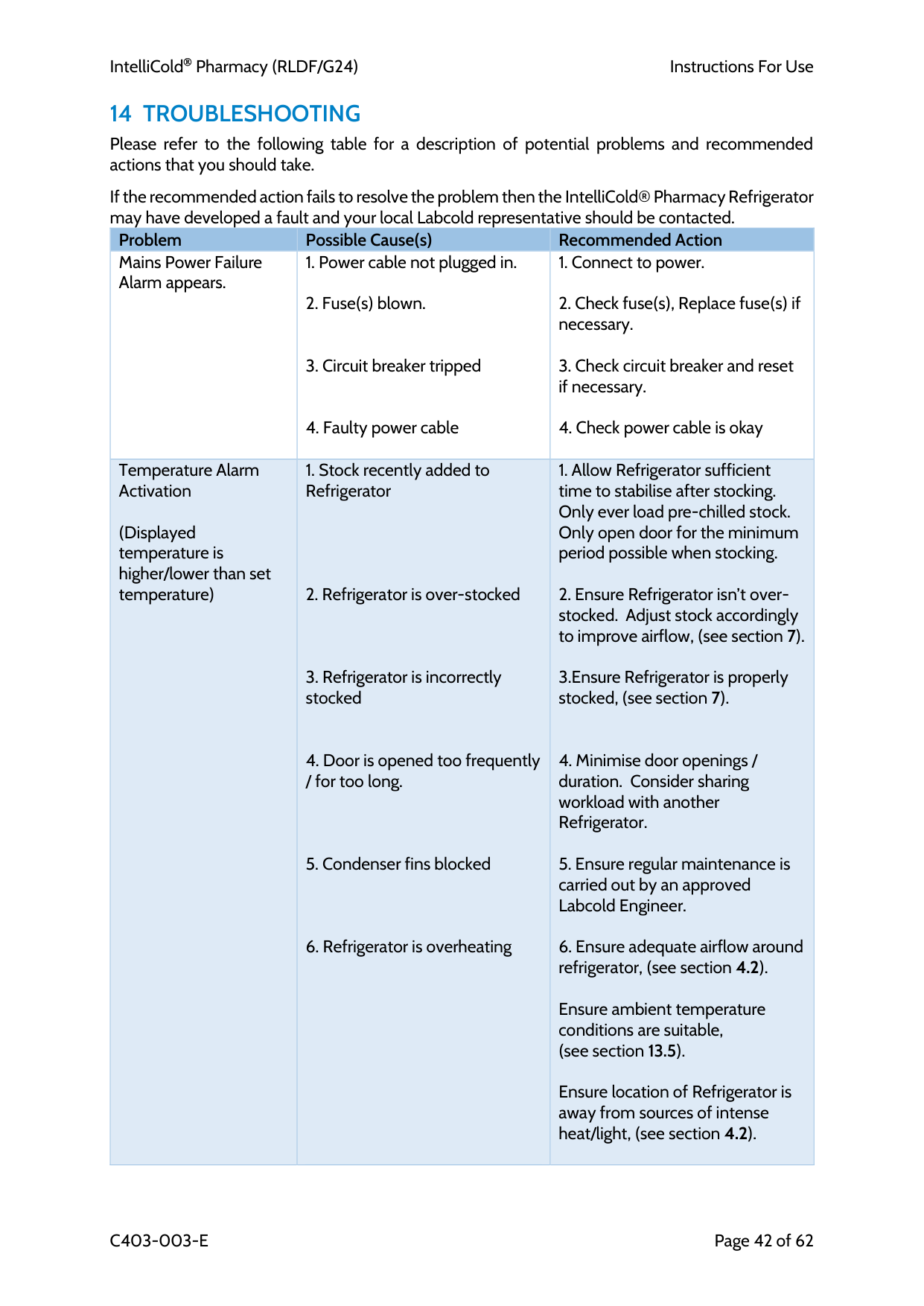
IntelliCold Pharmacy (RLDF/G24)
Instructions For Use
C403-003-E
Page 42 of 62
14 Troubleshooting
Please refer to the following table for a description of potential problems and recommended actions that you should take.If the recommended action fails to resolve the problem then the IntelliCold® Pharmacy Refrigerator may have developed a fault and your local Labcold representative should be contacted. Problem Possible Cause(s) Recommended Action Mains Power Failure Alarm appears.
(Displayed temperature is higher/lower than set temperature)
3.Ensure Refrigerator is properly stocked, (see section 7).
Ensure ambient temperature conditions are suitable, (see section 13.5).
Ensure location of Refrigerator is away from sources of intense heat/light, (see section 4.2).
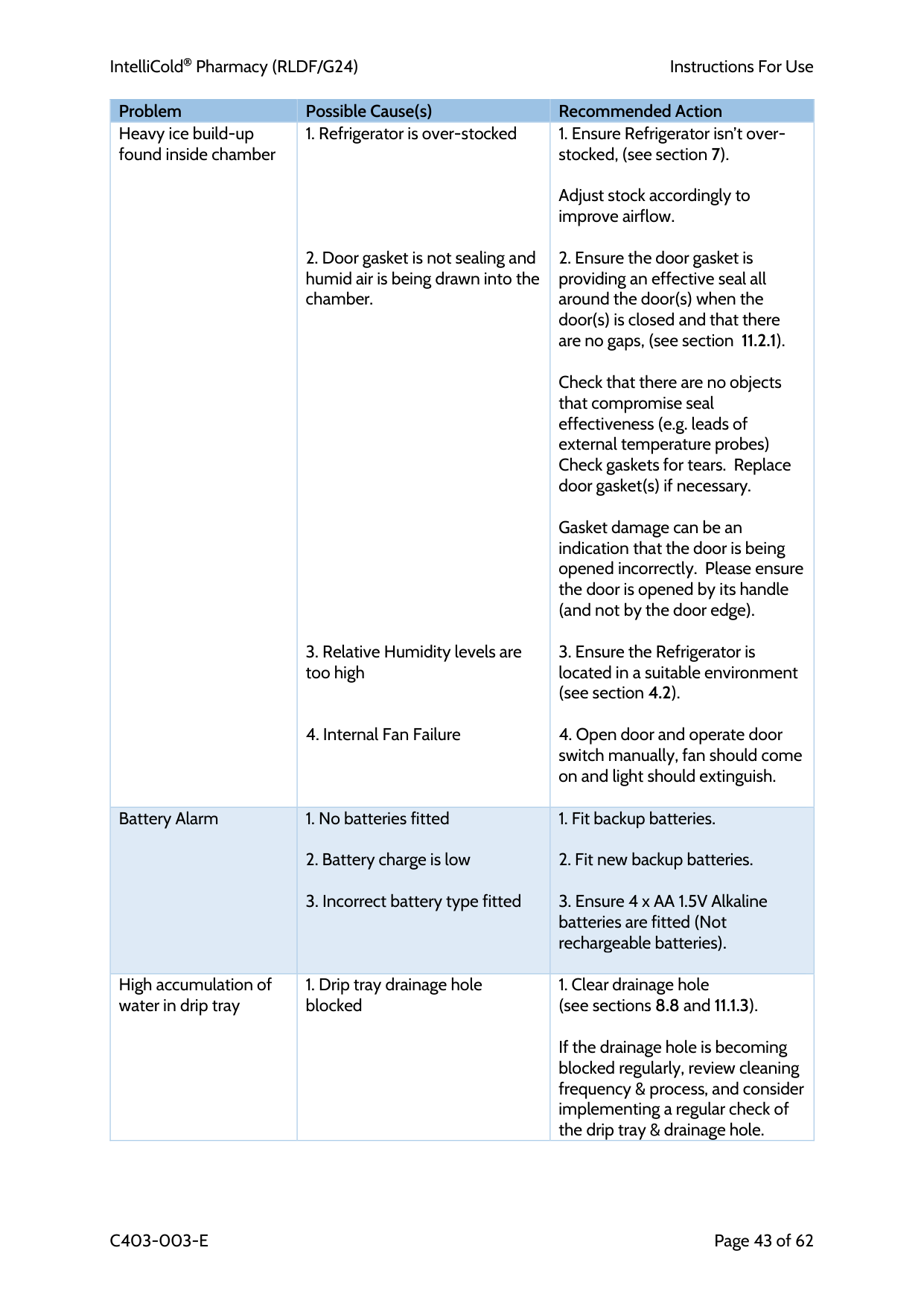
IntelliCold Pharmacy (RLDF/G24)
Instructions For Use
C403-003-E
Page 43 of 62 Problem Possible Cause(s) Recommended Action Heavy ice build-up found inside chamber
Adjust stock accordingly to improve airflow.
Check that there are no objects that compromise seal effectiveness (e.g. leads of external temperature probes) Check gaskets for tears. Replace door gasket(s) if necessary.
Gasket damage can be an indication that the door is being opened incorrectly. Please ensure the door is opened by its handle (and not by the door edge).
Battery Alarm
High accumulation of water in drip tray
If the drainage hole is becoming blocked regularly, review cleaning frequency & process, and consider implementing a regular check of the drip tray & drainage hole.
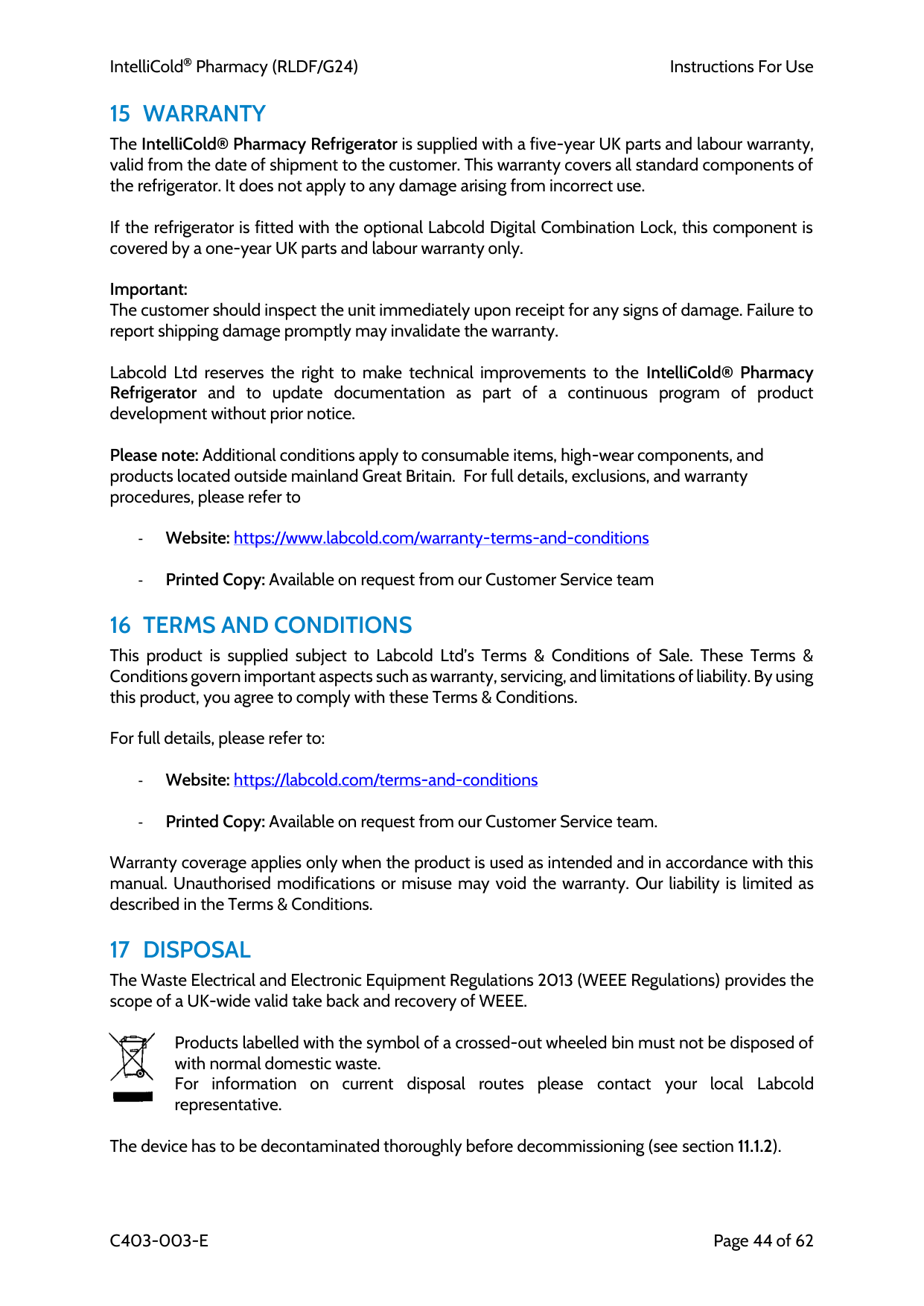
IntelliCold Pharmacy (RLDF/G24)
Instructions For Use
C403-003-E
Page 44 of 62
15 Warranty
The IntelliCold® Pharmacy Refrigerator is supplied with a five-year UK parts and labour warranty, valid from the date of shipment to the customer. This warranty covers all standard components of the refrigerator. It does not apply to any damage arising from incorrect use.If the refrigerator is fitted with the optional Labcold Digital Combination Lock, this component is covered by a one-year UK parts and labour warranty only.
Important: The customer should inspect the unit immediately upon receipt for any signs of damage. Failure to report shipping damage promptly may invalidate the warranty.
Labcold Ltd reserves the right to make technical improvements to the IntelliCold® Pharmacy Refrigerator and to update documentation as part of a continuous program of product development without prior notice.
Please note: Additional conditions apply to consumable items, high-wear components, and products located outside mainland Great Britain. For full details, exclusions, and warranty procedures, please refer to
16 Terms And Conditions
This product is supplied subject to Labcold Ltd’s Terms & Conditions of Sale. These Terms & Conditions govern important aspects such as warranty, servicing, and limitations of liability. By using this product, you agree to comply with these Terms & Conditions.For full details, please refer to:
Warranty coverage applies only when the product is used as intended and in accordance with this manual. Unauthorised modifications or misuse may void the warranty. Our liability is limited as described in the Terms & Conditions.
17 Disposal
The Waste Electrical and Electronic Equipment Regulations 2013 (WEEE Regulations) provides the scope of a UK-wide valid take back and recovery of WEEE.Products labelled with the symbol of a crossed-out wheeled bin must not be disposed of with normal domestic waste. For information on current disposal routes please contact your local Labcold representative.
The device has to be decontaminated thoroughly before decommissioning (see section 11.1.2).
IntelliCold Pharmacy (RLDF/G24)
Instructions For Use
C403-003-E
Page 45 of 62 Special Recycling Requirements:
• Refrigerants: Must be recovered and disposed of in accordance with local environmental regulations. Contact a certified refrigerant disposal service for assistance. • Batteries: Should be recycled at designated battery recycling facilities. Do not dispose of with regular waste.
For further details on disposal and recycling, please consult your local waste management authority or your Labcold representative.
18 Contact Us
For all queries regarding Labcold products and services contact: Labcold Ltd Cherrywood Chineham Park Basingstoke Hants
Rg24 8Wf
United Kingdomwww.labcold.com
For Service enquiries, spares and repairs: Tel: (+44) 01256 705 580 Fax: (+44) 01256 705 575 E-mail: service@labcold.com
For Sales enquires: Tel: (+44) 01256 705570 Fax: (+44) 01256 705575 E-mail: sales@labcold.com
IntelliCold Pharmacy (RLDF/G24)
Instructions For Use
C403-003-E
Page 46 of 62
19 Bibliography / Further Reading
UK Health Security Agency. Storage, distribution and disposal of vaccines: The Green Book, Chapter 3. https://assets.publishing.service.gov.uk/government/uploads/system/uploads/attachment_data/fil e/223753/Green_Book_Chapter_3_v3_0W.pdf
Guidance on vaccine handling and storage in GP practices https://www.publichealth.hscni.net/sites/default/files/2024- 09/Guidance%20on%20vaccine%20handling%20and%20storage%20in%20GP%20practices %202024.pdf
Guidance on Vaccine Storage and Handling (NHS Health Protection Scotland) https://publichealthscotland.scot/media/18187/guidance-on-vaccine-storage-and-handling_2- march-2023.pdf
GP mythbuster 17: Vaccine storage and fridges in GP practices CQC England https://www.cqc.org.uk/guidance-providers/gps/gp-mythbusters/gp-mythbuster-17-vaccine- storage-fridges-gp-practices
Vaccine Incident Guidance Responding to errors in vaccine storage, handling and administration https://assets.publishing.service.gov.uk/media/62c598188fa8f54e855dfe17/UKHSA-vaccine- incident-guidance-6-july-2022.pdf
IntelliCold Pharmacy (RLDF/G24)
Instructions For Use
C403-003-E
Page 47 of 62
20 Index
access port ............................................................................................................................................. 30 alarm conditions .................................................................................................................................... 18 alarms .................................................................................................................................................... 18 app ......................................................................................................................................................... 23 backup batteries .................................................................................................................................... 26 battery compartment ............................................................................................................................ 27 bluetooth ............................................................................................................................................... 24 brakes .................................................................................................................................................... 29 castors ................................................................................................................................................... 28 cleaning ................................................................................................................................................. 36 CLOUDTemp .......................................................................................................................................... 33 compatibility (app) ................................................................................................................................ 22 condensate Tray .................................................................................................................................... 30 controller ............................................................................................................................................... 16 data loggers ........................................................................................................................................... 34 data logging ........................................................................................................................................... 22 decontamination ................................................................................................................................... 36 defrosting .............................................................................................................................................. 38 disposal .................................................................................................................................................. 44 door handle ........................................................................................................................................... 25 door lock ................................................................................................................................................ 27 door seals .............................................................................................................................................. 37 drip tray ........................................................................................................................................... 29, 37 exported data ........................................................................................................................................ 25 external alarm ....................................................................................................................................... 35 internal fan ............................................................................................................................................ 29 levelling ................................................................................................................................................. 27 levelling feet .......................................................................................................................................... 28 location .................................................................................................................................................. 12 low limit detection ................................................................................................................................ 16 mains supply .......................................................................................................................................... 13 maintenance service contracts ............................................................................................................. 38 master key ............................................................................................................................................. 58
IntelliCold Pharmacy (RLDF/G24)
Instructions For Use
C403-003-E
Page 48 of 62 max/min ................................................................................................................................................ 20 max/min resetting ................................................................................................................................. 20 moving ................................................................................................................................................... 15 muting an alarm .................................................................................................................................... 19 pairing .................................................................................................................................................... 24 pharmacy drawer .................................................................................................................................. 31 refrigeration system .............................................................................................................................. 39 remote alarm ......................................................................................................................................... 32 repacking ............................................................................................................................................... 15 repairs .................................................................................................................................................... 38 settings menu ........................................................................................................................................ 21 shelf clips ............................................................................................................................................... 31 shelves ................................................................................................................................................... 30 simulated Load ...................................................................................................................................... 29 specifications ......................................................................................................................................... 40 stacking kit ............................................................................................................................................. 32 troubleshooting ..................................................................................................................................... 42 unpacking .............................................................................................................................................. 12 user code ............................................................................................................................................... 58 viewing data .......................................................................................................................................... 24 waking (the controller) .......................................................................................................................... 16 warranty ................................................................................................................................................ 44 wireless monitoring ............................................................................................................................... 33
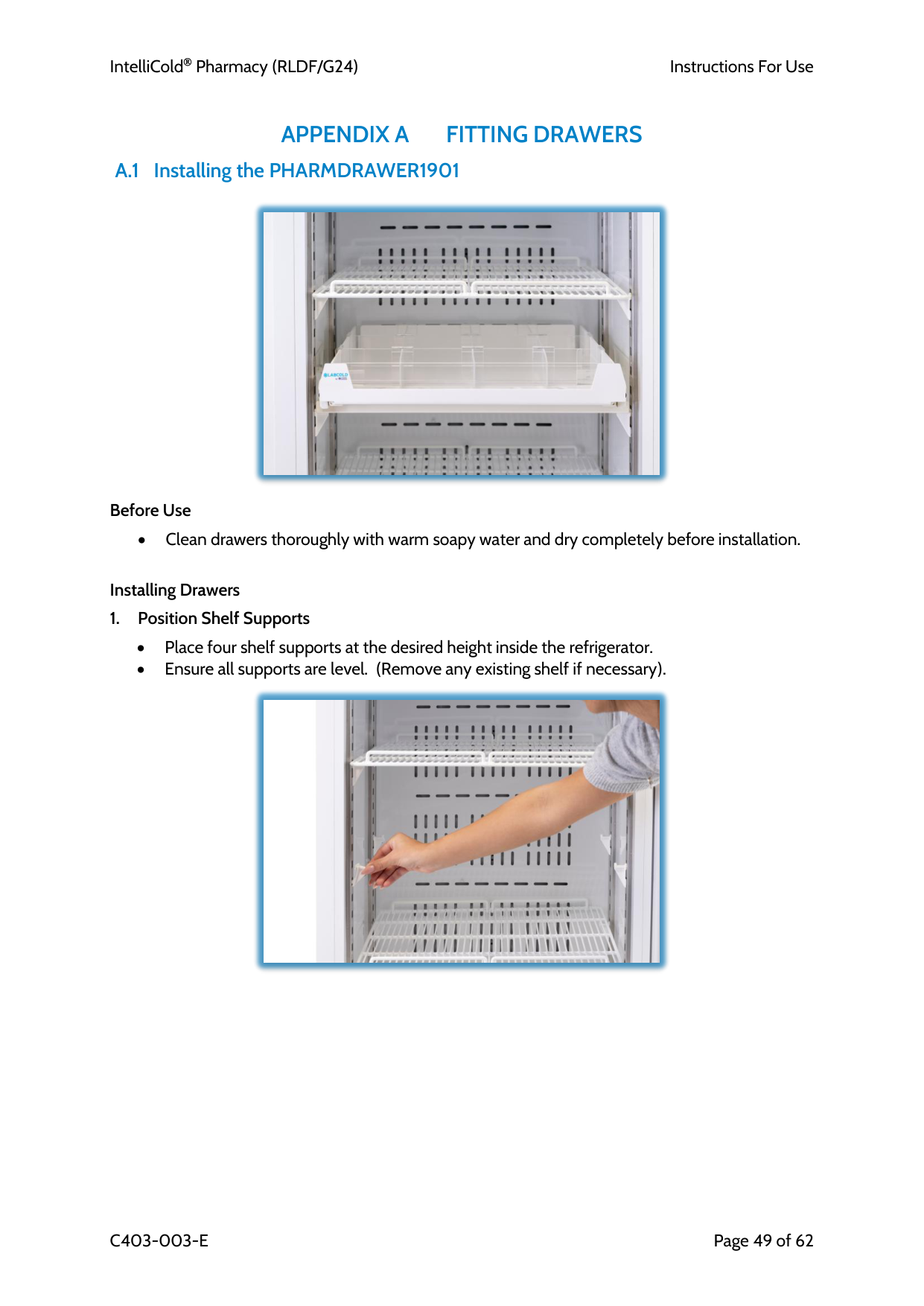
IntelliCold Pharmacy (RLDF/G24)
Instructions For Use
C403-003-E
Page 49 of 62
Appendix A
Fitting Drawers
A.1 Installing the PHARMDRAWER1901Before Use
• Clean drawers thoroughly with warm soapy water and dry completely before installation.
Installing Drawers
• Place four shelf supports at the desired height inside the refrigerator. • Ensure all supports are level. (Remove any existing shelf if necessary).
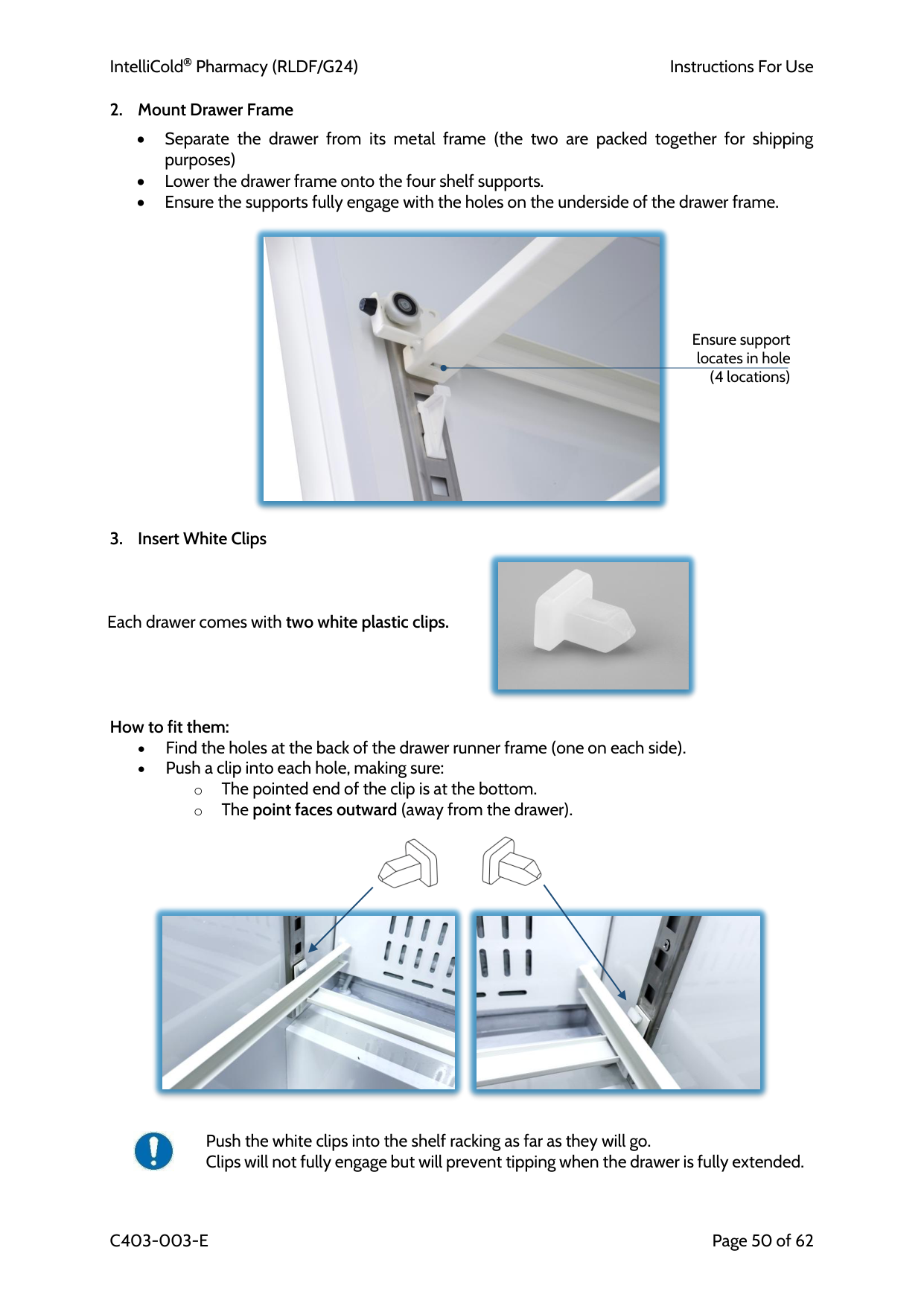
IntelliCold Pharmacy (RLDF/G24)
Instructions For Use
C403-003-E
Page 50 of 62
• Separate the drawer from its metal frame (the two are packed together for shipping purposes) • Lower the drawer frame onto the four shelf supports. • Ensure the supports fully engage with the holes on the underside of the drawer frame.
Each drawer comes with two white plastic clips.
How to fit them: • Find the holes at the back of the drawer runner frame (one on each side). • Push a clip into each hole, making sure: o The pointed end of the clip is at the bottom. o The point faces outward (away from the drawer).
Push the white clips into the shelf racking as far as they will go. Clips will not fully engage but will prevent tipping when the drawer is fully extended. Ensure support locates in hole (4 locations)
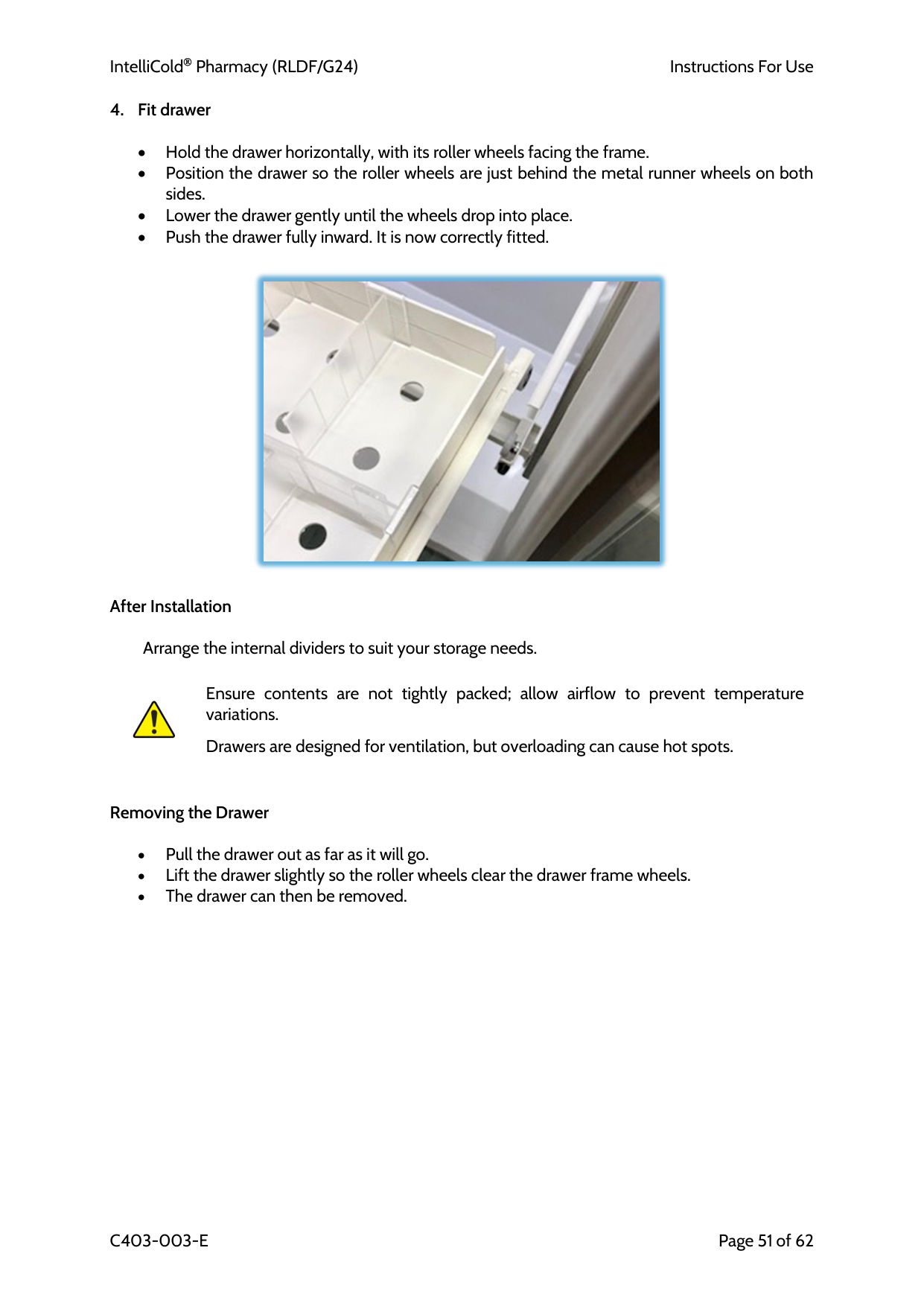
IntelliCold Pharmacy (RLDF/G24)
Instructions For Use
C403-003-E
Page 51 of 62
• Hold the drawer horizontally, with its roller wheels facing the frame. • Position the drawer so the roller wheels are just behind the metal runner wheels on both sides. • Lower the drawer gently until the wheels drop into place. • Push the drawer fully inward. It is now correctly fitted.
After Installation
Arrange the internal dividers to suit your storage needs.
Ensure contents are not tightly packed; allow airflow to prevent temperature variations.
Drawers are designed for ventilation, but overloading can cause hot spots.
Removing the Drawer
• Pull the drawer out as far as it will go. • Lift the drawer slightly so the roller wheels clear the drawer frame wheels. • The drawer can then be removed.
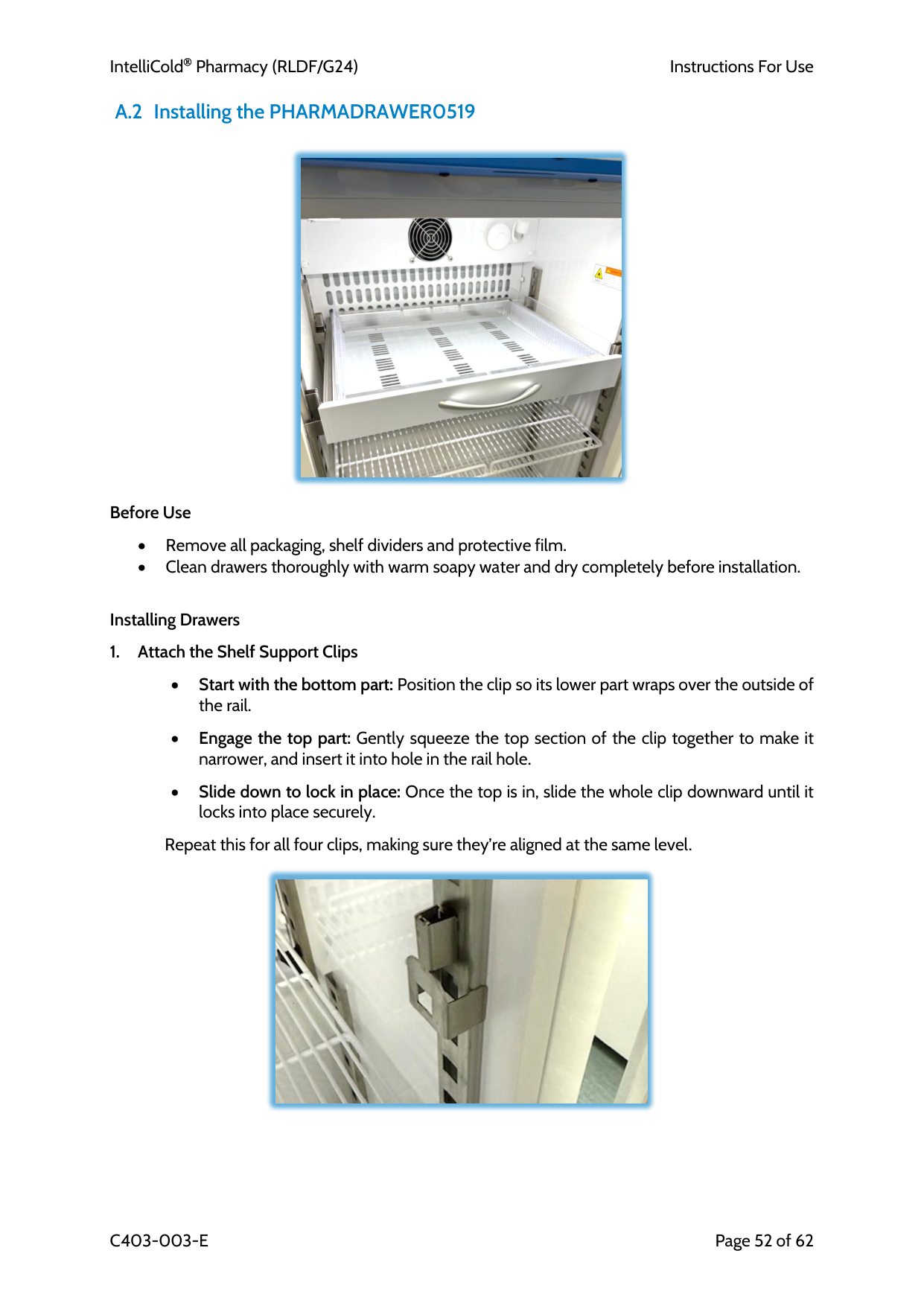
IntelliCold Pharmacy (RLDF/G24)
Instructions For Use
C403-003-E
Page 52 of 62 A.2 Installing the PHARMADRAWER0519
Before Use
• Remove all packaging, shelf dividers and protective film. • Clean drawers thoroughly with warm soapy water and dry completely before installation.
Installing Drawers
• Start with the bottom part: Position the clip so its lower part wraps over the outside of the rail.
• Engage the top part: Gently squeeze the top section of the clip together to make it narrower, and insert it into hole in the rail hole.
• Slide down to lock in place: Once the top is in, slide the whole clip downward until it locks into place securely.
Repeat this for all four clips, making sure they’re aligned at the same level.
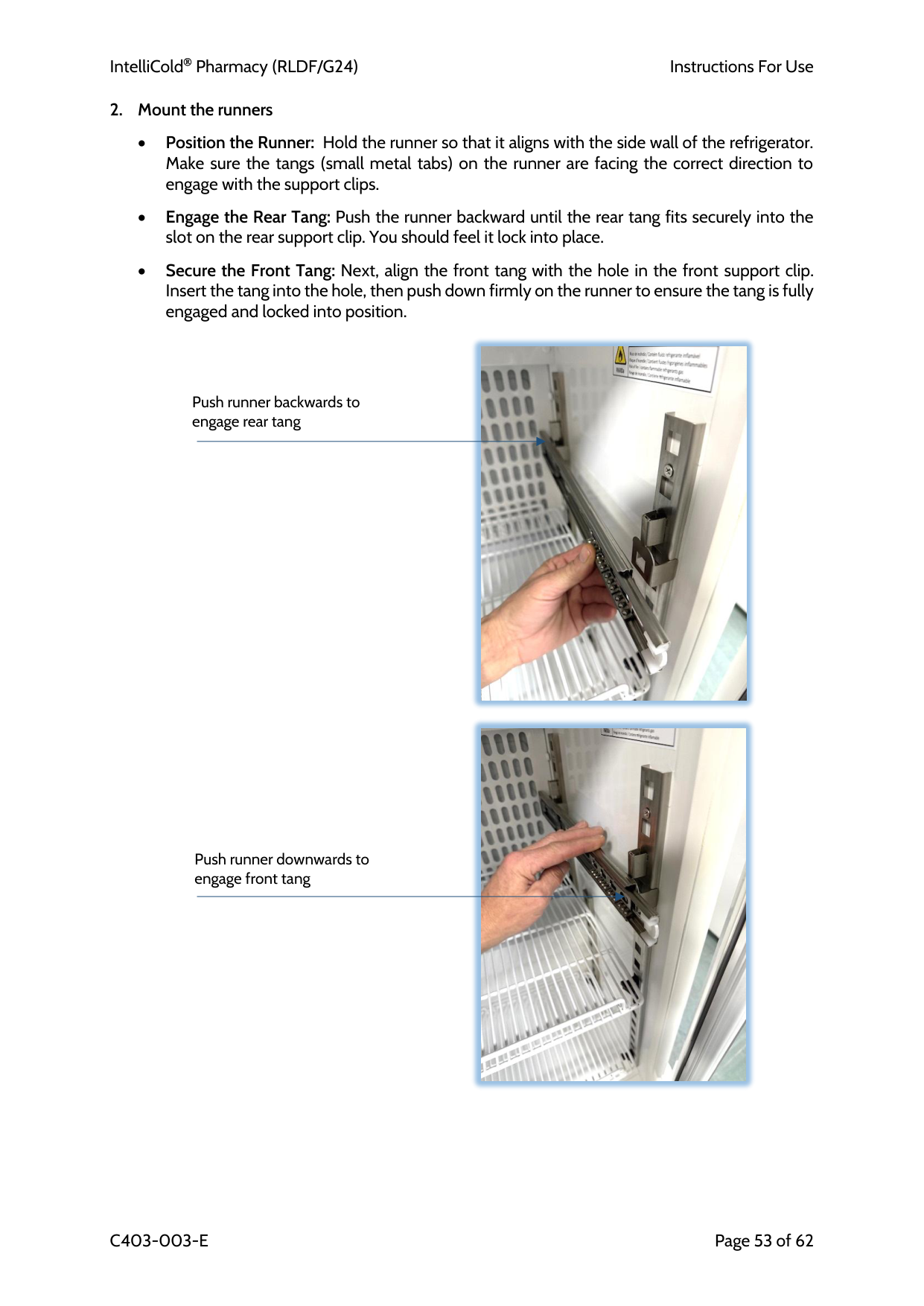
IntelliCold Pharmacy (RLDF/G24)
Instructions For Use
C403-003-E
Page 53 of 62
• Position the Runner: Hold the runner so that it aligns with the side wall of the refrigerator. Make sure the tangs (small metal tabs) on the runner are facing the correct direction to engage with the support clips.
• Engage the Rear Tang: Push the runner backward until the rear tang fits securely into the slot on the rear support clip. You should feel it lock into place.
• Secure the Front Tang: Next, align the front tang with the hole in the front support clip. Insert the tang into the hole, then push down firmly on the runner to ensure the tang is fully engaged and locked into position.
Push runner backwards to engage rear tang Push runner downwards to engage front tang
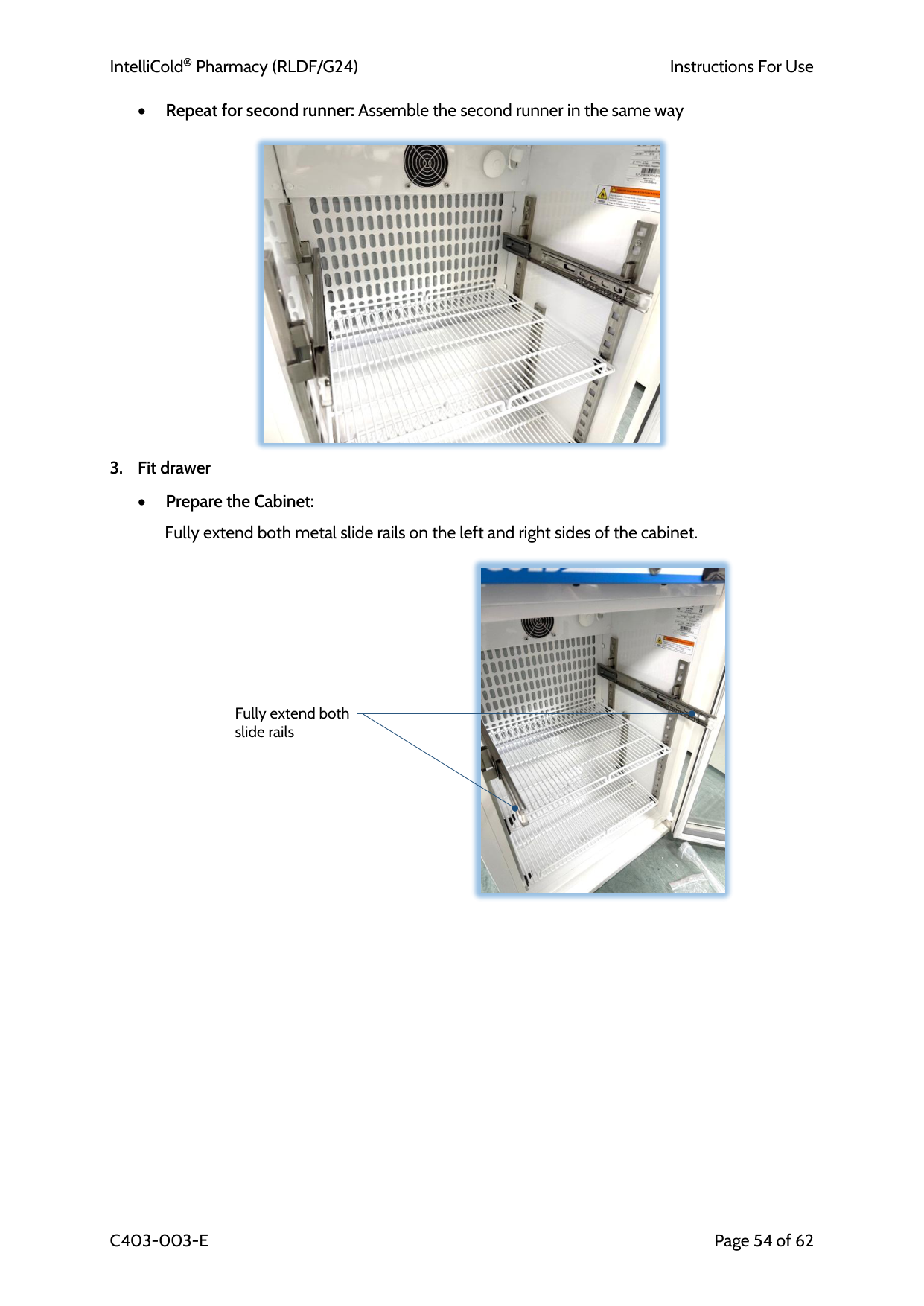
IntelliCold Pharmacy (RLDF/G24)
Instructions For Use
C403-003-E
Page 54 of 62 • Repeat for second runner: Assemble the second runner in the same way
• Prepare the Cabinet:
Fully extend both metal slide rails on the left and right sides of the cabinet.
Fully extend both slide rails
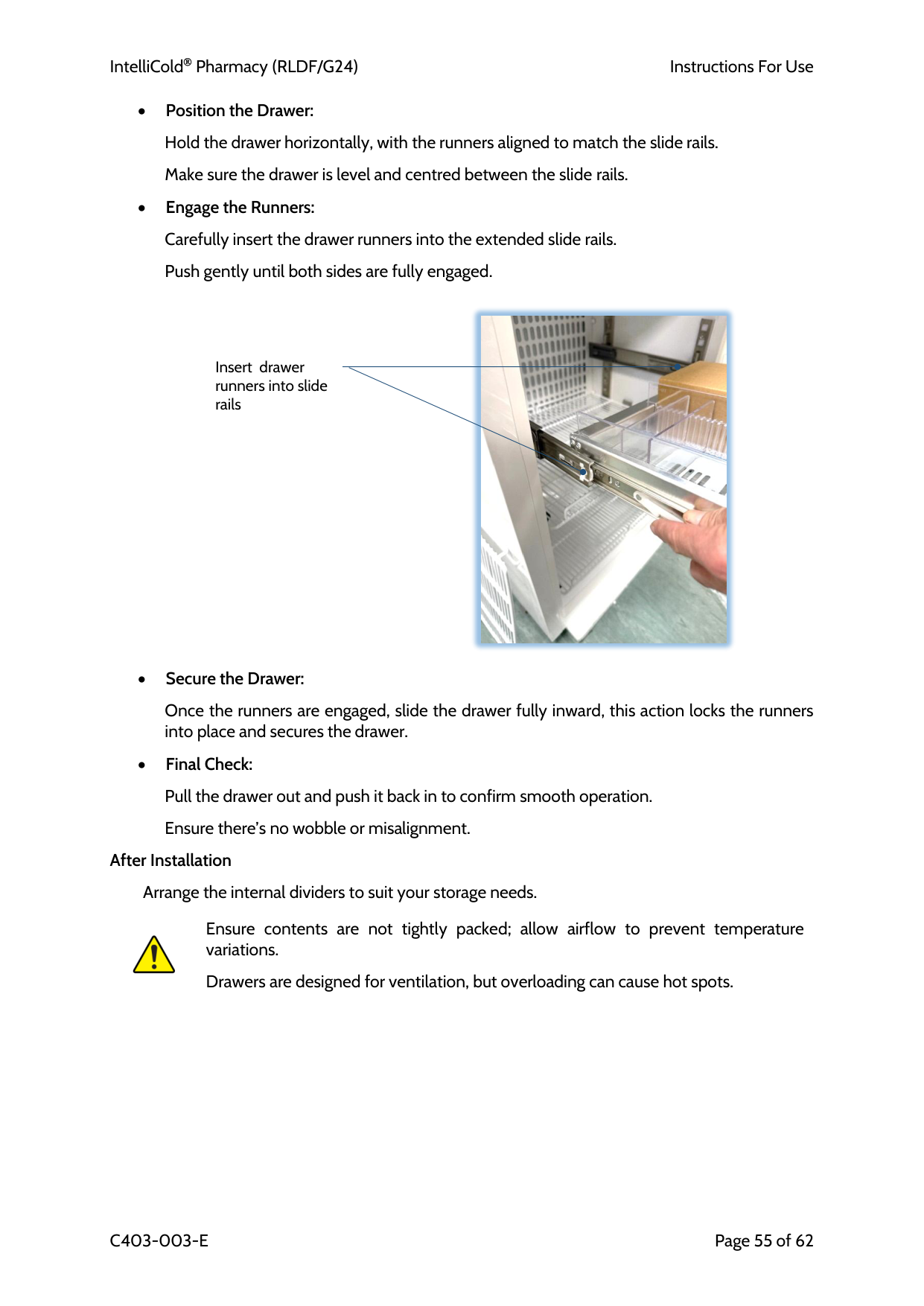
IntelliCold Pharmacy (RLDF/G24)
Instructions For Use
C403-003-E
Page 55 of 62 • Position the Drawer:
Hold the drawer horizontally, with the runners aligned to match the slide rails.
Make sure the drawer is level and centred between the slide rails.
• Engage the Runners:
Carefully insert the drawer runners into the extended slide rails.
Push gently until both sides are fully engaged.
• Secure the Drawer:
Once the runners are engaged, slide the drawer fully inward, this action locks the runners into place and secures the drawer.
• Final Check:
Pull the drawer out and push it back in to confirm smooth operation.
Ensure there’s no wobble or misalignment.
After Installation
Arrange the internal dividers to suit your storage needs.
Ensure contents are not tightly packed; allow airflow to prevent temperature variations.
Drawers are designed for ventilation, but overloading can cause hot spots.
Insert drawer runners into slide rails
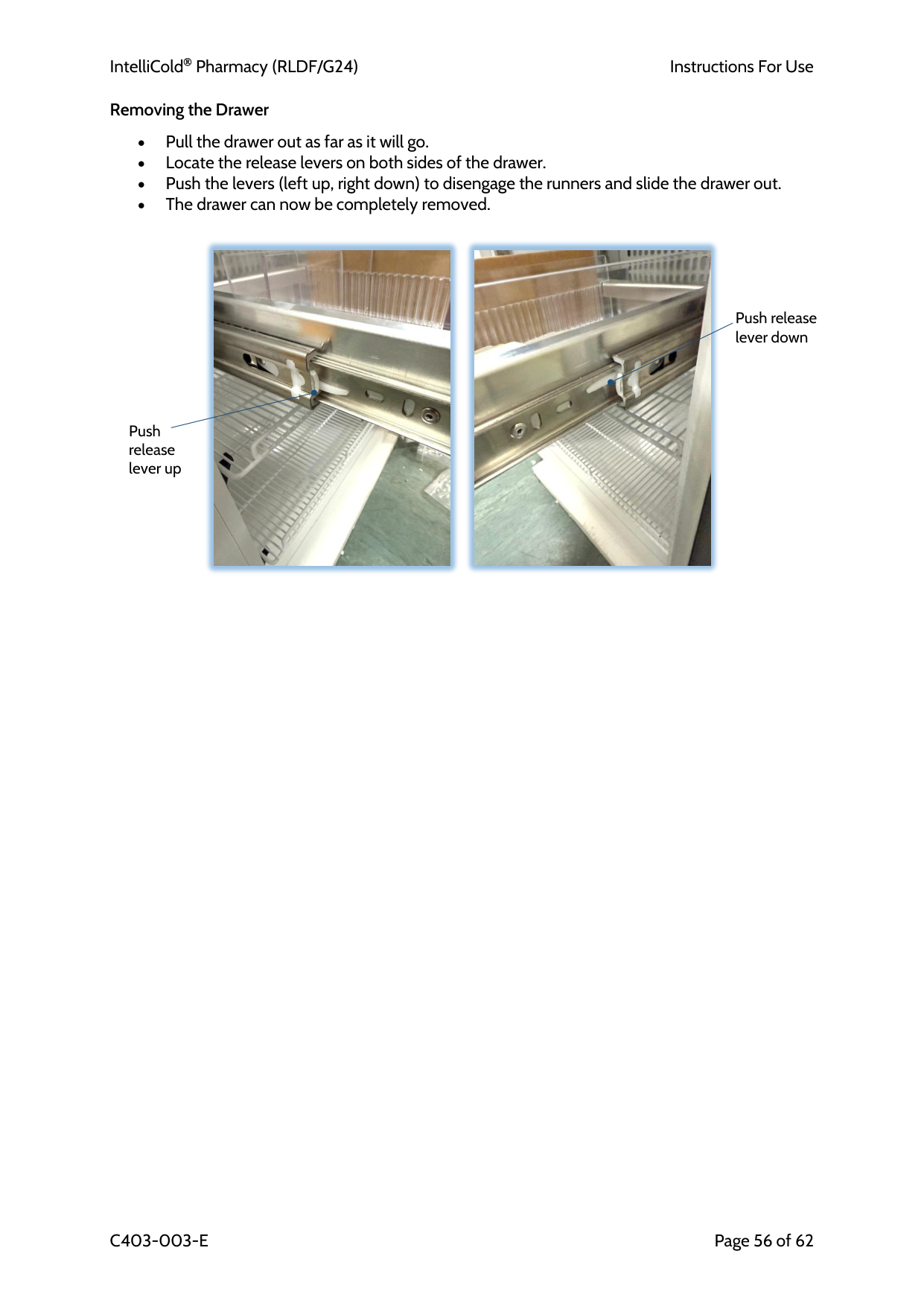
IntelliCold Pharmacy (RLDF/G24)
Instructions For Use
C403-003-E
Page 56 of 62 Removing the Drawer
• Pull the drawer out as far as it will go. • Locate the release levers on both sides of the drawer. • Push the levers (left up, right down) to disengage the runners and slide the drawer out. • The drawer can now be completely removed.
Push release lever down Push release lever up
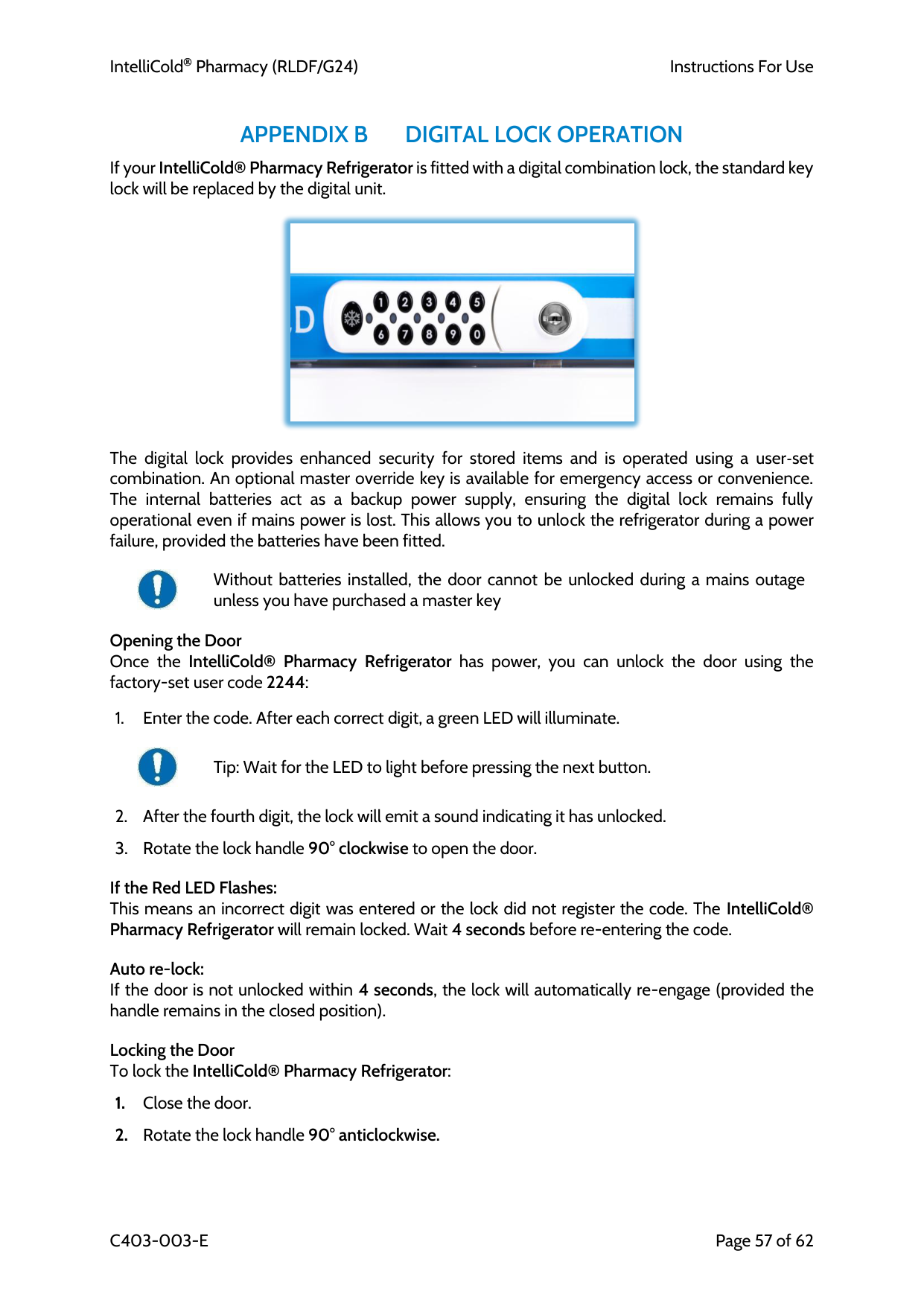
IntelliCold Pharmacy (RLDF/G24)
Instructions For Use
C403-003-E
Page 57 of 62
Appendix B
Digital Lock Operation
If your IntelliCold® Pharmacy Refrigerator is fitted with a digital combination lock, the standard key lock will be replaced by the digital unit.The digital lock provides enhanced security for stored items and is operated using a user‑set combination. An optional master override key is available for emergency access or convenience. The internal batteries act as a backup power supply, ensuring the digital lock remains fully operational even if mains power is lost. This allows you to unlock the refrigerator during a power failure, provided the batteries have been fitted.
Without batteries installed, the door cannot be unlocked during a mains outage unless you have purchased a master key
Opening the Door Once the IntelliCold® Pharmacy Refrigerator has power, you can unlock the door using the factory-set user code 2244:
Tip: Wait for the LED to light before pressing the next button.
If the Red LED Flashes: This means an incorrect digit was entered or the lock did not register the code. The IntelliCold® Pharmacy Refrigerator will remain locked. Wait 4 seconds before re-entering the code.
Auto re-lock: If the door is not unlocked within 4 seconds, the lock will automatically re-engage (provided the handle remains in the closed position).
Locking the Door To lock the IntelliCold® Pharmacy Refrigerator:
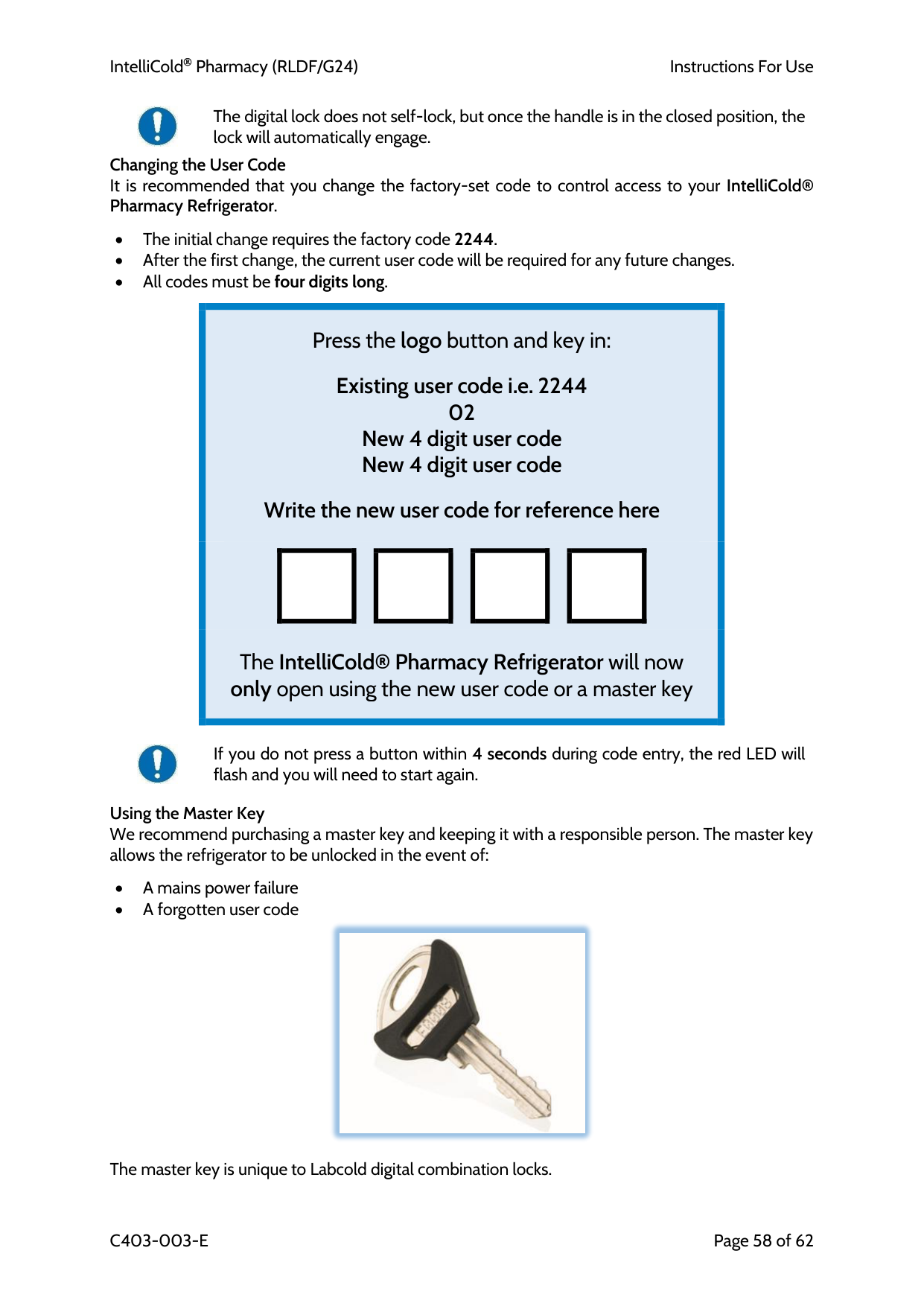
IntelliCold Pharmacy (RLDF/G24)
Instructions For Use
C403-003-E
Page 58 of 62
The digital lock does not self-lock, but once the handle is in the closed position, the lock will automatically engage. Changing the User Code It is recommended that you change the factory-set code to control access to your IntelliCold® Pharmacy Refrigerator.
• The initial change requires the factory code 2244. • After the first change, the current user code will be required for any future changes. • All codes must be four digits long.
Press the logo button and key in:
Existing user code i.e. 2244 02 New 4 digit user code New 4 digit user code
Write the new user code for reference here
The IntelliCold® Pharmacy Refrigerator will now only open using the new user code or a master key
If you do not press a button within 4 seconds during code entry, the red LED will flash and you will need to start again.
Using the Master Key We recommend purchasing a master key and keeping it with a responsible person. The master key allows the refrigerator to be unlocked in the event of:
• A mains power failure • A forgotten user code
The master key is unique to Labcold digital combination locks.
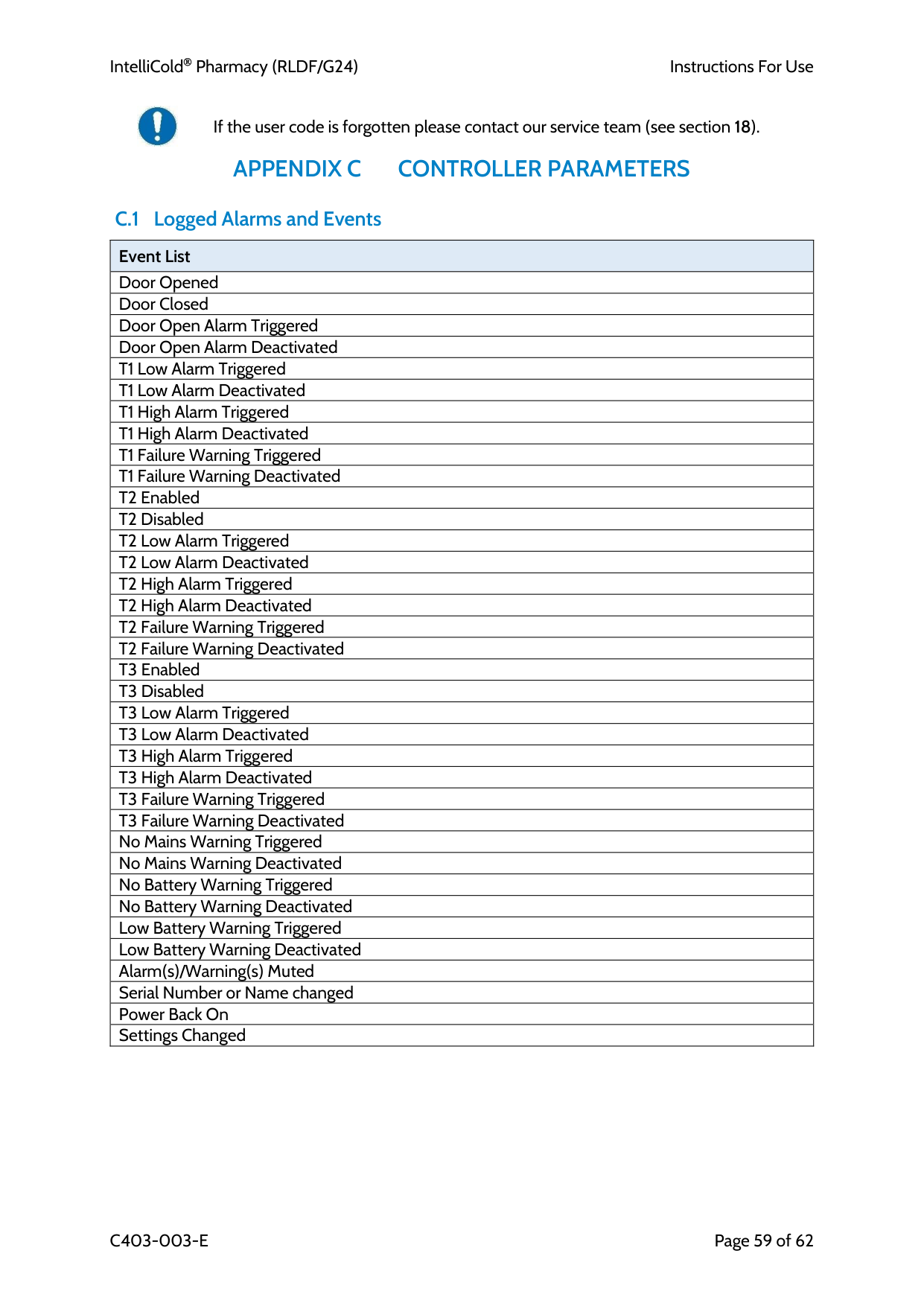
IntelliCold Pharmacy (RLDF/G24)
Instructions For Use
C403-003-E
Page 59 of 62
If the user code is forgotten please contact our service team (see section 18).
Appendix C
Controller Parameters
C.1 Logged Alarms and Events Event List Door Opened Door Closed Door Open Alarm Triggered Door Open Alarm Deactivated T1 Low Alarm Triggered T1 Low Alarm Deactivated T1 High Alarm Triggered T1 High Alarm Deactivated T1 Failure Warning Triggered T1 Failure Warning Deactivated T2 Enabled T2 Disabled T2 Low Alarm Triggered T2 Low Alarm Deactivated T2 High Alarm Triggered T2 High Alarm Deactivated T2 Failure Warning Triggered T2 Failure Warning Deactivated T3 Enabled T3 Disabled T3 Low Alarm Triggered T3 Low Alarm Deactivated T3 High Alarm Triggered T3 High Alarm Deactivated T3 Failure Warning Triggered T3 Failure Warning Deactivated No Mains Warning Triggered No Mains Warning Deactivated No Battery Warning Triggered No Battery Warning Deactivated Low Battery Warning Triggered Low Battery Warning Deactivated Alarm(s)/Warning(s) Muted Serial Number or Name changed Power Back On Settings Changed
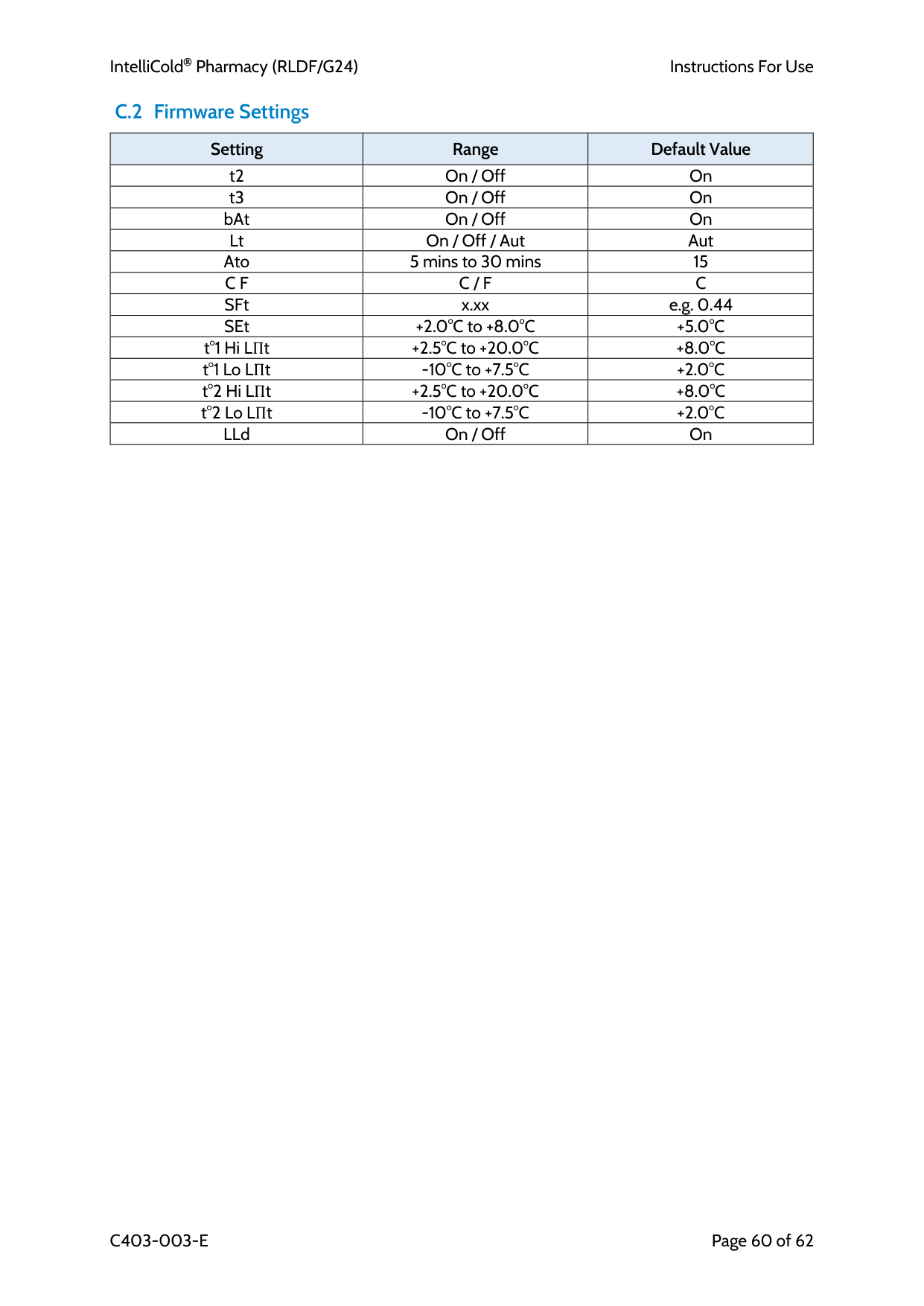
IntelliCold Pharmacy (RLDF/G24)
Instructions For Use
C403-003-E
Page 60 of 62 C.2 Firmware Settings Setting Range Default Value t2 On / Off On t3 On / Off On bAt On / Off On Lt On / Off / Aut Aut Ato 5 mins to 30 mins 15
C F
C / F
C
SFt x.xx e.g. 0.44 SEt +2.0°C to +8.0°C+5.0°C
t°1 Hi LΠt +2.5°C to +20.0°C+8.0°C
t°1 Lo LΠt -10°C to +7.5°C+2.0°C
t°2 Hi LΠt +2.5°C to +20.0°C+8.0°C
t°2 Lo LΠt -10°C to +7.5°C+2.0°C
LLd On / Off On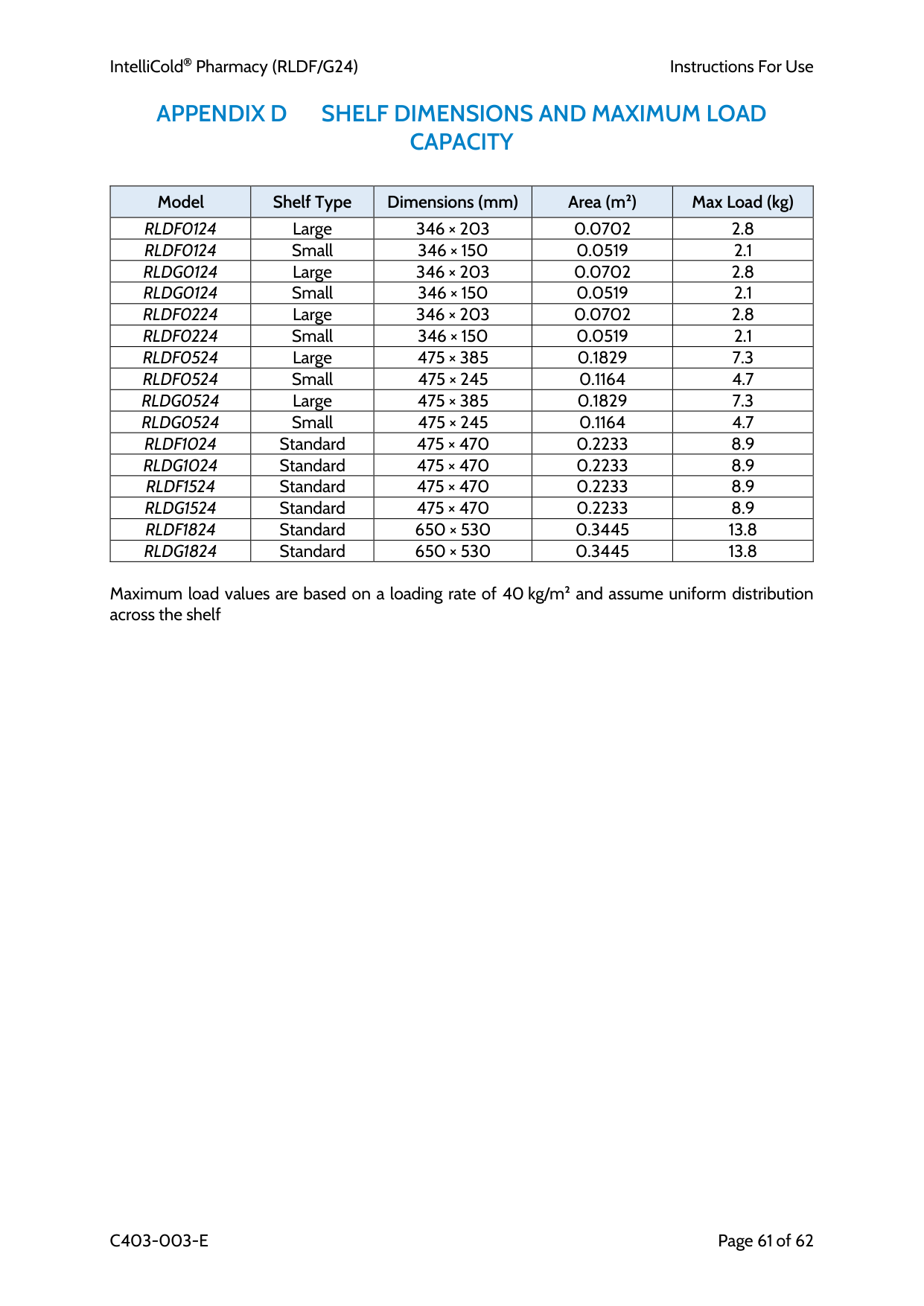
IntelliCold Pharmacy (RLDF/G24)
Instructions For Use
C403-003-E
Page 61 of 62
Appendix D
Shelf Dimensions And Maximum Load
Capacity
Model Shelf Type Dimensions (mm) Area (m²) Max Load (kg)
Rldf0124
Large 346 × 203 0.0702 2.8Rldf0124
Small 346 × 150 0.0519 2.1Rldg0124
Large 346 × 203 0.0702 2.8Rldg0124
Small 346 × 150 0.0519 2.1Rldf0224
Large 346 × 203 0.0702 2.8Rldf0224
Small 346 × 150 0.0519 2.1Rldf0524
Large 475 × 385 0.1829 7.3Rldf0524
Small 475 × 245 0.1164 4.7Rldg0524
Large 475 × 385 0.1829 7.3Rldg0524
Small 475 × 245 0.1164 4.7Rldf1024
Standard 475 × 470 0.2233 8.9Rldg1024
Standard 475 × 470 0.2233 8.9Rldf1524
Standard 475 × 470 0.2233 8.9Rldg1524
Standard 475 × 470 0.2233 8.9Rldf1824
Standard 650 × 530 0.3445 13.8Rldg1824
Standard 650 × 530 0.3445 13.8Maximum load values are based on a loading rate of 40 kg/m² and assume uniform distribution across the shelf
IntelliCold Pharmacy (RLDF/G24)
Instructions For Use
C403-003-E
Page 62 of 62
© Labcold Ltd, 2025 All rights reserved.
Manufacturer Labcold Ltd Cherrywood, Chineham Park, Basingstoke, Hampshire, RG24 8WF United Kingdom