Ask AI
— answers from the official manualAnswers from the official manual.
Common questions
Common Questions
33 totalHow do I prevent the camera shutter from working when no film or lens is loaded?
The Safety Release Lock prevents shutter release if there is no film loaded or if there is no lens attached. When you press the shutter button without film or lens, <F> (film) or <L> (lens) will blink in the viewfinder and on the LCD panel. (Page 44)
What does it mean when the battery icon is blinking on the LCD panel?
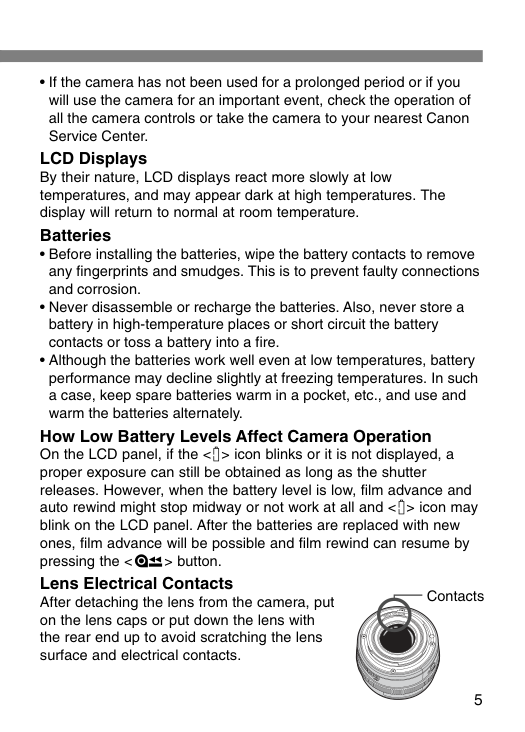
If the <π> icon blinks on the LCD panel, the battery level is very low and you should replace the batteries with new ones. A proper exposure can still be obtained as long as the shutter releases, but film advance and auto rewind might stop midway or not work at all. After replacing the batteries, film advance will be possible and film rewind can resume by pressing the rewind button. (Page 5)
Why is the shutter not working and the film icon blinking on the LCD panel?
If the frame count is not displayed and the film icon is blinking on the LCD panel, the film has not been loaded correctly. Remove the film and reload it properly, ensuring the film leader edge is aligned with the mark on the camera. If the film is not loaded properly, the shutter will not work. (Page 49)
How do I load film into the Canon EOS Rebel T2?
Turn the Mode Dial to any setting except Off, then slide down the back cover release lever to open the back. Insert the film cartridge at a slight angle and align the film leader edge with the mark on the camera, then close the back cover until it snaps shut. Film prewind will start automatically, and with DX-coded film, the ISO speed will be set automatically. (Page 15)
How do I properly clean and care for the Canon EOS Rebel T2?
Use only a blower brush to remove dust from the lens, eyepiece, mirror, focusing screen, and film compartment — do not use any cleaner containing an organic solvent on the camera body or lens. The shutter curtains are extremely thin and should only be cleaned with a blower; never touch them with your fingers. If the camera gets wet, take it to your nearest Canon dealer as soon as possible, and wipe salty air exposure with a slightly damp cloth. (Page 4)
What should I do if the autofocus fails to achieve focus?
If the focus confirmation light blinks, autofocus has failed, which can happen with low-contrast subjects, subjects in very low light, extremely backlit or reflective subjects, or subjects with repetitive patterns. You can use focus lock by focusing on an object at the same distance as the subject and recomposing, or set the lens focus mode switch to MF and focus manually by turning the lens focusing ring. (Page 31)
Show 27 more questions
How do I use the self-timer on the Canon EOS Rebel T2?
How do I set the date and time on the DATE Model of the EOS Rebel T2?
What is the flash range of the built-in flash and are there any usage warnings?
How do I prevent the camera from taking blurred pictures?
What does it mean when the focus confirmation light blinks?
How do I use the midroll rewind feature?
What should I do if the <π> icon blinks on the LCD panel?
How do I mount a lens on the camera?
What types of lenses can I use with this camera?
What are the shooting modes available on the Mode Dial and what do they do?
How do I install batteries in the Canon EOS Rebel T2?
What do the battery level icons on the LCD panel mean?
What should I do if the film won't load properly?
What batteries does the Canon EOS Rebel T2 use and how do I install them?
Can I use the camera in extreme temperatures?
How should I clean the lens and shutter curtains?
How should I store my camera when not in use for an extended period?
What happens if the battery level gets too low?
How does temperature affect the camera's LCD display and battery performance?
Should I ever try to disassemble my EOS Rebel T2?
Should I take test shots before an important event?
What does it mean if the battery icon blinks on the LCD panel?
What should I do if film advance stops midway?
How do I mount a lens to my EOS Rebel T2?
What should I do before shooting an important event?
What precautions should I take with the camera's electrical contacts?
What is the proper way to store my camera if I won't use it for a long time?
Full Manual
52 pages
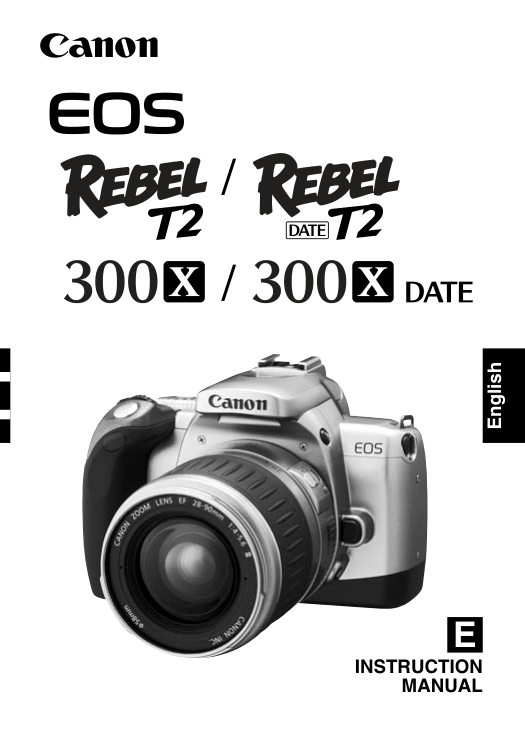
E
Instruction
Manual
English / /
2 Thank you for purchasing a Canon product. The EOS REBEL T2 (DATE) / 300X (DATE) is a very compact autofocus, single-lens reflex camera. It can be used for a wide variety of subjects and situations with fully automatic and user- controlled shooting modes. Read this Instruction manual and familiarize yourself with your new camera before taking pictures. Also read “Handling Cautions” on page 4 to prevent camera malfunction and damage. Before Using Your Camera
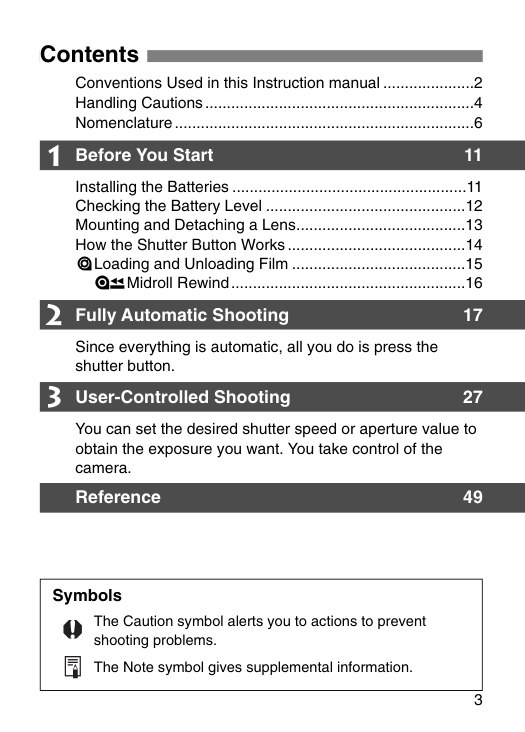
3 Contents Symbols The Caution symbol alerts you to actions to prevent shooting problems. The Note symbol gives supplemental information. 1 2 3 Conventions Used in this Instruction manual .....................2 Handling Cautions..............................................................4 Nomenclature.....................................................................6 Before You Start 11 Installing the Batteries ......................................................11 Checking the Battery Level ..............................................12 Mounting and Detaching a Lens.......................................13 How the Shutter Button Works.........................................14 =Loading and Unloading Film ........................................15 ¢Midroll Rewind......................................................16 Fully Automatic Shooting 17 Since everything is automatic, all you do is press the shutter button. User-Controlled Shooting 27 You can set the desired shutter speed or aperture value to obtain the exposure you want. You take control of the camera. Reference 49
4 Handling Cautions Camera Care and Storage
5
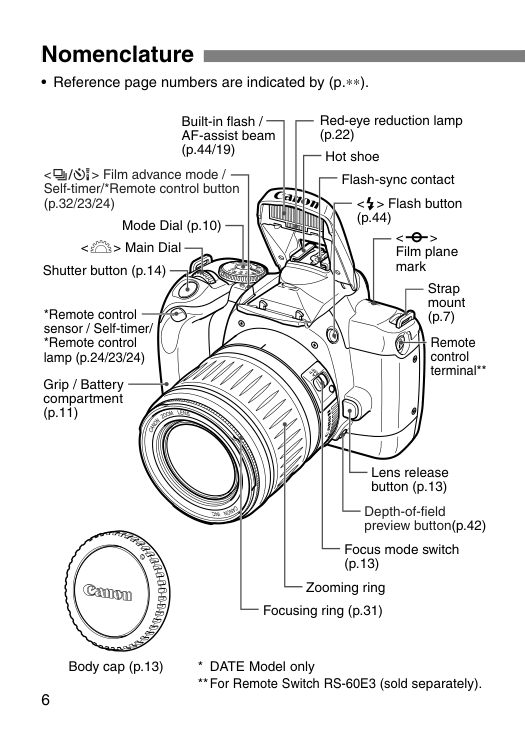
6 Nomenclature <^> Film advance mode / Self-timer/*Remote control button (p.32/23/24)
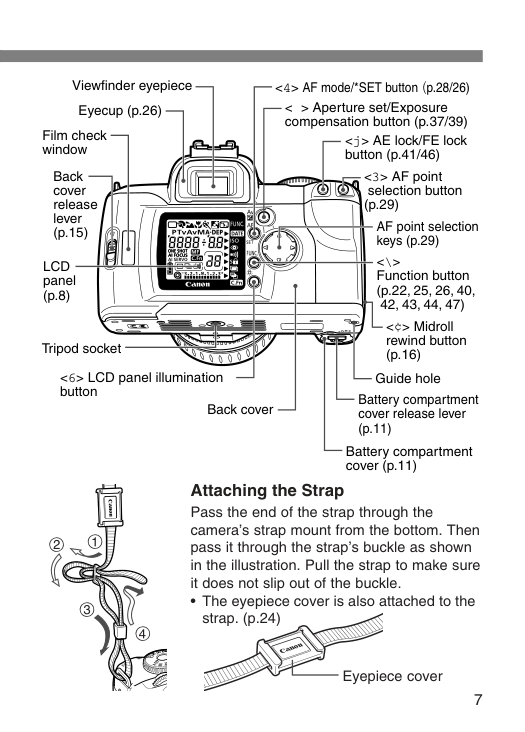
7 Eyecup (p.26) Viewfinder eyepiece Film check window Battery compartment cover (p.11) Guide hole <6> LCD panel illumination button <\> Function button (p.22, 25, 26, 40, 42, 43, 44, 47) <4> AF mode/*SET button (p.28/26) AF point selection keys (p.29) Back cover Battery compartment cover release lever (p.11) Tripod socket Lcd
panel (p.8) <3> AF point selection button (p.29) Back cover release lever (p.15) < > Aperture set/Exposure compensation button (p.37/39) <¢> Midroll rewind button (p.16) Attaching the Strap Pass the end of the strap through the camera’s strap mount from the bottom. Then pass it through the strap’s buckle as shown in the illustration. Pull the strap to make sure it does not slip out of the buckle.
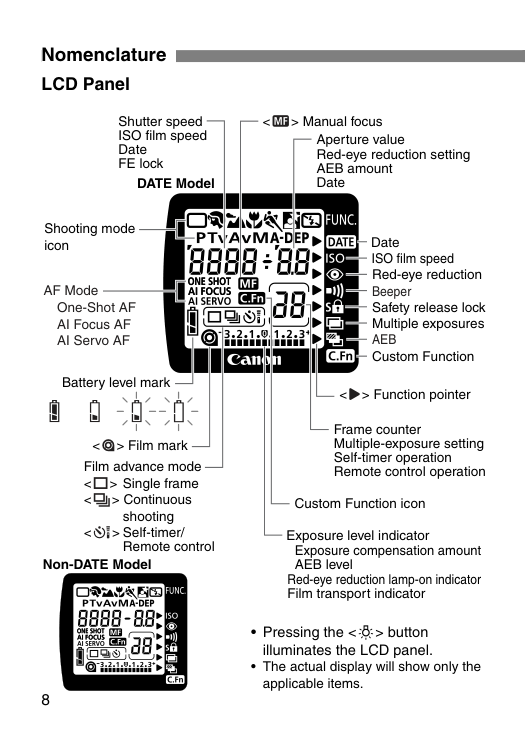
8 Nomenclature LCD Panel Shooting mode icon ISO film speed Shutter speed ISO film speed Date FE lock Battery level mark AF Mode One-Shot AF AI Focus AF AI Servo AF Exposure level indicator Exposure compensation amount AEB level Red-eye reduction lamp-on indicator Film transport indicator <=> Film mark <>> Function pointer Manual focus Multiple exposures
Aeb
Custom Function Red-eye reduction Beeper Safety release lock Date Film advance mode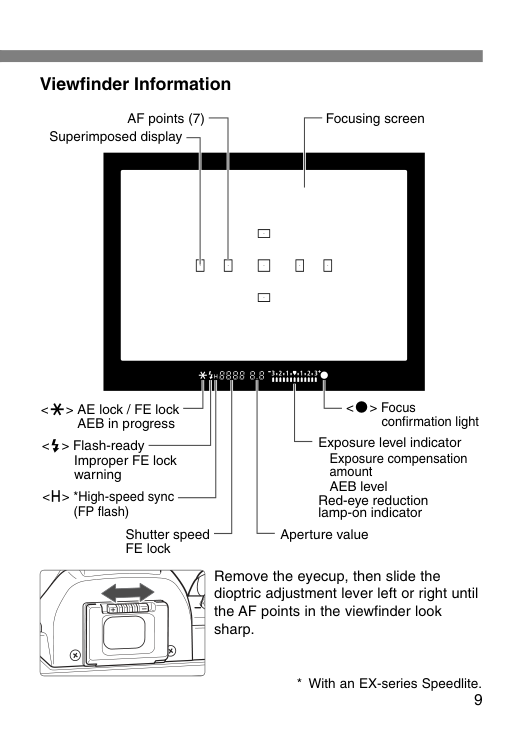
9 Viewfinder Information AF points (7) Superimposed display
B
a s i cZ
o n eI
m a g eZ
o n eOff
Full AutoC
r e a ti v eZ
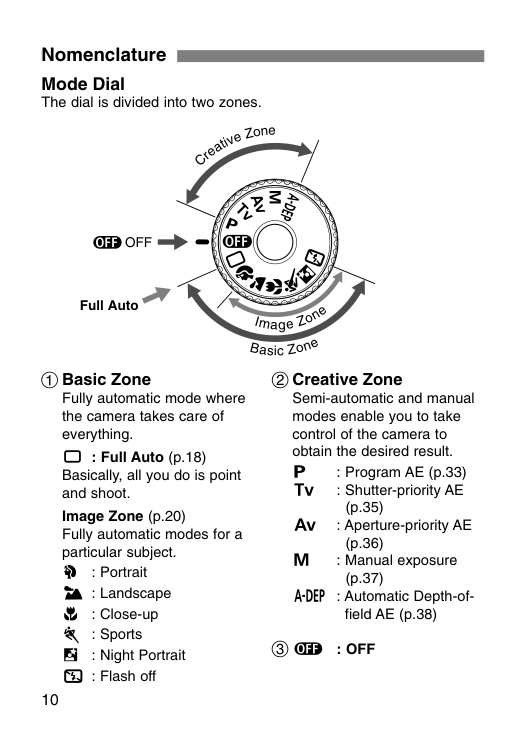
o n e 10 Nomenclature Mode Dial The dial is divided into two zones. 1 Basic Zone Fully automatic mode where the camera takes care of everything. Y : Full Auto (p.18) Basically, all you do is point and shoot. Image Zone (p.20) Fully automatic modes for a particular subject.U
: Portrait I : LandscapeO
: Close-up P : SportsA
: Night Portrait S : Flash off 2 Creative Zone Semi-automatic and manual modes enable you to take control of the camera to obtain the desired result.T
: Program AE (p.33)R
: Shutter-priority AE (p.35)E
: Aperture-priority AE (p.36)W
: Manual exposure (p.37) Q : Automatic Depth-of- field AE (p.38) 3 :: Off
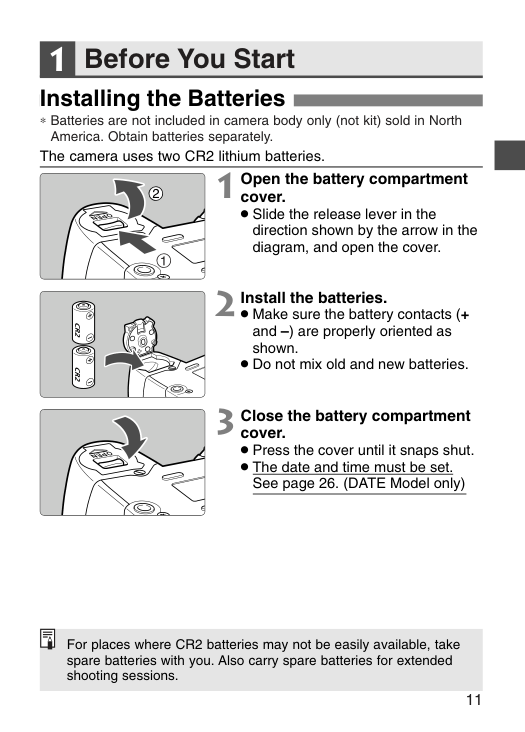
Before You Start 11 Installing the Batteries 1 1 Open the battery compartment cover.
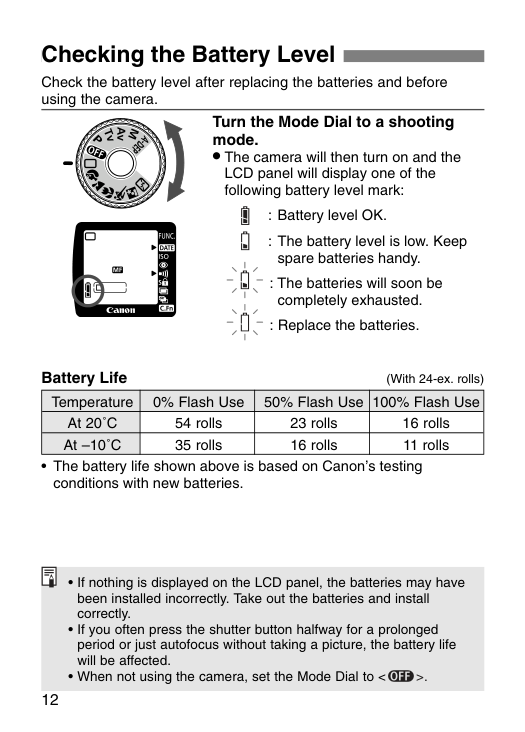
12 Checking the Battery Level Turn the Mode Dial to a shooting mode.
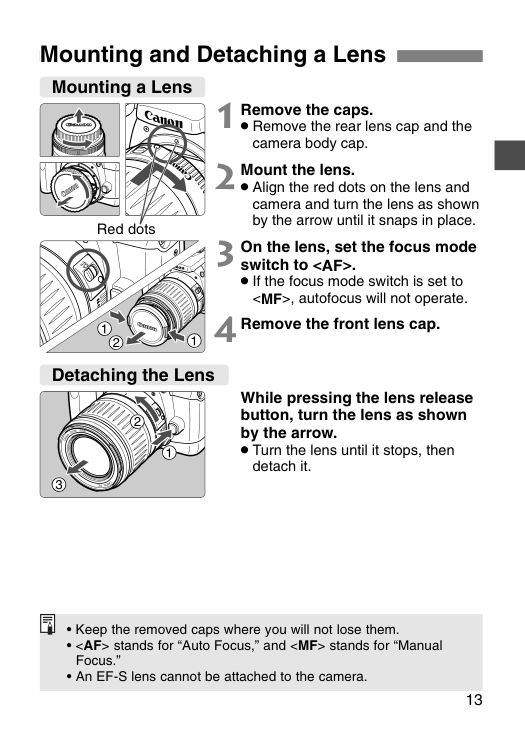
13 Mounting and Detaching a Lens 1 Remove the caps.
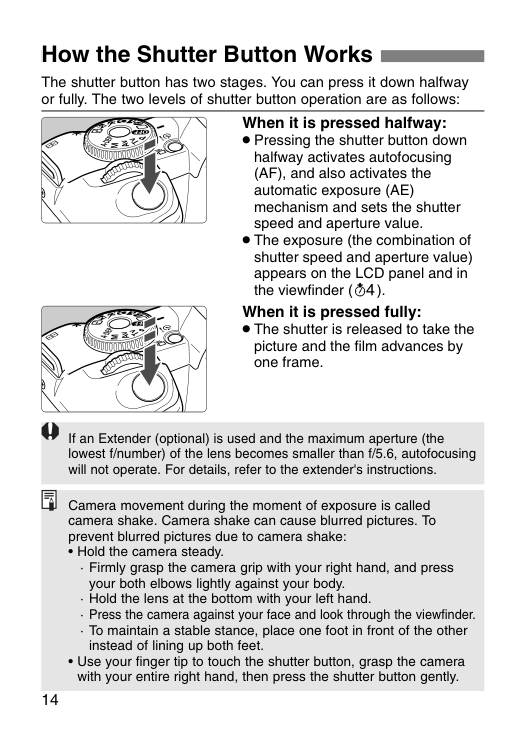
14 How the Shutter Button Works When it is pressed halfway:
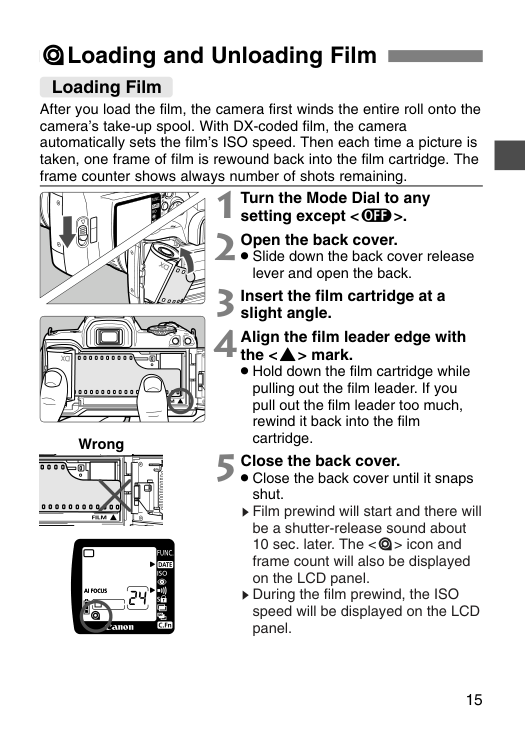
15 =Loading and Unloading Film 2 Open the back cover.
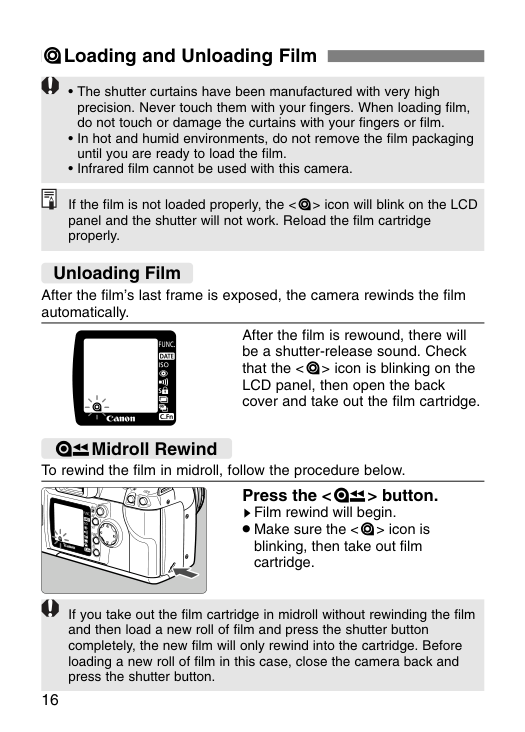
16 =Loading and Unloading Film If the film is not loaded properly, the <=> icon will blink on the LCD panel and the shutter will not work. Reload the film cartridge properly.
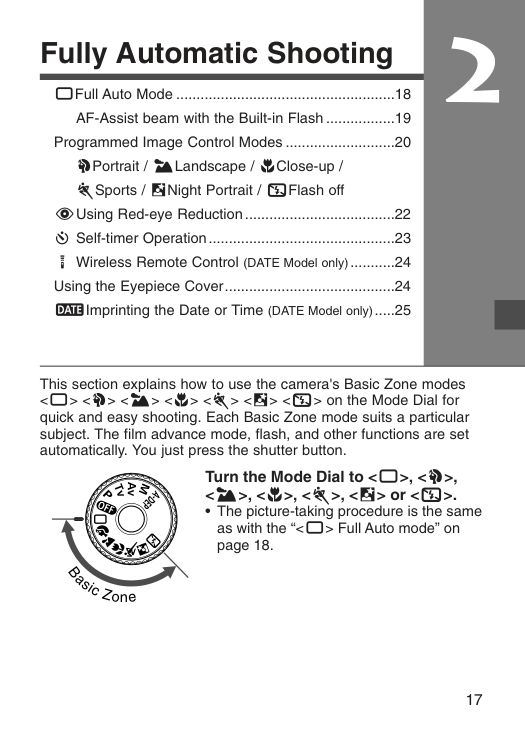
17 2 Fully Automatic Shooting YFull Auto Mode ......................................................18 AF-Assist beam with the Built-in Flash .................19 Programmed Image Control Modes ...........................20 UPortrait / ILandscape / OClose-up / PSports / ANight Portrait / SFlash off FUsing Red-eye Reduction.....................................22 q Self-timer Operation..............................................23 K Wireless Remote Control (DATE Model only)...........24 Using the Eyepiece Cover..........................................24 ;Imprinting the Date or Time (DATE Model only).....25
B
a s i cZ
o n e This section explains how to use the camera's Basic Zone modes , or on the Mode Dial for quick and easy shooting. Each Basic Zone mode suits a particular subject. The film advance mode, flash, and other functions are set automatically. You just press the shutter button. Turn the Mode Dial to .
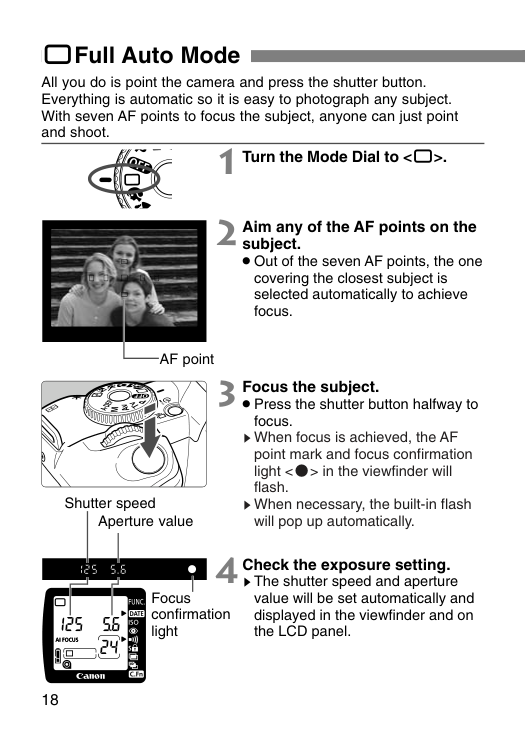
Aperture value Shutter speed 18 YFull Auto Mode All you do is point the camera and press the shutter button. Everything is automatic so it is easy to photograph any subject. With seven AF points to focus the subject, anyone can just point and shoot. 1 Turn the Mode Dial to
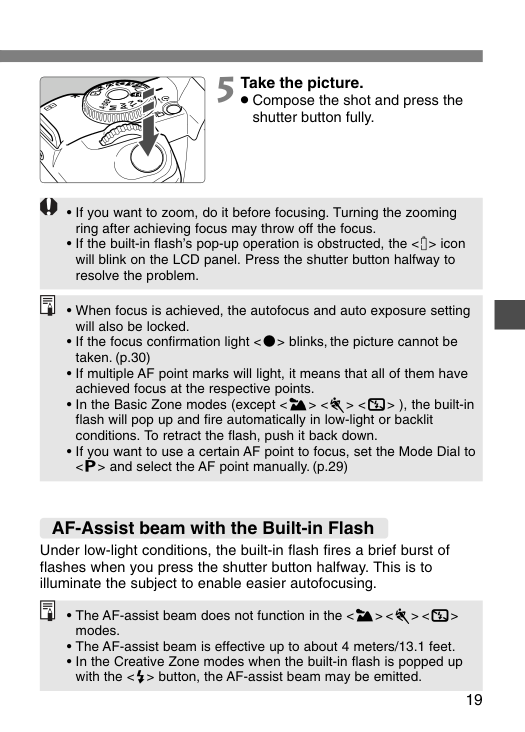
19 5 Take the picture.
), the built-in
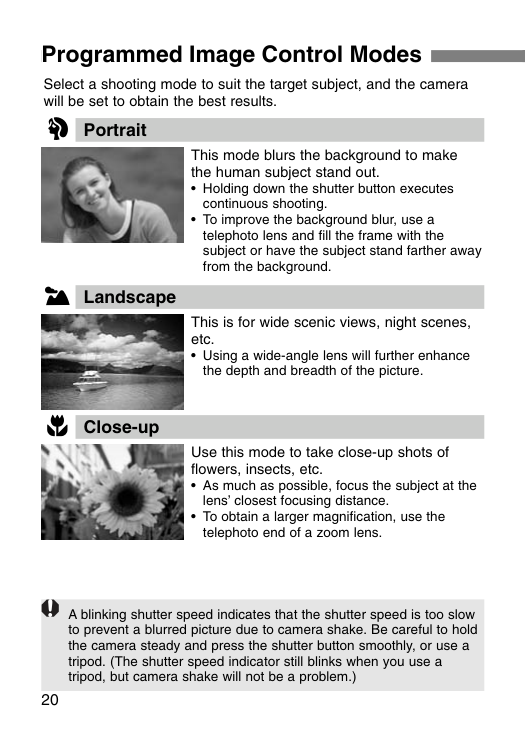
20 Programmed Image Control Modes Select a shooting mode to suit the target subject, and the camera will be set to obtain the best results. Portrait This mode blurs the background to make the human subject stand out.
U
I
O
Landscape Close-up This is for wide scenic views, night scenes, etc.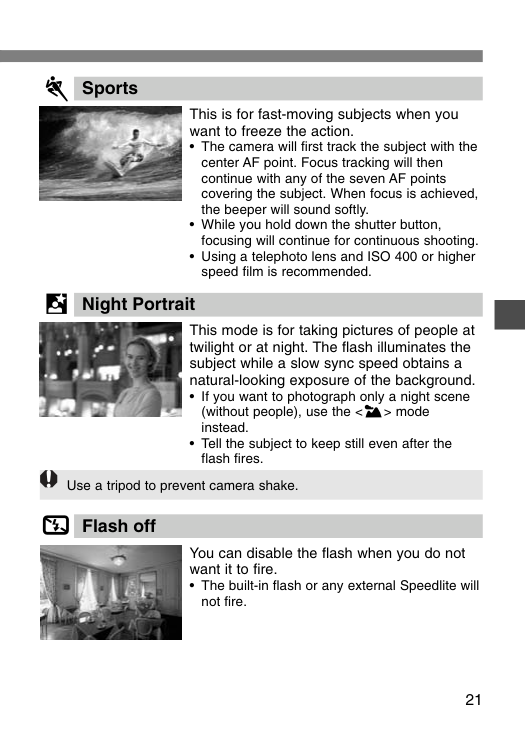
21 This is for fast-moving subjects when you want to freeze the action.
P
This mode is for taking pictures of people at twilight or at night. The flash illuminates the subject while a slow sync speed obtains a natural-looking exposure of the background.A
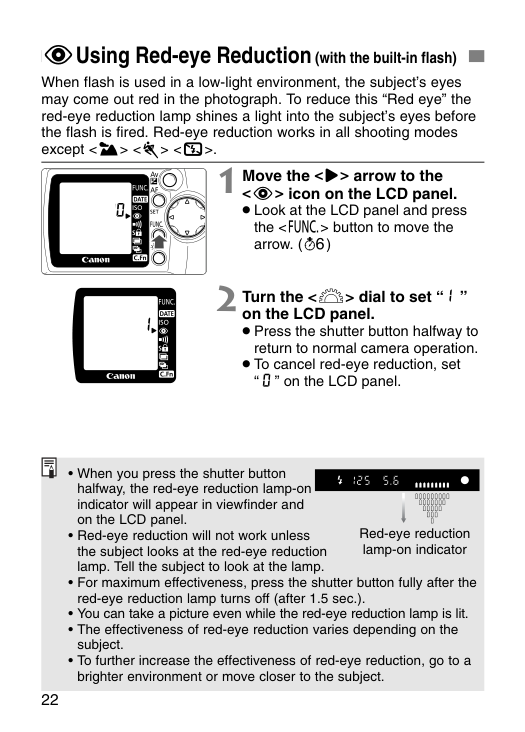
Use a tripod to prevent camera shake. You can disable the flash when you do not want it to fire.S
22 FUsing Red-eye Reduction (with the built-in flash) When flash is used in a low-light environment, the subject’s eyes may come out red in the photograph. To reduce this “Red eye” the red-eye reduction lamp shines a light into the subject’s eyes before the flash is fired. Red-eye reduction works in all shooting modes except
. 1 Move the <>> arrow to the
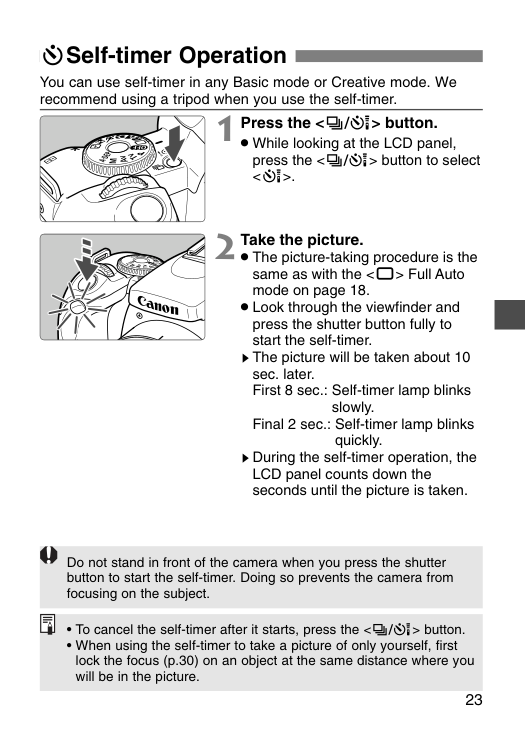
23 qSelf-timer Operation 1 Press the <^> button.
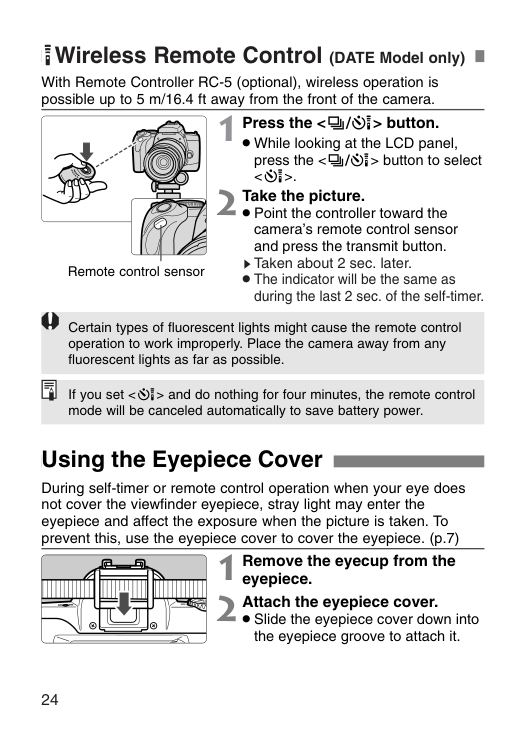
24 KWireless Remote Control (DATE Model only) 1 Press the <^> button.
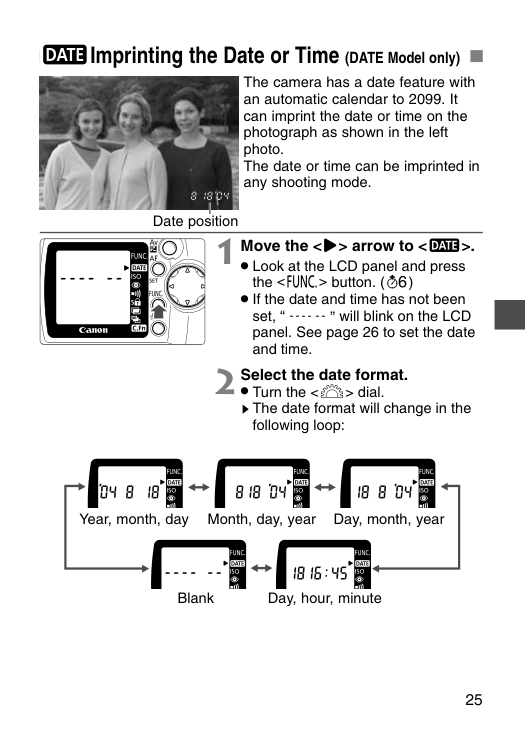
25 ;Imprinting the Date or Time (DATE Model only) 2 Select the date format.
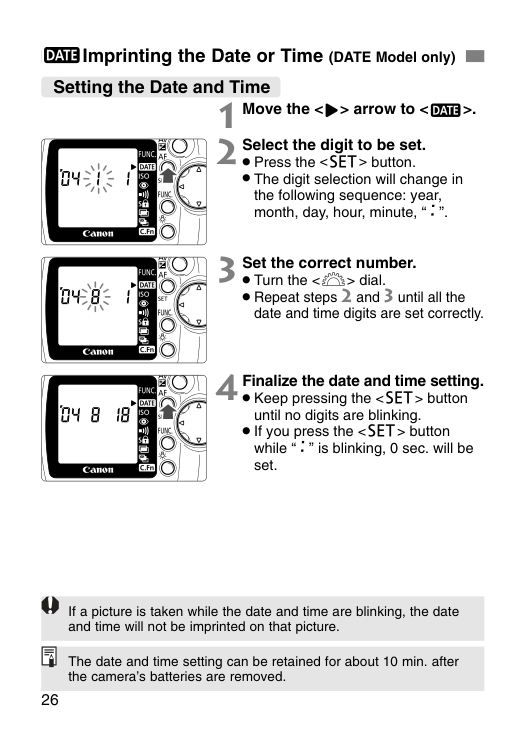
26 ;Imprinting the Date or Time (DATE Model only) Setting the Date and Time 1 Move the <>> arrow to <;>. 2 Select the digit to be set.
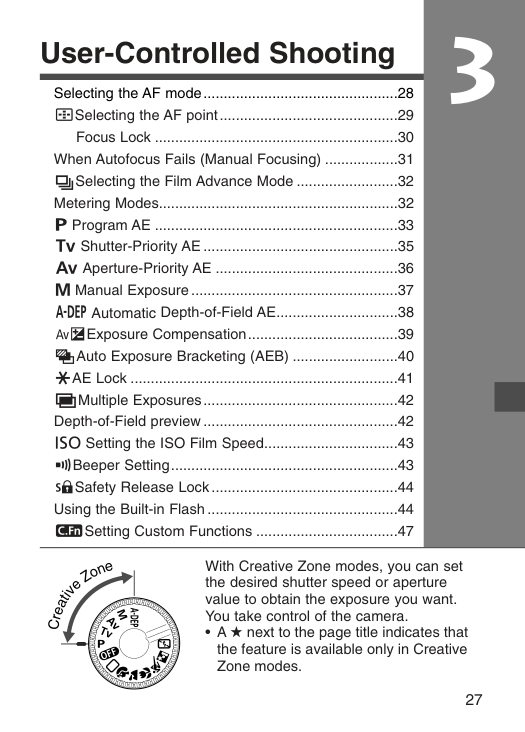
User-Controlled Shooting 27 3 Selecting the AF mode................................................28 3Selecting the AF point............................................29 Focus Lock ............................................................30 When Autofocus Fails (Manual Focusing) ..................31 HSelecting the Film Advance Mode .........................32 Metering Modes...........................................................32 T Program AE ............................................................33 R Shutter-Priority AE ................................................35 E Aperture-Priority AE .............................................36 W Manual Exposure ...................................................37 Q Automatic Depth-of-Field AE..............................38 ∑Exposure Compensation.....................................39 LAuto Exposure Bracketing (AEB) ..........................40 jAE Lock ..................................................................41 Z
o n e With Creative Zone modes, you can set the desired shutter speed or aperture value to obtain the exposure you want. You take control of the camera.
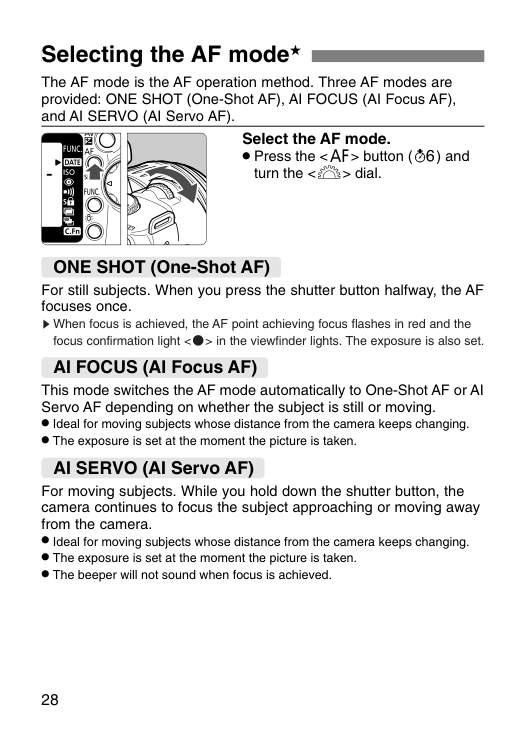
28 Selecting the AF mode★ The AF mode is the AF operation method. Three AF modes are provided: ONE SHOT (One-Shot AF), AI FOCUS (AI Focus AF), and AI SERVO (AI Servo AF). Select the AF mode.
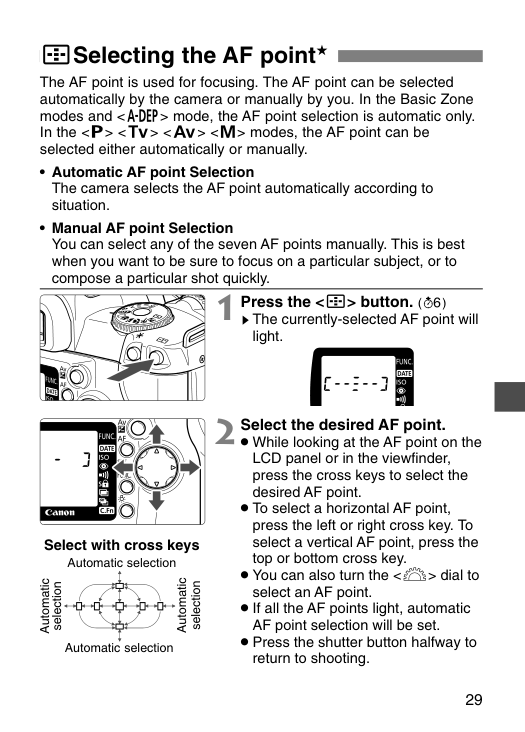
29 The AF point is used for focusing. The AF point can be selected automatically by the camera or manually by you. In the Basic Zone modes and mode, the AF point selection is automatic only. In the
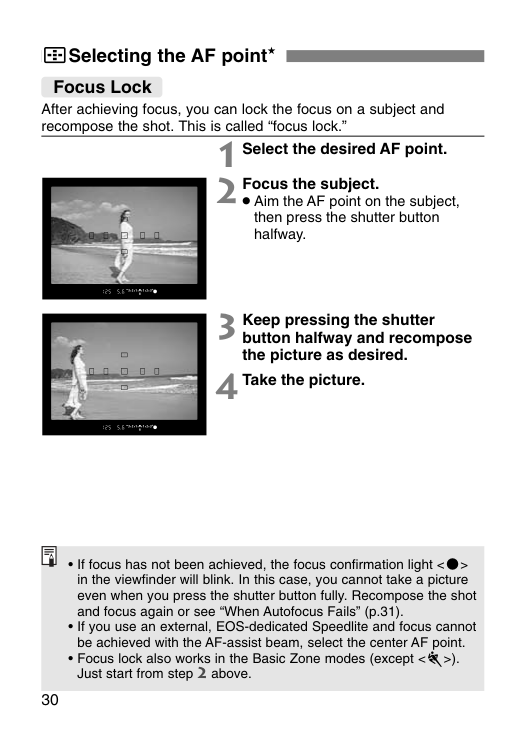
30 3Selecting the AF point★ Focus Lock After achieving focus, you can lock the focus on a subject and recompose the shot. This is called “focus lock.” 1 Select the desired AF point. 2 Focus the subject.
).
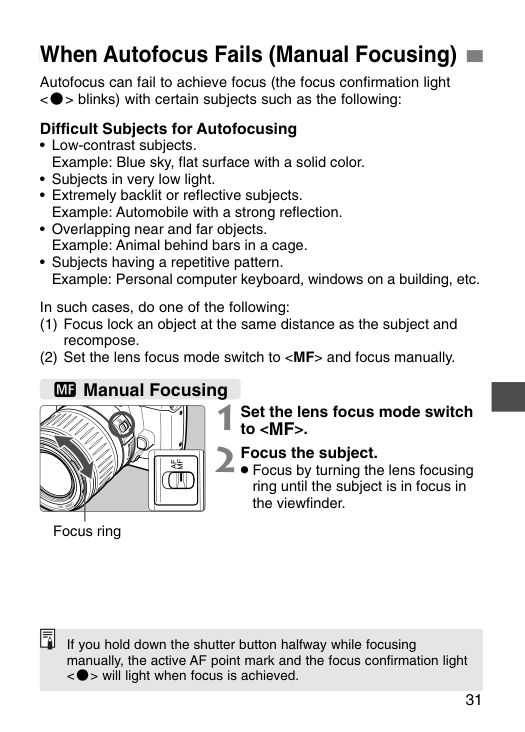
31 When Autofocus Fails (Manual Focusing) Autofocus can fail to achieve focus (the focus confirmation light
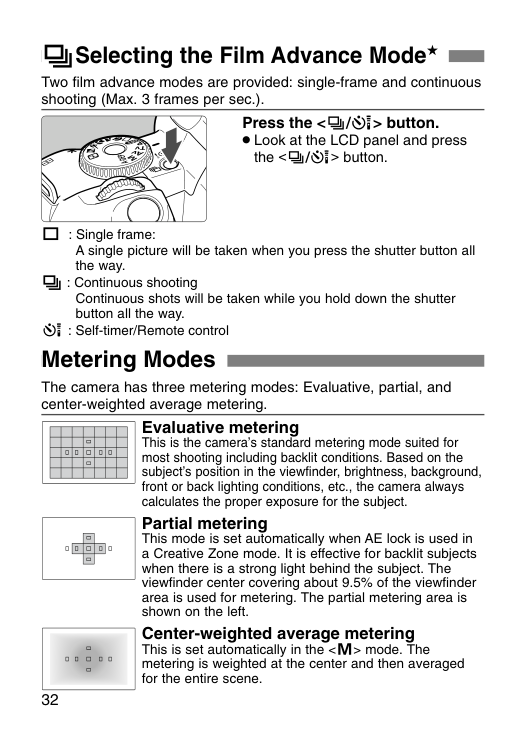
The camera has three metering modes: Evaluative, partial, and center-weighted average metering. Evaluative metering This is the camera’s standard metering mode suited for most shooting including backlit conditions. Based on the subject’s position in the viewfinder, brightness, background, front or back lighting conditions, etc., the camera always calculates the proper exposure for the subject. Partial metering This mode is set automatically when AE lock is used in a Creative Zone mode. It is effective for backlit subjects when there is a strong light behind the subject. The viewfinder center covering about 9.5% of the viewfinder area is used for metering. The partial metering area is shown on the left. Center-weighted average metering This is set automatically in the
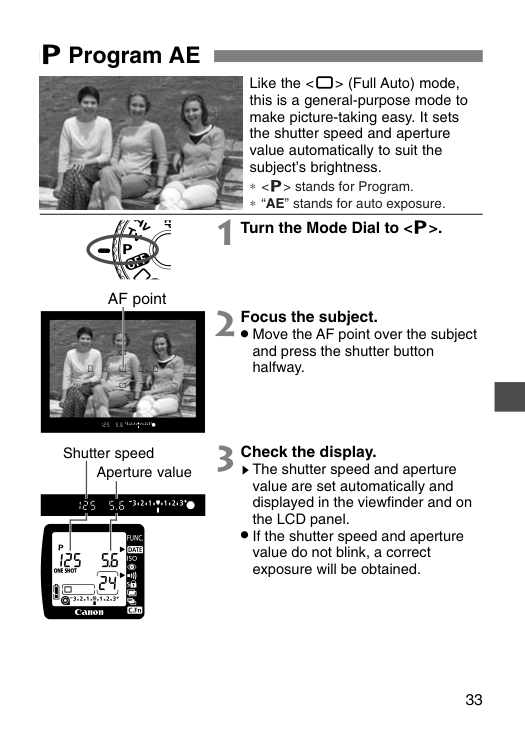
33 Like the
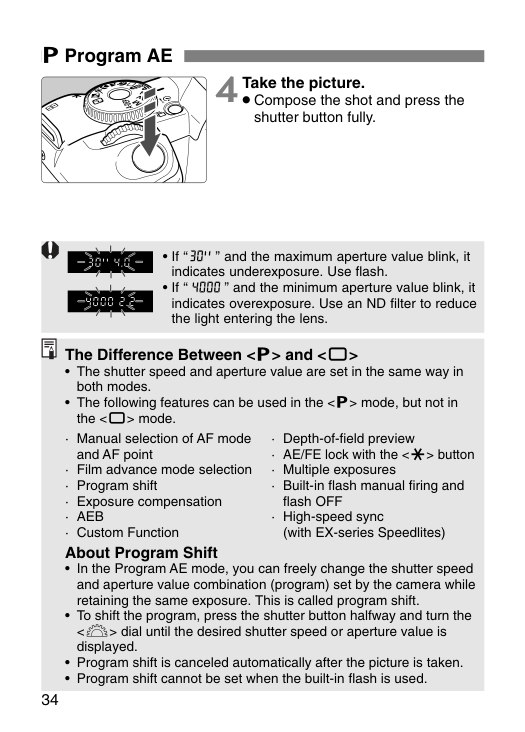
34 T Program AE 4 Take the picture.
· Aeb
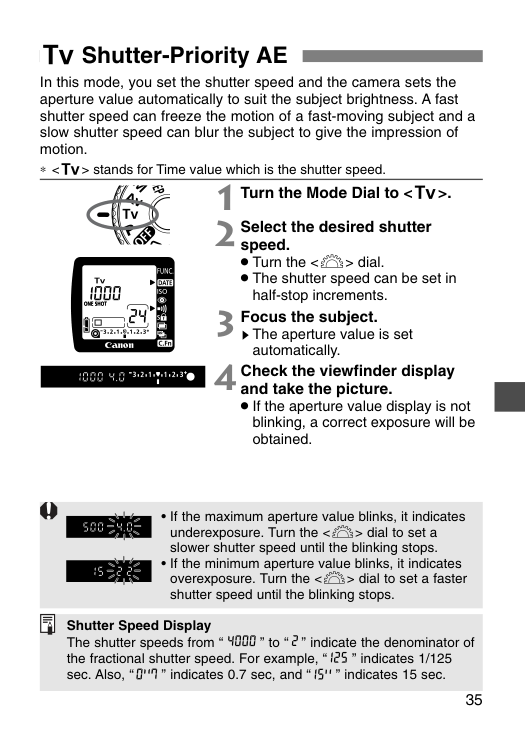
35 In this mode, you set the shutter speed and the camera sets the aperture value automatically to suit the subject brightness. A fast shutter speed can freeze the motion of a fast-moving subject and a slow shutter speed can blur the subject to give the impression of motion. ∗
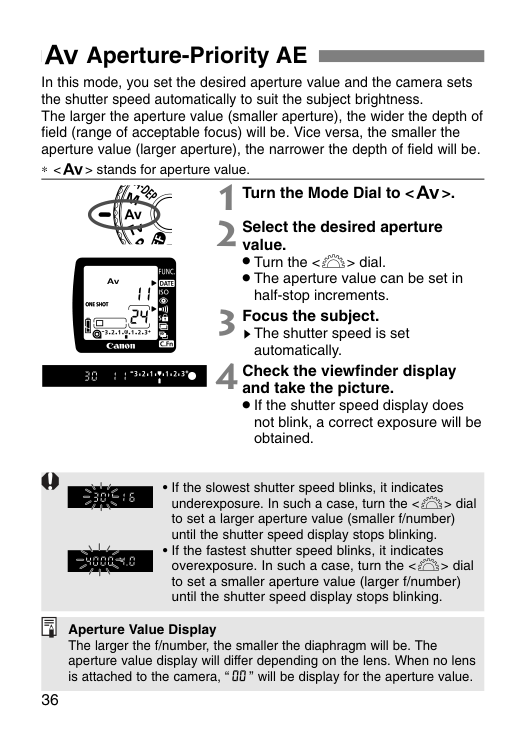
E Aperture-Priority AE 36 In this mode, you set the desired aperture value and the camera sets the shutter speed automatically to suit the subject brightness. The larger the aperture value (smaller aperture), the wider the depth of field (range of acceptable focus) will be. Vice versa, the smaller the aperture value (larger aperture), the narrower the depth of field will be. ∗
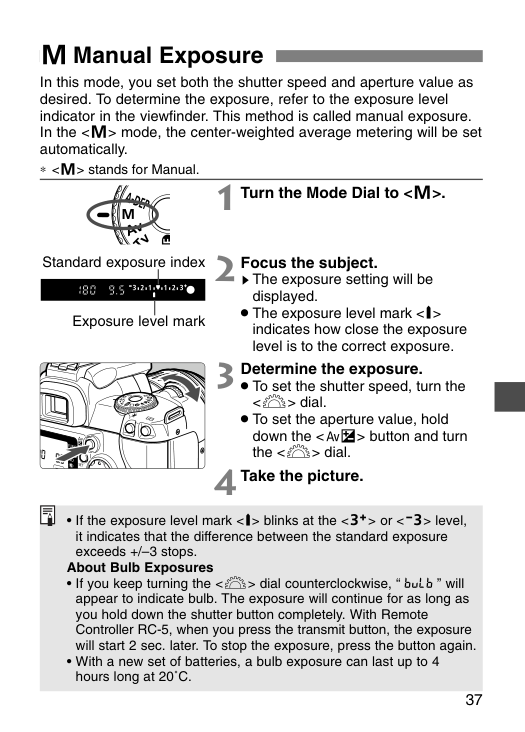
37 W Manual Exposure In this mode, you set both the shutter speed and aperture value as desired. To determine the exposure, refer to the exposure level indicator in the viewfinder. This method is called manual exposure. In the
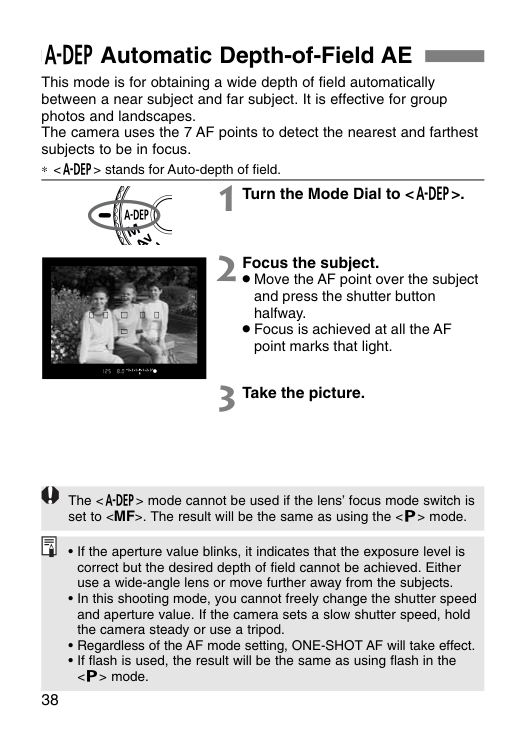
38 Q Automatic Depth-of-Field AE This mode is for obtaining a wide depth of field automatically between a near subject and far subject. It is effective for group photos and landscapes. The camera uses the 7 AF points to detect the nearest and farthest subjects to be in focus. ∗ stands for Auto-depth of field. 1 Turn the Mode Dial to
. 2 Focus the subject.
mode cannot be used if the lens’ focus mode switch is set to
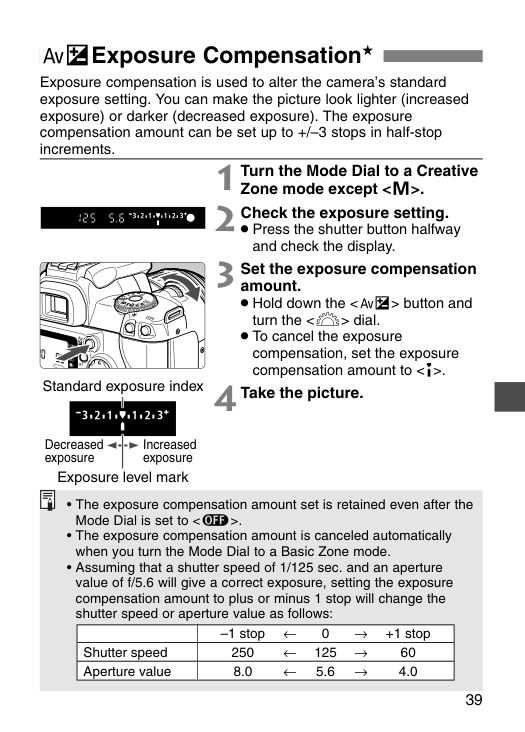
39 ∑Exposure Compensation★ Exposure compensation is used to alter the camera’s standard exposure setting. You can make the picture look lighter (increased exposure) or darker (decreased exposure). The exposure compensation amount can be set up to +/–3 stops in half-stop increments. 1 Turn the Mode Dial to a Creative Zone mode except
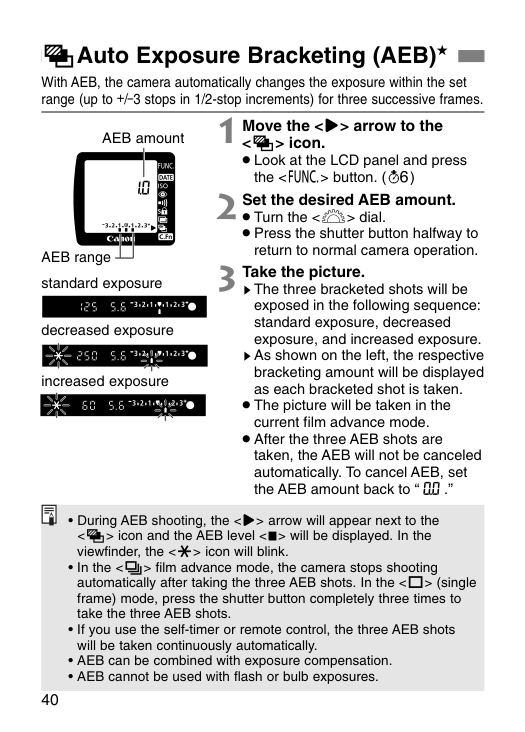
40 LAuto Exposure Bracketing (AEB)★ With AEB, the camera automatically changes the exposure within the set range (up to +/–3 stops in 1/2-stop increments) for three successive frames. 1 Move the <>> arrow to the
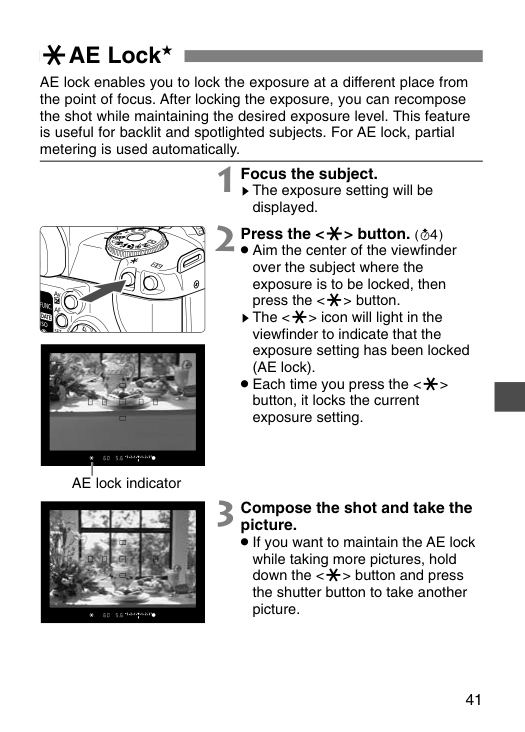
41 jAE Lock★ AE lock enables you to lock the exposure at a different place from the point of focus. After locking the exposure, you can recompose the shot while maintaining the desired exposure level. This feature is useful for backlit and spotlighted subjects. For AE lock, partial metering is used automatically. 1 Focus the subject. sThe exposure setting will be displayed. 3 Compose the shot and take the picture.
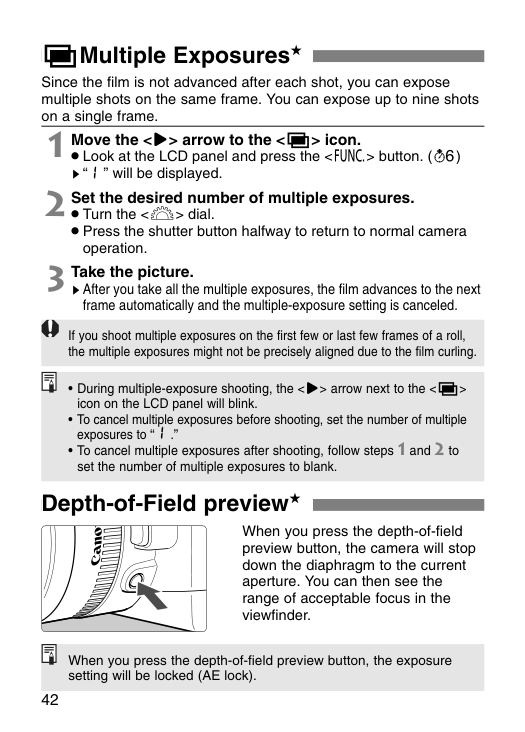
42
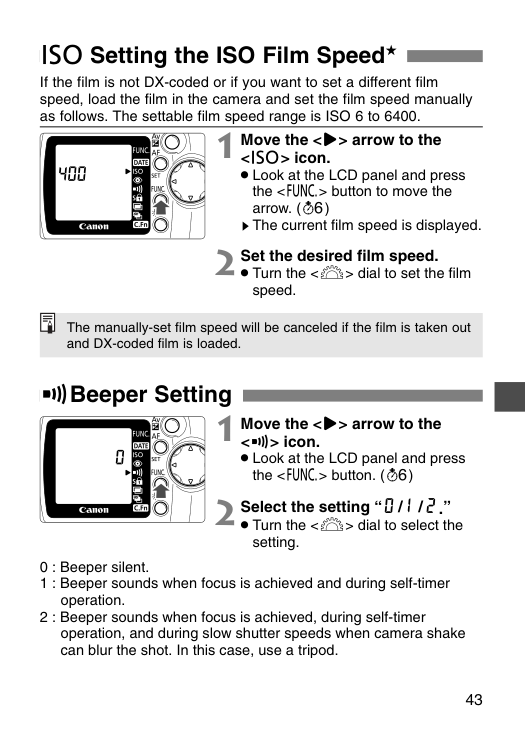
43 D Setting the ISO Film Speed★ If the film is not DX-coded or if you want to set a different film speed, load the film in the camera and set the film speed manually as follows. The settable film speed range is ISO 6 to 6400. 1 Move the <>> arrow to the
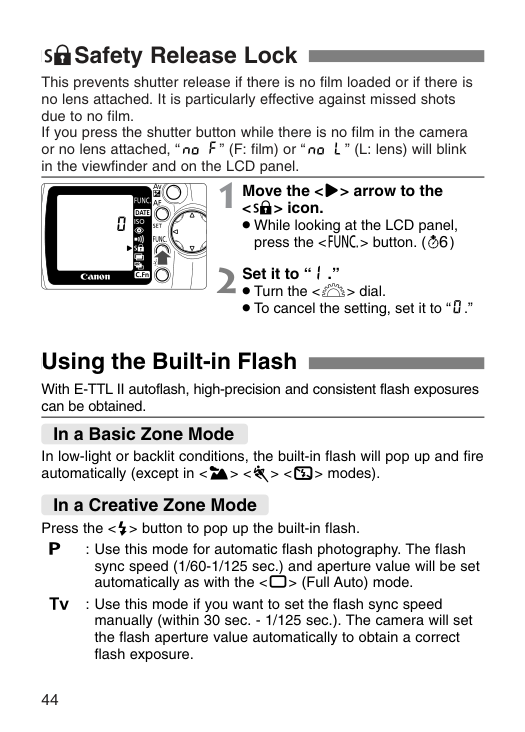
44 7Safety Release Lock This prevents shutter release if there is no film loaded or if there is no lens attached. It is particularly effective against missed shots due to no film. If you press the shutter button while there is no film in the camera or no lens attached, “ ” (F: film) or “ ” (L: lens) will blink in the viewfinder and on the LCD panel. Using the Built-in Flash In low-light or backlit conditions, the built-in flash will pop up and fire automatically (except in
modes). Press the T
: Use this mode for automatic flash photography. The flash sync speed (1/60-1/125 sec.) and aperture value will be set automatically as with the R
: Use this mode if you want to set the flash sync speed manually (within 30 sec. - 1/125 sec.). The camera will set the flash aperture value automatically to obtain a correct flash exposure. In a Basic Zone Mode In a Creative Zone Mode 1 Move the <>> arrow to the <7> icon.
45 Using the Built-in Flash
E
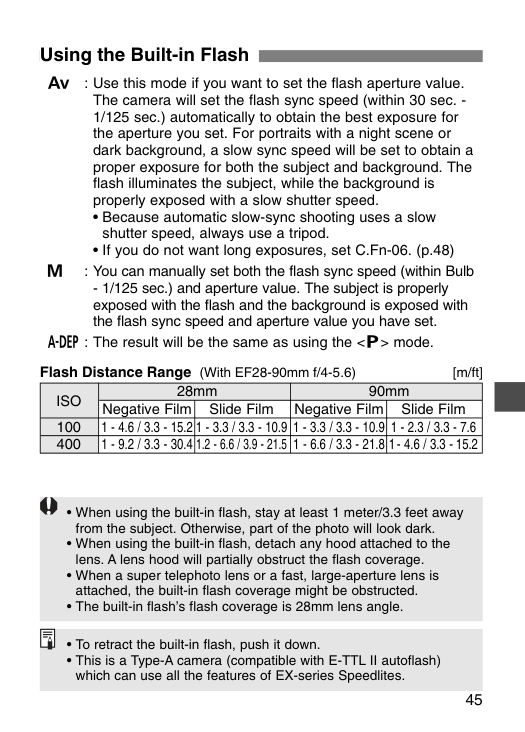
: Use this mode if you want to set the flash aperture value. The camera will set the flash sync speed (within 30 sec. - 1/125 sec.) automatically to obtain the best exposure for the aperture you set. For portraits with a night scene or dark background, a slow sync speed will be set to obtain a proper exposure for both the subject and background. The flash illuminates the subject, while the background is properly exposed with a slow shutter speed.W
: You can manually set both the flash sync speed (within BulbIso
28mm 90mm Negative Film Slide Film Negative Film Slide Film 100 1 - 4.6 / 3.3 - 15.2 1 - 3.3 / 3.3 - 10.9 1 - 3.3 / 3.3 - 10.9 1 - 2.3 / 3.3 - 7.6 400 1 - 9.2 / 3.3 - 30.4 1.2 - 6.6 / 3.9 - 21.5 1 - 6.6 / 3.3 - 21.8 1- 4.6 / 3.3 - 15.2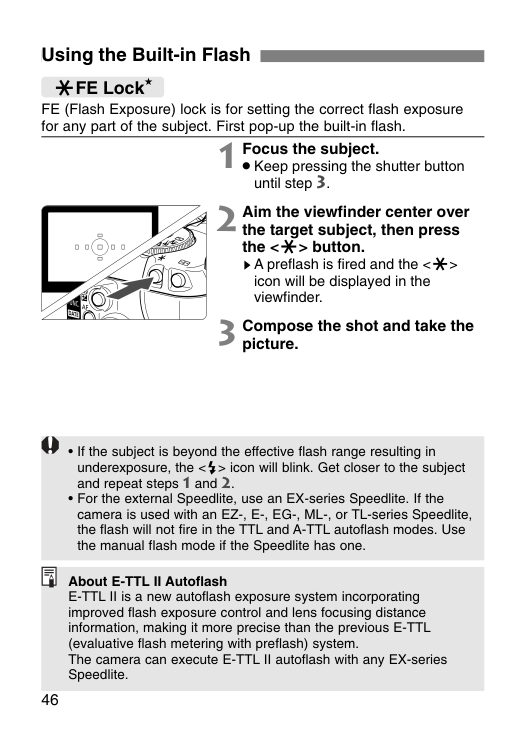
46 Using the Built-in Flash FE (Flash Exposure) lock is for setting the correct flash exposure for any part of the subject. First pop-up the built-in flash. jFE Lock ★ 1 Focus the subject.
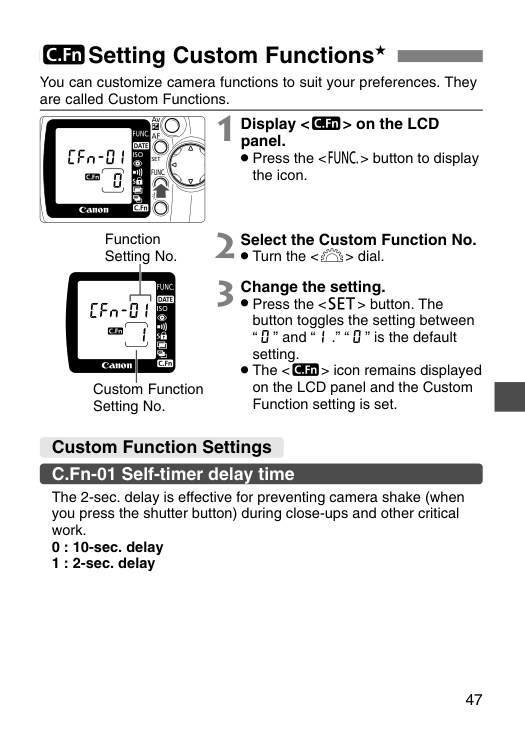
47 5Setting Custom Functions★ Custom Function Settings C.Fn-01 Self-timer delay time You can customize camera functions to suit your preferences. They are called Custom Functions. The 2-sec. delay is effective for preventing camera shake (when you press the shutter button) during close-ups and other critical work. 0 : 10-sec. delay 1 : 2-sec. delay 1 Display <5> on the LCD panel.
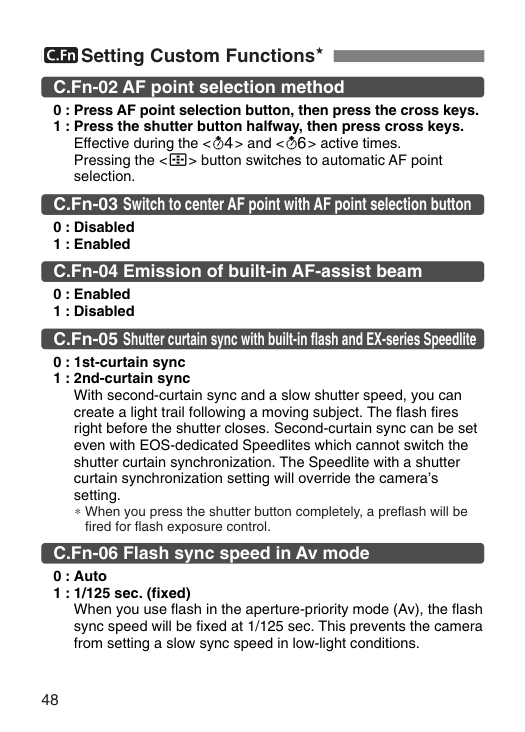
48 5Setting Custom Functions★ C.Fn-02 AF point selection method 0 : Press AF point selection button, then press the cross keys. 1 : Press the shutter button halfway, then press cross keys. Effective during the <˜> and <∫> active times. Pressing the <3> button switches to automatic AF point selection. C.Fn-05 Shutter curtain sync with built-in flash and EX-series Speedlite 0 : 1st-curtain sync 1 : 2nd-curtain sync With second-curtain sync and a slow shutter speed, you can create a light trail following a moving subject. The flash fires right before the shutter closes. Second-curtain sync can be set even with EOS-dedicated Speedlites which cannot switch the shutter curtain synchronization. The Speedlite with a shutter curtain synchronization setting will override the camera’s setting. ∗When you press the shutter button completely, a preflash will be fired for flash exposure control. C.Fn-06 Flash sync speed in Av mode 0 : Auto 1 : 1/125 sec. (fixed) When you use flash in the aperture-priority mode (Av), the flash sync speed will be fixed at 1/125 sec. This prevents the camera from setting a slow sync speed in low-light conditions. C.Fn-03 Switch to center AF point with AF point selection button 0 : Disabled 1 : Enabled C.Fn-04 Emission of built-in AF-assist beam 0 : Enabled 1 : Disabled
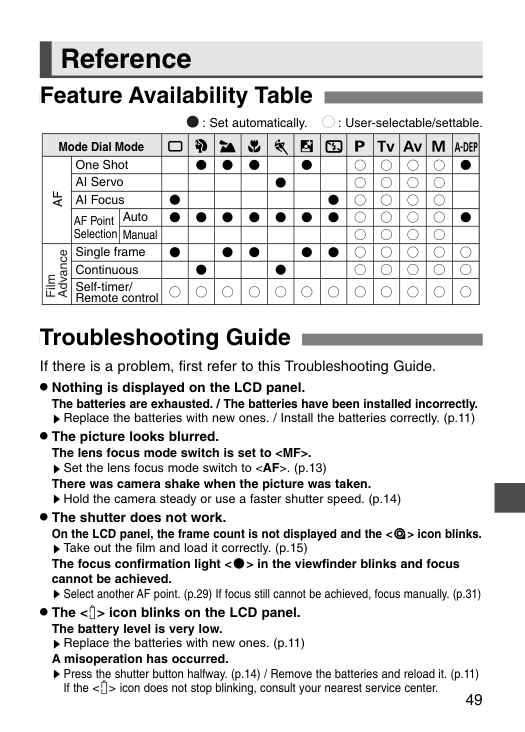
49 Reference Feature Availability Table
Y U I O P A S T R E W Q
Mode Dial Mode One Shot AI Servo AI Focus Auto Manual Single frame Continuous Self-timer/ Remote controlAf
Film Advance AF Point Selection : Set automatically. : User-selectable/settable. Troubleshooting Guide If there is a problem, first refer to this Troubleshooting Guide.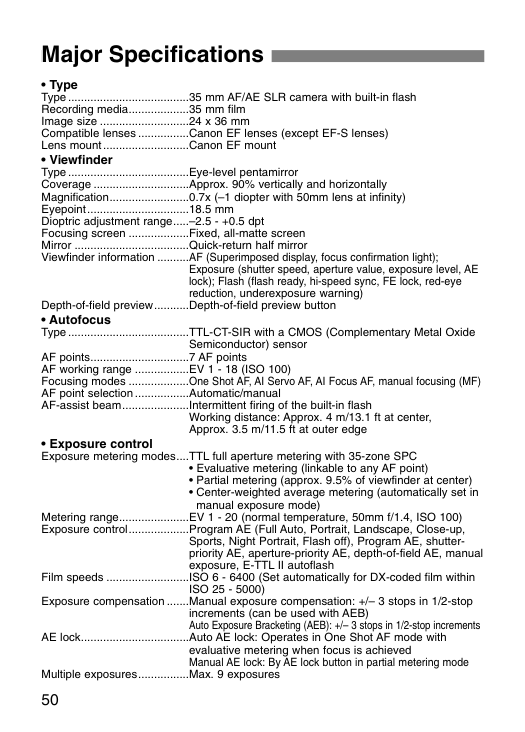
50 Major Specifications
Iso 25 - 5000)
Exposure compensation .......Manual exposure compensation: +/– 3 stops in 1/2-stop increments (can be used with AEB) Auto Exposure Bracketing (AEB): +/– 3 stops in 1/2-stop increments AE lock..................................Auto AE lock: Operates in One Shot AF mode with evaluative metering when focus is achieved Manual AE lock: By AE lock button in partial metering mode Multiple exposures................Max. 9 exposures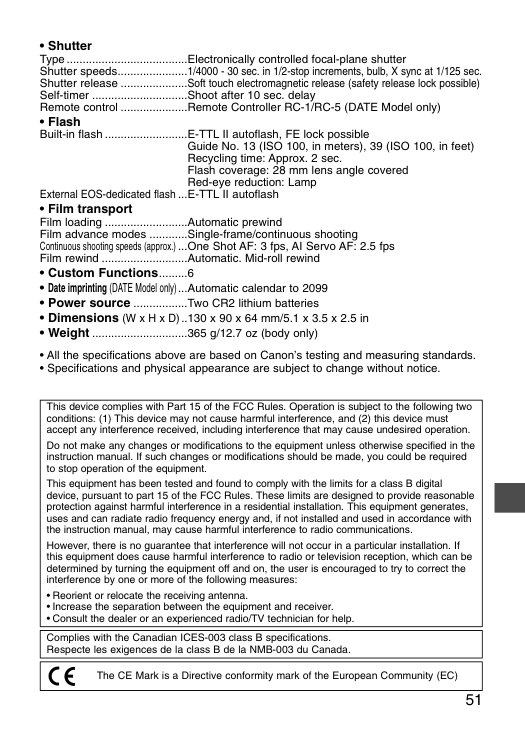
51